
by Dan Toomey | Jul 6, 2017 | BizTalk Community Blogs via Syndication
Last week I had the privilege not only of attending the INTEGRATE 2017 conference in London, but presenting as well. A huge thanks to Saravana Kumar and BizTalk360 for inviting me as a speaker – what a tremendous honour and thrill to stand in front of nearly 400 integration enthusiasts from around the world and talk about Hybrid Connectivity! Also, a big thanks to Mexia for generously funding my trip.
With 380+ attendees from 52 countries around the globe, this is by far the biggest Microsoft integration event of the year. Of those 380, only four of us that I know of came from APAC: fellow MVP speakers Martin Abbott from Perth and Wagner Silveira from Auckland NZ, as well as Cameron Shackell from Brisbane who manned his ActiveADAPTER sponsor stand. Wagner would have to take the prize for the furthest travelled with his 30+ hour journey!
I’ve already published one blog post summarising my take on the messages delivered by Microsoft (which accounted for half of the sessions at the event). This will soon be followed by a similar post with highlights of the MVP community presentations, which in addition to BizTalk Server, Logic Apps, and other traditional integration topics also spanned into the new areas of Bots, IoT and PowerApps.
 Aside from the main event, Saravana and his team also arranged for a few social events as well, including networking drinks after the first day, a dinner at Nando’s for the speakers, and another social evening for the BizTalk360 partners. They also presented each of the BizTalk360 product specialists with a beautiful award – an unexpected treat!
You have to hand it to Saravana and his team – everything went like clockwork, even keeping the speakers on schedule. And I thought it was a really nice touch that each speaker was introduced by a BizTalk360 team member. Not only did it make the speakers feel special, but it provided an opportunity to highlight the people behind the scenes who not only work to make BizTalk360 a great product but also ensure events like these come off. I hope all of them had a good rest this week!
As with all of these events, one of the things I treasure the most is the opportunity to catch up with my friends from around the globe who share my passion for integration, as well as meeting new friends. In my talk, I commented about how strong our community is, and that we not only integrate as professionals but integrate well as people too.


Arriving a day and a half before the three day event, I had hoped to conquer most of the jet-lag early on. But alas, the proximity to the solstice in a country so far North meant the sun didn’t set until past 10:30pm while rising just before 4:30am – which is the time I would involuntarily wake up each day no matter how late I stayed up the night before! Still, adrenalin kept me going and the engaging content kept me awake for every session.
And no matter what.., there was always time for a beer or two! 

I look forward to the next time I get to meet up with my integration friends! If you missed the event in London, you’ll have a second chance at INTEGRATE 2017 USA which will be held in Redmond on October 25-27. And of course, if you keep your eyes on the website, the videos and slides should be published soon.
(Photos by Nick Hauenstein, Dan Toomey, Mikael Sand, and Tom Canter)

by Vignesh Sukumar | Jul 4, 2017 | BizTalk Community Blogs via Syndication
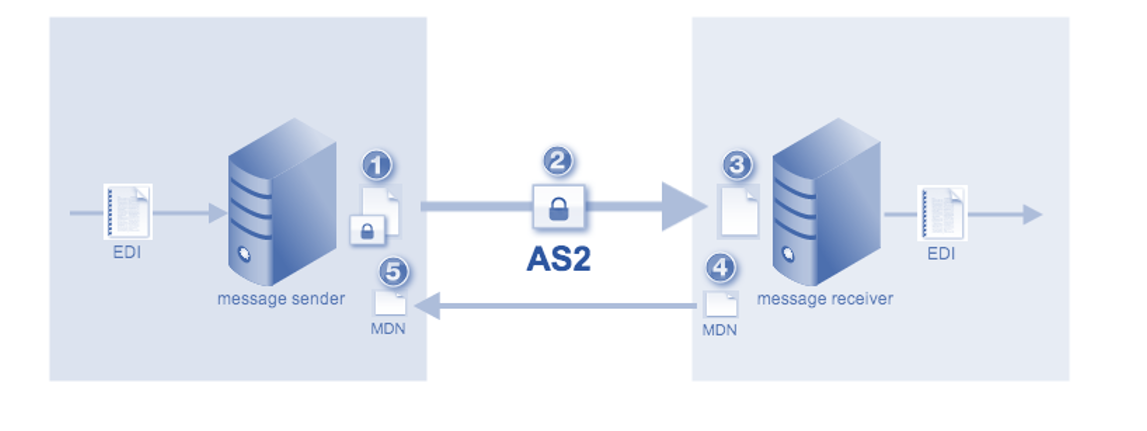
Electronic Data Interchange, provides a common-Industrial standard to communicate between different enterprises with a predefined format to reduce the manual efforts between trading partners. AS2(ApplicationStatement2) standard is a specification used in the EDI messages to transport messages securely over the wire with certificate/encryption algorithms.
MDN, Message Disposition Notification is a Technical Acknowledgement, which indicates whether the AS2 messages was successfully received by the recipient. With millions of EDI transactions happens each day, it is always important to track and report the success/failures on the consolidated interface. Even though BizTalk Admin console provides a message level AS2-MDN status on the EDI reporting, BizTalk360 takes this to the next level of consolidating the MDN status or other EDI status on a chart view for business understanding.
EDI Reports in BizTalk- Prerequisites
To Enable EDI reports in BizTalk, the prerequisite is to enable BAM. As the EDI reports utilize the BAM infrastructure, the EDI tracking data is being organized within the BAMPrimaryImport tables. Make sure to enable the BAM and EDI Reporting in the BizTalk Admin configuration pane to kick start with EDI Reporting!
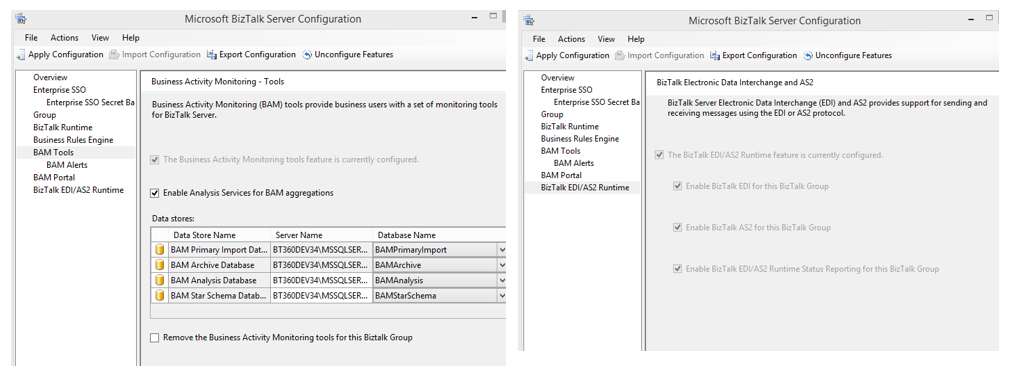
EDI Reporting in BizTalk Admin console
BizTalk Admin console displays the AS2-MDN status on a group level and the status is displayed on a per-message basis. Various filters are being available to segregate the party/status based messages.
Below is the list of tables responsible for determining the AS2-MDN status/ AS2 interchange status.

List of MDN Status
Below is the list of MDN status tracked in BizTalk Admin console
1: Acknowledged – Processed
2: Acknowledged – Rejected
3: Processed – MDN Pending
4: Processed – MDN not Expected
5: Processed – Not Acknowledged – Resend attempts exceeded
6: ‘Processed – Not Acknowledged – Resend duration exceeded
EDI Reporting in BizTalk360
EDI Reporting in BizTalk360 provides rich-dashboard widgets to get known on the consolidated EDI details from Interchange level to MDN status level.
Navigation: Operations>>Electronic Data Interchange>>EDI Dashboard>>Add Widget
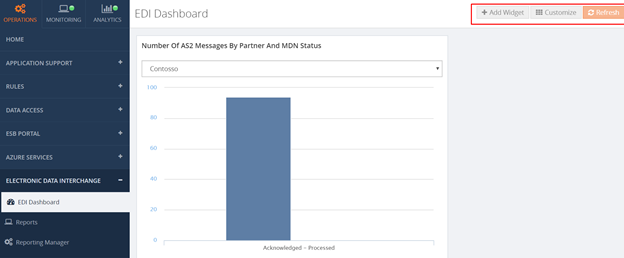
Below are the widgets available in BizTalk360 for EDI Reporting, customize it according to the Dashboard requirement.
AS2MDN-status based widgets
As this blog covers more on the side of MDN status, there are two different AS2-MDN status widgets are available in the EDI dashboard of BizTalk360. MDN Status in BizTalk is determined by various parameters like
- MdnDisposition Type
- DispositionModifier ExtType
- DispositionModifier ExtDescription
- MDN Status number
The permutation/combination of all the above four parameters varies the MDN enumerated value at BizTalk Admin console

- Number of AS2 messages by partner and MDN status
This widget reports the MDN status value filtered based on partners.
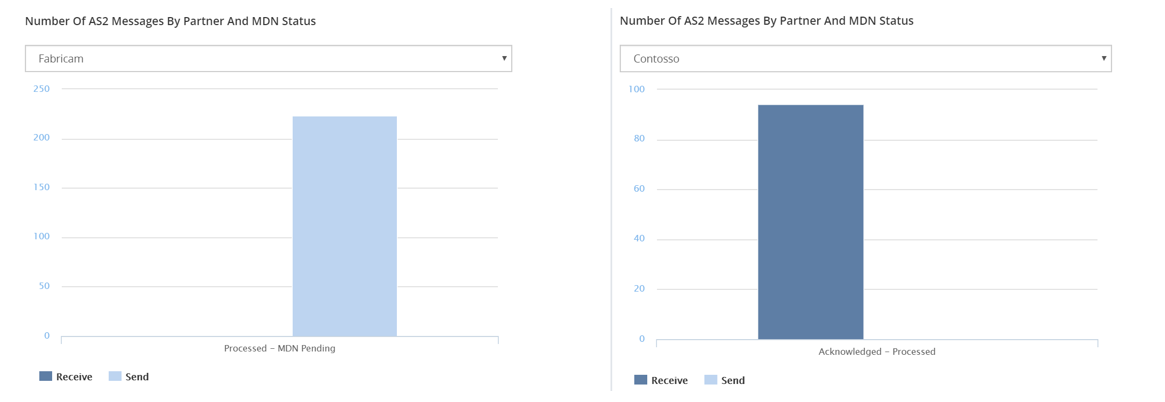
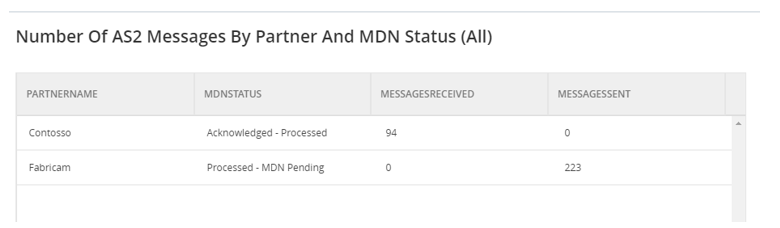
2. Number of AS2 messages by partner and MDN status(All)
This widget represents the aggregated count of received or send messages per partner and MDN status.
3. Number of AS2 messages by MDN status
This widget represents the Number of AS2 partners by MDN status in a chart for all the partners in one chart view also indicates the segregation of receive/send.
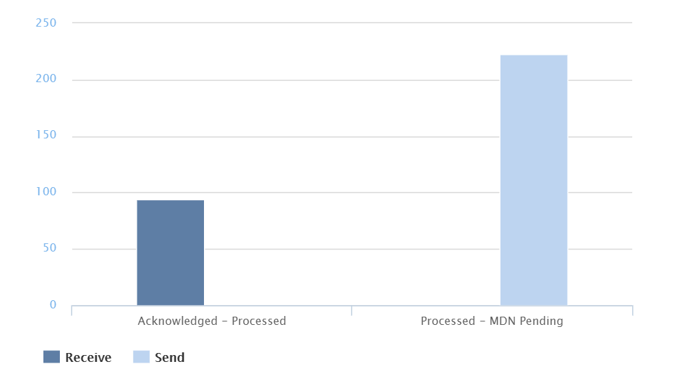
As this gives the comprehensive report on all the AS2/EDI events, BizTalk360 also provides options to set the date range from which the results should be displayed. This date range segregated as
Last24hrs, Last7Days, and Last30Days.

This widget can also be added in the Home screen of BizTalk360

Custom Widget
BizTalk360 also provides the facility to create a Custom widget, which can be tailor made to your requirement. As the BAM tables are been responsible for EDI reporting, utilize this data source to create your own Widget. Follow this link for step by step guide to create a custom widget.
Summary
As there were around 12 EDI widgets, based on the Business/Transaction requirements you can easily customize and have an eagle’s view of all the EDI transactions with no recurrence of manual work. Explore more of our inbuilt widgets and enjoy EDI reporting with just a click away from BizTalk360!
Author: Vignesh Sukumar
Vignesh, A Senior BizTalk Developer @BizTalk360 has crossed half a decade of BizTalk Experience. He is passionate about evolving Integration Technologies. Vignesh has worked for several BizTalk Projects on various Integration Patterns and has an expertise on BAM. His Hobbies includes Training, Mentoring and Travelling View all posts by Vignesh Sukumar
by Praveena Jayanarayanan | Jul 4, 2017 | BizTalk Community Blogs via Syndication
BizTalk360 is a single platform to have total control over your BizTalk environment. It has the three main modules namely Operations, Monitoring and Analytics. Monitoring is considered as the main feature of BizTalk360 because it provides rock solid monitoring for the BizTalk environment and informs us via email alerts when the BizTalk server is suffering from problems and downtimes.
As per the below quotes,
“Listening to our customer’s feedback makes them feel appreciated and part of the value creation process”,
We always listen to their valuable suggestions and feedback and add them to BizTalk360 in every upcoming release. We also make enhancements to the existing features based on the customer feedback. This blog explains about one such enhancement on actions performed on the suspended instances.
MessageBox Queries Monitoring:
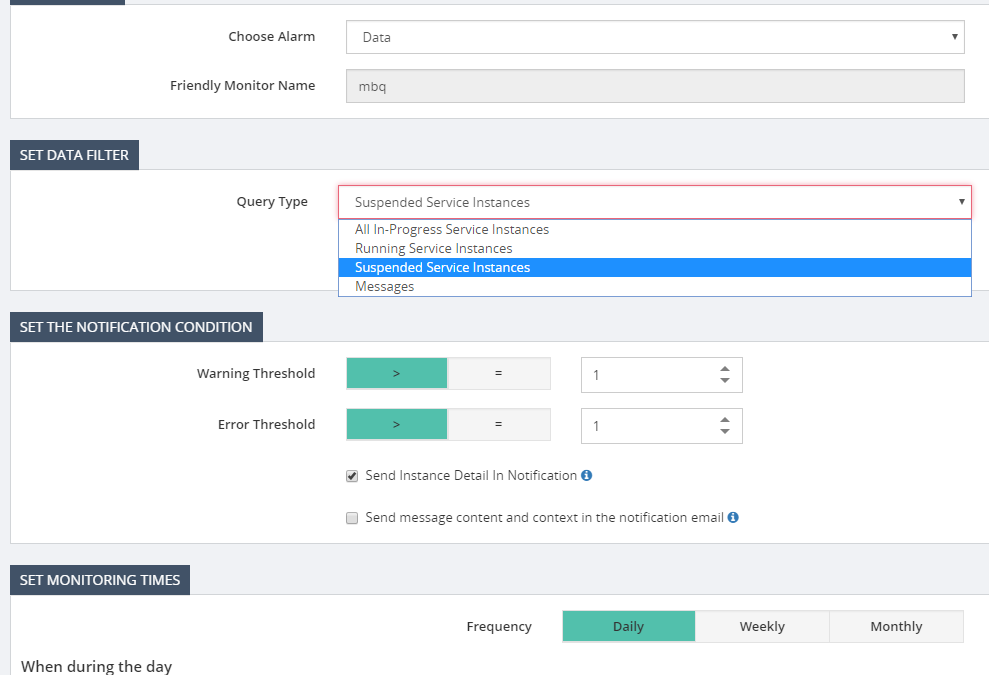
Data Monitoring was one such feature included in BizTalk360, from the customers’ feedback. Data monitoring helps to monitor the send/receive ports, service instances and exception data from different data sources in BizTalk server. Message Box Queries monitoring is a part of Data Monitoring which is used to monitor the service instances. The service instances may be running or may get suspended in BizTalk servers due to various reasons.
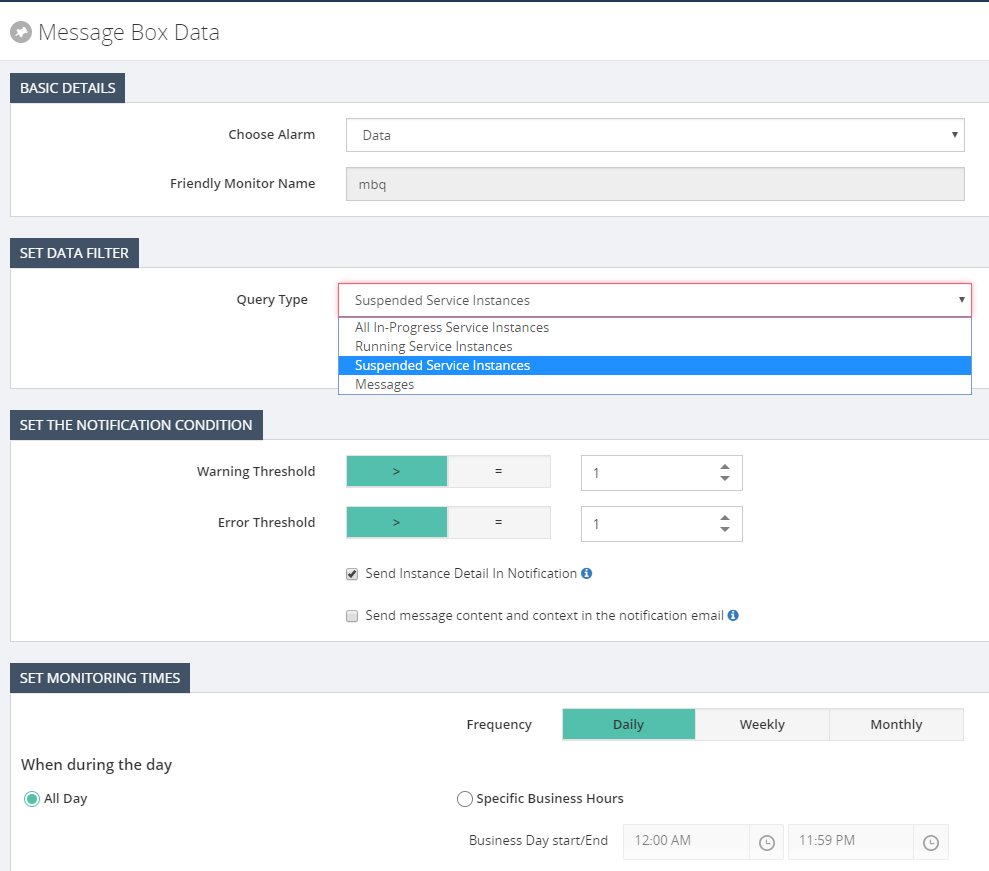
The messaging service instance is the service instance that’s created for your receive and send port at the run time. A receive port/send port is a combination of various things. Ex: An adapter (File, WCF, SQL etc.), a receive pipeline (and a send pipeline if two-way), and Maps. They get instantiated like the objects for the classes and have different states in their lifetime namely,
- Ready to Run
- Scheduled
- Dehydrated
- Suspended (Resumable)
- Suspended (Non-Resumable)
- Active
- In Breakpoint
Here in monitoring, we can monitor the count of these instances at various stages and the alerts will be triggered based on the filters and threshold value configured. It is important to monitor the number of service instances, to keep the BizTalk environment healthy. Having many instances will make the MessageBox database bloated which in turn will affect the performance of the environment. The service instance count can be retrieved from BizTalk Administrator group hub page which displays only the count and does not tell you if it’s the expected count or not. A person seeing this information needs to be a BizTalk expert to understand the various states. Here comes our MBQ monitoring which alerts users according to the threshold limit configured. A non-BizTalk person can now easily understand the alert message and act accordingly.
Actioning on the suspended service instances:
Based on the state of the service instances, the administrator can decide on whether to resume or terminate the instances. For example, when a message is sent through the send port and if it’s stopped, then the instance gets suspended. Once the send port is up, the message can be resumed and processed. Instead of going to the BizTalk admin console and checking it, BizTalk360 has the feature to terminate/resume the instances from the monitoring itself. We can also configure the time when we want to perform the action, either every time or during Error/Warning condition.
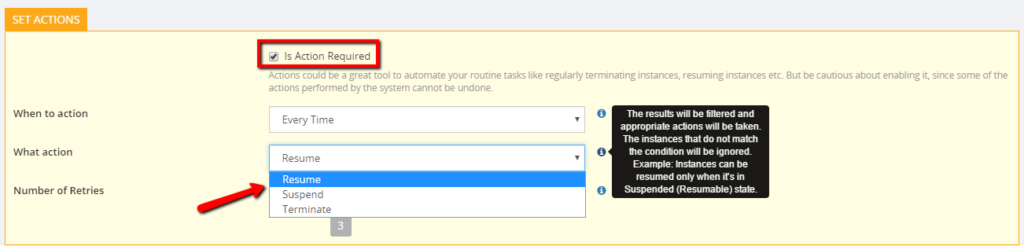
So, what happens when Action Required is ticked?
There may be scenarios wherein, the customer wants to monitor any suspended messages that by the end of the day are no longer relevant and should be terminated. So, in this case, BizTalk360 can automatically terminate the instances as per the alarm configuration. This can avoid the excess workload to the BizTalk user as he needs to go and manually run the query to find the instances and action it. We also have the option to bulk terminate the suspended instances altogether instead of doing one by one. There is also an archiving option and to download the instances.
Can non-super users terminate/resume suspended instances?
We have two kinds of users in BizTalk360, namely Super users and normal users. Super users enjoy the admin privileges and have access to all modules. They can define the authorization for the different level of users. They restrict the access permissions for the normal users. The normal users will have minimal access permissions.
The normal users can be anyone from the organization, may be supported engineers, other non-BizTalk group members who are just monitoring BizTalk servers. They would not be aware of the conditions of the service instances. Hence, they cannot decide upon the action to be performed on the suspended instances as it’s a sensitive area like terminating/resuming the instances. This may lead to security and auditing problems also. When normal users configure Data Monitoring and try to resume a suspended instance, they may get an exception message as follows-
System.Exception: User does not have enough rights to access the BizTalkQueryService(service) and ExecuteServiceInstanceOperation(operation).
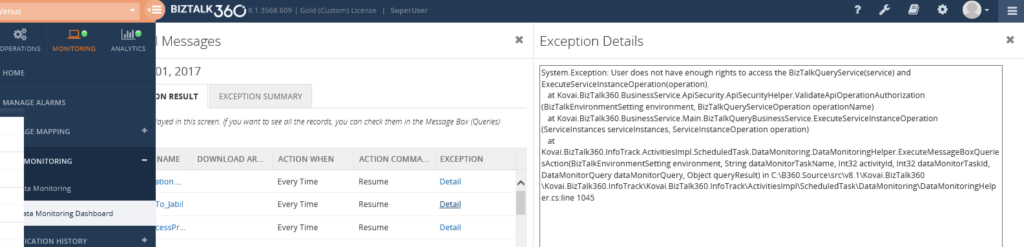
The administrator alone can know the state of the instances and decide upon the action on them. For this reason, BizTalk360 has provided the restriction that only superusers can perform the resume/terminate action for them.
An in-depth analysis on the super user access to terminate instances:
Let’s have an in-depth look into this limitation and how it must be handled. The user logged into BizTalk360 may be a super user. But still, that user will not be able to perform any action on the service instances. Do you know why? Let’s move forward to know the reason.
When we install BizTalk360, we provide the service account credentials. This service account will be the user who is running the App Pool and monitoring service. The logged in user running the MSI to install BizTalk360 may be different from the service account. When the application is installed, the logged in user will be created as a superuser in BizTalk360 by default.
So, what happens to the service account if it’s different from the logged in user?
The service account running the IIS App pool and the monitoring service must be created as the “Super User” in BizTalk360. Only then this user can perform the resume/terminate actions on the service instances. Otherwise, the above exception will be thrown.
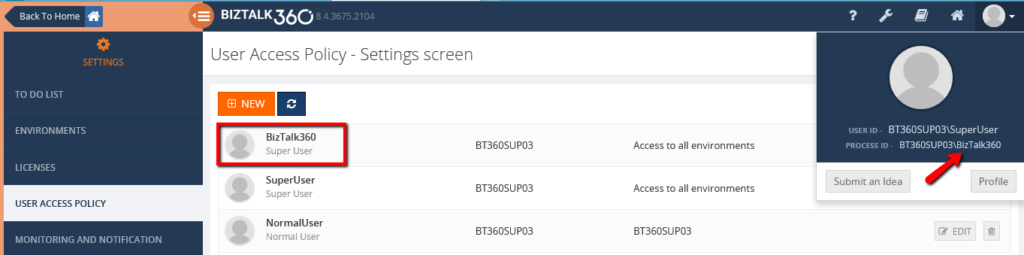
Since these are sensitive operations on the instances, only the super user/ administrator should be able to perform such tasks. Therefore, BizTalk360 has imposed this restriction that only when the service account is added as the super user, he can perform the operations on the suspended service instances.
Author: Praveena Jayanarayanan
I am working as Senior Support Engineer at BizTalk360. I always believe in team work leading to success because “We all cannot do everything or solve every issue. ‘It’s impossible’. However, if we each simply do our part, make our own contribution, regardless of how small we may think it is…. together it adds up and great things get accomplished.” View all posts by Praveena Jayanarayanan

by Praveena Jayanarayanan | Jul 4, 2017 | BizTalk Community Blogs via Syndication
BizTalk360 is a single platform to have total control over your BizTalk environment. It has the three main modules namely Operations, Monitoring and Analytics. Monitoring is considered as the main feature of BizTalk360 because it provides rock solid monitoring for the BizTalk environment and informs us via email alerts when the BizTalk server is suffering from problems and downtimes.
As per the below quotes,
“Listening to our customer’s feedback makes them feel appreciated and part of the value creation process”,
We always listen to their valuable suggestions and feedback and add them to BizTalk360 in every upcoming release. We also make enhancements to the existing features based on the customer feedback. This blog explains about one such enhancement on actions performed on the suspended instances.
MessageBox Queries Monitoring:
Data Monitoring was one such feature included in BizTalk360, from the customers’ feedback. Data monitoring helps to monitor the send/receive ports, service instances and exception data from different data sources in BizTalk server. Message Box Queries monitoring is a part of Data Monitoring which is used to monitor the service instances. The service instances may be running or may get suspended in BizTalk servers due to various reasons.
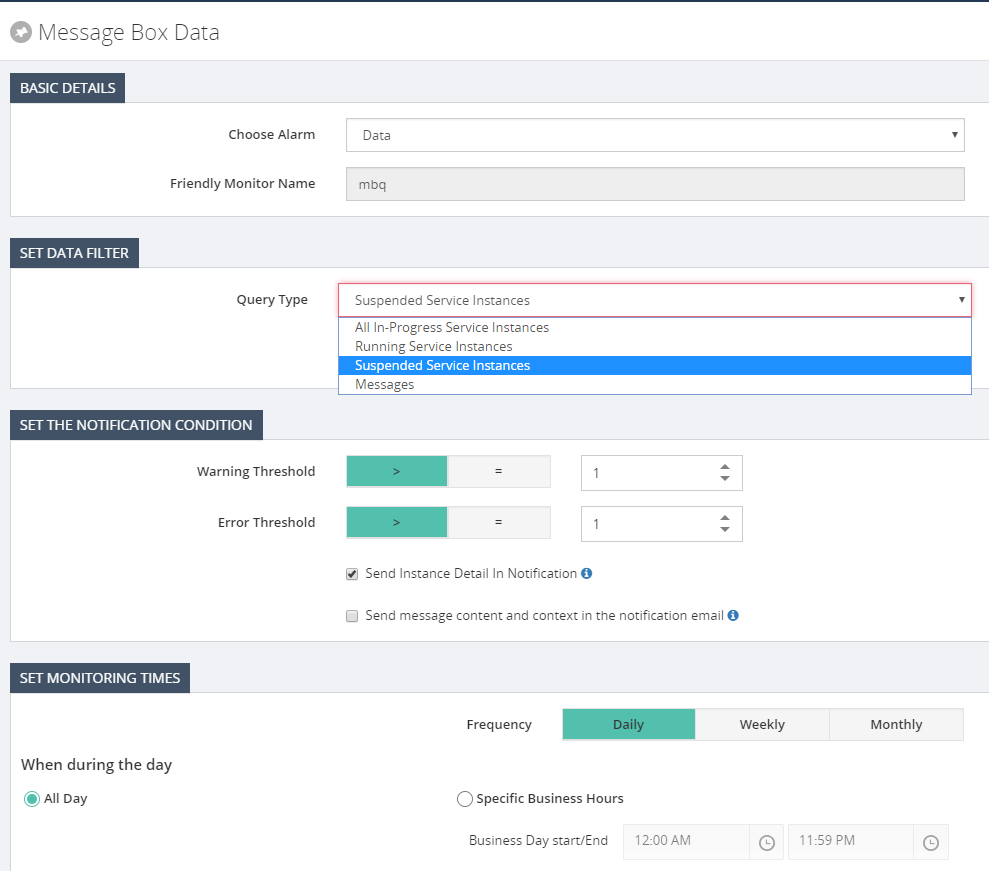
The messaging service instance is the service instance that’s created for your receive and send port at the run time. A receive port/send port is a combination of various things. Ex: An adapter (File, WCF, SQL etc.), a receive pipeline (and a send pipeline if two-way), and Maps. They get instantiated like the objects for the classes and have different states in their lifetime namely,
- Ready to Run
- Scheduled
- Dehydrated
- Suspended (Resumable)
- Suspended (Non-Resumable)
- Active
- In Breakpoint
Here in monitoring, we can monitor the count of these instances at various stages and the alerts will be triggered based on the filters and threshold value configured. It is important to monitor the number of service instances, to keep the BizTalk environment healthy. Having many instances will make the MessageBox database bloated which in turn will affect the performance of the environment. The service instance count can be retrieved from BizTalk Administrator group hub page which displays only the count and does not tell you if it’s the expected count or not. A person seeing this information needs to be a BizTalk expert to understand the various states. Here comes our MBQ monitoring which alerts users according to the threshold limit configured. A non-BizTalk person can now easily understand the alert message and act accordingly.
Actioning on the suspended service instances:
Based on the state of the service instances, the administrator can decide on whether to resume or terminate the instances. For example, when a message is sent through the send port and if it’s stopped, then the instance gets suspended. Once the send port is up, the message can be resumed and processed. Instead of going to the BizTalk admin console and checking it, BizTalk360 has the feature to terminate/resume the instances from the monitoring itself. We can also configure the time when we want to perform the action, either every time or during Error/Warning condition.
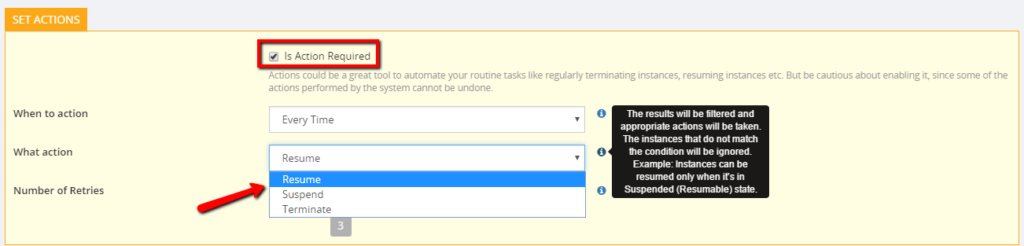
So, what happens when Action Required is ticked?
There may be scenarios wherein, the customer wants to monitor any suspended messages that by the end of the day are no longer relevant and should be terminated. So, in this case, BizTalk360 can automatically terminate the instances as per the alarm configuration. This can avoid the excess workload to the BizTalk user as he needs to go and manually run the query to find the instances and action it. We also have the option to bulk terminate the suspended instances altogether instead of doing one by one. There is also an archiving option and to download the instances.
Can non-super users terminate/resume suspended instances?
We have two kinds of users in BizTalk360, namely Super users and normal users. Super users enjoy the admin privileges and have access to all modules. They can define the authorization for the different level of users. They restrict the access permissions for the normal users. The normal users will have minimal access permissions.
The normal users can be anyone from the organization, may be supported engineers, other non-BizTalk group members who are just monitoring BizTalk servers. They would not be aware of the conditions of the service instances. Hence, they cannot decide upon the action to be performed on the suspended instances as it’s a sensitive area like terminating/resuming the instances. This may lead to security and auditing problems also. When normal users configure Data Monitoring and try to resume a suspended instance, they may get an exception message as follows-
System.Exception: User does not have enough rights to access the BizTalkQueryService(service) and ExecuteServiceInstanceOperation(operation).
The administrator alone can know the state of the instances and decide upon the action on them. For this reason, BizTalk360 has provided the restriction that only superusers can perform the resume/terminate action for them.
An in-depth analysis on the super user access to terminate instances:
Let’s have an in-depth look into this limitation and how it must be handled. The user logged into BizTalk360 may be a super user. But still, that user will not be able to perform any action on the service instances. Do you know why? Let’s move forward to know the reason.
When we install BizTalk360, we provide the service account credentials. This service account will be the user who is running the App Pool and monitoring service. The logged in user running the MSI to install BizTalk360 may be different from the service account. When the application is installed, the logged in user will be created as a superuser in BizTalk360 by default.
So, what happens to the service account if it’s different from the logged in user?
The service account running the IIS App pool and the monitoring service must be created as the “Super User” in BizTalk360. Only then this user can perform the resume/terminate actions on the service instances. Otherwise, the above exception will be thrown.

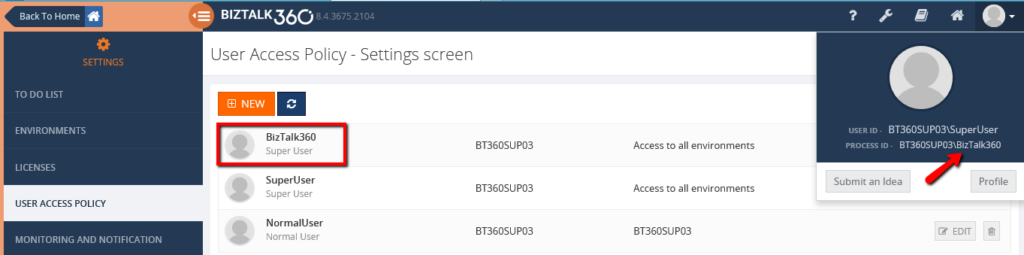
Since these are sensitive operations on the instances, only the super user/ administrator should be able to perform such tasks. Therefore, BizTalk360 has imposed this restriction that only when the service account is added as the super user, he can perform the operations on the suspended service instances.
Author: Praveena Jayanarayanan
I am working as Senior Support Engineer at BizTalk360. I always believe in team work leading to success because “We all cannot do everything or solve every issue. ‘It’s impossible’. However, if we each simply do our part, make our own contribution, regardless of how small we may think it is…. together it adds up and great things get accomplished.” View all posts by Praveena Jayanarayanan
by Steef-Jan Wiggers | Jul 3, 2017 | BizTalk Community Blogs via Syndication
It has been an amazing month, June 2017, with Integrate2017 and the momentum towards it. Team BizTalk360 and Saravana did an excellent job. Bhavana Nambiar wrote a great post about it.
Month June
In this month I did two talks one for the BizTalk UserGroup in Belgium, and Integrate 2017. For the BTUG.be session in Ghent at Codit I did a Logic App session.
During the month I prepared my session for integrate 2017 and executed on the 2nd day of the event. It was focussed on the end user/consumer of Logic Apps i.e. business. And I interviewed 30 people around the world to share their views with me.
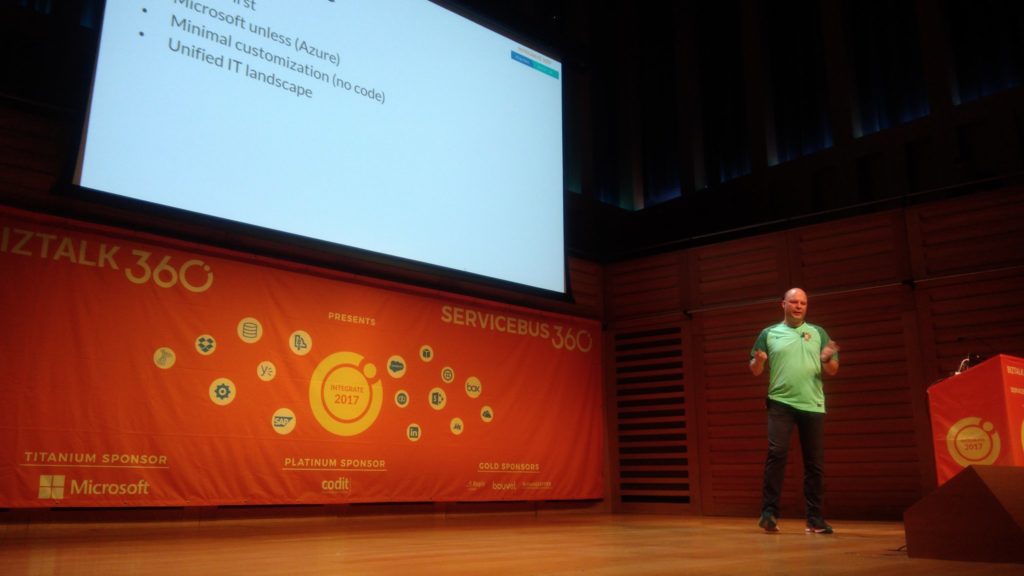
The event was in my view a huge success. The Pro-Integration team, Service Bus Team and MVP’s were present to give an awesome show!
Around Integrate 2017 and BTUG be I interviewed several people for my talking with integration pro youtube movies:
Music
My favorite albums in June were:
- Elder – Reflections Of A Floating World
- SikTh – The Future In Whose Eyes?
- Anathema – The Optimist
- Iced Earth – Incorruptible
- Vintersorg – Till Fjälls Del II

Dublin
After Integrate I went with Kent and Melissa to Dublin. We had to unwind a bit from all the excitement in London.

That’s all folks for this month. Next month I will be on holiday to Portugal (visiting Sandro) and France!
Cheers,
Steef-Jan
Author: Steef-Jan Wiggers
Steef-Jan Wiggers is all in on Microsoft Azure, Integration, and Data Science. He has over 15 years’ experience in a wide variety of scenarios such as custom .NET solution development, overseeing large enterprise integrations, building web services, managing projects, designing web services, experimenting with data, SQL Server database administration, and consulting. Steef-Jan loves challenges in the Microsoft playing field combining it with his domain knowledge in energy, utility, banking, insurance, health care, agriculture, (local) government, bio-sciences, retail, travel and logistics. He is very active in the community as a blogger, TechNet Wiki author, book author, and global public speaker. For these efforts, Microsoft has recognized him a Microsoft MVP for the past 6 years. View all posts by Steef-Jan Wiggers

by Bhavana Nambiar | Jul 3, 2017 | BizTalk Community Blogs via Syndication
The curtain has come down on INTEGRATE 2017 and as the saying goes ‘The only time you should ever look back is to see how far you’ve come!’.
Today when I look back at the success of INTEGRATE 2017, it feels like we have come a long way and every year we have just got better and better. From BizTalk Summit 2013 to INTEGRATE 2017, it is a great leap in terms of the success of the event, given the fact we are a small team doing this event organization.
We have had some amazing feedback from the community for our efforts, which boosts our morale to organize this event every year.
“You guys should be really proud of INTEGRATE 2017. I was amazed by last year’s event, but this year you guys set the bar really high.” – Wagner Silveira, Theta
A well planned and performed event with the right content and the right people!
“The largest organized event around the current state of Microsoft Integration in the world.” – Steef – Jan Wiggers
‘Great event with like-minded people, already looking forward to the next event.’
‘This is the must-attend integration event for Microsoft technology. The event organization is excellent with thanks to BizTalk360.’
Venue Hunt:
Organising an event year after year and delivering quality content comes with its own challenges. It all started in November 2016, when we approached Excel for booking the venue, we were met with disappointment when we found out that the venue was not available for any of the dates we requested. We were so not ready for this. We frantically started looking around for a good venue. The challenge here was to find a venue equivalent to Excel, London or better, which could accommodate 400 people for 3 days and be easily accessible for our attendees. With all these points in mind, the hunt for a good venue became even more difficult. The next month or so we were unsure if we would even be able to organize the event this year.
Finally, we found Kings Place but they didn’t have availability until June. Though we knew the timing was not going to be ideal, being summer time and holidays for a lot of the European countries, we decided to commit to Kings’ Place as it ticked all the other criteria. This meant the attendance for the event would be affected. But we decided to risk it since we knew how important this event is for the community. We had to put a deposit for the venue to guarantee the booking without knowing if we would be able to collect enough money through the sale of tickets.
Some of the highlights of the venue were the high-tech halls with most advanced technical support and award-winning caterers providing high-quality food, drink, and service to every single event.
When we opened the registration in February, we were pleasantly surprised at the response from the community. The tickets were selling like hot cakes.
Sponsors
The next step was to look for sponsors who could help us with the organization of the event as you are already aware we run this event purely for the community purpose and not for generating any profit. The budgets are very tight and to ensure that we put our best out there for our attendees we needed sponsors. Apart from Microsoft, our partners – Codit, QuickLearn, Middleway immediately agreed, and all the other sponsors followed.
Speakers
Content is always the most important thing that attracts the attendees to a conference like this. All the 3 days were packed with content delivered by the Microsoft Team and MVPS’ from the community. One of the main reasons for attending this event is there is no other event in the world focussed on Microsoft Integration and the opportunity to meet the Microsoft Product Team is very exciting. Saravana and Jim arranged for the speakers and prepared a very interesting line-up.
Execution
Having organized the event in Excel, London for the past 2 years, it was quite a challenge in the beginning to plan and organize everything around the new venue.
Due to the tight budgets, we could not book a setup day, which put us under great pressure to set up the venue on the first day of the event. The only way to tackle this challenge was to get to the venue early in the morning and choreograph the way it was all going to happen beforehand. We made teams who would focus on activities such as setting up banners, registration, etc.…
You can plan a day in advance, but it comes with its own surprises. When we reached the venue, we found that there were a few missing parcels, most importantly the box of lanyards. We had to just go with the flow and give away the badges without the lanyards. There were also some delayed deliveries forcing us to change some of our plans.
Even though all these obstacles kept appearing, we had to overcome them since we knew it was all going to be worth it at the end of the day.
Team Effort
This scale of the event cannot be organized without a team. I would like to take this opportunity to thank all the individuals in BizTalk360 who came together as a team and helped in making this event a great success. Each one worked really hard to put up a good show. Four of our team members flew from India to participate and help us with the event.
Registration Team
–Duncan, Srini, Mekala, Kandarp, Kajal, Rochelle, Saranya, Gowri. It is never easy to keep your calm amidst all the chaos in the morning. The aim was to finish all the registrations before the keynote and we achieved that. This year we also arranged separate registrations for the sponsors and speakers.
Banner Assembling Team
– Jo, Daniel, Vishnu, Rajesh – Special mention for this team. Despite all the odds the team put together all the banners in time for the start of the event.
Design & Social Media Team
– Vicky, Mohan, Parthiban & Sriram – this team was mainly operating from India. Their job started from the time we published the event – website creation, designing banners for the event, marketing the event through ads, promoting the event in social media to the public. We arranged a live streaming just for the Team so that they could follow the event remotely and could manage our Social Media updating everyone in the community through Twitter and Facebook.
Bloggers
– Lex, Srini & Sriram – They wrote some fantastic blogs updating some of the important sessions through the day and also a summary at the end of the day.
https://blogs.biztalk360.com/integrate-2017-recap-day-1-announcements-microsoft-pro-integration-team/
https://blogs.biztalk360.com/integrate-2017-recap-day-2/
https://blogs.biztalk360.com/integrate-2017-recap-day-3/
https://blogs.biztalk360.com/logic-apps-sessions-integrate-2017-day-2/
https://blogs.biztalk360.com/bringing-logic-apps-into-devops-with-visual-studio-and-monitoring/
Customer Testimonials
– Rochelle, Kajal & Gowri – They were responsible for collecting customer testimonials from our customers whom we could meet in person and talk about the use of the product.
We also had 3 booths which were managed by the Team to help the attendees throughout the day with information regarding the event and our products in general.
Speaker Introduction
This was a new initiative we thought to introduce this year. In the past, Saravana did all the introductions, but we took this responsibility from him this year and let him sit back and enjoy the event. This also gave a good opportunity to the BizTalk360 Team to introduce themselves to the community. Thanks to Gowri for motivating everyone to do this and for helping with the rehearsals. The speakers loved these introductions as well.
‘A bit of feedback… I really liked the way that each speaker was introduced before they walked out on stage. It made us feel special, and it also gave an opportunity for each of the BizTalk360 team members to introduce themselves and be seen as well. Nice work!’ – Daniel Toomey, Mexia
Partner Networking Event
This year we organized a Partner networking event to meet and greet all our partners. The Sales Team could have some meaningful conversations and this networking event helped in strengthening our partner relationship. We also put a huge partner banner to showcase our partner channel and give the partners visibility & publicity during this event.
Product Specialist & Partner Awards:
During the drinks and networking event on Day 1, we arranged for a presentation ceremony to announce our Partner of the Year and Product Specialist of the Year.
Read more – https://blogs.biztalk360.com/integrate-2017-biztalk360-partner-product-specialist-awards/
Pictures & Video
Our photography & video team did a great job by capturing the right emotions and moments during the event. Tariq, our photographer is the best at his job and came up with some fabulous pictures, one of which was to gather all the 380 attendees for a group picture.
Day 1 Pictures
Day 2 Pictures
Day 3 Pictures
Event Feedback:
Like every year, we sent out an online feedback form for our attendees to voice their opinions regarding the event. Thanks to everyone who took the time to send us their feedback. We have noted all the comments so far and will use them to improve future events.
I would like to thank Saravana Kumar and Gowri Ramkumar for their guidance, direction, and continuous support during the organization of this event, without which this would not have been possible. I also extend my gratitude to Microsoft, our sponsors, our partners and last but not the least to all the 380 attendees who traveled from over 20+ countries to make this event a big SUCCESS!
We cannot sit back and relax yet! As I pen this blog, the preparations for our next event INTEGRATE 2017 – USA has already started. So, see you all at Microsoft, Redmond on 25-27 October – until then Hasta la vista!!!
Author: Bhavana Nambiar
Bhavana makes sure our customers and team are well taken care of: license keys, payroll, benefits, taxes, accounting, dealing with the bank — she does it all!. View all posts by Bhavana Nambiar
by Gautam | Jul 3, 2017 | BizTalk Community Blogs via Syndication
Do you feel difficult to keep up to date on all the frequent updates and announcements in the Microsoft Integration platform?
Integration weekly update can be your solution. It’s a weekly update on the topics related to Integration – enterprise integration, robust & scalable messaging capabilities and Citizen Integration capabilities empowered by Microsoft platform to deliver value to the business.
If you want to receive these updates weekly, then don’t forget to Subscribe!
On-Premise Integration:
Cloud and Hybrid Integration:
Job openings in USA
Feedback
Hope this would be helpful. Please feel free to let me know your feedback on the Integration weekly series.
by michaelstephensonuk | Jul 2, 2017 | BizTalk Community Blogs via Syndication
Recently I wrote an article about how I was uploading bank info from Barclays to my Office 365 environment and into a SharePoint list.
http://microsoftintegration.guru/2017/06/29/logic-apps-integration-for-small-business/
In the article I got the scenario working but I mentioned that I didn’t really like the implementation too much and I felt sure there were tidier ways to implement the Logic App. This prompted swapping a few emails with Jeff Holland on the product team at Microsoft and he gave me some cool tips on how best to implement the pattern.
At a high level the actions required are:
- Receive a message
- Look up in a SharePoint list to see if the record exists
- If it exists update it
- If it doesn’t exist then create it
In the rest of the article ill talk about some of the tweaks I ended up making.
Get Item – Action – Doesn’t help
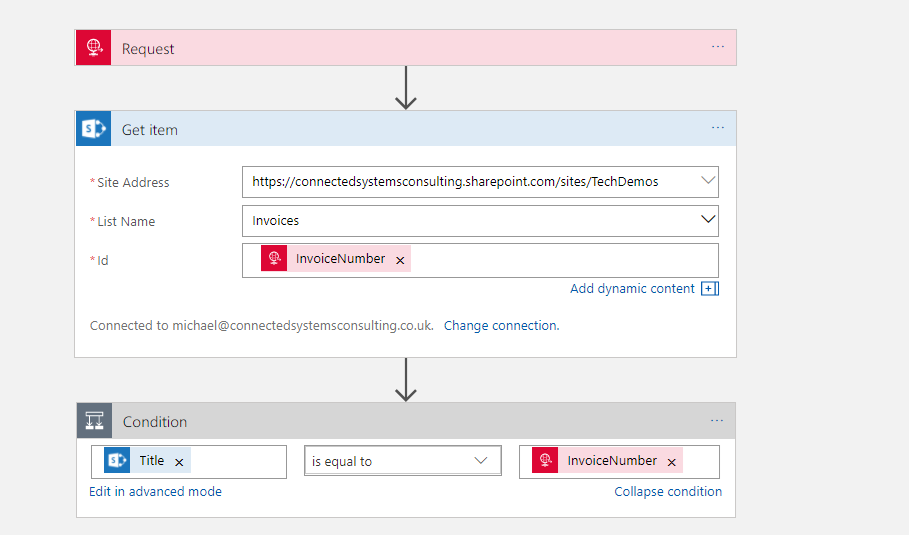
First off I noticed there was a Get Item action in the list which I hadn’t noticed the other day so I thought id have a look and see if it would do the job for me. I set up my test logic app as below.
The problem here however is that Get Item requires the ID which appears to resolve to a sort of internal id from SharePoint. In the real world your unlikely to have this id in other systems and you cant set the id when creating a record so I imagine its like an auto number. I quickly found Get Item wasn’t going to help short cut my implementation so it was back to Get Items.
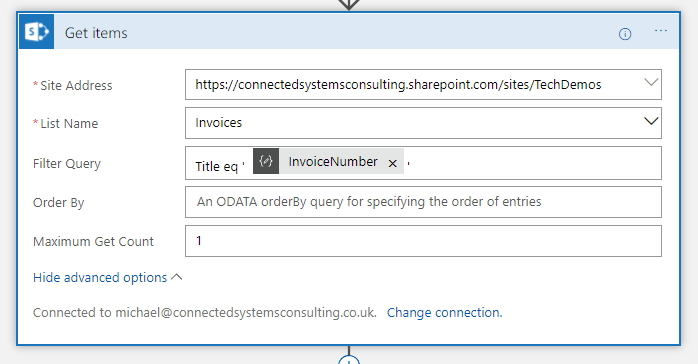
In the picture below you can see how I use Get Items with a filter query to check for a record where the Title is equal to the invoice number. In my implementation I decided to store the unique id for each invoice in the Title field as well as in a custom Invoice Number field. This makes the look up work well and also to be explicit I set the maximum get count property to 1 so I am expecting either an empty array if it’s a new record or an array with 1 element if the record already exists.
Getting Json for Single SharePoint Item
The next problem after the look up is working with the object from the array. I didn’t really fancy working with complex expressions to reference each property on the item in the array or doing it in an unnecessary loop so my plan was to try and create a reference to the first element in the array using a json schema and the Parse Json action.
To do this I left my Logic App in a position where it just did the look up and I then called it from Postman like in the picture below.
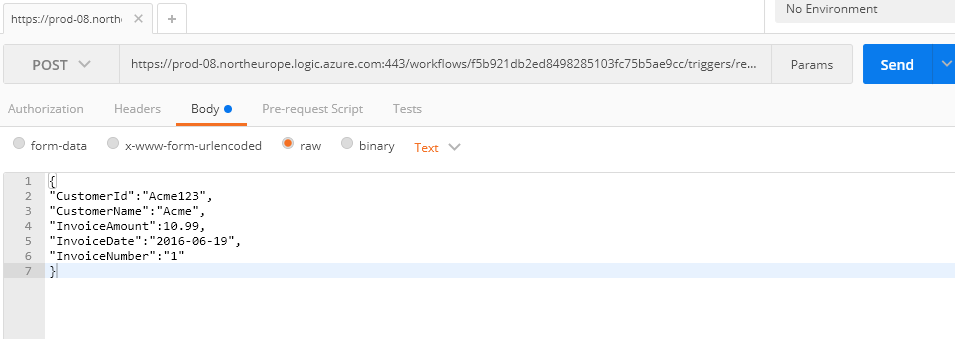
When the Logic App executed I was able to go into the diagnostics of the run and look at the Get Items to see the Json that was returned. (id already manually added 1 record to the SharePoint list so I knew id get 1 back). In the picture below you can see I opened the execution of Get Items.
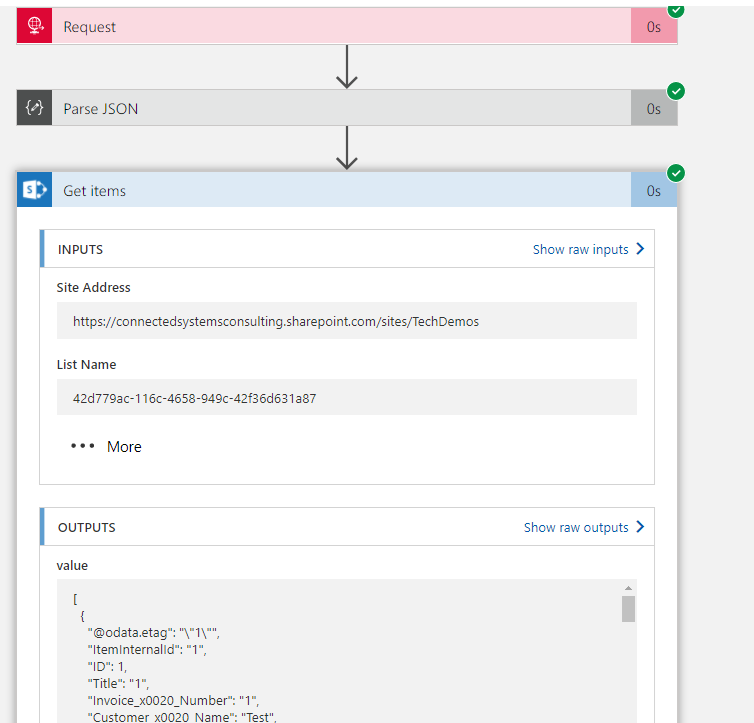
In the outputs section I can see the Json returned from the action and I copied this into notepad. I then removed the square brackets from the start and end which turn the json into an array. What im left with is the json representing the first element in the array. I put this to one side and kept it for later.
Make the Lookup Work
Now we wanted to make the look up work properly so lets review what id done so far. First off I had my request action which receives data over http. As a preference I tend to not add a schema to the request unless it’s a Logic App im calling from another Logic App. I prefer to use a Parse Json with a schema as the 2nd step. Ive just felt this decouples it a little and gives me scope to change stuff around a little more in the Logic App without the dependency on Request. A good example of this was once I needed to change the input from Request to Queue and if I had used the schema on Request it would have meant changing the entire logic app.
Anyway so we parse the json and then execute Get Items like we discussed above.
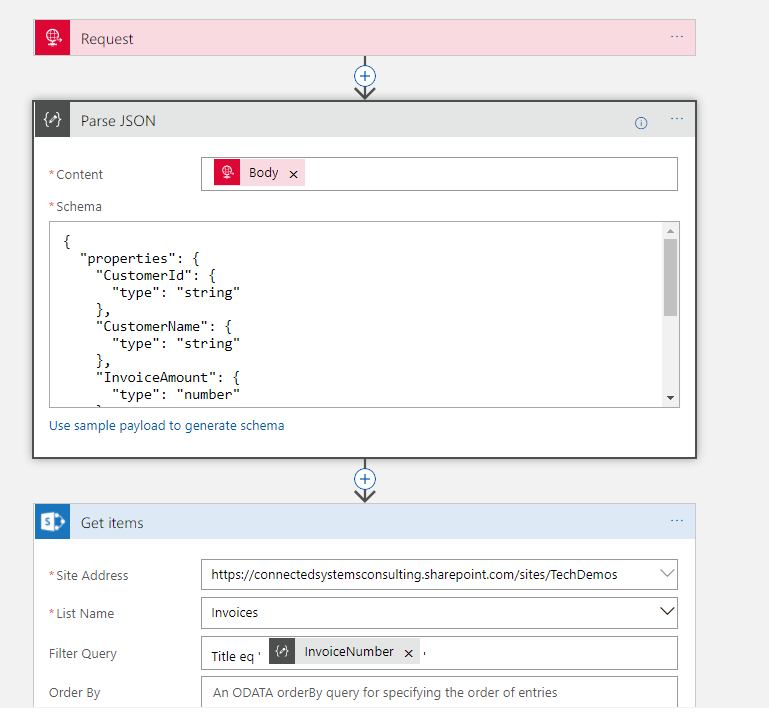
At this point I know im above to execute the Logic App and get a single element array if the invoice exists and an empty array if it doesn’t.
Workout if to Insert of Update
The next step which Jeff gave me some good tips on was how to workout if to do the insert or update. Previously id don’t this weird little counter pattern to count the elements in the array then decide the branch to execute based on that, but Jeff suggested an expression which can check for an empty array.
In the below picture you can see the expression checks the Get Items action and sees if the value is empty.
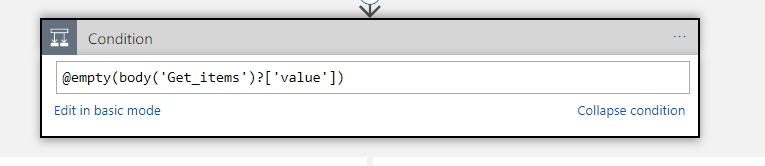
This has greatly simplified my condition so im happy!
The Create
The creation step was really just the same as before. We flow in properties from the inbound json into fiends on the SharePoint list and it gets created. See below pic.
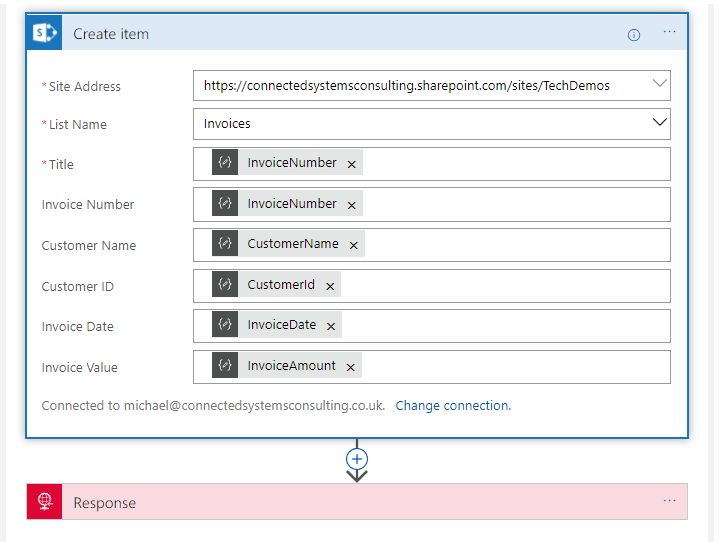
The Update
The bit where things got tidier is in the update. Previously I had a loop around the update action meaning it was executed once for every element, even though there should only ever be 1 element. While this works it looked untidy and didn’t make sense in the Logic App. I knew if I looked at it in 6 months time it would be a WTF moment. The problem was that for the update we need some fields from the query response and some fields from the input json to pass to the update action and it was awkward to make them resolve without the loop.
Combining Jeff’s tips and a little item of my own I decided to use the Parse Json action and the json id put to one side earlier which represented a single element in the Get Items response array. I used this json to have a schema for that item from the list and then in the content of the action Jeff suggested I used the @first expression. This basically meant that I could have a new pointer to that first element in the array which means when I used it downstream in the logic app I can reference it with nice parameters instead of repeatedly using the expression.
The below picture shows how I did this.
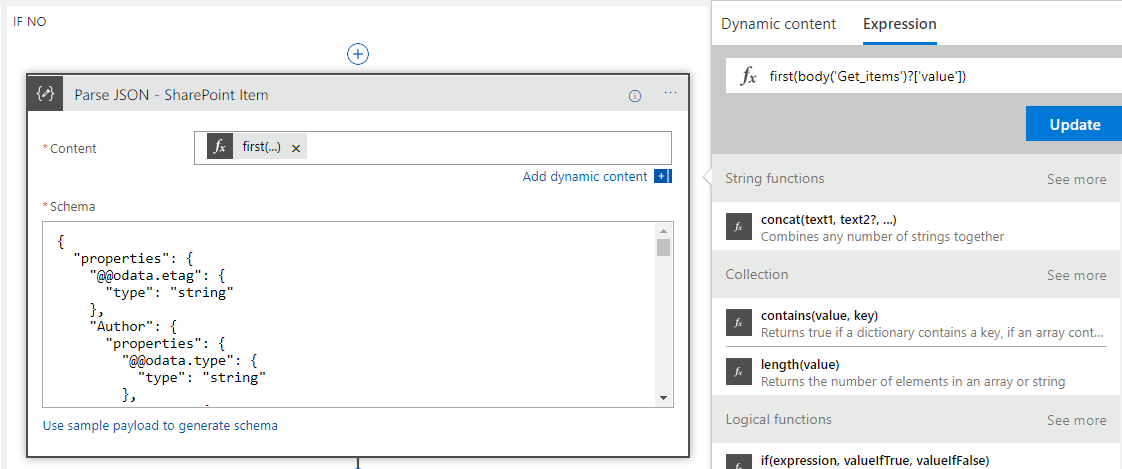
The next step was to do the Update Item action. At this point I effectively have pointers to two objects in the Logic App created by the Parse Json. The first is the input object and the second is the item queried from SharePoint. I now simply had to map the right properties to the right fields on the update action like in the below picture.

One caveat to note is that although the icons look the same the fields above actually come from 2 different Parse Json instances.
Wrap Up
At this point it now meant that when I execute my logic app via Postman I now get the SharePoint list updated and having new items inserted exactly as I wanted. Below is a pic of the list just to show this for completeness.
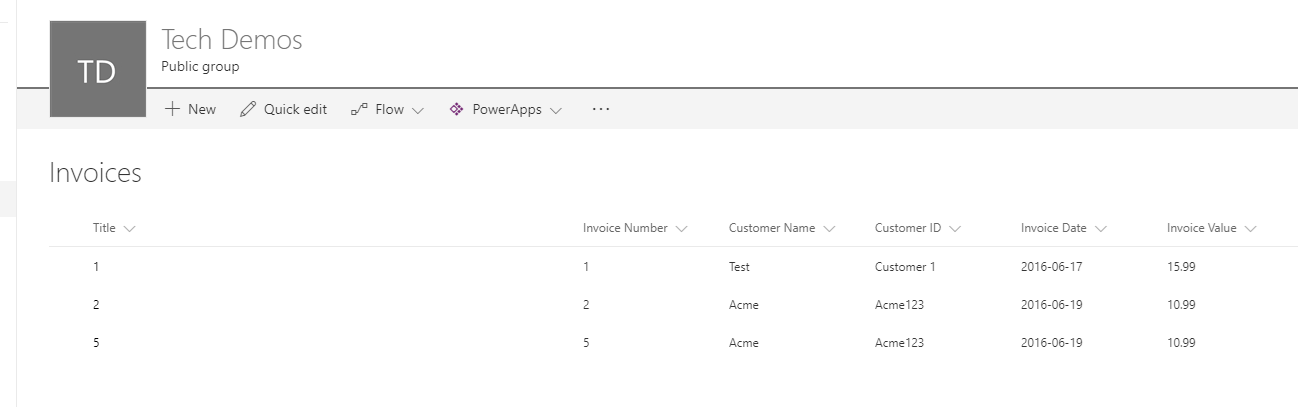
Also the below picture shows the full Logic App so you can see it all hanging together
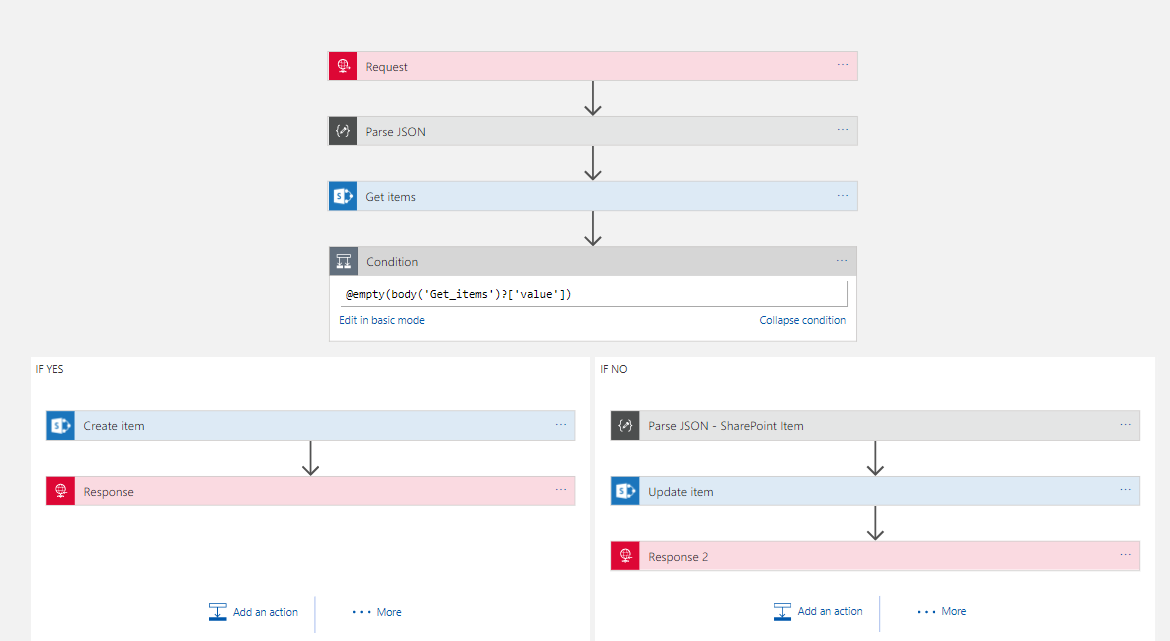
In summary with some help from Jeff I am much happier with how I implemented this upsert functionality. Ive said a few times it will be better when the API connectors support this functionality so the Logic App doesn’t need to care and becomes much simpler, but to be fair most API implementations tend to go for basic CRUD approaches so its common to face this scenario. Hopefully with the write up above that will make it easier for everyone to be able to write a tidier implementation of this pattern. I have a feeling it will be quite reusable for other application scenarios such as CRM which have similar API connectors. Maybe there is even the opportunity for these to become Logic App templates.

by Gautam | Jun 30, 2017 | BizTalk Community Blogs via Syndication
I am proud to be part of Synegrate which is now certified as Gold Partner for Microsoft’s Azure Cloud Platform. Synegrate was already a Managed Microsoft Gold Certified Partner in Application Integration and a Microsoft Silver Certified Partner in Cloud Competency.
Today Synegrate achieved a Microsoft Gold Cloud Platform competency, demonstrating a best-in-class ability and competencies on the Azure platform.
The Cloud Platform competency is designed for partners to capitalize on the growing demand for infrastructure and software as a service (SaaS) solutions built on Microsoft Azure.
This is the highest attainable partnership level and is earned after achieving the defined competency requirements.
To earn a Microsoft gold competency, partners must successfully complete exams (resulting in Microsoft Certified Professionals) to prove their level of technology expertise, and then designate these certified professionals uniquely to one Microsoft competency, ensuring a certain level of staffing capacity. They also must submit customer references that demonstrate successful projects, meet a performance (revenue and or consumption/usage) commitment, and pass technology and/or sales assessments.
Achieving the Microsoft Gold Cloud Platform competency showcases Synegrate’s expertise in and commitment to today’s cloud technology market and demonstrates deep knowledge of Microsoft’s Cloud Platform.
Synegrate has proven a reliable partner for customers globally. Over the years the company has been successful in assisting customers in various Microsoft solution based endeavors that created value propositions ranging from reduced costs or complexity to increased availability and security. Here are some stories and examples of our loyal customers.
About Synegrate
Synegrate’s core focus is data. We have data coursing through our veins; it is in our DNA. We specialize in the storing, integration, dissemination, visualization and analytics of data. We create modern data driven applications, BPM (Business Process Management) processes to orchestrate data and dashboards for data analysis.
Synegrate is a 100% Microsoft focused company that is fully committed to the Microsoft Azure cloud services and solutions.
We utilize the platforms, products and tools provided by Microsoft, to provide our customers with innovation, analytics and insight. We’re a front runner in helping our customers realize their future state architectures on the Microsoft Azure cloud.
We have our Head Office in California, development centers in different regions, allowing us to service the US from coast to coast.


by michaelstephensonuk | Jun 29, 2017 | BizTalk Community Blogs via Syndication
When Logic Apps was first announced at the Integrate summit in Seattle a few years ago one of my first comments was that I felt that this could be an integration game changer for small business in due course. The reason I said this was if you look across the vendor estate for integration products you have 2 main areas. The first is the traditional integration broker and ESB type products such as BizTalk, Oracle Fusion, Websphere and others. The 2nd area is the newer generation of iPaas such as Mulesoft, Dell Boomi, etc. While the technicalities of how they solve problems has changed and their deployment models are different they all have 1 key thing in common. They all view integration as a high value premium thing that customers will pay a lot of money to do well.
This has always rules them out of the equation for small business and meant that over the years many SME companies will typically implement integration solutions with custom code from their small development teams. This was often their only choice and made it difficult because as they grow they would reach a point where they got to a certain size yet their integration estate would be a mess of custom scripts, components and other things.
What excites me with Logic Apps is that Microsoft have viewed the cost model in a different way. While it is possible to spend a lot of money on some premium features it is also possible to create complex integration solutions that have zero up front cost and a running cost of less than a cup of coffee. This mindset that integration is a commodity not a premium service can be put forward by Microsoft because they have a wide cloud platform and offering low cost integration will increase the compute usage by customers across their cloud platform. Other than the big cloud players such as AWS and Google its much harder for them to think of integration in this way because the vendor doesn’t have the other cloud features to offer. Likewise AWS and Google who do have the platform play don’t have any integration heritage so this puts
Outside of the integration companies, small business has looked at products like Zapier and IFTTT for a few years but these products can only go so far in terms of complexity of processes you want to implement.
Microsoft in a unique position where they have an integration offering with something for the biggest enterprise right down the scale to something for a one man band.
In Microsoft world if you’re a small company the likelihood is your using Office 365, there are some great features available on that platform and for my own small business ive been an Office 365 user for years. One example of how I use it is for my accounts and business finance. While I use it a lot, I do have one legacy solution in place from my pre-office 365 days. I had a Microsoft Access database which I wrote a small console app which would load transactions from the CSV files from my bank into it so I could process them and keep my accounts up to date. Ive hated this access solution for years but it did the job.
I have decided that now is a good opportunity to migrate this to Office 365 along with the rest of my accounts and finance info and this will let me get rid the console app.
The plan for this new interface was to use Logic Apps to pick up the csv file I can download from my bank and then load the transactions into an Office 365 SharePoint list and then copy the file into a SharePoint document library for back up.
At a high level the architecture will look like the below picture.
While this integration may seem relatively straightforward there were a few hoops to jump through so I thought it might be interesting to share the journey.
Issues with Barclays File
First off the thing to think about would be the Barclays file. I will always have to download this manually (it would be nice if I could get them to deliver it to be monthly). The file was a pretty typical CSV file but a couple of things to consider.
First there is no unique id for each transaction!! – I found this very strange but the problem it causes is each time I download the file the same transaction may be in multiple files. A file would typically have around 3 months data in it. This means I need to check for transactions which have already been processes.
2nd there is a number field in the file but this is not populated so ill ignore this for now.
3rd and most awkwardly is that its possible to have 2 or more rows in the file which would be exactly the same but refer to different transactions. This happens if you pay the same place 2 or more times with the same amount on the same day. Id have to figure out how to handle this.
Logic App – Load Bank Transactions
I was going to implement the solution with 2 logic apps. The first one will collect the file, it will then process the file and do a loop over each record but each record will be processed individually by a separate Logic App. I like this separation as it makes it easier to test the Logic Apps.
Before I get into the details of the logic apps, the below picture shows what the logic app looks like.
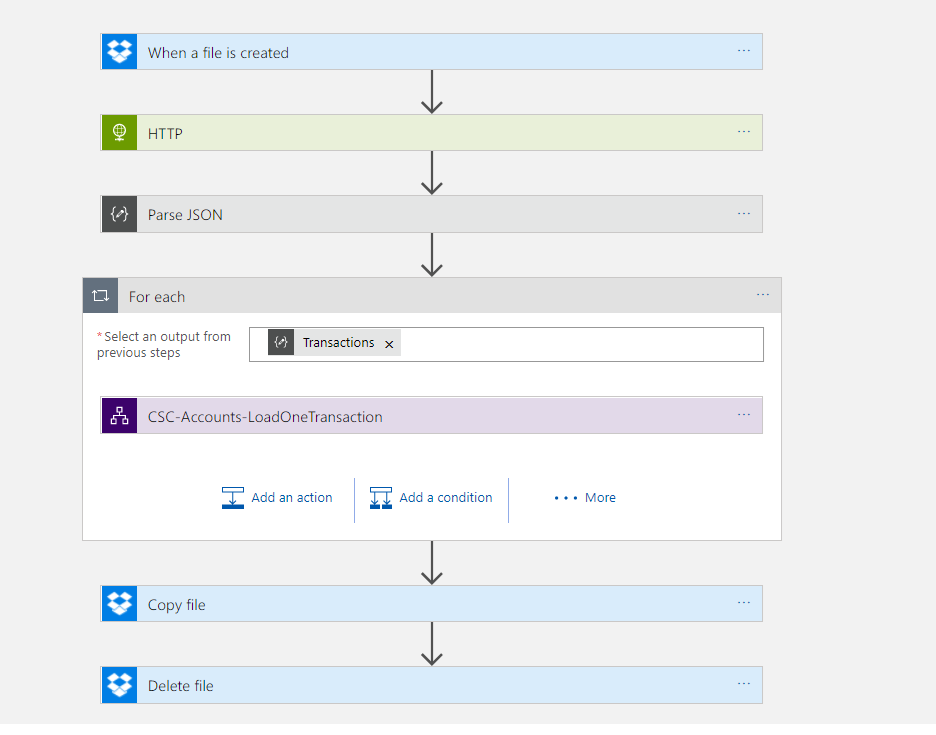
The main bit that is interesting in this Logic App is the parsing of the csv file. With Logic Apps if you have plenty of money to spend you can get an Enterprise Integration Account which includes flat file parsing capability. Unfortunately however I am a small business so I cant justify this cost. Instead I took advantage of the Azure Functions. In the Logic App I pass the file content to a function and then in the function I processed each line from the file and created an object model which will be returned as Json which will make the rest of the processing much easier.
In the function it was easy for me to use some .net code to do a bit of logic on the data and also to do things like trying to identify the type of transaction.
The big positive is using the consumption plan for Functions this means the cost is again very very cheap.
One interesting thing to note was I had some encoding issues calling the function from the logic app using the CSV data. I didn’t really get to workout the root cause of this as I could call it fine in Postman but I think its something about how the Logic App and its function connector encapsulate the call to the function. Fortunately it was really easy to work around this because I could just call the function with the HTTP connector instead!
The only other interesting point is I made the loop sequential just to keep processing simple so I didn’t have to worry about concurrency issues.
Azure Function Parse Bank Data
In the Azure Function I chose to tackle the problem of the duplicate looking transactions. The main job of the function was to convert the CSV data to JSON but I did a little extra processing to simplify things. One feature I implemented was to add a row key field. This would be used to populate the title field in the sharepoint list. This means id have a unique key to look up any existing records to update.
When calculating the row key I basically used the text from the entire row which in most cases was unique. As I processed records I checked if there was a transaction which already had that key. If it did I would add a counter to the end of it so if there were 3 rows with a row key id add a -2 and -3 to the 2nd and 3rd instances of the for to make them unique.
This isn’t the nicest solution in the world but it does work and gets us past the limitation from the Barclays data.
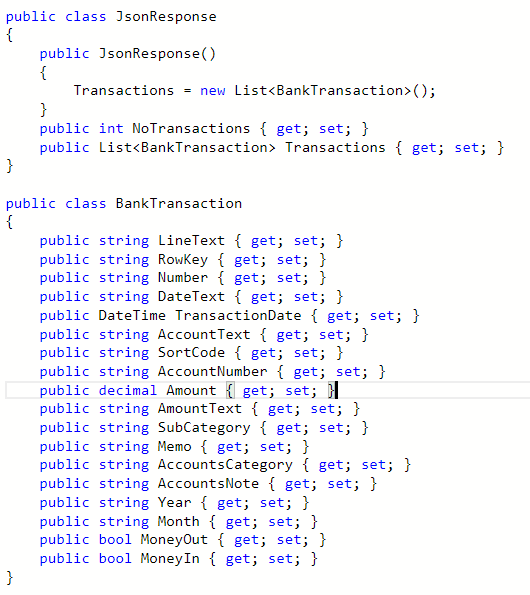
Response Object
Below is an picture of the response object returned from the functions so you can see its just an object wrapping a list of transactions.
Logic App – Load Single Transaction
Once I have my data in a nice JSON format, the parent Logic App would loop the records and call the child Logic App for each record. Below is a picture of the child Logic App.
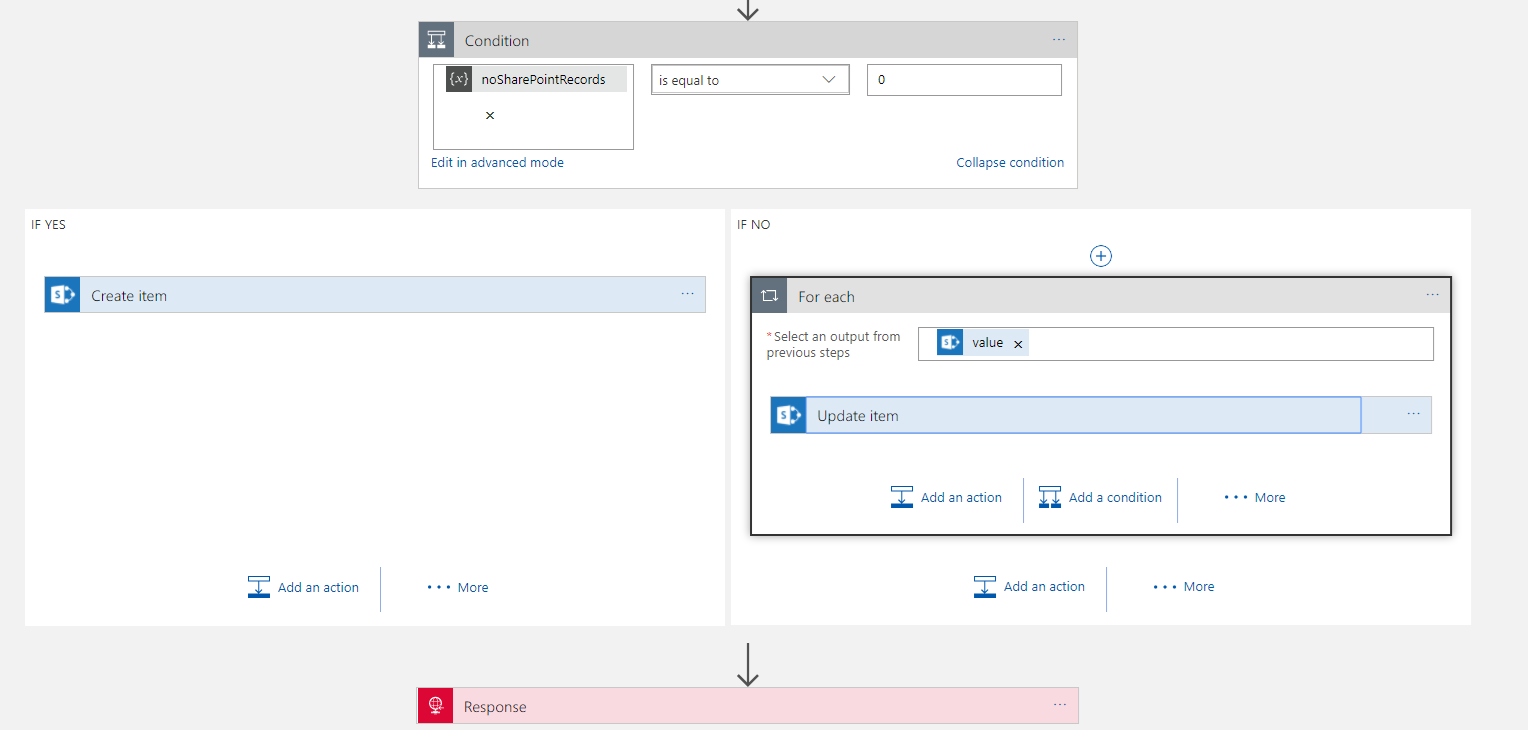
In this next section I am going to talk about how I implemented the solution. Please note that while this works, I did have a chat with Jeff Holland afterwards and he advised me on some optimisations which I am going to implement which will make this work a little nicer. I am going to blog this as a separate post but this is based on me working through how to get it to work with designer only features.
What’s interesting about this Logic App was the hoops to do the upsert style functionality. First off I needed to use the SharePoint Get Items with a query expression to “Title eq ‘#Row Key#’”. This would take the row key parameter passed in and then get any matches. I also used the return max records 1 setting as there would only be 1 match.
I also initialized a variable which I then counted the number of records in the logic app array that was returned. In my condition I could check the record could to see if there was a match in the query of SharePoint which would direct me to insert or update.
From here the Insert Item action was very straight forward but the Update Item was a little more fiddly. Because get items was an array I needed to put the Update inside a loop even though I know there is only 1 row. In the upsert I could use either fields from the input object or the queried item depending if I want to change values or not.
At this point I now had a working solution which took me about 2-3 hours to implement and test and I now have migrated my bank transaction processing into Office 365. The Azure upfront cost for the solution was zero and the running costs is about 50 pence each time I process a file.
Summary
As you can see this integration solution is viable for a small business. The main expense is manpower to develop the solution. I now have a nice sandboxed integration solution in a resource group in my companies Azure subscription. Its easy to run and monitor/manage. The great thing is these kind of solutions can grow with my business.
If you think about it this could be a real game changer for some small businesses. When you think about B2B business, often its about how smoothly and well integrated two business can be that is the differentiator between success and failure. Typically big organisations are able to automate these B2B processes but now with Azure integration a very small business could be able to implement an integration solution on the cloud which could massively disrupt the status quo of how B2B integration works in their sector. When you consider that those smaller business also don’t have the slow moving processes and people/politics of big business this must create so many opportunities for forward thinking SME organisations.


 Aside from the main event, Saravana and his team also arranged for a few social events as well, including networking drinks after the first day, a dinner at Nando’s for the speakers, and another social evening for the BizTalk360 partners. They also presented each of the BizTalk360 product specialists with a beautiful award – an unexpected treat!