by Jeroen | Dec 12, 2015 | BizTalk Community Blogs via Syndication
What we learned when migrating a BizTalk Server 2006 farm (with multiple solutions/projects) to BizTalk Server 2013R2:
1. You need an intermediate step
Migrating BizTalk 2006 solutions directly to BizTalk 2013R2 (Visualt Studio 2013) is not supported. You will need to migrate the solution to BizTalk 2010 (Visual Studio 2010) first as an intermediate step. More information here in a MSDN forum thread. (nothing fancy in this one I must admit, but you need to take this step into account when estimating an upgrade…)
2. Install the latest BizTalk CU on your development machine
The fact that we needed an extra intermediate step in the migration process was no big deal in our situatuion. We had an emtpy VM with BizTalk 2010 and Visual Studio 2010 in place. This machine was installed a few years ago by a developer, but was never used. It had no BizTalk Cumulative Updates installed.
We didn’t have any issues when migrating simple BizTalk 2006 solutions. We migrated to BizTalk 2010 and then migrated to BizTalk 2013R2 on an other machine.
When migrating the more complex solutions (big orchestrations and lots of ASMX web ports), we started to experience some weird behaviour in Visual Studio 2010:
That last error lead us in the right direction: BizTalk Server 2010 CU2:
This issue might also occur when you try to build a BizTalk Server 2010 solution that was converted from a Microsoft BizTalk Server 2006 R2 or Microsoft BizTalk Server 2009 solution in Visual Studio 2010.
After installing BizTalk Server 2010 CU8 on our development machine (the latest update at that moment), we restarted the migration (from the original BizTalk 2006 solution) of those complex projects, without the need to replace anything. The whole migration process completed without any error!
So, spare yourself the misery and start with a fully up to date BizTalk 2010 development environment. Other blogs on the internet might suggest to fix the “mismatched ‘braces’ ‘{}’ error” error by manually editting the .odx file. This was not the correct fix in our case as the error kept returning after every other change in the orchestration.
by Jeroen | Dec 12, 2015 | BizTalk Community Blogs via Syndication
What we learned when migrating a BizTalk Server 2006 farm (with multiple solutions/projects) to BizTalk Server 2013R2:
1. You need an intermediate step
Migrating BizTalk 2006 solutions directly to BizTalk 2013R2 (Visualt Studio 2013) is not supported. You will need to migrate the solution to BizTalk 2010 (Visual Studio 2010) first as an intermediate step. More information here in a MSDN forum thread. (nothing fancy in this one I must admit, but you need to take this step into account when estimating an upgrade…)
2. Install the latest BizTalk CU on your development machine
The fact that we needed an extra intermediate step in the migration process was no big deal in our situatuion. We had an emtpy VM with BizTalk 2010 and Visual Studio 2010 in place. This machine was installed a few years ago by a developer, but was never used. It had no BizTalk Cumulative Updates installed.
We didn’t have any issues when migrating simple BizTalk 2006 solutions. We migrated to BizTalk 2010 and then migrated to BizTalk 2013R2 on an other machine.
When migrating the more complex solutions (big orchestrations and lots of ASMX web ports), we started to experience some weird behaviour in Visual Studio 2010:
That last error lead us in the right direction: BizTalk Server 2010 CU2:
This issue might also occur when you try to build a BizTalk Server 2010 solution that was converted from a Microsoft BizTalk Server 2006 R2 or Microsoft BizTalk Server 2009 solution in Visual Studio 2010.
After installing BizTalk Server 2010 CU8 on our development machine (the latest update at that moment), we restarted the migration (from the original BizTalk 2006 solution) of those complex projects, without the need to replace anything. The whole migration process completed without any error!
So, spare yourself the misery and start with a fully up to date BizTalk 2010 development environment. Other blogs on the internet might suggest to fix the “mismatched ‘braces’ ‘{}’ error” error by manually editting the .odx file. This was not the correct fix in our case as the error kept returning after every other change in the orchestration.
by ShaheerA | Jul 10, 2015 | BizTalk Community Blogs via Syndication
We’ve had a number of people run into the following issue so I just wanted to provide an explanation and solution.
Issue:
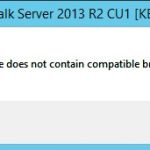
BizTalk 2013 R2 Cumulative Update 1 (CU1) install fails with “Package does not contain compatible branch patch” error:
Explanation:
This issue is happening in environments where a version of BizTalk Health Monitor (BHM) from the Microsoft Download Center has been placed within the BizTalk installation folder.
There are 2 branches of BHM:
- OOB BHM – shipped out-of-the-box with BTS2013 R2
- DLC BHM – shipped via Microsoft Download Center
OOB BHM has had 2 released versions so far. Version 2.0.0.0 shipped with BizTalk 2013 R2 RTM and version 3.1.5632.20684 shipped with BizTalk 2013 R2 CU1.
OOB BHM is located at SDKUtilitiesSupport ToolsBizTalkHealthMonitor within the BizTalk installation folder (default installation folder is C:Program Files (x86)Microsoft BizTalk Server 2013 R2)
DLC BHM has had many versions and is currently at 3.1.5654.28025.
The BTS2013R2 CU1 installer throws the above mentioned error if it finds any version of BHM within the BizTalk installation folder that is not a part of the OOB BHM branch.
We have seen this issue in environments where the user did one of the following:
- Replaced the OOB BHM binaries in the SDKUtilitiesSupport ToolsBizTalkHealthMonitor folder with a version of DLC BHM
- Created a new folder with a version of DLC BHM anywhere within the BizTalk installation folder
Solution:
To allow CU1 to install, simply move the folder containing DLC BHM out of the BizTalk installation folder and run the installer again.
Moving forward, never place any DLC BHM version within the BizTalk installation folder.
by ShaheerA | Jun 29, 2015 | BizTalk Community Blogs via Syndication
I originally published my BizTalk Terminator Not Cleaning Up Caching Items blog back in 2011 where I suggested to use the Terminate Multiple Instances (Hard Termination) task if the normal WMI-based Terminate Cache Instances task doesn’t clean up all the caching instances.
Since then, I’ve come across a caching cleanup scenario that even the hard termination task can’t handle. Basically, if there are cache message refs (in <HOST>Q or <HOST>Q_Suspended tables) that are missing their associated caching instance (in the Instances table), then even the hard termination task won’t be able to clean them up. The reason is that the Terminate Multiple Instances (Hard Termination) task finds the instances for termination by looking through the Instances table – so in this case it never sees the orphaned cache message refs.
If you run into this scenario, what you will see is that that once Hard Termination has successfully cleaned up all caching instances, BHM or MBV will continue to complain about cache messages and if you run the View Count of Cache Messages in All Host Queues task, it will show Cache Messages and Message Refs existing even though there are no Associated Cache Instances:
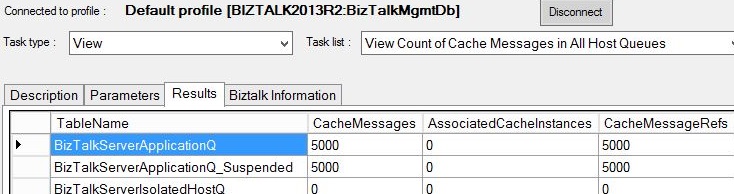
The workaround so far has been to to first run the DELETE Orphaned Messages In All Hosts task (to clean up the orphaned message refs) and then run the Terminate Multiple Instances (Hard Termination) task as mentioned in the previous blog (to clean up the cache instances).
I have also created a new cache cleanup task called Terminate Caching Items (Hard Termination). This task checks all the <HOST>Q, <HOST>Q_Suspended, and Instances tables for caching items associated with any host and in any state and cleans them all up. The purpose of this new task is to handle all cache item cleanup scenarios with one step – so the user doesn’t have to dig into the state of the cache items in their environment to know how to clean them up. So if BHM or MBV complain about cache items, simply running this task on the correct MessageBox should take care of it.
This new task is available in BHM v3.1 and Terminator v2.2.
If you were not already aware that Terminator has been integrated into the BizTalk Health Monitor (BHM) tool, see here.
by ShaheerA | Jun 29, 2015 | BizTalk Community Blogs via Syndication
I just wanted to let everyone know that BizTalk Terminator is now also available as a part of BizTalk Health Monitor (BHM) – the new BizTalk tool that integrates MBV and Terminator functionality into an MMC Snap-In that you can run as a part of your BizTalk Admin Console.
Update: Final version of standalone Terminator released.
More info here – including a comparison of the 2 versions of Terminator.
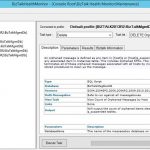
Terminator functionality can be found in BHM’s Maintenance node:
- You must be on BHM v3 or above to get the Terminator functionality
- Get BHM from https://www.microsoft.com/en-us/download/details.aspx?id=43716
- See here for a walkthrough of BHM v3 functionality – including Terminator integration.
- See the BHM blog at http://blogs.msdn.com/b/biztalkhealthmonitor for more information on BHM.
- So far, I’ve included the most popular Terminator tasks in BHM and plan to add more over time
- BHM officially supports BizTalk 2010, 2013, 2013R2, and 2016.
I’m going to continue updating standalone Terminator for now and it is still available here. At some point, I’ll probably end up creating a final build of the standalone version and move all new development to BHM. I’ll update this blog once that decision is made.- Standalone Terminator tool is no longer being updated. The final version of standalone Terminator is v2.5. All new development (including BTS2016 support) is happening in BHM Terminator.
- MBV is no longer being updated and the last update to it was in July 2014. To make sure you are using the latest MBV repository with the latest rules/queries, be sure to move to BHM.
by Tord Glad Nordahl | Jan 27, 2015 | BizTalk Community Blogs via Syndication
We all know that the focus at Microsoft is Mobility first and cloud first at the moment. AS some of you have found out I’m no longer in the MVP program since I joined Microsoft January 1st.
Microsoft still focus on BizTalk Server and BizTalk in the cloud, however as time flies and costumer explains there needs and current struggles Microsoft listens. MABS as we know if just spun off a child. This child is now a Microservice (to be specific many micro services). This solution will work both in the cloud and on premise. The biggest win is that this will be available as GA sometime around June, and is currently in preview.
The big different between MABS and Micros services is the way it works, Micro services is a part of IIS and can run both on site and in the cloud. Micro services will also be shipped as a part of BizTalk that’s expected to be released 6 months after the next windows server version.
Many people have asked me why Microsoft states that there will be a CU for BizTalk ever three months but that this is not happening, the reason for this is because the lack of bugs (yeah, there are to few hotfixes to cumulative them into a CU). a couple of days ago CU 7 for BizTalk Server 2010 was released 5 months overdue all because of the lack of fixes, Microsoft says that as long as there is less then 15 fixes Microsoft don’t create a CU (don’t worry though, if you have one of the bugs Microsoft will supply you with a private build that is fully supported).
Some people might be afraid that I’m moving away from the BizTalk space now that I joined Microsoft (worry not) my key focus as a Technology Solution Professional (TSP) is the data platform stack which includes BizTalk, BI, SQL and Azure. and I am lucky to still do a lot of BizTalk.
by Tord Glad Nordahl | Aug 25, 2014 | BizTalk Community Blogs via Syndication
We’re doing it again, and we are inviting you to join our BizTalk Innovation Day in Oslo.
Sign up here: BizTalk Innovation Day Sign up
For the third time the BizTalk Crew (Steef-Jan Wiggers, Sandro Pereira, Nino Crudele, Saravana Kumar and me) are hosting the BizTalk Innovation Day, one whole day with hardcore BizTalk!
We have decided to invite Cloud specialist Richard Sertoer from USA to tell us more about the future of integration both on-prem and in the cloud.
“The next decade looks to be one of the most disruptive in the short history of IT. New computing and architecture paradigms, an exploding number of connected devices, and new organization models have all directly impacted what systems integration will look like in the years ahead. What challenges has the cloud introduced? How does a DevOps commitment impact my integration approach? What role does integration play in the “internet of things”? In this session, we’ll talk about some of the mega-trends in the industry and how that may impact your approach to integration today and tomorrow.”
Steef-Jan Wiggers will give us more information around Microsoft Azure BizTalk Services (MABS)
“Microsoft Azure BizTalk Service (MABS) is almost available to us for year. It is a newcomer in the world of integration Platform as a Service (iPaaS) and promising contender for the sweet spot in the Gartner’s Magic Quadrant. This service in Azure has a lot offer and can provide different means of integration in the changing IT world of on premise ERP systems, services, cloud and devices. In this session the audience will learn where the Microsoft Azure BizTalk Service stands in middle of the iPaaS world, what it has to offer today and what the road map will look like in the future. During the session, the audience will also see demo is showcasing the various service features from a development, deployment and operations perspective.”
Sandro Pereira will announce a new whitepaper and give us a detailed overview of the new “Transform Designer” in MABS “.
“Migrating current BizTalk Server projects to BizTalk Services or starting new BizTalk Services projects can provide some challenges because although the developing experience is very similar, we are still talking about a new integration platform on Azure, and one of the main differences is the way we apply messages transformation with the new Transform Designer.
In this session, we will see the main differences between BizTalk Mapper Design (BizTalk Server) and the Transform Designer (BizTalk Services).”
Nino Crudele will talk more about how to “Develop as an Integration person”.
“After the London session, thinking like an integration person, Nino Crudele will speak about the real approach in a real development environment. There exists a lot of strategies, theories and philosophies about what the best strategies to use during development, some of them are very useful, other expensive, other very wrong.
In this session, Nino will present his personal approach and mining about development in real, considering all important topics for a good BizTalk developer.”
Saravana Kumar is repeating his known announcements at the BizTalk Innovation Day in Norway by releasing some brand new awesome feature in BizTalk360:
“BID Norway kind of became our inaugural place for introducing major versions. Last year we showcased version 7.0 to the public at BID, Norway. Since then we were constantly adding new features to the product and accelerated our development process. We worked on some exciting features like Graphical Message Flow, Throttling Analyzer, Business Rules Visualizer, Managed Services etc. Lot of these new features are designed in helping BizTalk customers to improve their support/operations/monitoring efficiency. In this presentation, Saravana Kumar will showcase the top 10 features we added since our last BID visit. We may be in a position to showcase some of the bits that’s going to come in 8.0 planned for end of this year.”
Myself (Tord Glad Nordahl) will be talking more about how developers and admins can co-exist together in harmony.
“The fight is on, and I am ready to provide you with the best ways and ideas on how to effectively work better together as a team, who messes up what, and how can we collaborate better. And I’ll share some of the secrets from both world, follow the rules and see how much more effective your team can become.”
Early bird is available till September 7th, so hurry up. We have a maximum cap, and the tickets are running out fast!!
Sign up here: BizTalk Innovation Day Sign up
by Tord Glad Nordahl | Aug 14, 2014 | BizTalk Community Blogs via Syndication
We all know that debatching should be done in the receive pipeline, I’ve yet to see any really good scenarios where you shouldn’t, but I know there is some (debatching in the orchestration can give you a huge performance loss in BizTalk).
So, I am the admin, and I rarely do development (after all, drag and drop development isn’t challenging enough for me).
I sometimes use BizTalk to help me do some jobs I’d rather not do manually. Like inserting something in a database if I have a million rows in an XML message, or if just want to play drag and drop with my kids. And I came into a case where debatching an XML file was essential for me and my kids in order to have some fun (the oldest 2 and 4 years, they need a little challenge). I looked at a few articles on the internet and none of them were really “easy to understand”. So I decided to make one on my own. Let’s just put this post in the “DevOps” category. In this example I’m using VS 2013 and BizTalk 2013 R2.
- Create a new BizTalk Project (I called mine “SimpleDebatching“) but you can name it anything you want, it won’t impact any other code in this tutorial
- Right click your project in the “Solution Explorer” and choose “Add” and “New item…“
- Click once on “Schema” and add a friendly name to it. I called mine “Orders“
- Rename the “Root” name into “Order“.
- Right click the root name “Order” and choose “Insert Schema Node” and “Child Field Element“
- Do step 5 a total of four times with the following names “orderId“, “orderDate“, “orderPrice” and “orderStatus“
- If you now open the schema we named “Orders” and expand all the elements it will look like this

- And now a pet on your back, you’re doing great
- Now that we’ve come so far we need to understand the meanings of an envelope, people will trick you and tell you some technical ways of it.. Don’t mind them. its like any envelope, it has something in it, one or multiple papers/records.
- In the “Solution Explorer” right click the project and choose “Add” and “New Item…“
- Again, click once on “Schema” and give it a friendly name. In this case I called it “OrdersEnvelope“
- The “Schema Editor” pops up and we can see the root name is… “root“.
- Rename the root name into “OrderEnvelope“
- Right click “OrderEnvelope” and choose “Insert Schema Node“, and choose “Child Record”
- Name this child record “Orders“
- Get a cup of Coffee…
- Right Click the node “Orders” and choose “Insert Schema Node“, and choose “Any Element“
- Now click once on the “<Schema>” and take a look at the “Properties” window
- Locate the option “Envelope” change this from “(Default)” to “Yes” (do this for the “OrdersEnvelope” schema)
- Now go to the root node (OrderEnvelope) in the “OrdersEnvelope” schema and look at the “Properties” window again, find the “Body XPath“
- click the “magic/ellipse” button and drill till you see “Orders”
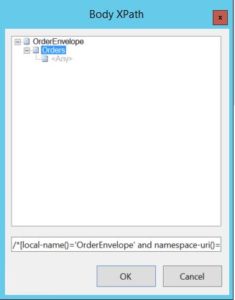
- Choose “Orders” and click “OK“.
- Pooof, and your schema “OrderEnvelope” is updated with the correct XPath
- Look at your self, and understand we still haven’t written one sentence of code..
- Go back to the “Solution Explorer” and right click the solution “SimpleDebatching“, choose “Add” and “New Item” and pick the “Receive Pipeline” name this “ReceiveAndDebatch“
- The Pipeline Component “drag and drop windows” appears.
- Expand the “Toolbox” windows and drag the “XML Disassembler” and drop it on the “Disassembler in the main window
- Click the newly added XML Disassembler and look at the properties window and find “Document Schema” click the ellipse button and locate your document schema “Orders”
- When you find this, click on it and hit the “Add” button, you will see the schema moving from the left window to the right
- Click “OK“
- Do the same with “Envelope Schema” but locate the “OrdersEnvelope” schema instaed
- Click “Add” and “OK“
- Now in order for us to deploy this code to BizTalk we need to do a few things
- Look at the “Solution Explorer” and right click the “Solution” Choose “Properties“
- In the “Properties window” that appear click “Deployment“
- Update the “Application Name” to “SimpleDebatching“
- Now we need to sign our assembly, so click the “Signing” and tick the box that says “Sign the assembly“
- From the drop down choose “<new…>” and create a new key
- Hit “CTRL+S” to save it
- Now back in the “Solution Explorer” right click it and choose “Deploy“
- Your code will now be deployed to your environment
- Open “BizTalk Administration Console” and locate your application “SimpleDebatching“
- Create a new Receive Port and name it “ReceiveDebatchPort“
- Create a receive location for this Receive Port and anme it “ReceiveDebatchLocation“
- Update the receive pipeline to your newly created recive pipeline “ReceiveAndDebatch“
- Create a new send port and name it “SendDebatch“
- Update the send pipeline to “XMLTransmit“
- Add a filter to your Receive Port by chooseing “BTS.ReceivePortName” and the value “ReceiveDebatchPort“
- Now restart your host instance and start the application.
- You can create a test message by generating an instance from the schema “OrdersEnvelope“
- Replace the “<any>” tag with a generated instance from the “Orders” schema (the more you add, the more records)
- Put the file in the in folder and see what happens.
So, you’ve done it, made a cool application, with drag and drop.. no coding.
Thanks for The help Erik Thue. 🙂 the best BT Dev in Bouvet
by Tord Glad Nordahl | Jun 10, 2014 | BizTalk Community Blogs via Syndication
So I guess most of you are aware that benchmarking of the environment and your applications are critical for your environment, when it comes to tuning and to see how well your applications are performing, we often end up with requirements like “We need to transfer 100 messages a minute” we all go “okay” but how good is it in the end, and where is the biggest bottleneck?
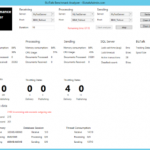
I spent hours using performance counters and parsing them through PAL to get the information I needed to estimate the throughput we were giving and where the bottleneck was located. After doing this for too long I decided to create a simple WPF application to give me some of the data I needed, although there still is some elements missing I get some of the important data in one view.
Based on the duration of the test the results is gathered and you get both live and somewhat historical data when the test is done.
The program mainly use the performance counters, but some SQL queries to get environmental information and some simple C# commands to restart hsots. The tools is still in beta and is under “development” which means I still release extra stuff to it when I need something I don’t have there, if you have any questions please let me know.
you can download the tool (BizTalk Benchmark Analyzer) here: http://bba.codeplex.com/
Feel free to come with updates and improvements, the source code is out there.
by Tord Glad Nordahl | May 28, 2014 | BizTalk Community Blogs via Syndication
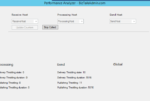
So, how often do you benchmark. We got the BizTalk Benchmark Wizard to indicate how your environment is doing. So I decided to go above and beyond and make something for you guys. But I want your input. What is the biggest struggles you have when it comes to benchmarking, and maybe I’ll implement them into the tool.
It’s currently based in Windows Form (oh how I hate windows form and C# at the moment.
I’m adding features as they come along and I hope to be able to give you a great tool soon!
Here is a little sneak peak
Let me know what you are struggling with and maybe it will be a feature. And of course the program itself will be free for all! (btw. it works with all versions of BizTalk from 2006 – 2013 (even 2013 R2))

