by Eldert Grootenboer | Dec 6, 2016 | BizTalk Community Blogs via Syndication
In this post, I will show how we can use Visual Studio to write Azure Functions and use these in our Logic Apps. Azure Functions, which went GA on November 15th are a great way to write small pieces of code, which then can be used from various places, like being triggered by a HTTP request or a message on Service Bus, and can easily integrate with other Azure services like Storage, Service Bus, DocumentDB and more. We can also use our Azure Functions from Logic Apps, which gives us powerful integrations and workflow, using the out of the box Logic Apps connectors and actions, and placing our custom code in re-usable Functions.
Previously, our main option to write Azure Functions was by using the online editor, which can be found in the portal.
However, most developers will be used to develop from Visual Studio, with its great debugging abilities and easy integration with our source control. Luckily, earlier this month the preview of Visual Studio Tools for Azure Functions was announced, giving us the ability to write Functions from our beloved IDE. For this post I used a machine with Visual Studio 2015 installed, along with Microsoft Web Developer Tools and Azure 2.9.6 .NET SDK.
After this, our first step will be to install Visual Studio Tools for Azure Functions.
Now that the tooling is installed, we can create a new Azure Functions project.
Our project will now be created, and we can start adding functions to it. To do so, rightclick on the project, choose Add, and the New Azure Function…. This will load a dialog where we can select what type of function we want to create. To use an Azure Function from a Logic App, we need to create a Generic Webhook.
For each function we add to our project, a folder will be created with its contents, including a run.csx where we will do our coding, and a function.json file containing the configuration for our Function.
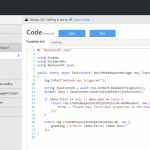
For this sample, let’s write some code which receives a order JSON message, and returns a message for the order, accessing the subnodes of the json message.
#r "Newtonsoft.Json"

using System;
using System.Text;
using System.Net;
using Newtonsoft.Json;

public static async Task<object> Run(HttpRequestMessage req, TraceWriter log)
{
    string jsonContent = await req.Content.ReadAsStringAsync();
    dynamic data = JsonConvert.DeserializeObject(jsonContent);

    var toReturn = new StringBuilder($"Company name is {data.Order.Customer.Company}.");

    foreach (var product in data.Order.Products)
    {
        toReturn.Append($" Ordered {product.Amount} of {product.ProductName}.");
    }

    return req.CreateResponse(HttpStatusCode.OK, new { greeting = toReturn });
}
|
As you can see, by using the dynamic keyword, we can easily access the JSON nodes.
Debugging
Now one of powers of Visual Studio is it’s great debugging possibilities, and we can now debug our Function locally as well. The first time you will start your Function, you will get a popup to download the Azure Functions CLI tools, accept this and wait for the tools to be downloaded and installed.
Once installed, it will start a local instance of your Function, and as we created a Generic Webhook Function, give you an endpoint where you can place your message.
Using a tool like Postman, we can now call our function, and debug our code, a great addition for more complex functions!
Deployment
Once we are happy with how our Function is working, we can deploy it to our Azure account. To do this, rightclick the project, and choose Publish…. A dialog will show, where we can choose to publish to a Microsoft Azure App Service. Here we can select an existing App Service or create a new one.
Update any settings if needed, and finally clock Publish, and your Function will be published to your Azure account and will be available for your applications. If you make any changes to your Function, just publish the updated function and it will overwrite your existing code.
Now that we have published our Function, let’s create a Logic App which uses this function. Aagain, you could do this from the portal, but luckily there is also the possibility these days to create them from Visual Studio. Go to Tools and choose Extensions and Updates. Here we download and install the Azure Logic Apps Tools for Visual Studio extension.
Now that we have our extension installed, we can create a Logic App project using the Azure Resource Group template.
This will show a dialog with various Azure templates, select the Logic App template.
Now rightclick the LogicApp.json file, and choose Open With Logic App Designer, and select and account and resource group for your Logic App.
This will load the template chooser, where we can use an predefined template, or create a blank Logic App, which we will use here. This will open the designer we know from the portal, and we create our logic app. We will use a HTTP request as our trigger. If you want, you can specify a JSON schema for your message, which can be easily created with http://jsonschema.net/. Now lets add an action which uses our Function, by clicking New step and Add an action. Use the arrow to show more options, and choose Show Azure Functions in the same region. Now select the function we created earlier.
For this example we will just pass in the body we received in our Logic App, but of course you can make some serious integrations and flows with this using all the possibilities which Logic Apps provide. Finally, we will send back the output from our function as the response.
Deployment
Rightclick on your project, and choose Deploy and selecty the resource group you selected earlier. Edit your parameters, which will include any connection settings for resources used in your Logic App as well. Once all your properties have been set, click OK to start the deployment.
Note that is you get the error The term ‘Get-AzureRmEnvironment’ is not recognized as the name of a cmdlet, function, script file, or operable program. you might have to restart your computer for the scripts to be loaded in correctly.
Now that your logic app is deployed, you can use Postman on your Logic App endpoint, and you will see the output from your Azure Function.
The code with this post can be found here.
by Rob Callaway | Dec 1, 2016 | BizTalk Community Blogs via Syndication
Introduction
This blog is usually reserved for technical posts and QuickLearn Training announcements, but something happened across my Facebook feed a while back and I’ve found myself revisiting it in my mind over and over so I have some thoughts / predictions / musings that I want to express.
Some Background
I’ve been training people how to be BizTalk Server developers and administrators since 2005. That’s a pretty long time; and in that time I’ve hit the job market looking for a new position on only a couple of occasions because I really love my job.
But I know that I’m one of the lucky ones. There are plenty of people out there looking to advance their careers. Others who hate the company they work for. Plenty of people feel stuck in dead-end positions. And there’s definitely a few looking to completely start over.
What’s the Point?
This brings me to my point. If any of that sounds like you, or someone you know, check out LinkedIn’s “Top Skills That Can Get You Hired in 2017” blog post (this is the thing that I saw on my Facebook feed). In it they list the top 10 skills based on the jobs listed on LinkedIn in 2016.
Of course, as someone who specializes in integration, I was pleased as punch to see Middleware and Integration Software in the #4 spot globally. Furthermore, Cloud and Distributed Computing is in the #1 spot (not surprising).
Naturally I couldn’t help but think of Logic Apps since it’s the convergence of those two categories. Logic Apps are in a position to change the game for a lot of organizations and people. I think we’re going to see a dramatic increase in the number of organizations / development teams looking for “cloud” developers with an integration background.
Don’t Tell Me BizTalk Is Dead, Because It’s Not
Just because that flashy new cloud-based integration platform comes rolling down the street doesn’t mean I’ve forgotten about BizTalk Server (my first love). Microsoft has increased their investment in BizTalk Server over the past 2 years, and just released BizTalk Server 2016 (I’m still waiting for Nick Hauenstein to start writing about all the new features). In the past year, Microsoft has changed its tune regarding Azure.
The new buzzword is Hybrid. I don’t want to dismiss that as a buzzword though. Hybrid (or more specifically, Hybrid Integration) is blending new Azure or cloud-based systems with existing on-premises systems. No one is going to abandon all of their on-premises investments overnight to adopt a cloud platform. The companies that are moving to the cloud are doing so slowly and deliberately one system / project at a time. No one is saying “Pack everything up Ted, we’re moving to the cloud.” Instead cloud services are used for new development.
As more workloads start running in the cloud, organizations need skilled people to connect those cloud services to data and services that live on-premises. BizTalk Server is a prime candidate to be your hybrid integration platform. Gartner estimates that by 2020, 75% of large organizations will have a hybrid integration platform. Those companies are going to need savvy integration professionals to build those platforms.
We Live in a Connected World
Our world seems to get more connected day-by-day. Mobile apps and IoT (Internet of Things) have changed the way people live their lives and neither is fading away any time soon. Oh yeah, I almost forgot to mention that in the LinkedIn article, Mobile Development holds the #7 spot.
That Gartner report I referenced a second ago states that 70% of mobile app development costs are related to integration and that integration represents 50% of the cost in IoT solutions. You know that all these systems don’t magically connect to each other. Someone has to build those connections, and that someone could be you.
Becoming a Unicorn
That sea-change the cloud was supposed to bring… it’s here. Companies have started adopting cloud technologies and they aren’t going to stop. As integration professionals, we are in a unique position to capitalize on this change. But with the demand as high as it is, you’re going to have to stand out. If your skills included integration (on-premises and cloud) + cloud development + mobile development, you’d be poised to land some of the most coveted jobs.
I didn’t intend for this to be a sales pitch, but if you need help getting there, QuickLearn Training can help you out. Our courses on BizTalk Server (updated for BizTalk Server 2016 starting in January 2017) and our Cloud-Based Integration Using Azure Logic Apps course will equip you with the deep skills you need to become the elusive unicorn that companies are looking for.
On the other side of the coin, if you’re looking to get some unicorns on your team, they are hard to find and will come at a cost. Honestly, you’re probably better off making your own unicorn. Time and again I hear from customers about horror stories where they hired someone who wasn’t a good fit. Or the consultant they contracted with disappeared and now they are stuck without support. I genuinely think the best option for most teams or organizations is to find the person you want and then help them gain the skills you need.
I’m not boasting when I say that I’ve had more than a handful of students tell me that my course(s) helped them find a direction for their career; if anything it is a rather humbling experience to realize that you have played a role in changing their lives. As a trainer, I love that my job is to make other people’s lives better, and I’d like to help make yours better too.
I know that I speak for everyone here at QuickLearn Training when I say, make 2017 awesome by becoming a unicorn!

by stephen-w-thomas | Nov 23, 2016 | Stephen's BizTalk and Integration Blog
I have been working heads down for a few weeks now with Windows Azure Logic Apps. While I have worked with them off and on for over a year now, it is amazing how far things have evolved in such a small amount of time. You can put together a rather complex EDI scenario in just a few hours with no up front hardware and licensing costs.
I have been creating Logic Apps both using the web designer and using Visual Studios 2015.
Recently I was trying to use the Transform Shape that is part of Azure Integration Accounts (still in Technical Preview). I was able to set all the properties and manually enter a map name Then I ran into issues.
I found if I switched to code view I was not able to get back to the Designer without manually removing the Transform Shape. I kept getting the following error: The ‘inputs’ of workflow run action ‘Transform_XML’ of type ‘Xslt’ is not valid. The workflow must be associated with an integration account to use the property ‘integrationAccount’.
What I was missing was setting the Integration Account for this Logic App. Using the web interface, it’s very easy to set the Integration Account. But I looked all over the JSON file and Visual Studios for how to set the Integration Account for a Logic App inside Visual Studios.
With the help of Jon Fancy, it turns out it is super simple. It is just like an Orchestration property.
To set the Integration Account for a Logic App inside Visual Studios do the following:
1. Ensure you have an Integration Account already created inside the subscription and Azure Location.
2. Make sure you set the Integration Account BEFORE trying to use any shaped that depend on it, like the Transform Shape.
3. Click anyplace in the white space of the Visual Studio Logic App.
4. Look inside the Property Windows for the Integration Account selection windows.
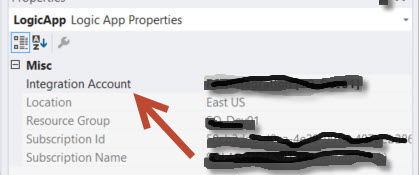
5. Select the Integration Account you want to use and save your Logic App.
It’s that simple!
Enjoy.

by Rene Brauwers | Nov 8, 2016 | BizTalk Community Blogs via Syndication
Hey you, yes you! I reckon you ended up reading this blogpost due to the enticing title. Well awesome, now that I have your attention.
Like all things in nature, things evolve. Well they either evolve or get instinct. By sharing this post I hope you as an Integration Specialist want to evolve as well and don’t get extinct.
So how would you know if your existence as an Integration Specialist is not about to get obliviated from this world? Well keep on reading..
Let’s start off with: Yes BizTalk Server is here to stay for the foreseeable future. BizTalk Server 2016 was just released and once again this is proof that Microsoft is still heavily investing in this great , one of a kind, integration platform.
You might wonder, how does Microsoft keep it alive? Well Microsoft is doing so by constantly evolving as it understands the business needs and the fact that integration space is changing and now both spans on-premises as the cloud and a clear example of this is to be seen with the new release of BizTalk Server 2016. This release a new adapter is being introduced which allows us to seamlessly expand into the Hybrid Integration Space, the logic app adapter for BizTalk. Besides this adapter we offcourse still have our good ‘old’ friend the SB Messaging adapter (service bus).
Anyways I am digressing. What about that thing I mentioned before; about becoming extinct as an Integration Specialist? Well, please allow me to elaborate.
Isn’t it true that when you decided to take up on a career within IT you were fully aware that you would need to keep your skillset and knowledge constantly up to date (I.e.; keep on learning new and exciting stuff). Well how many of you, actually do, keep up to date; and I mean really up to date, thus not only reading up on the new stuff but actually getting your hands dirty.
Most of the integrators I talk to, work day in day out with BizTalk Server, and although reading up on for example Logic Apps, Service bus, Azure functions, App Services, Service Fabric, Azure API management and so forth most of them have not really gotten their hands dirty and played around with these awesome services in Azure which open up new ways with regards to integration capabilities.
If I ask them why? I Usually get the same answer, no time, our company does not allow for us to use the Cloud, no need as we use BizTalk, not mature enough, don’t know where to start, it changes all the time, and so on. Well I do understand these answers and I most certainly do understand that ideally we would love to be able to learn these new skills in our boss’ time, but hey let’s wake up! You can decide to wait until this time arrives or you simply start investing in yourself! Anyways the longer you wait the harder it will get and that day where you will be deemed extinct will only get closer and closer. So please do not let this happen, don’t become extinct, evolve! The last thing you want is to end up like Milton from Office Space (https://www.youtube.com/watch?v=Vsayg_S4pJg)
In order to evolve you will need to expand your knowledge and be able to apply everything you learned (think integration patterns, integration best-practices etc.) in this new Hybrid world; and yes sorry to tell you; you won’t get far by merely clicking, copy and pasting and dragging and dropping. No you will need to level-up your foundational skills.
At this point you might ask yourself, how do I level-up my foundational skills and where do I start? Well it’s actually simpler than you might think especially considering that the chances are pretty big that you are a seasoned BizTalk Specialist which is able to solve the most complex integration challenges using all the capabilities within BizTalk, sure some areas are more familiar than others but overall; you have the skills, capabilities , know all the EAI patterns, love to decouple services and you know that Microservices is nothing more than another implementation of SOA and heck yeah you’ve been doing that for years. So yes you have a great foundation and that on itself gets you halfway there.
Nevertheless you will have to level-up and that my friend is only to be done in one way and that’s by exposing yourself to these new technologies and start experimenting. In short make those flying hours and don’t decide to be a passenger, become the pilot. Make mistakes, because by making mistakes we learn. If you are stuck reach-out to the community, attend user group meetings and so on and before you notice you will have skilled up and you are one step further away from getting extinct and one step closer to evolving even further.
So in fact it is pretty simple to ensure you will not get extinct, all it takes is that additional push in the right direction to get you moving and hopefully I’ve been able to contribute to this little push. So don’t wait any longer and get started
- If you don’t have an Azure Subscription, sign up here for a free trial and receive $260 in credits – or join visual studio dev essentials and get $25 dollar of Azure Credits per month for a year
- Have a look at one of the following resources to learn more about Logic Apps, API Management, Service Bus and BizTalk Server 2016
- Logic Apps
- API Management
- Service Bus
- BizTalk Server 2016
If you are in Sydney Australia, please do check out the Hybrid Integration Platform Usergroup and feel free to join us for one of our meetups!
Cheers
René
by Steef-Jan Wiggers | Oct 31, 2016 | BizTalk Community Blogs via Syndication
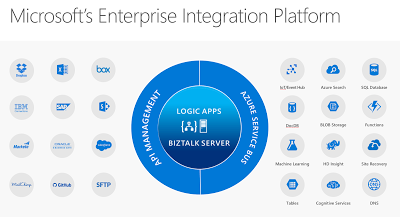
Just recently Microsoft has released its tenth version of BizTalk Server: BizTalkServer 2016. This latest version will bring the cloud closer to the enterprises with connectivity to Azure Service Logic Apps. The Logic App adapter will close the gap with regards to connectivity with SaaS solutions. The Logic Apps has a myriad of connectors of various SaaS solutions like Dropbox, GitHub, Marketo, Salesforce and with Azure Services like DocDb, Machine Learning and Functions.
SaaS connectors that will grow in numbers in the near future and connectors to Azure Services. Connectors that provide connectivity to anything, anywhere, which is basically the key driver for integration. Hence the centralizing Logic Apps and BizTalk Server at the heart of Microsoft’s Enterprise Integration Platform.
We have arrived in the digital age, where applications and data is everywhere. With all types of devices, we are connected 24/7 and surrounded by data we consume. And enterprises need to be connected and have access to data in- and outside their data center or cloud. Therefore, integration plays an essential role that it always had.
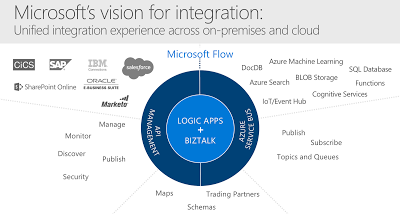
Microsoft technology has evolved over the years and matured into the tools we can use in this digital age to build integrations that fulfill current business needs. BizTalk Server, and Logic App each serve the need for enterprise requirements for integration and can work together nicely. And this Microsoft’s vision for integration i.e. the unified integration experience.
BizTalk Server can provide deep integration with divers line of business systems like SAP and Oracle and act as a gateway to the cloud. Logic Apps can make enterprises more agile to quickly deploy small integration solutions with minimal overhead and lead time. Both collaborate well with API Management and the Azure Service Bus, two other key Azure Services, forming Microsoft Integration Platform. A platform designed and built for the digital age!
Cheers,
Steef-Jan
Author: Steef-Jan Wiggers
Steef-Jan Wiggers is all in on Microsoft Azure, Integration, and Data Science. He has over 15 years’ experience in a wide variety of scenarios such as custom .NET solution development, overseeing large enterprise integrations, building web services, managing projects, designing web services, experimenting with data, SQL Server database administration, and consulting. Steef-Jan loves challenges in the Microsoft playing field combining it with his domain knowledge in energy, utility, banking, insurance, health care, agriculture, (local) government, bio-sciences, retail, travel and logistics. He is very active in the community as a blogger, TechNet Wiki author, book author, and global public speaker. For these efforts, Microsoft has recognized him a Microsoft MVP for the past 6 years. View all posts by Steef-Jan Wiggers
by John Callaway | Aug 11, 2016 | BizTalk Community Blogs via Syndication
QuickLearn Is Excited to Announce the Availability of the Improved Logic Apps Course
July 25th was a big week for Microsoft’s Azure Logic Apps with the announcement that Logic Apps Reaches General Availability, and it was a big week for QuickLearn as well. We have been working for months on honing our expertise with Logic Apps so that we would be ready to deliver the new and improved Cloud-Based Integration Using Azure App Services course in conjunction with Microsoft’s release. This course has been expanded from the original three-day version to a five-day version that includes a full one-day workshop where attendees build a complete integration solution using Logic Apps, Azure Service Bus, and various API App connectors.
Nick Hauenstein and Rob Callaway worked tirelessly over the last few weeks putting the finishing touches on what I have to say is a killer course. The rest of the team provided support in testing and editing but those two did the heavy lifting in truly getting up to speed. Nick did a Herculean job delivering the course to a truly international audience with attendees in London, Sydney and of course our office in Kirkland.
I had the opportunity to attend the class as a student. I have been following the development of Azure App Services as I’m sure many of you have, and felt I had a pretty good handle on how they all work, but I have to admit I came away with a much better idea of how all the parts can work together. Nick has a way of building great scenarios and explaining how the available parts can be used to build a complete integration.
For those of you keeping track, the timing meant that Nick had to shift gears mid-week as Microsoft pushed the GA bits into production. It was interesting to see things work one way in one demo and literally an hour later work a different way!
We also had a real treat when Jeff Hollan, Program Manager for Azure Logic Apps dropped by and spent about an hour talking about Logic Apps and answering questions for the students. Its great being so close to the Microsoft campus, we always appreciate visits from our friends there.
What Does the Future of Integration Look Like?
I wish I had a nickel for every time a student has asked that question in class. It has been puzzling since the story coming out of Redmond has been evolving over the last few years. Fortunately, the story is a good one.
Everyone needs integration. For years if you wanted to build a robust integration solution using .NET, you really only had two options. Start from scratch and build the whole thing yourself, a very time consuming process, or buy BizTalk Server. Although BizTalk is an awesome and powerful product, the learning curve is rather steep and the cost of ownership often high. What was needed was integration for the little guys.
Azure App Service is (becoming) the solution to this problem. Azure App Service is a fully managed platform for web, mobile, and integration scenarios. Our course focuses on connecting your on-premises resources to cloud services such as Service Bus and on building complexity into your solutions via Logic Apps. Although it isn’t a replacement for BizTalk, it shares many of the capabilities and features that BizTalk developers would be familiar with.
Does that mean you don’t need BizTalk anymore? Not at all! BizTalk still provides a very powerful processing engine whether you choose to run it in Azure or on your own hardware. Azure App Services simply provide an option to do some of the things BizTalk is capable of. It is probably best suited for .NET developers who aren’t familiar with BizTalk Server but are looking to integrate with Azure resources.
From time to time I have been asked about how Microsoft Flow fits into all of this. Flow uses the same connectors and services that are built into App Services, it just doesn’t have the ability for developers to extend it using Logic Apps and API Apps. With Flow you are moving into a home that is all furnished for you. With Azure App Services you have the house and a toolbox and a pile of wood to finish it off just the way you want it.
Is This the Right Course for You?
If you happen to be new to integration and are looking for a good place to start, this course is it. On the other hand, if you are an experienced BizTalk developer and you are interested in exploring the future, this is also the course for you. The amount of crossover between the two products is surprisingly small as far as the tools that you use, although of course the concepts will seem very familiar to you.
There are still seats available for the September 19th delivery being presented by Rob Callaway at out Kirkland location (also available for remote attendance). If you are in Europe, you have two opportunities coming up. I will be delivering the class in Oslo Norway with our partner Bouvet on October 24th or you can celebrate Halloween with an American (October 31st) with our partner InfoSupport in Utrecht, Netherlands.
by Daniel probert | Aug 3, 2016 | BizTalk Community Blogs via Syndication
In case you missed it, Logic Apps moved to General Availability last week.
At the same time, pricing for Logic Apps gained a new option: Consumption charging i.e. pay by use.
I‘ve been talking to a number of clients about this new pricing model, and every single one has expressed concerns: it‘s these concerns that I wanted to touch upon in this post. Most of these concerns are based around the fact that these customers feel they can no longer accurately calculate the monthly cost for their Logic Apps in advance.
I also feel that the whole discussion might be a bit overblown, as once you remove the cost of having to pay for servers and server licenses for a traditional on-premises application (not to mention the run and maintain costs), Logic Apps can be significantly cheaper, regardless of which pricing model you use.
Old Pricing Model vs New
Prior to GA, Logic Apps were charged as part of the App Service Plan (ASP) to which they belong: An App Service Plan has a monthly charge (based on the number of compute units used in the plan), but also throttles a Logic App once a certain number of executions are exceeded in a month (the limit changes depending on the type of ASP the Logic App uses).
Effectively the old way was Pay Monthly, the new way is Pay As You Go.
This table outlines the changes:
|
|
App Service Plan Model
|
Consumption Model
|
|
Static Monthly Charge
|
TRUE
|
FALSE
|
|
Throttling
|
TRUE
|
FALSE
|
|
Limit on Number of Logic App Executions
|
TRUE
|
FALSE
|
|
Pay per Logic App Execution
|
FALSE
|
TRUE
|
I can understand why Microsoft are making the change: consumption pricing favours those that have either a small number of Logic App executions per month (as they only pay for what they use); or who have large numbers of executions per month (and were therefore being throttled as they exceeded the ASP limits).
I‘m not sure yet if the ASP-style pricing model will stay: there‘s no mention of it any more in the Logic Apps pricing page, but you can still (optionally) associate a Logic App with an ASP when you create it.
How to select either pricing model when creating or updating a Logic App
When you create a new Logic App, you used to be able to select an App Service Plan: now this option is no longer available, and all new Logic Apps use the Consumption pricing plan by default.
However, if you have an existing Logic App and you wish to switch the billing model, you can do so via PowerShell here. You can also follow the instructions at the bottom of this blog post here (I suspect this will get surfaced in the Portal if both billing models are kept).
Why the new model can be confusing
Consumption pricing makes sense: one of the benefits of Azure is that you pay for what you use. Instead of paying upfront for an expensive license fee (e.g. SQL Server and BizTalk Server licenses) you can instead pay a smaller amount every month. A lot of businesses prefer this as it helps with cash flow, and reduces capital expenditure.
The main issue with consumption pricing for Logic Apps is that instead of paying for each execution of the Logic App, you‘re paying for the execution of the actions within that Logic App. And this is the problem, as a Logic App is opaque: when you‘re designing a solution, you may know how many Logic Apps you‘ll have, but you may not know exactly how many actions each will contain (or how many pf those actions will be executed) and this makes it difficult to estimate the runtime cost.
Up to now, it‘s been easy to work out what a Logic App will cost to run. And that‘s usually one of the first questions from a client: how much will this cost me per month.
But now, it‘s harder: instead of knowing exactly you have to estimate, and this estimate has to be based not only on how many times a Logic App will execute, but also *what* the Logic App will be doing i.e. if it will be looping, or if actions in an IF branch will execute.
Effect of the consumption model on development and testing
The main concern I (and others) have with the Consumption billing model is the effect it will have on development and testing: developers (and testers) are used to executing their applications with little or no cost (other than maybe the cost of an dev/test server and dev/test licenses).
Take a BizTalk Developer: chances are the BizTalk and SQL Server Licenses they are using came from an MSDN subscription, or they bought the Dev edition. In either case, they will execute their code during the development process without paying any attention to cost.
The same applies to testers.
An argument can be made that the cost per action of a Logic App is so low that this wouldn‘t be an issue (e.g. a reasonably complex Logic App with 50 actions per execution would cost 2.5p (4c) per execution. But the pennies do add up: imagine a corporate customer with 100 developers: each time those developers execute a Logic App like this, it costs the company £2.50 (US $4.00) – and that‘s just executing it once.
Microsoft will likely point out that an MSDN Subscription comes with free Azure credit, and that therefore there is no extra cost to execute these Logic Apps as they‘re covered in this free credit. But this doesn‘t apply to most of my clients: although the developers have MSDN, the free credit applies only to their MSDN subscription not the corporate subscription where they perform dev and testing. The MSDN subscriptions are usually used for prototyping, as they‘re not shared amongst multiple developers, unlike the corporate subscriptions.
So to summarise:
Consumption pricing could lead to:
- A preference against Test Driven Development due to perceived cost of executing code frequently against tests
- Corporates hesitant to allow developers to execute code during development whenever they want due to perceived cost
- A hesitation on performing Load/Perf Testing on Logic Apps due to the cost of doing so e.g. with our sample 50 action Logic App, executing it a million times for load testing would cost £4500 (about US $6000) – consumption pricing gets cheaper once you get over a certain number of actions (so a million actions is £0.00009 per action) – this is retail pricing though, some large customers will benefit from a volume licensing discount e.g. for an Enterprise Agreement.
Note: There is questionable value in performing Load/Perf Testing on Logic Apps, as there is little you can do to tune the environment, which is the usual rationale behind Load Testing (especially in a BizTalk environment). However, some level of testing may be required if your Logic App is designed to process multiple messages and there is either a time limit or the messages are connected in some way (e.g. debatching a request and then collating responses).
The solution
The solution (in my view) is to keep both billing models:
- ASP pricing can be kept for development/testing, which will have the effect of putting a cap on the cost of development and testing (although will hamper Load Testing). ASP pricing also benefits customers who have a reasonable number of executions per month, but aren‘t hitting the throttling limits. ASP pricing also allows for customer to try out Logic Apps for free by using the Free pricing tier.
- Consumption pricing can then be used for Production workloads, or for those who find that consumption pricing is cheaper for them for dev/test than ASP pricing
In addition, it would help if Microsoft provided more examples on monthly cost; provided some way to help calculate the monthly cost under the consumption model; and highlighted the overall reduction in cost through using Logic Apps for most customers. For example, if your Logic App is under the ASP pricing model, and you execute it, then the portal could tell you what that execution would have cost you under the consumption model (using retail pricing). Just an idea!
Let me know if you have other opinions, or agree/disagree with this.
by Nick Hauenstein | Jul 27, 2016 | BizTalk Community Blogs via Syndication
Today the Logic Apps team has officially announced the general availability of Logic Apps! We’ve been following developments in the space since it was first unveiled back in December of 2014. The technology has certainly come a long way since then, and is certainly becoming capable of being a part of enterprise integration solutions in the cloud. A big congratulations is in order for the team that has carried it over the finish line (and that is already hard at work on the next batch of functionality that will be delivered)!
Along with hitting that ever important GA milestone, Logic Apps has recently added some new features that really improve the overall experience in using the product. The rest of this post will run through a few of those things.
Starter Templates
When you go and create a new Logic App today, rather than being given an empty slate and a dream, you are provided with some starter templates with which you can build some simple mash-ups that integrate different SaaS solutions with one another and automate common tasks. If you’d still rather roll up your sleeves and dig right into the code of a custom Logic App, there is nothing preventing you from starting from scratch.
Designer Support for Parallel Actions
Ever since the designer went vertical, it has been very difficult to visualize the flow of actions whenever there were actions that could execute in parallel. No longer! You can now visualize the flow exactly as it will execute – even if there are actions that will be executing in parallel!
Logic Apps Run Monitoring
Another handy improvement to the visualization of your Logic Apps is the new runtime monitoring visualization provided in the portal. Instead of seeing a listing of each action in your flow alongside their statuses – with tens of clicks involved in taking in the full state of the flow at any given time – a brand new visualizer can be used to see everything in one shot.
The visualization captures essentially the same thing that you see in the Logic App designer, but shows both the inputs and the outputs on each card along with a green check mark (Success), red X (Failure), or gray X (skipped) in the top-right corner of the cards.
Additionally if you have a for each loop within your flow, you can actually drill into each iteration of the loop and see the associated inputs/outputs for that row of data.
Visual Studio Designer
There is one feature that you won’t see in the Azure portal. In fact, it’s designed for offline use – the Visual Studio designer for Logic Apps. The designer can be used to edit those Logic App definitions that you’d rather manage in source control as part of an Azure Resource Group project – so that you can take advantage of things like TFS for automated build and deploy of your Logic Apps to multiple environments
Unfortunately, at the moment you will not experience feature parity with the Azure Portal (i.e., it doesn’t do scopes or loops), but it can handle most needs and sure is snappy!
That being said, do note that at the moment, the Visual Studio designer is still in preview and the functionality is subject to change, and might have a few bugsies still lingering.
Much More
These are just a few of the features that stick out immediately while using the GA version of the product. However, depending on when you last used the product, you will find that there are lots of runtime improvements and expanded capabilities as well (e.g., being able to control the parallelism of the for each loops so that they can be forced to execute sequentially).
Be Prepared
So how can you be prepared to take your integrations to the next level? Well, I’m actually in the middle of teaching all of these things right now in QuickLearn Training’s Cloud-based Integration using Logic Apps class, and in my humble and biased opinion, it is the best source for getting up to speed in the world of build cloud integrations. I highly recommend it. There’s still a few slots left in the September run of the class if you’re interested in keeping up with the cutting edge, but don’t delay too long as we expect to see these classes fill up through the end of the year.
As always, have fun and do great things!
by Rob Callaway | Jun 9, 2016 | BizTalk Community Blogs via Syndication
One of the concerns that I have repeatedly heard from customers when we talk about Azure is application lifecycle management. If you do most of your resource deployment and management using the Azure Portal, then you probably picture a very manual migration process if you wanted to move your app from dev to test, or if you wanted to share your app with another developer.
A clear example of this occurred during a run of QuickLearn’s Cloud-Based Integration Using Azure App Service course when my students were quick to see that the Logic Apps they created was pretty much stuck where they created them. Moving from one resource group to another was impossible at the time, and exporting the Logic App (and all the API Apps it depended on) was only a dream, so the only option was to redo all your work in order to create the Logic App in another resource group or subscription.
Logic Apps and Azure App Service have come a long way since then and the QuickLearn staff has been working its collective noodle to come up with application lifecycle management guidance for Logic Apps using the tools that are available today, which will hopefully improve the way you go about deploying and managing your Logic Apps.
Some readers may already be aware of the Azure Resource Manager or ARM for short. For those who haven’t previously met my little friend I’ll give a short introduction of ARM and the tools that exist around it. ARM is the underlying technology that the Azure Portal uses for all its deployment and management tasks. For example, if you create any resource within a new Resource Group using the Portal it’s really ARM behind the scenes orchestrating the provisioning process.
“Great Rob, but why do I care?”
I’ll tell you why. There are tools designed around ARM that make it not only possible, but down-right easy to run ARM commands. For example, you can get the Azure PowerShell module or the Azure Command Line Interface (CLI) and script your management tasks.
There’s a little more to it though, you see, those Azure resources (Logic Apps, Resource Groups, Azure App Service plans, etc.) are complex objects. Resource Groups, for example, have dozens of configurable properties and serve as containers for other objects (e.g., Web Sites, API Apps, Logic Apps, etc.). Let’s not over simplify reality; your cloud applications aren’t made up of a single resource, but instead are many resources that work in tandem. Therefore, any deployment or management strategy needs to bear that in mind. If you want to pull back the covers on your own resources, head over to the Azure Resource Explorer and you’ll see what I’m talking about.
“It’s nice to have a command that I can run in a console window to create a Resource Group, but I need more than that!”
You’re right. You do need more than that. The way you get more is using ARM Templates. ARM Templates provide a declarative way to define deployment of resources. The ARM Template itself is a JSON file that defines the structure and configuration of one or more Azure resources.
“So how I do I get one of these templates?”
There are several ways that you can get your hands on the ARM Template that you want.
- Build it by hand – The template is a JSON file so I guess if you understand the schema of the JSON well enough you could write an ARM Template using Notepad, Kate, or Visual Studio Code. This doesn’t seem very practical to me.
- Use starter templates – The Azure SDK for Visual Studio includes an Azure Resource Group project type which includes empty templates for an array of Azure resources. These templates are actually retrieved from an online source and can be updated at any time to include the latest resources. This looks a lot more viable than using Notepad, but in the end you are still modifying a JSON file to define the resource that you want.
- Export the template – You can export existing resources into a new ARM Template file. The process varies slightly from one type of resource to the next but you essentially go to the resource in the Azure Portal and export the resource to an ARM Template file. Sadly, at the time this article is being written this is not supported for Logic Apps, but Jeff Hollan has a custom PowerShell cmdlet that he built to export a Logic App to an ARM Template file.
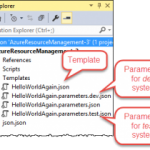
One more thing — these templates are designed to utilize parameter files, so any aspect of the resource you’re deploying could be set at deploy-time via a parameter in a parameter file. For example, the pricing tier utilized by your App Service plan might be Free in your development environment and Standard in your test environment. The obvious approach is to create a different parameter file for each environment or configuration you want to use.
“I see what you did there… So now what?”
Well, now you’ve got your template and a way to represent the differences in environments as your application flows through the release pipeline, and you have an easy and repeatable way to deploy your resources wherever and whenever you want. The only piece that’s missing are the tools to perform the deployment.
As mentioned above, you could use the Azure PowerShell tools or Azure CLI to create scripts that you manually execute. Those Visual Studio ARM Template projects even include a pre-built PowerShell script that you could execute.
Personally, I love automation but I’ve never been a big fan of asking a person to manually run a random script and feed it some random files. I want something that’s more streamlined. I want something that is simultaneously:
- Automated – The process once triggered should not require manual help or intervention
- Controlled – The process should accommodate appropriate approvals along the way if needed
- Consistent and Repeatable – The process should not vary with each execution; it should have predictable outcomes based on the same inputs
- Transparent – The whole team should have visibility into the deployments that have taken place, and be able to identify which versions of the code live where, and why (i.e., I should have work item-level traceability)
- Versioned – Changes within the process and/or the process inputs (i.e., Logic App code) should be documented and discoverable
- Scalable – It should be just as easy to deploy 20 things as it is to deploy 1 thing.
For the past few years my team has been using TFS / VSTS as our primary source control and project management tool. In that time we’ve become more reliant on the excellent build system (Team Foundation Build) that TFS offers.
Team Build is much more than a traditional local build using Visual Studio. Team Builds run on a build server (i.e., not on your local computer) and are defined using a Build Definition. The Build Definition is a declarative definition of both the process that the build server will execute, as well as the settings regarding how the build is triggered, and how it will execute. It’s essentially a workflow for preparing your application for deployment.
The Build Definition is made up of tasks. Each task performs a specific step required in the build process. For example, the Visual Studio Build task is used to compile .NET projects within Visual Studio Solutions, and within the step you can control the Platform (Win32, x86, x64, etc.), and the Configuration (debug or release). While the Xamarin.Android task is used for compiling Android applications with settings appropriate for them.
Build Definitions can have Tasks that do more than compile your code. You might include tasks to run scripts, copy files to the build server, execute tests (Load Tests, Web Performance Tests, Unit Tests, Coded UI tests etc.), or create installation packages (though this would generally just be done through another project in your solution [e.g., with Flexera InstallShield and/or the WiX Toolset]). This gives you the power to quickly and automatically execute the tasks that are appropriate for your application.
Furthermore, a single Team Project in TFS could have multiple build definitions associated with it; because sometimes you want the build to simply compile, but other times you want to burn down the village, compile, run tests, and then deploy your web site to Azure for manual testing. Or perhaps you’re managing builds for multiple feature branches or even multiple applications within the Team Project.
“So what does this have to do with Logic Apps?”
If I add one of those ARM Template Visual Studio projects to my TFS / VSTS source control repository (whether it’s a Git repository or TFVC), I can create a Build Definition that compiles the ARM Deployment Project and other Visual Studio projects that include resources used by my cloud application (e.g., custom API Apps, Web Sites, etc.), and then publishes the ARM Template files (templates and parameter files) to a shared location where they can be accessed by automated deployment processes.
This was surprisingly easy to set up, I think it only took about 5 minutes. The best part is I can have this build trigger on check-in, so my deployment files are always up-to-date.
Here’s what my Build Definition looks like:
First I compile the project.
Then I copy the ARM Template files and parameter files from the build output directory to a temporary file location.
Finally, I publish the files from the temporary location. I’m using a Server location that other steps in the build (or a Release Manager release task) could use. It could have also been a file share to give access to processes not hosted in TFS.
“So what does all this add up to?”
Whenever someone changes the ARM Deployment project (whether modifying the template or parameters file or adding a new template/parameter file to it) Team Build runs my Build Definition to: (1) compile my project, (2) extract the ARM deployment files from the build directory, and (3) publish the files as an Artifact named templates. That Artifact lives on the build server and can be accessed by VSTS Release Management release tasks that will actually deploy my Azure resources to the cloud.
Release Management (a component of TFS / VSTS) helps you automate the deployment and testing of your software in multiple environments. You can either fully automate the delivery of your software all the way to production, or set up semi-automated processes with approvals and on-demand deployments.
In Release Management, you create Release Definitions that are conceptually similar to build definitions. A Release Definition is a declarative definition of the deployment process. Just like a Build Definition, a Release Definition is composed of tasks and each task provides a deployment step. The primary input for a Release Definition is one or more Artifacts created by your Build(s).
Release Definitions add a couple extra layers of complexity. One of those layers is the Environment. We all know that release pipelines are made up of multiple environments, and often each environment will come with its own unique requirements and/or configuration details. Within a single release definition you can create as many environments as you want, and then configure the Tasks within a given environment as appropriate for that system. The various Environments in you Release Definition can have similar or different Tasks
Each environment can also utilize variables if you’d prefer to avoid hard-coding things that are subject to change.
In this simple example, I created a Release Definition with two environments: Development and Test. Within each environment I used the Azure Resource Group Deployment task to deploy my Logic App, Service Plan, and Resource Group as defined in my ARM Deployment Template JSON file.
I configured the deployment to Development to happen automatically upon successful build (remember the build runs when I check-in the source code). But I wanted Test deployments to be manual.
I also created variables that enabled me to parameterize the name of the Resource Group, and the name of the Parameter File to use in each environment.
You can see here how I’m using those variables within the Azure Resource Group Deployment task.
Of course it works.
If I go to my Visual Studio project and modify something about my Logic App template. Maybe I finally get around to fixing that grammatical error in my response message.
Then I check-in my changes.
In VSTS, I can see that my build automatically started.
After the build completes, in the Release Hub I can see that a new release (Release-4) using the latest build (13) has started deploying to the Development environment.
I’ve got logs to show me what happened during the deployment.
I can see the commits or changesets included in this release compared to earlier releases. So a month from now Nick can see what modifications were deployed in Release-4.
What’s going on in Azure though? It looks like the Logic App in the Development Resource Group was updated to match my changes.
But my Test environment wasn’t touched.
Over on the Release Hub, I can manually start the Deployment to Test.
I almost forgot, deploying to Test requires an approval as well.
Just like that, it’s done.
In about 30 minutes I was able to create a deployment pipeline for my Logic App. The deployment pipeline is flexible enough that changes can be made easily, but structured in a way that I (and everyone else on my team) can see exactly what it does.
QuickLearn Training offers courses to enhance your understanding of TFS / VSTS and Logic Apps. Our Build and Release Management Using TFS 2015 course has all the finer details that you’ll never get out of a blog article, and our Cloud-Based Integration Using Azure App Service course teaches you how to build enterprise-ready integration solutions using features of the Azure cloud.

by Nick Hauenstein | May 22, 2016 | BizTalk Community Blogs via Syndication
In this post, I am going to try to capture in text the presentation that I gave at the Integrate 2016 conference over in London. Text is likely the worst medium in which to capture such a session, but, alas, I do realize that sometimes it is the best medium for proper digestion of such content. If you’d rather see it in video form, click here.
So with that, let’s pretend that you are sitting among fellow professionals in a beautiful room on the 3rd floor of ExCeL London – complete with bright colored lights to set the mood. A wild American then appears, flailing his arms and babbling about how it’s actually 3 AM, and we’ve all been deceived. Then he starts talking about food.
Getting Our Priorities Straight
The world of software development might be a better place if we approached our tasks in that world the way that we approach each meal. We don’t really start each meal by a trip to the racks or shelves that hold our appliances – thinking, “Well, I have a vegetable peeler, and a fondue pot, I guess that means we’re eating some melted Gruyère and Emmentaler mixed with white wine, and carrot strings for every meal.”
Usually, the way it actually works out is that I’m thinking about what I’m craving, the ingredients that I have on hand and their flavor/nutritional value relative to my needs. From there, I look to proven recipes that satisfy those things, and finally, reach for the specific tools needed to do the job. If I don’t have them, I acquire them, or fashion a workable approximation.
We have to be really careful that we, when approaching software development and integration, take the same approach as we would when crafting an excellent meal. An approach that looks first to the needs and constraints, then to proven patterns/recipes, and allows the tools used to flow from the rest – even to the point of crafting/buying new tools that we haven’t used before if necessary.
Business Challenges / Constraints
So, let’s imagine that we all work together now. We want to take the approach outlined above – one in which we have to consider the business need and the constraints that we may very well simply be stuck with. From there, we can consider proven patterns that might help us overcome, and then finally identify/acquire/create the tools required to get the job done.
Our company makes custom bobbleheads.
The way that it works is that a customer uploads a 3D model of their face, and then selects a pre-built body from the gallery. The 3D print of their face starts immediately so that the order can be shipped as soon as possible. The customer is permitted to take as long as they need to select the body from the gallery of pre-built bodies. Once they select a body, we attach the printed face to the chosen body and ship the assembled dolls to the customer.
So what happens behind the scenes that we can’t escape?
Well, sadly we don’t do greenfield development here. It’s not really brownfield development either. It’s more like a house haunted by ghost IT – shadow IT that has left.
Whenever a customer uploads their 3D face model, an XML notification message is created that contains the order id and a reference to their face model. At the time it was built, our developers emulated the BizTalk Server demos of the day and built distributed, fault-tolerant XML file copy operations whilst applying the wisdom of Chris Maden who has been quoted saying, “XML is like violence. If it doesn’t solve your problem, you’re not using enough of it.”
These same developers learned while attending conferences over the past few years that Dropbox is the next big thing in enterprise integration. They may have been wrong, but it’s now up to us to Make Dropbox Great Again™.
Once the customer selects a body for their doll, another XML message is created and dropped into the same folder in Dropbox with the same file naming conventions. Ultimately, we need to pair up the two components of the order – the head and body – in order to complete the processing.
Proven Patterns
It’s at this point that we would consult the great oracles of all wisdom and knowledge in the world of integration, Gregor Hohpe and Bobby Woolf. We will search through the patterns to find pieces that help solve each piece of the puzzle.
Which patterns might we find? Well, to handle the communication with Dropbox, we might utilize the adapter pattern in hopes that one day the data will be sourced from a different system. We could apply the pipes and filters pattern and build a reusable translation/transformation pipeline made up of reusable independent steps organized in the proper order to provide the required translation/transformation/message enrichment for each interface.
From there, we could apply the publish and subscribe pattern to enable loosely coupled communication between the source system and any number of downstream subscribers – maybe routing the message in a content-based fashion. We could also layer on top of this a process manager to enable content-based correlation.
Tools
How would we use these patterns in concert with the tools we have/don’t have? BizTalk Server might seem like a natural fit.
It already provides for us the concept of a port that begins with an adapter which delivers a byte stream to a pipes and filters style pipeline responsible for translation of the message and promotion of context properties used for routing, this is followed by a transform before publishing to the message box. From there, we have process managers in the form of BizTalk Orchestrations that understand the concept of content-based correlation of published messages, allowing them to be reunited by the messaging engine. You get adapters, pipelines, maps, orchestration out of the box – and publish subscribe whether you want it or not!
It’s already bringing to the table everything I need. Everything but a handy Dropbox adapter. Now, I know that we could always build our own, or use out of the box adapters with ungodly amounts of WCF extensions to make some magic happen, but maybe that won’t be our best bet here.
So, let’s set that aside for a moment, and consider what might become possible if we started using Logic Apps like this? It’s really the same question I posed before about MABS.
In this case, we’re marrying Logic Apps and Service Bus. We have some Logic Apps that act in a similar fashion as BizTalk Ports. They provide adaptation and message enrichment and transformation through the use of relevant API apps for those concerns. Others act more like BizTalk Server orchestrations, coordinating the sends and receives of messages and operating on the content.
The messages are routed to the “orchestration” style Logic Apps through Service Bus. Each flow is triggered by subscribing to messages that arrive on a given Service Bus topic subscription (pre-created). Correlation can then be enabled by subscriptions dynamically created mid-flow.
At this point, you may have the following thought (which I humbly share indeed):
Demo Walkthrough
This isn’t all just a pipe dream – it’s real. I’ve built it. So, let’s see how it can fit together. The flow kicks off with an XML message. For this message, I have created a BizTalk Server 2016 schema (i.e., a regular XML schema with special notations about properties that should be promoted to the message context for routing purposes). The message looks like this:
The message contains a promoted OrderId property that we should be able to correlate on. In other words, the second message that will show up in Dropbox for the order should also contain the same OrderId value – which allows us to determine that they are indeed related messages. The first message also contains a reference to the head for the bobblehead doll that we will be printing.
When this message is uploaded to Dropbox, it will be picked up by our “Port” style Logic App that looks like this:
The first API App after the Dropbox receive is a custom API app that essentially builds a context property bag when it is passed an XML payload. It does this by comparing the document to a BizTalk schema, and using the instructions in the schema to “promote” properties by extracting the relevant content. It takes two inputs to operate.
The first input is a URL to the root of an Azure Blob Storage container that contains BizTalk schemas. It will use these schemas to perform message type resolution and property promotion. The second input is a string containing the entirety of an XML message. Not exactly the screaming performance of a forward-only streaming pipeline component, but it gets the job done, considering we’re already taking on latency to get to the cloud in the first place.
The output of that API app looks like this (click to enlarge):
The next API app takes the payload, along with the property bag (which it treats as a set of brokered message properties) and publishes the message to an Azure Service Bus Topic. This is just the out of the box connector using the outputs of our custom API app. The call out to that app looks like this:
This published message is picked up by our Logic App that is acting like an Orchestration. That Logic App has a pre-defined subscription on the same service bus topic for any message with a Message Type of Print Job.
After the message is received, the Logic App must quickly setup a subscription for any related messages that come in for that order. Unfortunately, the out of the box connector for Service Bus doesn’t yet have a way to create a new subscription – only ways to subscribe for messages on an existing subscription.
Thus, we will have to use a custom API app to create a subscription unique to this running instance of the Logic App – one that is based on the OrderId property of the received message. To provide this capability, we have a custom API app called CreateInstanceSubscription.
It requires quite a few inputs to function since we don’t yet have the capability of reading details from a stored API connection in a custom API app.
The API takes in a Correlation Property property, which contains the name of the property that is shared in common between the message that triggered the Logic App instance and the message that will be correlated with this running instance.
It also takes in the Message Type (in the namespace + # + root node name format) of the next expected message. Both of these properties will be used to create a new subscription on the service bus topic referenced by the last two configuration properties (Service Bus Topic, and Service Bus Connection String).
After it executes, we might expected to see a subscription like the following (click to enlarge):
Now that we have the subscription created, we can take our time with the rest of the process until we absolutely require the second message. In this case, we’re calling another custom API which provides a visualization of the received messages. In order to read the content, we can either use the xpath() function of Logic Apps to read the XML directly, or we can covert it to JSON first using the json() function, and then simply dot into it. I decided to use the JSON function since I hadn’t attempted to use it in a situation like this yet. It was okay (it was pretty darn verbose). xpath() would have been a better choice here – and the more natural choice given an XML payload.
This yields the following visualization (a body-less bobblehead awaiting its correlated message containing information about which body to use):
And we would expect that there is both an instance subscription in service bus and a Logic App that is still actively processing – waiting for Service Bus to re-activate it with a new message.
At this point, the new message can arrive at any moment in time. It will land in the same Dropbox folder, and process through the same Logic App serving as a “Port” – with the same XML property promotion, and Service Bus publishing action. It will land in the same Service Bus topic as before, and with a matching order id to the originally submitted message.
This second message carries some new information, however. In this case, it contains the body that the customer selected for their custom bobblehead doll.
Once published to the topic, the instance subscription previously created by the second Logic App in the process will be matched by a listening Service Bus connector.
The connector uses the topic name and instance subscription name passed to it from the Create Instance Subscription API App. The name of the subscription will be a randomly generated id for that running instance of the Logic App.
Now that we have the message, it’s time to ensure that we don’t bring the problem of zombies into the world of Logic Apps. There is a step that follows which will clean up the instance subscription for the Logic App before continuing with the final bits of the process.
Again, since the OOTB Service Bus connector does not contain any operations for managing subscriptions, the custom API App is called to delete the instance subscription using the details returned from the original call to the API which created it.
After that, it’s back off to the bobblehead visualizer with the details from the correlated message received.
Call to Action
So that’s pretty cool. We can now stand with confidence and proclaim that content-based correlation is possible with Logic Apps! However, it was built out of necessity, and required custom crafted components – as is often the case with anything worth doing.
You may be wondering why this talk was titled API Apps 101 for BizTalk Developers. I didn’t really tell you how to create API apps. Instead, I showed that API apps behave in a fashion similar to different components within BizTalk Server (adapters, pipeline components, orchestration shapes, etc…). I don’t want to leave you hanging though, because we are at a point in time where there is a golden opportunity to make your mark in the foundations of this new world.
This is the ground floor of Logic Apps and API Apps. As BizTalk Server developers, we know the required ingredients of enterprise integrations. We know the recipes for success. It’s just a matter of crafting some additional tools for use in the world of Logic Apps, and for the first time we have a unified marketplace to share and even sell these components.
From working on BizTalk Server integrations, we know that we will need custom API apps that can serve as adapters, pipeline components, and pattern utility apps (e.g., content-based correlators). In fact, you may have built such things before. It’s honestly not that difficult to port those things over into this new world of integration (where it makes sense) and reap the rewards. If you need inspiration, check out the listings of such components that have already been created for BizTalk Server. Each component represents a solution to a specific integration challenge – many of which are timeless challenges.
We write BizTalk components and API Apps in the same languages, though with different techniques, and targeting a different runtime.
How do we make that all happen? Well, today we are providing the world with “the goods”. All of the slides from this talk, a sample module from the February 2016 version of our Cloud-based Integration Using Azure App Service course, and all of the code involved in the demo. With those combined resources, you should be set on the right track to start building custom API Apps for use in Logic Apps – leveraging skills and work you’ve already accomplished.
If you’re ready to get started, click the image below to download the resources:
Until Next Time
That’s all for now! Again, go forth and create API apps and come visit us in our Cloud-based Integration Using Azure App Service course if you’d like to learn more.
I’ll leave Simon Young with the final word – and dining tip!