Developing solutions on Azure is sometimes an effortless operation. Administrate all your Azure resources that may be a different story. And this PowerShell script focuses on simplifying one of these processes.
One of the painful processes, not only when we are developing our Logic App, but mainly when we are administrating them, is finding what API Connections and no longer being used by your Logic Apps. What we call Orphaned API Connections.
What is the importance of this script? Over time, our Logic Apps can change to fit new requirements or fix some issues that can occur. And we can quickly end up with unused Azure API Connections. In addition, it is not easy to work out which API Connections are being used by our Logic Apps directly thru the Azure Portal! Neither to see if a specific API connector is orphaned.
This PowerShell script will look at all of the API Connections in your resource group and then inspect every Logic App in your resource group to check if the API Connections are being used or not. This script will help you to identify orphaned API Connections quickly.
This script was initially created by Mike Stephenson, which I took as a reference and improved or modified according to what I thought fit better to this task:
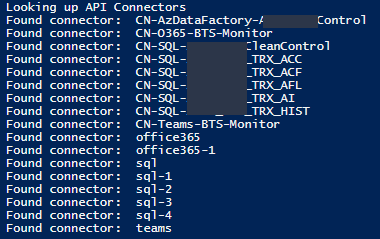
List the output of existing API Connectors in a specific resource group to print only the API Connector name instead of the full ID to be simple to read;
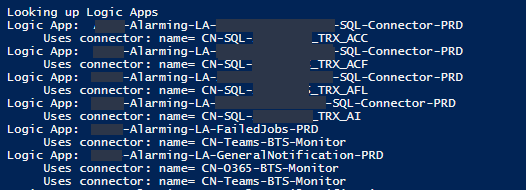
List the output of API Connectors bind to a Logic App group by each Logic App to be simple to read;
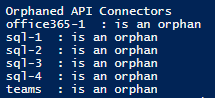
List the output of deprecated API Connector to include only connectors are deprecated to be simple to read – this is the main point of the script. give the list of deprecated/orphaned connectors;
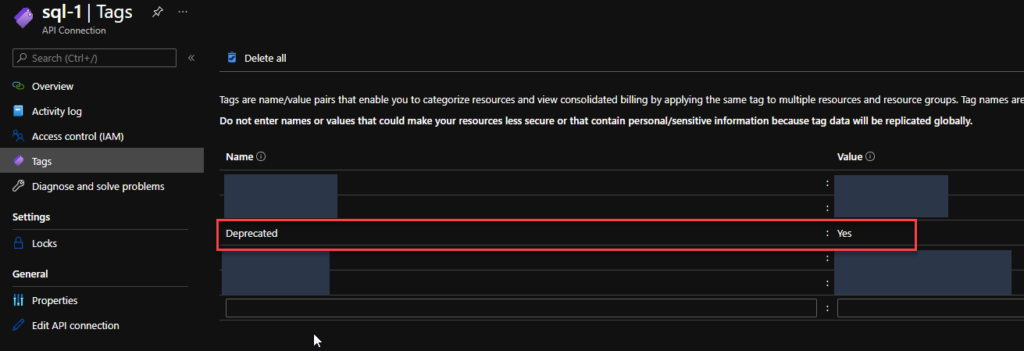
Add a Deprecated tag on all the API Connectors. The reason to add this tag is that sometimes I just want to reference them and make manually double-check on the subscription, talk with the development team or make these changes (remove these API Connectors on the next intervention window, if companies have kind of this policy) :
If it is orphaned then the value of this tag will be true;
Otherwise, the value of this tag will be false;
The output CSV format now includes the option for you to specify what CSV character you want to use as a separator or delimiters like comma or semicolon.
Download
You can download Find Orphaned API Connectors from GitHub here:
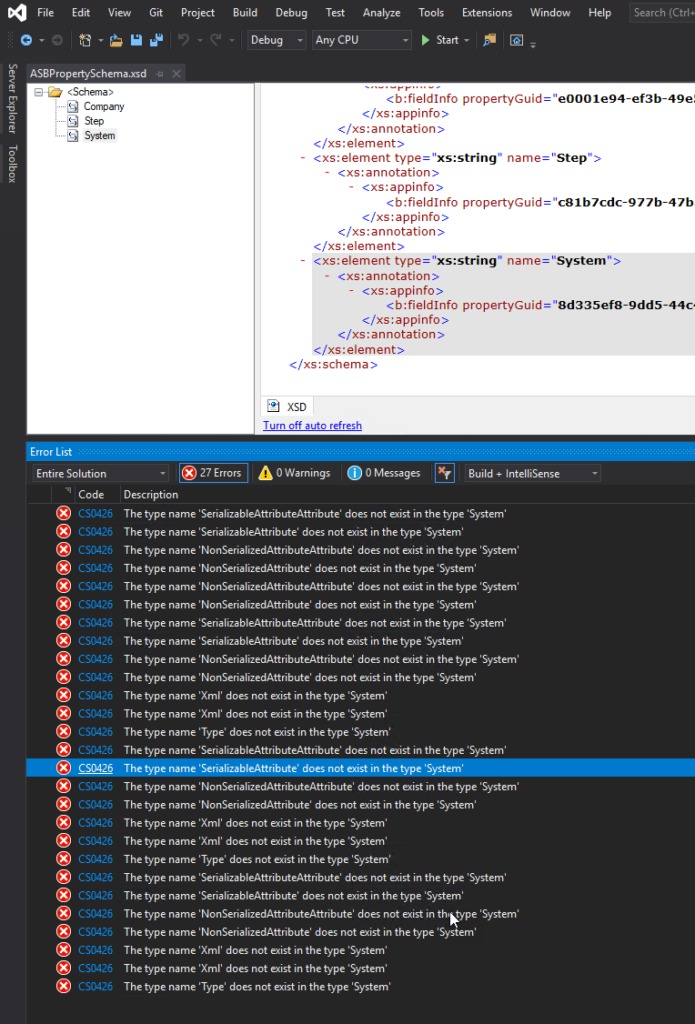
I’m just playing with BizTalk Server doing a small proof-of-concept using BizTalk Server and Azure Service Bus, and I was surprised with a few bunches of errors while I tried to compile my simple project:
Severity Code Description Project File Line Suppression State Error CS0426 The type name ‘SerializableAttributeAttribute’ does not exist in the type ‘System’ POC.BizTalk.AzureServiceBus C:DEVPOCPOC.BizTalk.AzureServiceBusPOC.BizTalk.AzureServiceBusSchemasASBPropertySchema.xsd.cs 9 Active Severity Code Description Project File Line Suppression State Error CS0426 The type name ‘Xml’ does not exist in the type ‘System’ POC.BizTalk.AzureServiceBus C:DEVPOCPOC.BizTalk.AzureServiceBusPOC.BizTalk.AzureServiceBusSchemasASBPropertySchema.xsd.cs 85 Active
Were is the full error list:
The type name ‘SerializableAttributeAttribute’ does not exist in the type ‘System’
The type name ‘SerializableAttribute’ does not exist in the type ‘System’
The type name ‘NonSerializedAttributeAttribute’ does not exist in the type ‘System’
The type name ‘NonSerializedAttribute’ does not exist in the type ‘System’
The type name ‘NonSerializedAttributeAttribute’ does not exist in the type ‘System’
The type name ‘NonSerializedAttribute’ does not exist in the type ‘System’
The type name ‘SerializableAttributeAttribute’ does not exist in the type ‘System’
The type name ‘SerializableAttribute’ does not exist in the type ‘System’
The type name ‘NonSerializedAttributeAttribute’ does not exist in the type ‘System’
The type name ‘NonSerializedAttribute’ does not exist in the type ‘System’
The type name ‘Xml’ does not exist in the type ‘System’
The type name ‘Xml’ does not exist in the type ‘System’
The type name ‘Type’ does not exist in the type ‘System’
The type name ‘SerializableAttributeAttribute’ does not exist in the type ‘System’
The type name ‘SerializableAttribute’ does not exist in the type ‘System’
The type name ‘NonSerializedAttributeAttribute’ does not exist in the type ‘System’
The type name ‘NonSerializedAttribute’ does not exist in the type ‘System’
The type name ‘Xml’ does not exist in the type ‘System’
The type name ‘Xml’ does not exist in the type ‘System’
The type name ‘Type’ does not exist in the type ‘System’
The type name ‘SerializableAttributeAttribute’ does not exist in the type ‘System’
The type name ‘SerializableAttribute’ does not exist in the type ‘System’
The type name ‘NonSerializedAttributeAttribute’ does not exist in the type ‘System’
The type name ‘NonSerializedAttribute’ does not exist in the type ‘System’
The type name ‘Xml’ does not exist in the type ‘System’
The type name ‘Xml’ does not exist in the type ‘System’
The type name ‘Type’ does not exist in the type ‘System’
Cause
Initially, I have to be honest, I was not realizing why this error was happening, mainly because the main error description may elude us and point us to DLL reference problems: Xml, System, SerializableAttributeAttribute, and so on. But looking carefully to the error message details, all of the errors will point us to the PropertySchema file.
After realizing that, it was not difficult to realize that I had on my Property Schema an element call System. System is a reserved word that you CANNOT use inside the property schemas.
Solution
The solution to this issue is quite simple, you need to:
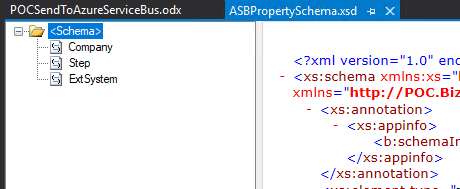
Rename your System element inside your Property Schema to another word, for example ExtSystem
Of course, fix all the dependencias inside your project, if you were already using this element iside your solution, for example Message Assigment shape
There was a big buzz this weekend regarding the release of a new Azure Logo by Microsoft. The new Azure icon represents the unity of Azure within the larger Microsoft family of product icons. It’s part of Microsoft’s Fluent Design System, carefully crafted to produce icons that look familiar to what customers know and love, while representing the agile future of our business.
I usually don’t update my stencils only because of a new icon. Still, this time I made an exception, and I updated my package with this new Azure icon (thanks, Tiago Costa, for providing me the resource). I also toked this opportunity to add also a previous request: the new Dataverse icon.
What’s new in this version?
These are the list of changes and additions present in this major release:
New shapes: There are new shapes on the following Visio Stencils files (.vssx):
MIS Power Platform Stencils: the new logo of Dataverse was added.
MIS Azure Stencils: the new logo of Azure was added.
SVG files: new SVG files added.
Microsoft Integration, Azure, Power Platform, Office 365 and much more Stencils Pack
Microsoft Integration, Azure, Power Platform, Office 365 and much more Stencils Pack it’s a Visio package that contains fully resizable Visio shapes (symbols/icons) that will help you to visually represent On-premise, Cloud or Hybrid Integration and Enterprise architectures scenarios (BizTalk Server, API Management, Logic Apps, Service Bus, Event Hub…), solutions diagrams and features or systems that use Microsoft Azure and related cloud and on-premises technologies in Visio 2016/2013:
BizTalk Server
Microsoft Azure
Integration
Integration Service Environments (ISE)
Logic Apps and Azure App Service in general (API Apps, Web Apps, and Mobile Apps)
Azure API Management
Messaging: Event Hubs, Event Grid, Service Bus, …
Azure IoT and Docker
AI, Machine Learning, Stream Analytics, Data Factory, Data Pipelines
SQL Server, DocumentDB, CosmosDB, MySQL, …
and so on
Microsoft Power Platform
Microsoft Flow
PowerApps
Power BI
Office365, SharePoint,…
DevOps and PowerShell
Security and Governance
And much more…
… and now non-related Microsoft technologies like:
SAP Stencils
The Microsoft Integration Stencils Pack is composed of 27 files:
Microsoft Integration Stencils
MIS Additional or Support Stencils
MIS AI and Machine Learning Stencils
MIS Apps and Systems Logo Stencils
MIS Azure Additional or Support Stencils
MIS Azure Black and Gray
MIS Azure Old Versions
MIS Azure Stencils
MIS Black and Cyan
MIS Buildings Stencils
MIS Databases and Analytics Stencils
MIS Deprecated Stencils
MIS Developer Stencils
MIS Devices Stencils
MIS Files and Message Types Stencils
MIS Generic Stencils
MIS Infrastructure and Networking Stencils
MIS Integration Fun
MIS Integration Patterns Stencils
MIS IoT Stencils
MIS Office, Office 365 and Dynamics 365
MIS Power BI Stencils
MIS Power Platform Stencils
MIS SAP Stencils
MIS Security and Governance
MIS Servers (Hexagonal) Stencils
MIS Users and Roles Stencils
Organisational Stencils
That you can use and resize without losing quality, in particular, the new shapes.
I usually use the series A fish out of water when I want to write something that goes a little bit off-topic on my main blog topic: Enterprise Integration. But this time is different. This was kind of the first thing I thought when I saw this error happen since that didn’t make sense at all.
To contextualize better this reason and blog post, I have been testing the new Logic Apps (Preview) for a while, and if you already try it before, you will know that this new type of Logic Apps runs on top of Azure Function Runtime. This means that now you can run Logic Apps anywhere: in the cloud, on-premises, locally on your laptop, or wherever you need to.
One of the requirements necessary to have the full Logic Apps designer support in VS Code is the Microsoft Azure Storage Emulator 5.10 tool
Microsoft Azure Storage Emulator 5.10 tool – This tool is necessary to have the full Logic Apps designer support in VS Code. This tool will use a local Microsoft SQL Server Express LocalDB instance (you can also use a SQL Server instead) to emulate Azure storage services.
Everything was working properly for the last four months or more, however for no plausible reason today while I was trying to start the Microsoft Azure Storage Emulator I got this error:
Probing SQL Instance: ‘(localdb)MSSQLLocalDB’. Caught exception while probing for SQL endpoint. A network-related or instance-specific error occurred while discovering a connection to SQL Server. The server was not found or was not accessible. Verify that the instance name is correct and that SQL Server is configured to allow remote connections. (provider: SQL Network Interfaces, error: 50 – Local Database Runtime error occurred. Error occurred during LocalDB instance startup: SQL Server process failed to start. ) Number of SqlErrors Reported: 1 SqlError: System.Data.SqlClient.SqlError: A network-related or instance-specific error occurred while establishing a connection to SQL Server. The server was not found or was not accessible. Verify that the instance name is correct and that SQL Server is configured to allow remote connections. (provider: SQL Network Interfaces, error: 50 – Local Database Runtime error occurred. Error occurred during LocalDB instance startup: SQL Server process failed to start. ) Could not find a LocalDB Installation. Probing SQL Instance: ‘localhostSQLExpress’. Caught exception while probing for SQL endpoint. A network-related or instance-specific error occurred while establishing a connection to SQL Server. The server was not found or was not accessible. Verify that the instance name is correct and that SQL Server is configured to allow remote connections. (provider: SQL Network Interfaces, error: 26 – Error Locating Server/Instance Specified) Number of SqlErrors Reported: 1 SqlError: System.Data.SqlClient.SqlError: A network-related or instance-specific error occurred while establishing a connection to SQL Server. The server was not found or was not accessible. Verify that the instance name is correct and that SQL Server is configured to allow remote connections. (provider: SQL Network Interfaces, error: 26 – Error Locating Server/Instance Specified) No available SQL Instance was found. One or more initialization actions have failed. Resolve these errors before attempting to run the storage emulator again.
Cause
Again, I can’t find any plausible reason for this to start happend, except the fact that my machine installed some system updates.
Solution
I don’t know if all these steps are necessary or not, I was just simple frustrated about this situation because I need to present this topic in my upcoming sessions this week, so I didn’t test all the hypotheses available properly. Nevertheless, I managed to solve this issue by simply recreating my LocalDb instances and allowing the emulator to recreate his db files.
Here is the steps necessary to perform these tasks:
Get your current LocalDB instance name
<pre class="wp-block-preformatted">
sqllocaldb i

</pre>
Delete the existing LocalDB instance
If you feel more comfortable you can choose to stop the LocalDB instance before you delete
<pre class="wp-block-preformatted">
sqllocaldb d &lt;LocalDB instance>
</pre>
Create your new LocalDB instance with the same name or a different one.
<pre class="wp-block-preformatted">
sqllocaldb c &lt;LocalDB instance>
</pre>
and finally, you need to delete the following Azure Storage Emulator database files to allow the emulator to recreate db files on the first start.
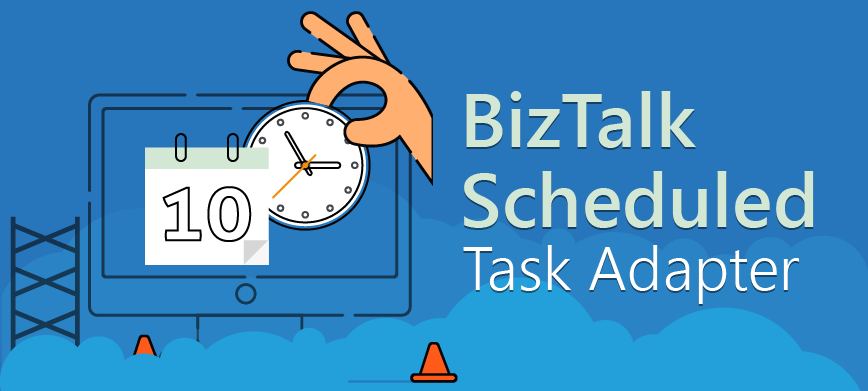
A few days ago, I release the latest version of the BizTalk Scheduled Task Adapter optimized for BizTalk Server 2020. Today I merged the changes and improvements made on that version and made it available for BizTalk Server 2016.
What is new?
New schedule capabilities:
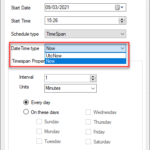
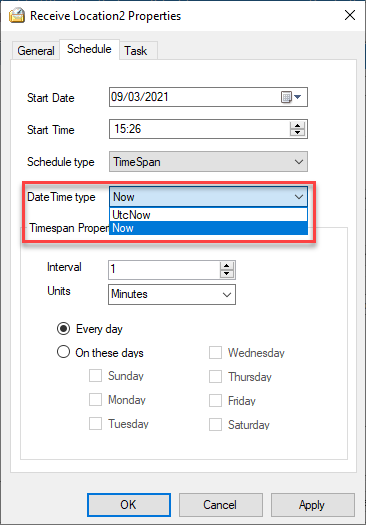
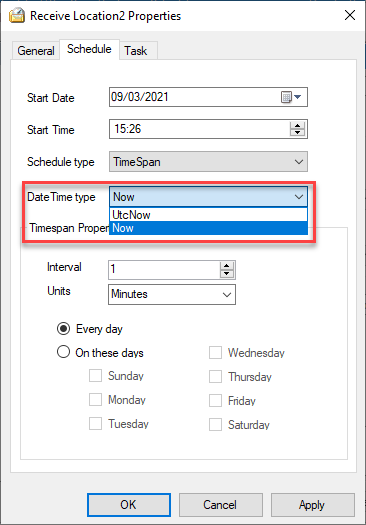
Capability to set DateTime you want to use on the Timespan schedule type: DateTime.Now or DateTime.UtcNow
By adding this capability to chose between DateTime.Now or DateTime.UtcNow, it will address and solve the issues reported regarding unlimited messages being triggered if you are using a different timezone than UTC.
The functionality always to trigger the message at 00 seconds and respect the original time set was added again to the Timespan schedule type. The GetNextActivationTime method was improved to fix all these unexpected behaviors reported that indeed was a feature by design.
BizTalk Scheduled Task Adapter
The BizTalk Scheduled Task Adapter is an in-process receive adapter that executes a prescribed task on a daily, weekly or monthly schedule. The adapter is configured entirely within BizTalk, all configurations are stored within the SSODB and can be exported and imported via binding files.
The schedule capabilities are similar to those available with the Windows Scheduled Task Service.
Four simple tasks are included:
XmlStringStreamProvider – generates a BizTalk message from a configured Xml string
FileStreamProvider – generates a BizTalk message from the contents of a file
HttpDownload – generates a BizTalk message from data downloaded from a web site
SQLStreamProvider – generates a BizTalk message from the contents of a SQL Query (similar to the old SQL adapter) – Since version 3.0
Custom tasks can be created. Any .NET class that implements the appropriate interface can be scheduled.
Big thanks to Pedro Almeida, my team member, that took 95% of my work and finalize this version!
Download
You can download this “new” version of the adapter in BizTalk Scheduled Task Adapter from GitHub:
Please feel free to use the adapter, and If you find any problems or bugs, please open an issue on the adapter GitHub site: https://github.com/sandroasp/BizTalk-Scheduled-Task-Adapter and help evolve this community adapter. You can also suggest new features, and I am also open to new ideas.
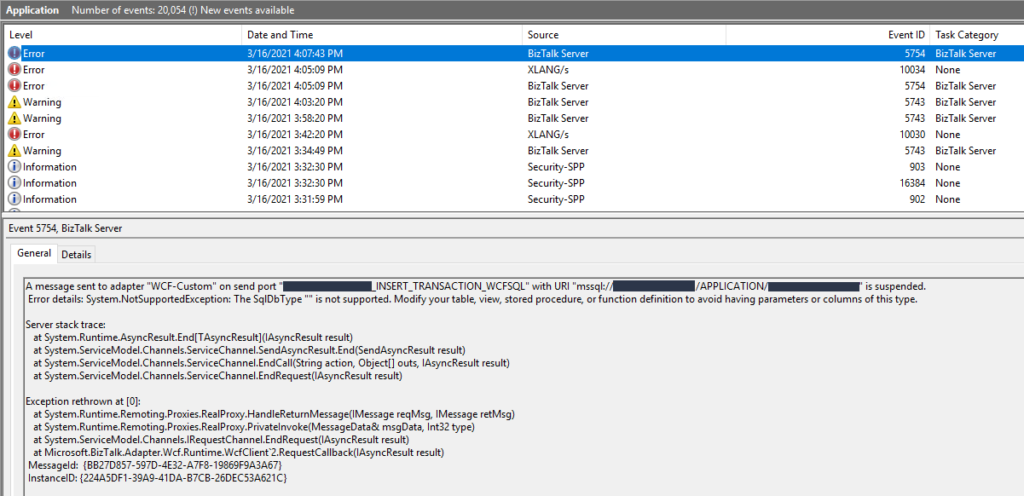
Recently while I was testing an integration solution on a client that uses WCF-SQL to insert data on a SQL Server database I got the following error:
System.NotSupportedException: The SqlDbType “” is not supported. Modify your table, view, stored procedure, or function definition to avoid having parameters or columns of this type.
This was a surprise since everything was working properly in the development environment.
Cause
In this solution, we were doing bulk insert on a SQL Server database by using a User-Defined Types as the input to the stored procedure, in our case a User-Defined Table Type. There are other ways to do a SQL Server bulk insert or update in BizTalk Server but definitely, this is the best approach. And this is one of the reasons why we are getting on the error message with the keyword: SqlDbType.
This problem occurs because the user account that you used to access the database, in my case the BizTalk Host Instance Account, don’t have permissions on the User-Defined Type associated to the Store procedure that we were invoking.
Solution
To solve this issue, you must give access to the user, in my case BizTalk Host Instance Account to properly execute the stored procedure, you must:
Open SQL Server Management Studio and connect to your server.
In the Object Explorer, select and expand the desired database and expand the Security folder and then the Users.
Right-click on the User, BizTalk Host Instance Account, and choose Properties.
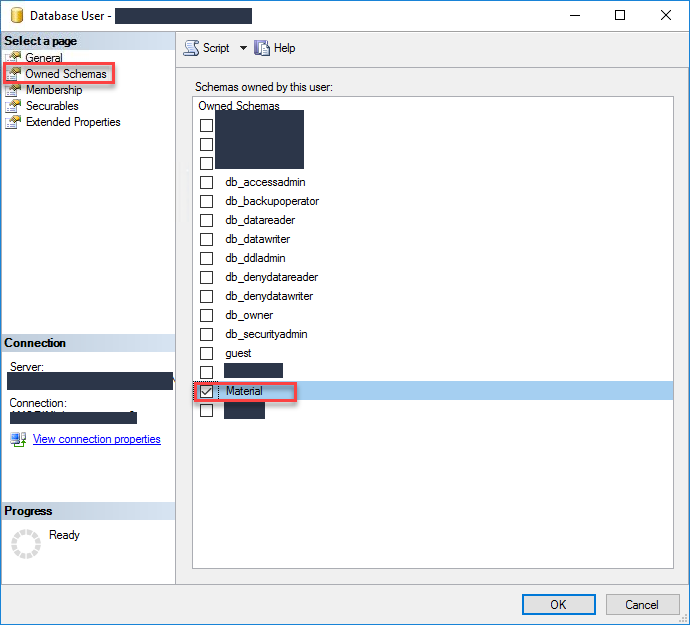
On the Database User windows, choose the Owned Schemas tab, and then on the Schemas owned by this user panel select the schema bind to your User-Defined Table Type.
In our case: Material
Click OK and try again to send the data to your SQL Server. It should work.
It has been a while since I didn’t follow carefully all the comments or issues posted on my blog or GitHub regarding BizTalk Scheduled Task Adapter. It was not by lack of interest but instead due to my lack of free time or just because I was focused on other projects or contributions.
Since I recently (7 days ago) publish I new version of the adapter with some further improvements and optimized it to BizTalk Server 2020. And I have a brand new environment that I need to install this adapter. I decided that it was an excellent opportunity and time to read the existing feedback and address, once and for all, all the reported issues or unexpected behaviors:
Using the Timespan schedule type may trigger unlimited messages;
Using the Timespan schedule type, if the time is set to past time, the task will not be triggered in certain cases.
Using the Timespan schedule type, when stopping the receive locations or stop/restart the host instances, you start to get a time drift from the original time set.
What is new?
New schedule capabilities:
Capability to set DateTime you want to use on the Timespan schedule type: DateTime.Now or DateTime.UtcNow
By adding this capability to chose between DateTime.Now or DateTime.UtcNow, it will address and solve the issues reported regarding unlimited messages being triggered if you are using a different timezone than UTC.
The functionality always to trigger the message at 00 seconds and respect the original time set was added again to the Timespan schedule type. The GetNextActivationTime method was improved to fix all these unexpected behaviors reported that indeed was a feature by design.
BizTalk Scheduled Task Adapter
The BizTalk Scheduled Task Adapter is an in-process receive adapter that executes a prescribed task on a daily, weekly or monthly schedule. The adapter is configured entirely within BizTalk, all configurations are stored within the SSODB and can be exported and imported via binding files.
The schedule capabilities are similar to those available with the Windows Scheduled Task Service.
Four simple tasks are included:
XmlStringStreamProvider – generates a BizTalk message from a configured Xml string
FileStreamProvider – generates a BizTalk message from the contents of a file
HttpDownload – generates a BizTalk message from data downloaded from a web site
SQLStreamProvider – generates a BizTalk message from the contents of a SQL Query (similar to the old SQL adapter) – Since version 3.0
Custom tasks can be created. Any .NET class that implements the appropriate interface can be scheduled.
Big thanks to Pedro Almeida, my team member, that took 95% of my work and finalize this version!
Download
You can download this “new” version of the adapter in BizTalk Scheduled Task Adapter from GitHub:
Please feel free to use the adapter, and If you find any problems or bugs, please open an issue on the adapter GitHub site: https://github.com/sandroasp/BizTalk-Scheduled-Task-Adapter and help evolve this community adapter. You can also suggest new features, and I am also open to new ideas.
Once again, after many requests and many postponements, due to my unavailability and free time to take these tasks, BizTalk Scheduled Task Adapter is finally officially available and optimized for BizTalk Server 2020 on GitHub!
The BizTalk Scheduled Task Adapter is an in-process receive adapter that executes a prescribed task on a daily, weekly or monthly schedule. The adapter is configured entirely within BizTalk, all configurations are stored within the SSODB and can be exported and imported via binding files.
The schedule capabilities are similar to those available with the Windows Scheduled Task Service.
Four simple tasks are included:
XmlStringStreamProvider – generates a BizTalk message from a configured Xml string
FileStreamProvider – generates a BizTalk message from the contents of a file
HttpDownload – generates a BizTalk message from data downloaded from a web site
SQLStreamProvider – generates a BizTalk message from the contents of a SQL Query (similar to the old SQL adapter) – Since version 3.0
Custom tasks can be created. Any .NET class that implements the appropriate interface can be scheduled.
What is new?
New schedule capabilities:
HTTPDownload task was changed and improved to control timeouts better and to avoid the receive locations disabling themselves automatically (Contribution made by Rickard Karlmats)
HTTPDownload task was changed and improved to support REST/JSON (Contribution made by Pedro Almeida)
Improved and optimized to BizTalk Server 2020 but it will also be compatible with BizTalk Server 2016
You can download this “new” version of the adapter in BizTalk Scheduled Task Adapter from GitHub:
Please feel free to use the adapter, and If you find any problems or bugs, please open an issue on the adapter GitHub site: https://github.com/sandroasp/BizTalk-Scheduled-Task-Adapter and help evolve this community adapter. You can also suggest new features, and I am also open to new ideas..
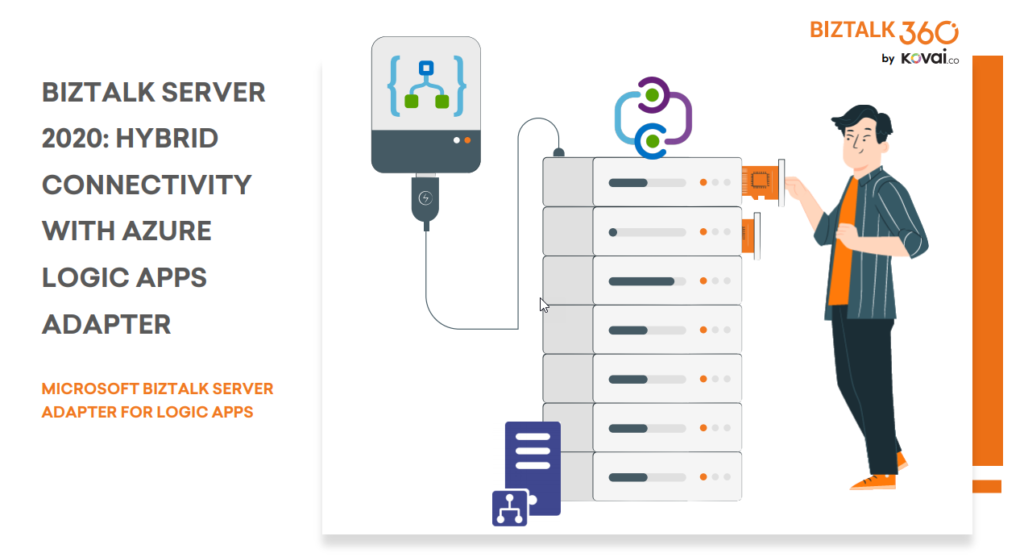
BizTalk Server 2020 is undoubtedly the best-suited integration for the On-Premises integration platform and IaaS (Infrastructure as Service). It is also integrating cloud services with a variety of built-in adapters for the cloud, such as the Azure Logic Apps.
The Azure Logic Apps adapter is used by BizTalk Server to communicate with Azure Logic Apps. This could also be possible using the HTTP adapter, but the Logic App adapter provides a better and straightforward experience.
This whitepaper will show you how BizTalk Server 2020 can interact with Logic Apps:
How BizTalk Server can send messages to Logic Apps using the Logic App adapter
How Logic Apps can send messages through BizTalk Server using the BizTalk Connector
Where I can download it
You can download the whitepaper here:
You can also find, download and enjoy several other free whitepapers of my own here:
Much has been written about the European Union’s (EU) General Data Protection Regulation (GDPR), which came into effect last May 28, 2018. the GDPR applies no matter where you are located, and with many organizations storing critical data in their database platforms, it will be incumbent upon them to ensure that the entire IT environment complies with the legislation, to avoid fines or penalties of up to €20 million or 4% of annual worldwide turnover.
Always Encrypted is a feature designed to protect sensitive data, such as credit card numbers or national identification numbers (for example, U.S. social security numbers), stored in Azure SQL Databases or on-premises SQL Server databases.
Always Encrypted allows clients to encrypt sensitive data inside client applications and never reveal the encryption keys to the Database Engine (SQL Database or SQL Server). As a result, Always Encrypted provides a separation between those who own the data (and can view it) and those who manage the data (but cannot view it). By ensuring on-premises database administrators, cloud database operators, or other high-privileged (but unauthorized) users, cannot access the encrypted data, Always Encrypted enables customers to confidently store sensitive data outside of their direct control. This allows organizations to encrypt data at rest and in use for storage in Azure, to enable delegation of on-premises database administration to third parties, or to reduce security clearance requirements for their own DBA staff.
This whitepaper will give you a detailed understanding of the following:
Creating SQL Server Database in BizTalk 2020
Creating always encrypted column in BizTalk Server
Querying and inserting data in the encrypted columns
Where I can download it
You can download the whitepaper here:
You can also find, download and enjoy several other free whitepapers of my own here: