by Sandro Pereira | Feb 28, 2018 | BizTalk Community Blogs via Syndication
BizTalk Mapper Extensions UtilityPack is a set of libraries with several useful functoids to include and use it in a map, which will provide an extension of BizTalk Mapper capabilities.
This particular version is optimized for BizTalk Server 2016
Functoids
Conversion Functoids
- Convert from human readable to epoch date Functoid: This functoid allows you to convert a traditional date (Human Readable Date) into a Unix date (Epoch Date).
- Convert from epoch to human readable date Functoid: This functoid allows you to convert a Unix date (Epoch Date) into a traditional date (Human Readable Date).
- Convert DateTime format Functoid: This functoid allows you to convert DateTime format.
Dynamic Generators Functoids
- Password Generator Functoid: Use this functoid to build a random password.
- Guid Generator Functoid: This functoid allows you to generate a new Guid.
- Tiny Id Generator Functoid: This functoid allows you to generate a new Tiny Id.
Encoder Functoids
- Base64 Decoder Functoid: This functoid allows you to decode Base64-encoded text strings.
- Base64 Encoder Functoid: This functoid allows you to convert string object into base64 encoded string.
Configuration Functoids
- BTSNTSvc Config Get Functoid: This functoid allows you to get configuration parameters from BTSNTsvc.exe.config. If there is no section specified, the functoid reads from the AppSettings.
- System Environment Variable Get Functoid: This functoid allows you to get configuration parameters from machine System Environment Variable.
- Custom Config Get Functoid: This functoid allows you to get configuration parameters from a custom configuration file.
- Windows Registry Config Get Functoid: This functoid allows you to get configuration parameters from Windows Registry.
- SSO Config Get Functoid: This functoid allows you to get configuration parameters from SSO Database.
- Rule Engine Config Get Functoid: This functoid allows you to obtain a definition value from a Vocabulary in the Business Rules Engine.
CRM Functoids
- CRM Lookup Functoid: This functoid allows you to retrieve a value from CRM lookup field. This functoid is able to perform a lookup operation using two different approaches: Accessing the CRM database (read-only), for local CRM integration or through the CRM web services if you want to avoid giving access to the database or if you have to integrate CRM online.
- MSCRM Map Helper Base Types Functoid: Use this functoid when you want map CRM base data types such as “xs:string”, “xs:int” and so on.
- MSCRM Map Helper Guid Functoid: Use this functoid when you want map CRM guid type.
- MSCRM Map Helper Money Functoid: Use this functoid when you want map CRM money type.
- MSCRM Map Helper Option Value Functoid: Use this functoid when you want map CRM option value type.
- MSCRM Map Helper References Functoid: Use this functoid when you want map CRM reference type.
String Functoids
- String Constant functoid: This functoid allows you to set constant values (strings) inside de maps.
- String ToTitleCase functoid: This functoid allows you to Converts the specified string to title case (except for words that are entirely in uppercase, which are considered to be acronyms).
- String Advance Compare Functoid: This functoid allows you to compare two specified String objects, ignoring or honoring their case, and returns a boolean that indicates if they are equal or not.
- String Replace Functoid: This functoid returns a new string in which all occurrences of a specified string (second parameter) found in the first string are replaced with another specified string (third parameter).
- String Normalize Functoid: This functoid allows you to normalize the text. It will remove two or more consecutive spaces and replace them with a single space, remove two or more consecutive newlines and replace them with a single newline and “condense” multiple tabs into one.
- String PadLeft Functoid: This functoid allows you to set a new string that right-aligns the characters in this instance by padding them on the left with a specified Unicode character, for a specified total length.
- String PadRight Functoid: This functoid allows you to set a new string that left-aligns the characters in this string by padding them on the right with a specified Unicode character, for a specified total length.
- String Remove Leading Zeros Functoid: This functoid allows you to remove any leading zeros from an input string.
Custom Advanced Functoids
- Default Value Mapping functoid: The Default Value Mapping have a similar but different behavior. You can use the Default Value Mapping functoid to return a value from one of two input parameters. If the value of the first input parameter is Null or Empty, then the value of the second input parameter is returned, otherwise, the first input is returned.
XPath Functoids
- XPath Functoid: This functoid natively integrates custom XPath queries in the BizTalk Mapper.
SharePoint Functoids
Logical Functoids
- Advance Logical AND Functoid: Use the Advance Logical AND functoid to return the logical AND of input parameters. This functoid requires two to one hundred input parameters.
- Advance Equal Functoid: Use the Advance Equal functoid to return the value “true” if the first input parameter is equal to the second input parameter. This functoid requires two input parameters.
- Advance Greater Than Functoid: Use the Advance Greater Than functoid to return the value “true” if the first input parameter is greater than the second input parameter. This functoid requires two input parameters.
- Advance Greater Than or Equal To Functoid: Use the Advance Greater Than or Equal To functoid to return the value “true” if the first input parameter is greater than or equal to the second input parameter. This functoid requires two input parameters.
- Advance Less Than Functoid: Use the Advance Less Than functoid to return the value “true” if the first input parameter is less than the second input parameter. This functoid requires two input parameters.
- Advance Less Than or Equal To Functoid: Use the Advance Less Than or Equal To functoid to return the value “true” if the first input parameter is less than or equal to the second input parameter. This functoid requires two input parameters.
- Advance Not Equal Functoid: Use the Advance Not Equal functoid to return the value “true” if the first input parameter is not equal to the second input parameter. This functoid requires two input parameters.
- Advance Logical NOT Functoid: Use the Advance Logical NOT functoid to return the logical inversion of the input parameter. This functoid requires one input parameter only.
- Advance Logical OR Functoid: Use the Advance Logical OR functoid to return the logical OR of input parameters. The input parameters have to be Boolean or numeric. This functoid requires two to one hundred input parameters.
- If-Then-Else Functoid: Use the If-Then-Else Functoid to return a value from one of two input parameters based on a condition. If the condition (first input) is True, then the value of the second input parameter is returned, otherwise, the Third input is returned.
Conversion Functoids
Description
This library includes a suit of functoids that make data conversions that you can use inside BizTalk Mapper.
Convert from human readable to epoch date Functoid
This functoid allows you to convert a traditional date (Human Readable Date) into a Unix date (Epoch Date).
What is epoch time?
The Unix epoch (or Unix time or POSIX time or Unix timestamp) is the number of seconds that have elapsed since January 1, 1970 (midnight UTC/GMT), not counting leap seconds (in ISO 8601: 1970-01-01T00:00:00Z). Literally speaking the epoch is Unix time 0 (midnight 1-1-1970), but ‘epoch’ is often used as a synonym for ‘Unix time’. Many Unix systems store epoch dates as a signed 32-bit integer, which might cause problems on January 19, 2038 (known as the Year 2038 problem or Y2038).
| Human readable time |
Seconds |
| 1 minute |
60 seconds |
| 1 hour |
3600 seconds |
| 1 day |
86400 seconds |
| 1 week |
604800 seconds |
| 1 month (30.44 days) |
2629743 seconds |
| 1 year (365.24 days) |
31556926 seconds |
Parameters
The functoid takes two mandatory input parameters:
- The input date or DateTime
- A string describing the input format of the first parameter
The output of the functoid is a long, Example: 1289427321
Convert from epoch to human readable date Functoid
This functoid allows you to convert a Unix date (Epoch Date) into a traditional date (Human Readable Date).
Parameters
The functoid takes two mandatory input parameters:
- The input date or DateTime
- A string describing the input format of the first parameter
The output of the functoid is a DateTime, Example: 10-11-2010 22:15:21
Dynamic Generators Functoids
Description
This library includes a suit of functoids that generate dynamic data; you can use this inside BizTalk Mapper.
Password Generator Functoid
This functoid allows you to build a random password.
Parameters
The functoid takes five mandatory input parameters:
- A Boolean that describing if you want to use Lower Case chars
- “a”, “b”, “c”, “d”, “e”, “f”, “g”, “h”, “i”, “j”, “k”, “l”, “m”, “n”, “o”, “p”, “q”, “r”, “s”, “t”, “u”, “v”, “w”, “x”, “y”, “z”
- A Boolean that describing if you want to use Upper Case chars
- “A”, “B”, “C”, “D”, “E”, “F”, “G”, “H”, “I”, “J”, “K”, “L”, “M”, “N”, “O”, “P”, “Q”, “R”, “S”, “T”, “U”, “V”, “W”, “X”, “Y”, “Z”
- A Boolean that describing if you want to use Numbers
- “1”, “2”, “3”, “4”, “5”, “6”, “7”, “8”, “9”, “0”
- A Boolean that describing if you want to use Symbols
- “!”, “@”, “#”, “$”, “%”, “&”, “*”, “?”
- An integer that represents the length of the password
The output of the functoid is a string, Example: 6FcUw7RBFi
Guid Generator Functoid
This functoid allows you to generate a new Guid.
Parameters
The functoid takes no parameters
The output of the functoid is a string, Example: 8fe5cee8-279b-4f1b-96f2-450cff2c846c
Tiny Id Generator Functoid
This functoid allows you to generate a new Tiny Id.
Parameters
The functoid takes no parameters
The output of the functoid is a string, Example: _2ZgiIhjCECNxi9QwU96FA
Encoder Functoids
Description
This library includes a suit of functoids that make data encoder that you can use inside BizTalk Mapper.
Base64 Encoder Functoid
This functoid allows you to convert string object into base64 encoded string.
Parameters
The functoid takes one mandatory input parameters:
- String that represents the text that you want to encode to Base 64
The output of the functoid is a string, Example: U2FuZHJvIFBlcmVpcmE=
Base64 Decoder Functoid
This functoid allows you to decode Base64-encoded text strings.
Parameters
The functoid takes one mandatory input parameters:
- Base 64 string representation that you want to decode to text string
The output of the functoid is a string, Example: Sandro Pereira
Configuration Functoids
Description
This library includes a suit of functoids that make read configuration parameter values from different locations and that you can use inside BizTalk mapper
BTSNTSvc Config Get Functoid
This functoid allows you to get configuration parameters from BTSNTsvc.exe.config. If there is no section specified, the functoid reads from the AppSettings.
Parameters
The functoid takes two mandatory input parameters:
- String that represents the keyname that you want to read from BTSNTsvc.exe.config
- A string that represents the section (can be an empty String) from the BTSNTsvc.exe.config that you want to read the keyname.
The output of the functoid is a string with the value of the configuration parameters from BTSNTsvc.exe.config
System Environment Variable Get Functoid
This functoid allows you to get configuration parameters from machine System Environment Variable.
Parameters
The functoid takes one mandatory input parameters:
- String that represents the key that you want to read from System Environment Variable
The output of the functoid is a string with the value of the configuration parameters from System Environment Variable of the machine
Custom Config Get Functoid
This functoid allows you to get configuration parameters from a custom configuration file.
Parameters
The functoid takes two mandatory input parameters:
- String that represents the key (variable name)that you want to read from a custom configuration file
- A string that represents the path to the custom configuration file that you want to read the key.
The output of the functoid is a string with the value of the configuration parameters from a custom configuration file.
SSO Config Get Functoid
This functoid allows you to get configuration parameters from SSO Database.
Parameters
The functoid takes two mandatory input parameters:
- String that represents the name of the affiliate application to represent the configuration container to access
- A string that represents the property name to read from the affiliate application.
The output of the functoid is a string with the value of the configuration parameters from SSO
Windows Registry Config Get Functoid
This functoid allows you to get configuration parameters from Windows Registry.
Parameters
The functoid takes two mandatory input parameters:
- A string that represents the name or path of the subkey to open.
- A string that represents the name of the value to retrieve from the registry. This string is not case-sensitive.
The output of the functoid is a string with the value of the configuration parameters from the registry.
Rule Engine Config Get Functoid
This functoid allows you to obtain a definition value from a Vocabulary in the Business Rules Engine.
Parameters
The functoid takes two mandatory input parameters:
- A string that represents the definition name (e.g. Value1)
- A string that represents the vocabulary name (i.e. Config).
The output of the functoid is a string with the value of the definition name from a specify vocabulary on the Business Rule Engine.
CRM Functoids
Description
This library includes a suit of functoids that help you to wok easily in CRM integration solution; you can use this inside BizTalk Mapper.
CRM Lookup Functoid
This functoid allows you to retrieve a value from CRM lookup field. This functoid is able to perform a lookup operation using two different approaches:
- Accessing the CRM database (read-only), for local CRM integration
- Through the CRM web services if you want to avoid giving access to the database or if you have to integrate CRM online.
Parameters
The functoid takes five mandatory input parameters:
- SSO Application Name: the connection parameters are stored inside SSO. Here you have to specify the application name where you decide to store the settings. This allows you to have multiple CRM environments that you can integrate;
- CRM Guid Field Name: key field name of which you want to get the value;
- CRM Entity Name: CRM entity name on which the resolution will be performed
- CRM Input Field Name: imagining having a “code” as input and you want to know the CRM physical key, in this attribute should specify the name of the “code” field.
- CRM Input Value: value from source system to resolve
The output of the functoid is a string, Example: 6erg5r-sdrf56-4dfgt5-6ty5r4-456trt
Installation
Create an SSO application.
SQL Server Lookup: Create the following SSO configuration parameters
- CrmConnectionType: “sql”
- CrmDatabaseConnectionString: specify the CRM database connection string
Open SQL Server management console, connect to CRM database and execute the script under CRMLookup.sql file in the project folder.
Local CRM web services lookup: Create the following SSO configuration parameters:
- CrmConnectionType: “ws”
- CrmUserName: specify a valid CRM username
- CrmUserDomain: specify a user active directory domain name
- CrmUserPassword: specify the user password
- CrmUri: specify the CRM web service url (ex: http://MyCrmServer/MyCrmInstance/XRMServices/2011/Organization.svc)
CRM Online web services lookup: Create the following SSO configuration parameters:
- CrmConnectionType: “ws”
- CrmUserName: specify a valid CRM username (ex: [email protected]
- CrmUserPassword: specify the user password
- CrmUri: specify the CRM web service url (ex: https://mydomain.crm4.dynamics.com/XRMServices/2011/OrganizationData.svc )
MSCRM Map Helper Base Types Functoid
Use this functoid when you want map CRM base data types such as “xs:string”, “xs:int” and so on.
Parameters
The functoid takes three mandatory input parameters:
- Source Field: Link from source schema field value.
- Target Field Name: CRM target field name.
- Target Field Type: CRM target field type (Example: “xs:dateTime”).
The output of this functoid should be linked to:
- “/<Schema>/<CRM_Operation>/entity/Attributes/KeyValuePairOfstringanyType/key”.
MSCRM Map Helper Guid Functoid
Use this functoid when you want map CRM guid type.
Parameters
The functoid takes two mandatory input parameters:
- Source Field: Link from source schema field value.
- Target Field Name: CRM target field name
The output of this functoid should be linked to:
- “/<Schema>/<CRM_Operation>/entity/Attributes/KeyValuePairOfstringanyType/key”.
You may use this functoid in combination with CRM Lookup functoid, where first find for entity guid and then use the result to map to the destination schema.
MSCRM Map Helper Money Functoid
Use this functoid when you want map CRM money type.
Parameters
The functoid takes two mandatory input parameters:
- Source Field: Link from source schema field value.
- Target Field Name: CRM target field name.
The output of this functoid should be linked to:
- “/<Schema>/<CRM_Operation>/entity/Attributes/KeyValuePairOfstringanyType/key
MSCRM Map Helper Option Value Functoid
Use this functoid when you want map CRM option value type.
Parameters
The functoid takes two mandatory input parameters:
- Source Field: Link from source schema field value.
- Target Field Name: CRM target field name.
The output of this functoid should be linked to:
- “/<Schema>/<CRM_Operation>/entity/Attributes/KeyValuePairOfstringanyType/key”.
MSCRM Map Helper References Functoid
Use this functoid when you want map CRM reference type.
Parameters
The functoid takes three mandatory input parameters:
- Source Field: Link from source schema field value.
- Target Field Name: CRM target field name.
- Entity Name: CRM referenced entity.
The output of this functoid should be linked to:
- “/<Schema>/<CRM_Operation>/entity/Attributes/KeyValuePairOfstringanyType/key”.
String Functoids
Description
This library includes a suit of functoids that provides many methods for safely creating, manipulating, and comparing strings that you can use this inside BizTalk Mapper.
String Constant functoid
This functoid allows you to set constant values (strings) inside de maps.
Parameters
The functoid takes one mandatory input parameters:
- String value to be returned out
The output of the functoid is the string set in the output, Example: “P0011”
String ToTitleCase functoid
This functoid allows you to Converts the specified string to title case (except for words that are entirely in uppercase, which are considered to be acronyms)
Parameters
The functoid takes one mandatory input parameters:
- The string to convert to title case
The output of the functoid is a string converted to title case., Example: “Sandro Augusto Sousa Pereira”
String Advance Compare Functoid
This functoid allows you to compare two specified String objects, ignoring or honoring their case, and returns a boolean that indicates if they are equal or not.
Parameters
The functoid takes three mandatory input parameters:
- The first string to compare
- The second string to compare
- True to ignore case during the comparison; otherwise, False.
The output of the functoid is a boolean that indicates if they are equal or not, Example: True
String Replace Functoid
This functoid returns a new string in which all occurrences of a specified string (second parameter) found in the first string are replaced with another specified string (third parameter).
Parameters
The functoid takes three mandatory input parameters:
- String where we will replace the values
- The string to be replaced.
- The string to replace all occurrences of oldValue.
The output of the functoid is a string that is equivalent to the current string except that all instances of oldValue are replaced with newValue. If oldValue is not found in the current instance, the method returns the current instance unchanged, Example: “Sandro Pereira: BizTalk”
String Normalize Functoid
This functoid allows you to normalize the text. It will remove two or more consecutive spaces and replace them with a single space, remove two or more consecutive newlines and replace them with a single newline and “condense” multiple tabs into one.
Parameters
The functoid takes one mandatory input parameters:
- The string to normalize
The output of the functoid is a string normalize without consecutive spaces, lines or tabs, Example: “Sandro Augusto Sousa Pereira”
String PadLeft Functoid
This functoid allows you to set a new string that right-aligns the characters in this instance by padding them on the left with a specified Unicode character, for a specified total length.
Parameters
The functoid takes three mandatory input parameters:
- String that will be pad on the left with a specified Unicode character
- The number of characters in the resulting string, equal to the number of original characters plus any additional padding characters.
- A Unicode padding character.
The output of the functoid is a new string that is equivalent to this instance, but right-aligned and padded on the left with as many paddingChar characters as needed to create a length of totalWidth. However, if totalWidth is less than the length of this instance, the method returns a reference to the existing instance. If totalWidth is equal to the length of this instance, the method returns a new string that is identical to this instance, Example: “*****BTS”
String PadRight Functoid
This functoid allows you to set a new string that left-aligns the characters in this string by padding them on the right with a specified Unicode character, for a specified total length.
Parameters
The functoid takes three mandatory input parameters:
- String that will be pad on the left with a specified Unicode character
- The number of characters in the resulting string, equal to the number of original characters plus any additional padding characters.
- A Unicode padding character.
The output of the functoid is a new string that is equivalent to this instance, but left-aligned and padded on the right with as many paddingChar characters as needed to create a length of totalWidth. However, if totalWidth is less than the length of this instance, the method returns a reference to the existing instance. If totalWidth is equal to the length of this instance, the method returns a new string that is identical to this instance, Example: “BTS******”
String Remove Leading Zeros Functoid
This functoid allows you to remove any leading zeros from an input string.
Parameters
The functoid has one mandatory parameter:
- Input string which contains leading zeros which need to be removed.
The output of the functoid is an integer which is equal to the input instance but then with the leading zeros removed.
Custom Advanced Functoids
Description
This library includes a suit of functoids that provides methods for Conditional mapping that you can use this inside BizTalk Mapper.
Default Value Mapping functoid
The Value Mapping and Value Mapping (Flattening) functoids are used to provide a conditional mapping from an input instance message to an output instance message. When their first input parameter is true, the second input parameter is put into the specified element or attribute in the output instance message; otherwise, that element or attribute is not created in the output instance message.
The Default Value Mapping have a similar but different behavior. You can use the Default Value Mapping functoid to return a value from one of two input parameters. If the value of the first input parameter is Null or Empty, then the value of the second input parameter is returned, otherwise, the first input is returned.
Parameters
he functoid takes one mandatory input parameters:
- A string value tested as Null or Empty.
- A string value that will act as Default Value in case of the first input will be Null or empty.
If the value of the first input parameter is Null or Empty, then the value of the second input parameter is returned, otherwise, the first input is returned, Example: “P0011”
Authentication Functoids
Description
This library currently includes one functoid. This functoid enables you to obtain an authentication token from the Windows Azure Access Control Service.
Get Windows Azure ACS Wrap Token Functoid
This functoid allows you to obtain an ACS WRAP access token in order to access a Windows Azure BizTalk Services Bridge or Windows Azure Service Bus resources. Note this token needs to be added to the outbound request message Http Header. In order to do so use the Authorization key and assign its value as ‘WRAP access_token={RECEIVED TOKEN}’
Parameters
The functoid takes four mandatory input parameters:
- A string issuerName – IssuerName belonging to the BizTalk Service namespace or Windows Azure Service Bus namespace
- A string issuerKey – Issuerkey belonging to the BizTalk Service namespace or Windows Azure Service Bus namespace
- A string endPoint – Full Uri pointing to the BizTalk Service Bridge or Windows Azure Service Bus queue/topic
- A string windowsAzureACSNamespace – BizTalk Service or Service Bus ACS namespace name
The output of the functoid is a string, Example:
net.windows.servicebus.action=Listen%2cManage%2cSend&http%3a%2f%2fschemas.microsoft.com%2faccesscontrolservice%2f2010%2f07%2fclaims%2fidentityprovider=https%3a%2f%2facsnamespace-bts.accesscontrol.windows.net%2f&Audience=http%3a%2f%2fnamespace.biztalk.windows.net%2fdefault%2f%2fRCVINBOUND&ExpiresOn=1390169379&Issuer=https%3a%2f%2fnamespace2786-bts.accesscontrol.windows.net%2f&HMACSHA256=pHxuXvfPSkvq4TRyB5F%2fj%1fUtC1m3TyQKEJ6%2bkO8mhQg%3
The output should then be added to the Authorization HTTP header of the outbound message. Example
[“Authorization”] = String.Format(“WRAP access_token=”{0}””, <YOUR TOKEN>);
XPath Functoids
Description
This library includes a suit of functoids that provides XPath methods that you can use this inside BizTalk Mapper.
XPath Functoid
This functoid natively integrates custom XPath queries in the BizTalk Mapper. This unique functoid which is a powerful competitor to the ScripterFunctoid or a custom XSLT stylesheet and mixes exceptionally well with other functoids.
Parameters
The functoid takes one mandatory input parameter and one optional parameter:
- The first parameter specifies an absolute or relative XPath expression, which becomes a native part of the generated XSLT.
- The (optional) second parameter is a link to the source tree node that becomes the (looping) context for the XPath expression.
This defines the current context node for the XPath expression and allows the use of relative XPath expressions. Additionally, the mapper will generate a looping construct for that linked node where appropriate.
The functoid output can be linked to a destination schema node or serve as input to other functoids
SharePoint Functoids
Description
This library includes a suit of functoids that help you to wok easily in SharePoint integration solution; you can use this inside BizTalk Mapper.
Add SharePoint 2013 Document Set Functoid
Creates a Document Set in an existing SharePoint 2013 List. It is a requirement that the SharePoint list contains a custom content-type of type document set.
Parameters
The following parameters are required:
- string siteUrl = SharePoint Site Url
- string listName = SharePoint List Name containing the custom content-type Document Set
- string docSetContentTypeName = Document Set Content Type name
- string newDocSetName=Name of the to document set to created
Comment: An custom content-type of type documentset needs to be available in SharePoint.
Logical Functoids
This library includes a suit of functoids to perform a variety of logical operations, often controlling whether a particular element or attribute is created in an output instance message. Most of the Logical Functoids are a replica of the existent Logical Functoids that came with BizTalk Server with the advantage that these will allow you to connect with others Custom String Functoids. They are fully compatible with existing functoids and don’t produce any more additional code.
Advance Logical AND Functoid
Use the Advance Logical AND functoid to return the logical AND of input parameters. It determines whether all of the specified input parameters are true.
Parameters
This functoid requires a minimum of two input parameters and a maximum of one hundred:
- Parameter 1: A value that can be evaluated as either True or False.
- Parameters 2 – 100: Values that can be evaluated as either True or False.
Returns the logical AND of parameters. True if all of the specified input parameters evaluate to True; False otherwise.
Advance Equal Functoid
Use the Advance Equal functoid to return the value “true” if the first input parameter is equal to the second input parameter. It tests whether the two input parameters are equal.
Parameters
This functoid requires two input parameters:
- Parameter 1: A value to be tested for equality with the parameter 2.
- Parameter 2: A value to be tested for equality with the parameter 1.
Returns “True” if the values of the two input parameters are equal; “False” otherwise.
Advance Greater Than Functoid
Use the Advance Greater Than functoid to return the value “true” if the first input parameter is greater than the second input parameter. It tests whether the first input parameter is greater than the second input parameter.
Parameters
This functoid requires two input parameters:
- Parameter 1: A value to be tested to determine whether it is greater than parameter 2.
- Parameter 2: A value to be tested to determine whether it is greater than parameter 1.
Returns “True” if the value of the first input parameter is greater than the value of the second input parameter; “False” otherwise.
Advance Greater Than or Equal To Functoid
Use the Advance Greater Than or Equal To functoid to return the value “true” if the first input parameter is greater than or equal to the second input parameter. It tests whether the first input parameter is greater than or equal to the second input parameter.
Parameters
This functoid requires two input parameters:
- Parameter 1: A value to be tested to determine whether it is greater than or equal to parameter 2.
- Parameter 2: A value to be tested to determine whether it is greater than or equal to parameter 1.
Returns “True” if the value of the first input parameter is greater than or equal to the value of the second input parameter; “False” otherwise.
Advance Less Than Functoid
Use the Advance Less Than functoid to return the value “true” if the first input parameter is less than the second input parameter. It tests whether the first input parameter is less than the second input parameter.
Parameters
This functoid requires two input parameters:
- Parameter 1: A value to be tested to determine whether it is less than parameter 2.
- Parameter 2: A value to be tested to determine whether it is less than parameter 1.
Returns “True” if the value of the first input parameter is less than the value of the second input parameter; “False” otherwise.
Advance Less Than or Equal To Functoid
Use the Advance Less Than or Equal To functoid to return the value “true” if the first input parameter is less than or equal to the second input parameter. It tests whether the first input parameter is less than or equal to the second input parameter.
Parameters
This functoid requires two input parameters:
- Parameter 1: A value to be tested to determine whether it is less than or equal to parameter 2.
- Parameter 2: A value to be tested to determine whether it is less than or equal to parameter 1.
Returns “True” if the value of the first input parameter is less than or equal to the value of the second input parameter; “False” otherwise.
Advance Not Equal Functoid
Use the Advance Not Equal functoid to return the value “true” if the first input parameter is not equal to the second input parameter. It tests whether the two input parameters are not equal.
Parameters
This functoid requires two input parameters:
- Parameter 1: A value to be tested for inequality with parameter 2.
- Parameter 2: A value to be tested for inequality with parameter 1.
Returns “True” if the values of the two input parameters are not equal; “False” otherwise.
Advance Logical NOT Functoid
Use the Advance Logical NOT functoid to return the logical inversion of the input parameter. Use to logically negate the value of the Boolean input parameter.
Parameters
This functoid requires one input parameter only:
- Parameter 1: A value that can be evaluated as either True or False.
Returns “True” if the specified input parameter evaluates to False; “False” otherwise.
Advance Logical OR Functoid
Use the Advance Logical OR functoid to return the logical OR of input parameters. The input parameters have to be Boolean or numeric. It determines whether any of the specified input parameters are true.
Parameters
This functoid requires a minimum of two input parameters and a maximum of one hundred:
- Parameter 1: A value that can be evaluated as either True or False.
- Parameters 2 – 100: Values that can be evaluated as either True or False.
Returns “True” if any of the specified input parameters evaluate to True; “False” otherwise.
If-Then-Else Functoid
Use the If-Then-Else Functoid to return a value from one of two input parameters based on a condition. If the condition (first input) is True, then the value of the second input parameter is returned, otherwise, the Third input is returned.
Parameters
This functoid requires three input parameters:
- Boolean representing the result of a previous condition
- The value to be returned if the condition is True.
- The value to be returned if the condition is False.
If the condition is True, then the value of the second input parameter is returned, otherwise th, Third input is returned.
Installation
Installation in a production environment
In a production environment you just need to install the DLL in the GAC
- gacutil /i assemblyPath
Installation in a development environment
In a development environment you should install the DLL in two places
- For using inside the Visual Studio BizTalk Mapper, you need to copy the dll file to the “%BTS%Developer ToolsMapping Extensions” folder, where %BTS% is the installation folder of BizTalk.
- Start Visual Studio.NET and go to “Tools” => “Choose Toolbox Items” and then go to the “Functoids” pane. Check the functoids that should be available in the toolbox.
- You must also install the assembly into the GAC so that the functoid is available to BizTalk at runtime.
- gacutil /i assemblyPath
PowerShell
Installation in a production environment
In a production environment copy the deployment directory and the PowerShell directory from the build environment and place it on the production server
- Ensure you are using the latest version of PowerShell, or download it here
- Rename the deploymentSettings_Production.xml file to deploymentSetting.xml
- Ensure you have compiled the BizTalk Mapper Extensions UtilityPack Solution using the RELEASE option
- Execute the InstallAndRegisterFunctoids.ps1 script
Installation in a development environment
In a development environment go to the PowerShell directory
- Ensure you are using the latest version of PowerShell, or download it here
- Rename the deploymentSettings_Other.xml file to deploymentSetting.xml
- Ensure you have compiled the BizTalk Mapper Extensions UtilityPack Solution using the DEBUG option
- Execute the InstallAndRegisterFunctoids.ps1 script
You can download Runtime BizTalk Mapper Extensions UtilityPack DLLs for BizTalk Server 2016 from:
 BizTalk Mapper Extensions UtilityPack for BizTalk Server 2016 (45 KB)
Microsoft | TechNet Gallery
You can download the BizTalk Mapper Extensions UtilityPack source code from:
BizTalk Server Community Extensions Utility Packs GitHub Repository
GitHub
Author: Sandro Pereira
Sandro Pereira lives in Portugal and works as a consultant at DevScope. In the past years, he has been working on implementing Integration scenarios both on-premises and cloud for various clients, each with different scenarios from a technical point of view, size, and criticality, using Microsoft Azure, Microsoft BizTalk Server and different technologies like AS2, EDI, RosettaNet, SAP, TIBCO etc. He is a regular blogger, international speaker, and technical reviewer of several BizTalk books all focused on Integration. He is also the author of the book “BizTalk Mapping Patterns & Best Practices”. He has been awarded MVP since 2011 for his contributions to the integration community. View all posts by Sandro Pereira
by michaelstephensonuk | Feb 10, 2018 | BizTalk Community Blogs via Syndication
Having worked a lot with Dynamics CRM/365 over the last few years I thought it would be interesting to discuss a common use case and some of the architecture patterns you may consider to implement the solution.
Lets imagine a scenario where the business requirement is as follows:
- The user will be updating a customers record in Dynamics 365
- When the user saves the change we need the change to be synchronised with the billing system
Now at this point I am going to deliberately ignore flushing out these requirements too much. Any experiences integration person will now be thinking of a number of functional and non-functional questions they would want to get more information about, but the above is the typical first requirement. We will use this vagueness to allow us to explore some of the considerations when we look at the options that are available to solve the problem. One thing to note is I am going to consider this to be a 1 way interface for this discussion.
Option 1 – CRM Custom Plugin – Synchronous
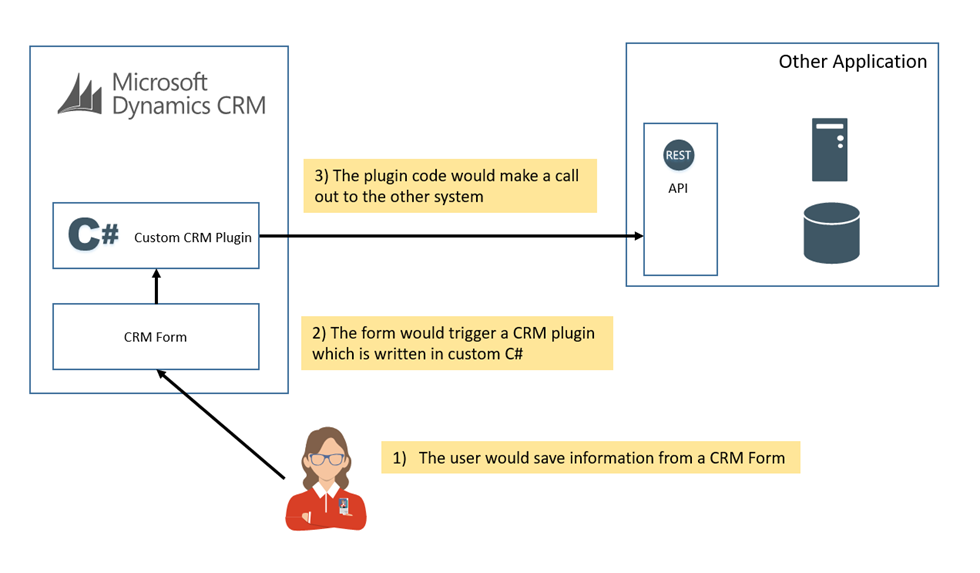
In option 1 the CRM developer would use the extensibility features of Dynamics. This allows you to write C# code which will execute within the CRM runtime environment as a plugin. With a plugin you can configure when the code will execute. Options include things like:
- When an entity is updated but before the save is made
- When the entity is updated but after the save is made
- As above but on other commands such as created/deleted
The below picture shows what this scenario will look like
Good things:
- This is probably the quickest way you can get the data from the commit in CRM to the other application
- This is probably the simplest way you can do this integration with the minimum number of network hops
- This solution probably only needs the skill set of the CRM developer
Things to consider:
- You would be very tightly coupling the two applications
-
You would have some potential challenges around error scenarios
- What happens if the save to the other app works but the save to CRM doesn’t or visa-versa
- The custom plugin is probably going to block the CRM users thread while it makes the external call which is asking for performance issues
- You would need to consider if you would do the call to the other application before or after saving the data to CRM
- You would need to consider where to store the configuration for the plugin
- There would be error and retry scenarios to consider
-
There would be the typical considerations of tightly coupled apps
- What if the other app is broken
- What if it has a service window
- Errors are likely to bubble up to the end user
-
You will have OOTB (out of the box) CRM plugin tracing diagnostics but this may require some custom code to ensure it logs appropriate diagnostic information
Option 1.5 – CRM Custom Plugin – Asynchronous
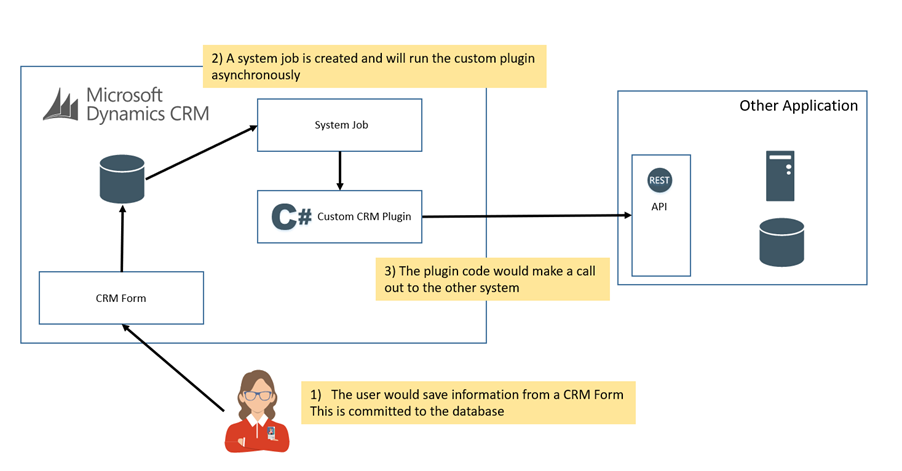
In this option the solution is very similar to the above solution with the exception that the developer has chosen to take advantage of the asynchronous system jobs feature in CRM. The plugin that was developed is probably the same code but this time the configuration of the plugin in CRM has indicated that the plugin should be executed out of process from the transaction where the user is saving a change. This means that the commit of the change will trigger a system job which will be added to the processing queue and it will execute the plugin which will send data to the other application.
The below picture illustrates this option.
Good things:
Things to consider:
- There may be other things on the processing queue so there is no guarantee how long it will take to synchronize
-
You may get race conditions if another transaction updates the entity and you haven’t appropriately covered these scenarios in your design
- Also think about the concurrency of system jobs and other plugins
-
I have seen a few times where option 1 is implemented then flipped to option 2 due to performance concerns as a workaround
- This needs to be thought about upfront
- You may struggle to control the load on the downstream system
-
Again there is a tight coupling of systems. CRM has explicit knowledge of the other application and a heavy dependency on it
- What if the app is down
- What if there are service windows
- Error scenarios are highly likely and there could be lots of failed jobs
Option 2 – CRM out of the Box Publishing to Azure Service Bus
Option 1 and 1.5 are common ways a CRM developer will attempt to solve the problem. Typically they have a CRM toolset and they try to use a tool from that toolset to solve the problem as bringing in other things was traditionally a big deal.
With the wide adoption of Azure we are starting to see a major shift in this space. Now many Dynamics projects are also including Azure by default in their toolset. This means CRM developers are also gaining experience with tooling on Azure and have a wider set of options available. This allows a shift in the mindset that not everything has to be solved in CRM and actually doing stuff outside of CRM offers many more opportunities to build better solutions while at the same time keeping the CRM implementation pure and focused on its core aim.
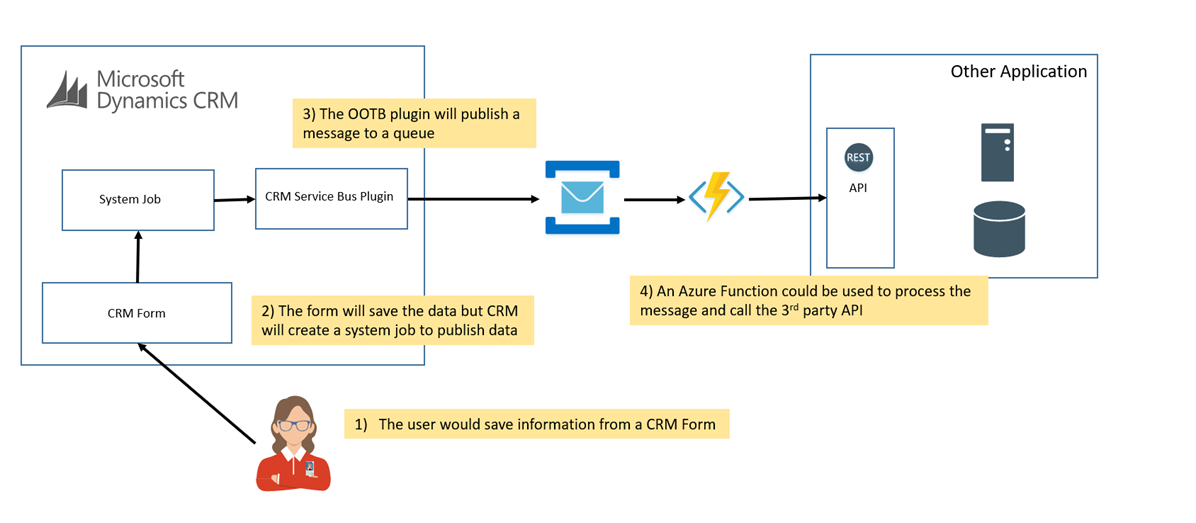
In this solution the CRM developer has chosen to add an Azure Service Bus instance to the solution. This means they can use the OOTB plugin (not a custom one) in CRM which will publish messages from CRM to a queue or topic when an entity changes. From here the architecture can choose some other tools to get messages from Service Bus to the destination application. For simplicity in this case I may choose an Azure Function which could allow me to write a simple bit of C# to do the job.
The below solution illustrates this:
Good things:
- No custom coding in CRM
- The Service Bus plugin will be much more reliable than the custom one
- The Service Bus plugin will get a lot of messages out to Service Bus very fast by comparison to the custom plugin in 1.5 which will bottleneck on the downstream system probably
- Service Bus supports pub/sub so you can plugin routing of messages to other systems
- The Azure Function could be developed by the CRM developer quite easily with a basic C# skillset
- Service Bus offers lots of retry capabilities
- The queue offers a buffer between the applications so there is no dependency between them
- The function could be paused in downtime so that CRM can keep pumping out changes and they will be loaded when the other app is back online
- The solution will be pretty cheap, you will pay a small cost for the service bus instance and per execution for the function. Unless you have very high load this should be a cheap option
Things to consider:
- The key thing to remember here is that the solution is near realtime. It is not an instant synch. In most cases it is likely the sync will happen very quickly but the CRM System Jobs could be one bottleneck if you have lots of changes or jobs in CRM. Also the capability of the downstream system may be a bottleneck so you may need to consider how fast you want to load changes
- The only bad thing is that there are quite a few moving parts in this solution so you may want to ensure you are using appropriate management and monitoring for the solution. In addition too CRM System jobs you may want to consider Service Bus 360 to manage and monitor your queues and also Application Insights for your Azure Functions
Option 3 – Logic App Integration
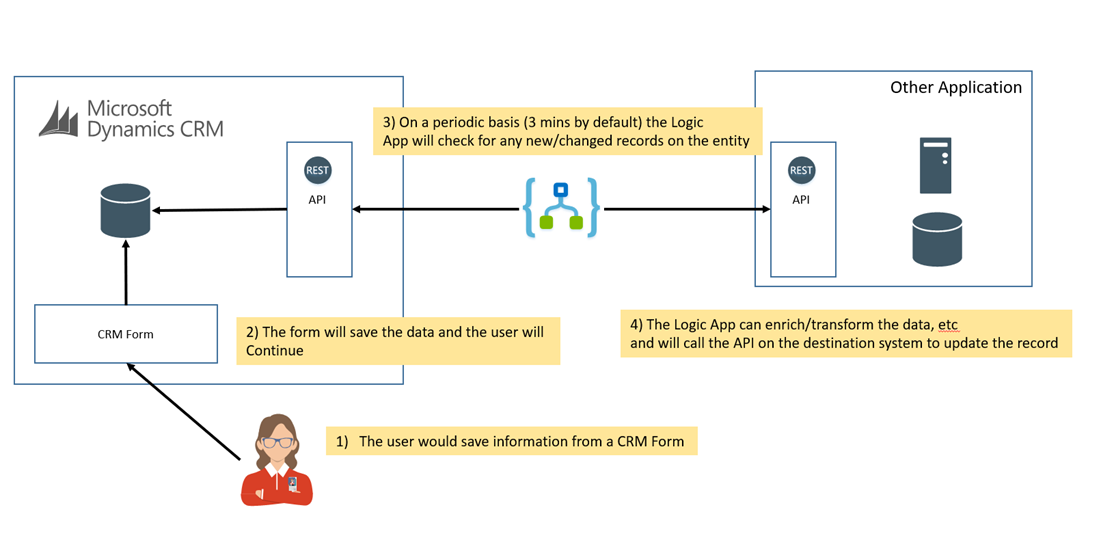
In option 3 the developer has chosen to use a Logic App to detect changes in CRM and to push them over to the other application. This means that the CRM solution is very vanilla, it doesn’t even really know that changes are going elsewhere. In the above options a change in CRM triggered a process to push the data elsewhere. In this option the Logic App is outside CRM and is periodically checking for changes and pulling them out.
Typically the Logic App will check every 3 minutes (this is configurable) and it will pull out a collection of changes and then 1 instance of the logic app will be triggered for each change detected.
The logic app will then use an appropriate connector to pass the message to the downstream application.
The below picture shows what this looks like.
Good things:
- There is nothing to do in CRM
- The Logic App will need monitoring and managing separate to CRM
- The Logic App is not part of the CRM developers core skill set, but they are very simple to use so it should be easy to pick this up
- The Logic App has a lot of features if you run into more advanced scenarios
- The Logic App has connectors for lots of applications
- You may be able to develop the solution with no custom code
- The Logic App has some excellent diagnostics features to help you develop and manage the solution
- The Logic App has retry and resubmit capabilities
- The solution will be pretty cheap with no upfront capital cost. You just pay per execution. Unless you have very high load this should be a cheap option
- This option can also be combined with Service Bus and BizTalk Server for very advanced integration scenarios
Things to consider:
Option 4 – SSIS Integration
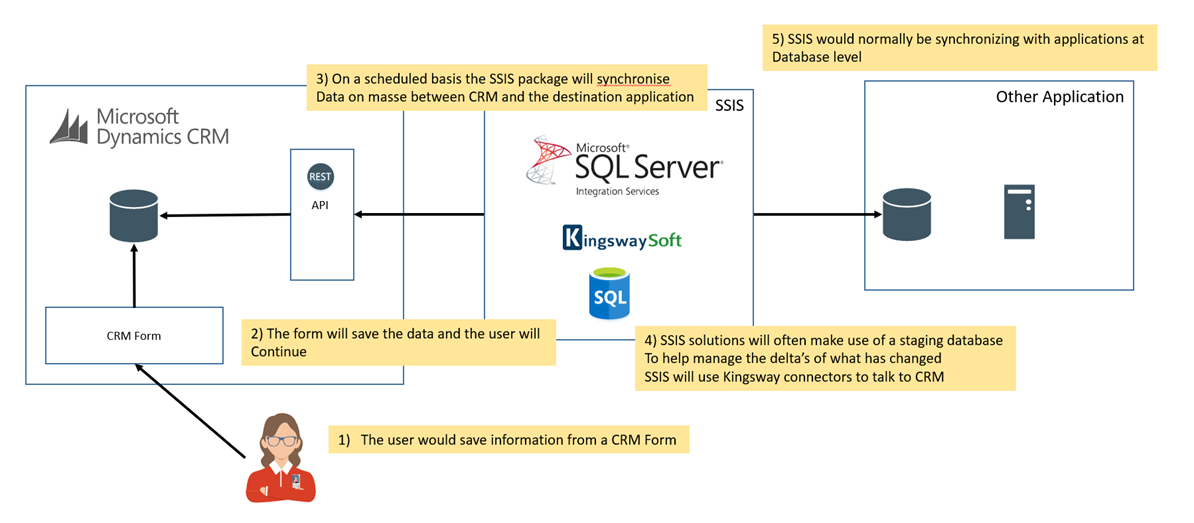
The next option to consider is an ETL based approach using SSIS. This approach is quite common for CRM projects because they often have people with SQL skills. The solution would involve setting up an SSIS capability and then purchasing the 3rd party Kingswaysoft SSIS connectors which includes support for Dynamics.
The solution would then pull out data from CRM via the API using a fetch xml query or OData Query. It would then push the changes to the destination system. Often SSIS would be integrating at database level which is its sweetspot but it does have the capability to call HTTP endpoints and API’s.
Although the diagrams look similar, the big difference between the Logic App approach and SSIS is that SSIS is treating the records as a batch of data which it is attempting to process in bulk. The Logic App is attempting to execute a separate transaction for each row it pulls out from the CRM changes. Each solution has its own way of dealing with errors which makes this comparison slightly more complex, but typically think of the idea of a batch of changes vs individual changes.
In the SSIS solution it is also very common for the solution to include a staging database between the systems where the developer will attempt to create some separation of concern and create deltas to minimize the size of the data being sent to downstream systems.
Good things:
- You can process a lot of data very quickly
- Common approach on CRM projects
- Kingswaysoft product is mature
- Predominantly configuration based solution
- Sometimes error scenarios can be complex
Things to consider:
There is no right or wrong answer based on the original 2 line requirement we got, but you can see each solution has a lot to think about.
This emphasises the importance of asking questions and elaborating on the requirements and working out the capabilities of the applications you will integrate with before choosing which option to take. As a general rule I would recommend not to jump too quickly to option 1 or 1.5. As an integration guy we usually frown upon these kind of options because of the way they couple applications and create long term problems even though they might work initially. I think the other 3 options (2-4) will be relatively easy to choose between depending on the requirements elaboration but with option 1 and 1.5 I would only choose these in niche cases and I would do so only with full buy in from your architecture team that you have a justifiable reason for choosing it that has been documented enough to be able to explain later when someone comes along and asks WTF?
One other factor to consider which we didn’t touch on too much above. I have kind of assumed you have an open toolset on todays typical CRM and Azure project. It may also be the case that your project has some constraints which may influence your decision to choose one option over the other. I hope in these cases the above considerations will help you to validate the choice you make or also give you some ammunition if you feel that you should challenge the constraint and consider another option.
by Gautam | Jan 21, 2018 | BizTalk Community Blogs via Syndication
Do you feel difficult to keep up to date on all the frequent updates and announcements in the Microsoft Integration platform?
Integration weekly update can be your solution. It’s a weekly update on the topics related to Integration – enterprise integration, robust & scalable messaging capabilities and Citizen Integration capabilities empowered by Microsoft platform to deliver value to the business.
If you want to receive these updates weekly, then don’t forget to Subscribe!
Feedback
Hope this would be helpful. Please feel free to provide any feedback on the Integration weekly series.

by Eldert Grootenboer | Jan 2, 2018 | BizTalk Community Blogs via Syndication
Another year has gone by, and looking back, it has been an amazing year for me. The year started with becoming a MVP, for which I am thankful and honored. I want to once again thank everyone who has helped me reaching this astounding accomplishment, with special thanks going out to my buddy Steef-Jan, who has been like a mentor to me.

Became a MVP
Looking back on 2017, it was also a year of lots of traveling, including trips either for speaking or for attending conferences. Most of these trips have been together with some great friends, like Steef-Jan, Tomasso, Sandro, Nino and many more. Last year I have visited Gold Coast, Brisbane, Sydney, Melbourne, Gothenborg, Stockholm, Ghent, Lisbon, London, Oslo, Mechelen, Seattle, Bellevue and Dutch Harbor.

Lisbon

Oslo

Dutch Harbor
I love to speak, and in 2017 I got the chance to speak at a lot of different locations and events. This includes speaking at conferences, user groups and webcasts, which allowed me to spread knowledge, meet old friends, make new friends, and interact with people from all around the world. With the rise of Azure, I have spoken on various subjects around its great technologies and services, for example IoT, Logic Apps, Event Grid, Bot Framework and many more.

IoT
Bot Framework
Last year we did the first Global Integration Bootcamp, for which I am one of the founders and board members. With a total of 12 countries, 16 locations, 55 speakers and over 650 attendees, it was a great success!

Global Integration Bootcamp
Over the past year I have once again written several blog posts, both on my own blog as well as a guest writer for BizTalk360. I love sharing this way, and have gotten a lot of great feedback from all of you, so you can certainly expect more to come.
Blog Posts
Not only have I been blogging, but I also wrote another ebook together with Steef-Jan, Tomasso and Rob, covering modern integration, as an addition to the Global Integration Bootcamp.
Modern Integration eBook
Of course, becoming a MVP was the most amazing reward I have gotten last year, but I am also very honored to have received the BizTalk360 Product Specialist award for the third time in a row.

BizTalk360 Product Specialist
I also have gotten my TOGAF certification, continuing my path into architecture.

TOGAF 9 Certified
As I said, 2017 has been a great year, having spent time with old friends, made many new friends, traveled all over the world, and accomplishing many personal goals. For 2018, I intend to continue doing this, and keep doing all these things I enjoy most. The year 2018 is already starting great, with ny first trip will be coming up in two weeks, as I honored to be speaking in Helsinki at IglooConf.

IglooConf
We are also working hard on another Global Integration Bootcamp, so make sure to attend as well! I am in the works of planning more sessions and trips at the moment as well, so if you ever see me around, come and say hello. You are the ones who give me the motivation and opportunities to do everything I get to do, thank you!
by Jeroen | Dec 16, 2017 | BizTalk Community Blogs via Syndication
IBM Websphere MQ can be an overwhelming product to use as a message broker if you have worked in the past with Microsft’s MSMQ or the Azure Service Bus. The best way to learn and understand a product is to have your local lab environment, that you can recreate when needed.
With this post I share with you some links how you can setup your own local IBM MQ 9 installation for development purposes.
Step 1: Download IBM MQ Advanced for Developers
Direct link: IBM MQ 9.0.3 for Windows
Step 2: Setting up a development WebSphere MQ server
This very well written blog posts explain how you can setup a queue manager, configure a channel and create a queue.
(Skip step 10 as it isn’t the best way to disable security)
Step 3: Disable MQ Security
The default installation of IBM MQ has security turned on. Without disabling this you won’t be able to use your .NET client application or the BizTalk Adapter to send/receive messages. Be aware that you should only do this on your development environment!
Step 4: Add a firewall exclusion rule
If you are planning to host your local IBM MQ setup in a seperate VM, you will most likely need to setup a firewall exlusion rule so you can access the queue manager from another machine. (If you install IBM MQ as a service it will listen by default on all IP addresses)
Simply add an exclusion rule to allow inbound TCP traffic for the port your queue manager is running on (default is 1414).
Optional: .NET Sample Applications
by michaelstephensonuk | Oct 1, 2017 | BizTalk Community Blogs via Syndication
Recently I had a chat with a few people at a company about integration solutions and a question came up which I remember not having been asked in a while. “Will the business users be able to modify the solution after its live”. Back in the day you used to get asked this quite often but I don’t remember being asked this one for a while. I do know that the technology landscape has changed a lot since I last got asked this and after a very interesting discussion I thought id share my thinking of this space.
Why would the user want to modify the solution
There are a few different things that come up as the reason for this desire. It’s a good idea in this discussion with a customer to find out their drivers, they may not always be the same. Some of the common ones include:
- IT guys are expensive so we don’t want to constantly need to pay a premium for changes
- IT take too long to make the changes
- A change may seem very simple yet IT seem to turn it into a project
- We need to react to customer’s needs and changes quickly
What are the ways in which the user may modify the solution
Different solutions will have different things that can be changed or tuned but if we think of common solutions we see these are some of the areas we can change things:
- Config settings in the solution which are used to drive decision logic. EG a threshold for an order which is considered large. Depending upon where the config settings are stored they may be able to be modified by the business user
- Business Rules may be editable by a business user
- Flow logic, the solution may have a workflow which could be edited by the user
- On boarding new customers/partners is a part of the integration solution the business user may wish to take control of
- Data mapping and transformation rules
Im sure there are probably plenty of other areas but above are just a few off the top of my head
Should the user be allowed to modify the solution
Assuming the reason that the business users want to be able to take control of modifying the solution or parts of it is valid then a decision over if this should be allowed or not is likely to come down to the desire of the product owner or sponsor and the governance areas of the solution.
What we need to consider is that if we elevate the business users permissions to control parts of the integration solution, does this mean we trade off any other parts of the solution. In this area we need to consider the areas of the solution that the business user will often have low regard for such as performance, testing, application lifecycle management, security and risk. If for example we go and grant permissions for the business user to modify the work flow of an integration process then the changes are they will reactively go an do this in response to a change required by their customer. They may not think to communicate the planned change, they may not test it properly and may think their change has worked by they don’t understand that they have now broken 3 things down stream which have been affected by this change.
The one think you can guarantee is that the business user will very rarely have an understanding of dependencies and consequences within the system. I say this quite boldly because often many IT people do not have this understanding either. When it comes to making changes, even if you have a very good IT architecture, treating the change like pulling out a piece of a Jenga puzzle is a good approach to make. First you need to work out if this is a good piece to be messing around with or not. Maybe its pretty safe and you can let your business user get on with it and at other times you need to be very cautious and through.
Having a view on the changes the business would like to make overlayed with some kind of heat map of your architecture will tell you the safe Jenga pieces for the business to take control of and the areas of risk when you need to keep in IT.
When you then let the business make these changes themselves, you still need to implement a change management process for them to follow. You don’t want to be in a position where the business user made a change which wasn’t reflected back into the system source configuration so that next time there is a major release the change is regressed. Teams still need to work together.
Types of solution
Once you have identified areas and rules around the business user making changes in isolation, I guess you have laid out your rules for engagement as you begin democratizing integration in certain areas.
I would expect that you find solutions would fall into certain types which are more and less acceptable for the business to change.
Citizen Integrator
Citizen Integrator solutions are those ones which were either built by the business or built by IT but can be handed over to be looked after day to day by business users. These may be solutions for individuals or solutions for teams.
In this space you will find super users in the business such as Excel guru’s begin to thrive. They can build solutions for their team and themselves and really innovate.
One of the challenges from an IT perspective is that if the Citizen Integrator builds a solution that becomes too important or if it becomes relevant to be managed by regulatory rules which the business function may not be aware of but IT have dedicated functions to support.
How do you as an IT function stop bob the HR junior intern from building the mission critical staff holiday system replacement project without anyone in IT being aware?
Id expect the business user to be able to make the following changes in this type of solution:
Lightweight Low Risk Integration
Lightweight integration projects may be good candidates for business users to “modify”. I would consider light weight to mean not lots of load, not very complex and fairly well isolated. In this scenario you may choose to allow a business super user to some changes in certain areas but it is likely some areas may require a more advanced skillset.
Id expect the business user to be able to make the following changes in this type of solution:
Mission Critical & High Risk
In a mission critical integration solution I would expect that there would be a pretty thourgh change management process that would control changes to the system. In these cases the consequences of breaking something out-weigh the benefits of quick changes. I would expect that most changes would involve a degree of impact analysis followed by a controlled change process involving making the change, deploying it in a repeatable way, testing the change and making the change live.
The intention of the process overhead is to remove risk of things going wrong and sometimes removing the risk of politics in the organisation if something was broken that affected the core business.
I would expect in this case the attitude to the business super user making changes would be:
Those examples above are just some of the ones you might come across. It really depends on the organisation and its attitude to risk and change. An example you might find is a mission critical system which has certain parts of the system which are very safe for business users to modify. An example might be an architecture where Dynamics CRM is used to provide a lot of the settings and configuration for a customer and then integration processes use these settings as required. This gives the user a place where they can safely modify some parts of the system which are used by others. I think the key point here though is it comes back to a heat map of your architecture so you know the safe Jenga pieces and the unsafe ones.
Technology Comparison
Up until this point I have tried to think about things agnostic of technology, but if we also bring in this angle it gets even more interesting. Back a number of years ago when we had a small set of tools available there were only a few limited choices in this space, but now we have many more choices.
Flow & Power Apps
If we know we have requirements for the business user to take an active part in the solution and its maintenance then Flow and Power Apps give us an ecosystem which is built for these users. In a solution we can incorporate these tools to provide a safe(ish) area for the business user to do their bits. We can even give the business user control of the entire solution if its appropriate.
Flow and Power Apps should be a part of our integration architecture anyway and give us a big tick in the box of empowering the business user to be an active stakeholder in an integration solution.
Logic Apps
Logic Apps are a really interesting one, they have the features or a high power mission critical integration tool but the ability to sandbox logic apps in resource groups means it is possible for us to use some logic apps for those IT only use cases and have other Logic Apps where the business user could be granted access to Azure and the resource group to be able to manage and modify if it was appropriate.
BizTalk
BizTalk is one of the tools where there are not that many choices for the business user. It is unlikely we would want the business user to make changes to anything which is not then handed over to IT for deployment. That said in an agile environment a BizTalk developer and business subject matter expert working closely on a solution can be a very good way to work.
Rules, Cross Reference Data, port settings and Configuration settings are the most likely candidates for a desire to change but I think the risks of doing this without an ALM process would outweigh any benefits.
One point to note with BizTalk is that BizTalk 360 provides a number of features which can allow a business user to manage their integration solution. While BizTalk might be one of the less friendly tools to allow a business super user to make changes, BizTalk 360 can allow the person to manage their messages and process instances if they want. This can be done in a safe way.
SSIS & Data Factory
Azure Data Factory and SSIS are like BizTalk in that it would be difficult to get a business user to be able to do anything with them. They are a fairly closed environment and require a significant skill set to do anything with them. Id see these as IT only tools.
Service Bus
Service Bus is an interesting one, you could imagine a scenario where the business user might request that all new customer messages are now also sent to a new application they are buying. Conceptually its not too much of a leap to see an advanced user setting up a new subscription from the new customer topic to the new application worker queue. In the real world however I can imagine that most of these changes would require some additional work around the applications either sending or receiving messages so I think the service bus change would be unlikely to be done in isolation.
I think a business user may also struggle to understand message flows without an upfront visualization tool.
With this in mind I suspect Service Bus would be unlikely to be a good fit for requirements for business users to modify.
Event Grid
My first thought is that event grid would fall into the same space as service bus messaging, but maybe in the future as the solution matures the fact that the data is events rather than messages may mean that there are certain scenarios that the business may dynamically change their interest in. In wonder about scenarios like a university clearing time where perhaps a super user gets a really cool idea of a way to improve the likelihood of a new student signing up and would like to explore events for just 2 or 3 conditions for a couple of days. Self service subscription to events in this nature could be a really powerful way of experimentation within the business.
Summary
I think the answer to the initial question has changed a lot over the last few years, its great to be in the position where we have loads of technical options and rather than being limited in how we could include those requirements into a solution its now a case of making sure we don’t go too over the top and remember that there is still an important place for governance and best practices in addition to agility and flexibility.
Exciting times really
by BizTalk Team | Sep 25, 2017 | BizTalk Community Blogs via Syndication
If you missed the chance to attend INTEGRATE 2017 in London this year, now is your chance to participate in INTEGRATE 2017 USA at the Microsoft Redmond Campus. Come see Scott Guthrie, Executive Vice President for the Cloud and Enterprise division, deliver the keynote address. Have a chance to network with Microsoft employees along with Microsoft Integration MVPs.
Further details and registration information can be found at https://www.biztalk360.com/integrate-2017-usa/

by BizTalk Team | Sep 18, 2017 | BizTalk Community Blogs via Syndication
Microsoft has a lot of great partners, and one of our missions is to highlight these, if you want to do a partner post on our team blog reach out to us either over mail or through comments on this post.
This post is written by BizTalk360 to highlight how they take advantage of BizTalk Server to help customers achieve more with our product.
Today BizTalk360 has become an inherent part for anyone using Microsoft BizTalk Server. Since its inception in 2011, the product has matured significantly with continuous improvement mainly driven by industry & customer feedback. BizTalk360 takes one critical pain point of every Microsoft BizTalk Server customer BizTalk Server Operations & Monitoring and solves the problem extremely well.
Today the product comes with some 70+ features to address the BizTalk Server Operations and Monitoring challenges; in this blog let’s take a look at the top 5 reasons why every Microsoft BizTalk Server customer should consider using BizTalk360.
1. Modern Web based Management Experience
The out of the box BizTalk Server Administration tool that comes with BizTalk Server is a MMC based Windows Application. It requires installing on every administrator or support person’s computer.
BizTalk360, is a modern on-premise web based management tool that provides the user with a modern web experience and increases productivity as a result with regard to BizTalk Server Administration and Management.
With the single installation of BizTalk360, many BizTalk Server environments (Production, UAT, Staging etc.) in the organization can be configured and managed. Administrators and operators can access the web portal from any modern web browser.
BizTalk360 comes with a lot of out of the box dashboards and widgets to make management of BizTalk Server easier.
2. Enterprise grade Security and Auditing
The majority of the tasks performed by using the BizTalk Admin console require elevated Administrator rights and it also lacks the ability to restrict users to specific BizTalk Applications running in the environment.
The other important limitation of BizTalk Admin console is the auditing and governance capability. The tool does not audit any user operational activities. For example: If someone accidentally or purposely stops an important Orchestration or Send Port it will heavily interrupt the message processing. It will not be possible to pinpoint who performed that action.
Whereas when you are using BizTalk360 every single user operational activity on the BizTalk Environments is stored for governance and audit purpose. The customers can keep the data for as long as they want by a simple setting.
3. Monitoring designed for BizTalk Server
There are many general purpose monitoring tools in the market which claim they cover BizTalk Server monitoring, but when you start using them you’ll start realizing they just scratch the surface with generic things like Memory, CPU, Event Log etc. and won’t go any deeper. Whereas BizTalk360 is designed from the ground up to address the monitoring challenges of Microsoft BizTalk Server. It covers the breadth and width of BizTalk Server Monitoring needs.
There are unique requirements like Transaction or Data Monitoring which is specific to BizTalk Server, for example did we process 1000 messages (invoices) from SAP today (or every hour), this is addressed only in BizTalk360, a general purpose monitoring tool.
Auto healing is another important aspect, where BizTalk360 will try to rectify the problem itself whenever possible. Example: An FTP Receive Port may go down for various transient reasons like a network outage, temporary unavailability of FTP location and so on. In these circumstances, BizTalk360 will bring the FTP Receive Port back online with automatic healing capability.
4. Productivity with Single Unified Tooling
On a day to day basis, a BizTalk Server Administrator can use anywhere from 5-8 different tools like BizTalk Admin console, SQL Management Studio, BAM Portal, ESB Portal, Windows Event Viewers, Perfmon, BizTalk Health Monitor, SCOM console to name a few. This creates several challenges, lost productivity due to context switching between tools, security concerns (every single tool across environments needs to be secured), and training people for day-to-day support is time-consuming and expensive (you need very skilled resources).
BizTalk360 addresses all these challenges by providing a unified web based management administration tool for BizTalk Server. All the features are built from the ground up within BizTalk360 for example BizTalk360 comes with its own enhanced BAM portal and ESB portal. BizTalk360 also comes with some key productivity features like a centralized Event Viewer, team knowledge base, Secure SQL Query management, Throttling analyzer, Web based Rules Composer etc.
5. Analytics for Environment Transparency
Most organizations treat their BizTalk Environments like a black box. The standard tools like BizTalk Admin console provide very little transparency on the health of the environment. It doesn’t come with any analytical information like charts and graphs to showcase the failure rates, transaction volume, message processing latency, messaging patterns, throttling analysis etc.
BizTalk360 has a dedicated section for Analytics to address all the above challenges. It makes it super easy for administrators to view the health of your BizTalk Environments, you can create your own custom dashboards based on your scenarios like SAP to Dynamics CRM integration, Oracle to IBM MQ integration etc.
Summary
The above 5 points explain clearly why BizTalk Server customer should use BizTalk360. Microsoft as a platform company always focus on the scalability and reliability of the platform and it depends on partners like BizTalk360 to address the tooling gap. At one end of the spectrum is the platform (Microsoft BizTalk Server) and at the other end are the custom solutions built using BizTalk Server (by customers and consulting companies). BizTalk360 positions itself in the middle and bridges the gap with regard to BizTalk Server Administration and Management.
Today there are over 2500 installations of BizTalk360 in the world; some of the mission critical businesses including Microsoft IT (responsible for the entire retail and supply chain operations) rely on BizTalk360 for their day to day operations and monitoring.
Trial Download: You can try BizTalk360 trial version for 14 days on your own BizTalk Environments and validate the benefits.
by BizTalk Team | Sep 13, 2017 | BizTalk Community Blogs via Syndication
We are happy to announce the release of Microsoft Host Integration Server 2013 Cumulative Update 4. Host Integration Server is included with the BizTalk License and is a part of our broader BizTalk offerings to assist our customers with integrating to various backend systems. In the case of Host Integration Server, we provide customers with options to interact with IBM software. For customers just starting out with Host Integration Server we suggest using our latest version, Host Integration Server 2016.
This cumulative update package contains hotfixes for issues that were resolved after the release of Host Integration Server 2013.
We recommend that you test the cumulative update before you deploy it in a production environment. Because the builds are cumulative, each new update release contains all the hotfixes and all the security updates that were included in the previous Host Integration Server 2013 cumulative updates. We recommend that you consider applying the most recent Host Integration Server 2013 Cumulative Update to remain current with the product.
Cumulative update package 4 for Microsoft Host Integration Server 2013:
- Application Integration – 6 customer issues fixed
- Data Integration – -12 customer issues fixed
- Message Integration – 6 customer issues fixed
- Network Integration – 10 customer issues fixed
- Session Integration – 10 customer issues fixed
Information regarding how to download the package and details regarding the specific fixes can be found in the KB article here.
We encourage you to actively engage with us and propose new features for all BizTalk offerings, including Host Integration Server, through our BizTalk User Voice page.
by Bill Chesnut | Sep 1, 2017 | BizTalk Community Blogs via Syndication
The process for creating a BizTalk 2016 Developer machine with 2016 is back to the way is was in the previous 2013R2 Azure Gallery Images, almost everything is install and all you need to do is some configuration. As an update from my
previous blog post, I will walk through the steps here:
Start with the BizTalk Server 2016 Developer Azure Gallery Image
Create a new Virtual Machine from the Azure Gallery Image, Logon to your newly created machine
I then joined my machine to my Azure AD Domain Services Domain and updated some of the machine settings
SQL 2016 is installed and configured, the only thing I found was around some of the enabled protocols, so open SQL Configuration manager and enable Named Pipes and TCP/IP, this requires a restart of SQL to become effective
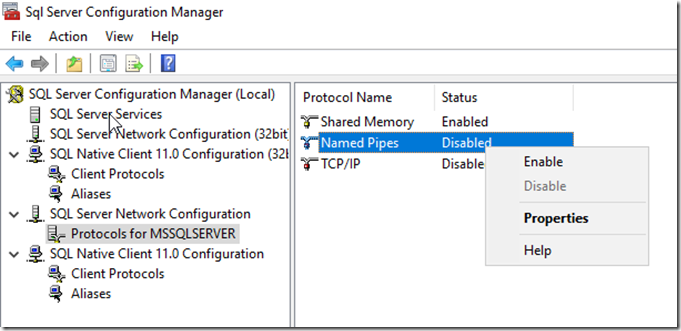
Visual Studio 2015 Professional is installed, you will just need to Sign In with your MSDN linked email account to activate
The remainder of building a BizTalk Server 2016 Developer machines is the same as my previous blog post, Starting from Configuring BizTalk Server 2016 Developer Edition – https://www.biztalkbill.com/2017/03/21/creating-biztalk-server-2016-developer-from-azure-gallery-image/