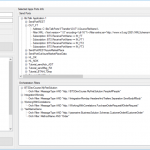
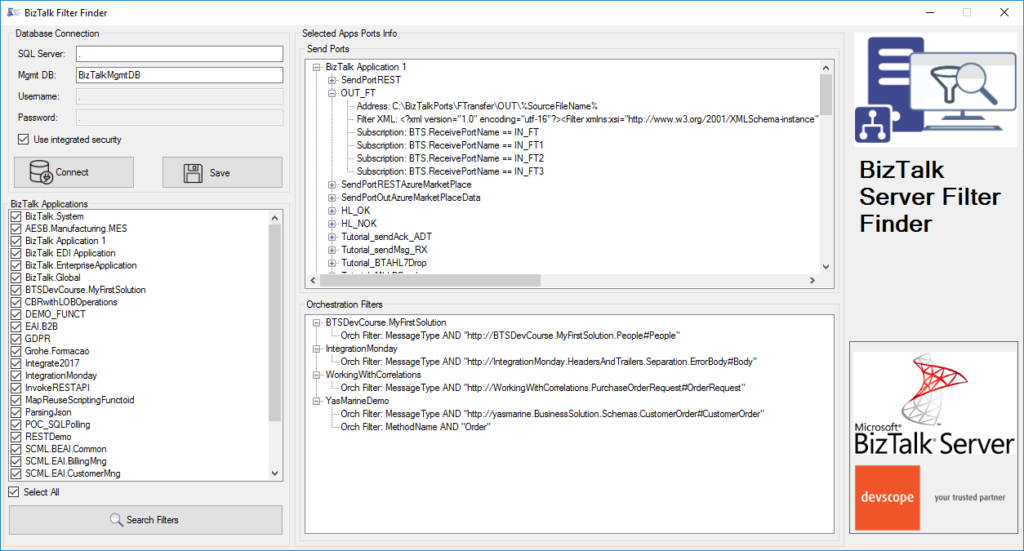
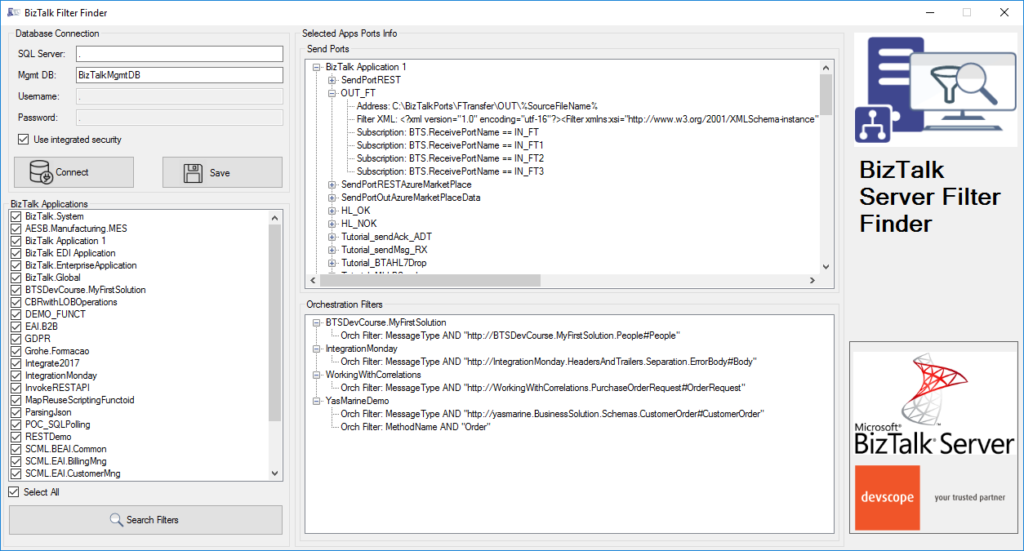
BizTalk Filter Finder tool got an update and it is now more powerful and with new features and mainly all of that thanks to Michał Plutyński contributions. And for those who are not familiar with this tool, the BizTalk Filter Finder Tool is a simple tool that aims to simplify the process for better understand and maintain solutions based on content-based routing and context-based routing with or without orchestrations involved.
This tool will extend default BizTalk Server capabilities transforming this tedious and sometimes complicate analysis a little simple, easy and fast. You can read more details about this tool in the original post here: BizTalk Filter Finder Tool.
What’s new in the release
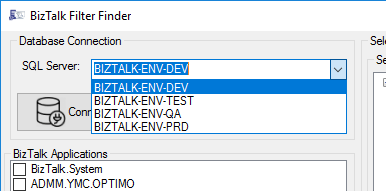
A new dropdown list that allows you to select your BizTalk Server environment (you can set up them in the config file), this way is better and easier to use in bigger teams with several environments.
Add filters/search capabilities allowing you to filter the existing subscriptions and only show filters with subscriptions that contain some text;
Hotfix/improvements: Changes in reading orchestration list when it’s used a MessageBoxDb on a different server then ManagementDb.
Credits to Michał Plutyński for becoming a collaborator of this tool.
It was only 9 days ago that I released the latest minor version of this package, on that time the goal was to update the Security and Governance stencils to please my dear friend Nino Crudele. It was then that I notice that Microsoft did again a completely redesigned on several of the symbols and of course add new services so I decided that this was the time to not only refresh the package with the new icons but also but so extra work.
What’s new in this version?
With the growing number of stencils in this package, it was becoming hard to easily find or look for the right shape/representation. So once again based on some feedback I received from the community I decide to do so rearranging. I still have many things to do in this project in terms of organization but for now, these are the changes on this major release:
New shapes: The main additions are all the new shapes on the Azure Portal. New shapes added on:
MIS Azure Stencils: containing all the main Azure Portal Services
MIS AI and Machine Learning Stencils: all shapes related to AI or Machine Learning scenarios;
MIS IoT Devices Stencils: all shapes related to IoT scenarios:
Microsoft Integration Stencils;
MIS Azure Others Stencils: containing Azure Postal Services, features of the services and other interesting shapes;
MIS Azure Additional or Support Stencils: other shapes that may be interesting in supporting Azure diagrams and designs or presentations;
MIS Azure Stencils: Complete update to this category with many new shapes added and many shapes moved to MIS Azure Others Stencils file;
MIS AI and Machine Learning Stencils: Complete update to this category with many new shapes added and updating many others to there current stencils;
Add categories:
Microsoft Integration Stencils Old Version Stencils: containing all the oldest versions of stencils (obsolete, deprecated or replaced by a new shape)
Ordered by name: I recently started to sort shapes in alphabetical order. These are the categories already sorted:
MIS Azure Stencils;
MIS Azure Others Stencils;
MIS AI and Machine Learning Stencils;
Microsoft Integration Stencils Old Version Stencils;
MIS Security and Governance;
Text Annotations: This is a requested feature and I already started to work on it but it will get some time to finish it. For now, you will see text annotations on:
MIS AI and Machine Learning Stencils
SVG Files: Add new SVG files, and uniform the name of the files;
Microsoft Integration, Azure, Power Platform, Office 365 and much more Stencils Pack
Microsoft Integration, Azure, Power Platform, Office 365 and much more Stencils Pack it’s a Visio package that contains fully resizable Visio shapes (symbols/icons) that will help you to visually represent On-premise, Cloud or Hybrid Integration and Enterprise architectures scenarios (BizTalk Server, API Management, Logic Apps, Service Bus, Event Hub…), solutions diagrams and features or systems that use Microsoft Azure and related cloud and on-premises technologies in Visio 2016/2013:
BizTalk Server
Microsoft Azure
Integration
Integration Service Environments (ISE)
Logic Apps and Azure App Service in general (API Apps, Web Apps, and Mobile Apps)
Azure API Management
Messaging: Event Hubs, Event Grid, Service Bus, …
Azure IoT and Docker
AI, Machine Learning, Stream Analytics, Data Factory, Data Pipelines
SQL Server, DocumentDB, CosmosDB, MySQL, …
and so on
Microsoft Power Platform
Microsoft Flow
PowerApps
Power BI
Office365, SharePoint,…
DevOps and PowerShell
Security and Governance
And much more…
… and now non-related Microsoft technologies like:
SAP Stencils
The Microsoft Integration Stencils Pack is composed of 28 files:
Microsoft Integration Stencils
MIS Azure Stencils
MIS Additional or Support Stencils
MIS AI and Machine Learning Stencils
MIS Apps and Systems Logo Stencils
MIS Azure Additional or Support Stencils
MIS Azure Mono Color
MIS Azure Old Versions
MIS Azure Others Stencils
MIS Buildings Stencils
MIS Databases and Analytics Stencils
MIS Deprecated Stencils
MIS Developer Stencils
MIS Devices Stencils
MIS Files Stencils
MIS Generic Stencils
MIS Infrastructure Stencils
MIS Integration Fun
MIS Integration Patterns Stencils
MIS IoT Devices Stencils
MIS Office365
MIS Power BI Stencils
MIS PowerApps and Flows Stencils
MIS SAP Stencils
MIS Security and Governance
MIS Servers (HEX) Stencils
MIS Users and Roles Stencils
Microsoft Integration Stencils Old Version Stencils
That you can use and resize without losing quality, in particular, the new shapes.
In October, I did a major rearrange and release of my stencils pack mainly because Microsoft redesigned many of the icons present in the Azure Portal, but and guess what? Microsoft didn’t stop it yet. And several of the symbols that suffer a redesigned they already have a new version. So I decide that it is time for me to update my stencils once again, but instead of spending a lot of time and release everything at the same time, like I did last time, I decided this time I will do it in small waves.
What’s new in this version?
The main goal of this release was to provide the new icons present in the Azure Portal and update existing ones. In this version, the changes and additions are:
New shapes: New shapes added on MIS Security and Governance, MIS Developer Stencils and MIS IoT Devices Stencils;
MIS Security and Governance: Complete update to this category with many unique symbols added and updating many others to there current stencils;
SVG Files: Add new SVG files, and uniform all the filenames;
Special Highlights: Azure Arc and Machines – Azure Arc
Microsoft Integration, Azure, Power Platform, Office 365 and much more Stencils Pack
Microsoft Integration, Azure, Power Platform, Office 365 and much more Stencils Pack it’s a Visio package that contains fully resizable Visio shapes (symbols/icons) that will help you to visually represent On-premise, Cloud or Hybrid Integration and Enterprise architectures scenarios (BizTalk Server, API Management, Logic Apps, Service Bus, Event Hub…), solutions diagrams and features or systems that use Microsoft Azure and related cloud and on-premises technologies in Visio 2016/2013:
BizTalk Server
Microsoft Azure
Integration
Integration Service Environments (ISE)
Logic Apps and Azure App Service in general (API Apps, Web Apps, and Mobile Apps)
Azure API Management
Messaging: Event Hubs, Event Grid, Service Bus, …
Azure IoT and Docker
AI, Machine Learning, Stream Analytics, Data Factory, Data Pipelines
SQL Server, DocumentDB, CosmosDB, MySQL, …
and so on
Microsoft Power Platform
Microsoft Flow
PowerApps
Power BI
Office365, SharePoint,…
DevOps and PowerShell
Security and Governance
And much more…
… and now non-related Microsoft technologies like:
SAP Stencils
The Microsoft Integration Stencils Pack is composed of 27 files:
Microsoft Integration Stencils
MIS Additional or Support Stencils
MIS AI and Machine Learning Stencils
MIS Apps and Systems Logo Stencils
MIS Azure Additional or Support Stencils
MIS Azure Mono Color
MIS Azure Old Versions
MIS Azure Others Stencils
MIS Azure Stencils
MIS Buildings Stencils
MIS Databases and Analytics Stencils
MIS Deprecated Stencils
MIS Developer Stencils
MIS Devices Stencils
MIS Files Stencils
MIS Generic Stencils
MIS Infrastructure Stencils
MIS Integration Fun
MIS Integration Patterns Stencils
MIS IoT Devices Stencils
MIS Office365
MIS Power BI Stencils
MIS PowerApps and Flows Stencils
MIS SAP Stencils
MIS Security and Governance
MIS Servers (HEX) Stencils
MIS Users and Roles Stencils
That you can use and resize without losing quality, in particular, the new shapes.
And you thought there was no Santa Claus? I couldn’t
take this opportunity and this time of year to once again give back to the
community what they have also done for me: grow up together in several aspects.
The role of an adapter is to enable communications
between BizTalk Server and external systems and trading partners. Users
configure adapters by creating send ports and receive locations that define the
properties for given instances of the adapter. Most adapters support both send
and receive operations, whereas other adapters support communication in only
one direction.
The HTTP Adapter is one of the adapters that support
two-way communications, but unlike other adapters, this adapter has two
characteristics that define it:
The HTTP
“Receive” Adapter that is responsible for delivering messages to BizTalk is, in
fact, a DLL that runs inside Internet Information Services (IIS)
And for that
reason, it must be configured in IIS – it is not there out-of-the-box.
In this whitepaper, we will describe the step-by-step process of installing and configuring the HTTP Adapter in order to receive messages.
Some of you may think that the HTTP adapter is deprecated,
but that is not true. The only adapters that were deprecated were the old SAP
adapter (removed) and the SOAP and SQL adapter (that still are present in the
Administration Console). The HTTP adapter is a classic but is not deprecated
and is still very used today.
The idea for
this whitepaper was partly out of a real need and at a customer request.
Because it is a strange adapter with a peculiar configuration unlike any other
adapter in BizTalk Server, when I was giving a training course, the attendees
struggle to understand and put it working correctly. By coincidence, a week
later, I needed to put this adapter working at another client. As a result of that request and that client’s
need, I end up creating this step-by-step guide on how to install and configure
the HTTP adapter to receive messages through HTTP requests. I think this is a
good whitepaper about a classic adapter in BizTalk Server.
Recently my team and I developed and released several tools that extend the out-of-box capabilities of BizTalk Server 2016 for developer and administration teams to be more productive, saving times in some simple but time-consuming tasks that should d supposed to be. One of these tools was BizTalk Filter Finder Tool.
Because many clients still are using BizTalk Server 2013 R2, and because I had received some requests from the community, I will be releasing these tools for BizTalk Server 2013 R2 also. And today, we will stat with the BizTalk Filter Finder Tool.
BizTalk Filter Finder Tool
BizTalk Filter Finder Tool is a simple tool that aims to simplify the process for better understand and maintain solutions based on content-based routing. By allowing you to have a quick overview of all the artifacts, send ports or orchestrations that have filters associated.
This tool will extend default BizTalk Server capabilities transforming this tedious and sometimes complicate analyze a little simple, easy, and fast.
It way not be a fantastic tool; it may not be beautiful, but for me is a timesaver tool.
Credits also to my team member at DevScope, Pedro Almeida that collaborated with me in the development of this tool.
Recently my team and I developed and released several tools that extend the out-of-box capabilities of BizTalk Server 2016 for developer and administration teams to be more productive, saving times in some simple but time-consuming tasks that should d supposed to be. One of these tools was BizTalk Port Multiplier Tool.
Because many clients still are using BizTalk Server 2013 R2, and because I had received some requests from the community, I will be releasing these tools for BizTalk Server 2013 R2 also. And today, we will stat with the BizTalk Port Multiplier Tool.
BizTalk Port Multiplier Tool
BizTalk Port Multiplier Tool is a simple tool that aims to simplify the port “cloning” process by allowing you to quickly “clone or duplicate” any existing port: Receive Port or Send Port.
Send Ports are quite easy to archive, you only need to give a different name to the port, and you can clone it;
Receive Ports are tricky because they may contain several Receive Locations and each URI needs to be unique;
This tool will extend default BizTalk Server capabilities transforming the tedious and sometimes complicate port creation based on an existing one a little simple and easy allowing you to:
Create a new Receive Port based on an existing one;
It will also export the binding file from that new Receive Port;
Create a new Send Port based on an existing one;
It will also export the binding file from that new Send Port;
Generate different binding files for each environment
Why do I need to “clone” a Receive Port?
Sometimes you also need to create a receive port with similar configurations of an existing one, also changing only a few settings or simple the URI, and instead of manually recreating, you can have 90% of the process done automatically.
Sometimes it is practical, occasionally, or in some scenarios, it may not work, but in most cases, it will. So it is a best-effort operation and not an exact clone because they may have several Receive Locations, and each Address/URI needs to be unique. So, you then need to go to each receive location and reconfigure them.
Credits
Credits also to my team member at DevScope, Pedro Almeida that collaborated in the development of this tool.
Recently my team and I developed and released several tools that extend the out-of-box capabilities of BizTalk Server 2016 for developer and administration teams to be more productive, saving times in some simple but time-consuming tasks that should d supposed to be. One of these tools was BizTalk Bindings Exporter Tool.
Because many clients still are using BizTalk Server 2013 R2, and because I had received some requests from the community, I will be releasing these tools for BizTalk Server 2013 R2 also. And today, we will stat with the BizTalk Bindings Exporter Tool
BizTalk Bindings Exporter Tool
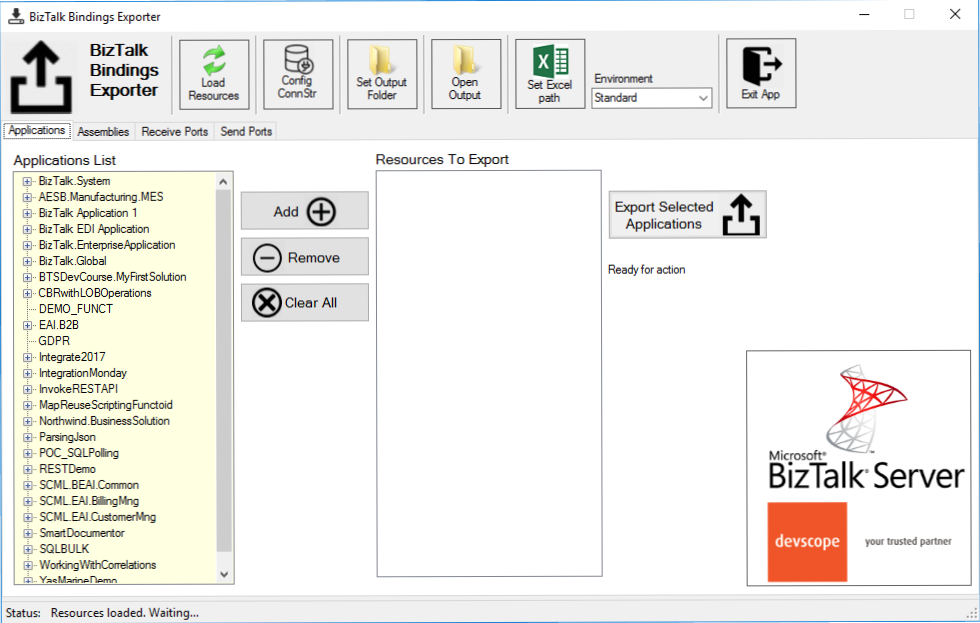
BizTalk Binding Exporter Tool is a simple tool that will suppress the absence of advanced binding file generation capabilities in the BizTalk Server Administration Console, allowing you to generate and export a binding file from BizTalk Applications in an intuitive and easy way.
Exporting a BizTalk Server Application binding is, at first sight, a quick and straightforward task that can be done using the BizTalk Server Administration Console:
Click Start, click All Programs, click Microsoft BizTalk Server 20xx, and then click BizTalk Server Administration
In the console tree, expand BizTalk Server Administration, expand the BizTalk Group, and then expand Applications
Right-click the application whose bindings you want to export, point to Export, and then click Bindings…
On the Export Bindings page, in Export to file, type the absolute path of the .xml file to which to export the bindings
Ensure that Export all bindings from the current application option is selected, and then click OK
But even in simple tasks, we may encounter challenges that require us to perform some monotonous and boring manual operations that consume some of our precious time and are always subject to failures. Because out-of-the-box BizTalk Administration Console doesn’t allow you to:
Export a Binding file of a specif Receive Port or list of Receive Ports;
Export a Binding file of a specif Send Port or list of Send Ports;
Export a Binding file of a specif Assembly or list of Assemblies;
And these are just a few scenarios. You can only fully Export the binding files of an entire application, which will lead you to sometimes extensive and fallible manual work to clean the binding files.
Usually, the binding exportation starts in development. Still, we also need to generate the same bindings for other environments like production, and for that, we usually need to open the binding file and replace/fix the differences for each different environment… which usually is a tedious operation. What we need to replace is mainly:
the URI’s: it should be fixed, but it is not mandatory. If you know what you are doing, you can fix them directly on the environment after you import the Binding.
the host instances: not mandatory, if you have the same host and host instances names across all your different environments (as best practices will tell you to do).
the NT Group Name associated in the Services (Orchestrations): according to securities best practices you shouldn’t use the same BizTalk Groups in different environments, so in this case, if you follow these best practices, you need to change these parameters in your binding file.
Normally, everyone changes the URI’s but neglecting the other parameters may be causing problems during the Binding import.
Once again, this tool will extend default BizTalk Server capabilities transforming the tedious and sometimes complicate binding generation a little simple and easy.
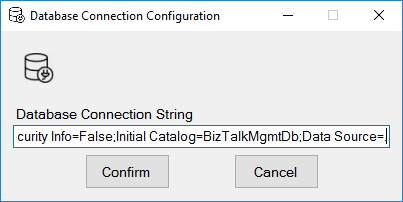
You just need to specify the connection string to the BizTalk Management database (BizTalkMgmtDb)
And this tool allows you to generate and export binding files with the following capabilities:
Export binding(s) file(s) for an entire Application or a list of Applications;
Export binding(s) file(s) from a specify Assembly or list of Assemblies;
Export binding(s) file(s) from a Receive Port or list of Receive Ports;
Export binding(s) file(s) from a Send Port or list of Send Ports;
Or Generate different binding files for each environment if you create an Excel File with the mapping for each environment ;
Credits also to my team member at DevScope, Pedro Almeida that collaborated in the development of this tool.
BizTalk Pipeline Components Extensions Utility Pack community project for BizTalk Server 2016, once again, got a new update and it now has a new component that you can use in your custom BizTalk Server pipelines: Local Archive Pipeline Component.
Local Archive Pipeline
Component
BizTalk Server Local Archive pipeline component it’s a
pipeline component that can be used for archiving incoming/outgoing message
from any adapters. It will provide the following capabilities:
It can be used in any stage of a receive pipeline or send pipeline;
It can be used in multiple stages of a receive pipeline or send pipeline;
It provides an option for you to specify the location path for where you want to save the message: local folder, shared folder, network folder.
It can be used from any adapter:
If the adapter provides the ReceivedFileName property promoted like the File adapter or FTP adapter the component will take this value in consideration and save the message with the same name;
Otherwise, it will use the MessageID, saving the file with the MessageID has its name without extension.
public Microsoft.BizTalk.Message.Interop.IBaseMessage Execute(Microsoft.BizTalk.Component.Interop.IPipelineContext pc, Microsoft.BizTalk.Message.Interop.IBaseMessage inmsg)
{
//
// TODO: implement component logic
//
// this way, it's a passthrough pipeline component
if (this.PerformBackup)
{
try
{
//Get Message Id
Guid msgId = inmsg.MessageID;
//Get Filename by FileAdapter NS
string fileName = inmsg.Context.Read("ReceivedFileName", "http://schemas.microsoft.com/BizTalk/2003/file-properties").ToString();
if (string.IsNullOrEmpty(fileName))
{
fileName = inmsg.Context.Read("ReceivedFileName", "http://schemas.microsoft.com/BizTalk/2003/ftp-properties").ToString();
if (string.IsNullOrEmpty(fileName))
{
fileName = msgId.ToString();
}
}
if (!new DirectoryInfo(this.Folder).Exists)
{
try
{
Directory.CreateDirectory(this.Folder);
}
catch
{
throw;
}
}
SaveStreamToFile(inmsg.BodyPart.Data, fileName, true);
inmsg.BodyPart.Data.Position = 0;
}
catch
{
throw;
}
}
return inmsg;
}
What is BizTalk Pipeline Components Extensions Utility
Pack?
BizTalk Pipeline Components Extensions Utility Pack is
a set of custom pipeline components (libraries) with several custom pipeline
components that can be used in received and sent pipelines, which will provide
an extension of BizTalk out-of-the-box pipeline capabilities.
At the beginning of this week I ask on twitter what should be the topic of my next blog posts: BizTalk Server and JSON support or Azure Logic Apps. And the majority of the replies was: BizTalk Server and better JSON support.
For that reason, I will respect my reader’s decision and I will be releasing today a new addition to my BizTalk Pipeline Components Extensions Utility Pack community project for BizTalk Server 2016: Custom JSON Encoder Pipeline Component.
You may be asking yourself: this component already exists by default in BizTalk Server 2016, so why we need another?
Yes, Microsoft provides out-of-the-box a JSON Encoder to transform the XML messages into a JSON message and sends it out. But, unfortunately, in some cases, it doesn’t work as you should expect to work and it will fail, in my case with this error:
Reason: Value cannot be null. Parameter name: key
And in reality what I just want is a simple way, that, I hope, it would work for all scenarios (aka XML messages) in a simple and effective way.
JSON Encoder Pipeline Component
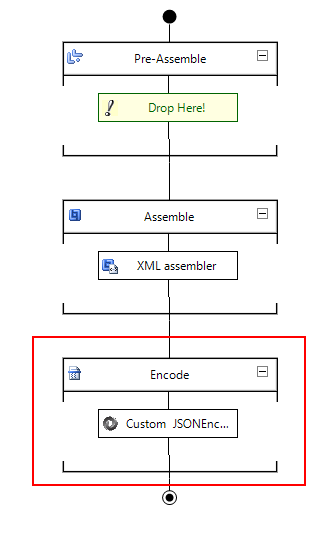
The Custom JSON Encoder is a pipeline component for BizTalk Server which can be used in a Send Pipeline (Encode stage) to encode any XML message into a JSON equivalent in a simple and effective way.
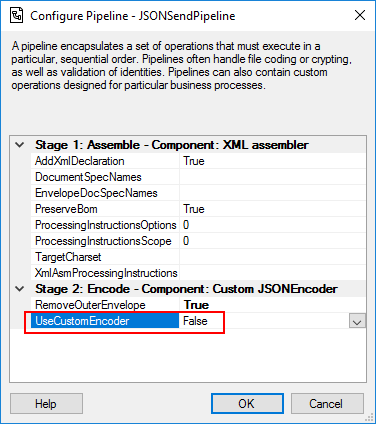
Because I would like to have a choice between using the default pipeline component provide by Microsoft, at least the internal behavior, this pipeline component is an extension of the default JSON Encoder pipeline component and fully compatible with it and you will be able from the BizTalk Administration console you will be able to decide if:
You want to use
the behavior of the default JSON Encoder pipeline component provide by
Microsoft by setting the UseCustomEncoder property to False;
or use the custom
behavior to generate the JSON message by setting the UseCustomEncoder property
to True;
What is BizTalk Pipeline Components
Extensions Utility Pack?
BizTalk Pipeline Components Extensions Utility Pack is a set of custom pipeline
components (libraries) with several custom pipeline components that can be used
in received and sent pipelines, which will provide an extension of BizTalk
out-of-the-box pipeline capabilities.
Have you ever found yourself in a position where you
needed to understand how a particular BizTalk solution works? And to make
matters worse, the majority of the solution is implemented based on content-based
routing?
Routing Messages in BizTalk
Server
So first, what is this: Content-Based routing?
Don’t get me wrong the definition that I will provide because there are several Message Routing Patterns that you can implement in BizTalk Server. For example, you can implement in BizTalk Server a:
So in his essence, the subscriber will subscribe to
the messages based on Content-Based Routing.
And you may say: yes, but I can route a message without examining is content.
And you are right. The problem is the default
definition of this pattern:
As the names
describe, Content-Based Router examines the message content and routes the
message onto a different channel based on data contained in the message. For
example, routing a message based on specif values of specif fields, or based on
some criteria like existing fields.
However, as I told you before, a message in BizTalk
Server is always composed by the message itself and the metadata
associated with it. And for that reason, you may found other variations or
other names like:
Context-Based
Routing: Context-Based Routing is similar to the previous
one, but instead of analyzing the content of the message, it will analyze the
metadata of the message. This information, in BizTalk Server, is normally
created on the receive port by the adapter and pipelines.
Remember that I
can promote messages to the context of the message and route them;
Message-Based
Routing: that is normally defined when:
a message is
routed by BizTalk only based on the message type;
But this is
metadata associated in the message, and you need to inspect the message to get
is type;
or in pass-thru
scenarios when you are just redirecting the message to other systems, i.e.,
BizTalk is a broker and don’t “touch” or modify the message;
But these
filters are also associated with metadata of the message;
The problem of managing these
solutions
If you have found yourself managing solutions, that
majority is implemented with content-based routing, which is usually associated
with not using orchestrations. You know that is not easy to understand the solution:
What ports are subscribing
to the messages?
In which
conditions?
In which application?
But that’s not all. Even worse if you have
orchestrations using filters based on the content/context of the message in the
activation.
This kind of analyze is hard because BizTalk Server
Administration Console doesn’t provide an easy way out-of-the-box for you to
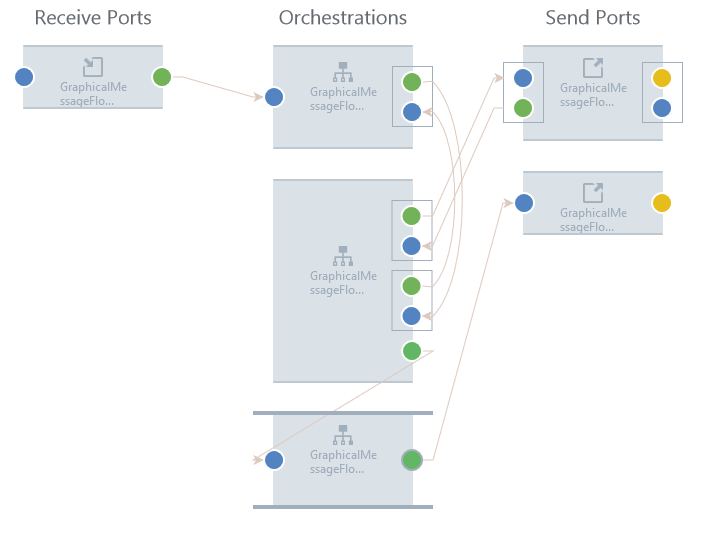
see these subscriptions for example in a central place or in a visual diagram
like:
This picture is actually from BizTalk360 Graphical Message Flow, but it serves well here as prof-of-concept.
The default solution
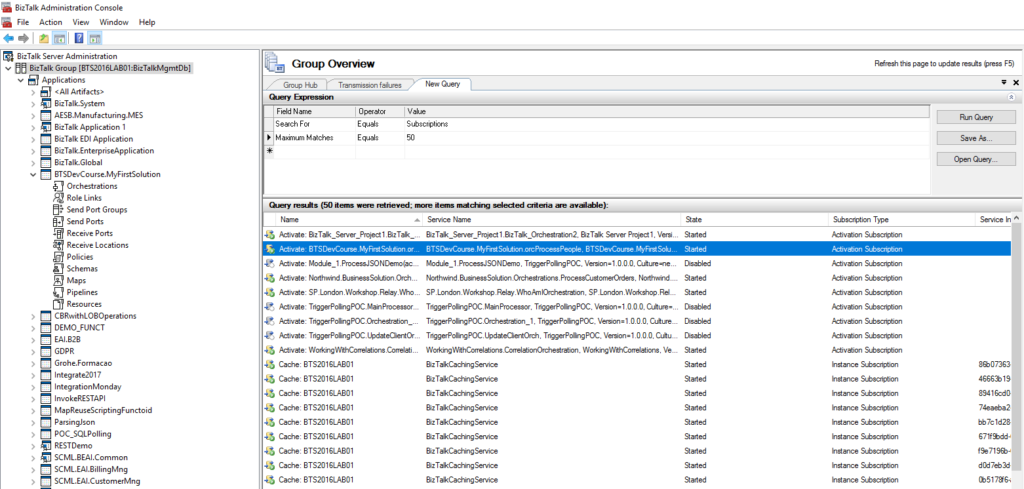
So the default solution that you have out-of-the-box
with the product is to query the subscription from the BizTalk Server
Administration Console by:
In the console
tree, expand BizTalk Server Administration, and then click the BizTalk group.
In the details
pane, click the New Query tab.
In the Query
Expression group, in the Value column, select Subscriptions from the drop-down
list box.
But then you need to go one by one and see what the
filters are.
You can minimize this by filtering more the query
using the following filters:
Maximum Matches:
The number of matches to display.
Service Instance
ID: You can filter subscriptions by service instance ID.
Service Name: You
can filter subscriptions by service name.
Subscription
Type: You can filter subscriptions by Activation Subscription or Instance
Subscription.
But that will not solve all your problems also. In conclusion, this is a hard and time-consuming task.
And sometimes what I need is just to have a quick
overview of all these filters.
BizTalk Filter Finder Tool
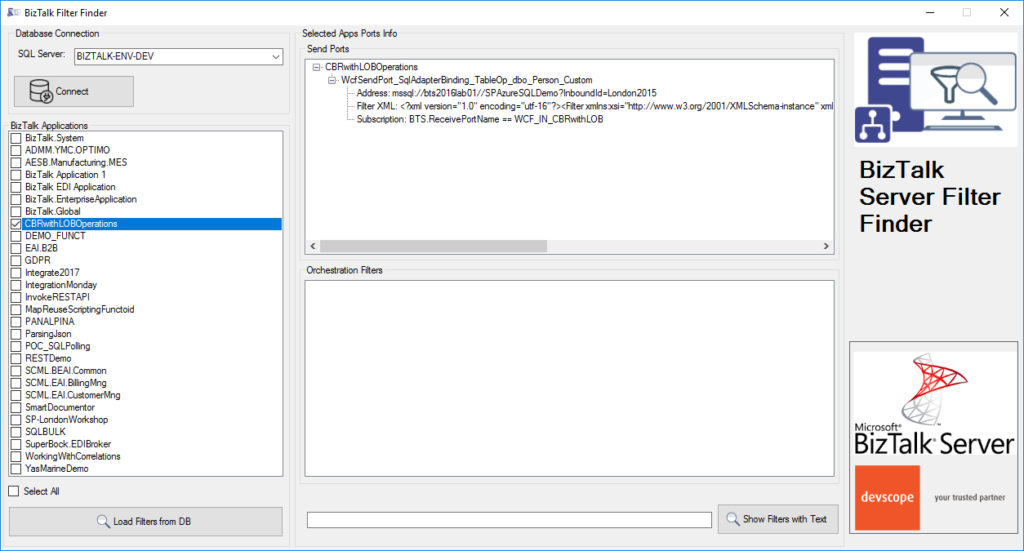
“BizTalk Filter Finder Tool” is a simple tool that
aims to simplify the process for better understand and maintain solutions based
on content-based routing. By allowing you to have a quick overview of all the
artifacts, send ports or orchestrations that have filters associated.
This tool will extend default BizTalk Server
capabilities transforming this tedious and sometimes complicate analyze a
little simple, easy and fast.
It way not be an amazing tool; it may not be beautiful
but for me is a timesaver tool.
Credits also to my team member at DevScope, Pedro Almeida that collaborated with me in the development of this tool.


 BizTalk Filter Finder Tool