Another error
and warnings, cause and solutions blog post. This time on a small issue that I got
during an application configuration in a developing environment.
Well, I
think I will not tell you anything new, but when you are generating Schemas
from a SQL database, regardless of whether they are actions directly on tables
or invoking stored procedures, a binding file is automatically created on your
BizTalk Server Visual Studio solution. And you can use it to easily create the
necessary ports to communicate with your SQL database. You don’t need to create
them manually.
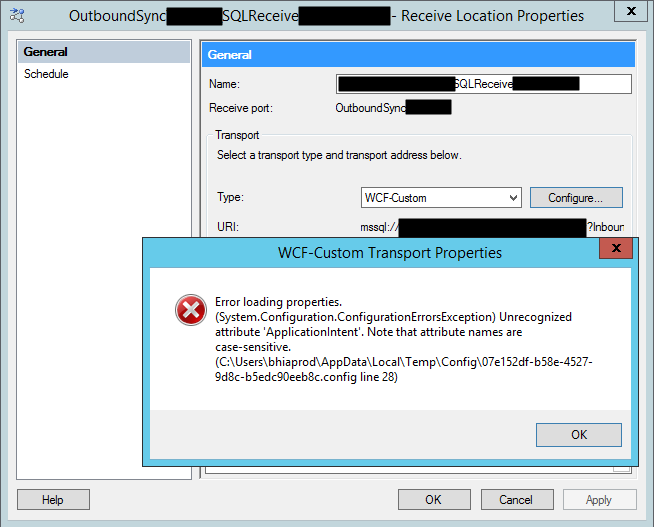
On one of these occasions, as I did thousands of times before, I successfully import my binding file containing the receive ports for my SQL database. But to my surprise every time I was trying to open the port configuration to change the attributes, I was getting the following error:
Error loading properties. (System.Configuration.ConfigurationErrorsException) Unrecognized attribute ‘Attribute-Name’. Note that attribute names are case-sensitive.
For a better context, why this error was happening, I was working with the BizTalk Server 2013 R2 version.
Cause
Although I didn’t initially understand why it
happened, the error is quite clear. The attribute name, in my case ApplicationIntent
was invalid.
Only thing I was sure:
It
wasn’t a case-sensitive issue I was sure about that because this was an auto-generated
binding file and the only thing I did was to change the receive port and
receive location names
To demystify the problem, I ended up:
Manually
creating the receive port;
Export
the bindings;
And
compare the bindings;
And what I noticed was that the bindings were different, this last one, that was working, didn’t contain the ApplicationIntent attribute and two other additional attributes like MultiSubnetFailover attribute.
I end up realizing that, because I didn’t have access to the client and I was with limit access to my dev machines, I end up creating the Schemas and the transformations using a different version: BizTalk Server 2016.
The schemas and almost artifacts, even if you
developer in a higher version, it will work well on BizTalk Server 2013 R2, you
just need to compile with a different network. Nevertheless, I will not advise doing
that. However, the binding files are different and not compatible between these
two versions for this adapter.
Solution
The solution is easy and you have three options:
Manually remove, fixing the binding file, for example, open in notepad and remove the ApplicationIntent=”ReadWrite”;
I will not recommend that approach;
You will find other issues that you need to solve;
Regenerate the schemas and bindings in your correct Visual Studio solution;
It may give you additional work on redeploying the solution;
But it is the most consistent option, everything will be updated and you sure that you have all the correct resources.
Manually create the ports on the BizTalk Server Administration Console;
Make sure to generate the binding files and update them in our Visual Studio solution;
Recently a
client call me reporting a strange behavior on the BizTalk Server Administration
Console. Based on what was reported to me, some updates were applied to the
server at the level of the operating system and that after installation, they
would have performed a controlled restart to the environment. However, after
the environment is back once again online when trying to access the
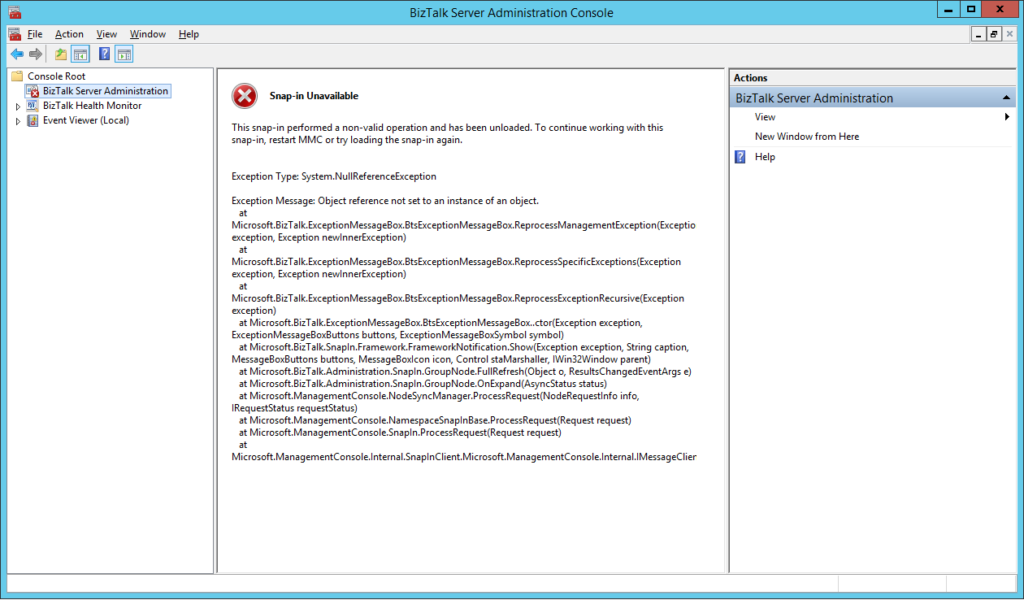
administrative console, they got the following error:
The snap-in performed a non-valid
operation and has been unloaded. To continue working with this snap-in, restart
MMC or try loading the snap-in again.
Just for curiosity, BizTalk Health Monitor, worked perfectly fine. And the BizTalk Server engine was working properly also. It was just a matter of UI.
Cause
I don’t really know the specific reasons that cause this problem, and to be honest, being a production environment, the important was to put everything working again. But in a simple way, this error message normally means that the MMC or one of the snap-ins, in this case, BizTalk Server Administration snap-in did not load correctly.
Restarting the machine again, or even restart
the BizTalk Server Administration console doesn’t solve the issue.
Solution
You can troubleshoot fudder this problem and use
a tool like System File Checker to scan and see if you find the root of the
issue and probably the fix.
However, the simple way to solve this is to:
Repair
BizTalk Server installation;
Once you repair the installation, everything
should be working fine again.
Notice: don’t forget to reinstall the last Cumulative
updates.
I
have an insane roadmap of things to be published but if I didn’t have this week
was fertile in providing me with new content. Full week troubleshooting and
fixing issues in several clients… what an amazing week! But the best one
arrived almost on the last day.
Do
you know the feeling when you develop a solution that has been working properly
for a while and stops working for no logical reason? I bet you do. And this happened
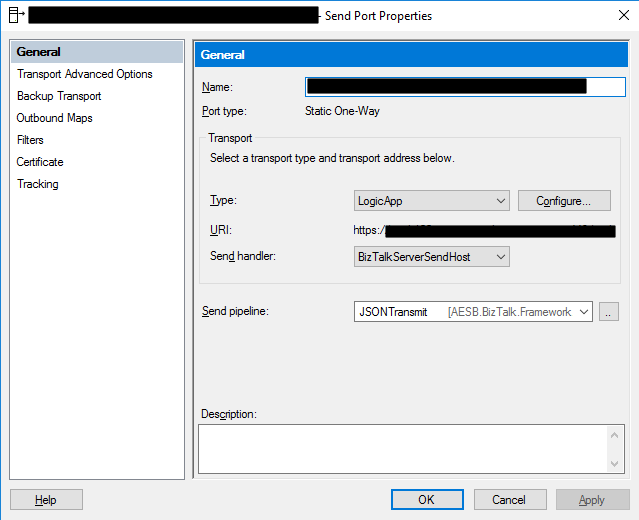
to me this week at a client where we are using the BizTalk Server Logic App
Adapter to extend part of our logical business to the cloud. And without we
make any changes to the Logic Apps or any changes in our BizTalk Server environment
(aka no new development installed, no patch’s or hotfixes installed, no
restarts, …) everything stops to work, we were not receiving any new messages
on our Logic Apps.
When
I access to BizTalk Server environment, I realize that all the requests were
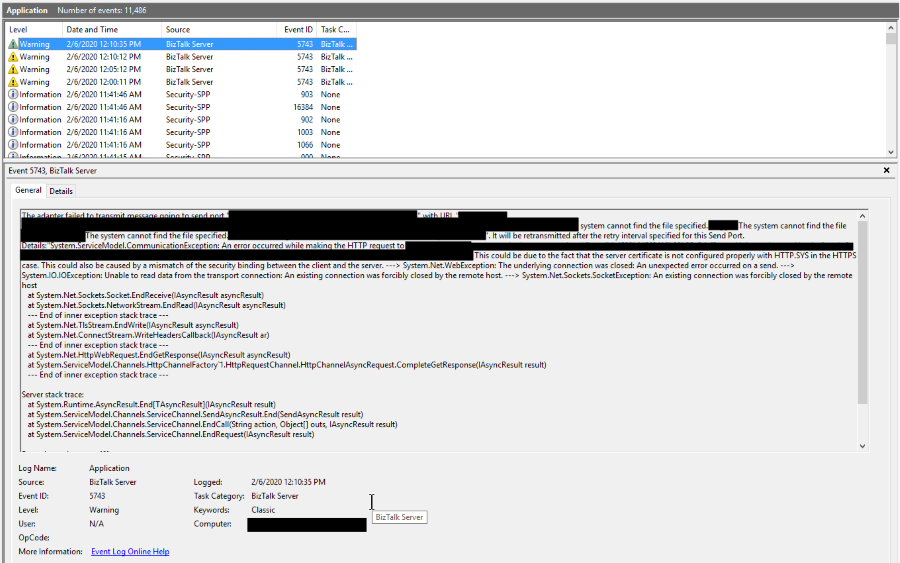
suspended with the following error:
System.ServiceModel.CommunicationException: An error occurred while making the HTTP request to https://prod-….logic.azure.com/workflows/…/triggers/manual/paths/invoke?queryparameters . This could be due to the fact that the server certificate is not configured properly with HTTP.SYS in the HTTPS case. This could also be caused by a mismatch of the security binding between the client and the server. —> System.Net.WebException: The underlying connection was closed: An unexpected error occurred on a send. —> System.IO.IOException: Unable to read data from the transport connection: An existing connection was forcibly closed by the remote host. —> System.Net.Sockets.SocketException: An existing connection was forcibly closed by the remote host at System.Net.Sockets.Socket.EndReceive(IAsyncResult asyncResult) at System.Net.Sockets.NetworkStream.EndRead(IAsyncResult a
The adapter failed to transmit message going to send port “LOGICAPP_SEND_PORT” with URL “https://prod-….logic.azure.com/workflows/…/triggers/manual/paths/invoke?queryparameters“. It will be retransmitted after the retry interval specified for this Send Port. Details:”System.ServiceModel.CommunicationException: An error occurred while making the HTTP request to https://prod-….logic.azure.com/workflows/…/triggers/manual/paths/invoke?queryparameters. This could be due to the fact that the server certificate is not configured properly with HTTP.SYS in the HTTPS case. This could also be caused by a mismatch of the security binding between the client and the server. —> System.Net.WebException: The underlying connection was closed: An unexpected error occurred on a send. —> System.IO.IOException: Unable to read data from the transport connection: An existing connection was forcibly closed by the remote host. —> System.Net.Sockets.SocketException: An existing connection was forcibly closed by the remote host
at System.Net.Sockets.Socket.EndReceive(IAsyncResult asyncResult)
at System.Net.Sockets.NetworkStream.EndRead(IAsyncResult asyncResult)
— End of inner exception stack trace —
at System.Net.TlsStream.EndWrite(IAsyncResult asyncResult)
at System.Net.ConnectStream.WriteHeadersCallback(IAsyncResult ar)
— End of inner exception stack trace —
at System.Net.HttpWebRequest.EndGetResponse(IAsyncResult asyncResult)
at System.ServiceModel.Channels.HttpChannelFactory`1.HttpRequestChannel.HttpChannelAsyncRequest.CompleteGetResponse(IAsyncResult result)
— End of inner exception stack trace —
Server stack trace:
at System.Runtime.AsyncResult.End[TAsyncResult](IAsyncResult result)
at System.ServiceModel.Channels.ServiceChannel.SendAsyncResult.End(SendAsyncResult result)
at System.ServiceModel.Channels.ServiceChannel.EndCall(String action, Object[] outs, IAsyncResult result)
at System.ServiceModel.Channels.ServiceChannel.EndRequest(IAsyncResult result)
Exception rethrown at [0]:
at System.Runtime.Remoting.Proxies.RealProxy.HandleReturnMessage(IMessage reqMsg, IMessage retMsg)
at System.Runtime.Remoting.Proxies.RealProxy.PrivateInvoke(MessageData& msgData, Int32 type)
at System.ServiceModel.Channels.IRequestChannel.EndRequest(IAsyncResult result)
at Microsoft.BizTalk.Adapter.Wcf.Runtime.WcfClient`2.RequestCallback(IAsyncResult result)”.
The other curious thing was that all my environments DEV, QA, and PROD were with the same symptom and all of them start at the same time which made this problem even more intriguing.
However,
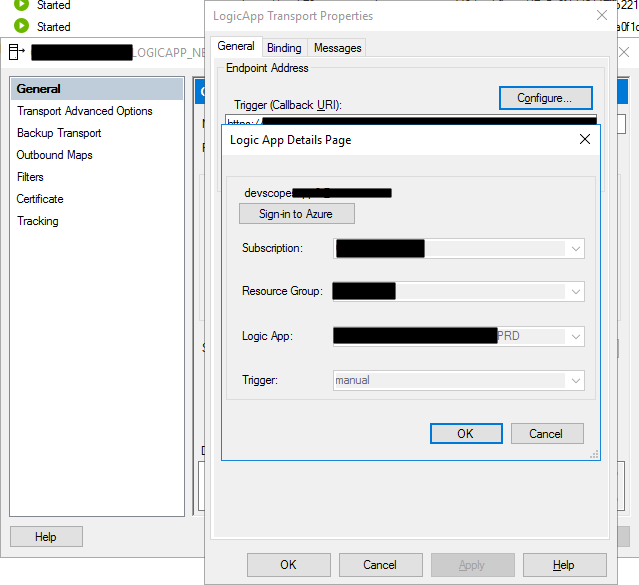
I was able to connect with the adapter, see and select all the Logic Apps in my
subscription.
To
demystify if that was a problem with the adapter, I switch to the HTTP adapter
in order to try. Nevertheless, I got identical problems that made me dismiss
the idea that there could be something wrong with the adapter.
The
next step was to see if there was a network issue, maybe a firewall or proxy, which
should be because there was no intervention in the environment, but it is
always worth testing. To do that, I used one of my favorite tools, postman, and
to my surprise, everything was working fine. I was able to communicate and send
requests to all my Logic Apps in all my environments!
Cause
If you don’t are really
familiar with this type of problem, you may be pointed for a certificate issue,
but in our case, we were not using any kind of certificates to call our Logic
Apps and no additional type of authentication.
But I was sure that I had
already seen that error in the past, and I was related to security protocol (TLS
1.0 or TLS 1.2) used on the HTTPS communication and yes HTTPS because
all Logic Apps endpoints are in HTTPS.
BizTalk
Server came out-of-the-box and works very well with SSL (Secure Socket Layer)
3.0 or TLS (Transport Layer Security) 1.0, and these are the security
protocol used. New versions of BizTalk Server allow us to use TLS 1.2, but that
required extra manual configurations that we need to do in the environment and I
know that everyone is deprecating TLS 1.0 and 1.1 because of the well know vulnerabilities,
nevertheless, everything was working fine I have been doing this kind of hybrid
solution connecting with Logic Apps.
What
I discovered on the official documentation was that they say that: The
Request trigger supports only Transport Layer Security (TLS) 1.2 for incoming
calls. Outgoing calls continue to support TLS 1.0, 1.1, and 1.2.
Nevertheless,
that wasn’t true until a few days ago, and my guess is that they actually discontinue
support for TLS 1.0 and 1.1 on the incoming calls without any notice, something
that, in my opinion, you shouldn’t do.
Solution
The solution was very simple,
we just need to specify that the default security protocol on BizTalk Server is
TLS 1.2. And to do that you need:
To
make some changes on the registry to set TLS 1.2 as default security protocol TLS1.2;
Or
creating a Custom BizTalk Server behavior;
I
choose the first option, making some changes to the registry. And to accomplish
that we need to add the below DWORD values in our registry:
On the [HKEY_LOCAL_MACHINESYSTEMCurrentControlSetControlSecurityProvidersSCHANNELProtocolsTLS 1.2Client]
Create the following DWORD (32-bit) values
Name: DisabledByDefault
Value Data: 0
Name: Enabled
Value Data: 1
On the [HKEY_LOCAL_MACHINESYSTEMCurrentControlSetControlSecurityProvidersSCHANNELProtocolsTLS 1.2Server]
Create the following DWORD (32-bit) values
Name: DisabledByDefault
Value Data: 0
Name: Enabled
Value Data: 1
On the [HKEY_LOCAL_MACHINESOFTWAREMicrosoft.NETFrameworkv4.0.30319]
Create the following DWORD (32-bit) values
Name: SchUseStrongCrypto
Value Data: 1
On the [HKEY_LOCAL_MACHINESOFTWAREWow6432NodeMicrosoft.NETFrameworkv4.0.30319]
Create the following DWORD (32-bit) value
Name: SchUseStrongCrypto
Value Data: 1
If
you try resending a message to your Logic App, everything should work properly
again.
And of course, this was my answer: @WSilveiraNZ a new BizTalk Server 2020 sticker is being made… just to let you know #msbts but then Coen Dijkgraaf joined and asked if the sticker would be available on time for Global Integration Bootcamp?
I was undecided
about whether to publish or wait to INTEGRATE to be a surprise. But I at the
end I decided to create not one but two stickers:
On to published during the INTEGRATE event… spam alert: it is awesome!
And this one above to publish now in order for you all to grab it and go to a graphics shop to make your BizTalk Sticker. A simple and clean BizTalk Server 2020 sticker identical to the logo that I publish this week: BizTalk Server 2020: a new unofficial logo
This package is a collection of 3 different image formats of the new BizTalk
Server 2020 sticker, two of them are available in vector
format that will allow you to use and resize without losing quality:
BizTalkSticker.ai
BizTalkSticker.pdf
BizTalkSticker-01.png
All of the
resources are in the original size ready to print in a graphics shop.
Thanks to Cristóvão Silva (Graphic & Web Designer @ DevScope) for helping me creating these resources.
I hope you enjoy!
Download
BizTalk Server 2020 sticker Microsoft | TechNet Gallery
BizTalk Server 2020 was officially released in the middle of January, January 15, 2020, to be more accurate. And you may be asking, why haven’t I written a post about this new version yet.
The answer is simple. I think this version should be properly analyzed, tested by us, and then we can talk about it. And for me, it all starts with installing and configuring the product, and this is where you will find the big differences between the previous version, BizTalk Server 2016 for this new version. You may have a quick overview of that on my twitter handle: https://twitter.com/sandro_asp:
It is not yet available, but for now, I can tell you that I have finished my BizTalk Server 2020 installation and configuration guide – 122 pages guide describing detail instructions to install all the features of the product – I think I may be the first one installing and configuring BAM Portal and is running properly. The installation guide will be published soon but for now, is under review.
It is a sign that you like it, but, once again, this is not the official logo. The official logo was released by Microsoft when BizTalk Server 2016 was launched and at that time Microsoft decided to drop the fancy Server icon from the logo and the version identification, now it is a simple generic logo with just Text that will be consistent in this and further versions of BizTalk Server. You may find the official logo here: Because BizTalk Server 2016 is almost here… take a look to the new BizTalk Server logotype.
But people sometimes prefer to use the “old” format just because it specifies the version, so it is easier to associate with the last version or a specific version of the product. And that was the main reason for me to create that logo.
Nevertheless, during BizTalk Server 2016 release, Microsoft also updated or released a BizTalk Server icon/stencil that you may find in the official BizTalk Server twitter handle:
So I decided that my first blog post after BizTalk Server 2020 was launched, it would be about updating my unofficial BizTalk Server logo and this time it would combine:
The official BizTalk Server icon with the official BizTalk Server logo.
Plus the version number.
And the end
result is this:
This package is a collection of 4 different image formats of the new Unofficial BizTalk Server 2020 logotype, two of them are available in vector format that will allow you to use and resize without losing quality:
BizTalkLogo.ai
BizTalkLogo.pdf
BBizTalkLogo-01.jpg
BizTalkLogoWhite-01.png
Thanks to Cristóvão Silva (Graphic & Web Designer @ DevScope) for helping me creating these resources.
Download
New Unofficial BizTalk Server 2020 logo in vector format Microsoft | TechNet Gallery
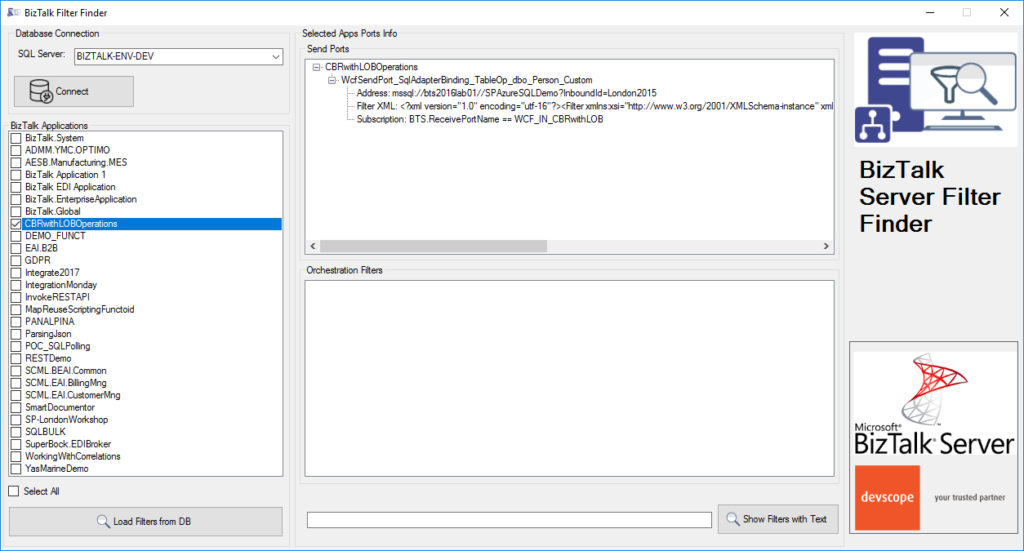
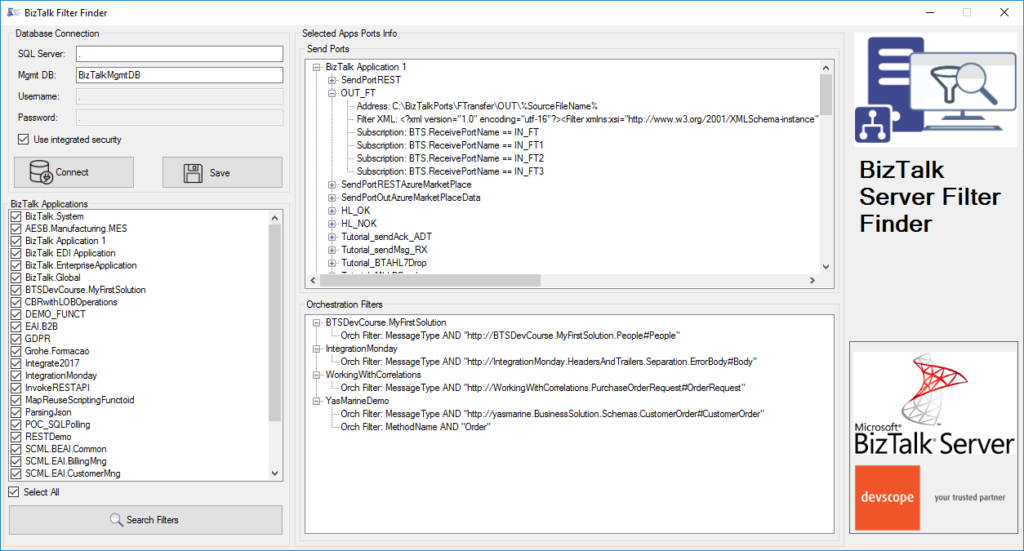
BizTalk Filter Finder tool got an update and it is now more powerful and with new features and mainly all of that thanks to Michał Plutyński contributions. And for those who are not familiar with this tool, the BizTalk Filter Finder Tool is a simple tool that aims to simplify the process for better understand and maintain solutions based on content-based routing and context-based routing with or without orchestrations involved.
This tool will extend default BizTalk Server capabilities transforming this tedious and sometimes complicate analysis a little simple, easy and fast. You can read more details about this tool in the original post here: BizTalk Filter Finder Tool.
What’s new in the release
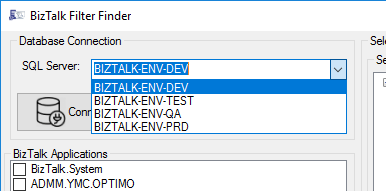
A new dropdown list that allows you to select your BizTalk Server environment (you can set up them in the config file), this way is better and easier to use in bigger teams with several environments.
Add filters/search capabilities allowing you to filter the existing subscriptions and only show filters with subscriptions that contain some text;
Hotfix/improvements: Changes in reading orchestration list when it’s used a MessageBoxDb on a different server then ManagementDb.
Credits to Michał Plutyński for becoming a collaborator of this tool.
On 15th of January 2020, Microsoft announced the release of BizTalk Server 2020. There was a lot of buzz on social media about the release. Pretty much all of the posts were highlighting and excited about the new set of features that got shipped in the product.
Even though the release came with a bunch of exciting new features like any other regular software product updates, there are some important points to note, especially for people who invested heavily in Microsoft BizTalk Server for the past 2 decades.
BizTalk Server 2020 is not just a simple software update it’s a game-changer and beginning of a new era.
Two decades of past
That’s how long Microsoft BizTalk Server is in the market.
The first version came in 2000, and now we are in 2020 and excited about the new release “BizTalk Server 2020”. Microsoft consistently released a new version every 2-4 years once for the past 20 years (2000, 2002, 2004, 2006, 2006 R2, 2009, 2010, 2013, 2013 R2, 2016 and now 2020) – i.e 11 major releases.
There are very few products in the history of software sustained a two decades life span and still going strong. On Microsoft land I can only think of a few products like Windows, Office, SQL Server are the ones which reached this milestone.
I’m feeling lucky enough to be one of them who worked on this amazing piece of technology for 20 years now. For most of the software developers out there, our career is pretty much determined by our initial few months/years after graduation and where we end up. For some people, you become programmers, again depending on what technology stack you got initial opportunities, some become data guys like DBA’s, IT administrators, and in the modern era new things like AI/ML, Big Data, etc. For me, it was/is BizTalk Server and Integration in general.
In the past 20 years, I have seen various technologies come and go. We ourselves were bitten by choosing a wrong one for BizTalk360 in the initial days. Microsoft Silverlight as our front-end, the thing that looked flashy and promised to change the way Rich Internet Applications (RIA) are build quietly died and we ended up wasting full 1 year rebuilding everything in HTML5. We finally released version 7.0 back in Oct 2013 fully revamped in HTML5
Unless otherwise, the product solves a core problem well, the chances of sustainability for this long is pretty slim.
One decade of future commitment
When Microsoft releases a server product like BizTalk Server, they commit for 10 years of product support commitment. 5 years of regular support and another 5 years of extended support for you to comfortably run your production systems without worrying about the end of life.
BizTalk Server 2020 is Microsoft’s commitment to existing customers who invested in BizTalk Server and future customers the product is supported until 2030.
It’s very important for large enterprises to get this commitment. As I mentioned earlier, you cannot afford to make wrong bets (like what we did on the front-end technology for BizTalk360 using Microsoft Silverlight), you simply end up with wasted time, money and more importantly opportunity. For us, that one year was a very painful period, with limited resources instead of building exciting new features for our customers, we ended up redoing the same thing.
It’s not easy
Even for a large organization like Microsoft, it’s not easy to maintain and improve a legacy matured product like BizTalk Server.
During my long-standing relationship with BizTalk Server in this 20 years period, I have personally dealt with at least 4-5 different completely different sets of teams at Microsoft. This is what I have witnessed
“People will come, people will go but the product stays.”
I can imagine it will be such a hard job to bring people on board to get up to speed understanding such a vast platform and innovate on top of that mixing the old and new era. In spite of the challenges, Microsoft still continued and innovated constantly for the past 20 years.
What goes behind the scene?
On every release, one of the important updates will be platform alignment. BizTalk Server relies on four important underlying platforms, the core Windows Operating System, SQL Server for data, Visual Studio for development tools and finally Microsoft Office for certain dependencies like BAM.
BizTalk Server 2020 supports the following platforms
Visual Studio 2019
Windows Server 2019, Windows Server 2016, Windows 10
SQL Server 2019, SQL Server 2017, SQL Server 2016 SP2
Office 2019, Office 2016
Supporting these new platforms is not always just a recompile of your code. For instance, the team had spent nearly 3 years rebuilding the tools for Visual Studio 2019. Some of the BizTalk Server toolings like Mapper and Orchestration designer is complex. Visual Studio 2019 changed the complete plugin-architecture and significant work has gone behind the scene to make it work.
There are few areas Microsoft does not highlight on the release notes, but that takes a significant amount of time for the product group like accelerators and adapters. Microsoft BizTalk Server is a central middleware hub supporting various industry standards like HL7, SWIFT, etc, these specifications change regularly as well, in every release they need to make sure they support the latest standards.
In a similar way, all those connecting BizTalk adapters like SAP, Oracle, JD Edwards, Peoplesoft, etc all need to be retested and realigned.
Being a global product there are a ton lot of legal procedures they need to pass through before a 20 year old product like BizTalk Server is released to the public.
You probably are not aware, some of the high-end military/defense teams across the world use BizTalk Server, it’s not that easy to commit a new release when you have such sensitive customers.
I remember having a conversation with one of the product owners of BizTalk Server in the past, how tough the whole legal process before they can get a go-ahead for the release.
Hub for modern and legacy world
If you look carefully at how Microsoft is positioning BizTalk Server 2020, it’s positioning it as a hub/window between the legacy and modern world.
The fact is, however the new cloud technology stack spans out and promises to change the world, there will always be an on-premise dependency. It will take at least another few decades (or never), for 100% cloud-native organizations to evolve.
Oh! Do you know still some of the big bank’s core systems are still running on IBM Mainframes built-in 1960 and ’70s?
For the past 10 years, in the enterprise world, it’s always a hybrid scenario, where certain things are best suited for on-premise and certain things are best suited for the cloud, you mix and match the tech stack that’s suitable for your business.
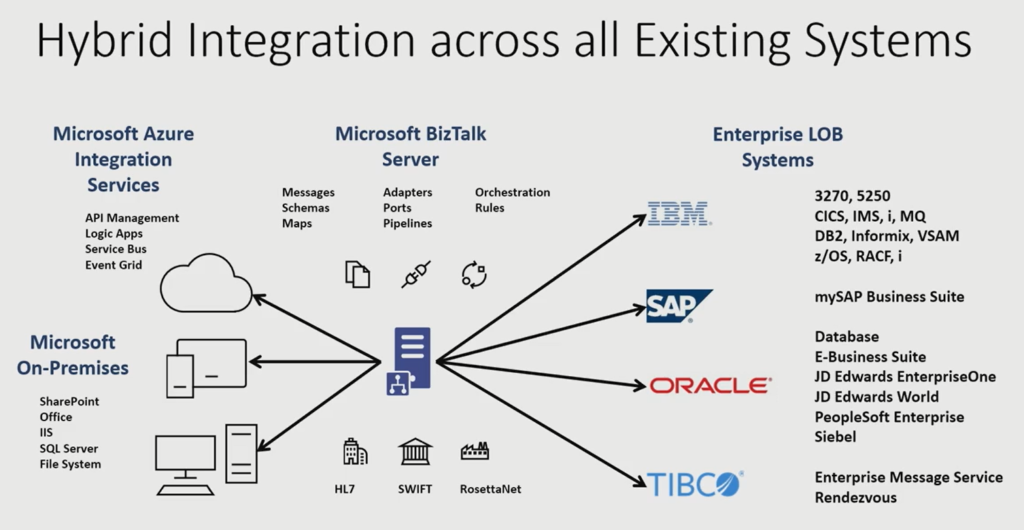
The below picture depicts how Microsoft BizTalk Server can act as a glue between the on-prem and the cloud world and get most of the benefit out of both.
There are a lot of features that shipped with BizTalk Server 2020 supporting this vision.
New customers – is BizTalk Server the right technology?
If you are on a hunt for choosing your middleware platform, it’s not an easy decision to make. With a ton of new products available in the market and each product requiring months of learning to understand the capabilities, it’s never going to be easy to compare and test everything.
But sometimes you need to go with the proven technology and the future vision of the product. BizTalk Server sustained 20 years of constant improvement (a release pretty much every 2-3 years once 2000, 2002, 2004, 2006, 2006 R2, 2009,2010, 2013, 2013 R2, 2016), a lot of features and underlying architecture are robust and scalable to sustain such a long time period.
This long history of the product is such an important decision-making factor.
And the future commitment from Microsoft gearing towards the cloud makes it a perfect candidate for any organization to bet on this middleware platform.
Why BizTalk Server developers and administrators must be excited?
Learning a complex product like BizTalk Server is time consuming long term commitment. It takes years of work and the right projects to fully understand the product and its capabilities. If you have invested your time in the past few years being a BizTalk Developer or Administrator it’s a great time to be excited with the commitment from Microsoft on the future of BizTalk Server.
BizTalk360 is ready for BizTalk Server 2020
For those of you who are not aware of BizTalk360. I would like to give a short intro and excited to announce after working with Microsoft for the past few months, we are now fully supporting Microsoft BizTalk Server 2020 with our latest release.
We are a 3rd party product providing advanced monitoring and management capabilities for Microsoft BizTalk Server. Out of the box, BizTalk Server comes with a management console called “BizTalk Admin Console”, which does a great job for people to manage and operate your BizTalk Server environments. However, the tool lacks a lot of advanced capabilities like web-based management console, advanced user access security features, advanced toolings like throttling analyzer, topology viewer, messaging patterns viewer, health dashboards, etc.
Monitoring for a platform like BizTalk Server is so crucial, but BizTalk Server doesn’t come out of the box with any monitoring capabilities. The customers need to rely on Microsoft SCOM or 3rd party products like BizTalk360. SCOM management packs for BizTalk Server is not updated for many years and it comes with only minimal monitoring capabilities.
BizTalk360 is a widely used product in the market with over 650 large enterprises helping them to manage/operate and monitor their BizTalk Server environments. BizTalk360 supports BizTalk Server 2013, 2013 R2, 2016 and now 2020.
In October, I did a major rearrange and release of my stencils pack mainly because Microsoft redesigned many of the icons present in the Azure Portal, but and guess what? Microsoft didn’t stop it yet. And several of the symbols that suffer a redesigned they already have a new version. So I decide that it is time for me to update my stencils once again, but instead of spending a lot of time and release everything at the same time, like I did last time, I decided this time I will do it in small waves.
What’s new in this version?
The main goal of this release was to provide the new icons present in the Azure Portal and update existing ones. In this version, the changes and additions are:
New shapes: New shapes added on MIS Security and Governance, MIS Developer Stencils and MIS IoT Devices Stencils;
MIS Security and Governance: Complete update to this category with many unique symbols added and updating many others to there current stencils;
SVG Files: Add new SVG files, and uniform all the filenames;
Special Highlights: Azure Arc and Machines – Azure Arc
Microsoft Integration, Azure, Power Platform, Office 365 and much more Stencils Pack
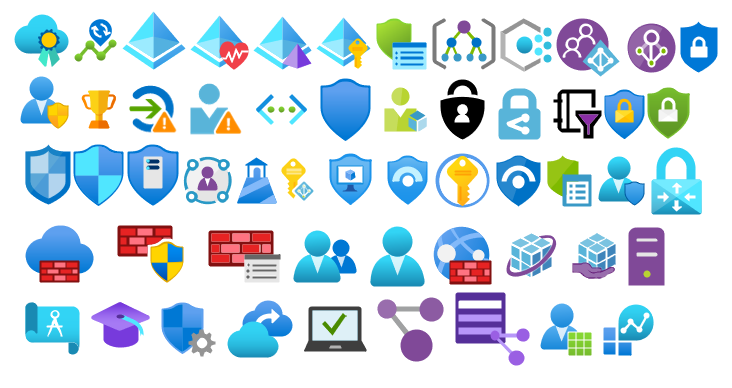
Microsoft Integration, Azure, Power Platform, Office 365 and much more Stencils Pack it’s a Visio package that contains fully resizable Visio shapes (symbols/icons) that will help you to visually represent On-premise, Cloud or Hybrid Integration and Enterprise architectures scenarios (BizTalk Server, API Management, Logic Apps, Service Bus, Event Hub…), solutions diagrams and features or systems that use Microsoft Azure and related cloud and on-premises technologies in Visio 2016/2013:
BizTalk Server
Microsoft Azure
Integration
Integration Service Environments (ISE)
Logic Apps and Azure App Service in general (API Apps, Web Apps, and Mobile Apps)
Azure API Management
Messaging: Event Hubs, Event Grid, Service Bus, …
Azure IoT and Docker
AI, Machine Learning, Stream Analytics, Data Factory, Data Pipelines
SQL Server, DocumentDB, CosmosDB, MySQL, …
and so on
Microsoft Power Platform
Microsoft Flow
PowerApps
Power BI
Office365, SharePoint,…
DevOps and PowerShell
Security and Governance
And much more…
… and now non-related Microsoft technologies like:
SAP Stencils
The Microsoft Integration Stencils Pack is composed of 27 files:
Microsoft Integration Stencils
MIS Additional or Support Stencils
MIS AI and Machine Learning Stencils
MIS Apps and Systems Logo Stencils
MIS Azure Additional or Support Stencils
MIS Azure Mono Color
MIS Azure Old Versions
MIS Azure Others Stencils
MIS Azure Stencils
MIS Buildings Stencils
MIS Databases and Analytics Stencils
MIS Deprecated Stencils
MIS Developer Stencils
MIS Devices Stencils
MIS Files Stencils
MIS Generic Stencils
MIS Infrastructure Stencils
MIS Integration Fun
MIS Integration Patterns Stencils
MIS IoT Devices Stencils
MIS Office365
MIS Power BI Stencils
MIS PowerApps and Flows Stencils
MIS SAP Stencils
MIS Security and Governance
MIS Servers (HEX) Stencils
MIS Users and Roles Stencils
That you can use and resize without losing quality, in particular, the new shapes.
And you thought there was no Santa Claus? I couldn’t
take this opportunity and this time of year to once again give back to the
community what they have also done for me: grow up together in several aspects.
The role of an adapter is to enable communications
between BizTalk Server and external systems and trading partners. Users
configure adapters by creating send ports and receive locations that define the
properties for given instances of the adapter. Most adapters support both send
and receive operations, whereas other adapters support communication in only
one direction.
The HTTP Adapter is one of the adapters that support
two-way communications, but unlike other adapters, this adapter has two
characteristics that define it:
The HTTP
“Receive” Adapter that is responsible for delivering messages to BizTalk is, in
fact, a DLL that runs inside Internet Information Services (IIS)
And for that
reason, it must be configured in IIS – it is not there out-of-the-box.
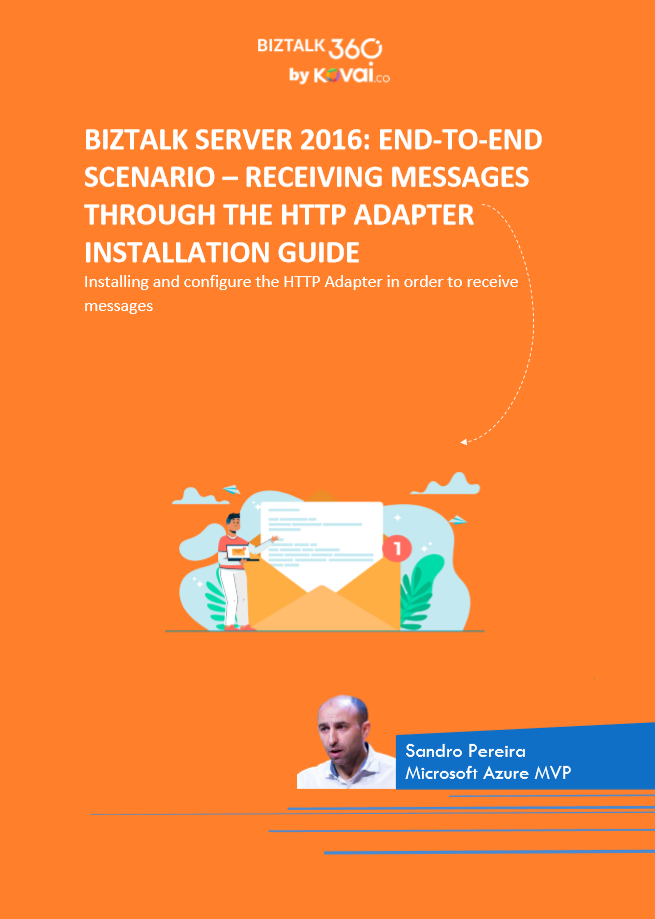
In this whitepaper, we will describe the step-by-step process of installing and configuring the HTTP Adapter in order to receive messages.
Some of you may think that the HTTP adapter is deprecated,
but that is not true. The only adapters that were deprecated were the old SAP
adapter (removed) and the SOAP and SQL adapter (that still are present in the
Administration Console). The HTTP adapter is a classic but is not deprecated
and is still very used today.
The idea for
this whitepaper was partly out of a real need and at a customer request.
Because it is a strange adapter with a peculiar configuration unlike any other
adapter in BizTalk Server, when I was giving a training course, the attendees
struggle to understand and put it working correctly. By coincidence, a week
later, I needed to put this adapter working at another client. As a result of that request and that client’s
need, I end up creating this step-by-step guide on how to install and configure
the HTTP adapter to receive messages through HTTP requests. I think this is a
good whitepaper about a classic adapter in BizTalk Server.
Recently my team and I developed and released several tools that extend the out-of-box capabilities of BizTalk Server 2016 for developer and administration teams to be more productive, saving times in some simple but time-consuming tasks that should d supposed to be. One of these tools was BizTalk Filter Finder Tool.
Because many clients still are using BizTalk Server 2013 R2, and because I had received some requests from the community, I will be releasing these tools for BizTalk Server 2013 R2 also. And today, we will stat with the BizTalk Filter Finder Tool.
BizTalk Filter Finder Tool
BizTalk Filter Finder Tool is a simple tool that aims to simplify the process for better understand and maintain solutions based on content-based routing. By allowing you to have a quick overview of all the artifacts, send ports or orchestrations that have filters associated.
This tool will extend default BizTalk Server capabilities transforming this tedious and sometimes complicate analyze a little simple, easy, and fast.
It way not be a fantastic tool; it may not be beautiful, but for me is a timesaver tool.
Credits also to my team member at DevScope, Pedro Almeida that collaborated with me in the development of this tool.





 #msbts but then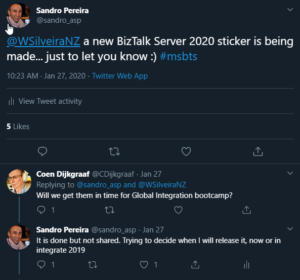

 BizTalk Server 2020 sticker