by Swetha Mohandas | Jul 17, 2018 | BizTalk Community Blogs via Syndication
Being a support person/Administrator, who would not be happy if there is a functionality to retrieve the data very easily and quickly? In a high-volume data store scenario, there will always be challenges to quickly filter and retrieve desired data. The latest version of BizTalk360 has this fantastic capability to filter the grid columns and get the results. Yes, all the grid columns in BizTalk360 have got new makeover!!!
Additionally, the Export to Excel functionality is not new in BizTalk360 there are features which already have this capability., but the new implementation is different than the existing one. How? In case there is a different set of data on the multiple tabs of the page (Eg: Tracking manager), earlier, the data in the all the grid columns will be exported to a single Excel sheet. It’s not the same now. Let’s take a deep look at the various filters implemented in the coming sections, but first, we’ll discuss the Grid Filter options.
Grid Column Filtering
Let’s talk about what are all the types of filters we are using in the BizTalk360. We have implement mainly 4 types of filter in BizTalk360. The grid supports two types of filtering, in one of the user can write a filter value and choose the filter function (Contains, Is Equal to, Less than etc.). These types are:
- Text Filter
- Checklist Filter
Text Filter
Text filter is the default filter. Using a text filter, you can filter the text input. The text filter is already implemented in the BizTalk360 in various sections. User should enter the text in the filter text box what they want to filter. After clicking on the filter button, the grid displays only the records matching the filter criteria.
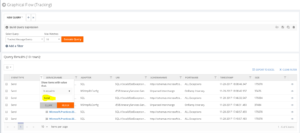
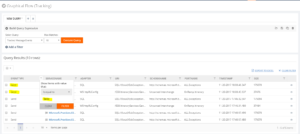
Checklist Filter
The second type of filtering is the Checklist filtering. Using this filtering type, the grid shows a checkbox list with predefined values. The user can select some of the values and apply the filtering. The grid will show only records that match any of the selected values in the list. In BizTalk360, we use checklist filtering with the following types,
- Status Filter
- Boolean Filter
- Date Time filter
Status Filter
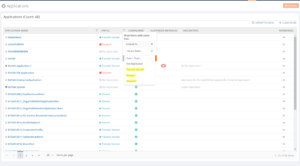
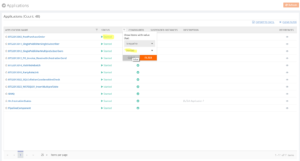
A Status filter allows to filter the different status in the column. BizTalk360 already binds the available statuses in the drop down and based on the selected user can filter the status. For example, a BizTalk application has different statuses, like Started, Stopped and Partially started.
Boolean Filter
The Boolean filter is another type of custom filter we introduced in the BizTalk360. Say for example, in the Search Artifacts section, we have a checkbox column to check for the receive port, if it’s a two-way port or not. Using the Boolean filter for this column, the user can filter for the two-way receive location.
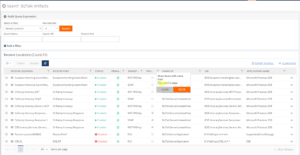
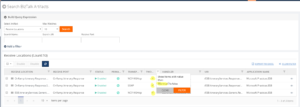
DateTime Filter
In the BizTalk360 UI, we also have date/time columns. For filtering this field, we have introduced the DateTime filter. This filter is very useful for customers to filter dates from the grid. A user can select the date from the date/time picker, which is available in the filter itself and select the time from the drop-down. Users can filter for all types of date format based on the user profile settings.
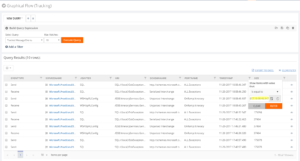
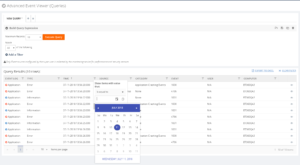
Clear Filter
What if you have selected a filter option and want to clear it? Here is the Clear option, which is newly introduced in this release. If the user filters multiple columns, it is very difficult to clear each filter manually. So the Clear Filter functionality is very useful to clear the all filters in a single click.
Export to Excel
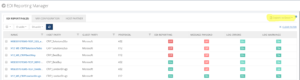
When using the grid, it is often useful and important to export your data in the MS Excel to make it accessible offline. BizTalk360 already has the feature to export to Excel for grid data in Operations section. From this version onwards, we have extended this functionality to export the grids which contain multiple information or tab pages to a single sheet in both Operations and Monitoring sections. The purpose of exporting multiple grids in a single sheet is that the user can easily navigate through the information in a single sheet.
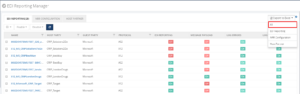
For the EDI Report Manager, Tracking Manager and the Monitoring section we have implemented this functionality. It is implemented as a drop-down, which has options like All and the distinct grid names. If the user selects the ‘All’ option, all grid information is exported to a single Excel sheet with multiple tabs. The user can also export individual grids by clicking the grid name from the drop-down.
Conclusion
At BizTalk360 we believe that both functionalities make our product stand out and keep the customer engaged. Now the customer can easily search and export data in a convenient and user-friendly method.
Author: Swetha Mohandas
Test Engineer at BizTalk360. Software Test Engineer having good knowledge of SDLC and STLC. Love to test the software product. View all posts by Swetha Mohandas

by Sandro Pereira | Jul 16, 2018 | BizTalk Community Blogs via Syndication
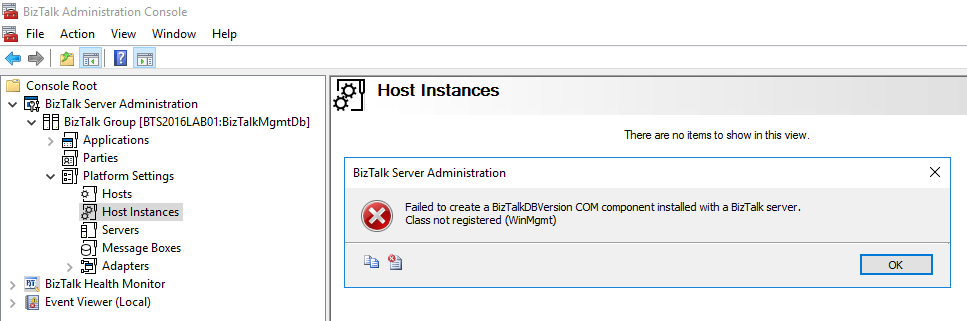
If you follow the BizTalk Server hashtag #msbts on social media like twitter or if you follow BizTalk Server MSDN forum, you will notice one disturbed thread recently: Security Updates released by Microsoft in July 10, 2018 will break you BizTalk Server Administration Console and as a result, you will not be able to access to BizTalk Server “Platform Settings”, getting the following error:
TITLE: BizTalk Server Administration
——————————
Failed to create a BizTalkDBVersion COM component installed with a BizTalk server.
Class not registered (WinMgmt)
——————————
BUTTONS:
OK
——————————
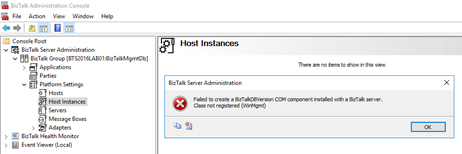
You will not be able for example to: restart the host instances from the BizTalk Server Administration console.
As far as I notice in my clients and in my dev machine, the BizTalk Server engine will still work properly as if nothing happened, it will still be able to receive, process and send all your messages.
Cause
The cause of the problem is still unclear, and Microsoft is still working on how to solve it. And this problem will happen depending in witch SO or BizTalk Server you will have. It has already been registered problems in BizTalk Server 2010, 2013, 2013 R2 and/or BizTalk Server 2016.
What is causing the problem are security updates that were released by Microsoft on July 10, 2018.
Solution
For now, there isn’t a fancy solution, Microsoft is working on a resolution and estimates a solution will be available mid-July.
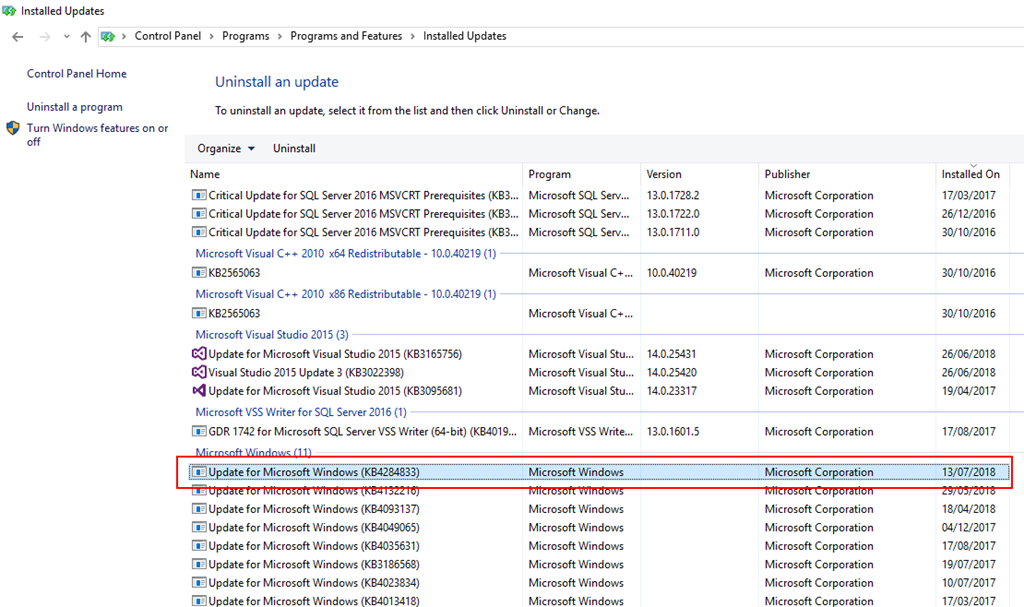
With that said, the only “solution” or let us call workaround to solve this issue is to uninstall all the “critical” security updates that were installed: in my case, uninstalling the “KB4284833” solved my case.
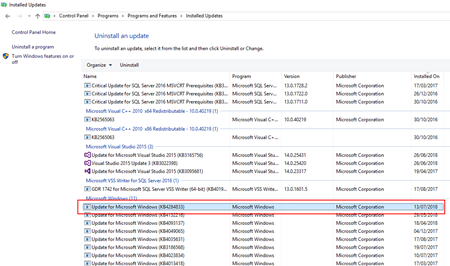
To do that you need to:
- Press the “Windows key” to open the Start menu and type “Control Panel” and click on “Control Panel” option from the Search window
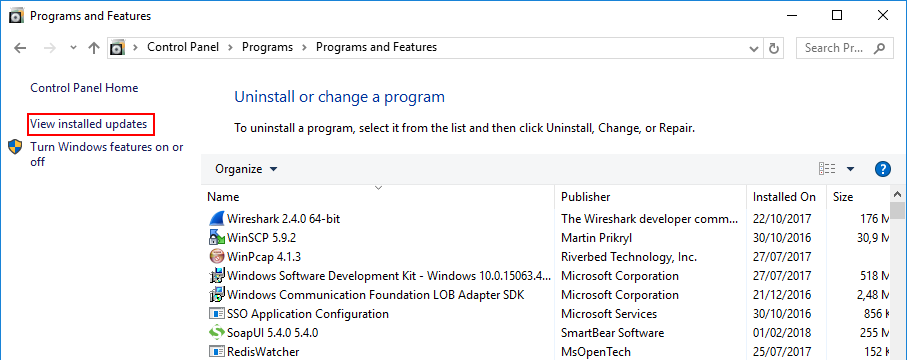
- On the “Control Panel” windows, select “Programs” and then “Programs and Features” option.
- On the “Programs and Features” panel, select “View installed updates” option.
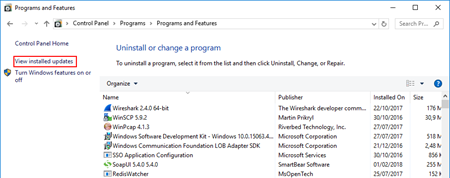
- And then you just need to select the update you want to uninstall and then right-click and select “Uninstall”.
In the end, you will need to reboot your machine.
You can always check this forum thread: Microsoft Security Updates cause BizTalk Admin Console errors: An internal failure occurred for unknown reasons (WinMgmt) to check to have an idea what updates you should uninstall depending on your OS version:
- BizTalk Server 2013 R2: KB4338600 and/or KB4338601
- BizTalk Server 2010: KB4338602
- Others: This includes KB4338600, KB4338605, KB4338613, KB4338614, KB4338424, KB4338419
All of them to be checked in your environment and analyzed by your internal teams.
Author: Sandro Pereira
Sandro Pereira lives in Portugal and works as a consultant at DevScope. In the past years, he has been working on implementing Integration scenarios both on-premises and cloud for various clients, each with different scenarios from a technical point of view, size, and criticality, using Microsoft Azure, Microsoft BizTalk Server and different technologies like AS2, EDI, RosettaNet, SAP, TIBCO etc. He is a regular blogger, international speaker, and technical reviewer of several BizTalk books all focused on Integration. He is also the author of the book “BizTalk Mapping Patterns & Best Practices”. He has been awarded MVP since 2011 for his contributions to the integration community. View all posts by Sandro Pereira

by Gautam | Jul 15, 2018 | BizTalk Community Blogs via Syndication
Do you feel difficult to keep up to date on all the frequent updates and announcements in the Microsoft Integration platform?
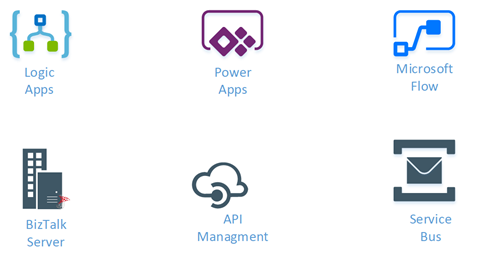
Integration weekly update can be your solution. It’s a weekly update on the topics related to Integration – enterprise integration, robust & scalable messaging capabilities and Citizen Integration capabilities empowered by Microsoft platform to deliver value to the business.
If you want to receive these updates weekly, then don’t forget to Subscribe!
Feedback
Hope this would be helpful. Please feel free to reach out to me with your feedback and questions.

by Bill Chesnut | Jul 15, 2018 | BizTalk Community Blogs via Syndication
By: Bill Chesnut
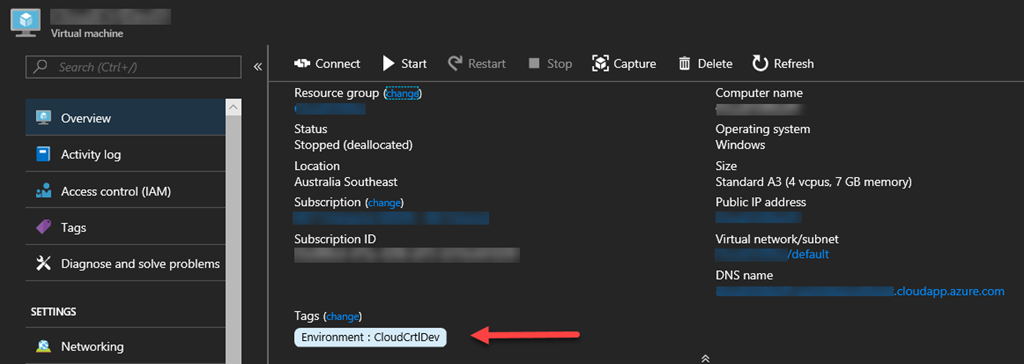
Tags have been around in Azure for a long time, but only recently have they been brought to the portal has a 1st class citizen. They are now on the overview page of almost every resource type
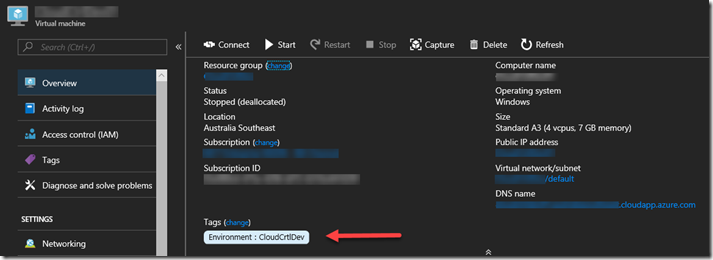
This is an example of a Virtual Machine, and Tags are now visible on the Overview Page
One of the best practices that some Azure users have been following is to Tag the Resource groups that resources are in, one assumption here is that those Tags would be available in the billing portal and/or billing files, but that is not the case, since Resource groups have no billing information associated with them they don’t appear in the billing files and cannot be used to separate the bills by Resource group Tags. This is a top request for most products that deal with reporting on Azure consumption. Until these products add support for rolling down the Tag from the Resource groups, there is a manual way to make this happen, but it could be lots of work for large Azure subscriptions.
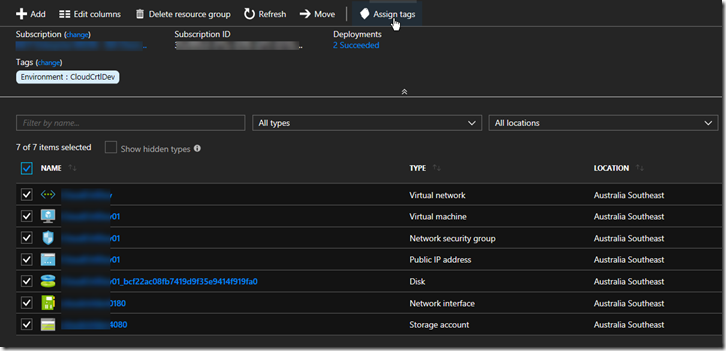
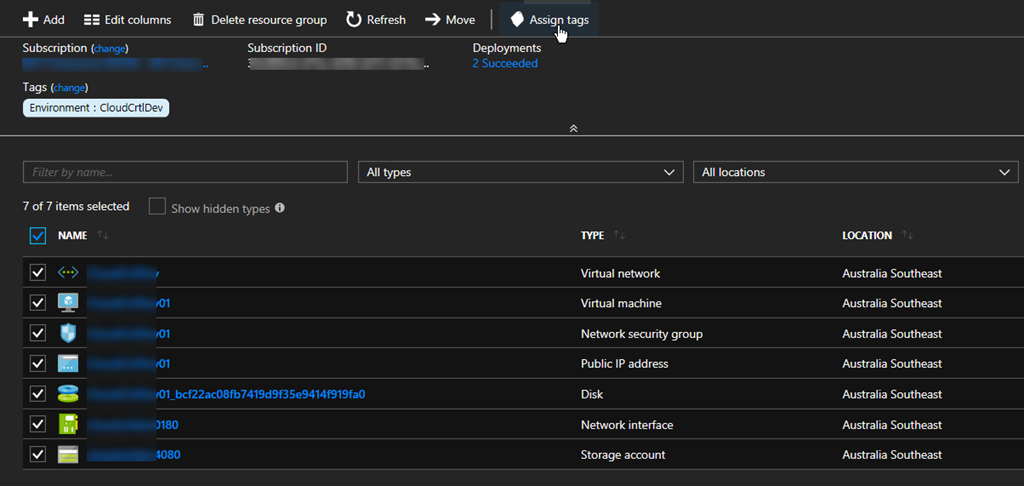
In your Resource group select all the resources you want to Tag, Click “Assign tags”
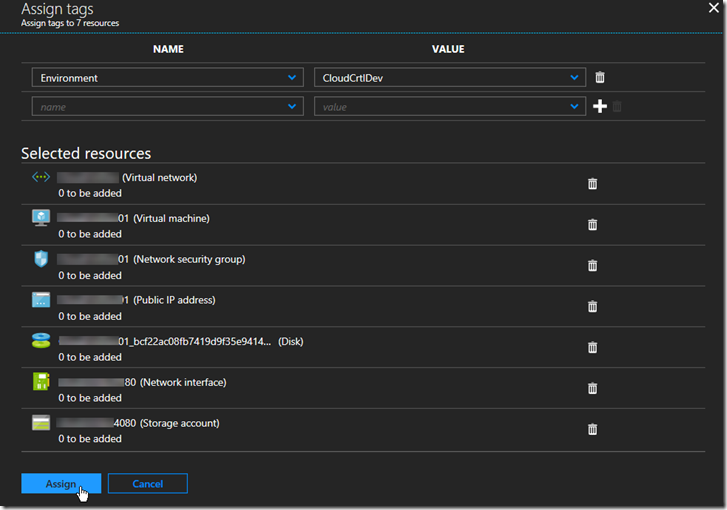
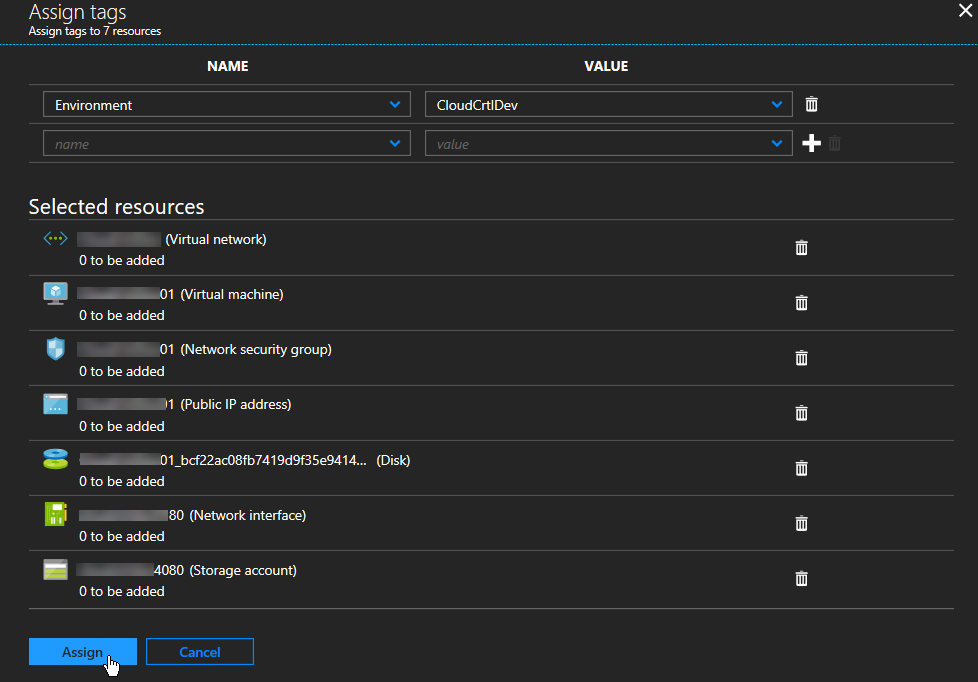
Add the Tags to assign at the top and click ‘Assign”
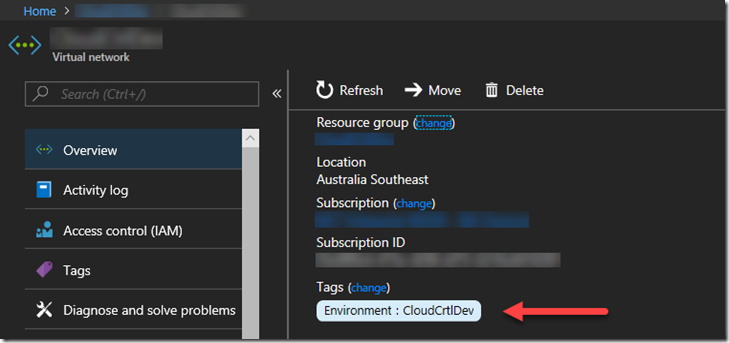
Select one of the resources to verify the tags have been assigned
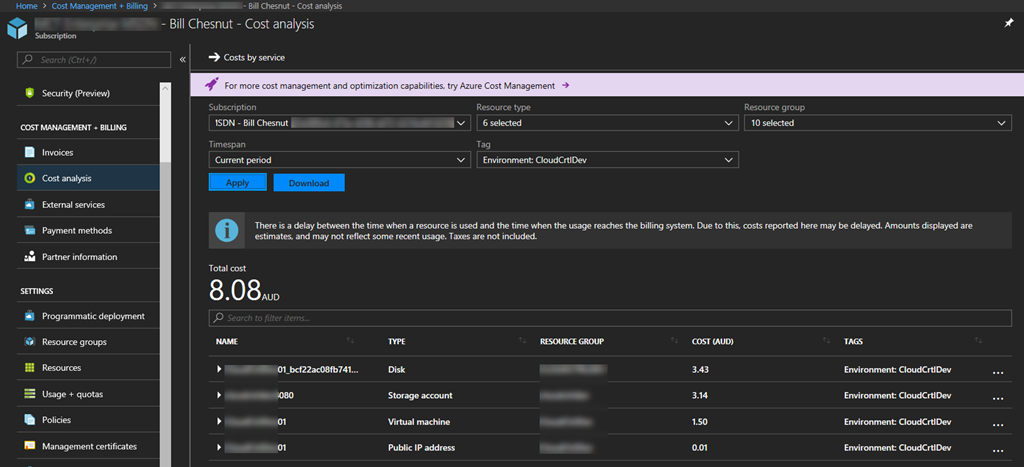
You can now go into the Azure Portal Billing and Cost Analysis and select the Tag you have assigned and see the costs associated with that tag
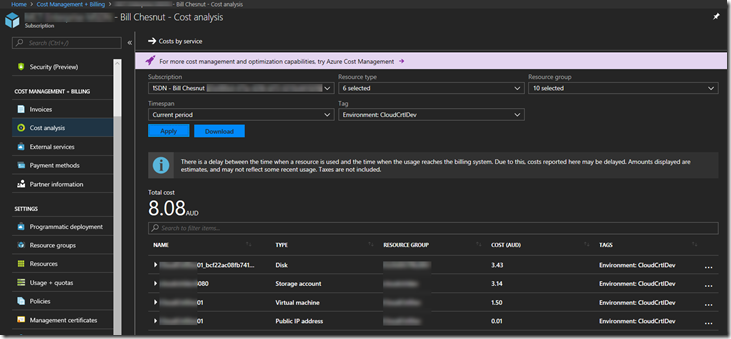
Hope this blog post helps you manage your Azure environment easier.
Note: The feature to roll down Tags from Resource groups is being added to SixPivot’s Cloud Control Product in the near future, please go and try Cloud Control

Trial for Free today
Cross posted to http://www.sixpivot.com.au

by Sandro Pereira | Jul 12, 2018 | BizTalk Community Blogs via Syndication
It’s fair to say that we all know the default Database Lookup functoid. It allows you to connect and extract information from a database. This functoid requires four input parameters in the following order:
- A lookup value – value for which to search in the specified database, table, and column (next parameters);
- A database connection string – The full connection string for the database with a provider, machine name, database and authentication (an ActiveX Data Objects .NET (ADO.NET) connection string);
- A table name – name of the table in the database in which to search
- A column name for the lookup value – name of the column in the table in which to search – the first parameter
The functoid is quite simple to use, however, the main problem that developers face when they use it, refers to the second parameter: the connection string.
How to know the correct value of the connection string to be set in the Database Lookup Functoid
Is hard to remember the correct syntax/value to specify in the connection string to be used inside the Database Lookup Functoid.
For you to be sure that you don’t make any mistakes, which could lead to future waste of time by diagnosing and rectifying the connection string, the simple and easy way to guarantee that we are using the correct connection string value – but also for not having to remember this by head – is to:
- Create a simple Universal Data Link (.udl) File
- Set the OLE DB provider connection parameters
- And finally, test the connection to check if everything is correct
To accomplish this, we need to:
- Create a text file and name it “ODBCConnectionTest.udl” on your file system
- Preferably on the BizTalk Server machine
- The name of the file is not important, the important part is the extension, it must be “.udl”
- Double-click the Universal Data Link file that you just created
- On the Provider Tab, select the appropriate OLE DB provider for the type of data you want to access and then Next
- In my case, it is “Microsoft OLE DB Provider for SQL Server”
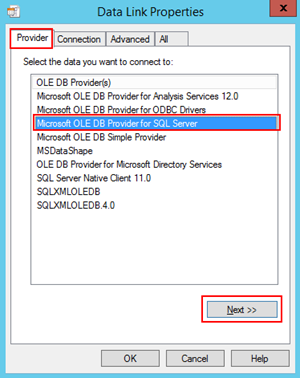
- In the Connection tab, specify:
- The SQL Server instance that hosts the database
- The authentication method: Use Windows NT integrated security or Use a specific user name and password
- And finally, the database name to which you want to connect
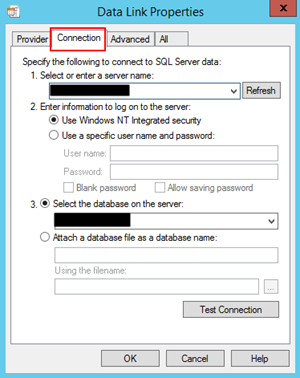
- After specifying these properties, you then should click on “Test Connection…” button to attempt a connection to the specified data source. If no connection is made, review the settings. Otherwise, click “Ok”
Now that we have our Universal Data Link file created and properly configured, you can open the UDL file in Notepad and you will have access to the connection string value that you should use inside the Database Lookup Functoid. You just need to copy and paste it inside the second parameter of the Functoid.
Note: you should paste the connection string statically inside the Database Lookup Functoid but that is a different topic that we will address in another BizTalk Server Tips and Tricks.
I hope this small trick will the useful, enjoy and stay tuned for new BizTalk Server Tips and Tricks!
Author: Sandro Pereira
Sandro Pereira is an Azure MVP and works as an Integration consultant at DevScope. In the past years, he has been working on implementing Integration scenarios both on-premises and cloud for various clients, each with different scenarios from a technical point of view, size, and criticality, using Microsoft Azure, Microsoft BizTalk Server and different technologies like AS2, EDI, RosettaNet, SAP, TIBCO etc. View all posts by Sandro Pereira

by Mekala Ramesh | Jul 10, 2018 | BizTalk Community Blogs via Syndication

DST in General
It is a universal practice around the world to observe daylight saving time(DST). We all moved our clocks one hour forward this last March. We woke up an hour sooner, had some additional espresso and tried to adjust to the jet-lag. Every spring we set the clocks forward and winter we turn the clock back. Most nations do not participate in DST and even within the USA, not all the states are participating in DST.
Real business scenario
In the software business, it is fundamental part to deal with business situations cautiously during the DST time. For instance, a company has rules created in an order taking system, that the order depends on the time of the order – if the clock changes, the rules might not be as clear. Like this, there are infinite scenarios we can consider.
In the integration business arena, a flow of the business information may happen from one end of the world to another. For this kind of situations, the business decision logic may work based on the time. Likewise, in BizTalk Server, administrators dependably should watch out for the deployed applications, its artifacts states and flow of the information. In case of anything turns out badly, there may be a huge effect on the mission-critical business (Eg: Banking, Insurance, Healthcare, Logistics etc.,). To stay away from these issues, BizTalk360 is used as an integral tool in 500+ business in 30+ nations.
Advanced Monitoring in BizTalk360
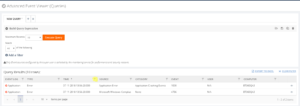
In BizTalk360, we have powerful monitoring capabilities to monitor the business information using the query builder functionality, which is looking for the information about suspended service instances, running service instances, tracked Service instances and tracked message events. Similarly, you can query BAM views, perform activity searches, filter out ESB exceptions, query the event logs and monitor Azure Logic apps.
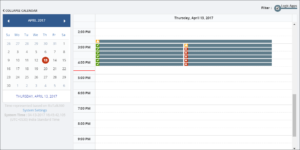
While monitoring this data, BizTalk360 will send notifications to many notification media. These media contain Email, SMS, inbuilt notification channels like Slack, ServiceNow, and Webhook. Customers can also create their own notification channels to receive the alerts from BizTalk360. To know more about our advanced data monitoring capability click here “https://assist.biztalk360.com/support/solutions/folders/1000221446”.
Problem Statement
We wanted to share our experience in solving a daylight-saving issue in our application for a specific scenario, where the email alerts are sent from the application properly during the normal days, whereas false alerts will be sent once during the daylight-saving time. We started investigating the scenario in deep to nail down the problem.
Forward Scenario
Consider below EST (Eastern Time Zone, UTC-5:00) DST change as an example.
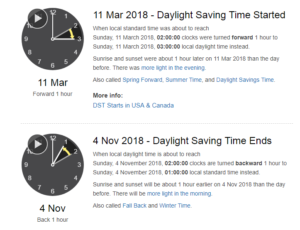
Set the system time zone settings as (UTC-08:00) Pacific Time (US & Canada) in BizTalk360.
Sunday, 11 March 2018, 02:00:00 clocks were turned forward 1 hour, to 03:00:00.
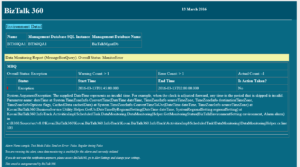
Let’s consider a scenario where Message Box data monitor is configured to monitor the suspended service instances for a purchase order application on an hourly basis. There is a column to show “Next Run At“ time which populates the next expected cycle for the data monitor. For an hourly based scenario, it will populate data consistently to notify the next run cycle. At the time of DST, in the 1:00 am cycle, next run time should be calculated as 3:00 am. Instead of this, Next run cycle is computed as 2:00 am. The BizTalk360 monitoring service will pick this time and try to convert the invalid time for further processing. Due to the invalid time, an exception appears in the email for only that monitoring cycle.
Backward scenario
Sunday, 4 November 2018, 02:00:00 clocks are turned backward 1 hour to 01:00:00.
In the Fallback scenario, the issue won’t appear since the clock will be turned backward 1 hour and the monitoring service will come to look for the Next run time and wait until that time for further processing.
Code Snippet
As the problem stated above, DST adjustment has not been handled in the inbuilt .Net libraries. BizTalk360 properly calculates DST from V8.8 version onwards. In the below code snippet, in the highlighted text you can find the logic.
TimeZoneInfo timeZoneInfo = TimeZoneInfo.FindSystemTimeZoneById(regionalSetting.timezone.timezoneId);
if (timeZoneInfo.SupportsDaylightSavingTime)
{
    DateTime dateTime = nextRunDateTime;

    if (timeZoneInfo.IsAmbiguousTime(dateTime))
    {}

    if (timeZoneInfo.IsInvalidTime(dateTime))
    {
        DateTime adjustedDateTime = Helper.AdjustDateTimeForDSTChange
       (dateTime, regionalSetting);
    }
}

public static bool IsValidDateTime(DateTime dateTime, SystemRegionalSetting regionalSetting)
{
    TimeZoneInfo timeZoneInfo = TimeZoneInfo.FindSystemTimeZoneById
    (regionalSetting.timezone.timezoneId);

    return timeZoneInfo.IsInvalidTime(dateTime) ? false : true;
}

public static DateTime AdjustDateTimeForDSTChange(DateTime dateTime, SystemRegionalSetting regionalSetting)
{
    TimeZoneInfo timeZoneInfo = TimeZoneInfo.FindSystemTimeZoneById
    (regionalSetting.timezone.timezoneId);

    return dateTime.Add(timeZoneInfo.GetUtcOffset(dateTime.AddDays(1)) - timeZoneInfo.BaseUtcOffset);
}
Testing
Time conversion is much more complicated than you imagine, because different countries/locales switch to daylight saving time at different dates, it is not just one sweep change. Hence, we have thoughtfully derived the scenarios for testing to cover all the combinations.
Following are the test scenarios which we need to take care of during the DST testing:
1. UTC (Coordinated Universal Time)
2. GMT time zones which observers DST during summer time (Eg: British Summer Time)
3. UTC –(Minus) time zones which observe DST (Eg: Pacific Time US & Canada)
4. UTC –(Minus) time zones which don’t observe DST (Eg: Arizona)
5. UTC + (Plus) time zones which observe DST (CEST)
6. UTC +(Plus) time zones which don’t observe DST (IST)
Conclusion
We took a just more efficient way to solve the DST issue in our recent version 8.8. Happy migrating and try BizTalk360!!! Get started with the free 30 days trial. For any queries/feedback please write to us [email protected].
Author: Mekala Ramesh
Test Lead at BizTalk360 – Software Testing Engineer having diverse exposure in various features and application testing with a comprehensive understanding of all aspects of SDLC. Strong knowledge to establish the testing process from the scratch. Love to test the software product to deliver it with good quality. Strongly believes on “Testing goes beyond just executing the test protocol”. View all posts by Mekala Ramesh

by Gautam | Jul 8, 2018 | BizTalk Community Blogs via Syndication
Do you feel difficult to keep up to date on all the frequent updates and announcements in the Microsoft Integration platform?
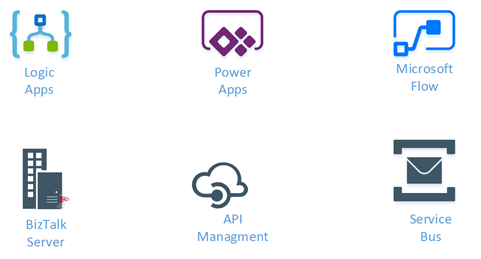
Integration weekly update can be your solution. It’s a weekly update on the topics related to Integration – enterprise integration, robust & scalable messaging capabilities and Citizen Integration capabilities empowered by Microsoft platform to deliver value to the business.
If you want to receive these updates weekly, then don’t forget to Subscribe!
Videos
Podcasts
How get started with iPaaS design & development in Azure?
Feedback
Hope this would be helpful. Please feel free to reach out to me with your feedback and questions.

by Arunkumar Kumaresan | Jul 8, 2018 | BizTalk Community Blogs via Syndication
For a Software Product company, People are the valuable assets. To keep the business sustainable, we need to take care of the workforce, upskill them and retain the talent. As the years pass by, besides all efforts to retain existing workforce, there will be a churn due to various reasons – personal, circumstantial and business related. You need to reinforce your workforce with new people to:
- Refill the open position due to the exit of existing team member
- To grow your business, build new features, products, extend support to customers, market etc
Refilling a position cannot be an overnight activity unless there is an emergency. Any business should be prepared for emergencies by having a possible back up. Even experienced professionals cannot replace immediately as there is always a learning curve to get up to speed for the opened-up position.
It is not practically viable to always hire experienced people for all the positions in an organization and on the other hand one cannot run the business with all junior people. There should be a right mix of talent at all levels. Having a strong supply at the bottom layer provides any organization with multiple benefits:
- Add young and energetic talent
- Can train them easily on the business needs of the organization
- They can scale up over a period
- Moulding them into the organizational culture is also easy
Running operations in India, which is a major supplier of Knowledge workforce to many businesses worldwide, there are a lot of opportunities to hire talent. Many organizations partner with professional educational institutions to hire, train and intake fresh talent. It is important to find a right partner for this engagement. Not all engagements between businesses and institutions become successful. There are various factors:
- The stage in which the business is – opportunities, needs, scale, revenue, funding, possibility to invest in hiring
- The stage at which the institution is – are the really welcoming, trusted partner, serious about supplying and supporting needs of businesses who approach them for talent
- The mindset of students – honour the offer made, respect the opportunity, passion for career, belief in the organization
In the past, we tried various recruitment and training methodologies and finally resorted to partner with an engineering college, like what most of the MNCs do. We were trying to reach out to multiple institutions, though all were really welcoming, we found a right partner with (SECE) Sri Eshwar College of Engineering, Coimbatore
- The management was very approachable, listen to our requirements and take necessary actions to support to train their students for our needs
- Faculty members of the college extend valuable support in grooming the fresh talent based on the training requirements we share
- Students respect and understand the potential opportunity that lies ahead with a growing and promising organization like us
The institution has got a lot of initiatives to provide industry-student linkage. They invite organizations to set up Centre of Excellence, labs, extended office as a remote location. We have signed an MoU and set up a Center of Excellence with them since 2017.
We struck a right sync with this institution for our growth at this stage and decided to recruit fresh graduates from this institution. In 2017, we hired 5 students and they underwent rigorous training which helped them to be readily deployable into products – Serverless360, Atomic Scope, and Document360. Within a few weeks into their job, their contribution is being used by multiple enterprises across the world.
Here are few throwbacks to the 2017 recruitment drive
 Organisation overview to the aspiring candidates
 Candidates taking up the programming challenge at SECE IT Center
 Personal Interview

2018 batch – welcome aboard BizTalk360
We came back to this institution again in 2018 for our future requirements.
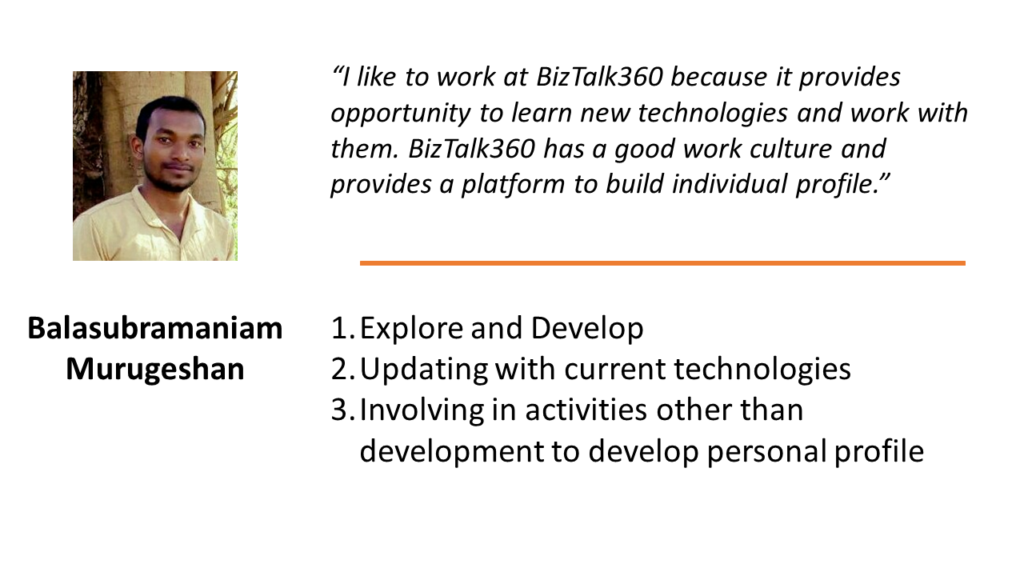
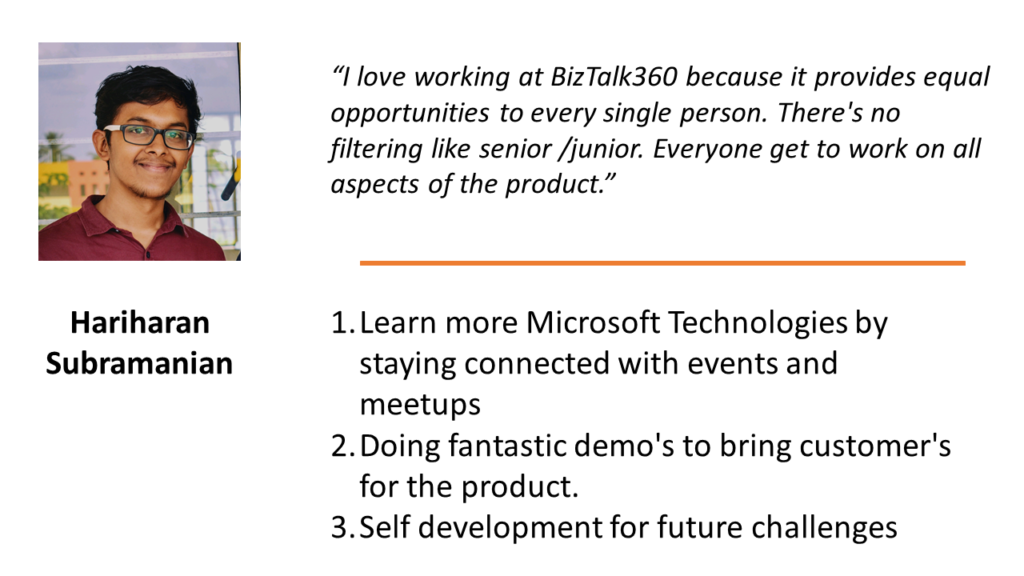
Prior to the interview process, here are the messages that 2018 batch sent to the prospects from 2019 batch.
Based on our plans to market our products and exploring how other product companies work, this year we also came up with a new role – Technical Product Marketing and we offered an internship to two students. Within a couple of days, those interns showed very good capabilities to explore Serverless computing and they came up with a blog:
Serverless Computing and Enterprise Application Integration (EAI)
Basics of Serverless Computing
For the Software Engineer requirement, we considered various factors to assess the candidates:
- Cumulative performances in programming activities in their academic period
- Performance in Logical Reasoning and programming using a testing platform
- Approach to few problems by identifying right Data Structures & Algorithm
- Interview on programming knowledge
- Capability to explore latest technologies – Cloud Computing, Azure Integration Services, Serverless Computing
- Personality assessment
After rigorous assessments, we offered 4 candidates (in banner image) to join us as interns from late 2018.
We extend all the selected candidates a warm welcome and promise them a wonderful career!
Author: Arunkumar Kumaresan
Technical Lead – Product Engineering at BizTalk360 India. Working on Microsoft technologies for more than 10 years, focusing on Windows Azure and Integration platform. As Microsoft Certified Professional and a Trainer, has conducted training for professionals and graduates. Actively involved in organizing global and User Group events on Microsoft technologies. View all posts by Arunkumar Kumaresan

by Sandro Pereira | Jul 5, 2018 | BizTalk Community Blogs via Syndication
To finalize, maybe, these series of Errors and Warnings… Causes and Solutions let’s describe and address a fairly simple one that from time to time appears: Login Failed. While trying to communicate to a SQL Server database to invoke a stored procedure thru BizTalk WCF-SQL adapter I got this following error:
A message sent to adapter “WCF-Custom” on send port “STAGING_SQL_WCF_SEND” with URI “mssql://SQL-SERVER-NAME//AsyncTransactions?InboundId=ins” is suspended.
Error details: Microsoft.ServiceModel.Channels.Common.ConnectionException: Cannot open database “AsyncTransactions” requested by the login. The login failed.
Login failed for user ‘DOMAINBTSHostSrvc’. —> System.Data.SqlClient.SqlException: Cannot open database “AsyncTransactions” requested by the login. The login failed.
Login failed for user ‘DOMAINBTSHostSrvc’.
at System.Data.SqlClient.SqlInternalConnectionTds..ctor(DbConnectionPoolIdentity identity, SqlConnectionString connectionOptions, SqlCredential credential, Object providerInfo, String newPassword, SecureString newSecurePassword, Boolean redirectedUserInstance, SqlConnectionString userConnectionOptions, SessionData reconnectSessionData, DbConnectionPool pool, String accessToken, Boolean applyTransientFaultHandling)
at System.Data.SqlClient.SqlConnectionFactory.CreateConnection(DbConnectionOptions options, DbConnectionPoolKey poolKey, Object poolGroupProviderInfo, DbConnectionPool pool, DbConnection owningConnection, DbConnectionOptions userOptions)
at System.Data.ProviderBase.DbConnectionFactory.CreatePooledConnection(DbConnectionPool pool, DbConnection owningObject, DbConnectionOptions options, DbConnectionPoolKey poolKey, DbConnectionOptions userOptions)
at System.Data.ProviderBase.DbConnectionPool.CreateObject(DbConnection owningObject, DbConnectionOptions userOptions, DbConnectionInternal oldConnection)
at System.Data.ProviderBase.DbConnectionPool.UserCreateRequest(DbConnection owningObject, DbConnectionOptions userOptions, DbConnectionInternal oldConnection)
at System.Data.ProviderBase.DbConnectionPool.TryGetConnection(DbConnection owningObject, UInt32 waitForMultipleObjectsTimeout, Boolean allowCreate, Boolean onlyOneCheckConnection, DbConnectionOptions userOptions, DbConnectionInternal& connection)
at System.Data.ProviderBase.DbConnectionPool.TryGetConnection(DbConnection owningObject, TaskCompletionSource`1 retry, DbConnectionOptions userOptions, DbConnectionInternal& connection)
at System.Data.ProviderBase.DbConnectionFactory.TryGetConnection(DbConnection owningConnection, TaskCompletionSource`1 retry, DbConnectionOptions userOptions, DbConnectionInternal oldConnection, DbConnectionInternal& connection)
at System.Data.ProviderBase.DbConnectionInternal.TryOpenConnectionInternal(DbConnection outerConnection, DbConnectionFactory connectionFactory, TaskCompletionSource`1 retry, DbConnectionOptions userOptions)
at System.Data.ProviderBase.DbConnectionClosed.TryOpenConnection(DbConnection outerConnection, DbConnectionFactory connectionFactory, TaskCompletionSource`1 retry, DbConnectionOptions userOptions)
at System.Data.SqlClient.SqlConnection.TryOpenInner(TaskCompletionSource`1 retry)
at System.Data.SqlClient.SqlConnection.TryOpen(TaskCompletionSource`1 retry)
at System.Data.SqlClient.SqlConnection.Open()
at Microsoft.Adapters.Sql.SqlAdapterConnection.OpenConnection()
— End of inner exception stack trace —
Server stack trace:
at Microsoft.Adapters.Sql.SqlAdapterConnection.OpenConnection()
at Microsoft.Adapters.Sql.ASDKConnection.Open(TimeSpan timeout)
at Microsoft.ServiceModel.Channels.Common.Design.ConnectionPool.GetConnection(Guid clientId, TimeSpan timeout)
at Microsoft.ServiceModel.Channels.Common.Design.ConnectionPool.GetConnectionHandler[TConnectionHandler](Guid clientId, TimeSpan timeout, MetadataLookup metadataLookup, String& connectionId)
at Microsoft.ServiceModel.Channels.Common.Channels.AdapterRequestChannel.OnOpen(TimeSpan timeout)
at System.ServiceModel.Channels.CommunicationObject.Open(TimeSpan timeout)
at Microsoft.BizTalk.Adapter.Wcf.Runtime.OneWayOperationSendPortRequestChannel`1.OnOpen(TimeSpan timeout)
at System.ServiceModel.Channels.CommunicationObject.Open(TimeSpan timeout)
at System.ServiceModel.Channels.ServiceChannel.OnOpen(TimeSpan timeout)
at System.ServiceModel.Channels.CommunicationObject.Open(TimeSpan timeout)
at System.ServiceModel.Channels.CommunicationObject.Open()
Exception rethrown at [0]:
at System.Runtime.Remoting.Proxies.RealProxy.HandleReturnMessage(IMessage reqMsg, IMessage retMsg)
at System.Runtime.Remoting.Proxies.RealProxy.PrivateInvoke(MessageData& msgData, Int32 type)
at System.ServiceModel.ICommunicationObject.Open()
at Microsoft.BizTalk.Adapter.Wcf.Runtime.WcfClient`2.GetChannel[TChannel](IBaseMessage bizTalkMessage, ChannelFactory`1& cachedFactory)
at Microsoft.BizTalk.Adapter.Wcf.Runtime.WcfClient`2.SendMessage(IBaseMessage bizTalkMessage)
MessageId: {71CDC883-AE8D-4303-A72E-ADA9ECE91981}
InstanceID: {1EA7B77C-924F-4C74-87DE-BCC4D1AD8E6A}
The cause of the problem is quite obvious and the error message, this time because sometimes is not quite true like we saw in my last post, the error message clearly identifies the origin of the problem.
This problem occurs because the user account that you used to access the database, in my case the BizTalk Host Instance Account, don’t have permissions to connect the database.
Simple problem, simple solution. You need to grant permission to the user to access database
Once again, given “sysadmin” or “db_owner” would solve all our problems but it goes against security best practices and sometimes these tables contain sensitive data or personal data, and nowadays with General Data Protection Regulation (GDPR) in EU this sometimes can be a backdoor for other possible problems and teams need to start taking into considerations these security policies.
You always should give the minimum rights to a certain user for him to do the necessary tasks. Nothing more, nothing less… as things should be.

by Sowmiya Subramanian | Jul 5, 2018 | BizTalk Community Blogs via Syndication
The BAM Portal in BizTalk360, provides the option for querying BAM views, perform activity searches, check user permissions and to view the query results of Related Activities and Documents the same as in the out of the box BAM Portal of BizTalk Server. However, the user couldn’t view the query results in their respective time zone in BizTalk360, like in the original BAM portal. We brought a number of improvements to the BAM Portal in BizTalk360; setting the time zone is just one of them.
Time Zone in BizTalk BAM portal
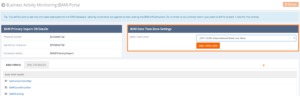
Some of our customers requested the functionality to view the query result on their respective time zone. In BizTalk360 v8.8, we came up with the solution, by implementing “BAM Time Zone”. With the help of this, the user can choose the time zone specifically to their requirement.
In the BizTalk BAM Portal, the query result is displayed according to the local Time Zone, while the actual data in the BAMPrimary database is stored in the UTC time zone. BAM captures milestones such that they are automatically recorded in Coordinated Universal Time (UTC) format (this is also referred to as Greenwich Mean Time). When you send date/times to BAM using the APIs, they are received in the format sent without conversion to UTC format.
Time Zones in BizTalk360 BAM portal
Earlier versions of BizTalk360 automatically picked up those data in the BAMPrimaryImport database and display it. BizTalk360 won’t convert any time zone as might be user required; the product will display UTC time zone the same as in BAMPrimaryImport database. From this version on, BizTalk360 will pick up the UTC time in the BAMPrimaryImport database and then convert that into the user required time zone. The user can set the required time zone using the BAM Time Zone.
Usability of BAM Time Zones
The available time zones are displayed in the BAM Time Zone dropdown and the user can choose the specific time zone according to the system Timezone/ local time zone. Through this, the user can view the date time as in the original BAM portal.
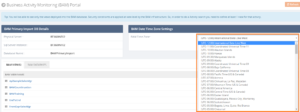
The BAM Time Zone also includes Day Light savings, so query result is displayed according to the Day Light Savings.
Can Other Users set the BAM Time Zone?
Only the Super User will have the permission to set the BAM Time Zone. If other users also have that permission, that could create confusion, so to avoid this we have given permission to set the BAM time Zone only to Super Users.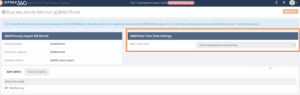
Other users can view which time zone has set, but they have not access to change the set BAM Time Zone.
Related Documents Improvements
In version v8.6, we have implemented the Related Activities and Related Documents Functionality. After this release, we came to know some new workaround from our customers, who noticed an issue in Related Activities view and Related Documents Download Functionality, like
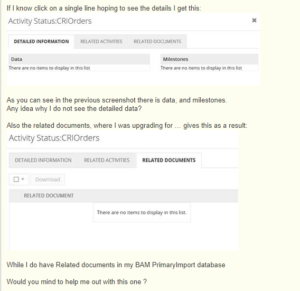
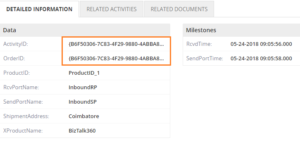
The above issue is because, when the “Activity Id” has any special characters or it is custom created, the user could not view the detailed information. This has been solved in the current version of BAM. The user can now view the detailed information and Related activities without any constraints.
Handling the XML Message in BAMPrimaryImport Database
We came across another new workaround with Related Documents Download functionality. The Related Document is not getting downloaded when the XML message is stored in BAMPrimaryImport Database.
In the BizTalk BAM portal, the user can capture the whole XML Data in LongReferenceData column in the BAMPrimaryImport Database. This can be done by using the AddReference method of the BAM Orchestration Event Stream to log the complete xml message.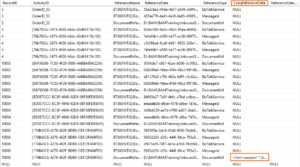
BAM can store up to 1 MB of data through the AddReference method (using longReferenceData field with type NTEXT) on the event stream, a great well-performing solution for message-bodies which enables the storage of message bodies alongside the data that describes how it was processed.
Handling the XMLMessage in BizTalk360 BAM Portal
In the BizTalk360 BAM Portal, the Related Documents are only downloaded from the archive folder. From this version of BizTalk360 v8.8, the Related documents will get downloaded either from archive folder and from the database. It checks the XML message either in Archive folders or in the database, if it is found, it downloads the XML File in Zip File Format as shown below.
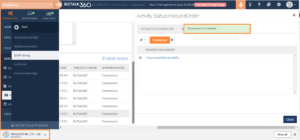
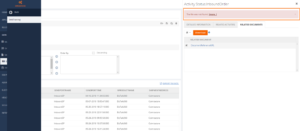
If the file is not available in both archive folders or database, it will throw a “File Not Found exception” as below.
Filter Improvements
In the previous version, we received a feedback from customers that some filter conditions are not working as expected in the BizTalk360 BAM Portal.
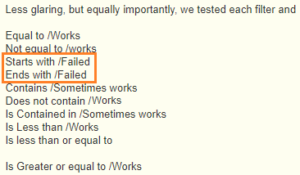
In the current version of BizTalk360, we have fixed the below mentioned filter conditions in BizTalk360 BAM.
- String Filter
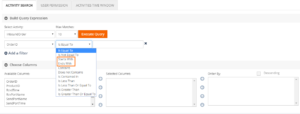
2. Date Time Filter
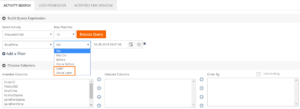
We improved those filters, so it will be working from BizTalk v8.8. We have implemented above functionality in the BAM Portal by keeping our customer feedback and understanding the consequence of users on execution. This implementation will highly optimize the BizTalk360 BAM Portal.
If you are interested, you can read more on our Documentation portal.