![BizTalk WCF-SQL Error: Microsoft.ServiceModel.Channels.Common.MetadataException: Object [dbo].[StoredProcedureName] of type StoredProcedure does not exist](https://www.biztalkgurus.com/wp-content/uploads/2018/07/BizTalk-WCF-SQL-Object-type-StoredProcedure-does-not-exist_thumb-1.png)
by Sandro Pereira | Jul 4, 2018 | BizTalk Community Blogs via Syndication
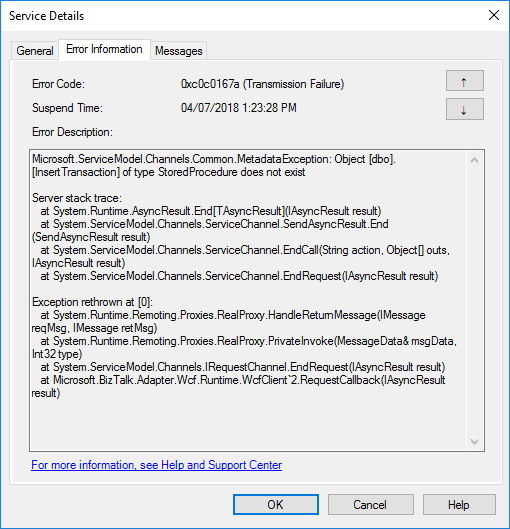
I told you in my last blog post an error never comes alone … when an error appears, it always appears two or three. Or that, or I have a tendency to attract, or find weird errors! This time I was completely stunned: StoredProcedure does not exist, while trying to invoke a stored procedure thru BizTalk WCF-SQL adapter:
Microsoft.ServiceModel.Channels.Common.MetadataException: Object [dbo].[InsertTransaction] of type StoredProcedure does not exist
Server stack trace:
at System.Runtime.AsyncResult.End[TAsyncResult](IAsyncResult result)
at System.ServiceModel.Channels.ServiceChannel.SendAsyncResult.End(SendAsyncResult result)
at System.ServiceModel.Channels.ServiceChannel.EndCall(String action, Object[] outs, IAsyncResult result)
at System.ServiceModel.Channels.ServiceChannel.EndRequest(IAsyncResult result)
Exception rethrown at [0]:
at System.Runtime.Remoting.Proxies.RealProxy.HandleReturnMessage(IMessage reqMsg, IMessage retMsg)
at System.Runtime.Remoting.Proxies.RealProxy.PrivateInvoke(MessageData& msgData, Int32 type)
at System.ServiceModel.Channels.IRequestChannel.EndRequest(IAsyncResult result)
at Microsoft.BizTalk.Adapter.Wcf.Runtime.WcfClient`2.RequestCallback(IAsyncResult result)
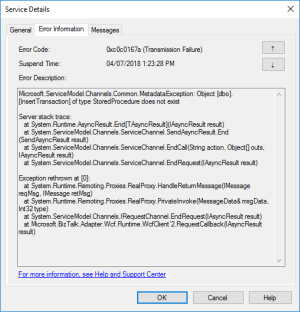
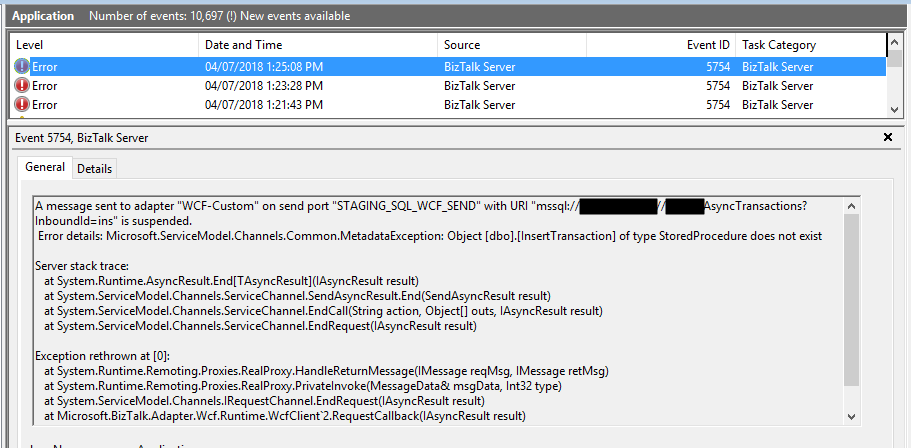
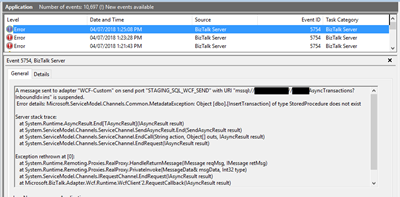
or in the event viewer:
A message sent to adapter “WCF-Custom” on send port “STAGING_SQL_WCF_SEND” with URI “mssql://SQL-SERVER-NAME//AsyncTransactions?InboundId=ins” is suspended.
Error details: Microsoft.ServiceModel.Channels.Common.MetadataException: Object [dbo].[InsertTransaction] of type StoredProcedure does not exist
Server stack trace:
at System.Runtime.AsyncResult.End[TAsyncResult](IAsyncResult result)
at System.ServiceModel.Channels.ServiceChannel.SendAsyncResult.End(SendAsyncResult result)
at System.ServiceModel.Channels.ServiceChannel.EndCall(String action, Object[] outs, IAsyncResult result)
at System.ServiceModel.Channels.ServiceChannel.EndRequest(IAsyncResult result)
Exception rethrown at [0]:
at System.Runtime.Remoting.Proxies.RealProxy.HandleReturnMessage(IMessage reqMsg, IMessage retMsg)
at System.Runtime.Remoting.Proxies.RealProxy.PrivateInvoke(MessageData& msgData, Int32 type)
at System.ServiceModel.Channels.IRequestChannel.EndRequest(IAsyncResult result)
at Microsoft.BizTalk.Adapter.Wcf.Runtime.WcfClient`2.RequestCallback(IAsyncResult result)
MessageId: {71CDC883-AE8D-4303-A72E-ADA9ECE91981}
InstanceID: {1EA7B77C-924F-4C74-87DE-BCC4D1AD8E6A}
As I normally say, doubt what you read – even if it is on my blog – because there are many conspiracy theories, and we can find so-called solutions by googling it… but a lot of them are just that: conspiracy theories.
Cause
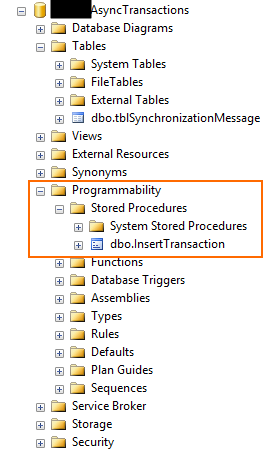
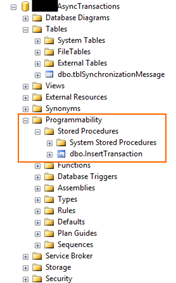
Personally, I usually like to start with the simplest thing: If it says that doesn’t exist… let’s check, and in this case, the error raised by the adapter it’s just stupid because the stored procedure exists in that specific database as you may see in the picture below:
At a first glimpse, it seems that was not a security issue because I was able to connect to the database, otherwise, I would get the following error:
Error details: Microsoft.ServiceModel.Channels.Common.ConnectionException: Cannot open database “AsyncTransactions” requested by the login. The login failed.
Again, some conspiracy theories may let you think that:
- you should regenerate schemas;
- or that may be a mismatch in the namespaces;
- the operation is not properly set;
- that the “?” character that you normally find in the URI is causing this problem;
- and my favorite is that you should give “sysadmin” rights to the service account that is running the host instance.
Lucky, I remembered to double check the security permission directly on SQL Server, so I opened the SQL Server Management Console with the service account and try to execute the stored procedure and… guest what… I didn’t have permissions!
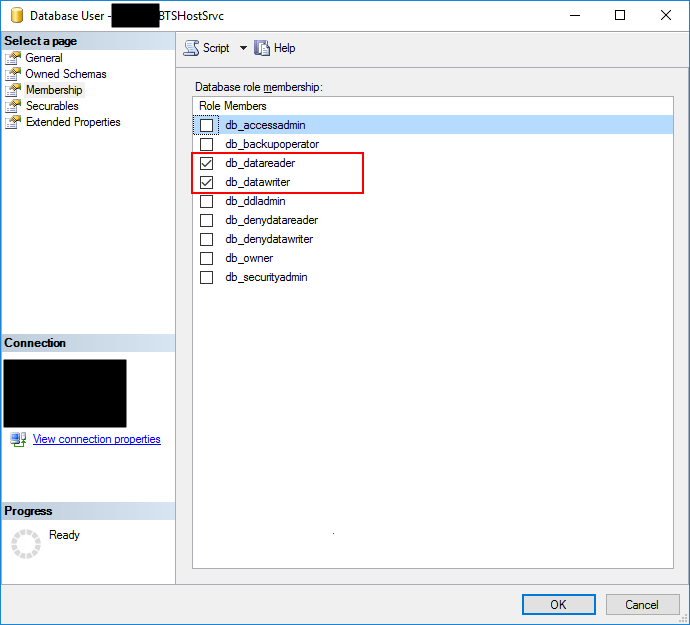
When I double check the permissions to that service account, it had: db_datareader and db_datawriter… that in some situations are enough:
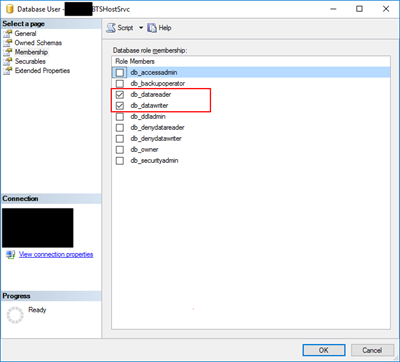
Of course, given “sysadmin” or “db_ower” would solve all my problems but sometimes you are not allowed to do that for security reasons and also is not a best practice, special now with GDPR.
So the problem was clear that the service account that is running the host instance bind to that send port didn’t have the right permissions to execute the stored procedure… unfortunately, the error raised by the adapter is out of context.
Solution
The best approach for you to solve this problem is to create a new server role, for that particular database, in SQL Server:
- In Object Explorer, access to your database and expand it.
- Expand the Security folder.
- Right-click the “Database Roles” folder and select “New Database Role…”
- In the “New Database Role” window
- On the “Role name” property, on the General page, enter a name for the new database role, for example, “db_spexecution”
- On the “Owner” property, inherit from db_datareader and db_datawriter (optional)
- On the Securables page, under Securables, click “Search” button.
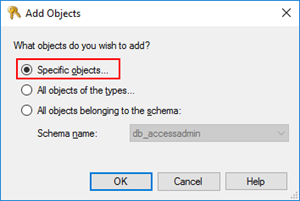
- On “Add Objects” window, select “Specific objects…” and click “OK”
-
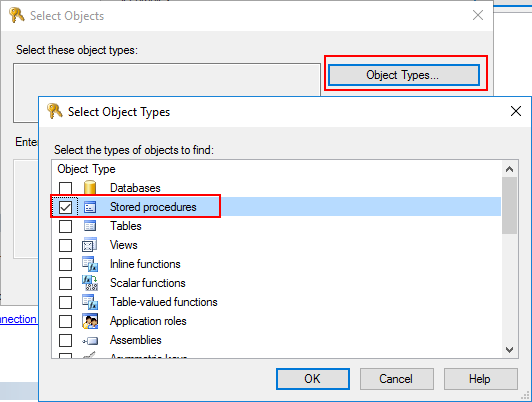
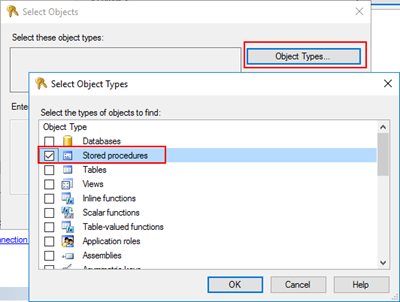
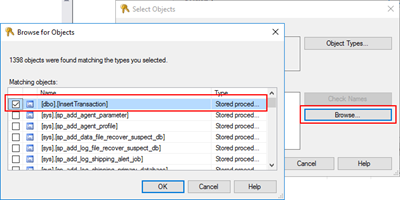
- On “Select Objects” windows, click “Object Types…” and then select “Stored Procedures”
-
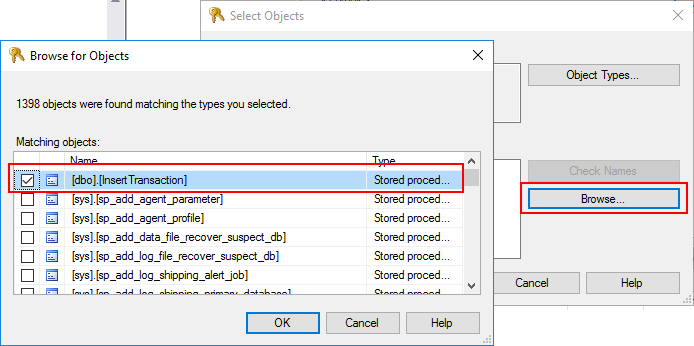
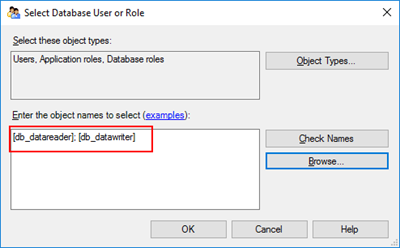
- After selecting the object type, click “Browse…” and from the “Browser for Objects” windows select the stored procedures you want to invoke. (only the one that you need)
-
- Click “Ok” and again “OK” to return to the main “New Database Role” window.
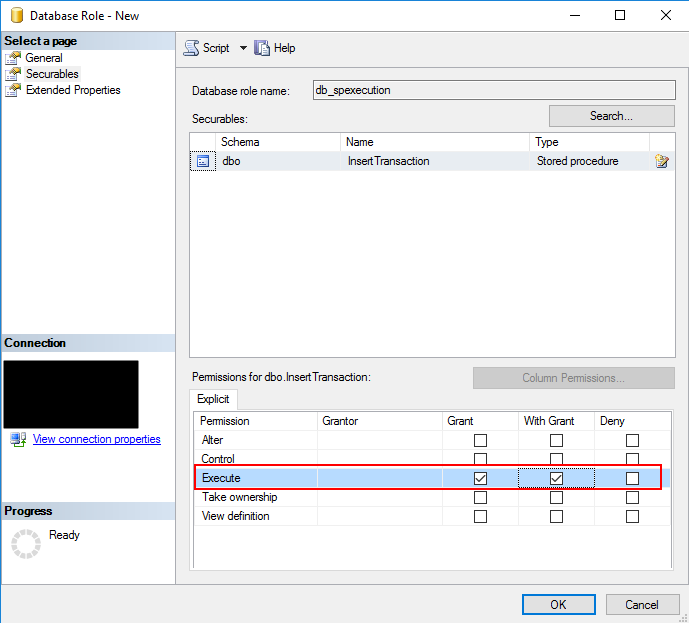
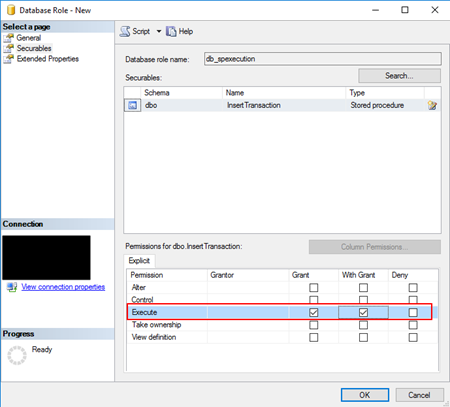
- The last step, on the Securables page, is to give Execute permissions “Grant” and “Grant with”.
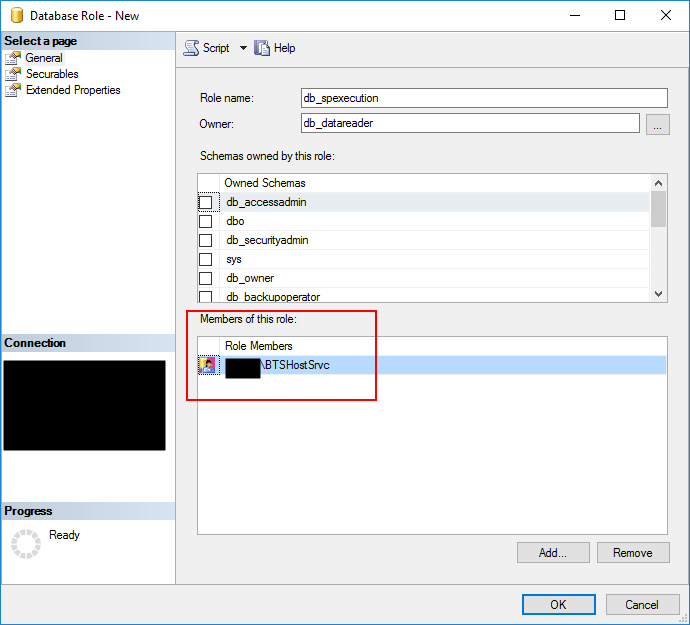
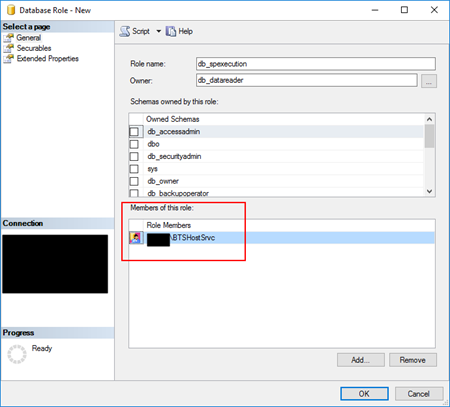
- And finally give, on the General tab, add the service account that is running the host instance to the Role Members for that role.
You can now try to resend the suspended messages or send new ones, and you will be able to communicate and execute the stored procedures without any problem.
Author: Sandro Pereira
Sandro Pereira lives in Portugal and works as a consultant at DevScope. In the past years, he has been working on implementing Integration scenarios both on-premises and cloud for various clients, each with different scenarios from a technical point of view, size, and criticality, using Microsoft Azure, Microsoft BizTalk Server and different technologies like AS2, EDI, RosettaNet, SAP, TIBCO etc. He is a regular blogger, international speaker, and technical reviewer of several BizTalk books all focused on Integration. He is also the author of the book “BizTalk Mapping Patterns & Best Practices”. He has been awarded MVP since 2011 for his contributions to the integration community. View all posts by Sandro Pereira
by Sandro Pereira | Jul 3, 2018 | BizTalk Community Blogs via Syndication
An error never comes alone … When an error appears, it always appears two or three, and I still have thousands to published, but this one but this one made me crazy for a few minutes: The type or namespace name ‘SerializableAttributeAttribute’ does not exist in the namespace!
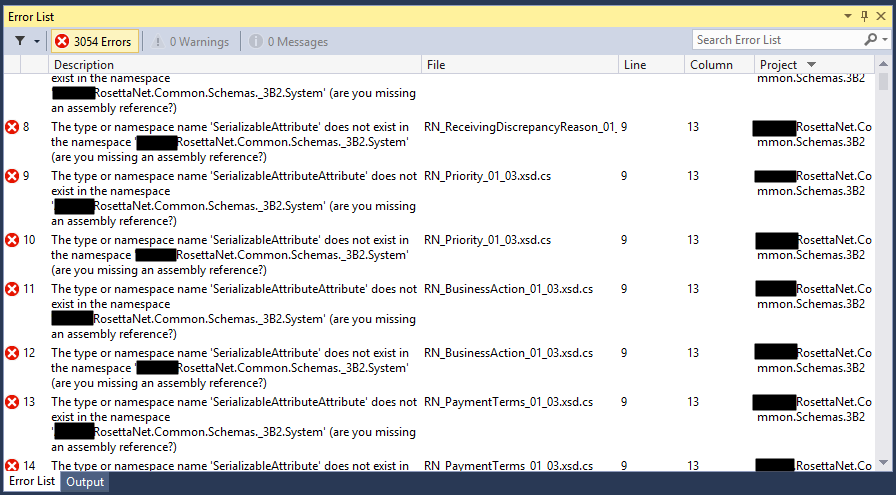
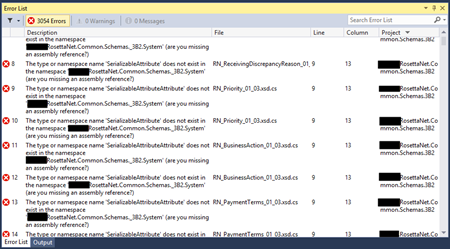
Yes, you read it right, while I was trying to compile a RosettaNet schemas projects, in this particular case a PIP3B2 Advance Shipment Notification I got thousands of errors, 3054 to be exact saying:
Error 1 The type or namespace name ‘SerializableAttributeAttribute’ does not exist in the namespace
RosettaNet.Common.Schemas._3B2.System’ (are you missing an assembly reference?)
C:TFS…RosettaNet.Common.Schemas.3B2DomainLogisticsCodeListRN_FreightPaymentTerms_01_03.xsd.cs 9 13 RosettaNet.Common.Schemas.3B2 …
Error 3054 The type or namespace name ‘NonSerializedAttribute’ does not exist in the namespace ‘RosettaNet.Common.Schemas._3B2.System’ (are you missing an assembly reference?) C:TFS… RosettaNet.Common.Schemas.3B2DomainProcurementINT_Procurement_02_07_01_09.xsd.cs 5072 21 RosettaNet.Common.Schemas.3B2
… and several other schemas as you may see in the picture below.
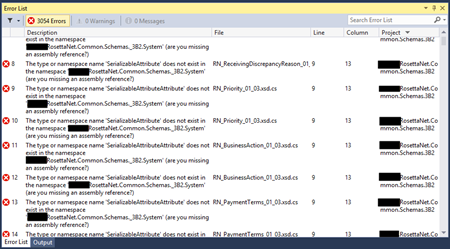
But do not be fooled into thinking this is a problem related exclusively to RosettaNet, it is not, and it can happen with any “normal” or any kind of schemas.
Cause
There are certain keywords, type names, and identifier names that you should use because they are internally used by BizTalk and it way enter in conflict and sometimes originate problems and errors, keywords like activate, atomic, body, task, compensate, method and several ones, you can see the full list here XLANG-s Reserved Words. But there are other keywords that depending on the artifact, may give you problems like:
- BTS (associated with Microsoft.BizTalk.GlobalPropertySchemas assembly)
- “-“ in RootNode Typename inside schemas
- …
And “System”!
If you use the keyword “System” inside a schema namespace like:
- “RosettaNet.Common.Schemas._3B2.System”
- “MyNamspace.System.Schemas”
You will not be able to compile your schema project.
The problem, if you download from the GS1 RosettaNet Standards certain PIP’s they will have the following structure:
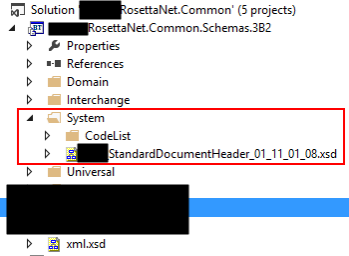
And as you see, there is a folder “System” that inside have several schemas and normally the schema namespace is composed by the project name or (assembly name) and the path to the schema, for example in this case:
- RosettaNet.Common.Schemas._3B2.System.CodeList
- Or RosettaNet.Common.Schemas._3B2.System
And this is causing all of these problems because in this case, “System” is a reserved keyword that shouldn’t be used.
Solution
The difficult part of this error was finding the cause of the problem. Once you know what is causing the problem the solution is quite simple. You just need to:
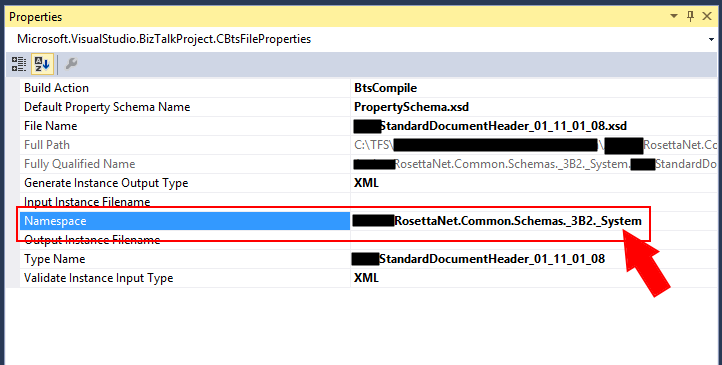
- Change the “Namespace” property on all the schemas the word “System” to another name, for example, “_System” (to maintain the consistency but it can be other word/value)
In my case, I hade the change the “Namespace” property of the schemas in the “System” folder
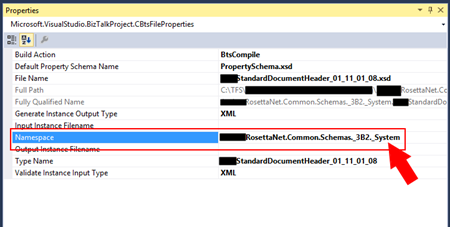
You can now rebuild your schema solution and this error should go away.
Author: Sandro Pereira
Sandro Pereira lives in Portugal and works as a consultant at DevScope. In the past years, he has been working on implementing Integration scenarios both on-premises and cloud for various clients, each with different scenarios from a technical point of view, size, and criticality, using Microsoft Azure, Microsoft BizTalk Server and different technologies like AS2, EDI, RosettaNet, SAP, TIBCO etc. He is a regular blogger, international speaker, and technical reviewer of several BizTalk books all focused on Integration. He is also the author of the book “BizTalk Mapping Patterns & Best Practices”. He has been awarded MVP since 2011 for his contributions to the integration community. View all posts by Sandro Pereira

by Rochelle Saldanha | Jul 3, 2018 | BizTalk Community Blogs via Syndication
Introduction
BizTalk360 allows you to setup monitoring on many artifacts and also allows you to auto-correct artifacts which have hit an unexpected state. During day to day operations it is very helpful to have this monitoring in place as it will save the BizTalk administrator(s) a lot of time because they don’t have to do that monitoring manually.
However, there are also times that you don’t want this monitoring to be active. Think of for example during maintenance windows because of deployments or installation of security patches. To temporarily stop monitoring, BizTalk360 provides a feature called ‘Stop Alerts for Maintenance’, which enabled the user to set up a single maintenance window. This feature can be found in the Settings area of the product.
In BizTalk360 v8.8, we have extended that feature by adding the capability to allow the user to setup multiple future maintenance windows. So during these periods the alarms will be disabled and no notifications will be sent.
In this article, we will take a detailed look at few end-to-end scenarios of settings up maintenance windows with a real-time scenario.
Scenario: Regular Maintenance windows
Let’s say, weekly on a Saturday some work involving performing weekly maintenance checks of the reliability, administration, security, and performance of a BizTalk Server system are done.
When the ports are down, you might continue to get notifications from BizTalk360 as it continues to monitor the BizTalk environment. In this case you would like to setup a maintenance window to stop all alerts during that period.
Follow the below steps as shown:
1. Log in to the BizTalk360 application
2. Go to the Settings page by clicking the Gear icon on top left hand side.
3. Navigate to ‘Monitoring & Notifications‘ and then ‘Stop Alerts for Maintenence‘
4. Select the environment which you wish BizTalk360 to stop monitoring and the correct date and start time of maintenance and the duration of the window. Also provide a Comment for Auditing purposes and click ‘Save’
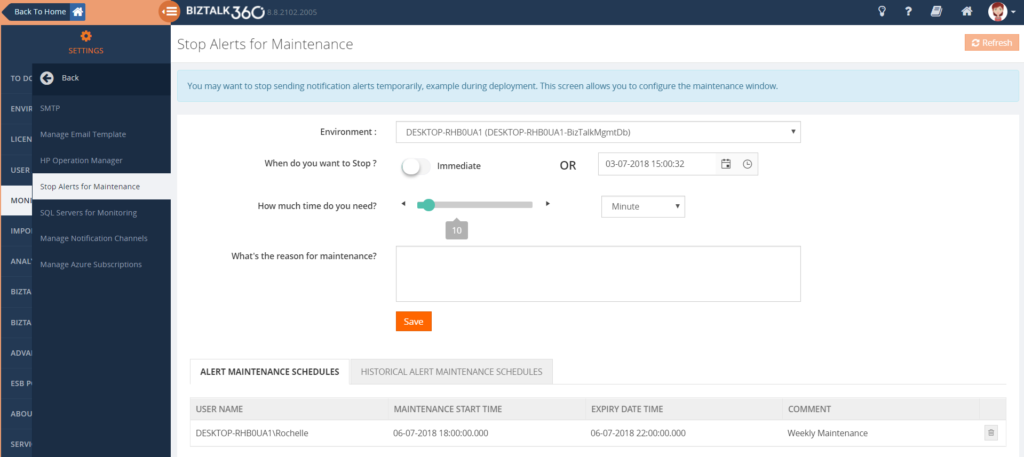
5. Here you can set up future maintenance schedules. As these are saved in the BizTalk360 database, they are displayed in the Grid below the configuration section
The Alert Maintenance Schedule grid shows you the list of scheduled maintenance windows for that environment. You can also delete schedules in this table by clicking on the small bin icon on the right-hand side of each of the schedules. If you wish to see the Historical Maintenance Schedules that have gone past, you can switch Tabs and view the results there.
Scenario: Emergency maintenance window
In case some emergency is happening and you don’t want to receive falsified notifications from BizTalk360, you can also set this up.
1. Select the environment which you wish BizTalk360 to stop monitoring and the correct date and start time of maintenance and the duration of the window
2. Use the Immediate slider option for the maintenance window to start immediately
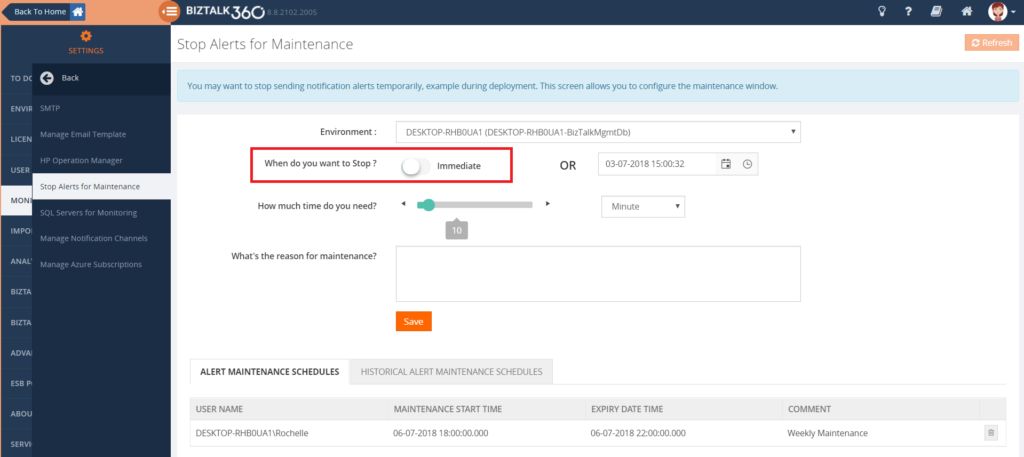
3. Define how long the Maintenance window must remain active
4. Give comment for Auditing purposes and click ‘Save’
Now the maintenance window is started immediately, and BizTalk360 notifications will cease while maintenance is on.
When the maintenance period is on
You will be alerted that the maintenance period is currently going on with an informational message both in the Operational dashboard as well as in the Stop Alerts screen as well.
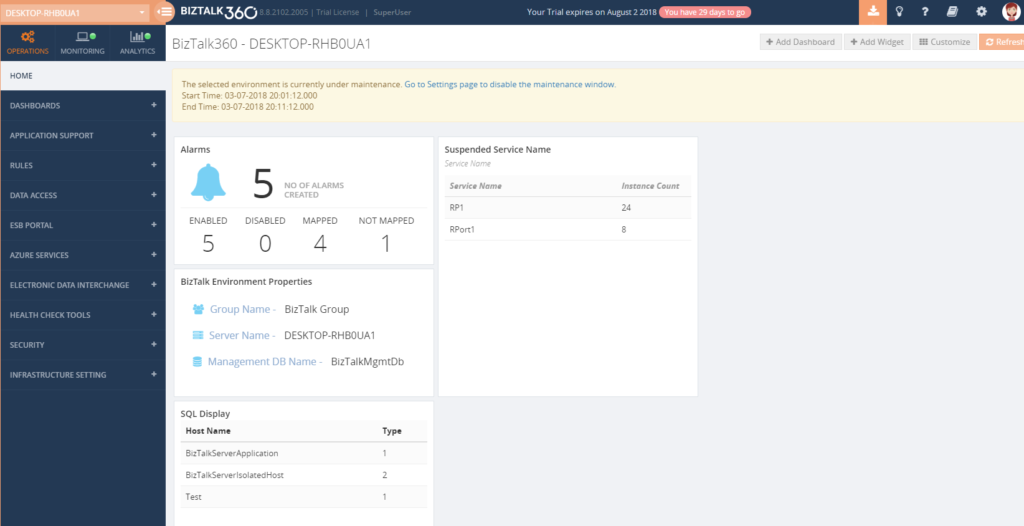
Information regarding the start & end times of maintenance window will also be provided.
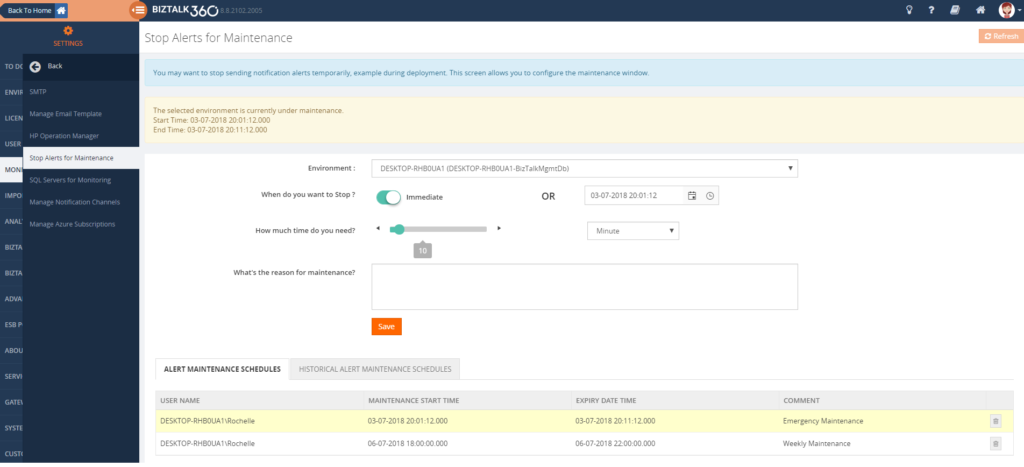
This feature is very useful to keep track of the maintenance schedules that are upcoming and those that have already passed. It also shows some form of auditing as you can see the person who scheduled a maintenance window in BizTalk360.
As soon as the maintenance window finishes, BizTalk360 will start sending notifications again based on the monitoring.
Purging maintenance windows
We have also set in place some purging policies to help manage the table size of the historical maintenance schedules.
To view this configuration
1. Log in to the BizTalk360 application
2. Go to the Settings page by clicking the Gear icon on top left hand side.
3. Navigate to ‘BizTalk360 Health‘ and then ‘Data Purging‘.
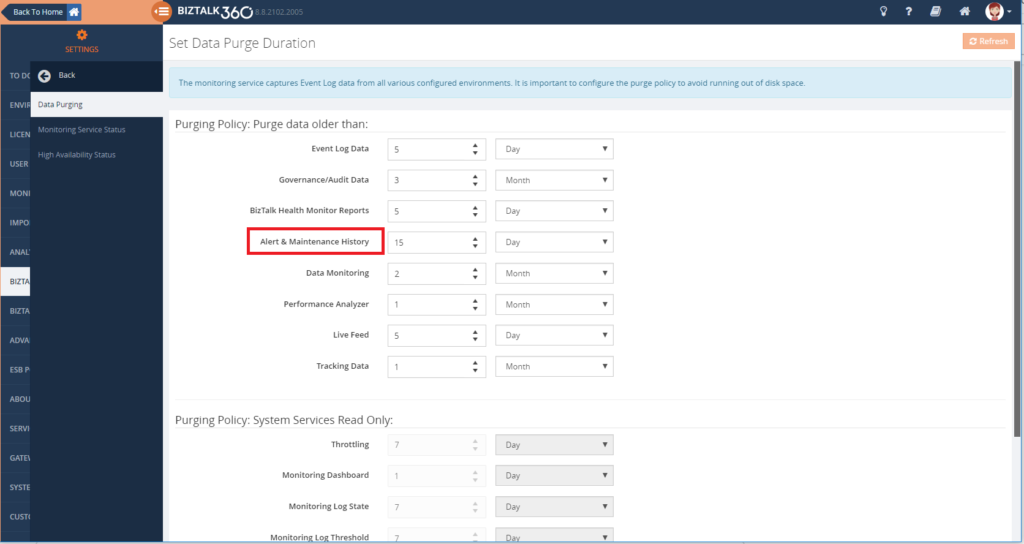
The default value is 15 days, so every 15 days the Alert & maintenance history is purged, but this can be changed as per your requirements.
Conclusion
If you want to read more about this and all the other features BizTalk360 provides, check out our Documentation portal.
Improvement of the existing ‘Stop Alerts for Maintenance’ feature was implemented based on the voting and requests on our feedback portal. If you feel there is any feature that would benefit you, please make a note in the feedback portal.
Author: Rochelle Saldanha
Rochelle Saldanha is currently working in the Customer Support & Client Relationship Teams at BizTalk360. She loves travelling and watching movies. View all posts by Rochelle Saldanha

by Sandro Pereira | Jul 2, 2018 | BizTalk Community Blogs via Syndication
I’m back with “Errors and Warnings, Causes and Solutions” and this time targeting developers – BizTalk Deploy operation failed – that work until late and they are a bit tired… believe me, It’s never a good recipe!
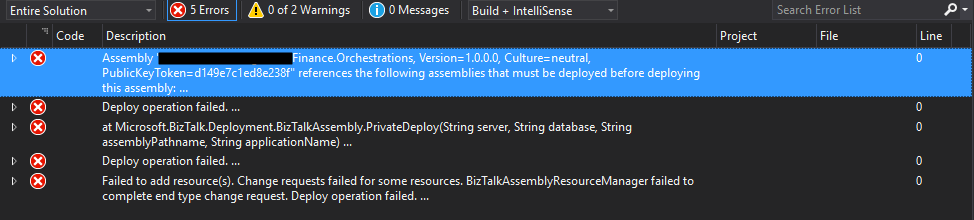
Today will I was deploying a BizTalk Server Solution from Visual Studio I had a rookie problem that, because I was tired, I took 20 minutes to find out the problem:
Severity Code Description Project File Line
Error Assembly “Finance.Orchestrations, Version=1.0.0.0, Culture=neutral, PublicKeyToken=d149e7c1ed8e238f” references the following assemblies that must be deployed before deploying this assembly:
Assembly “Staging.Orchestrations, Version=1.0.0.0, Culture=neutral, PublicKeyToken=d149e7c1ed8e238f”.
Deploy operation failed…
At Microsoft.BizTalk.Deployment.BizTalkAssembly.PrivateDeploy(String server, String database, String assemblyPathname, String applicationName)…
…
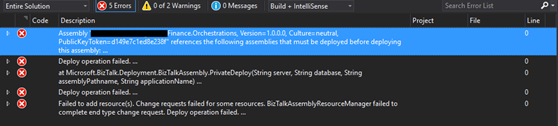
… a rookie problem that if you read carefully the error message you will know the problem.
Cause
Basically, this is a dependency problem… “Finance.Orchestrations” assembly references certain “Staging.Orchestrations” artifacts, and for this reason, this last assembly (Staging.Orchestrations) must be deployed before deploying the assembly that references these artifacts (Finance.Orchestrations).
When you deploy BizTalk assembly you must ensure that any referenced assembly is deployed first. BizTalk actually, helps you out, by enforcing that “deployment rule” by not letting you applying adding resource action without deploying all its references and that is the reason why this error is happens
Although I’m almost sure that I had deployed all the resources – common schemas, maps, and orchestrations – that was being consumed in this BizTalk Solution. When I decide to check if they were actually deployed in the environment, I found out that they weren’t… again a rookie mistake.
Solution
The solution to this problem is easy, make sure that all the dependencies are deployed before you deploy your solution.
In my case, I deployed the “Staging.Orchestrations” assembly and then I was able to indeed deploy the “Finance.Orchestrations”.
Author: Sandro Pereira
Sandro Pereira lives in Portugal and works as a consultant at DevScope. In the past years, he has been working on implementing Integration scenarios both on-premises and cloud for various clients, each with different scenarios from a technical point of view, size, and criticality, using Microsoft Azure, Microsoft BizTalk Server and different technologies like AS2, EDI, RosettaNet, SAP, TIBCO etc. He is a regular blogger, international speaker, and technical reviewer of several BizTalk books all focused on Integration. He is also the author of the book “BizTalk Mapping Patterns & Best Practices”. He has been awarded MVP since 2011 for his contributions to the integration community. View all posts by Sandro Pereira
by Gautam | Jul 1, 2018 | BizTalk Community Blogs via Syndication
Do you feel difficult to keep up to date on all the frequent updates and announcements in the Microsoft Integration platform?
Integration weekly update can be your solution. It’s a weekly update on the topics related to Integration – enterprise integration, robust & scalable messaging capabilities and Citizen Integration capabilities empowered by Microsoft platform to deliver value to the business.
If you want to receive these updates weekly, then don’t forget to Subscribe!
Feedback
Hope this would be helpful. Please feel free to reach out to me with your feedback and questions.

by Sandro Pereira | Jul 1, 2018 | BizTalk Community Blogs via Syndication
It seems like yesterday that I announce my first award, back them as a BizTalk Server MVP, but it’s been 8 years and a half on this amazing program. On 1st January 2011 I joined this amazing group of technicians and since then I was re-award in:
- 2012, again as BizTalk Server MVP,
- From 2013 to 2015, I was rebranded as Microsoft Integration MVP
- In 2017, Integration become part of Azure category, so I was award as Azure MVP
- And in middle of 2017, I was Award in two categories, Azure and Visio MVP
And today, with all the same pride, honor and enthusiasm than the first time, I’m delighted to share that the most expected email arrived once again and that I was renewed as a Microsoft Azure MVP (Microsoft Most Valuable Professional). This is my 8th straight year on the MVP Program, an amazing journey, and experience that, again, started in 2011, and that gave me the opportunity, and still does, to travel the world for speaking engagement, share the knowledge, and to meet the most amazing and skilled people in our industry.

As usual, I would like to thank:
First to my wife Fernanda, and my kids Leonor, Laura and now my new baby José (for all the “confusion and madness” they bring into my life), and to all members of my beautiful family… THANKS for all the support during these last years! You guys are my inspiration!
To my MVP Lead Cristina Herrero
The Microsoft Integration Team and Azure Teams like Paul Larson, Mandi Ohlinger, Dan Rosanova, Jon Fancey, Kevin-Lam and Kent Weare; Microsoft Portugal: Paulo Mena, Luís Calado, Ivo Ramos, Ricardo Jesus, Pedro Santos and all other Microsoft employees involved;
To DevScope (my company) and all my coworkers: no names here because all of them are amazing professionals – what an amazing team they are – we have 4 amazing MVP at DevScope, one Microsoft Regional Director, and one former MVP, WOW!! So, thanks for all the support given.
To all my fellow Microsoft Azure (Integration) MVP’s: Nino Crudele, Steef-Jan Wiggers, Saravana Kumar, Mikael Håkansson, Johan Hedberg, Tomasso Groenendijk, Salvatore Pellitteri, Richard Seroter, Stephen W. Thomas, Mick Badran, Michael Stephenson, Bill Chesnut, Thomas Canter, Mattias Lögdberg, Sam Vanhoutte, Glenn Colpaert, Howard S. Edidin, Martin Abbott, Leonid Ganeline, Dan Toomey, Wagner Silveira and Eldert Grootenboer for the support in this program.
Special thanks to all my blog readers, friends and of course to BizTalk and Azure/Integration Community – there are so many that I don’t want to mention names, so I don’t take the risk to forget someone.
And finally, to my Blog sponsor BizTalk360 and all their team for the amazing support and partnership.
It’s a big honor to be in the program and I’m looking forward to another great year!
Author: Sandro Pereira
Sandro Pereira lives in Portugal and works as a consultant at DevScope. In the past years, he has been working on implementing Integration scenarios both on-premises and cloud for various clients, each with different scenarios from a technical point of view, size, and criticality, using Microsoft Azure, Microsoft BizTalk Server and different technologies like AS2, EDI, RosettaNet, SAP, TIBCO etc. He is a regular blogger, international speaker, and technical reviewer of several BizTalk books all focused on Integration. He is also the author of the book “BizTalk Mapping Patterns & Best Practices”. He has been awarded MVP since 2011 for his contributions to the integration community. View all posts by Sandro Pereira

by Sandro Pereira | Jun 30, 2018 | BizTalk Community Blogs via Syndication
I don’t know exactly why but maybe because I’m always talking about BizTalk Server on every major event my friends have a tendency to say that I love my server and I live on my personal island:


Don’t get me wrong I do really love BizTalk Server and I don’t mind talking about the product, It’s something I do with pleasure because I talk about something I do really like but the main reason I talk every single time about BizTalk Server in major events is because the organizers ask me to speak about BizTalk Server – and I will never say no to that regardless of whether I would like or not to talk about other topics.
But despite that BizTalk Server is not the only tool I like, in fact, as I spoke about in my last talk in INTEGRATE 2018, you should use the best tool to address each particular problem, and me being an Integrator Magician, I do like other tools like API Management, Service Bus, Event Hubs, Logic Apps, Azure Functions, Power BI, PowerApps and Flows for example.
So, in response to one of my dear friends – Kent Weare – that normally say that I’m a server lover I created this my new sticker: “I Love My Flow”. Why, for two reasons:
- obvious to annoy and play around with Kent – I know that he is happy with this;
- but mostly because I love Flow and I think it has huge potential to be used in certain scenarios both in Enterprise or Personal context
The sticker has 3 similar variations but my favorite one is the first:



Hope you enjoy! In the download, you will find the sticker in vector format that you can use as you wish. My next task will be to print the sticker so I can offer in my next Flow speaking engagement.
Special thanks to my two coworkers at DevScope: António Lopes, the designer, and creator behind my idea.
You can download BizMan, The BizTalk Server SuperHero sticker from:
 I Love My Flow Sticker (2,6 MB)
Microsoft | TechNet Gallery
Author: Sandro Pereira
Sandro Pereira lives in Portugal and works as a consultant at DevScope. In the past years, he has been working on implementing Integration scenarios both on-premises and cloud for various clients, each with different scenarios from a technical point of view, size, and criticality, using Microsoft Azure, Microsoft BizTalk Server and different technologies like AS2, EDI, RosettaNet, SAP, TIBCO etc. He is a regular blogger, international speaker, and technical reviewer of several BizTalk books all focused on Integration. He is also the author of the book “BizTalk Mapping Patterns & Best Practices”. He has been awarded MVP since 2011 for his contributions to the integration community. View all posts by Sandro Pereira

by Senthil Palanisamy | Jun 27, 2018 | BizTalk Community Blogs via Syndication
Introduction
Import/Export is an important capability to manage configurations in complex environments. It facilitates that configuration can be exported and imported across multiple environments like Production, Staging, QA. BizTalk360 helped its customers by providing alarm import/export confirmation for many releases now. This feature can also be used as a backup mechanism of BizTalk360 configurations, in case you want to setup a new instance of BizTalk360.
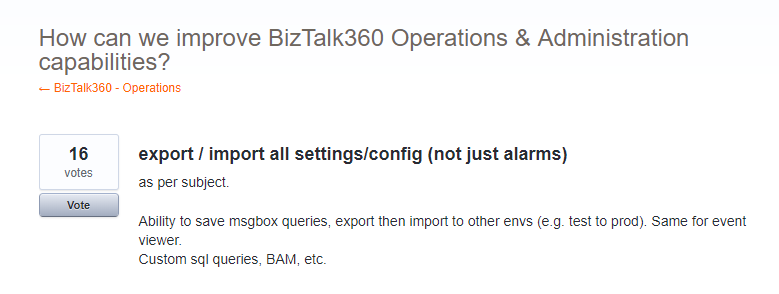
In feedback portal, many customers requested us to extend the existing functionality to other sections of the product, like User Access Policies, Secure SQL Queries, Saved queries configuration, Knowledge Base, Dashboards & Widgets and BizTalk Reporting configurations.
Real Time Scenarios
Let us see scenarios where import/export configurations can be used quite frequently.
Scenario 1
When your organization has deployed BizTalk360 on one of the Development/QA/UAT environment(s) and made lots of monitoring, user, SQL queries configurations, at some point in time, you would want to move all these configurations to the Production environment. The BizTalk360 administrator must do the usual practice to set up the configurations manually in production environment. If there are just a handful of alarm configurations/user configuration, this is a feasible option for the BizTalk360 administrator. However, if there are many configurations (100, 200, or even 500), it becomes a painstaking process for BizTalk360 administrator to manually create each alarm and its associated monitoring configurations in the production environment. Besides that, it’s just an awful amount of work, creating the configuration is also error prone.
Scenario 2
In downward scenario, when an issue happened in Production, for example in the Data Monitoring capability, when you try to action on Suspended Service Instances. By simply exporting the configuration(s) from Production and import the configuration into the Staging environment, you might just be able to replicate the issue.
New Capabilities
Prior to 8.8, the Import/Export feature is available for Alarm configuration. From version 8.8 onward it is extended to other sections in BizTalk360
- User Access Policies
- Saved Queries
- Message Box and Tracking queries
- BAM, ESB and EDI queries
- Advanced Event Viewer queries
- Secure SQL Queries
The Import/Export configuration feature is available under the Settings section of BizTalk360 web portal. Alarm configuration Export/Import is removed from the Manage Alarms screen in the Monitoring section, so all the full Export/Import configurations feature is incorporated in a single place in the Settings section (Settings -> Import and Export).
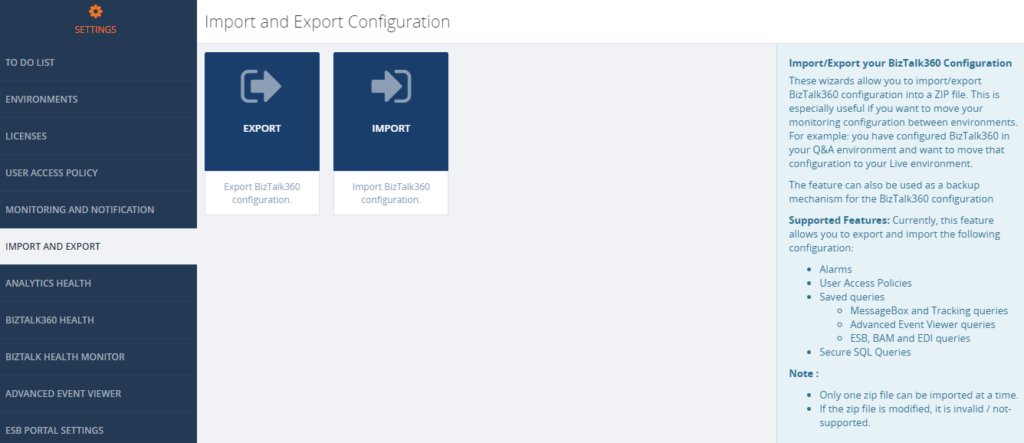
Export Configuration
From this version onward, user can pick the configuration they want to export from an environment. For instance, a user can choose desired Alarms and User Access Policy configurations for export. Exporting configurations is a straight forward process; selected configurations are exported in single ZIP File.
Alarm Configuration
Exporting alarm configuration has the same functionality as like previous versions, with additional improvement, to select the desired alarms. To know more detail about alarm configuration, check the Blog written by our founder Saravana Kumar.
User Access Policies
Both Super and Non-Super User Access Policies configuration are available to export . The user can select user access policy configurations they want to export to the other environment.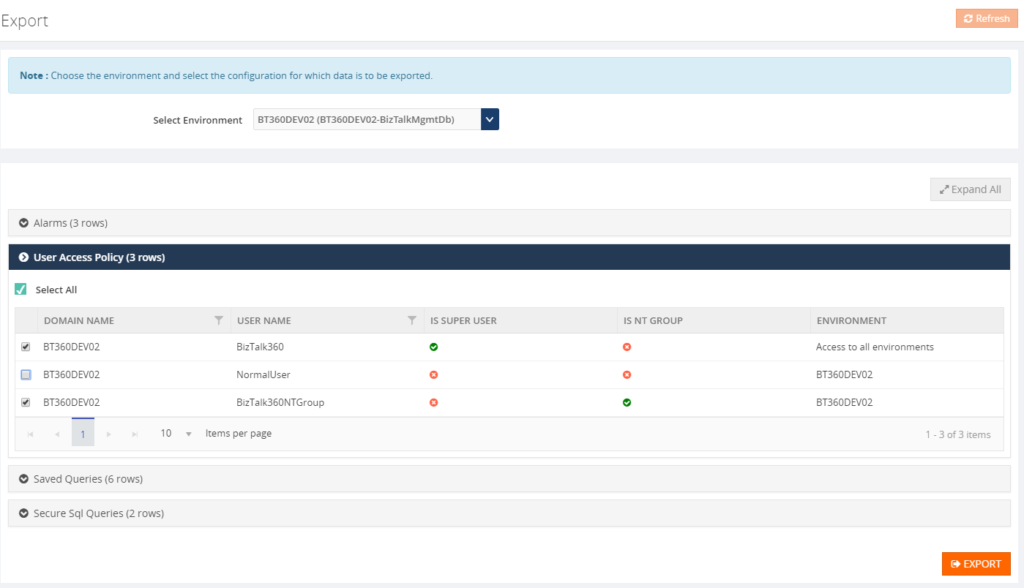
Saved Queries
The user can select the Saved queries configuration to export the data in following sections:
- Message Box Queries
- Advanced Event Viewer
- Graphical Flow (Tracking)
- ESB Exception Data
- Business Activity Monitoring
- Electronic Data Interchange
While selecting the export configuration, the user can choose saved queries sections will be exported. During export, all the queries under the that section will be available in JSON.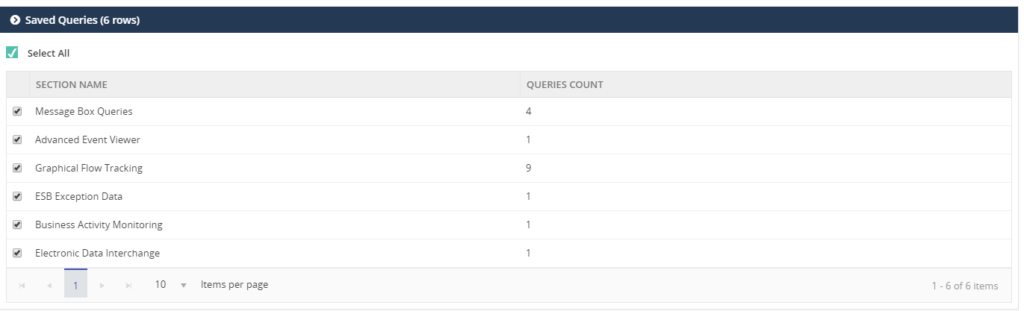
Secure SQL Queries
In Secure SQL query configuration, the user can select the queries they want to export.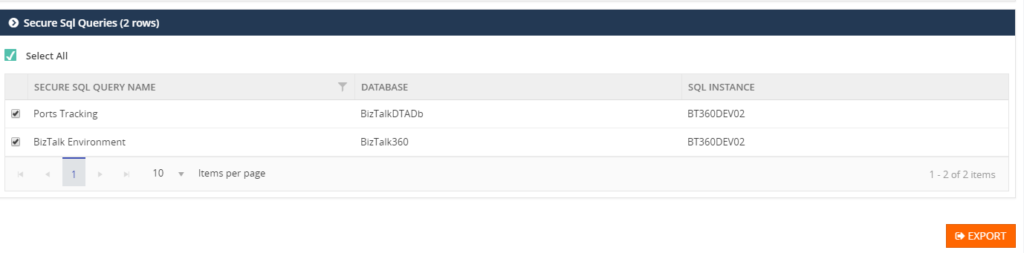
Import Configuration
A user can choose the environment in which they want to import the configurations. First step to import configurations, is to select the exported ZIP File. This will list the configurations which are exported, after which the user can select the configurations which need to be imported.
User Access Policies
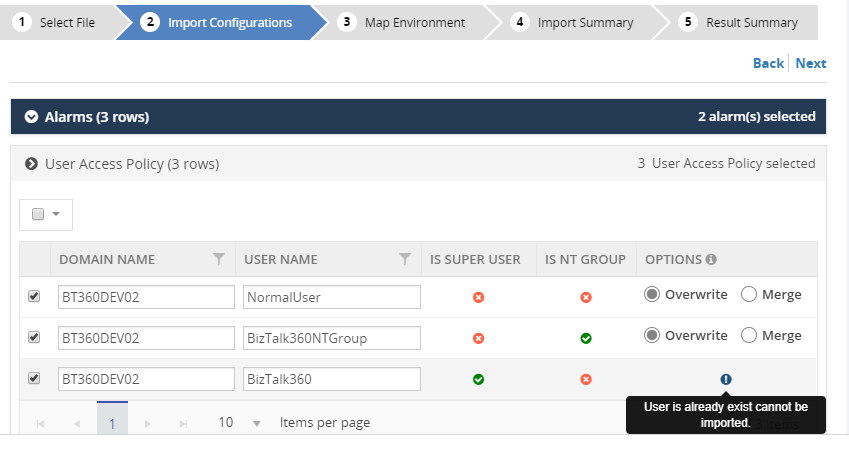
While importing the User Access Policy configuration, there will be three options available. For Super user’s configurations, only the Create option is available, since Super user access all the environments and features based on license policies.
All the three options are available for Non-Super users:
- Create – the create option will be available for both Super and Non-Super user policy configurations.
- Overwrite – this option will replace the existing User Access Policy configuration of the non-super user
- Merge – this option will merge already existing User Access Policies in the destination environment with the policies, which are exported. If, according to the Exported policies, a Non-Super user has permission to edit queries in the Secure SQL Query feature, that means that the same User Access Policy in the destination environment, will permit this feature.
Saved Queries
Similar to exporting configuration, a user selects the sections that need to be imported. This will import all the queries for the selected sections.
Secure SQL Queries
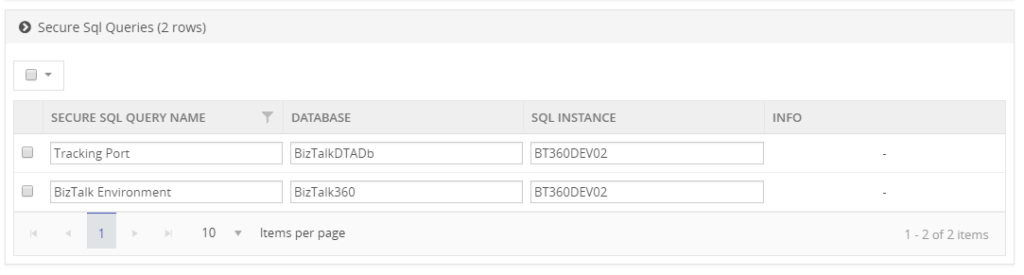
While importing Secure SQL Query configuration, the user can edit the query name, database and SQL Instance, according to the destination environment. If the Secure SQL Query configuration is already available, then the Override option is applied, otherwise it will create a new query.
Result Summary
The user confirms the import operation by clicking the Import button. Once the import process is completed it will produce the Imported Result Summary. This Summary might look like shown below.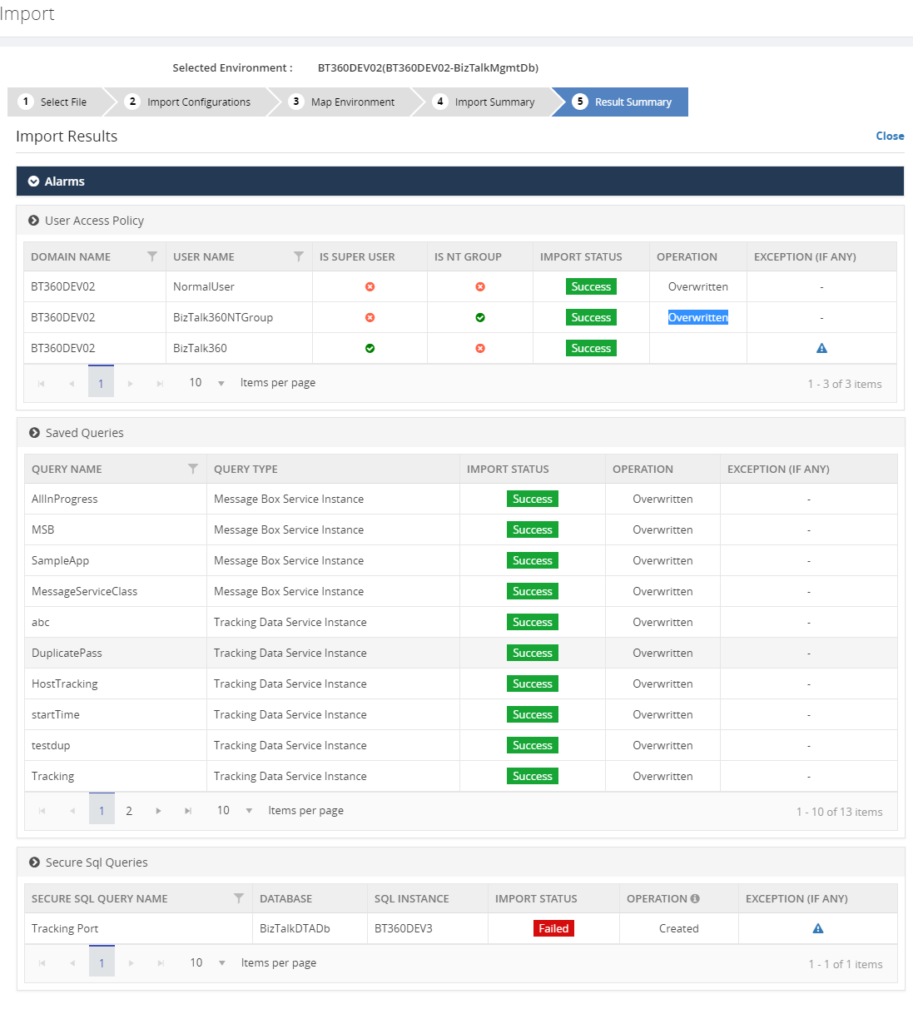
Next set of Configuration
For the upcoming release, version 8.9, the following Import/Export configurations sections are under development pipeline:
- Knowledge Base
- BizTalk Reporting
- Dashboard
- Custom Widgets
Conclusion
The Import/Export configuration feature is useful with respect to back-up of, amongst others, user and alarm configurations and increase productivity by sharing the configuration between multiple environments. In future releases of BizTalk360, we will bring more export/import features, to make the experience as rich as possible.
If you have any suggestions what kind of date you would like to transfer between BizTalk environments, feel free to let us know by entering a request on our Feedback portal.
Author: Senthil Palanisamy
Senthil Palanisamy is the Technical Lead at BizTalk360 having 12 years of experience in Microsoft Technologies. Worked various products across domains like Health Care, Energy and Retail. View all posts by Senthil Palanisamy
by Sandro Pereira | Jun 26, 2018 | BizTalk Community Blogs via Syndication
Yesterday, June 25, 2016, BizTalk Server team released the new BizTalk Server 2016 Feature Pack 3, again, this only can be applied to BizTalk Server 2016, the previous versions of the product don’t support FP and there is nothing on the roadmap to support them. This FP was announced in Integrate 2018 London event and it will include:
- 3 brand new Office365 adapters:
- Office 365 Mail Adapter: will allow you to consume (read, mark as read or delete) Outlook e-mail messages through one-way BizTalk Server receive locations or send email messages through one-way static or dynamic send ports.
- Office 365 Calendar Adapter: that will allow you to get future calendar events through one-way BizTalk Server receive locations or create calendar events through one-way static or dynamic send ports. Personally, I still need to find a good case story for this adapter but is better have than don’t have nothing.
- Office 365 Contact Adapter: that will allow you to create contacts through one-way static or dynamic send ports. Again, still need to find a good case story for this adapter.
- Support for Authentication with Azure AD and OAuth using Microsoft Enterprise Single Sign-On – This feature is included, but only consumed by the new Office 365 adapters
- And compliance with:
- US government accessibility standard
- FIPS and GDPR privacy standards
- Compatibility with SQL Server 2016 SP2: You now can deploy multiple databases per instance of an Availability Group.
And I couldn’t wait for trying it out!
Microsoft BizTalk Server 2016 Feature Pack 3: Step-by-step Installation Instructions
After you download the Microsoft BizTalk Server 2016 Feature Pack 3 You should:
- Run the downloaded .EXE file – BTS2016-KB4103503-ENU.exe – from your hard drive.
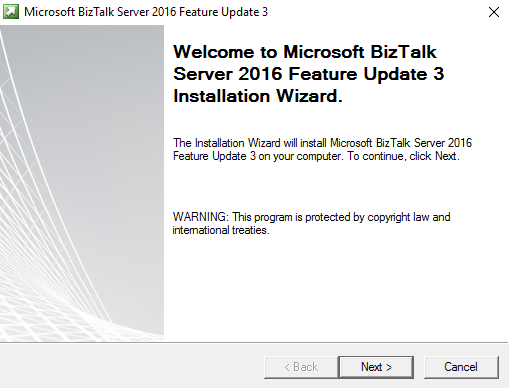
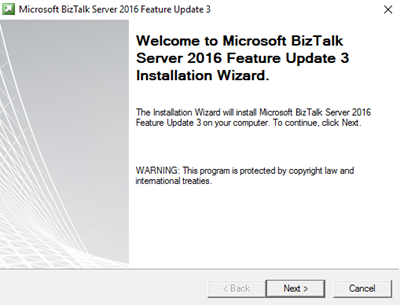
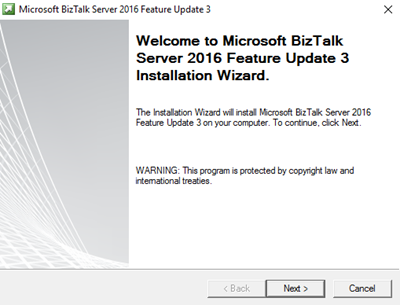
- In the “Welcome to Microsoft BizTalk Server 2016 Feature Update 3 Installation Wizard” screen, click “Next”
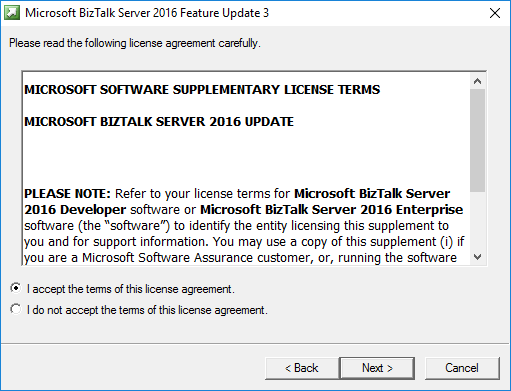
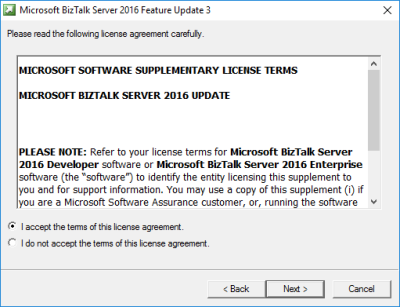
- In the “License agreement” screen, select the option “I accept the terms of this license agreement” and then click “Next”
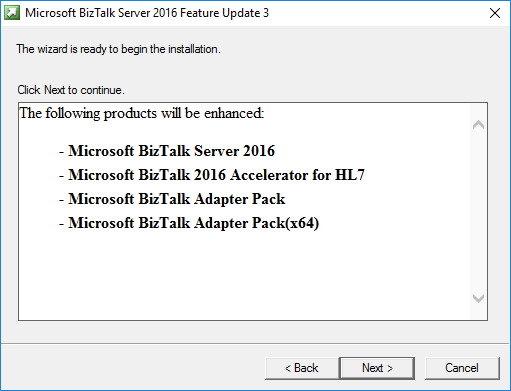
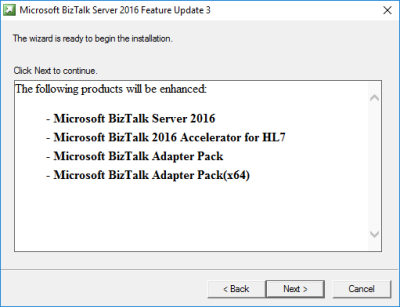
- In the “Ready to Install”, it will be provided a list of products that will be enhanced, you should click “Next” to continue with the installation.
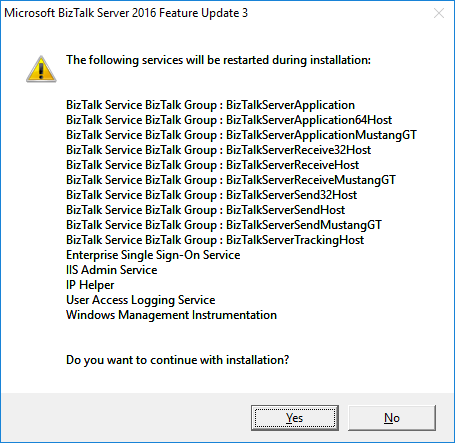
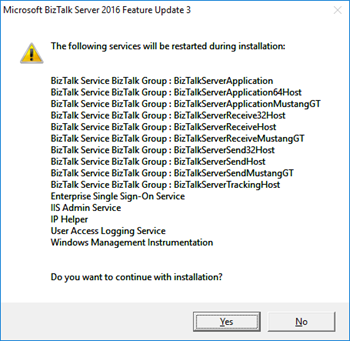
- The BizTalk Server 2016 Feature Pack 3 installation will prompt a window with the list of services that will be restarted during the installation process, click “Yes” to continue with the installation.
- The installation process may take some minutes to complete, and you probably see some “background” windows to appear and to be completed.
- Important: you should wait until the “Installation Wizard has completed” screen to appear
- In the “Installation Wizard has completed” screen, click “Finish”
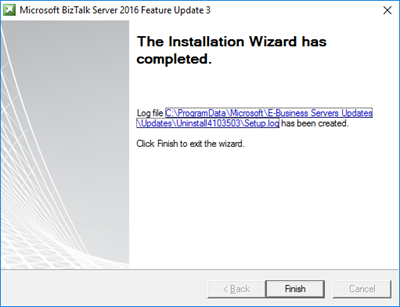
Note: BizTalk Server 2016 Feature Pack 3 doesn’t request for you to restart BizTalk Server machine after you finish the FP3 installation process. But I normally like to restart once the installation is complete (this is optional).
Once the installation is complete, you will be able to see and use the new features:
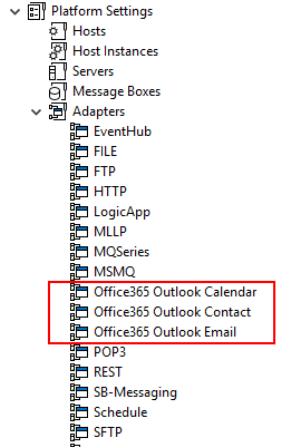
Note: Microsoft BizTalk Server 2016 Feature Update 3 comes with CU5, so once you install this FP you are also updating your BizTalk Server environment with the latest cumulative update. This is not optional.
Author: Sandro Pereira
Sandro Pereira lives in Portugal and works as a consultant at DevScope. In the past years, he has been working on implementing Integration scenarios both on-premises and cloud for various clients, each with different scenarios from a technical point of view, size, and criticality, using Microsoft Azure, Microsoft BizTalk Server and different technologies like AS2, EDI, RosettaNet, SAP, TIBCO etc. He is a regular blogger, international speaker, and technical reviewer of several BizTalk books all focused on Integration. He is also the author of the book “BizTalk Mapping Patterns & Best Practices”. He has been awarded MVP since 2011 for his contributions to the integration community. View all posts by Sandro Pereira
by BizTalk Team | Jun 25, 2018 | BizTalk Community Blogs via Syndication
Available now is Microsoft BizTalk Server 2016 Feature Pack 3. This update to BizTalk Server 2016 contains new and improved capabilities for integrating BizTalk Server workloads with Office 365 Outlook Email, Calendar, and Contact resources.
Office 365 Adapters
Microsoft Office 365 is a cloud-based subscription service that brings together the best tools for the way people work today. By combining best-in-class apps like Excel and Outlook with powerful cloud services like OneDrive and Microsoft Teams, Office 365 lets anyone create and share anywhere on any device.
Microsoft BizTalk Server Adapters for Office 365 enable IT professionals and enterprise developers to integrate Outlook mail, contacts, and schedules with new solutions based on BizTalk Server 2016.
Office 365 Mail Adapter
Using the BizTalk Adapter for Office 365 Mail, you can read, mark as read or delete, Outlook e-mail messages through one-way BizTalk Server receive locations. Using the Office 365 Mail Adapter, you can write e-mail message, including setting message priority, through one-way static or dynamic BizTalk Server send ports.
Office 365 Calendar Adapter
Using the BizTalk Adapter for Office 365 Calendar, you can get future calendar events through one-way BizTalk Server receive locations. Using the Office 365 Calendar Adapter, you can create calendar events, including specifying required and optional attendees, through one-way static or dynamic BizTalk Server send ports.
Office 365 Contact Adapter
Using the BizTalk Adapter for Office 365 Contact, you can create contacts, by specifying all settings, through one-way static or dynamic BizTalk Server send ports.
Licensing
Microsoft customers with Software Assurance or Azure Enterprise Agreements are licensed to use Feature Pack 3.
BizTalk Server 2016 Feature Pack 3 can be installed on Enterprise and Developer editions only.
Software
BizTalk Server 2016 Feature Pack 3 contains all the functionality of Feature Packs 1 and 2, plus all the fixes in Cumulative Update 5.
You can install Feature Pack 3 on BizTalk Server 2016 Enterprise and Developer Edition (retail, CU1, CU2, CU3, CU4, FP1, FP2).
Download the software now from the Microsoft Download Center.
Documentation
You can learn more about Feature Pack 3 by reading the documentation articles. Please contribute to improving our documentation, by joining our BizTalk Server community on GitHub.