by Sandro Pereira | Jul 26, 2018 | BizTalk Community Blogs via Syndication
With all these new security features present on the latest Microsoft operating systems, don’t get me wrong they are good, sometimes our life as BizTalk Developers seems like it’s reversing and becoming a nightmare, especially if you are a consultant working with multiple different clients, environments, and projects.
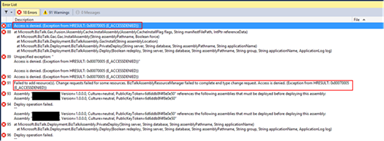
Most of the times I start developing a new project at a new client, the first time I try to deploy a solution I get an “Error 87 Access is denied. (Exception from HRESULT: 0x80070005 (E_ACCESSDENIED))…” error message.
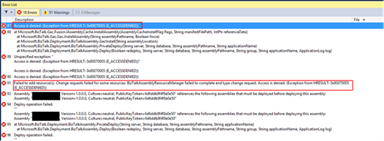
There are several possible causes for you to get such Access Denied errors when deploying BizTalk solutions directly from Visual Studio. Most common is that you don’t have the right BizTalk privileges to deploy artifacts, or in other words, you are not a local Administrator.
But most of the time is simpler than that and indeed is related with these additional securities setting present in recent Windows Server versions. For you to be able to successfully deploy a BizTalk Server solution directly from Visual Studio, you must run Visual Studio as an Administrator, or with elevated permissions, because BizTalk assemblies need to be deployed into the GAC. What normally happens, is that if you have User Account Control (UAC) activated, or sometimes even deactivated, there are some additional securities setting present in recent Windows Server versions that, by default, doesn’t run Visual Studio with elevated permissions.
The quick solution is for you to run Visual Studio as an Administrator by simply run below step:
- Right-click under Visual Studio and choose “Run as administrator” option.
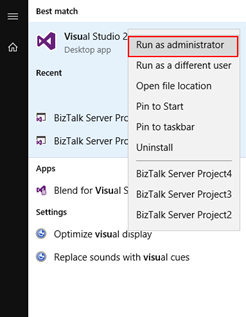
The problem with this approach is that you need to remember yourself to do it every time you want to run Visual Studio, otherwise the next time you try to deploy the solution it will fail again with the same error.
How to properly address this problem?
Actually, this problem can be simply addressed by:
- Access the devenv.exe file on the file system, which is by default installed in: “C:Program Files (x86)Microsoft Visual Studio 14.0Common7IDE”
- Right-click devenv.exe and select “Troubleshoot compatibility”
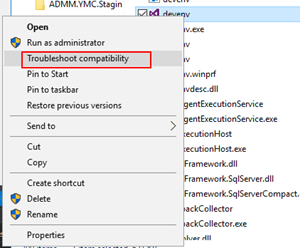
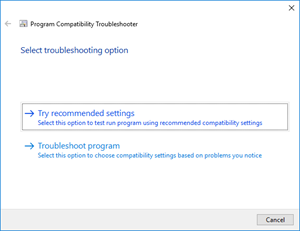
- On the “Select troubleshooting option” page, select “Troubleshoot compatibility” option
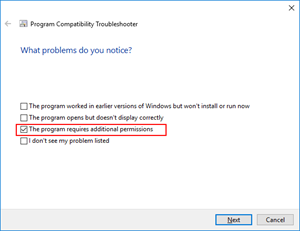
- On the “What problems do you notice?” page, select the “The program requires additional permissions” option and then click “Next”
- On the “Test compatibility settings for the program” page, click “Test the program…”, wait for the program to launch and then click “Next”
- Select “Yes, save these settings for this program”
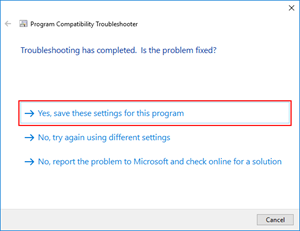
You will never face this problem again… at least at that client.
Enjoy and Stay tuned for new BizTalk Server Tips and Tricks!
Author: Sandro Pereira
Sandro Pereira is an Azure MVP and works as an Integration consultant at DevScope. In the past years, he has been working on implementing Integration scenarios both on-premises and cloud for various clients, each with different scenarios from a technical point of view, size, and criticality, using Microsoft Azure, Microsoft BizTalk Server and different technologies like AS2, EDI, RosettaNet, SAP, TIBCO etc. View all posts by Sandro Pereira
by Bill Chesnut | Jul 24, 2018 | BizTalk Community Blogs via Syndication
By Bill Chesnut
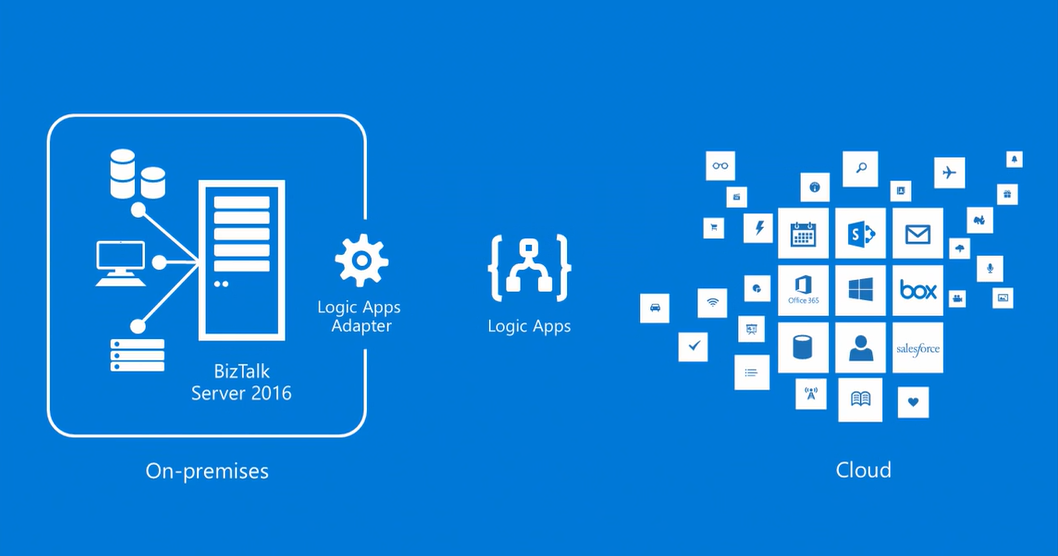
This is the 1st of a multipart series of Blog Posts to help companies understand Migrating BizTalk to Azure Integration Platform as a Service (IPaaS).
Should I be migrating from BizTalk to Azure iPaaS? This is a question I am being ask more and more lately for a couple of different reasons.
BizTalk development has always been a very specialized skill set with a limited number of resources available in the market, so companies are now starting to look at Azure iPaaS as a viable alternative to BizTalk in terms of finding developers with the correct skill sets.
There are 3 other reasons many companies are looking at moving from BizTalk to Azure iPaaS:
- cost, consumption pricing instead of product licensing;
- location of data, many companies are dealing with their consumers over the internet, so having their integration resources in Azure makes more sense;
- Infrastructure, companies are seeing the advantages of not having to maintain their own infrastructure and using Platform as a Service (PaaS) and Software as a Service (SaaS) offerings as a cost-effective alternative.
Unlike the BizTalk middleware products that covered most features required for all integration scenarios, Azure iPaaS is a collection of Azure services that may or may not be utilised for each scenario.
The base components that make up Azure iPaaS are Service Bus, Logic Apps, API Management and Event Grid. For some integration scenarios you may also use services like but not limited to: SQL Database, Storage, Function App, Web Site (hosing your WebAPI or WebJobs), Cosmos Db and Virtual Machines. In this series of blog posts, I will look at the different scenarios and the Azure services required.
Instead of spending time here to explain each of the Azure iPaaS services, I have included links to Azure documentation on each product/service mentioned:
All Azure Product/Services can be found here: https://docs.microsoft.com/en-us/azure/#pivot=products
Before you jump full steam into migrating from your on-premises (or cloud hosted) BizTalk to Azure iPaaS, there are a few things that you need to look at to see if the migration makes sense:
- Location of your data
- Sensitivity of your data
- Security Policies for accessing cloud-based resources
- Location of consumers/partners
Let’s look at each of these items in detail:
Location of your data, if most of your data currently used by BizTalk is located inside of your data center it would be hard to justify moving all of that data to and from Azure to use Azure iPaaS.
If your data is from your consumers/partners and it is coming in and going out via the internet, iPaaS can be a great solution in terms of cost, scalability and availability.
Sensitivity of your data, again this will relate back to the first item, if the data is coming in and going out over the internet, your company has already accepted the risk, so iPaaS will be a viable solution, otherwise, a risk assessment will need to be undertaken.
Security Policies for accessing cloud based resources can sometimes be one of the hardest nuts to crack, it requires educating your management to the benefits and security safe guards of Azure. It also means designing your iPaaS solution to use some of the additional security features available in Azure. The final point to look at is location of consumers/partners, again if everyone using the integration service of BizTalk are located inside of your data center, having them traverse to Azure and back for data does not make sense, but if many of your consumers/partners are outside of your offices or mobile users, Azure make perfect sense for availability and scale.
Once a company has decided that moving to Azure iPaaS makes sense, the next item to consider is the structure of their existing BizTalk integration solution, does the existing BizTalk solutions follow best practice:
- having incoming data mapped to an internal/canonical format
- processed in BizTalk using the internal/canonical format
- then mapped back to the outbound format before leaving BizTalk
if so, this will make the migration to Azure iPaaS a less disruptive and staged process.
This series will continue with the following blog posts:
- Migrating inbound messaging to Azure using Logic Apps, Event Grid, Service Bus and the BizTalk Claim Check Pipeline component that I have built.
- Migrating outbound messaging to Azure, using the same tooling as inbound
- Choices for message archiving in Azure
- End to End Monitoring of Azure iPaaS
- EDI (EDIFACT, X12 & AS2) Capabilities of Azure iPaaS
- Azure iPaaS CI/CD
Thanks for taking the time to view this blog post.
Cross Posted on: http://www.sixpivot.com.au

by Sandro Pereira | Jul 24, 2018 | BizTalk Community Blogs via Syndication
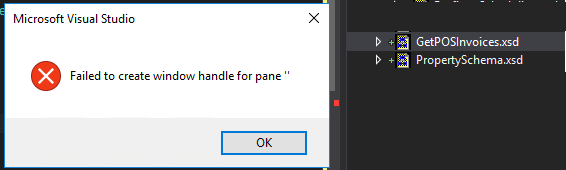
There are errors that we are familiar with, but I guess this you may never hear about it. I didn’t know it until today: Failed to create window handle for pane ”.
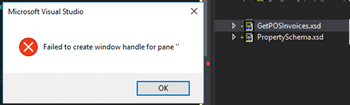
This happened today while I was trying to open a Schema from my BizTalk Server project. Every other artifact opened well in their designer/editor like Orchestrations, Maps, and Pipelines… with the exception of Schemas.
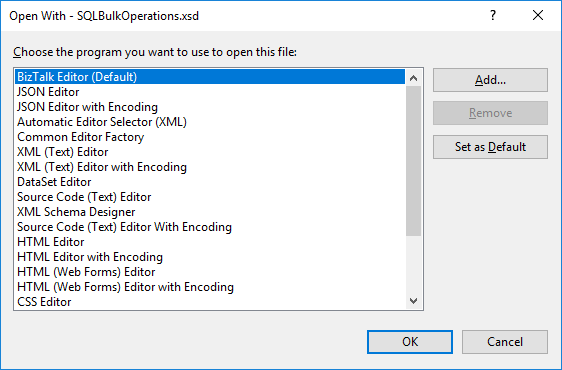
I try to force it open by the BizTalk Schema Editor by right-clicking on the schema, open with and select the BizTalk Editor (Default) without any result.
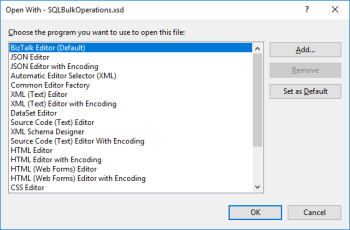
I even try to force it open with another editor like XML (Text) Editor – it worked by the way – and once again try to open by the Schema Editor, again, without any practical result.
Note: I had 3 visual studio instances opened with 3 different projects: 2 of them worked well and only one had this problem.
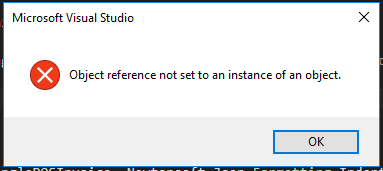
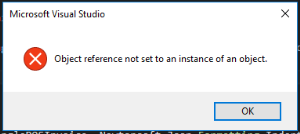
Also, when I try to close this particular Visual Studio instance, I got another error:
Microsoft Visual Studio: Object reference not set to an instance of an object
Cause
Honestly, I have no f*** idea… but I know the solution.
Solution
To solve this problem, you need to… do what we normally do when nothing works!
- Close the Visual Studio and open again
Problem solved!
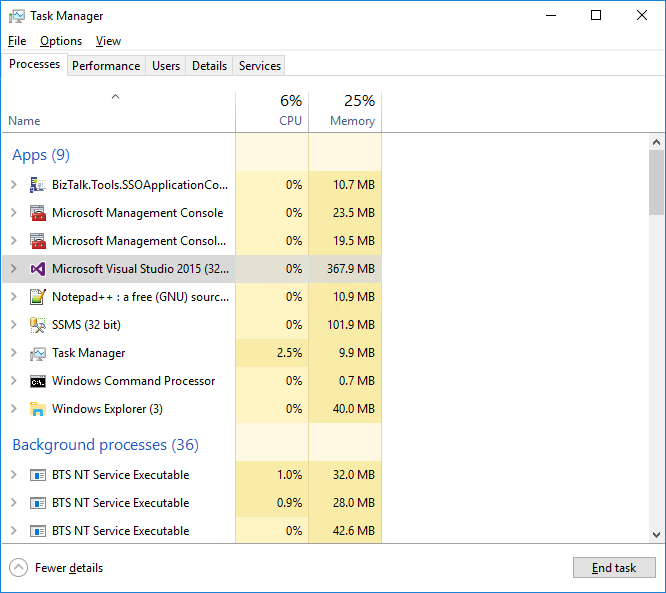
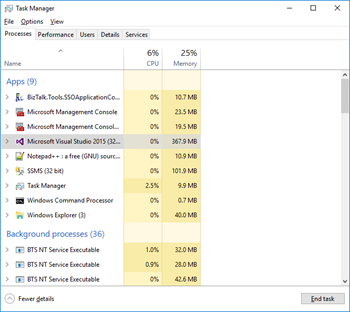
Because I was unable to close the Visual Studio – Object reference not set to an instance of an object – I terminated the Visual Studio task using the task manager.
Author: Sandro Pereira
Sandro Pereira lives in Portugal and works as a consultant at DevScope. In the past years, he has been working on implementing Integration scenarios both on-premises and cloud for various clients, each with different scenarios from a technical point of view, size, and criticality, using Microsoft Azure, Microsoft BizTalk Server and different technologies like AS2, EDI, RosettaNet, SAP, TIBCO etc. He is a regular blogger, international speaker, and technical reviewer of several BizTalk books all focused on Integration. He is also the author of the book “BizTalk Mapping Patterns & Best Practices”. He has been awarded MVP since 2011 for his contributions to the integration community. View all posts by Sandro Pereira
by Sandro Pereira | Jul 24, 2018 | BizTalk Community Blogs via Syndication
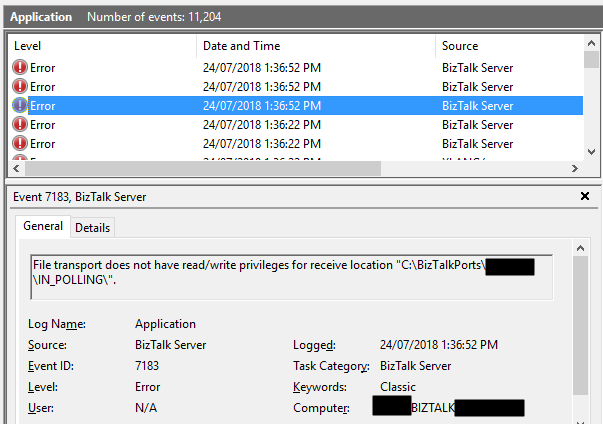
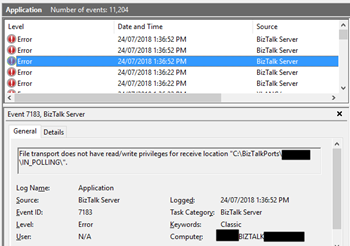
In the spirit of documenting all possible and imaginary errors, let’s address today a classic one: File transport does not have read/write privileges for receive location “DRIVE:FOLDER NAME”.
This happens more than you may think, and today after finish creating a backup port for testing a new process while I was trying to Enable the File receive location I got the following errors:
File transport does not have read/write privileges for receive location “C:BizTalkPortsIN_POLLING”.
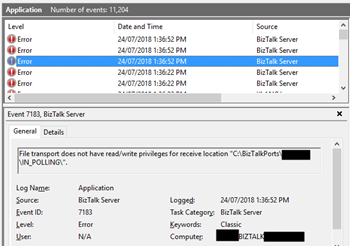
Followed by other similar warning messages:
The Messaging Engine failed to add a receive location “POLLING_FILE” with URL “C:BizTalkPortsIN_POLLING*.xml” to the adapter “FILE”. Reason: “File transport does not have read/write privileges for receive location “C:BizTalkPortsIN_POLLING”. “.
The receive location “POLLING_FILE” with URL “C:BizTalkPortsIN_POLLING*.xml” is shutting down. Details:”The Messaging Engine failed while notifying an adapter of its configuration. “.
Cause
As I said before this is a classic error, the reason is quite obvious and the error message clearly identifies the origin of the problem.
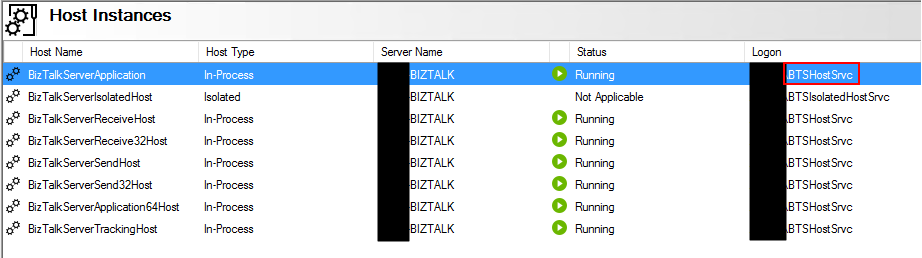
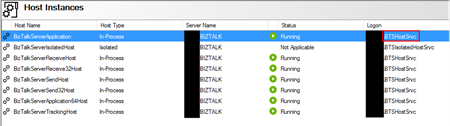
The problem is that the user that is running the BizTalk Server host instance(s) don’t have read/write privileges in that specific folder.
Solution
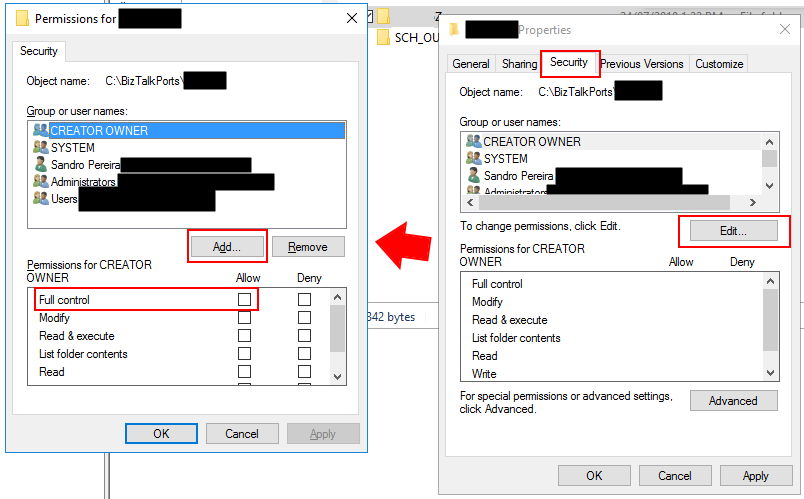
To solve this problem, you need to give readwrite privileges for the user that is running BizTalk Server Host Instance, in my case “BTSHostSrvc”, into that specific folder. For that you need to:
- From the file system, access to the folder in question and then right-click on the folder and select the “Properties” option;
- If attribute “Read-only (only applies to files in folder)” is enabled (selected), disable it (unselect);
- Then go to the “Security” tab and then click “Edit…” button and then “Add…” button
- Search for the user that is running the BizTalk Server Host Instance and then click “OK”;
- For that specific user give read and write access;
- In my case, because this was/is a “BizTalk process” folder, I gave “Full control”
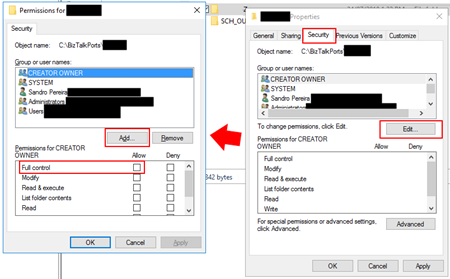
- At the click “OK” and “OK” once again.
Once you give access to the user this classic problem is going away… until the next time!
Author: Sandro Pereira
Sandro Pereira lives in Portugal and works as a consultant at DevScope. In the past years, he has been working on implementing Integration scenarios both on-premises and cloud for various clients, each with different scenarios from a technical point of view, size, and criticality, using Microsoft Azure, Microsoft BizTalk Server and different technologies like AS2, EDI, RosettaNet, SAP, TIBCO etc. He is a regular blogger, international speaker, and technical reviewer of several BizTalk books all focused on Integration. He is also the author of the book “BizTalk Mapping Patterns & Best Practices”. He has been awarded MVP since 2011 for his contributions to the integration community. View all posts by Sandro Pereira

by Sivaramakrishnan Arumugam | Jul 24, 2018 | BizTalk Community Blogs via Syndication
We are excited to launch version 8.8 of BizTalk360, where we have added improvements to existing features and resolved quite a few numbers of outstanding support tickets which were raised by our customers.
As others are excited, I’m even little bit more excited about the BizTalk360 new version release. The reason being, in this release every person in the team has transformed and performed as a DevOps in BizTalk360. Everyone on the team provided their contribution in the form of developing a new feature, enhancing an existing feature, testing, documenting, writing blogs and so on.
DevOps Transformation
2017 was a special year for BizTalk360 product support, we had learned many new things. We started this year with a lot of training. We all product support engineers underwent product training with the help of the respective developers who developed the product features and with the QA who tested.
In 2018, we evolved ourselves from support engineers to QA cum Product Support engineer this year!!! As a product-based and a start-up company, we have improved ourselves and have learned from previous practices.
Being a support engineer for a long time, I have been involved in the development activity. I take this opportunity to thank everyone in and out of BizTalk360 for this wonderful opportunity.
The Development Process of v8.8
This time we have changed our development process from Agile to Kanban as well. As the process changed, we are in a situation to monitor each task what we do.
In the version 8.7, few of us evolved as a DevOps and worked along with the release. With the hands-on experience in the version 8.7, we planned our 8.8 from the requirement of the features to the post-release validation.
Here is the task list what we followed in 8.8.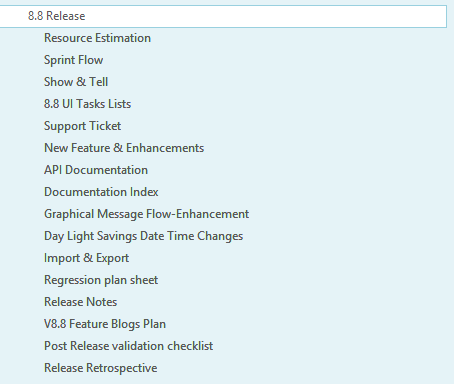
Sprint plan
We planned for 2 months duration with 4 sprints, each sprint holding 2 weeks of duration in this release. As we have our own priority (like Support, QA, Dev involved) based on our availability, the tasks were allocated in each sprint.
During the completion of a sprint and to start another sprint, the feature allocated must be in the deliverable state.
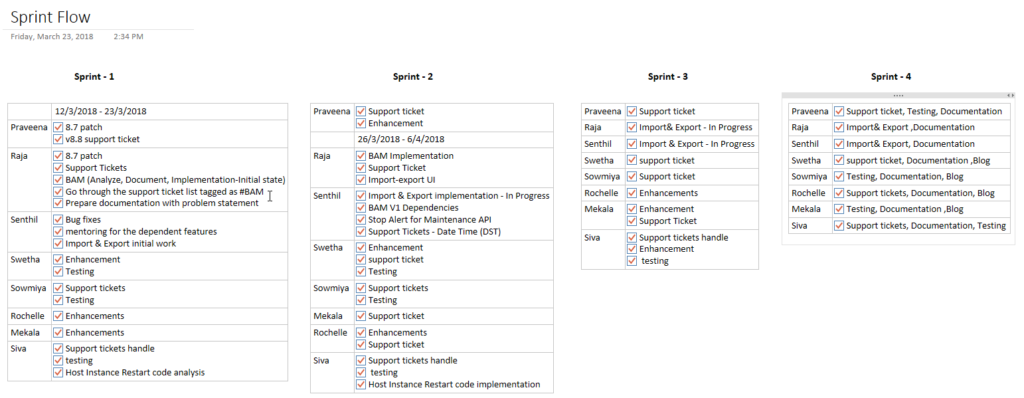
Task plan
The tasks will be assigned to the individuals based on the nature of their jobs. The assigned tasks must be completed before sprint completion. When I say fixing or enhancement of the feature for the sprint, it doesn’t mean just development. It includes:
- development
- testing
- documentation of the feature
- support document
- mock Release notes
Documentation
For the Release Notes, we took a complete list of the development tasks and decided what needed to be added in the Release Notes and the support documentation.
If it’s a feature enhancement, we will change the existing documentation according to the feature enhancement. For a new feature, we created a new article in our support portal (https://assist.biztalk360.com). Also, we prepared a rough Release Notes article.
Screenshot of mock release notes.
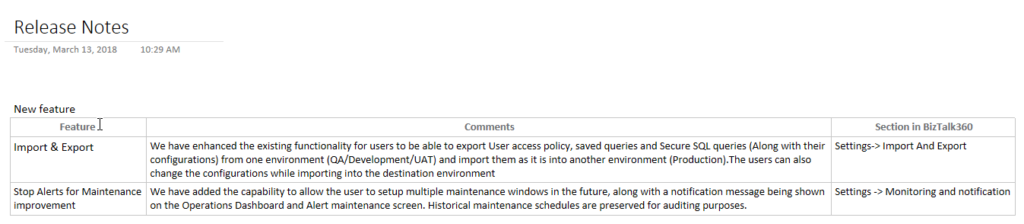
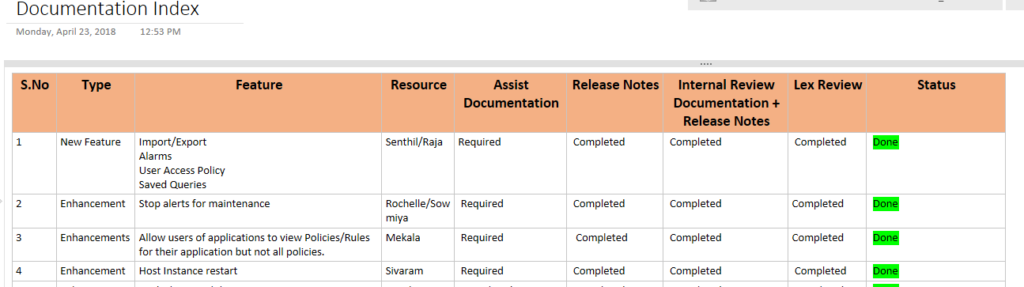
Once we complete a feature enhancement or a new feature document, we will send it to one of the team members for internal review. After review, we will pass it on to the Documentation team to add or make changes to the support document.
Here is a part of the list of the documentation index what we had done in 8.8.
Post-release validation
The process does not end once the product is ready for release. We do have few activities for the post-release validations to make the release complete and we were also involved in these activities. The activities include the tasks needed to be done before the product is announced to the public.
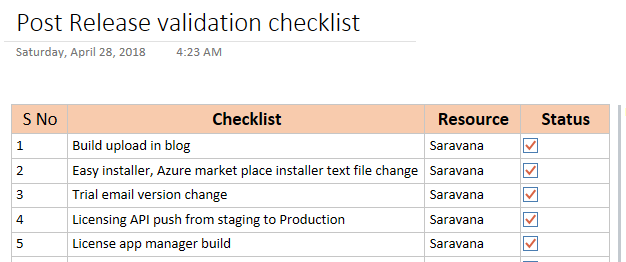
Here is the sample list of post-release validation list.
Daily Stand-up
Meetings are always helpful for the team coordination and understand the activities and make sure everyone on the team is on the same page. Daily stand-up is one another way to update our daily task, to reveal our technical challenges what we had faced on the day before, the tasks what we have worked and what we are going to work on the day.
If there are any challenges faced, any one of the people from the team or from other teams will help you out to overcome the problem. Also, we get feedback and suggestion on the tasks. If we have any technical dependencies we will convey in the meeting so that within a team all will get to know who is working on what. It helped us to complete the task on time.
Along with the task update, we will also verify the development progress, testing, documentation of the feature, support and mock release notes.
Show and Tell
As the name implies, we show our developed feature and tell the progress of our development activity to the team. This is something different from the Daily stand-up as we would showcase the tasks performed for the entire week and demo the feature developed to have the feedback from the management.
Show and tell is conducted every Monday afternoon. We will showcase what we developed during the meeting to our CEO along with the external team members to get their feedback and suggestion. Based on the suggestion we will make changes.
Challenges what we faced
It is not that much easy to transform from a QA and Technical Support engineer to DevOps even though we handle technical things.
From our side, at the very beginning stage, we faced a problem with the priority and time consumption. At a very earlier stage, I was not able to focus completely on the development since we are handling the support. We receive support cases and our priority is to solve the tickets as soon as possible. We could overcome this by the practice in various sprints.
“Success is where preparation and opportunity meet”
From my personal point of view, since we handled from the requirement to post-release validation I would like to name it as contribute360. I personally take this opportunity once again to thank everyone in and out of BizTalk360 for this wonderful opportunity and believing in us. We are looking forward to much more opportunity.
Feedback portal
>>Which feature would you like to see coming in BizTalk360 in upcoming releases? <<
Now we would like to request you, our customers, to please take the time to fill this questionnaire. This helps us to prioritize the next upcoming feature tasks and will let us know what your main pain points are. This way we can further improve the product and make it a usable as possible for you.
Author: Sivaramakrishnan Arumugam
Sivaramakrishnan is our Support Engineer with quite a few certifications under his belt. He has been instrumental in handling the customer support area. He believes Travelling makes happy of anyone. View all posts by Sivaramakrishnan Arumugam
by Gautam | Jul 23, 2018 | BizTalk Community Blogs via Syndication
Do you feel difficult to keep up to date on all the frequent updates and announcements in the Microsoft Integration platform?
Integration weekly update can be your solution. It’s a weekly update on the topics related to Integration – enterprise integration, robust & scalable messaging capabilities and Citizen Integration capabilities empowered by Microsoft platform to deliver value to the business.
If you want to receive these updates weekly, then don’t forget to Subscribe!
Feedback
Hope this would be helpful. Please feel free to reach out to me with your feedback and questions.

by Bill Chesnut | Jul 22, 2018 | BizTalk Community Blogs via Syndication
By Bill Chesnut
Being a big fan of Azure API Management (APIM), I get ask often “why should you use Azure API Management to publish my APIs? They are in Azure in an App Service as WebAPI”. To address this question we are going to go through the components and features of APIM. One thing I will not be coving is cost, too many times people first look at the cost of a product/service before they look at the features, I will leave the cost analysis to later and concentrate on the features.
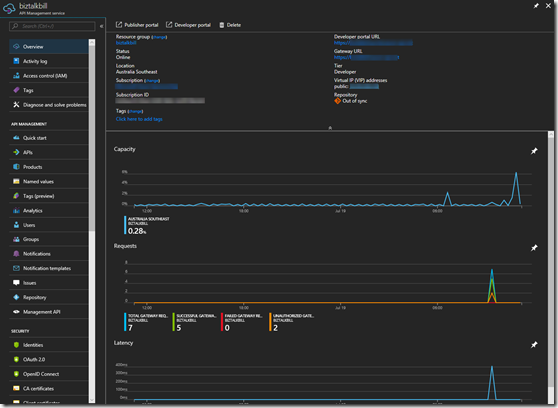
There are 3 main components of APIM: API gateway, Azure Portal and Developer Portal, let’s talk quickly about each of these. Complete details can be found here: https://docs.microsoft.com/en-us/azure/api-management/api-management-key-concepts
API gateway
This is the gatekeeper, it accepts calls, routes them to the location of your API, verifies access, enforces quotas and rate limits, caches backend responses, manipulates the requests and responses and provides logging and analytics. There is nothing in the gateway that you could not do in your own code, but I strongly believe that you should not try to reinvent the wheel, concentrate on your code functionality not the plumbing.
Azure Portal / Management APIs
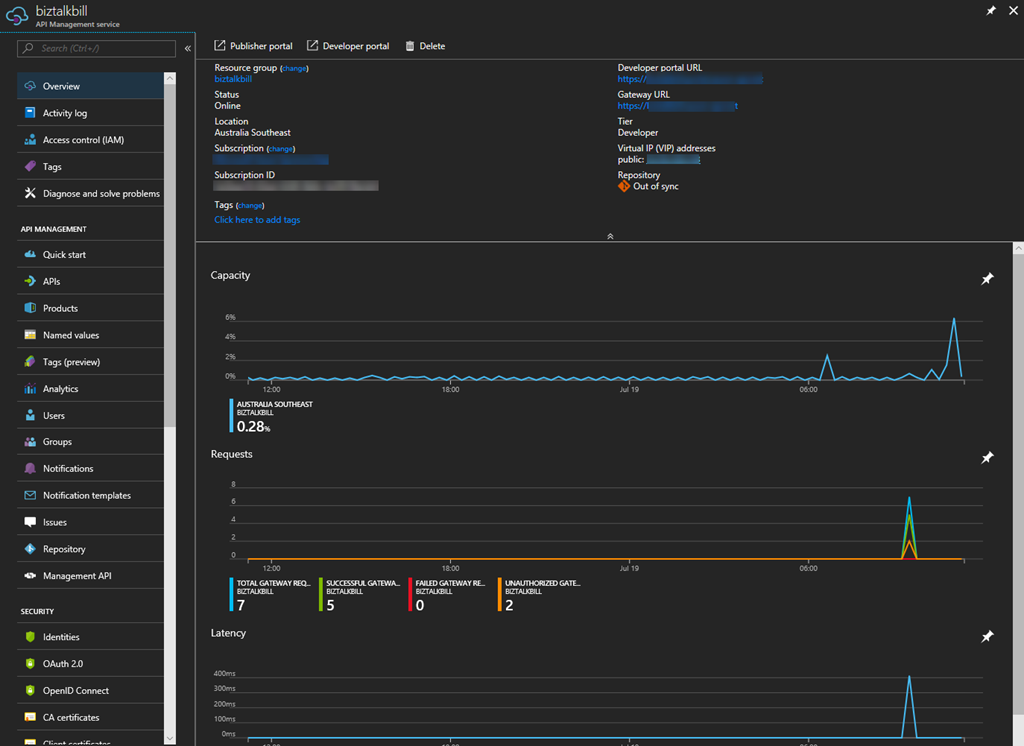
Originally when Microsoft purchased APIM, there was a Publisher Portal where all the management of your APIs was done. In the last year or so Microsoft have migrated all of this functionality to the Azure Portal, offering the added benefit of RBAC (Resource Based Access Control). As I am talking about the Azure Portal, almost all of the portal functionality is available via the management APIs. The Azure portal allows the definition or import of the API schemas, the packaging of the APIs into products, configuration of policies, and the management of users and analytics. They have also recently added the ability to test APIs directly from the Azure portal.
Developer Portal
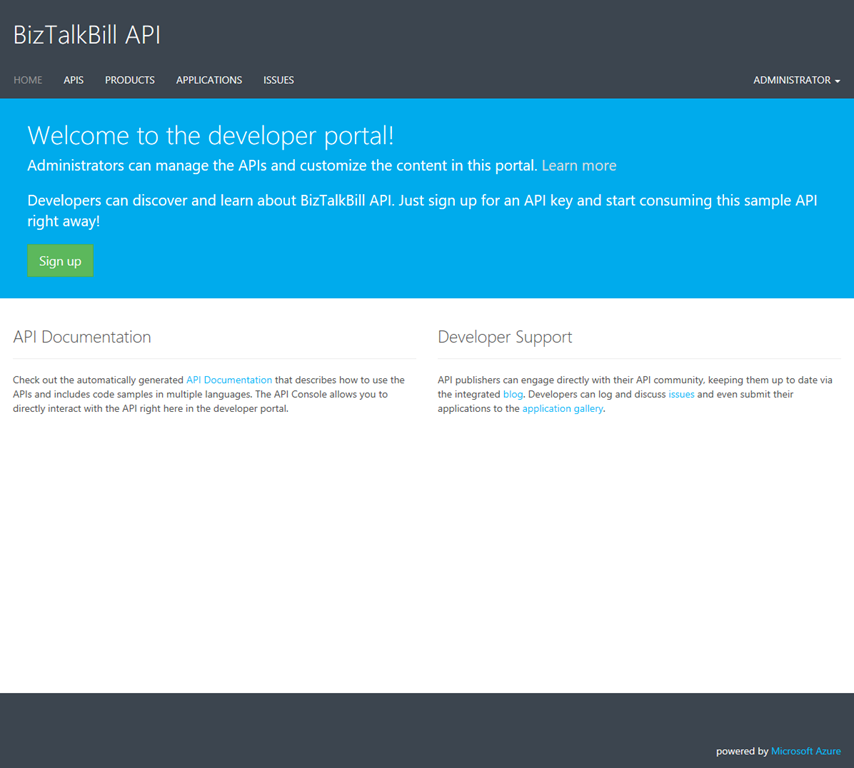
This is the main entry point for developers that want to use your API. The developers register themselves on the developer portal, you can decide if you want to approve their registration and what method you want them to use to register: Username & Password, Azure Active Directory, Azure Active Directory B2C, Facebook, Google, Microsoft Account or Twitter. The developer portal allows the user to discover your Product (which is made up of your APIs), manage their subscriptions to your Products, test the APIs, get sample code to call the API in different languages (Curl, #, Java, JavaScript, ObjC, PHP, Python and Ruby) and view the analytics of their own usage.
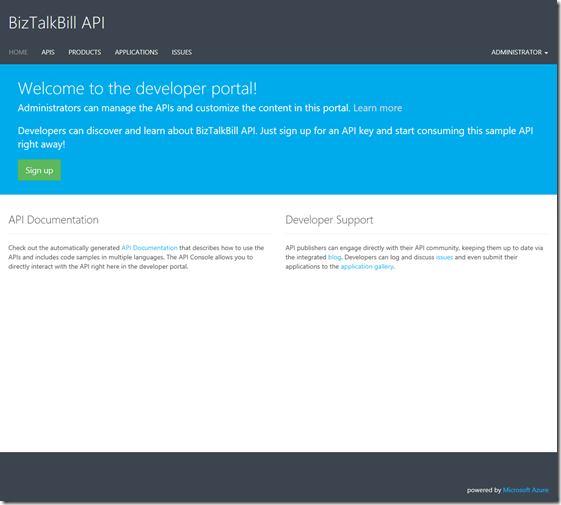
To really start talking about the answer to the question “why should you use APIM”, we need to start looking at the features of APIM. Not every company has the same requirements for publishing APIs, so there are features of APIM that your company may or may not use.
When you start looking at feature, one of the things you need to look at is are your APIs going to be Public or Private. If you need them available to external parties including partners & customers, they will need to be public. If they are indented for internal developer use only, they can be private. I would actually argue that they should all be public It is amazing the number of times I have seen companies build APIs for internal use only to then have to figure out how to make them public after the fact. Public does not mean available to everyone, public typically means available to partners or customers.
The feature that I will look at in some depth are: Security, Policies, Importing APIs, Analytics/Logging and Versioning/Revisions
Security
Now that we have decided to publish our APIs, how are we going to protect them? There are several security layers and ways to protect your APIs. The first is Azure API Management subscriptions, by default in APIM each set of APIs are part of a Product and users of a Product get a subscription to that Product, The subscription has a primary and secondary key and one of these needs to be passed in the header of the request to the APIM. This protects your API from being called by anyone without a subscription key. Request without a key are stopped at the APIM gateway, never reaching your API backend. The 2nd layer that you can choose is OAuth 2.0 or OpenID Connect, of which there are many providers. When you configure your APIs to use either OAuth 2.o or OpenID Connect, the caller would need to supply a valid authorization token in the request header. The final layer of security is between APIM and your APIs and there are several options for this, you can pass the OAuth 2.0 or OpenID Connect token through, you can using Client Certificates, you can user Basic Authentication and finally you can use the static IP address of your APIM instance.
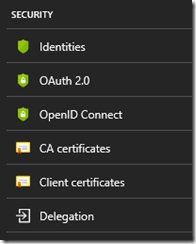
Policies
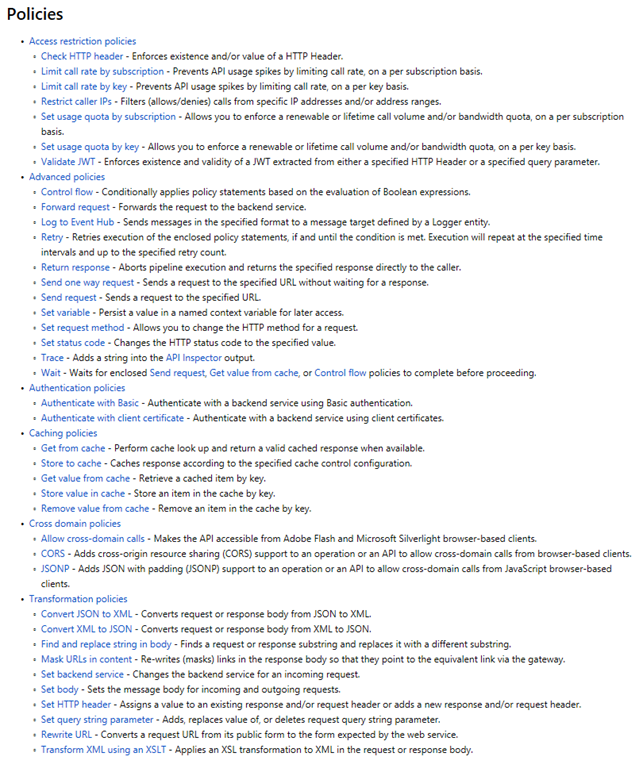
One of the biggest reasons I point out to clients thinking about APIM is the power of the polices. There is so much you can do with APIM policies, they can be implement at the Product level, so they apply to all APIs that are part of the Product (Note: APIs can be in multi Product). They can be implemented at API level so they apply to all operation in the API, or they can be implemented for a single operation. There are 6 categories of polices:
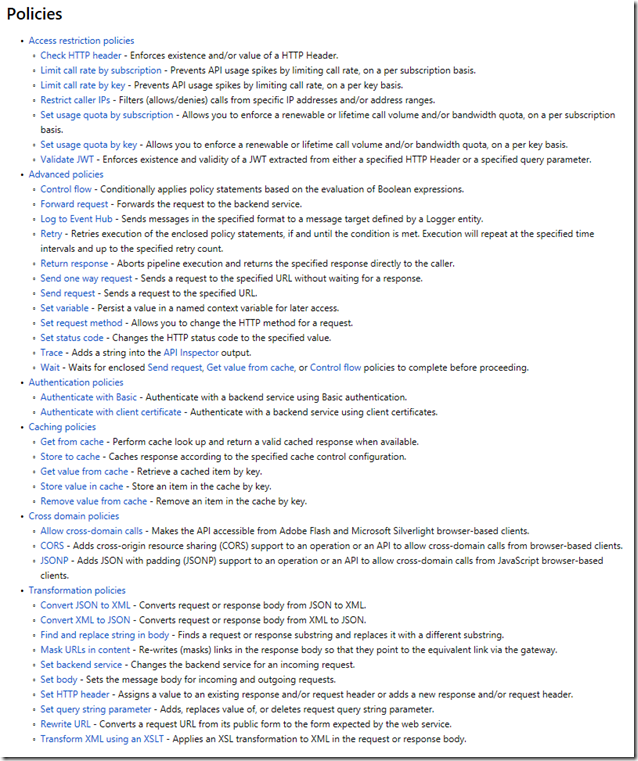
I would like to call out a few of my favourites:
- Validate JWT – Enforces existence of validity of a JWT
- Control flow – Conditionally applies policy statements based on the evaluation of Boolean expressions
- Log to Event Hub – Send message in the specified format to a message target defined by the Logger entity
- The whole set of Caching polices – being able to add caching to your APIs without touching the code
- Convert JSON to XML and Convert XML to JSON
- Set body (specifically using a Liquid template) – used primarily for the REST to SOAP, but not limited to that
That is a small number of the available polices, but do give you a good idea of the power of polices in APIM
Importing APIs
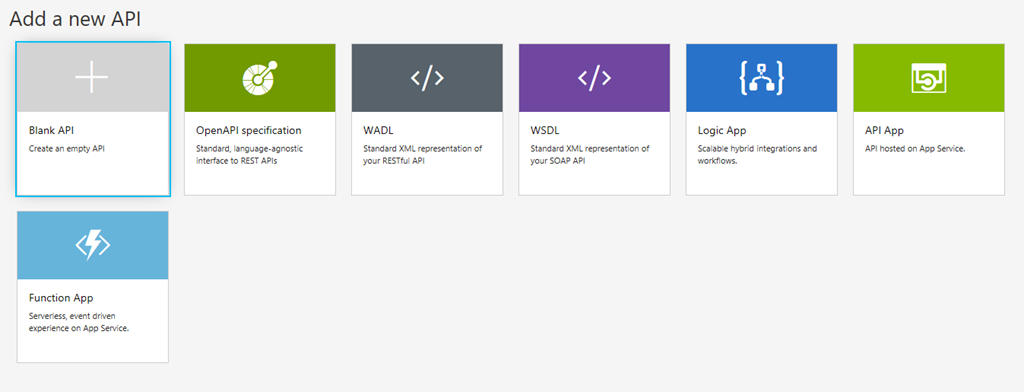
This feature makes it easy to get started with APIM, it is how you get your APIs into APIM. Microsoft have just implemented a couple of standards here but they have made it quick and easy by giving you lots of options. These are the available options:
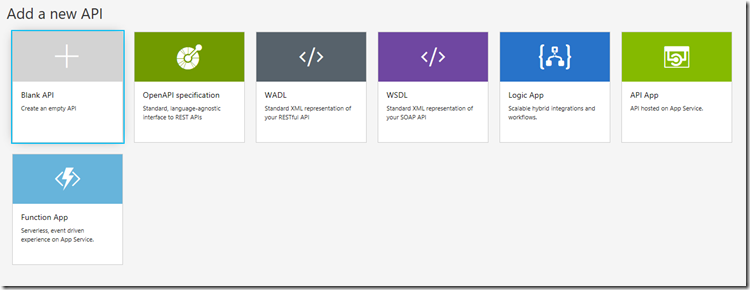
Analytics/Logging
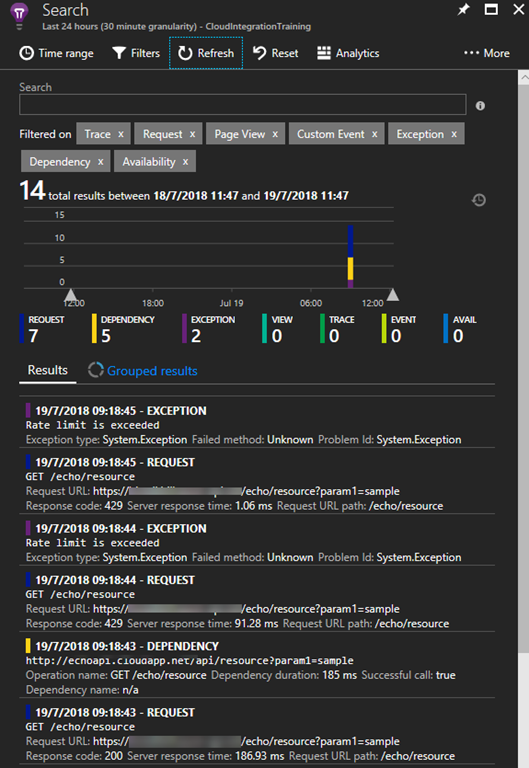
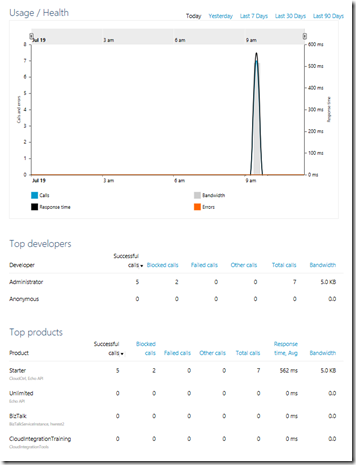
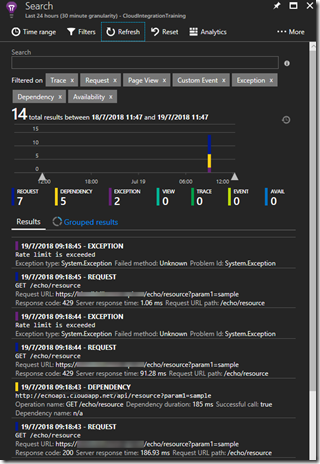
Analytics and Logging are 2 distinct types of data that needs to be collected from your APIs. I have typically seen very good logging in API code, but rarely good Analytics. I know I have spent my fair share of time in IIS logs trying to figure out some usage analytics. Analytics gives you access to usage, health and activity data around your APIs. This can be viewed in the APIM Publisher Portal (still to be migrated to the Azure Portal) or in Azure Portal under Azure Monitor. If you need to log data in APIM before or after your API call, you can use the Log to Event Hub policy to capture that information, very helpful in the SOAP to REST scenarios. The final piece is a bit of a mixture, Microsoft have recently enabled the ability to connect Application Insights to APIM. Application Insights provides insights into the request, exceptions and dependencies.
Versioning/Revisions
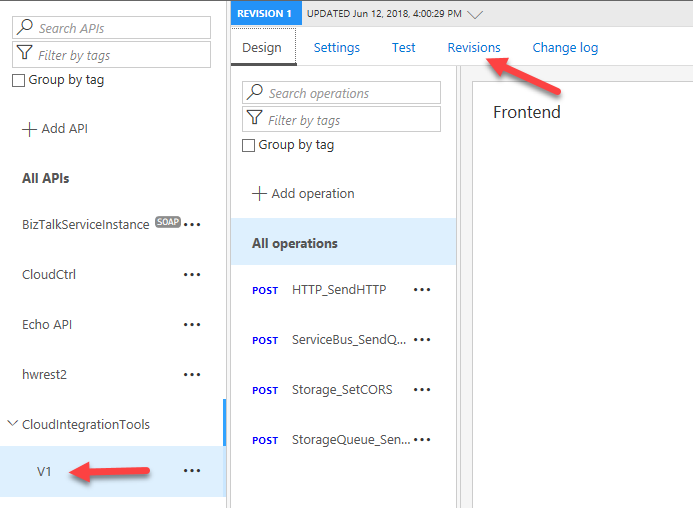
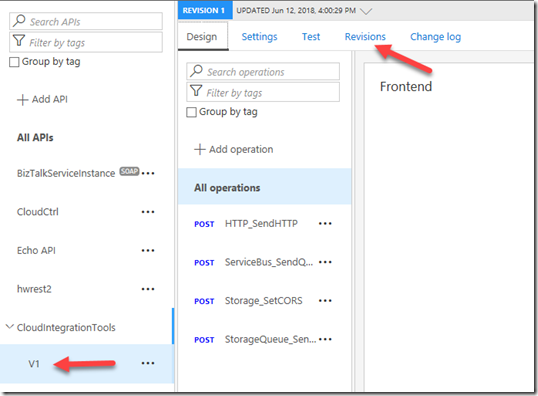
These are 2 very helpful features of APIM, Many of us start our our API journey without thinking about how we are going to manage change. If we were to go back to the early days of COM programing the rule was never change the interface, you can change the code but never the interface. In the real world interfaces need to change, so how we manage that change is the important. With APIM, if we originally published our APIs without versioning this feature will allow you to maintain the original without a version but then add a new versioned copy of the same API. With versioning there may also be a need to maintain several version of the same API because of different usage scenarios, APIM will allow each version to point to a different backend set of APIs, or you can use policies to update earlier version to conform to the new backend. APIM supports the version in either the path, header or query string. Revisions are useful when you change the code behind your API but not the interface. Revisions allow you deploy and test the new revision without making it the active revision of your API.
There are a few other things that may help to make your decision to publish your APIs in APIM:
- APIM instances have a static IP address
- All APIM instances above developer are highly available
- APIM Developer and Premium can be connected to a Virtual Network for VPN connectivity
- APIM Premium can have instances in multiple Azure Regions and includes an internal Traffic Manager and shared configuration
- APIM standard instance can be placed behind Traffic Manager, but configuration is not shared
I hope the information provide in this blog post can help you decide if APIM is the right solution for publishing your APIs.
Cross Posted to http://www.sixpivot.com.au

by Sandro Pereira | Jul 19, 2018 | BizTalk Community Blogs via Syndication
After many requests and many postponements, due to my unavailability and free time to take these tasks, BizTalk Scheduled Task Adapter is finally officially available and optimized for BizTalk Server 2016 on GitHub!
This became more critical because Codeplex closed and community members were not finding mainly the installation files so I was getting a lot of emails requesting them. Note that despite Codeplex is closed you can still download the source code from the archive.
At the moment is only available the installation files of BizTalk Scheduled Task Adapter v6.0 for BizTalk Server 2016 and the following reported issue was solved:
- In some scenarios, in the first trigger event, multiple messages were sent at the same time – Solved
You can download this “new” version of the adapter in BizTalk Scheduled Task Adapter from GitHub:
The BizTalk Scheduled Task Adapter is an in-process receive adapter that executes a prescribed task on a daily, weekly or monthly schedule. The adapter is configured entirely within BizTalk, all configurations are stored within the SSODB and can be exported and imported via binding files.
Soon I will add the source code for BizTalk Server 2016 and the same for previous versions: BizTalk Server 2013 R2, BizTalk Server 2013, BizTalk Server 2010, and so on.
Question?
Should I do a BizTalk Scheduled Task Adapter commercial version that will guarantee full support to this adapter (reported bugs and/or issues quietly fixed) and new features?
 BizTalk Scheduled Task Adapter for BizTalk Server 2016 available on GitHub
Microsoft | GitHub
Author: Sandro Pereira
Sandro Pereira lives in Portugal and works as a consultant at DevScope. In the past years, he has been working on implementing Integration scenarios both on-premises and cloud for various clients, each with different scenarios from a technical point of view, size, and criticality, using Microsoft Azure, Microsoft BizTalk Server and different technologies like AS2, EDI, RosettaNet, SAP, TIBCO etc. He is a regular blogger, international speaker, and technical reviewer of several BizTalk books all focused on Integration. He is also the author of the book “BizTalk Mapping Patterns & Best Practices”. He has been awarded MVP since 2011 for his contributions to the integration community. View all posts by Sandro Pereira

by Sandro Pereira | Jul 19, 2018 | BizTalk Community Blogs via Syndication
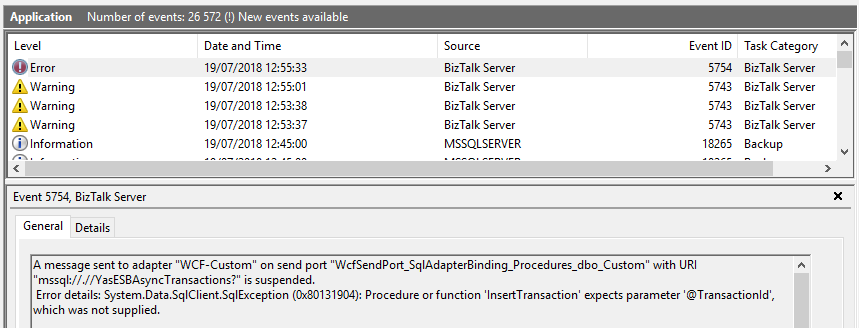
Today while trying to test a solution where it was supposed to invoke a SQL Server Stored Procedure with optional parameters thru the BizTalk Server WCF-SQL adapter I got this following error: Procedure or function expects parameter which was not supplied.
A message sent to adapter “WCF-Custom” on send port “WcfSendPort_SqlAdapterBinding_Procedures_dbo_Custom” with URI “mssql://.// AsyncTransactions?” is suspended.
Error details: System.Data.SqlClient.SqlException (0x80131904): Procedure or function ‘InsertTransaction’ expects parameter ‘@TransactionId’, which was not supplied.
Server stack trace:
at System.Runtime.AsyncResult.End[TAsyncResult](IAsyncResult result)
at System.ServiceModel.Channels.ServiceChannel.SendAsyncResult.End(SendAsyncResult result)
at System.ServiceModel.Channels.ServiceChannel.EndCall(String action, Object[] outs, IAsyncResult result)
at System.ServiceModel.Channels.ServiceChannel.EndRequest(IAsyncResult result)
Exception rethrown at [0]:
at System.Runtime.Remoting.Proxies.RealProxy.HandleReturnMessage(IMessage reqMsg, IMessage retMsg)
at System.Runtime.Remoting.Proxies.RealProxy.PrivateInvoke(MessageData& msgData, Int32 type)
at System.ServiceModel.Channels.IRequestChannel.EndRequest(IAsyncResult result)
at Microsoft.BizTalk.Adapter.Wcf.Runtime.WcfClient`2.RequestCallback(IAsyncResult result)
ClientConnectionId:2731f081-b009-4ba5-a420-95efe7307e71
Error Number:201,State:4,Class:16
MessageId: {746C3B89-A7ED-4C12-8548-0FE174ACA2CB}
InstanceID: {FF06027F-BB96-498B-9515-1E2D55FEAC5A}
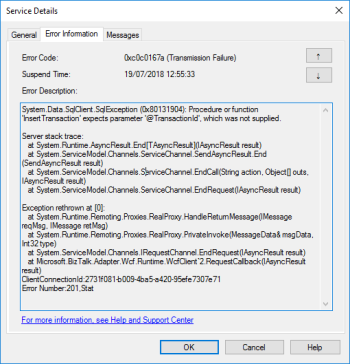
Followed by other similar warning messages:
The adapter failed to transmit message going to send port “WcfSendPort_SqlAdapterBinding_Procedures_dbo_Custom” with URL “mssql://.// AsyncTransactions?”. It will be retransmitted after the retry interval specified for this Send Port. Details:”System.Data.SqlClient.SqlException (0x80131904): Procedure or function ‘InsertTransaction’ expects parameter ‘@TransactionId’, which was not supplied.
The adapter failed to transmit message going to send port “WcfSendPort_SqlAdapterBinding_Procedures_dbo_Custom” with URL “mssql://.// AsyncTransactions?”. It will be retransmitted after the retry interval specified for this Send Port. Details:”Microsoft.ServiceModel.Channels.Common.XmlReaderParsingException: The start element with name “Request” and namespace “http://BizTalkTesting.SQLBulkOperations” was unexpected. Please ensure that your input XML conforms to the schema for the operation.
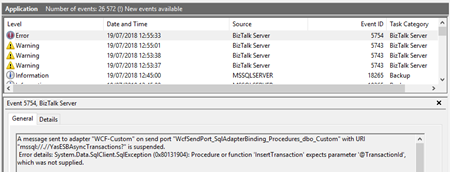
Cause
The cause of this problem is, once again, quite obvious and the error message present clearly identifies the origin of the problem. The stored procedure is expecting a certain field or several fields that are not being passed maybe because they are marked on the schema as optional fields.
Solution
Of course, the simple problem is to pass all the parameter presented and required by the stored procedure. You should pass them:
- as NULL, if they are nillable;
- or as empty strings;
Having said that, my problem was not that quite simple because the parameter described in the error above needs to be optional. After I analyze the stored procedure contract I realized that all of them are set as mandatory fields that need to be passed:
ALTER PROCEDURE [dbo].[InsertTransaction]
    -- Add the parameters for the stored procedure here
    @SourceSystem  VARCHAR(50),
    @DestinationSystem VARCHAR(50),
    @TransactionId uniqueidentifier,
    @MessageId uniqueidentifier,
    @DocumentType VARCHAR(50),
    @DocumentId VARCHAR(100),
    @BodyMessage ntext,
    @BodyType VARCHAR(5),
    @Priority int
AS
BEGIN
...
When I say that all of them are mandatory, of course, I can set it as NULL but in terms of BizTalk Server, I need to send all the fields in the XML message.
To make it actually optional, we need to change the contract of the schema to something like this:
ALTER PROCEDURE [dbo].[InsertTransaction]
    -- Add the parameters for the stored procedure here
    @SourceSystem  VARCHAR(50),
    @DestinationSystem VARCHAR(50),
    @TransactionId uniqueidentifier  = null,
    @MessageId uniqueidentifier  = null,
    @DocumentType VARCHAR(50),
    @DocumentId VARCHAR(100),
    @BodyMessage ntext,
    @BodyType VARCHAR(5),
    @Priority int
AS
BEGIN BEGIN
...
Once we modify the stored procedure to have default NULL values the problem will be solved. Now we don’t need to send these fields as NULL or blank, now we actually can omit them from the message – optional fields!
Author: Sandro Pereira
Sandro Pereira lives in Portugal and works as a consultant at DevScope. In the past years, he has been working on implementing Integration scenarios both on-premises and cloud for various clients, each with different scenarios from a technical point of view, size, and criticality, using Microsoft Azure, Microsoft BizTalk Server and different technologies like AS2, EDI, RosettaNet, SAP, TIBCO etc. He is a regular blogger, international speaker, and technical reviewer of several BizTalk books all focused on Integration. He is also the author of the book “BizTalk Mapping Patterns & Best Practices”. He has been awarded MVP since 2011 for his contributions to the integration community. View all posts by Sandro Pereira

by Sowmiya Subramanian | Jul 19, 2018 | BizTalk Community Blogs via Syndication
Do you have a BizTalk environment which handles huge volume of transactions? With the BizTalk admin console, It is nearly impossible to go through those data. In the past, BizTalk360 solved this problem by allowing to filter various data based on parameters associated with the data. But for some cases, even if you filtered the data, you might end up having lot of rows in the grid which may not be user friendly. It seems to be slow, while visualizing large set of data in a single grid.
While searching the result with large dataset, the browser seems to jump around while scrolling, providing a not smooth and unnatural experience. This has led that, from a user experience standpoint, scrolling is no longer considered as functional.
Apart from that, even the most modern browsers will eat up lot of memory when rendering all those data in the UI. To overcome this, it’s absolutely necessary to split the results of a query into subsequence’s to achieve constant response times.
At the splitting process, it is very important to keep paging transitions fluently. That means, rows can’t appear twice or miss completely in the result. For this purpose, the so-called Pagination comes into play in BizTalk360.
What pagination really does?
Pagination is an excellent way to navigate through large amounts of content. E.g., when we search for something that returns many records, which cannot be displayed on a single web page, those records are split into number of pages that can be accessed through links via the Pagination mechanism. It enables the user to navigate to the next page one after the other and even jump forward to several pages. Pagination allows you to make large amounts of content easy to find and breaks up several entries or web content into multiple pages, allowing you to toggle through content with ease.
What is improved due to pagination in BizTalk360?
In this version of BizTalk360, we have optimized the grids by providing you the power of pagination. We have implemented pagination for each grid available in the BizTalk360. It is an easy and standard practice, that prevents you from having to load the entire result set all at once.

The grid supports both preloaded and dynamically loaded data. By using pagination, the rows in the grid gets dynamically separated into pages. The grid will automatically display 25 rows in each page, by default. The user can increase the maximum number of result rows by selecting the Max Match size in the drop down.
Basic navigation
Pagination can further be customized for different circumstances, like when a user approaches to an end or the beginning, or indicating the current page number to the user. Pagination dynamically separates the rows on each page, as shown below. By listing out the page number, users are allowed to skip ahead, one page at time.
The page numbers which are shown in grey are disabled (or inactive) and the other page numbers are shown in blue, since they are enabled (or active). The user can use the previous and next page buttons, as these can be considered a more intuitive interface for showing the previous/next records.
Sometimes you may simply require Last page and First page links, which provide simple and quick navigation to the beginning and the end of the result set, to the user. These are implemented, as shown below, to further improve the usability.
The First, Previous, Next and Last page links are appended at the bottom of each grid.
Customizing row count in System Settings
By default, the grid will automatically display 25 rows per page, the user can customize the row display by adding the desired row count in Setting->System Settings->Max Matches.
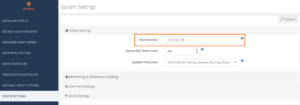
The added Max Matches are displayed in a dropdown at the bottom of each grid. According to the selection of the dropdown, the row count will be changed dynamically on the resulting grid.
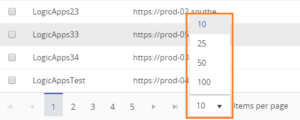
Through this, we can reduce the load time on each execution. For instance, it is used by executing the result, where the user can customize grid for displaying a limited number of results on each search, or showing a limited number of rows per page. This way, the overall performance to display the result, will highly be improved.
Row count display
The total grid row count of the current page compared to the overall row count will be displayed at the bottom end of the grid.
At BizTalk360, we believe that a beautiful grid and listing data interactively to user, will make our product stand out and keep customers engaged. Keeping our customer feedback and understanding the consequence of users on execution, the amount of load time increases proportionally to the growth of data. To overcome this issue, we have provided a better solution for our customers, by implementing this type of content grids, which will highly optimize the performance and reduce the customer effort to visualize the result. A major advantage of this approach, is that now an execution can be used to happen in the lower time limit.