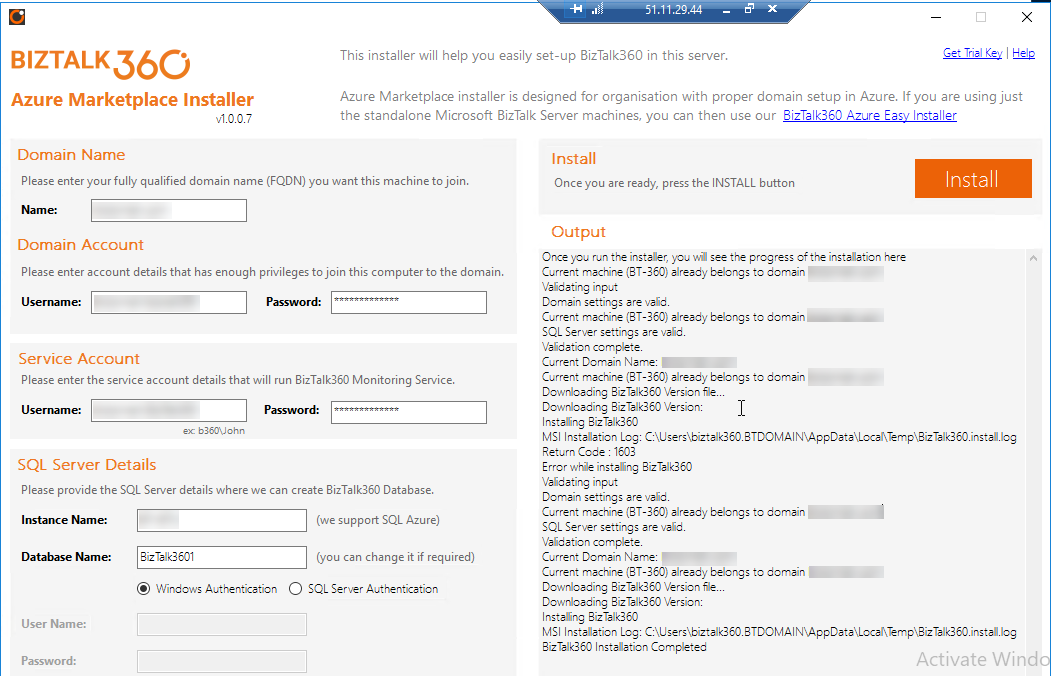
Working in Kovai.co provides a lot of opportunities to learn and explore new things. I’m sure within Kovai.co your job role doesn’t decide your day to day work routine. Click here to know more about the work culture. Recently we had an opportunity to work in Microsoft Azure Marketplace and interestingly we came across a new case related to IIS configuration.
In this blog, I’m going to share my experience in creating a Marketplace installer for BizTalk360 and how we solved the challenge.
Different ways to install BizTalk360
There are various deployment choices for BizTalk360. To fulfill all the customer needs, there are several ways to install BizTalk360 and we provide different types of installer options:
Before going to the problem, I would like to provide a brief insight into Microsoft Azure Marketplace and how to create an Azure Marketplace installer, since the problem appeared while creating Marketplace.
Microsoft Azure Marketplace
The Microsoft Azure Marketplace is an online store that offers applications and services either built on or designed to integrate with Microsoft’s public cloud computing platform.
The products and services offered through the Microsoft Azure Marketplace come from either Microsoft or its technology partners.
Before they become available for purchase on the Marketplace, all services and products are certified through the Microsoft Azure Certified program to ensure compatibility with the Azure public cloud.
BizTalk360 in Azure Marketplace
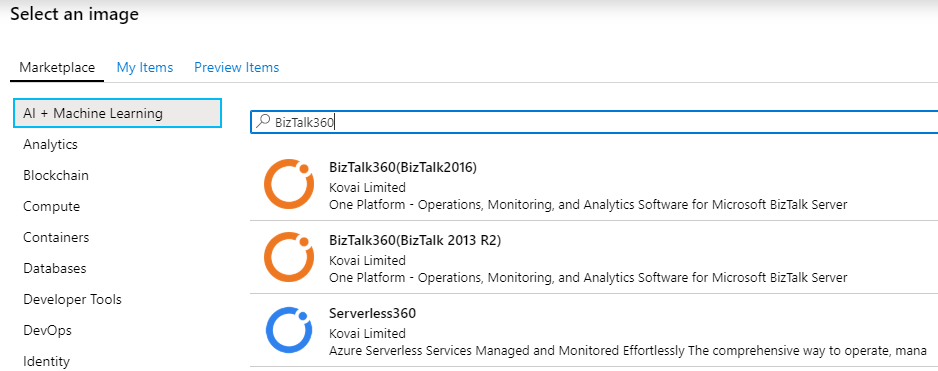
BizTalk360 on Azure Marketplace is suitable for customers having a full-blown setup in the cloud, such as a domain setup, Active Directory and one or more BizTalk environments running within the network. In this scenario, customers can download BizTalk360 from the Marketplace. BizTalk360 will run independently in its own virtual machine environment and will connect to all the available BizTalk environments available in the same network.
So, our task is to make BizTalk360 support the BizTalk Server 2016 installations on Microsoft Azure. For this, we must provision a complete virtual machine for the BizTalk server 2016 along with the pre-requisites to install BizTalk360. To know more about the BizTalk360 Azure marketplace installer please check here.
Create a user VM Image
Since it’s a vast process, here we would like to give a general step that required to create a managed or an unmanaged image from a generalized VHD.
Sign in to the Cloud Partner Portal and create a VM offer
Offer Settings – Define the offer within Azure Marketplace
SKU’s – Solutions can be differentiated by SKU based on their features sets, the VM image type, throughput/scalability, billing model, or other specific features
For in-depth Azure marketplace documentation please refer to the article here.
Real Problem
Once after uploading the VM image into the Marketplace, before getting into public, the images will be available in preview items (inclusively for testing) for the configured subscriptions.
During the testing, we have tried installing BizTalk360 to verify the BizTalk360 is installing automatically without any issues. Without any problem, the BizTalk360 installed its services and created a database. But it failed to create the website. In the installation log, we have found error lines (some may face different error code) to the following:
WriteIIS7ConfigChanges: Error 0x80070002: Site not found for create application.
WriteIIS7ConfigChanges: Error 0x80070002: Failed to configure IIS application.
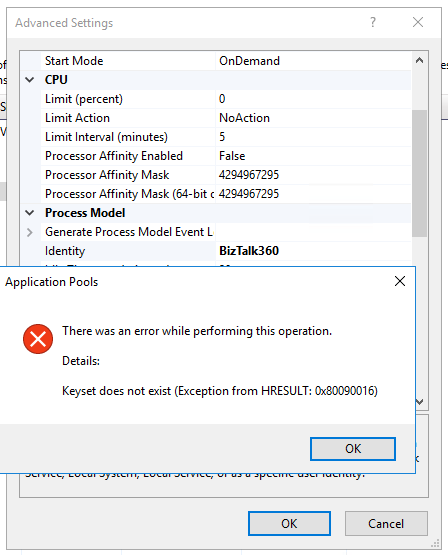
We are able to understand that the problem is not due to the creation of the Website but during the changes in it. To drill down the problem, we tried to create a web pool manually and changed its identity. During the change, we faced an exception below.
You may face this specific issue when you are running IIS 7+ and versions. When we try to change the application pool identity of an application pool to a domain account, we get the above error while committing the changes.
The error code might change according to your machine operating system and IIS version, but you will get the text as keyset does not exist while trying to update the application pool identity with a custom account or while trying to specify a connect as a user. You might also get the below error codes:
0x80090005
0x8009000D
Cause of the problem
Possibility 1
This issue happens when your IIS specific machine keys are corrupted or missing. Your machine keys might go corrupt if there was an improper shutdown of the machine or the machine was cloned from an existing image or if there was a system crash.
We have referred some blogs and articles for this issue, and they suggested to replace the machine keys. What if you don’t have a backup (Its always a good idea to have a backup of the machine keys)? Unfortunately, we have no idea about the corrupted machine keys.
Okay! Let’s see the different machine keys required in IIS for encryption.
The location of the key depends on the operating system (from Windows server 2012 onward) is basically C:ProgramDataMicrosoftCryptoRSAMachineKeys
Possibility 2
The BizTalk360 service should be the LOCAL SERVICE account of the IIS Web Management Service (also known as WMSvc). This problem occurs because the SERVICE account does not have Read access on the iisWasKey key.
Possibility 3
Check if the metabase.xml is corrupted or if c2319c42033a5ca7f44e731bfd3fa2b5_GUID is corrupted. In IIS any sensitive data like passwords won’t be stored in plain text and will have to be encrypted before it is stored in the config file and get decrypted accordingly when needed.
Most suggest to rebuild or reinstall IIS. But what if reinstalling IIS is not an option?
How we solved the case
We can regenerate these machine keys without reinstalling IIS completely. To do that follow the below steps.
1. Rename the below files or move them to a different location from C:ProgramDataMicrosoftCryptoRSAMachineKeys. This time I don’t want to take the risk, so I just took existing machine keys as a backup.
6de9cb26d2b98c01ec4e9e8b34824aa2_GUID
iisConfigurationKey
d6d986f09a1ee04e24c949879fdb506c_GUID
NetFrameworkConfigurationKey
76944fb33636aeddb9590521c2e8815a_GUID
iisWasKey
2. Backup applicationhost.config, then delete everything inside the tags below in applicationhost.config. Delete the contents within <configProtectedData> or <providers>.
<configProtectedData>
<providers>
…
</providers>
</configProtectedData>
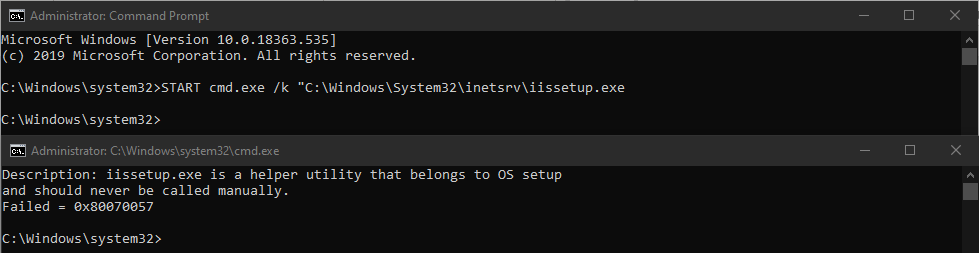
3. Open a command prompt in admin mode and run the below command
Now you will receive a message “the error Failed = 0x80070005”. Even though it shows a failure message, the above steps should regenerate the machine keys and the configprotecteddata section in applicationhost.config.
If the above suggestions don’t help, the most preferable option would be to reinstall IIS to fix the corruption (no other go).
Fix in the Marketplace
From my understanding, the machine keys might be corrupted due to an improper shutdown of the machine. Because we used the Sysprep command to generalize the VM.
sysprep.exe /oobe /generalize /shutdown /mode:vm
The above command helped the image to remove computer-specific information such as installed drivers and the computer security identifier (SID).
Once after running the sysprep.exe command, we faced the WriteIIS7ConfigChanges exception. So, to fix the issue, we used the below registry command to regenerate the machine keys during the machine provision/first-time launch.
After the bootup, at the initial launch (only one time) RegenerateIISKeys.bat file will be called by the RegenerateIISKeys.reg file to regenerate the machine keys. So, during the installation of BizTalk360, the installer will have the new machine keys and the installation will be successful.
Conclusion
Keeping the user perspective in mind, we have built various deployment choices for BizTalk360 customers which would ease the installation and provide a user-friendly experience. You are just one click away from provisioning a brand new BizTalk360 VM in Microsoft Azure.
I want to take this opportunity once again to thank everyone in and out of Kovai.co for this wonderful opportunity and believing in us. We are looking forward, for many more opportunities.
It’s time to upgrade your BizTalk360 installation! We are here with our next release of BizTalk360 V.9.0.3.
A brief summary of new features we introduced in V9.0.3
Database Size Monitoring
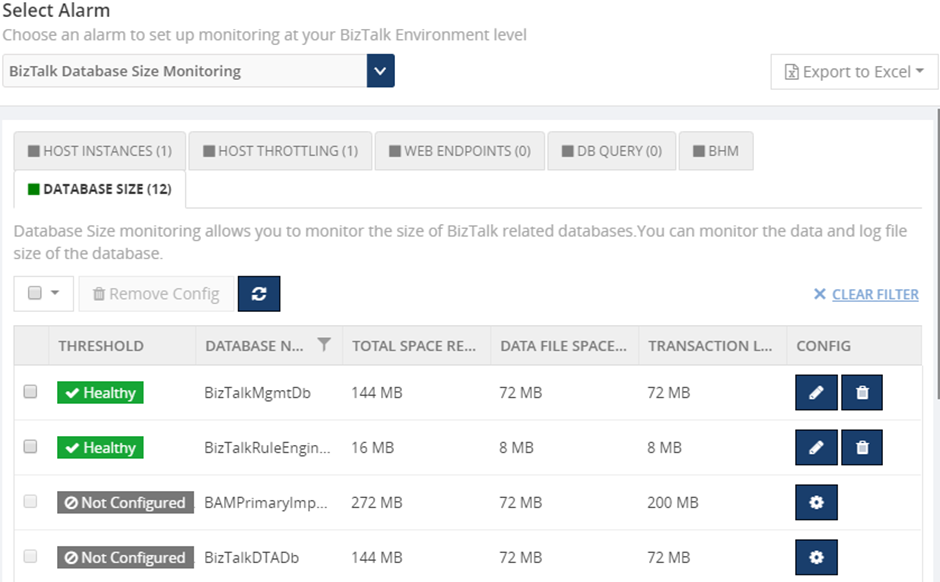
Database Size monitoring helps to monitor the Data and log file size of the BizTalk and BizTalk360 databases, by simply configuring the error and warning threshold values for the database and log file sizes.
Below are the BizTalk databases that can be monitor using BizTalk360:
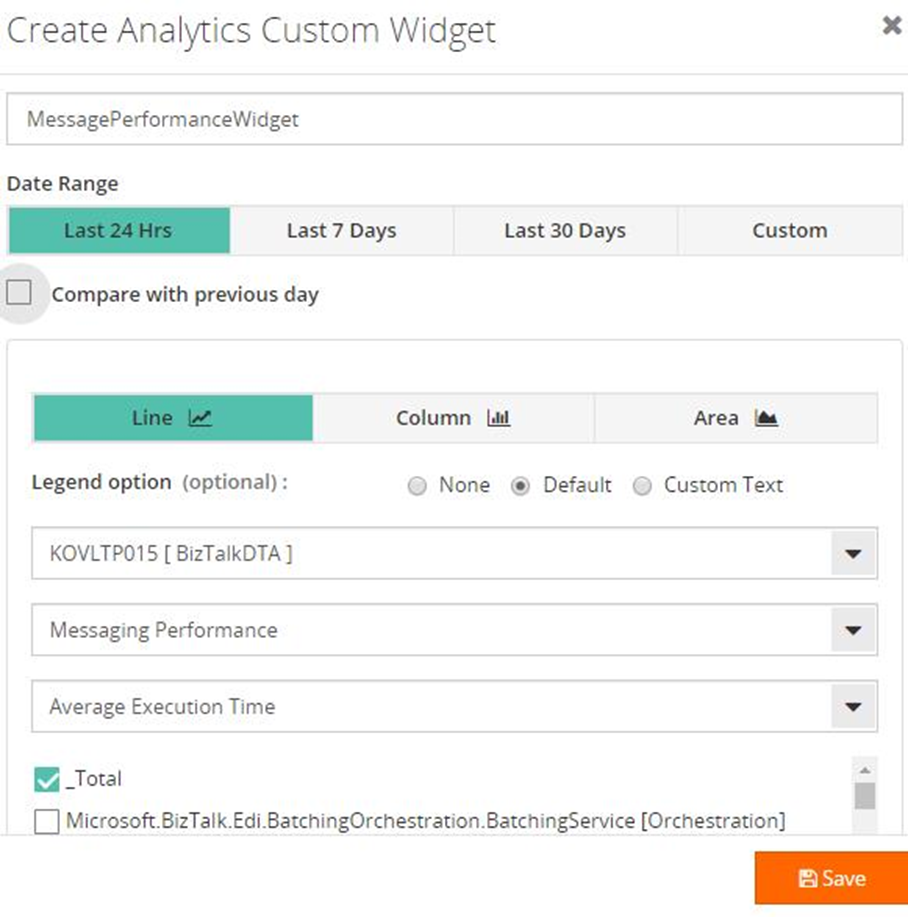
By using the BizTalk360 Reporting Custom widget, you can retrieve performance metrics of the BizTalk environment such as Messaging Performance, Message Transmission failure rate, Server performance, etc., as a report. Based on the configured schedule you can receive that report in your email box.
Configurable Polling interval for monitoring
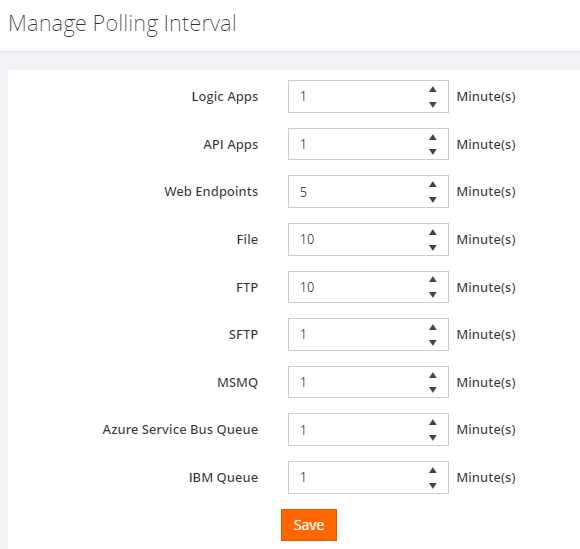
By default, the BizTalk360 monitoring service checks the status of all configured artifacts every 1 min. However, BizTalk360 provides an option for the user to configure the polling interval. Based on the configured polling interval, the monitoring service will determine the monitor status of the endpoints.
Migration Scenario – After migration, the default polling interval 1 min will be set to all the Endpoints. This can be modified as per your requirements.
SQL Server Cluster Monitoring
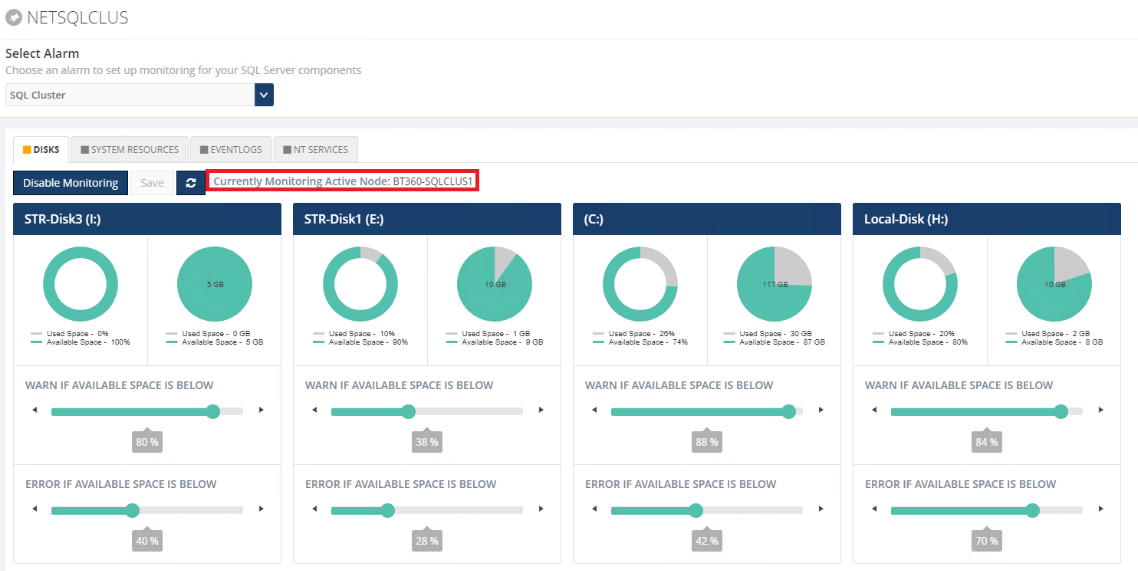
we extend our support to monitor the SQL Server cluster. Cluster SQL Server can be monitored by configuring the SQL Server Network name. BizTalk360 will start monitoring the currently active node. In case of a failover, BizTalk360 will automatically take the active server for monitoring.
The following resources can be monitored by configuring the SQL Server:
CPU & Memory
NT Services
Disks (available disk space)
Event Logs
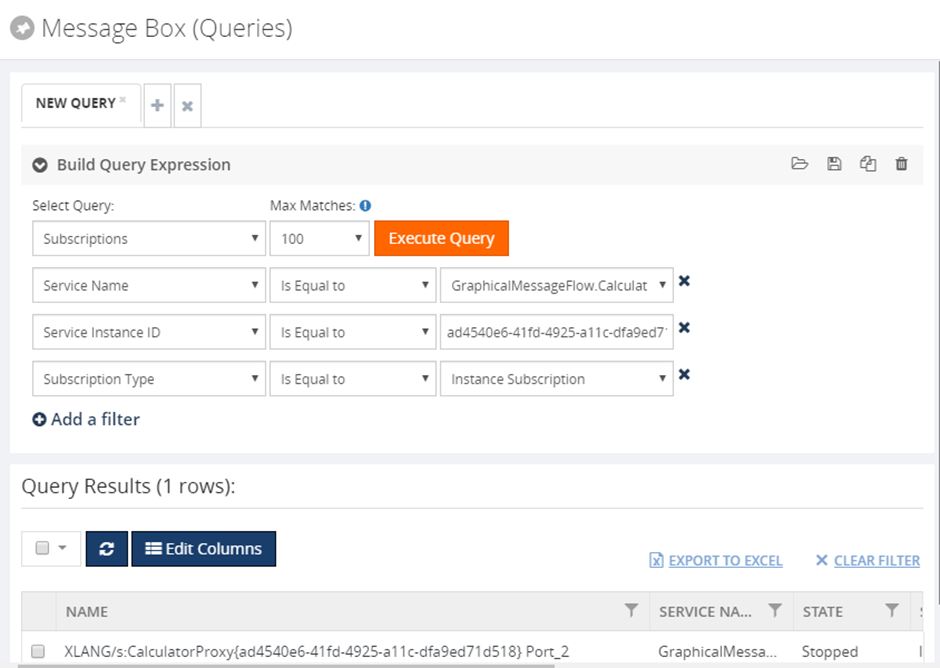
Subscriptions (Message Box)
In addition, to retrieve the service instance and message details, BizTalk360 allows users to execute queries to retrieve the details of the subscription from the message box database. The subscription details such as Name, Service Name, state, subscription type, service instance id will be retrieved on message box query execution.
Look at this blog article to see the benefits of the above features in detail.
Let’s jump into the feature improvements in detail
SQL Authentication Support
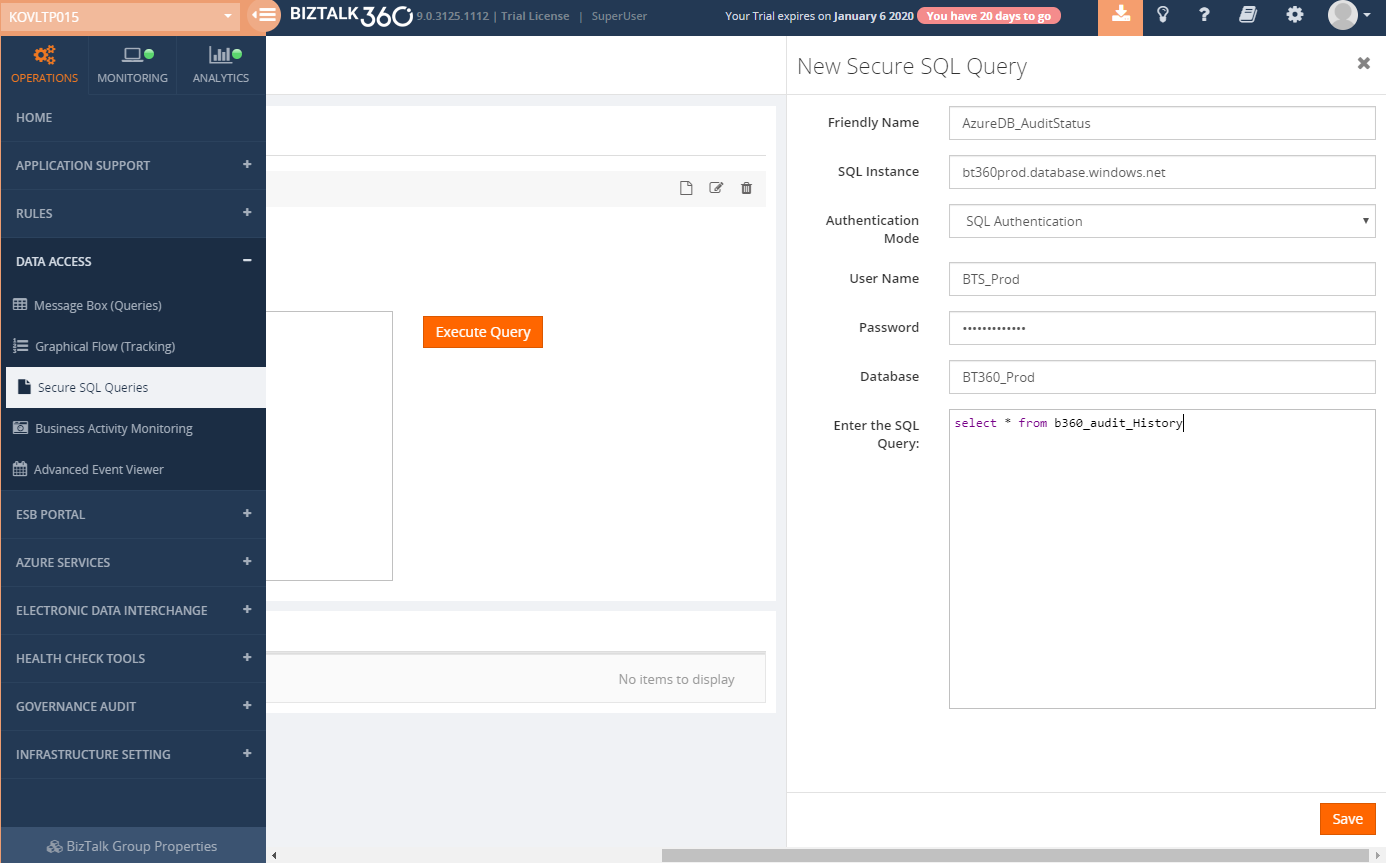
BizTalk360 allows users to view and monitor the SQL Query results by using Secure SQL Query and database query monitoring functionality. In Which BizTalk360 executes the Query by connecting to the server against windows system users (using windows authentication mode).
But shared server can have multiple users having access to different instances and Databases. So, to support this, we have improved these functionalities by supporting SQL Authentication mode, With this user can connect to the database with the relevant user credentials. From this version on, you can also query your Azure databases.
Dashboard Improvements
The dashboard is one of the key functionalities where customers would be using more often on a day-day basis. So, we have considered improving the dashboard frequently based on customer feedback.
BizTalk360 Monitoring Dashboard improvements
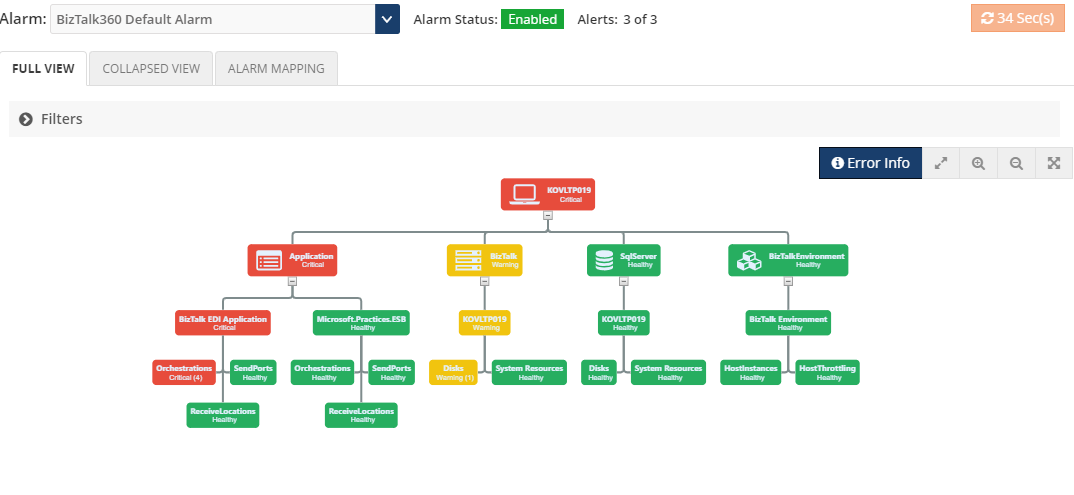
Indication of alarm status (Enabled/Disabled)
Number of Alerts Notified (2/3)
The artifacts from the collapsed view are now clickable to route to the respective mapping section
BizTalk Group Dashboard improvements
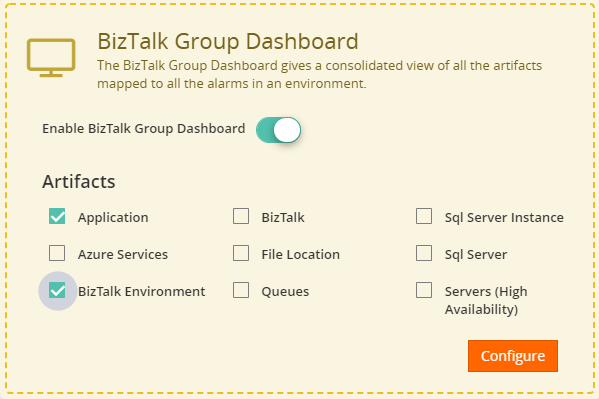
BizTalk group dashboard in BizTalk360 gives the consolidated view of all the artifacts mapped to all the alarms in an environment.
From this version on, we allow the user to configure the BizTalk group dashboard based on their needs. Users can choose the artifacts types (Application, Servers, Queues, Folder Monitoring, etc . ) that they want to look into the dashboard. So that BizTalk360 monitoring service will fetch the status of only the chosen artifacts type on every cycle, rather looking for all the artifacts. In this way, we have improved the performance of the monitoring service. Also, you can Enable or Disable the BizTalk Group dashboard at any point in time.
Migration Scenario – After migration, the BizTalk Group Dashboard will be in enable mode, with all the artifacts type chosen. After which you can reconfigure this as per your requirement.
Tracking (DTA) Performance Data Collection Optimisation
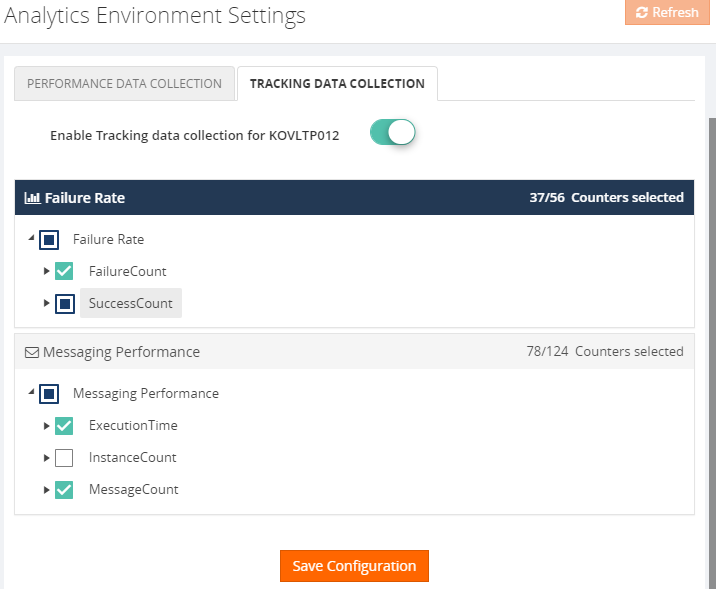
In the earlier version, Users can enable tracking data collection for various metrics type, say Failure/Success rate for Port, Schema, Messaging Performance for the port , schema, orchestration, etc, where BizTalk360 will start collecting data for all the metrics of the selected type. From this version on, to improve the performance, we allow users to choose the relevant DTA metrics, which will reduce the number of calls to the DTA database.
Users can choose the DTA metrics at the environment level in a well-ordered tree view diagram.
Migration Scenario –If you enabled Tracking (DTA) Performance Data Collection then after migration all DTA metrics under the selected type will be enabled. This can be modified as per your requirements.
Logic App
With the rise of Hybrid integration solutions, the job of BizTalk administrators has extended to the (Azure) cloud. BizTalk360 helps these administrators by providing operational and monitoring support for Logic Apps and API Apps, thereby admin need not check the Azure portal to know the health of these services, where they can easily operate and monitor from BizTalk360.
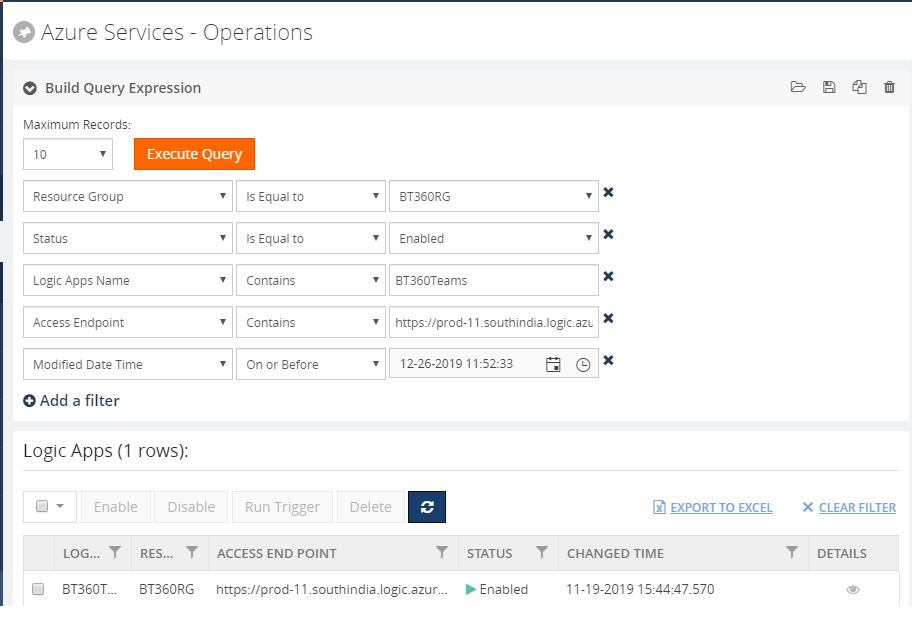
However, in the earlier version of BizTalk360, we allow all the users to manage all the LogicApps there is no access restriction. We have improved this in this release where admin can define which user can manage (enable, disable, delete, trigger) the Logic Apps based on the role.
In addition to this, we have introduced the filter option to filter the logic apps under different subscriptions.
Quick Alarm
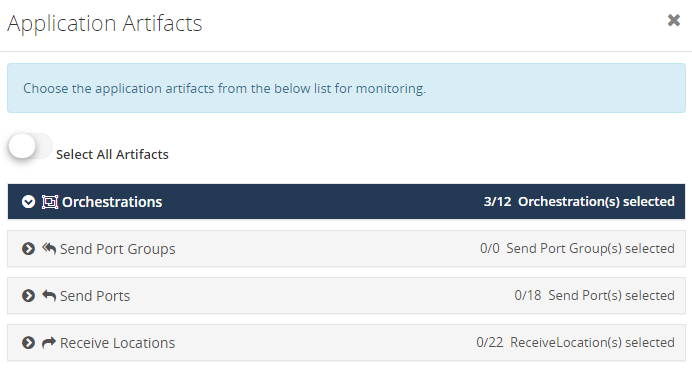
With the quick alarm, you can select the application artifacts that you want to monitor, BizTalk360 will automatically map that artifacts for monitoring.
Notification Channel
Now you can define the error type i.e. only error & warning or error/warning/healthy of the artifacts to get notified in the notification channels(slack, Service Now, Webhook).
Place Holder Encryption
Place holders can be used in the custom widgets. To tighten the security now all the placeholder values configured in custom widgets will get encrypted. For the existing placeholder, values will get encrypted automatically once you upgraded to the latest version.
Service Instance operations
From this version on, we allow the user to enter the reason in the comment section (optional) for all the service instance operations (Resume/Suspend/Terminate). The same will get audited for reference.
SFTP
All the file mask patterns supported in BizTalk server will now support in BizTalk360
Conclusion
Considering the feedback from our customers, BizTalk360 will continue to provide more useful features.
Why not give BizTalk360 a try! It takes only 10 minutes to install on your BizTalk environments and you can witness and check the security and productivity of your own BizTalk Environments.
Christmas is about spending time with family and friends. It’s about creating happy memories that will last a lifetime, and it is, without a doubt, my favorite holiday season.
And once again, my sincere wishes for a Merry Christmas and a Happy New Year to all my readers, friends, coworkers (amazing guys at DevScope), Microsoft BizTalk Community, all the Portuguese Communities, my MVP “family” and of course to my beautiful family.
Thanks in advance for all the support and encouragement given throughout another year. It was, once again, an incredible year for me, on both a personal and professional level, and hope that the next will be a year filled with new challenges, I promise that I will continue to share knowledge hoping that they can help someone.
May this festive season sparkle and shine, may all of your wishes and dreams come true, and may the new year be made of great happiness. Merry Christmas to you and your entire family and a happy new year!
And you thought there was no Santa Claus? I couldn’t
take this opportunity and this time of year to once again give back to the
community what they have also done for me: grow up together in several aspects.
The role of an adapter is to enable communications
between BizTalk Server and external systems and trading partners. Users
configure adapters by creating send ports and receive locations that define the
properties for given instances of the adapter. Most adapters support both send
and receive operations, whereas other adapters support communication in only
one direction.
The HTTP Adapter is one of the adapters that support
two-way communications, but unlike other adapters, this adapter has two
characteristics that define it:
The HTTP
“Receive” Adapter that is responsible for delivering messages to BizTalk is, in
fact, a DLL that runs inside Internet Information Services (IIS)
And for that
reason, it must be configured in IIS – it is not there out-of-the-box.
In this whitepaper, we will describe the step-by-step process of installing and configuring the HTTP Adapter in order to receive messages.
Some of you may think that the HTTP adapter is deprecated,
but that is not true. The only adapters that were deprecated were the old SAP
adapter (removed) and the SOAP and SQL adapter (that still are present in the
Administration Console). The HTTP adapter is a classic but is not deprecated
and is still very used today.
The idea for
this whitepaper was partly out of a real need and at a customer request.
Because it is a strange adapter with a peculiar configuration unlike any other
adapter in BizTalk Server, when I was giving a training course, the attendees
struggle to understand and put it working correctly. By coincidence, a week
later, I needed to put this adapter working at another client. As a result of that request and that client’s
need, I end up creating this step-by-step guide on how to install and configure
the HTTP adapter to receive messages through HTTP requests. I think this is a
good whitepaper about a classic adapter in BizTalk Server.
Recently my team and I developed and released several tools that extend the out-of-box capabilities of BizTalk Server 2016 for developer and administration teams to be more productive, saving times in some simple but time-consuming tasks that should d supposed to be. One of these tools was BizTalk Filter Finder Tool.
Because many clients still are using BizTalk Server 2013 R2, and because I had received some requests from the community, I will be releasing these tools for BizTalk Server 2013 R2 also. And today, we will stat with the BizTalk Filter Finder Tool.
BizTalk Filter Finder Tool
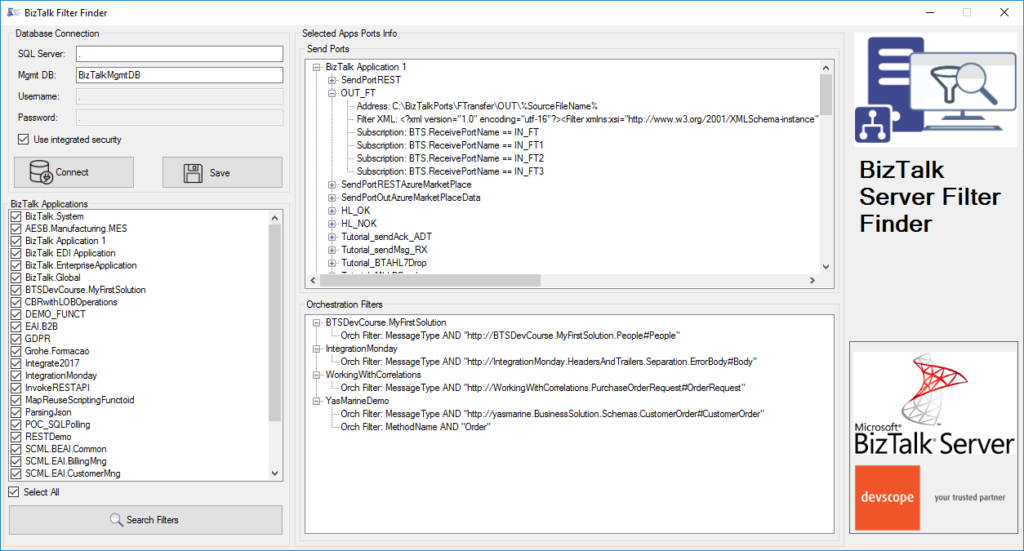
BizTalk Filter Finder Tool is a simple tool that aims to simplify the process for better understand and maintain solutions based on content-based routing. By allowing you to have a quick overview of all the artifacts, send ports or orchestrations that have filters associated.
This tool will extend default BizTalk Server capabilities transforming this tedious and sometimes complicate analyze a little simple, easy, and fast.
It way not be a fantastic tool; it may not be beautiful, but for me is a timesaver tool.
Credits also to my team member at DevScope, Pedro Almeida that collaborated with me in the development of this tool.
In this blog, we will take a detail look about the feature Secure SQL Queries which is available in BizTalk360 and we shall look how effectively it can be used in by the BizTalkies and what are all the things we can achieve by having this feature and how we made this feature so reliable for you.
Secure SQL Queries
Secure SQL Queries is a secure platform to store predefined queries and provide access to BizTalk members to execute the queries. BizTalk360, by default, comes pre-loaded with a set of queries and allows the users (with permissions) to build secure SQL queries that are more appropriate to the organization’s business.
Reliability of Secure SQL Queries
BizTalk Support members will typically have a bunch of standard SQL queries they run on a regular basis to get some reporting on BizTalk databases. Each individual team member will have their own set of SQL queries and they manage it on their local machines. Which will basically result in two things, useful reporting queries are not shared between team members and maintaining the queries in SQL files and accessing different files for the different environment is not productive.
BizTalk360 allows you to save the SQL queries so that the queries can be saved under a centralized area and available for access to all the BizTalk members.
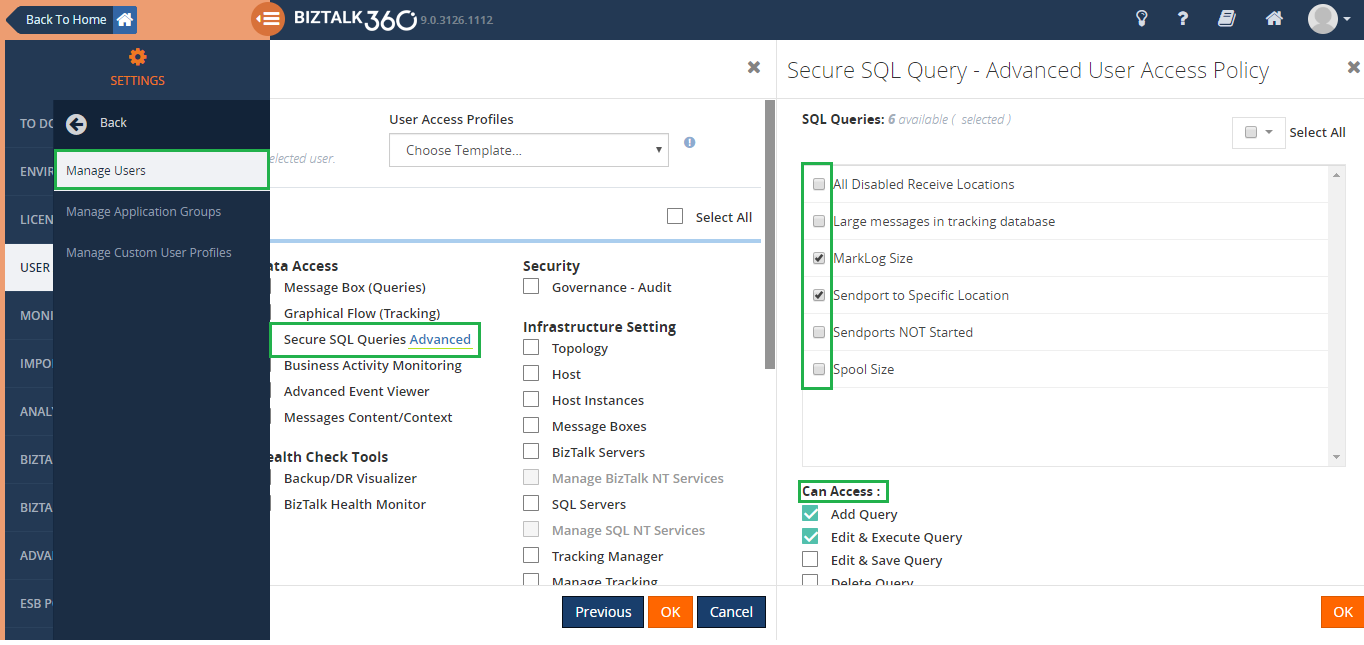
SQL queries are used for fetching the report from the BizTalk Database where admins are concerned to provide full access as it may have confidential information and interested to give privilege only for the authenticated BizTalk members. This can be handled by using the User Access Policy feature in BizTalk360 which allows to create a user and provide the permission for the saved Secure SQL Queries (only the enabled query will be listed for the users). Permission can be provided for the Secure SQL Queries as follows Add Query, Edit & Execute Query, Edit and Save query, Delete Query and Export Query.
At any point in time, there may be a chance of data loss or change may happen in the queries. To handle this sort of situation BizTalk360 provides you the feature Governance & Audit for Secure SQL Queries. If any operation like Create, Edit, Delete is performed against the Secure SQL Queries will be captured in the BizTalk360’s Governance & Audit section. So that we can find the details of the operation performed through the feature Governance & Audit for Secure SQL Queries.
Functionalities of Secure SQL Queries
In BizTalk360, you can query against the table’s data. Based on the customer’s requirement it allows you to store and execute the stored procedures.
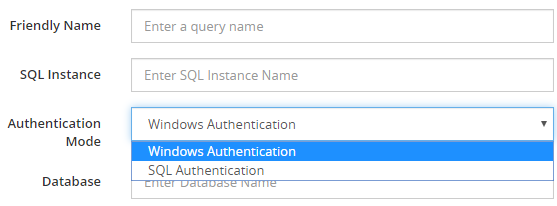
In real-time when more users are involved, or remote connections are being established with the SQL Server, SQL authentication can be used. In shared servers where different users should have access to different databases and when a client connects to an instance of SQL Server on another computer than the one on which the client is running, in that case, SQL Server authentication is needed. Such user can select the Authentication Mode as SQL Authentication so that the user name and password can be provided, and the query can be saved and executed
Using the SQL Authentication Mode, you can get connected to the Azure Database by providing the Azure Database’s instance name, username, password for saving the queries.
Let’s glimpse on Secure SQL Queries in BizTalk360
Secure SQL Queries is implemented in the Operation, Monitoring, and Analytics section. Since most of our customers use this feature widely.
Secure SQL Queries in Operation
BizTalk360 comes with a pre-loaded set of queries. The users can choose one of these pre-loaded queries from the drop-down list. When the item is selected from the drop-down, the query automatically executes, and the result is displayed in the Query Results pane. It allows users to define and add/edit/delete your own queries. In which you can execute the query to check for the results.
Secure SQL Queries in Monitoring
You can monitor the Database Query results by configuring the query which returns the scalar value. If there is any deviation in the query results, then BizTalk360 will trigger an alert notification.
Secure SQL Queries in Analytics
The BizTalk360 Reporting feature includes a widget called Secure SQL Queries, where you can map the existing Secure SQL Queries to such custom widgets. The custom SQL widgets hold the top 100 records of the mapped query and send that as a report on the scheduled time. This feature can be powerful as it enables you to automatically receive reports based on SQL queries, without the need to requesting it manually over and over again!
Performance impact
BizTalk databases can grow extremely bigger. It’s not uncommon to have over 1 million records in certain tables (ex: MessageInOut table in Tracking Database). Executing some queries like just a plain “SELECT * ..” on those tables without any query optimization or locks can have serious performance impact during business hours. Always try to write the query which returns the selective results.
Secure SQL Queries are designed to allow the users to execute only the ‘Select’ statement for queries and Execute command for Stored procedures. This will ensure the reliability of the data in the BizTalk Server and other databases.
Say, for instance, there may be a chance that the normal/a superuser runs a DELETE/TRUNCATE/DROP/UPDATE/INSERT commands through the secure SQL queries in BizTalk360. The above-mentioned commands are restricted by design to avoid data loss and secure the data.
Benefits of having Secure SQL Queries
Single management tool for users to execute the queries
No need for SQL Server Management Studio
Central Query Repository – maintaining queries is much easier
The end-users need not have direct access to the SQL database
The queries will be executed in the context of the service account, therefore only the service account requires access
Queries can be executed against any SQL instance/database
Conclusion
We are constantly improving on the features based on feedback in the customer forum. BizTalk360 will continue to provide more useful features in every release. Why not give BizTalk360 a try!
Do you feel difficult to keep up to date on all the frequent updates and announcements in the Microsoft Integration platform and Azure iPaaS?
Integration weekly update can be your solution. It’s a weekly update on the topics related to Integration – enterprise integration, robust & scalable messaging capabilities and Citizen Integration capabilities empowered by Microsoft platform to deliver value to the business.
Recently my team and I developed and released several tools that extend the out-of-box capabilities of BizTalk Server 2016 for developer and administration teams to be more productive, saving times in some simple but time-consuming tasks that should d supposed to be. One of these tools was BizTalk Port Multiplier Tool.
Because many clients still are using BizTalk Server 2013 R2, and because I had received some requests from the community, I will be releasing these tools for BizTalk Server 2013 R2 also. And today, we will stat with the BizTalk Port Multiplier Tool.
BizTalk Port Multiplier Tool
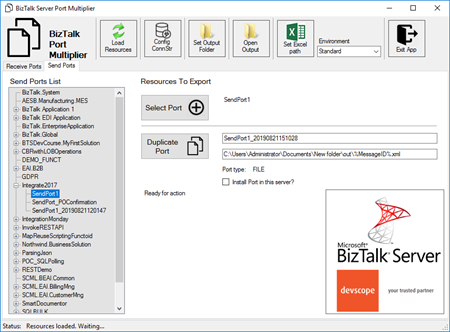
BizTalk Port Multiplier Tool is a simple tool that aims to simplify the port “cloning” process by allowing you to quickly “clone or duplicate” any existing port: Receive Port or Send Port.
Send Ports are quite easy to archive, you only need to give a different name to the port, and you can clone it;
Receive Ports are tricky because they may contain several Receive Locations and each URI needs to be unique;
This tool will extend default BizTalk Server capabilities transforming the tedious and sometimes complicate port creation based on an existing one a little simple and easy allowing you to:
Create a new Receive Port based on an existing one;
It will also export the binding file from that new Receive Port;
Create a new Send Port based on an existing one;
It will also export the binding file from that new Send Port;
Generate different binding files for each environment
Why do I need to “clone” a Receive Port?
Sometimes you also need to create a receive port with similar configurations of an existing one, also changing only a few settings or simple the URI, and instead of manually recreating, you can have 90% of the process done automatically.
Sometimes it is practical, occasionally, or in some scenarios, it may not work, but in most cases, it will. So it is a best-effort operation and not an exact clone because they may have several Receive Locations, and each Address/URI needs to be unique. So, you then need to go to each receive location and reconfigure them.
Credits
Credits also to my team member at DevScope, Pedro Almeida that collaborated in the development of this tool.
Recently my team and I developed and released several tools that extend the out-of-box capabilities of BizTalk Server 2016 for developer and administration teams to be more productive, saving times in some simple but time-consuming tasks that should d supposed to be. One of these tools was BizTalk Bindings Exporter Tool.
Because many clients still are using BizTalk Server 2013 R2, and because I had received some requests from the community, I will be releasing these tools for BizTalk Server 2013 R2 also. And today, we will stat with the BizTalk Bindings Exporter Tool
BizTalk Bindings Exporter Tool
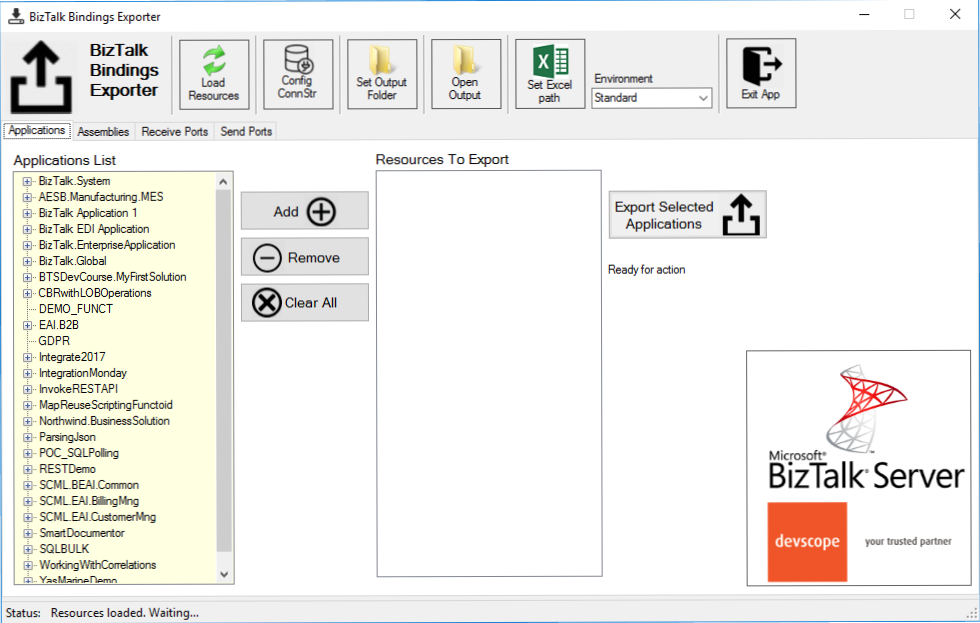
BizTalk Binding Exporter Tool is a simple tool that will suppress the absence of advanced binding file generation capabilities in the BizTalk Server Administration Console, allowing you to generate and export a binding file from BizTalk Applications in an intuitive and easy way.
Exporting a BizTalk Server Application binding is, at first sight, a quick and straightforward task that can be done using the BizTalk Server Administration Console:
Click Start, click All Programs, click Microsoft BizTalk Server 20xx, and then click BizTalk Server Administration
In the console tree, expand BizTalk Server Administration, expand the BizTalk Group, and then expand Applications
Right-click the application whose bindings you want to export, point to Export, and then click Bindings…
On the Export Bindings page, in Export to file, type the absolute path of the .xml file to which to export the bindings
Ensure that Export all bindings from the current application option is selected, and then click OK
But even in simple tasks, we may encounter challenges that require us to perform some monotonous and boring manual operations that consume some of our precious time and are always subject to failures. Because out-of-the-box BizTalk Administration Console doesn’t allow you to:
Export a Binding file of a specif Receive Port or list of Receive Ports;
Export a Binding file of a specif Send Port or list of Send Ports;
Export a Binding file of a specif Assembly or list of Assemblies;
And these are just a few scenarios. You can only fully Export the binding files of an entire application, which will lead you to sometimes extensive and fallible manual work to clean the binding files.
Usually, the binding exportation starts in development. Still, we also need to generate the same bindings for other environments like production, and for that, we usually need to open the binding file and replace/fix the differences for each different environment… which usually is a tedious operation. What we need to replace is mainly:
the URI’s: it should be fixed, but it is not mandatory. If you know what you are doing, you can fix them directly on the environment after you import the Binding.
the host instances: not mandatory, if you have the same host and host instances names across all your different environments (as best practices will tell you to do).
the NT Group Name associated in the Services (Orchestrations): according to securities best practices you shouldn’t use the same BizTalk Groups in different environments, so in this case, if you follow these best practices, you need to change these parameters in your binding file.
Normally, everyone changes the URI’s but neglecting the other parameters may be causing problems during the Binding import.
Once again, this tool will extend default BizTalk Server capabilities transforming the tedious and sometimes complicate binding generation a little simple and easy.
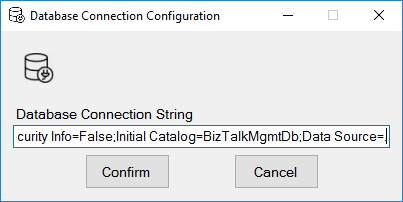
You just need to specify the connection string to the BizTalk Management database (BizTalkMgmtDb)
And this tool allows you to generate and export binding files with the following capabilities:
Export binding(s) file(s) for an entire Application or a list of Applications;
Export binding(s) file(s) from a specify Assembly or list of Assemblies;
Export binding(s) file(s) from a Receive Port or list of Receive Ports;
Export binding(s) file(s) from a Send Port or list of Send Ports;
Or Generate different binding files for each environment if you create an Excel File with the mapping for each environment ;
Credits also to my team member at DevScope, Pedro Almeida that collaborated in the development of this tool.
The BizTalk Pipeline Components Extensions Utility Pack community project for BizTalk Server 2016, once again, got a new update! It now has a new component that you can use in your custom BizTalk Server pipelines: SQL Server Polling Debatch Message By Grouping Filter Pipeline Component.
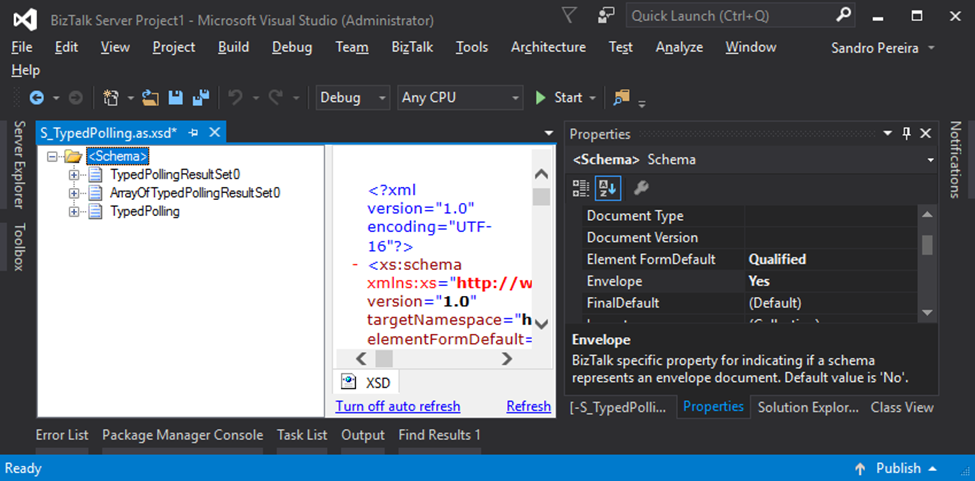
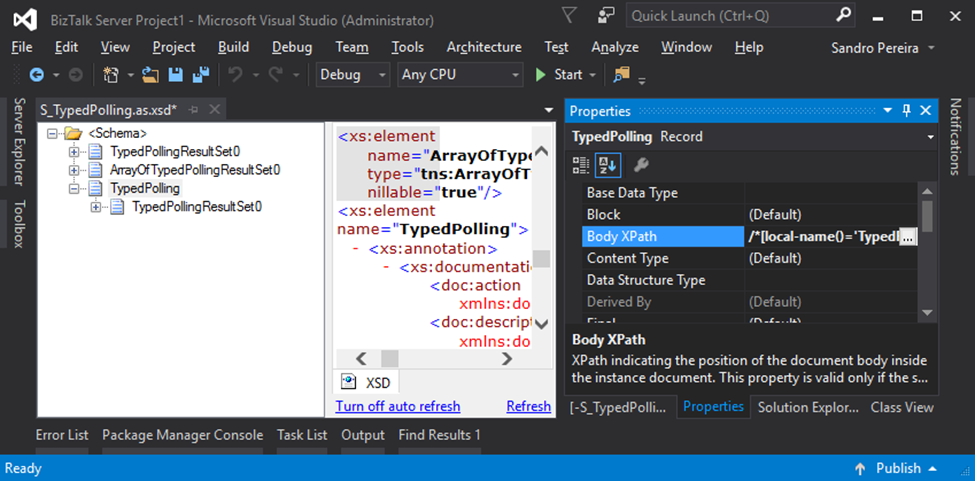
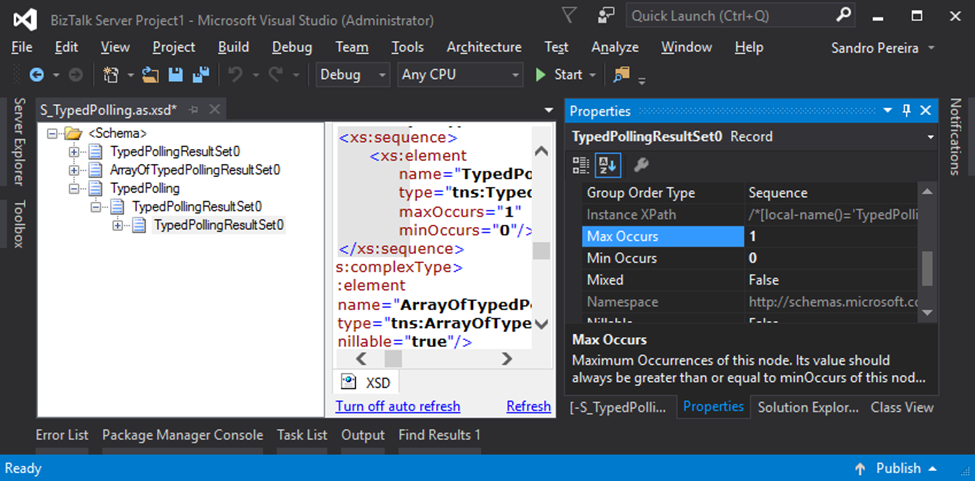
Debatching messages, which are received from WCF-SQL Adapter, is quite a simple task to do. You need to:
Specify that the message has an envelope by setting the Envelope property to Yes
Specify the Body XPath property
And finally, set the Max Occurs property to 1
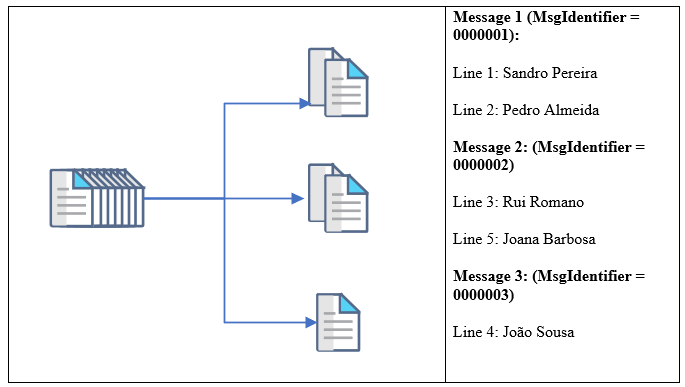
Next, the default XMLReceive pipeline will do the rest. However, what happens if you want to extend and customize this behavior? In my case, let’s imagine I have the following row samples:
SeqId
Name
MsgIdentifier
Role
Company
1
Sandro Pereira
0000001
Team Lead
DevScope
2
Pedro Almeida
0000001
Senior Developer
DevScope
3
Rui Romano
0000002
Team Lead
DevScope
4
João Sousa
0000003
Team Lead
DevScope
5
Joana Barbosa
0000002
BI Architect
DevScope
We will poll all the data from the SQL Database (not all, but let’s say the first 20 lines), and we want to split or debatch the incoming message based on the value of the MsgIdentifier property. So, after passing the receive pipeline, we will get, based on the previous example, 3 different messages:
The main question is: How do we handle scenarios where debatching is done based on business logic?
The answer is that we don’t have anything out-of-the-box that allows us to do these kinds of tasks. Most of you will think about debatching these kinds of messages inside an orchestration.
However, the best way for us to achieve this goal is to develop a custom Disassemble pipeline component.
SQL Server Polling Debatch Message By Grouping Filter Pipeline Component
The reason for choosing the Disassemble stage is simple; it is here that normally the process of breaking up a large interchange message into smaller messages happens, by removing the Envelopes, which is often called “debatching”. So, this should indeed be the place for us to create our custom Disassemble pipeline component.
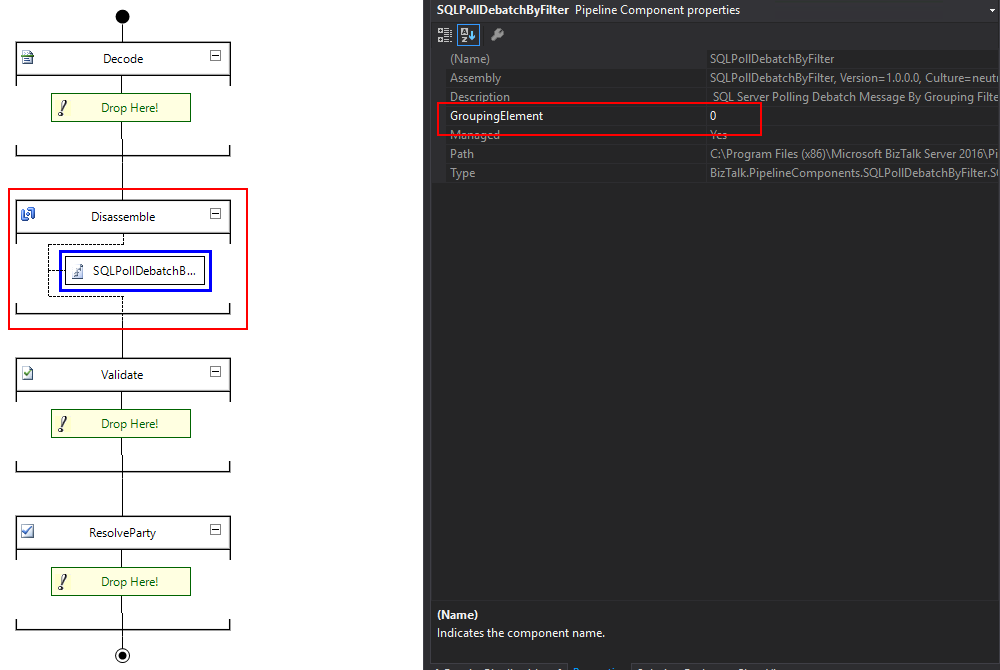
The SQL Server Polling Debatch Message By Grouping Filter pipeline component is a custom disassemble pipeline component that can be used to debatch incoming messages from the WCF-SQL adapter, by filtering from a specific element of the message. It will provide the following capabilities:
It allows you to define the grouping element
This will be an integer that will define the position of the element inside the message after the source code
Note: This custom pipeline component can be used with other LOB adapters but it was never tested before.
The source code shown here is just a snippet. To be able to use this, you can download the latest version from the BizTalk Pipeline Components Extensions Utility Pack.
What is BizTalk Pipeline Components Extensions Utility Pack?
The BizTalk Pipeline Components Extensions Utility Pack is a set of custom pipeline components (libraries) with several custom pipeline components that can be used in receive and send pipelines, which will provide an extension of BizTalk out-of-the-box pipeline capabilities.




 . But what if reinstalling IIS is not an option?