by stephen-w-thomas | Jul 23, 2013 | Stephen's BizTalk and Integration Blog
|
When driving down the street I think we all know what to do when we see a Stop Sign – we know we need to stop the car.
What happens when you see Stopped as a status for a Windows Azure Virtual Machines?
A little over a month ago Microsoft announced they would no longer charge for a Stopped Virtual Machine. This came as welcome news as I am sure many of you are like me – have left something on for a few days and received a bill for it.
What Microsoft introduced was really a new definition of Stopped to go along with the existing process they had in place.
We now have the following two definitions:
- Stopped
- Stopped – Deallocated
|
|
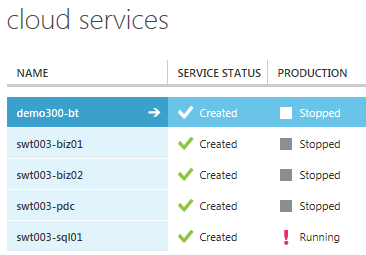
When you create a Virtual Machine inside Windows Azure you get a Cloud Service to basically host that virtual machine role. You can add more than one Virtual Machine to that Cloud Service and would do so to achieve high availability.
Up until a few days ago, that Cloud Service was always hidden from the Windows Azure Management Portal. You could see it when you deleted the last virtual machine in the service or using PowerShell. Now, you can see the services inside the UI – so that should help with the confusion. The Cloud Service, along with other things, is what gives your Virtual Machine a Virtual IP address (VIP).
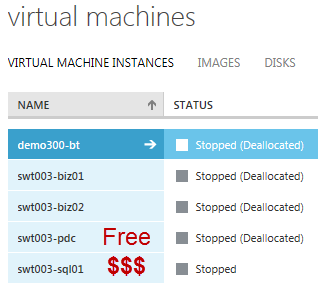
In the pictures below you can see a few of my Virtual Machines and Cloud Services in the Stopped and Stopped Deallocated state.
What’s the difference between Stopped and Stopped– Deallocated?
Stopped $$$ – When a virtual machine is stopped you are still being charged for the virtual machine. You also have the Virtual IP (VIP) address reserved and when you start the machine back up again you will get the same VIP. This is useful when you must have the same VIP.
Stopped Deallocated – When a virtual machine is stopped deallocated you are no longer charged for the virtual machine. The catch is, when you start it back up you might not get the same VIP back again. You get a message about this when you stop the Virtual Machine.
For all the work I am doing right now, the Stopped Deallocated state works just fine for me.
See below on how to get your Virtual Machine into a Stopped or Stopped Deallocated state.
How to Stop a Virtual Machine ($$$)
- PowerShell
- Stop-AzureVM -Name $VirtualMachineName -ServiceName $ServiceName –StayProvisioned (StayProvisioned is new in PowerShell as of 06/13)
- Selecting Shut Down while logged into the Virtual Machine
- REST API
- Example: https://management.core.windows.net/<subscription-id>/services/hostedservices/swt003-sql01/deployments/swt003-sql01/roleInstances/swt003-sql01/Operations
How to Stop – Deallocate a Virtual Machine (Money Saver!!!!)
- PowerShell
- Stop-AzureVM -Name $VirtualMachineName -ServiceName $ServiceName –Force (Note if you don’t use –Force you get an annoying confirmation popup)
- Using the Windows Azure Management Portal
- You will get a confirmation informing you the Virtual IP will be released
Please post if I have missed any other ways to stop a Virtual Machine.
How are you using Windows Azure Virtual Machines? Does the Stopped Deallocated state work for you?

by community-syndication | Jul 23, 2013 | BizTalk Community Blogs via Syndication
Congratulations to Anthony Borton, QuickLearn’s TFS course developer and lead TFS trainer! Anthony recently received an email from Microsoft confirming he delivered the highest rated developer pre-conference seminar at TechEd Europe this year. His seminar was titled Kickstart Your Application Lifecycle Management Using Team Foundation Server 2012 and was focused on helping attendees get a […]
Blog Post by: Nick Hauenstein
by community-syndication | Jul 23, 2013 | BizTalk Community Blogs via Syndication
So you need a multi-server BizTalk Environment, and you want it automagically provisioned in one click? What will you get? A zip file with some powershell scripts which will perform the following tasks for you (all in one click)… Read more ›
Blog Post by: Ren%u00e9 Brauwers
by Rene Brauwers | Jul 23, 2013 | BizTalk Community Blogs via Syndication
So you need a multi-server BizTalk Environment, and you want it automagically provisioned in one click?
A zip file with some powershell scripts which will perform the following tasks for you (all in one click) 🙂
1.Basic configured Virtual Network
includes creation of an affinity group if not available
includes creation of storage if not available
2. Configured Domain Controller
includes Active Directory Installation
includes BizTalk Service Accounts
includes BizTalk Groups
3. Configured SQL Server joined to the domain
includes firewall changes
includes msdtc changes
includes sql protocol changes
ensures domain admin to be added to the sql-server sysadmin role
4. Fully Configured! BizTalk Server joined to the domain
includes all BizTalk Features with exception of BAM Alerts
includes firewall changes
includes msdtc changes
includes configuration of hosts / host instances and adding them to the adapters
1. Download the powershell scripts here
2. Unzip
3. Download your azure publisher profile here
4. Open the script in your favorite editor using Administrative Privileges
5. Modify the script named Start_BizTalk_Multi_Server_Azure_Provisioning_v1.0.ps1
6. Run the script and wait.
Powershell executing
<embed width=”425″ height=”355″ type=”application/x-shockwave-flash” src=”http://www.youtube
allemagne viagra.com/v/dSIsRK0gJa0&hl=en” />
BizTalk Server End Result
Special thanks and credits go out to:
Peter Borremans, who wrote the following article which got me going
Jeremie de Villard, I used his adapted BizTalk Configuration Tool and Task-Schedule script to auto-configure BizTalk
Scott Banwart, I used his powershell script as basis for configuring the BizTalk Hosts, Host Instances and Adapters
Please note; the scripts are as is; go ahead and play with it. Most definitely you can clean it up more and make it more efficient 😉 If you make any modifications, feel free but be nice and SHARE!! 🙂
This work, unless otherwise expressly stated, is licensed under a Creative Commons Attribution-ShareAlike 3.0 Unported License. http://creativecommons.org/licenses/by-/3.0/
Cheers
René

by community-syndication | Jul 23, 2013 | BizTalk Community Blogs via Syndication
Hello BizTalk community,
I continued to work on MBV since its recent version 13, improving its UI and updating again its repository (queries and rules).
I also fixed some issues that were reported to me and I added some interesting features :
1) MBV provides now a new section named “Dashboard report”.
This section contains in fact all indicators considered as critical for the good health of a BizTalk group and will allow you to have a very quick view of the state of your BizTalk System.
This view was missing from my experience spent with some BT admins; indeed, the existing “Summary Report” section contains already lot of important information but we don’t know obviously what is crucial to monitor among that volume of information and what is reflecting the good health of a BT System.
This Dashboard section takes so only some important entries of the Summary Report and isolate them in a specific section.
Idealy I would appreciate to have also a such view in one tab of the Hub page of the BizTalk console, showing quickly the number of total messages in all MsgBox queues, the used space of the BizTalk databases, the state of the jobs,etc… 😉
This is a sample view of that section :
Dashboard Report
| Item Caption |
Item Value |
| BizTalk Databases – Sizes |
|
| Total DB Space Used for MGMT DB “BizTalkMgmtDb” on MJPAUCLT |
12.00 MB |
| Total DB Space Used for MSGBOX DB 1 (MASTER) “BizTalkMsgBoxDb” on MJPAUCLT |
8.84 MB |
| Total DB Space Used for DTA DB “BizTalkDTADb” on MJPAUCLT |
7.66 MB |
| Total DB Space Used for BAM PRIMARY IMPORT DB “BAMPrimaryImport” on MJPAUCLT |
6.69 MB |
| Total DB Space Used for RULEENGINE DB “BizTalkRuleEngineDb” on MJPAUCLT |
3.22 MB |
| Total DB Space Used for SSO DB “SSODB” on MJPAUCLT |
5.67 MB |
| BizTalk Host Instances |
|
| Total Host Instances |
2 |
| Total Host Instances Running |
1 |
| Total Tracking Host Instances Running |
1 |
| MJPAUCLT: BizTalkServerApplication (PID:4524.000) |
Memory = 73863170.000 bytes, Thread Count = 76.000 |
| Ports, Pipelines & Orchs |
|
| Total Receive Locations |
3 |
| Receive Locations disabled |
2 |
| Total Send Ports |
2 |
| Send Ports stopped |
0 |
| Total Orchestrations Deployed |
4 |
| Orchestrations stopped |
0 |
| BizTalk Jobs |
|
| Backup BizTalk Server (BizTalkMgmtDb) |
State=Disabled,Sched=15m,No History Found |
| CleanupBTFExpiredEntriesJob_BizTalkMgmtDb |
State=Enabled,Sched=12h,Last Status=Succeeded,Last Duration (hhmmss)=000000 |
| DTA Purge and Archive (BizTalkDTADb) |
State=Disabled,Sched=1m,No History Found |
| MessageBox_DeadProcesses_Cleanup_BizTalkMsgBoxDb |
State=Enabled,Sched=1m,Last Status=Succeeded,Last Duration (hhmmss)=000000 |
| MessageBox_Parts_Cleanup_BizTalkMsgBoxDb |
State=Enabled,Sched=1m,Last Status=Succeeded,Last Duration (hhmmss)=000000 |
| MessageBox_Message_ManageRefCountLog_BizTalkMsgBoxDb |
State=Enabled,Not Running,Sched=1m |
| MessageBox_Message_Cleanup_BizTalkMsgBoxDb |
State=Disabled,Last Status=Succeeded,Last Duration (hhmmss)=000000 |
| PurgeSubscriptionsJob_BizTalkMsgBoxDb |
State=Enabled,Sched=1m,Last Status=Succeeded,Last Duration (hhmmss)=000000 |
| TrackedMessages_Copy_BizTalkMsgBoxDb |
State=Enabled,Sched=1m,Last Status=Succeeded,Last Duration (hhmmss)=000000 |
| MessageBox_UpdateStats_BizTalkMsgBoxDb |
State=Enabled,Sched=5m,Last Status=Succeeded,Last Duration (hhmmss)=000001 |
| Operations_OperateOnInstances_OnMaster_BizTalkMsgBoxDb |
State=Enabled,Sched=1m,Last Status=Succeeded,Last Duration (hhmmss)=000000 |
| Longer job’s duration (except ‘Message_ManageRefCountLog’) |
000001 Sec (MessageBox_UpdateStats_BizTalkMsgBoxDb) |
| DTA Tables |
|
| Larger table |
“dta_Services” – 1016 KB -59 Rows |
| MsgBox Tables |
|
| Larger table – MSGBOX DB 1 (MASTER) “BizTalkMsgBoxDb” on MJPAUCLT |
“Fragments” – 1064 KB – 33 Rows |
| Total in MsgBox TrackingData table(s) – MSGBOX DB 1 (MASTER) “BizTalkMsgBoxDb” on MJPAUCLT |
96 KB – 0 Rows |
| Total in Tracking Body tables – MSGBOX DB 1 (MASTER) “BizTalkMsgBoxDb” on MJPAUCLT |
0 KB – 0 Rows |
| Total in Q tables (Work + Suspended) – MSGBOX DB 1 (MASTER) “BizTalkMsgBoxDb” on MJPAUCLT |
112 KB – 10 Rows |
| MsgBox Queues |
|
| Total Suspended Messages – MSGBOX DB 1 (MASTER) “BizTalkMsgBoxDb” on MJPAUCLT |
10 |
| Total Suspended Resumables Messages – MSGBOX DB 1 (MASTER) “BizTalkMsgBoxDb” on MJPAUCLT |
10 |
| Total Pending Messages in Work Q – MSGBOX DB 1 (MASTER) “BizTalkMsgBoxDb” on MJPAUCLT |
0 |
| “BizTalkServerApplicationQ_Suspended” has most Suspended Messages |
10 |
| MsgBox Database Integrity |
|
| Message Refs w/out Spool rows |
0 |
| Messages w/out RefCounts |
0 |
| Message Refs w/out Instances |
0 |
| Subscriptions w/out Instances |
0 |
| InstanceState w/out Instances |
0 |
| Messages with RefCount = -1 |
0 |
| Messages processed |
|
| Today |
Sent = 0, Received = 0 |
| Service Instances |
|
| Ready To Run – MSGBOX DB 1 (MASTER) “BizTalkMsgBoxDb” on MJPAUCLT |
0 |
| Active – MSGBOX DB 1 (MASTER) “BizTalkMsgBoxDb” on MJPAUCLT |
1 |
| Suspended Non-Resumable – MSGBOX DB 1 (MASTER) “BizTalkMsgBoxDb” on MJPAUCLT |
5 |
| Suspended Resumable – MSGBOX DB 1 (MASTER) “BizTalkMsgBoxDb” on MJPAUCLT |
5 |
| Dehydrated – MSGBOX DB 1 (MASTER) “BizTalkMsgBoxDb” on MJPAUCLT |
0 |
2) I also changed a little bit the size and orientation of the frames of the generated HTML files to clarify again the output.
This is a sample of the new output :

3) I added finally the possibility to change more quickly the current profile in both UI and console version of MBV and added some two predefined profiles “Minimum” and “Full”.
I recall that a profile stores the selected queries, the query custom properties, and all the MBV global options, and each profile is stored in a file prefixed by “MBVSettings_”.
At MBV UI startup a combobox is populated by all the profile files enumerated in the current MBV folder.
You can so select in one click your current profile in the combobox visible on the main page of MBV UI (or as argument in MBVConsole), and also select the predefined “Minimum” or “Full” profile.
Selecting the Minimum profile will select only the queries of the “Important” category as opposed the Full profile selecting all the queries of all the categories.
This quick selection of a predefined profile is mush faster than checking/unchecking manually the queries in each category.

This version of MBV is available as an attachment in that post.
I look forward to have your feedbacks on that version and you can contact me of course if you want to report issue or suggestions.
in next posts I will discuss more about the global options of MBV to cutomize the report according to your own needs .
You have indeed the possibility to keep only the sections you are interested by, just by changing some global options. Stay tuned so !
Thanks !
JP

Blog Post by: JPAUC

by community-syndication | Jul 21, 2013 | BizTalk Community Blogs via Syndication
There is a new User Group born in Belgium. It’s a brand new BizTalk User Group, to be more precise, and goes by the name of BTUG.be. One of the initiators is someone of our very own company… Mitch Vanhelden, one of our Business Integration consultants working with Microsoft BizTalk. Cnext is proud to be […]
Blog Post by: Cnext

by community-syndication | Jul 19, 2013 | BizTalk Community Blogs via Syndication
I would like to make a small announcement… today we publicly announced the birth of a brand new Belgian BizTalk User Group, called BTUG.be! We were planning something like this for quite some time now, and you even might have picked up some rumours about it in the past. But as of today it is official, Belgium now has its very own BizTalk User Group.
I’m proud to say that I’m one of the co-founders of this BTUG.be. Together with Sam Vanhoutte we have started this initiative under excellent guidance of Lex Hegt, who shared his knowledge he gained with the Dutch BizTalk User Group.
And to start out, we wanted to make it a joined collaboration of the Belgian BizTalk Community. In this spirit we are glad that also i8c decided to support the initiative and Sven Van den brande agreed to fulfill our board of the BTUG.be. So that makes the all new Belgian BizTalk User Group will be worked out as a joined effort by Cnext, Codit and i8c with in the board at startup myself, Sam Vanhoutte and Sven Van den brande.
I’m already looking forward on having a great time working together with these guys organising all upcoming events.
A very first launch event is being planned to have place in november. For keeping up to date on all matters of this BTUG.be, I’ll recommend you subscribe to the mailing list on the website http://www.btug.be and even keep a close eye to the website for all announcements. And certainly don’t forget to follow our twitter account @BTUGbe.
And last of all, I would like to call out for sponsors… As the entire organization will be driven on volunteer work. So to cover all the necessary costs we will need to make for hosting events, catering, travel expenses in case of international speakers, etc. we are on the lookout for sponsors to keep it fun and free for everyone. You can always contact us on any questions or to share your interest for sponsoring using this entry form on the website.

by community-syndication | Jul 19, 2013 | BizTalk Community Blogs via Syndication
This post is the ninth in a weekly series intended to briefly spotlight those things that you need to know about new features in BizTalk Server 2013. A lot of people want to be able to manage BizTalk Server from the command line or from within scripts – it is enterprise level server software after […]
Blog Post by: Nick Hauenstein
by community-syndication | Jul 19, 2013 | BizTalk Community Blogs via Syndication
One of the great things about using BizTalk Server as your integration platform is that you get a significant amount of schemas right out of the box. Microsoft has done a great job keeping up with industry standards such as EDI (supply chain logistics and more), HL7 (healthcare), HIPAA (healthcare) , SWIFT (financial services).
With […]
Blog Post by: Stan Kennedy

by community-syndication | Jul 18, 2013 | BizTalk Community Blogs via Syndication
Great news for the BizTalk community, BizTalk Innovation Day will be back to Italy on October 17 and event more great news: the event is free but be aware that the places are limited! So book your seat now! The speaker are the usual suspect, the "BizTalk Crew": me, Steef-Jan Wiggers, Tord Glad Nordahl, Saravana […]
Blog Post by: Sandro Pereira