I installed the Logic Apps mapper/schema editor SDK on a BizTalk 2016 VM.
After I loaded a BizTalk project to make some changes, I discovered that the BizTalk Project Template was overwritten.
I thought this was a bug and reported it.

For those of you that missed our announcements here and here, BizTalk Server 2016 has been released to manufacturing (RTM) today! What does this mean? Well, we now go through the process of making the media available across all channels which takes a little time to complete. But we know you can’t wait for all…
Blog Post by: BizTalk Team

After Microsoft announced today that BizTalk Server 2016 just reach RTM, however is not yet public available for download – that is the 10th major release of BizTalk Server – bringing several new capabilities like: Support for the latest platform versions: Windows Server 2016, SQL Server 2016, Office 2016 and Visual Studio 2015 SQL Server […]
Blog Post by: Sandro Pereira

Take a moment and think about the best manager that you’ve had. I’ll wait. Now, think about the worst manager you’ve had. What characteristics separate the two? It’s said that people don’t leave companies, they leave managers. Sure, that happens…. Read More ›
Blog Post by: Richard Seroter

After I loaded a BizTalk project to make some changes, I discovered that the BizTalk Project Template was overwritten.
I thought this was a bug and reported it.

I was sending a message from the Logic App to BizTalk.
I used the JSON Schema wizard and used the default setting. Root, for the Root element.
There was a failure executing the receive pipeline: "CRMDemo.ReceivePipeline1, CRMDemo, Version=1.0.0.0, Culture=neutral, PublicKeyToken=17c282d81ae800e3" Source: "XML validator" Receive Port: "CRMReceivePort" URI: "/GetCRMAccount/Service1.svc" Reason: The XML Validator failed to validate. Details: The element 'Root' in namespace 'http://CRMDemo.JSONSchema1' has invalid child element 'id'. List of possible elements expected: 'body'..
I looked at the message body from suspended message
{"id":"94bf6bf8-4a96-e611-80ea-c4346bdc7221","name":"Silly Goose two","phone":"748-852-1256"}
There wasn’t a body node. 💡
I then checked the source from the Logic App
{
    "Send_message": {
            "inputs": {
                "body": {
                    "id": "@{triggerBody()?['accountid']}",
                    "name": "@{triggerBody()?['name']}",
                    "phone": "@{triggerBody()?['telephone1']}"
                },
                "host": {
                    "api": {
                        "runtimeUrl": "https://logic-apis-northcentralus.azure-apim.net/apim/biztalk"
                    },
                    "connection": {
                        "name": "@parameters('$connections')['biztalk_1']['connectionId']"
                    }
                },
                "method": "post",
                "path": "/Send",
                "queries": {
                    "receiveLocationAddress": "http://40.86.103.129/GetCRMAccount/Service1.svc"
                }
            },
            "runAfter": {},
            "type": "ApiConnection"
    }

}
My BizTalk Schema is shown below.
<?xml version="1.0" encoding="utf-16"?>
<xs:schema xmlns:b="http://schemas.microsoft.com/BizTalk/2003" attributeFormDefault="unqualified" elementFormDefault="unqualified" targetNamespace="http://CRMDemo.JSONSchema1" xmlns:xs="http://www.w3.org/2001/XMLSchema">
  <xs:element name="Root">
          <xs:complexType>
            <xs:sequence>
              <xs:element minOccurs="0" name="id" type="xs:string" />
              <xs:element minOccurs="0" name="name" type="xs:string" />
              <xs:element minOccurs="0" name="phone" type="xs:string" />
            </xs:sequence>
          </xs:complexType>
        </xs:element>
</xs:schema>
Finally it came to me. 😳
I needed use the body node as the name of the Root element in my schema. That solved the problem.

The BizTalk Documenter has been compiled and refactored for .Net 4.6 and BizTalk 2016 Tap release.
This will only work for BizTalk 2016.
RSS feed for comments on this post. TrackBack URI
xon Olympus, een snelgroeiend ICT-dienstenbedrijf uit Utrecht dat zich specialiseert in de integratie van systemen en applicaties op het Microsoft-platform, fuseert met zijn Belgische branchegenoot Codit. Het fusiebedrijf gaat verder onder de naam Codit.
Blog Post by: AxonOlympus
We are happy to announce two new Cumulative updates one for BizTalk Server 2013 (CU5) and BizTalk Adapter Pack 2013 (CU4) is available. Cumulative update package 5 for Microsoft BizTalk Server 2013: This cumulative update package for Microsoft BizTalk Server 2013 CU5 contains hotfixes for the BizTalk Server 2013 issues that were resolved after the…
Blog Post by: BizTalk Team

I just updated three of my useful BizTalk PowerShell scripts in some cases fixing some small bugs, improving performance and in other cases adding also new capabilities. PowerShell to configure Default Dynamic Send Port Handlers for each Adapter: This is a simple script that allows you to configure the default send handlers associated with all […]
Blog Post by: Sandro Pereira
Hi All,
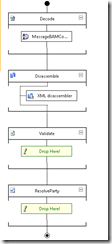
I just came across an issue/bug with the pipeline unit test in BizTalk 2013/r2. In my case, I’ve multiple document specification present in the XML disassembler stage. When we write Unit test for this custom pipeline it fails with the error “System.InvalidOperationException: None of the disassembler components could recognize a data”. The error basically means that I do not have a Schema Document Specification added to the XML Disassembler for the message, but that’s not correct. I’ve the doc spec available along with the other schema doc specs in the collection.
I’ve written unit test using Spec Flow and Winterdom BizTalk Pipeline Testing tool. The Unit test is mentioned below:
Feature: Pipelines
Scenario Outline: Test Inbound Request Pipeline
Given the pipeline has been configured with the “<TypeName>” and “<SubscriberName>”
When the inbound request pipeline is executed with the “<InputMessage>”
Then the following Context Properties should be promoted “<MessageType>”, “<SubscriberName>”
Examples:
| InputMessage | TypeName | MessageType | SubscriberName |
| ManageAlertResponse.xml | SQLProviderResponse | http://schemas.microsoft.com/Sql/2008/05/TypedProcedures/dbo#ManageAlertsResponse | |
using System;
using System.IO;
using System.Linq;
using Microsoft.BizTalk.Message.Interop;
using Microsoft.VisualStudio.TestTools.UnitTesting;
using TechTalk.SpecFlow;
using Common.Patterns.PipelineComponent;
using Common.Utilities.BAM.Message.V1;
using Common.Utilities.Helper.Component;
using DB.Common.Pipelines;
using DB.Common.Schemas;
using Winterdom.BizTalk.PipelineTesting;
namespace DB.Common.Test.Bindings.Pipelines
{
[Binding]
public sealed class InboundRequestPipeline : BasePipelineBinding
{
[Given(@”the pipeline has been configured with the “”(.*)”” and “”(.*)”””)]
public void GivenThePipelineHasBeenConfiguredWithTheAnd(string typeName, string subscriberName)
{
ReceivePipelineWrapper pipeline = PipelineFactory.CreateReceivePipeline(typeof(RcvDBResponseMsg));
pipeline.AddDocSpec(typeof(TypedProcedure_dbo));
ScenarioContext.Current.Add(“Pipeline”, pipeline);
}
[When(@”the inbound request pipeline is executed with the “”(.*)”””)]
public void WhenTheInboundRequestPipelineIsExecutedWithThe(string inputMessageName)
{
var pipeline = (ReceivePipelineWrapper)ScenarioContext.Current[“Pipeline”];
string inputMessagePath = String.Format(“{0}.{1}”, MESSAGE_RESOURCE_PATH, “Input”);
using (Stream inputMessageStream = GetResourceStream(inputMessagePath, inputMessageName))
{
IBaseMessage inputMessage = MessageHelper.CreateFromStream(inputMessageStream);
inputMessage.Context.Promote(“InterchangeID”, “http://schemas.microsoft.com/BizTalk/2003/system-properties”, Guid.NewGuid().ToString());
inputMessage.Context.Promote(“CorrelationToken”, “http://schemas.microsoft.com/BizTalk/2003/system-properties”, Guid.NewGuid().ToString());
MessageCollection outputMessageCollection = pipeline.Execute(inputMessage);
IBaseMessage outputMessage = outputMessageCollection.FirstOrDefault();
ScenarioContext.Current.Add(“OutputMessage”, outputMessage);
}
}
[Then(@”the following Context Properties should be promoted “”(.*)””, “”(.*)”””)]
public void ThenTheFollowingContextPropertiesShouldBePromoted(string targetMessageType, string targetSubscriberName)
{
var outputMessage = (IBaseMessage)ScenarioContext.Current[“OutputMessage”];
string messageType = outputMessage.Context.Read(“MessageType”, “http://schemas.microsoft.com/BizTalk/2003/system-properties”).ToString();
Assert.AreEqual(targetMessageType, messageType);
}
#region PrivateHelper
#endregion
}
}
The test fail on the highlighted step above with the below exception :
Test Name: TestInboundRequestPipeline_ManageAlertResponse_Xml
Test FullName: DB.Common.Test.Features.PipelinesFeature.TestInboundRequestPipeline_ManageAlertResponse_Xml
Test Source: : line 2147483647
Test Outcome: Failed
Test Duration: 0:00:00.1399699
Result Message:
Test method DB.Common.Test.Features.PipelinesFeature.TestInboundRequestPipeline_ManageAlertResponse_Xml threw exception:
System.InvalidOperationException: None of the disassembler components could recognize a data
Result StackTrace:
at Microsoft.Test.BizTalk.PipelineObjects.Stage.Execute(IPipelineContext pipelineContext, IBaseMessage inputMessage)
at Microsoft.Test.BizTalk.PipelineObjects.GenericPipeline.ExecuteSubPipeline(IPipelineContext pipelineContext, IBaseMessage inputMessage, Int32 startStageIndex, Int32 endStageIndex)
at Microsoft.Test.BizTalk.PipelineObjects.ReceivePipeline.Execute(IPipelineContext pipelineContext)
at Winterdom.BizTalk.PipelineTesting.ReceivePipelineWrapper.Execute(IBaseMessage inputMessage)
at .DB.Common.Test.Bindings.Pipelines.InboundRequestPipeline.WhenTheInboundRequestPipelineIsExecutedWithThe(String inputMessageName) in c:ShadabWSDevelopmentIntegrationDBCommon2.0DB.Common.TestBindingsPipelinesInboundRequestPipeline.cs:line 46
at lambda_method(Closure , IContextManager , String )
at TechTalk.SpecFlow.Bindings.BindingInvoker.InvokeBinding(IBinding binding, IContextManager contextManager, Object[] arguments, ITestTracer testTracer, TimeSpan& duration)
at TechTalk.SpecFlow.Infrastructure.TestExecutionEngine.ExecuteStepMatch(BindingMatch match, Object[] arguments)
at TechTalk.SpecFlow.Infrastructure.TestExecutionEngine.ExecuteStep(StepInstance stepInstance)
at TechTalk.SpecFlow.Infrastructure.TestExecutionEngine.OnAfterLastStep()
at TechTalk.SpecFlow.TestRunner.CollectScenarioErrors()
at .DB.Common.Test.Features.PipelinesFeature.ScenarioCleanup() in c:ShadabWSDevelopmentIntegrationDBCommon2.0DB.Common.TestFeaturesPipelines.feature.cs:line 0
at .DB.Common.Test.Features.PipelinesFeature.TestInboundRequestPipeline(String inputMessage, String typeName, String messageType, String subscriberName, String[] exampleTags) in c:ShadabWSDevelopmentIntegrationDBCommon2.0.DB.Common.TestFeaturesPipelines.feature:line 7
at .DB.Common.Test.Features.PipelinesFeature.TestInboundRequestPipeline_ManageAlertResponse_Xml() in c:ShadabWSDevelopmentIntegrationDBCommon2.0..Common.TestFeaturesPipelines.feature.cs:line 0
After doing some investigation, We found that if there is other Schemas Doc Specification present first in the order to the doc spec which is passed from the unit test, the unit test component did not recognize the schema spec and fails the unit test.
For example: I’ve passed schema type “TypedProcedure_dbo“ from my unit test to the pipeline which is second in the list.
The unit test fails, because the first Schema type in the list is “EmployerSecurity”.
As soon as I move the “TypedProcedure_Dbo” up in the order, compile, Gac and run the unit test, all looks good and success.
It looks like the Pipeline Unit test only validate schema with the first spec, my question is why does the order matter in the Unit test while it does not matter at the run time? Just wondering if anyone have already experience similar issue and have a better solution?
Regards,
Shadab