Today, the BizTalk Product Group announced the general availability of the BizTalk Server Accelerator for SWIFT – Message Pack 2016.
Download : https://www.microsoft.com/en-us/download/details.aspx?id=53948
Advertisements


We followed Mohamed M Malek and used the WCF-WebHTTP adapter to integrate with the Apache ActiveMQ Rest API. Initially we used a HTTP GET to consume the message but discovered that after a while the central message broker ran out of memory. Researching the Apache documentation we discovered that you can consume messages by browsing to the subscription but you must then DELETE the message when you have finished processing it, to acknowledge a particular message.
We tried to acknowledge our HTTP GET with a subsequent HTTP DELETE but could not DELETE the message from the queue. It had already been removed from our subscription.
In the end we changed from using a HTTP GET to a HTTP DELETE. The Apache documentation says you can use either a HTTP DELETE or GET to consume the message. We found that response was identical whether we used GET or DELETE. What was more pleasing was that the memory no longer increased on the central message broker and this solved our issue. Thanks to Deepa Kamalanathan for working all this out.

No comments yet.
RSS feed for comments on this post. TrackBack URI

Today, the BizTalk Product Group announced the general availability of the BizTalk Server Accelerator for SWIFT – Message Pack 2016.
Download : https://www.microsoft.com/en-us/download/details.aspx?id=53948
We are happy to announce the availability (RTM) of Message Pack 2016 for BizTalk Server Accelerator for SWIFT. This can be downloaded from: https://aka.ms/biztalkswift Microsoft BizTalk Accelerator for SWIFT (A4SWIFT) provides a set of schemas, rules, and associated tools to assist you in the integration of SWIFT messaging with your internal applications. It uses BizTalk…
Blog Post by: BizTalk Team
In May, I gave a session at Integrate 2016 titled Azure IaaS Essentials for the BizTalk Developer (watch online now).
In that session I outlined that prices for Azure resource vary by data center.
In case you did not know, the price you pay for Azure resources in a US datacenter can vary from that in Brazil (expensive) , Japan, Indian, and so on.
What is interesting though, is that event data centers in the United States have different prices.
From what I’ve seen, the East 2 and West 2 data centers seem to have better prices than a lot of the other US data centers.
I checked some prices on Virtual Machines and Storage – not all Azure resource – but some prices were as much as 13% lower!
If you use a lot of Azure saving up to 13% or maybe more can really add up.
The key take-a-way is to ensure you check the prices of the resources in multiple data centers if you have the ability to do so for your scenario.

Instead of trying to archive everything I want at once, what will probably take me long time, I decided to publish another version of my Microsoft Integration Stencils Pack with an additional of 80 new shapes and some reorganization. With these new additions, this package now contains an astounding total of ~911 shapes (symbols/icons) that […]
Blog Post by: Sandro Pereira

Exciting news Version 1.9.1.0 of BizTalk Mapper Extensions UtilityPack for BizTalk Server 2013 R2 and 2013 is now available! Here’s the change-log for this release: Updated Logical Functoids: The project has sign strong name key solving an issue regarding to “Unable to add BizTalk.Logical.Functoids.dll to the GAC (version 1.9.0.0)” – However, this is a false […]
Blog Post by: Sandro Pereira
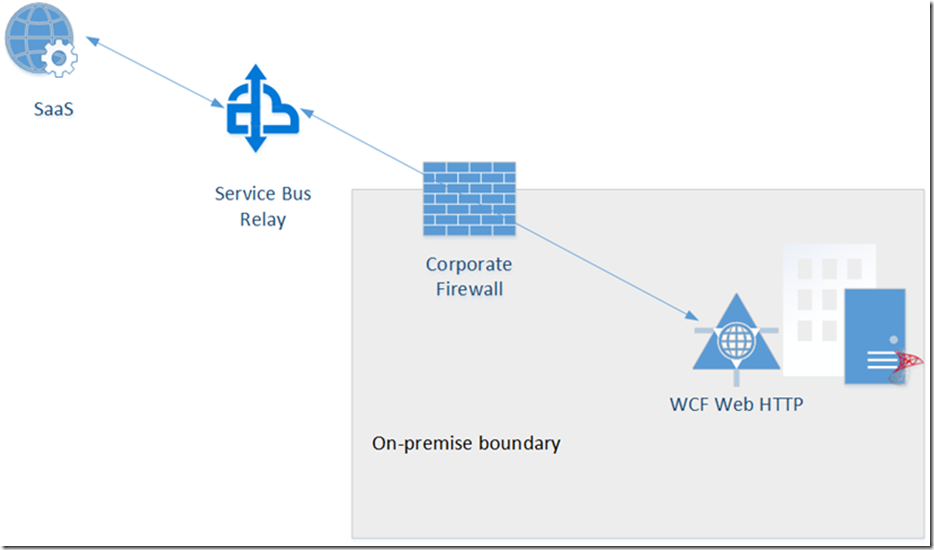
Colin Dijkgraaf and I presented this on Integration Monday today. In this session we showed why the WCF-WebHTTP adapter requires some workarounds. We used BizTalk 2016 Tap release to demonstrate these workarounds. The presentation and PowerPoint presentation can be downloaded from here.
RSS feed for comments on this post. TrackBack URI
Ik probeer in plaats van het probleem op te lossen, de oorzaak weg te nemen
Blog Post by: AxonOlympus
Geef klanten wat ze nodig hebben, niet wat ze willen
Blog Post by: AxonOlympus

The Service Bus Preview does not display Azure Service Bus Relays in my hands. The Service bus is in preview in the new Azure Portal and I used it to create this service bus. I created a Azure Service bus relay but could not find it anywhere in the new portal. Without this it is […]
Blog Post by: mbrimble