by Rene Brauwers | Nov 8, 2016 | BizTalk Community Blogs via Syndication
Hey you, yes you! I reckon you ended up reading this blogpost due to the enticing title. Well awesome, now that I have your attention.
Like all things in nature, things evolve. Well they either evolve or get instinct. By sharing this post I hope you as an Integration Specialist want to evolve as well and don’t get extinct.
So how would you know if your existence as an Integration Specialist is not about to get obliviated from this world? Well keep on reading..
Let’s start off with: Yes BizTalk Server is here to stay for the foreseeable future. BizTalk Server 2016 was just released and once again this is proof that Microsoft is still heavily investing in this great , one of a kind, integration platform.
You might wonder, how does Microsoft keep it alive? Well Microsoft is doing so by constantly evolving as it understands the business needs and the fact that integration space is changing and now both spans on-premises as the cloud and a clear example of this is to be seen with the new release of BizTalk Server 2016. This release a new adapter is being introduced which allows us to seamlessly expand into the Hybrid Integration Space, the logic app adapter for BizTalk. Besides this adapter we offcourse still have our good ‘old’ friend the SB Messaging adapter (service bus).
Anyways I am digressing. What about that thing I mentioned before; about becoming extinct as an Integration Specialist? Well, please allow me to elaborate.
Isn’t it true that when you decided to take up on a career within IT you were fully aware that you would need to keep your skillset and knowledge constantly up to date (I.e.; keep on learning new and exciting stuff). Well how many of you, actually do, keep up to date; and I mean really up to date, thus not only reading up on the new stuff but actually getting your hands dirty.
Most of the integrators I talk to, work day in day out with BizTalk Server, and although reading up on for example Logic Apps, Service bus, Azure functions, App Services, Service Fabric, Azure API management and so forth most of them have not really gotten their hands dirty and played around with these awesome services in Azure which open up new ways with regards to integration capabilities.
If I ask them why? I Usually get the same answer, no time, our company does not allow for us to use the Cloud, no need as we use BizTalk, not mature enough, don’t know where to start, it changes all the time, and so on. Well I do understand these answers and I most certainly do understand that ideally we would love to be able to learn these new skills in our boss’ time, but hey let’s wake up! You can decide to wait until this time arrives or you simply start investing in yourself! Anyways the longer you wait the harder it will get and that day where you will be deemed extinct will only get closer and closer. So please do not let this happen, don’t become extinct, evolve! The last thing you want is to end up like Milton from Office Space (https://www.youtube.com/watch?v=Vsayg_S4pJg)
In order to evolve you will need to expand your knowledge and be able to apply everything you learned (think integration patterns, integration best-practices etc.) in this new Hybrid world; and yes sorry to tell you; you won’t get far by merely clicking, copy and pasting and dragging and dropping. No you will need to level-up your foundational skills.
At this point you might ask yourself, how do I level-up my foundational skills and where do I start? Well it’s actually simpler than you might think especially considering that the chances are pretty big that you are a seasoned BizTalk Specialist which is able to solve the most complex integration challenges using all the capabilities within BizTalk, sure some areas are more familiar than others but overall; you have the skills, capabilities , know all the EAI patterns, love to decouple services and you know that Microservices is nothing more than another implementation of SOA and heck yeah you’ve been doing that for years. So yes you have a great foundation and that on itself gets you halfway there.
Nevertheless you will have to level-up and that my friend is only to be done in one way and that’s by exposing yourself to these new technologies and start experimenting. In short make those flying hours and don’t decide to be a passenger, become the pilot. Make mistakes, because by making mistakes we learn. If you are stuck reach-out to the community, attend user group meetings and so on and before you notice you will have skilled up and you are one step further away from getting extinct and one step closer to evolving even further.
So in fact it is pretty simple to ensure you will not get extinct, all it takes is that additional push in the right direction to get you moving and hopefully I’ve been able to contribute to this little push. So don’t wait any longer and get started
- If you don’t have an Azure Subscription, sign up here for a free trial and receive $260 in credits – or join visual studio dev essentials and get $25 dollar of Azure Credits per month for a year
- Have a look at one of the following resources to learn more about Logic Apps, API Management, Service Bus and BizTalk Server 2016
- Logic Apps
- API Management
- Service Bus
- BizTalk Server 2016
If you are in Sydney Australia, please do check out the Hybrid Integration Platform Usergroup and feel free to join us for one of our meetups!
Cheers
René
by michaelstephensonuk | Nov 7, 2016 | BizTalk Community Blogs via Syndication
Tonight we had loads of people on the integration monday webcast and there were a few people who wanted the slides asap to share with their teams. We will be posting the video from tonights session and the slides on the link below tomorrow once the video is processed as we do each week along side all past events.
For those who wanted slides asap just sharing them here temporarily but do check back on the below link for the video: http://cscblogsamples.blob.core.windows.net/publicblogsamples/Integration%20monday%20-%20Product%20Group%20presentation.pdf
Past Events
by SanjivGupta | Nov 7, 2016 | BizTalk Community Blogs via Syndication
Microsoft IT’s Enterprise Integration Platform (EPS) team became the first to go-live on BizTalk Server 2016. The platform that is managed by EPS is one of the most critical in the Microsoft ecosystem as it processes over 30 million B2B transactions per month worth in excess of USD 120 Billion annually with 2000 + partners using multiple message formats including X12, EDIFACT, XML, SWIFT spans across all business domains viz., Supply Chain, Finance, Human Resources, Volume Licensing. The initial functional & performance test results of BizTalk 2016 were so encouraging that the team implemented a “critical” trade screening business process that ensures screening of organizations, consumers before Microsoft sells its products and services.
This project is part of overarching initiative to optimize infrastructure costs by adopting Azure’s IaaS & PaaS offerings and completely eliminating on premise footprint. This is where BizTalk 2016 delivers key business value due to its compatibility with Azure IaaS while providing a supported High Availability solution. Yes, that’s right – unlike its predecessor, BizTalk Server 2016 leverages out-of-box SQL Server 2016’s “Always On Availability Group ” functionality to provide high availability solutions on Azure IaaS. This release also provides BizTalk connectors to support hybrid integration scenarios.
While the PaaS story of B2B integration matures with the rapid emergence of Logic Apps, Microsoft was fully focused on this new release of BizTalk Server as it allows existing customers to move to Microsoft supported BizTalk-IaaS solution without having to change existing BizTalk applications. To ensure a defect-free release of BizTalk 2016, Microsoft IT and BizTalk Product Group collaborated to identify top enterprise integration scenarios which need to be tested before general availability (GA) of BizTalk 2016 and be the first customer to adopt BizTalk 2016 on IaaS. To achieve this objective, rigorous testing and validation was performed along the following lines:
- BizTalk functional testing on IaaS
- All artefacts, including different adaptors and message types
- End to end flows which include B2B and hybrid A2A scenarios using the new Logic Apps adaptor.
- Individual Application data and sanity validation tests
- High Availability tests
- Change the backend SQL HA/DR architecture of the SQL WFSC cluster to SQL Always On Availability Group and potential implications/best practices to adhere to.
- Extreme HA tests, including MSDTC edge case scenarios.
- Performance & Load testing
- Performance tests (sustenance, peak load behavior, etc.)
- Reliability tests (peak load auto-recovery)
- Scalability tests (ability to handle up to 5X the normal traffic load patterns)
The migration from BizTalk Server 2013R2 was “lift and shift” or as is basis. Existing BizTalk applications from 2013R2 were used as is.
The experience overall with BizTalk Server 2016 on Microsoft Azure IaaS VMs has been exciting, especially with the new set of features including IaaS High-Availability support, Logic Apps adaptor, improved BizTalk Admin UI console and new features which have made administration easier than before. Additionally, due to the migration to IaaS, the team has been able to consolidate and optimize hardware requirement exactly as per use, thereby already showing up to 20% cost savings annually in the initial analysis.

by Steve | Nov 3, 2016 | BizTalk Community Blogs via Syndication
Host Integration Server 2016 RTM is avaiable
The Host Integration Server Product Team finally released the great new Release 2016.
This release confirms the commitment to Microsoft enterprise customers and partners, by delivering a set of new technologies, tools, and improvements.
- New Microsoft Client for MQ connecting .NET Framework and BizTalk Server applications to IBM MQ message processing systems, providing simplified administration and improved performance.
- Expanded platform support for latest Microsoft operating systems and development tools, plus support for most popular IBM systems versions, permitting the broadest application support lifecycle for upgraded and new solutions.
- Improved installation and configuration assisting IT administrators to efficiently deploy new clients and servers, reducing operating expenses and total cost of ownership.
- New telemetry for improving technologies and tools, by monitoring and reporting connections, operations, and exceptions.
- New Microsoft Client for DRDA connecting .NET Framework and BizTalk Server applications to IBM DB2 and Informix relational database systems, delivering increased functionality, with improved performance and scalability.
by BizTalk Team | Nov 3, 2016 | BizTalk Community Blogs via Syndication
We have launched the BizTalk Server 2016 Developer image on MSDN. You can download this by going into our MSDN subscriber download site.
BizTalk Server 2016 Developer is a free licensed product that can be used in testing. It does not require an MSDN subscription, however only MSDN Subscribers will be able to access and download the file.
We would like to emphasize the changes made to BizTalk Server 2016
| Feature |
Description |
| Support for newer platforms |
BizTalk Server 2016 adds support for the following Microsoft platforms:- Visual Studio 2015
– Windows Server 2016
– SQL Server 2016
– Office 2016Hardware and Software Requirements for BizTalk Server 2016 |
| SQL Server 2016 AlwaysOn Availability Groups |
Support includes:
– Using on-premises and in Microsoft Azure IaaS virtual machines
– Using for production workloads
– Provides a high available (HA) solution in Microsoft Azure
High Availability using SQL Server AlwaysOn
|
| BizTalk Server Azure VMs in production |
BizTalk Server Azure virtual machines are now fully supported for production environments. Using SQL Server 2016 AlwaysOn, a highly available solution is now possible.
High Availability using SQL Server AlwaysOn
|
| Logic App adapter |
Connect to your Logic Apps hosted in Azure, and get access to all the connectors including Salesforce, SharePoint, CRM Online, and more. For example, you can receive an order in BizTalk Server, connect to your Logic App, and update Salesforce.
Logic App adapter
|
| FTP adapter |
SYST command is no longer required. When you configure the FTP adapter on a receive location or send port, there is a property called FTP Server Type. Using this property, you choose the FTP server you want; which determines if SYST is required.
As a result of this change, there are more “supported” FTP servers.
Configuring the FTP adapter
|
| SFTP adapter |
SFTP adapter is re-engineered to use WinSCP to connect to SFTP; which allows support for more SFTP servers. Client-side logging and additional encryption ciphers are also new.
SFTP adapter
|
| Allow import of tracking settings |
When importing a binding a file, you can choose to import (or not import) the tracking properties enabled on your orchestrations, send ports, and so on. This is a global setting (set at the Group level) so you can set this feature in your different environments. For example, you can import the existing tracking properties for your Development environments, and don’t import the tracking properties for your Production environments.
BizTalk Settings Dashboard, Group Page
|
| Shared Access Signature (SAS) |
You can use SAS authentication for the Service Bus connection with the BasicHttpRelay, NetTcpRelay, BasicHttp, and WebHttp adapters.
WCF-BasicHttpRelay adapter
WCF-NetTcpRelay adapter
WCF-BasicHttp adapter
WCF-WebHTTP adapter
SB-Messaging adapter now includes the steps to get Access Control (ACS) values using PowerShell.
|
| Ordered delivery on dynamic ports |
– Includes the adapters that support ordered delivery on static send ports
– You can enable the ordered delivery option in the BizTalk Administration console |
| SHA-2 hash functions |
SHA-2 is fully supported, including:
- BizTalk can consume SHA2-signed certificates across all of its components
- Supports the following Advanced Encryption Standard (AES) exchange system for signature keys in AS2, RosettaNet, and the MIME/SMIME encoder:
- Supports the following SHA2-based MIC calculations for AS2:
- Supports the following SHA2-based digest methods in RosettaNet:
- SHA1 certificates will continue to work
|
| Compile your maps |
Choose to compile your maps using XslTransform or XslCompiledTransform |
| Schema window |
In the BizTalk mapper, the Schema dialog window is now resizable |
| Office web components (OWC) |
Office web components (OWC) is now an optional installation component. |
| Adapters and Accelerators |
Improvements and changes include:
– SAP adapter now uses SAP Connector for .NET (NCo), while still supporting the classic RFC SDK. WCF-SAP adapter support for the SAP .NET Connector provides more details.
– BizTalk Accelerator for HL7: The MLLP adapter on a receive location now supports the option to initiate an outbound connection to a remote LOB listener.
|
| Import/export parties |
Changes include:
– The import and export option is separated from the Application. For example, you can export a party without exporting the application. You can import a party without importing the application.
– Can choose which parties, business profiles, and agreements you want to import or export
– Can continue to import/export the business-to-business artifacts as you do in BizTalk Server 2013 R2, BizTalk Server 2013, and BizTalk Server 2010.
|
| BizTalk Administration |
Some changes include:
– Configure the settings for multiple hosts/host instances simultaneously
– Filter artifacts in the BizTalk Administration console using a new search capability
– Save multiple suspended messages simultaneously to a file within Group Hub
– The BizTalk Administration console has a more modern look and feel
|
Deprecated & Removed List
by community-syndication | Nov 1, 2016 | BizTalk Community Blogs via Syndication
We are happy to announce that the Host Integration Server (HIS) 2016is available on the MSDN for download. Host Integration Server 2016 went RTM October 27th. HIS 2016 Enterprise https://aka.ms/his2016msdnent HIS 2016 Developer https://aka.ms/his2016msdndev There has been massive changes and platform alignments to the product this release, take a look at our “What’s new in…
Blog Post by: BizTalk Team
by Steef-Jan Wiggers | Oct 31, 2016 | BizTalk Community Blogs via Syndication
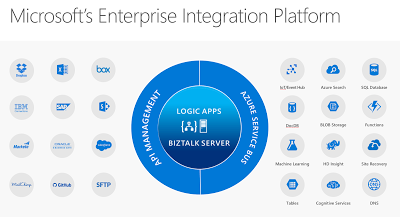
Just recently Microsoft has released its tenth version of BizTalk Server: BizTalkServer 2016. This latest version will bring the cloud closer to the enterprises with connectivity to Azure Service Logic Apps. The Logic App adapter will close the gap with regards to connectivity with SaaS solutions. The Logic Apps has a myriad of connectors of various SaaS solutions like Dropbox, GitHub, Marketo, Salesforce and with Azure Services like DocDb, Machine Learning and Functions.
SaaS connectors that will grow in numbers in the near future and connectors to Azure Services. Connectors that provide connectivity to anything, anywhere, which is basically the key driver for integration. Hence the centralizing Logic Apps and BizTalk Server at the heart of Microsoft’s Enterprise Integration Platform.
We have arrived in the digital age, where applications and data is everywhere. With all types of devices, we are connected 24/7 and surrounded by data we consume. And enterprises need to be connected and have access to data in- and outside their data center or cloud. Therefore, integration plays an essential role that it always had.
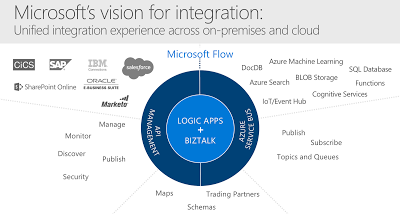
Microsoft technology has evolved over the years and matured into the tools we can use in this digital age to build integrations that fulfill current business needs. BizTalk Server, and Logic App each serve the need for enterprise requirements for integration and can work together nicely. And this Microsoft’s vision for integration i.e. the unified integration experience.
BizTalk Server can provide deep integration with divers line of business systems like SAP and Oracle and act as a gateway to the cloud. Logic Apps can make enterprises more agile to quickly deploy small integration solutions with minimal overhead and lead time. Both collaborate well with API Management and the Azure Service Bus, two other key Azure Services, forming Microsoft Integration Platform. A platform designed and built for the digital age!
Cheers,
Steef-Jan
Author: Steef-Jan Wiggers
Steef-Jan Wiggers is all in on Microsoft Azure, Integration, and Data Science. He has over 15 years’ experience in a wide variety of scenarios such as custom .NET solution development, overseeing large enterprise integrations, building web services, managing projects, designing web services, experimenting with data, SQL Server database administration, and consulting. Steef-Jan loves challenges in the Microsoft playing field combining it with his domain knowledge in energy, utility, banking, insurance, health care, agriculture, (local) government, bio-sciences, retail, travel and logistics. He is very active in the community as a blogger, TechNet Wiki author, book author, and global public speaker. For these efforts, Microsoft has recognized him a Microsoft MVP for the past 6 years. View all posts by Steef-Jan Wiggers
by community-syndication | Oct 31, 2016 | BizTalk Community Blogs via Syndication
The new kid on the block in Microsoft’s integration portfolio is Logic Apps. And for those who do not know what a Logic App is; it’s a hosted piece of integration logic in Microsoft Azure. To be more precise the hosting is done in Azure in a similar way as a Web App and the logic are built by creating a trigger followed by a series of actions similar to a workflow. And you can simply create and
by BizTalk Team | Oct 31, 2016 | BizTalk Community Blogs via Syndication
We are happy to announce that BizTalk Server 2016 is available on the MSDN Subscriber download site. We currently have the following versions available:
- BizTalk Server 2016 Enterprise
- BizTalk Server 2016 Standard
- BizTalk Server 2016 Branch
The BizTalk Server 2016 Developer edition will be coming soon.
We also have the BizTalk Server 2016 Enterprise edition available in Azure through the classic portal (this will be coming to the new portal soon).
Host Integration Server 2016 is also part of BizTalk Server and available for MSDN download too. For more info on HIS 2016 check out the team blog here.
We are constantly looking for feedback to improve the product. If you want to participate and work even more with the product group feel free to sign up for Azure Advisors and join our group. If your company already is a part of the Azure Advisors use this link to join.