
by Nick Hauenstein | Jan 25, 2017 | BizTalk Community Blogs via Syndication
At the end of last week, a few of us from QuickLearn Training hosted a webinar with an overview of a few of the new features in BizTalk Server 2016. This post serves as a proper write-up of the feature that I shared and demonstrated – Shared Access Signature Support for Relay Adapters. If you missed it, we’ve made the full recording available on YouTube here. We’ve also clipped out just the section on Shared Access Signature Support for Relay Adapters over here – which might be good to watch before reading through this post.
While that feature is not the most flashy or even the most prominent on the What’s New in BizTalk Server 2016 page within the MSDN documentation, it should come as a nice relief for developers who want to host a service in BizTalk Server while exposing it to consumers in the cloud — with the least amount of overhead possible.
Shared Access Signature (SAS) Support for Relay Adapters
You can now use SAS authentication with the following adapters:
- WCF-BasicHttpRelay
- WCF-NetTcpRelay
- WCF-BasicHttp*
- WCF-WebHttp*
* = Used only for sending messages as a client
Why Use SAS Instead of ACS?
Before BizTalk Server 2016, our only security option for the BasicHttpRelay and NetTcpRelay adapters was the Microsoft Azure Access Control Service (ACS).
One of the main scenarios that the Access Control Service was designed for was Federated Identity. For simpler scenarios, wherein I don’t need claims mapping, or even the concept of a user, using ACS adds potentially unnecessary overhead to (1) the deployed resources (inasmuch as you must setup an ACS namespace alongside the resources you’re securing), and (2) the runtime communications.
Shared Access Signatures were designed more for fine-grained and time-limited authority delegation over resources. The holder of a key could sign and distribute small string-based tokens that define a resource a client could access and timeframe within which they were allowed to access the resource.
Hosting a Relay Secured by Shared Access Signatures
In order to expose a BizTalk hosted service in the cloud via Azure Relay, you must first create a namespace for the relay – a place for the cloud endpoint to be hosted. It’s at the namespace level that you can generate keys used for signing SAS tokens that allow BizTalk server to host a new relay, and tokens that allow clients to send messages to any of that namespace’s relays.
The generated keys are associated with policies that have certain associated claims / rights that each is allowed to delegate.
In the example above, using the key associated with the biztalkhost policy, I would be able to sign tokens that allow applications to listen at a relay endpoint within the namespace, but I would not be able to sign tokens allowing applications to Send messages to the same relays.
Clicking a policy reveals its keys. Each policy has 2 keys that can be independently refreshed, allowing you to roll over to new keys while giving a grace period in which the older keys are still valid.
Either one of these keys can be provided in the BizTalk Server WCF-BasicHttpRelay adapter configuration to host a new relay.
Configuring the Security Settings for the WCF-BasicHttpRelay Adapter
When configuring the WCF-BasicHttpRelay adapter, rather than providing a pre-signed token with a pre-determined expiration date, you provide the key directly. The adapter can then sign its own tokens that will be used to authorize access to the Relay namespace and listen for incoming connections. This is configured on the Security tab of the adapter properties.
If you would like to require clients to authenticate with the relay before they’re allowed to send messages, you can set the Relay client authentication type to RelayAccessToken:
From there it’s a matter of choosing your service endpoint, and then you’re on your way to a functioning Relay:
Once you Enable the Receive Location, you should be able to see a new WCF Relay with the same name appear in the Azure Portal for your Relay namespace. If not, check your configuration and try again.
Most importantly, your clients can update their endpoint addresses to call your new service in the cloud.
The Larger Picture: BizTalk Hybrid Cloud APIs
One thing to note about this setup, however, is that the WCF-BasicHttpRelay adapter is actually not running in the Isolated Host. In other words, rather than running as part of a site in IIS, it’s running in-process within the BizTalk Server Host Instance itself. While that provides far less complexity, it also sacrifices the ability to run the request through additional processing before it hits BizTalk Server (e.g., rate limiting, blacklisting, caching, URL rewriting, etc…). If I were hosting the service on-premises I would have this ability right out of the box. So what would I do in the cloud?
Using API Management with BizTalk Server
In the cloud, we have the ability to layer on other Azure services beyond just using the Azure Relay capability. One such service that might solve our dilemma described in the previous section would be Azure API Management.
Rather than having our clients call the relay directly (and thus having all message processing done by BizTalk Server), we can provide API Management itself a token to access to our BizTalk Hosted service. The end users of the service wouldn’t know the relay address directly, or have the required credentials to access it. Instead they would direct all of their calls to an endpoint in API Management.
API Management, like IIS, and like BizTalk Server, provide robust and customizable request and response pipelines. In the case of API Management, the definitions of what happens in these pipelines are called “policies.” There are both inbound policies and outbound policies. These policies can be configured for a whole service at a time, and/or only for specific operations. They enable patterns like translation, transformation, caching, and rewriting.
In my case, I’ve designed a quick and dirty policy that replaces the headers of an inbound message so that it goes from being a simple GET request to being a POST request with a SOAP message body. It enables caching, and at a base level implements rate-limiting for inbound requests. On the outbound side it translates the SOAP response to a JSON payload — effectively exposing our on-premises BizTalk Server hosted SOAP service as a cloud-accessible RESTful API.
So what does it look like in action? Below, you can see the submission of a request from the client’s perspective:
How does BizTalk Server see the input message? It sees something like this (note that the adapter has stripped away the SOAP envelope at this point in processing):
What about on the outbound side? What did BizTalk Server send back through the relay? It sent an XML message resembling the following:
If you’re really keen to dig into the technical details of the policy configuration that made this possible, they’re all here in their terrifying glory (click to open in a new window, and read slowly from top to bottom):
The token was generated with a quick and dirty purpose-built simple console app (the best kind).
Tips, Tricks, and Stumbling Blocks
Within the API Management policy shown above, you may have noticed the CDATA sections. This is mandatory where used. You’ll end up with some sad results if you don’t remember to escape any XML input you have, or the security token itself which includes unescaped XML entities.
Another interesting thing with the policy above is that the WCF-BasicHttpRelay adapter might choke while creating a BizTalk message out of the SOAP message constructed via the policy above (which includes heaps of whitespace so as to be human readable), failing with the following message The adapter WCF-BasicHttpRelay raised an error message. Details “System.InvalidOperationException: Text cannot be written outside the root element.
This can be fixed quite easily by adjusting the adapter properties so that they’re looking for the message body with the expression set to “*”.
Questions and Final Thoughts
During the webinar the following questions came up:
- Q: Is https supported?
- A: Yes, for both the relay itself and the API management endpoint.
- Q: Maximum size is 256KB; I was able to get a response about 800 KB; Is that because BizTalk and Azure apply the compression technology and after compression the 800KB response shrinks to about 56KB?
- A: The size limit mentioned applies to brokered messages within Service Bus. Azure Relay is a separate service that isn’t storing the message for any period of time – messages are streamed to the service host. Which means if BizTalk Server disconnects, the communication is terminated. There’s a nice article comparing the two communication styles over here.
I hope this has been both helpful and informative. Be sure to keep watching for more of QuickLearn Training’s coverage of New Features in BizTalk Server 2016, and our upcoming BizTalk Server 2016 training courses.

by Sandro Pereira | Jan 24, 2017 | BizTalk Community Blogs via Syndication
After some requests from the community, I decided to update my Microsoft Integration Stencils Pack with an additional of 183 new shapes and some reorganization. With these new additions, this package now contains an astounding total of ~1094 shapes (symbols/icons) that will help you visually represent Integration architectures (On-premise, Cloud or Hybrid scenarios) and solutions diagrams in Visio 2016/2013. It will provide symbols/icons to visually represent features, systems, processes and architectures that use BizTalk Server, API Management, Logic Apps, Microsoft Azure and related technologies.
- BizTalk Server
- Microsoft Azure
- BizTalk Services
- Azure App Service (API Apps, Web Apps, Mobile Apps and Logic Apps)
- Event Hubs
- Service Bus
- API Management, IoT and Docker
- Machine Learning, Stream Analytics, Data Factory, Data Pipelines
- and so on
- Microsoft Flow
- PowerApps
- PowerBI
- PowerShell
- And many more…
The Microsoft Integration Stencils Pack v2.4 is composed by 11 files:
- Microsoft Integration Stencils v2.4
- MIS Apps and Systems Logo Stencils v2.4
- MIS Azure Portal, Services and VSTS Stencils v2.4
- MIS Azure SDK and Tools Stencils v2.4
- MIS Azure Services Stencils v2.4
- MIS Deprecated Stencils v2.4
- MIS Devices Stencils v2.4
- MIS IoT Devices Stencils v2.4
- MIS Servers and Hardware Stencils v2.4
- MIS Support Stencils v2.4
- MIS Users and Roles Stencils v2.4
These are some of the new shapes you can find in this new version:
You can download Microsoft Integration Stencils Pack for Visio 2016/2013 from:
 Microsoft Integration Stencils Pack for Visio 2016/2013 (9,1 MB)
Microsoft | TechNet Gallery
Author: Sandro Pereira
Sandro Pereira lives in Portugal and works as a consultant at DevScope. In the past years, he has been working on implementing Integration scenarios both on-premises and cloud for various clients, each with different scenarios from a technical point of view, size, and criticality, using Microsoft Azure, Microsoft BizTalk Server and different technologies like AS2, EDI, RosettaNet, SAP, TIBCO etc. He is a regular blogger, international speaker, and technical reviewer of several BizTalk books all focused on Integration. He is also the author of the book “BizTalk Mapping Patterns & Best Practices”. He has been awarded MVP since 2011 for his contributions to the integration community. View all posts by Sandro Pereira

by Eldert Grootenboer | Jan 23, 2017 | BizTalk Community Blogs via Syndication
The first month of 2017 is almost over, and I was thinking back on my experiences over the last year. Looking at the integration space, 2016 was the year where Azure really matured. Of course, we already have been having the Service Bus stack for quite some time, but last year we also had Logic Apps go GA, which allows us to create flows in Azure, and easily connecting cloud services. And later in the year, Azure Functions went live as well, which gives us the ability to write small pieces of code, which can also be used from Locic Apps, closing the gap for custom code. And this was also the year we got a new BizTalk Server release, BizTalk 2016, which brings us even better integration with Azure, allowing us to focus even more on hybrid integration scenarios. For me personally, this was a year where I had lot of fun speaking, writing and visiting conferences.
BizTalk Server Extensibility Book
In March, we published our book which I wrote together with Steef-Jan Wiggers and Johann Cooper. In this book, we describe various ways in which you can extend BizTalk, like custom pipelines, adapters, BAM, WCF Behaviors, etc. I had a blast writing this book, it was awesome to be able to work together with these two great minds and put our experiences with a great product into this book, which is free for everyone to download.
Conferences
In May, i attended Integrate, a must visit conference for anyone working with Microsoft’s integration technologies. Organized by BizTalk360, this was 3 days full of great sessions on integration, and discussion and socializing with the product group and fellow integrators. Make sure to be there this year as well, and come and say hi, it will be held June 26,27,28, and registrations will open soon.
Also in may, I visited TUGA IT in Portugal, where I had a great time together with my friends Steef-Jan, Sandro and Nino.
Usergroups
I love getting involved with the community, and what better way to do this then visit as much of usergroup meetings as I can. I will visit these whenever I can, either as a participant or as a speaker, and always have a blast. At our local user group here in the Netherlands, BTUG NL, I got to do 2 sessions this year. My first session was in March, which was actually a duo session together with my good friend Steef-Jan, where we talked about BizTalk Server Extensibility, of course inspired by our book. My second session was in November, this time on Hybrid Integration using BizTalk and Azure.
For me this was also the year I got to speak internationally, to be precise in Sweden and Belgium. I did another duo-session with Steef-Jan in Sweden in June, both in Stockholm and Goteborg. Sweden is such a nice country, with really friendly people, and being able to speak here together with Steef-Jan was a great experience. I also try to visit our friends from Belgium at BTUG BE as often as possible. They have a great community, and I also got the chance to speak here in June, on IoT and Azure.
Integration Monday
Every Monday Michael Stephenson and Saravana Kumar bring in another speaker on Integration Monday, talking about something integration related. I got to do 2 sessions here, one in March on BizTalk Server Extensibility together with Steef-Jan, and another on IoT and Azure in September. Doing these sessions is very different, as you don’t have an audience in front of you, but I love doing these, as you get to share with a global community.
The year 2017 started especially great for me, as on January 1st I received my first MVP Award. I can’t express how honored I am with this, it feels awesome to be part of such a great community.
I did another session on Integration Monday in January, this time on Hybrid Integration. But it’s only the beginning of the year, and I have a lot more planned. As I already mentioned, I will be going to Integrate in June, but first I will be going to Australia in February. Here I will be meeting with Rene, Mick, Dean, Bill, Dan and many others, I will be speaking in Sydney and Melbourne, and will be attending Ignite. I am one of the organizers of the Global Integration Bootcamp which will be done in March, where communities worldwide will be spending an entire day with integration using BizTalk and Azure, and I will be speaking here myself as well. I will be back in Sweden to do another session as well, probably in April, and will also be in Portugal in May for another TUGA IT. As you can tell, this will be another great year, and I am looking forward to catch up with old friends, and meet many new friends.
by BizTalk Team | Jan 23, 2017 | BizTalk Community Blogs via Syndication
BizTalk Server 2016 hit the pricelist December 1st 2016. With this we moved into a different era and are continuing our efforts in providing first class services to our customers around the world. To help us we want your feedback, suggestions and ideas. You can help us by going to our UserVoice page, either write new ideas or vote for some that we have there already.
You can also follow us on Twitter and Facebook.
by Tomasso Groenendijk | Jan 22, 2017 | BizTalk Community Blogs via Syndication
I’d like to build tools for other developers and in the past I created some small tools for BizTalk 2010 and BizTalk 2013 to test your maps. This time I wanted to create something else because nowadays I’m focusing more and more on functionality in Azure. Therefore I created an XSLT API that you can use to transform XML messages with XSLT. The API can also be used to execute BizTalk maps as long you don’t have Custom Functoids.
Prerequisites
The only thing what you have to do is to create account on Apigize.com. Then you get secure and optimized cloud storage for free that is only accessible by yourself. You can upload up to 10 XSLT files without any costs!
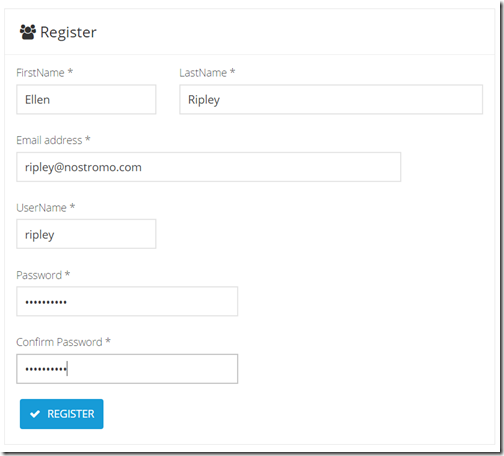
| On the Register page enter your details and then click on the Register button. |
|
| |
| Copy the Primary key value from Your subscription details. |
|
Note:
Every API request you make to the Web API must be authenticated by including an Authorization Header with your API Key. |
| |
| Click on Files API in the Documentation menu to see the operations of the Files API. |
|
| |
How to upload a XSLT map?
You can create a XSLT map by using the Visual Studio Enterprise Integration SDK or for example another XSLT tool like MapForce and XMLSpy from Altova. When you are finished creating the XSLT transformation, you upload the XSLT file into your integration account.
Use a tool like Postman to call the Files API.
Select POST and enter: https://free.apigize.io/v1/files in the Request URL.
In the Header enter “Ocp-Apim-Subscription-Key” as the key name and your Primary key as the value. |
|
| |
In the Body select the form-data radio button and then select the file that you want to upload.
Click on the Send button to upload the file. |
|
| |
How to create a XSLT transform?
With the XSLT API you can transform an .XML message.
Select POST and enter: https://free.apigize.io/v1/xslt/{XSLT filename} in the Request URL.
In the Header enter “Ocp-Apim-Subscription-Key” as the key name and your Primary key as the value. Also specify the Content-Type and what you want to Accept. |
|
| |
In the Body select the raw radio button and then enter the XML message that you want to transform.
Click on the Send button to transform the message. |
|
| |
Conclusion
In this blog post I only showed how to upload a file with the Files API and how to use the XSLT API. Of course there are more operations available on the API’s but these work similar. I want to add even more functionality to the API’s so stay tuned!

by stephen-w-thomas | Jan 21, 2017 | BizTalk Community Blogs via Syndication
The purpose of this post is to talk about a side-project that I have going on with Saravana Kumar and BizTalk360. The purpose of #MiddlewareFriday is to create a video blog of new and interesting developments going on in the industry. Each week we will publish a short video that has some new content. The content may feature news, demos and will also highlight other activities going on in the community. From time to time we will also bring on some guests to keep the content fresh and get some different perspectives.
For both Saravana and myself there is no direct commercial incentive in doing the show. It really comes down to participating in a community, learning by doing, improving communication skills and having some fun along the way.
I am going to keep this post updated to keep a running list of the shows – in part to aid in search engine discovery.
| Episode |
Title |
Date |
Tags |
| 1 |
Protecting Azure Logic Apps with Azure API Management |
January 6, 2017 |
Azure API Management, Logic Apps, ServiceNow, API Apps |
| 2 |
Azure Logic Apps and Service Bus Peek-Lock
|
January 13, 2017 |
Logic Apps, Service Bus, Patterns |
| 3 |
Logic Apps and Cognitive Services Face API – Part 1
|
January 20, 2017 |
Logic Apps, Cognitive Service, Face API, Steef-Jan Wiggers |
| 4 |
Microsoft PowerApps and Cognitive Services Face API -Part 2 |
January 27, 2017 |
PowerApps, Cognitive Services, Face API |
| 5 |
Serverless Integration with Steef-Jan Wiggers |
February 3rd, 2017 |
Logic Apps, Sentiment Analysis, Slack, Azure Functions, Steef-Jan Wiggers |
| 6 |
Azure Logic Apps and Power BI Real Time Data Sets |
February, 10, 2017 |
Logic Apps, Power BI connector, Sandro’s Integration stencils, Quicklearn, Global Integration Bootcamp |
| 7 |
Azure Monitoring, Azure Logic Apps and Creating ServiceNow Incidents |
February 17, 2017 |
Logic Apps, Azure Monitoring, API Apps, ServiceNow, Glen Colpaert SAP, Webhook Notification BizTalk360 |
| 8 |
Exploring ServiceBus360 Monitoring |
February 24, 2017 |
Service Bus, BizTalk360, Community Content: Team Flow + Luis, Exception handling for Logic App Web Services Toon Vanhoutte |
| 9 |
Coming Soon – SAP and Logic Apps |
March 3rd, 2017 |
TBD |
by Rob Callaway | Jan 20, 2017 | BizTalk Community Blogs via Syndication
Yesterday the QuickLearn Training team got together to host a webinar for other members of the integration community to reflect on a few of the new features in BizTalk Server 2016. Rather than trying to cram all of the features into a 1 hour webinar. We focused on three of the new features and explored the fun implications of each.
- SAS Authentication for Azure Relays
- Using the XslCompiledTransform Class in BizTalk Maps
- Enhancements to the management experience
If you missed it, you can find it on the QuickLearn Training YouTube channel. We will be releasing detailed write-ups of each of these topics in the coming weeks.
This was just part one of a series of Webinars that we are planning. Keep an eye out for more details on the next webinar via our Twitter account.

by Gautam | Jan 19, 2017 | BizTalk Community Blogs via Syndication
Microsoft Tech Summits kicked off today at Chicago with lots of keynotes, technical training sessions and hands-on labs to build and develop cloud skills of interested individuals.
There were also deep dive sessions covering a range of topics across Microsoft Azure and the hybrid platform including security, networking, data, storage, identity, mobile, cloud infrastructure, management, DevOps, app platform, productivity, collaboration and more.
The Microsoft Tech Summit provides Free, two-day technical training for IT professionals and developers with experts who build the cloud services across Microsoft Azure, Office 365, and Windows 10.
Here is the Agenda look like.
You can also find a city near you and Register for the event
Here’s a list of the currently published Tech Summit events around the globe:
- Amsterdam, March 23 – 24
- Bangalore, March 16 – 17
- Birmingham, March 27 – 28
- Chicago, January 19 – 20
- Copenhagen, March 30 – 31
- Frankfurt, February 9 – 10
- Johannesburg, February 6 – 7
- Milan, March 20 – 21
- Seoul, April 27 – 28
- Singapore, March 13 – 14
- Washington D.C. March 6 – 7
.
There is another free event coming up for integration community – Global integration boot camp.
This event is driven by user groups and communities around the world, backed by Microsoft, for anyone who wants to learn more about Microsoft’s integration story. In this full-day boot camp there will deep-dive into Microsoft’s integration stack with hands-on sessions and labs, delivered to you by the experts and community leaders.
In this Boot Camp, the main focus will be on:
BizTalk 2016 –BizTalk Server 2016, what’s new, and using the new Logic Apps adapter
Logic Apps –Creating Logic Apps using commonly-used connectors
Servicebus –Build reliable and scalable cloud messaging and hybrid integration solutions
Enterprise Integration Pack –Using the Enterprise Integration Pack (EIP) with Logic Apps
API Management –How does API management help you organize your APIs and how does it increase security?
On-Premise Gateway –Connecting to on-prem resources using the On-Premise Gateway
Hybrid Integration –Hybrid integrations using BizTalk Server and Logic Apps
Microsoft Flow – Learn to compose flows with Microsoft Flow
If you are interested to be part of it or to host it on your location, you can reach out to organizers by providing your details.
Organizers

by Gautam | Jan 19, 2017 | BizTalk Community Blogs via Syndication
This week during our discovery session with one of our new customer and Azure Black Belt Team members we came to know about a new storage type called Archive Storage which is still in development phase.
It is also mentioned in the Microsoft Cloud Platform roadmap documentation which provides a snapshot of what Microsoft is working on in their Cloud Platform business. You can use the document to find out which cloud services are
- recently made generally available
- released into public preview
- are still developing and testing
- or are no longer developing
As per documentation,
Azure Archive Storage is a very low cost cloud storage for data that is archived and very rarely accessed with retrieval time in hours. It can be useful for archive data such as medical reports, compliance documents, exchange mails, etc. that are accessed rarely but need to be stored for many years.
Currently Azure Storage offers two storage tiers for Blob – Hot and cool storage.
Azure hot storage tier – is optimized for storing data that is accessed frequently.
Azure cool storage tier – is optimized for storing data that is infrequently accessed and long-lived.
Azure Archive Storage is different than Hot and Cold because it’s in a way offline data storage. And that’s the reason if the Archive Storage data need to be accessed then it will be made online with retrieval time in hours. It will also be cheaper than Cold storage almost half price.
With Archive Storage there will be an option to apply a policy to move the data from hot or cold tier to Archive. For example, you can have an automated process based on a policy to move any data which is one-year-old to archive storage.
I hope archive storage type would provide an option to enterprise customers to store archival data in most cost-effective way in Azure.

by Sandro Pereira | Jan 17, 2017 | BizTalk Community Blogs via Syndication
While researching for my last post, Thinking outside the box (or not): How to create “Global C# function” to be reused inside a map?, in BizTalk360 blog, I encountered several errors while playing around with maps in order to find an approach that would allow me to create the concept of Global Function. And some of this errors were:
“Inline Script Error: must declare a body because it is not marked abstract, extern, or partial”
“Inline Script Error: ; expected”
or
“Inline Script Error: Type ‘BizTalkMapper.FunctoidInlineScripts’ already defines a member called ‘FunctionName’ with the same parameter types”
Causes
The cause of this problem is that you do not correctly declare the body of the Inline C# Function.
Or, if you are trying to reuse an existing Inline C# Function you are doing it properly.
To reuse Inline C# Functions these are the rules that you need to follow:
- If all of the Scripting Functoids are in the same grid page: In the first Scripting Functoid, linked from the source to the destination, we will have to specify the body function and in the following functoids, we only need the function declaration (no body).
- If the Scripting Functoids are in different grid pages: The Scripting Functoid that specifies the body function needs to be on the leftmost grid page and the remaining Scripting Functoids (with the function body declared) on the other grid pages to the right. In other words, counting the grid pages from left to right, if the Scripting Functoid that specifies the body function is on the second grid page, the remaining functoids with the function body declared, cannot be placed on the first grid page, they can only be placed from the second grid page (including the second).
Solution
The solution to solve this issue you have two options, you need to follow the rules described above (BizTalk Mapper tips and tricks: How to reuse Scripting Functoids with Inline C# inside the same map) or you need to implement the concept of global C# Function described in my post: Thinking outside the box (or not): How to create “Global C# function” to be reused inside a map?, in resume:
- Add a Grid page to your map and rename it to “GlobalFunctions”
- Set this grid as the first grid page of your map (important step)
- Drag-and-Drop a Scripting Functoid to the “GlobalFunctions” grid page and place the C# code
- Do not link any inputs and don’t map (link) this Scripting Functoids to any element in the destination Schema.
- Double click the earlier Scripting Functoids added to the “GlobalFunctions” grid page and set the expected input values as empty constant values, that by default doesn’t exist
- Now you can use these functions in other grid pages using only the function declaration
Author: Sandro Pereira
Sandro Pereira lives in Portugal and works as a consultant at DevScope. In the past years, he has been working on implementing Integration scenarios both on-premises and cloud for various clients, each with different scenarios from a technical point of view, size, and criticality, using Microsoft Azure, Microsoft BizTalk Server and different technologies like AS2, EDI, RosettaNet, SAP, TIBCO etc. He is a regular blogger, international speaker, and technical reviewer of several BizTalk books all focused on Integration. He is also the author of the book “BizTalk Mapping Patterns & Best Practices”. He has been awarded MVP since 2011 for his contributions to the integration community. View all posts by Sandro Pereira
