by Sandro Pereira | Jul 27, 2017 | BizTalk Community Blogs via Syndication
In the past, I wrote a blog post about Configuring BizTalk Server Host and Host Instances according to some of the Best Practices and I already have available online two PowerShell scripts for you to download: PowerShell to Configure BizTalk Server Host and Host Instances and PowerShell to Configure BizTalk Server 2013/2013 R2 Host and Host Instances.
The problem of these two scripts is that they only do 90% of the work and they are intended to be used on “day zero” of your environment, i.e., after you finish installing your environment. Don’t get me wrong, you can still use it if you have your environment up and running for a long time but in this case, you will get several error messages while the script tries to delete the handlers associated with the adapters and the reason is that you probably have already several receive and send port that is configured to use the existing “default” handler: “BizTalkServerApplication“.
For this reason, I decided to update my previous script, of course, optimize it to BizTalk Server 2016 (but it can be executed in BizTalk Server previous versions), and add to it more functionalities:
- Configure the Default Send Handler as the Send Handler for each existing static and Dynamic Send Ports
- Configure Receive Handlers from all the existing Receive locations
With these missing functionalities added the script is now working 100% and you can use it on “day zero” of your environment or when in an existing environment with existing BizTalk Applications configured and running.
The only catch is, if you already have BizTalk Application running in your environment, in order for the script to do all the steps you may need to stop all your BizTalk Applications, special the ones that have orchestrations deployed. And one of the reasons why is that for example if you cannot change the Receive or Send handler of ports that are bind to an orchestration, if, the orchestration is running.
What is Host and a Host Instances?
The BizTalk Host is a logical process and security boundary within BizTalk Server that represents a logical set of zero or more run-time processes in which you can deploy BizTalk Server services and artifacts (such as adapter handlers, receive locations, and orchestrations). Each host has a security group assigned to it and may contain multiple host instances, each on an individual machine, that perform the work of the host.
In another hand, a host instance is the physical instance of a host on a computer running BizTalk Server. Each host instance belongs to exactly one host, and the service account of the host instance belongs to the security group of the host. The security group may be used to grant permissions to physical resources such as databases for use by any host instances in the host.
What is an Adapter Handler?
An adapter handler is an instance of a BizTalk host in which the adapter code runs. When you specify a send or receive handler for an adapter you are specifying which host instance the adapter code will run in the context of. An adapter handler is responsible for executing the adapter and contains properties for a specific instance of an adapter.
The default BizTalk Server configuration will only create one in-process host, “BizTalkServerApplication”, that will be associated as a receive and send adapter handler for all of the installed adapters, with the exception of HTTP, SOAP, WCF-BasicHttp, WCF-WSHttp and WCF-CustomIsolated adapter receive handlers that can only be running in an isolated host.
How can I automate this task?
Windows PowerShell is a Windows command-line shell designed especially for system administrators and can be used by BizTalk administrators to help them in automating tasks.
This is a simple script that will configure the following components in your environment:
- Create Host and Host Instance according to some of the best practices: two Receive host and host instances (one 32-bits and one 64-bits); two Send host and host instances (one 32-bits and one 64-bits); One Host and Host Instance to process Orchestrations and one Host and Host Instance for tracking;
- Create Receive and Send Handlers for each adapter;
- And finally, associate the correct Receive and Send Handlers to each existing receive and send ports present in your environment
THIS POWERSHELL IS PROVIDED “AS IS”, WITHOUT WARRANTY OF ANY KIND.
The script can be found and download on Microsoft TechNet Gallery:
 PowerShell to Configure BizTalk Server 2016 Host, Host Instances and Handlers (30 KB)
Microsoft | TechNet Gallery
Author: Sandro Pereira
Sandro Pereira lives in Portugal and works as a consultant at DevScope. In the past years, he has been working on implementing Integration scenarios both on-premises and cloud for various clients, each with different scenarios from a technical point of view, size, and criticality, using Microsoft Azure, Microsoft BizTalk Server and different technologies like AS2, EDI, RosettaNet, SAP, TIBCO etc. He is a regular blogger, international speaker, and technical reviewer of several BizTalk books all focused on Integration. He is also the author of the book “BizTalk Mapping Patterns & Best Practices”. He has been awarded MVP since 2011 for his contributions to the integration community. View all posts by Sandro Pereira

by Sriram Hariharan | Jul 27, 2017 | BizTalk Community Blogs via Syndication
After the previous Logic Apps live webcast back in May 2017, the team were back just in time for their webcast on July 26, 2017 – a day before Logic Apps went Generally Available (GA) one year ago! Yes, Azure Logic Apps officially turns 1!! A huge round of applause and shout out to the team at Microsoft for giving a great product offering. This episode of Logic Apps live webcast had Jeff Hollan, Kevin Lam and Jon Fancey giving the recent updates that have rolled into the product.
Happy Birthday Logic Apps! You’ve turned 1 and have a long way to go!
New York Hackathon – September 5, 2017
The Logic Apps team is conducting a very unique, first of its kind Hackathon event on September 5, 2017 at Microsoft Times Square office in Downtown, Washington. This hackathon will focus on Azure Functions, Azure Logic Apps, Azure App Services, API Management and more. If you are interested to attend this hackathon, send the Logic Apps team a Tweet (DM), email.
What’s New in Azure Logic Apps?
- Export Logic App in Visual Studio – When you open a Logic App from Cloud Explorer in Visual Studio, you can export the Logic App to your Visual Studio project. This will create a file on your file system of the Logic App as an ARM template. You can import this template into the Visual Studio and start using your Logic App within Visual Studio.
- Webhooks in Foreach loop – Previously, it was possible to have Webhooks across the Logic App and now the functionality has been extended to the Foreach loop. You can have as many Webhooks in your foreach loop.
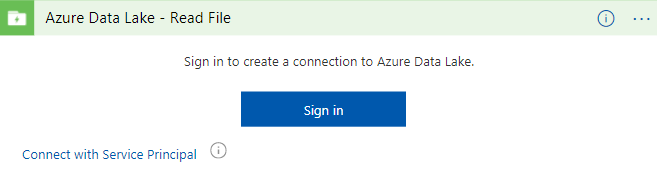
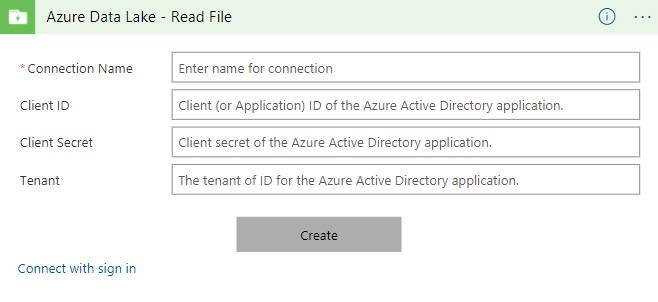
- Service Principal Authentication (Azure Data Lake and ARM) – If you are using any resource templates, one of the biggest challenges with some OAuth connectors is that you have to give your consent by signing up and giving Logic Apps the permission to access your connection details. This is a challenge when there are numerous deployments. Instead, now when you try to connect to Azure Resource Manager or Azure Data Lake, you can now connect using the Azure Application Service Principal. All you have to do is provide a secret key that has access to the application. Soon, this functionality will roll out to Office365 connectors, Dynamics connectors and SharePoint connectors.
- Array handling in designer – Let’s say you have a situation where you have an output from one of the Logic App steps and you want to input the actual array object instead of the actual elements, this operation is now possible in the Logic Apps designer. This is best implemented now in the “Send Email” step where you can add multiple attachments as an array.
- Batch Processing – Jon Fancey demonstrated this functionality at INTEGRATE 2017 where users can group things together (arbitrarily).
- Variable decrement – In addition to initialize and increment (discussed in the earlier Logic Apps Live webcast), and the Set functionality explained here, the Logic Apps team have added the “decrement” capability to variables. The team will be adding support for more variable types in the coming weeks/months.
- Run history compressed view – When you click the Run History section, you will see a compressed view of the actual run history that lists the failed runs for you to easily act upon.
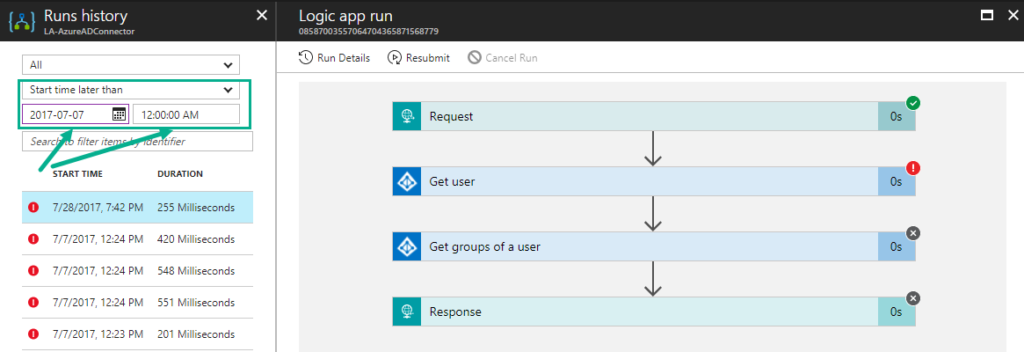
- Run API time-range filter – You can now filter the runs based on the time-range (say, between two date range times)
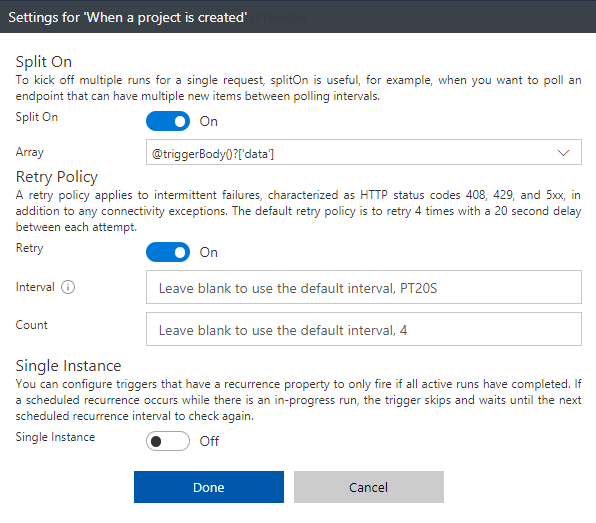
- Action Configuration settings (splitOn, retry policy, timeout, sequential flag, disable async polling) – All these operations (that are configurable) can now be performed right from the Logic Apps Designer in the Trigger Configuration settings.
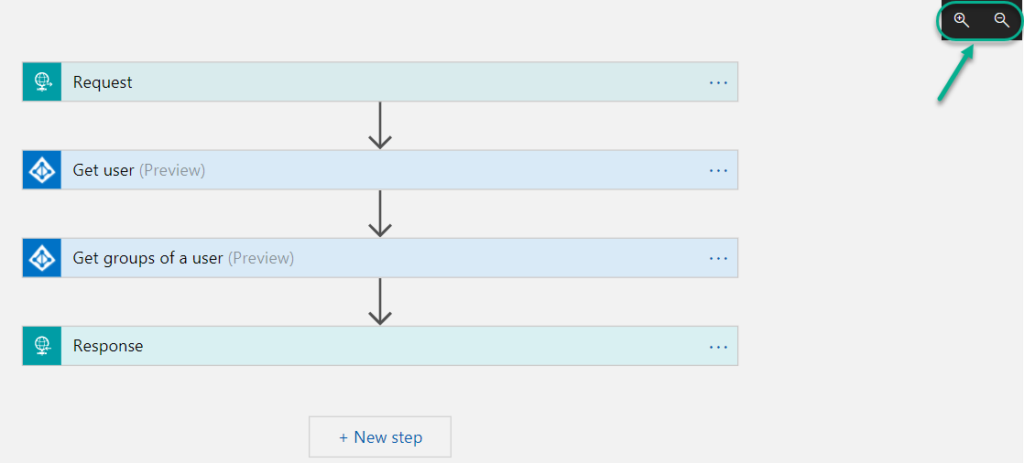
- Pan and zoom within the Designer
- Server side paging (eg., SQL) – For instance, SQL has a page size limit of 256 rows in a request. Say, when you query more than 256 rows, only the first 256 rows would be fetched from the database. Now you can enable Server Side Paging from the Designer where there is a configurable value and you can retrieve the number of rows depending on the value that is configured.
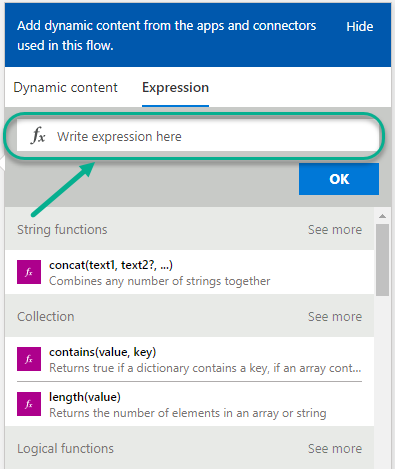
- Expression Authoring – You can build your expression functions from the designer, and all other expressions are listed right in the Designer. It becomes easy for you to find the expressions.
- Smart tips – There are hints now available in the Logic Apps Designer that will remind you to perform a very important action.

- XSLT Byte Order Mark config – When you use the Transform action, you will normally get back the XML and along with it, you will receive the byte order mark. The Logic Apps team has now in fact cleaned the code in such a way that you can now opt out from receiving those byte order mark in addition to the XML.
- Open Sourced Templates – You can submit New / update the existing Templates at github.com/azure/logicapps. The Logic Apps team will review the templates and publish them accordingly.
New Connectors
- Azure File Storage – You can now access your blob attached storage from/to your VM
- ARM Invoke and Service Principal – The ARM Invoke is super powerful. For any Azure Resource that you have access to, you can easily Start/Stop the VM, etc.
- Azure Application Insights – This connector allows you to queue up reports and run queries to get the App Insights report
- Video Indexer
- Microsoft Planner
- Microsoft Teams
- Microsoft Forms
- Bing Maps
- Bing Search
- Adobe Creative Cloud
- Parserr
- Calendly
- Teamwork
- JotForm
- Freshservice
- Pitney Bowes
- AWeber
- Cognito Forms
- Team Work
- PostreSQL
What’s in Progress?
- Large Files – Ability to move large files up to 1 GB (between) for specific connectors (blob, FTP)
- SOAP – One of the most requested features on UserVoice. Once available, you will be able to consume SOAP services (both cloud and on-premise)
- Expression Intellisense – Logic Apps workflow definitions will incorporate the same code used by Microsoft Visual Studio
- Expression tracing – With this capability, you can actually get to see the intermediate values for complex expressions
- Foreach nesting in the designer – This was a backend capability that was recently released but this capability will soon be incorporated into the designer.
- Foreach failure navigation – Say, you have about 1000 iterations in the foreach loop and 5 of them actually failed, you have to look for which one actually failed. Instead, you can navigate to the next failed action inside a for each loop easily to see what happened.
- Functions + Swagger
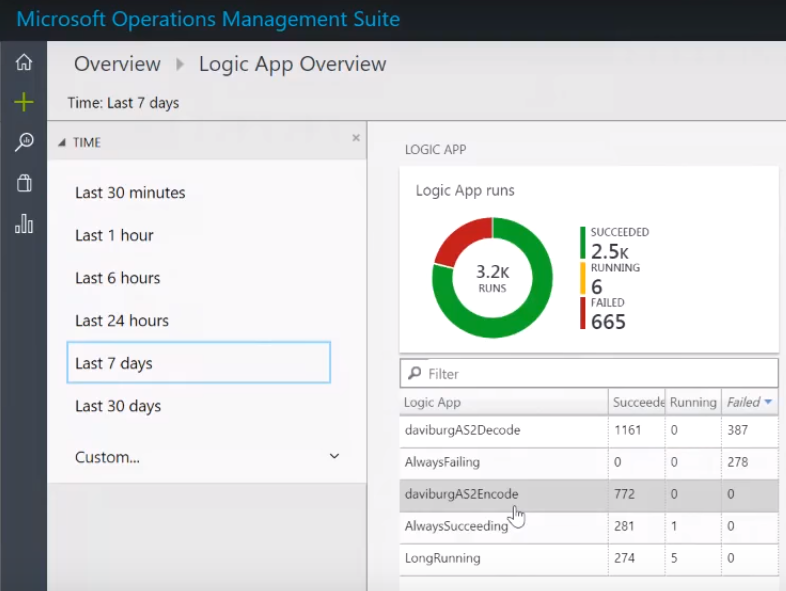
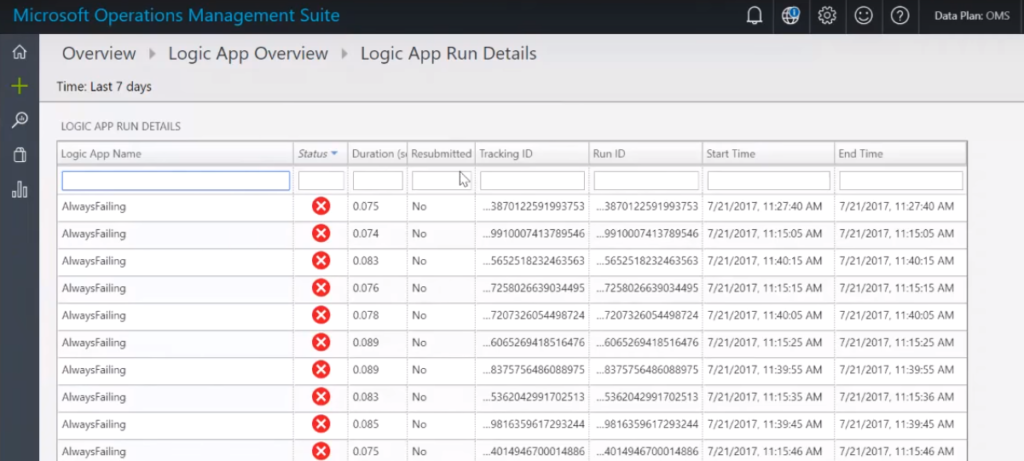
- Logic Apps OMS Package – You can monitor all the Logic Apps using a B2B solution within the Operations Management Suite (OMS). The preview of this OMS dashboard will be available within the next month (before next Logic Apps live webcast). You can bulk resubmit at the same time.
- Variables append (capability)
- Publish Logic Apps to PowerApps and Flow in a easy way
- Export Flow to Logic App ARM template
- Code view peek in the Action
- Time based batching
- Upcoming Connectors
- Azure Tables
- Azure SQL Data Warehouse
- Service Now
- Workday
- Feedly
- MySQL (RW)
- Amazon Redshift
You can watch the recording of this session here
[embedded content]
Community Events Logic Apps team are a part of
- Integration Bootcamp on September 21-22, 2017 at Charlotte, North Carolina. This event will focus on BizTalk, Azure Logic Apps, Azure API Management and lots more.
- INTEGRATE 2017 USA – October 25 – 27, 2017 at Redmond. Register for the event today.
Why attend INTEGRATE 2017 USA event?
Jim Harrer (Pro Integration Team Program Manager, Microsoft) and Saravana Kumar (Founder/CTO – BizTalk360) give you a heads up as to why you have to attend INTEGRATE 2017 USA event.
Feedback
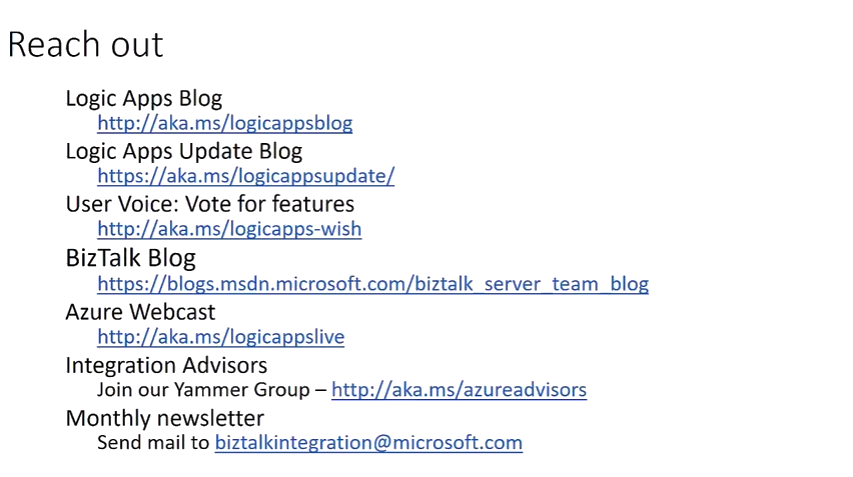
If you are working on Logic Apps and have something interesting, feel free to share them with the Azure Logic Apps team via email or you can tweet to them at @logicappsio. You can also vote for features that you feel are important and that you’d like to see in logic apps here.
The Logic Apps team are currently running a survey to know how the product/features are useful for you as a user. The team would like to understand your experiences with the product. You can take the survey here.
If you ever wanted to get in touch with the Azure Logic Apps team, here’s how you do it!
Previous Updates
In case you missed the earlier updates from the Logic Apps team, take a look at our recap blogs here –
Author: Sriram Hariharan
Sriram Hariharan is the Senior Technical and Content Writer at BizTalk360. He has over 9 years of experience working as documentation specialist for different products and domains. Writing is his passion and he believes in the following quote – “As wings are for an aircraft, a technical document is for a product — be it a product document, user guide, or release notes”. View all posts by Sriram Hariharan

by Raja Sreenivasan | Jul 27, 2017 | BizTalk Community Blogs via Syndication
With this release of BizTalk360(v8.5), the user can customize email template. The earlier version of BizTalk360 only has a capability to change the color of the email body, font, logo, background, footer background etc. Most of our customer had requested to customize the email alert with more comprehensive improvements, so we have revamped the email template module with more additional functionalities to simplify and customize the email notification. This allows to create and manage custom templates for notifications.
The user can able to create a template with an in-built XSLT validator with preview options. Email template can be used in different alarms with light or dark theme, which helps to
• grab the support team’s attention to take on the relevant actions.
• choose different theme templates to indicate different business cases.
• easily identify which template belongs to which environment.
So, let’s us look how to create a template in the newer version of BizTalk360.
Creating Template
In BizTalk360, Manage Email Template can be found in the monitoring and notification section of setting side. While installing the newer version, the default template “BizTalk360 Email Template” will be used for all the existing or newly created alarm.

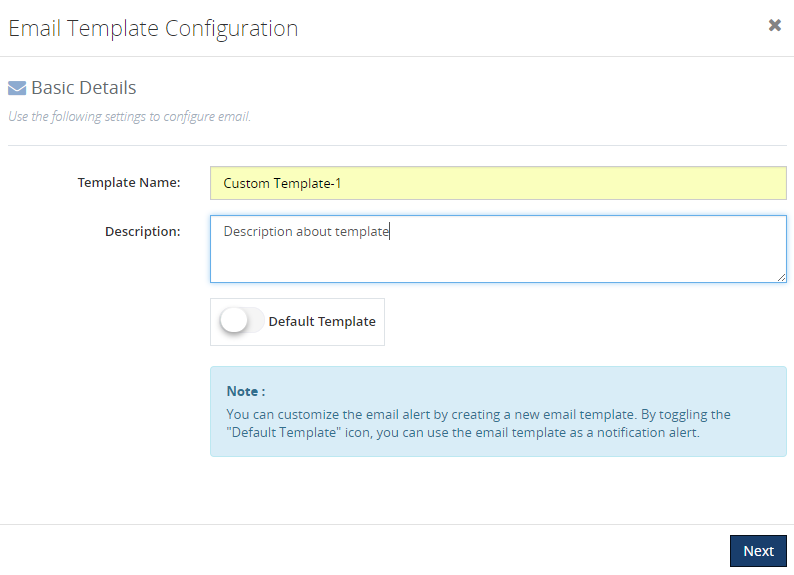
For creating a new template, click on “NEW” icons as shown in above picture, a blade opens for providing the basic details like template name, description of the template, toggle button for making it as default template as shown in the picture below.
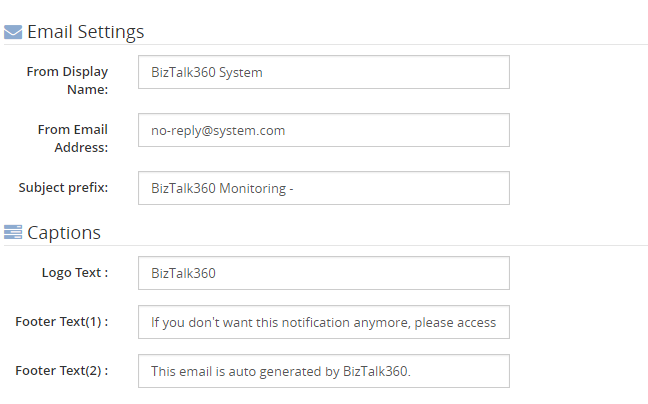
In the following section, the user can edit and provide their own data like display name, email address, logo text, footer text etc.same as previous versions for a better manageability.
Theme
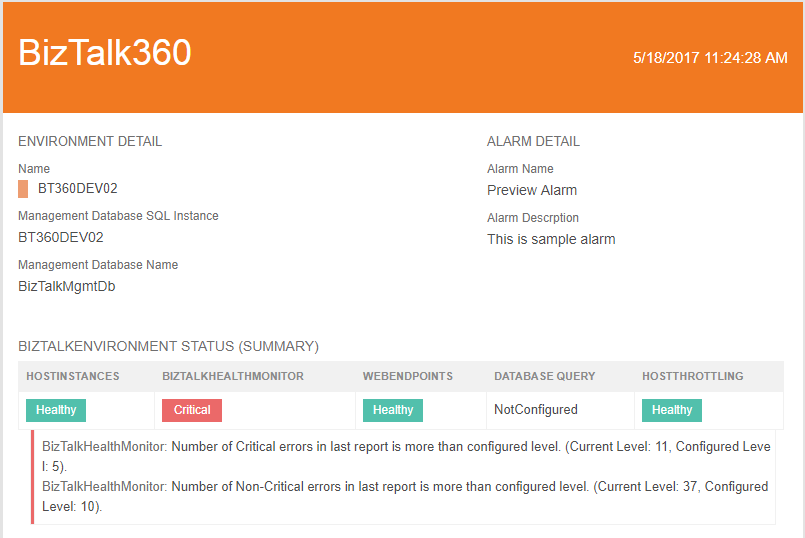
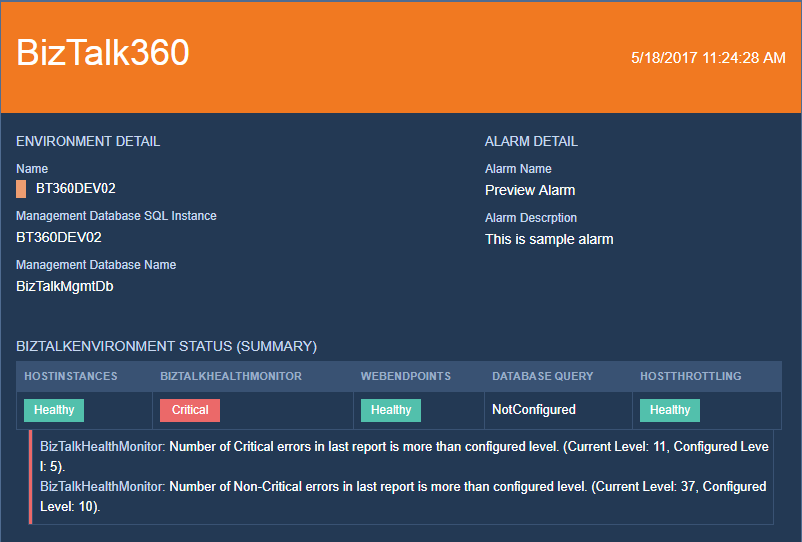
Initially, BizTalk360 provides a default template “BizTalk360 Email Template” with a light elegant theme. Themes are also available in two variants light and dark. A user can able to choose light or dark theme while creating a template.
However, the earlier version of BizTalk360 email colors are chosen by selecting colors from color picker and here we came up with the idea of providing “themes” instead of simply selecting the color code for the email template.
We categorized themes into two
• Light Theme
• Dark Theme
Light Theme
Dark Theme
We are not restricting the user to simply selecting light or dark theme, we have also provisioned to edit the themes.
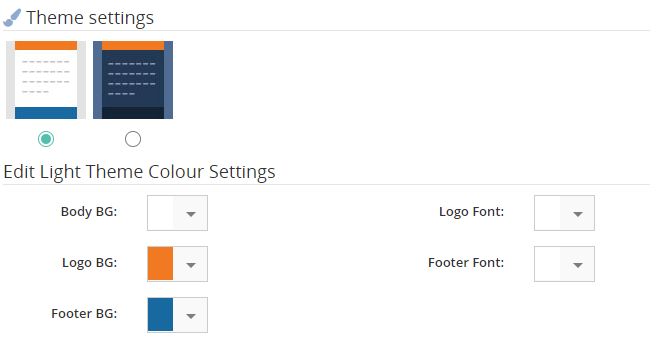
Under the edit theme color settings, a user can choose 6 Body BG color which represents different themes for light and dark. Once the theme is selected, “PREVIEW TEMPLATE” option is being provided to cross check the desired changes on a new blade.
Once the template is created, it will be displayed in the main grid of Manage Email Templates page.
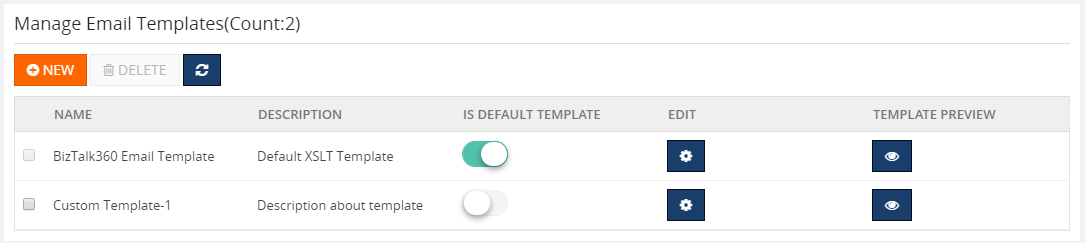
XSLT
BizTalk360 uses XSLT (eXtensible Stylesheet Language Transformations) as a styling language for customizing the email template. The XSLT file editing option is being provided to a user for changing font family and font size. “Please do not change any logic in XSLT file, as this might corrupt the mailing functionality”. This facility is available in the edit section of each template by clicking the edit gear icon.
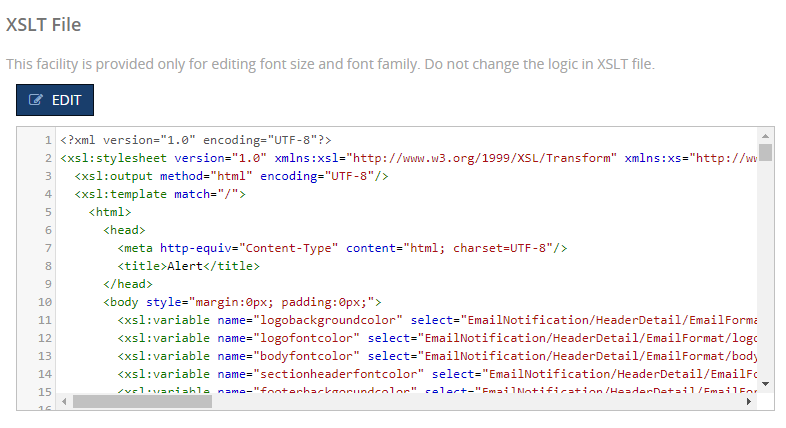
Once the changes are made in the XSLT file, the inbuilt XSLT validator verifies the XSLT file and allows the user to save the file after successful verification.
The “Preview Template” option is provided in edit section to make sure the desired changes have been made in XSLT file.
Alarm Configuration
In the alarm configuration section, we have customized for a user-friendliness to choose the template that has been created at the manage email module. Also, we made the notification channel to be available in the Alarm configuration page itself. We have made the email configuration optional if the notification channel is being enabled so that either one of the choices can serve the purpose.
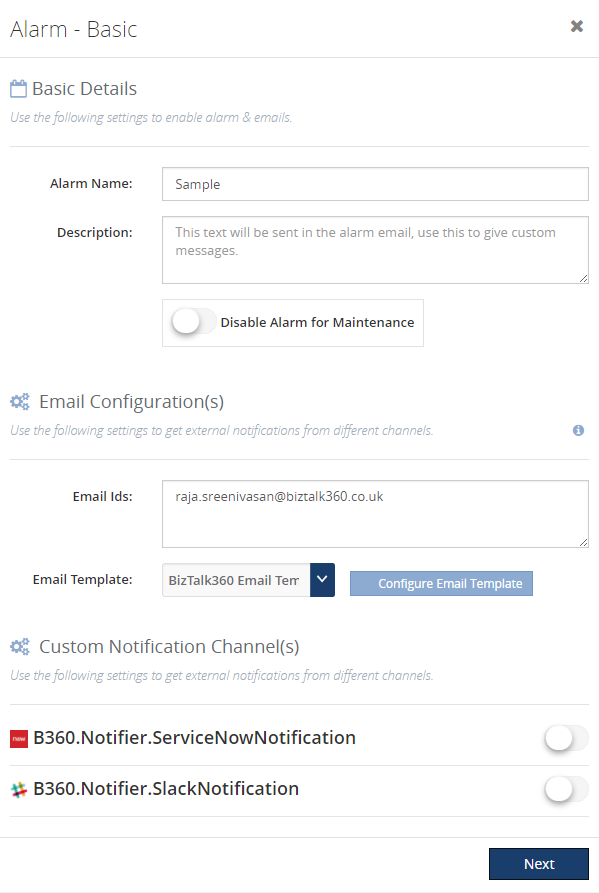
Conclusion
BizTalk360 already had a feature to format email template, with its latest release v8.5 it fills the gap by adding the ability to customize, create and manage template for different alarms based on user preference. Keep your mailing color codes intact with your thoughts using our customized email template feature. If you have any feedback or suggestion, please feel free to write to us at [email protected].

by Gautam | Jul 25, 2017 | BizTalk Community Blogs via Syndication
With Azure Logic Apps, you can now implement “serverless”, cloud-based enterprise integration workflows for EAI & B2B scenarios
- EAI – Enterprise Application Integration
- B2B – Business-to-Business communication
The Enterprise Integration Pack features include the B2B, EDI and XML capabilities for handling complex business to business workloads. With this features, Logic Apps can easily leverage the power of BizTalk Server, Microsoft’s industry leading integration solution to enable integration professionals to build the solutions they need.
The pack uses industry standard protocols, including AS2, X12, and EDIFACT, to exchange messages between business partners. Messages can be optionally secured using both encryption and digital signatures.
Enterprise Integration Pack is based on integration account, which is a secure and scalable container that stores the various artifacts you need for more complex business process workflow such as, schemas for XML validation, maps for transformation, and trading partner agreements.

Integration Account
Integration Account, a container that stores the various artifacts you need for more complex business process workloads such as trading partner agreements.
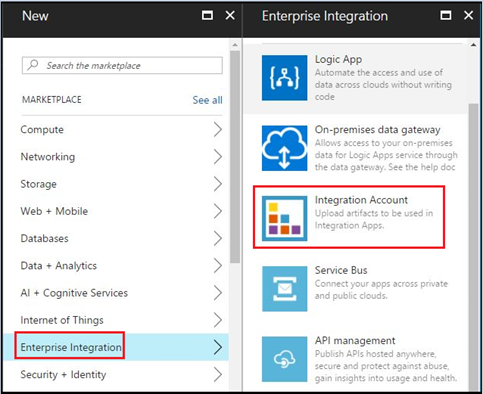
It is essential to create an integration account for a Logic App to use EAI and B2B capabilities. To create an integration account, log in to Azure portal and go to New –> Enterprise Integration, as shown below. Select Integration Account here.
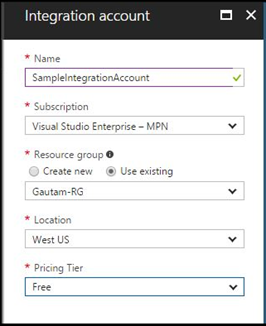
Now enter the Name for the integration account and select the Subscription, Resource group, and Location, as shown below. Click on the Create button.
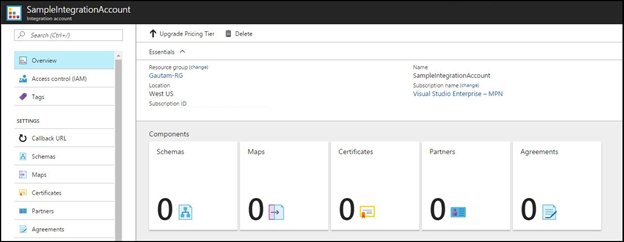
This is how the integration account container SampleIntegrationAccount look like.
To use the artifacts stored in the integration account, you need to create a Logic App and link the integration account to it.
Integration account can hold the following integration artifacts used for Enterprise Integration scenarios:
XML schemas: You can use XML schema to define the message / document format that you expect to receive and send from source and destination systems respectively.
XSLT-based maps: This can be used to transform XML data from one format to another format.
Trading partners: This is a representation of a group within organization or partner you do business with. These are the entities that participate in Business-To-Business (B2B) messaging and transactions.
Trading partner agreements: When two partners establish a relationship, this is referred to as an agreement. Trading partner agreements is an understanding between two business profiles to use a specific message encoding protocol or a specific transport protocol while exchanging EDI messages with each other. Enterprise Integration supports three protocol/transport standards:
Certificates: Enterprise Integration uses certificates for secure messaging of EDI data, which is achieved using public and private keys. Organization (Trading Partner) generates keys, distributes the public, and keeps the private secret. Data encrypted by the public key can only be decrypted by the private key.
Certificates are just electronic documents that contains a public key. These certificates are digitally signed by a trusted certificate authority (CA) and the signature binds owner’s identity to the public key.
Logic Apps Enterprise Integration Tool
The Enterprise Integration Tool is an extension for Visual Studio 2015, which can be downloaded from here.
Basically, it adds an integration project type to Visual Studio 2015 and lets you create XML schemas, Flat File Schemas, and maps to build an EAI/B2B integration solution.
It uses the Logic App Schema editor, Flat File Schema generator, and XSLT mapper to easily create integration account artifacts. These artifacts, XSD and XSLT map files are uploaded to integration account so that you can use them for Enterprise Messaging in Logic App.
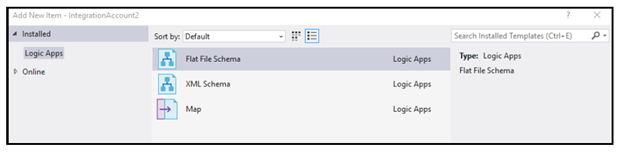
Integration account connectors
The integration pack connectors enable you to easily validate, transform and process different messages that you exchange with different applications within your enterprise (EAI) or with your business partners (B2B). If you work with BizTalk Server, then these connectors are a good fit to expand your BizTalk workflows into Azure.
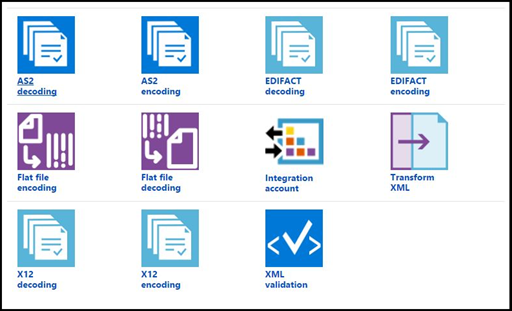
Following enterprise features can be achieved by using Integration account connectors
EAI features:
- XML Validation
- Transform XML
- Flat File Encoding
- Flat File Decoding
B2B features:
- AS2 – Decode AS2 Message
- AS2 – Encode to AS2 Message
- X12 – Decode X12 message
- X12 – Encode to X12 message by agreement name
- X12 – Encode to X12 message by identities
- EDIFACT – Decode EDIFACT message
- EDIFACT – Encode to EDIFACT message by agreement name
- EDIFACT – Encode to EDIFACT message by identities
Together all these features/capabilities enable customers to create end to end automated business processes that scale with the cloud connecting you to your business partners quicker than ever on Logic Apps.
Enterprise Integration templates
Logic Apps has rich set of pre-built template and few of them are for Enterprise Integration as shown below.
VETER – Validate, Enrich, Transform, Extract, Route.
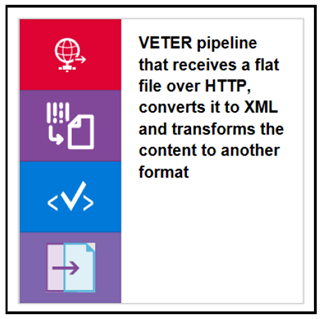
There is a quick start template on GitHub to try these scenarios. Here is the GitHub link for VETER scenario
EDI over AS2
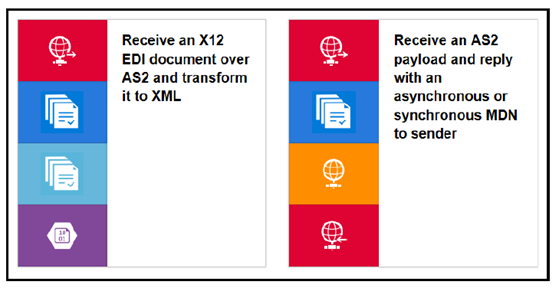
Message handling in Logic Apps
The Enterprise Messaging in Logic Apps have the following features:
Flexibility in content types: Logic Apps are flexible enough to support different content types, such as binary, JSON, XML, and primitives. Now you can receive different message types in Logic Apps and then convert them to JSON or XML format required for the downstream systems. We also have new BizTalk connectors, which can be used to push the message to the on-premise BizTalk server.
The Enterprise Integration pack provides XSD support in Logic Apps. So, you can upload your XML schemas to integration account and use them in Logic App workflow and further convert them to the binary or JSON format as per your requirement.
Mapping: you can also create XSLT-based map in Visual Studio and use them in Logic App workflows. You can also leverage your existing assets-schema and maps by uploading them to integration account and using them in Logic Apps.
Flat file processing: You can easily convert Flat files into XML and vice versa. Built-in connectors support Logic Apps to convert csv, delimited, and positional file into XML and then into JSON/base64.
EDI: With Enterprise Integration Pack, Logic Apps now supports EDI processing for business-to-business (B2B) integration scenarios with out-of-the-box X12 and EDIFACT support. By enabling both encode and decode for these EDI standards you are able to receive or send EDI documents from Logic Apps.
Summary:
Enterprise Application Pack for Logic Apps comes with the concept of integration account that stores various artifacts you need for more complex business process workloads such as trading partner agreements. You need to use Enterprise Integration Tool to create enterprise artifacts such as schema and maps which would be used to create “serverless”, cloud-based enterprise integration workflows for EAI & B2B scenarios.
You can check out the next post to build your first Enterprise Messaging solution in Logic Apps.

by Sandro Pereira | Jul 25, 2017 | BizTalk Community Blogs via Syndication
Nice way to start the day: “SQL Server detected a logical consistency-based I/O error’s“… For some reason, maybe due to sudden computer shutdown/crash or a forced shutdown, one of my client BizTalk DEV virtual machines presented strange behaviors this morning. The Host Instances were always restarting for no apparent reason. When I started to diagnose the problem, and inspect the machine Event Viewer I found the following error:
SQL Server detected a logical consistency-based I/O error: incorrect pageid (expected 1:1848; actual 0:0). It occurred during a read of page (1:1848) in database ID 10 at offset 0x00000000e70000 in file ‘C:Program FilesMicrosoft SQL ServerMSSQL13.MSSQLSERVERMSSQLDATABizTalkMsgBoxDb.mdf’. Additional messages in the SQL Server error log or system event log may provide more detail. This is a severe error condition that threatens database integrity and must be corrected immediately. Complete a full database consistency check (DBCC CHECKDB). This error can be caused by many factors; for more information, see SQL Server Books Online.
These type of error is usually related to the IO/Hardware issues and as the error mention you should check and run the DBCC CHECKDB in SQL Server:
DBCC CHECKDB (BizTalkMsgBoxDb) WITH NO_INFOMSGS, ALL_ERRORMSGS
When I execute the above command, I got more detail of the problems that were happening:
Msg 8909, Level 16, State 1, Line 1
Table error: Object ID 0, index ID -1, partition ID 0, alloc unit ID 0 (type Unknown), page ID (1:1856) contains an incorrect page ID in its page header. The PageId in the page header = (0:0).
Msg 8909, Level 16, State 1, Line 1
Table error: Object ID 0, index ID -1, partition ID 0, alloc unit ID 0 (type Unknown), page ID (1:1848) contains an incorrect page ID in its page header. The PageId in the page header = (0:0).
CHECKDB found 0 allocation errors and 2 consistency errors not associated with any single object.
Msg 8928, Level 16, State 1, Line 1
Object ID 544720993, index ID 1, partition ID 72057594059227136, alloc unit ID 72057594069385216 (type In-row data): Page (1:1856) could not be processed. See other errors for details.
Msg 8980, Level 16, State 1, Line 1
Table error: Object ID 544720993, index ID 1, partition ID 72057594059227136, alloc unit ID 72057594069385216 (type In-row data). Index node page (0:0), slot 0 refers to child page (1:1856) and previous child (0:0), but they were not encountered.
CHECKDB found 0 allocation errors and 2 consistency errors in table ‘BizTalkServerSendHost_DequeueBatches’ (object ID 544720993).
Msg 8928, Level 16, State 1, Line 1
Object ID 1437248175, index ID 1, partition ID 72057594061717504, alloc unit ID 72057594072137728 (type In-row data): Page (1:1848) could not be processed. See other errors for details.
Msg 8980, Level 16, State 1, Line 1
Table error: Object ID 1437248175, index ID 1, partition ID 72057594061717504, alloc unit ID 72057594072137728 (type In-row data). Index node page (0:0), slot 0 refers to child page (1:1848) and previous child (0:0), but they were not encountered.
CHECKDB found 0 allocation errors and 2 consistency errors in table ‘BizTalkServerTrackingHost_DequeueBatches’ (object ID 1437248175).
CHECKDB found 0 allocation errors and 6 consistency errors in database ‘BizTalkMsgBoxDb’.
repair_allow_data_loss is the minimum repair level for the errors found by DBCC CHECKDB (BizTalkMsgBoxDb).
CAUSE
Again, these type of error is usually related to the IO/Hardware issues and it may occur due to sudden computer shutdown/crash or a forced shutdown of the machine that for some reason corrupted the files,
Solution
Because I already had almost all the settings/configurations/optimizations of my developer environment done and did not want to re-install them again, like SQL Server optimizations, Jobs, host and host instances and so on, to solve the SQL Server detected a logical consistency-based I/O error I had to:
- Set the ‘BizTalkMsgBoxDb’ database to be in single user mode.
ALTER DATABASE BizTalkMsgBoxDb

SET SINGLE_USER;

GO
- Try to repair the errors that were found in both tables: ‘BizTalkServerSendHost_DequeueBatches’ and ‘BizTalkServerTrackingHost_DequeueBatches’
USE BizTalkMsgBoxDb;

GO

DBCC CHECKTABLE('BizTalkServerSendHost_DequeueBatches', REPAIR_ALLOW_DATA_LOSS)

GO

DBCC CHECKTABLE('BizTalkServerTrackingHost_DequeueBatches', REPAIR_ALLOW_DATA_LOSS)

GO

ALTER DATABASE BizTalkMsgBoxDb

SET MULTI_USER;

GO
- Try to repair the errors that were found in both tables: ‘BizTalkServerSendHost_DequeueBatches’ and ‘BizTalkServerTrackingHost_DequeueBatches’
Because you change ‘BizTalkMsgBoxDb’ database to be in single user mode and then back to multi user if we don’t force a full backup the Backup job will start to fail with the message:
- [SQLSTATE 01000] (Message 4035) BACKUP LOG cannot be performed because there is no current database backup. [SQLSTATE 42000] (Error 4214)
So, to avoid this we need to force a BizTalk full backup by calling the “BizTalkMgmtDb.dbo.sp_ForceFullBackup” stored procedure
This way may not be the correct or perfect solution because If successful, the REPAIR_ALLOW_DATA_LOSS option may result in some data loss. In fact, it may result in more data lost than if a user were to restore the database from the last known good backup. The problem was that I didn’t have a last known good backup and in fact, this was a dev environment, so losing data was not really important.
The good news was that after I run all these steps, all the SQL Server detected a logical consistency-based I/O error’s stop appearing in Event Viewer the environment became stable and working properly again.
Author: Sandro Pereira
Sandro Pereira lives in Portugal and works as a consultant at DevScope. In the past years, he has been working on implementing Integration scenarios both on-premises and cloud for various clients, each with different scenarios from a technical point of view, size, and criticality, using Microsoft Azure, Microsoft BizTalk Server and different technologies like AS2, EDI, RosettaNet, SAP, TIBCO etc. He is a regular blogger, international speaker, and technical reviewer of several BizTalk books all focused on Integration. He is also the author of the book “BizTalk Mapping Patterns & Best Practices”. He has been awarded MVP since 2011 for his contributions to the integration community. View all posts by Sandro Pereira
by Vignesh Sukumar | Jul 25, 2017 | BizTalk Community Blogs via Syndication
BizTalk360, being a Middleware monitoring tool, it must deal with a lot of message transfer between different systems of BizTalk Server. In a typical enterprise level scenarios, the cluster of systems plays an important role in high availability. The Communication between different server systems happens from Server to a network and then to another system via ports/protocols.
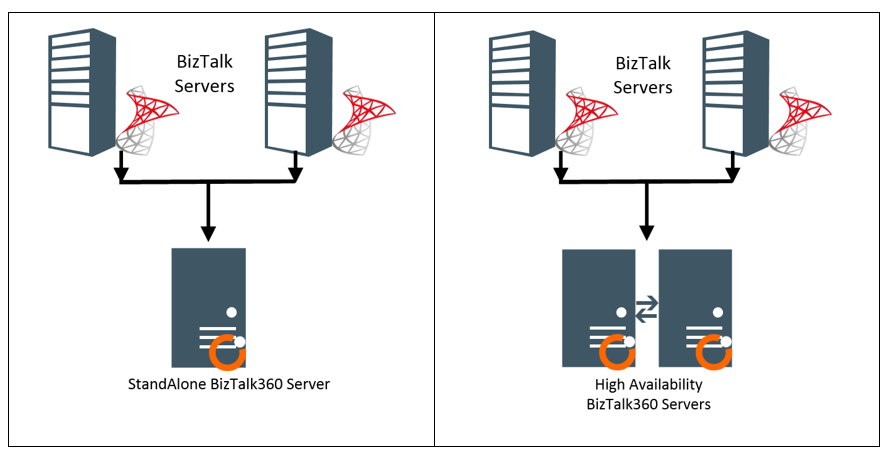
In a typical StandAlone (or) High-Availability monitoring scenarios where BizTalk360 is installed on a server different from actual BizTalk server. This enables the BizTalk Server to be monitored on 24×7 without any downtime on monitoring. Even if the BizTalk physical server goes down, BizTalk360 can send the down alert. This blog summarizes the basic ports/protocols that need to be granted an access to receive or send a message across the interconnected systems.
As this is the best practice to install the BizTalk360, we need to make sure the BizTalk360 running servers should be enabled with below protocols/port number in the Windows Firewall to communicate with the BizTalk Server/Azure/any external services at runtime. Below is the list of basic ports/protocols utilized for all the features/services.
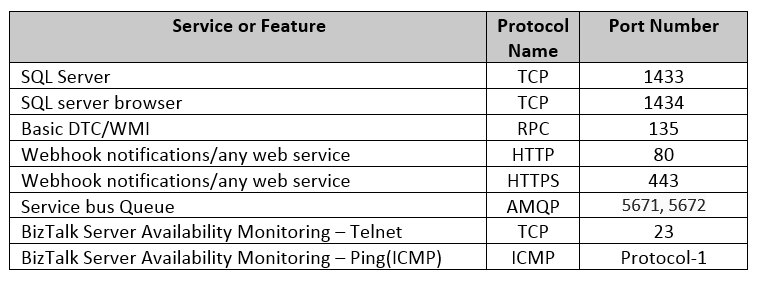
SQL Server:
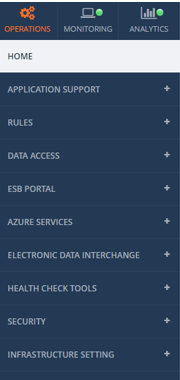
As BizTalk Server Relies on the SQL server databases, connection to the SQL server is critical to fetch the Artifacts/any results via direct query or through BizTalk ExplorerOM. This SQL connectivity is responsible for a majority of the below functionalities.
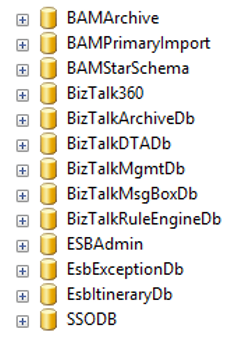
Database responsible for the above functionalities includes the below BizTalk databases and also BizTalk360 database.
DTC/WMI Port
BizTalk360 communicates with other windows services with the help of Windows Management Instrumentation. MSDTC- Microsoft Distribution Coordinator is responsible for moving the transaction from one system to another system. Make sure the Network DTC is also switched on to communicate with other remote servers and MSMQ. Also make sure MSDTC, WMI and RPC windows services are up and running.

Useful Microsoft Links
As the BizTalk360 server requires the same level of permissions like BizTalk server and the usage of the ports/protocols are pertinent to the Business architecture of every client, the below Microsoft links provides the port level segregation for different features that must be enabled on the Firewall to make BizTalk360 monitoring work seamlessly
Random/Custom Ports:
At run time, TCP ports are randomly picked up by the server, make sure the dynamically allocated ports are also being unblocked by the firewall. Also, make sure if custom ports are utilized for any service, unblock that as well from the firewall for the seamless working. Please refer Microsoft article for guidance. For firewall security recommendations please visit this msdn-link.
Summary
BizTalk360 provides continuous support and suggestions to make the monitoring at your ease. This blog was one such effort to make sure our BizTalk360 users seamlessly follow best practices to make BizTalk monitoring an easier one.
Author: Vignesh Sukumar
Vignesh, A Senior BizTalk Developer @BizTalk360 has crossed half a decade of BizTalk Experience. He is passionate about evolving Integration Technologies. Vignesh has worked for several BizTalk Projects on various Integration Patterns and has an expertise on BAM. His Hobbies includes Training, Mentoring and Travelling View all posts by Vignesh Sukumar
by shadabanwer | Jul 24, 2017 | BizTalk Community Blogs via Syndication
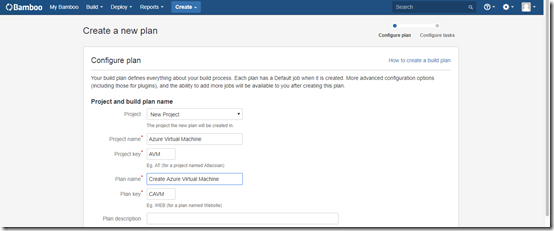
In this post I will showing how to use Bamboo to create Azure Virtual machine from existing disk image and to do deployment of the projects/artefacts on the newly created virtual machine. The Idea was to create a Dev/Test environment in the cloud with all the application installed.
- Create New Plan in Bamboo.
2. Click on Configure Plan.
Add Task – Choose Script. Enter the PowerShell script as per the below. The script will ask for Azure Login details, enter your azure subscription login details. The below script will create a txt file VirtualMachine.txt with the value “BizTalkIpAddress=<IPAddress>” of the newly created Virtual machine
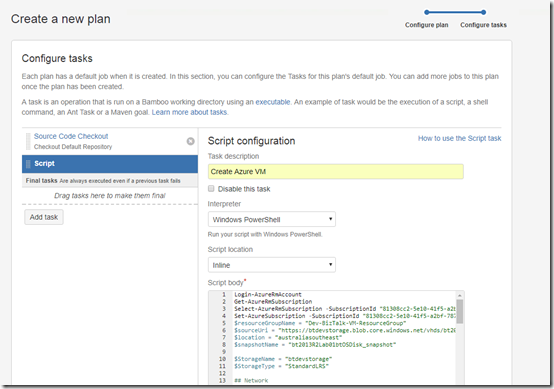
Login-AzureRmAccount
Get-AzureRmSubscription
Select-AzureRmSubscription -SubscriptionId “<your subscription id>”
Set-AzureSubscription -SubscriptionId “<your subscription id”
$resourceGroupName = “Dev-BizTalk-VM-ResourceGroup”
$sourceUri = “https://<storage Name>.blob.core.windows.net/vhds/bt2013R2Lab01btOSDisk.vhd” #Link to your existing disk image vhd file.
$location = “australiasoutheast”
$snapshotName = “bt2013R2Lab01btOSDisk_snapshot”
$StorageName = “btdevstorage”
$StorageType = “StandardLRS”
## Network
$InterfaceName = “btNetworkInterface0” + ${bamboo.buildNumber}
Write-Host “Inteface:”,${bamboo.buildNumber}
$Subnet1Name = “btSubnet01”
$VNetName = “btVNet01”
$VNetAddressPrefix = “10.0.0.0/16”
$VNetSubnetAddressPrefix = “10.0.0.0/24”
## Compute
$VMName = “bt2013R2Lab0” + ${bamboo.buildNumber}
$ComputerName = “bt2013R2Lab0” + ${bamboo.buildNumber}
$VMSize = “Standard_DS2_v2”
$OSDiskName = $VMName + “btOSDisk”
$disk = Get-AzureRmDisk -ResourceGroupName $resourceGroupName -DiskName $dataDiskName
$osDiskName = “bt2013R2Lab0” + ${bamboo.buildNumber} + “btOSDisk”
Write-Host “OSDiskName:”,$osDiskName
$osDisk = New-AzureRmDisk -DiskName $osDiskName -Disk `
(New-AzureRmDiskConfig -AccountType StandardLRS -Location $location -CreateOption Import `
-SourceUri $sourceUri) `
-ResourceGroupName $resourceGroupName
$storageacc = Get-AzureRmStorageAccount -ResourceGroupName $ResourceGroupName
# Network
$vnet = Get-AzureRMVirtualNetwork -Name $VNetName -ResourceGroupName $ResourceGroupName
$pip = New-AzureRmPublicIpAddress -Name $InterfaceName -ResourceGroupName $ResourceGroupName -Location $Location `
-AllocationMethod Dynamic
$nic = New-AzureRmNetworkInterface -Name $InterfaceName -ResourceGroupName $ResourceGroupName `
-Location $location -SubnetId $vnet.Subnets[0].Id -PublicIpAddressId $pip.Id -NetworkSecurityGroupId $nsg.Id
$user = “admin”
$password = ”
$securePassword = ConvertTo-SecureString $password -AsPlainText -Force
$Credential = New-Object System.Management.Automation.PSCredential ($user, $securePassword)
$vmConfig = New-AzureRmVMConfig -VMName $vmName -VMSize “Standard_A2”
$vm = Add-AzureRmVMNetworkInterface -VM $vmConfig -Id $nic.Id
# Create the VM in Azure
$vm = Set-AzureRmVMOSDisk -VM $vm -ManagedDiskId $osDisk.Id -StorageAccountType $StorageType `
-DiskSizeInGB 128 -CreateOption Attach -Windows
New-AzureRmVM -ResourceGroupName $ResourceGroupName -Location $location -VM $vm
Set-AzureRmVMAccessExtension -ResourceGroupName $resourceGroupName -VMName $VMName `
-Name $ComputerName -Location $location -UserName $Credential.GetNetworkCredential().Username `
-Password $Credential.GetNetworkCredential().Password -typeHandlerVersion “2.0”
$net=Get-AzureRmPublicIpAddress -ResourceGroupName $resourceGroupName -Name $InterfaceName
$ipAddress = $net.IpAddress
$Content = “BizTalkIpAddress=$ipAddress”
Write-Host $Content
write-output $Content | add-content ${bamboo.build.working.directory}PackagesVirtualMachine.txt
3. Create Deployment Steps.
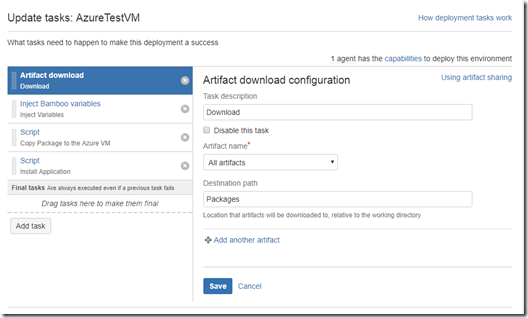
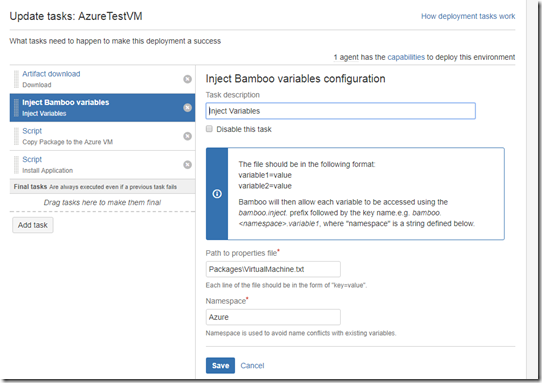
- Inject Bamboo Variables. This is used to get the IP Address of the newly created virtual machine.
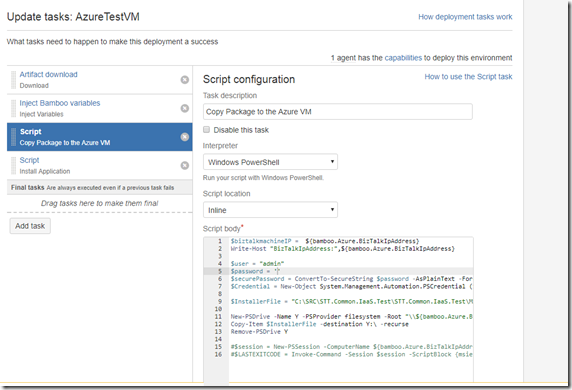
- Copy Package to the Azure VM. This is used to copy the downloaded packages to the newly created virtual machine.
$biztalkmachineIP = ${bamboo.Azure.BizTalkIpAddress}
Write-Host “BizTalkIpAddress:”,${bamboo.Azure.BizTalkIpAddress}
$user = “admin”
$password = ”
$securePassword = ConvertTo-SecureString $password -AsPlainText -Force
$Credential = New-Object System.Management.Automation.PSCredential ($user, $securePassword)
$InstallerFile = “C:SRCSTT.Common.IaaS.TestSTT.Common.IaaS.TestMSISTT.Common.IaaS.msi”
New-PSDrive -Name Y -PSProvider filesystem -Root “${bamboo.Azure.BizTalkIpAddress}C$” -Credential $Credential
Copy-Item $InstallerFile -destination Y: -recurse
Remove-PSDrive Y
#$session = New-PSSession -ComputerName ${bamboo.Azure.BizTalkIpAddress} -Credential $Credential -ConfigurationName Microsoft.Powershell32
#$LASTEXITCODE = Invoke-Command -Session $session -ScriptBlock {msiexec.exe /i “C:STT.Common.IaaS.msi” /passive /log “c:log.txt”}
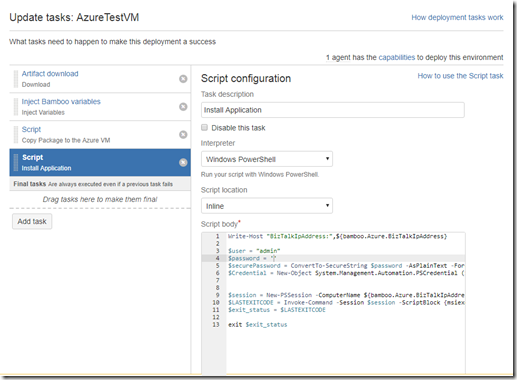
- Install Application : This script will execute the installer package. This is just to prove that the packages are getting installed on the new machine.
Write-Host “BizTalkIpAddress:”,${bamboo.Azure.BizTalkIpAddress}
$user = “admin”
$password = ”
$securePassword = ConvertTo-SecureString $password -AsPlainText -Force
$Credential = New-Object System.Management.Automation.PSCredential ($user, $securePassword)
$session = New-PSSession -ComputerName ${bamboo.Azure.BizTalkIpAddress} -Credential $Credential -ConfigurationName Microsoft.Powershell32
$LASTEXITCODE = Invoke-Command -Session $session -ScriptBlock {msiexec.exe /i “C:STT.Common.IaaS.msi” /passive /log “c:log.txt”}
$exit_status = $LASTEXITCODE
exit $exit_status
The whole idea is to how create instant environment in the Cloud. Once the environment is created we can download/build the packages from any repository and deploy to the new machine. I’ve just used bamboo because to give visual touch and use as an continuous Integration and deployment.
Note: This is not the BizTalk environment, with BizTalk there is still few things to be done on the machine.
Thanks.
by Gautam | Jul 23, 2017 | BizTalk Community Blogs via Syndication
Do you feel difficult to keep up to date on all the frequent updates and announcements in the Microsoft Integration platform?
Integration weekly update can be your solution. It’s a weekly update on the topics related to Integration – enterprise integration, robust & scalable messaging capabilities and Citizen Integration capabilities empowered by Microsoft platform to deliver value to the business.
If you want to receive these updates weekly, then don’t forget to Subscribe!
On-Premise Integration:
Cloud and Hybrid Integration:
Feedback
Hope this would be helpful. Please feel free to let me know your feedback on the Integration weekly series.

by Sandro Pereira | Jul 22, 2017 | BizTalk Community Blogs via Syndication
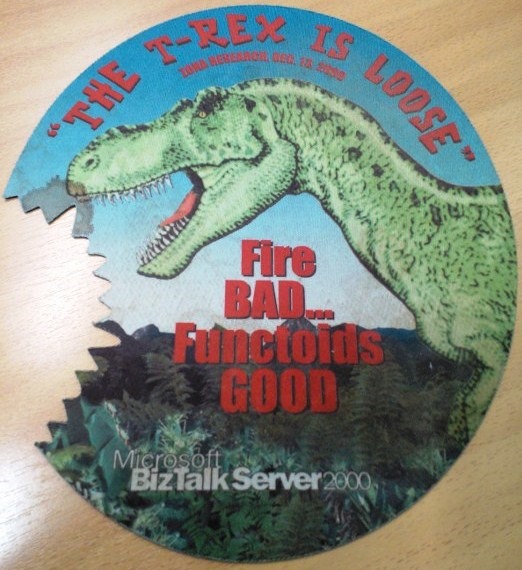
Let me tell you the story behind BizMan, The BizTalk Server SuperHero Sticker. On 12th May, during my session in the Integrate 2016 event in London about “A new set of BizTalk Server Tips and Tricks”, I announce that I had two BizTalk Server 2016 stickers versions to offer – probably one of the firsts BizTalk stickers ever – with the mythic phrase “The T-Rex is loose“ to celebrate the release of BizTalk Server 2016 version and one of them, of course, with a badass T-Rex and the other with a “dear”/”sweet” T-Rex version.

You need to remember that to commemorate the first release ever: BizTalk Server 2000 (on 12/12/2000) the BizTalk Server marketing folks designed a “killer” mouse pad for the product team with the phrase “The T-Rex is loose”.
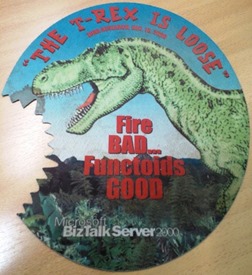
(Original photo from Gijs in ‘t Veld)
You can read more about it on Gijs in ‘t Veld blog: Happy 12th birthday BizTalk Server, The T-Rex!.
Of course, BizTalk people love them… Who doesn’t like T-Rex? Who doesn’t like BizTalk?
- Well to respond to the first question, I think all of us like T-Rex… because they don’t exist anymore, they appear in so many movies, they are so cool, they are so huge, Rex meaning “king” in Latin by the way… so the tyrant king it is badass!
- To respond the second question: Many people, for many reasons, they simply don’t understand the product (but wish to all of their features for free) or they simply do not realize what enterprise integration is. (but that is a different topic that I will not enter into detail here)
And some of the feedback, if we can call it that way, that I received from these group of people (the ones that don’t like BizTalk Server – probably the same that are always saying BizTalk is dead) was more or like this:
- “It is an old product, obsolete like the dinosaur”
BizTalk has never been so alive that is today, we are actually seeing the PRO INTEGRATION team at Microsoft investing heavily in the product, not only supporting new platform updates but actually bringing new capabilities at a faster pace to the product. So, my response to these group of people and to this type of comment is in the creation of a new sticker: The BizTalk Server SuperHero: THE BIZMAN!
If you want to add this sticker to your laptop or another area, you just need to download the zip file below and send it to a graphic shop. It as in the perfect size/resolution for printing.

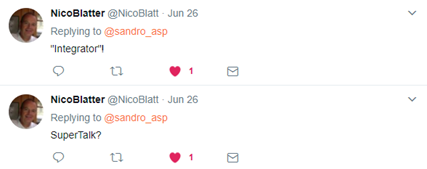
I decide to call it BizMan but there were plenty of other amazing suggestions:





Hope you enjoy!
Special thanks to my two coworkers at DevScope: Frederico Junqueira, the artist and creator of the BizMan, The BizTalk Server SuperHero design and António Lopes for giving the final touches and help with everything related with the graphic.
You can download BizMan, The BizTalk Server SuperHero sticker from:
BizTalk Server SuperHero Sticker: BizMan (10,1 MB)
Microsoft | TechNet Gallery
Author: Sandro Pereira
Sandro Pereira lives in Portugal and works as a consultant at DevScope. In the past years, he has been working on implementing Integration scenarios both on-premises and cloud for various clients, each with different scenarios from a technical point of view, size, and criticality, using Microsoft Azure, Microsoft BizTalk Server and different technologies like AS2, EDI, RosettaNet, SAP, TIBCO etc. He is a regular blogger, international speaker, and technical reviewer of several BizTalk books all focused on Integration. He is also the author of the book “BizTalk Mapping Patterns & Best Practices”. He has been awarded MVP since 2011 for his contributions to the integration community. View all posts by Sandro Pereira
by michaelstephensonuk | Jul 22, 2017 | BizTalk Community Blogs via Syndication
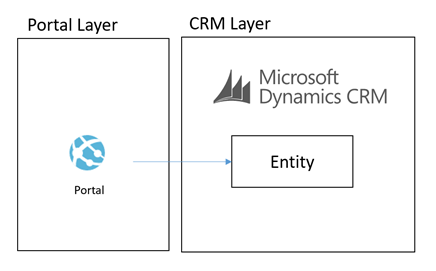
I wanted to talk a little about the architecture I designed recently for a Dynamics CRM + Portal + Integration project. In the initial stages of the project a number of options were considered for a Portal (or group of portals) which would support staff, students and other users which would integrate with Dynamics CRM and other applications in the application estate. One of the challenges I could see coming up in the architecture was the level of coupling between the Portal and Dynamics CRM. Ive seen this a few times where an architecture has been designed where the portal is directly querying CRM and has the CRM SDK embedded in it which is an obviously highly coupled integration between the two. What I think is a far bigger challenge however is the fact that CRM Online is a SaaS application and you have very little control over the tuning and performance of CRM.
Lets imagine you have 1000 CRM user licenses for staff and back office users. CRM is going to be your core system of record for customers but you want to build systems of engagement to drive a positive customer experience and creating a Portal which can communicate with CRM is a very likely scenario. When you have bought your 1000 licenses from Microsoft you are going to be given the infrastructure to support the load from 1000 users. The problem however is your CRM portal being tightly coupled to CRM may introduce another amount of users on top of the 1000 back office users. Well whats going to happen when you have 50,000 students or a thousands/millions of customers starting to use your portal. You now have a problem that CRM may become a bottle neck to performance but because its SaaS you have almost no options to scale up or out your system.
With this kind of architecture you have the choices to roll your own portal using .net and either Web API or CRM SDK integration directly to CRM. There are also options to use products like ADXStudio which can help you build a portal too. The main reason these options are very attractive is because they are probably the quickest to build and minimize the number of moving parts. From a productivity perspective they are very good.
An illustration of this architecture could look something like the below:
What we were proposing to do instead was to leverage some of the powerful features of Azure to allow us to build an architecture for a Portal which was integrated with CRM Online and other stuff which would scale to a much higher user base without having performance problems on CRM. Noting that problems in CRM could create a negative experience for Portal Users but also could significantly effect the performance of staff in the back office is CRM was running slow.
To achieve this we decided that using asynchronous approaches with CRM and hosting an intermediate data layer in Azure would allow us at a relatively low cost have a much faster and more scalable data layer to base the core architecture on. We would call this our cloud data layer and it would sit behind an API for consumers but be fed with data from CRM and other applications which were both on premise and in the cloud. From here the API was to expose this data to the various portals we may build.
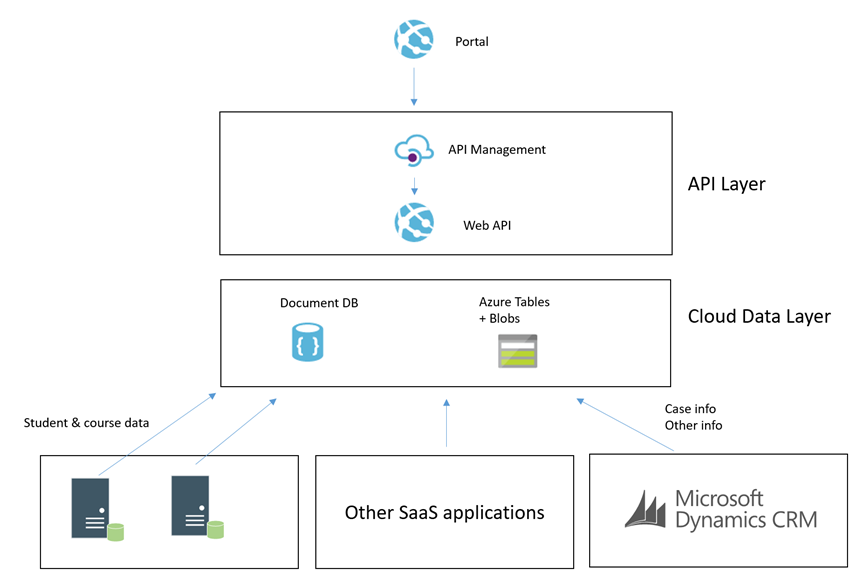
The core idea was that the more we could minimize the use of RPC calls to any of our SaaS or On Premise applications the better we would be able to scale the portal we would build. Also at the same time the more resilient they would be to any of the applications going down.
Hopefully at this point you have an understanding of the aim and can visualise the high level architecture. I will next talk through some of the patterns in the implementation.
Simple Command from Portal
In this patter we have the scenario where the portal needs to send a simple command for something to happen. The below diagram will show how this works.
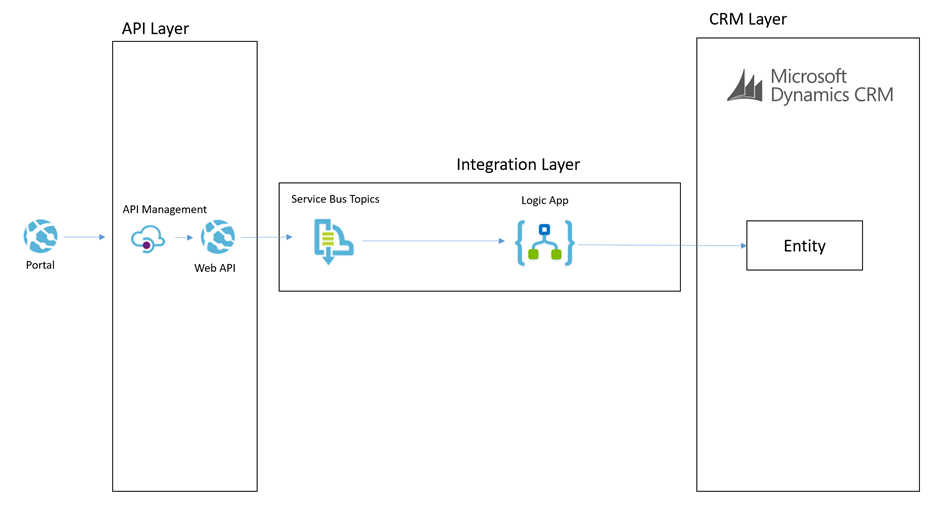
Lets imagine a scenario of a user in the portal adding a chat comment to a case.
The process for the simple command is:
- The portal will send a message to the API which will do some basic processing but then it will off load the message to a service bus topic
- The topic allows us to route the message to many places if we want to
- The main subscriber is a Logic App and it will use the CRM connectors to be able to interact with the appropriate entities to create the chat command as an annotation in CRM
This particular approach is pretty simple and the interaction with CRM is not overly complicated. This is a good candidate to use the Logic App to process this message.
Complex Command from Portal
In some cases the portal would publish a command which would require a more complex processing path. Lets imagine a scenario where the customer or student raised a case from the portal. In this scenario the processing could be:
- Portal calls the API to submit a case
- API drops a message onto a service bus topic
- BizTalk picks up the message and enriches with additional data from some on premise systems
- BizTalk then updates some on premise applications with some data
- BizTalk then creates the case in CRM
The below picture might illustrate this scenario
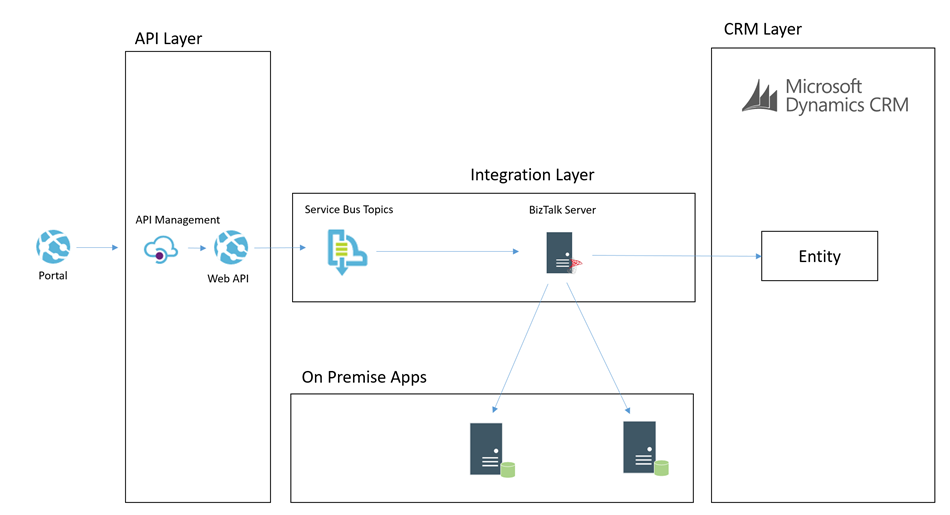
In this case we choose to use BizTalk rather than Logic Apps to process the message. I think as a general rule the more complex the processing requirements, the more I would tend to lean towards BizTalk than Logic Apps. BizTalks support for more complex orchestration, compensation approaches and advanced mapping just lends itself a little better in this case.
I think the great thing in the Microsoft stack is that you can choose from the following technologies to implement the above two patterns behind the scenes:
- Web Jobs
- Functions
- Logic Apps
- BizTalk
Each have their pro’s and con’s which make them suit different scenarios better but also it allows you to work in a skillset your most comfortable with.
Cloud Data Layer
Earlier in the article I mentioned that we have the cloud data layer as one of our architectural components. I guess in some ways this follows the CQRS pattern to some degree but we are not specifically implementing CQRS for the entire system. Data in the Cloud Data Layer is owned by some other application and we are simply choosing to copy some of it to the cloud so it is in a place which will allow us to build better applications. Exposing this data via an API means that we can leverage a data platform based on Cosmos DB (Document DB) and Azure Table Storage and Azure Blob Storage.
If you look at Cosmos DB and Azure Storage, they are all very easy to use and to get up and running with but the other big benefits is they offer high performance if used right. By comparison we have little control over the performance of CRM online, but with Cosmos DB and Azure Storage we have lots of options over the way we index and store data to make it suit a high performing application without all of the baggage CRM would bring with it.
The main difference over how we use these data stored to make a combines data layer is:
- Cosmos DB is used for a small amount of meta data related to entities to aid complex searching
- Azure Table store is used to store related info for fast retrieval by good partitioning
- Azure Blob Storage is used for storing larger json objects
Some examples of how we may use this would be:
- In an azure table a students courses, modules, etc may be partitioned by the student id so it is fast to retrieve the information related to one student
- In Cosmos DB we may store info to make advanced searching efficient and easy. For example find all of the students who are on course 123
- In blob storage we may store objects like the details of a KB article which might be a big dataset. We may use Cosmos DB to search for KB articles by keywords and tags but then pull the detail from Blob Storage
CRM Event to Cloud Data Layer
Now that we understand that queries of data will not come directly from CRM but instead via an API which exposes an intermediate data layer hosted on Azure. The question is how is this data layer populated from CRM. We will use a couple of patterns to achieve this. The first of which is event based.
Imagine that in CRM each time an entity is updated/etc we can use the CRM plugin for Service Bus to publish that event externally. We can then subscribe to the queue and with the data from CRM we can look up additional entities if required and then we can transform and push this data some where. In our architecture we may choose to use a Logic App to collect the message. Lets imagine a case was updated. The Logic App may then use info from the case to look up related entity data such as a contact and other similar entities. It will build up a canonical message related to the event and then it can store it in the cloud data layer.
Lets imagine a specific example. We have a knowledge base article in CRM. It is updated by a user and the event fires. The Logic App will get the event and lookup the KB article. The Logic App will then update Cosmos DB to update the metadata of the article for searching by apps. The Logic App will then transform the various related entities to a canonical json format and save them to Blob storage. When the application searches for KB articles via the API it will be under the hood retrieving data from Cosmos DB. When it has chosen a KB article to display then it will retrieve the KB article details from blob storage.
The below picture shows how this pattern will work.
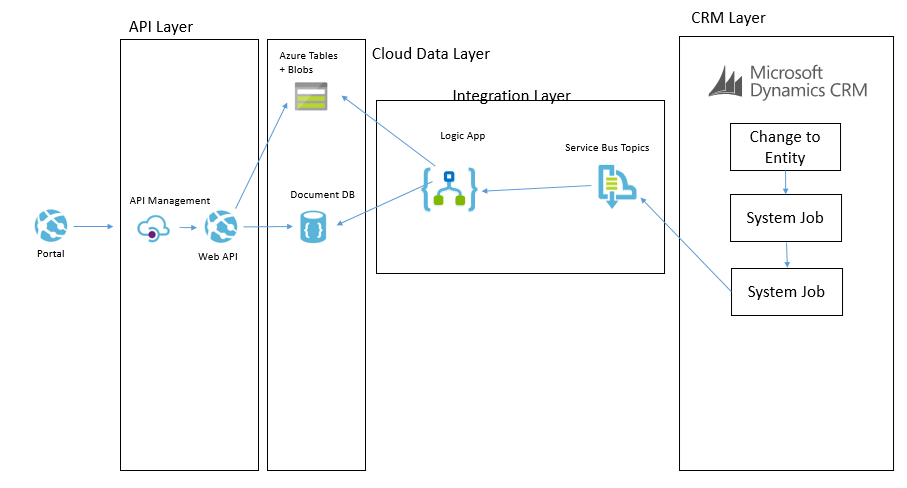
CRM Entity Sync to Cloud Data Layer
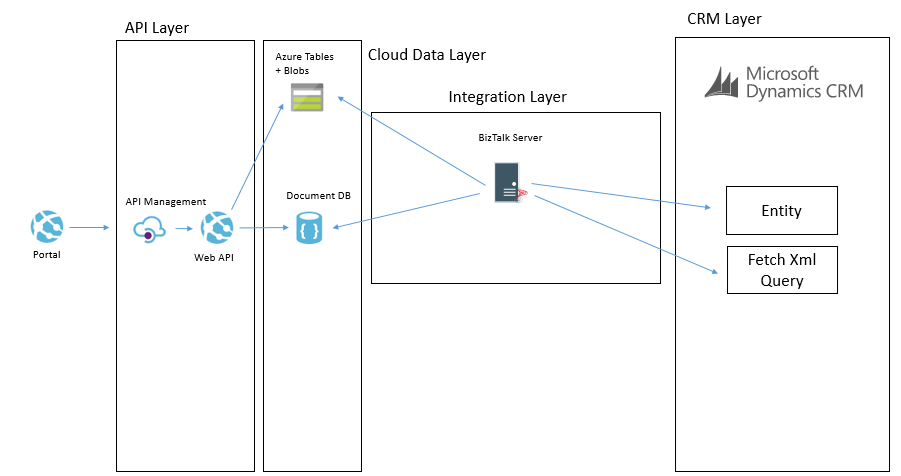
One of the other ways we can populate the cloud data layer from CRM is via a with a job that will copy data. There are a few different ways this can be done. The main way will involve executing a fetch xml query against CRM to retrieve all of the records from an entity or all of the records that have been changed recently. They will then be pushed over to the cloud data layer and stored in one of the data stores depending on which is used for that data type. It is likely there will be some form of transformation on the way too.
An example of where we may do this is if we had a list of reference data in CRM such as the nationalities of contacts. We may want to display this list in the portal but without querying CRM directly. In this case we could copy the list of entities from CRM to the cloud data layer on a weekly basis where we copy the whole table. There are other cases where we may copy data more frequently and we may use different data sources in the cloud data layer depending upon the data type and how we expect to use it.
The below example shows how we may use BizTalk to query some data from CRM and then we may send messages to table storage and Cosmos DB.
Another way we may solve this problem is using Data Factory in Azure. In Data Factory we can do a more traditional ETL style interface where we will copy data from CRM using the OData feeds and download it into the target data sources. The transformation and advanced features in Data Factory are a bit more limited but in the right case this can be done like in the below picture.
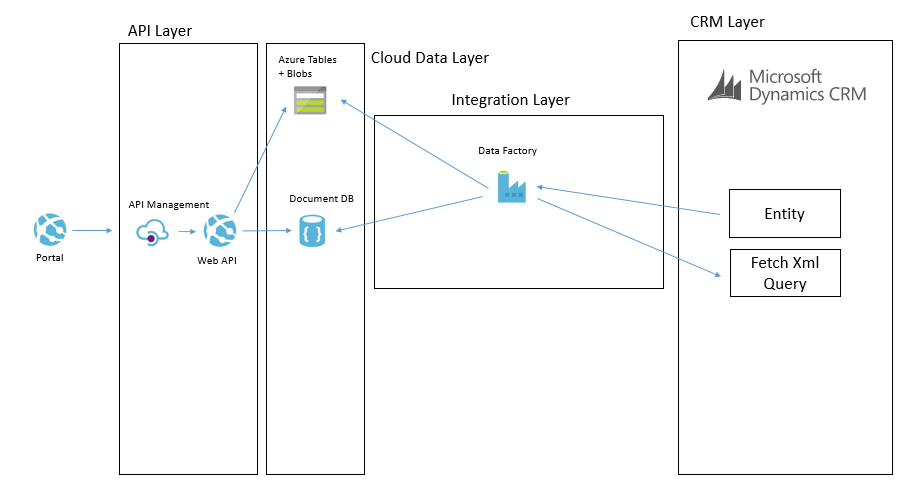
In these data synchronisation interfaces it will tend to be data that doesn’t change that often and data which you don’t need the real time event to update it which it will work the best with. While I have mentioned Data Factory and BizTalk as the options we used, you could also use SSIS, custom code and a web job or other options to implement it.
Summary
Hopefully the above approach gives you some ideas how you can build a high performing portal which integrated with CRM Online and potentially other applications but by using a slightly more complex architecture which introduces asynchronous processing in places and CQRS in others you can create a decoupling between the portal(s) you build and CRM and other back end systems. In this case it has allowed us to introduce a data layer in Azure which will scale and perform better than CRM will but also give us significant control over things rather than having a bottle neck on a black box outside of our control.
In addition to the performance benefits its also potentially possible for CRM to go completely off line without bringing down the portal and only having a minimal effect on functionality. While the cloud data layer could still have problems, firstly it is much simpler but it is also using services which can easily be geo-redundant so reducing your risks. An example here of one of the practical aspects of this is if CRM was off line for a few hours while a deployment is performed I would not expect the portal to be effected except for a delay in processing messages.
I hope this is useful for others and gives people a few ideas to think about when integrating with CRM.