Microsoft has been discontinuing some actions for some time or at least
running side by side different versions, don’t get me wrong. But they were never
extremely good at providing proper documentation, even in the old days that we
had software releases every two or three years, now imagine in this crazy fast
delivery world that we are leaving! What you see is:
A big gap between the documentation and the features that we have available or not properly documented in terms of how they work;
There is nothing that tells you what was change or how certain task that was possible to do in previous versions of action can now be done.
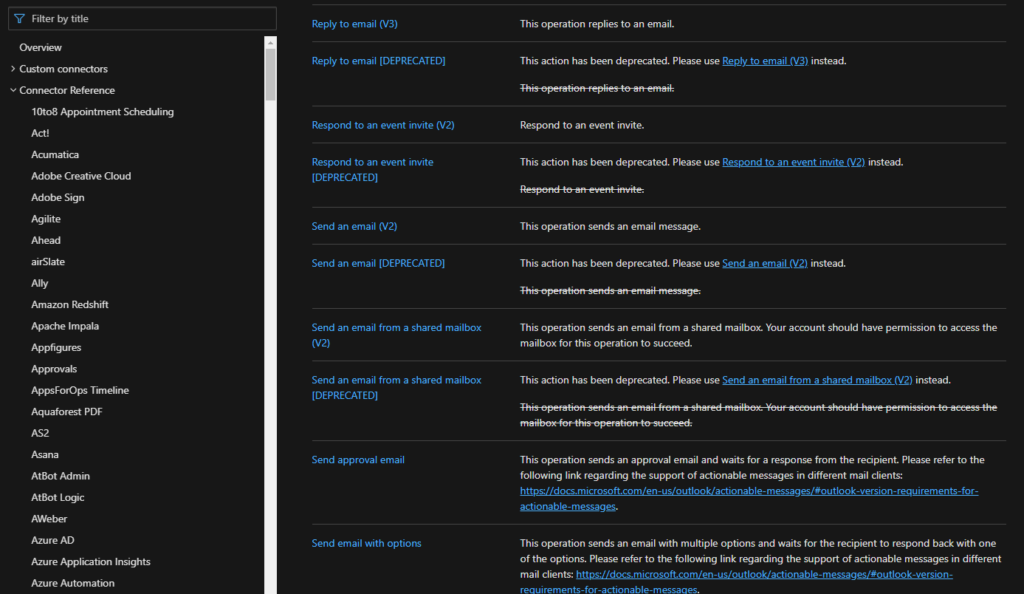
When I say that for the first time that Microsoft deprecated connection
actions, I mean actual remove from the list of actions on the Logic App design,
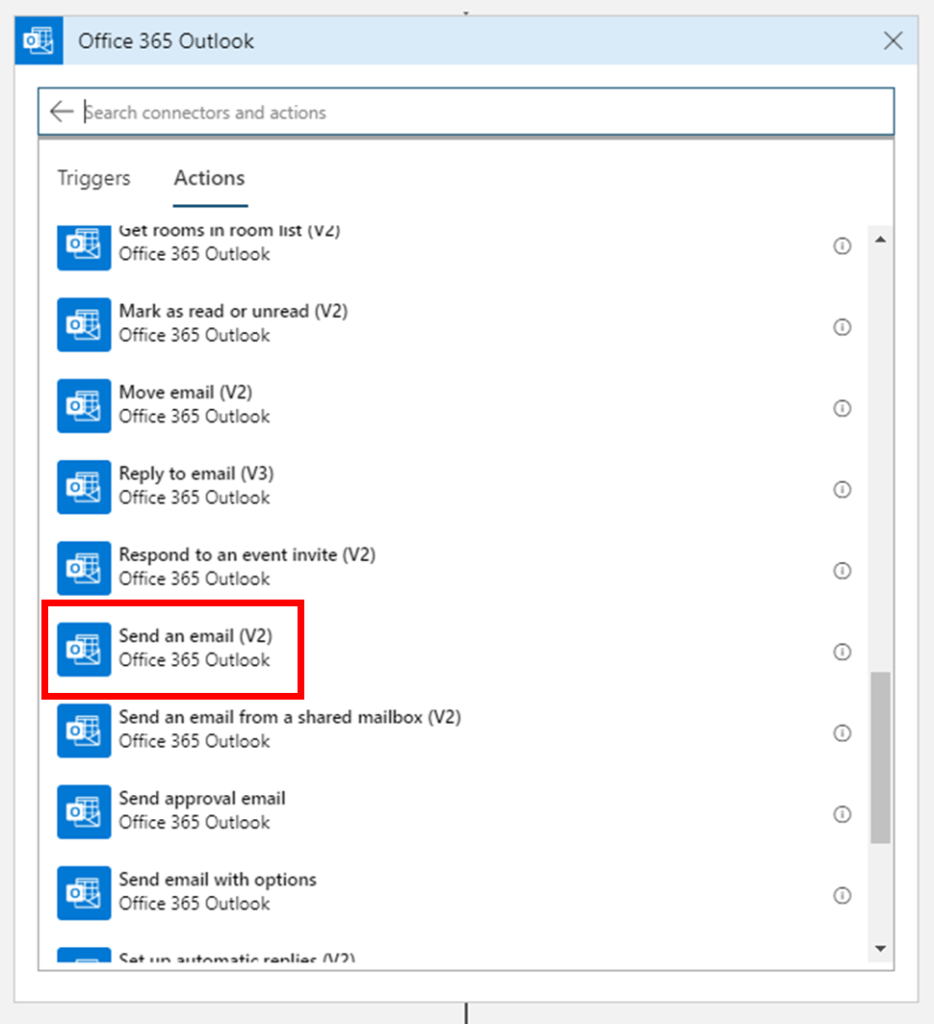
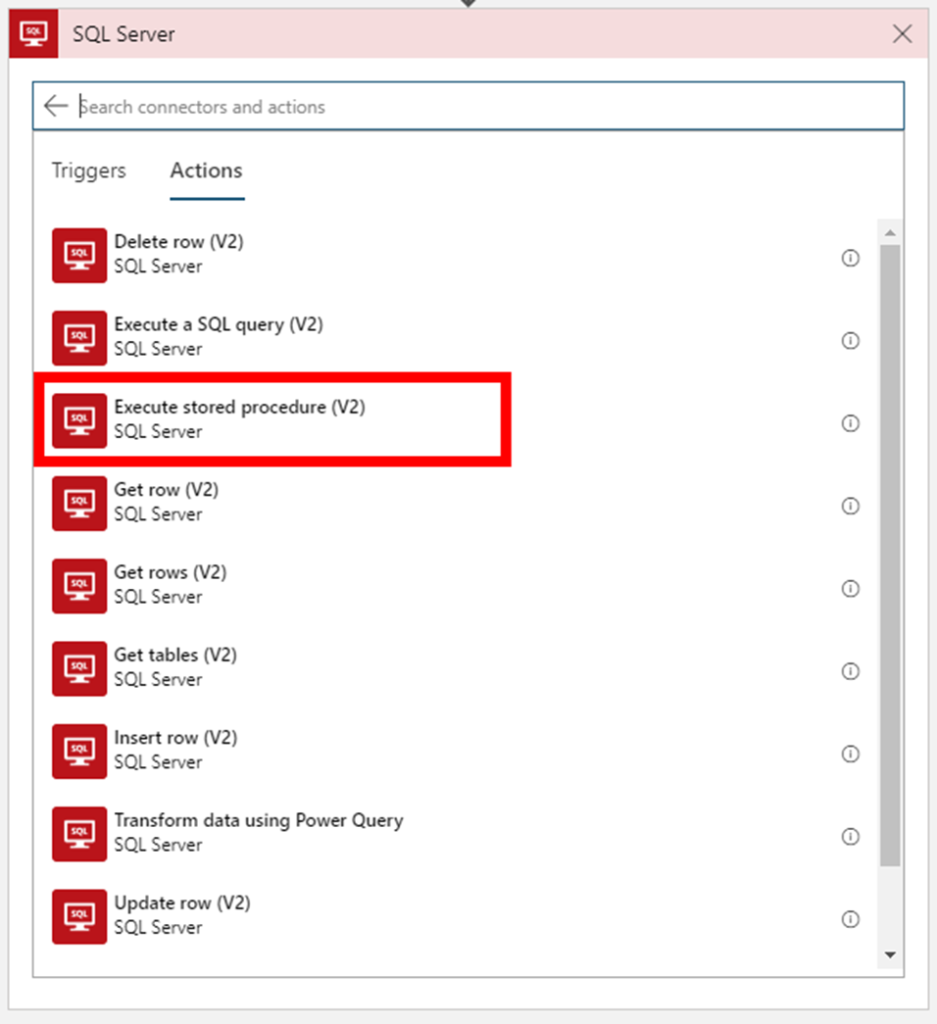
taking from the example the two connectors mention above you can’t see
the deprecated action on the Logic App designer anymore:
But don’t be alarmed, your existing logic apps that still use these
deprecated actions continue to work properly.
In this article, we will address the Office 365 Outlook connector and especially the Send an Email V2 action because Send an Email action is now deprecated. So the question here is:
How to send a well-formatted custom HTML Email using Send an Email V2 action available on the Office 365 Outlook connector?
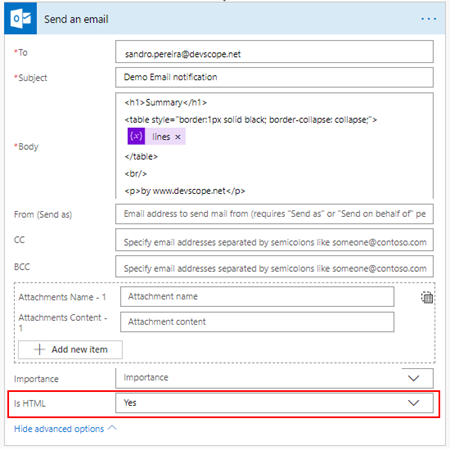
I personally liked the Send
an Email action because we were able to directly put HTML code on the body
property and define that the email body format would be HTML bt setting the
property Is HTML to true.
Quite simple to use and
efficient.
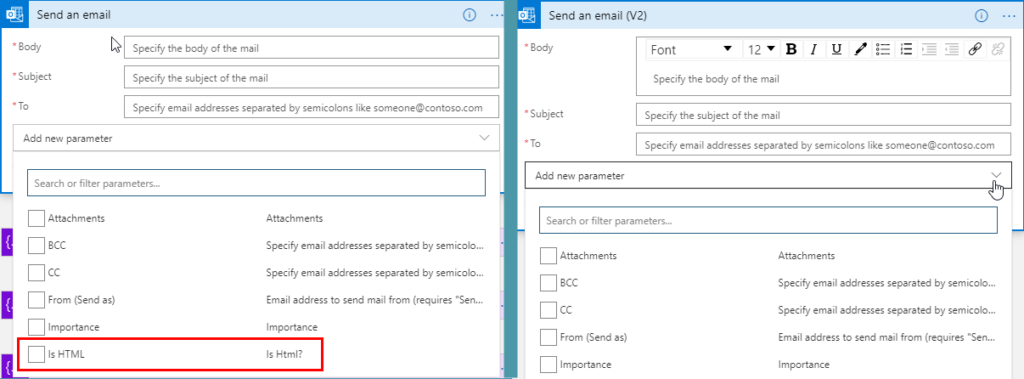
However, Send an email (V2) action has totally different
behavior. First of all, it owns fewer properties:
Is HTM property was removed from this action;
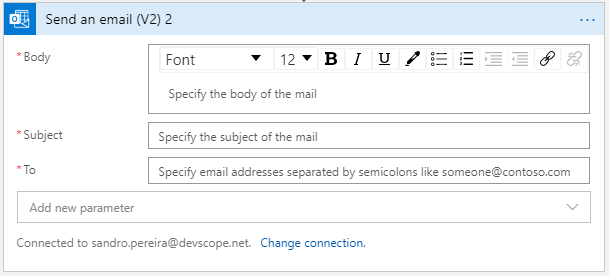
And a completely new look
and feel of the Body property as you see in the picture below:
With a powerful editor similar to what we have in our office tools (Word, Outlook, …)
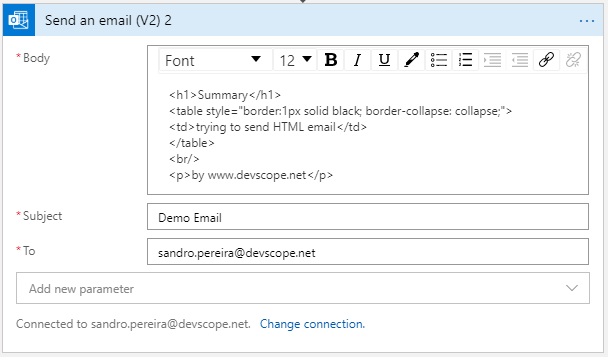
That also means that we no longer have the possibility to directly insert HTML code into the body property of the message as we did earlier with the previous version. Well, we can write HTML code on the body of this action:
But the end result will not be what you expect:
Unluckily Power Automate designer, we don’t have a Code View button (</>) on the Body property editor, I will be blogging about this feature soon on Serveless360 blog. So, who we are able to send a proper well-formatted HTML Email using Send an email V2 action?
The answer is: unfortunately, at least in my opinion, we need to build the HTML in an action beforehand in a composite action or in a variable. And then put the compose output or variable as the send mail body property, and the action will render correctly the output as an HTML.
To do that we need:
On
the Logic App designer, add the next step by clicking the +New step
button
On
the Choose an action window, enter Variables and select the
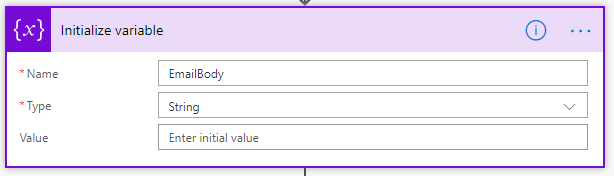
action Initialize variable
On
the Variable action configuration:
On
the Name property, type “EmailBody”
On
the Type property, specify the type as “String”
On
the Value property leave it blank
On
the Logic App designer, add the next step by clicking the +New step
button
On
the Choose an action window, enter Variables and select the
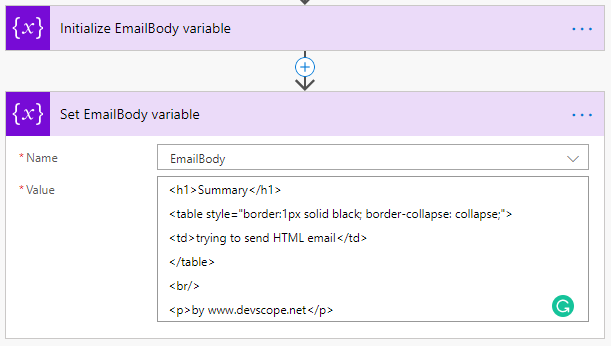
action Set variable
On
the Variable action configuration:
On
the Name property, select “EmailBody” variable
On
the Value property, type your custom HTML
Note: you can take as example this fancy HTML Template that I created specifically for this article here: HTML Notification Template to use Logic App or Power Automate Outlook connector and not this basic HTML that you are seeing on the picture.
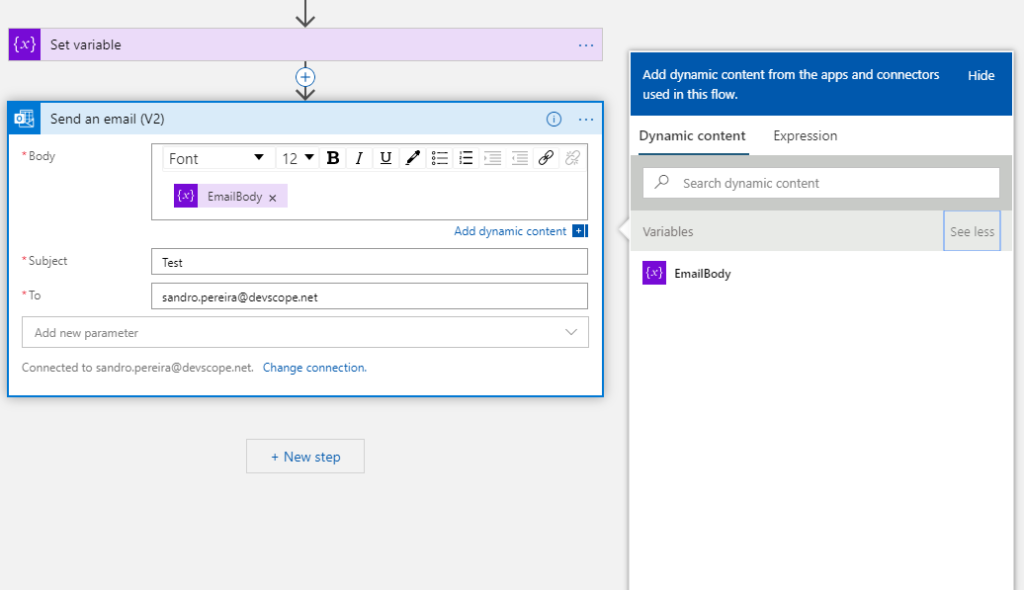
And then define directly on the Body editor (without switching to Code View) that the body will be the content of the variable we created earlier:
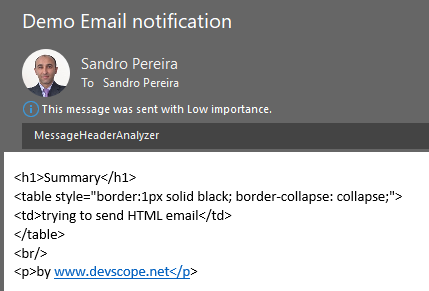
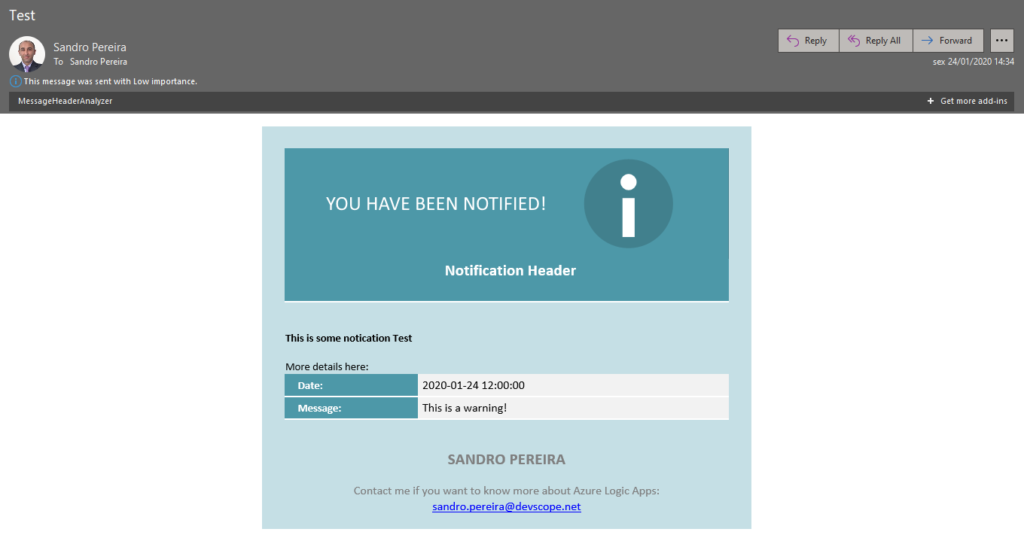
And you will see that you
will be receiving also a well-formatted HTML email on your mailbox:
Thanks Thiago Almeida for the help and credits to Pedro Rosa that helped me creating this HTML Template and most important to be compatible with Outlook because not all the stylesheets that we can apply aren’t compatible.
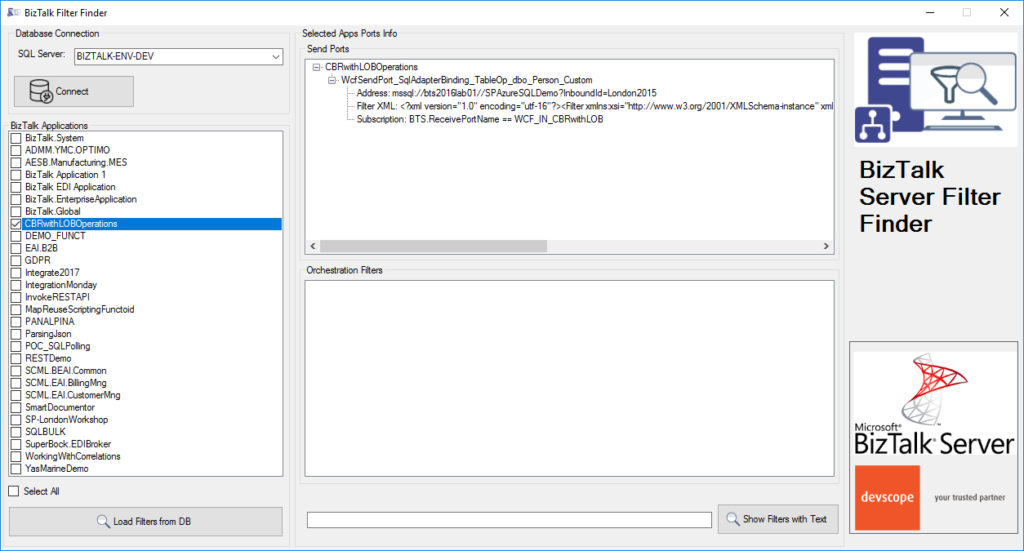
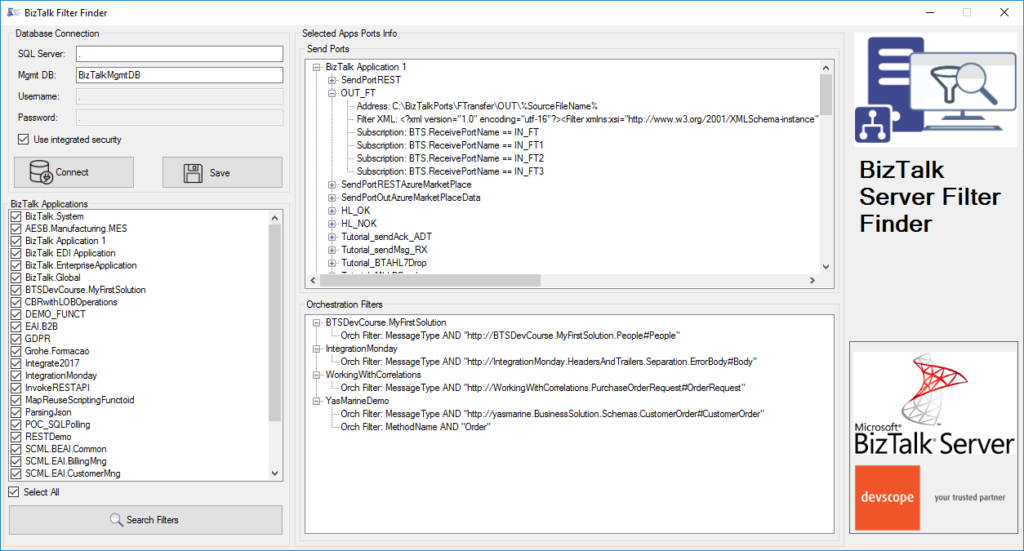
BizTalk Filter Finder tool got an update and it is now more powerful and with new features and mainly all of that thanks to Michał Plutyński contributions. And for those who are not familiar with this tool, the BizTalk Filter Finder Tool is a simple tool that aims to simplify the process for better understand and maintain solutions based on content-based routing and context-based routing with or without orchestrations involved.
This tool will extend default BizTalk Server capabilities transforming this tedious and sometimes complicate analysis a little simple, easy and fast. You can read more details about this tool in the original post here: BizTalk Filter Finder Tool.
What’s new in the release
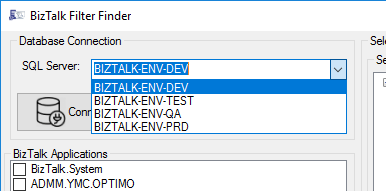
A new dropdown list that allows you to select your BizTalk Server environment (you can set up them in the config file), this way is better and easier to use in bigger teams with several environments.
Add filters/search capabilities allowing you to filter the existing subscriptions and only show filters with subscriptions that contain some text;
Hotfix/improvements: Changes in reading orchestration list when it’s used a MessageBoxDb on a different server then ManagementDb.
Credits to Michał Plutyński for becoming a collaborator of this tool.
It was only 9 days ago that I released the latest minor version of this package, on that time the goal was to update the Security and Governance stencils to please my dear friend Nino Crudele. It was then that I notice that Microsoft did again a completely redesigned on several of the symbols and of course add new services so I decided that this was the time to not only refresh the package with the new icons but also but so extra work.
What’s new in this version?
With the growing number of stencils in this package, it was becoming hard to easily find or look for the right shape/representation. So once again based on some feedback I received from the community I decide to do so rearranging. I still have many things to do in this project in terms of organization but for now, these are the changes on this major release:
New shapes: The main additions are all the new shapes on the Azure Portal. New shapes added on:
MIS Azure Stencils: containing all the main Azure Portal Services
MIS AI and Machine Learning Stencils: all shapes related to AI or Machine Learning scenarios;
MIS IoT Devices Stencils: all shapes related to IoT scenarios:
Microsoft Integration Stencils;
MIS Azure Others Stencils: containing Azure Postal Services, features of the services and other interesting shapes;
MIS Azure Additional or Support Stencils: other shapes that may be interesting in supporting Azure diagrams and designs or presentations;
MIS Azure Stencils: Complete update to this category with many new shapes added and many shapes moved to MIS Azure Others Stencils file;
MIS AI and Machine Learning Stencils: Complete update to this category with many new shapes added and updating many others to there current stencils;
Add categories:
Microsoft Integration Stencils Old Version Stencils: containing all the oldest versions of stencils (obsolete, deprecated or replaced by a new shape)
Ordered by name: I recently started to sort shapes in alphabetical order. These are the categories already sorted:
MIS Azure Stencils;
MIS Azure Others Stencils;
MIS AI and Machine Learning Stencils;
Microsoft Integration Stencils Old Version Stencils;
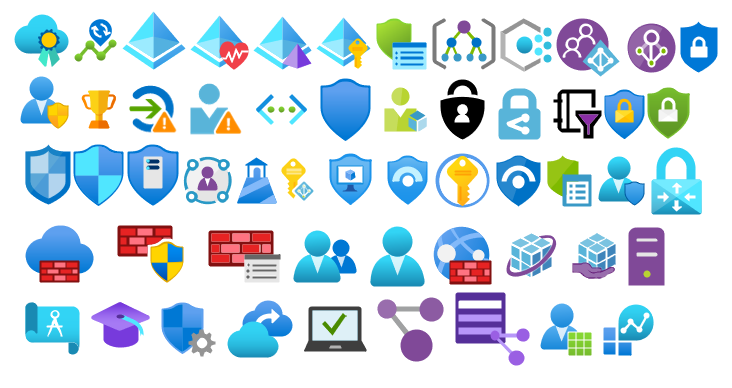
MIS Security and Governance;
Text Annotations: This is a requested feature and I already started to work on it but it will get some time to finish it. For now, you will see text annotations on:
MIS AI and Machine Learning Stencils
SVG Files: Add new SVG files, and uniform the name of the files;
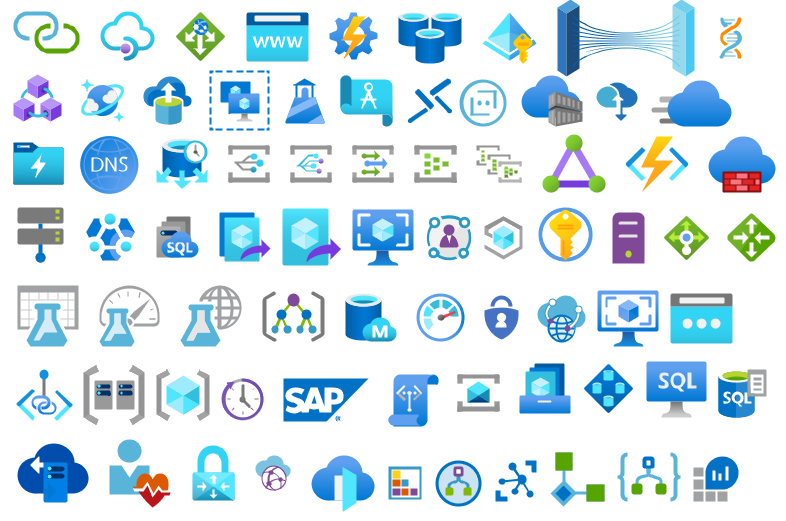
Microsoft Integration, Azure, Power Platform, Office 365 and much more Stencils Pack
Microsoft Integration, Azure, Power Platform, Office 365 and much more Stencils Pack it’s a Visio package that contains fully resizable Visio shapes (symbols/icons) that will help you to visually represent On-premise, Cloud or Hybrid Integration and Enterprise architectures scenarios (BizTalk Server, API Management, Logic Apps, Service Bus, Event Hub…), solutions diagrams and features or systems that use Microsoft Azure and related cloud and on-premises technologies in Visio 2016/2013:
BizTalk Server
Microsoft Azure
Integration
Integration Service Environments (ISE)
Logic Apps and Azure App Service in general (API Apps, Web Apps, and Mobile Apps)
Azure API Management
Messaging: Event Hubs, Event Grid, Service Bus, …
Azure IoT and Docker
AI, Machine Learning, Stream Analytics, Data Factory, Data Pipelines
SQL Server, DocumentDB, CosmosDB, MySQL, …
and so on
Microsoft Power Platform
Microsoft Flow
PowerApps
Power BI
Office365, SharePoint,…
DevOps and PowerShell
Security and Governance
And much more…
… and now non-related Microsoft technologies like:
SAP Stencils
The Microsoft Integration Stencils Pack is composed of 28 files:
Microsoft Integration Stencils
MIS Azure Stencils
MIS Additional or Support Stencils
MIS AI and Machine Learning Stencils
MIS Apps and Systems Logo Stencils
MIS Azure Additional or Support Stencils
MIS Azure Mono Color
MIS Azure Old Versions
MIS Azure Others Stencils
MIS Buildings Stencils
MIS Databases and Analytics Stencils
MIS Deprecated Stencils
MIS Developer Stencils
MIS Devices Stencils
MIS Files Stencils
MIS Generic Stencils
MIS Infrastructure Stencils
MIS Integration Fun
MIS Integration Patterns Stencils
MIS IoT Devices Stencils
MIS Office365
MIS Power BI Stencils
MIS PowerApps and Flows Stencils
MIS SAP Stencils
MIS Security and Governance
MIS Servers (HEX) Stencils
MIS Users and Roles Stencils
Microsoft Integration Stencils Old Version Stencils
That you can use and resize without losing quality, in particular, the new shapes.
In October, I did a major rearrange and release of my stencils pack mainly because Microsoft redesigned many of the icons present in the Azure Portal, but and guess what? Microsoft didn’t stop it yet. And several of the symbols that suffer a redesigned they already have a new version. So I decide that it is time for me to update my stencils once again, but instead of spending a lot of time and release everything at the same time, like I did last time, I decided this time I will do it in small waves.
What’s new in this version?
The main goal of this release was to provide the new icons present in the Azure Portal and update existing ones. In this version, the changes and additions are:
New shapes: New shapes added on MIS Security and Governance, MIS Developer Stencils and MIS IoT Devices Stencils;
MIS Security and Governance: Complete update to this category with many unique symbols added and updating many others to there current stencils;
SVG Files: Add new SVG files, and uniform all the filenames;
Special Highlights: Azure Arc and Machines – Azure Arc
Microsoft Integration, Azure, Power Platform, Office 365 and much more Stencils Pack
Microsoft Integration, Azure, Power Platform, Office 365 and much more Stencils Pack it’s a Visio package that contains fully resizable Visio shapes (symbols/icons) that will help you to visually represent On-premise, Cloud or Hybrid Integration and Enterprise architectures scenarios (BizTalk Server, API Management, Logic Apps, Service Bus, Event Hub…), solutions diagrams and features or systems that use Microsoft Azure and related cloud and on-premises technologies in Visio 2016/2013:
BizTalk Server
Microsoft Azure
Integration
Integration Service Environments (ISE)
Logic Apps and Azure App Service in general (API Apps, Web Apps, and Mobile Apps)
Azure API Management
Messaging: Event Hubs, Event Grid, Service Bus, …
Azure IoT and Docker
AI, Machine Learning, Stream Analytics, Data Factory, Data Pipelines
SQL Server, DocumentDB, CosmosDB, MySQL, …
and so on
Microsoft Power Platform
Microsoft Flow
PowerApps
Power BI
Office365, SharePoint,…
DevOps and PowerShell
Security and Governance
And much more…
… and now non-related Microsoft technologies like:
SAP Stencils
The Microsoft Integration Stencils Pack is composed of 27 files:
Microsoft Integration Stencils
MIS Additional or Support Stencils
MIS AI and Machine Learning Stencils
MIS Apps and Systems Logo Stencils
MIS Azure Additional or Support Stencils
MIS Azure Mono Color
MIS Azure Old Versions
MIS Azure Others Stencils
MIS Azure Stencils
MIS Buildings Stencils
MIS Databases and Analytics Stencils
MIS Deprecated Stencils
MIS Developer Stencils
MIS Devices Stencils
MIS Files Stencils
MIS Generic Stencils
MIS Infrastructure Stencils
MIS Integration Fun
MIS Integration Patterns Stencils
MIS IoT Devices Stencils
MIS Office365
MIS Power BI Stencils
MIS PowerApps and Flows Stencils
MIS SAP Stencils
MIS Security and Governance
MIS Servers (HEX) Stencils
MIS Users and Roles Stencils
That you can use and resize without losing quality, in particular, the new shapes.
2019 was a very challenging year. Nevertheless, it was another great year both on a personal and professional level, if last year I described as a family year this one it was a consolidation year.
If last year I moved my family to a bigger house, this year we made all the necessary modifications to the home of our dreams;
If my team at DevScope grew at the end of 2018, 2019 was a year of consolidation, and we hope it will continue to grow during this year in terms of business but full of challenging and great projects worldwide. We are doing a fantastic job;
My Porto Airbnb host house is running smoothly, with good reviews from our guests. Nevertheless, there is always space for improvement.
And who knows me knows that one of my passions is to enjoy a glass of good wine, so I’m delighted to have my first wine cellar draft (it will be improved in the future)
But with all of these renovations, it was also a year
that I had to dedicated more time to the family – something that was delightful!
And I got married…
My Blog is growing every year…
So, once again, I struggle to have free time, but when you love what you do, you will always find a way to do it. So, in the end, I was able to:
Publish 43 new posts on my blog; it was indeed the year I publish fewer blog posts since I started my blog, but to be honest, I compensate in other aspects!
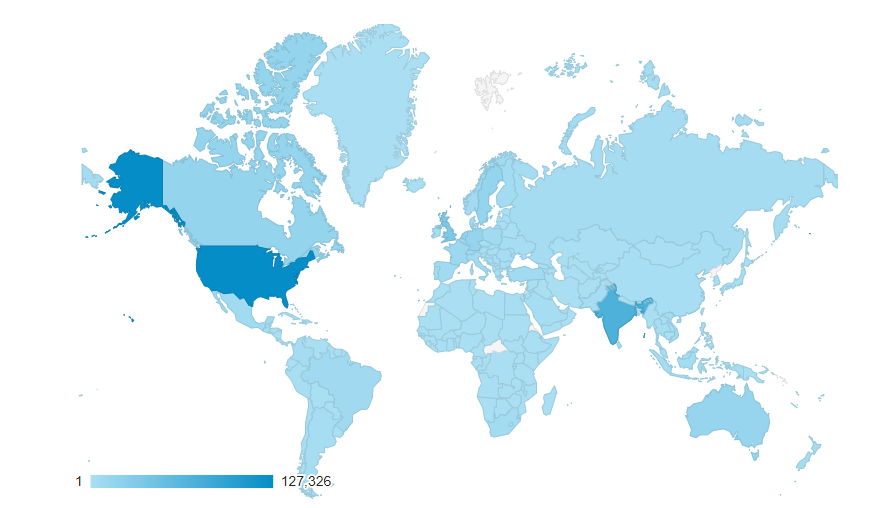
More than 431,000 visits to my blog – that’s an average of 1,181 visits per day!
That is almost double of last year. And the best year ever.
Coming from 207 countries across the world in the past year.
13 new locations compare to the previous year
And the countries that most visited my blog still are the United States, followed by India, the United Kingdom, and Canada
Not bad if we compare to previous years:
2018: 246,381 visits, 194 countries, 70 new posts
2017: 210,000 visits, 167 countries, 63 new posts (migrate to a new blog)
2016: 318,576 visits, 190 countries, 50
new posts
2015: 350,000 visits, 184 countries, 79 new
posts
2014: 310,000 visits, 183 countries, 52
new posts
2013: 200,000 visits, 176 countries, 79
new posts
2012: 170,000 visits, 171 countries, 102
new posts
2011: 91,000 visits, 61 new posts
I want to say thanks to all my readers. I appreciate all the visits to my
blog, and thanks for your support.
Attractions in 2019
These are the top 10 posts that got the most views in 2019:
I told earlier that this was the year I wrote fewer
blog posts in my blog. On the other hand, this was the year I published more
open source contributions like code samples, tools, and resources. Here is the
current list of all my contributions:
Migrate all the code samples that existed in Microsoft Code Gallery that shut down to a GitHub repository: BizTalk Server Learning Path that includes nothing less than 46 code samples that will help you understand and improve different skill in BizTalk Server.
BizTalk Scheduled Task Adapter repo includes an in-process receive adapter that executes a prescribed task on a daily, weekly or monthly schedule.
And the creation of a public repository for Microsoft BizTalk Server open source community extensions: code samples, BizTalk Artifacts (components), adapters, tools and so on: BizTalk Server Open Source Community that at the moment already includes 5 tools and 3 resources:
BizTalk Binding Exporter Tool is a simple tool that you can use to easily generate and export binding files from BizTalk Applications.
BizTalk Port Multiplier Tool is a simple tool that aims to simplify this process by allowing you to easily “clone or duplicate” an existing port (Receive Port or Send Port).
BizTalk Filter Finder Tool is a simple tool that aims to simplify the process for better understand and maintain solutions based on content-based routing and context-based routing with or without orchestrations involved.
BizTalk Pipeline Components Extensions Utility Pack is a set of custom pipeline components (libraries) with several custom pipeline components that can be used in received and sent pipelines, which will provide an extension of BizTalk out-of-the-box pipeline capabilities.
BizTalk Mapper Extensions UtilityPack is a set of libraries with several useful functoids to include and use it in a map, which will provide an extension of BizTalk Mapper capabilities.
BizTalk MapperExtensions Functoid Wizard is a Custom Functoid Project Wizard for Visual Studio. It allows you to create a new Functoids project for BizTalk Server without having to create manually the project.
SSO Application Configuration tool that provides the ability to add and manage applications, add and manage key-value pairs in the SSO database, as well as import and export configuration applications so that they can be deployed to different environments.
Other contributions…
And of course, several other publications outside my
blog.
Christmas is about spending time with family and friends. It’s about creating happy memories that will last a lifetime, and it is, without a doubt, my favorite holiday season.
And once again, my sincere wishes for a Merry Christmas and a Happy New Year to all my readers, friends, coworkers (amazing guys at DevScope), Microsoft BizTalk Community, all the Portuguese Communities, my MVP “family” and of course to my beautiful family.
Thanks in advance for all the support and encouragement given throughout another year. It was, once again, an incredible year for me, on both a personal and professional level, and hope that the next will be a year filled with new challenges, I promise that I will continue to share knowledge hoping that they can help someone.
May this festive season sparkle and shine, may all of your wishes and dreams come true, and may the new year be made of great happiness. Merry Christmas to you and your entire family and a happy new year!
And you thought there was no Santa Claus? I couldn’t
take this opportunity and this time of year to once again give back to the
community what they have also done for me: grow up together in several aspects.
The role of an adapter is to enable communications
between BizTalk Server and external systems and trading partners. Users
configure adapters by creating send ports and receive locations that define the
properties for given instances of the adapter. Most adapters support both send
and receive operations, whereas other adapters support communication in only
one direction.
The HTTP Adapter is one of the adapters that support
two-way communications, but unlike other adapters, this adapter has two
characteristics that define it:
The HTTP
“Receive” Adapter that is responsible for delivering messages to BizTalk is, in
fact, a DLL that runs inside Internet Information Services (IIS)
And for that
reason, it must be configured in IIS – it is not there out-of-the-box.
In this whitepaper, we will describe the step-by-step process of installing and configuring the HTTP Adapter in order to receive messages.
Some of you may think that the HTTP adapter is deprecated,
but that is not true. The only adapters that were deprecated were the old SAP
adapter (removed) and the SOAP and SQL adapter (that still are present in the
Administration Console). The HTTP adapter is a classic but is not deprecated
and is still very used today.
The idea for
this whitepaper was partly out of a real need and at a customer request.
Because it is a strange adapter with a peculiar configuration unlike any other
adapter in BizTalk Server, when I was giving a training course, the attendees
struggle to understand and put it working correctly. By coincidence, a week
later, I needed to put this adapter working at another client. As a result of that request and that client’s
need, I end up creating this step-by-step guide on how to install and configure
the HTTP adapter to receive messages through HTTP requests. I think this is a
good whitepaper about a classic adapter in BizTalk Server.
Recently my team and I developed and released several tools that extend the out-of-box capabilities of BizTalk Server 2016 for developer and administration teams to be more productive, saving times in some simple but time-consuming tasks that should d supposed to be. One of these tools was BizTalk Filter Finder Tool.
Because many clients still are using BizTalk Server 2013 R2, and because I had received some requests from the community, I will be releasing these tools for BizTalk Server 2013 R2 also. And today, we will stat with the BizTalk Filter Finder Tool.
BizTalk Filter Finder Tool
BizTalk Filter Finder Tool is a simple tool that aims to simplify the process for better understand and maintain solutions based on content-based routing. By allowing you to have a quick overview of all the artifacts, send ports or orchestrations that have filters associated.
This tool will extend default BizTalk Server capabilities transforming this tedious and sometimes complicate analyze a little simple, easy, and fast.
It way not be a fantastic tool; it may not be beautiful, but for me is a timesaver tool.
Credits also to my team member at DevScope, Pedro Almeida that collaborated with me in the development of this tool.
Recently my team and I developed and released several tools that extend the out-of-box capabilities of BizTalk Server 2016 for developer and administration teams to be more productive, saving times in some simple but time-consuming tasks that should d supposed to be. One of these tools was BizTalk Port Multiplier Tool.
Because many clients still are using BizTalk Server 2013 R2, and because I had received some requests from the community, I will be releasing these tools for BizTalk Server 2013 R2 also. And today, we will stat with the BizTalk Port Multiplier Tool.
BizTalk Port Multiplier Tool
BizTalk Port Multiplier Tool is a simple tool that aims to simplify the port “cloning” process by allowing you to quickly “clone or duplicate” any existing port: Receive Port or Send Port.
Send Ports are quite easy to archive, you only need to give a different name to the port, and you can clone it;
Receive Ports are tricky because they may contain several Receive Locations and each URI needs to be unique;
This tool will extend default BizTalk Server capabilities transforming the tedious and sometimes complicate port creation based on an existing one a little simple and easy allowing you to:
Create a new Receive Port based on an existing one;
It will also export the binding file from that new Receive Port;
Create a new Send Port based on an existing one;
It will also export the binding file from that new Send Port;
Generate different binding files for each environment
Why do I need to “clone” a Receive Port?
Sometimes you also need to create a receive port with similar configurations of an existing one, also changing only a few settings or simple the URI, and instead of manually recreating, you can have 90% of the process done automatically.
Sometimes it is practical, occasionally, or in some scenarios, it may not work, but in most cases, it will. So it is a best-effort operation and not an exact clone because they may have several Receive Locations, and each Address/URI needs to be unique. So, you then need to go to each receive location and reconfigure them.
Credits
Credits also to my team member at DevScope, Pedro Almeida that collaborated in the development of this tool.
Recently my team and I developed and released several tools that extend the out-of-box capabilities of BizTalk Server 2016 for developer and administration teams to be more productive, saving times in some simple but time-consuming tasks that should d supposed to be. One of these tools was BizTalk Bindings Exporter Tool.
Because many clients still are using BizTalk Server 2013 R2, and because I had received some requests from the community, I will be releasing these tools for BizTalk Server 2013 R2 also. And today, we will stat with the BizTalk Bindings Exporter Tool
BizTalk Bindings Exporter Tool
BizTalk Binding Exporter Tool is a simple tool that will suppress the absence of advanced binding file generation capabilities in the BizTalk Server Administration Console, allowing you to generate and export a binding file from BizTalk Applications in an intuitive and easy way.
Exporting a BizTalk Server Application binding is, at first sight, a quick and straightforward task that can be done using the BizTalk Server Administration Console:
Click Start, click All Programs, click Microsoft BizTalk Server 20xx, and then click BizTalk Server Administration
In the console tree, expand BizTalk Server Administration, expand the BizTalk Group, and then expand Applications
Right-click the application whose bindings you want to export, point to Export, and then click Bindings…
On the Export Bindings page, in Export to file, type the absolute path of the .xml file to which to export the bindings
Ensure that Export all bindings from the current application option is selected, and then click OK
But even in simple tasks, we may encounter challenges that require us to perform some monotonous and boring manual operations that consume some of our precious time and are always subject to failures. Because out-of-the-box BizTalk Administration Console doesn’t allow you to:
Export a Binding file of a specif Receive Port or list of Receive Ports;
Export a Binding file of a specif Send Port or list of Send Ports;
Export a Binding file of a specif Assembly or list of Assemblies;
And these are just a few scenarios. You can only fully Export the binding files of an entire application, which will lead you to sometimes extensive and fallible manual work to clean the binding files.
Usually, the binding exportation starts in development. Still, we also need to generate the same bindings for other environments like production, and for that, we usually need to open the binding file and replace/fix the differences for each different environment… which usually is a tedious operation. What we need to replace is mainly:
the URI’s: it should be fixed, but it is not mandatory. If you know what you are doing, you can fix them directly on the environment after you import the Binding.
the host instances: not mandatory, if you have the same host and host instances names across all your different environments (as best practices will tell you to do).
the NT Group Name associated in the Services (Orchestrations): according to securities best practices you shouldn’t use the same BizTalk Groups in different environments, so in this case, if you follow these best practices, you need to change these parameters in your binding file.
Normally, everyone changes the URI’s but neglecting the other parameters may be causing problems during the Binding import.
Once again, this tool will extend default BizTalk Server capabilities transforming the tedious and sometimes complicate binding generation a little simple and easy.
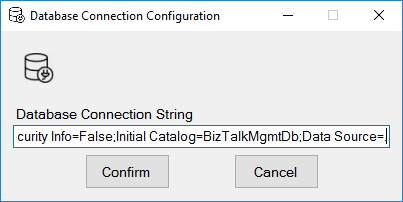
You just need to specify the connection string to the BizTalk Management database (BizTalkMgmtDb)
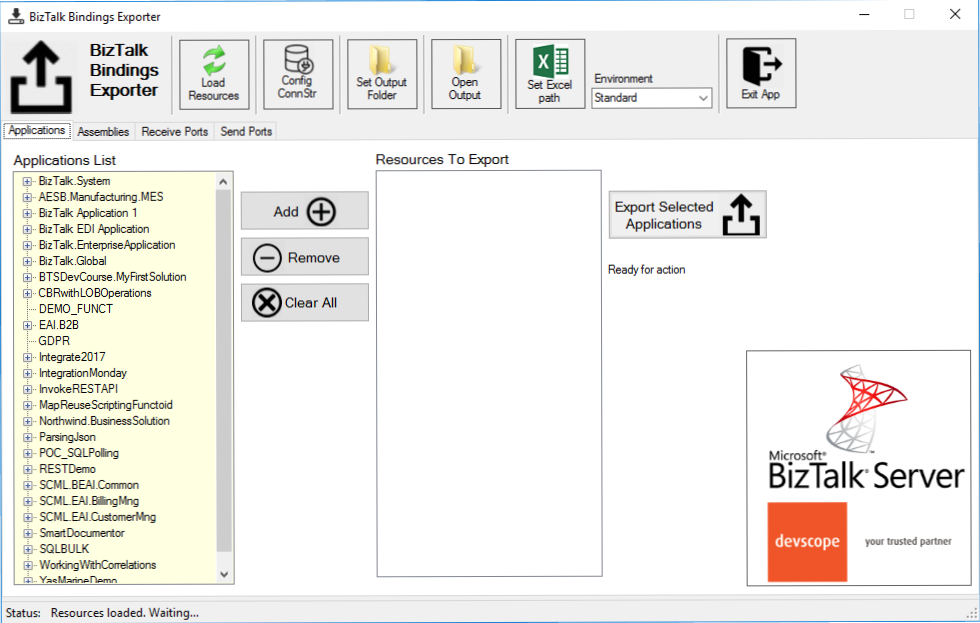
And this tool allows you to generate and export binding files with the following capabilities:
Export binding(s) file(s) for an entire Application or a list of Applications;
Export binding(s) file(s) from a specify Assembly or list of Assemblies;
Export binding(s) file(s) from a Receive Port or list of Receive Ports;
Export binding(s) file(s) from a Send Port or list of Send Ports;
Or Generate different binding files for each environment if you create an Excel File with the mapping for each environment ;
Credits also to my team member at DevScope, Pedro Almeida that collaborated in the development of this tool.