by Gautam | Aug 10, 2017 | BizTalk Community Blogs via Syndication
Recently Azure Table Storage Connector has been released in preview.
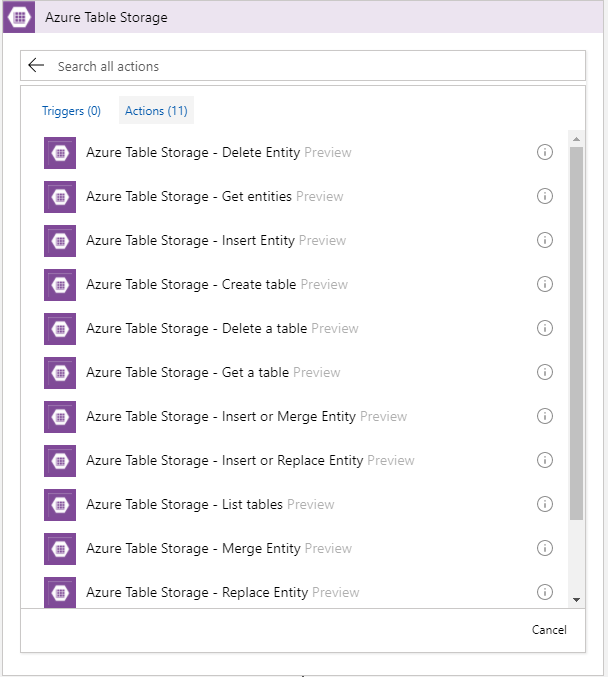
Now, the connector is only available in West Central US. Hopefully soon it will be rolled out to other data centers.
To play around this connector I created this very simple Logic App which pulls an entity from the table storage.
I have a table storage called RobustCloudIntegrationWithAzure as shown below.
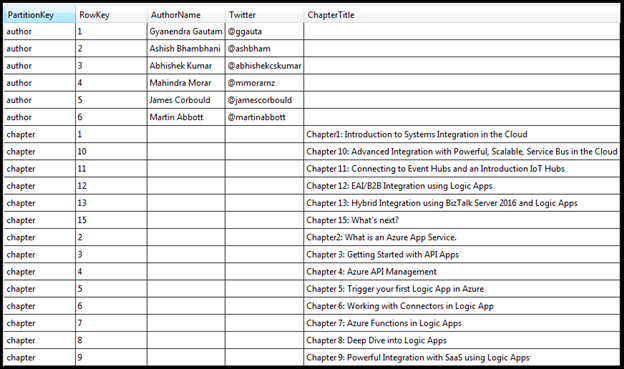
This table basically stores all the authors and chapters name of the book Robust Cloud Integration With Azure.

The author or the chapter is the partition key and the sequence number is the row Key. To get any author or chapter details, you need to pass partition key and the row key to the logic app
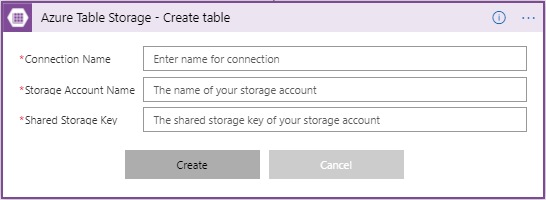
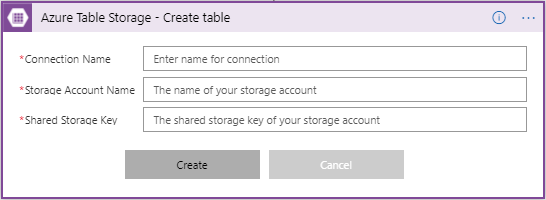
First you need to make a connection to the Azure Storage table, by providing the Storage Account Name with Shared Storage Key. You also need to give a name to your connection.
Once you have made the connection successfully, you can use any action of CRUD operation. In this case I am using Get Entities which is basically a select operation.
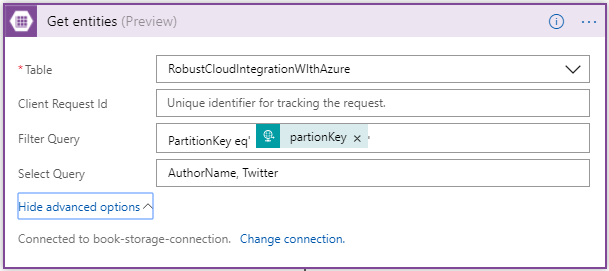
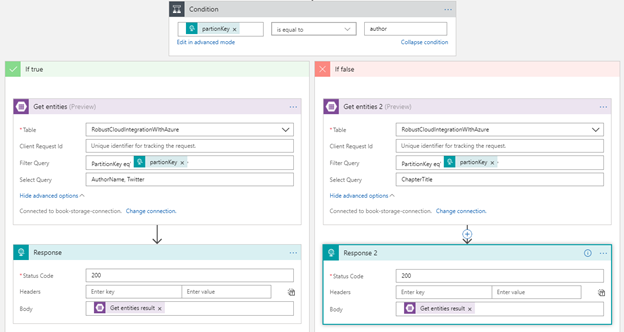
Once you have selected the table, you have option to user Filter and Select OData query. In the Filter Query I have condition to check for partionKey which is coming from input request. In the Select Query, you can choose the columns of the table to display.
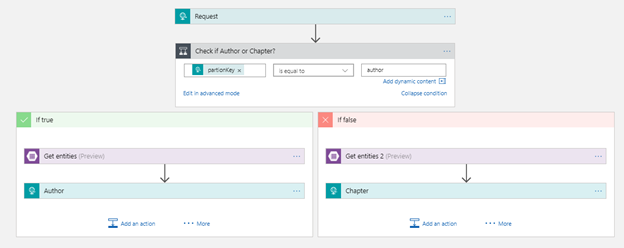
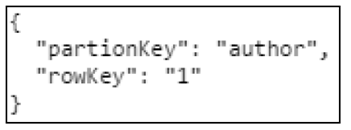
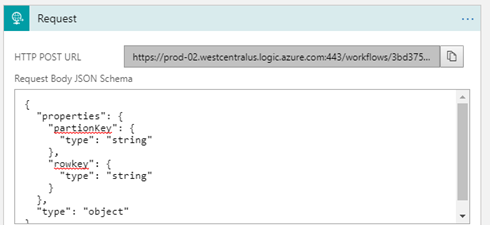
So, this logic app receives an request with the partionKey and rowKey as inputs.
Then it checks the value of partitionKey. If a partitionkey is equal to the author, Author action would be executed, else Chapter action. Depending on the partitionkey, either author or chapter details will be sent out as the response from the Logic App workflow
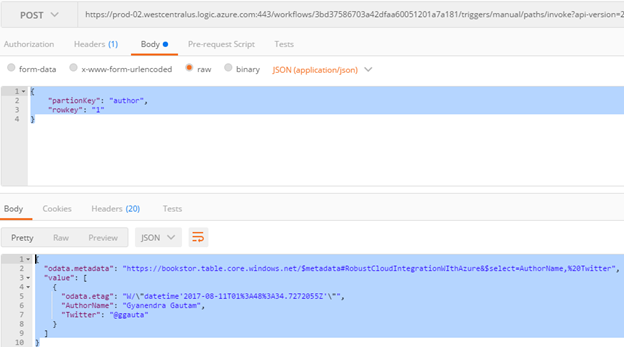
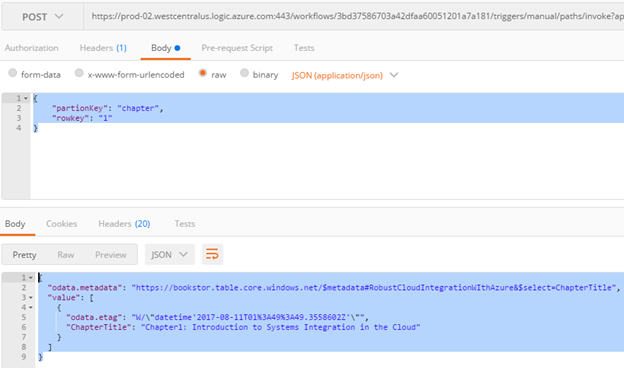
Here are the sample request and response using Postman.
Author
Chapter
Conclusion
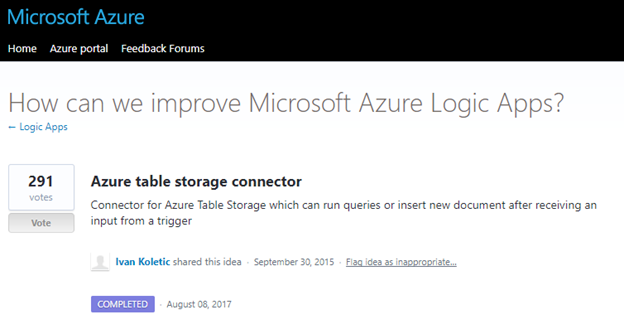
Azure Table Storage Connector was one of the most voted request to Logic App team and now it’s available to use.
by michaelstephensonuk | Jul 31, 2017 | BizTalk Community Blogs via Syndication
One of the biggest challenges in integration projects over the years is how to manage the relationship between the implementation of your solution and the documentation describing the intention of the solution and how it works and how to look after it.
We have been through paradigm shifts where projects were writing extensive documentation before a single line of code was written through to the more agile approaches with leaner documentation done in a just in time fashion. Regardless of these approaches the couple of common themes that still exist is:
- How do we relate the documentation to the implementation?
- How do we keep the documentation up to date?
- How do we make it transparent and accessible?
Ever since the guys at Mexia in Brisbane introduced me to Confluence, I have been a huge supporter of using this for integration. I have found the shift from people working over email and in word documents to truly collaborating in real time in Confluence to be one of the biggest factors for success in projects I have worked on. The challenge still remained how to create the relationship between the documentation and the implementation.
Fortunately with Azure we have the ability to put custom tags on most resources. This gives us a very easy way to start adding links to documentation to resources in Azure.
In the below article Ill show how we use this with a Logic Apps solution.
The Resource Group + Solution Level Documentation
In this particular case most of our solution is encapsulated within the resource group. This works great as we can have a document describing the solution. Below shows the confluence page we have outlining the solution blueprint and how it works.
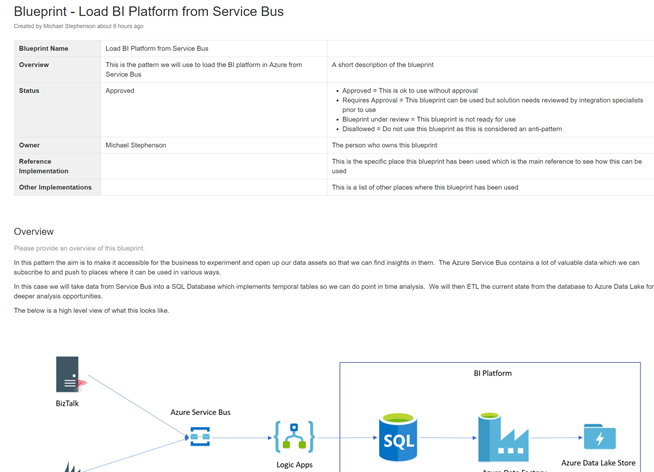
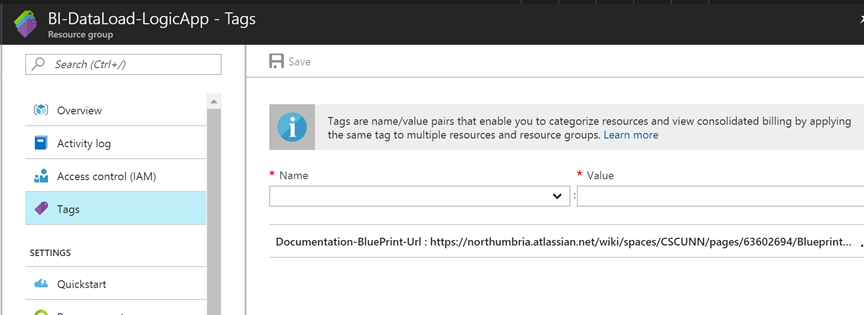
This solution documentation can then be added to the tags of the resource group as shown in the picture below.
The Logic App + Interface Specific Documentation
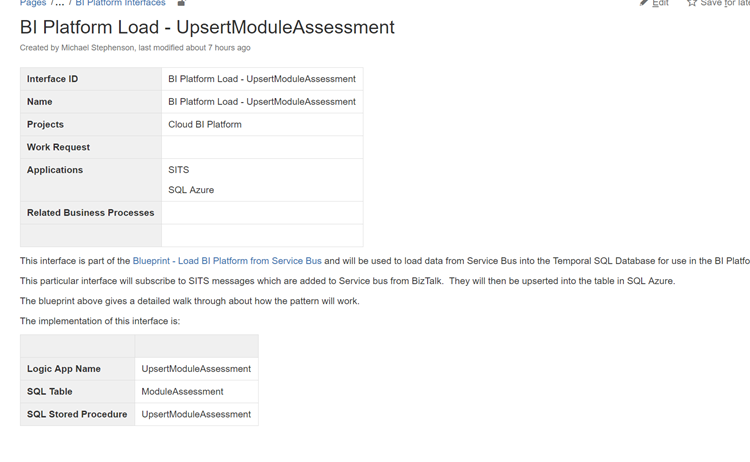
Next up we have the interface specification from our interface catalogue. Below is an example page from confluence to show a small sample of what one of these pages may look like. The specification will typically include things like analysis, mappings and data formats, component diagrams, process diagrams, etc.
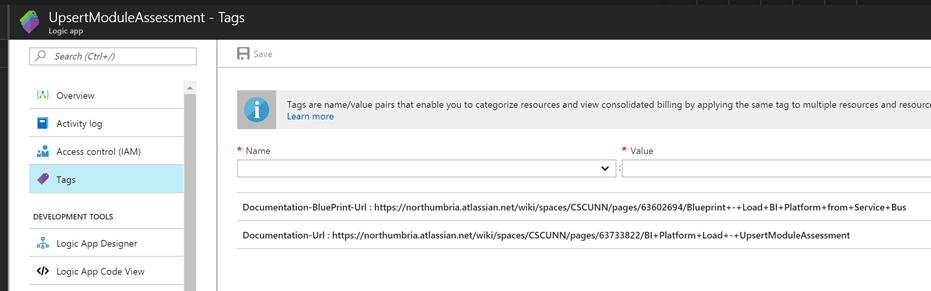
In the logic app we are able to use the tags against the logic app to create a relationship between our documentation and the implementation. In the below example I have added a link to the solution blueprint the locig app implements and also some specific documentation for that interface.
API Connector and Application specific connection documentation
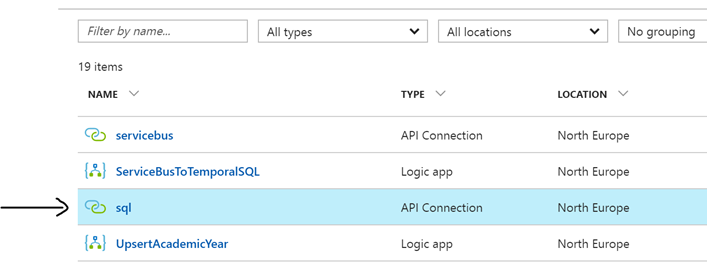
Next up we have application connector and API documentation. In the resource group we have a set of API connectors we have created. In this case we have the SQL one for connecting to our SQL Azure database as shown below.
In its tags we can now add a link to a page in confluence where we will document specifics related to this connection.
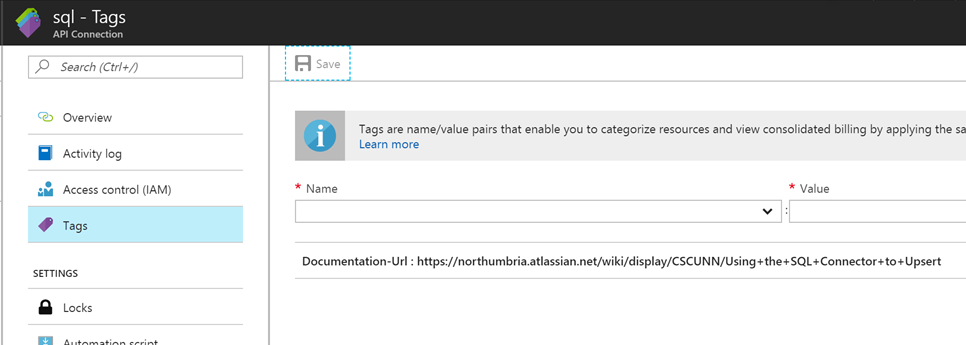
In this particular case one of the interesting things is how we will be using the MERGE command in SQL to upsert a record to the database, we have documented how this works in Confluence and we can easily link to it from the SQL connector. Below is an example of this documentation.
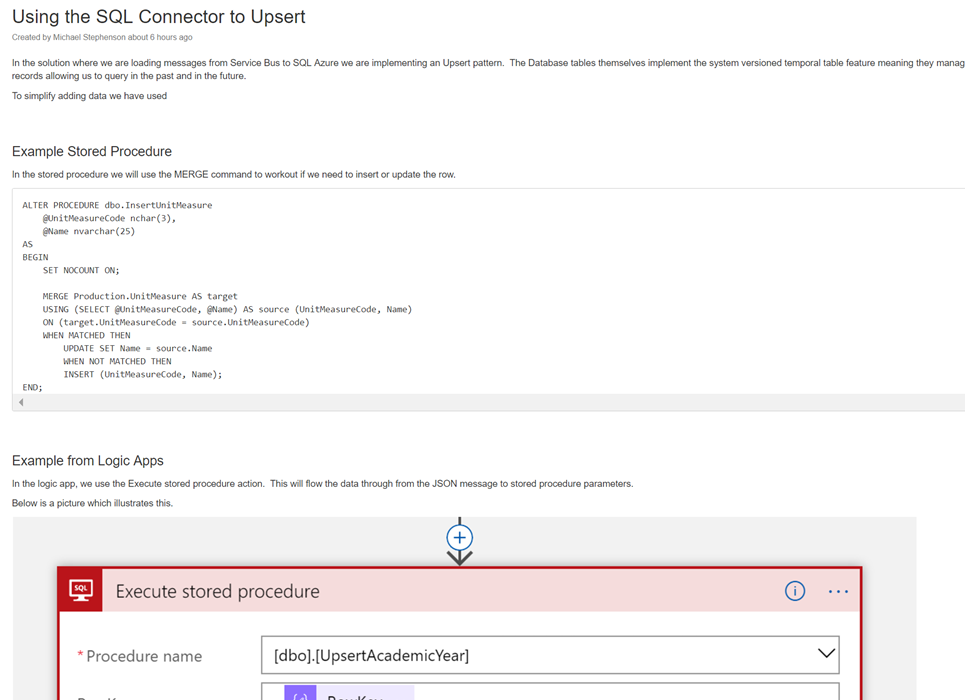
Summary
In summary you can see that tags enables us to close the gap between implementation and documentation/guidance. This is a feature we should be able to use a lot!

by michaelstephensonuk | Jul 22, 2017 | BizTalk Community Blogs via Syndication
I wanted to talk a little about the architecture I designed recently for a Dynamics CRM + Portal + Integration project. In the initial stages of the project a number of options were considered for a Portal (or group of portals) which would support staff, students and other users which would integrate with Dynamics CRM and other applications in the application estate. One of the challenges I could see coming up in the architecture was the level of coupling between the Portal and Dynamics CRM. Ive seen this a few times where an architecture has been designed where the portal is directly querying CRM and has the CRM SDK embedded in it which is an obviously highly coupled integration between the two. What I think is a far bigger challenge however is the fact that CRM Online is a SaaS application and you have very little control over the tuning and performance of CRM.
Lets imagine you have 1000 CRM user licenses for staff and back office users. CRM is going to be your core system of record for customers but you want to build systems of engagement to drive a positive customer experience and creating a Portal which can communicate with CRM is a very likely scenario. When you have bought your 1000 licenses from Microsoft you are going to be given the infrastructure to support the load from 1000 users. The problem however is your CRM portal being tightly coupled to CRM may introduce another amount of users on top of the 1000 back office users. Well whats going to happen when you have 50,000 students or a thousands/millions of customers starting to use your portal. You now have a problem that CRM may become a bottle neck to performance but because its SaaS you have almost no options to scale up or out your system.
With this kind of architecture you have the choices to roll your own portal using .net and either Web API or CRM SDK integration directly to CRM. There are also options to use products like ADXStudio which can help you build a portal too. The main reason these options are very attractive is because they are probably the quickest to build and minimize the number of moving parts. From a productivity perspective they are very good.
An illustration of this architecture could look something like the below:
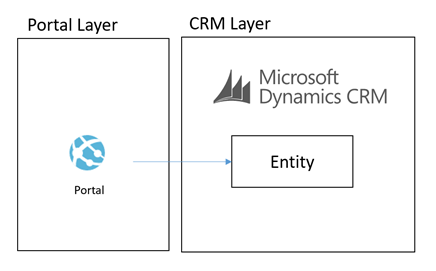
What we were proposing to do instead was to leverage some of the powerful features of Azure to allow us to build an architecture for a Portal which was integrated with CRM Online and other stuff which would scale to a much higher user base without having performance problems on CRM. Noting that problems in CRM could create a negative experience for Portal Users but also could significantly effect the performance of staff in the back office is CRM was running slow.
To achieve this we decided that using asynchronous approaches with CRM and hosting an intermediate data layer in Azure would allow us at a relatively low cost have a much faster and more scalable data layer to base the core architecture on. We would call this our cloud data layer and it would sit behind an API for consumers but be fed with data from CRM and other applications which were both on premise and in the cloud. From here the API was to expose this data to the various portals we may build.
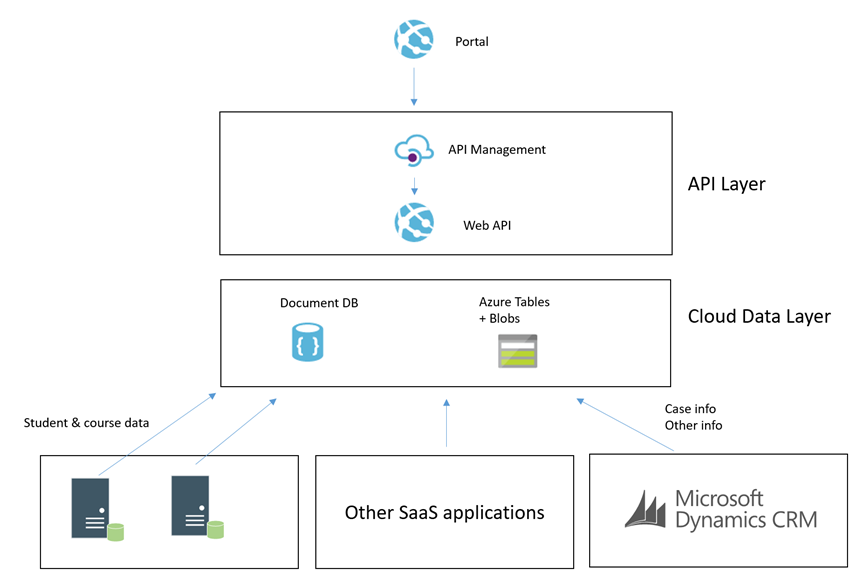
The core idea was that the more we could minimize the use of RPC calls to any of our SaaS or On Premise applications the better we would be able to scale the portal we would build. Also at the same time the more resilient they would be to any of the applications going down.
Hopefully at this point you have an understanding of the aim and can visualise the high level architecture. I will next talk through some of the patterns in the implementation.
Simple Command from Portal
In this patter we have the scenario where the portal needs to send a simple command for something to happen. The below diagram will show how this works.
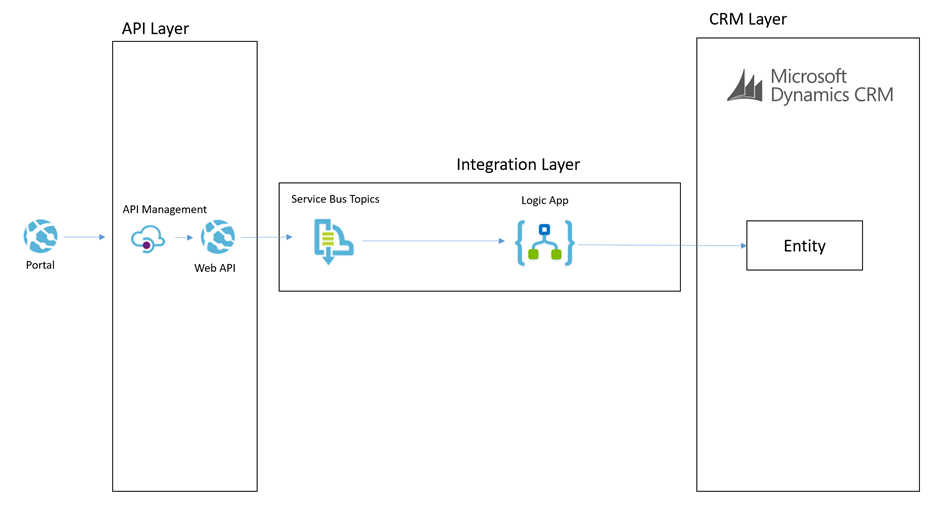
Lets imagine a scenario of a user in the portal adding a chat comment to a case.
The process for the simple command is:
- The portal will send a message to the API which will do some basic processing but then it will off load the message to a service bus topic
- The topic allows us to route the message to many places if we want to
- The main subscriber is a Logic App and it will use the CRM connectors to be able to interact with the appropriate entities to create the chat command as an annotation in CRM
This particular approach is pretty simple and the interaction with CRM is not overly complicated. This is a good candidate to use the Logic App to process this message.
Complex Command from Portal
In some cases the portal would publish a command which would require a more complex processing path. Lets imagine a scenario where the customer or student raised a case from the portal. In this scenario the processing could be:
- Portal calls the API to submit a case
- API drops a message onto a service bus topic
- BizTalk picks up the message and enriches with additional data from some on premise systems
- BizTalk then updates some on premise applications with some data
- BizTalk then creates the case in CRM
The below picture might illustrate this scenario
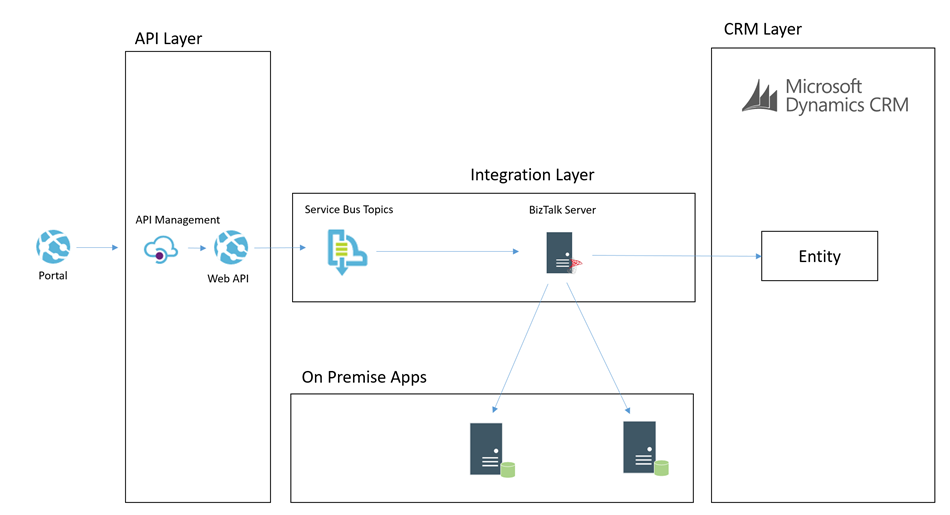
In this case we choose to use BizTalk rather than Logic Apps to process the message. I think as a general rule the more complex the processing requirements, the more I would tend to lean towards BizTalk than Logic Apps. BizTalks support for more complex orchestration, compensation approaches and advanced mapping just lends itself a little better in this case.
I think the great thing in the Microsoft stack is that you can choose from the following technologies to implement the above two patterns behind the scenes:
- Web Jobs
- Functions
- Logic Apps
- BizTalk
Each have their pro’s and con’s which make them suit different scenarios better but also it allows you to work in a skillset your most comfortable with.
Cloud Data Layer
Earlier in the article I mentioned that we have the cloud data layer as one of our architectural components. I guess in some ways this follows the CQRS pattern to some degree but we are not specifically implementing CQRS for the entire system. Data in the Cloud Data Layer is owned by some other application and we are simply choosing to copy some of it to the cloud so it is in a place which will allow us to build better applications. Exposing this data via an API means that we can leverage a data platform based on Cosmos DB (Document DB) and Azure Table Storage and Azure Blob Storage.
If you look at Cosmos DB and Azure Storage, they are all very easy to use and to get up and running with but the other big benefits is they offer high performance if used right. By comparison we have little control over the performance of CRM online, but with Cosmos DB and Azure Storage we have lots of options over the way we index and store data to make it suit a high performing application without all of the baggage CRM would bring with it.
The main difference over how we use these data stored to make a combines data layer is:
- Cosmos DB is used for a small amount of meta data related to entities to aid complex searching
- Azure Table store is used to store related info for fast retrieval by good partitioning
- Azure Blob Storage is used for storing larger json objects
Some examples of how we may use this would be:
- In an azure table a students courses, modules, etc may be partitioned by the student id so it is fast to retrieve the information related to one student
- In Cosmos DB we may store info to make advanced searching efficient and easy. For example find all of the students who are on course 123
- In blob storage we may store objects like the details of a KB article which might be a big dataset. We may use Cosmos DB to search for KB articles by keywords and tags but then pull the detail from Blob Storage
CRM Event to Cloud Data Layer
Now that we understand that queries of data will not come directly from CRM but instead via an API which exposes an intermediate data layer hosted on Azure. The question is how is this data layer populated from CRM. We will use a couple of patterns to achieve this. The first of which is event based.
Imagine that in CRM each time an entity is updated/etc we can use the CRM plugin for Service Bus to publish that event externally. We can then subscribe to the queue and with the data from CRM we can look up additional entities if required and then we can transform and push this data some where. In our architecture we may choose to use a Logic App to collect the message. Lets imagine a case was updated. The Logic App may then use info from the case to look up related entity data such as a contact and other similar entities. It will build up a canonical message related to the event and then it can store it in the cloud data layer.
Lets imagine a specific example. We have a knowledge base article in CRM. It is updated by a user and the event fires. The Logic App will get the event and lookup the KB article. The Logic App will then update Cosmos DB to update the metadata of the article for searching by apps. The Logic App will then transform the various related entities to a canonical json format and save them to Blob storage. When the application searches for KB articles via the API it will be under the hood retrieving data from Cosmos DB. When it has chosen a KB article to display then it will retrieve the KB article details from blob storage.
The below picture shows how this pattern will work.
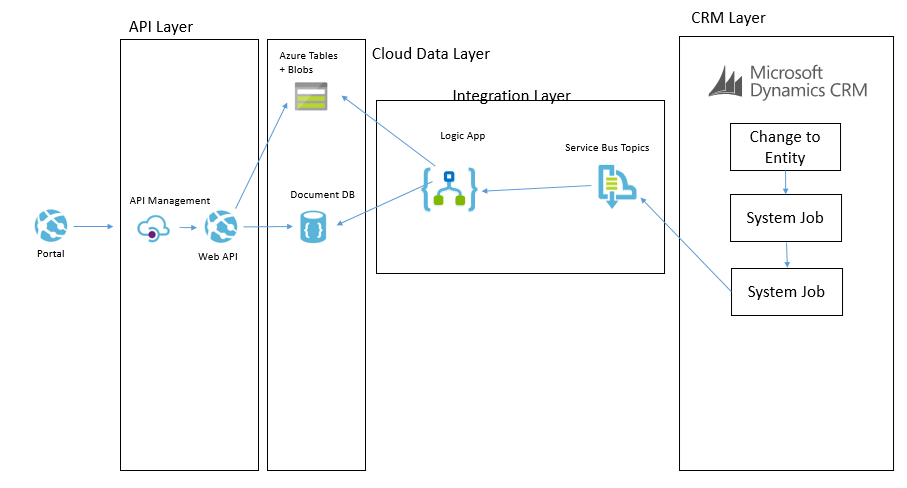
CRM Entity Sync to Cloud Data Layer
One of the other ways we can populate the cloud data layer from CRM is via a with a job that will copy data. There are a few different ways this can be done. The main way will involve executing a fetch xml query against CRM to retrieve all of the records from an entity or all of the records that have been changed recently. They will then be pushed over to the cloud data layer and stored in one of the data stores depending on which is used for that data type. It is likely there will be some form of transformation on the way too.
An example of where we may do this is if we had a list of reference data in CRM such as the nationalities of contacts. We may want to display this list in the portal but without querying CRM directly. In this case we could copy the list of entities from CRM to the cloud data layer on a weekly basis where we copy the whole table. There are other cases where we may copy data more frequently and we may use different data sources in the cloud data layer depending upon the data type and how we expect to use it.
The below example shows how we may use BizTalk to query some data from CRM and then we may send messages to table storage and Cosmos DB.
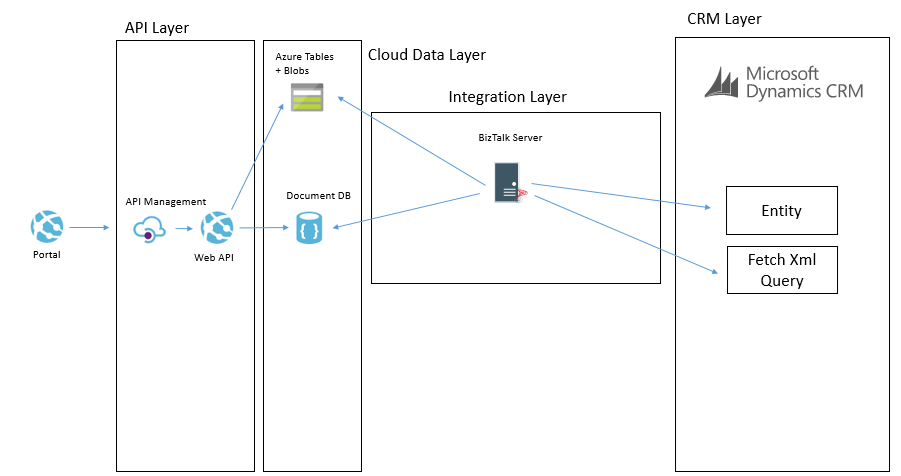
Another way we may solve this problem is using Data Factory in Azure. In Data Factory we can do a more traditional ETL style interface where we will copy data from CRM using the OData feeds and download it into the target data sources. The transformation and advanced features in Data Factory are a bit more limited but in the right case this can be done like in the below picture.
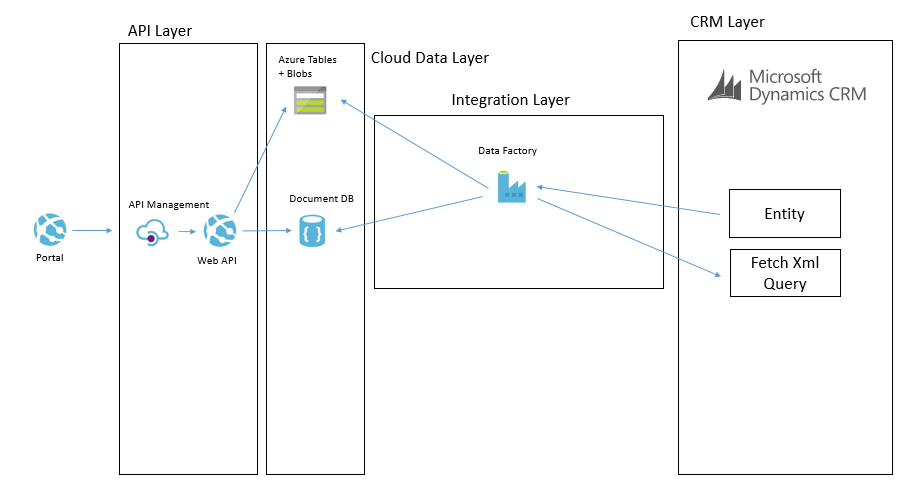
In these data synchronisation interfaces it will tend to be data that doesn’t change that often and data which you don’t need the real time event to update it which it will work the best with. While I have mentioned Data Factory and BizTalk as the options we used, you could also use SSIS, custom code and a web job or other options to implement it.
Summary
Hopefully the above approach gives you some ideas how you can build a high performing portal which integrated with CRM Online and potentially other applications but by using a slightly more complex architecture which introduces asynchronous processing in places and CQRS in others you can create a decoupling between the portal(s) you build and CRM and other back end systems. In this case it has allowed us to introduce a data layer in Azure which will scale and perform better than CRM will but also give us significant control over things rather than having a bottle neck on a black box outside of our control.
In addition to the performance benefits its also potentially possible for CRM to go completely off line without bringing down the portal and only having a minimal effect on functionality. While the cloud data layer could still have problems, firstly it is much simpler but it is also using services which can easily be geo-redundant so reducing your risks. An example here of one of the practical aspects of this is if CRM was off line for a few hours while a deployment is performed I would not expect the portal to be effected except for a delay in processing messages.
I hope this is useful for others and gives people a few ideas to think about when integrating with CRM.

by Nino Crudele | Jul 21, 2017 | BizTalk Community Blogs via Syndication
Agile is a word I really like to use now in the integration space, in my last event, the Integrate 2017, I started to present this my concept.
As we see the business’s dynamics are changing very fast, companies require fast integration every time more, sending and integrating data very easily and fast is now a key requirement.
There are many options now to obtain that, however some of them are better in some specific situation than the others.
During my last event, I presented how I approach to the agile integration using Microsoft Azure and some example with BizTalk Server as well.
Following these concepts, I started a new project called Rethink121, I like the idea to rethink technologies in different ways and this is what my customers appreciate more.

Most of the time we start using a technology following the messages provided by the vendor, without exploring other new possibilities and ways, I think is important to evaluate a technology like a little kid evaluates his first toy.
During the session, I shown some scenarios like, how to get fast and easy hybrid integration, BizTalk performance, concepts like agile and dynamic integration, cognitive integration.
Many people have been impressed by the demos, some other made me many questions and asking more about that, a new concept and a new view always creates a lot questions because it stimulates the creativity and the curiosity.
During the session, I have shown a BizTalk solution sample sending a flat file between a REST and a WCF endpoint and using a pipeline and a map to send and receive flat data between the endpoints.
The process executed by BizTalk Server was able to achieve that in 80 milliseconds for a single message in request response, I have shown how is possible to achieve real time performances in BizTalk Server without change the solution and reusing all the artefacts as is.
Do to that I use my framework named SnapGate which is able to be installed inside BizTalk Server and improve the performances.
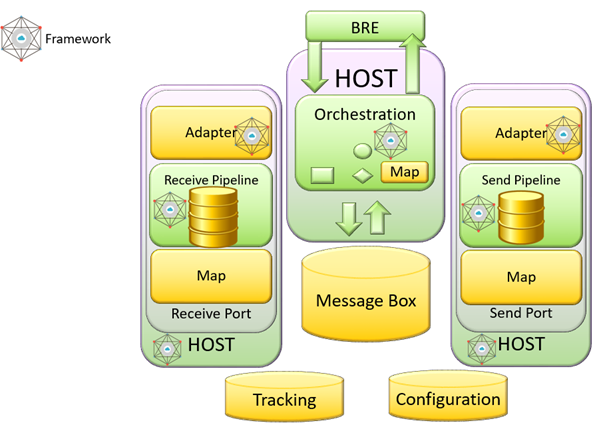
The time spent to execute the single request response using SnapGate was around 4 milliseconds, quite impressive result.
I have shown the generic BizTalk adapter which is able to extend the BizTalk integration capabilities without any limit, the adapter is able to be extended using PowerShell or even a simple .Net code in 5 minutes.
I explain the concept of agile integration and how I approach and how I use the technologies, I like to map the BizTalk Server architecture to Microsoft Azure to better explain that.
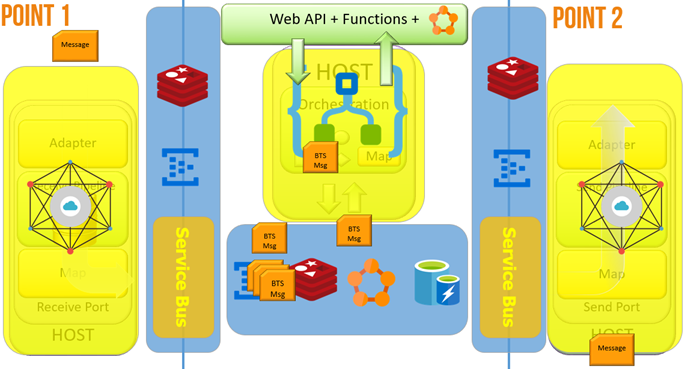
During the demo, I have shown a scenario able to demonstrate how to send and integrate data across the world in very fast ways, the key point of this demo were:
- The system was able to integrate data and create new integration points in real time
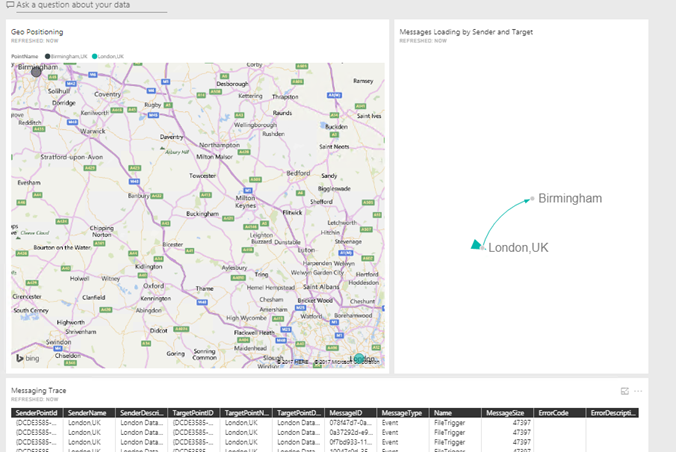
- The system was using PowerBI in real-time and using normal graphs and PowerBI feature in real time.
- The system was learning by itself about how to integrate these points and we don’t need to physically deploy our mediation stack.
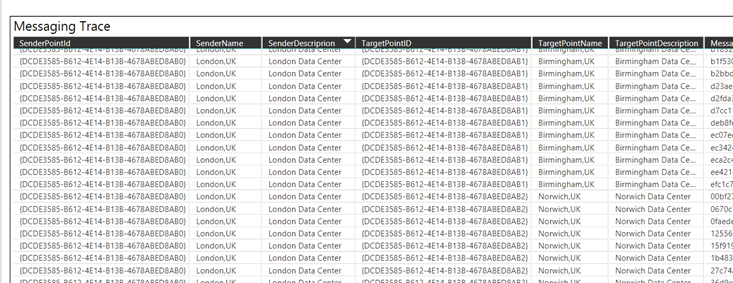
Starting form a single integration point in London
I started a new integration point in Birmingham and the integration point in London started synchronising the adaptation layer with Birmingham and sending exchange messages between them
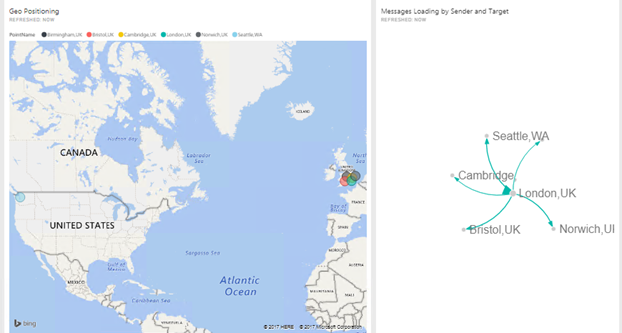
I started other more to show how much easy can be integrate new point and exchange data between them without care about to deploy any new feature, the system learns by itself, we can call this cognitive integration.
There are so many innovative aspects to consider here, the possibility to have fast hybrid integration at very low cost, integrate data fast and easy, the possibility to integrate PowerBI in real time data analytic scenario.
A last thing, many people asking me about BizTalk server and its future, well, the list below are the technologies I most like to use and how, I have shown this slide during the session.
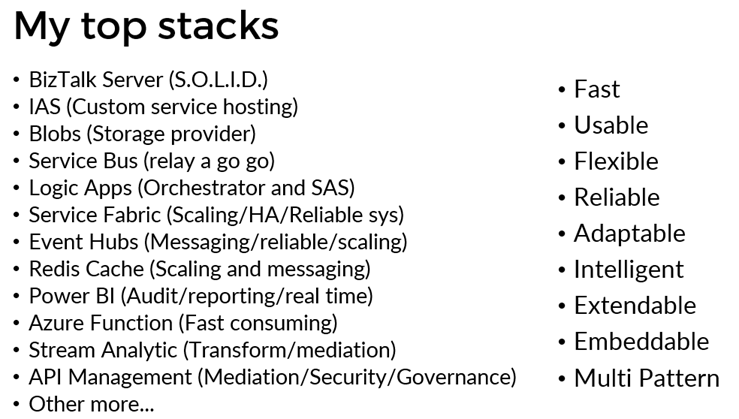
There is one thing only I can say, BizTalk Server is S.O.L.I.D.
I will explain more in detail about agile and cognitive integration in my next session in the Integration Monday in September, see you there.
Author: Nino Crudele
Nino has a deep knowledge and experience delivering world-class integration solutions using all Microsoft Azure stacks, Microsoft BizTalk Server and he has delivered world class Integration solutions using and integrating many different technologies as AS2, EDI, RosettaNet, HL7, RFID, SWIFT. View all posts by Nino Crudele
by michaelstephensonuk | Jul 2, 2017 | BizTalk Community Blogs via Syndication
Recently I wrote an article about how I was uploading bank info from Barclays to my Office 365 environment and into a SharePoint list.
http://microsoftintegration.guru/2017/06/29/logic-apps-integration-for-small-business/
In the article I got the scenario working but I mentioned that I didn’t really like the implementation too much and I felt sure there were tidier ways to implement the Logic App. This prompted swapping a few emails with Jeff Holland on the product team at Microsoft and he gave me some cool tips on how best to implement the pattern.
At a high level the actions required are:
- Receive a message
- Look up in a SharePoint list to see if the record exists
- If it exists update it
- If it doesn’t exist then create it
In the rest of the article ill talk about some of the tweaks I ended up making.
Get Item – Action – Doesn’t help
First off I noticed there was a Get Item action in the list which I hadn’t noticed the other day so I thought id have a look and see if it would do the job for me. I set up my test logic app as below.
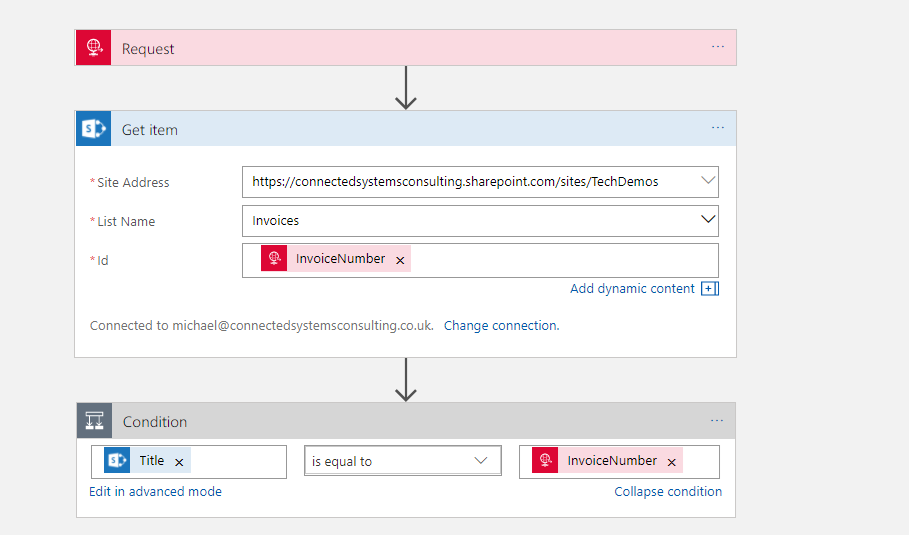
The problem here however is that Get Item requires the ID which appears to resolve to a sort of internal id from SharePoint. In the real world your unlikely to have this id in other systems and you cant set the id when creating a record so I imagine its like an auto number. I quickly found Get Item wasn’t going to help short cut my implementation so it was back to Get Items.
In the picture below you can see how I use Get Items with a filter query to check for a record where the Title is equal to the invoice number. In my implementation I decided to store the unique id for each invoice in the Title field as well as in a custom Invoice Number field. This makes the look up work well and also to be explicit I set the maximum get count property to 1 so I am expecting either an empty array if it’s a new record or an array with 1 element if the record already exists.
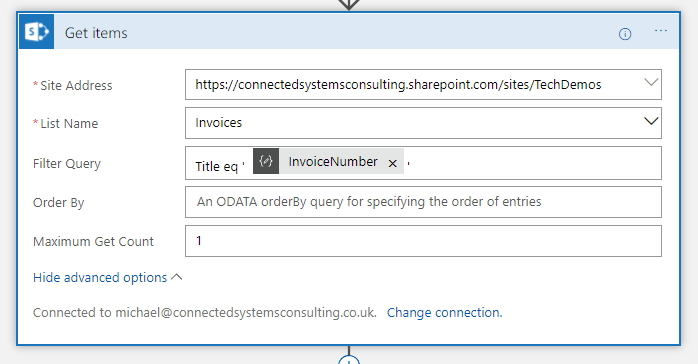
Getting Json for Single SharePoint Item
The next problem after the look up is working with the object from the array. I didn’t really fancy working with complex expressions to reference each property on the item in the array or doing it in an unnecessary loop so my plan was to try and create a reference to the first element in the array using a json schema and the Parse Json action.
To do this I left my Logic App in a position where it just did the look up and I then called it from Postman like in the picture below.
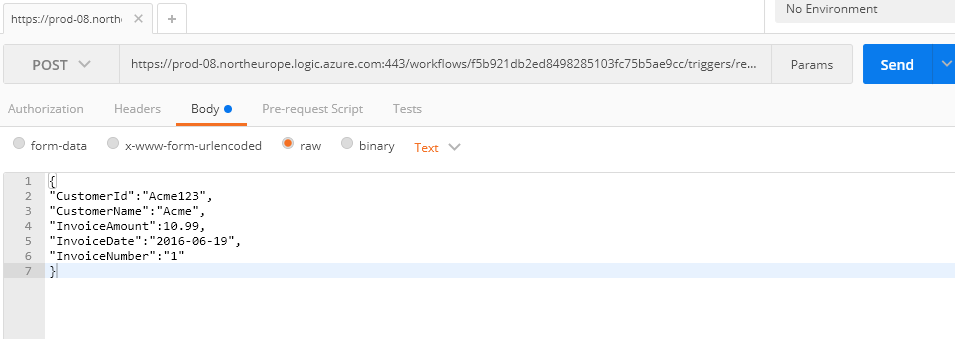
When the Logic App executed I was able to go into the diagnostics of the run and look at the Get Items to see the Json that was returned. (id already manually added 1 record to the SharePoint list so I knew id get 1 back). In the picture below you can see I opened the execution of Get Items.
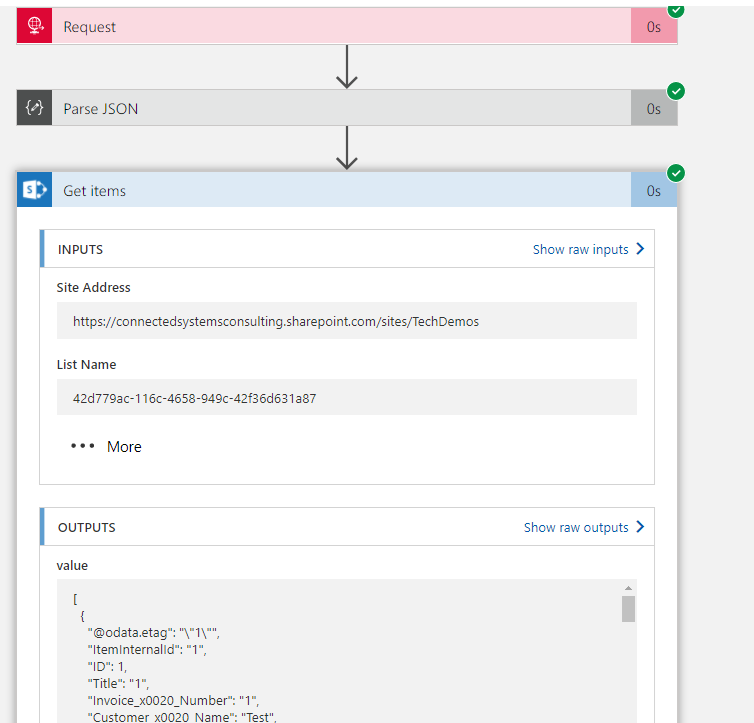
In the outputs section I can see the Json returned from the action and I copied this into notepad. I then removed the square brackets from the start and end which turn the json into an array. What im left with is the json representing the first element in the array. I put this to one side and kept it for later.
Make the Lookup Work
Now we wanted to make the look up work properly so lets review what id done so far. First off I had my request action which receives data over http. As a preference I tend to not add a schema to the request unless it’s a Logic App im calling from another Logic App. I prefer to use a Parse Json with a schema as the 2nd step. Ive just felt this decouples it a little and gives me scope to change stuff around a little more in the Logic App without the dependency on Request. A good example of this was once I needed to change the input from Request to Queue and if I had used the schema on Request it would have meant changing the entire logic app.
Anyway so we parse the json and then execute Get Items like we discussed above.
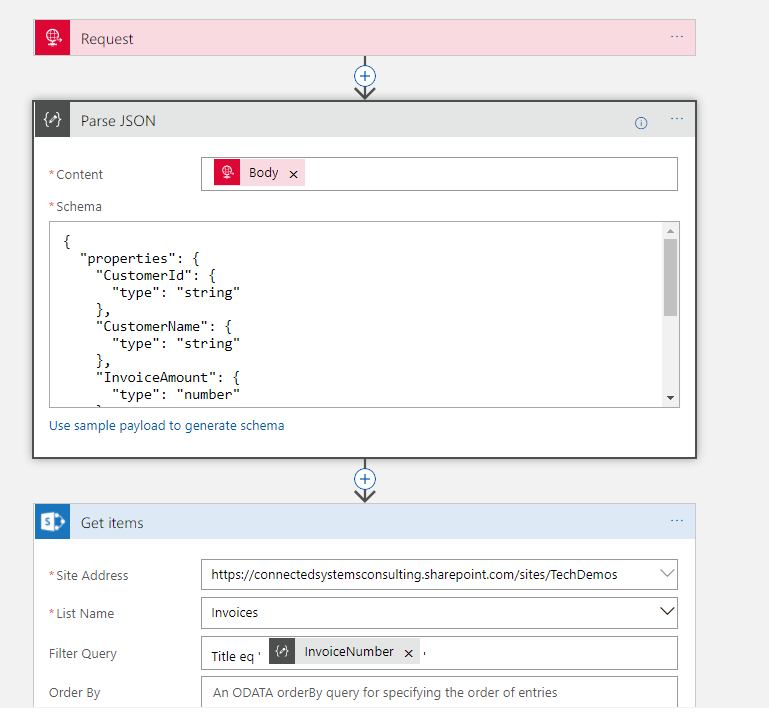
At this point I know im above to execute the Logic App and get a single element array if the invoice exists and an empty array if it doesn’t.
Workout if to Insert of Update
The next step which Jeff gave me some good tips on was how to workout if to do the insert or update. Previously id don’t this weird little counter pattern to count the elements in the array then decide the branch to execute based on that, but Jeff suggested an expression which can check for an empty array.
In the below picture you can see the expression checks the Get Items action and sees if the value is empty.
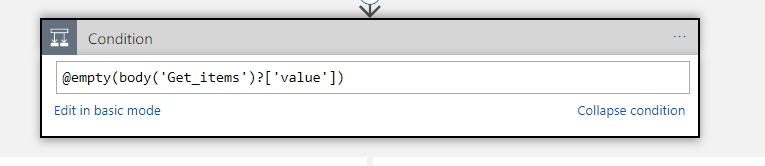
This has greatly simplified my condition so im happy!
The Create
The creation step was really just the same as before. We flow in properties from the inbound json into fiends on the SharePoint list and it gets created. See below pic.
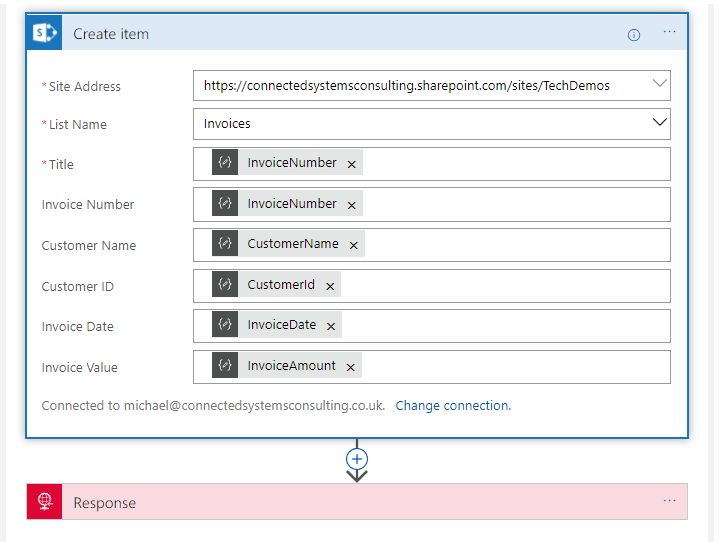
The Update
The bit where things got tidier is in the update. Previously I had a loop around the update action meaning it was executed once for every element, even though there should only ever be 1 element. While this works it looked untidy and didn’t make sense in the Logic App. I knew if I looked at it in 6 months time it would be a WTF moment. The problem was that for the update we need some fields from the query response and some fields from the input json to pass to the update action and it was awkward to make them resolve without the loop.
Combining Jeff’s tips and a little item of my own I decided to use the Parse Json action and the json id put to one side earlier which represented a single element in the Get Items response array. I used this json to have a schema for that item from the list and then in the content of the action Jeff suggested I used the @first expression. This basically meant that I could have a new pointer to that first element in the array which means when I used it downstream in the logic app I can reference it with nice parameters instead of repeatedly using the expression.
The below picture shows how I did this.
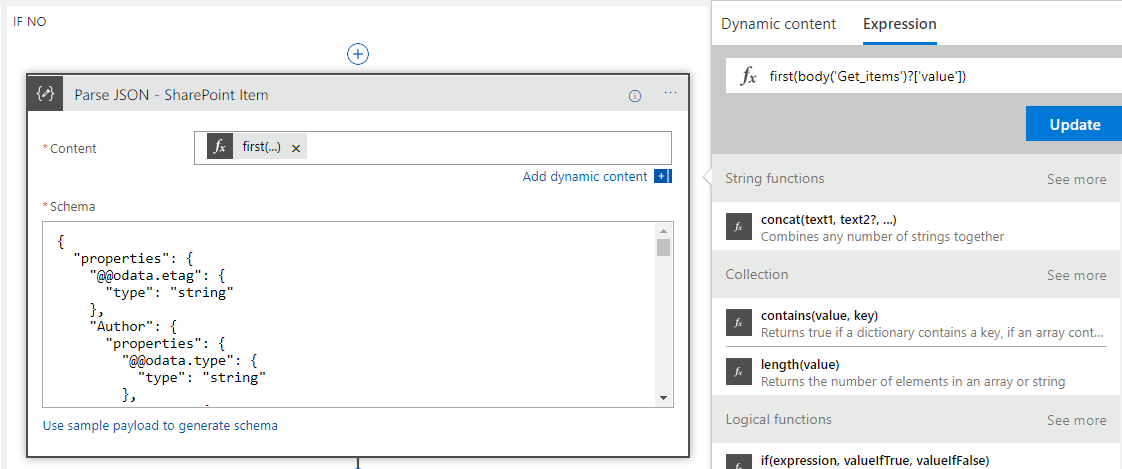
The next step was to do the Update Item action. At this point I effectively have pointers to two objects in the Logic App created by the Parse Json. The first is the input object and the second is the item queried from SharePoint. I now simply had to map the right properties to the right fields on the update action like in the below picture.

One caveat to note is that although the icons look the same the fields above actually come from 2 different Parse Json instances.
Wrap Up
At this point it now meant that when I execute my logic app via Postman I now get the SharePoint list updated and having new items inserted exactly as I wanted. Below is a pic of the list just to show this for completeness.
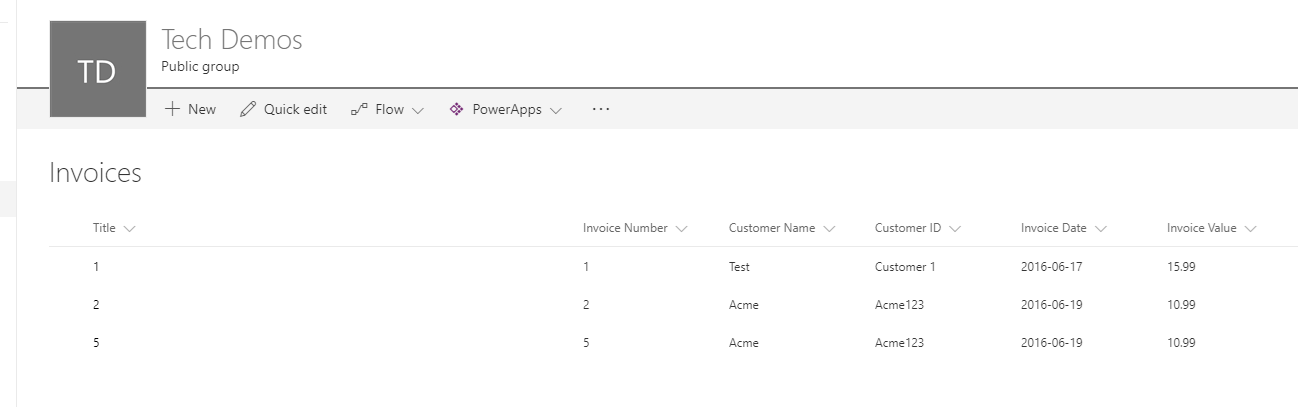
Also the below picture shows the full Logic App so you can see it all hanging together
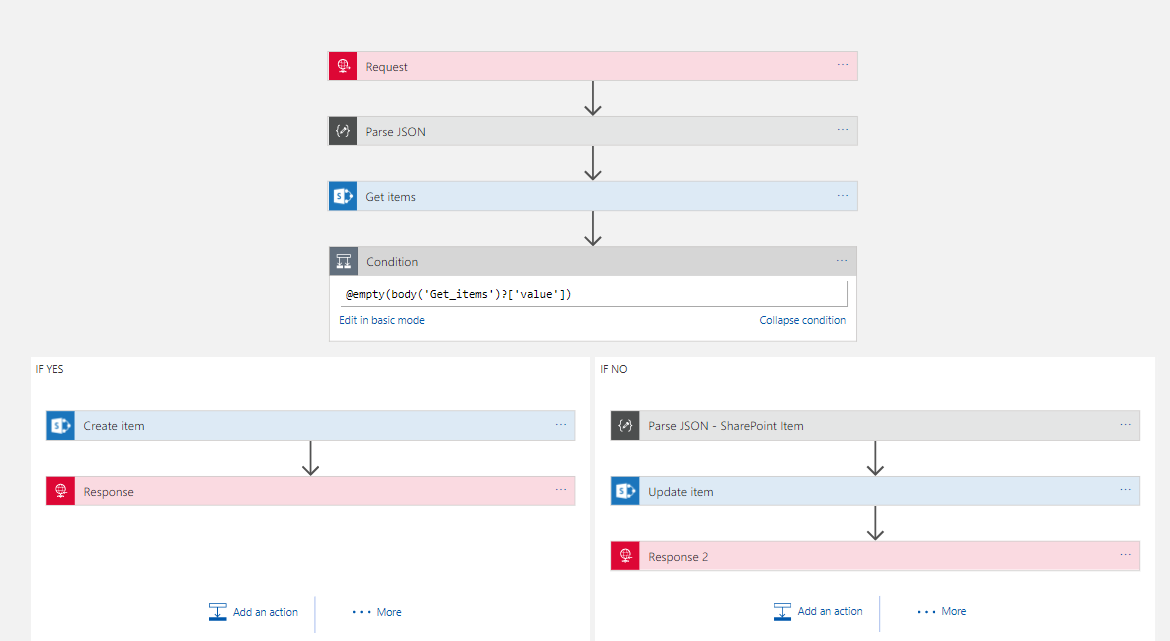
In summary with some help from Jeff I am much happier with how I implemented this upsert functionality. Ive said a few times it will be better when the API connectors support this functionality so the Logic App doesn’t need to care and becomes much simpler, but to be fair most API implementations tend to go for basic CRUD approaches so its common to face this scenario. Hopefully with the write up above that will make it easier for everyone to be able to write a tidier implementation of this pattern. I have a feeling it will be quite reusable for other application scenarios such as CRM which have similar API connectors. Maybe there is even the opportunity for these to become Logic App templates.

by Gautam | Jun 28, 2017 | BizTalk Community Blogs via Syndication
Now a days, this is a very common and valid question in the BizTalk community, both for existing BizTalk customer and for new one too.
Here is what Tord answered in the open Q&A with product group at 100th Episode of integration Monday. Check at ~ 30.30 minutes of the video.

If your solution need to communicate with SaaS application, Azure workloads and cloud business partners (B2B) all in cloud then you should use Azure Logic Apps, but if you are doing lot of integration with on-premise processing by communicating with on-premise LOB applications, then BizTalk is the pretty good option. You can use both if you are doing hybrid integration.
So basically, it depends on scenario to scenario based on your need and architecture of your solution.
Many enterprises now use a multitude of cloud-based SaaS services, and being able to integrate these services and resources can become complex. This is where the native capability of Logic Apps can help by providing connectors for most enterprise and social services and to orchestrate the business process flows graphically.
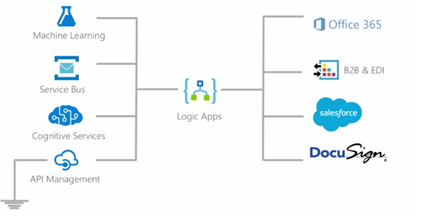
If your resources are all based in the cloud, then Logic Apps is a definite candidate to use as an integration engine.
Natively, Logic Apps provides the following key features:
Rapid development: Using the visual designer with drag and drop connectors, you design your workflows without any coding using a top-down design flow. To get started, Microsoft has many templates available in the marketplace that can be used as is, or modified to suit your requirements. There are templates available for Enterprise SaaS services, common integration patterns, Message routing, DevOps, and social media services.
Auditing: Logic Apps have built-in auditing of all management operations. Date and time when workflow process was triggered and the duration of the process. Use the trigger history of a Logic App to determine the activity status:
- Skipped: Nothing new was found to initiate the process
- Succeeded: The workflow process was initiated in response to data being available
- Failed: An error occurred due to misconfiguration of the connector
A run history is also available for every trigger event. From this information, you can determine if the workflow process succeeded, failed, cancelled, or is still running.
Role-based access control (RBAC): Using RBAC in the Azure portal, specific components of the workflow can be locked down to specific users. Custom RBAC roles are also possible if none of the built-in roles fulfills your requirements.
Microsoft managed connectors: There are several connectors available from the Azure Marketplace for both enterprise and social services, and the list is continuously growing. The development community also contributes to this growing list of available connectors as well.
Serverless scaling: Automatic and built in on any tier.
Resiliency: Logic Apps are built on top of Azure’s infrastructure, which provides a high degree of resiliency and disaster recovery.
Security: This supports OAuth2, Azure Active Directory, Cert auth and Basic auth, and IP restriction.
There are also some concerns while working with Logic Apps, shared by Microsoft IT team at INTEGRATE 2017
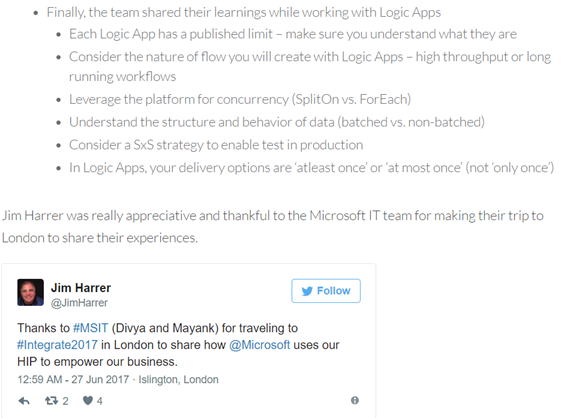
You can also refer the book, Robust cloud integration with Azure to understand and get started with integration in cloud.
When you have, resources scattered in the cloud and on premise, then you may want to consider BizTalk as a choice for this type of hybrid integration along with Logic Apps.
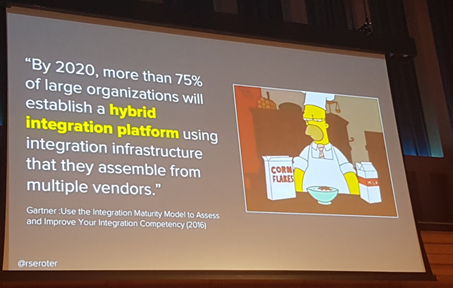
BizTalk 2016 include an adapter for Logic Apps. This Logic App adapter will be used to integrate Logic Apps and BizTalk sitting on premise. Using the BizTalk 2016 Logic App adapter on-premise, resources can directly talk to a multitude of SaaS platforms available on cloud.
The days of building monolithic applications are slowly diminishing as more enterprises see the value of consuming SaaS as an alternative to investing large amounts of capex to buy Commercial Off the Self (COTS) applications. This is where Logic Apps can play a large part by integrating multiple SaaS solutions together to form a complete solution.
BizTalk Server has been around since 2000, and there have been several new products releases since then. It is a very mature platform with excellent enterprise integration capabilities.
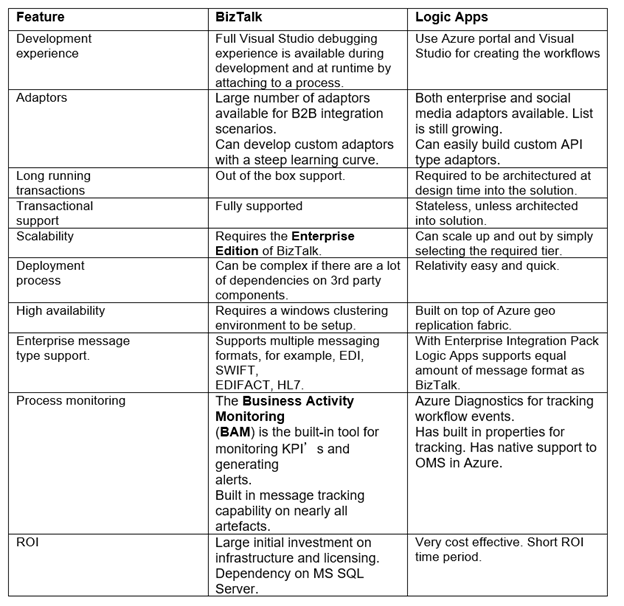
Below is a short comparison matrix between BizTalk and Logic Apps:
Conclusion
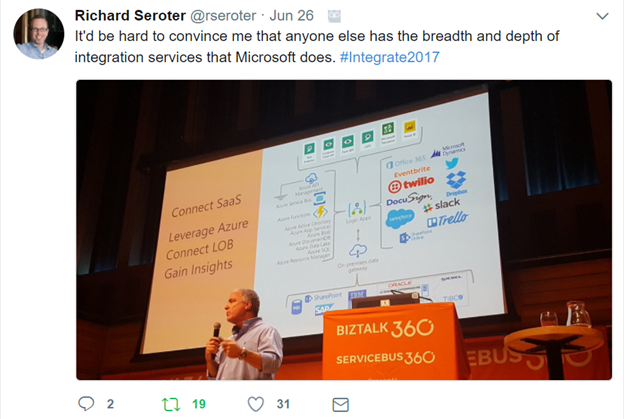
Microsoft Integration platform has all the option for all kind of customer’s integration need.
by BizTalk Team | Jun 27, 2017 | BizTalk Community Blogs via Syndication
We are very happy to announce a wonderful tool provided by MSIT, the tool will help in a multiple scenarios around migrating your environment or even taking backup of your document applications.
It comes with few inbuilt intelligence like
- Connectivity test of source and destination SQL Instance or Server
- Identify BizTalk application sequence
- Retain file share permissions
- Ignore zero KB files
- Ignore files which already exist in destination
- Ignore BizTalk application which already exist in destination
- Ignore Assemblies which already exist in destination
- Backup all artifacts in a folder.
| Features Available |
Features Unavailable |
- Windows Service
- File Shares (without files) + Permissions
- Project Folders + Config file
- App Pools
- Web Sites
- Website Bindings
- Web Applications + Virtual Directories
- Website IIS Client Certificate mapping
- Local Computer Certificates
- Service Account Certificates
- Hosts
- Host Instances
- Host Settings
- Adapter Handlers
- BizTalk Applications
- Role Links
- Policies + Vocabularies
- Orchestrations
- Port Bindings
- Assemblies
- Parties + Agreements
- BAM Activities
- BAM Views + Permissions
|
- SQL Logins
- SQL Database + User access
- SQL Jobs
- Windows schedule task
- SSO Affiliate Applications
|
Download the tool here
For a small guide take a look here
by BizTalk Team | May 30, 2017 | BizTalk Community Blogs via Syndication
We are happy to announce the 2nd Cumulative updates BizTalk Server 2016.
This cumulative update package for Microsoft BizTalk Server 2016 contains hotfixes for the BizTalk Server 2016 issues that were resolved after the release of BizTalk Server 2016.
NOTE: This CU is not applicable to environment where Feature Pack 1 is installed, there will be a new Cumulative Update for BizTalk Server 2016 Feature Pack 1 coming soon.
We recommend that you test hotfixes before you deploy them in a production environment. Because the builds are cumulative, each new update release contains all the hotfixes and all the security updates that were included in the previous BizTalk Server 2016 CUs. We recommend that you consider applying the most recent BizTalk Server 2016 update release.
Cumulative update package 6 for Microsoft BizTalk Server 2016:
- BizTalk Server Adapter
- 4010116: FIX: “Unable to allocate client in pool” error in NCo in BizTalk Server
- 4013857: FIX: The WCF-SAP adapter crashes after you change the ConnectorType property to NCo in BizTalk Server
- 4011935: FIX: MQSeries receive location fails to recover after MQ server restarts
- 4012183: FIX: Error while retrieving metadata for IDOC/RFC/tRFC/BAPI operations when SAP system uses non-Unicode encoding and the connection type is NCo in BizTalk Server
- 4013857: FIX: The WCF-SAP adapter crashes after you change the ConnectorType property to NCo in BizTalk Server
- 4020011: FIX: WCF-WebHTTP Two-Way Send Response responds with an empty message and causes the JSON decoder to fail in BizTalk Server
- 4020012: FIX: MIME/SMIME decoder in the MIME decoder pipeline component selects an incorrect MIME message part in BizTalk Server
- 4020014: FIX: SAP adapter in NCo mode does not trim trailing non-printable characters in BizTalk Server
- 4020015: FIX: File receive locations with alternate credentials get stuck in a tight loop after network failure
- BizTalk Server Accelerators
- 4020010: FIX: Dynamic MLLP One-Way Send fails if you enable the “Solicit Response Enabled” property in BizTalk Server
- BizTalk Server Design Tools
- 4022593: Update for BizTalk Server adds support for the .NET Framework 4.7
- BizTalk Server Message Runtime, Pipelines, and Tracking
- 3194297: “Document type does not match any of the given schemas” error message in BizTalk Server
- 4020018: FIX: BOM isn’t removed by MIME encoder when Content-Transfer-Encoding is 8-bit in BizTalk Server
Download and read more here

by Nino Crudele | May 15, 2017 | BizTalk Community Blogs via Syndication
TUGAIT is one of the most important community events in Europe, many speakers across all countries join the conference and most of them are Microsoft MVPs.
The community events are the higher expression of the passion for technologies because organized just for a pure scope of sharing knowledge and experience.
This year I will present 2 sessions, here the full agenda, one focused to Microsoft Azure, the second focused more to the development aspect.

In the first session, Microsoft Azure EventHubs workout session, I will present
how I see EventHubs, all the technologies normally involved with it and how to use it in real scenario.
For this session I prepared a very interesting demo which involve, EventHubs, Stream Analytics, Service Bus, Data Factory, Data Catalog, Power Bi, Logic App, On premise integration.
I will explain how to manage EventHubs, the most important challenges in a scenario using it and how to solve them.
We will compare EventHubs with the other technologies and how to use it in different scenarios like IoT , event driven integration, broadcasting messaging and more.
In the second session, How to face the integration challenges using the open source, I will present how to integrate technologies today using all the technologies available, the differences between them and the best approaches to use.
I will present the most interesting challenges about hybrid integration and messaging scenarios using Cloud and on premise options.
We will examine all the technologies stack available and how to combine them to solve integration scenarios like hybrid data ingestion, big data moving, high loading, reliable messaging and more.
We will see how to manipulate specific technologies stacks and how to use them in different ways to save cost and to obtain first class solutions.
I’m very excited because TUGAIT is a very important event and it’s a great opportunity to share your personal experience with a lot of people, have a lot of fun in a perfect community spirit.
The TUGAIT is free and you can register here
See you there then!
Author: Nino Crudele
Nino has a deep knowledge and experience delivering world-class integration solutions using all Microsoft Azure stacks, Microsoft BizTalk Server and he has delivered world class Integration solutions using and integrating many different technologies as AS2, EDI, RosettaNet, HL7, RFID, SWIFT. View all posts by Nino Crudele

by BizTalk Team | May 8, 2017 | BizTalk Community Blogs via Syndication
Hello,
We are happy to announce the 6th Cumulative updates BizTalk Server 2013R2.
This cumulative update package for Microsoft BizTalk Server 2013 R2 contains hotfixes for the BizTalk Server 2013 R2 issues that were resolved after the release of BizTalk Server 2013 R2.
We recommend that you test hotfixes before you deploy them in a production environment. Because the builds are cumulative, each new update release contains all the hotfixes and all the security updates that were included in the previous BizTalk Server 2013 R2 update release. We recommend that you consider applying the most recent BizTalk Server 2013 R2 update release.
Cumulative update package 6 for Microsoft BizTalk Server 2013 R2
- BizTalk Server Adapter
- 3060880: FIX: Error 1219 (0x800704c3) when you use File Adapter together with alternate credentials in BizTalk Server
- 3192680: FIX: NCO BAPI response structure is different from ClassicRFC when BAPI response is empty
- 3194304: Intermittent “Invalid destination NCoConnection (DELETED)” error messages when a SAP Send port makes an RFC call to get open items
- 4010116: FIX: “Unable to allocate client in pool” error in NCo in BizTalk Server
- 4011935: FIX: MQSeries receive location fails to recover after MQ server restarts
- 4012183: FIX: Error while retrieving metadata for IDOC/RFC/tRFC/BAPI operations when SAP system uses non-Unicode encoding and the connection type is NCo in BizTalk Server
- 4013857: FIX: The WCF-SAP adapter crashes after you change the ConnectorType property to NCo in BizTalk Server
- 4020011: FIX: WCF-WebHTTP Two-Way Send Response responds with an empty message and causes the JSON decoder to fail in BizTalk Server
- 4020012: FIX: MIME/SMIME decoder in the MIME decoder pipeline component selects an incorrect MIME message part in BizTalk Server
- 4020014: FIX: SAP adapter in NCo mode does not trim trailing non-printable characters in BizTalk Server
- 4020015: FIX: File receive locations with alternate credentials get stuck in a tight loop after network failure
- BizTalk Server Accelerators
- 4020010: FIX: Dynamic MLLP One-Way Send fails if you enable the “Solicit Response Enabled” property in BizTalk Server
- BizTalk Server Message Runtime, Pipelines, and Tracking
- 3194293: Orphaned BizTalk DTA service instances are not removed by the “DTA Purge and Archive” job in BizTalk Server
- 3194297: “Document type does not match any of the given schemas” error message after you apply Cumulative Update 4 for BizTalk Server 2013
- 4010117: FIX: “TimeStamp retrieval failed” error in BizTalk Server when an FTP server responds using milliseconds
- 4020018: FIX: BOM isn’t removed by MIME encoder when Content-Transfer-Encoding is 8-bit in BizTalk Server
- Download and read more here
We also opened our user voice page where we are looking for morefeedback to help us build BizTalk 2016 vNext!