
by Saravana Kumar | Jan 29, 2018 | BizTalk Community Blogs via Syndication

This blog is a part of the series of blog articles we are publishing on the topic “Why we built XYZ feature in BizTalk360”. Read the main article here.
Why do we need this feature?
In a BizTalk Server support scenario, one of the common things that happen is people accessing the BizTalk System and some custom databases regularly using tools like SQL Management Studio to run some reporting queries. Some of the system databases will include BizTalk Message Box (BizTalkMsgBoxDb), BizTalk Management (BizTalkMgmtDb), BizTalk Tracking (BizTalkDTADb), Business Activity Monitoring – BAM (BizTalkPrimaryImport). BizTalk Administrator and support people access these databases for a variety of requirements such as to check tables like spool or host tables in Message Box, Message In-out table in tracking database, looking for some values in BAM database tables, cross reference data, check for large messages etc.
What are the current challenges?
Performance Impact: Some of the BizTalk databases can grow extremely bigger. It’s not uncommon to have over 1 million records in certain tables (ex: MessageInOut table in Tracking Database). Executing some queries like just a plain “SELECT * ..” on those tables without any query optimization or locks can have serious performance impact during business hours.
Productivity Improvement: BizTalk Support Team will typically have a bunch of standard SQL queries they run on a regular basis to get some reporting on BizTalk databases. Each individual team members will have their own set of SQL queries and they manage it in their local machines. This basically results in two things, useful reporting queries are not shared between team members and maintaining the queries in SQL files and accessing different files for different environment is not productive.
No consolidated tooling: If BizTalk Administrator or support person needs to run some reporting queries, they need to use an external tool like SQL management studio.
What is the current limitation in standard BizTalk Admin Console?
The standard BizTalk Admin Console does not come with any capabilities related to accessing SQL data. This leaves the support people to rely on external SQL tools like SQL Server Management Studio (SSMS). Tools like SSMS are designed for DBA’s and Developers and it’s not particularly friendly when it comes to pure support and management – a level of technical expertise is required to use SSMS.
How BizTalk360 solves the problem?
We understood the practical challenges of not having an integrated SQL data access tool along with BizTalk Administration and the challenges it exposes (as explained above). This resulted in building “Secure SQL Queries” platform in BizTalk360.
The principles are quite simple — a DBA or someone who understands SQL well writes optimized SQL queries and store them with friendly names in BizTalk360. Ex: “Depth of Message Box Spool Table”. Then, assign who will have permissions to run the queries. May be not all the queries are required for every support person. BizTalk360 can then work like a reporting tool for these custom SQL queries and display them in the web interface directly.
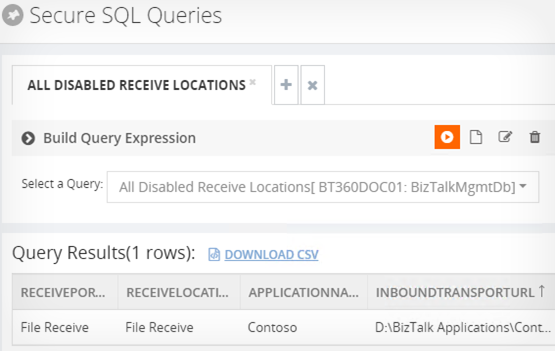
This approach eliminates people from directly running non-optimized queries in production environments and it also simplifies having access to SQL data within a single web console instead of switching tools.
One of the biggest advantage is that useful SQL reporting queries in your BizTalk environment can be centrally stored and shared between team members.
NOTE: The platform is very generic; you can store and execute SQL queries across any databases and not necessarily just BizTalk Server databases as long as the service account has right privileges to access the data.
What is the business value?
The business benefits are very obvious. Providing a secure web based platform for accessing SQL sever data (which is critical to the day-to-day operations of any BizTalk Server solution) increases the productivity of support/BizTalk Admin people and makes it extremely secure. In general, you can keep your database administrators (DBA’s) happy in the organisation.
Get started with a Free Trial today!
Download and try BizTalk360 on your own environments free for 30 days. Installation will not take more than 5-10 minutes.

Author: Saravana Kumar
Saravana Kumar is the Founder and CTO of BizTalk360, an enterprise software that acts as an all-in-one solution for better administration, operation, support and monitoring of Microsoft BizTalk Server environments. View all posts by Saravana Kumar

by Saravana Kumar | Jan 26, 2018 | BizTalk Community Blogs via Syndication

This blog is a part of the series of blog articles we are publishing on the topic “Why we built XYZ feature in BizTalk360”. Read the main article here.
Why do we need this feature?
Microsoft BizTalk Server being a middleware platform sitting right in the middle of the organisation connecting all the systems together, it’s inevitable there will be some regular operational challenges. When you are talking to multiple systems, it’s hard to control every end systems. Some of the common problem you encounter will be a partner sending the message that contains some unknown characters, having the format of the date in wrong format etc.
In BizTalk Admin console, when such problems occur and depending on how the exceptions are handled most of the time, it will result in some form of suspended service instances with some error code. Typically a BizTalk support person will start analysing it within the BizTalk Admin console or via the Event Viewers in BizTalk Servers and find a relevant solution.
Over a period, the BizTalk support team will know the answers for pretty much all the known issues and they will be able to solve the problem quickly. However, what happens if someone leaves the team or you bring someone new to the team. It will take equal amount of time for that new person to pick up all the known issues.
Few organisations maintain some kind of internal wiki or SharePoint documents to cover all the known issues, however they are not always updated and in sync, multiple documents, and no one actively look into those documents for solution. They always tend to start from scratch and end up spending time diagnosing the problem.
To address this particular challenge we have built “Team Knowledgebase” capability within BizTalk360.
What is the current limitation in BizTalk Server Admin Console?
BizTalk Server Admin console doesn’t come with any such capability to address this real world challenge. BizTalk Admin Console is designed more for hard-core technical BizTalk people and it expects a level of BizTalk knowledge, it only displays the technical error descriptions whenever there are suspended instance. There is no option for team collaboration and ability to store solutions to the problem.
How does BizTalk360 solve this problem?
We identified this feature could be a huge time saver when it comes to BizTalk Solutions support and also it helps to bring non-BizTalk people into supporting BizTalk solutions easily.
BizTalk360 provides a platform to store team knowledge base articles for known issues. Example: If an instance gets suspended with some error code “0x34564” for a particular application, the support person can easily write a short knowledge base article saying this particular error happens due to “Known issue with our partner Contoso, their internal systems are not capable of sending date time in the format our system is expecting”, the support person can also set the rules saying this is applicable for Application XYZ, the instance status should be “Suspended-Non resumable”, the Environment should be “Production”, the error description text should contain “Contoso”.
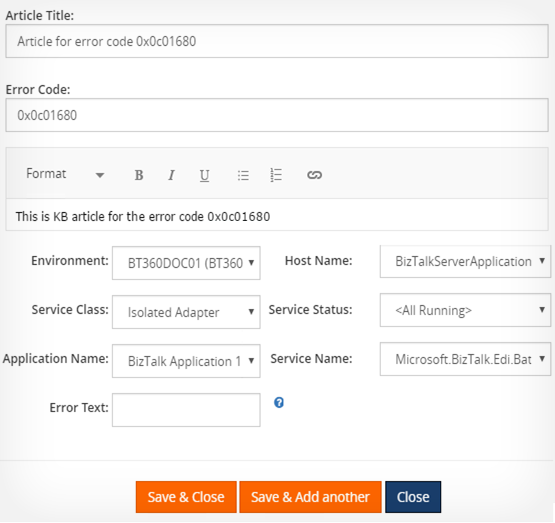
Once the knowledge base article is created with set of rules, BizTalk360 will keep watching for any errors that happens in the system and if it matches an existing knowledge base condition, it will show a small book icon next to the error. This helps the support person to quickly realize it’s a known issue and also see the solution to the issue.
The team knowledge base capability is available for Suspended Instances, Event Viewer, ESB Errors, Throttling Conditions in BizTalk360.
What is the business value?
As you can see the business value of the team knowledgebase feature is huge, it drastically reduces the time taken to troubleshoot the problem, especially for the repeated ones. The feature also helps to mitigate the risk of good people leaving the organisation with the knowledge and also helps to on-board new people into the team and bring them up-to speed pretty quickly.
Get started with a Free Trial today!
Download and try BizTalk360 on your own environments free for 30 days. Installation will not take more than 5-10 minutes.

Author: Saravana Kumar
Saravana Kumar is the Founder and CTO of BizTalk360, an enterprise software that acts as an all-in-one solution for better administration, operation, support and monitoring of Microsoft BizTalk Server environments. View all posts by Saravana Kumar

by Lex Hegt | Jan 25, 2018 | BizTalk Community Blogs via Syndication

This blog is a part of the series of blog articles we are publishing on the topic “Why we built XYZ feature in BizTalk360”. Read the main article here.
Why do we need this feature?
To be able to do his job, a BizTalk administrator needs to know what kind of processes flow through the BizTalk environment. This insight can be used for a number of purposes, like:
- analysis and/or debugging of issues
- learning/training purposes
- documentation purposes
One of the features which can be used to better understand the processes in BizTalk is the Tracking queries which can be accessed through the BizTalk Administration Console. These queries provide insight on which messages and orchestrations have been processed by BizTalk. From the Tracking queries, it is also possible to have some insight on the message flow.
What are the current challenges?
The major problem with the message flow which can be shown in BizTalk Admin console is that it is very textual and doesn’t allow you to show the entire flow. This makes understanding the processes in BizTalk a time-consuming task.
Another disadvantage is that when somebody accesses the tracking queries in the BizTalk Admin console, confidential information might be revealed to unauthorized people.
How BizTalk360 solves this problem?
BizTalk360 offers a lot of features to provide insight in BizTalk processes. One of these features is the Graphical Message Flow viewer.
As with the Tracking queries in the BizTalk Admin console, the Graphical Message Flow viewer depends on tracking data. So, to start using the Graphical Message Flow viewer, you start with creating a Tracking query in BizTalk360.
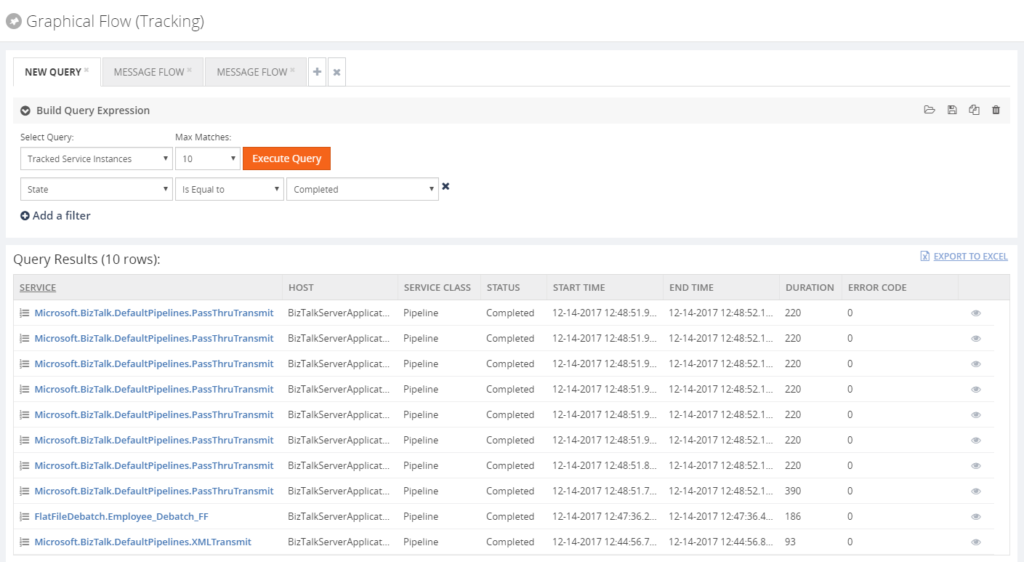
As you can see from the Build Query Expression part of the screen, you can create the same kind of queries as in the BizTalk Administration console. You can also save your tracking queries for later use. These queries are stored in the BizTalk360 database, so you always have them at hand. Whereas with the BizTalk Admin console, your queries are stored to the file system which can make it harder to retrieve them, especially when you have multiple BizTalk servers.
Details of the tracked service instances can be viewed by simply clicking the eye icon in the most right column of the grid.
The first column of the results grid shows the name of the service as a hyperlink. By clicking the hyperlink, the Graphical Message Flow for the service instance will be shown.
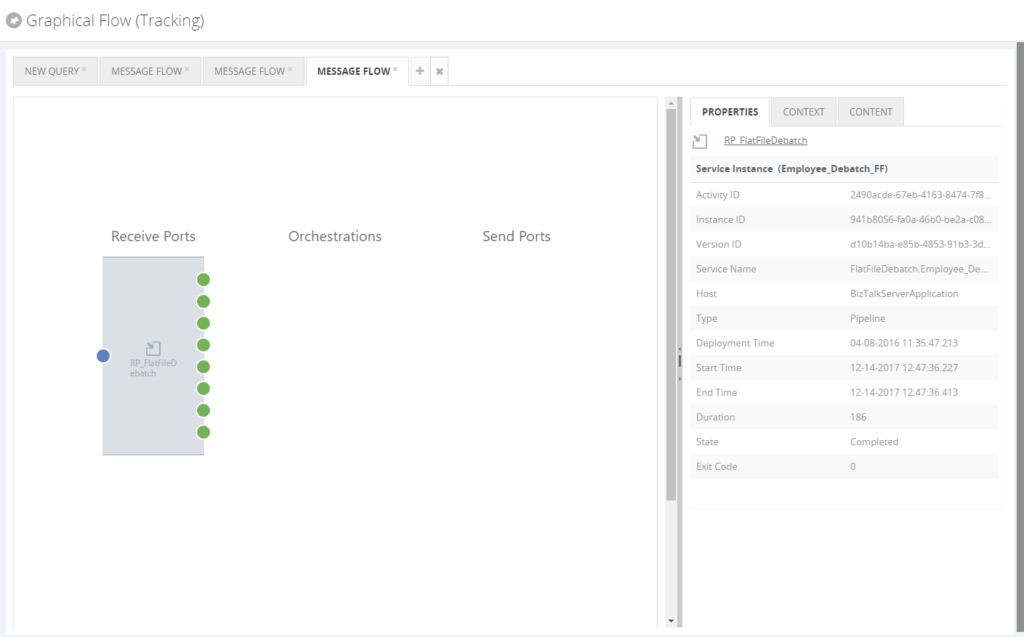
The Graphical Message Flow viewer shows the service instance as a shape and depending on the type of artifact, then it will appear under the Receive Port, Orchestration or Send Port label. The blue dot in the shape reflects the receive side of a message at the artifact, while the green dots reflect that the message has been sent out of the artifact. In the above screenshot, one message has been received and multiple messages have been sent out, depicting a debatching scenario.
Besides the graphical shape of the service instance, also all kind of properties of the service instance is shown. You can even directly navigate to the BizTalk artifact in its BizTalk application, by simply clicking the provided hyperlink.
Also, the related service instances can be viewed, depicting the complete message flow. This can be done by clicking the subsequent green dots.
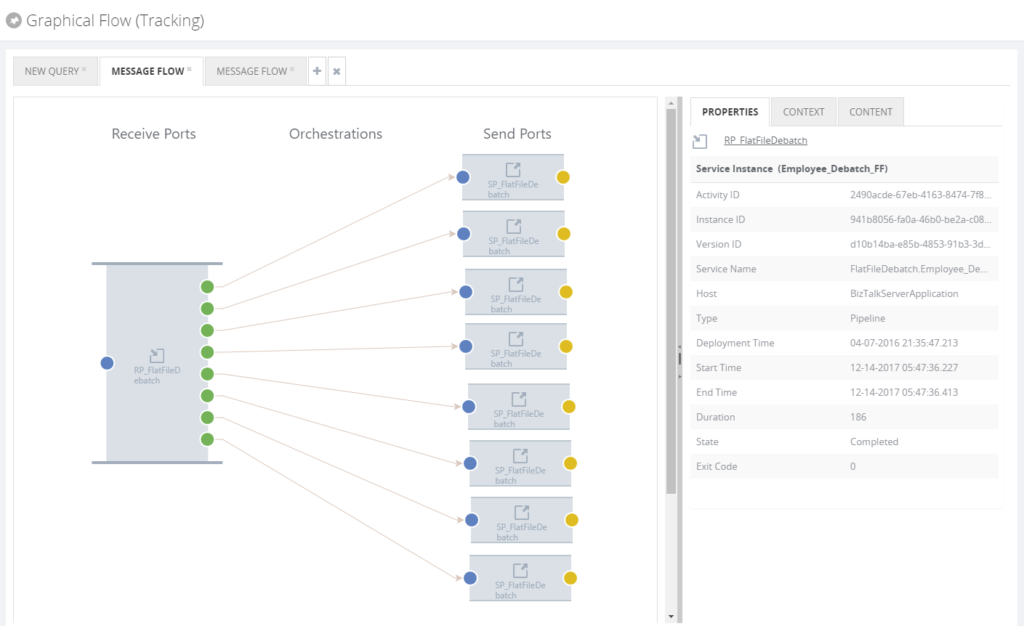
Depending on the amount of tracking turned on for the artifacts and whether the user is authorized in BizTalk360, message context and content information can be viewed in the pane at the right of the screen.
The Graphical Message Flow viewer is a very useful feature and it is likely that BizTalk administrators will use it on a near day to day basis.
Get started with a Free Trial today!
Download and try BizTalk360 on your own environments free for 30 days. Installation will not take more than 5-10 minutes.

Author: Lex Hegt
Lex Hegt works in the IT sector for more than 25 years, mainly in roles as developer and administrator. He works with BizTalk since BizTalk Server 2004. Currently he is a Technical Lead at BizTalk360. View all posts by Lex Hegt

by Lex Hegt | Jan 24, 2018 | BizTalk Community Blogs via Syndication
This blog is a part of the series of blog articles we are publishing on the topic “Why we built XYZ feature in BizTalk360”. Read the main article here.
Why do we need this feature?
In their day to day operations, BizTalk administrators will regularly need to check the status of different BizTalk artifacts. There might be multiple reasons to do so, amongst which are:
- Artifacts being in the wrong state (a Receive Location being Disabled, instead of Enabled)
- The configuration of an artifact needs to be checked for analysis of an issue
- The state of artifacts needs to be persisted, because of an upcoming deployment
To access the actual state and configuration of BizTalk artifacts, BizTalk administrators need to use a Remote Desktop connection to access the BizTalk server and start the BizTalk Server Administrator Console. The BizTalk Administrator console is not very helpful in finding the needed artifact(s) as the console has no or only limited search functionality.
What are the current challenges?
Besides the fact that BizTalk administrators will not always have access to RDP, because they might not be at their own desk, the Administration console is not very helpful, when certain artifact(s) need to be found. For example, the Admin console has:
- no or limited search feature (depending on the BizTalk Server version)
- no state persisting feature
No or limited search feature
In versions older than BizTalk Server 2016, there are just browse features per artifact type, which can make it quite time-consuming to find the artifact(s) you are looking for.
With BizTalk Server 2016, Microsoft introduced a Search feature. However, that feature is limited to search only for the name of any artifact. So for example, it is not possible to search for the URI or the transport type of an artifact.
No state persisting feature
Besides taking screenshots, there is no feature to store the status of the artifacts. Taking screenshots will help a bit, but it is not very practical. Reason for that is because not all artifacts (of the same type) for which you want to persist the state might fit on the same screen. Therefore, you’ll have to make multiple screen shots and store them in for example a Word document, which decreases the usability.
How BizTalk360 solves this problem?
To address all the mentioned problems, BizTalk360 has the Search Artifacts feature. The Search Artifacts feature allows you to search for BizTalk artifacts in one single screen. Depending on the kind of artifact, you can search and filter for different properties of that kind of artifact. For example, for Receive Locations and Send ports, you can search and filter for:
- Name of the artifact
- The URI of the artifact
- Application where the artifact resides
- The status of the artifact (Enabled/Disabled or Started/Stopped/Unenlisted)
- Host name which processes the artifact
- Transport Type of the artifact
When you have searched for certain artifacts, BizTalk360 shows the results in a grid. Depending on the kind of artifact, this result grid will show the most important data for that kind of artifact.
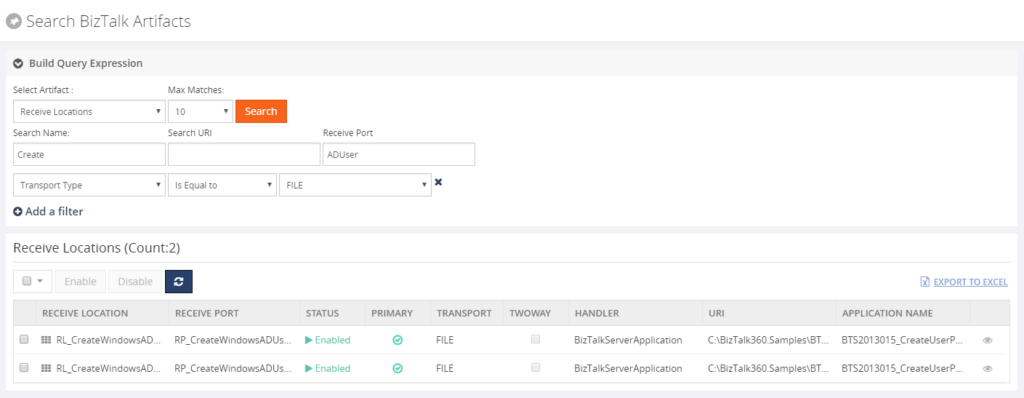
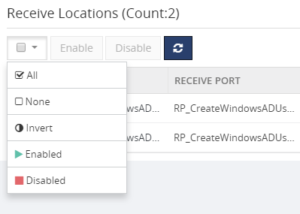
You can also, directly, action on a single artifact or on multiple artifacts. In case of Receive Locations for example, you can immediately Enable or Disable one or multiple Receive Locations from the grid. BizTalk360 shows a handy drop down box to select artifacts, depending on their state.
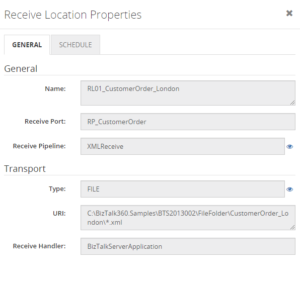
Further, you can access the properties of a certain artifact by clicking the eye icon which appears in the last column of the grid.
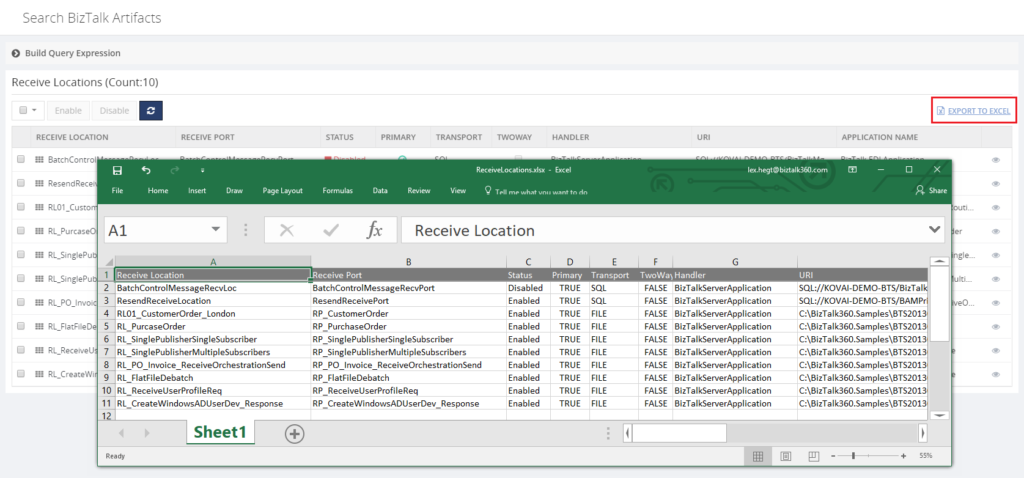
Another handy feature is the ability to export the entire result grid to Excel. This feature is especially handy in case you are preparing the deployment of BizTalk application(s) and you want to persist the current state of the artifacts, as the state might be changed by the deployment package(s).
 All in all, the Search feature in BizTalk360 not only saves time in the day to day operations of a BizTalk administrator, but it will also make him or her look better, when a business user arrives at his or her desk with a quick question on the state of a particular artifact!
Get started with a Free Trial today!
Download and try BizTalk360 on your own environments free for 30 days. Installation will not take more than 5-10 minutes.

Author: Lex Hegt
Lex Hegt works in the IT sector for more than 25 years, mainly in roles as developer and administrator. He works with BizTalk since BizTalk Server 2004. Currently he is a Technical Lead at BizTalk360. View all posts by Lex Hegt

by Saravana Kumar | Jan 23, 2018 | BizTalk Community Blogs via Syndication

This blog is a part of the series of blog articles we are publishing on the topic “Why we built XYZ feature in BizTalk360”. Read the main article here.
Why do we need this feature?
In the previous article “Why did we built User Access Policy to Manage BizTalk Server Security?”, we looked at the importance of securing the BizTalk Server environments, what are the limitations of existing security mechanisms in BizTalk Server and how BizTalk360 User Access Policy mechanism helps to address the gaps. The other important aspect that’s more closely related to security is the governance & auditing.
In a nutshell, Governance and Auditing simply means recording all the activities performed by a BizTalk Administrator or Operations person in your BizTalk Server environments. Auditing is such a crucial part for any enterprise software. Let’s take some example scenarios and see how the impact of such activities can cause huge business disruption.
Let’s imagine you have an integration scenario picking up purchase orders from a FTP location, processing it via a BizTalk Orchestration and finally sending it to the SAP system. In this simplest scenario, a BizTalk Administrator can potentially do the following 5 activities intentionally or accidentally —
- Disabling the BizTalk FTP Receive Location
- Unenlisting the BizTalk Orchestration
- Stopping the BizTalk SAP Send Port
- Stopping the Host Instances that run receive location, send port and orchestration
- Terminate a BizTalk Service Instance that’s processing the purchase order
Any one of the above activity would have resulted in a business impact of not processing that purchase order.
When such incidents happen, you must have the system in place to look at the audit logs and see who actually performed such activity and take necessary steps. In critical industries like Healthcare and Financial institutions, Auditing and Governance are mandatory and governed by industry bodies like SOX and HIPAA.
What is the current limitation in BizTalk Server?
The standard BizTalk Server Admin console doesn’t come with any in-built auditing capabilities for user activities. Once someone has access to BizTalk Admin Console (i.e pretty much your entire BizTalk support team), they are free to perform any activities without a trace.
As mentioned in the previous section, pretty much every single activity the BizTalk Server administrator or support person performs in a controlled environment like Production will have significant consequences.
It’s a very common scenario in large teams for no one taking the blame when things go wrong. Question like “Do you know who stopped that host instance?” are common. The difficult part is you probably don’t know how long that particular host instance was in stopped state, since you don’t have the audit trace.
How does BizTalk360 solve this problem?
Once we built the web based BizTalk Server Admin console, the first top most priority we addressed in the product is sorting out the Security and Audit capabilities for administrative activities. As you can see from the below picture, all the actions performed by the BizTalk Administrators are logged/audited.
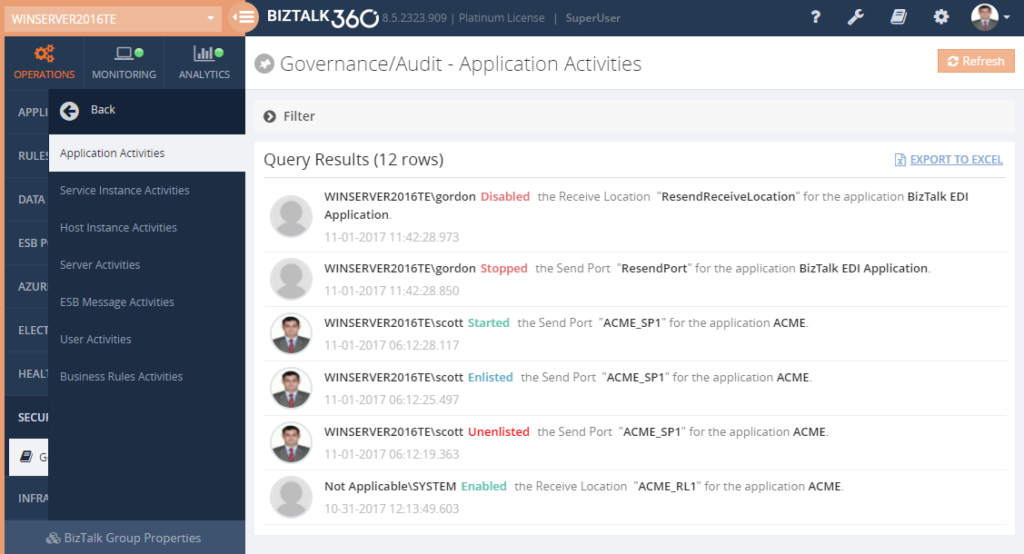
The actions could be something related to BizTalk Applications like starting/stopping Receive Locations, Send Port, Orchestration, it could be related BizTalk Host Instance like starting/stopping host instances, Service Instance activities like terminating, resuming, suspending, ESB management activities like resubmitting messages, and so on.
For every new feature we add to BizTalk360, we make sure auditing capabilities are also taken care of. The organisations can keep the audit data for however long they want based on their corporate policy; you can easily configure the data retention period in BizTalk360.
In order for us to build a system that’s capable of auditing user activities, we need to make sure BizTalk Administrators can use BizTalk360 instead of the standard BizTalk Admin console, that means covering each and every feature that’s available in BizTalk Admin Console needs a counter part in BizTalk360. Apart from deployment and configuration changes (ex: changing the password of FTP receive location), BizTalk Administrators can perform every activity in BizTalk360 that can be performed in the standard BizTalk Admin Console.
Can we audit user activities if it’s performed via BizTalk Admin Console?
This is one of the common questions we receive when we talk about Governance and Auditing. Unfortunately we cannot capture activities that’s performed outside BizTalk360. The idea is you restrict access to standard BizTalk Admin Console to very few people (super users) and force majority of the people to use BizTalk360 for controlled environments.
Get started with a Free Trial today!
Download and try BizTalk360 on your own environments free for 30 days. Installation will not take more than 5-10 minutes.

Author: Saravana Kumar
Saravana Kumar is the Founder and CTO of BizTalk360, an enterprise software that acts as an all-in-one solution for better administration, operation, support and monitoring of Microsoft BizTalk Server environments. View all posts by Saravana Kumar

by Saravana Kumar | Jan 22, 2018 | BizTalk Community Blogs via Syndication

This blog is a part of the series of blog articles we are publishing on the topic “Why we built XYZ feature in BizTalk360”. Read the main article here.
Why do we need this feature?
Being a middleware product, BizTalk Server is often going to sit right in the center of the organisation. All your critical backend systems like SAP, CRM, Oracle, SQL, and so on are connected to each other via BizTalk Server. So in theory, if someone has full access to your middleware platform like BizTalk Server, technically they can also get access to any of the underlying systems.
When it comes to security or performance, it is determined by the weakest point in the link chain. You might have created a highly protective security wall for each one of those critical backend systems, but when there is a punch whole for an external system (BizTalk Server) to get through, it’s important to protect the security of that external system to the same strength as your backend system.
We felt the current Administrative Security capabilities of BizTalk Server is very limited (will see in detail) and hence the birth of Advanced User Access Policy & BizTalk Server Security feature in BizTalk360.
What is the current limitation in BizTalk Server?
When it comes to day-to-day BizTalk Server Administration and Security, currently the scenario is like this. The Administrator will access the BizTalk Environment using the BizTalk Admin Console, depending on whether he/she belongs to either “BizTalk Server Administrators” or “BizTalk Server Operators” Window NT Group. Certain features will be enabled or disabled in BizTalk Admin Console based on these user roles.
There are few challenges in this approach. If you are a member of the BizTalk Server Administrators group, you have all the access required wide open. However, if you are a member of the BizTalk Server Operators group, your options are limited and the rules are hard coded by Microsoft in terms of what you can and cannot do.
The table below shows the actions that can and cannot be performed by members of BizTalk Operators Group
| Can Do |
Cannot Do |
| View service state and message flow |
Modify the configuration for BizTalk Server. |
| Start or stop applications (Send Ports, Send Port Groups, Orchestrations, Receive Locations) |
View message context properties classified as Personally Identifiable Information (PII) or message bodies. |
| Terminate/Resume Service Instances |
Modify the course of message routing, such as removing or adding new subscriptions to the running system, including the ability to publish messages into the BizTalk Server runtime. |
In pretty much every case, those rules are not practical for the day-to-day administrative work and pretty much within days every single person supporting/administering the BizTalk Server environment will be working with Administrative privileges.
Common challenges in BizTalk Server security
Let’s highlight some of the common day-to-day challenges that are not addressed by the out of the box BizTalk Server security mechanism.
Application Level Security: Your BizTalk Server environment will be a shared environment in many organisations. For various practical and cost reasons, you are not going to have many BizTalk Server environments. However, many business units in the organisation will be deploying their integration solutions into the platform. In such scenarios, for example Team A might need access to Applications A,B,C and Team B might need access to Applications X, Y, Z. You cannot set this level of Application isolation security using the standard BizTalk Server security mechanism.
Read Only Access: In some cases, you might want to give read-only access to your BizTalk Server environments. Example: It’s very common to allow few developers who worked on the project to have access to production environments. You wanted to make sure developers do not modify or deploy anything without change control. This is not possible with the standard BizTalk Server security mechanism.
Mixed Privilege Scenario: For practical reasons, there will be scenarios where you wanted the support person to have some level of mixed privilege. Example: They might need to start and stop the BizTalk Host Instances periodically, they may need to turn on/off tracking settings, or you may NOT want them to terminate or resume service instances etc. If you want to achieve this, there is no other option than making that person (or team) part of BizTalk Server Administrators group. This basically results in no security. As you can see, hard coded rules are not practical and it results in elevated privilege. Sadly this is the scenario with most organisations.
Security for different tools: The default security mechanism only covers the BizTalk Admin console and WMI access. However, when you are working with BizTalk Server, there are at least 5-8 other tools you’ll be using such as BAM Portal, ESB Portal, Event Viewers, Azure Services etc. Currently they all need their own security mechanisms, making it super complex and often vulnerable.
Multiple BizTalk Environments: Typically, organisations will have 2-3 BizTalk Server environments. Example: Production, DR, QA (System Integration, User Acceptance) etc. You can simply multiply the above mentioned problems by number of BizTalk Server environments you have.
How does BizTalk360 solves these problems?
From the above points discussed, it is pretty clear and obvious that a better security mechanism is required when it comes to day-to-day BizTalk Server Administration and Operations. Let’s take a quick look at how BizTalk360 addresses the challenges in a seamless way.
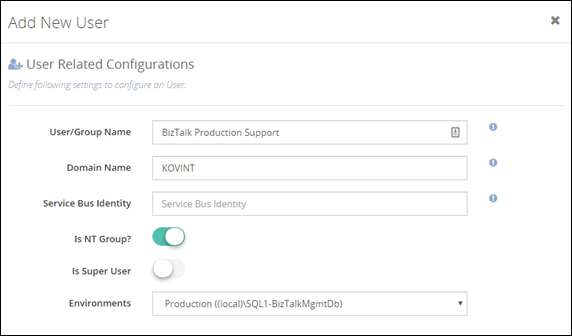
The below screenshot shows how you can add BizTalk Administrator/Operator to your BizTalk environment. There are few things to note — in the first place, BizTalk360 supports multiple BizTalk Server environment management from a single console; so you can set up security and access rights from a single place. You can either configure security for individuals or as team (ex: Create an NT Group called “BizTalk Production Support”)
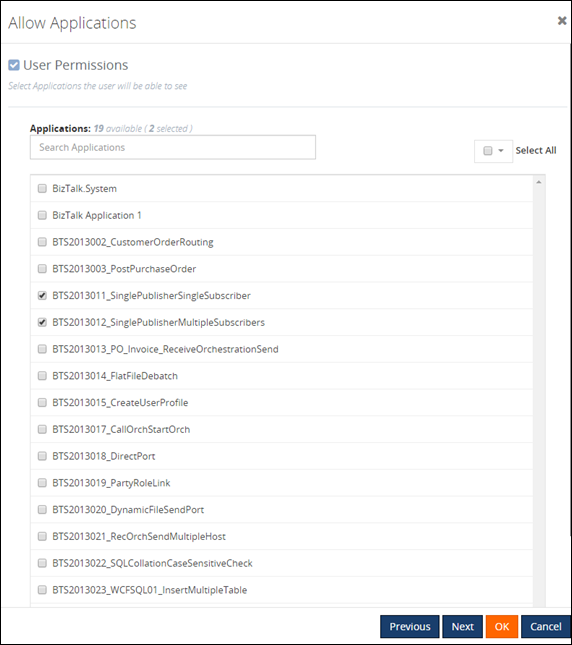
In the second screenshot below, you can see that you do not need to give access for the administrator to complete BizTalk Server environment. You can carefully choose required BizTalk Applications for which a BizTalk Server administrator requires access. The entire BizTalk360 application is context aware, for example, if you have given permission for Application A,B,C and they depend on specific Host and Host Instance, only those related host/host instances will be visible for the user.
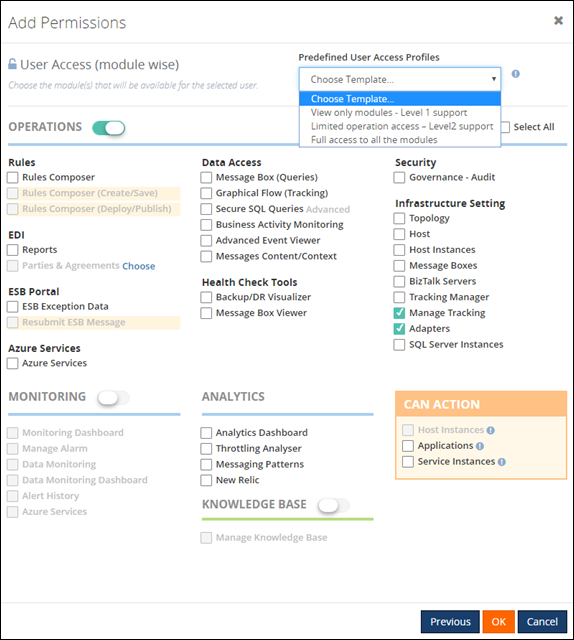
In the final screenshot, you can see how BizTalk360 provides full flexibility in terms of what level of permission you wanted to assign for the user. There are no hard coded rules; this makes it practical to give the correct level of permission to BizTalk Administrators/support people. BizTalk360 also comes with pre-defined security templates which you can apply as shown below. The “Can Action” section basically allows users to take some actions in the BizTalk Server environment, for example, if you do not want the user to terminate/resume service instances you can simply uncheck the check box “Service Instances”.
What is the Business Benefit?
Every business likes to run their systems in a secure way. You do not want your critical business systems like BizTalk Server to run with security challenges. This particular feature in BizTalk360 was one of the first key feature built in the product after the original web based BizTalk Admin Console functionality is completed.
Get started with a Free Trial today!
If you are not using BizTalk360, it is pretty clear that you are compromising on certain Administrative security aspects in your BizTalk Environment. So, why don’t you download and try BizTalk360 on your own environment. We provide 30 days free trial of the fully functional product.

Author: Saravana Kumar
Saravana Kumar is the Founder and CTO of BizTalk360, an enterprise software that acts as an all-in-one solution for better administration, operation, support and monitoring of Microsoft BizTalk Server environments. View all posts by Saravana Kumar

by Saravana Kumar | Jan 19, 2018 | BizTalk Community Blogs via Syndication

This blog is a part of the series of blog articles we are publishing on the topic “Why we built XYZ feature in BizTalk360”. Read the main article here.
Why do we need this feature?
BizTalk Server being a Middleware product connected to various legacy backend systems, it needs to make sure the entire ecosystem can work in an optimal way. If one of the legacy system connected to BizTalk is slow for any reason, then BizTalk Server needs to act sensibly and not to overload that system with messages more than what it can handle. In such scenarios, BizTalk Server will throttle itself (slow down itself) and make sure the messages are delivered to the backend in an optimal rate.
BizTalk Server achieves this capability by continuously monitoring various performance counters (memory footprint, thread count, message publishing rates, database size etc.) and self tuning itself. There are over 50 performance counters related to throttling in BizTalk Server which monitors both inbound and outbound traffic.
So it’s important to understand whether your BizTalk Environment is working correctly or under throttling condition.
What are the current challenges?
BizTalk Expert Required: If you wanted to analyse and detect a throttling condition in your BizTalk Environment, an experienced BizTalk person is required. There are no out of the box tooling from Microsoft to understand throttling conditions. The person should configure all the required Perfmon counters, collect data, analyse it and predict any throttling condition.
Time Consuming: Even if you have an experience person, setting up Perfmon counters, data collection and analysis is time consuming process. In our experience, it takes anywhere from a day to a week to fine tune Throttling in BizTalk Environment.
No Monitoring: There are no out of the box monitoring solution for BizTalk Throttling conditions.
How BizTalk360 Solves the problem?
BizTalk360 addresses this problem by introducing two important features called BizTalk360 Throttling Analyser and BizTalk Host Throttling Monitor.
Throttling Analyser periodically collects all the required Performance Counters relevant to throttling and stores the values in a SQL database, so there is no necessity for setting up Perfmon as and when required. Once the data is collected, it presents the status in a very interactive graphical dashboard. The BizTalk Administrators can easily visualize the throttling condition and take appropriate action. The throttling data is kept for last 7 days, so you can login to BizTalk360 anytime and see historic throttling condition as well.
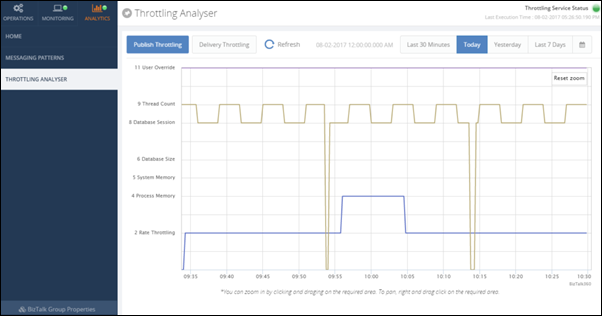
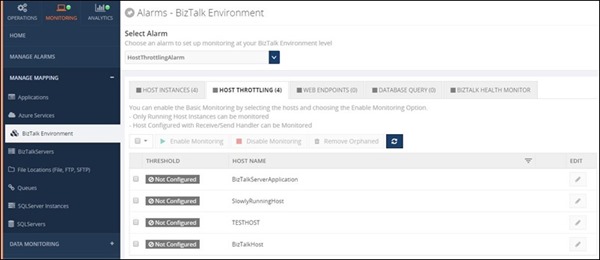
Throttling Monitoring is the new addition to the product where the Administrator can enable BizTalk Host Monitoring in almost a single click or fine tune it according their requirements. Once configured, BizTalk360 will periodically check for any throttling condition violations and alert appropriate users via various notification channels like Email, SMS, Slack, etc.
Interested to try this feature?
Download and try BizTalk360 on your own environments free for 30 days. The installation will not take more than 5-10 minutes.

Author: Saravana Kumar
Saravana Kumar is the Founder and CTO of BizTalk360, an enterprise software that acts as an all-in-one solution for better administration, operation, support and monitoring of Microsoft BizTalk Server environments. View all posts by Saravana Kumar

by Lex Hegt | Jan 18, 2018 | BizTalk Community Blogs via Syndication

This blog is a part of the series of blog articles we are publishing on the topic “Why we built XYZ feature in BizTalk360”. Read the main article here.
Why do we need this feature?
As a BizTalk Administrator, it is critical to constantly have a good overview of the health of the BizTalk environments for which the BizTalk Administrator is responsible. To be able to consider the health of BizTalk Groups, it does not stop by knowing whether all ports and orchestrations are started. There are so many other aspects which are relevant to get the full picture of the health. Think of, for example, the state of the Host Instances and SQL Server jobs, the number of suspended service instances, all kind of Windows services, ESB Exceptions, EDI transactions, etc.
It would take BizTalk Administrators a lot of their precious time to constantly check the actual health status of all these different artifacts.
What are the current challenges?
One of the main challenges with the out-of-the-box tooling of BizTalk Server is that it is not possible to have the needed information available in one view. To get that overview you need to look into multiple screens and browse through multiple applications. For example, multiple screens of the BizTalk Server Administration console, SQL Server Management Studio, the portal of the ESB toolkit, Remote Desktop sessions to access the Windows server, etc.
At BizTalk360, we think this is far from efficient as it would take the BizTalk Administrators too much time just to get the overview information. In our opinion, BizTalk Administrator should spend his time on better things, than constantly going from one console to another, just to find out the current health of the system.
How BizTalk360 solves this problem?
BizTalk360 has the concept of Dashboards. These highly customizable Dashboards can show different types of data. Amongst these dashboards are:
- The Operations Dashboard
- The ESB Dashboard
- The EDI Dashboard
- The Monitoring Dashboard
- The Data Monitoring Dashboard
- The Analytics Dashboard
On a number of dashboards, you can add widgets from the collection of widgets that are provided by BizTalk360, or you can create your own widgets and add them to the dashboards. In certain cases, certain data can be viewed from different kinds of dashboards. For example, the EDI and ESB dashboards contain widgets which can be shown on their own dashboard, but also on the Operations Dashboard.
In most cases, the Operations Dashboard will be the first screen a BizTalk Administrator will see, after he has opened BizTalk360.
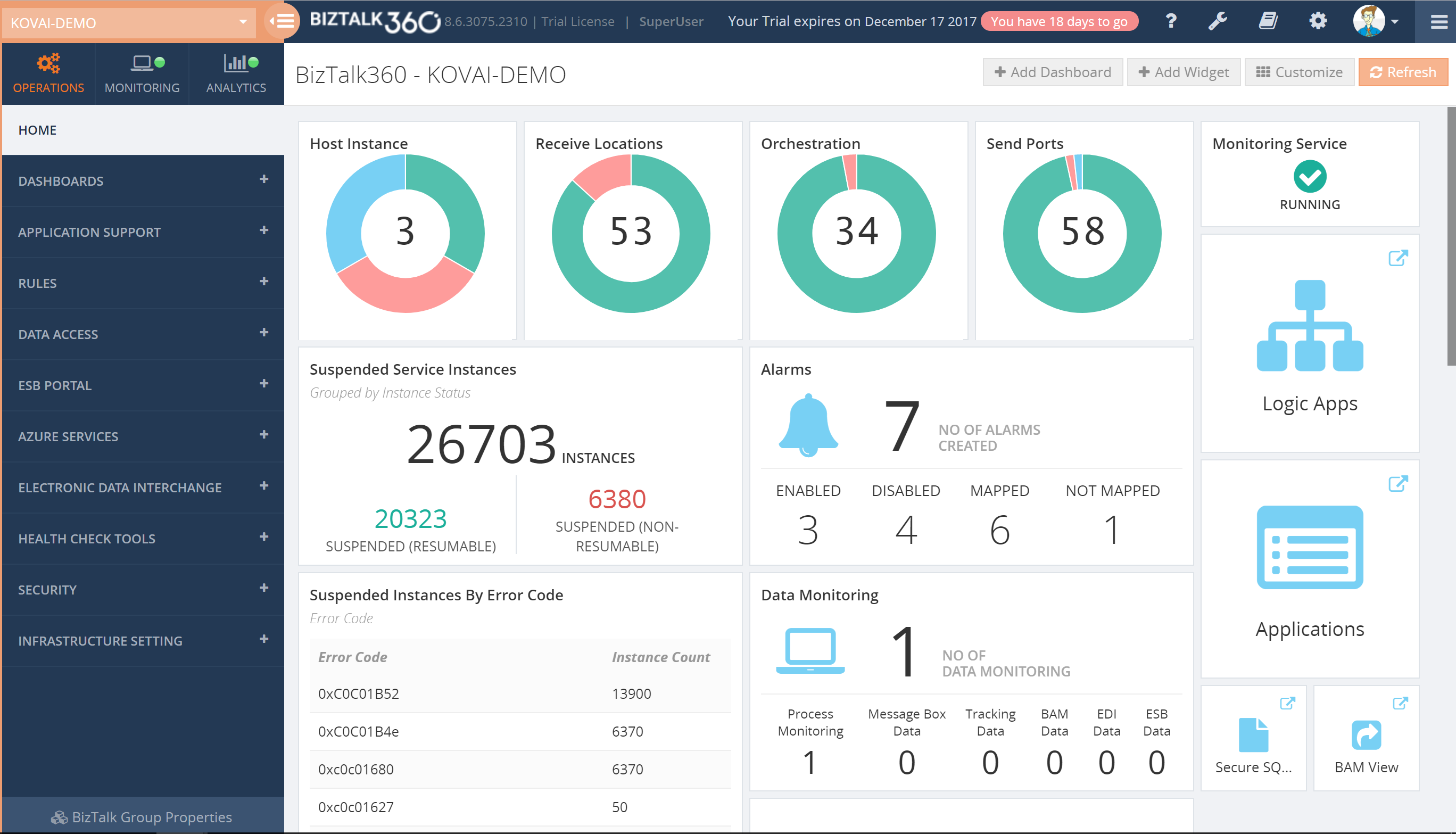
The Operations Dashboard, by default, already shows a number of widgets, but BizTalk Administrators can completely modify the layout of that dashboard to suit their needs. If the collection of widgets, which comes out of the box, is not enough, BizTalk360 allows administrators to create Custom widgets and add them to your dashboard. Besides the widgets, the Operations Dashboard can also contain pinpoints which are like shortcuts and provide you with easy access to all the different screens of the application.
Additionally, you can also create multiple dashboards if you like, to fit multiple purposes. For example, say, you can have Dashboards for particular interfaces or setting them up for different kind of roles.
Download and Try BizTalk360 Free for 30 days today!
Download and try BizTalk360 on your own environments free for 30 days. Installation will not take more than 5-10 minutes.

Author: Lex Hegt
Lex Hegt works in the IT sector for more than 25 years, mainly in roles as developer and administrator. He works with BizTalk since BizTalk Server 2004. Currently he is a Technical Lead at BizTalk360. View all posts by Lex Hegt

by Saravana Kumar | Jan 17, 2018 | BizTalk Community Blogs via Syndication
This blog is a part of the series of blog articles we are publishing on the topic “Why we built XYZ feature in BizTalk360”. Read the main article here.
BizTalk and Queuing Platforms
In any Enterprise integration scenario, message queuing technologies like IBM MQ, MSMQ, Azure Service Bus Queues etc., play a significant role. Message Queuing provides the solution to some critical business scenarios like the store and forward, first in first out, batch processing and so on.
Often times, queuing platform works more or less like a database — it accumulates the messages that was received from the source systems. The real power of the platform is realized when messages are pulled and utilized by the downstream systems like order processing, shipping etc.
BizTalk Server comes with native adapters for IBM MQ, MSMQ, Service Bus making it a powerful platform when your integration solution needs to communicate to Queuing endpoints.
Why do we need this feature?
Given the above scenario, the importance of a queuing platform in an Enterprise integration solution is pretty clear. In an integration scenario, it’s important to make sure both the BizTalk Server platform as well as the systems to which it is connected are all working seamlessly without any downtime. If an order receiving IBM MQ is down, then the entire integration journey of end-to-end order processing is also down. Hence it’s pretty important, you monitor those external queuing systems in addition to your BizTalk Server platform.
What are the current challenges?
No Monitoring: There is no out of the box monitoring solution that comes with BizTalk Server to monitor either BizTalk Server platform or the external sources like IBM MQ, MSMQ, Azure Service Bus Queue etc.
Custom Solutions: Often, developers write some C# or PowerShell scripts to monitor the external Queues which is hard to maintain, which will not have a good configuration experience, and will go out of sync over a period of time. Even though at the face it will look like few lines of code, real implementation will require correct type of client libraries, handling SSL certificates etc.,
Limited 3rd party solutions: There are third party options available to monitor the queues, however, they come with limited functionality. It’s not tightly integrated with your BizTalk Solution and the configuration is not seamless.
How BizTalk360 solves this problem?
The monitoring for Queuing technologies that work with BizTalk Server is built from the ground up in BizTalk360. The user experience of configuring the monitoring for Queues is seamless. If your environment uses any Queue based BizTalk Receive Port/adapter or Send Port/adapter, BizTalk360 picks up all the configuration from them. You only need to specify the conditions you are interested in monitoring.
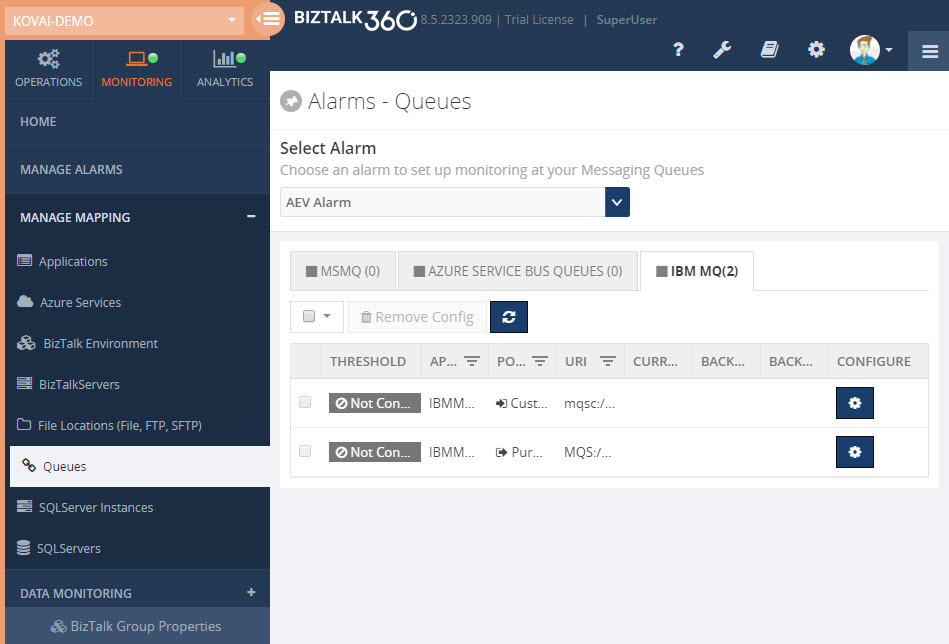
Here is the list of supported thresholds for different Queuing technologies that comes along with BizTalk360
IBM MQ:
- Current Queue Depth
- Current Queue Usage %
- Backout Queue Depth
- Backout Queue Usage %
MSMQ:
- Queue Size
- Active Message Count
- Journal Message Count
- Dead Letter Message Count
Azure Service Bus Queue:
- Queue Status
- Active Message Count
- Dead Letter Message Count
- Transfer Message Count
- Queue Size
- Message Count
- Transfer Dead Letter Message Count
- Scheduled Message Count
- Queue Size
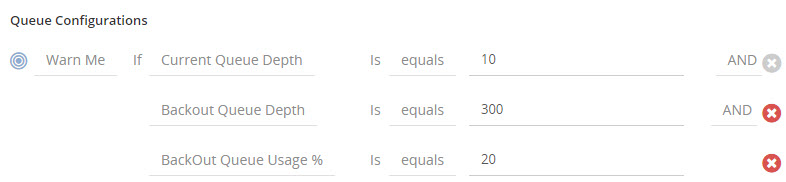
You can combine multiple check conditions using a logical AND/OR as shown in below, this makes it extremely powerful
General Monitoring Benefits
BizTalk360 monitoring comes with a set of standard features that’s applicable to all monitoring plugins. The Queue monitoring can also take advantage of the following capabilities.
Import/Export: The import/export function allows you to move your monitoring configuration from one environment to another. Example: From your UAT/Staging environment to Production.
Notification Channel: BizTalk360 comes with a list of Notification Channels like email, SMS, slack, HP Operations Manager etc., making it powerful to notify administrators as soon as something goes wrong.
Monitoring Dashboard: BizTalk360 comes with rich monitoring dashboard that visualizes the system health in a graphical way.
Notification History: You can also keep track of all the notification history that’s been sent to the support people.
Author: Saravana Kumar
Saravana Kumar is the Founder and CTO of BizTalk360, an enterprise software that acts as an all-in-one solution for better administration, operation, support and monitoring of Microsoft BizTalk Server environments. View all posts by Saravana Kumar

by Saravana Kumar | Jan 16, 2018 | BizTalk Community Blogs via Syndication
Back in 2010, the original idea of BizTalk360 was very simple — to create a web based version of the BizTalk Admin Console (BAC). However, over the years, the product has evolved into a full blown Operations, Monitoring and Analytics solution for Microsoft BizTalk Server; thanks to constant customer and community feedback.
This blog is a part of the series of blog articles we are publishing on the topic “Why we built XYZ feature in BizTalk360”. Read the main article here.
History of BizTalk Server and Admin tools
If you look at the history of BizTalk Server, the first version was released in 2000 and then an updated version was released in 2002. Both these initial versions were very preliminary. They used Visio as the Orchestration designer, had the concept of channels, worker queues etc., and the standard MMC snap (like any other Microsoft Product).
In 2004, Microsoft released BizTalk Server 2004 — one of the major step forward in the history of BizTalk Server. The product was developed from scratch using .NET technologies since the previous two versions (BizTalk Server 2000 and BizTalk Server 2002) were built on top of COM/COM+ technology (most of the young generations now probably won’t know much about it).
BizTalk Server 2004 came with the integrated Orchestration and Map designer within Visual Studio and also introduced some major new concepts like Business Activity Monitoring, Enterprise Single Sign on, Business Activity Services, Business Rules Engine so on. It also came with a management tool called “Health and Activity Tracker (HAT)”. HAT was the only tool available for BizTalk Administrators/Support people to run the day-to-day operations of your BizTalk Environment.
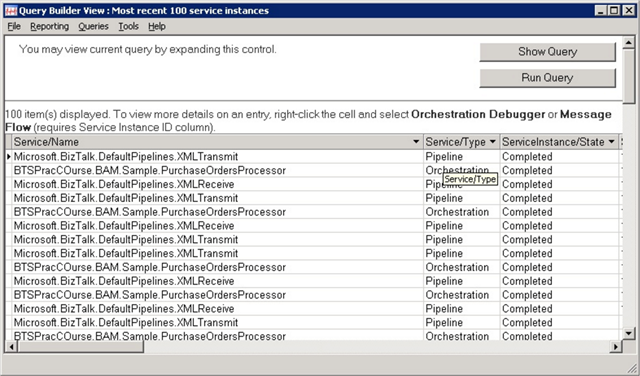
In BizTalk Server 2004, there was no concept of BizTalk Applications (to group/segregate things together). You simply deploy your solutions containing schemas, maps, orchestrations etc., to the environment and soon the environment became too complex.
Two years later, Microsoft released BizTalk Server 2006. One of the major update to this edition of BizTalk Server was the new architecture when compared to BizTalk 2004. Microsoft addressed some of the shortcomings in the previous version of the product. One of the major functionality of BizTalk Server 2006 was the introduction of “BizTalk Admin Console” and the concept of Applications where you can group related artifacts like Schemas, Maps, Orchestrations, .NET dlls, batch files, Rules Policies etc., together. This version also introduced the ability to package applications into MSI’s for easy deployment.
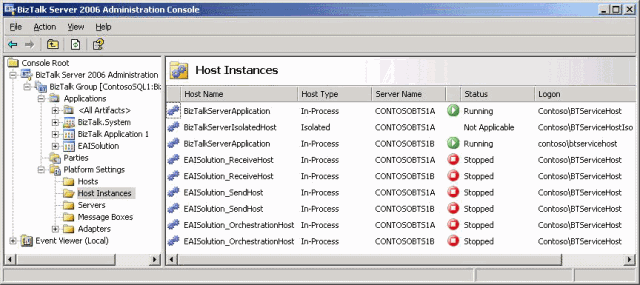
Why did we build a web based BizTalk Admin Console?
After 2006, Microsoft constantly released new versions of BizTalk Server pretty much every 2 years once. BizTalk Server 2006 R2, BizTalk Server 2009 and BizTalk Server 2010. However, there was no major improvement that was made on the BizTalk Admin Console.
Being active in the BizTalk community, we constantly started to hear people’s frustration of both not modernizing the BizTalk Admin Console to a web based console and a lot of missing capabilities when it comes to Enterprise requirements like enhanced security, auditing, governance etc.
This is when we realized there is a clear need for an Enterprise Grade Web Based BizTalk Admin console to help and support the thousands of BizTalk Server Enterprise customers out there.
Having worked with Microsoft for nearly 2 decades, we pretty much knew how the company operates. We understood that Microsoft will not invest their valuable time in creating a web based management solution. Microsoft is always focused on creating a scalable/robust platform and it always embraces the partner ecosystem to build tooling around it. If you look at other popular products in Microsoft stack like SQL Server, IIS, Active Directory Manager, Windows Event Log etc, the default tooling will be pretty basic, none of them have a web based solution.
Birth of BizTalk360
In 2010, for all the above mentioned reasons, we took the big bet on building a complete web based BizTalk Admin console i.e the birth of BizTalk360. The below screen shot shows how BizTalk360 is simply a web based BizTalk Admin Console.
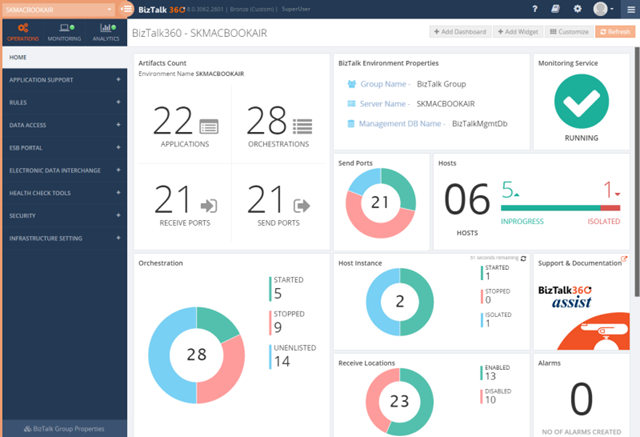
Like any software product, BizTalk360 has evolved and matured in the past 6 years. Even though the original idea was to build just a web based BizTalk Admin Console, over the years, more and more features were added to the product and today BizTalk360 has become a single operations, monitoring and analytics solution for Microsoft BizTalk Server.
As a mid sized company (around 50 people), it’s super important for us to carefully select the features we wanted to build. We cannot afford to build features that no-one wants. In the series of blog articles over the new few weeks, we’ll reveal similar stories of why we built specific features and what’s the reasoning behind each one of them.
As you can see, if you are still using only the standard BizTalk Admin Console for your day-to-day operations, then you are at least 10 years behind in terms of tooling.
Download and Try BizTalk360 Free for 30 days today!
Download and try BizTalk360 on your own environments free for 30 days. Installation will not take more than 5-10 minutes.

Author: Saravana Kumar
Saravana Kumar is the Founder and CTO of BizTalk360, an enterprise software that acts as an all-in-one solution for better administration, operation, support and monitoring of Microsoft BizTalk Server environments.
View all posts by Saravana Kumar


