Microsoft Integration, Azure, Power Platform, Office 365 and much more Stencils Pack it’s a Visio package that contains fully resizable Visio shapes (symbols/icons) that will help you to visually represent On-premise, Cloud or Hybrid Integration and Enterprise architectures scenarios (BizTalk Server, API Management, Logic Apps, Service Bus, Event Hub…), solutions diagrams and features or systems that use Microsoft Azure and related cloud and on-premises technologies in Visio 2016/2013:
BizTalk Server
Microsoft Azure
Integration
Integration Service Environments (ISE)
Logic Apps and Azure App Service in general (API Apps, Web Apps, and Mobile Apps)
Azure API Management
Messaging: Event Hubs, Event Grid, Service Bus, …
Azure IoT and Docker
AI, Machine Learning, Stream Analytics, Data Factory, Data Pipelines
SQL Server, DocumentDB, CosmosDB, MySQL, …
and so on
Microsoft Power Platform
Microsoft Flow
PowerApps
Power BI
Office365, SharePoint,…
DevOps and PowerShell
Security and Governance
And much more…
… and now non-related Microsoft technologies like:
SAP Stencils
The Microsoft Integration Stencils Pack is composed of 23 files:
Microsoft Integration Stencils v4.0.2
MIS Additional or Support Stencils v4.0.0
MIS AI Stencils v4.0.0
MIS Apps and Systems Logo Stencils v4.0.0
MIS Azure Additional or Support Stencils v4.0.0
MIS Azure Others Stencils v4.0.0
MIS Azure Stencils v4.0.2
MIS Buildings Stencils v4.0.0
MIS Databases Stencils v4.0.0
MIS Deprecated Stencils v4.0.0
MIS Developer Stencils v4.0.0
MIS Devices Stencils v4.0.0
MIS Files Stencilsv4.0.0
MIS Generic Stencils v4.0.0
MIS Infrastructure Stencils v4.0.0
MIS Integration Patterns Stencils v4.0.0
MIS IoT Devices Stencils v4.0.0
MIS Office365 v4.1.0
MIS Power BI Stencils v4.0.0
MIS PowerApps and Flows Stencils v4.0.0
MIS SAP Stencils v4.0.0
MIS Security and Governance
MIS Servers (HEX) Stencils v4.0.0
MIS Users and Roles Stencils v4.0.0
That you can use and resize without losing quality, in particular, the new shapes.
What’s new in this version?
I’m doing some changes in the project in terms of organization and resources but instead of taking too much time doing it from top to bottom, I will be releasing small versions until the job is done. In this version the changes and additions are:
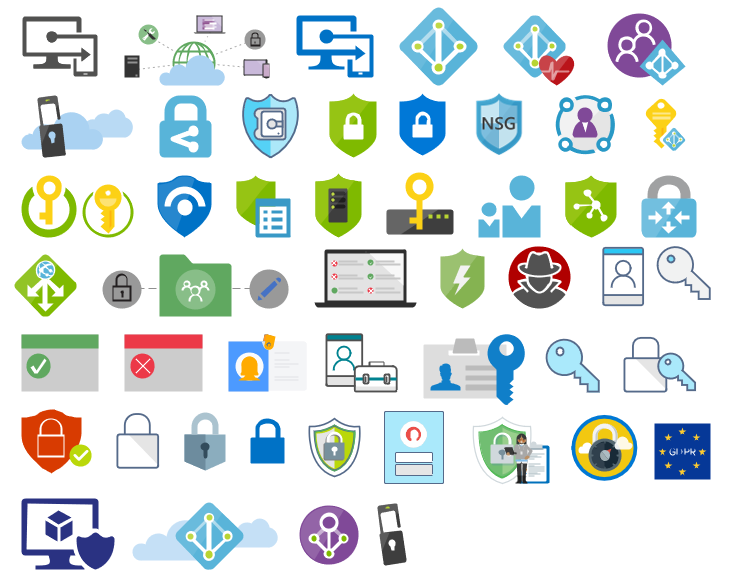
New shapes: near 50 new shapes have been added:
3 related to Microsoft Intune – a requested from a community member;
47 related to Security and Governance;
New category: I add a new file to the project called: Security and Governance with 47 shapes;
SVG Files: I’m starting to provide also the SVG files, from all these resources. At the moment these new shapes that were released in this version are now available in SVG Files on GitHub
Do you feel difficult to keep up to date on all the frequent updates and announcements in the Microsoft Integration platform and Azure iPaaS?
Integration weekly update can be your solution. It’s a weekly update on the topics related to Integration – enterprise integration, robust & scalable messaging capabilities and Citizen Integration capabilities empowered by Microsoft platform to deliver value to the business.
If you want to receive these updates weekly, then don’t forget to Subscribe!
Do you feel difficult to keep up to date on all the frequent updates and announcements in the Microsoft Integration platform and Azure iPaaS?
Integration weekly update can be your solution. It’s a weekly update on the topics related to Integration – enterprise integration, robust & scalable messaging capabilities and Citizen Integration capabilities empowered by Microsoft platform to deliver value to the business.
If you want to receive these updates weekly, then don’t forget to Subscribe!
Due to personal requests from some members of the community, I decided to release another minor version of my stencils pack that will include the following features:
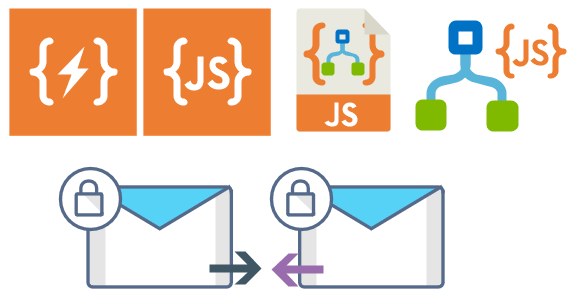
New shapes: new shapes were added to existing modules like:
Logic App Inline Code (square – original that you can find in Logic App design)
Logic App Inline Code JS (square – original that you can find in Logic App design)
Logic App Inline Code (Custom shape version 1)
Logic App Inline Code (Custom shape version 2)
Secure Message Input
Secure Message Output
Microsoft Integration, Azure, Power Platform, Office 365 and much more Stencils Pack it’s a Visio package that contains fully resizable Visio shapes (symbols/icons) that will help you to visually represent On-premise, Cloud or Hybrid Integration and Enterprise architectures scenarios (BizTalk Server, API Management, Logic Apps, Service Bus, Event Hub…), solutions diagrams and features or systems that use Microsoft Azure and related cloud and on-premises technologies in Visio 2016/2013:
BizTalk Server
Microsoft Azure
Integration
Integration Service Environments (ISE)
Azure App Service (API Apps, Web Apps, Mobile Apps, and Logic Apps)
Event Hubs, Event Grid, Service Bus, …
API Management
IoT, and Docker
Machine Learning, Stream Analytics, Data Factory, Data Pipelines
and so on
Microsoft Power Platform
Microsoft Flow
PowerApps
Power BI
PowerShell
Infrastructure, IaaS
Office 365
And many more…
… and now non-related Microsoft technologies like:
Do you feel difficult to keep up to date on all the frequent updates and announcements in the Microsoft Integration platform?
Integration weekly update can be your solution. It’s a weekly update on the topics related to Integration – enterprise integration, robust & scalable messaging capabilities and Citizen Integration capabilities empowered by Microsoft platform to deliver value to the business.
If you want to receive these updates weekly, then don’t forget to Subscribe!
I may be writing less on my blog as I frequently do, this will change soon, but this year of this is being very productive in terms of lectures. 4 in 4 months and more to come:
3/30/2019 – Real case implementations using Azure Logic Apps and/or Microsoft Flows at Global Integration Bootcamp Madrid
2/14/2019 – Integration Down Under | February 14, 2019 | How we are using Microsoft Integration features and related Azure technologies to improve our processes
2/4/2019 – The NOS-addin – your (free) BizTalk Dev buddy! at Integration Monday
1/30/2019 – XLVIII Porto.Data Community Meeting | How we use Microsoft Flow and PowerApps: Real cases scenarios
Now is time to share some resources before I start writing about other things and completely forget about this.
About my session
Session Name: How we are using Microsoft Integration features and related Azure technologies to improve our processes
Microsoft Integration features Session
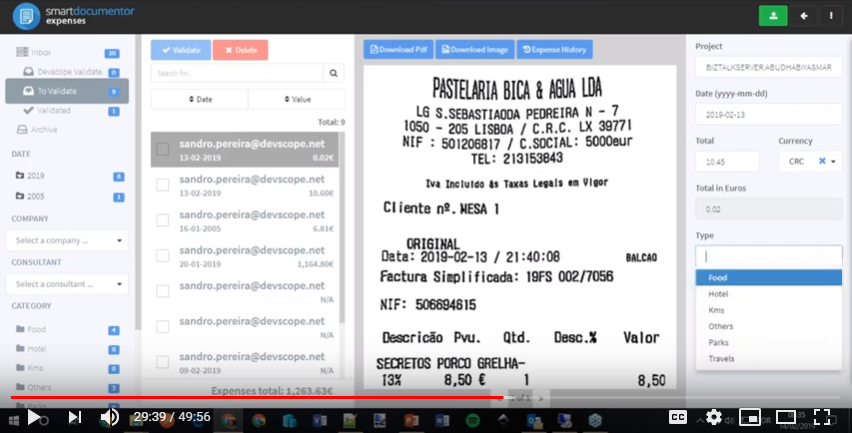
Session Overview: In this session, I will show you real live scenarios on how we at DevScope are using Microsoft Integration features (Logic Apps, API Management, API’s) and related Azure technologies like PowerApps, Flows and Power BI to:
First, improve our internal processes like expenses reports, time reports and so on;
And, secondly, how the first step helps us out to extend our product and our business by exporting these same approaches and concepts to our clients
This will be a lightweight talk addressing some real scenarios and show them in action.
Integration Down Under – How we are using Microsoft Integration features and related Azure technologies to improve our processes
About Integration Down Under
Integration Down Under serves the Australian / New Zealand community interested in all things Microsoft integration. Endeavoring to have regular webinar presentations, usually on the 2nd Thursday of each month. Organized by a panel of five Australian and New Zealand integration experts, our guest speakers feature various Azure MVPs, members of the Microsoft product teams, and other prominent members of the Microsoft integration community.
Do you feel difficult to keep up to date on all the frequent updates and announcements in the Microsoft Integration platform?
Integration weekly update can be your solution. It’s a weekly update on the topics related to Integration – enterprise integration, robust & scalable messaging capabilities and Citizen Integration capabilities empowered by Microsoft platform to deliver value to the business.
If you want to receive these updates weekly, then don’t forget to Subscribe!
Do you feel difficult to keep up to date on all the frequent updates and announcements in the Microsoft Integration platform?
Integration weekly update can be your solution. It’s a weekly update on the topics related to Integration – enterprise integration, robust & scalable messaging capabilities and Citizen Integration capabilities empowered by Microsoft platform to deliver value to the business.
If you want to receive these updates weekly, then don’t forget to Subscribe!
Recently I added an article to the integration playbook which compares the different approaches used for Durability, Persistence and Retry across the various microsoft technologies such as BizTalk, Logic Apps, Event Grid, Event Hubs, Service Bus Messaging and Functions
Do you feel difficult to keep up to date on all the frequent updates and announcements in the Microsoft Integration platform?
Integration weekly update can be your solution. It’s a weekly update on the topics related to Integration – enterprise integration, robust & scalable messaging capabilities and Citizen Integration capabilities empowered by Microsoft platform to deliver value to the business.
If you want to receive these updates weekly, then don’t forget to Subscribe!
Feedback
Hope this would be helpful. Please feel free to reach out to me with your feedback and questions.


 Microsoft Integration, Azure, Power Platform, Office 365 and much more Stencils Pack for Visio