
by community-syndication | Sep 23, 2011 | BizTalk Community Blogs via Syndication
When it comes to documentation with BizTalk it can be challenging task. What do and what do I not document and how do I document it. In my view there are three types of documentation when it comes to BizTalk in my opinion. That is:
- BizTalk Environment (Design) document
- Functional Design of BizTalk Solution
- Technical (Design) of BizTalk Solution
BizTalk Environment (design) documentation you can described the different BizTalk environment Development, UAT and Production. In this type of document you can roughly describe the following:
- Purpose;
- Design Decisions regarding environments;
- Considerations/Issues;
- Landscape (how does it fit with in IT-Landscape in Enterprise);
- MS BizTalk and SQL Server editions;
- SQL Server configuration (sizing disk, clustering e.a.);
- ICT Policy (Back up, Anti-virus, Patching, e.a.) applied in Enterprise;
- Operating Systems;
- Security Settings;
- Backup and Restore (procedures e.a.);
- BizTalk Group Configuration (clustering, availability e.a.);
- Host configuration;
To add you in documenting the environment or take into consideration (i.e. reference material) is MSDN Microsoft BizTalk Server 2010 Operations Guide.
Functional Design you describe how solution will work, which service it will call, what type of message’s it excepts, processes and sends. You can use notation symbols found in EAI Patterns site and create a functional model for your BizTalk solution (see example below).
You can also use UML like state diagram to depict process that is implemented in BizTalk solution (see picture below).
![clip_image002[6]](https://lh5.ggpht.com/-LqxTFP8_E3g/Tnx44Kzw0OI/AAAAAAAADx8/22kdDnR-K8o/clip_image002%25255B6%25255D_thumb%25255B2%25255D.jpg?imgmax=800 "clip_image002[6]")
Besides diagrams, you will also document specifications for messages (data types, restrictions, e.a.), security settings, protocols, message patterns, and so on.
Finally Technical (design) documentation of BizTalk solution and its configuration is fairly simple as you use BizTalk documenter for it. This is tool found on codeplex that can automatically generate a document (compiled chm, and even HTML for 2010 version).You can start documenter and following screen will be shown.
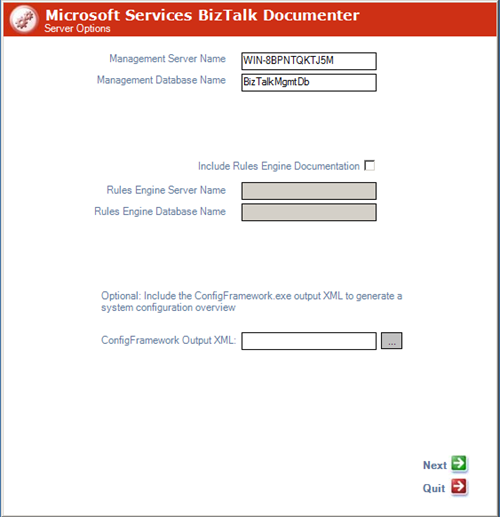
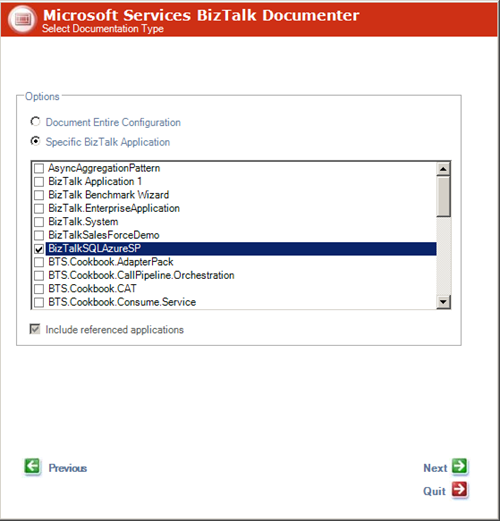
Click Next, Select if you want to completely document entire configuration of specific BizTalk application.
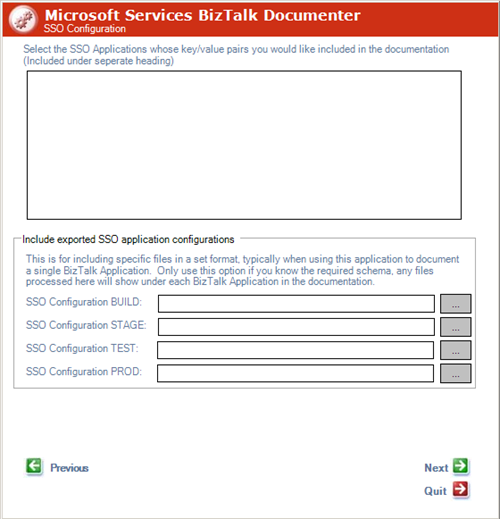
Click Next, you can select (this is new with BizTalk 2010 documenter) SSO configuration e.a.
Click Next, choose output options.
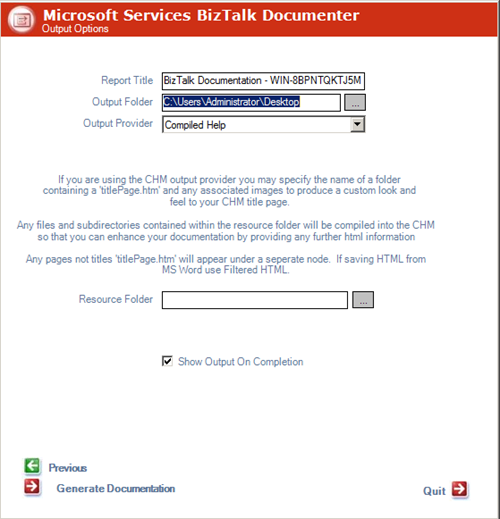
Finally you can click Generate Documentation and documentation will generated for you in desired format.
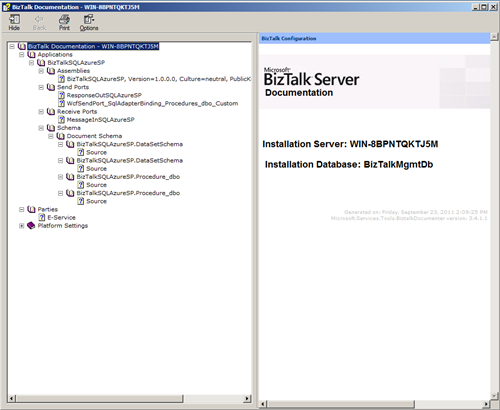
As you can see working with documenter is pretty straight forward and type of documentation can be realized with minimal effort. You can keep this documentation easy up to date when changes are made to BizTalk solution. Versioning your solution and its documentation is very important here! Documentation of BizTalk environment will take more effort and will be done in MS Word with perhaps drawings from Visio (there are BizTalk stencils, see post by Sandro). Functional documentation regarding your BizTalk solution will also require some effort, but vital before implementing your solution. Usually MS Word and Visio are used here as well.
Comments are welcome as I am interested in your view on documenting BizTalk.
Cheers!
by community-syndication | Sep 23, 2011 | BizTalk Community Blogs via Syndication
If you want to get up to speed on Azure AppFabric brokered messaging there are a couple of resources you should check out.
SB CTP Messaging User Guide
This is a 30 page word document put together by the AppFabric dev team. It’s a great read to get an introduction to Queues, Topics and Subscriptions. If you are working in the AppFabric Labs environment using the May or June CTP the code will work fine. There have been significant changes in the API in the September 2011 release, so don’t expect any of the code to compile in that release, but the theory section is still very much valid.
Best Practices for Leveraging Windows Azure Service Bus Brokered Messaging API
This is a 10 page blog post from the Windows Azure CAT team that provides some great tips for developers who have some familiarity with brokered messaging. The level is pretty advanced, and it’s impressive to see how much experience the CAT team has accumulated on brokered messaging. All the code here is on the September 2011 release. It’s a must-read if you plan to develop anything using service bus brokered messaging.

by community-syndication | Sep 23, 2011 | BizTalk Community Blogs via Syndication
Nigel Bachmann just added a new version of BizTalk Documenter: BizTalk Server 2010 Documenter and update the existing version BizTalk 2006 Documenter. The source code and MSI for both versions are available on CodePlex. This tool creates documentation for a given BTS 2010 installation and it will compile: BTS Host configuration Send/Receive port configuration Orchestration […]
Blog Post by: Sandro Pereira
by community-syndication | Sep 22, 2011 | BizTalk Community Blogs via Syndication
Windows Azure Storage med Bj%u00f6rn Eriksen.
Thursday, September 29, 2011 from 5:30 PM to 9:00 PM
Windows Azure Storage %u00e4r en tj%u00e4nst i Windows Azure som r%u00f6r olika typer av lagring. Blobs, Queues, Tables och %u00e4r begrepp som m%u00e5nga garanterat k%u00e4nner till, och s%u00e4kert har en uppfattning om hur de ska bete sig, men finns det mer %u00e4n det som syns p%u00e5 ytan? Utvecklare %u00e4r vana att jobba med filsystem, databaser och k%u00f6hanterare s%u00e5 varf%u00f6r skapa en ny modell? Skalbarhet och p%u00e5litlighet %u00e4r det korta svaret!
Register here.
Join Sweden Windows Azure Group (SWAG)here.

by community-syndication | Sep 22, 2011 | BizTalk Community Blogs via Syndication
Back in the days when I was working with BizTalk 2004 I always had the book ‘Microsoft BizTalk Server 2004 Unleashed‘ close by on my desk. Later on, when BizTalk 2006 was released the same was the case for the book ‘Professional BizTalk Server 2006‘. It is not my intention to fail other good BizTalk […]
Blog Post by: Randal van Splunteren
by community-syndication | Sep 21, 2011 | BizTalk Community Blogs via Syndication
I’ve added a third walkthrough to the AppFabric Walkthrough series.
“The following walkthrough will show how topics and subscriptions can be used to implement a simple publish-subscribe messaging channel. The next walkthrough will build on this sample and explore the use of filters on subscriptions.”
Introducing Topics and Subscriptions
The other two walkthroughs are here.
Simple Brokered Messaging
Creating a Simple Queue Management Tool
At present there are no charges for using the new brokered messaging capabilities in AppFabric, so I have been taking advantage of this to explore the new functionality. This free offer will not last forever, so now is a great time to take a look at the new capabilities.
by community-syndication | Sep 19, 2011 | BizTalk Community Blogs via Syndication
Hi folks we’re delivering Azure sessions on behalf of Microsoft over the next coming
weeks
Here’s the official timetable, come along they’re free for you!!
(All times are in Australian Eastern Standard Time)
Blog Post by: Mick Badran
by community-syndication | Sep 19, 2011 | BizTalk Community Blogs via Syndication
I’ve added a second AppFabric Walkthrough based on the Azure AppFabric Service Bus September 2011 release. The second one looks at using the NamespaceManager class to create, list, get and delete queues in an AppFabric service bus namespace using a simple C# console application. Feel free to expand on this scenario to create more sophisticated management consoles.
As with the first walkthrough there have been a lot of changes in the classes used to interact with the service bus, so don’t expect this code to work against the May or June CTP releases.
The two walkthroughs are here.
AppFabric Walkthrough: Simple Brokered Messaging
AppFabric Walkthrough: Creating a Simple Queue Management Tool
by community-syndication | Sep 19, 2011 | BizTalk Community Blogs via Syndication
One benefit of my recent experience on a BA flight was that I got plenty of time to read through “Microsoft BizTalk 2010 Line of Business Systems Integration”. I’d promised the publisher weeks ago that I would take a look and publish some comments, but August has been such a busy month for me, and they have had to be patient. I should point out that, for the sake of transparency, that with another BizTalk book about to be released (next week) which I helped co-author, I have an urgent and obvious need to make good on this promise before I start to blog on other stuff.
BTS10LoBI is a really welcome addition to the corpus of BizTalk Server books and fills a conspicuous gap in the market. BizTalk Server offers a wide-ranging library of adapters. The ’native’ (built-in) adapters understandably get a lot of attention, as do the WCF adapters, but other adapters, such as the LoB adapters and HIS adapters, are often overlooked. I came to the book with the mistaken assumption that its chief focus was on the BizTalk Adapter Pack. This is a pack of adapters built with the WCF-based LoB SDK. In fact, the book follows a much broader path. It is a book about LoB integration in a general sense, and not about one specific suite of adapters. Indeed, it is not simply about adapters. It focuses on integration with various LoB systems, and explains how adapters and other tools are used to achieve this.
This makes for a more interesting read. For example, one, possibly unintended, consequence (given that it represents collaboration between five different authors) is that it illustrates very effectively the spectrum of approaches and techniques that end up being employed in real-world integration. In some cases developers use adapters that offer focused support for metadata harvesting and other features, exploited through tools such as the ’Consume Adapter Service’ UI. In other cases, they use native adapters with hand-crafted schemas, or they create fa%u00e7ade services. The book covers additional scenarios where third-party LoB tools and cloud services (specifically SalesForce) are used in conjunction with BizTalk Server. Coupled with lots of practical examples, the book serves to provide insight into the ’feel’ of real-world integration which is so often a messy and multi-faceted experience.
The book does not cover the BizTalk Adapter Pack comprehensively. There is no chapter on the Oracle adapters (not a significant issue because they are very similar to the SQL Server adapter) or the Siebel adapter. On the other hand, it provides two chapters on the SAP adapter looking at both IDOC and RFC/BAPI approaches. I particularly welcome the inclusion of chapters on integration with both Dynamics CRM 2011 and Dynamics AX 2009. I learned a lot about Dynamics CRM which I haven’t had occasion personally to integrate with in its latest version. The chapter on SalesForce mentions, but does not describe in any detail, the TwoConnect SalesForce adapter which we have used very effectively on previous projects. Rather, it concentrates on direct HTTP/SOAP interaction with SalesForce.com and, very usefully, advocates the use of Azure AppFabric for secure exchange of data across the internet.
The book provides two chapters on integration with SharePoint 2010. The first explores the use of the native adapter to communicate with form and document libraries, and provides illustrated examples of working with InfoPath forms. It would have been reasonable to stop there, but instead, the second chapter goes on to describe how to integrate more fulsomely with SharePoint via its web service interface, and specifically how to interact with SharePoint lists.
Increasingly, the BizTalk community is waking up to the implications of Windows Azure and AppFabric. This is an important step for developers to take. Future versions of BizTalk Server will essentially join and extend the on-premise AppFabric world. As Microsoft progressively melds their on/off premise worlds, BizTalk developers will increasingly have to grapple with integration of cloud based services, and integration of on-premise services via the cloud. The book is careful to address this emerging field through the inclusion of a chapter on integration via the Azure AppFabric service bus. As I mentioned above, this is applied specifically to SalesForce integration in a later chapter. The AppFabric Service Bus is a rapidly-evolving part of the Azure platform, and is set to introduce a raft on new features in the coming months which will greatly extend the possibilities. Eventually we will see cloud-based integration services appear in this space. So, the inclusion of this chapter points out the direction of major future evolution of Microsoft’s capabilities and offerings in the integration space.
The book is not shy about providing guidance on practical problems and potential areas of confusion that developers may encounter. The content is clearly based on real-world experience and benefits from ’war stories’. The value of such content cannot be underestimated, and can save developers hours of pain and frustration when tackling new problems. All in all, I thoroughly welcome this book. My thanks to the authors, Kent Waere, Richard Seroter, Sergei Moukhnitski, Thiago Almeida and Carl Darski.

by community-syndication | Sep 19, 2011 | BizTalk Community Blogs via Syndication
For the BizTalk Portuguese Community, I will present a session about maps: “BizTalk Mapper: How maps work in BizTalk Server 2010“ in the next NetPonto community event that will occur on September 24 in Lisbon. No dia 24 de Setembro (pr%u00f3ximo S%u00e1bado) a Comunidade NetPonto comemora o seu segundo anivers%u00e1rio, e convida todos os seus […]
Blog Post by: Sandro Pereira


![clip_image002[6]](https://lh6.ggpht.com/-de0jDRyhZXU/Tnx43t0ToCI/AAAAAAAADx4/dJYuqufuN7E/s1600-h/clip_image002%25255B6%25255D%25255B4%25255D.jpg "clip_image002[6]")


