by community-syndication | Sep 29, 2011 | BizTalk Community Blogs via Syndication
I’ve spent some time lately playing around with MSMQ, Authentication and the use of External Certificates. This is an interesting scenario, but one that I found to be documented in relatively unclear terms, with somewhat conflicting information all over the place. Plus, the whole process isn’t very transparent at first. Normally, when you’re using MSMQ […]
Blog Post by: Tomas Restrepo
by community-syndication | Sep 29, 2011 | BizTalk Community Blogs via Syndication
Last week on 21st September we had the privilege to present the capabilities of BizTalk360 to an enthusiastic audience in Copenhagen, Denmark (You can view the pictures here on our facebook fan page).
We fully understand for any technical user group meetings you are not going to get decision makers who will put the money down and buy the product, it will normally be truly technical chaps, who are prepared to spend some of their spare time either to present or come and learn some new stuff. We don’t treat these presentations as marketing pitch, instead we use this opportunity to spread the word and more importantly get some real feedback from people who are on the field. It proved really valuable for us, and we can see the proof in the evolution of BizTalk360.
Jan Eliasen doesn’t require any introduction in the BizTalk world, he is a long time BizTalk Server MVP, he is great blogger all things BizTalk, along with few energetic chaps he runs the BizTalk user group in Denmark, he is the first one to write any BizTalk exams that comes out, and more importantly he is the author of the newly released book "Microsoft BizTalk Server 2010 Unleashed"
You can read Jan’s article about BizTalk360 here http://blogs.eliasen.dk/Technical/post/2011/09/25/BizTalk-360.aspx
We are super excited to see such a positive feedback from a great influencer in the community.
Nandri
Saravana Kumar
Social:
Join us on @biztalk360 | http://facebook.com/biztalk360 | http://getsatisfaction.com/biztalk360
by community-syndication | Sep 29, 2011 | BizTalk Community Blogs via Syndication
Following on from the successful BizTalk Server 2010 Developer training that Mexia ran in Melbourne in August 2011, we are doing it again, this time we have added a 2 days BizTalk 2010 Administrator training course.
- BizTalk Server 2010 Administrator Training – November 21st & 22nd, 2011 –
https://bizadmmel1111.eventarc.com/event/view/5767/biztalk-2010-administrator-training—melbourne
- BizTalk Server 2010 Developer Training – November 28th to 2nd December, 2011 –
https://bizdevmel1111.eventarc.com/event/view/5765/biztalk-2010-developer-training—melbourne
For any questions or to organise on-site BizTalk Server 2010 training please Contact Me
by community-syndication | Sep 28, 2011 | BizTalk Community Blogs via Syndication
This example is not covered in the ESB Toolkit samples and I bumped my forehead a few times while making it work. I thought it’d be helpful to save other fellow BizTalk’ers from headaches by publishing findings.
I have been fun of dynamic generic messaging for quite a while and went long ways to avoid working with typed messages and static bindings when it made sense. Nowadays, with the ESB Toolkit one does not have to spend much effort to achieve this goal. But one has to learn intricacies of configuration to unleash unlimited flexibility of the Toolkit.
Let’s say we have a requirement to store some messages on service bus to the database. And the number of message types supported is growing plus their schemas can potentially change. If the database is SQL Server we can use an ESB Off-Ramp dynamically bound to WCF-SQL send port.
The send port interface can be implemented different ways. One way is to generate typed WCF-SQL Adapter schemas for database objects (tables or procedures). Then create maps to transform original message to the adapter schema. This may potentially lead to complex maps that perform poorly, difficult to maintain and support. We also have to deploy new schemas every time new type is added.
Other way with minimal BizTalk coding is to use one-way port calling stored procedure that accepts entire message as a parameter and internally maps/saves message to the database. This saves us from creating and deploying stored procedure schema and map, as well as schema for the response message. We also gain performance on the BizTalk end by offloading XML to relational model mapping to the database engine which it does more efficiently. Simply put, stored procedures perform better and simpler to maintain. I chose this approach over the first.
Suppose, we have two message types http://contoso.com/schemas#PurchaseOrder and http://contoso.com/schemas#Invoice. We have created two stored procedures InsertPurchaseOrder and InsertInvoice. Each stored procedure accepts one parameter, the message body:
CREATE PROCEDURE InsertPurchaseOrder
    @messageBody nvarchar(max)
AS
BEGIN
    SET NOCOUNT ON;

    DECLARE @docHandle int
    EXEC sp_xml_preparedocument @docHandle OUTPUT, @messageBody, N'<ns0:PurchaseOrder xmlns:ns0="http://contoso.com/schemas" />'

-- Perform mapping and insert here using OPENXML for example

END
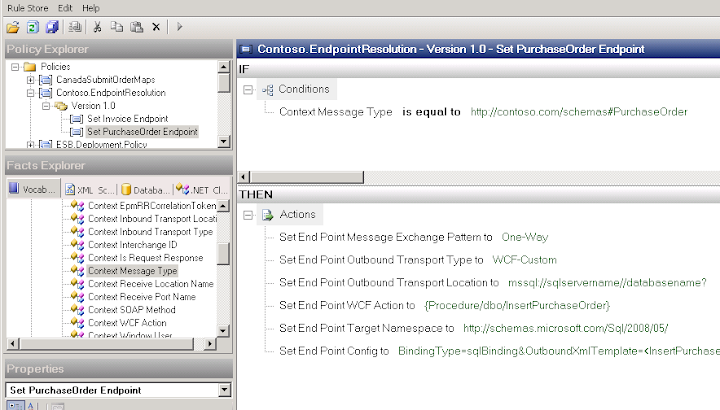
Create BRE policy to resolve endpoint configuration:
In the Action area there are a lot of things being set up. Let’s go through them one by one:
|
Parameter
|
Value
|
Notes
|
|
Set Endpoint Message Exchange Pattern
|
One-Way
|
Establishes exchange pattern, we don’t need solicit-response in our case
|
|
Set End Point Outbound Transport Type
|
WCF-Custom
|
This is the binding we are going to use.
Note: this value is not available in the ESB.TransportTypes vocabulary. Thus, we use literal string value “WCF-Custom”
|
|
Set Endpoint Outbound Transport Location
|
mssql://sqlservername//databasename?
|
This is standard form of the WCF-SQL uri. The example given is for default SQL instance (notice double slash)
|
|
Set End Point WCF Action
|
{Procedure/dbo/InsertPurchaseOrder}
|
This is from WCF-SQL adapter schema, but the trick here, it wants to be enclosed in {} which is not obvious
|
|
Set End Point Target Namespace
|
http://schemas.microsoft.com/Sql/2008/05
|
|
|
Set End Point Config
|
See below
|
That’s where “magic” is configured and deserves separate consideration
|
Endpoint configuration details
BindingType=sqlBinding&OutboundXmlTemplate=<InsertPurchaseOrder xmlns=”http://schemas.microsoft.com/Sql/2008/05/Procedures/dbo”><messageBody><bts-msg-body xmlns=”http://www.microsoft.com/schemas/bts2007″ encoding=”string”/></messageBody></InsertPurchaseOrder>&OutboundBodyLocation=UseTemplate&BindingConfiguration=<binding name=”sqlBinding” />
|
Parameter
|
Value
|
Notes
|
|
BindingType
|
sqlBinding
|
|
|
BindingConfiguration
|
<binding name=”sqlBinding” />
|
Default binding configuration which can be augmented.
|
|
OutboundXmlTemplate
|
<InsertPurchaseOrder xmlns= http://schemas.microsoft.com/Sql/2008/05/Procedures/dbo>
<messageBody>
<bts-msg-body xmlns=”http://www.microsoft.com/schemas/bts2007″ encoding=”string”/>
</messageBody>
</InsertPurchaseOrder>
|
This is key parameter to make adapter accept the message and pass to stored procedure. The root element is the procedure name. The immediate child element is the procedure’s parameter. The enclosed element is to tell where to place message body.
|
|
OutboundBodyLocation
|
UseTemplate
|
Tells adapter to use template rather than raw message body.
This is another parameter which was not apparent since there’s no enumeration to provide possible values. Digging into adapter reference helps.
|
Add Messaging service to the Itinerary with the BRE endpoint resolver that uses policy created earlier. Then simply use one-way off-ramp. In the dynamic one-way port configuration PassThroughTransmit pipeline will do the job.

Once all these components implemented you have truly generic infrastructure to save any message to the database with minimal overhead. As new messages added, you simply create new stored procedure and rule that associate message type with it. And there are no BizTalk artifacts to deploy.
by community-syndication | Sep 28, 2011 | BizTalk Community Blogs via Syndication
It’s been a week since we announced the private beta availability of Moesion and the reaction from customers, partners and the press have been incredible. I thought I’d take the time to highlight some of the press coverage that Moesion has received during…(read more)
Blog Post by: gsusx
by community-syndication | Sep 27, 2011 | BizTalk Community Blogs via Syndication
A topic that I think BizTalk professional find appealing in Windows Azure is the Service Bus (part of Windows Azure AppFabric). Service Bus provides secure messaging and connectivity capabilities that enable building distributed and disconnected applications in the cloud, as well hybrid application across both on-premises and the cloud.
One of new features is topics and queues. Clemens Vasters did a talk on Windows Azure Service Bus Topics and Queues during Windows Build and an advanced one, which you find on his blog.
You can work with this new feature through Windows Azure AppFabric SDK V1.5 – September 2011. The version 1.5 SDK includes an updated Service Bus assembly that includes support for durable, or “brokered” messaging features, such as queues, topics, and subscriptions. These features require the .NET Framework version 4.0. (Note: If you have a dependency on the .NET Framework version 3.5, you should download or continue to use version 1.0 of the AppFabric SDK.)
If you have virtual machine available or laptop following requirements are applicable:
- Account Requirements Before running the samples in the SDK, you must have one or more service namespaces. To create a Windows Azure AppFabric service namespace, you have to register or login Windows Azure Platform Portal.
- Runtime Requirements The Windows Azure AppFabric SDK samples are available as Visual Studio 2010 solutions (C# and VB) and require Microsoft .NET Framework 4.0 higher to run. The SDK is supported on Windows Server 2008, Windows 7, Windows Vista, Windows Server 2003, and Windows XP operating systems. For Windows Server AppFabric integration, IIS7.5 is required.

by community-syndication | Sep 26, 2011 | BizTalk Community Blogs via Syndication
I am currently using BizTalk 2010 as the integration hub between a number of systems, including Microsoft Dynamics CRM Online. The XLANG/s Orchestration compiler will complain with the following: Unexpected use of keyword: ‘task’ One of the core entities in CRM is the ‘Task’, a sub-type of an Activity in the Sales process. However, we […]
Blog Post by: Brett
by community-syndication | Sep 25, 2011 | BizTalk Community Blogs via Syndication
At last, I can announce that ’BizTalk Server 2010 Unleashed’ has been published and is available through major booksellers in both printed and electronic form.The book is not a new edition of the old ’BizTalk Server 2004 Unleashed’ book from several years ago, although Brian Loesgen, our fearless team leader, provided continuity with that title.Instead, this is entirely new content written by a team of six authors, including myself.
BizTalk Server is such a huge subject.It proved a challenge to decide on the content when we started our collaboration a couple of years back (yes, it really was that long ago!). We quickly decided that the book would principally target the BizTalk development community and that it would provide a solid and comprehensive introduction to the chief artefacts of BizTalk Server 2010 solutions – schemas, maps, orchestrations, pipelines and adapters.Much of this content was written by Jan Eliasen and forms part 1 (“The Basics”) of the book.
On the day my complimentary copies were delivered, I was working on the implementation of a pipeline component, and had an issue to do with exposing developer-friendly info in Visual Studio.I used this as a test-run of Jan’s content, and sure enough, discovered that he had clearly addressed the issue I had, including sample code.Jan’s contribution is succinct and to the point, but is also very comprehensive (he’s even documented things like creating custom pipeline templates!). I particularly appreciate the way he included plenty of guidance on testing individual artefacts.
My contributions to part 1 is a chapter on adapters (the ’adapter chapter’ as we fondly called it). This explores each of the ’native’ adapters and the family of WCF adapters.There is also some content on the new SQL adapter which is part of the BizTalk Adapter Pack.In that respect, it overlaps with ’Microsoft BizTalk 2010 Line of Business Systems Integration’ which I reviewed recently, and also in respect of the SharePoint adapter.However, ’Microsoft BizTalk 2010 Line of Business Systems Integration’ provides a whole lot more information on a range of LoB adapters.It is written in a different style to BizTalk Server 2010 Unleashed and is highly complementary.
Although the original plan was to include content on custom adapter creation, this didn’t, in the end, get covered in any depth.One reason for this is that, going forward, most custom adapter development for both BizTalk and Azure Integration Services (still some way off) is likely to be done using the WCF LoB Adapter SDK.That suggested that we would have had to document two distinct adapter frameworks in order to do the job properly, and this proved a little too much to tackle.Room there for another book, methinks.
Part 1 accounts for about half the content of the book.Beyond this, we wanted to add value by covering more advanced topics, including the use of BizTalk Server alongside WCF and the emerging Azure platform, new features in BizTalk Server 2010 and topics that have been only partially covered elsewhere.So, for example, Anush Kumar was contributed an entire section (part 4) on RFID including the new RFID Mobile Framework.Anush is well-known in the BizTalk community due to his involvement in the development of RFID Server.Between Jon Flanders and Brian Loesgen, the book includes content on exploiting WCF extensibility in BizTalk, integrating via the Azure service bus (please note that this content was written before the advent of topics/subscriptions or Integration Services), the BAM framework and the ESB toolkit.
There is also a whole section (part 3) written by Scott Colestock that introduces the Administration Console and describes deployment approaches for BizTalk solutions.
Rules
That leaves one more subject for which I was responsible.One of the main reasons I was asked to contribute to the book was to document rules processing.Although there is some great content out there on the use of the BRE, I have long felt there is a need for a more comprehensive introduction.Due to some early confusion, I originally intended a total of seven short chapters on rules, but this content was refactored into two longer chapters.The first chapter introduces the Business Rules Framework.My idea was to emphasise the entire framework up front, rather than simply explore the rules composer and other tools.I also tried to explain the typical ’feel’ of rules processing in the context of a BizTalk application, and the relationship between executable rules and higher-level business rules.
The second chapter investigates rule-based programming.It attempts broadly to achieve two related goals.The first is to explain rules programming to developers, to demystify the model, explain the techniques and provide insight into how to handle a number of common issues and pitfalls that rules developers face.The second is to provide a solid theoretical introduction to rules processing, including concepts that are not generally familiar to the average developer.I resisted the temptation, though, to provide an in-depth explanation of how the Rete Algorithm works, which I’m sure will be a relief:-)You can read the Wikipedia article on that.
Conclusions
So there you have it.BizTalk Server 2010 is a mature enterprise-level product which, although it has a long future ahead of it, won’t change fundamentally over time.Microsoft has publically stated that their future major investments in EAI/EDI will be made in the Azure space, although new versions of BizTalk Server will continue to benefit from general improvement and greater integration with the evolving Azure platform.So, hopefully, our content will serve for some time as a useful introduction to BizTalk Server, chiefly from a developer’s perspective.
by community-syndication | Sep 25, 2011 | BizTalk Community Blogs via Syndication
This new book about BizTalk Server 2010 is now available for purchase! This very helpful book was written by BizTalk MVPs Brian Loesgen, Jan Eliasen, Charles Young, Scott Colestock, Jon Flanders, and Anush Kumar.
by community-syndication | Sep 23, 2011 | BizTalk Community Blogs via Syndication
This week Tellago Studios announced Moesion : a cloud platform to manage your IT systems or cloud services directly from your smartphone or tablet. Moesion is the result of our constant obsession to bring innovation and modern technologies to the world…(read more)
Blog Post by: gsusx
