
by community-syndication | Jan 16, 2016 | BizTalk Community Blogs via Syndication
In the last days I’ve been migrating old maps from BizTalk Server 2004 to the last versions of BizTalk Server: 2013 and 2013 R2 and I have seen several “styles/approaches” to address mappings, some of them great, some of them not so much and other completely crazy. Today I will address a topic that I, […]
Blog Post by: Sandro Pereira

by bchesnut | Jan 12, 2016 | BizTalk Community Blogs via Syndication
Published By: Bill Chesnut
This blog post is to go along with my Integration Monday talk: http://www.integrationusergroup.com/biztalk-continuous-integration-continuous-deployment
Prerequisites
Your BizTalk Solution needs to be using BTDF (https://biztalkdeployment.codeplex.com/)
You need a Visual Studio Team Services Account (https://www.visualstudio.com/)
You need a BizTalk Build Server (BizTalk Developer 2013 R2 machine with BTDF installed)
PowerShell Scripts using in VSTS Build (https://github.com/Mexia/BizTalkCICD)
Modification to the BTDF EnvironmentSettings.xml file required for VSTS Build
Add a Column for Build Server with Settings File Name: Exported_BuildSettings.xml
Modification to the Deployment.btdfproj file required for VSTS Build
| Open the Deployment.btdfproj files |
|
| To Display the Build Number and date time of deployment on the BizTalk Server
Add the line below in the PropertyGroup shown
<BizTalkAppDescription>Version: $(ProductVersion) – Deployed: $([System.DateTime]::Now.ToString(“dd-MM-yyyy HH:mm:ss”))</BizTalkAppDescription>
|
|
| To Select the correct Environment Settings file for the Build Server
Add the line below in the PropertyGroup shown
<DeveloperPreProcessSettings Condition=”‘$(IsInVSTSBuild)’ == ‘True’”>$(MSBuildProjectDirectory)EnvironmentSettingsExported_BuildSettings.xml
</DeveloperPreProcessSettings>
|
|
| Update this line for any properties that need to be pulled from the EnvironmentSettings file |
 |
| To control which Hosts get stopped and started during the install process
Add the highlighted ItemGroup, repeat the BizTalkHosts entry for all Hosts used by the application
<ItemGroup>
<BizTalkHosts Include=”DefaultHost” />
</ItemGroup>
|
 |
| If the BizTalk Application that you are deploying references other BizTalk Applications, Add the ItemGroup show with a AppsToReference for every BizTalk Application that is referenced |
 |
| If there are other BizTalk Applications that depend on the BizTalk Application that is being deployed
Add the ItemGroup and Target to the end of the Deployment.btdfproj file
Note: add a AppsToRemove line for each BizTalk Application that depends of the BizTalk Application that is being deployed
|
|
Steps to Create a Build in VSTS
| Open the VSTS Team Project that the BizTalk Solution is in, go to the Build Tab, Click the + to create a new build |
|
| Select Empty
Click Next
|
|
| Select Default for the Default agent queue
Click Create
|
|
| Click Save |
|
| Type the name for the build, usually the same name as the solution
Click OK
|
|
| Click Options
Note: The build steps will be added later
|
|
| Take Default Options
Click Repository
Note: Create Work Item on Failure if build failure work needs to be tracked
|
|
| Select true for Clean
Click Variables
|
|
| Take Default Configuration |
|
| Take Default Configuration
Note: These can be set according to the clients requirements
|
|
| Enter the string shown for the Build number format |
|
| Take Default Configuration
Click Save
|
|
| Click OK |
|
| On the Build Tab
Click Add build step
|
|
| From Utility Tasks, Select PowerShell
Click Add
Click Close
|
|
| Configure as shown |
|
| On the Build Tab
Click Add build step
|
|
| From Utility Tasks, Select PowerShell
Click Add
Click Close
|
|
| Configure as shown |
|
| On the Build Tab
Click Add build step
|
|
| From Build Tasks, Select Visual Studio Build
Click Add
Click Close
|
|
| Configure as Shown
Click the pencil at the end of the name
|
|
| Update Name
Click OK
|
|
| On the Build Tab
Click Add build step
|
|
| From Test Tasks, Select Visual Studio Test
Click Add
Click Close
|
|
| Configure as Shown
Update Step Name
|
|
| On the Build Tab
Click Add build step
|
|
| From Build Tasks, Select MSBuild
Click Add
Click Close
|
|
| Configure as Shown
Update Step Name
|
|
| On the Build Tab
Click Add build step
|
|
| From Test Tasks, Select Visual Studio Test
Click Add
Click Close
|
|
| Configure as Shown
Update Step Name
|
|
| On the Build Tab
Click Add build step
|
|
| From Build Tasks, Select Visual Studio Build
Click Add
Click Close
|
|
| Configure as Shown
Update Step Name
|
|
| On the Build Tab
Click Add build step
|
|
| From Build Tasks, Select MSBuild
Click Add
Click Close
|
|
| Configure as Shown
Update Step Name
|
|
| On the Build Tab
Click Add build step
|
|
| From All Tasks, Select Copy and Publish Artifacts
Click Add
Click Close
|
|
| Configure as Shown
Update Step Name
|
|
| On the Build Tab
Click Add build step
|
|
| From All Tasks, Select Copy and Publish Artifacts
Click Add
Click Close
|
|
| Configure as Shown
Update Step Name
|
|
| On the Build Tab
Click Add build step
|
|
| From All Tasks, Select Copy and Publish Artifacts
Click Add
Click Close
|
|
| Configure as Shown
Update Step Name
|
|
| Click Save |
|
| Click OK |
|
| To Test the Build
Click Queue build
|
|
| Take Defaults
Click OK
|
|
| Verify build complete successfully |
|
Thanks for your time and I look forward to helping people on their BizTalk CI & CD journey
Comments are closed.
by bchesnut | Jan 12, 2016 | BizTalk Community Blogs via Syndication
This blog post is to go along with my Integration Monday talk: http://www.integrationusergroup.com/biztalk-continuous-integration-continuous-deployment
Prerequisites
Your BizTalk Solution needs to be using BTDF (https://biztalkdeployment.codeplex.com/)
You need a Visual Studio Team Services Account (https://www.visualstudio.com/)
You need the drop folder from a BizTalk Build (BizTalk Continuous Integration with Visual Studio Team Services (VSTS) or BizTalk Continuous Integration with Team Foundation Server (TFS) 2015 Update 1 )
PowerShell Scripts using in VSTS Release Management (https://github.com/Mexia/BizTalkCICD)
Modification to the BTDF EnvironmentSettings.xml file required for VSTS Release Management
Add a Column for Release Management with Settings File Name: Exported_RMSettings.xml, add #{} around the name of the settings for use by Release Management
Steps to Create a Release in VSTS
Thanks for your time and I look forward to helping people on their BizTalk CI & CD journey
Comments are closed.

by bchesnut | Jan 11, 2016 | BizTalk Community Blogs via Syndication
Published by: Bill Chesnut
This blog post is to go along with my Integration Monday talk: http://www.integrationusergroup.com/biztalk-continuous-integration-continuous-deployment/ and is designed to start people thinking about Continuous Integration and Continuous Deployment for their BizTalk Solutions, later post will cover the methods and tools.
What is Continuous Integration & Continuous Deployment
CI & CD mean a number of thing to different people and technologies, for BizTalk I think CI & CD means 3 things: Automating Build, Testing and Packaging, Making Release an easily repeatable process and Reducing Human involvement.
If we look at the the 1st one, Automating Build, Testing and Packaging, these 3 components have never been real easy with BizTalk, you can manually do each of these on a BizTalk developer workstation, but automating all or part of this process has taken a great deal of effort. At Mexia we have chosen to use the BizTalk Deployment Framework (BTDF) from Codeplex because it goes a very long way towards fixing the problems with BizTalk packaging and deployment, which we will look at in later posts.
The 2nd item to me is the hardest one with BizTalk if you have not automated the process, if one developer creates a deployment package (without BTDF) and then another developer creates another deployment package, it is very likely that they will be slight differences and the quality of the deployed code will suffer, I myself have even had these type of issues when the process to create a deployment package becomes more than a couple of pages of instructions, it is very prone to errors. With BTDF (or the tool of your choice) and automation this can become an easily repeatable process with consistent outcomes.
The final item it something that most BizTalk project teams with be acutely aware of, losing a developer for part or all of a day to do a release or even to make some simple configuration changes, which has a flow on effect with the team falling behind in the work for the next delivery milestone. Again if tools are used to remove the release configuration from the developers responsibility and the automating of the package creation the developers can concentrate on what developer do, develop.
Why Continuous Integration & Continuous Deployment
Many of the reason for Why do CI & CD are also defined in What is CI & CD, but I think the greatest reasons for spending the time to setup CI & CD are: consistency of delivery, reduced time to deliver and getting the developers out of the configuration loop. The easier that the build, test, package and deploy process is the more often teams will be willing to do releases, which will benefit everyone involved in the project.
The bottom line is the easier the process to more often it will be done and the more often it is done the better the quality of the final solution.
What’s Next
This post is designed to be the 1st of a series around BizTalk CI & CD, the next post will be hands on with the tools, below is the list of what I plan to cover in this series of posts, I will update the lists with links as I publish those posts:
Thanks for your time and I look forward to helping people on their BizTalk CI & CD journey
by community-syndication | Jan 11, 2016 | BizTalk Community Blogs via Syndication
DocumentDB is a highly scalable, NoSQL document database service in Azure. On azure.microsoft.com you can find a lot information about DocumentDB. For example how you can create a DocumentDB or how to build your first app. But in a “real life” scenario (for example in project for a customer) this information is probably not enough or even relevant because the samples are often console applications and maybe you want to create a Mobile or a Web App. Often you also need to modify the data from the client or add meta data to it. For example a creation date or an order status. Therefore its good practice to create a custom Web API to handle the inserts, updates, deletes and data retrievals. There you have complete control on the object that is sent by the client. But how do you do that if you want to store the data in DocumentDB? In that case it can take quite some time to find the additional info that you need. Therefore I created an API App to show how you can insert, update, delete or get a customer order and how to add additional (meta data) to the orders! The following sample can easy be modified for other type of objects.
Prerequisites
First you have to create a DocumentDB database and a collection inside it. The easiest way to do that is in the Azure Portal. This blog post doesn’t show how to do that because you can also find that information in “How to create a database for DocumentDB” on the Azure website. The result is similar like below:
Steps
This post also doesn’t give an intro on how to create an API App but rather focuses on the part that is specific for DocumentDB, (Here you can find more information on how to create an API App.)
Create an Order
|
|
First create a Data Access Layer (DAL) helper class that stores the order in DocumentDB. The order that is sent to the API App from the client is put in a server order object that has extra properties like OrderStatus and CreationDate. This construction makes it possible to create properties on the order that are not visible for the client or for example read only for the client. When an object is stored in DocumentDB is automatically a guid created for the object. This guid is sent back to client and can be used to retrieve the order.
|
public async Task<string> CreateOrder(ClientOrder order)
{
    string id = null;

    //Create a server order with extra properties
    ServerOrder s = new ServerOrder();

    s.customer = order.customer;
    s.item = order.item;

    //Add meta data to the order
    s.OrderStatus = "in progress";
    s.CreationDate = DateTime.UtcNow;

    //Get a Document client
    using (client = new DocumentClient(new Uri(endpointUrl),
    authorizationKey))
    {

        string pathLink = string.Format("dbs/{0}/colls/{1}",
        databaseId, collectionId);

        ResourceResponse<Document> doc = await client.
        CreateDocumentAsync(pathLink, s);

        //Return the created id
        id = doc.Resource.Id;
    }

    return id;
}
.csharpcode, .csharpcode pre
{
font-size: small;
color: black;
font-family: consolas, “Courier New”, courier, monospace;
background-color: #ffffff;
/*white-space: pre;*/
}
.csharpcode pre { margin: 0em; }
.csharpcode .rem { color: #008000; }
.csharpcode .kwrd { color: #0000ff; }
.csharpcode .str { color: #006080; }
.csharpcode .op { color: #0000c0; }
.csharpcode .preproc { color: #cc6633; }
.csharpcode .asp { background-color: #ffff00; }
.csharpcode .html { color: #800000; }
.csharpcode .attr { color: #ff0000; }
.csharpcode .alt
{
background-color: #f4f4f4;
width: 100%;
margin: 0em;
}
.csharpcode .lnum { color: #606060; } |
| |
| Create a POST method in the API App Controller class to post a new order to the API App. Call the helper class to insert the order in DocumentDB and return the generated id (guid) to client. |
public async Task<IHttpActionResult> Post([FromBody]ClientOrder order)
{
    OrderResult result = new OrderResult();

    try
    {
        OrderManager mgr = new OrderManager();
        string id = await mgr.CreateOrder(order);

        if (id != null)
        {
            result.Id = id;
        }

        //Return a HTTP 200 with the created id
        return Ok(result);
    }
    catch
    {
        return InternalServerError();
    }
}
.csharpcode, .csharpcode pre
{
font-size: small;
color: black;
font-family: consolas, “Courier New”, courier, monospace;
background-color: #ffffff;
/*white-space: pre;*/
}
.csharpcode pre { margin: 0em; }
.csharpcode .rem { color: #008000; }
.csharpcode .kwrd { color: #0000ff; }
.csharpcode .str { color: #006080; }
.csharpcode .op { color: #0000c0; }
.csharpcode .preproc { color: #cc6633; }
.csharpcode .asp { background-color: #ffff00; }
.csharpcode .html { color: #800000; }
.csharpcode .attr { color: #ff0000; }
.csharpcode .alt
{
background-color: #f4f4f4;
width: 100%;
margin: 0em;
}
.csharpcode .lnum { color: #606060; } |
| |
| You can test the API App with the test page that is automatically generated with Swagger. |
|
| |
Check in the Azure Portal with the Document Explorer if the order really is stored in DocumentDB.
Below you can see that the server object with additional properties is stored. |
|
| |
| |
Read an Order by Id
|
|
Create a method in the DAL helper class the get the order by its generated id. There are several ways to get data from DocumentDB. You can use a SQL query but in the sample below is LINQ used.
|
public ServerOrder GetOrderById(string id)
{
    ServerOrder order = null;

    //Get a Document client
    using (client = new DocumentClient(new Uri(endpointUrl),
    authorizationKey))
    {
        string pathLink = string.Format("dbs/{0}/colls/{1}",
        databaseId, collectionId);

        dynamic doc = client.CreateDocumentQuery<Document>(pathLink).
        Where(d => d.Id == id)
        .AsEnumerable().FirstOrDefault();

        if (doc != null)
        {
            order = doc;
        }
    }
    return order;
}
.csharpcode, .csharpcode pre
{
font-size: small;
color: black;
font-family: consolas, “Courier New”, courier, monospace;
background-color: #ffffff;
/*white-space: pre;*/
}
.csharpcode pre { margin: 0em; }
.csharpcode .rem { color: #008000; }
.csharpcode .kwrd { color: #0000ff; }
.csharpcode .str { color: #006080; }
.csharpcode .op { color: #0000c0; }
.csharpcode .preproc { color: #cc6633; }
.csharpcode .asp { background-color: #ffff00; }
.csharpcode .html { color: #800000; }
.csharpcode .attr { color: #ff0000; }
.csharpcode .alt
{
background-color: #f4f4f4;
width: 100%;
margin: 0em;
}
.csharpcode .lnum { color: #606060; } |
| |
| Create a GET method in the API App Controller class to get the order by its id. Call the DAL helper class to get the order from DocumentDB and return the server order to client. The NotFound() en Ok() methods are used to return the necessary status code to the client. |
public IHttpActionResult Get(string id)
{
    OrderManager mgr = new OrderManager();
    var order = mgr.GetOrderById(id);

    if (order == null)
    {
        return NotFound();
    }
    return Ok(order);
}
.csharpcode, .csharpcode pre
{
font-size: small;
color: black;
font-family: consolas, “Courier New”, courier, monospace;
background-color: #ffffff;
/*white-space: pre;*/
}
.csharpcode pre { margin: 0em; }
.csharpcode .rem { color: #008000; }
.csharpcode .kwrd { color: #0000ff; }
.csharpcode .str { color: #006080; }
.csharpcode .op { color: #0000c0; }
.csharpcode .preproc { color: #cc6633; }
.csharpcode .asp { background-color: #ffff00; }
.csharpcode .html { color: #800000; }
.csharpcode .attr { color: #ff0000; }
.csharpcode .alt
{
background-color: #f4f4f4;
width: 100%;
margin: 0em;
}
.csharpcode .lnum { color: #606060; } |
| |
| The Swagger test page makes it easy to test the API App but you can also use other tools like Postman to test your API App. |
|
| |
| |
Update an Order
|
| Create a method in the DAL helper class to update the order in DocumentDB. At first you needed a SelLink to update or delete an object in DocumentDB but in that case you first have to query for the document if you only have an id. This is not necessary anymore because now you can also create an Uri. In the example below is still searched first for the order with a query. |
public async Task<string> UpdateOrderById(string id, ClientOrder order)
{
    string result = null;

    //Get a Document client
    using (client = new DocumentClient(new Uri(endpointUrl), authorizationKey))
    {

        string pathLink = string.Format("dbs/{0}/colls/{1}", databaseId, collectionId);

        dynamic doc = client.CreateDocumentQuery<Document>(pathLink).
        Where(d => d.Id == id)
        .AsEnumerable().FirstOrDefault();

        if (doc != null)
        {
            ServerOrder s = doc;
            s.customer = order.customer;
            s.item = order.item;
            s.ModifiedDate = DateTime.UtcNow;

            //Update document using self link.
            ResourceResponse<Document> x = await
            client.ReplaceDocumentAsync(doc.SelfLink, s);

            result = x.StatusCode.ToString();
        }
    }

    return result;
}
.csharpcode, .csharpcode pre
{
font-size: small;
color: black;
font-family: consolas, “Courier New”, courier, monospace;
background-color: #ffffff;
/*white-space: pre;*/
}
.csharpcode pre { margin: 0em; }
.csharpcode .rem { color: #008000; }
.csharpcode .kwrd { color: #0000ff; }
.csharpcode .str { color: #006080; }
.csharpcode .op { color: #0000c0; }
.csharpcode .preproc { color: #cc6633; }
.csharpcode .asp { background-color: #ffff00; }
.csharpcode .html { color: #800000; }
.csharpcode .attr { color: #ff0000; }
.csharpcode .alt
{
background-color: #f4f4f4;
width: 100%;
margin: 0em;
}
.csharpcode .lnum { color: #606060; } |
| |
| Create a PUT method in the API App Controller class to update the order. Call the DAL helper class to update the order in DocumentDB. |
public async Task<IHttpActionResult> Put(string id, [FromBody]ClientOrder order)
{
    try
    {
        OrderManager mgr = new OrderManager();
        string result = await mgr.UpdateOrderById(id, order);

        if (result == null)
        {
            return NotFound();
        }

        return Ok("Order updated");
    }
    catch
    {
        return InternalServerError();
    }
}
.csharpcode, .csharpcode pre
{
font-size: small;
color: black;
font-family: consolas, “Courier New”, courier, monospace;
background-color: #ffffff;
/*white-space: pre;*/
}
.csharpcode pre { margin: 0em; }
.csharpcode .rem { color: #008000; }
.csharpcode .kwrd { color: #0000ff; }
.csharpcode .str { color: #006080; }
.csharpcode .op { color: #0000c0; }
.csharpcode .preproc { color: #cc6633; }
.csharpcode .asp { background-color: #ffff00; }
.csharpcode .html { color: #800000; }
.csharpcode .attr { color: #ff0000; }
.csharpcode .alt
{
background-color: #f4f4f4;
width: 100%;
margin: 0em;
}
.csharpcode .lnum { color: #606060; } |
| |
| |
Delete an order
|
| Create a method in the DAL helper class to delete the order in DocumentDB. In the example below is an Uri created to directy delete the order by its id. |
public async Task<string> DeleteOrderById(string id)
{
    string result = null;

    //Get a Document client
    using (client = new DocumentClient(new Uri(endpointUrl),
    authorizationKey))
    {
        var docLink = string.Format("dbs/{0}/colls/{1}/docs/{2}",
        databaseId, collectionId, id);

        // Delete document using an Uri.
        var x = await client.DeleteDocumentAsync(docLink);

        if (x != null)
        {
            result = x.StatusCode.ToString();
        }
    }
    return result;
}
.csharpcode, .csharpcode pre
{
font-size: small;
color: black;
font-family: consolas, “Courier New”, courier, monospace;
background-color: #ffffff;
/*white-space: pre;*/
}
.csharpcode pre { margin: 0em; }
.csharpcode .rem { color: #008000; }
.csharpcode .kwrd { color: #0000ff; }
.csharpcode .str { color: #006080; }
.csharpcode .op { color: #0000c0; }
.csharpcode .preproc { color: #cc6633; }
.csharpcode .asp { background-color: #ffff00; }
.csharpcode .html { color: #800000; }
.csharpcode .attr { color: #ff0000; }
.csharpcode .alt
{
background-color: #f4f4f4;
width: 100%;
margin: 0em;
}
.csharpcode .lnum { color: #606060; } |
| |
| Create a DELETE method in the API App Controller class to delete the order. Call the DAL helper class to delete the order in DocumentDB. |
public async Task<IHttpActionResult> Delete(string id)
{
    try
    {
        OrderManager mgr = new OrderManager();
        string result = await mgr.DeleteOrderById(id);

        if (result == null)
        {
            return NotFound();
        }

        return Ok("Order deleted");
    }
    catch
    {
        return InternalServerError();
    }
}
.csharpcode, .csharpcode pre
{
font-size: small;
color: black;
font-family: consolas, “Courier New”, courier, monospace;
background-color: #ffffff;
/*white-space: pre;*/
}
.csharpcode pre { margin: 0em; }
.csharpcode .rem { color: #008000; }
.csharpcode .kwrd { color: #0000ff; }
.csharpcode .str { color: #006080; }
.csharpcode .op { color: #0000c0; }
.csharpcode .preproc { color: #cc6633; }
.csharpcode .asp { background-color: #ffff00; }
.csharpcode .html { color: #800000; }
.csharpcode .attr { color: #ff0000; }
.csharpcode .alt
{
background-color: #f4f4f4;
width: 100%;
margin: 0em;
}
.csharpcode .lnum { color: #606060; } |
| |
Conclusion
|
I really like DocumentDB because it’s a very powerful database. You don’t have to create tables anymore in the database because you store the entire JSON object in a collection. That makes it easier for developers. It’s also incredibly fast so that’s all great but as always there also a couple of things that I miss. What I really like about SQL Server is the SQL Server Management Studio and that is something you don’t have that for DocumentDB. Sure, you can do a lot of things in the Azure Portal but it doesn’t give the same user experience. (There are also some open source initiatives like Azure DocumentDB Studio) Another good thing about SQL Server is the documentation. You have a lot of documentation about SQL Server. Maybe this is because the Microsoft team are still developing new features in it.
In the meantime you will have to read the Azure blog posts to keep track of all the new stuff in DocumentDB!
Download the API App sample on:
code.msdn.microsoft.com
|
| |
| |
| |
| |
| |
| |
| |
| |
| |
by Tomasso Groenendijk | Jan 11, 2016 | BizTalk Community Blogs via Syndication
When you create a Web API you can use it for your own applications but maybe you also want to expose it to the outside world. In that case you probably want to change the behavior of the Web API. For example add security or hide properties. You can use BizTalk to create a virtual service in front of your Web API to modify the behavior but is that the smartest choice? Because BizTalk writes every message that it receives a couple of times to the MessageBox database. This increases heavily the execution time and especially with Web APIs it’s important to have a really low execution time!
Another option is to use Sentinet from Nevatech to create a virtual service in front of your Web API.
The virtual service runtime in Sentinet can also be extended with custom messages processing. Sentinet provides a number of build-in message processing components but it is also possible to create custom message processing components.
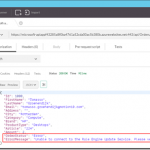
Let’s have a look at the following example where an Order Web API is used inside an organization to process orders. This Web API must also be exposed to external customers to show the status of an order but if an error occurs in the Web API or in a background process, the OrderStatus property must be modified that the order is still in progress and the ErrorMessage property with the error must not be shown to the customers. Furthermore the output of the Web API must be in XML instead of JSON.
The following steps in Sentinet are necessary to make it work:
- Add the REST service (or API) to the the Sentinet Repository
- Create a Virtual Service
- Add custom Pipeline Processing
- Test the Virtual REST Service
Sentinet makes it really easy to modify the response of a Web API. You only have to create a Virtual Service in front of it and add custom Pipeline Processing! Especially if you are already familiar with XPATH and XSLT, the example above doesn’t take long to implement.
Download:
Sentinet version 4.5
by Nick Hauenstein | Jan 10, 2016 | BizTalk Community Blogs via Syndication
I’m finally settling back into the swing of things as we kick off the year 2016! It has been quite a relaxing break, spending Christmas and New Year’s with my family out in the woods of Snohomish, WA. Since getting back to the office, I’ve been catching up on quite the backlog of emails. Among them was an email that called out a file that was uploaded to the Microsoft download site at the end of last month – the long awaited BizTalk Server Roadmap for 2016 or should I say the Microsoft Integration Roadmap (more on that to below).
Continued Commitment to BizTalk Server
The document opens up with a bullet pointed summary of the core takeaways (I for one appreciate that it leads with the TLDR):
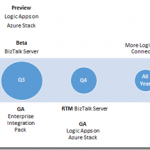
- Continuing commitment to BizTalk Server, with our 10th release of BizTalk Server in Q4 2016.
- Expansion of our iPaaS vision to provide a comprehensive and compelling integration offering spanning both traditional and modern integration requirements. Preview refresh in January 2016 and General Availability (GA) in April 2016.
- Deliver our iPaaS offering on premises through Logic Apps on Azure Stack in preview around Q3 2016 and GA around end of the year.
- Strong roadmap and significant investments to ensure we continue to be recognized as a market leader in integration.
- The next release of Host Integration Server is planned on the same timeline as BizTalk Server below.
That’s right; 2016 is the year where we start to see Microsoft’s integration investments in the cloud start to pay dividends on-premises – with two complementary offerings that each offer their own approach to solving integration challenges while still ensuring that you can build mission critical BizTalk Server integrations on the latest Microsoft platform. Though Microsoft is expanding the integration toolbox beyond just BizTalk Server, the focus is still firm on Integration, and the tools are built on proven platforms with a proven infrastructure.
BizTalk Server 2016 New Features
So what can we expect in BizTalk Server 2016?
- Platform alignment – SQL 2016, Windows Server 2016, Office 2016 and latest release of Visual Studio.
- BizTalk support for SQL 2016 AlwaysOn Availability Groups both on-premises and in Azure IaaS to provide high availability (HA).
- HA production workloads supported in Azure IaaS.
- Tighter integration between BizTalk Server and API connectors to enable BizTalk Server to consume our cloud connectors such as SalesForce.Com and O365 more easily.
- Numerous enhancements including
-
- Improved SFTP adapter,
- Improved WCF NetTcpRelay adapter with SAS support
- WCF-SAP adapter based on NCo (.NET library)
- SHA2 support
- Host Integration Server “2016”
-
- New and improved BizTalk adapters for Informix, MQ & DB2
- Improvements to PowerShell integration, and installation and configuration
I don’t know about you, but I’m fairly excited to see this listing. With the death of SHA1 certificates this year, it’s good to see SHA2 support finally coming into BizTalk Server 2016, if for nothing else, then for SHA2 a BizTalk Server 2016 upgrade is going to be a must.
Also, notice the tighter integration between BizTalk Server and API connectors. That’s fantastic! One thing that Logic Apps do really well is provide friendly connectivity to SaaS endpoints. One thing they don’t do as well is content-based correlation and long -running transactions. One thing that BizTalk Server doesn’t do too well is provide friendly connectivity to SaaS endpoints (there is generic REST connectivity, but you’re going to be wishing that you would have built/bought/downloaded an adapter once you start going down that road). One thing that BizTalk Server does really well is content-based correlation and long-running transactions. Here we’re seeing the best of Azure App Service Logic Apps meeting the best of BizTalk Server. That should make anyone happy.
An Integration Taxonomy
One interesting thing found in the roadmap is a brief discussion of an integration taxonomy that makes a distinction between “Modern Integration” – which is usually SaaS and web-centric, based in the cloud, and within the realm of Web and mobile developers — and “Enterprise Integration” – which includes support for industry standards (e.g., X12, EDIFACT, etc…), targets mission critical workloads, and caters more towards enterprise integration specialists.
In a way, this sets the context for the two core integration offerings of BizTalk Server and Logic Apps – defining the persona that might gravitate towards each. However, Logic Apps will offer an Enterprise Integration Pack for the pro developer that wants the power of BizTalk Server with the elasticity of a PaaS offering.
Where Is This Going?
Well, you might be reading this because you’re passionate about Logic Apps; you might be reading this if you’ve been working with BizTalk Server since the year 2000. Either way, you’re in the business of doing integration. MIcrosoft isn’t interested in building up cliques of developers, but instead catering to all while providing an easy to use location agnostic (cloud/on-prem) rock solid, highly scalable platform for mission critical integration.
The focus is on evolving capabilities, it doesn’t matter what brand name is slapped on the side of it (whether it’s Logic Apps, Power Apps, or BizTalk Server), Microsoft is committed to making the world of enterprise integration a better place!

by Steve | Jan 8, 2016 | BizTalk Community Blogs via Syndication
MQRC 2072 – Transactional issue
Hello,
You may have issues with the IBM MQ Client 7.5 and 8.0 together with BizTalk 2013 / 2013 R2 with Transactional Support set to true. You are getting an MQRC 2072 and you can see a lot of errors / warnings in the Event Log. This is actually a code defect in the 7.5.0.3 / 7.5.0.4 and 8.0.0.2 client.
IBM has worked on fixing this issues : http://www-01.ibm.com/support/docview.wss?rs=171&uid=swg1IT07469
The issue is finally fixed in the following IBM MQ Clients :
Best Regards,

by Steve | Jan 8, 2016 | BizTalk Community Blogs via Syndication
MQRC 2072 – Transactional issue
Hello,
You may have issues with the IBM MQ Client 7.5 and 8.0 together with BizTalk 2013 / 2013 R2 with Transactional Support set to true. You are getting an MQRC 2072 and you can see a lot of errors / warnings in the Event Log. This is actually a code defect in the 7.5.0.3 / 7.5.0.4 and 8.0.0.2 client.
IBM has worked on fixing this issues : http://www-01.ibm.com/support/docview.wss?rs=171&uid=swg1IT07469
The issue is finally fixed in the following IBM MQ Clients :
Best Regards,
by community-syndication | Jan 7, 2016 | BizTalk Community Blogs via Syndication
Recently I was asked by a client: how do I deploy an API App or a Logic App to a Virtual Network (VNet)?
If you’ve ever used BizTalk Services (MABS) then you’ll know one of the biggest limitations with MABS was that it didn’t support VNets: a lot of companies create VNets, and hook them up to their on-premises network, so that their Azure environment becomes a secure extension of their on-premises network.
Blog Post by: Daniel Probert



