by Tord Glad Nordahl | Apr 1, 2016 | BizTalk Community Blogs via Syndication
Apr 16
1
The release we have been waiting for is finnaly starting to turn into a full product. Although a lot of the features we’re waiting for as of know the new release brings out a full set of new features. Just the fact that you know can export multiple messages in one bunch, and import bindings without tracking turned on (global setting).
If you want to learn more of BizTalk 2016 and it’s new features take a look at the following two links:
BizTalk Server 2016 – What’s new: https://msdn.microsoft.com/en-us/library/mt670742
Host Integration Server 2016 – What’s new: https://msdn.microsoft.com/en-us/library/mt670807
Some key takeaways:
- Full platform alignment (SQL 2016, Office 2016, Server 2016, Visual Studio 2015)
- SQL Server Always On support both on-prem and as IaaS in Azure
- Ordered delivery on dynamic send ports (simple flip switch in the admin console)
- SHA 2 support
- SAP Adapter enhancements
- ServiceBus adapter enhancements
- MLLP adapter enhancements
- Import / Export independent from Applications (like parties etc)
- Configure multiple hosts simultaneously
- Filter and search for artifacts
- Save multiple messages at the same time
- Importing new bindings you are given an option to import the tracking settings
Downloads should be available to the public soon, only invited people have access as of now.
This entry was posted on April 1, 2016 at 10:25 am. You can follow any responses to this entry through the RSS 2.0 feed. You can skip to the end and leave a response. Pinging is currently not allowed.
Posted in Biztalk by Tord Glad Nordahl
by Daniel probert | Apr 1, 2016 | BizTalk Community Blogs via Syndication
Update: I’ve just realised the links in this article were wrong when I published it, so have updated them.
I’ve decided to update my 2008 article on Understanding the BizTalk Mapper for BizTalk 2013R2. You can download the article here (in .docx and .pdf formats):
Understanding the BizTalk Mapper v2.0.docx (243.08 KB)
Understanding the BizTalk Mapper v2.0.pdf (1.49 MB)
I originally wrote this article in 2008, and it was aimed at BizTalk 2006 R2. Since then, we’ve had 3 more versions of BizTalk: 2010, 2013, and 2013R2. With BizTalk 2016 entering CTP in the next few days, I thought it was time to revisit this article and update it for the latest (public) version of BizTalk.
At the time I wrote this article, I was of the view that the mapper was always the answer. In fact, the reason I started the article was that I had an argument with a colleague over what technology was better for transforming data in BizTalk: Maps (i.e. XSLT) or C# (serializing/deserializing your XML into a class). I actually set out to prove my colleague wrong by comparing the two – and ended up surprising myself by just how little there was in the comparison.
8 years on, and my views have changed (somewhat): I spent 4 years working on a very large BizTalk system that had huge throughput (200tps) and very low latency (<500ms) requirements, and maps had to go out the window. In fact, we took over the system from a well-known consultancy that had used standard BizTalk practices i.e. maps, pipelines etc. The system did what it was supposed to, but was horribly slow.
But this was not your average run-of-the-mill BizTalk system. The BizTalk Mapper is still a very powerful tool, and with the advent of Azure and Microsoft’s cloud integration platform (Logic Apps et al) the mapper will live on.
Over the last 8 years, people have asked why it’s important to know what each of the functoids emit: The answer is that it’s the best way to understand what each functoid does. If you can’t get your head around the documentation for the Table Looping functoid (for example) then just look at what XSLT the functoid emits: this should help you understand what it does.
What surprised me in doing this update is that there have been zero changes to the mapper functoids since BizTalk 2006R2. The biggest change has been that support for choosing whether to use XslTransform or XslCompiledTransform for your maps – this can have a significant impact on performance (as seen later).
I’m still a firm believer that you shouldn’t be creating complex maps in the Mapper unless you understand how XSLT works, and I hope that this article helps you with that understanding.
by Dan Toomey | Mar 31, 2016 | BizTalk Community Blogs via Syndication
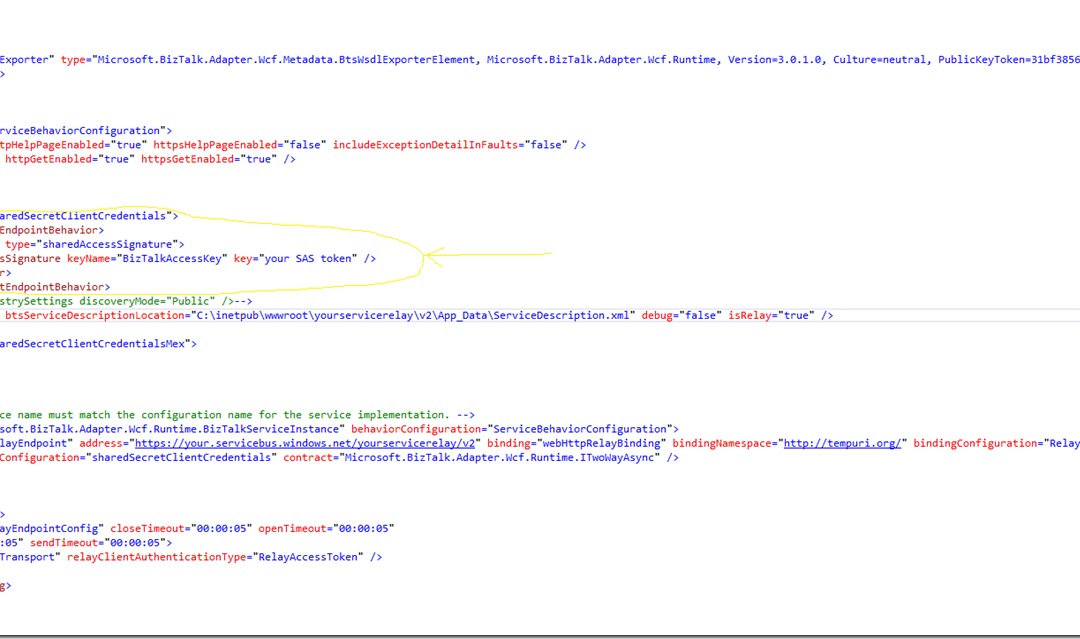
Many people have written about Azure Service Bus Relays in the past and a summary can be found here. Dan Rosanova recently tweeted “….We’re trying to discourage ACS for security. SAS is our preferred model.”. The ACS security pattern is described here and the SAS pattern is described here. This article attempts to summarise BizTalk adapter support for using SAS tokens.
Most BizTalk Server examples use ACS tokens rather than SAS tokens, probably because the BizTalk Adapters only allowed configuration with ACS tokens when service bus relays were first released with BizTalk 2013. BizTalk 2013 R2 has limited support for configuration of SAS tokens and most adapters only allow use of ACS tokens out of the box (OOTB). If you want to use a SAS token you have to be very inventive. I hope that BizTalk vNext will add SAS token support for all WCF adapters.
by community-syndication | Mar 31, 2016 | BizTalk Community Blogs via Syndication
The first new feature for BizTalk Server 2016 CTP1 we’ll showcase here is the ability to now set ordered delivery on Dynamic Send Ports. This has always been a limitation for dynamic sends which we’ve now removed – thanks to everyone who asked us for this feature. As you can see from the screenshot below,…
Blog Post by: BizTalk Team
by Daniel probert | Mar 31, 2016 | BizTalk Community Blogs via Syndication
The 1st CTP (Community Technical Preview) for BizTalk 2016 has been released today.
Whilst you have to sign up to Microsoft Connect to access the CTP, Microsoft have published the release notes for the CTP here: BizTalk 2016 Release Notes
These release notes will be added to as the product gets closer to release.
For more details, including instructions on how to sign up, go here: https://blogs.msdn.microsoft.com/biztalk_server_team_blog/2016/03/30/announcing-biztalk-server-2016-community-technology-preview-1/
by community-syndication | Mar 30, 2016 | BizTalk Community Blogs via Syndication
We are excited to release our first Community Technology Preview (CTP1) for BizTalk Server 2016 today. Businesses are always looking for ways to deliver services faster to market, leading to an era of rapid application growth. Therefore, it is essential that data flows seamlessly between these applications. BizTalk Server 2016 CTP1 enables integration with mission…
Blog Post by: BizTalk Team

by community-syndication | Mar 28, 2016 | BizTalk Community Blogs via Syndication
Many people have written about Azure Service Bus Relays in the past and a summary can be found here. Dan Rosanova recently tweeted “….We’re trying to discourage ACS for security. SAS is our preferred model.”. The ACS security pattern is described here and the SAS pattern is described here. This article attempts to summarise BizTalk […]
Blog Post by: mbrimble

by Abhishek kumar Pathak | Mar 21, 2016 | BizTalk Community Blogs via Syndication
Recently I got a chance to install and configure the ESB Tool Kit and ESB Management portal in multi-server environment.
Below are the steps which I followed to successfully configure and deploy the ESB Management portal.
- Install Enterprise Library 5 from http://www.microsoft.com/en-in/download/details.aspx?id=15104
- Install Chart Control from Microsoft Chart Controls for .Net Framework 4 & Framework 3.5
- Install Microsoft Report Viewer Redistributable 2008 from http://www.microsoft.com/en-in/download/confirmation.aspx?id=6576
- Copy the ESB portal source code from the development server in C:Projects folder and Remove the read-only attribute of this folder.
- Update database server name in the web config file of ESB portal (located in “C:ProjectsMicrosoft.Practices.ESBESBSourceSourceSamplesManagement PortalESB.PortalWeb.Config” )
- Update Database server name in web config of ESB Exception Service (Located in “C:ProjectsMicrosoft.Practices.ESBESBSourceSourceSamplesManagement PortalESB.Exceptions.ServiceESB.Exceptions.ServiceWeb.config”)
- To turn on unrestricted access for Power Shell, execute the following command using the Power Shell 32-bit and 64-bit consoles:
- set-executionpolicy unrestricted
- To verify, run the following command
- get-executionpolicy
- Note: If you face any issue with above script, use “Set-ExecutionPolicy Unrestricted -Scope CurrentUser”
- Go to the C:ProjectsMicrosoft.Practices.ESBESBSourceSourceSamplesManagement PortalInstallScripts location and edit Management_Install.ps1 script.
- Comment the [BuildManagementSolution] function of Power Shell script. (This is required because there is no need to build the solution again).
- Update the [RunDatabaseScript $relativePath”SQLESB.Administration Database.sql” “Database server Name“] command. (This is required because It will try to create the database in local server)
- Step 10 is only required for first server configuration. Later comment this line of script for other server (This is because SQL Server will be same for Both BizTalk instance)
- Open a command prompt using “Run as administrator”.
- Execute the Management_Install.cmd command located in “C:ProjectsMicrosoft.Practices.ESBSourceSamplesManagementPortalInstallScripts”.
- Open the IIS manager, Select the ESB portal and check the authorization. If all fine, Browse the ESB portal directly from here.
- If some error occurred, Change the authorization and app pool setting by checking user access.
Repeat the same step to other server.
Note: Multi-Server Environment – (Two BizTalk Server and one SQL server)
Please let me know If any suggestion on this or Feel free to add some point.

by Abhishek kumar Pathak | Mar 21, 2016 | BizTalk Community Blogs via Syndication
Recently I got a chance to install and configure the ESB Tool Kit and ESB Management portal in multi-server environment.
Below are the steps which I followed to successfully configure and deploy the ESB Management portal.
- Install Enterprise Library 5 from http://www.microsoft.com/en-in/download/details.aspx?id=15104
- Install Chart Control from Microsoft Chart Controls for .Net Framework 4 & Framework 3.5
- Install Microsoft Report Viewer Redistributable 2008 from http://www.microsoft.com/en-in/download/confirmation.aspx?id=6576
- Copy the ESB portal source code from the development server in C:Projects folder and Remove the read-only attribute of this folder.
- Update database server name in the web config file of ESB portal (located in “C:ProjectsMicrosoft.Practices.ESBESBSourceSourceSamplesManagement PortalESB.PortalWeb.Config” )
- Update Database server name in web config of ESB Exception Service (Located in “C:ProjectsMicrosoft.Practices.ESBESBSourceSourceSamplesManagement PortalESB.Exceptions.ServiceESB.Exceptions.ServiceWeb.config”)
- To turn on unrestricted access for Power Shell, execute the following command using the Power Shell 32-bit and 64-bit consoles:
- set-executionpolicy unrestricted
- To verify, run the following command
- get-executionpolicy
- Note: If you face any issue with above script, use “Set-ExecutionPolicy Unrestricted -Scope CurrentUser”
- Go to the C:ProjectsMicrosoft.Practices.ESBESBSourceSourceSamplesManagement PortalInstallScripts location and edit Management_Install.ps1 script.
- Comment the [BuildManagementSolution] function of Power Shell script. (This is required because there is no need to build the solution again).
- Update the [RunDatabaseScript $relativePath”SQLESB.Administration Database.sql” “Database server Name“] command. (This is required because It will try to create the database in local server)
- Step 10 is only required for first server configuration. Later comment this line of script for other server (This is because SQL Server will be same for Both BizTalk instance)
- Open a command prompt using “Run as administrator”.
- Execute the Management_Install.cmd command located in “C:ProjectsMicrosoft.Practices.ESBSourceSamplesManagementPortalInstallScripts”.
- Open the IIS manager, Select the ESB portal and check the authorization. If all fine, Browse the ESB portal directly from here.
- If some error occurred, Change the authorization and app pool setting by checking user access.
Repeat the same step to other server.
Note: Multi-Server Environment – (Two BizTalk Server and one SQL server)
Please let me know If any suggestion on this or Feel free to add some point.

by stephen-w-thomas | Mar 20, 2016 | BizTalk Community Blogs via Syndication
BizTalk360 has recently released more details on their annual conference in London. This year there is a name change. Instead of the BizTalk Summit, the name gets altered to align with the “Integrate” brand. In case you were not aware, BizTalk360 organized the last Integrate Summit in Redmond back in December 2014 so it makes sense to carry that name forward. BizTalk360 has been working closely with the Microsoft product groups to put on a great event.
This year the summit looks to be better and bigger than ever. There are more than 20 speakers lined up over 3 days . The speakers have a variety of backgrounds including Microsoft Product Group, Consultants, Customers, System Integrators and MVPs. There is also an opportunity to hear from the Microsoft’s leadership team and get insight into their plans as it pertains to Azure App Service and Integration.
The session abstracts look great! The topics cover a broad set of technologies that will appeal to integration focused professionals. The topics include:
- BizTalk Server 2016
- Azure Logic Apps
- Azure App Service
- Azure Service Bus (Event Hubs and Messaging)
- Internet of Things (IoT)
- Azure API Management
- Azure Stream Analytics
- Power Bi
My topic will focus on some the recent learnings from an Industrial IoT project. I will talk about tag data ingestion, complex event processing (calculations, reference data, out of bounds, absence of event) and visualization. I will also throw in a little BizTalk and Logic apps for good measure.
This will be my third time speaking in London at a BizTalk360 event. I am once again looking forward to the experience as BizTalk360 always puts on a good show and it is a great opportunity to network with the excellent European Integration community.
For more details, please check out the event page. There are early bird specials so pay close attention to the dates.
See you in London!
http://www.biztalk360.com/integrate-2016/
