by Priyadharshini | Jun 1, 2020 | BizTalk Community Blogs via Syndication
Introduction
This blog is an extraction of the session “BizTalk Server 2020 – Migration Path” presented by Sandro Pereira at Integrate 2020.
Back in January 2020, Microsoft announced the availability of BizTalk Server 2020 for public release with lots of exciting features and enhancements. It’s the time to migrate to the new version to enjoy the features. Sandro, Microsoft Azure MVP talks about the upgrade process, key information, and step-by-step instructions for upgrading from any of the previous BizTalk Server version. It also covers the reasons to upgrade to BizTalk Server 2020.
Why should you upgrade your BizTalk Platform?
People in the Integration space would always remember the BizTalk stickers that they receive from Sandro and here it is for BizTalk 2020.
Here are a few reasons:
- Lots of support
- If you are in an older version of BizTalk, then it’s time for you to migrate for continuous support especially the Enterprise clients.
- Environmental constraints
- BizTalk Server heavily depends on performance of the Windows server and SQL server. It’s time to upgrade for better performance
- New features
- Every release of BizTalk comes with a bunch of exciting features for Hybrid Integration
- Support for TLS 1.2
- Support for XSLT 3.0 which is a feature asked for many years
- More privacy and security for GDPR
- Feature packs
- New features can be added through the feature packs, so you need not wait for 3 to 4 years for the new features
- Move to cloud
- Ability to run on Azure VM as IaaS
- Administrator and Developer productivity enhancements
- New Visual Studio console features
What are the migration options?
- Migrate to Azure
- Migrate to BizTalk Server 2020
Migrate to Azure
- Hosted Azure Servers
- This is the easy option as most of them run BizTalk on the Azure VMs. There are options of high availability and, they can be hosted in various regions.
- Migrating to Azure Services
This is completely moving out of BizTalk. All the BizTalk related artefacts will be migrated to the Azure services. It is a complete redesign of the Integration solution. For example, there will be no MessageBox and Service Bus needs to be used to persist the messages. It is a difficult option even with the new BizTalk Migration Tool.
BizTalk Server has a rapid release cadence of major version every 2/3 years with radical changes. Azure is completely different. BizTalk server with the long release history is very stable. On the other hand, there is release for Azure every week and the features get deprecated. There is no one to one mapping in Azure. The process on arrival needs to be improved in Azure. There are some interesting options still missing in Azure like Business Rules.
BizTalk 2020 Migration

In- Place Upgrade
Here is the list of the supported and unsupported migration options:
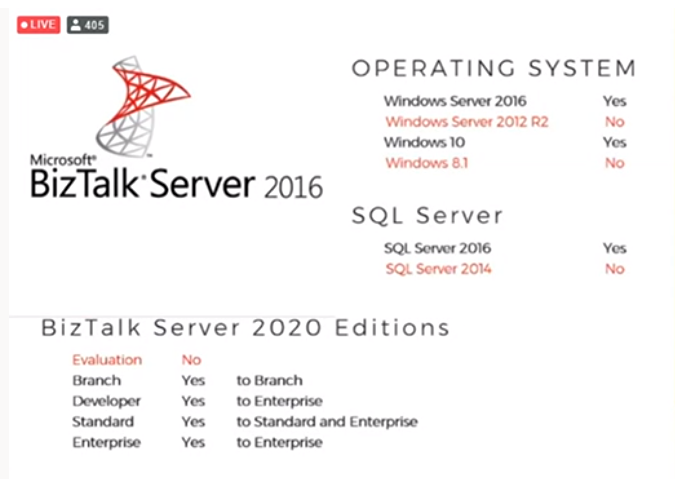
There are few constraints like the SQL Adapter that has been deprecated, TIBCO Enterprise Message Adapter has been removed and the RosettaNet has issues in BizTalk 202 for which the hotfix needs to be installed for smooth functioning.
Migrate to the brand-new environment
The AS-IS migration
This is without any non-mandatory changes. The .Net framework needs to be changed, the deployment properties need to fix and the solution to be rebuilt.
Migrate and Improve
This needs to be done on the analysis of the business requirements and what needs to be improved on the solution side. This requires more prolonged version of testing as lot of improvements would be added and for the integration between different teams.
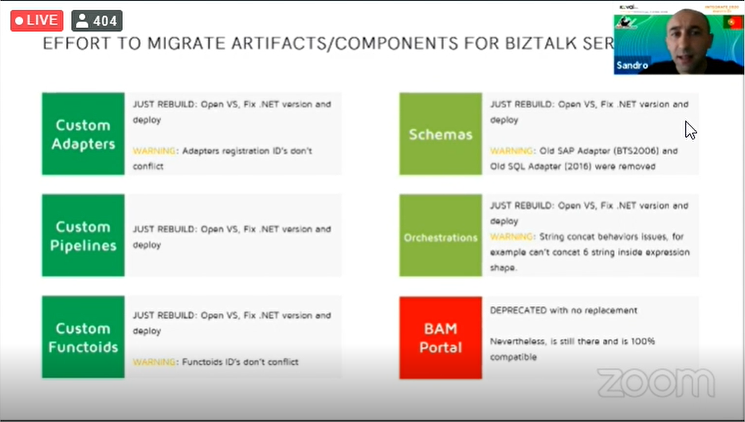
With his experience of more than 16 years working in BizTalk, Sandro shares the statistics on the effort of different migration options.
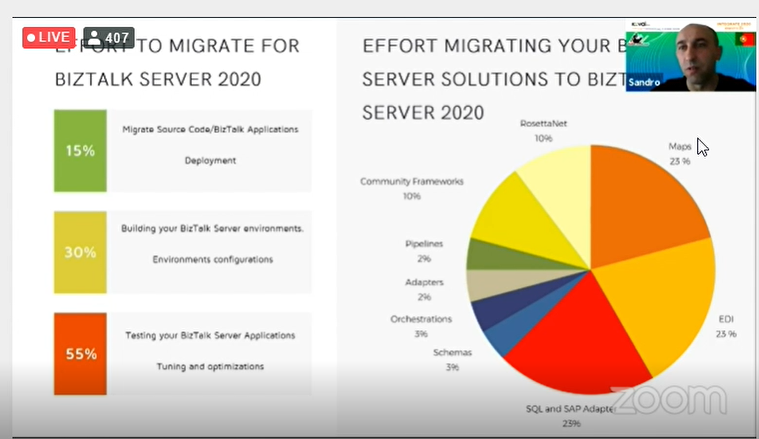
There are some pain points while migrating the BizTalk Server artifacts/components.
- Mappings will be critical
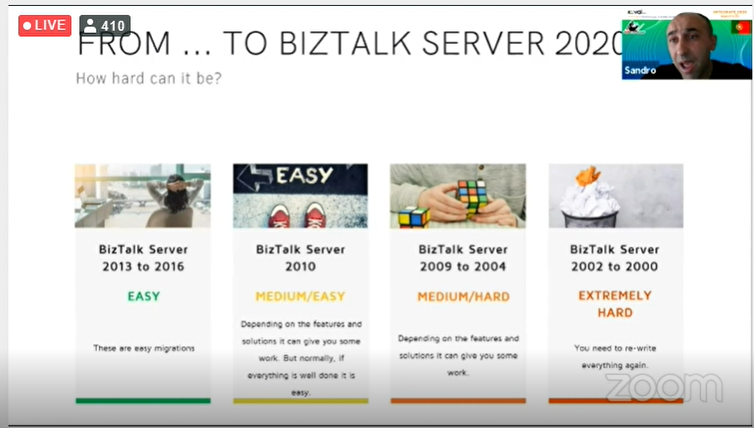
- Older versions are difficult to migrate
- SAP adapter is removed. So, all generated schemas need to be recreated
- EDI might have problems. Because of TPM, parties cannot be directly migrated. You will need to use the BizTalk Server Party Migration Tool
- BTDF is not available
- RFID and Human workflows are removed
- BRE is a simple export/import
How easy is the migration from the older versions
Wrap Up
Hope the insights on the BizTalk Server 2020 gives a clear picture on the migration path. Sandro and Tom Canter are working on the book on the BizTalk2020 Migration which would be available soon.
Happy migrating!
The post BizTalk Server – 2020 Migration Path appeared first on BizTalk360.

by Sandro Pereira | Jun 1, 2020 | BizTalk Community Blogs via Syndication
INTEGRATE (formerly known as BizTalk Summit) is the primary conference for professionals working in the Microsoft Integration space and once again is back this time REMOTE due to the COVID-19 issue around the word. It will be the first-ever INTEGRATE REMOTE conference that will happen from June 1 to 3, 28 speakers – 12 MVPs, 15 Microsoft PM and 1 former MVP – will address the entire Microsoft Integration Platform landscape on topics like BizTalk Server, Logic Apps, Service Bus, Event Grid, Event Hubs, Power Automate, API Management, Azure Functions and many more.
And once again I will be there delivering a session – since the first BizTalk Summit event, I’m a constant presence as a speaker at these events – about BizTalk Server! This time on a session about: Migration Path to BizTalk Server 2020.
About my session
Session Name: BizTalk Server 2020: Migration Path
The goal of this session to demystify and clarify the BizTalk Server migration process and help both implementation teams as decision-makers to be aware of all the considerations that need to be taken into account when planning your migration to BizTalk Server 2020 and hopefully helping you carry out these tasks.
INTEGRATE 2020 Remote Registration
You are still on time to register for the conference here. Use my coupon discount INT2020-SPEAKER-SANDRO to get 15% discount!
The post Join me at INTEGRATE 2020 Remote | JUNE 1-3, 2020 | BizTalk Server 2020: Migration Path appeared first on SANDRO PEREIRA BIZTALK BLOG.
by Gautam | May 25, 2020 | BizTalk Community Blogs via Syndication
Do you feel difficult to keep up to date on all the frequent updates and announcements in the Microsoft Integration platform and Azure iPaaS?
Integration weekly update can be your solution. It’s a weekly update on the topics related to Integration – enterprise integration, robust & scalable messaging capabilities and Citizen Integration capabilities empowered by Microsoft platform to deliver value to the business.
Microsoft Announcements and Updates
Community Blog Posts
Videos
Podcasts
How to get started with iPaaS design & development in Azure?
- Robust Cloud Integration with Azure
- Microsoft Azure for Developers: What to Use When
- Serverless Computing: The Big Picture
- Azure Logic Apps: Getting Started
- Azure Logic Apps: Fundamentals
- Microsoft Azure Developer: Creating Enterprise Logic Apps
- Microsoft Azure API Management Essentials
- Azure Functions Fundamentals
- Cloud Design Patterns for Azure: Availability and Resilience
- Architecting for High Availability in Microsoft Azure
Feedback
Hope this would be helpful. Please feel free to reach out to me with your feedback and questions.
by stephen-w-thomas | May 22, 2020 | BizTalk Community Blogs via Syndication
Author Credits: Martin Peters, Senior Consultant at Codit
During deployments of BizTalk application, it is common practice to put BizTalk360 in maintenance mode before the deployment and switch to normal mode again after the deployment.
This avoids alerts being sent to various people due to stopping and starting of BizTalk during the deployment. If you are using Azure DevOps to deploy BizTalk applications automatically, you do not want to have a manual process to put BizTalk360 in and out of maintenance mode.
The good news is that BizTalk360 provides a set of APIs which allow you to automate this.
An article from Senthil Palanisamy named BizTalk Application Deployment Using Azure Pipeline with BizTalk360 API’s inspired me to implement this for a customer. In Senthil’s blog, Powershell scripts are used to access the BizTalk360 APIs and turn the maintenance mode off and on. But, as more and more customers are using Azure DevOps and BizTalk360, you need a copy of the PowerShell scripts. The PowerShell scripts might change over time (changes, bug fixing), so the next step is to put the PowerShell scripts under version control and create a DevOps extension.
The DevOps extension is maintained on GitHub, and compatible changes are automatically distributed to all organizations using this extension.
Single Server Scenario
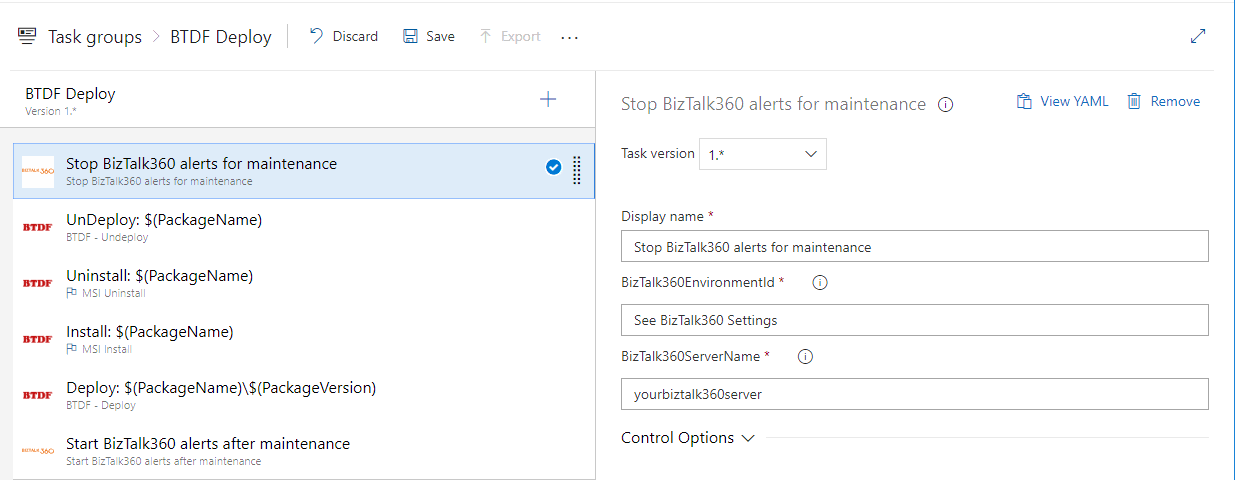
When your Test, Acceptance, and Production environment consist of a single server, you can create a task group and use this in the release pipeline. Note that in this example, the task group uses the BTDF extension, which is useful if you are using the BizTalk Deployment Framework for deployments.
The BizTalk360 tasks require the hostname of the server where BizTalk360 is installed and the Environment ID. You can find the Environment ID in http://<yourbiztalk360server>/BizTalk360/Settings#api.
Note: You must have a license to use the BizTalk360 API.
If you do not have a license, please contact your BizTalk360 representative. The BizTalk360 API offers an extensive API that allows you to automate other tasks as well.
Multi-Server Scenario
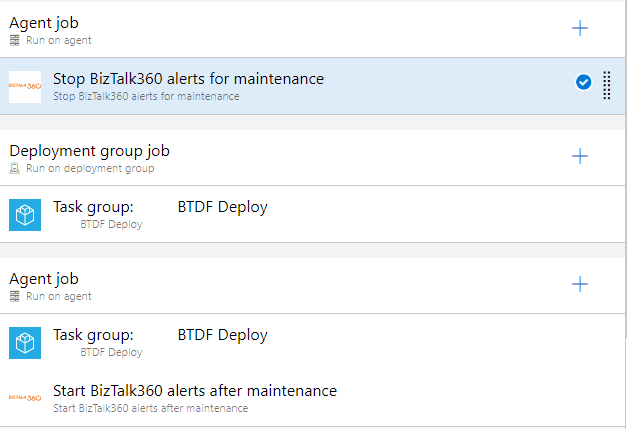
In a multi-server scenario, you want to put BizTalk360 in maintenance mode before deployment to the first server and out of maintenance mode after deployment to the last server. This case, your release pipeline might look like;
You can find the DevOps extension on the VisualStudio Marketplace.
The source code is available on GitHub. Please feel free to make any improvements, enhancements, etc.
The post BizTalk360 Maintenance Mode with BizTalk Deployments via Azure DevOps appeared first on BizTalk360.

by shadabanwer | May 21, 2020 | BizTalk Community Blogs via Syndication
In this post I will talk about how we can access function app from APIM using url & function key. There was a requirement were we don’t want to add function app as an Azure Resource into the APIM, instead access via URL and function key, storing and retrieving the key from Key Vault.
So what I did.
Created a Resource Deploy project to create and store function key in Key Vault.
azuredeploy.parameters.json
{
"$schema": "https://schema.management.azure.com/schemas/2015-01-01/deploymentParameters.json#",
"contentVersion": "1.0.0.0",
"parameters": {
"keyVaultName": {
"value": "#{KeyVaultName}"
},
"functionAppName": {
"value": "fapp-#{EnvironmentPrefix}-product-reference"
},
"functionAppResourceGroup": {
"value": "#{AzureDeploymentResourceGroup}"
}
}
}
azuredeploy.json
{
  "$schema": "https://schema.management.azure.com/schemas/2015-01-01/deploymentTemplate.json#",
  "contentVersion": "1.0.0.0",
  "parameters": {
    "keyVaultName": {
      "type": "string"
    },
    "functionAppName": {
      "type": "string"
    },
    "functionAppResourceGroup": {
      "type": "string"
    }
  },
  "variables": {
    "functionAppId": "[concat('/subscriptions/', subscription().subscriptionId, '/resourceGroups/', parameters('functionAppResourceGroup'), '/providers/Microsoft.Web/sites/', parameters('functionAppName'))]",
    "KeyName": "[concat(parameters('functionAppName'),'-functionkey')]"
  },
  "resources": [
    {
      "type": "Microsoft.KeyVault/vaults/secrets",
      "name": "[concat(parameters('keyVaultName'),'/', variables('KeyName'))]",
      "apiVersion": "2015-06-01",
      "properties": {
        "contentType": "text/plain",
        "value": "[listkeys(concat(variables('functionAppId'), '/host/default/'),'2016-08-01').functionKeys.default]"
      },
      "dependsOn": []
    }

  ],
  "outputs": {
    "functionAppId": {
      "type": "string",
      "value": "[variables('functionAppId')]"
    }
  }
}
Now created Resource deploy Project for APIM .
azuredeploy.parameters.json
"FunctionKey": {
  "reference": {
    "keyVault": {
      "id": "#{AzureKeyVaultID}"
    },
    "secretName": "fapp-#{EnvironmentPrefix}-product-paymentreference-functionkey"
  }
},
"FunctionKeyDR": {
  "reference": {
    "keyVault": {
      "id": "#{AzureKeyVaultID}"
    },
    "secretName": "fapp-#{SecondaryEnvironmentPrefixFapp}-product-paymentreference-functionkey"
  }
Below is what we need to add as a back-end service in the azuredeploy.json
 {
      "type": "Microsoft.ApiManagement/service/backends",
      "apiVersion": "2019-01-01",
      "name": "[concat(parameters('ApimServiceName'), '/', variables('nVKeyPrimaryHostnameCreate'))]",
      "dependsOn": [
        "[resourceId('Microsoft.ApiManagement/service/apis', parameters('ApimServiceName'), parameters('apiname'))]"
      ],
      "properties": {
        "url": "[variables('nVValuePrimaryHostnameCreate')]",
        "protocol": "http",
        "resourceId": "[concat('https://management.azure.com/subscriptions/', subscription().subscriptionId, '/resourceGroups/', resourceGroup().name, '/providers/Microsoft.Web/sites/', parameters('backendid'))]",
        "credentials": {
          "header": {
            "x-functions-key": [
              "[parameters('FunctionKey')]"
            ]
          }
        }
      }
    },
{
      "type": "Microsoft.ApiManagement/service/backends",
      "apiVersion": "2019-01-01",
      "name": "[concat(parameters('ApimServiceName'), '/', variables('nVKeySecondaryHostnameValidatePRN'))]",
      "dependsOn": [
        "[resourceId('Microsoft.ApiManagement/service/apis', parameters('ApimServiceName'), parameters('apiname'))]"
      ],
      "properties": {
        "url": "[variables('nVValueSecondaryHostnameCreate')]",
        "protocol": "http",
        "resourceId": "[concat('https://management.azure.com/subscriptions/', subscription().subscriptionId, '/resourceGroups/', resourceGroup().name, '/providers/Microsoft.Web/sites/', parameters('backendid'))]",
        "credentials": {
          "header": {
            "x-functions-key": [
              "[parameters('FunctionKeyDR')]"
            ]
          }
        }
      }
    },

by stephen-w-thomas | May 20, 2020 | BizTalk Community Blogs via Syndication

As the title of this session suggests, you will learn about the benefits of event-based integration and how it can help modernize your applications to be reactive, scalable, and extensible. The star of the show here is Event Grid, a lynchpin capability offered as part of Azure Integration Services.
Event Grid offers a single point for managing events sourced from within and without Azure, intelligently routing them to any number of interested subscribers. It not only supports 1st class integration with a large number of built-in Azure services but also supports custom event sources and routing to any accessible webhook. On top of that, it boasts low-latency, massive scalability, and exceptional resiliency. It even supports the Cloud Events specification for describing events, as well as your own custom schemas.
My talk will feature a demo showing how Event Grid easily enables real-time monitoring of Azure resources – but this is only one of many possible scenarios that are supported.
Why I should attend INTEGRATE 2020 Remote?
With INTEGRATE 2020 Remote, we are consolidating all Microsoft Integration focused content in a single place covering on-premise (BizTalk Server), cloud (Azure Logic Apps, Functions, API Management, Service Bus, Event Grid, Event Hub, Power Platform), and Hybrid in an intense 3 days conference, with its own keynote.
If you are a Microsoft Integration professional, even if you attend part of the conference here and there, you’ll still see significant value educating and preparing yourself for the future. Please go ahead and register now.
The post Integrate 2020 Remote Session Spoiler – Building Event-Driven Integration Architectures appeared first on BizTalk360.
by Dan Toomey | May 19, 2020 | BizTalk Community Blogs via Syndication
I feel very privileged to be a speaker at INTEGRATE for the 4th year in a row. Many thanks to Saravana Kumar and Kovai for the privilege & opportunity! Of course, thanks to COVID-19 this year will be a bit different… no jet lag, no expensive bar tabs, and (sadly) no catching up with my good friends & colleagues from around the world (at least not in person anyway). But on the plus side, an online event does have the potential to reach a limitless number of integration enthusiasts. And if you think that you might be one of them, here’s a discount code for you to use!
So what will my talk be about? Well as the title suggests, you will learn about the benefits of event-based integration and how it can help modernise your applications to be reactive, scalable, and extensible. The star of the show here is Event Grid, a lynchpin capability offered as part of Azure Integration Services.
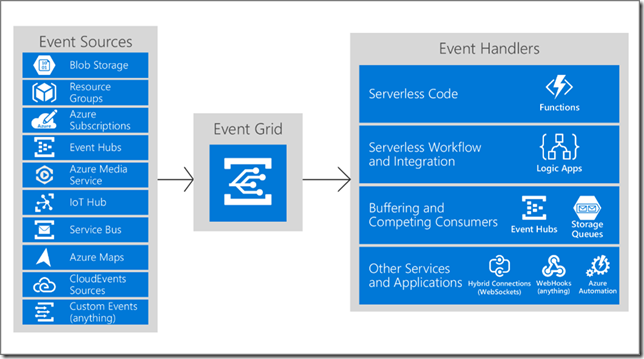
Event Grid offers a single point for managing events sourced from within and without Azure, intelligently routing them to any number of interested subscribers. It not only supports 1st class integration with a large number of built-in Azure services, but also supports custom event sources and routing to any accessible webhook. On top of that, it boasts low-latency, massive scalability, and exceptional resiliency. It even supports the Cloud Events specification for describing events, as well as your own custom schemas.
My talk will feature a demo showing how Event Grid easily enables real-time monitoring of Azure resources – but this is only one of many possible scenarios that are supported. Register for Integrate 2020 Remote so you can not only attend this session but also 40 other topics presented by 30+ integration experts from around the world! Use the discount code INT2020-SPEAKER-DAN to get 15% off any ticket price.

by Lex Hegt | May 19, 2020 | BizTalk Community Blogs via Syndication
Continuing our series of webinars around BizTalk360, Atomic Scope, and BizTalk Server, this time we will explain how you can use BizTalk360 to monitor your BizTalk environment effortlessly!
One of the main goals of using BizTalk360 is probably that you want to have peace of mind that your BizTalk environment is healthy, while you are doing smarter things than constantly checking the BizTalk Server Administration console and all kind of other relevant consoles. In this webinar, we will show you several different ways how you can achieve that peace of mind. Among other things, the following topics are discussed.
Organize your Alarms
BizTalk360 gives you a lot of freedom around alarm creation, but this might leave you uncertain around how to approach setting up monitoring. That is why, besides explaining the basics around the different monitoring types and setting up monitoring in BizTalk360, in this webinar, we will be explaining different approaches to organize your alarms.
Inform your Business Users
In general, we see that BizTalk360 notifications are mainly being transmitted to the BizTalk administrators. However, not just BizTalk administrators, and other IT roles, are involved in operating the BizTalk environment. Also, your business users play a role in it.
BizTalk360 has multiple capabilities to support your business users in such a way that they can help themselves. This way they do not need to create support tickets or pick up the phone, they can check their relevant information themselves via BizTalk360!
Return of Investment in BizTalk and BizTalk360
Your organization has heavily invested in a BizTalk platform and have developed all kind of interfaces which are deployed in that platform. By making the best of your investment in BizTalk360, you do not only get ROI in BizTalk360 but also in BizTalk Server. Using a couple of examples, we show you how that happens.
Note: As you know, in early June we will run our annual Integrate event, which will take place remotely this year. In case, you did not register to join us in this event, join this webinar, as we will have something interesting for you!
External Guest
As we have done a couple of times meanwhile, also for this webinar we have an external guest. During this webinar, we are joined by Frédéric Gobert, who is an Integration analyst at ArcelorMittal, which is the biggest producer of steel in the world. Among other things, Frédéric will explain how BizTalk360 is used beside SCOM and Dynatrace and how BizTalk360 has been a lifesaver in multiple scenarios!
BizTalk360 v9.1 has been Released!
Following our pattern of bringing a new release every 3 to 4 months, we have just released v9.1. During the webinar, we will show you what’s new in that release. Are you already interested in knowing more about this release? You can check the Release Notes here.
Conclusion
In summary, do you identify yourself in one or more of the following situations?
- you want to be aware of any issues earlier than your IT colleagues or business users
- you want to be able to monitor pro-actively
- you want to do smarter things than constantly perform manual checks
- you want to take more benefit in your investment in BizTalk Server (and BizTalk360)
- you want higher availability of your interfaces
Then, this webinar is for you! It will take place on May 28th, 10 AM (BST). Just click here to register and leave your details. Shortly we will send you the confirmation mail.
Also, if you think you cannot attend the webinar at the specified time, no worries! Go ahead and register, our team will make sure to send you the webinar recording.
We are looking forward to meeting you there!
The post Webinar Spoiler: Monitor your BizTalk environment effortlessly with BizTalk360 appeared first on BizTalk360.
by Gautam | May 18, 2020 | BizTalk Community Blogs via Syndication
Do you feel difficult to keep up to date on all the frequent updates and announcements in the Microsoft Integration platform and Azure iPaaS?
Integration weekly update can be your solution. It’s a weekly update on the topics related to Integration – enterprise integration, robust & scalable messaging capabilities and Citizen Integration capabilities empowered by Microsoft platform to deliver value to the business.
Microsoft Announcements and Updates
Community Blog Posts
Videos
Podcasts
How to get started with iPaaS design & development in Azure?
- Robust Cloud Integration with Azure
- Microsoft Azure for Developers: What to Use When
- Serverless Computing: The Big Picture
- Azure Logic Apps: Getting Started
- Azure Logic Apps: Fundamentals
- Microsoft Azure Developer: Creating Enterprise Logic Apps
- Microsoft Azure API Management Essentials
- Azure Functions Fundamentals
- Cloud Design Patterns for Azure: Availability and Resilience
- Architecting for High Availability in Microsoft Azure
Feedback
Hope this would be helpful. Please feel free to reach out to me with your feedback and questions.
by Sandro Pereira | May 18, 2020 | BizTalk Community Blogs via Syndication
After several days migrating BizTalk open-source contributions like BizTalk Mapper Extensions UtilityPack, BizTalk Pipeline Components Extensions Utility Pack, BizTalk MapperExtensions Functoid Project Template, BizTalk MapperExtensions Functoid Wizard and several tools like BizTalk Filter Finder Tool, BizTalk Bindings Exporter Tool, or BizTalk Port Multiplier Tool for BizTalk Server 2020. It is time to get back to one of my favorite topics error and warnings, cause, and solutions blog post. This time on a small development issue that I got recently while I was trying to Consume Adapter Service to generate the Oracle schemas inside Visual Studio.
I have done these thousands of times and it is a very straightforward task once you know how to communicate with Oracle system but this time I got the following error:
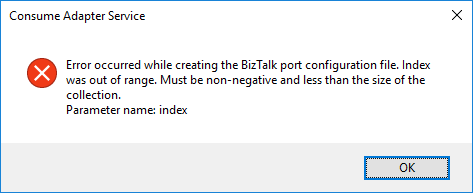
Error occurred while creating the BizTalk port configuration file. Index was out of range. Must be non-negative and less than the size of the collection.
Parameter name: index
A curiosity is that the Wizard was able to successfully generate the Oracle Schemas. The problem occurred while it was trying to generate the Binding file.
Cause
Unfortunately, I don’t know exactly the cause reason for this error. In my view, the same occurred due to some special character coming from the Oracle resources that are being consumed or incompatibilities between Oracle data types and .NET data types and that are used to generate the Binding file.
Nevertheless, this is not a stopping issue. You still have all the necessary BizTalk resources generated by the wizard: the Oracle schemas. The only thing that is not generated is the binding file, which is extremely useful to create the receive or send port in the BizTalk Server Administration Console. However, despite this constraint, you are still able to manually create the port without requiring the binding file.
Solution
Well, you know me, it is possible to manually create the ports without requiring the binding files, however, this is an accelerator that I prefer not to lose. So, I had to investigate and solve this problem, before it appears more often.
And in fact, the solution is quite easy:
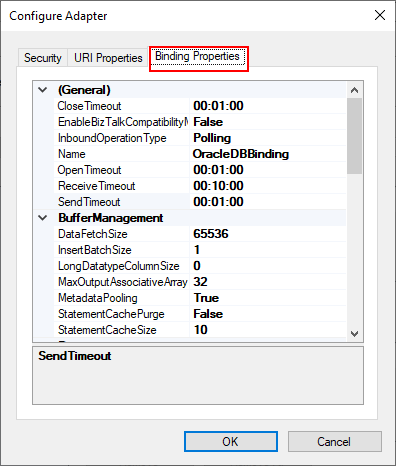
- On the Consume Adapter Service Schema Generator Wizard, while you are configuring the connection string to Oracle, configure the URI, select the Binding Properties tab.
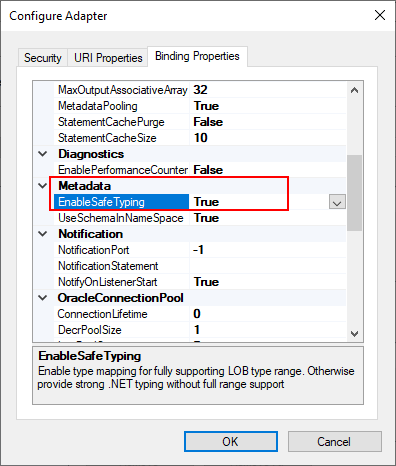
- On the Binding Properties tab, scroll down to the Metadata section. There you will find a property called: EnableSafeTyping.
- This feature controls how the adapter surfaces certain Oracle data types and by default this value is false.
- To solve this issue you need to change the EnableSafeTyping value to true.
Since not all .NET and Oracle types are created equally, we occasionally need to set the value true for this property to handle some constraints around data types.
This is not a unique Oracle issue, this same error may happen when you are trying to generate schemas from SAP also.
The post Visual Studio BizTalk Schema Generator Wizard error: Error occurred while creating the BizTalk port configuration file appeared first on SANDRO PEREIRA BIZTALK BLOG.