by Gautam | May 13, 2019 | BizTalk Community Blogs via Syndication
Do you feel difficult to keep up to date on all the frequent updates and announcements in the Microsoft Integration platform and Azure iPaaS?
Integration weekly update can be your solution. It’s a weekly update on the topics related to Integration – enterprise integration, robust & scalable messaging capabilities and Citizen Integration capabilities empowered by Microsoft platform to deliver value to the business.
If you want to receive these updates weekly, then don’t forget to Subscribe!
Microsoft Announcements and Updates
Community Blog Posts
Videos
Podcasts
How get started with iPaaS design & development in Azure?
- Robust Cloud Integration with Azure
- Microsoft Azure for Developers: What to Use When
- Serverless Computing: The Big Picture
- Azure Logic Apps: Getting Started
- Azure Logic Apps: Fundamentals
- Microsoft Azure Developer: Creating Enterprise Logic Apps
- Microsoft Azure API Management Essentials
- Azure Functions Fundamentals
- Cloud Design Patterns for Azure: Availability and Resilience
- Architecting for High Availability in Microsoft Azure
Feedback
Hope this would be helpful. Please feel free to reach out to me with your feedback and questions.
by Sandro Pereira | May 10, 2019 | BizTalk Community Blogs via Syndication
I’m back to writing! With so many talks in recent times and those who still come, and with it all the time necessary to prepare them; with so much work and new projects ongoing (thankfully); with 3 kids at home and recently married… it has been difficult to arrange a free time to concentrate on the writing. But I’m back, and for starting with a smooth topic that I like: “Errors and Warnings, Causes and Solutions” on a problem that actually I faced today while trying to connect with SQL Server Integration Services (SSIS): “The specified service does not exist as an installed service.”
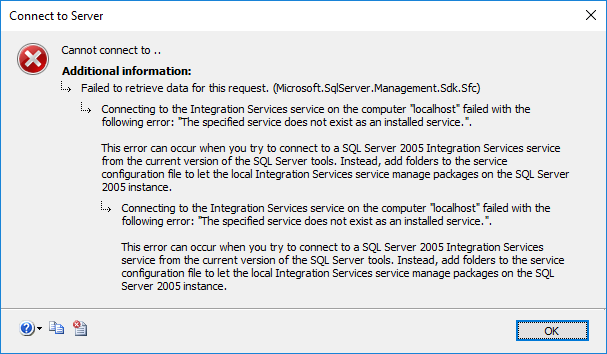
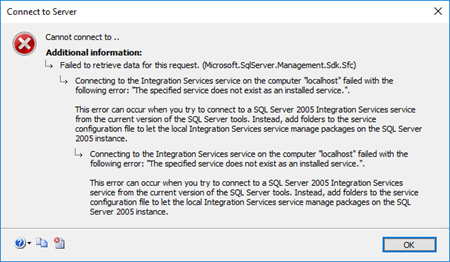
Today, while I was trying to access SSIS from SQL Server 2016 Server, that host and support BizTalk Server 2016 I got the following and bizarre error:
TITLE: Connect to Server
——————————
Cannot connect to ..
——————————
ADDITIONAL INFORMATION:
Failed to retrieve data for this request. (Microsoft.SqlServer.Management.Sdk.Sfc)
For help, click: http://go.microsoft.com/fwlink?ProdName=Microsoft%20SQL%20Server&LinkId=20476
——————————
Connecting to the Integration Services service on the computer “localhost” failed with the following error: “The specified service does not exist as an installed service.”.
This error can occur when you try to connect to a SQL Server 2005 Integration Services service from the current version of the SQL Server tools. Instead, add folders to the service configuration file to let the local Integration Services service manage packages on the SQL Server 2005 instance.
Cause
This was bizarre because again I was trying to access to SSIS directly from SQL Server machine and I was sure that I had Integration Services installed and running on the server as I was able to confirm access to the services (services.msc).

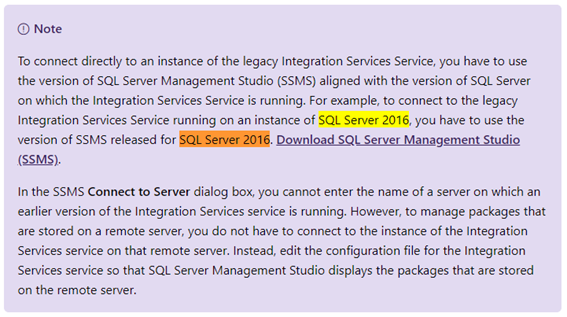
I’m not a SQL Server specialist, but after careful research into the SSIS documentation it says:
“To connect directly to an instance of the legacy Integration Services Service, you have to use the version of SQL Server Management Studio (SSMS) aligned with the version of SQL Server on which the Integration Services Service is running. For example, to connect to the legacy Integration Services Service running on an instance of SQL Server 2016, you have to use the version of SSMS released for SQL Server 2016.”
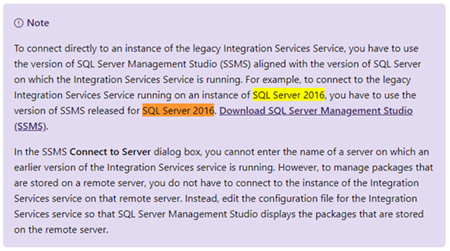
That triggered some red lights on my head because:
- I knew that this was a recent installation and we were using a current version of SQL Server Management Studio (v17.9.1);
- and I also knew that for example during the BizTalk Server configuration we may face some issues configuring some features if we are using a recent version of SSMS, you should use a compatible and recommended version: SSMS 16.5.3.
Solution
So, to solve this issue, you should:
In my case, I was able to connect to SSIS without any problem from SSMS installed in BizTalk Server 2018 machine because I always installed from day one SSMS 16.5.3 on BizTalk Servers machines.
The post BizTalk Server 2016 and Install SQL Server Integration Services (SSIS) 2016: The specified service does not exist as an installed service appeared first on SANDRO PEREIRA BIZTALK BLOG.
by Senthil Kumar Palanisamy | May 8, 2019 | BizTalk Community Blogs via Syndication
Introduction
BizTalk360 has powerful monitoring features to manage the BizTalk Application Artifacts, Queues, Infrastructure, Health check tools, etc. Most of the customers are using BizTalk360 for its core monitoring capabilities. BizTalk360 is the single tool to manage operational activities, monitoring and analytics of the mission-critical BizTalk environment. In this transforming phase, it is a tedious process for a dedicated person to monitor all the configurations. To address this scenario, System Alert notification is implemented in BizTalk360 v9.0.
Why System Alerts?
Currently BizTalk360 use Alarms to send out the notifications of Application artifacts, queues, Infrastructure settings health of the BizTalk environment. In the same perspective there is need to know the health of BizTalk360, which will helpful to the administrator who takes care BizTalk360. The BizTalk360 Monitoring service will take care of sending system notifications to the configured admin user email boxes. These email boxes can be configured in the system settings. A new monitoring sub service called ‘System Alert’ has been introduced to send system related notifications. System Alerts can be enabled in the System Alert Settings under Monitoring and Notification tab of system settings. A user can configure multiple admin emails with semicolon separated values.
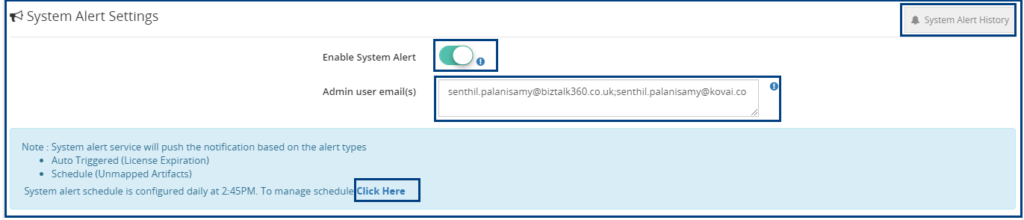
A System Alert notification can be pushed to the admin users in the two ways:
- Scheduled
- Automatically Triggered
The BizTalk360 Monitoring service has a polling interval of 60 seconds and it will check for system alerts to be pushed. Either these alerts will be pushed based on a trigger or on a schedule.
NOTE: Custom Notification channel alerts are not applicable for Systems Alerts in this version (9.0).
System Alert Schedules
System Alert Schedules will send periodic reports of unmapped application artifacts. This will be helpful to the BizTalk Operation Users/ Administrators who can take appropriate actions to configure the artifacts for monitoring.
System Alert configuration can be scheduled as follows:
- Daily – Daily schedule will push the notification at the specified time in a day for all the days of the week.
- Weekly – Weekly schedule can push the notification on the specified day and time in the week (for example, Wednesday, 12 PM)
- Monthly – Monthly schedule can push the notification on the specified day and time in the month (for example, the 15th day of the month, 10 AM)
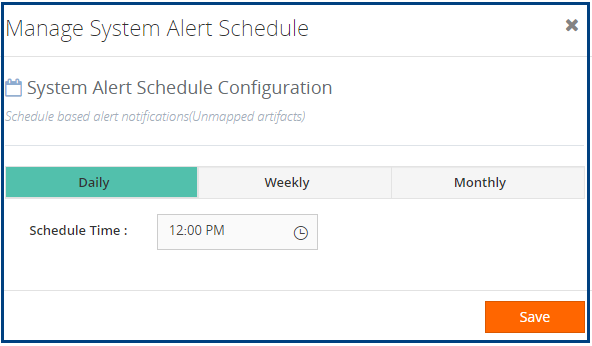
Based on the configuration, the Monitoring Service will alert the Unmapped Application Artifacts in the BizTalk Environment. The Unmapped Application Artifacts list will be available as an attachment in the email notification.
Unmapped BizTalk Application Artifacts
The Unmapped Application Artifacts list feature can be used to manage the artifacts which are not mapped to any of the BizTalk360 Alarms for monitoring.
Scenario
It will be helpful for the administrators who are taking care of the application artifact’s health. When BizTalk Developers or a deployment team deploy new artifacts into the BizTalk Group, the BizTalk administrators might not exactly know the newly deployed artifacts. In such cases, the Unmapped Application Artifacts status will provide a warning indication to the administrators/operators.
The status of Unmapped artifacts is shown in the monitoring dashboard. Unmapped application artifacts status will be healthy when all the application artifacts in an environment are mapped to the alarm. It will show the unhealthy status, when any of the artifacts left unmapped for monitoring. “Unmapped Application Artifacts Link” will be listed with the application artifacts which are still unmapped.
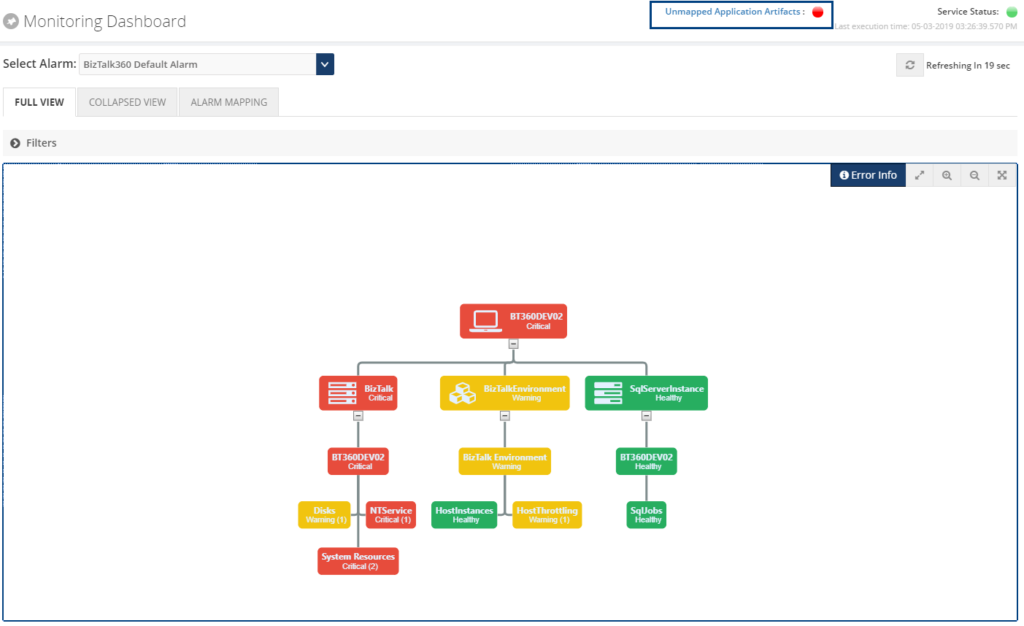
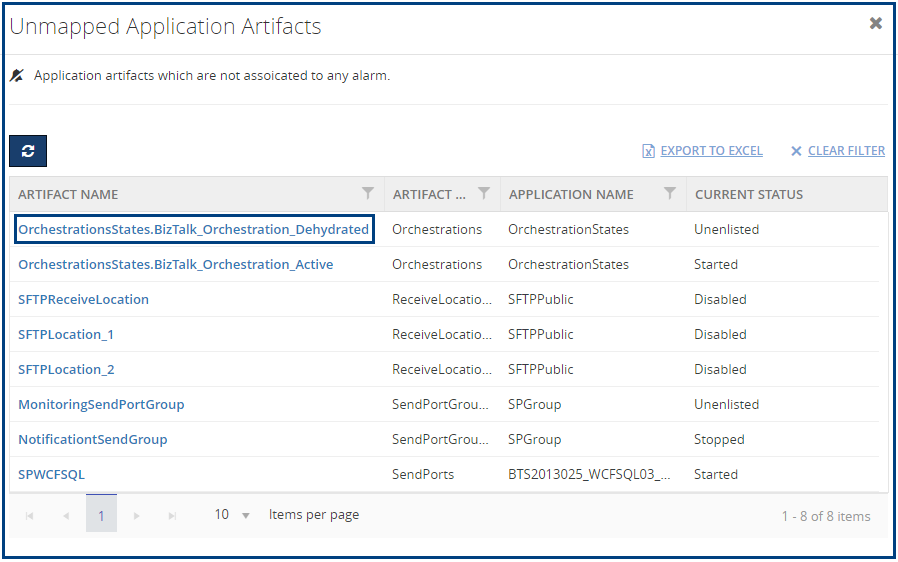
Unmapped Monitor State
From BizTalk360 version 9.0 on, the new Unmapped monitoring status is introduced. This is the default state for application artifacts. Users can set the expected state and start monitoring the artifacts.
NOTE: Users can use the Do Not Monitor state, if they don’t want to monitor an artifact. In such cases, that artifact will not be listed under Unmapped application artifacts.
Automatic Triggered Alerts
When the events or conditions meet the triggering rules, then the alerts will be triggered automatically. System Alerts can be of triggered based
- BizTalk360 License Expiration
- Database Sizes (BizTalk Database & BizTalk360)
In this version of BizTalk360, BizTalk360 License Expiration is implemented. Database Sizes triggered notification will be implemented in a future version of BizTalk360.
License Expiration
When your BizTalk360 license is about to expiry, BizTalk360 System Alerts service will notify the license expiration to the admin users. Notification can be sent on the 30, 15, 7, 2 days before the license expiry date.
System Alert History
Click on the ‘System Alert History’ button to view the historical System Alerts. Alert History is maintained for both alert types(Schedule and Trigger). Users can view the system alerts email notification which has been sent to admin users in HTML Format.
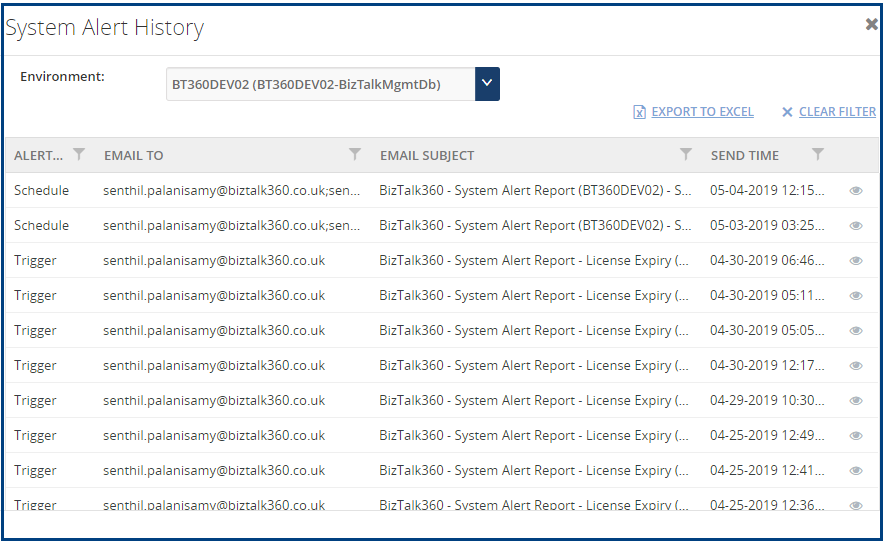
Data Purging
System Alerts historical records are maintained based on the data purging policy of “Alert & Maintenance History”. BizTalk360 will maintain the system alert notification history up to the configured number of days/months.
Based on your requirement you can set the purge duration.
Conclusion
System Alerts notifications will be helpful to BizTalk Administrators to manage the BizTalk Group health and BizTalk360 environments.
Get started with the free 30 days trial. For any queries/feedback please write to us [email protected].
The post System Alerts and Unmapped Application Artifacts in BizTalk360 appeared first on BizTalk360.
by Gautam | May 5, 2019 | BizTalk Community Blogs via Syndication
Do you feel difficult to keep up to date on all the frequent updates and announcements in the Microsoft Integration platform?
Integration weekly update can be your solution. It’s a weekly update on the topics related to Integration – enterprise integration, robust & scalable messaging capabilities and Citizen Integration capabilities empowered by Microsoft platform to deliver value to the business.
If you want to receive these updates weekly, then don’t forget to Subscribe!
Microsoft Announcements and Updates
Community Blog Posts
Videos
- Serverless automation using PowerShell in Azure Functions
- Getting started with Azure Blockchain Service Part I: Deploy and configure your network
- Getting started with Azure Blockchain Service Part II: Write and test smart contracts with VS Code
- Getting started with Azure Blockchain Service Part III: Send data to the ledger
- Getting started with Azure Blockchain Service Part IV: Publish events and ledger data
Podcasts
How get started with iPaaS design & development in Azure?
- Robust Cloud Integration with Azure
- Microsoft Azure for Developers: What to Use When
- Serverless Computing: The Big Picture
- Azure Logic Apps: Getting Started
- Azure Logic Apps: Fundamentals
- Microsoft Azure Developer: Creating Enterprise Logic Apps
- Microsoft Azure API Management Essentials
- Azure Functions Fundamentals
- Cloud Design Patterns for Azure: Availability and Resilience
- Architecting for High Availability in Microsoft Azure
Feedback
Hope this would be helpful. Please feel free to reach out to me with your feedback and questions.
by Sandro Pereira | May 1, 2019 | BizTalk Community Blogs via Syndication
Until now, we have been addressing single operations, like generating binding files for one Receive or Send Port port or a single Assembly. Some of these default operations can be achieved with out-of-the-box tools (BizTalk Server Administration Console or even with BTSTask command-line tool included with BizTalk Server), other more advanced scenarios extend the default functionalities:
- How can we easily export a binding file from a BizTalk Application?
- How can we easily export a binding file from a specify assembly?
- Using the fully qualified name (FQName) of the assembly.
- Using only the assembly name
- How can we easily export a binding file from a Receive Port?
- How can we easily export a binding file from a Send Port?
- And many more
From now on, we will be addressing some of the previous features described in this series of posts, but this time aggregating several operations for example:
- How can we easily export a binding file from a list of assemblies?
- By fully qualified name (FQName)
- By assembly names
- How can we easily export a binding file from a list of Receive Ports?
- How can we easily export a binding file from a list of Send Ports?
In other words, instead of generating a specific binding file for each resource: Receive Port, Send Port or Assembly, we will be generating a unique binding file that will include all this information, so it can easily be handled.
Today’s blog post will be about: How to Export BizTalk Server Resource Bindings from a List of Assemblies FQName with PowerShell.
Out-of-the-box, we can export a binding file for a specific assembly which is deployed in your BizTalk Server environment. But if you have 10 assemblies then you will be forced to generate them one by one and you will end up with:
- 10 different binding files that you can provide to your administration team
- Or manually merge them into one and provide them to your administration team
This manual intervention, besides being monotonous, boring and time-consuming is subject to many failures. So the normal question is, is there any way that we can improve this experience? And the response is yes, all of this can be fully automated using, for example, PowerShell scripts.
Like the previous samples, we could fully automate this Binding generation for each environment, but once again. let’s keep it simple and address what is mandatory and easily forgotten. With this PowerShell sample we will be able to generate a unique binding file for a list of specific assemblies deployed in my BizTalk Server environment. The script will take care of the following tasks:
- Generate a Binding file for 3 environments DEV, QA and PRD
- Changing the NT Group Name for each different environment
- Generate a unique binding file, instead of having separated binding files for each assembly
function bts-list-resource-exportbindings-by-assembly-fqname([string]$bindingFilePath, [string]$appName, [string]$listAssemblyFQName, [boolean]$generateDiffEnvBindings)
{
    $finalBinding = (Get-Content "C:TempBTSTemplateBindingInfo.xml")
    $moduleRefNode = $finalBinding.SelectSingleNode("BindingInfo/ModuleRefCollection")
    $sendPortNode = $finalBinding.SelectSingleNode("BindingInfo/SendPortCollection")
    $receivePortNode = $finalBinding.SelectSingleNode("BindingInfo/ReceivePortCollection")

    $list = $listAssemblyFQName.Split("|")

    foreach($element in $list)
    {
        $dllName = $element.Substring(0, $element.IndexOf(','))
        $taskParams = ” ExportBindings /Destination:$bindingfilePath$appName.$dllName.BindingInfo.xml /AssemblyName:""$element"" ”
        Start-Process "BTSTask.exe" $taskParams -Wait

        $xml = (Get-Content "$bindingfilePath$appName.$dllName.BindingInfo.xml")

        foreach($moduleRef in $xml.BindingInfo.ModuleRefCollection.ModuleRef)
        {
            $node = $finalBinding.ImportNode(($moduleRef), $true);
            $moduleRefNode.AppendChild($node);
        }
        foreach($sendPort in $xml.BindingInfo.SendPortCollection.SendPort)
        {
            $node = $finalBinding.ImportNode(($sendPort), $true);
            $sendPortNode.AppendChild($node);
        }
        foreach($receivePort in $xml.BindingInfo.ReceivePortCollection.ReceivePort)
        {
            $node = $finalBinding.ImportNode(($receivePort), $true);
            $receivePortNode.AppendChild($node);
        }
    }

    $finalBinding.Save("$bindingfilePath$appName.BindingInfo.xml")

    if($generateDiffEnvBindings)
    {
        $xml = (Get-Content "$bindingfilePath$appName.BindingInfo.xml")

        # QA Binding Info Generation
        $xml.SelectNodes("//Host") | % {
            $_.NtGroupName = $global:qaNTGroupName
        }
        $xml.Save("$bindingfilePath$appName.QA.BindingInfo.xml")

        # PRD Binding Info Generation
        $xml.SelectNodes("//Host") | % {
            $_.NtGroupName = $global:prdNTGroupName
        }
        $xml.Save("$bindingfilePath$appName.PRD.BindingInfo.xml")
    }
}

THIS POWERSHELL IS PROVIDED “AS IS”, WITHOUT WARRANTY OF ANY KIND.
You can download the full script from here: Export BizTalk Resource Bindings from List of Assemblies FQName with PowerShell
The post BizTalk Bindings Exportation: How to Export BizTalk Server Resource Bindings from a List of Assemblies FQName with PowerShell appeared first on BizTalk360.
by Sandro Pereira | Apr 30, 2019 | BizTalk Community Blogs via Syndication
Let’s go for the third PowerShell sample in a series of posts that, once again, I will be addressing some of the real case scenarios that we may face daily:
- How can we easily export a binding file from a BizTalk Application?
- How can we easily export a binding file for a specific assembly?
- Using the fully qualified name (FQName) of the assembly
- Using only the assembly name
- How can we easily export a binding file from a list of assemblies?
- How can we easily export a binding file from a Receive Port?
- How can we easily export a binding file from a Send Port?
- And many more
Today’s blog post will be about: How to Export BizTalk Server Resource Bindings by Assembly Name (instead of the FQName) with PowerShell.
This is extremely similar to the previous one, but instead of using the fully qualified name (FQName) of the assembly, we will be using only the assembly name. Nevertheless, this small change will have a significant technical impact on the way we can archive this goal.
Just for getting started, and for you to be aware, this is impossible to do out-of-the-box with the standard tools:
- BizTalk Server Administration Console
- Or even with BTSTask command-line tool included with BizTalk Server. This tool provides the option for you to export binding information to a .xml file by using the ExportBindings command:
- BTSTask ExportBindings /Destination: value [/GroupLevel] [/ApplicationName:value] [/AssemblyName:value ] | [/GlobalParties] [/Server:value] [/Database:value]
- /ApplicationName: Name of the application from which to export bindings.
- /AssemblyName: a Locally unique identifier (LUID) of the assembly from which to export bindings.
So, if you want to do something outside the box this is were the fun and challenges really start to appear and the question that we may ask is: Is there any way that we can accomplish this and at the same time improve the experience, similar to the previous examples? The response is that yes, all of this can be fully automated using, for example, PowerShell scripts.
Like the previous samples, we could fully automate this Binding generation for each environment, but once again, let’s keep it simple and address what is mandatory and easily forgotten. With this PowerShell sample, we will be able to generate a binding file for a specific assembly which is deployed in my BizTalk Server environment.
Generate a Binding file for 3 environments DEV, QA and PRD:
- Changing the NT Group Name for each different environment
- Generate a Binding file for each version of the assembly name found deployed
function bts-resource-exportbindings-by-assembly-name([string]$bindingFilePath, [string]$appName, [string]$assemblyName, [boolean]$generateDiffEnvBindings)
{
    $list= BTSTask.exe ListApp /ApplicationName:$appName

    $list |foreach {
	    if ($_ -like '*Resource:*')
        {
            if($_.Split('-')[1].Split('"')[1] -eq "System.BizTalk:BizTalkAssembly")
            {
                $varAssemblyFQName = $_.Split('-')[2].Split('"')[1]
                $verison = $_.Split('-')[2].Split('"')[1].Split("=")[1].Split(",")[0]
                if($varAssemblyFQName -like "*"+ $assemblyName + "*")
                {
                    $taskParams = ” ExportBindings /Destination:$bindingfilePath$appName.$assemblyName.$verison.BindingInfo.xml /AssemblyName:""$varAssemblyFQName"" ”
                    Start-Process "BTSTask.exe" $taskParams -Wait

                    if($generateDiffEnvBindings)
                    {
                        $xml = (Get-Content "$bindingfilePath$appName.$assemblyName.$verison.BindingInfo.xml")

                        # QA Binding Info Generation
                        $xml.SelectNodes("//Host") | % {
                            $_.NtGroupName = $global:qaNTGroupName
                        }
                        $xml.Save("$bindingfilePath$appName.$assemblyName.$verison.QA.BindingInfo.xml")

                        # PRD Binding Info Generation
                        $xml.SelectNodes("//Host") | % {
                            $_.NtGroupName = $global:prdNTGroupName
                        }
                        $xml.Save("$bindingfilePath$appName.$assemblyName.$verison.PRD.BindingInfo.xml")
                    }
                }
            }
        }
    }
}
THIS POWERSHELL IS PROVIDED “AS IS”, WITHOUT WARRANTY OF ANY KIND.
You can download the full script from here: Export BizTalk Server Resource Bindings by Assembly Name with PowerShell
The post BizTalk Bindings Exportation: How to Export BizTalk Server Resource Bindings by Assembly Name with PowerShell appeared first on BizTalk360.
by Gautam | Apr 28, 2019 | BizTalk Community Blogs via Syndication
Do you feel difficult to keep up to date on all the frequent updates and announcements in the Microsoft Integration platform?
Integration weekly update can be your solution. It’s a weekly update on the topics related to Integration – enterprise integration, robust & scalable messaging capabilities and Citizen Integration capabilities empowered by Microsoft platform to deliver value to the business.
If you want to receive these updates weekly, then don’t forget to Subscribe!
Microsoft Announcements and Updates
Community Blog Posts
Videos
Podcasts
How get started with iPaaS design & development in Azure?
- Robust Cloud Integration with Azure
- Microsoft Azure for Developers: What to Use When
- Serverless Computing: The Big Picture
- Azure Logic Apps: Getting Started
- Azure Logic Apps: Fundamentals
- Microsoft Azure Developer: Creating Enterprise Logic Apps
- Microsoft Azure API Management Essentials
- Azure Functions Fundamentals
- Cloud Design Patterns for Azure: Availability and Resilience
- Architecting for High Availability in Microsoft Azure
Feedback
Hope this would be helpful. Please feel free to reach out to me with your feedback and questions.

by Sandro Pereira | Apr 25, 2019 | BizTalk Community Blogs via Syndication
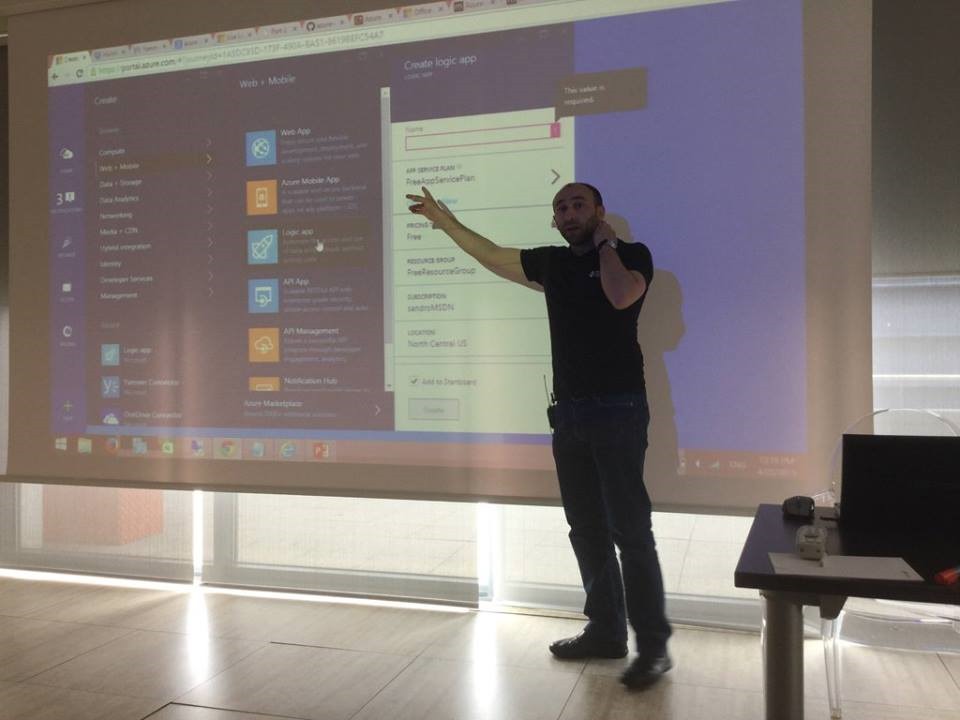
I think I’ve been present since the first edition of this event, except for last year… so, I’m super excited for presenting once again on this fantastic event! In 2015 I spoke for the first time about Logic Apps:
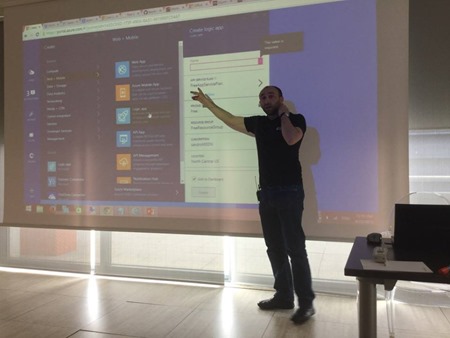
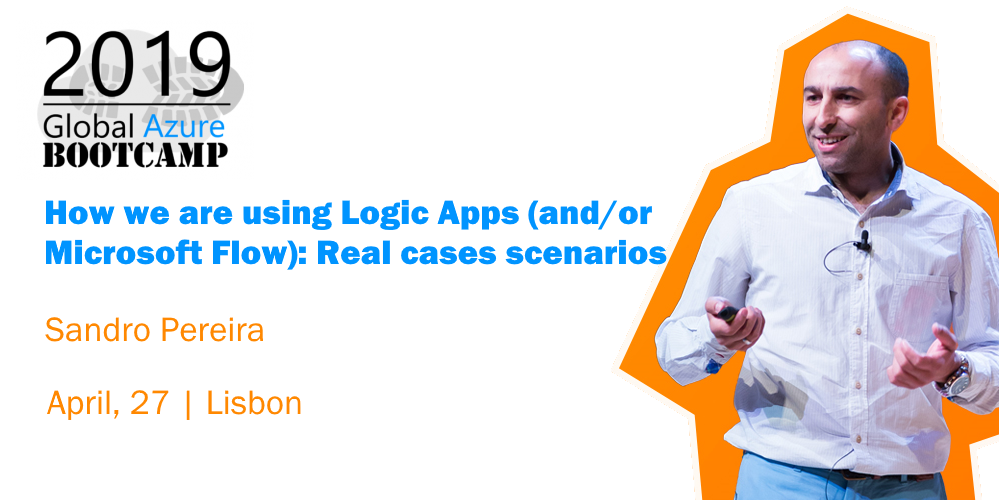
And later on in 2016…. And I will return this year with a mix session about Logic Apps and Microsoft Flow on a session about: “How we are using Logic Apps (and/or Microsoft Flow): Real cases scenarios.”
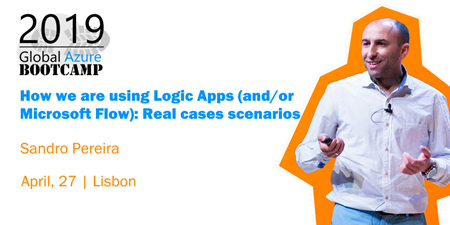
I have been presenting a similar talk on my last events (online events, Porto.Data, and Madrid) and this may be the last time I do it in this format.
Abstract
We know that all business problem can be solved with a variety of technologies and different solutions. However, sometimes developing that type of solutions has traditionally been too costly and time-consuming for many of the need’s teams and departments face, especially those projects that are internally for organizations to use or for a short period. As a result, many of these projects or solutions will be on the shelf or in the imaginary of the collaborators.
In this session, I will show you real live scenarios on how we at DevScope are using Microsoft Integration features like Logic Apps, API Management, API’s and Microsoft Flows. Using also a variety of related Azure technologies like PowerApps and Power BI to:
- First, improve our internal processes like expenses reports, time reports and so on;
- And, secondly, how the first step helps us out to extend our product and our business by exporting these same approaches and concepts to our clients
This will be a lightweight talk addressing some real scenarios and show these in action
Global Azure Bootcamp 2019 Lisbon Agenda
- 8:30 – 09:00 – Welcome and accreditation
- 09:00 – 09:15 – Introduction + Housekeeping by Tiago Costa and Virgilio Esteves
- 09:15 – 09:45 – Best Practices for Real-time Data by Viviane Ribeiro
- 09:45 – 10:15 – Azure Serverless by Virgilio Esteves
- 10:15 – 10:30 – Coffee Break
- 10:30 – 11:00 – ARM your Azure Infrastructure by Tiago Costa
- 11:00 – 12:00 – Let’s talk about: Azure Monitor by Pedro Sousa
- 12:00 – 13:00 – TBA by Luis Calado
- 13:00 – 14:00 – Lunch Break
- 14:00 – 15:00 – Extend your Identity to the Cloud by Nuno Árias Silva
- 15:00 – 16:00 – Azure SQL Database Managed Instance is so much more than just a full-fledged SQL Server in the Cloud! by Niko Neugebauer
- 16:00 – 16:15 – Coffee Break
- 16:15 – 17:15 – How we are using Logic Apps (and/or Microsoft Flow): Real case scenarios by Sandro Pereira
- 17:15 – 18:00 – Security? Whose problem is it, really? by Tiago Pascoal
- 18:00 – 18:30 – Prizes and Closing
This is a free event with very limited seats that you will not want to miss, register now!
We are waiting for you.
The post Global Azure Bootcamp 2019 Lisbon | April 27, 2019 | How we are using Logic Apps (and/or Microsoft Flow): Real cases scenarios appeared first on SANDRO PEREIRA BIZTALK BLOG.
by Mandar Dharmadhikari | Apr 24, 2019 | BizTalk Community Blogs via Syndication
Recently on Integration Monday, I presented a chat bot which can be used to administer BizTalk, hosted on premises, using a chat bot, Logic Apps and the On Premises Data Gateway. The session can be found at Administering BizTalk Server with a Chatbot. This blog post is aimed at discussing the session.
Context
For a product company serving its customer, there are few areas where the company executives need to work with their customers. These activities can be broadly classified into two categories:
- Customer Service
- Brand Loyalty and Awareness
Let us take a brief look at each of these categories.
- Customer Service: Executives of the company might need to converse with customers to:
- Account management: Help customer manage their services, subscriptions, payments etc.
- FAQ: Answer the common questions about the product
- Issue Resolution: Solve the issues customers face with the product
- Brand Awareness and Loyalty: Executives of the company can converse with customers to:
- Seek Feedback: Understand how customers like the product. What the general sentiment for the product is?
- New Features/Products: Inform customers about the new features or the products that the company is launching
For the conversation in the customer service category, the general mode of conversation is use of emails, phone calls or support websites. While in the Brand Awareness category it is generally emails and calls.
Now consider what if the conversations are delivered to the customers at their fingertips? This is possible by creating virtual assistants tailored for the functions specific to the product. These virtual assistants, when imbibed with the power of Natural Language Processing and Cognitive services, help customers converse with the company and get their intended work done.
This not only makes conversation available to customers at their fingertips, but also saves a lot of money for the company by automating most of the before mentioned tasks.
This concept of providing “Conversation” as a service to the customers through virtual assistants is generally termed as “Conversation as a Service”.
Chat bots are the starting point of Conversation as a Service as they pave a way to build full-fledged virtual assistants.
What Are Chat Bots?
Now that we have seen what Conversation as a Service is and how bots fit into this, let us analyse how the chat bots are different from a regular web application. Consider a scenario where you want to buy a laptop. In such scenario in normal web application, you would generally follow below steps:
- Navigate to the Home page of the website
- Enter the search details for the laptop. This search then leads to a new web page which displays the result
- After selecting a particular laptop, to place the order the website redirects to a new page where details like name, address and payment details are collected and the order is finally placed
Now let us try to convert these steps to how a chat bot would process the laptop request. Following image shows the comparison between the web application and the chat bot.
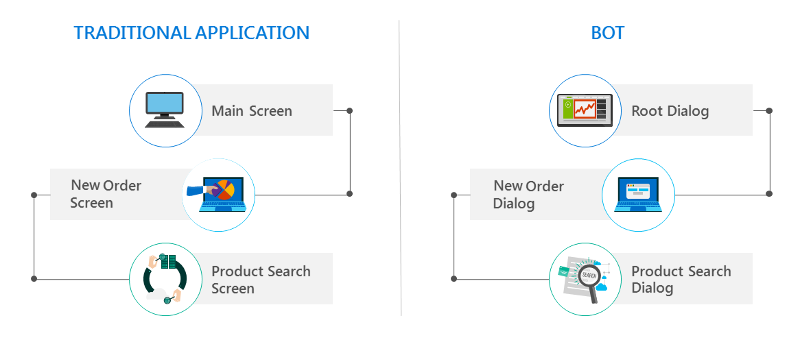
A chat bot does not have a traditional UI where the user navigates from one page to another, bots have dialogs that correspond to a particular web page in a web application. So, to order a laptop the chat bot would use following dialogs:
- A root dialog which greets the user and asks them what they want to do
- Once the user confirms they want to buy a laptop, the bot initiates the Product Search Dialog and collects the search parameters from the user. Once that is done, the bot returns the result to the user in the form of carousel cards
- Once the user confirms the laptop, the bot initiates an Order dialog which would then collect name, address and payment details and then place an order for the laptop
In a nutshell, chat bots are just like normal web applications but instead of having a breadcrumb-based web page approach, bots use dialogs to collect and display information. Each dialog only supports a single responsibility akin to the single responsibility principle of software design.
Tools and Frameworks Used
Now that we know what Conversation as Service is and how and what chat bots are, let us take a look at the tools and frameworks we use to build the chat bot.
- Visual Studio 2017/ Visual Studio Code – Any one of these IDE’s can be used to build the bot code. I prefer to use Visual Studio 2017 as it provides a bot skeleton project which takes care of basic plumbing of the bot code, we just need to add our logic in it. Visual Studio Code does not provide that flexibility, we have to create an empty web app and add the code ourselves.
- MS Bot Framework SDK 4.x – This is the official Microsoft released SDK to develop bots. This SDK works with ASP.NET Core 2.x and makes the framework a cross platform development framework. We can develop the code on Windows, Linux or Mac
- Asp.Net Core 2.x – The cross platform open source .Net framework by Microsoft
- Adaptive Cards – This framework is used to author and render the cards using a standard Json format. Brings uniformity in the way information is exchanged between the channel and the bot
- Bot Framework Emulator – Used to emulate the actual conversation between the user and the bot. Helps to debug the bots hosted locally and also on Azure The following image shows the basic building blocks in a typical bot. All of these blocks are from Microsoft Azure perspective.
Typical Bot Architecture
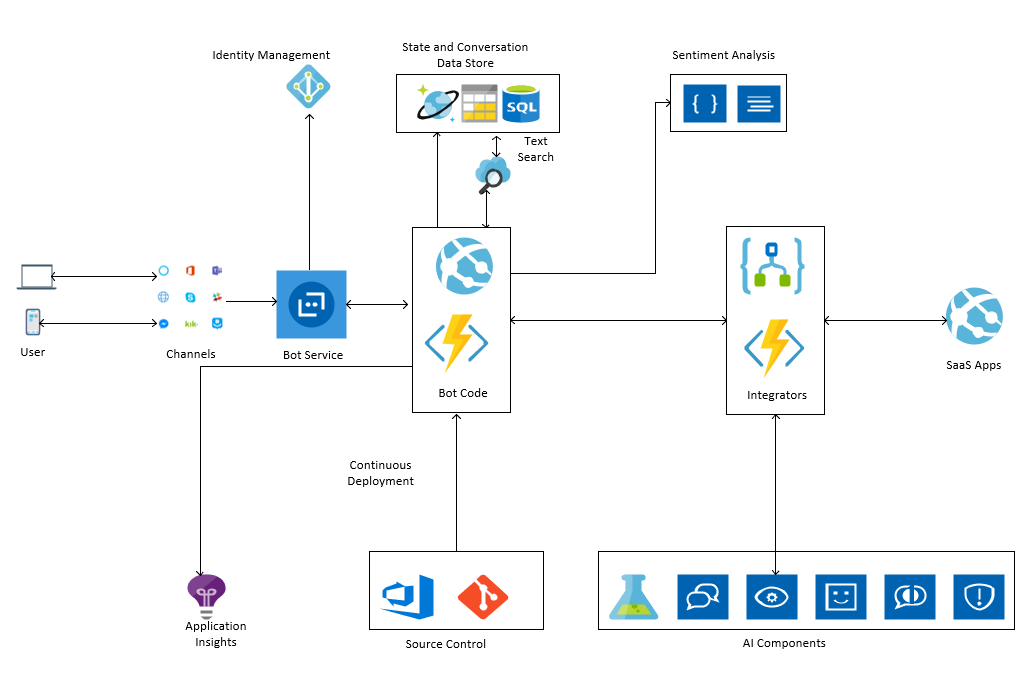
Let us take a look at each of the blocks in brief.
- Bot Service – This a central piece which connects the different communication channels to the actual bot code. It allows us to manage the connection to the communication channels. It allows to implement authentication to the back-end services used by the bot code. E.g. If we want the user to be authenticated to use the MS Graph API, we add the OAuth connection to the Graph API in the bot service.
- Identity Management – The Bot Framework provides out of the box connection to various OAuth providers like Uber, Gmail, LinkedIn, Fitbit, MS Graph API etc. It also allows to map our custom OAuth system to the bot code.
- Channels – Various channels are available for us to integrate the bot with, they are FaceBook, Email, Slack, Kik, Skype, Skype For Business etc. Each registration of the channels needs to be done with the Bot Service.
- Bot Code – The bot code can be hosted as a Web App or a function App when we use the SDK V3 and as Web App for now for SDK V4.
- State and Conversation Management – The bot framework allows us to manage the state and the conversation history using several out of the box options. We can use CosmosDb, Blob Storage or Azure SQL Database. The Azure Search Service can be used with the conversation History store to fetch history from the store.
- NLP and Sentiment Analysis – These features are used to Introduce more complex and rich features into bot which enables it to converse with the user in a more natural form and detect the sentiment of the user as the conversation continues on. This provides a lot of information to companies to understand how their chat bot is faring with the task of solving problems of their customers.
- Integrators – The bot can communicate with the other SaaS products and Machine Learning Models, QnA maker services and Cognitive Services using Integration offerings like Logic Apps and Azure Functions.
- Repositories – The Web/ Function App in which the bot code is deployed can be hooked to different repositories and configured to use Continuous Deployment.
The BizMan
Now that we have seen what a typical bot looks like, let us move on to the BizTalk Admin Bot. I have named this Bot “The BizMan” as it administers the BizTalk server. The name and the superhero persona were conceived by Sandro Pereira . The post is available on his blog at BizMan, The BizTalk Server SuperHero Sticker

The architecture for BizMan is almost similar to the bot architecture discussed above. The following image shows the architecture for BizMan.
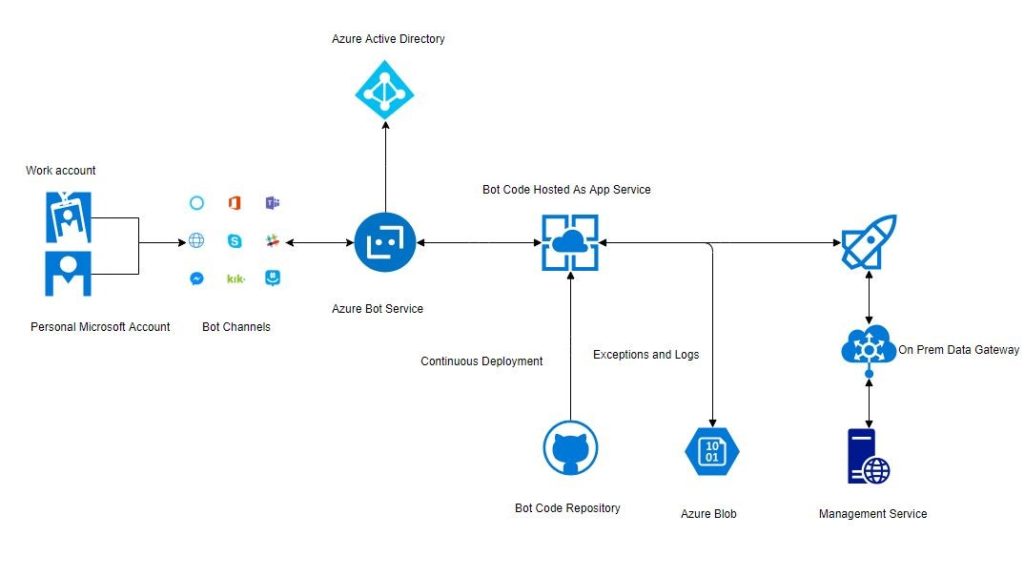
BizMan Requires that the user is a valid user in the Azure Active Directory and can be authenticated successfully. BizMan uses Blob Storage to store the logs and suspended instances reports. It uses Logic Apps to communicate with the BizTalk Management service (which comes with the BizTalk 2016 Feature Packs). This communication takes place using the On Premises Data Gateway.
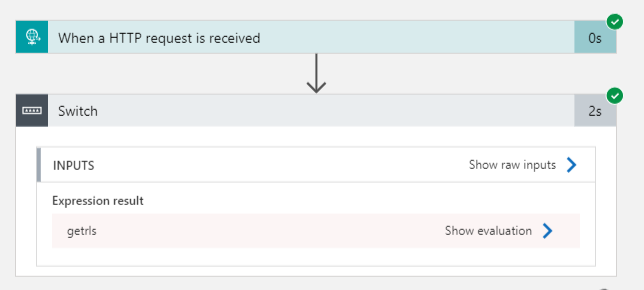
The Management service that comes with Feature Pack 1 for BizTalk 2016, allows us to administer BizTalk Server using the Web API. This service also comes with a pre-authored Swagger definition which gives us the details about the various operations available in the service. This enables us to create a custom Logic Apps connector to communicate with this Web API. So, we just upload the Json file containing the Swagger information of the API and set up Windows authentication using an account which is part of “BizTalk Administrators Group”. This allows us to easily consume various operations in the Web API in a Logic App. A sample snapshot of the Logic App is shown below.
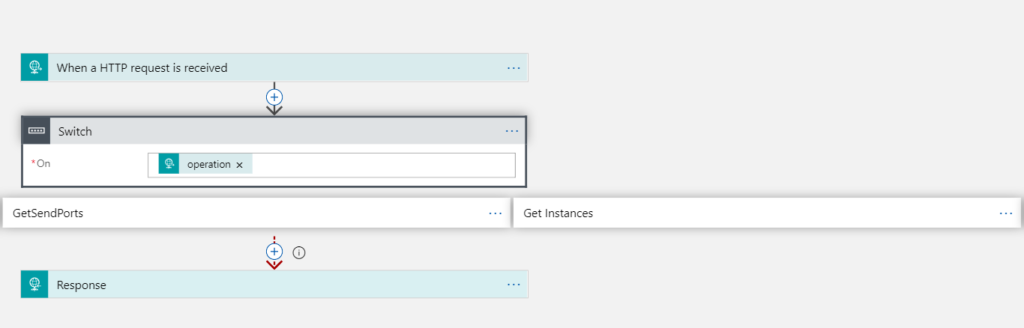
As will be clear, it is very easy to create the Logic App and add new operations, if we use a Custom Logic Apps connector.
The typical flow for the bot is shown below.
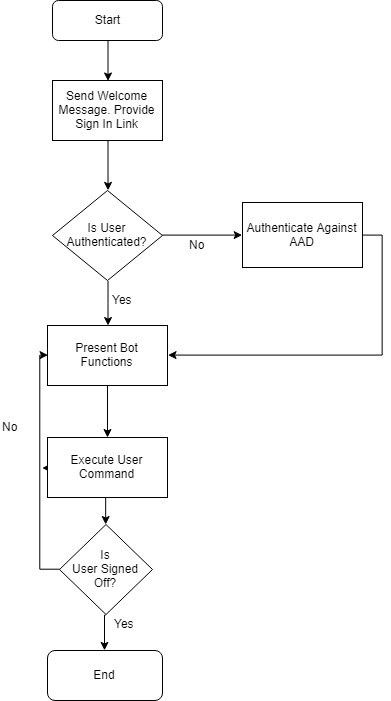
The BizMan is able to perform following tasks:
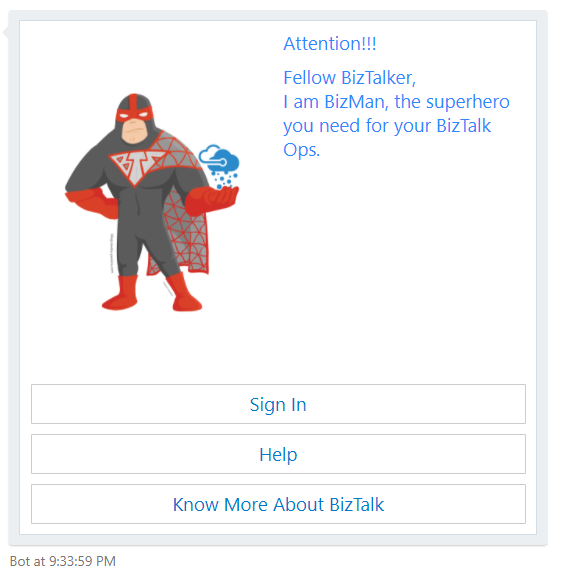
- Greet the User
- Authenticate the user against the AAD
- Get Hosts
- Get the Applications deployed in the BizTalk environment
- Get the List of Orchestrations, Send Ports by application
- Stop/ Start Send ports
- Enable / Disable Receive Location
- Get Suspended Instances
- Get Feed Back from the user
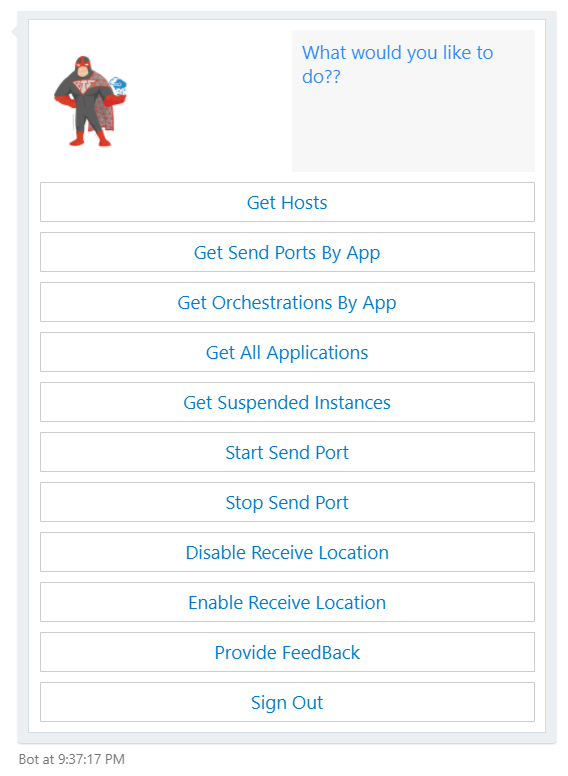
The options are presented to user as a big adaptive card as shown below.
Let us take a look at some of the operations available in the bot.
- Greet the User:
- Authenticate the User:
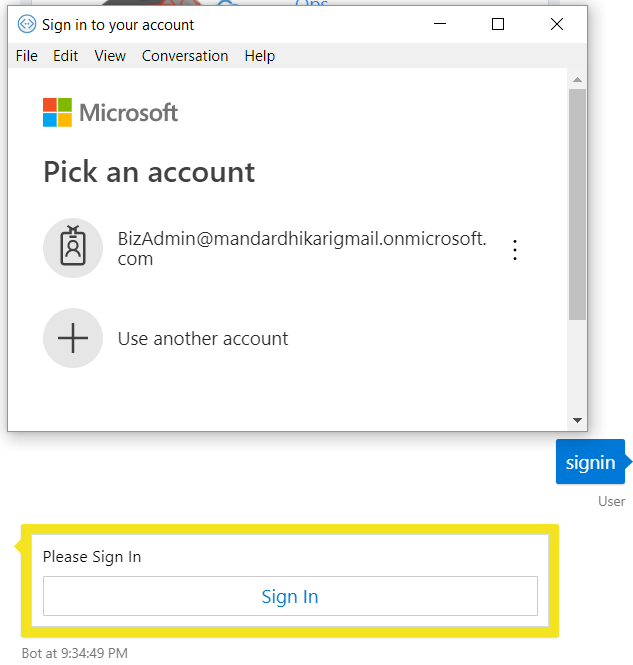
- Enable Receive Location:
Let us explore this operation in detail. In this operation, the User initiates the command by clicking on the Enable Receive Location option available from the operation card as shown below.
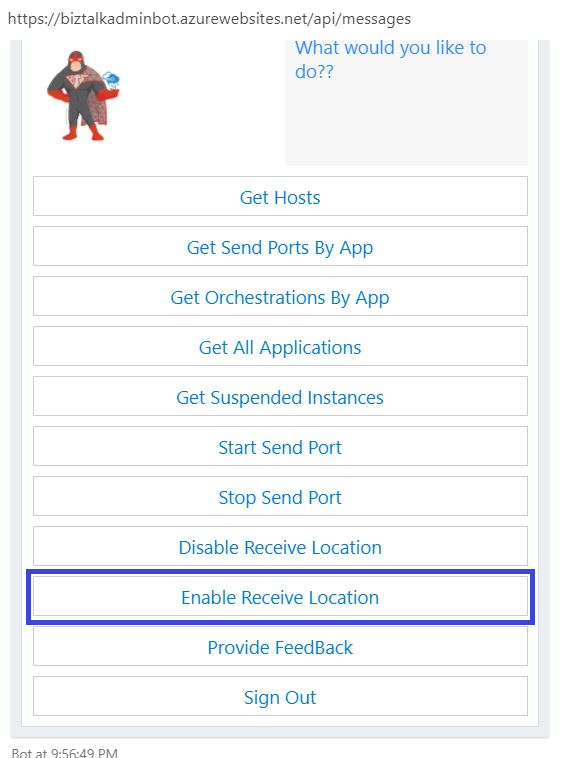
This initiates a call with the command “enablerl” to the bot web app. The first step in enabling any receive location is to get the list of all the receive locations that are disabled on the environment. The bot code first checks if there is a list of receive locations in the cache (gets refreshed every 1 min).
If the cache does not have the list, the bot code in turn initiates a call to the Logic App which fetches the list of the receive locations from the on premises BizTalk environment using the BizTalk management service. Following is a request response sample that Logic App receives and returns to the bot respectively.
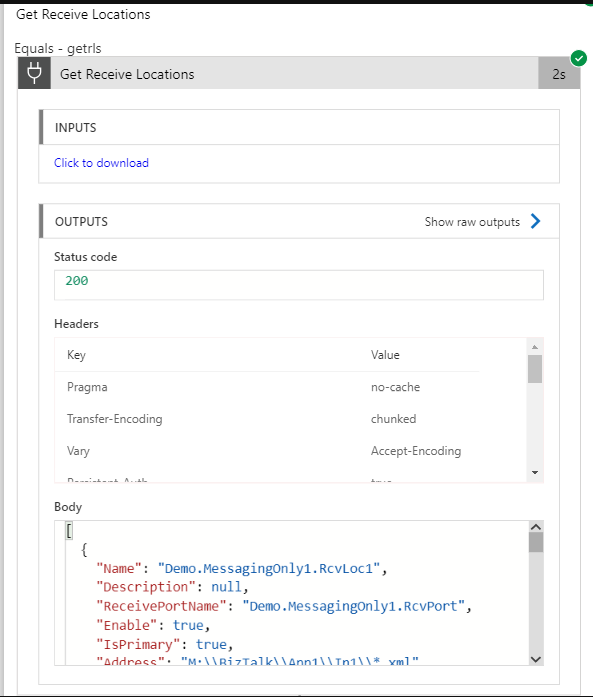
Once the list of the receive locations is available, the bot filters the list based upon the “Enable” flag received in response. So, for the “Enable Receive Location” operation, only the disabled receive locations are populated and the user is presented with a drop-down list to select a location from. A sample is shown below.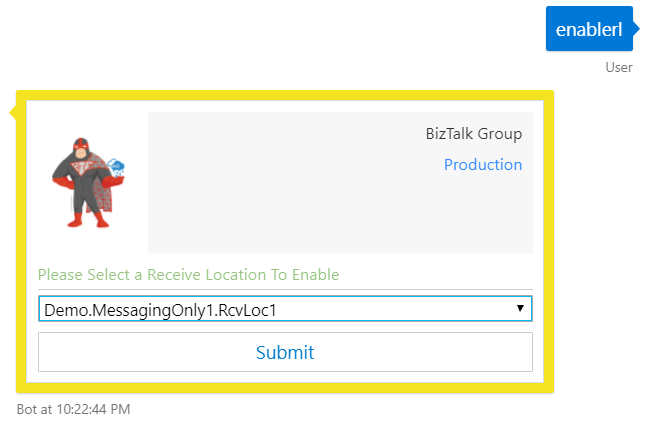 Once the user clicks on the Submit button, the bot code initiates another call to the Logic App which in turn calls the On Premises BizTalk management service and enables the receive location. The Logic App Request response is shown below.
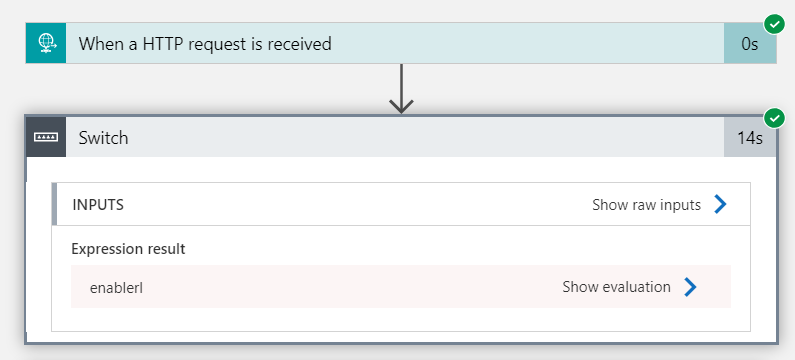
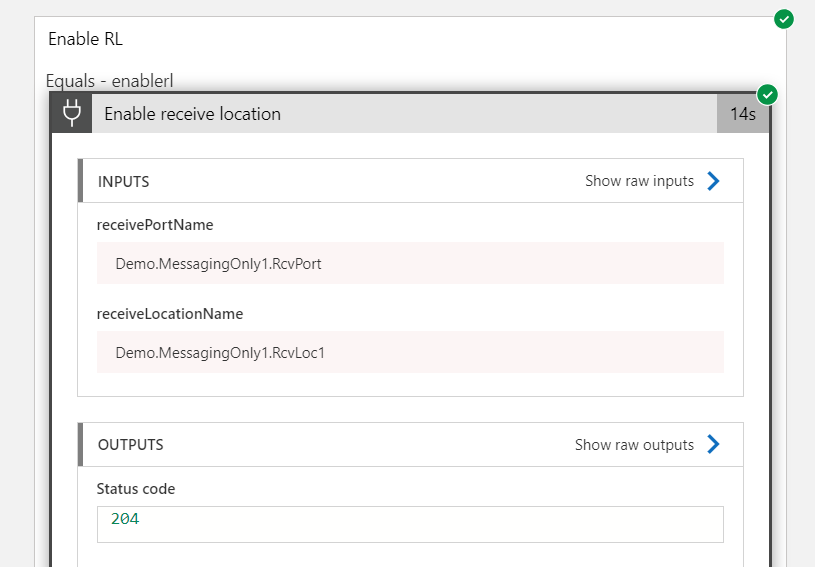
Once the receive location is enabled, the user gets a response that the “Operation Completed Successfully.”
In case there are no disabled receive locations in the BizTalk environment, then the bot code will notify the user that there are no disabled receive locations in the BizTalk environment.
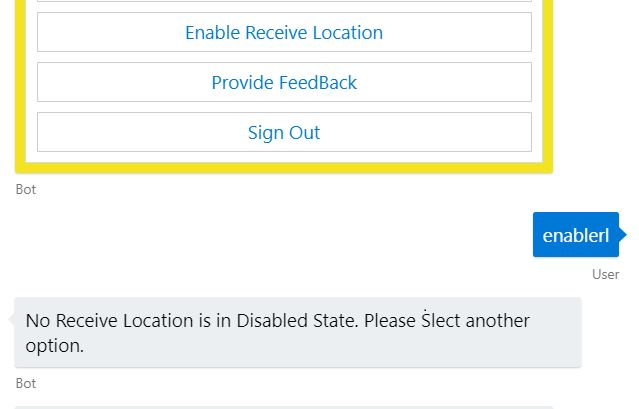
Note: Similar logic is applied in following operations available in the bot:
- Disable Receive Location
- Start Send Port
- Stop End Port
4. Get Hosts:
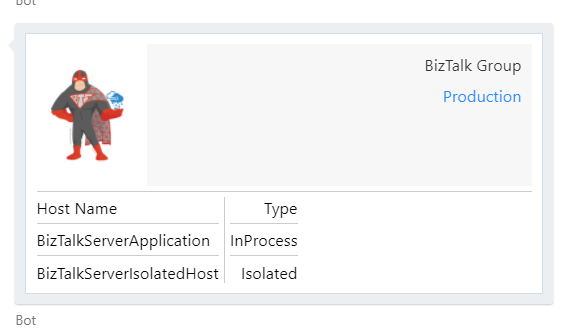
The operation is initiated when the user selects the Get Hosts operation from the list of available operation.
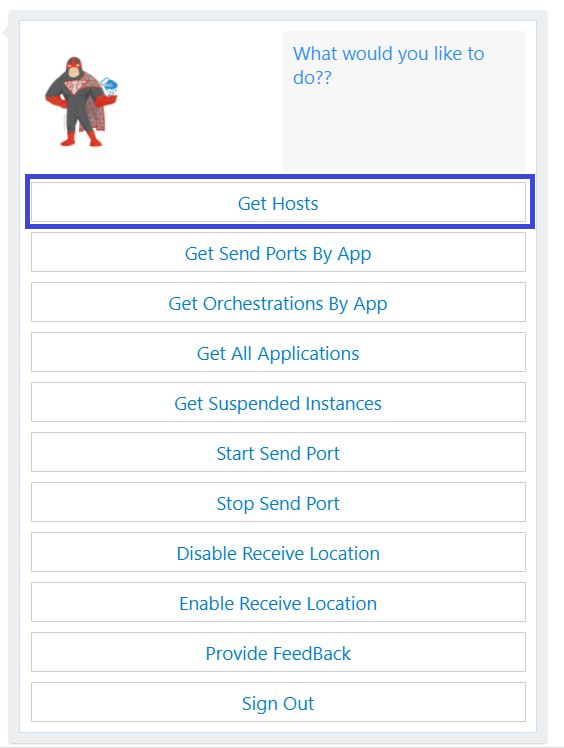
This initiates a command “gethosts” to the bot code. The code checks its cache to check if there is a list of hosts available with it. If it finds the list, the hosts are displayed to the user. In case the list is not available, the bot will initiate a call to the Logic App which calls the On Premises BizTalk management service and gets the list of the hosts. The response displayed to the user as an adaptive card shown below.
- Note: Similar approach is taken while implementing following operations:
- Get Send Ports by App
- Get Orchestrations by App
- Get All Applications
5. Get Suspended Instances Report
This operation, as the name suggest, brings the list of the Suspended Instances from the On Premises BizTalk environment. In this case, no caching is implanted as the number of suspended instances can change on a per second basis in a high load environment. In this operation, a small report is displayed to the user which contains the suspended instances grouped together as shown below.
This card gives the user an option to view a detailed report and provides a button to open the report. Once the user clicks on the button, it directs the user to a HTML web page which contains details about the suspended instances. In this case, the detailed report is stored as block blob in the azure storage account. This blob is available only until the point the user is actually logged in the session in the bot. The blob is deleted upon the end of the session.
In similar fashion, additional features can be added to the bot by adding new switch cases to the logic app and accounting for them in the bot code.
Further Scope
The BizMan can be made more functional by expanding on the Logic App and the bot code to assimilate more functions.
Natural Language Processing and Sentiment Analysis can be implemented in the bot to enable it to communicate more freely with the users.
Functions to control and monitor the Logic Apps can also be implemented in the same chat bot.
Reading Sources
In order to get started with building chat bots, the following MSDN documentation are the go-to links.
- Azure Bot Service Documentation
- Adaptive Cards
The post Administering BizTalk server using a Chat Bot appeared first on BizTalk360.
by Sandro Pereira | Apr 23, 2019 | BizTalk Community Blogs via Syndication
This is the second PowerShell sample in a series of samples that I will do on this topic addressing some of the real case scenarios that we may face daily:
- How can we easily export a binding file from a BizTalk Application?
- How can we easily export a binding file from a specify assembly?
- How can we easily export a binding file from a list of assemblies?
- How can we easily export a binding file from a Receive Port?
- How can we easily export a binding file from a Send Port?
- And many more
Today’s blog post will be about: How to Export BizTalk Server Resource Bindings by Assembly FQ Name with PowerShell.
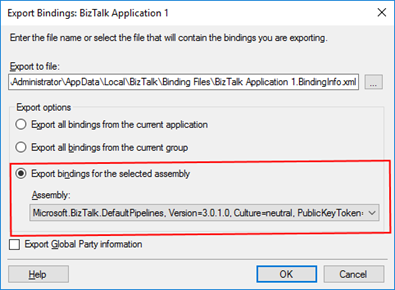
Exporting a BizTalk Server Application binding is, at first sight, a simple and quick task that can be done using the BizTalk Server Administration Console:
- Click Start, click All Programs, click Microsoft BizTalk Server 20xx, and then click BizTalk Server Administration
- In the console tree, expand BizTalk Server Administration, expand the BizTalk Group, and then expand Applications
- Right-click the application whose assembly is associated, and you want to export the bindings, or simply right-click on the Applications, point to Export, and then click Bindings…
- On the Export Bindings page, in Export to file, type the absolute path of the .xml file to which to export the bindings
- Ensure that Export bindings from the select assembly is selected, and then click OK
But, again, even in all simple tasks we may encounter challenges that require us to perform some monotonous and boring manual operations that consume some of our precious time and are always subject to failures.
Once again, the steps that I described above only generate the binding files from that specific environment, maybe or normally this all start in development, but we also will need to generate the same bindings for production, and for that we normally need to open the binding file and replace/fix the differences for each different environment… which is normally a tedious operation. What we need to replace is mainly:
- The URI’s – it should be fixed but it is not mandatory you can fix them directly on the environment after you import the Binding if you know what you are doing
- The host instances – not mandatory if you have the same host and host instances names across all your different environments as best practices will tell you to do
- The NT Group Name associated in the Services (Orchestrations) – according to security best practices you shouldn’t use the same BizTalk Groups in different environments, so in this case, if you follow this best practice, you need mandatory to change these parameters in your binding file
Normally, everyone changes the URI’s but neglecting the other parameters may be causing problems during the Binding import.
- So, the question is: Is there any way that we can improve this experience? And the response is that yes, all of this can be fully automated by using, for example, PowerShell scripts.
Like the previous sample, we could fully automate this Binding generation for each environment, but once again, let’s keep it simple and address what is mandatory and easily forgotten. With this PowerShell sample for a specific assembly, with a fully qualified name, deployed in my BizTalk Server environment, I can easily:
- Generate a Binding file for 3 environments DEV, QA and PRD
- Changing the NT Group Name for each different environment
function bts-resource-exportbindings-by-assembly-fqname([string]$bindingFilePath, [string]$appName, [string]$assemblyFQName, [boolean]$generateDiffEnvBindings)
{
    $dllName = $assemblyFQName.Substring(0, $assemblyFQName.IndexOf(','))
    $taskParams = ” ExportBindings /Destination:$bindingfilePath$appName.$dllName.BindingInfo.xml /AssemblyName:""$assemblyFQName"" ”
    Start-Process "BTSTask.exe" $taskParams -Wait

    if($generateDiffEnvBindings)
    {
        $xml = (Get-Content "$bindingfilePath$appName.$dllName.BindingInfo.xml")

        # QA Binding Info Generation
        $xml.SelectNodes("//Host") | % {
            $_.NtGroupName = $global:qaNTGroupName
        }
        $xml.Save("$bindingfilePath$appName.$dllName.QA.BindingInfo.xml")

        # PRD Binding Info Generation
        $xml.SelectNodes("//Host") | % {
            $_.NtGroupName = $global:prdNTGroupName
        }
        $xml.Save("$bindingfilePath$appName.$dllName.PRD.BindingInfo.xml")
    }
}
THIS POWERSHELL IS PROVIDED “AS IS”, WITHOUT WARRANTY OF ANY KIND.
You can download the full script from here: Export BizTalk Server Resource Bindings by Assembly FQName with PowerShell
The post BizTalk Bindings Exportation: How to Export BizTalk Server Resource Bindings by Assembly FQ Name with PowerShell appeared first on BizTalk360.