by [email protected] Steef-Jan Wiggers | Feb 9, 2016 | BizTalk Community Blogs via Syndication
A new version of BizTalk360 has been released, version 8 which comes with a boatload of features and a complete overhaul of its user interface to provide an exceptional user experience. The product adopted a concept of widgets in the dashboard similar to the new Microsoft Azure portal. A BizTalk 360 user can now create and customize dashboards for different use cases.
The User Interface, Dashboards and Widgets.
In this post I will review a few of the new features and let’s kick off with the UI, which has improved dramatically. Intially BizTalk360 was a Silverlight application before it migrated to HTML 5. And in version 8.0 it has adjusted to what you experience on the Azure Portal and what you see with UI in devices. Below you see a customized dashboard with several widgets.
Figure 1. An example of my customized monitoring dashboard.
The end user has also the ability to create his own custom widgets via the settings page.
Picture 2. An example of creating a custom widget.
Furthermore the separation of monitoring and analytics is based upon audience targeting. An analyst or support engineer can interpret information of messaging and processes within a BizTalk Group from a different perspective as shown below demonstrating a customized dashboard.
Figure 3. An example of a customized analytics dashboard..
BizTalk360 API’s
Another incredible addition are the API’s, which offer a tremendous amount of value to enterprise customers. It brings extreme extensibility for its end users and enables the for instance to pull information from several environments. The API’s (REST web services) are the core of the BizTalk360 capabilities and the BizTalk360 front-end uses them. And as a BizTalk360 end user you can leverage all of these API’s to have access to your BizTalk environment. In the setting menu under API Documentation you can find the descriptions of each API and operation. For instance if you select BizTalkApplicationService you can observe a list of operations belonging to it. Subsequently select one of the operations, Services.REST/BizTalkApplicationService.svc/GetOrchestrations, specify the environmentId and applicationName and hit “Try it out!”.
Figure 4. BizTalk360 API’s document page..
You can call the API’s from different machines, by setting the appropriate authorization in the user access policy. Calling the API operation from SoapUI will result in the same response as from BizTalk360 API Documentation.
Figure 5. Calling BizTalk360 API from SoapUI.
The look-and-feel are similar when you publish an (Web) API configured with swagger documentation describing it.
Business Rules in a browser
Yet another new feature added to BizTalk360 is the rule engine capability of BizTalk Server i.e. the business rule and composer are accessible from a browser. You can view what type rules are deployed.
Figure 6. Deployed rules in a BizTalk Group.
And one of the capabilities is that you as end user can compose new rules, edit or test them. Below you see an example of testing a deployed rule, which you can do in a browser!
Figure 7. Test of a deployed business rule.
The version of the business rules composer in BizTalk360 only supports pre-created vocabularies. Therefore, to ensure a smooth user experience, you need to create all the vocabularies you will require to develop or edit your rules in the BizTalk Business Rules Composer. In a nutshell follow the instructions on the BizTalk360 portal with regards to rules.
Live feeds
In an enormous environment various operation people perform various actions in a production or UAT environment, and it can be valuable means of real-time tracking of what happens. This new version of BizTalk360 offers live feeds and you view on the right side after click the icon (indicated in red in the picture below).
Figure 8. Live feed in BizTalk Group.
Alarms and notifications
In BizTalk360 you can set alarms, which can result in an email being sent to you.
Figure 9. An example of email indicating a receive location is down.
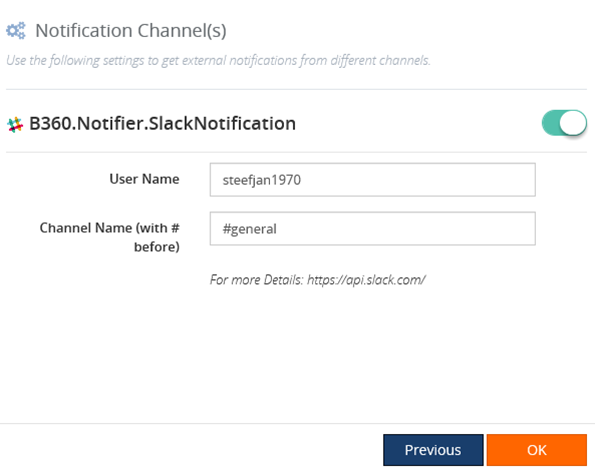
Or you can leverage one of the out of the box notification channels like Slack and configure an alarm using a notification channel.
Figure 10. Enable the SlackNotification on a custom alarm.
Once you have set up Slack following the instructions on BizTalk360 UI and the alarm you will receive notifications in Slack.
Figure 11. Notification in Slack.
Final words
The BizTalk360 team has worked intensely the last 12 months to bring this to the table. Not just the flexibility with widgets, yet also with the separation of monitoring and analytics, the 360 plus API’s on top of your BizTalk Group, live feeds, notifications and the rules engine. This product has definitely evolved to the next level. Expect the release of 8.0 to change the way BizTalk is being monitored!
Cheers,
Steef-Jan
by community-syndication | Feb 9, 2016 | BizTalk Community Blogs via Syndication
A new version of BizTalk360 has been released, version 8 which comes with a boatload
of features and a complete overhaul of its user interface to provide an
exceptional user experience. The product adopted a concept of widgets in the
dashboard similar to the new Microsoft Azure portal. A BizTalk 360 user can now
create and customize dashboards for different use cases.
The User Interface,
by Tomasso Groenendijk | Feb 8, 2016 | BizTalk Community Blogs via Syndication
When you create a Web API you can use it for your own applications but maybe you also want to expose it to the outside world. In that case you probably want to change the behavior of the Web API. For example add security or hide properties. You can use BizTalk to create a virtual service in front of your Web API to modify the behavior but is that the smartest choice? Because BizTalk writes every message that it receives a couple of times to the MessageBox database. This increases heavily the execution time and especially with Web APIs it’s important to have a really low execution time!
Another option is to use Sentinet from Nevatech to create a virtual service in front of your Web API.
The virtual service runtime in Sentinet can also be extended with custom messages processing. Sentinet provides a number of build-in message processing components but it is also possible to create custom message processing components.
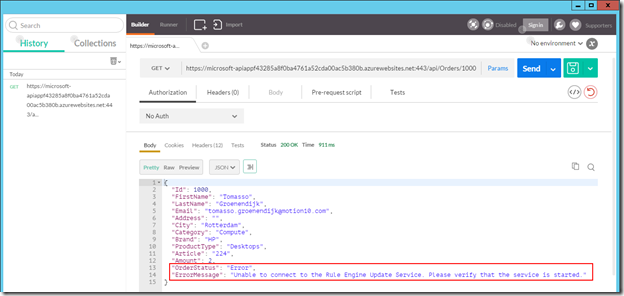
Let’s have a look at the following example where an Order Web API is used inside an organization to process orders. This Web API must also be exposed to external customers to show the status of an order but if an error occurs in the Web API or in a background process, the OrderStatus property must be modified that the order is still in progress and the ErrorMessage property with the error must not be shown to the customers. Furthermore the output of the Web API must be in XML instead of JSON.
The following steps in Sentinet are necessary to make it work:
- Add the REST service (or API) to the the Sentinet Repository
- Create a Virtual Service
- Add custom Pipeline Processing
- Test the Virtual REST Service
Sentinet makes it really easy to modify the response of a Web API. You only have to create a Virtual Service in front of it and add custom Pipeline Processing! Especially if you are already familiar with XPATH and XSLT, the example above doesn’t take long to implement.
Download:
Sentinet version 4.5
by community-syndication | Feb 7, 2016 | BizTalk Community Blogs via Syndication
For the past few months, I got hooked up with BizTalk360 and isolated myself from any deep technology learning. Now BizTalk360 version 8.0 is out of my way the team is kind of settled down, I thought it’s time to look deep into some of the technology areas I was intending to learn for some […]
The post Understand Azure Event Hubs appeared first on BizTalk360 Blog.
Blog Post by: Saravana Kumar
by community-syndication | Jan 28, 2016 | BizTalk Community Blogs via Syndication
After the holiday season, the Azure Logic Apps team were back with their monthly Google Hangout session – the seventhin the series – on January 28, 2015. This was quite an interesting session with lots of updates on the new features that were built over the last couple of months. We recommend you to read […]
The post Azure Logic Apps Monthly Update – January 2016 appeared first on BizTalk360 Blog.
Blog Post by: Sriram Hariharan

by community-syndication | Jan 27, 2016 | BizTalk Community Blogs via Syndication
It’s always good to analyze code performed by others, please do not consider this a criticism, it is not my intention. Doing that you will, compare technics, learn new things, noted and we become aware of how some transformation rules are made inside the maps and sometimes, most often when things are done in the […]
Blog Post by: Sandro Pereira
by community-syndication | Jan 27, 2016 | BizTalk Community Blogs via Syndication
BizTalk360 version 8.0 is almost there! Make sure you get on the list for the launch webinar (Europe or US). We’ve been working on BizTalk360 8.0 for nearly 14 months now. 9 developers, 2 UI/UX designers, 2 document writers, and 5 QA people. We spent over 30,000 man hours into BizTalk360 version 8.0. Based on […]
The post BizTalk360 Version 8.0 Will Change the Way You Think About BizTalk – Again! appeared first on BizTalk360 Blog.
Blog Post by: Saravana Kumar
by community-syndication | Jan 26, 2016 | BizTalk Community Blogs via Syndication
Our team is getting matured in terms of experience and composition, so as our flagship product – BizTalk360. We have added new features, improved existing features, and giving a complete face lift in terms of UI/UX with version 8.0. We are also identifying existing issues in the productthrough our QA practice and most importantly by […]
The post We Are Going Agile! appeared first on BizTalk360 Blog.
Blog Post by: Arunkumar Kumaresan

by community-syndication | Jan 25, 2016 | BizTalk Community Blogs via Syndication
Finally, something that many community members have been requesting me to publish is here! I already made this manual several months ago, however, for several reasons (speaking engagements, publishing other content and so on) I have been delaying its publication. But I have offered this same guide to all my customers. There are many things […]
Blog Post by: Sandro Pereira