by community-syndication | Jan 29, 2012 | BizTalk Community Blogs via Syndication
You have installed BizTalk?
You have installed SQL server?
You have installed .NET4.0 ?
Everything is fine.
Then you reboot, or you restart SQL Server.
Enterprise Single Sign-on Does not want to start. ???
It errors with:
Could not create SSOSQL. To fix the problem, reinstall SSO or try ‘regasm SSOSQL.dll’ from a Visual Studio command prompt.Error Code: 0x80131700
OR
Windows could not start the Enterprise Single Sign-On Service service on Local Computer.
Error 0x80131700: 0x80131700
OR you are getting:
Creation of Adapter FILE Configuration Store Entries failed.
An Error occurred while attempting to access the SSO database.
The problem is .NET 4 does something to break SSO.
This issue occurs after installing .NET Framework 4.0. The registration of the assembly used by ENTSSO to access SQL Server (SSOSQL.dll) does not specify the correct version of the .NET Framework. When .NET Framework 4.0 is installed, the assembly will try to use the newer framework and then fail to load
DO NOT do what it says in the event log it will NOT work fully.
The fix is: http://support.microsoft.com/kb/2252691
However you need to BE SURE you do it correctly.
Is your environment 64bit? Most are these days. Did you install 64bit SSO?
Is it in:
64bit: C:\Program Files\Common Files\Enterprise Single Sign-On
32Bit: C:\Program Files (x86)\Common Files\Enterprise Single Sign-On
If you have 64bit, follow the 64BIT instructions ONLY
1. Open a command window
2. Go to C:\Windows\Microsoft.NET\Framework64\v2.0.50727
3. Type each of the following and hit ENTER
32bit: regasm “C:\Program Files\Common Files\Enterprise Single Sign-On\win32\ssosql.dll”
64bit: regasm “C:\Program Files\Common Files\Enterprise Single Sign-On\ssosql.dll”
Note On a 64-bit server, regasm will need to be run for both the 32-bit and 64-bit versions of ssosql.dll.
Do both of these steps and you day will be brighter.
by community-syndication | Jan 28, 2012 | BizTalk Community Blogs via Syndication
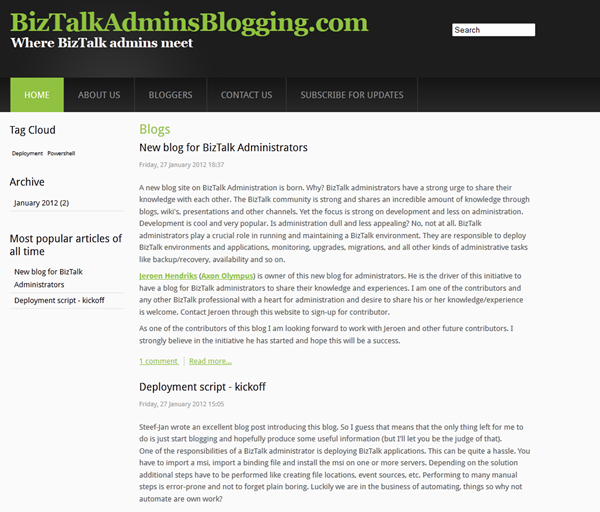
There is a new BizTalk blog. Another one, yes targeted for BizTalk administrators. Why? There are many blogs out there. Yet most of them are focused on the developer. There is not much on BizTalk administrative topics nor one blog where BizTalk administrators share their knowledge, and experience between each other and with the community. Jeroen Hendriks from Axon Olympus started an initiative to create a blog for BizTalk professionals with a heart for managing BizTalk. He talked this through with me sharing some thoughts and a game plan. We took from there and blog is live now!
You can join as contributor by contacting Jeroen (administrator and owner) through Contact Us. Currently besides me and Jeroen, two more professionals from the field joined: Tord Glad Nordahl and Howard S. Edidin. Probably more BizTalk professionals will join over time. I hope many will contribute and even more will read this blog.
Enjoy.
by community-syndication | Jan 25, 2012 | BizTalk Community Blogs via Syndication
A couple of weeks ago I wrote a blog post for the Official blog of TechNet Wiki with the topic “Wiki-Ninjas on Technology: BizTalk Server”. In that blog post I wrote a story on contributions of the community and Microsoft employees for the TechNet Wiki. Mid December there were little of 40 BizTalk Wiki Articles and over a month’s time it has grown to little over 70. That is a tremendous growth of articles (around 30). It show increasing popularity of the TechNet Wiki as a channel of information on Microsoft technology and products.
The newly added articles on BizTalk Server have been written by myself, Tord Glad Nordahl, Sandro Pereira, Howard S. Edidin, and Mick Badran. All these articles (existing and new) are being improved every day by people mentioned here and others (Microsoft employees and the community). I expect the number will grow over time to over 100+ articles as more community members will probably join.
With the wealth of information on TechNet Wiki, MSDN and other Microsoft channels combined you can fully leverage the BizTalk Server platform. You can reach all the BizTalk related wiki articles through BizTalk Server Resources on the TechNet Wiki article.
Enjoy reading any of the articles and hopefully you will find them useful.
by community-syndication | Jan 22, 2012 | BizTalk Community Blogs via Syndication
| FABRIKAM is a manufacturing company who has CONTOSO as one of its resellers. FABRIKAM would like to get their sales number thru CONTOSO channel, but CONTOSO does not want to give access to their own database and they don’t have the time to create an application to expose this data. |
FABRIKAM est une entreprise manufacturi%u00e8re qui a parmi ses revendeurs CONTOSO. FABRIKAM voudrait avoir ses chiffres de vente pour ce qui concerne CONTOSO, mais CONTOSO ne veut pas donner acc%u00e8s %u00e0 sa base de donn%u00e9es et n’a pas le temps de cr%u00e9er une application pour exposer ces donn%u00e9es. |
| CONTOSO is willing to put data they have about FABRIKAM products they sell in a CONTOSO database, but CONTOSO cannot expose their database to the Internet either. So they decide to rent a database on the Internet. |
CONTOSO veut bien en revanche pousser les donn%u00e9es de vente de FABRIKAM, mais CONTOSO ne peut pas non plus exposer ses propres bases de donn%u00e9es sur Internet. Ils d%u00e9cident donc de louer une base de donn%u00e9es sur Internet. |
| SQL Azure is a perfect fit for this. There is no hardware, infrastructure or other high availability mechanisms to worry about, SQL Azure is a relational cloud PaaS level database as a service (note from the author: think I put quite a few keywords in that sentence!!!). |
SQL Azure correspond parfaitement. On n’a pas besoin de s’occuper de mat%u00e9riel, d’infrastructure, ou autre m%u00e9canismes de haute disponibilit%u00e9, SQL Azure est une base de donn%u00e9es relationnelle en tant que service dans le nuage de niveau PaaS (NDLR: je pense que j’ai mis un paquet de mots clefs, l%u00e0!!!). |
| CONTOSO will be able to push filtered data (only FABRIKAM sales data) to a database outside their firewall, and FABRIKAM will be able to query that data with SQL or build reports with SQL Azure Reporting Services. |
CONTOSO va pouvoir pousser les donn%u00e9es filtr%u00e9es (uniquement les vente de FABRIKAM) vers une base de donn%u00e9es en dehors de leur pare-feu, et FABRIKAM pourra requ%u00eater ces donn%u00e9es en SQL ou m%u00eame cr%u00e9er des rapport avec SQL Azure Reporting Services. |
| FABRIKAM creates %u00e0 SQL Azure server (let’s call it axcdlm02uz.database.windows.net). In this server, they create a SQL Azure database named salesthrucontoso with a dedicated login salesthrucontosodbo. |
FABRIKAM cr%u00e9e un serveur SQL Azure (Appelons-le axcdlm02uz.database.windows.net). Dans ce serveur, ils cr%u00e9ent une base de donn%u00e9es SQL Azure appel%u00e9e salesthrucontoso avec un compte d%u00e9di%u00e9 salesthrucontosodbo. |
| CONTOSO has communicated to FABRIKAM the range of IP adddresses they use to go to the salesthrucontoso database, so that FABRIKAM can configure SQL Azure server firewall rules |
CONTOSO avait communiqu%u00e9 %u00e0 FABRIKAM les plages d’adresses IP qu’ils utiliseront pour se connecter %u00e0 la base salesthrucontoso, de fa%u00e7on %u00e0 ce que FABRIKAM puisse configurer les r%u00e8gles de pare-feu du serveur SQL Azure. |
In return, FABRIKAM communicates to CONTOSO all the details to connect to the SQL Azure database:
– server name: axcdlm02uz.database.windows.net
– database name: salesthrucontoso
– login: salesthrucontosodbo and its password |
En retour, FABRIKAM communique %u00e0 CONTOSO tous les d%u00e9tails pour se connecter %u00e0 la base SQL Azure:
– nom de serveur : axcdlm02uz.database.windows.net
– nom de la base: salesthrucontoso
– compte: salesthrucontosodbo and its password |
| As SQL Azure uses the same tabular data stream (TDS) protocol as SQL Server, CONTOSO can use SQL Server drivers to access SQL Azure. They do it thru their usual ETL(*) tool. So CONTOSO can easily build an interface from their database (SQL Server, or Oracle, DB2, or any other vendor’s database) towards the cloud database and run it everyday so that FABRIKAM easily access their data without any risk to compromise their own internal databases. |
Comme SQL Azure utilise le m%u00eame protocole TDS que SQL Server, CONTOSO peut utiliser pour acc%u00e9der %u00e0 SQL Azure les m%u00eame pilotes d’acc%u00e8s que ceux d’SQL Server. Ils le font %u00e0 travers leur ETL habituel. CONTOSO peut ainsi facilement construire une interface depuis leur base de donn%u00e9es (SQL Server, Oracle, DB2, ou autre) %u00e0 destination de la base de donn%u00e9es en nuage et ex%u00e9cuter cette interface quotidiennement pour que FABRIKAM puisse acc%u00e9der facilement %u00e0 ses donn%u00e9es sans risque de compromettre ses propores bases de donn%u00e9es internes. |
(*) ETL = Extract Transform Load.
As an example, SQL Server’s ETL is SSIS (SQL Server Integration Services). |
(*) ETL = Extract Transform Load.
Par exemple, l’ETL d’SQL Server est SSIS (SQL Server Integration Services). |
| Please refer to this post that shows how to connect to SQL Azure with SSIS. |
Voir ce billet qui montre comment se connecter %u00e0 SQL Azure depuis SSIS. |
Benjamin
Blog Post by: Benjamin GUINEBERTIERE
by community-syndication | Jan 21, 2012 | BizTalk Community Blogs via Syndication
Since this week BizTalk Processing Monitor is available as a Public Beta. It can be obtained here.
Why use BizTalk Processing Monitor
Depending on how you setup BizTalk Processing Monitor, it helps you, amongst others, with the following needs:
- Monitoring and notification of any message flow interruptions
- Get insight in how the BizTalk solution is setup
- Adds value when doing stress or load tests
- Informs you when your BizTalk system is throttling and why
- Informs you in how many messages (in number and in KB, MB or GB) are processed
- Informs you what kind of messages (Message types) are processed
- Informs you about transmission failures
Features
The most important features of BizTalk Processing Monitor are:
- Message flow monitoring with notifications
- Throttling monitoring with notifications
- Singleton Backlog monitoring
- Support for multiple environments
- Integration with other monitoring tools
Documentation
The following documentation is available:
- Getting started with BizTalk Processing Monitor (download)
- How to use the Traffic Light Monitoring (download)
- Overview Keyboard Shortcuts (download)
- Exporting and importing Diagrams (download)
by community-syndication | Jan 20, 2012 | BizTalk Community Blogs via Syndication
| You have a SQL Azure Server. You can access the databases thru the administrator login you specified while creating the SQL Azure Server. |
On dispose d’un serveur SQL Azure. On peut y acc%u00e9der avec le compte administrateur qui a %u00e9t%u00e9 sp%u00e9cifi%u00e9 lors de la cr%u00e9ation du serveur SQL Azure. |
In the SQL Azure server, you have the following databases:
– master
– DB001
– DB002 |
Dans le serveur SQL Azure, on dispose des bases suivantes:
– master
– DB001
– DB002 |
| You would like to create a SQL Azure login that has fully access to DB001 but no access to the other databases. |
On souhaite cr%u00e9er un compte d’acc%u00e8s %u00e0 SQL Azure qui est administrateur de la base DB001 mais n’a pas acc%u00e8s aux autres bases. |
| Here is how to do that. |
Voici comment proc%u00e9der. |
| In the Windows Azure management portal, select the master database and click manage. |
Dans le portail d’administration de Windows Azure, s%u00e9lectionner la base master et cliquer sur Manage. |
| connect with the SQL Azure Administrator |
se connecter avec l’administrateur SQL Azure |
| Create the new login by entering the following statement in a new Query:
create login DB001Admin with password = ‘IYtfidgu18’;
go
(replace IYtfidgu18 by a password you choose)
then click Run |
cr%u00e9er le nouveau compte en entrant la requ%u00eate suivante dans une nouvelle “Query”:
create login DB001Admin with password = ‘IYtfidgu18’;
go
(remplacer IYtfidgu18 par nun autre mot de passe qu’on choisira)
puis cliquer sur Run |
| Close the browser tab and go back to the Windows Azure management portal. Select DB001 database, click manage |
Fermer l’onglet du navigateur et aller de nouveau dans le portail Windows Azure. S%u00e9lectionner la base DB001 et cliquer sur manage. |
| connect with the SQL Azure Server admin login (the same you used to connect to master) and create a new query |
se connecter avec le compte d’administration du serveur SQL Azure (le m%u00eame qu’on a utilis%u00e9 pour se connecter %u00e0 la base master) pus cr%u00e9er une nouvelle “query” |
| type the following statement:
CREATE USER DB001Admin
FOR LOGIN DB001Admin
WITH DEFAULT_SCHEMA = dbo
GO
— Add user to the database owner role
EXEC sp_addrolemember N’db_owner’, N’DB001Admin’
GO
and Run the query |
Taper la requ%u00eate suivante:
CREATE USER DB001Admin
FOR LOGIN DB001Admin
WITH DEFAULT_SCHEMA = dbo
GO
— Add user to the database owner role
EXEC sp_addrolemember N’db_owner’, N’DB001Admin’
GO
et cliquer sur Run |
| DB001Admin with a password of IYtfidgu18 (or whatever you chose) is now a valid login for DB001 database, and only that database. |
DB001Admin avec le mot de passe IYtfidgu18 (ou ce qu’on a choisi %u00e0 la place) est maintenant un compte valable pour la base DB001, et seulement pour cette base |
Benjamin
| PS: with contained databases, there might also be ways to have database users fully defined in the database, but this is not the case yet in SQL Azure. |
PS: Avec les bases de donn%u00e9es contenues, il pourrait y avoir %u00e0 l’avenir un compte directement h%u00e9berg%u00e9 au niveau de la base elle-m%u00eame, mais ce n’est pas le cas actuellement dans SQL Azure. |
Blog Post by: Benjamin GUINEBERTIERE
by community-syndication | Jan 19, 2012 | BizTalk Community Blogs via Syndication
It is stupid to compare those two beasts.
BizTalk Server is a pricey, huge development and run-time system, it includes tons of the tools, supports tons of protocols and systems. It works for very specialized middle ware integration stack. It integrates big and complex systems as SAP, CRM, Oracle and intermediates many protocols and standards as SOAP, EDI, SWIFT, FTP, tons of them.
It is a messaging system.
ZeroMQ is a low-level, wire-levelprotocol, the same level as TCP. It has ultra-simple API. It isimplemented as a library for dozens languages as C#, Java, Python, PHP, C++, COBOL, Ada, Haskel, F#, Erlang, etc. It works in the most OS: Windows, Linux, QNX… It is free and works under open-source license.
It is a messaging system.
BizTalk implements many messaging exchange patterns: Request-Response, Pub-Sub, Queue, Message Broker, Router, Convoy.
0MQ implements the same: Request-Response, Pub-Sub, Pub-Sub with Topics, Queue, Message Broker, Router…
BizTalk development stack is compounded of several editors. BizTalk run-time stack includes several services on top of SQL Server, several tools, and tons of dll-s and SQL code.
0MQ is just a library, a dll. Library per language, per OS.
…
Why I feel so comfortable with this 0MQ?
Why I think it is a serious choice to do messaging in my real-life messaging?
Do I want to abandon the comfort of a big track to ride almost bare-bone wheels?
by community-syndication | Jan 18, 2012 | BizTalk Community Blogs via Syndication
BizTalk MVP Steef-Jan Wiggers has written some valuable BizTalk articles on the TechNet Wiki. It is great to have community contributions!
by community-syndication | Jan 18, 2012 | BizTalk Community Blogs via Syndication
I was recently asked if I could help move a virtual machine that had been setup and running in VirtualPC and move it to run under Hyper-V.
The answer is yes it can be done. Movement from Hyper-V to VirtualPC is not as easy (and many times not possible) but there are a number of blog posts on this topic already so I won’t cover that here. One of the reasons that it is easier to move from VirtualPC to Hyper-V is that VirtualPC is only 32 bit.
There are a number of steps that must be occur for a successful move.
First, start by uninstalling the integration components while the virtual machine is running in VirtualPC. You can do this through the Add/Remove programs feature in Windows in the Virtual Machine. The Hyper-V drivers and additions will not install over the VirtualPC additions and that is why you must remove them first.
Next, move the vhd file to a location where it can be accessed by your Hyper-V instance. Walk through the wizard to create a new virtual machine but when prompted to create a new drive or select and existing drive, pick select an existing drive and point it to your .vhd file.
Finally, once you have the virtual machine configured in your Hyper-V instance then start the machine. Go through the Settings Menu and install the Hyper-V additions. Once you do this, the Hyper-V additions installs a new HAL as well as new drivers for network, video and sound devices. The process of installing the new HAL is one of the reasons that a Hyper-V image is no longer portable back to VirtualPC.
However, at this point, you might think that everything is done and you are ready to use the virtual machine. Most of the time this is correct, however, there are situations that require additional steps. You will know that you have additional steps if your integration components aren’t working – you can tell really quickly if your mouse doesn’t move outside of the virtual machine.
You are more likely to have this occur if your virtual machine is running versions of Windows prior to Vista or if you are running Windows Server 2008 as these do not have the ability to dynamically detect the HAL at boot time.
So, to fix this run MSConfig.exe – by clicking the Start menu, selecting Run and typing msconfig. Once the utility launches, click on the Boot tab and click the Advanced Options Button. When the BOOT Advanced Options dialog appears, click the Detect HAL checkbox and hit ok. Restart the virtual machine and you should be good to go!
Blog Post by: Stephen Kaufman
by community-syndication | Jan 17, 2012 | BizTalk Community Blogs via Syndication
Tellago’s technology update series keeps rocking. Now is time to talk about Kinect for business applications. Yes, you heard that right. Next Thursday, we will be hosting a webinar to discuss how the upcoming Kinect for Windows can disrupt the enterprise…(read more)
Blog Post by: gsusx

