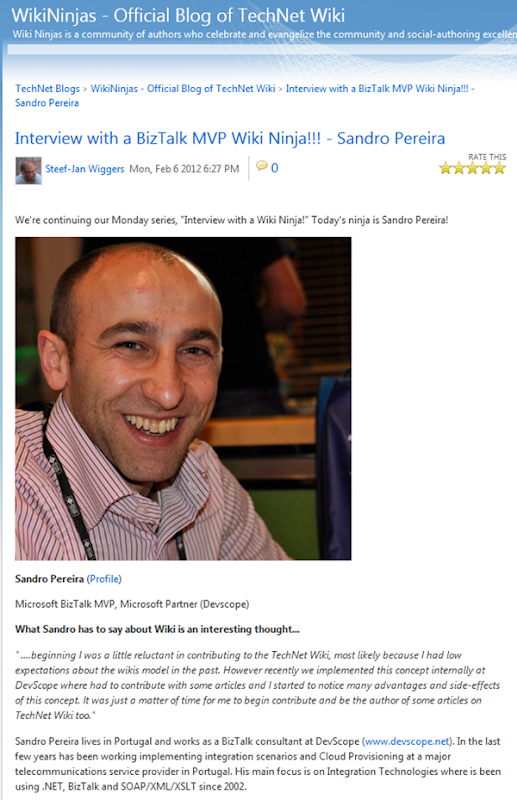
Interview with a BizTalk MVP Wiki Ninja!!! – Sandro Pereira
I have done an interview with fellow BizTalk MVP Sandro. You can read it here.  Sandro is one of the technical reviewers of my forthcoming BizTalk Server 2010 Cookbook.
Enjoy the story!

I have done an interview with fellow BizTalk MVP Sandro. You can read it here. Sandro is one of the technical reviewers of my forthcoming BizTalk Server 2010 Cookbook.
Enjoy the story!
SQL Server, particularly its relational database engine, matured quite some time ago. So the “significance” of every new release over recent years can be viewed-in some ways-as relatively nominal. The last watershed release of the product was actually SQL Server 2005, which was when the relational engine (that, for years, defined SQL Server) stopped occupying […]
Blog Post by: Lenni Lobel
BizTalkadminsblogging has had a tremendous start. Within a week and a half 13 posts already and this will be number 14. An average almost two blog posts a day. This reflects the high demand for BizTalk administration related information, the need for sharing it and desire to create more exposure for this aspect of BizTalk Server. Jeroen and Joris have done an excellent job setting up this blog site, running and maintaining it. The recent posts have touched topics like PowerShell, Microsoft Operation Framework, and so on.
There is also a TechNet Wiki, where some of the bloggers and others have written articles on BizTalk Administration. I, Tord G. Nordahl, Sandro Pereira, Howard S. Edidin and Microsoft have written the following articles that are related to BizTalk administration:
As you can see that is quite an extensive list (20+ articles).
In the near future Jeroen and I want to organize an event with the Dutch BizTalk User Group that is focused on BizTalk administration. A similar event has already taken place last week. The Ordina BizTalk Innovation Event with topic Administration and Monitoring has been a great success. More than 40 attendees were present at the event. This shows the growing commitment of the community towards BizTalk administration.
Writing these stories so far on community members has been a great experience and I received a lot of positive feedback. The stories continue with the fourth story in the BizTalk Community Series that brings active BizTalk community members to the foreground. The story today is on Abhijit Mahato. He is a Microsoft Community Contributor since 2011, a blogger and an active BizTalk forum member.
Abhijit is married to his lovely wife Laxmi, and they are expecting their first child in March 2012. His family lives in Kolkata, also known as “The City of Joy, City of Palaces, the Cultural capital of India”, located in the eastern part of India.
Abhijit currently works as a Senior BizTalk Consultant at Capgemini, one of the world’s largest IT Services, Consulting and Outsourcing companies with over 115,000 people operating in 40 countries. His job involves working with customers on integration projects especially using BizTalk Server, WCF (.Net) and SQL Server (SSIS). He loves to design, architect, and develop BizTalk Solution. Also he likes to install and configure BizTalk Server.
He had his first integration project using BizTalk Server 2004 in the year 2005. His senior project manager and customer highly appreciated his work and effort. This motivated him to do more integration projects. Since then Abhijit has worked on many large and complex integration projects with BizTalk.
Abhijit feels that the best thing about working in any integration project is learning BizTalk (Integration product) and also the opportunity to learn other technologies like SAP, EDI, MS CRM and so on. What he likes the most about BizTalk Server product and I quote is:
“It is currently one of the most mature, reliable and stable integration server in the industry.”
Furthermore he describes the product in the following manner:
“It has got a huge number of “out of the box” adapters; and there is a long list of other features like message persistence, recovery in case of failure in communication, correlation, long running transactions, monitoring of business processes, complex mapping, and the ESB. Furthermore BizTalk contains a number of tools like BRE, BAM, SSO, BizTalk Admin console and so on enhancing productivity.”
Finally Abhijit is very excited about Microsoft’s recent announcement of the forthcoming release of BizTalk Server 2010 R2, and is looking forward to exploring and working with this new release.
In his spare time, Abhijit loves to spend time with his family and friends, take participation in various quiz competitions and enjoy solving mathematical and logical puzzles. Besides that he loves reading technical blogs on new Microsoft technologies like Windows AppFabric,Windows Workflow Foundation and Windows Azure. Finally he also spends time in contributing to MSDN BizTalk forums and write blogs posts about BizTalk issues and related topics.
Abhijit would like to thank people for reading his posts and appreciates if they can also provide feedback. This will keep him motivated to continue to contribute. He feels this will also improve the online BizTalk community experience for others.
A final quote from Abhijit:
“I believe that one doesn’t ever get tired until he makes the last attempt and doesn’t ever make the last attempt until he is successful.”
I would like to thank Abhijit for his contributions to the community and the time he took to have a chat with me.
After ranting on a couple of emails today about a particular Azure issue, I’ve popped
up a couple of features to vote on.
http://www.mygreatwindowsazureidea.com/forums/34192-windows-azure-feature-voting
Add yours now
Blog Post by: Mick Badran
With the ever changing Azure space, chances are you’ve had services working a treat
and then one day just fail.
“Can’t connect” etc.
This has happened to me twice this week – with over 14 IP Address ranges defined in
the client’s firewall rules.
It appears that my service bus services were spun up or assigned another IP outside
the ’allowed range’.
It gets frustrating at times as generally the process goes as follows:
1) fill out a form to request firewall changes. Include as much detail as possible.
2) hand to the client and they delegate to their security/ops team to implement.
3) confirmation comes back.
4) start up ServiceBus service
5) could work?? may fail – due to *another* IP address allocated in Windows Azure
not on the ’allowed list of ranges’.
6) fill out another form asking for another IP Address
By the 3rd iteration of this process it all is beginning to look very unprofessional.
(in comparison, these guys are used to tasks such as ’Access to SQL Server XXX – here’s
the ports, there’s the machine and done’. Azure on the other hand – ’What IP Addresses
do you need? What ports?’ we need better information in this area)
Anyway – here’s the most update to date list 10/02/2011.
http://blogs.msdn.com/b/windowsazureappfabricannounce/archive/2010/01/28/additional-data-centers-for-windows-azure-platform-appfabric.aspx
Blog Post by: Mick Badran
Thanks to everybody who attended our latest Tellago Technology Update webinar: “Rocking the Enterprise with Kinect”. We truly enjoyed the enthusiastic audience and the insightful feedback. You can find the slide-deck below and watch the recording at https…(read more)
Blog Post by: gsusx

It is amazing how time flies! It seems like just yesterday my book on Applied Architecture Patterns hit the shelves, but that was almost a year and a half ago now.
A few months ago, a new BizTalk patterns book written by fellow BizTalk MVP Dan Rosanova has been released. It is called Microsoft BizTalk Server 2010 Patterns published by Packet Publishing.
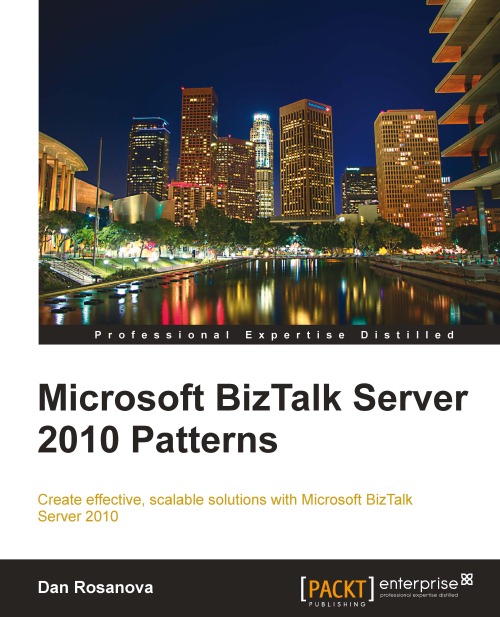
What separates this book from other BizTalk books is it covers both BizTalk Basics & Patterns and a detailed overview of a real-life BizTalk Solution.
This book is available from Packet and Amazon. Currently, the Amazon Kindle version is available for around $18. This will be the best $18 you spend toward bettering your BizTalk knowledge!
Thanks to Packet Publishing I have a few copies of the book to give away!
This week I am going to give away a copy to a random comment on this blog post. Simply post a comment below (make sure you are a registered BizTalkGurus.com user or you include your email address so I can contact you if you win) about a BizTalk Pattern you use today or about Why You Need To Learn About BizTalk Patterns. I will pick a random winner from all comments received before the end of the day on Wednesday February 8th Central Time.
I will cover shipping of the book to any address the USPS delivers to worldwide.
If you do not win this time, watch for more upcoming ways to win!
| The goal of this blog post is to show that it is as easy with SQL Azure as with SQL Server to push data with SSIS. | Le but de ce billet est de montrer qu’il est aussi simple de pousser des donn%u00e9es avec SSIS vers SQL Azure que vers SQL Server. |
| In this sample, let’s use SQL Server 2008 R2, which is the latest SQL Server version in production (1). | Dans cet exemple, utilisons SQL Server 2008 R2, qui est la derni%u00e8re version sortie de SQL Server (1). |
| The scenario is to push some data from SQL Server 2008 R2 on premises to SQL Azure in the cloud. This is done with SQL Server 2008 R2 Integration Services (SSIS). | Le sc%u00e9nario est de pousser des donn%u00e9es venant de SQL Server 2008 R2, %u00e0 demeure, vers SQL Azure, en nuage, et ce avec SQL Server 2008 R2 Integration Services (SSIS). |
| If and when starting from an empty SQL Azure database, in order to create the schema, one would typically use SQL Azure Migration Wizard which has an option to generate schema only. | Dans le cas o%u00f9 l’on part d’une base de donn%u00e9es SQL Azure vide, de fa%u00e7on %u00e0 cr%u00e9er le sch%u00e9ma, on utiliserait typiquement le SQL Azure Migration Wizard qui a une option pour ne g%u00e9n%u00e9rer que le sch%u00e9ma. |
| Here are the steps to create a very simple SSIS package and execute it (in debug mode): | Voici les %u00e9tapes pour cr%u00e9er un package SSIS tr%u00e8s simple et l’ex%u00e9cuter (en mode debug): |
| NB: the SSIS package needs an outbound access to port 1433 in order to connect to SQL Azure. The SQL Azure firewall must also have been opened for the public IP address the SSIS package will use to access the Internet. | NB: Le package SSIS a besoin d’un acc%u00e8s au port 1433 en sortie vers Internet pour se connecter %u00e0 SQL Azure. Le pare-feu SQL Azure doit %u00eatre ouvert pour l’adresse IP publique avec laquelle le package SSIS sort sur Internet. |
| Here is a synopsis of what we just did. Data was copied from SQL Server 2008 R2 to SQL Azure thru SSIS exactly as it would have been from SQL Server to SQL Server. | Voici un r%u00e9capitulatif de ce que nous venons de faire. Les donn%u00e9es ont %u00e9t%u00e9 copi%u00e9es depuis SQL Server 2008 R2 vers SQL Azure %u00e0 travers SSIS exactement comme cela aurait %u00e9t%u00e9 fait de SQL Server %u00e0 SQL Server. |
| This sample SSIS package was very simple, because its goal was to show connectivity is seamless. Of course, in real life this package would contain much more shapes in order to copy several tables, transform data and so on. | Cet exemple de package SSIS est simpliste parce que le but ici est de montrer que la connectivit%u00e9 est ais%u00e9e. Bien s%u00fbr, dans la vraie vie ce package contiendrait bien d’autres %u00e9l%u00e9ments de fa%u00e7on %u00e0 copier plusieurs tables, transformer les donn%u00e9es etc. |
| (1) SQL Server 2012 is in Release Candidate 0 for now so I expect companies to have SQL Server 2008 R2 deployed | (1) SQL Server 2012 est en Release Candidate 0 actuellement et je m’attends donc %u00e0 ce que les entreprises aient d%u00e9ploy%u00e9 SQL Server 2008 R2. |
Blog Post by: Benjamin GUINEBERTIERE
Prepare for the class by making sure that your workstation meets the minimum requirements, have a stable internet connection, a speakerphone or headset, and check for any firewall issues. By double checking everything before class starts you make the morning of class stress free.
Pre-Class Checklist:
When you’re setting up your learning environment, make sure you have an interruption free atmosphere so that you can focus on the class. It is easy to get distracted and miss important information.
Also, it is also helpful to have two computers or monitors to separately view the instructor presentation and remote into the hands-on lab environment.
Every class starts with introductions. Take this opportunity to get to know your instructor, classmates, and to share about yourself as well as how your company is planning to use the technology. The more information the instructor has about your goals and expectations the better they can tailor the class to your needs.
During class, we highly encourage you to ask questions and participate in classroom discussion. The instructor presentation is only part of the training experience, a lot of the best learning happens organically through class participation. Don’t be shy! The instructors want to hear your questions and comments. It makes for a more exciting and interesting class for everyone.
If you have a question that may not be applicable to the entire class, the instructor may suggest that you take the conversation offline. Either way, we want to make sure you walk away with your questions answered.
Don’t be afraid to give feedback throughout the week. If class is moving too fast or slow, you’re struggling with a lab, or experiencing technical difficulties, let us know right away. Please don’t wait until the end of week evaluations to let us know about any concerns. Most of these problems have an easy fix, the sooner we know the sooner we can get you back on track.
You can find most of our trainers and staff on LinkedIn or Facebook! We love to connect with our students and see how things go after training. If you had a great trainer, post your reviews or comments on our community to let other people know. On QuickLearn’s Facebook and LinkedIn pages, we share industry news, technical expertise, as well as special deals and events. We also encourage you to connect with your peers. You never know when those networks will come in handy!
The most important thing is to relax and have fun. Our instructors are so passionate about technology and want to share that excitement with you. Encourage them by laughing at their jokes and throwing out a few of your own.
The QuickLearn team looks forward to having you in class. If there is anything that we can do to make your experience more enjoyable, please let us know!