by community-syndication | Apr 26, 2010 | BizTalk Community Blogs via Syndication
Performance has been one of the more popular topics at the Swedish BizTalk user group, where we’ve had both Darren Jefford and Paolo Salvatori as previous speakers. This event is of a more practical and detailed level, and covers performance considerations from both a setup/configuration perspective as well as from a developer perspective. Ewan and I have been planning this event since mid January, but for various reasons we haven’t been able to do it until now.
Sign up here
BizTalk Server Performance: Best practice
Session #1 – Instrument your BizTalk Server
Optimizing and verifying your BizTalk Server installation is not an easy thing to do. The documentation is good but very extensive. This presentation aims to guide you through the most important operations you need to do in order to boost the performance of BizTalk.
Session #2 – Performance Optimization Patterns
This session will present architectural, design, and development patterns to improve BizTalk processing performance. "Performance" can be expressed by latency and/or throughput, and this session will cover aspects of both. This will include pipeline and orchestration patterns to increase throughput, reduce latency, and reduce memory usage during BizTalk processing. We will also cover the results from BizTalk CAT recent Perf engagements.
Speakers:
Ewan Fairweather
Ewan Fairweather has worked for Microsoft for five years. He currently works as a program manager in the Business Platform Division on the Customer Advisory Team (CAT) working on large scale Integration and OLTP SQL applications. Prior to this, Ewan spent three years working for Microsoft U.K. in the Premier Field Engineering team where he worked with enterprise customers, helping them to maintain and optimize their BizTalk applications. This included working in a dedicated capacity on some of the world's largest BizTalk deployments, predominantly within financial services.
Ewan coauthored the successful Professional BizTalk Server 2006 (Wrox, 2007) and has written many white papers for Microsoft including the "Microsoft BizTalk Server Performance Optimization Guide," which is available on the Microsoft Developers Network (MSDN) Web site. Prior to joining Microsoft, Ewan worked as a Cisco Certified Academy Instructor (CCAI) for a regional training organization, delivering advanced routing and networking courses. Ewan holds a bachelor's degree in computing with management from the University of Leeds. Outside of work, Ewan's hobbies include reading, taking part in as many sports as possible, and regularly going to the gym.
Ewan maintains his blog at http://blogs.msdn.com/ewanf
by community-syndication | Apr 25, 2010 | BizTalk Community Blogs via Syndication
by community-syndication | Apr 24, 2010 | BizTalk Community Blogs via Syndication
Well if you’re cracking on and updating your SharePoint Beta 2 Installs to RTM and
wanting to make it out the door while there’s some daylight leftthen you’re better
than meright now it’s dark! 🙂
Ok – so I figured, no probs just do a stsadm -o addcontentdb and
we’re well on our way, exactly the same from Beta 1 to Beta 2.
This time SharePoint RTM doesn’t want to play. I got this error:
Sequence [Microsoft.SharePoint.Upgrade.SPContentDatabaseSequence]
cannot upgrade
an object [SPContentDatabase Name=WSS_Content_Int2010] whose build
version
[14.0.4536.1000] is too old. Upgrade requires [14.0.4730.1000] or higher.
So as you can see the Version numbers of my Beta2 ContentDB
is close, but RTM is not playing.
I thought I’d take a punt and see what happened:
-
Open up the ContentDB in SQL Management Studio and open up
the Tables folder.
-
Locate the Versions Table (down the bottom).
-
Open the Versions Table in Edit Mode and modify
the Rows which have a Version=14.0.4536.1000 next to them.
-
Simply change the version number to 14.0.4730.1000
-
Save the changes
-
Rerun the stsadm -o addcontentdb command
and bob’s your uncle.
The ContentDB I used here was 18GB in size and all has come up trumps.
This may save you a bit of time and sure it’s a hack, but we’re now in RTM land.
Good luck 🙂
.csharpcode, .csharpcode pre
{
font-size: small;
color: black;
font-family: consolas, “Courier New”, courier, monospace;
background-color: #ffffff;
/*white-space: pre;*/
}
.csharpcode pre { margin: 0em; }
.csharpcode .rem { color: #008000; }
.csharpcode .kwrd { color: #0000ff; }
.csharpcode .str { color: #006080; }
.csharpcode .op { color: #0000c0; }
.csharpcode .preproc { color: #cc6633; }
.csharpcode .asp { background-color: #ffff00; }
.csharpcode .html { color: #800000; }
.csharpcode .attr { color: #ff0000; }
.csharpcode .alt
{
background-color: #f4f4f4;
width: 100%;
margin: 0em;
}
.csharpcode .lnum { color: #606060; }
by community-syndication | Apr 24, 2010 | BizTalk Community Blogs via Syndication
Hi all
As many of you know, I am writing this book on
BizTalk along side some great names of the community.
Anyway, I was just writing about the Scope shape for orchestrations and decided to
go through the documentation of this to see if I missed something. And indeed there
was a small detail I missed, which you can find at http://msdn.microsoft.com/en-us/library/aa560150(BTS.10).aspx –
it states that “You can nest scopes up to 44 levels deep.”
I thought that was a funny number and decided to test it.
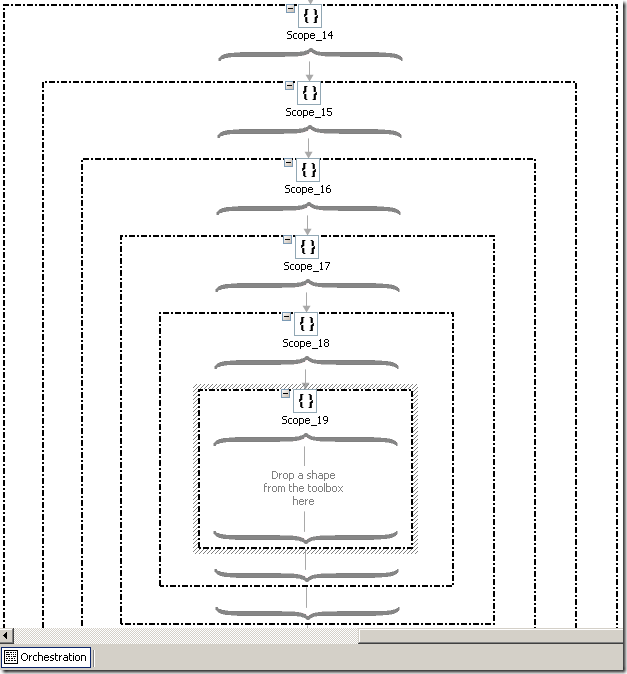
So I started adding Scope shapes and at 19 nested Scope shapes I had this:
which looks just fine. BUT, after adding an expression shape to the content of the
19’th Scope shape and adding the 20’th Scope shape I get this:
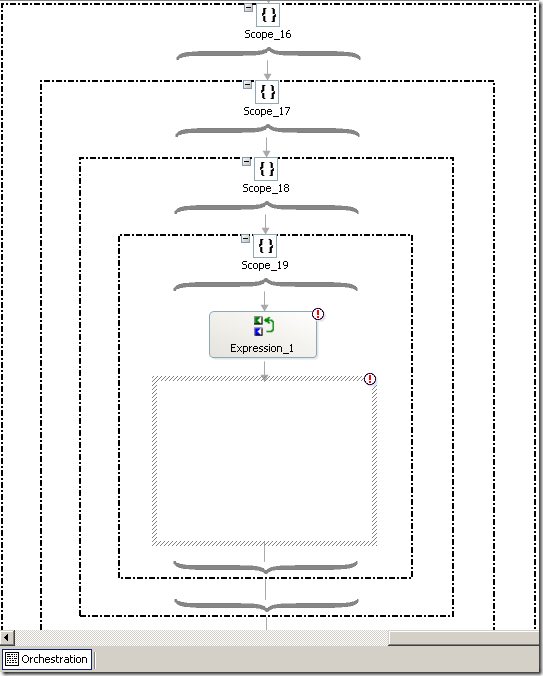
which is not fine.
So basically, the orchestration designer will not show you the Scopes at level 20
or deeper. You can still add them, though – and it compiles just fine even at 47 levels
of Scope shapes, actually – haven’t bothered trying more levels than that.
Now, some of you (all of you?) may sit and wonder: Come on, how probable is it that
anyone will do that? An I completely agree – if you get above 10 levels of nested
Scope shapes you are most definitely going in the wrong direction 🙂 I just wanted
to see if the documentation was correct on this.
I hope this will help someone, but it probably won’t 🙂
—
eliasen
by community-syndication | Apr 23, 2010 | BizTalk Community Blogs via Syndication
I’ve just spent the past couple of days looking into the ’upgrade’ process and I’ve
come out the other side. Here’s a quick jot down of what I encountered
-
Environment: Single WFE (Win2K8 R2 x64) and a separate SQL 2008 x64
‘backend’. Currently running SP2010 Beta2 with content databases around 13GB
-
I haven’t uninstalled any of the existing SP2010 beta 2 bits – this is a VM and I
have a handy backup, so in case of emergency break glass was my plan b.
-
Launched Setup.bat – up came the intro screen and I selected Install
PreReqs. In my case the prereqs failed their first installed with it grumbling
about the IIS Web Role not present (but this was an existing SP2010 server, so obviously
the Web Role was present and correctly running).
Ran the PreReqs again and all was fine 🙂
-
Setup.exe – launched the product, provided a license key and we ran
all the way through no problems. Interestingly thRege installer didn’t mention anything
like “I found a previous version of SharePoint do you want to ”
-
Configuration Wizard – this is where my trouble started.
-
As the Wizard was launching, it appeared not to be able to recognise the
fact that we were already in a farm. It was like we were running on a machine, where
the DB Server wasn’t accessible.
I ’removed’ the Server from the Farm (which were the only options in the Wizard for
me)
-
Re-ran the Wizard Take#2, supplied the details at the beginning,
Server Farm etc etc and sent it on it’s way.
-
The Wizard ran up to step 3 of 10 (where it configures the Farm DB
+ creates the SharePoint Web Services IIS Site) and then FAILED.
What I noticed that the FarmDB was created successfully, but the IIS side was failing.
(The error logs spoke about a socket based error – which I think was unrelated)
-
Tweaking, rerunning the Wizard didn’t fix thingsso here’s my fix.
-
I also uninstalled SP2010 RTM a few times and reinstalled, but same error
-
The fix –
-
Delete the \14 hive
-
Delete the Registry Key (and all under it) HKLM\Software\Microsoft\Shared
Tools\Web Server Extensions
-
Uninstall/reinstall the IIS Web Role on the Server
-
Repair the SharePoint install from rerunning Setup.exe –
repair option. (you might be able to leave this step out, but I deleted the
Web Server Extensions key after I installed SP2010, so I needed it to be rewritten)
-
Run Config Wizard
-
Upgrade any Content DBs you want to mount – through stsadm
-o addcontentdb or Mount-ContentDB (powershell)
>
I’m sure you’ll be able to shorten this list of steps when you upgrade, but I’ve got
to get on and configure this environment.
Have fun,
Mick.

by community-syndication | Apr 23, 2010 | BizTalk Community Blogs via Syndication
If you are using SharePoint 2010 RTM and get the following error:
Access denied by Business Data Connectivity.

It likely is because by default on installation the BCS service doesn’t have any permissions
enabled at all.
If you go to your central administration site and manage the BCS service and look
at Metadata Store permissions you’ll see that it is empty

Obviously in a production environment you want to be very deliberate about setting
the permissions, but when you are developing you just want your code to work 🙂
Here’s a PowerShell script that will set the permissions on the Metadata store (and
all BCS models deployed after you run the script) to all windows users. Again,
not something I recommend for a production machine – but something that is fine for
your development machine.
 1: $adminURL="HKLM:\SOFTWARE\Microsoft\Shared
Tools\Web Server Extensions\14.0\WSS\"
 2: $key
= Get-Item $adminURL
 3: $adminurl
= $key.GetValue(">CentralAdministrationURL")
 4: Write-Host
">Central admin site "+ $adminurl
 5: Add-pssnapin
Microsoft.SharePoint.PowerShell -ErrorAction SilentlyContinue
6:
 7: Write-Host
Updating BCS persmissions
 8: $obj
= Get-SPBusinessDataCatalogMetadataObject -BdcObjectType Catalog -ServiceContext $adminurl
 9: $right
= (1+2+0x10+4)
 10: $claim
= New-SPClaimsPrincipal -Identity 'c:0!.s|windows' -IdentityType
EncodedClaim
 11: Grant-SPBusinessDataCatalogMetadataObject
-Identity $obj -Principal $claim -Right $right
 12: Copy-SPBusinessDataCatalogAclToChildren
-MetadataObject $obj
 13: Write-Host
Complete

Check out my new book on REST.

by community-syndication | Apr 23, 2010 | BizTalk Community Blogs via Syndication
Do you enjoy trying to find free conference rooms for meetings? If you do, you’re probably a psycho who eats puppies. I work at the headquarter campus of a large company with dozens upon dozens of buildings. Apparently the sole function of my company is to hold meetings since it’s easier to find Hoffa’s body […]
by community-syndication | Apr 23, 2010 | BizTalk Community Blogs via Syndication
by community-syndication | Apr 23, 2010 | BizTalk Community Blogs via Syndication
A recent bug found in BTARN processing can cause stray text to appear in response messages. The issue is a temporary variable not being cleared. Here is a sample from a recent case.
<ActionIdentity>
<GlobalBusinessActionCode>Formally confirms the status of line item(s) in a Purchase Order. A Purchase Order line item may have one of the following states: accepted, rejected, or pending.</GlobalBusinessActionCode>
<InstanceIdentifier>md.o1loqohc.efs41f.</InstanceIdentifier>
<VersionIdentifier>V02.00</VersionIdentifier>
</ActionIdentity>
The Business Document Description is written to a temporary variable. It is only overwritten if “/ServiceHeader/ProcessControl/TransactionControl/ActionControl/ActionIdentity/description/FreeFormText” is populated. Since this is an optional value the temporary variable was not properly cleared leading to the stray text. A hot fix is available to rid the world of this menace.
A replacement S/MIME component is now available to remedy those cases with unexplained service validation errors. The error appears to be random, however in high volume processing the right circumstances happen frequently enough to generate a couple of failures a day. The “exsmime.dll” has to be updated to remedy the problem. The fix was to be included in BizTalk R2 SP1. Early releases of SP1 may not have the latest version, 8.2.254.0. The problem also exists in BizTalk 09.
by community-syndication | Apr 23, 2010 | BizTalk Community Blogs via Syndication
The Benchmark Wizard was release earlier this year, and even though we got lots of good feedback we’ve also got requests for some changes.
If you haven’t yet heard about this tool, the purpose of it is to verify your BizTalk environment performs as expected. There are two different scenarios you can run, a Messaging and an Orchestration scenario. Each of the scenarios has been tested on various environments and configuration. The result of these tests has provided the tool with a set of KPI’s, which your test result will be benchmarked against. For more information about the Benchmark Wizard:
Benchmark your BizTalk Server (Part 1) – Overview
Benchmark your BizTalk Server (Part 2) – How to install
Benchmark your BizTalk Server (Part 3) – Drill down and analyse
The most common feedback is related to the fact that it was very difficult to meet the KPI’s. A reason for this is that the original tests where executed while global tracking was disabled. This was unfortunate as the DTA tracking has ~30% overhead. We have done a re-run of all the tests, and updated the KPI’s for the new version (shown at the bottom of this page).
Further more, there seams to be a question of how to interpret the result. What does “Succeeded” mean? Does it reflect the best possible result or good enough? To make this more clear, we’ve implemented the “stop light approach”, where if you’ve Succeeded you should be proud of yourself and make a blog post, while an Acceptable result is nothing to be ashamed of.
There has also been some other fixes such as the resetting all the counters when you re-run the test, and fixing the CPU counters to show correct values.
Special thanks to Microsoft and Ewan Fairweather for letting me use their test lab!
Download BizTalk Benchmark Wizard from CodePlex
Scenario KPI’s: Messaging Single and Multi Message Box
|
# of Bts Srv
|
#CPU/Bts Srv
|
# SQL Srv
|
#CPU/SQL Srv
|
Msgs/Sec
|
Msgs/Sec
|
| 1 |
1 Quad |
(1) |
(1) |
160 |
200 |
| 1 |
1 Quad |
1 |
1 Quad |
280 |
350 |
| 1 |
1 Quad |
1 |
2 Quad |
390 |
490 |
| 1 |
1 Quad |
1 |
2 Quad |
560 |
700 |
| 2 |
1 Quad |
1 |
2 Quad |
620 |
770 |
| 2 |
2 Quad |
1 |
2 Quad |
730 |
910 |
| 2 |
2 Quad |
1 |
4 Quad |
780 |
980 |
Scenario KPI’s: Orchestration Single Message Box
|
# of Bts Srv
|
#CPU/Bts Srv
|
# SQL Srv
|
#CPU/SQL Srv
|
Msgs/Sec
|
Msgs/Sec
|
| 1 |
1 Quad |
(1) |
(1) |
110 |
140 |
| 1 |
1 Quad |
1 |
1 Quad |
170 |
210 |
| 1 |
1 Quad |
1 |
2 Quad |
190 |
240 |
| 1 |
1 Quad |
1 |
2 Quad |
220 |
270 |
| 2 |
1 Quad |
1 |
2 Quad |
230 |
290 |
| 2 |
2 Quad |
1 |
2 Quad |
260 |
320 |
| 2 |
2 Quad |
1 |
4 Quad |
300 |
370 |
Test environment:
| Type |
Model |
CPU Type |
# of CPUs |
# of Cores/CPU |
Architecture |
RAM |
Local Disks |
OS |
Software |
| Database |
DL785 |
Intel Xeon |
8 x 2.4 Ghz |
4 |
x64 |
130 GB |
2 x 72gb* |
Win2k8 SP2 EE 64bit |
SQL Server 2008 SP1 |
| BTS Receive host |
R805 |
Intel Xeon |
2 x 2.33 Ghz |
4 |
x64 |
8 GB |
2 x 72gb 10k SAS |
Win2k8 SP2 EE 64bit |
BizTalk Server 2009 |
| BTS Send host |
R805 |
Intel Xeon |
2 x 2.33 Ghz |
4 |
x64 |
8 GB |
2 x 72gb 10k SAS |
Win2k8 SP2 EE 64bit |
BizTalk Server 2009 |
| Load server |
R805 |
Intel Xeon |
2 x 2.33 Ghz |
4 |
x64 |
8 GB |
2 x 72gb 10k SAS |
Win2k8 SP2 EE 64bit |
BizTalk Benchmark Wizard |
| Back-end server |
R805 |
Intel Xeon |
2 x 2.33 Ghz |
4 |
x64 |
8 GB |
2 x 72gb 10k SAS |
Win2k8 SP2 EE 64bit |
Indigo Service |
* Storage: EMC Clarion CX-240 ( 5 solid state drives )
Configuration: