Download and Share Visual Studio Color Schemes

Download and Share Visual Studio Color Schemes

As developers we often spend a large part of our day staring at code within Visual Studio.  If you are like me, after awhile the default VS text color scheme starts to get a little boring.

The good news is that Visual Studio allows you to completely customize the editor background and text colors to whatever you want – allowing you to tweak them to create the experience that is “just right” for your eyes and personality.  You can then optionally export/import your color scheme preferences to an XML file via the Tools->Import and Export Settings menu command.

[In addition to blogging, I am also now using Twitter for quick updates and to share links. Follow me at: twitter.com/scottgu]

New website that makes it easy to download and share VS color schemes

Luke Sampson launched the http://studiostyles.info/ site a week ago (built using ASP.NET MVC 2, ASP.NET 4 and VS 2010).

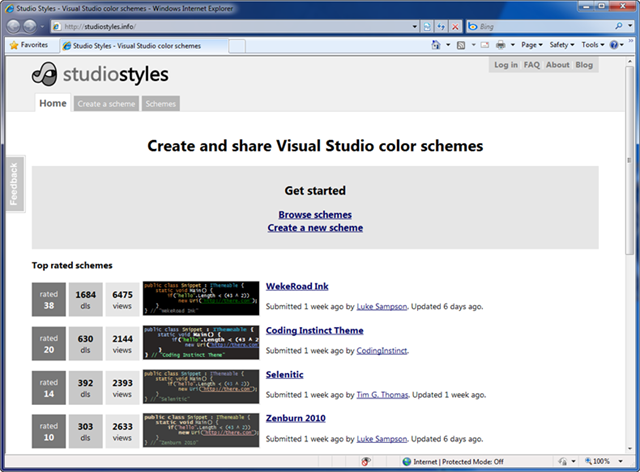
Studiostyles.info enables you to easily browse and download Visual Studio color schemes that others have already created.  The color schemes work for both VS 2008 and VS 2010 (all versions – including the free VS express editions):

image

Color schemes are sorted by popularity and voting (you can vote on whether you find each “hot or not”). 

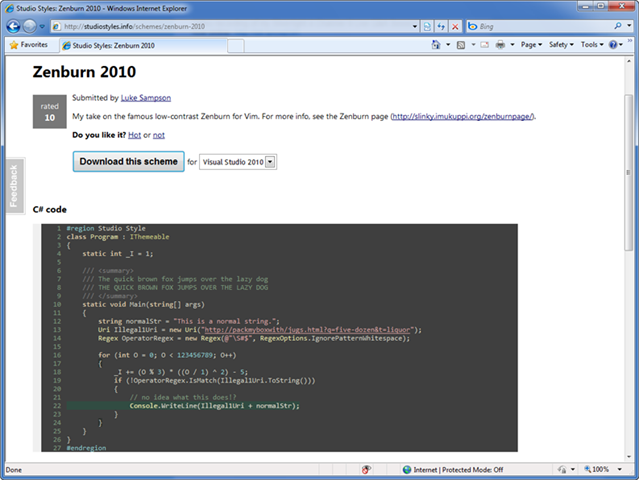
You can click any of the schemes to see screen-shots of it in use for common coding scenarios.  You can then download the color settings for either VS 2010 or VS 2008:

image

You can also optionally upload color schemes of your own if you have a good one you want to share with others. 

If you haven’t visited it yet – check it out: http://studiostyles.info/  And thank you Luke Sampson for building it!

Hope this helps,

Scott

SQL Server 2008 R2 RTM

It’s somewhat old new now but in case you were unaware SQL 2008 R2 has Released to Manufacturing (RTM). Official press here: http://www.microsoft.com/presspass/presskits/sqlserver/

“Welcome to the Microsoft SQL Server News Center! We are excited to inform you that SQL Server 2008 R2 has released to manufacturing, meaning customers will get it through our distribution channels in the next few weeks! SQL Server 2008 R2 delivers breakthrough capabilities for organizations that want enterprise-class scalability, improved IT and developer efficiency, and self-service BI. To experience the launch virtually, please visit the SQL Server 2008 R2 Digital Tour at www.sqlserverlaunch.com.”

Workflow Receive activity and message correlation

With WF4 it is quite easy to use data that is part of the request message, for example an order identifier, to route multiple WCF messages to the same workflow. It is also possible to have multiple messages that can start a new workflow. In this blog post I am going to show both these concepts in a single workflow. This workflow is going to be able to receive three different messages, AddItem, AddExpensiveItem and Submit.  Either AddItem or AddExpensiveItem can start a new workflow while Submit can only be done with an existing workflow.

The final workflow looks like this%u00b1


To create the workflow you need to start by creating a new WCF Workflow Service Application in Visual Studio 2010. Next delete the default activities that have been created by the template and replace it with a Sequence activity. Add a variable named TotalAmount of type Int32 and a Boolean variable named OrderSubmitted. Add a DoWhile activity and set its condition to OrderSubmitted = false so it will keep on executing until we set the OrderSubmitted variable to true.

So much for the boring part, now we get to the real message part.

First we need to add a Pick activity. This is needed because we want to receive multiple different messages without specifying an order. Add a third PickBrach so we get a total of three branches and a a Receive activity to each Trigger. Set all three ServiceContractName’s to OrderService and set the OperationName to AddItem, AddExpensiveItem and Submit respectively. Now the AddItem and AddExpensiveItem requests are allowed to start a new workflow so check the CanCreateInstance for both of them.

Next the important part for the correlation bit. All three requests need to share some common piece of data.Below is the Content definition of the AddItem request.

Both the AddExpensiveItem and Submit requests only contain the orderId parameter

The important is that they all share the same orderId that the client needs to provide.


That takes care of sending some common data but we still need to configure the workflow to use that to correlate requests to the same workflow. This last part is done using the CorrelatesOn property of the Receive activity. In all three point this to the orderId being passed in and make sure all three have a matching key.


After we have added the processing part to the Action part of each PickBranch we are all set to go.

Note: to create the SendReply, just right click the Receive activity and select Create SendReply. This will be placed on the clipboard so now you can paste it into the Action Sequence.


Running the workflow

Press F5 to activate the WCF Test Client. You should see three possible actions, either AddItem or AddExpensiveItem can start a workflow or send messages to an existing workflow. It just depends on whether the orderId passed in can be correlated to an existing workflow. If so that workflow receives the message, otherwise a new workflow is started.

The Submit message on the other hand can only be executed with an existing workflow.


Just in case anyone is interested below is the complete XAML for the workflow:

<WorkflowService mc:Ignorable="sap" ConfigurationName="Service1" sap:VirtualizedContainerService.HintSize="1193,850" Name="Service1" mva:VisualBasic.Settings="Assembly references and imported namespaces serialized as XML namespaces" xmlns="http://schemas.microsoft.com/netfx/2009/xaml/servicemodel" xmlns:mc="http://schemas.openxmlformats.org/markup-compatibility/2006" xmlns:mv="clr-namespace:Microsoft.VisualBasic;assembly=System" xmlns:mva="clr-namespace:Microsoft.VisualBasic.Activities;assembly=System.Activities" xmlns:p="http://schemas.microsoft.com/netfx/2009/xaml/activities" xmlns:s="clr-namespace:System;assembly=mscorlib" xmlns:s1="clr-namespace:System;assembly=System" xmlns:s2="clr-namespace:System;assembly=System.Xml" xmlns:s3="clr-namespace:System;assembly=System.Core" xmlns:s4="clr-namespace:System;assembly=System.ServiceModel" xmlns:sa="clr-namespace:System.Activities;assembly=System.Activities" xmlns:sad="clr-namespace:System.Activities.Debugger;assembly=System.Activities" xmlns:sap="http://schemas.microsoft.com/netfx/2009/xaml/activities/presentation" xmlns:scg="clr-namespace:System.Collections.Generic;assembly=System" xmlns:scg1="clr-namespace:System.Collections.Generic;assembly=System.ServiceModel" xmlns:scg2="clr-namespace:System.Collections.Generic;assembly=System.Core" xmlns:scg3="clr-namespace:System.Collections.Generic;assembly=mscorlib" xmlns:sd="clr-namespace:System.Data;assembly=System.Data" xmlns:sl="clr-namespace:System.Linq;assembly=System.Core" xmlns:ssa="clr-namespace:System.ServiceModel.Activities;assembly=System.ServiceModel.Activities" xmlns:ssx="clr-namespace:System.ServiceModel.XamlIntegration;assembly=System.ServiceModel" xmlns:st="clr-namespace:System.Text;assembly=mscorlib" xmlns:x="http://schemas.microsoft.com/winfx/2006/xaml">
  <p:Sequence sad:XamlDebuggerXmlReader.FileName="c:\users\maurice\documents\visual studio 2010\Projects\DeclarativeServiceLibrary1\DeclarativeServiceLibrary1\Service1.xamlx" sap:VirtualizedContainerService.HintSize="1163,820" mva:VisualBasic.Settings="Assembly references and imported namespaces serialized as XML namespaces">
    <p:Sequence.Variables>
      <p:Variable x:TypeArguments="x:Int32" Name="TotalAmount" />
    </p:Sequence.Variables>
    <sap:WorkflowViewStateService.ViewState>
      <scg3:Dictionary x:TypeArguments="x:String, x:Object">
        <x:Boolean x:Key="IsExpanded">True</x:Boolean>
      </scg3:Dictionary>
    </sap:WorkflowViewStateService.ViewState>
    <p:DoWhile sap:VirtualizedContainerService.HintSize="1141,696">
      <p:DoWhile.Variables>
        <p:Variable x:TypeArguments="x:Boolean" Name="OrderSubmitted" />
      </p:DoWhile.Variables>
      <p:DoWhile.Condition>[OrderSubmitted = False]</p:DoWhile.Condition>
      <p:Pick sap:VirtualizedContainerService.HintSize="1115,576">
        <p:PickBranch DisplayName="Branch1" sap:VirtualizedContainerService.HintSize="307,530">
          <p:PickBranch.Variables>
            <p:Variable x:TypeArguments="CorrelationHandle" Name="__handle1" />
            <p:Variable x:TypeArguments="x:Int32" Name="Price" />
          </p:PickBranch.Variables>
          <p:PickBranch.Trigger>
            <x:Reference>__ReferenceID0</x:Reference>
          </p:PickBranch.Trigger>
          <p:Sequence sap:VirtualizedContainerService.HintSize="277,312">
            <sap:WorkflowViewStateService.ViewState>
              <scg3:Dictionary x:TypeArguments="x:String, x:Object">
                <x:Boolean x:Key="IsExpanded">True</x:Boolean>
              </scg3:Dictionary>
            </sap:WorkflowViewStateService.ViewState>
            <p:Assign sap:VirtualizedContainerService.HintSize="255,58">
              <p:Assign.To>
                <p:OutArgument x:TypeArguments="x:Int32">[TotalAmount]</p:OutArgument>
              </p:Assign.To>
              <p:Assign.Value>
                <p:InArgument x:TypeArguments="x:Int32">[TotalAmount + Price]</p:InArgument>
              </p:Assign.Value>
            </p:Assign>
            <SendReply DisplayName="SendReplyToReceive" sap:VirtualizedContainerService.HintSize="255,90">
              <SendReply.Request>
                <Receive x:Name="__ReferenceID0" CanCreateInstance="True" sap:VirtualizedContainerService.HintSize="277,100" OperationName="AddItem" ServiceContractName="OrderService">
                  <Receive.CorrelatesOn>
                    <XPathMessageQuery x:Key="key1">
                      <XPathMessageQuery.Namespaces>
                        <ssx:XPathMessageContextMarkup>
                          <x:String x:Key="xgSc">http://tempuri.org/</x:String>
                        </ssx:XPathMessageContextMarkup>
                      </XPathMessageQuery.Namespaces>sm:body()/xgSc:AddItem/xgSc:orderId</XPathMessageQuery>
                  </Receive.CorrelatesOn>
                  <Receive.CorrelationInitializers>
                    <RequestReplyCorrelationInitializer CorrelationHandle="[__handle1]" />
                  </Receive.CorrelationInitializers>
                  <ReceiveParametersContent>
                    <p:OutArgument x:TypeArguments="x:Int32" x:Key="orderId" />
                    <p:OutArgument x:TypeArguments="x:String" x:Key="item" />
                    <p:OutArgument x:TypeArguments="x:Int32" x:Key="price">[Price]</p:OutArgument>
                  </ReceiveParametersContent>
                </Receive>
              </SendReply.Request>
              <SendParametersContent>
                <p:InArgument x:TypeArguments="x:Int32" x:Key="Total">[TotalAmount]</p:InArgument>
              </SendParametersContent>
            </SendReply>
          </p:Sequence>
        </p:PickBranch>
        <p:PickBranch sap:VirtualizedContainerService.HintSize="307,530">
          <p:PickBranch.Variables>
            <p:Variable x:TypeArguments="CorrelationHandle" Name="__handle1" />
          </p:PickBranch.Variables>
          <p:PickBranch.Trigger>
            <x:Reference>__ReferenceID1</x:Reference>
          </p:PickBranch.Trigger>
          <p:Sequence sap:VirtualizedContainerService.HintSize="277,312">
            <sap:WorkflowViewStateService.ViewState>
              <scg3:Dictionary x:TypeArguments="x:String, x:Object">
                <x:Boolean x:Key="IsExpanded">True</x:Boolean>
              </scg3:Dictionary>
            </sap:WorkflowViewStateService.ViewState>
            <p:Assign sap:VirtualizedContainerService.HintSize="255,58">
              <p:Assign.To>
                <p:OutArgument x:TypeArguments="x:Int32">[TotalAmount]</p:OutArgument>
              </p:Assign.To>
              <p:Assign.Value>
                <p:InArgument x:TypeArguments="x:Int32">[TotalAmount + 100]</p:InArgument>
              </p:Assign.Value>
            </p:Assign>
            <SendReply DisplayName="SendReplyToReceive" sap:VirtualizedContainerService.HintSize="255,90">
              <SendReply.Request>
                <Receive x:Name="__ReferenceID1" CanCreateInstance="True" sap:VirtualizedContainerService.HintSize="277,100" OperationName="AddExpensiveItem" ServiceContractName="OrderService">
                  <Receive.CorrelatesOn>
                    <XPathMessageQuery x:Key="key1">
                      <XPathMessageQuery.Namespaces>
                        <ssx:XPathMessageContextMarkup>
                          <x:String x:Key="xgSc">http://tempuri.org/</x:String>
                        </ssx:XPathMessageContextMarkup>
                      </XPathMessageQuery.Namespaces>sm:body()/xgSc:AddExpensiveItem/xgSc:orderId</XPathMessageQuery>
                  </Receive.CorrelatesOn>
                  <Receive.CorrelationInitializers>
                    <RequestReplyCorrelationInitializer CorrelationHandle="[__handle1]" />
                  </Receive.CorrelationInitializers>
                  <ReceiveParametersContent>
                    <p:OutArgument x:TypeArguments="x:Int32" x:Key="orderId" />
                  </ReceiveParametersContent>
                </Receive>
              </SendReply.Request>
              <SendParametersContent>
                <p:InArgument x:TypeArguments="x:Int32" x:Key="Total">[TotalAmount]</p:InArgument>
              </SendParametersContent>
            </SendReply>
          </p:Sequence>
        </p:PickBranch>
        <p:PickBranch DisplayName="Branch2" sap:VirtualizedContainerService.HintSize="307,530">
          <p:PickBranch.Variables>
            <p:Variable x:TypeArguments="CorrelationHandle" Name="__handle2" />
          </p:PickBranch.Variables>
          <p:PickBranch.Trigger>
            <x:Reference>__ReferenceID2</x:Reference>
          </p:PickBranch.Trigger>
          <p:Sequence sap:VirtualizedContainerService.HintSize="277,312">
            <sap:WorkflowViewStateService.ViewState>
              <scg3:Dictionary x:TypeArguments="x:String, x:Object">
                <x:Boolean x:Key="IsExpanded">True</x:Boolean>
              </scg3:Dictionary>
            </sap:WorkflowViewStateService.ViewState>
            <SendReply DisplayName="SendReplyToReceive" sap:VirtualizedContainerService.HintSize="255,90">
              <SendReply.Request>
                <Receive x:Name="__ReferenceID2" sap:VirtualizedContainerService.HintSize="277,100" OperationName="Submit" ServiceContractName="OrderService">
                  <Receive.CorrelatesOn>
                    <XPathMessageQuery x:Key="key1">
                      <XPathMessageQuery.Namespaces>
                        <ssx:XPathMessageContextMarkup>
                          <x:String x:Key="xgSc">http://tempuri.org/</x:String>
                        </ssx:XPathMessageContextMarkup>
                      </XPathMessageQuery.Namespaces>sm:body()/xgSc:Submit/xgSc:orderId</XPathMessageQuery>
                  </Receive.CorrelatesOn>
                  <Receive.CorrelationInitializers>
                    <RequestReplyCorrelationInitializer CorrelationHandle="[__handle2]" />
                  </Receive.CorrelationInitializers>
                  <ReceiveParametersContent>
                    <p:OutArgument x:TypeArguments="x:Int32" x:Key="orderId" />
                  </ReceiveParametersContent>
                </Receive>
              </SendReply.Request>
            </SendReply>
            <p:Assign sap:VirtualizedContainerService.HintSize="255,58">
              <p:Assign.To>
                <p:OutArgument x:TypeArguments="x:Boolean">[OrderSubmitted]</p:OutArgument>
              </p:Assign.To>
              <p:Assign.Value>
                <p:InArgument x:TypeArguments="x:Boolean">True</p:InArgument>
              </p:Assign.Value>
            </p:Assign>
          </p:Sequence>
        </p:PickBranch>
      </p:Pick>
    </p:DoWhile>
  </p:Sequence>
</WorkflowService>

 

Enjoy!


www.TheProblemSolver.nl

Wiki.WindowsWorkflowFoundation.eu

Trying the WF ADO.NET Activity Pack CTP 1

Recently the workflow team at Microsoft released a first CTP to the ADO.NET Activity Pack. In this blog post I am going to take a quick look at how to get started with these activities.


First step is installing the activity pack. Download the setup MSI from http://wf.codeplex.com/releases/view/43585 and run the installer. This will install the activities in the folder C:\Program Files (x86)\Microsoft WF ADO.NET Activity Pack\CTP 1 and register them with VS2010 so they automatically appear in the toolbox. Note that the main assembly containing the activities is called Microsoft.Data.Activities.dll.

If we start VS2010 and create a new workflow project the 3 ADO.NET activities are right there in the toolbox.


All three activities operate in a similar manner so I am going to use the ExecuteSqlQuery<T> to demonstrate how to use these activities. The sample is simple, all I am going to do is load a set of customers from the Northwind database and display these on the screen.

First step is to define a customer type the workflow can work with. This is as simple as they come:

public class Customer
{
    public string CustomerId { get; set; }
    public string CompanyName { get; set; }
    public string ContactName { get; set; }
 
}

Next you can drag a ExecuteSqlQuery<T> onto the design surface. I put them inside of a Sequence so I can print the result after the ExecuteSqlQuery<T> is finished. When prompted for the type select Brose for Types and select the Customer from the current project.


Now the activity is on the design surface but as can be seen from the Error List both the connection and the command need to be specified.


First the connection because that is a bit misleading, at least for me the first time I tried.

Clicking the connection button in the property sheet allows you to use an existing database connection or create a new one. Nice but that does mean your connection string will be part of the workflow, not so good, and is a literal instead of an expression so not easy to change. The proper way to do this is to add a connection string setting to the project first. And once that is done this connection will also appear in the Configure Database Connection dialog for the ExecuteSqlQuery<T>,

Next step is to specify the command to execute.

Here we are doing a simple select from the customers table and filtering the results to only include the UK based companies. All we have is a simple textbox to enter a SQL command, table or stored procedure name. Quite primitive [:(]. Keep in mind that the select * is quite a bad idea as well and you are far better of specifying the field names as we will see in a bit.

Next we need to map the data loaded to our customer type. For this purpose we get a record variable that points to a SqlDataReader and we can use the record.GetString(index) and similar functions to load the data. This requires passing an index, the reason doing a SELECT * is not a smart mover


When this is done all we need to do is capture the Result property, which contains a List<Customer> and loop over this printing the content.


The complete workflow in XAML:

<Activity mc:Ignorable="sap" x:Class="WorkflowConsoleApplication7.Workflow1" sap:VirtualizedContainerService.HintSize="356,1058" mva:VisualBasic.Settings="Assembly references and imported namespaces for internal implementation" xmlns="http://schemas.microsoft.com/netfx/2009/xaml/activities" xmlns:local="clr-namespace:WorkflowConsoleApplication7" xmlns:mc="http://schemas.openxmlformats.org/markup-compatibility/2006" xmlns:mda="clr-namespace:Microsoft.Data.Activities;assembly=Microsoft.Data.Activities" xmlns:mv="clr-namespace:Microsoft.VisualBasic;assembly=System" xmlns:mva="clr-namespace:Microsoft.VisualBasic.Activities;assembly=System.Activities" xmlns:s="clr-namespace:System;assembly=mscorlib" xmlns:s1="clr-namespace:System;assembly=System" xmlns:s2="clr-namespace:System;assembly=System.Xml" xmlns:s3="clr-namespace:System;assembly=System.Core" xmlns:s4="clr-namespace:System;assembly=System.ServiceModel" xmlns:sa="clr-namespace:System.Activities;assembly=System.Activities" xmlns:sad="clr-namespace:System.Activities.Debugger;assembly=System.Activities" xmlns:sap="http://schemas.microsoft.com/netfx/2009/xaml/activities/presentation" xmlns:scg="clr-namespace:System.Collections.Generic;assembly=System" xmlns:scg1="clr-namespace:System.Collections.Generic;assembly=System.ServiceModel" xmlns:scg2="clr-namespace:System.Collections.Generic;assembly=System.Core" xmlns:scg3="clr-namespace:System.Collections.Generic;assembly=mscorlib" xmlns:sd="clr-namespace:System.Data;assembly=System.Data" xmlns:sl="clr-namespace:System.Linq;assembly=System.Core" xmlns:st="clr-namespace:System.Text;assembly=mscorlib" xmlns:x="http://schemas.microsoft.com/winfx/2006/xaml">
  <Sequence sad:XamlDebuggerXmlReader.FileName="c:\users\maurice\documents\visual studio 2010\Projects\WorkflowConsoleApplication7\WorkflowConsoleApplication7\Workflow1.xaml" sap:VirtualizedContainerService.HintSize="316,1018">
    <Sequence.Variables>
      <Variable x:TypeArguments="scg3:List(local:Customer)" Name="Customers" />
    </Sequence.Variables>
    <sap:WorkflowViewStateService.ViewState>
      <scg3:Dictionary x:TypeArguments="x:String, x:Object">
        <x:Boolean x:Key="IsExpanded">True</x:Boolean>
      </scg3:Dictionary>
    </sap:WorkflowViewStateService.ViewState>
    <mda:ExecuteSqlQuery x:TypeArguments="local:Customer" ProviderName="{x:Null}" CommandText="Select * from Customers where Country = @Country" ConnectionConfigurationName="WorkflowConsoleApplication7.Properties.Settings.NorthwindConnection" sap:VirtualizedContainerService.HintSize="294,647" Result="[Customers]">
      <mda:ExecuteSqlQuery.RecordProcessor>
        <ActivityFunc x:TypeArguments="sd:IDataRecord, local:Customer">
          <ActivityFunc.Argument>
            <DelegateInArgument x:TypeArguments="sd:IDataRecord" Name="record" />
          </ActivityFunc.Argument>
          <ActivityFunc.Result>
            <DelegateOutArgument x:TypeArguments="local:Customer" Name="target" />
          </ActivityFunc.Result>
          <Sequence DisplayName="Map Customer Fields" sap:VirtualizedContainerService.HintSize="264,476">
            <sap:WorkflowViewStateService.ViewState>
              <scg3:Dictionary x:TypeArguments="x:String, x:Object">
                <x:Boolean x:Key="IsExpanded">True</x:Boolean>
                <x:Boolean x:Key="IsPinned">False</x:Boolean>
              </scg3:Dictionary>
            </sap:WorkflowViewStateService.ViewState>
            <Assign sap:VirtualizedContainerService.HintSize="242,58">
              <Assign.To>
                <OutArgument x:TypeArguments="local:Customer">[target]</OutArgument>
              </Assign.To>
              <Assign.Value>
                <InArgument x:TypeArguments="local:Customer">[New Customer]</InArgument>
              </Assign.Value>
            </Assign>
            <Assign sap:VirtualizedContainerService.HintSize="242,58">
              <Assign.To>
                <OutArgument x:TypeArguments="x:String">[target.CustomerId]</OutArgument>
              </Assign.To>
              <Assign.Value>
                <InArgument x:TypeArguments="x:String">[record.GetString(0)]</InArgument>
              </Assign.Value>
            </Assign>
            <Assign sap:VirtualizedContainerService.HintSize="242,58">
              <Assign.To>
                <OutArgument x:TypeArguments="x:String">[target.CompanyName]</OutArgument>
              </Assign.To>
              <Assign.Value>
                <InArgument x:TypeArguments="x:String">[record.GetString(1)]</InArgument>
              </Assign.Value>
            </Assign>
            <Assign sap:VirtualizedContainerService.HintSize="242,58">
              <Assign.To>
                <OutArgument x:TypeArguments="x:String">[target.ContactName]</OutArgument>
              </Assign.To>
              <Assign.Value>
                <InArgument x:TypeArguments="x:String">[record.GetString(2)]</InArgument>
              </Assign.Value>
            </Assign>
          </Sequence>
        </ActivityFunc>
      </mda:ExecuteSqlQuery.RecordProcessor>
      <InArgument x:TypeArguments="x:String" x:Key="Country">UK</InArgument>
    </mda:ExecuteSqlQuery>
    <ForEach x:TypeArguments="local:Customer" DisplayName="ForEach&lt;Customer&gt;" sap:VirtualizedContainerService.HintSize="294,207" Values="[Customers]">
      <ActivityAction x:TypeArguments="local:Customer">
        <ActivityAction.Argument>
          <DelegateInArgument x:TypeArguments="local:Customer" Name="item" />
        </ActivityAction.Argument>
        <WriteLine sap:VirtualizedContainerService.HintSize="257,100" Text="[item.CustomerId &amp; &quot; &quot; &amp; item.CompanyName &amp; &quot; &quot; &amp; item.ContactName]" />
      </ActivityAction>
    </ForEach>
  </Sequence>
</Activity>

and in design mode:


Conclusion

These activities work well enough but result in using plain old ADO.NET. Now there is nothing wrong with plain ADO.NET but with the current emphasis on Object Relational Mappers like the Entity Framework this seems a bit out of place. And the option to use connection strings from the application settings instead of embedding them in the workflow isn’t all that obvious either. Still a nice set of activities to add to the toolbox.


Enjoy!

www.TheProblemSolver.nl

Wiki.WindowsWorkflowFoundation.eu

Box Selection and Multi-Line Editing with VS 2010

This is the twenty-second in a series of blog posts I’m doing on the VS 2010 and .NET 4 release.

I’ve already covered some of the code editor improvements in the VS 2010 release.  In particular, I’ve blogged about the Code Intellisense Improvements, new Code Searching and Navigating Features, HTML, ASP.NET and JavaScript Snippet Support, and improved JavaScript Intellisense.  Today’s blog post covers a small, but nice, editor improvement with VS 2010 – the ability to use “Box Selection” when performing multi-line editing.  This can eliminate keystrokes and enables some slick editing scenarios.

[In addition to blogging, I am also now using Twitter for quick updates and to share links. Follow me at: twitter.com/scottgu]

Box Selection

Box selection is a feature that has been in Visual Studio for awhile (although not many people knew about it).  It allows you to select a rectangular region of text within the code editor by holding down the Alt key while selecting the text region with the mouse.  With VS 2008 you could then copy or delete the selected text.

VS 2010 now enables several more capabilities with box selection including:

  • Text Insertion: Typing with box selection now allows you to insert new text into every selected line
  • Paste/Replace: You can now paste the contents of one box selection into another and have the content flow correctly
  • Zero-Length Boxes: You can now make a vertical selection zero characters wide to create a multi-line insert point for new or copied text

These capabilities can be very useful in a variety of scenarios.  Some example scenarios: change access modifiers (private->public), adding comments to multiple lines, setting fields, or grouping multiple statements together.

Great 3 Minute Box-Selection Video Demo

Brittany Behrens from the Visual Studio Editor Team has an excellent 3 minute video that shows off a few cool VS 2010 multi-line code editing scenarios with box selection (note: enable your speakers as there is audio during the demo):


Watch it to learn a few ways you can use this new box selection capability to optimize your typing in VS 2010 even further:

Hope this helps,

Scott

P.S. You can learn more about the VS Editor by following the Visual Studio Team Blog or by following @VSEditor on Twitter.

Application Infrastructure: Cloud Benefits Delivered

http://www.appinfrastructure.com 

We would like to highlight an exciting upcoming event which brings a fresh view on the latest trends and upcoming product offerings in the Application Infrastructure space.  This is a Virtual Event that focuses on bringing some of the benefits of the cloud to customers’ current IT environments while also enabling connectivity between enterprise, partners, and cloud investments. Windows Azure AppFabric is a key part of this event.


Want to bring the benefits of the cloud to your current IT environment? Cloud computing offers a range of benefits, including elastic scale and never-before-seen applications. While you ponder your long-term investment in the cloud, you can harness a number of cloud benefits in your current IT environment now.


Join us on May 20 at 8:30 A.M. Pacific Time to learn how your current IT assets can harness some of the benefits of the cloud on-premises-and can readily connect to new applications and data running in the cloud. As part of the Virtual Launch Event, Gartner vice president and distinguished analyst Yefim Natis will discuss the latest trends and biggest questions facing the Application Infrastructure space. He will also speak about the role Application Infrastructure will play in helping businesses benefit from the cloud.  Plus, you’ll hear some exciting product announcements and a keynote from Abhay Parasnis, GM of Application Server Group at Microsoft.  Parasnis will discuss the latest Microsoft investments in the Application Infrastructure space aimed at delivering on-demand scalability, highly available applications, a new level of connectivity, and more. Save the date!

Application Infrastructure Virtual Launch Event

If you read my blog then you have an interest in BizTalk Server, Windows Server AppFabric, Azure, Windows Azure AppFabric, WCF, etc That means that you would also be really interested in the virtual launch event coming up on May 20th 2010 (8:30AM Pacific Time). Details are below, the event site is http://www.appinfrastructure.com.

See you there!

================================================

Application Infrastructure: Cloud Benefits Delivered

http://www.appinfrastructure.com

Want to bring the benefits of the cloud to your current IT environment? Cloud computing offers a range of benefits, including elastic scale and never-before-seen applications. While you ponder your long-term investment in the cloud, you can harness a number of cloud benefits in your current IT environment now.

Join us on May 20 at 8:30 A.M. Pacific Time to learn how your current IT assets can harness some of the benefits of the cloud on-premises-and can readily connect to new applications and data running in the cloud. As part of the Virtual Launch Event, Gartner vice president and distinguished analyst Yefim Natis will discuss the latest trends and biggest questions facing the Application Infrastructure space. He will also speak about the role Application Infrastructure will play in helping businesses benefit from the cloud.  Plus, you’ll hear some exciting product announcements and a keynote from Abhay Parasnis, GM of Application Server Group at Microsoft.  Parasnis will discuss the latest Microsoft investments in the Application Infrastructure space aimed at delivering on-demand scalability, highly available applications, a new level of connectivity, and more. Save the date!

Windows Server AppFabric Beta 2 Refresh for Visual Studio 2010/.NET 4 RTM


Today we are pleased to announce a Beta 2 Refresh for Windows Server AppFabric.  This build supports the recently released .NET Framework 4 and Visual Studio 2010 RTM versions-a request we’ve had from a number of you.  Organizations wanting to use Windows Server AppFabric with the final RTM versions of .NET 4 and Visual Studio 2010 are encouraged to download the Beta 2 Refresh today.  Please click here for an installation guide on installing the Beta 2 Refresh.  We encourage developers and IT professionals building ASP.NET applications or applications that use WCF or WF and run on IIS to download the Beta 2 Refresh and provide feedback at http://connect.microsoft.com/dublin/feedback or via our forum at http://social.msdn.microsoft.com/Forums/en-US/dublin/threads/. 


Windows Server AppFabric is a set of application services focused on improving the performance and management of Web and Composite applications.  To deliver these benefits, Windows Server AppFabric provides distributed caching technology and pre-built management and monitoring infrastructure that utilize familiar .NET skills. 


Currently in Beta 2, Windows Server AppFabric enhances the Application Server role in Windows Server and is available as a free download