by community-syndication | Apr 16, 2009 | BizTalk Community Blogs via Syndication
I am building a BizTalk 2009 book library for my team at work and thought I’d share the list of books with some comments. They can all be pre-ordered from Amazon (with the exception of Pro Mapping in BizTalk 2009 that is already shipping).
Must have books:
SOA Patterns with BizTalk Server 2009 by Richard Seroter
Very much […]
by stephen-w-thomas | Apr 15, 2009 | Downloads
This sample code outlines how to set up Continuous Integration, Automated Unit Tests, and to create an MSI Package using Team Foundation Server 2008 (TFS) with BizTalk Server 2009.
At a high level, this is what is happening in the end to end process.
A file is updated and checked in -> A build is started -> The build completes -> Defined unit tests are ran -> a MSI Package is created
This sample code goes along with a step-by-step blog post that outlines this process.
That blog post can be found here: http://www.biztalkgurus.com/blogs/biztalk-integration/2009/04/16/setting-up-continuous-integration-automated-unit-tests-and-msi-packaging-in-biztalk-2009/
by community-syndication | Apr 15, 2009 | BizTalk Community Blogs via Syndication
Hi all
I have had posts about the context accessor functoid here and here.
Just a couple of notes about the context accessor functoids (plural – because there
are two functoids at codeplex):
-
One of the functoids will only work when called from a map that is
executed inside an orchestration.
-
The other functoid will only work when called from a map in a receive
port AND only if the pipeline component that ships with the functoid
has been used in the receive pipeline.
As you can see, creating a map based on either of these functoids makes your map impossible
to use in either an orchestration or a receive port based on which functoid you chose.
So you are creating a pretty hard coupling between your map and where it should be
used. This can be ok, but if other developers mess around with your solution in a
year or so, they wont know that and things can start breaking up.
My self: I am a user of the functoids – I would use them instead of assigning values
inside an orchestration using a message assignment shape.. but this discussion is
pretty much academic and about religion 🙂
Anyway, beware the limitations!
—
eliasen
by community-syndication | Apr 15, 2009 | BizTalk Community Blogs via Syndication
Hi all
I had a post about one of the context
accessor functoids which can be seen here: http://blog.eliasen.dk/2009/04/01/TheContextAccessorFunctoidPartI.aspx
This post is about the other one – the one that can only be used in a map that is
used in a receive port.
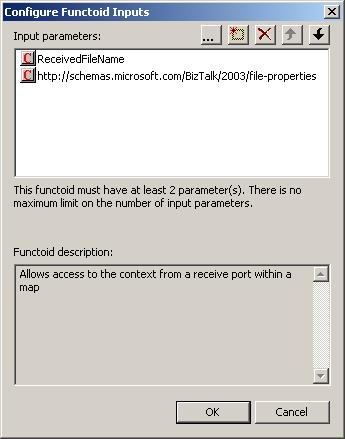
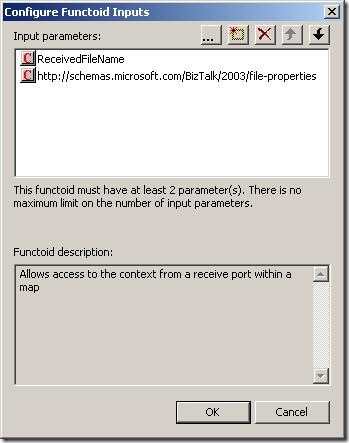
Basically, the functoid takes in three inputs:
The first is the name of the property and the second parameter is the namespace of
the property schema this property belongs to. The third parameter is an optional string
that is returned in case the promoted property could not be read.
This functoid only works in a map that is called in a receive port
and only if the receive location uses a pipeline that uses the ContextAccessorProvider
pipeline component that is included in he same DLL as the functoids.
What the pipeline component does is, that it takes the context of the incoming message
and saves it in a public static member. This way, the functoid can access this static
member of the pipeline component and read the promoted properties this way.
Good luck using it.
—
eliasen
by community-syndication | Apr 15, 2009 | BizTalk Community Blogs via Syndication
[Source: http://geekswithblogs.net/EltonStoneman]
Managing concurrency within an application boundary can be straightforward where you own the database schema and the application’s data representation. By adding an incrementing lock sequence to tables and holding the current sequence in entity objects, you can implement optimistic locking at the database level without a significant performance hit. At the service level, the situation is more complicated. Even where the database schema can be extended, you wouldn’t want the internals of concurrency management to be exposed in service contracts, so the lock sequence approach isn’t suitable.
An alternative pattern is to compute a data signature representing the retrieved state of an entity at the service level, and flow the signature alongside the entity in Get services. On Update calls, the original data signature is passed back and compared to the current signature of the data; if they differ then there’s been a concurrency violation and the update fails. The signature can be passed as a SOAP header across the wire so it’s not part of the contract and the optimistic locking strategy is transparent to consumers.
The level of transparency will depend on the consumer, as it needs to retrieve the signature from the Get call, retain it, and pass it back on the Update call. In WCF the DataContract versioning mechanism can be used to extract the signature from the header and retain it in the ExtensionData property of IExtensibleDataObject. The contents of the ExtensionData property are not directly accessible, so if the same DataContract is used on the Get and the Update, and the signature management is done through WCF extension points, then concurrency control is transparent to users.
I’ve worked through a WCF implementation for this pattern on MSDN Code Gallery here: Optimistic Locking over WCF. The sample uses a WCF behavior on the server side to compute a data signature (as a hash of the serializable object – generating a deterministic GUID from the XML string) and adds it to outgoing message headers for all services which return a DataContract object. On the consumer side, a parallel behaviour extracts the data signature from the header and adds it to ExtensionData, by appending it to the XML payload and using the standard DataContractSerializer to extract it.
The update service checks the data signature passed in the call with the current signature of the object and throws a known FaultException if there’s been a concurrency violation, which the WCF client can catch and react to:
Sixeyed.OptimisticLockingSample
The sample solution consists of four projects providing a SQL database for Customer entities, WCF Get and Update services, a WCF client and the ServiceModel library which contains the data signature behaviors. DataSignatureServiceBehavior adds a dispatch message formatter to each service operation, which computes the hash for any DataContract objects being returned, and adds it to the message headers. DataSignatureEndpointBehavior on the client adds a client message formatter to each endpoint operation, which extracts the hash from incoming calls, stores it in ExtensionData and adds it back to the header on outgoing calls.
Concurrency checking is done on the server side in the Update call, by comparing the given data signature to the signature from the current object state:
Guid dataSignature = DataSignature.Current;
if (dataSignature == Guid.Empty)
{
//this is an update method, so no data signature to
//compare against is an exception:
throw new FaultException<NoDataSignature>(new NoDataSignature());
}
Customer currentState = CustomerEntityService.Load(customer);
Guid currentDataSignature = DataSignature.Sign(currentState);
//if the data signatures match then update:
if (currentDataSignature == dataSignature)
{
CustomerEntityService.Update(customer);
}
else
{
//otherwise, throw concurrency violation exception:
throw new FaultException<ConcurrencyViolation>(new ConcurrencyViolation());
}
A limitation of the sample is the use of IExtensibleDataObject to store the data signature at the client side. Although this is fully functional and allows a completely generic solution, it relies on reflection to extract the data signature and add it to the message headers for the update call, which is a brittle option. Where you have greater control over the client, you can use a custom solution which will be more suitable – e.g. creating and implementing an IDataSignedEntity interface, or if consuming the services in BizTalk, by using context properties.
by community-syndication | Apr 15, 2009 | BizTalk Community Blogs via Syndication
[Source: http://geekswithblogs.net/EltonStoneman]
The venerable log4net library enables cheap instrumentation with configured logging levels, so logs are only written if the log call is on or above the active level. However, the evaluation of the log message always takes place, so there is some performance hit even if the log is not actually written. You can get over this by using delegates for the log message, which are only evaluated based on the active log level:
public static void Log(LogLevel level, Func<string> fMessage)
{
if (IsLogLevelEnabled(level))
{
LogInternal(level, fMessage.Invoke());
}
}
Making the delegate call with a lambda expression makes the code easy to read, as well as giving a performance saving:
Logger.Log(LogLevel.Debug,
() => string.Format(“Time: {0}, Config setting: {1}”,
DateTime.Now.TimeOfDay,
ConfigurationManager.AppSettings[“configValue”]));
For simple log messages, the saving may be minimal, but if the log involves walking the current stack to retrieve parameter values, it may be worth having. The sample above writes the current time and a configuration value to the log, if set to Debug. With the log level set to Warn, the log isn’t written. Executing the call 1,000,000 times at Warn level consistently takes over 3.7 seconds if the logger call is made directly, and less than 0.08 seconds if the Lambda delegate is used:
With a Warn call, the log is active and the direct and Lambda variants run 5,000 calls in 8.6 seconds, writing to a rolling log file appender:
I’ve added the logger and test code to the MSDN Code Gallery sample: Lambda log4net Sample, if you’re interested in checking it out.
by community-syndication | Apr 15, 2009 | BizTalk Community Blogs via Syndication
I’ve added some functionality to the PGP Pipeline component to enable it to Sign and Encrypt files.
Properties Explained:
ASCIIArmorFlag – Writes out file in ASCII or Binary
Extension – Final File’s extension
Operation – Decrypt, Encrypt, and now Sign and Encrypt
Passphrase – Private Key’s password for decrypting and signing
PrivateKeyFile – Absolute path to private key file
PublicKeyFile – Absolute path to public key file.
TempDirectory – Temporary directory used for file processing.
Email me if you could use this.

by community-syndication | Apr 15, 2009 | BizTalk Community Blogs via Syndication
With the release of SQL Server 2005 SP3, many of us are wondering if BizTalk Server 2006 is supported with SP3. I asked Microsoft this question and here was the reply:
“The BizTalk test team has planned complete testing of this. However, the Rangers team has tested this setup in a in-house test setup and […]
by community-syndication | Apr 15, 2009 | BizTalk Community Blogs via Syndication
I was having some problems transferring files from a very old SUN Unix server using the FTP adapter. I decided to create a new BizTalk FTP/FTPS adapter that would be robust and allow me to connect to FTPS servers.
Here are the Receive Location Properties.
Explanation of properties:
CRLF Mode – The CRLF Mode property applies when downloading files in ASCII mode. If CRLF Mode is set to No Alteration the transfer happens normally without alteration. A value of CRLF converts all line endings to CR+ LF. A value of LF Only converts all line endings to LF-only. A value of CR Only converts all line endings to CR-only.
FTP Trace Mode – Send a trace of the FTP session and any errors to either a File, designated by the FTP Trace path and FileName, Event Log, or None.
Transfer Mode – Binary or ASCII
Use Passive Host Address – Some FTP servers need this option for passive data transfers. In passive mode, the data connection is initiated by the client sending a PASV command to the FTP server, and the FTP server responds with the IP address and port number where it is listening for the client’s connection request. When the Use Passive Host Address property is set to Yes, the IP address in the PASV response is discarded and the IP address of the remote endpoint of the existing control connection is used instead.
Authentication Mode – By setting the Authentication Mode Property to AuthTls , a secure FTP connection can be established using either SSL 3.0 or TLS 1.0. The FTP_FTPS Adapter will automatically choose whichever is supported by the FTP server during the secure channel establishment. The FTP control port remains at the default (21). Upon connection, the channel is converted to a secure channel automatically. All control messages and data transfers are encrypted. By choosing Implicit SSL, the FTP_FTPS Adapter connects using SSL on port 990, which is the de-facto standard FTP SSL port.
Client Certificate – The FTP_FTPS Adapter provides the ability to use a client certificate with secure FTP (implicit or explicit SSL/TLS).
Private Key File – The FTP_FTPS Adapter provides the ability to use a client certificate with secure FTP (implicit or explicit SSL/TLS). You may load a certificate from separate .crt (or .cer) and .pvk files and use it as the client-side SSL cert. The .pvk contains the private key. The .crt/.cer file contains the PEM or DER encoded digital certificate. Note: Client-side certificates are only needed in situations where the server demands one.
Invoice VAN FTP/SSL – By choosing yes, the FTP_FTPS Adapter will sets all the properties correctly to connect to an Inovis VAN FTP/SSL.
Tumbleweed Secure Transport FTPS Server – The FTP_FTPS Server can connect, authenticate, transfer files to a Tumbleweed Secure Transport SSL FTP Server. Instead of providing a login name and password, you pass the string “site-auth” for the username, and an empty string for the password. You must also provide a client-side digital certificate — as the certificate’s credentials and validity are used to authenticate.
Please email me if you could use this adapter.

by community-syndication | Apr 15, 2009 | BizTalk Community Blogs via Syndication
If you are in the local area, there is a pretty cool event coming to town on May 8th. From Jeff Brand:
Join us for a special event co-sponsored by the .NET User Group & Silverlight User Group. This month we’re bringing highlights from the MIX09 conference to you!! You’ll get detailed information and in-depth demonstrations on the upcoming release of Silverlight 3 and Expression Blend 3 as well as see some of the great new technologies that were introduced at MIX09.
So, if you didn’t make it to Mix and you want to learn all about the cool technologies first hand, get registered soon. Don’t think this will fill up fast? Think again. In addition to the MIX content, Microsoft is doing a screening of the new Star Trek movie after the event. That’s right, run don’t want to that website and register and find your old communicator and Spock ears!