by community-syndication | Mar 9, 2009 | BizTalk Community Blogs via Syndication
I’ll be giving a talk for Microsoft’s “Build Your Skills” event on March 24th in St. Louis (and March 31st in Minneapolis) on the topic of code profiling. We’ll look at the profiling tools built into Visual Studio Team System Developer, and a few others to boot. You can get all the details here.
There is a whole slate of great talks planned for the day, so register now if you’re
in the area…
by community-syndication | Mar 9, 2009 | BizTalk Community Blogs via Syndication
WCF services can be accessed by a variety of clients, and this post will talk briefly about accessing services from Silverlight. The same familiar programming model applies to Silverlight as any WCF client application.
The first step in developing Silverlight clients is to set up a development environment. If you already have Visual Studio 2008 SP1 on the box, all that is needed is to install the Microsoft Silverlight Tools for Visual Studio 2008, available on this page (among other resources). The package will install the Silverlight runtime (the piece required to run Silverlight apps in the browser), the Silverlight SDK (the libraries and tools needed to build apps), and the Visual Studio project templates and other supporting features.
To create your first WCF service and Silverlight client combination, follow the steps in this set of documentation topics. Note that only certain WCF bindings and features are supported in Silverlight, and you can consult this page for a full description.
A common pitfall for developers new to Silverlight is the cross-domain restriction in the networking stack. For security reasons, if the WCF service and Silverlight client live on different domains (for example http://fabrikam.com/service.svc and http://contoso.com/mysilverlightcontrol.html), the service domain needs to use a cross-domain policy file to explicitly opt in to be accessible by Silverlight clients (for example http://fabrikam.com/clientaccesspolicy.xml). For a description of the cross-domain restriction, see this topic. For an example cross-domain policy file, see this topic.
If you get stuck at any point in the process so far, this article explains how to easily debug the service-client pair.
After you have built your first Silverlight WCF solution, you can move on to some advanced scenarios. Here is a list of areas you may wish to explore:
- Duplex communication – WCF services can “push” data to Silverlight clients, without the user having to manually poll the service. This is also known as a “notification” communication pattern, as opposed to a “request/reply” pattern. This topic walks you through implementing this scenario. The programming model for duplex services is rather complex, so our team has implemented a code sample which hides away some of that complexity. Check out the “Duplex Services” section of this blog post for more information and a link to the sample. In the next version of Silverlight, a greatly simplified duplex programming model is being considered.
- REST services – this class of web services uses light-weight wire formats (such as plain XML or JSON) and clear URI conventions for a simple experience consuming services. This set of topics highlights how WCF in Silverlight can be used to access REST services.
Here are some good resources for follow-up:
Going forward, content from the Silverlight web services team blog (linked above) will be syndicated over here at the .NET Endpoint blog. Please keep an eye out for exciting new content coming up over the next month.
Yavor Georgiev
Program Manager
Connected Framework Team
by community-syndication | Mar 8, 2009 | BizTalk Community Blogs via Syndication
Zoiner and I are both travelling this week, but rather than cancel our meetings, we have rejiggered them (I’ve always wanted to use that word in a sentence).
So, San Diego .NET User Group Connected Systems and Architecture SIGs are doing a joint meeting tomorrow (Monday March 9 2009), and I will be doing my Microsoft SOA Offerings presentation.
I plan to show a demo I’ve been working on. It involves BizTalk Server 2009, ESB Guidance 2.0, Dublin, Windows Workflow Foundation and Windows Communication Foundation (from .NET 4.0), and Azure, all in a couple of VMs running simultaneously (off my notebook) with two networks, using 64-bit Virtual PC hosted on 64-bit Windows 7. With the exception of Virtual PC, *everything* in that chain is beta — or earlier. Now that should certainly appeal to the inner-geek in all of you!
Meeting starts at 6:00 for pizza, 6:30 for the meeting itself, at the Microsoft La Jolla office.
Technorati Tags: BizTalk,Azure,ESB,SOA,WF,WCF,Dublin
by community-syndication | Mar 8, 2009 | BizTalk Community Blogs via Syndication
Hi all
So, I have written two previous posts about how to solve the If-Then-Else problem
in a map. The first
post discussed the way to use built-in functoids to solve the issue. The second
post discussed the issues I had creating a custom functoid to do the job.
Well, I now have a new way of doing it, which is not just one functoid, but still
it’s prettier than what I can do with the built-in functoids.
Basically, as discussed in my post about the issues with the different functoid categories,
a functoid that is in the String category cannot accept a logical functoid as input.
A scripting functoid can accept a logical functoid as input, but I can’t create a
custom scripting functoid where I decide what script to appear inside the scripting
functoid at design time.
So the solution I am describing in this post is a combination of the two.
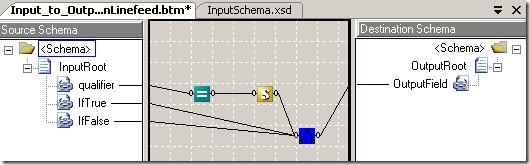
This screenshot describes a map that solves the If-Then-Else problem:
The blue functoid with the crappy icon is programmed by myself. It is a simple functoid,
which takes in three parameters, which are all strings. First, it tries to convert
the first parameter to a boolean. If this fails, a “false” is assumed. Then, if the
boolean was true, the second parameter is returned and if it was false, the third
parameter is returned.
Now, since a string functoid cannot take a logical functoid as an input, I use a custom
scripting functoid that is very simple:
public string Same(string str)
{
return str;
}
Which is really annoying to have to do, since… well… I take in a string and return
the exact same string. Oh well…
You can find my functoid and the project that uses it as file downloads at the bottom
of this post. Note, that the functoid library contains a whole bunch of functoids,
of which only one is relevant. The library contains all the functoids I built trying
to solve the If-Then-Else issue. The only needed functoid will be included in my downloadable functoid
library at a later point.
Now, the advantages of this solution is, that it only requires three functoids all
together. The best I could do with the built-in functoids were four, and five were
sometimes the prettiest solution.
>
Project that uses the functoid: here
>
—
eliasen
by community-syndication | Mar 8, 2009 | BizTalk Community Blogs via Syndication
For me there always comes a time when installing BTS 09 or Clients to work on SQL
2008, that I need all the client ‘bits’ to talk to SQL2008
Also – the classic problem to solve when installing BizTalk 2009 using SQL 2008, “Where
do I get Notification Services From???”
Look no further – here’s a SQL SP3 goldmine 🙂
SQL
GoldMine!!
Enjoy
by community-syndication | Mar 8, 2009 | BizTalk Community Blogs via Syndication
[Source: http://geekswithblogs.net/EltonStoneman]
The basic Code Generation Guidance Package on CodePlex comes with an additional sample Guidance package. This sample is intended to demonstrate how the functionality of the base package can be customised to create a project-specific Guidance package, where you can easily add tailored code generation recipes to your package. In the basic package are the Wizard steps necessary to configure ad-hoc code generation, but there are also ValueProviders which can read configuration from recipes without requiring the whole user interface.
Installation
You’ll need to modify the hard-coded paths and URIs in the sample package, so it doesn’t come with an installed release. If you open the Sixeyed.Guidance.CodeGenerationSample solution you’ll see that it references the base Sixeyed.Guidance.CodeGeneration and Sixeyed.CodeGeneration assemblies. The sample contains a set of T4 templates in the \Templates\Text directory, the XML configuration for the package and the XML includes for individual recipes. There’s no additional code in the sample project, all the required functionality is in the referenced base package.
Together with the GAX project, there’s a database project which you can use to create a SQL Server database suitable for the data-bound recipes to run against. To install, run the CreateDatabase script and then execute the SSIS package to populate data from the included Excel workbook (this is only necessary if you want to run the recipes as-is, otherwise you can modify the XML to use your own database).
Sample T4 Templates
There are T4 templates for each of the metadata providers in the base package. The scripts named _Simple.tt are straightforward and begin with the name of the expected provider; to run them, you can use Add Generated Items from the base package, select the relevant metadata and point to the template. To demonstrate more useful code generation, there are two more substantial templates:
- ConfigurationSection.cs.tt – use the File source and the Text provider on this template. If you select Configuration.txt (from the database project) as the source, the recipe will generate a typed configuration class, which has a static property to access the current config settings. The template can be easily extended to add a Default value for optional settings, and the same text file can be used to drive a different T4 template to generate the actual configuration settings;
- StoredProcedure.cs.tt – use the SQL Server database source and the Stored Procedure provider. Select a procedure and the recipe will generate a DAL class to execute the stored procedure. This class won’t compile, as it inherits from a base class which isn’t provided, but it demonstrates one approach for DAL generation.
Sample Recipes
The included recipes demonstrate configuring one or more settings for code generation so that the Wizard can be tailored or avoided altogether. Generate Stored Procedure shows this best, configuring the metadata provider using the SourceConfigurationValueProvider:
<Argument Name=“SourceConfiguration“ Type=“Sixeyed.CodeGeneration.Metadata.SourceConfiguration, Sixeyed.CodeGeneration“>
<ValueProvider Type=“SourceConfigurationValueProvider”
SourceTypeName=“Database”
SourceName=“SqlServer Database”
SourceUri=“Data Source=x\y;Integrated Security=True;Initial Catalog=Scratchpad;”
ProviderName=“Stored Procedure Provider“>
</ValueProvider>
</Argument>
These settings are the equivalent of the first Wizard page, selecting the metadata source. It specifies the source type and source name, the URI for the source (in this case, the Scratchpad database included with the sample), and the metadata provider name. Having the SourceConfiguration argument pre-populated means the first Wizard page will be skipped. The recipe also specifies the T4 template to use with the TemplateConfigurationValueProvider:
<Argument Name=“TemplateConfiguration“ Type=“Sixeyed.CodeGeneration.Generation.TemplateConfiguration, Sixeyed.CodeGeneration“>
<ValueProvider Type=“TemplateConfigurationValueProvider“
TemplatePath=“x:\y\z\Templates\Text\StoredProcedure.cs.tt“>
</ValueProvider>
</Argument>
Only the template path is specified here, but other settings (target namespace, class name etc.) can also be provided. Having the TemplateConfiguration argument populated means the third Wizard page will not be shown. Running this recipe gives you a Wizard form which only contains the second page, for selecting metadata items, pre-populated with the list which has already been loaded from the configured database:
– note that the other pages are not available, so the user is constrained to using the configured source and T4 template.
Other recipes demonstrate configuring all or part of the settings needed for code generation. Generate Simple runs a template which requires no metadata, so it connects to the metadata source, runs the template and adds the project output with no user intervention. Additional Source demonstrates how you can extend the base code generation guidance package with additional metadata sources and providers of your own, without rebuilding the base package. Specify the SourceAssemblyConfiguration argument:
<Argument Name=“SourceAssemblyConfiguration“ Type=“Sixeyed.CodeGeneration.Metadata.SourceAssemblyConfiguration, Sixeyed.CodeGeneration“>
<ValueProvider Type=“SourceAssemblyConfigurationValueProvider”
AssemblyList=“Sixeyed.CodeGeneration.Tests“>
</ValueProvider>
</Argument>
– and the .NET assemblies named in AssemblyList (semi-colon separated) will be interrogated at run-time to identify IMetadataSource and IMetadataProvider implementations (there’ll be more detail on those interfaces in a coming post). Any available classes will be added to the list of sources and providers shown in Add Generated Items, and can also be used in SourceConfiguration argument values.
Usage
By providing custom recipes, you can tailor your own Guidance packages which contain recipes for generating classes or other artifacts based on established patterns. This gives the project team an easy way of ensuring consistency for common coding problems in the domain – configuration sections and stored procedure wrappers are simple examples. Note that the URIs and paths are hard-coded. The code generation guidance package will attempt to find a T4 template if the path is not fully stated, but it won’t always succeed (there’s an issue with returning the running GuidancePackage instance that I haven’t tracked down). In a typical project though, templates would be in SCM and source URIs would be consistent among developers, so fully-qualified hard-coded text shouldn’t be a problem.
I’ll be extending the sample package to include other templates that may be useful starting points for common code generation tasks – enums to represent reference data, unit tests for .NET and BizTalk artifacts, MSBuild scripts and anything else that occurs. If you have any templates of your own which would fit in a standard library, let me know and I’ll add you as a CodePlex contributor.
by community-syndication | Mar 8, 2009 | BizTalk Community Blogs via Syndication
In my notes on BizTalk 2009 post I have highlighted the fact that now, as part of the BizTalk installation, you can select the “Project Build Components” which allow you to build BizTalk projects without Visual Studio or BizTalk installed on the build machine.
This is very cool feature of the product, but I have to admit that I have missed something quite important; luckily – Mikael Hakansson hadn’t – the provided tasks do not support deployment of BizTalk projects, but only build (see Mikael’s article here).
What this means is that, while you can use the tasks deployed through the installation to verify that your BizTalk projects build correctly (as part of continuous integration setup, for example), you have no way of verifying that they can be deployed or, more importantly, run any automated tests;
The SDC tasks, with their support for BizTalk deployment, can come in very handy here, and you can certainly use them to augment the built in build support with deployment capabilities, but they add more dependencies to the plate, which has to be planned for.
Of course, attending the MVP summit in Redmond last week we had a great chance of raising this (and various other) subjects with the product group, and we certainly have not let that opportunity go missed, now we just need to wait and see if they “pick up the glove”.

by community-syndication | Mar 7, 2009 | BizTalk Community Blogs via Syndication
Over on the Oslo forums there have been a few questions about how to interact with
M (specifically MSchema) programmatically. I’ve been doing this quite a bit creating PluralSight’s
Oslo course, as well as working on various samples.
What I’m going to do is create an in-memory representation of one or more M files
by using the M Compiler – which is clearly named as Compiler (it in the Microsoft.M
namespace). Compiler has a couple of methods, one is aptly named Compile, which I’m
not going to use in this sample. Compile creates a CompilationResults object that
not only has the in-memory parsed representation of the MSchema, it also has the in-memory
representation of the Database that would be created if you used mx.exe to deploy
the M to the database.
Instead I’m going to use Compiler.Parse, because I’m only interested in the M in-memory
representations at the moment (not the database objects). I need to reference three
assemblies to get this to work: System.Xaml.dll, System.DataFlow.dll, and Microsoft.M.Framework.dll.
To get Compiler to be happy, I have to pass it a CompilerOptions object which is essentially
the arguments to the compiler. I’m going to actually parse the provided M sources
in the SDK for the Repository itself (found in the OSLOInstallDir\Models directory
as raw M files with a M project thrown in as well).
string dir
= @"C:\Program Files (x86)\Microsoft Oslo SDK 1.0\Models";
CompilerOptions cops = new CompilerOptions();
cops.IncludeStandardLibrary = true; foreach (string file in Directory.GetFiles(dir, "*.m",
SearchOption.AllDirectories)) { CompilerInput cinput = new CompilerInput();
cinput.Name = Path.GetFileNameWithoutExtension(file); cinput.Reader = new StreamReader(file,
Encoding.UTF8, true); cops.Sources.Add(cinput);
} CompilationResults cresults = Compiler.Parse(cops);
After I get the CompilationResults back, I can loop and party on the CompilationResults.ParsedSources.Modules
collection. This will be the collection of MSchema modules found in the source directory.
To get at the actual M artifacts, for each Module I need to loop its Members property.
Members is of type ICollection
. IDeclaration is the interface that all Module members implement. If I use Reflector
(such a handy tool) I can see all the types that implement this interface:

I put a red arrow next to the two really interesting implementations – ExtentDeclaration
and TypeDeclaration. If I had the following M, I’d get one of each object:
module MFun
{
   type foo : {
    id : Integer32 = AutoNumber();
    data : Text;
} where identity
id; foos : foo*; }
In this case foo is a TypeDeclaration, and foos is an ExtentDeclaration. This example
is pretty easy, but because MSchema is flexible, things can get ugly very quickly.
Where things get ugly is when you want to follow the trail further than just the top
level object. What if for example I wanted to find out the definition for each ExtentDeclaration.
Let me take another example:
module Models1
{
    Model :
    {
        Id : Integer64 = AutoNumber();
        Name : Text;
    }* where identity
Id; } module Models2 { Model :( { Id : Integer64 = AutoNumber(); Name : Text; } where identity
Id)*; }
In this sample I’d have two Modules – each with a single ExtentDeclaration. But the
first ExtentDeclaration’s Type property is a ParamaterizedExpression. A ParameterizedExpression
has an Arguments collection, and that’s where you can get back to the actual definition.
In this case its ParameterizedExpression is made up of two arguments: one is a CollectionType
that shows me the {Id, Name} structure, and the other is another ParamaterizedExpression
that is the definition of the where statement. The second Module (Models2) has a single
ExtentDeclaration, but its Type is Collection (because of the parenthesis and the
way the MSchema is parsed). At the end of the day these two extents really are the
*same* semantically – but because of the slightly different syntax – the object model
ends up looking different.
If I where to parse my “foo” example, I’d end up with one Module with two members,
and if I wanted to figure out where the definition of the ExtentDeclaration came from,
I’d have to go down the object model until I found the type declaration for the collection
type that foos is made up of.

Here is some code (included in the project you can download at the end) that finds
the type name for every ExtentDeclaration in a Module, at least using all the various
M sources I have 🙂 (That is – it works on my machine).
public static string FindExtentTypeName(ExtentDeclaration
extent) { string name = "Not
Found"; var et = extent.Type as Microsoft.M.CollectionType; if (et
!= null) { if (et.ElementType is ParameterizedExpression)
{ var theExpression = et.ElementType as ParameterizedExpression; //check
to see if expression refers to a type var results = (from arg in theExpression.Arguments where arg.GetType()
== typeof(DeclarationReference) select arg); if (results
!= null && results.Count() > 0)//we
have an extent { var dr = results.First() as DeclarationReference; if (dr
!= null) { name = dr.Name; } } else {
name= extent.Name.Value; } }//direct extent if (et.ElementType is DeclarationReference)
{ name = ((DeclarationReference)et.ElementType).Name; } } else {
var parm = extent.Type as ParameterizedExpression; if (parm
!= null) { CollectionType collectionType = (from
ex in parm.Arguments where ex.GetType()
== typeof(CollectionType) select ex).First() as CollectionType; if (collectionType.ElementType is EntityType)
{ name = extent.Name.Value; } if (collectionType.ElementType is DeclarationReference)
{ name = ((DeclarationReference)collectionType.ElementType).Name; } } } return name;
} }
So the output looks like this:

Happy M parsing.
ProgrammingM.zip
(16.12 KB)
Check out my new book on REST.

by community-syndication | Mar 7, 2009 | BizTalk Community Blogs via Syndication
Google, in an unsurprising move is retiring its SOAP
API. Just like Microsoft and Azure (although I have to think the people
at Google knew this before the people at Microsoft as a general proposition) things
are moving the REST way.

Check out my new book on REST.
by community-syndication | Mar 7, 2009 | BizTalk Community Blogs via Syndication
After thinking about using a Windows Service instead of a console application to send emails on specific Event Log entries I wanted to monitor, I decided to stick with the console application just because it’s so easy to implement. It requires no installation, no background process is running, and you can execute it from many batches for each type of message you’re wanting to email. I’ve considered doing the alerts via MSN Messenger, or RSS feed, but feel that email is still the most requested way that people want to receive their alerts.
I did add the capability of looking back as little as one minute using the -NUMBEROFMINUTES: argument.
Now you can use any combination of -NUMBEROFMINTUES, -NUMBEROFHOURS, and -NUMBEROFDAYS to look back the time you need to search the event log.
Here again is a complete list of the arguments:
-TOEMAIL: = ToEmail (Required)
-FROMEMAIL: = FromEmail (Required)
-SMTPSERVER: = SmtpServer (Required)
-NUMBEROFDAYS: = Number of Days to look back (Optional) if not set will use 0
-NUMBEROFHOURS: = Number of Hours to look back (Optional) if not set will use 0
-NUMBEROFMINUTES: = Number of Minutes to look back (Optional) if not set will use 0
/n = Send Email if there are no events (Optional)
/e = Send Errors (Optional)
/w = Send Warnings (Optional)
/i = Send Information (Optional)
-EVENTSOURCE: = Event Source (Optional)
-EVENTCATEGORY: = Event Category (Optional)
-EVENTMESSAGESEARCHSTRING: = Event Message Search String (Optional)
Here’s an example of the resultant email:
Please send any comments or suggestions on its usefulness.



