by community-syndication | Oct 15, 2008 | BizTalk Community Blogs via Syndication
Review “MCTS Self-Paced Training Kit (Exam 70-503): Microsoft .NET Framework 3.5 Windows Communication Foundation (PRO-Certification)”
http://www.amazon.com/MCTS-Self-Paced-Training-70-503-PRO-Certification/dp/0735625654/ref=sr_1_12?ie=UTF8&s=books&qid=1224042536&sr=8-12
I like this series of books (SPTK – Self-Paced Training Kit) because the theory here is always ended with real world examples. And these examples shows how the product is used in the real situations, to solve the real problems. It is like the prioritization of the functionality.
In the WCF documentation on the MSDN there is no such prioritization, great list of the features is here and no clue where are the main features and where are the secondary, additional features.
In the SPTK books there are no place to all features, the goals of these books are different. There are only the main features and steps how they are used to get the real result. For example, the part about MessageContract. A lot of information are in the MSDN, but it is realy hard to understand what the purpose of the MessageContract is. The real world example is shown in this book, how to use the MessageContract to transmit the license key to the client. Short example gives us the understanding of this artifact.
I am working with Web-services more then 4 years, and last year mostly with WCF-services. I was using this book to review my knowledge to make it more systematic. I didn’t use this book to prepare for exam (See discussion about the certification exams here http://forums.microsoft.com/MSDN/ShowPost.aspx?PostID=3280207&SiteID=1)
I use every information source to *understand* what is going on inside the product, why these features were included in the product, what alternatives were and are. Why so? Knowledge does not stacked in my brain without answers to this questions. I could not study the product in the *button-by-button* style as monkey.
I have to know *why*.
Teaching techniques usually use the patterns how the product should not be used, the samples of the improper practice. Usually it is hard to teach proper techniques without list the improper practices. Sometimes one sample of the wrongdoing is worth dozens samples of well doing.
How does this series of books the SPTK is different from other books published by Microsoft?
* Here are only described the *main* product features. These features were selected by Microsoft itself and it works as a unofficial prioritizing. It is very important.
* Here we see the *real world* problems and ways to resolve them with help of the main product features.
* In these books are the concisely description (and sometimes the history) what was the source of these features.
* Here we could see the samples of the improper practice, how the product should not be used.
Pros:
* This book is the Microsoft vision of what was the intend of the WCF, how the WCF should be used.
* The concise information about WCF is concentrated in the *Lessons*. The real world samples are placed near it. These samples are also concentrated on the main things.
* I very like the *Lesson Summary* parts. These lists are the lists of the *prime features* of the WCF.
Cons:
* Sometimes the book gives us the method in the samples that are obsolete. Say, the generation of the classes from XSD with XSD.exe utility. Several generation of the Software Factory could make this and SvcUtil.exe so.
* Sometimes the description are not perfect. I have feeling that authors did not squeeze out the whole information from the BizTalk team 🙂 and this is not surprise me because of the huge WCF feature pool. (For instance, we are asked on page.66 to comment attribute the [XmlSerializerFormat…] and regenerate scheams again, then make sure these schemas are going to get big differences from the default schemas. All these exercises with regenerating are useless without detailed explanations.)
Conclusion:
I know several good sources of the information about WCF for deep studying.
* Samples in .NET SDK
* The Book “Programming .NET Components”, 2nd Edition by Juval Lowy
* MSND forums (http://social.msdn.microsoft.com/forums/en-US/wcf/threads/
– and this book is good addition to this list.
I mark this book with 5 stars.
It has flaws, but benefits of using it as a fast and reliable source to study WCF are great.
Best regards!
by community-syndication | Oct 15, 2008 | BizTalk Community Blogs via Syndication
In this week’s installment of the WCF screencast series, CSD MVP Aaron Skonnard from PluralSight guides the viewer through how to configure your WCF service reference in Visual Studio 2008.
Aaron starts off from the previously created WCF service (see the screencast covering the creation of a WCF service) and WCF client (see the screencast covering the creation of a WCF client). Picks up where we left off, Aaron first updates the service reference to refresh the contract from the WCF service, and then demonstrates where the service reference is stored in the object browser and examines the actual code.
Aaron also demonstrates how to configure the service reference, if you want to customize the service reference – allowing you to change the address or access level, setting asynchronous behavior in your WCF client, and what type to use when the service encounters object collections.
As mentioned above, the WCF screencasts are a weekly series of Channel9 videos done in conjunction with the folks at PluralSight to help developers new to WF/WCF see how the technology is used. It’s worth noting that Aaron and the PluralSight folks are now offering online training courses (in a format similar to these screencasts) as a compliment to their catalog of instructor-led training courses covering Microsoft connected systems technologies. Their training topics range from .NET v3.5 (including an excellent WF/WCF Double Feature course) to WSS to BizTalk server.
by community-syndication | Oct 15, 2008 | BizTalk Community Blogs via Syndication
Quite a while ago I posted a walkthrough of installing BizTalk Server on a multi server environment using Virtual PC. Since then I have been involved with the development and delivery of the QuickLearn BizTalk Server Administrators course, a 5 day course covering in detail the many aspects of installing and managing a multi server environment.
I thought it would be a good idea to post a webcast on BloggersGuides.net that would run through the process. It probably takes about a day to run through the full install if you create the VMs yourself, the webcast is just under 30 minutes.
This webcast will run quickly through an installation of the core BizTalk Server components in a three server environment (one SQL server, two BizTalk servers). I will also discuss some of the best practices that should be used that differ from installing a development environment.
As with the other BizTalk webcasts, this is one that I demo during the class, and it’s also based on the lab that students will follow during the course. Bear in mind that this is one of the day-one labs, the course also covers deployment and management in multi server environments, monitoring BizTalk and SQL using MOM, and a full hands-on run through of the BizTalk Server disaster recovery procedures for databases and SSO master secret server. The log shipping configuration for BizTalk Server is challenging to implement, if you have not got it setup in your environments, you really need to attend this course!
by community-syndication | Oct 14, 2008 | BizTalk Community Blogs via Syndication
The last couple of weeks have seen a significant increase in terms of announcements and information from Microsoft ahead of the Professional Developer’s Conference next week. It is a key time for Microsoft’s Connected Systems Division (CSD) as they go public with their plans for .NET 4, Oslo and ’Dublin’. Microsoft’s announcement of Dublin led immediately to an interesting, if somewhat predictable, debate within the company I work for, and I think it is worth going over some of that territory here.
http://geekswithblogs.net/cyoung/archive/2008/10/15/125848.aspx
by community-syndication | Oct 14, 2008 | BizTalk Community Blogs via Syndication
…anf get-togethers and parties are starting to add up. Some internal or private and some open to everyone that will hopefully be packed with people. We arrive late saturday, and will probably just fall asleep as soon as we hit the hotel, seeing that…(read more)
by community-syndication | Oct 14, 2008 | BizTalk Community Blogs via Syndication
The WCF has such structure of the performance counter names:
http://msdn.microsoft.com/en-us/library/ms735098.aspx
ServiceName@ServiceBaseAddress
(ServiceName).(ContractName)@(endpoint listener address)
(ServiceName).(ContractName).(OperationName)@(first endpoint listener address)
In MSDN we have:
“There is a limit on the length of a performance counter instance’s name. When a Windows Communication Foundation (WCF) counter instance name exceeds the maximum length, WCF replaces a portion of the instance name with a hash value.” http://msdn.microsoft.com/en-us/library/ms731052.aspx
In my case WCF has generated the names:
notif28.inoti60.removebyrefer54@82rapper|notificationwrapper.svc
notif28.inoti60.removebymsgid@82rapper|notificationwrapper.svc
notif28.inoti60.removebyemailid@82rapper|notificationwrapper.svc
notif28.inoti60.schedule@82rapper|notificationwrapper.svc
(Sorry for rapper 🙂 Originally it was Wrapper)
The question is:
Can I use these names as hard-coded names or
next time the WCF could generate different names???
BTW Such names with a hash value are disaster if I need to use the performance counters in my code.
Say I’d like to get counters for the operation with name “RemoveByReferenceMessage” name.
How I can find my counters with codeif I have names:
notif28.inoti60.removebyrefer54@82rapper|notificationwrapper.svc
notif28.inoti60.removebymsgid@82rapper|notificationwrapper.svc
notif28.inoti60.removebyemailid@82rapper|notificationwrapper.svc
notif28.inoti60.schedule@82rapper|notificationwrapper.svc
???
How many chars of the operation name I have to use for search?
How many chars of the endpoint name I have to use for search?
How many chars of the service name I have to use for search?
One good part of this is that is the hash algorithm always gives us the same names. Al last in my experience.
Now I know only one method to use WCF performance counter namesin the custom code:
-
Start WCF service and get the generated performance counter names from the PerfMon.
-
Use these names in the code.
Disadvantages: After any change in the ServiceName, ContractName, OperationName, ServiceBaseAddress, EndpointListenerAddress we have to repeat these steps again.
The full discussion is on http://forums.microsoft.com/MSDN/ShowPost.aspx?PostID=2810105&SiteID=1
by community-syndication | Oct 14, 2008 | BizTalk Community Blogs via Syndication
When the Oracle E-Business Suite (EBS) Adapter performs an operation on an Interface Table, Interface View, Concurrent Program, or a Request Set (Coming in the CTP4), it compulsorily sets the application context. To set application context, the adapter calls the FND_GLOBAL.APPS_INITIALIZE API. However, to call this API, the adapter requires three values:
1. User Id
2. Application Id
3. Responsibility Id corresponding to the User Id and Application Id.
The adapter gets the Responsibility Name from the binding, EBS User Name from the binding (or from Client Credentials starting CTP4), and retrieves corresponding id’s from the backend to use when initializing application context. As I mentioned, it also needs the application id. For Interface Tables, Interface Views, Concurrent Programs, and Request Sets, the action contains the application short name. The adapter uses this application short name and ignores the value in the binding property ApplicationShortName to get the application id from the back end.
So when is the ApplicationShortName in the binding property used? It is used for setting application context for artifacts which do not have the application short name in their action. This includes PL/SQL APIs, Procedures, Functions, DB Tables, and DB Views. The adapter does not ‘know’ which application these artifacts belong to (if they belong to one). The adapter does not enforce setting application context for these artifacts, but you can make the adapter set the application context for them by proving the EBS User Name as well as the application short name.
When the adapter sees that the operation is to be performed on a PL/SQL API, Procedure, Function, DB Table, or DB View, if the ApplicationShortName in the binding and the EBS User Name are available, it goes ahead and tries to set the application context. Of course – it requires a valid Responsibility Name in order to be successful.
When (and only when) the application context is being set, the adapter looks at the binding property OracleEBSOrganizationId. If this has been populated, the adapter sets the Organization Id, else it does not.
With CTP4, which is due in some time, we support specifying ApplicationShortName, ResponsibilityName, and OrganizationId using Message Context Properties which provides greater flexibility in choosing responsibility and Org Id, and even override the application short name in the action. That will be the topic of my next post.
Till then, Happy Coding!

by community-syndication | Oct 14, 2008 | BizTalk Community Blogs via Syndication
The PDC is coming up fast!
I’m so excited about the PDC in general – but I think the most exciting part might
be what’s coming as part of Oslo. Steve
Martin has been talking about it among others.
If you haven’t heard, Oslo isn’t the big wave of products anymore, its been re-defined
to mean just three things:
-
Oslo the language (“M”)
-
The repository (for holding models)
-
The visual editor (“Quadrant”)
All three of these are very very cool. Although I have to give the biggest cool factory
to “M”, and its ability to allow textual DSLs to be built with ease
One thing I’ve been talking about for years is the benefits of modeling. But the modeling
has always been visual (Orchestrations and WF). I think I’ve come to the realization
(which clearly the Oslo team has as well) that visual models are useful for a certain
portion of the developer population, but for the most part developers like to write
code, which means text.
Whether you are coming to the PDC or not, look out for the DSL capabilities of M

Check out my new book on REST.
by community-syndication | Oct 14, 2008 | BizTalk Community Blogs via Syndication
Today we shipped the final release of Silverlight 2. You can download Silverlight 2, as well the Visual Studio 2008 and Expression Blend 2 tool support to target it, here.
Cross Platform / Cross Browser .NET Development
Silverlight 2 is a cross-platform browser plugin that enables rich media experiences and .NET RIAs (Rich Internet Applications) within the browser.
Silverlight 2 is small in size (4.6MB) and takes only 4-10 seconds to install on a machine that doesn’t already have it. It does not require the .NET Framework to be installed on a computer to run – the Silverlight setup download includes everything necessary to play video or run applications.
Developers can write Silverlight applications using any .NET language (including VB, C#, JavaScript, IronPython and IronRuby). Silverlight provides a rich set of features for development including:
- WPF UI Framework: Silverlight 2 includes a rich UI framework that makes building rich Web applications much easier. In includes a powerful graphics and animation engine, as well as rich support for higher-level UI capabilities like controls, layout management, data-binding, styles, and template skinning. The WPF UI Framework in Silverlight is a compatible subset of the WPF UI Framework features in the full .NET Framework, and enables developers to re-use skills, controls, code and content to build both rich cross browser web applications, as well as rich desktop Windows applications.
- Rich Controls: Silverlight 2 includes a rich set of built-in controls that developers and designers can use to quickly build applications. The Silverlight 2 release includes core form controls (TextBox, CheckBox, RadioButton, ComboBox, etc), built-in layout management panels (StackPanel, Grid, Panel, etc), common functionality controls (Slider, ScrollViewer, Calendar, DatePicker, etc), and data manipulation controls (DataGrid, ListBox, etc). All Silverlight controls support a rich control templating model, which enables developers and designers to collaborate together to build highly polished solutions.
-
Rich Networking Support: Silverlight 2 includes rich networking support. It includes out of the box support for calling REST, WS*/SOAP, POX, RSS, and standard HTTP services. It supports cross domain network access (enabling Silverlight clients to directly access resources and data from resources on the web). It also includes built-in sockets networking support.
- Rich Base Class Library: Silverlight 2 includes a rich .NET base class library of functionality (collections, IO, generics, threading, globalization, XML, local storage, etc). It includes rich APIs that enable HTML DOM/JavaScript integration with .NET code. It includes LINQ and LINQ to XML library support (enabling easy transformation and querying of data), as well as local data caching and storage support. The .NET APIs in Silverlight are a compatible subset of the full .NET Framework.
- Rich Media Support: Silverlight 2 includes built-in video codecs for playing high definition video, as well as for streaming it over the web (including both live and on-demand support). Silverlight includes support for adaptively switching video bitrates on the fly based on network conditions (enabling users to avoid seeing the dreaded "buffering…" message), placing and metering ads within video streams, as well as enabling content protection.
The final Silverlight 2 release delivers a tremendous amount of power and flexibility that enables you to really push the boundaries of what can be done in a browser, and enable great end user experiences.
Silverlight Customers
Over the last few months a number of very high profile sites have successfully launched using the beta releases of Silverlight 2.
In August, NBC hosted the Olympics live on nbcolympics.com and served up 1.3 billion page views, 70 million video streams, and 600 million minutes of video content – making it the largest ever media event on the web. Users visiting the site spent an average of 27 minutes on the site when they watched a video – an unprecedented number for online traffic.
In August, the Democratic National Convention was streamed live using Silverlight, and broadcast a 2Mbit live video feed of the event and speeches – receiving outstanding feedback from audiences watching it.
This month a number of other high profile sites are going live with the final release of Silverlight 2. CBS College Sports Network will be streaming 20,000 hours of live games for 150+ college and university partners. AOL is launching their new AOL Mail browser version to 60 million users using Silverlight 2. Blockbuster will be launching their new MovieLink subscription service using Silverlight. Yahoo! Japan is live today enabling live streaming of Major League Baseball games. Hard Rock International will be updating their memorabilia site with new features. And companies like Toyota, HSN and hundreds of others will be live this week as well.
Silverlight Control Pack
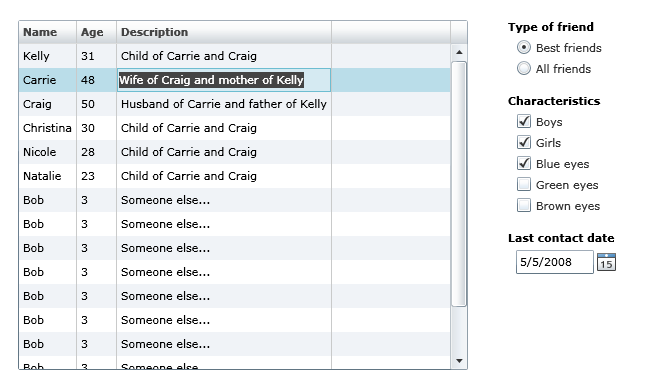
Silverlight 2 ships with dozens of built-in UI controls that can be used to build applications. Below is a screen-shot of the Silverlight DataGrid, RadioButton, CheckBox and DatePicker controls in the final release:
Today we are also announcing the "Silverlight Control Pack" – which will deliver dozens of more controls that you can use with Silverlight 2. We will continually add new controls to the control pack over the next few months (we expect to ultimately have more than 100 controls total). The first release of the control pack will include controls like TreeView, DockPanel, WrapPanel, ViewBox, Expander, NumericUpDown, AutoComplete and more. All controls will ship with full source, and with a OSI license that allows you to modify and use the source for any purpose.
Interoperability
Today we are also announcing that Microsoft is partnering with Soyatec to sponsor additional tools for developing Silverlight applications using the cross platform Eclipse development platform. Click here to learn more about this and download the free Silverlight Eclipse plugin. Click here for a step-by-step tutorial that walks-through how to use their Eclipse tools today to build a Silverlight 2 application.
We are also announcing today that we are releasing the Silverlight XAML vocabulary and schema under the Open Specification Promise (OSP), which enables anyone to create products that read and write XAML for Silverlight.
Learning Silverlight 2
The best way to learn Silverlight 2 is to visit the www.silverlight.net web-site. You can find free online tutorials, videos and training available there. The site also hosts an online forum system where MVPs and Microsoft Silverlight team members will be able to help answer technical questions. Also make sure to subscribe to the Silverlight Community RSS Feed, Jesse Liberty’s Blog, and Tim Heuer’s Blog for a daily dose of great Silverlight content.
I’ve recently updated my Digg-client tutorial for the final Silverlight 2 release. This provides an end to end walkthrough of a Silverlight 2 application, and helps explain the different programming concepts behind it (controls, layout management, networking, data-binding, styles, user controls, control templates, etc). If you are brand new to Silverlight or WPF development I recommend walking through it to understand the basics:
You can develop Silverlight 2 applications using any version of Visual Studio 2008. Simply install the Silverlight Tools for Visual Studio 2008 download to get Silverlight tooling support within it.
If you do not have VS 2008, you can alternatively install the free Visual Web Developer 2008 Express SP1 Edition. This free tool provides great ASP.NET development tool support, and starting today also now supports Silverlight 2 development. You can follow all of the steps in my tutorial above using the Visual Web Developer 2008 Express Edition – and get full intellisense, debugging, and deployment support.
Upgrading from the Beta
If you have the Beta2 or RC versions of the VS Tools for Silverlight, or the Silverlight 2 Beta SDK or Developer Editions of Silverlight 2, please make sure to uninstall these completely before downloading and installing today’s release.
End users who have Silverlight 1, or Silverlight 2 Beta1 or Beta2 will be automatically upgraded to the final Silverlight 2 release starting later this month. Until then, if they visit a Silverlight 2 (final release) site, they will see the standard install prompt that a machine that does not have Silverlight installed would see. Clicking it will upgrade their machines to the final release of Silverlight 2 (there is no need for them to uninstall anything – Silverlight 2 will cleanly install over Silverlight 1 or the previous betas).
Because there are some breaking changes between Silverlight 2 Beta2 and the final Silverlight 2 release, end users who have the final Silverlight 2 release installed will not be able to run applications that are still targeting Silverlight Beta2. Most major Silverlight 2 sites plan to upgrade to the final release in the next 24 hours (which will fix this issue) – if you hit a site built with Beta2 before then you might experience trouble with it. That should go away within about a day once all sites are updated though (this was one reason why we released the public release candidate last month – to help developers get their sites ready for the final release).
Summary
Silverlight 2 is a major release that enables some great new application and media experiences to be built, and allows developers to use .NET within any browser to create them.
Thank you for all your support and feedback the last year as we’ve worked on it. All of us on the Silverlight team are really excited to see what you build with it. 🙂
Scott
by community-syndication | Oct 13, 2008 | BizTalk Community Blogs via Syndication
*rant
One of our staff recently got an iPhone after a vodafone sales rep suggested they
should ‘try’ one……one piece of detail they left off……
Vodafone didn’t put them on the appropriate plan (?????) as the iPhone can be a little
chatty (as we all know).
First bill came in at a 500% increase from previous – wow!!! No phone calls, txts,
reminders…nothing (but I get regular txts asking me if I want circus tickets??)
Upon asking them the big “Why” question – “Oh…you’re not on an iPhone plan…” ????????
(Should have read “You’re on our most expensive plan so we can squeeze more out of
you!”)
(But you sold me the iPhone……)
/*rant
The good thing that did come out of all this is that I discovered a site that compares
all pricing/plans for iPhones from major carriers.
http://www.numbersinaflash.com/iphone-top-10-plans/ –
even got knobs and dials!
Virgin Mobile look to be leading the way here
Problem#2 – How to move over to Virgin Mobile?
