by community-syndication | Oct 13, 2008 | BizTalk Community Blogs via Syndication
Hi all
Today, a former customer of mine called me and had a question. She is using updategrams
to insert rows into a table in SQL Server, and she had a problem with dates. The input
CSV sometimes had an empty string for a date.
This would translate in the XML to an element with an empty string inside it. This
would then get mapped to an attribute for that column in the table, and when SQL Server
read the updategram, the 01-01-1900 was inserted into the date field because no other
value was specified.
The customer wants null to be inserted instead. She asked me how to do this, and I
said that that was easy – I would send her an example later this night.
So I started preparing my example, and it turns out, that my approach only works for
elements and records – I have never before had to suppress an attribute, so I wasn’t
aware of this. My approach being, bye the way, that I connect a logical functoid to
the destination node that I don’t want created under some circumstances. But a logical
functoid can not be connected to an attribute in the destination schema. Bummer.
So I eventually went with a custom scripting functoid, and my example ended up like
this:
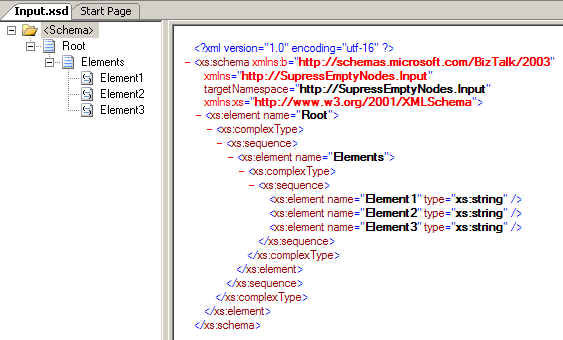
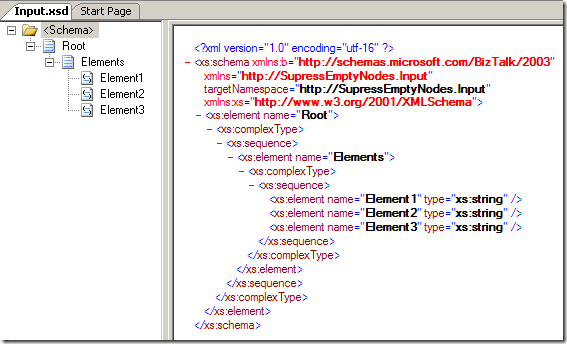
Input schema:
Just a plain schema with three elements, all required.
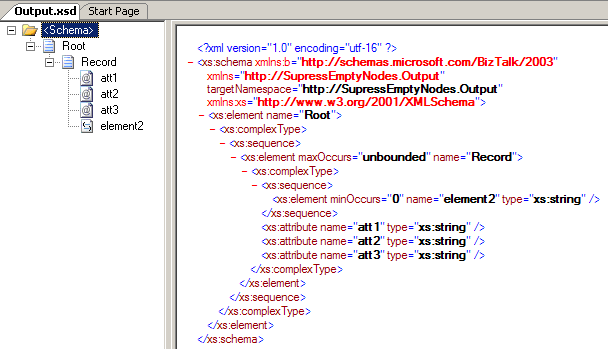
The output schema:
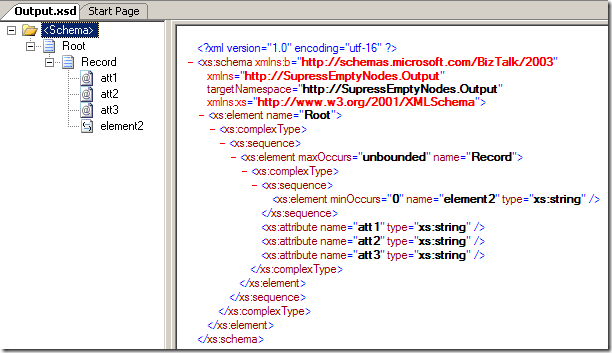
This schema has three attributes to simulate the updategram and also an element just
to show the approach for elements.
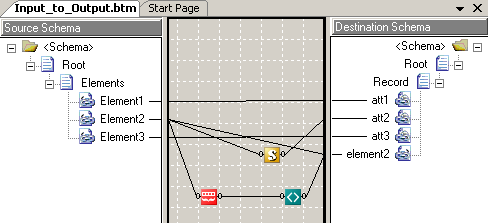
The map ended up like this:
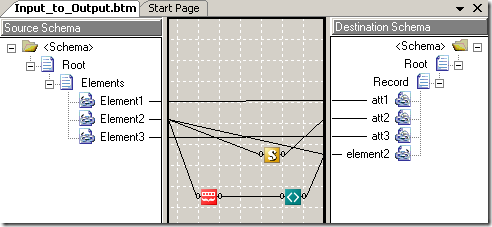
Element1 goes to att1 and Element3 goes to att3. No magic there.
As for element2 in the output, I have used to functoids to get it to be created only
when a string is present in the source. The first functoid (the red one) is a “String
Size” functoid, which returns the length of a string. The green functoid is a “Not
equal to” functoid, which has the string length as one parameter and the constant
“0” as the other parameter. The order of these parameters do not matter. So basically,
at runtime, the element2 element is created if and only if, the length of the string
in Element2 is larger than 0. For this particular customer, I could have used the
“Logical Date” functoid instead of the combination of these two functoids, since that
will return true if the input string is a date, which is exactly what I want. But
the above solution is more general and applies to a lot more scenarios. Downside being,
of course, that the above solution will accept a “abc” as a string, and since the
length is larger than 0, it will get to the output.
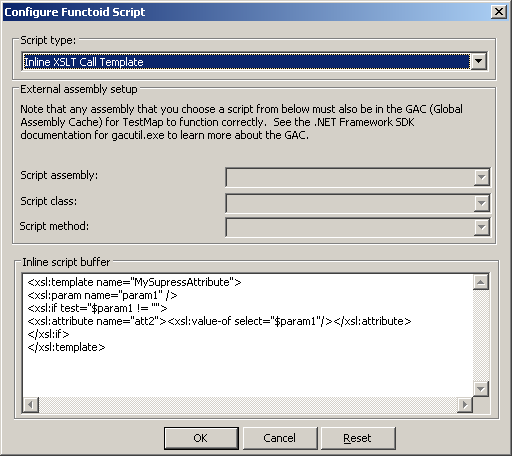
Anyway, the customer didn’t have elements, but attributes. for this I had to use a
custom scripting functoid with this code:
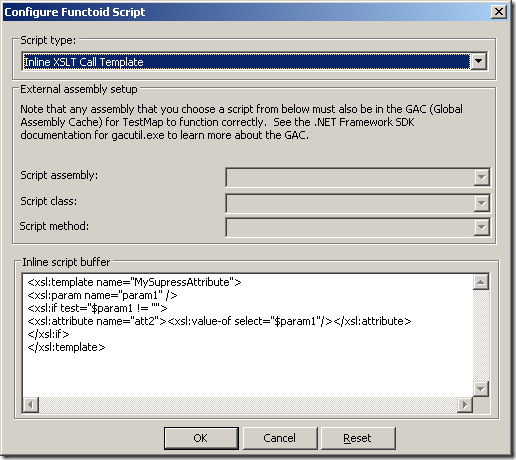
Basically, this call template takes one parameter, being the element in the source
that might be empty. It then check the value to see if it is different from the empty
string, and if it is not the empty string, an attribute is created and the value for
the attribute is set to the input parameter.
Now, as a side node, the input my customer has is a CSV file, so actually, in this
case you can also take advantage of a nice little property on the schema. To demonstrate,
I have created a flat file schema for a CSV input:
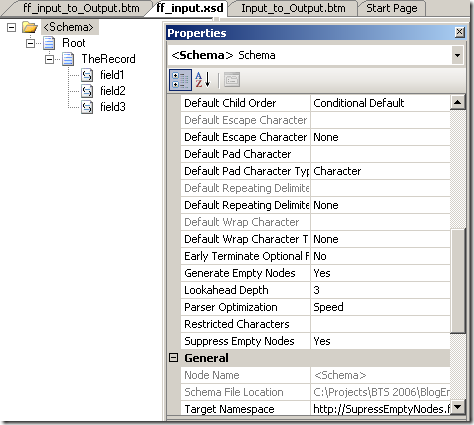
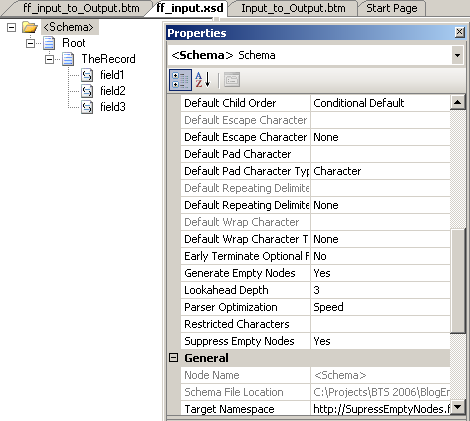
As you can see in the properties window, I have set “Suppress Empty Nodes” to “Yes”.
When BizTalk parses the flat file, the nodes that would be created as empty nodes
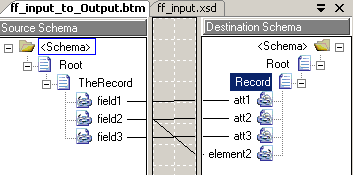
now aren’t created at all. This means, that the map can just look like this:
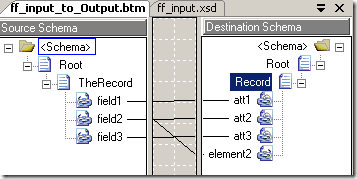
No functoids required, and it will give the exact same output as the above map. Do
notice, that this only works with flat files where you make BizTalk suppress empty
nodes.
So, that was all… feel free to ask questions 🙂
You can find my demonstration project here
>
I hope this turns out to be helpful to someone.
—
eliasen
by community-syndication | Oct 13, 2008 | BizTalk Community Blogs via Syndication
Holy smokes, did I have a blast at Tulsa TechFest! It was a great couple of days hanging out with some great speakers, like Randy Walker, Caleb Jenkins, Zain, Chris, Phil and many more. I did presentations on three different topics. The first of these was called Building Services That Rock, the second was Intro to C# 3.0, and finally an intro to Parallelism in .NET. All were well received, I believe, and I thank David for having me out to speak again.
This was my first time back since the original Tulsa TechFest in 2006. In the year between I went to Heartland Developer Conference. I’ve had a fantastic at both events, but Tulsa TechFest’s enormous size in comparison to HDC and never ending topics is just immensely compelling. At this one conference I could have seen talks on Robotics Studio, Expression Blend, C#, VB, LINQ, Sharepoint, Silverlight, and TDD. When I say I could have seen these, I mean without conflicts, attending all keynotes, and that is just one possible path through this conference extravaganza.
Seriously, if you’ve not ventured to Tulsa TechFest, check it out next year. And keep your eyes here for an announcement soon about Dallas TechFest 2009.
by community-syndication | Oct 13, 2008 | BizTalk Community Blogs via Syndication
There are lots of news in Messenger 9 Beta. Some that I at first sight can't really say I like, and some that I just don't see as being useful just yet. But there are some highlights. Read more here . It's the small things that make me happy…(read more)
by community-syndication | Oct 13, 2008 | BizTalk Community Blogs via Syndication
If you haven't had the opprtunity yet to dive into the .NET Framework 3.5 there is a training kit from Microsoft covering the enhancements to the Framework. There is also this other training kit that covers a larger part of the .NET 3.0/3.5 Framework…(read more)
by community-syndication | Oct 13, 2008 | BizTalk Community Blogs via Syndication
Applications in BizTalk 2006 for me are just logical buckets that allow you place like-minded artifacts (maps, schemas, orchestrations etc.) together, so your environment when viewed through the BizTalk Admin Console looks clean and tidy and can be easily managed.
Although resources (BizTalk Assemblies) and ports can be moved between applications, they cannot exist in multiple […]
by community-syndication | Oct 13, 2008 | BizTalk Community Blogs via Syndication
We’re now just a few short weeks away from PDC, which promises to yield a bumper crop of announcements. Aside from the Oslo/Dublin stuff that regular readers of my blog know I follow closely, there will also be cloud-related announcements. One thing I would expect is that Live Mesh will either get more features/capabilities, or that it may become part of something larger. Either way, I’m a big fan of the existing offering, and am eagerly waiting to see where this leads.
Here’s a few things I’ve done lately that I think are pretty cool use-cases for Live Mesh:
Share, REALLY share
I started a new project recently, and I was given a client machine to work with (for security reasons, we cannot plug our laptops in to the network). The first thing I did was set up a folder on my desktop that I would use as a place to archive documents. Then, I synched it with my Live Mesh desktop. Next, I shared it locally (inside the network, a conventional folder share) with my fellow team members so they could also access it, so a colleague could drop a file in there, and it would propagate to my Live Mesh desktop-in-the-cloud. Lastly, from my Live Mesh desktop, I invited my colleagues and gave them rights to the folder so that they could also access the content from remote locations. Now,you may be wondering…. we already have MOSS and a project portal set up for collaboration. In addition, we also run Groove, so I could have used that to replicate content. So, why did I do this? Because it was a geeky way to test the functionality. I could also share the Live Mesh folder with anyone, even people who may not have Groove, or may not have rights to our MOSS portal. All in all, it was really cool, and quick to set up.
Almost like being there…
I have been in pretty intense travel mode for most of the year (when I go home now I call it a “visit”). This poses some interesting life logistic challenges, such as something arrives in the postal mail at home when I’m on the other side of the planet. So… using Live Mesh, I took my “public scans” folder and synched it with my Live Mesh desktop. I then synched that to a folder on my notebook. Now when something comes in the mail, I can tell my wife to put it on the scanner, and then using Live Mesh’s remote desktop functionality, take control of my machine at home and scan the document. Once it has been scanned, it replicates up to my desktop and then to my notebook. Very cool!
And now, mobile….
Lastly, I discovered that there’s a mobile Live Mesh experience (http://m.mesh.com). So, using my Windows Mobile phone, I can get to my Live Mesh desktop, navigate to my “public scans” folder (or, of course, any other folder in my Live Mesh desktop), and see the PDF that was scanned and replicated above.
Clearly, I’m having far too much fun with Live Mesh, and I am eagerly awaiting whatever comes out of PDC around this…
Technorati Tags: Live Mesh,Cloud Computing
by community-syndication | Oct 13, 2008 | BizTalk Community Blogs via Syndication
During the last months I’ve become a big fan of Powershell. It is a greatshell which allows you to do things in a very flexible manner. When it comes to BizTalk administration tasks however most of the time you end up writing scripts that use WMI to do things.
I would be great if BizTalk developers […]
by community-syndication | Oct 13, 2008 | BizTalk Community Blogs via Syndication
InMarch Yossi Dahanblogged aboutvarious ways to create messages from scratch in an orchestration. In his post (in the comments) he also mentionedhe would be very interested in the performance characteristics.
I shared this interest with him an decided to spend some time on a small test solution to measure the performance. Because I wanted to be […]
by community-syndication | Oct 12, 2008 | BizTalk Community Blogs via Syndication
I’ve been working on organizing the code for my old custom Symmetric
Encryption Pipeline Components for BizTalk Server 2006 and I’ve posted the updated
code on a new GitHub repository.
Be aware that I renamed things a little bit and cleaned other parts of the code.
The code includes both the encryption and decryption component, some basic tests using PipelineTesting,
and the Windows Forms Configuration Utility that stores the crypto keys used by the
components in a custom Configuration Application in Enterprise Single Sign-On.
by community-syndication | Oct 11, 2008 | BizTalk Community Blogs via Syndication
This year (from October 27-30) I’ll be attending the Microsoft PDC hosted at Los Angeles. Especially for my field of work a lot of interesting topics will come up over there. So I hope to get more insight of Oslo, WF etc. 🙂 If you want to meet me there just drop me note.
Technorati tags: PDC