by community-syndication | Nov 29, 2006 | BizTalk Community Blogs via Syndication
Yesterday Irena Kennedy posted a great compilation of multiple sources which resulted in a big fat post outlining selection criteria for an integration solution. She summarizes choosing between SSIS, MSMQ, WCF, BizTalk, SQL Service Broker, and Host Integration Server. Check it out.
Also, if you’ve never undergone a code review by Irena, you haven’t truly lived. It’s a truly terrifying and rewarding experience from a brilliant MCS asset.
by community-syndication | Nov 29, 2006 | BizTalk Community Blogs via Syndication
I had some discussion today with Christof Claessens about the merits of using .NET classes as orchestration message types in BizTalk Server 2006. Here are some of the reasons I came up with, and also some of the issues.
http://geekswithblogs.net/cyoung/articles/99464.aspx
by community-syndication | Nov 29, 2006 | BizTalk Community Blogs via Syndication
There are two interesting BizTalk 2006 bugs to be aware of – it seems like they would
be encountered fairly often, so I’m a little surprised that I haven’t seen more newsgroup/forum
activity around these.
The first bug is encountered when you attempt to start a BizTalk 2006 application
definition with orchestrations that have been bound to different hosts. (Say,
OrchA in HostA, and OrchB in HostB.) After the application has been deployed,
the first time the application is started (and ‘orchestration start/enlist’
is included in the start options) you will receive an error that looks something like
this:
 Microsoft.BizTalk.ExplorerOM.BtsException: Could not enlist orchestration 'BizTalkSample.Orchestrations.Echo,BizTalkSample.Orchestrations,

   Version=1.0.0.0, Culture=neutral, PublicKeyToken=05a4a8d4071035d9'. Could not enlist

   orchestration 'BizTalkSample.Orchestrations.Echo,BizTalkSample.Orchestrations, Version=1.0.0.0,

   Culture=neutral, PublicKeyToken=05a4a8d4071035d9'. Value does not fall within the

   expected range.
You can work around this error by manually starting your orchestrations in the MMC,
either one-at-a-time or grouped by host. The error only occurs the first time
you attempt to start – all future attempts will succeed. This is because the
underlying bug has to do with the creation of subscriptions for the orchestrations.
This is actually a regression from BizTalk 2004 – where you could in fact change multiple
orchestrations (across differing hosts) to a started state via the BtsOrchestration
‘Explorer OM’ class in a single transaction (i.e. before calling SaveChanges.)
In addition to the behavior just described with BizTalk 2006, you can’t do this kind
of Explorer OM work once multiple hosts are involved in BizTalk 2006.
But hey, there is a hotfix. Contact PSS and ask about KB927052.
The second bug is encountered when you have a BizTalk 2006 application with multiple
MSMQ receive locations. You will find that restarting your host instances takes
an excessively long period of time. This is due to a bug in the adapter which
was not allowing the host service to stop correctly (the Service Control Manager would
eventually just terminate the service…) Contact PSS and ask about KB928222.
by community-syndication | Nov 29, 2006 | BizTalk Community Blogs via Syndication
There are two interesting BizTalk 2006 bugs to be aware of – it seems like they would
be encountered fairly often, so I’m a little surprised that I haven’t seen more newsgroup/forum
activity around these.
The first bug is encountered when you attempt to start a BizTalk 2006 application
definition with orchestrations that have been bound to different hosts. (Say,
OrchA in HostA, and OrchB in HostB.) After the application has been deployed,
the first time the application is started (and ‘orchestration start/enlist’
is included in the start options) you will receive an error that looks something like
this:
 Microsoft.BizTalk.ExplorerOM.BtsException: Could not enlist orchestration 'BizTalkSample.Orchestrations.Echo,BizTalkSample.Orchestrations,

Version=1.0.0.0, Culture=neutral, PublicKeyToken=05a4a8d4071035d9'. Could not enlist

orchestration 'BizTalkSample.Orchestrations.Echo,BizTalkSample.Orchestrations, Version=1.0.0.0,

Culture=neutral, PublicKeyToken=05a4a8d4071035d9'. Value does not fall within the

expected range.
You can work around this error by manually starting your orchestrations in the MMC,
either one-at-a-time or grouped by host. The error only occurs the first time
you attempt to start – all future attempts will succeed. This is because the
underlying bug has to do with the creation of subscriptions for the orchestrations.
This is actually a regression from BizTalk 2004 – where you could in fact change multiple
orchestrations (across differing hosts) to a started state via the BtsOrchestration
‘Explorer OM’ class in a single transaction (i.e. before calling SaveChanges.)
In addition to the behavior just described with BizTalk 2006, you can’t do this kind
of Explorer OM work once multiple hosts are involved in BizTalk 2006.
But hey, there is a hotfix. Contact PSS and ask about KB927052.
The second bug is encountered when you have a BizTalk 2006 application with multiple
MSMQ receive locations. You will find that restarting your host instances takes
an excessively long period of time. This is due to a bug in the adapter which
was not allowing the host service to stop correctly (the Service Control Manager would
eventually just terminate the service…) Contact PSS and ask about KB928222.
by community-syndication | Nov 29, 2006 | BizTalk Community Blogs via Syndication
ROLLBACKs create the interesting events.
I’ve spent a time trying to understand them.
When I’ve tried to use
BEGIN TRAN MAIN
…
ROLLBACK TRAN MAIN
inside of the SP, that is started by BizTAlk SQL port,
And I’ve got couple events: (they are bellow)
It was interesting as this SP has done ROLLBACK if I test it without BizTalk.
I’ve got the description of this situation in the BizTalk 2006 Help:
“Save Tran and RollBack tran in stored procedures will cause an error event from the SQL adapter, but the transaction does roll back.”
Matt Meleski gave me the decision:
“…A simple trick that you could try would be to test for an exisitance of a
transaction before starting a new one in the proc. But this would require
minor modifications to your stored procedure. For example:
At the top of the proc,
Declare @MyTran bit
— If Caller Started the Transaction, let the caller handle it
— otherwise control it in the proc.
If @@Trancount = 0
Begin
Begin Transaction
Set @MyTran = 1
End
At the bottom of your proc, to rollback or commit:
If @MyTran = 1 and @@Trancount > 0
Begin
Rollback Transaction — Or Commit Transaction
End
…”
It works!!!
Thanks Matt!
As I can understand the SQL Port create the wrapping transaction and…
in result I cannot properly use the ROLLBACK feature.
No problem. But the text of the events could be more accurate, doesn’t it?
========================================================================
There are the text of those events:
———————————————————–
Event Type: Warning
Event Source: BizTalk Server 2004
Event Category: BizTalk Server 2004
Event ID: 5740
Date: 11/28/2006
Time: 4:21:07 PM
User: N/A
Computer: CORPBTS1
Description:
The adapter “SQL” raised an error message. Details “HRESULT=”0x80004005”
Description=”Cannot roll back MAIN. No transaction or savepoint of that name
was found.”
“.
AND then the second event
Event Type: Warning
Event Source: BizTalk Server 2004
Event Category: BizTalk Server 2004
Event ID: 5743
Date: 11/28/2006
Time: 4:21:07 PM
User: N/A
Computer: CORPBTS1
Description:
The adapter failed to transmit message going to send port
“SQL://CORPNT5/Prod/”. It will be retransmitted after the retry interval
specified for this Send Port. Details:”HRESULT=”0x80004005″
Description=”Cannot roll back MAIN. No transaction or savepoint of that name
was found.”
“.
———————————————————–
When I change the
ROLLBACK TRAN MAIN
to
ROLLBACK WORK
the event changed to:
———————————————————–
Event Type: Warning
Event Source: BizTalk Server 2004
Event Category: BizTalk Server 2004
Event ID: 5740
Date: 11/28/2006
Time: 4:16:09 PM
User: N/A
Computer: CORPBTS1
Description:
The adapter “SQL” raised an error message. Details “HRESULT=”0x80040e14”
Description=”Distributed transaction completed. Either enlist this session
in a new transaction or the NULL transaction.”
“.
AND then the second event
Event Type: Warning
Event Source: BizTalk Server 2004
Event Category: BizTalk Server 2004
Event ID: 5743
Date: 11/28/2006
Time: 4:16:09 PM
User: N/A
Computer: CORPBTS1
Description:
The adapter failed to transmit message going to send port
“SQL://CORPNT5/Prod/”. It will be retransmitted after the retry interval
specified for this Send Port. Details:”HRESULT=”0x80040e14″
Description=”Distributed transaction completed. Either enlist this session
in a new transaction or the NULL transaction.”
“.
by community-syndication | Nov 28, 2006 | BizTalk Community Blogs via Syndication
Eilene Hao, Program Manager, SharePoint has been writing series of posts about SharePoint Services Workflow. You can check out the entire series in the SharePoint team weblog.

by stephen-w-thomas | Nov 28, 2006 | Stephen's BizTalk and Integration Blog
Deployment in BizTalk 2006 is a greatly improved process over that of BizTalk 2004. The typical deployment process in BizTalk 2006 goes something like this:
1. Export the MSI using BizTalk Administration
2. Move to target computer
3. Import MSI through BizTalk Administration or BTSTASK
4. Run the MSI to GAC the DLL’s
Simple and straight forward. But why do we need to run the MSI after we import it?
This accomplishes a few things, mostly to GAC the DLL’s and to have the MSI package show up under Add/Remove programs. This makes is easy to see what has been deployed to the target computer.
But what if you only wanted to move the code to one target computer and you did not care about seeing the items under Add/Remove programs?
Well, then you could change the DLL properties (a.k.a. Resources) inside BizTalk Administration to
actually GAC your DLLs on MSI import.
How to change the Resource properties in BizTalk 2006
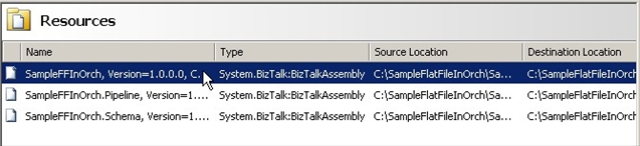
Step 1: Open BizTalk 2006 Administration, select your Application, click on Resources.
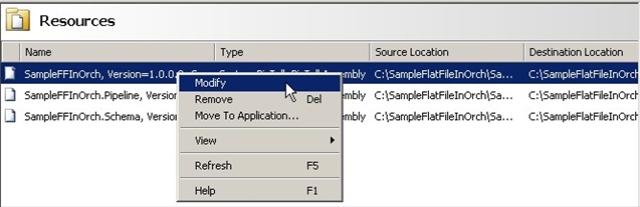
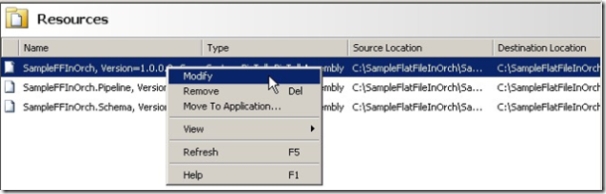
Step 2: Select the first BizTalk Assembly Resource, right click, select Modify
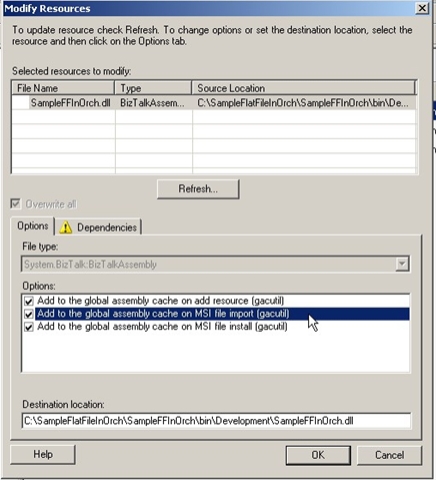
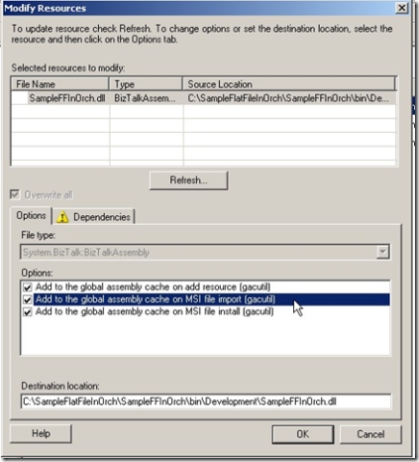
Step 3: Under Modify Resources – Options box, check the “Add to the Global Assembly Cache on MSI file import (gacutil)”
4. Repeat for each BizTalk Assembly or other resources in your application that you needed GACed.
It is that easy! Now when you import the MSI your BizTalk resources will be put into the global assembly cache without any additional effort.
Now remember, just because you can do something does not mean you should. This most likely would be most valuable on a single computer install and remember you MSI will not show up under Add/Remote programs.

by community-syndication | Nov 28, 2006 | BizTalk Community Blogs via Syndication
The deployment story in BizTalk Server 2006 is greatly improved over that of 2004. A typical deployment in BizTalk Server 2006 goes something like this:
1. Export the MSI using BizTalk Administration or BtsTask
2. Move the MSI to the target computer
3. Import the MSI using BizTalk Administration or BtsTask
4. Run the MSI to put the DLLs in the global assembly cache (GAC)
This is a simple and straight forward process. But why do you need to run the MSI after it is imported?
This accomplishes a few things:
1. It puts the DLL's into the GAC
2. Adds the MSI package to show up under Add/Remove programs
But what if you only wanted to move the code to one target computer and you did not care about seeing the items under Add/Remove programs?
Then you could change the DLL properties (Resources) inside the BizTalk Administration tool to
actually place your DLLs into the GAC on MSI import.
How to Change Resource Properties in BizTalk Server 2006
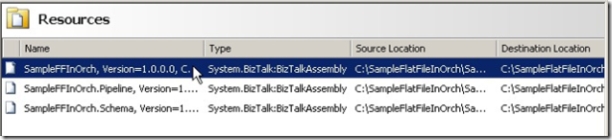
Step 1: Open BizTalk Administration, select your Application, click on Resources.

Step 2: Select the first BizTalk Assembly Resource, right click, select Modify

Step 3: Under Modify Resources – Options box, check the "Add to the Global Assembly Cache on MSI file import"

4. Repeat for each Assembly or other resources in your application that you want in the GAC.
Now when the MSI is imported your resources will be put into the GAC without any additional effort.
Just remember that the MSI will not show up under Add/Remote programs as it would when you run it on the target system.
by community-syndication | Nov 28, 2006 | BizTalk Community Blogs via Syndication
Richard Seroter has just posted about the BizTalk 2006 R2 beta 1 installation experience and new functionality – it would appear there is lots of .Net 3.0 and WCF, along with Microsoft EDI/AS2 and BAM Evening goodies!
The installation experience appears to be along the same lines as BizTalk 2006, with added EDI/AS2 configuration options (which […]
by community-syndication | Nov 28, 2006 | BizTalk Community Blogs via Syndication
Yesterday I did a quick evaluation of the Beta 1 release of BizTalk Server 2006 R2, and thought I’d walk through the installation process and highlight some new things I noticed.
The Beta 1 release looks to be for early adopters only, so there is no “public” release at the moment. Hopefully there will be one in the Spring. Also please note that anything shown here is subject to change by Beta 2 or final release.
First, I walked through the standard installation.
Next I chose the components to install. You can see from my image below that there are additional EDI/AS2 components, Windows Communication Foundation (WCF) bits, and additional BAM Eventing (new interceptors for both Windows Workflow and WCF).
After installing, I jumped right to configuration. As you can see here, not a whole lot of changes.
You will see additional configuration, however, for the new EDI/AS2 functionality.
Next I went through and installed the new BizTalk .NET adapters. These adapters allow you to ping various Line of Business (LOB) systems directly through .NET code without going through BizTalk.
Once everything was installed, I went to see if anything new showed up in the BizTalk Administration Console. First thing I saw was a new “Application” called BizTalk EDI Application. Inside, there were a couple of orchestrations, lots of schemas, ad a few pipelines.
Next I checked out the “Adapters” section and saw all the new WCF adapters available. Nice.
I read in one of the documents that the BAM Management tool had been upgraded, so I looked at the bm.exe command line tool to see what new options were available. You’ll see below that there are now options to deal directly with interceptors. This will allow you to instrument your WF and WCF process to feed data directly into the common BAM infrastructure. I like it.
I wanted to see all the options available for the WCF adapters, so I went ahead and build a couple new receive locations. The first receive location uses the WCF – WSHttp adapter.
Then I built a WCF – Custom location. Check out all the various options below:
Finally, I jumped into Visual Studio.NET 2005 and kicked off the WCF Service Publishing Wizard. If you’ve ever used the standard Web Services Publishing Wizard, then you’d be fairly familiar with this one.
In future posts I’ll dig more into how to actually use all these great new functions. Some folks are already digging into the functionality, like my buddy Jesus Rodriguez who has a post on Invoking TCP-Hosted WCF Services using BizTalk Server R2.
Technorati Tags: BizTalk