by community-syndication | Nov 28, 2006 | BizTalk Community Blogs via Syndication
Wow, its been a busy couple of months here.
I was looking forward to getting to the Microsoft SOA conference in Seattle back at the start of October, but I ended up being pulled back to Toronto for a pressing BizTalk opportunity we had going. That opportunity pretty much took all of my time for the first couple of weeks of October. The team here was pretty busy running the Canadian BizTalk Partner Roadshow (outlined in my last post). I had a chance to meet some great partners during the roadshow, but I’ll save that discussion for a future post.
For now, I wanted to some of the work we had to do for the that opportunity that kept me from getting to the Microsoft SOA conference. One of the things that we had to show was how the BizTalk SAP adapter could be installed, configured and used. Since the process can be a bit confusing and tricky, I thought I’d post the steps I followed.
Step 1 – The obvious first step is to install and configure BizTalk 2006. I won’t go into the details of this as there are already a bunch of detailed documents out there that outline this process. Once this is done, you’ll likely wonder where the SAP adapter is. It isn’t installed as part of the core BizTalk Server installation process. The adapter comes in a separate installation package and you’ll need to make sure you have this before you proceed further.
Step 2 – The SAP.NET Connector is a prerequisite for the BizTalk SAP adapter and must be installed before you try installing the adapter. This is the trickiest step for most people and is often the most frustrating part of the process. The frustration comes from trying to figure out what version of the connector you need to install for your BTS 2006 environment. There are multiple versions of the connector and if you don’t have the correct one, then nothing is going to work for you. One of the most common errors people hit when installing connector is that the it has a dependancy on Visual Studio 2003. Since BizTalk 2006 is dependant on Visual Studio 2005, the installation fails and you’re stuck. Beyond this specific error, there are a number of other errors that you can run into if you aren’t using the correct version. The key to getting past these issue is to install the SAP.NET Connector Runtime version 1.0.3. The runtime version does not have the VS 2003 dependancy and you’ll be able to install it in your BizTalk 2006 environment. A key note, the Connector is not provided by Microsoft and you will have to obtain this from SAP.
Step 3 -Before you get too far into this process, you’ll want to contact your SAP administrator to get your hands on the connection/username/password information. You’ll obviously need this information when we set about configuring the adapter. From my experience, getting connection information and username/password info can often take a few days. Therefore, I recommend asking for this as soon as you find out you’ll need to use the adapter.
In all honesty, getting your hands on the connector and getting the proper connection information will take the majority of your time (It did for me). Once you’re past these steps, the remaining steps can be completed quite quickly. In fact, I’ve attached a short AVI file that shows the remaining steps. Feel free to download it and use it however you need (training, client demos etc) as it really shows how simple it is to configure and use the adapter. The entire movie is only 4 minutes long and its about 1.5 megs zipped.
Step 5 – You’ll need to install the SAP adapter. It’s a pretty simple install and when its done, you’ll be able to see the new SAP adapter using the Biztalk Admistration Console. (This is shown in the AVI)
Step 6 – Once the adapter is installed, we’ll need to configure it and setup a send port that we can use to connect to the live environment and generate our message schemas. (Shown in the AVI) Note, that we want to configure the adapter before we do anything else in Visual Studio.
Step 7 – Now that the adapter is installed, we can use it to generate our schemas. To generate the SAP schemas, right click on your project, select “Add->Add Generated Item”. From the pop-up window, select the “Add Adapter Metadata” option and the Adapter Metadata wizard will launch. One the wizard’s first screen, select the SAP option. You’ll need to provide the name of the SQL Server and the database where your SAP Adapter is configured. Once you have entered this info, the adapter you already created will show in the third drop down. You’ll then be presented with a search screen that will allow you to search against the IDOCs and RFC functions in your SAP environment. (Note, you can use the * wildcard when searching). Once you select the IDOC or RFC you want to generate the schema for, select the next button and the schemas will be generated for you.
Setp 8 – You’re done, go ahead and develop the rest of the BizTalk project as you normally would.
The AVI file will show as a link at the end of this post. I filmed it at 1024×768 so set your resolution to this before running.
Cheers and keep on BizTalking.
Peter
by community-syndication | Nov 28, 2006 | BizTalk Community Blogs via Syndication
I recently worked on a pilot to access RPG programs on an IBM AS/400 from BizTalk Server 2006. We used the new Host Applications adapter which is included with the Microsoft BizTalk Adapters for Host Systems (which is available for free as long as you have a BizTalk Server 2006 license.)
The pilot went smoother than I thought it would and it was pretty easy for the most part. We did run into a few issues which I will cover in this post. Before I cover the issues though, I would like to provide some context for using the Host Applications adapter:
- The documentation is heavily focused on Host Integration Server 2006 (my naïve understanding is that the BizTalk Adapters for Host Systems and HIS 2006 are largely the same product) and it is hard to get a grasp of what you need to review in the docs; however, in the Operations section of the docs there are sections on the BizTalk Adapters for Host Systems: Host Applications, Host Files, DB2, WebSphere MQ (client-side, does not require a Windows version of WebSphere MQ.)
- For the Host Applications adapter, you can’t just install the adapter – you need TI Manager, Dev Tools, etc. When installing the adapters, we used the default settings, which installs lots of HIS components (and the 4 BizTalk adapters) but it does not upgrade Enterprise Single Sign-On to version 4.0 (version 4.0 is included with HIS 2006, version 3.0 is included with BizTalk 2006.)
- You will have additional services running after installing the BizTalk Adapters for Host Systems so make sure you have a beefy development machine if you are going to be utilizing these adapters.
- The docs state that you need Windows 2003 to connect to an RPG program using the Host Applications adapter but it works fine from my laptop running Windows XP SP2.
- You must generate metadata (.dll and .xsd) to use the Host Applications adapter – check out the docs for more info on doing this.
- You must configure a Remote Environment in TI Manager to use the Host Applications adapter – check out the docs for more info on doing this.
Issues
We only ran into a couple of major issues. The first issue was that when connecting to RPG programs we would get an error message complaining that the programs didn’t have a PLIST – when using the Host Applications adapter to communicate with an RPG programs that RPG program must have PLIST. If it doesn’t, you will not be able to generate the Transaction Integrator .dll and .xsd (metadata necessary for connecting to the RPG programs.) My understanding of a PLIST is that is something analogous to an interface in the .NET world. We examined two different courses of action to work around this issue. The first was to call the RPG programs from DB2 stored procedures and then use the DB2 adapter to access the mainframe. The second option, which we opted to use, was to have the mainframe developers create small wrapping RPG programs which contained PLISTs and then call the program that we really want to access. This worked very well.
The second major issue was that we didn’t know the port number that we needed to use to connect to the mainframe. In our case it was 8475 (this appears to be the standard port to call RPG programs on AS/400s.)
Minor Issues and Other Notes
We did not use SSO with the Host Application Adapter (some parts of the docs seem to imply that you must use SSO.) We used the TIClientContext elements that are part of the generated .xsd and passed in the USERID and PASSWORD by including them in the message sent through the adapter:
<ns0:TIClientContext TIContextKeyword="USERID" TIContextValue="theuserid" />
<ns0:TIClientContext TIContextKeyword="PASSWORD" TIContextValue="thepassword" />
If you do this, you must set the Set the ‘Allow Security Overrides’ send port adapter configuration property to ‘Yes’. Additionally, in TI Manager, for your Remote Environment, you must check the ‘Require client provided security’ on the Properties-Security tab.
We had to use the XmlReceive pipeline on the solicit-response Host Application adapter send port to get the response message back to our orchestration. The default is of course the PassThruReceive pipeline.
by community-syndication | Nov 27, 2006 | BizTalk Community Blogs via Syndication
Whenever we work on BizTalk projects we feel why there is no provision for App.Config file so that one can store Key/Value pairs in it. So to have a work around for it we save key/value pair in Btsntsvc.config file.
It is one of the easiest work around.
1. But can you store sensitive data like your domain password in a place which is visible and accessible to all.
2. Do you feel changing btsntsvc.config file is right from developer point of view.
I do feel your answer is Nonot at all. Well in such scenario SSODB comes in picture. The key/value pair is stored in encrypted format so nobody can access sensitive data. No btsntsvc.config file is involved in it. Single Sign-On database (SSODB) is a standard Database which gets installed while one installs BizTalk Server.
My Dummy Solution contains 3 projects.
1. SSODB Helper class to query SSODB.
2. MMC3.0 Snap-in for Administrators to add key/value pairs.
3. Windows Form to test the SSODB helper class.
We can user SSODB Helper class in our Orchestration to get any key/value pair. I won’t get into technical details of how to develop it. MMC 3.0 developments with C# is not officially supported by Microsoft. “Sample Snap In” development code can be downloaded from Microsoft site.
http://msdn.microsoft.com/library/default.asp?url=/library/en-us/managedMMC/html/a335f609-a929-449a-86f6-29ac7c227709.asp
I had a thread runnig regarding Developing “MMC 3.0 Snap IN” at
http://groups.google.com/group/microsoft.public.management.mmc/browse_thread/thread/88b4e3da49af3ceb/71f5ee87514f63ac?lnk=gst&q=mmc3.0&rnum=12&hl=en#71f5ee87514f63ac
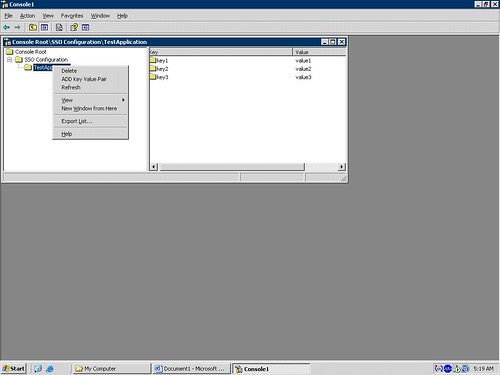
The Snap-In looks like the one below. One can create Applicationwhich in turn contains Key/value pairs. SSODB stores in terms of Application Name-ConfigName-Key/value pairs. So one Application can contain more then one ConfigName which contains many key/value pairs. For simplicity I had only one ConfigName which contains many key/value pairs. So in my current solution I have no Provision for multiple ConfigNames.
One needs to first Add an Application. A new application with name “NewChild”. One needs to rename it to the Application Name one wants. Application Names are user friendly namesSo you can name it as per your convenience. Then one can add key/value pair. It’s worthwhile to work with SSODB and its pretty challenging. Queries and Bugs are always welcomed.
by community-syndication | Nov 27, 2006 | BizTalk Community Blogs via Syndication
HowTo: Building a WCF Service and Consumer
HowTo: Debug an application crash/hang in production environment
by community-syndication | Nov 27, 2006 | BizTalk Community Blogs via Syndication
Hello Edi World!
BizTalk Server 2006 R2 has been certified by Drummond for EDIINT-AS2 processing http://www.drummondgroup.com/html-v2/as2-companies.html.
AS2 support is natively available within the product – meaning you don’t have to pay ’extra’ for it. The integration of the AS2 functionality is seamless so no worries about ’external’ integration!
AS2 is support in BizTalk is available in Synch and Asynch (HTTP) modes. MDN/Ack is generated seamlessly and NRR/Reporting is supported too! Bottom-line this is a full feature product!
Imagine the possibilities!
Namaste!
Suren
by community-syndication | Nov 27, 2006 | BizTalk Community Blogs via Syndication
As a good friend said: Learn it, Love it, Live it
http://blogs.msdn.com/rruggeri/archive/2006/11/21/the-microsoft-connected-health-framework.aspx
by community-syndication | Nov 27, 2006 | BizTalk Community Blogs via Syndication
During the configuration of BizTalk 2004, during the configuring of WMI, there is the following error:
Failed to deploy Biztalk system assembly “D:\Program Files\Microsoft BizTalk Server 2004 Microsoft.BizTalk.DefaultPipelines.dll”. Unspecified exception: Unable to generate a temporary class (result=1).
error CS2001: Source file ‘C:\WINDOWS\TEMP\zkf0npgt.0.cs’ could not be found.
error CS2008: No inputs specified.
Unable to generate a temporary class (result=1).
error CS2001: Source File ‘C:\WINDOWS\TEMP\zkf0npgt.0.cs’ could not be found
error CS2008: No inputs specified
The resolution is to give NETWORK SERVICE read/write access to the C:\WINDOWS\TEMP directory
by community-syndication | Nov 27, 2006 | BizTalk Community Blogs via Syndication
Recently I had to configure a BizTalk 2006 multi-server environment that someone else had built out (installed BizTalk, SQL, prerequisites, etc.) When running the BizTalk configuration tool I would get the following error:
"BizTalk 2006 Configuration: Microsoft SQL Server 2005 Data Transformation Services (DTS) for BAM Archiving is not installed on the local machine. Please install Microsoft SQL Server 2005 Integration Services. (Microsoft.BizTalk.Bam.CfgExtHelper.ToolsHelper" … Additional information: “Could not load file or assembly ‘Microsoft.SqlServer.ManagedDTS, Version=9.0.242.0”…
I assumed that the SQL Client Tools weren’t installed, which is a requirement per the installation guides. I also found this post on the same problem, http://blogs.msdn.com/mattlind/archive/2006/08/30/730575.aspx
This hunch (which the post confirmed) turned out to be correct so I tracked down the SQL Server DVDs; however, when installing the required SQL Client Tools I would get this error message when the setup package was trying to install OWC11:
"Error 1706. Setup cannot find the required files. Check your connection to the network, or CD-ROM drive. For other potential solutions to this problem, see C:\Program Files\Microsoft Office\OFFICE11\1033\SETUP.CHM"
Since it was failing on the OWC11 portion of the installation I had a hunch that it was the already installed OWC11 (11.0.8003.0) (likely from the BizTalk 2006 pre-requisites .cab file) that was causing the SQL Client Tools setup program problems so I uninstalled OWC11 and then tried to install the SQL Client Tools again. They installed successfully this time (and they installed OWC11 (11.0.6558.0).
I decided to repair BizTalk since things we’re being installed in an odd order; additionally, I extracted the owc11.exe (installer) from the BizTalk prerequisites cab and installed it to be safe. Now the OWC11 version is back to (11.0.8003.0)
I ran the BizTalk configuration tool again it worked smoothly.
So, please follow the installation guides carefully to avoid having to troubleshoot your installation/configuration – or at least to avoid increasing the chances of having to troubleshoot J.

by community-syndication | Nov 27, 2006 | BizTalk Community Blogs via Syndication
Gregory
Van de Wiele, a fellow BizTalk MVP, wrote to me a couple of weeks ago with some
good information on how to catch XML Schema errors thrown by the XML Disassembler
Component in a BizTalk pipeline when using my BizTalk PipelineTesting library.
Here’s the scoop:
In order to find a real XML schema error, when using XMLDASM component for validating,
you need to do this:
-
Inside your test, catch type XmlDasmException
-
You won’t find the real schema validation error using the Message or ExtendedDescription
prop: both are empty
-
GetArgument(0) does the trick. Alternatively you could call the GetErrorMessage(Exception)
on the Utilities type in the Microsoft.Test.BizTalk.PipelineObjects
It took me quite some time because I somehow overlooked the private ’arguments’
collections in the debugger. Maybe other people will make the same mistake.
Thanks for the tip, Gregory, I’m sure other people will find it useful! As soon as
I find some free time, I’ll update the PipelineTesting library with this and other
suggestions Gregory passed on! If anyone has other suggestions or feature requests,
now is the time for them 
Technorati
tags:
BizTalk,
BTS,
Testing
by community-syndication | Nov 26, 2006 | BizTalk Community Blogs via Syndication
At this Thursday’s SOA and BP Conference in Sydney, Graham Elliott and I will be doing a session called Demystifying Workflow which will aim to clear up some confusion between WF, BTS and OFFICE workflow. Please drop in and say hi 🙂 We receive lots of questions and have plenty of dialog around this topic so we thought it would be a great opportunity for us to tackle this head on at the conference. We are presenting in the Microsoft Sydney offices 4–5 pm.
