Do you feel difficult to keep up to date on all the frequent updates and announcements in the Microsoft Integration platform and Azure iPaaS?
Integration weekly update can be your solution. It’s a weekly update on the topics related to Integration – enterprise integration, robust & scalable messaging capabilities and Citizen Integration capabilities empowered by Microsoft platform to deliver value to the business.
I was alerted by fellow Integration MVPs that BizTalk Server 2020 is now available!
Sure enough, it is available for download on MSDN. All versions of BizTalk 2020 including Developer, Branch, Standard, and Enterprise.
The interesting take away is support for Visual Studio 2019! So we skipped over Visual Studio 2017 altogether. Plus support for SQL 2019 and Windows 2019.
There is a nice, long list of What’s New in BizTalk 2020 along with some notable deprecations including the POP and SOAP adapters.
Interested in learning more about Azure Logic Apps? What are they used for? What business problems they can solve?
Take a look at my new course “Azure Logic Apps: Getting Started” available on Pluralsight that offers training on working with and creating Azure Logic Apps.
It is a quick 1 hour 18 minutes overview of the basics of Logic Apps. Content is broken down into 3 modules.
Introduction to Microsoft Azure Logic Apps
Design and Development of Logic Apps
Building a Production Ready Logic App
If you are short on time, you can watch Pluralsight content in up to 2x speed!
Give the course a try and I look forward to any feedback!
My new course titled “BizTalk Server administration with BizTalk360” is now live on Pluralsight!
BizTalk Server Administration with BizTalk360
Here is the Introduction to the course:
“BizTalk Server is a complex enterprise integration server that typically requires daily administration. This course will teach you how to use BizTalk360 to streamline your administration tasks and provide valuable insight into daily operations.”
This course is packed full of over 3 hours of content covering 11 modules.
While we all know that the Azure Logic App team is coming out with amazing new Connectors all the time!
As new ones are rolled out, a lot of the time we get to use them in Preview mode. One thing to keep in mind is, sometimes key details of the connector will change while in the preview period.
Here is an example for the SendGrid Send Email Connector.
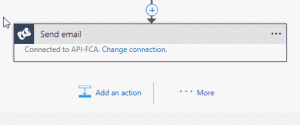
We are using it in a few Logic Apps to send emails. When I open the Logic App up inside the web app or Visual Studios, I see this:
All I see is the connection information rather than the To, From, Subject, and Body.
Now this just seems to be a UI issue. My Send Mail actions seem to work and send emails. But if I want to make a change I need to do it inside the code vs the designer.
How to fix it?
Option 1: Delete the shape and re-add it. Simple enough. Make sure you copy out the parameter values before you delete it so you can set them again.
Option 2: Edit the JSON to adjust the changed values. Two fields are different now: PATH and BODY.
If you want to manually fix this do the following:
1. Change the Path to “/mail/send”
2. Rename “body” to “text”
Once complete, you will see all the properties available through the UI again.
I had a great time presenting at the Microsoft Technology Center a few weekends ago in Manhatten covering Azure Functions and Azure Logic Apps as part of the Global Integration Bootcamp!
We had a great group of presenters and an even better group of participants.
If you are interested in the slides and lab for the session, you can download them below. The topics covered are Azure Logic Apps, Azure Functions, and Azure Storage,
Notes for the lab: You need a hosted email account (Gmail, Outlook, Office 365, etc) and a trail Twilio account (this can be skipped if you don’t want to receive a text)
Windows Azure Logic Apps now have support for variables inside a logic app!
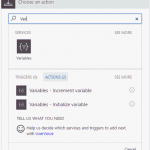
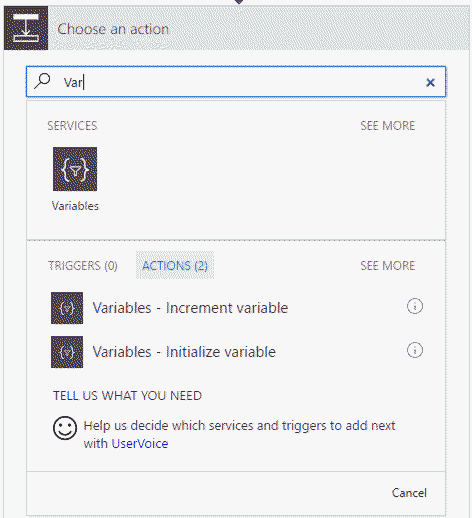
In order to use them, just search for Variables inside the Add Action dialog box.
You have two options: one to initialize a variable and one to increment a variable.
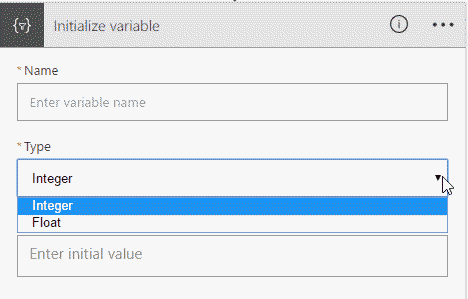
Currently, Variables support Integer and Float variable types as shown in the image below. But with all things Logic Apps, this could change later on.
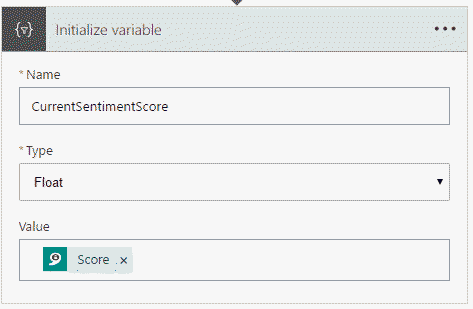
You can also use Math Functions when assigning and incrementing variables.
An example of this is using the Add internal function to add 5 to another existing variable. This would look like this:
@add(variables(‘TestingVariables’),5)
You access a variable inside JSON like
@variables(‘<Variable Name>’)
One interesting point to note if that you can not use the output of a variable as the increment for the same variable.
You will get this error when you try to save the Logic App:
Failed to save logic app TestVariables. The inputs of workflow run action ‘Increment_variable’ of type ‘IncrementVariable’ are not valid. Self reference is not supported when updating the value of variable ‘Increment_variable’.
What would you like to see next for variables in Azure Logic Apps?
More data types?
Cross Logic App variable support?
Ability to create more than one variable at a time?
Are you working with Windows Azure Logic Apps inside Visual Studios and seen an error like this after you deploy?
The API connection ‘/subscriptions/{Subscription ID}/resourceGroups/{Resource Group Name}/providers/Microsoft.Web/connections/sql’ is a connection under a managed API. Connections under managed APIs can be used if and only if the API host is a managed API host. Either omit the ‘host.api’ input property, or verify that the specified runtime URL matches the regional managed API host endpoint ‘https://logic-apis-westus.azure-apim.net/’.
What I have found is the Logic App gets a little sticky to a Region. It seems to like the initial region you set when you first created the Logic App. Most of the shapes inside a Logic App are internal API calls to Microsoft hosted services. This ends up looking like this in the JSON:
As you can see the eastus is set in the runtimeUrl of the internal API call to the SQL API. When this is deployed to another region, at present Visual Studio does not replace this value with the correct region.
So what happens when you deploy to another region? Well these values get sent as-is.
If you run the Logic App you will get an error message like seen above.
To fix this issue it is simple, once you deploy the Logic App into a new region open it inside the Web Portal and Save It. You do not have to do anything else. This will adjust the runtimeUrl values to the correct region.
I have been working a lot with Azure Logic Apps over the past month. Since I am new to Logic Apps, I often run into silly issues that turn out to trivial to fix. This is one of them.
I was working with the HTTP Rest API shape to try to call a custom API, actually trying to call the Azure REST API to do an action on another Logic App – but more on that later.
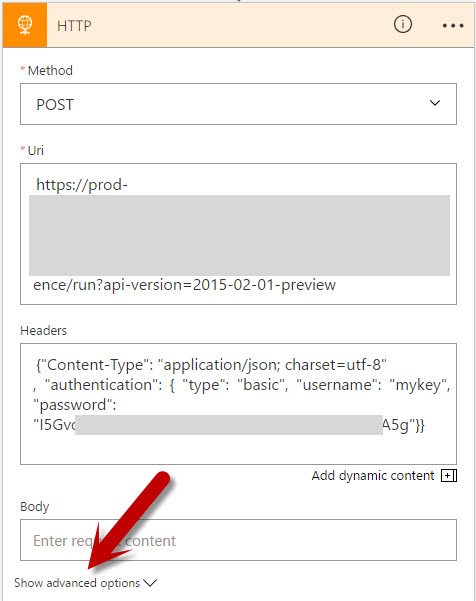
I was setting Content Type and Authorization inside the Headers file as shown below:
I kept receiving this error:
Unable to process template language expressions in action ‘HTTP’ inputs at line ‘1’ and column ‘1234’: ‘Error reading string. Unexpected token: StartObject. Path ‘headers.authentication’.’.
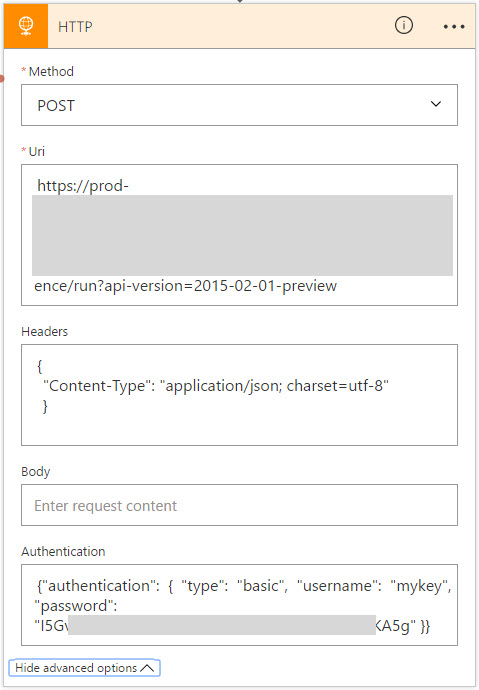
The fix was super simple. I had not expanded the Show Advanced Options for this shape. Once expanded, I see the Authorization is broken out from the other Headers. I moved the Authorization section from the Headers to here and it worked as expected!
So note to self, is something does not work as expected try expanding the Advanced Options section of the shape to see if that might help.
I have been working heads down for a few weeks now with Windows Azure Logic Apps. While I have worked with them off and on for over a year now, it is amazing how far things have evolved in such a small amount of time. You can put together a rather complex EDI scenario in just a few hours with no up front hardware and licensing costs.
I have been creating Logic Apps both using the web designer and using Visual Studios 2015.
Recently I was trying to use the Transform Shape that is part of Azure Integration Accounts (still in Technical Preview). I was able to set all the properties and manually enter a map name Then I ran into issues.
I found if I switched to code view I was not able to get back to the Designer without manually removing the Transform Shape. I kept getting the following error: The ‘inputs’ of workflow run action ‘Transform_XML’ of type ‘Xslt’ is not valid. The workflow must be associated with an integration account to use the property ‘integrationAccount’.
What I was missing was setting the Integration Account for this Logic App. Using the web interface, it’s very easy to set the Integration Account. But I looked all over the JSON file and Visual Studios for how to set the Integration Account for a Logic App inside Visual Studios.
With the help of Jon Fancy, it turns out it is super simple. It is just like an Orchestration property.
To set the Integration Account for a Logic App inside Visual Studios do the following:
1. Ensure you have an Integration Account already created inside the subscription and Azure Location.
2. Make sure you set the Integration Account BEFORE trying to use any shaped that depend on it, like the Transform Shape.
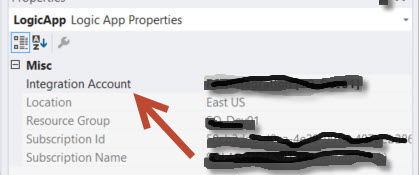
3. Click anyplace in the white space of the Visual Studio Logic App.
4. Look inside the Property Windows for the Integration Account selection windows.
5. Select the Integration Account you want to use and save your Logic App.