by Gautam | Oct 7, 2018 | BizTalk Community Blogs via Syndication
Do you feel difficult to keep up to date on all the frequent updates and announcements in the Microsoft Integration platform?
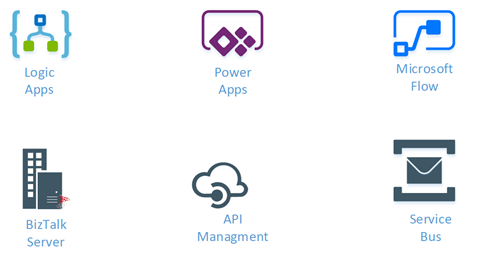
Integration weekly update can be your solution. It’s a weekly update on the topics related to Integration – enterprise integration, robust & scalable messaging capabilities and Citizen Integration capabilities empowered by Microsoft platform to deliver value to the business.
If you want to receive these updates weekly, then don’t forget to Subscribe!
Feedback
Hope this would be helpful. Please feel free to reach out to me with your feedback and questions.
by Gautam | Sep 30, 2018 | BizTalk Community Blogs via Syndication
Do you feel difficult to keep up to date on all the frequent updates and announcements in the Microsoft Integration platform?
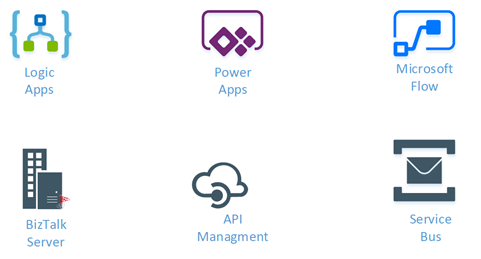
Integration weekly update can be your solution. It’s a weekly update on the topics related to Integration – enterprise integration, robust & scalable messaging capabilities and Citizen Integration capabilities empowered by Microsoft platform to deliver value to the business.
If you want to receive these updates weekly, then don’t forget to Subscribe!
Feedback
Hope this would be helpful. Please feel free to reach out to me with your feedback and questions.
by Sivaramakrishnan Arumugam | Sep 27, 2018 | BizTalk Community Blogs via Syndication
In very few days, we will release BizTalk360 version 8.9. As everyone is excited, I’m excited too as, in every release of BizTalk360, we constantly improve and include features based on the customer’s feedback and business needs. In the upcoming version, we have implemented a few features purely based on the customer’s feedback.
Here is the list of features which I’m going to cover in this blog:
- PDF Download
- Restore System Email XSLT Template
- Monitoring IBMMQ and Azure Service Bus Queues using Message Age
- Performance improvements
PDF Download
Based on the existing implementation in the Analytics reporting module, many of our customers requested the PDF download feature. We have implemented the PDF Download capability for the following modules:
- Graphical Flow (Tracking)
- Messaging Patterns
- Operations Dashboard
- Monitoring Dashboard
- Analytics Dashboard
In Graphical Flow (Tracking)
The user views the entire flow of the message from where it entered the BizTalk server to the point where it left the BizTalk Server environment. All the message flows are indicated by arrow marks between the nodes, which will provide a clear indication of the message transactions.
Say, in a message flow a message is not sent to the expected node; this will become clear in the Graphical Flow (Tracking) feature.
Example: The Viewer shows you what messages a service instance (pipeline or orchestration) sent and received, and details such as the URL, port, and party used. You can also see which preceding service instances handled the messages coming into the service instance you are currently viewing.
You can link back to these instances and see the messages coming into and going out of these instances.You can also see the subsequent service instances that received messages from the service instance you are currently viewing, and link forward to these instances to see the messages coming into and going out of these instances.
In other words, you can walk through the entire path of an activation message through your business process.
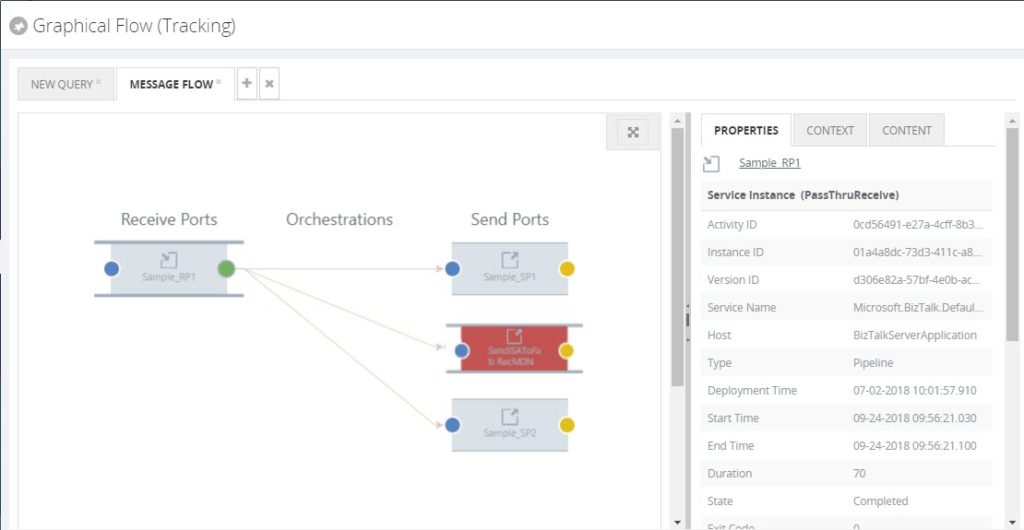
In such cases, the new PDF download implementation will be helpful to download the flow and escalate the problem to the required team.
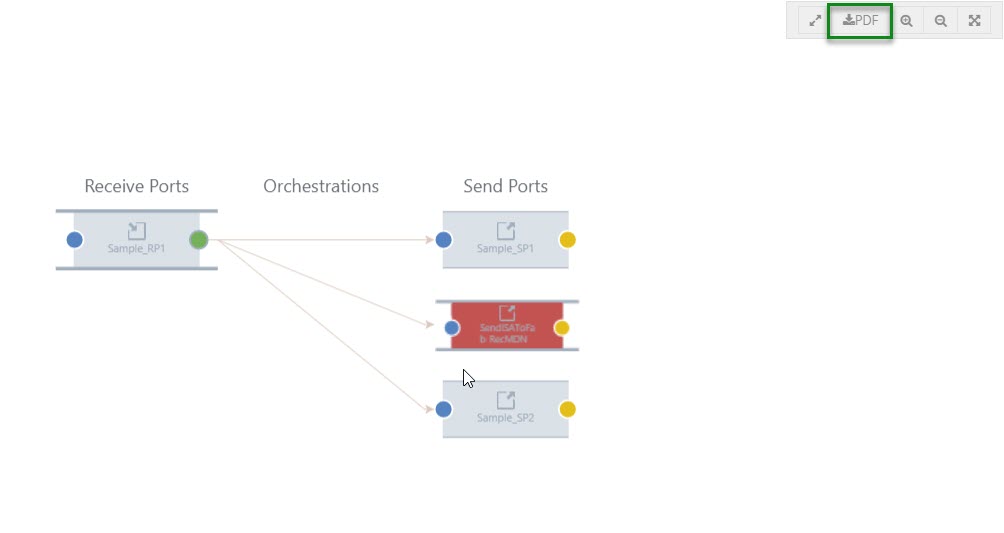
To capture the full message pattern, you can choose the full-screen view. Along with the zoom in and zoom out capability, we have introduced a new option PDF download feature.
The PDF will get downloaded and be given the name of a pipeline of the selected port. Say for example, in the graphical flow, if you choose a Receive Port and select the download option, the PDF will be downloaded and be given the name of the Receive Port pipeline.
Messaging Patterns
As you are aware, the message patterns are the unique flows that get recorded for the message transfers. To capture a message flow, choose the full-screen view option. Along with the zoom in and zoom out options, the PDF download button will now be visible
When the user wants to see a message flow, we display it as a graphical pattern with the artifacts involved.
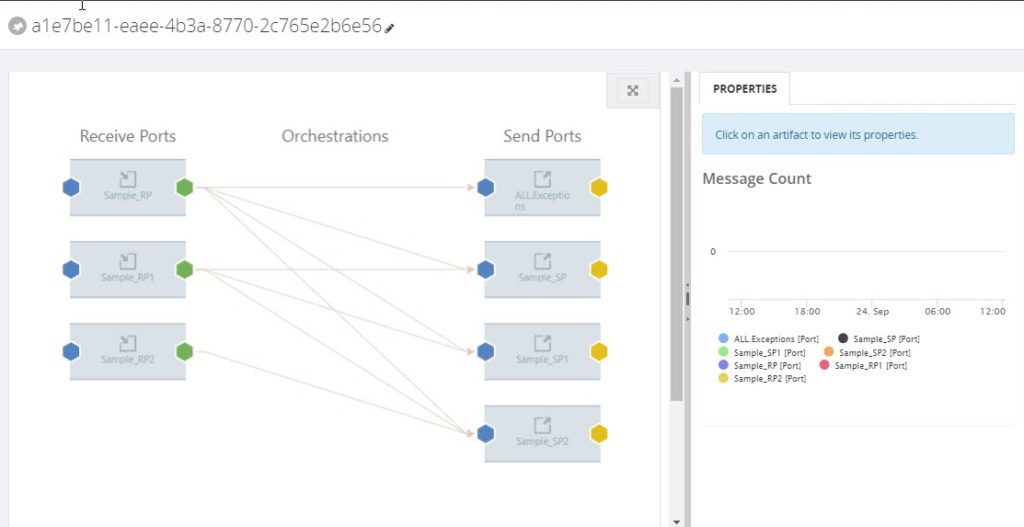
Example: A message can be received by a receive port, split up and processed in separate orchestrations, after which the processed messages are being sent to external processes/systems. To capture a unique message flow and use it for reference in the future, the PDF download will be helpful.
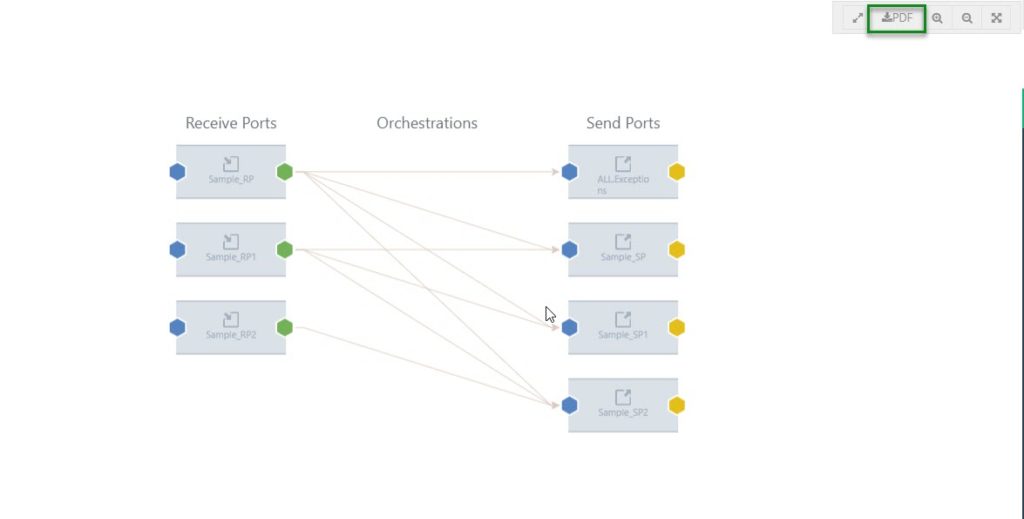
Messaging Patterns will be downloaded with the name of the message pattern.
Operations Dashboard
BizTalk360 has a capability to add default widgets and create your own custom widgets. In such cases, you have configured important widgets into the dashboard.
Even though you have an option to make the dashboard as global, when you want to share within the team you would have to make screenshots. To avoid creating screenshots again, we have implemented the PDF download option.
When you navigate to the Operations Dashboard, at the top right corner, next to the Refresh button, the PDF button will be available.
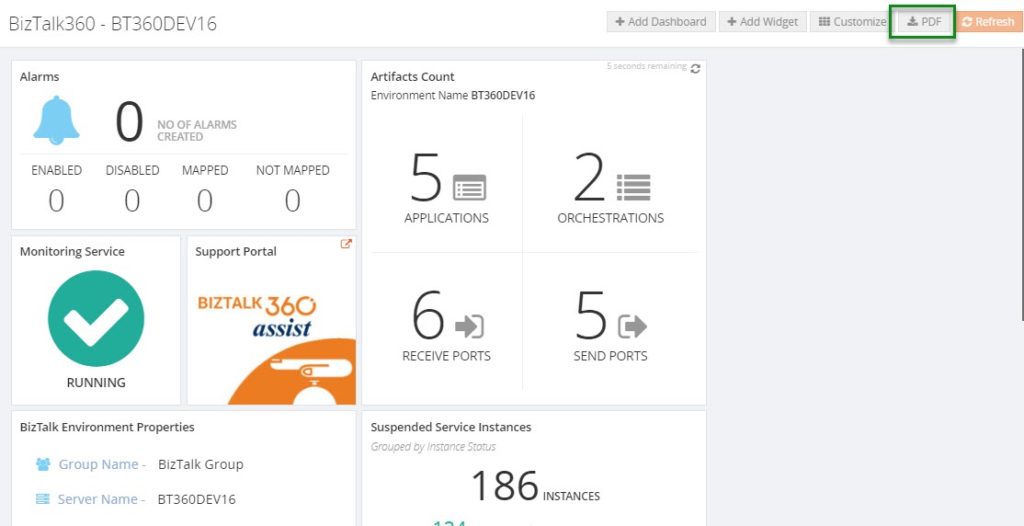
When you download the Operations Dashboard, the PDF will get downloaded with the name of the dashboard.
Monitoring Dashboard
You may get the status of an alarm via notifications from BizTalk360 whenever the port goes down. You can also receive the complete status of the monitored artifacts, with the help of a regular health check alarm for each hour. But, when you want to share the immediate status of the alarm the PDF download option will be helpful.
The download option will be enabled, similar to the Messaging Patterns for the Operations Dashboard. You can choose the full-screen view option. Along with the zoom in and zoom out buttons, the PDF download button will now be visible.
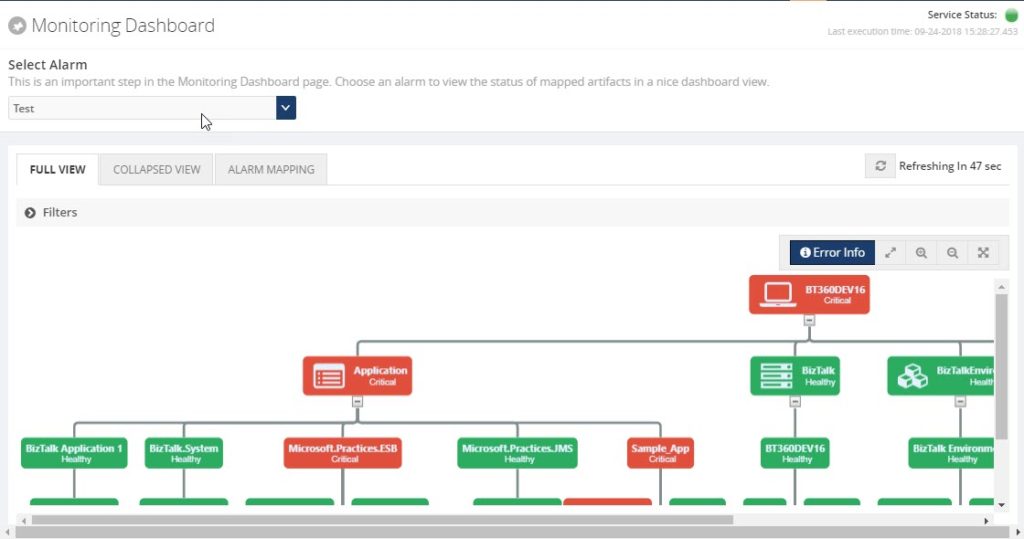
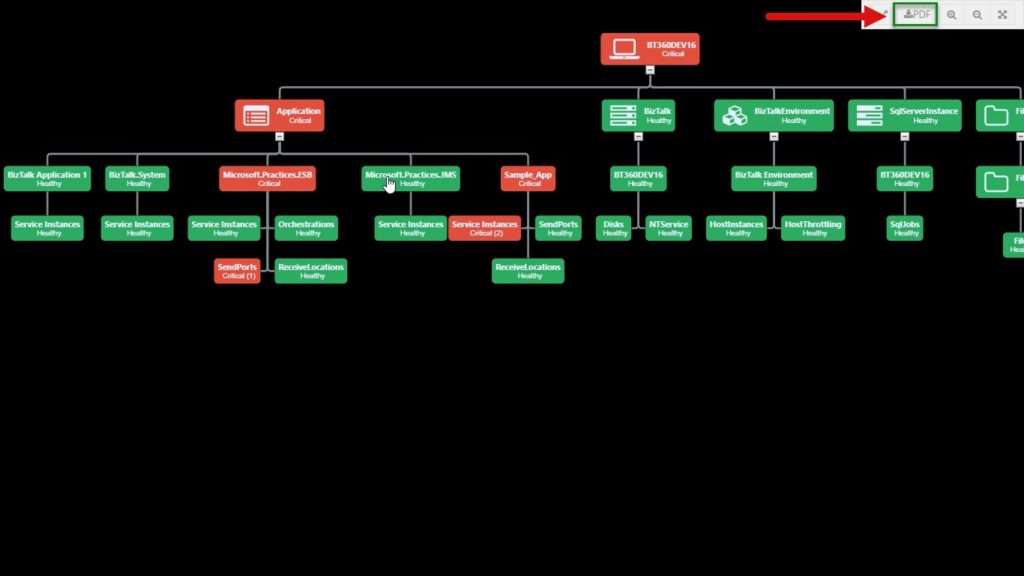
As seen in the messaging pattern, when you download the monitoring dashboard, the PDF will be saved with the alarm name which you were viewing.
Analytics Dashboard
Like the Operations Dashboard, in the Analytics Dashboard, at the top right corner, next to the Refresh button, the PDF download button will be available.
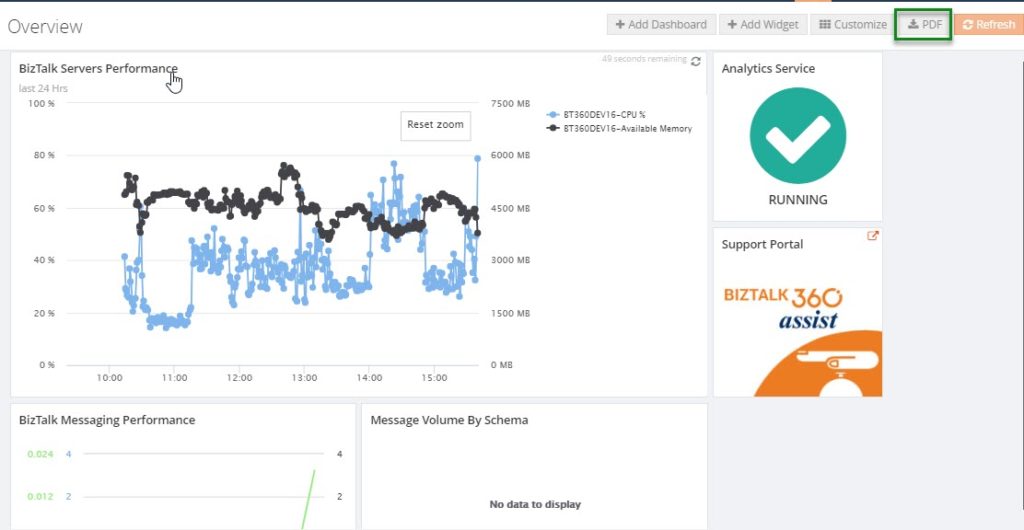
When you download the PDF, it will get downloaded with the name of the dashboard.
Restore System XSLT
We constantly improve the email templates based on the customer requests and we provide the templates directly to the customers. After that, we make the changes on the default email template in the very next release.
To make use of the newly improved email template in both default and custom email templates which are already created, until now people had to update their template(s) manually. While doing the manual changes, there may be a chance of misconfiguring the template. To avoid the manual changes, we brought this new capability “Restore System XSLT”, directly from the user interface.
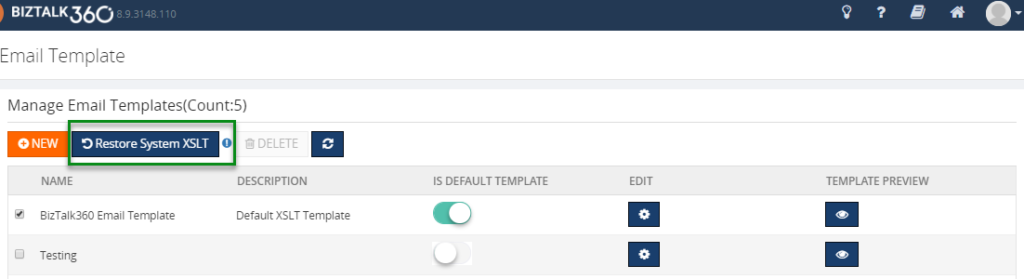
Monitor with Message Age
Another most requested capability is monitoring IBMMQ and Azure Service bus queues with message age.
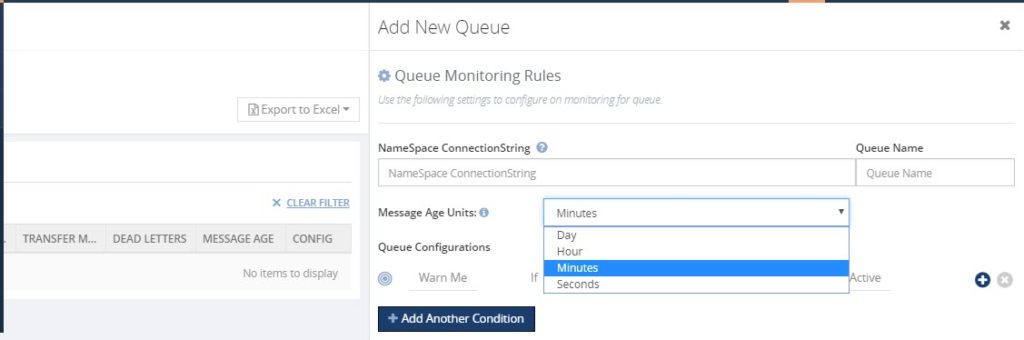
Message age is the time a message exists in a Queue. Using the message age parameter, you can monitor the queue messages along with the time messages exist in a queue.
In a real-time scenario, a message should be processed and send out, as the queues serve as first in first out. If it is not being processed and still pending in the queues over a particular period, you will get notified with the implementation of Message Age parameter.
We have implemented Message Age parameter as an additional monitoring filter option, in two places.
- Azure Service Bus queues
- IBM MQ
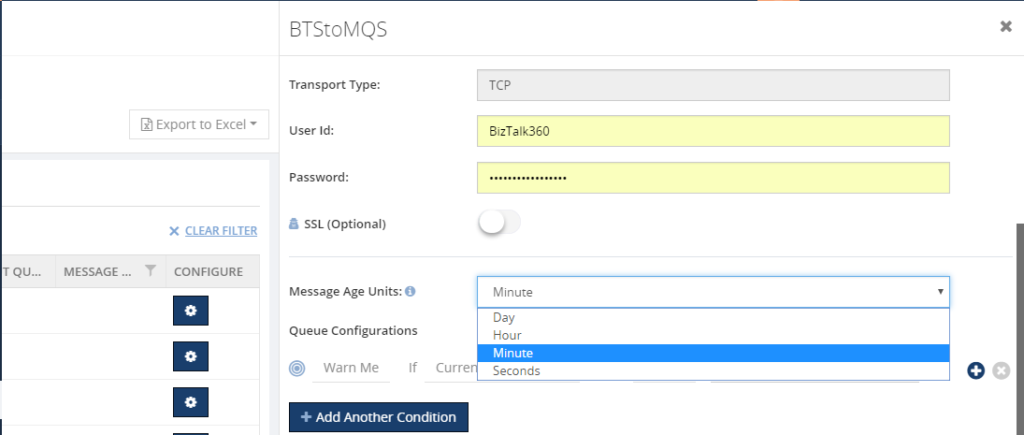
As of now, using the Message Age parameter, you can monitor the message age from few seconds to 24 hours Say, for example, if you want to monitor a queue using the message age parameter, you can monitor the queue messages along with the time of the message when it is created.
Performance Improvement
For the table “b360_BizTalkDB_Tbl_sizes”, every minute a stored procedure in BizTalk360 will clear a table of old records and insert new records.
One of our customers started facing problems, that due to high CPU usage because of that query is being executed every minute. Also, while deleting an entry, a full table scan is done, every time the query is executed. In an environment, this causes 2 seconds of CPU usage and half a million of I/O’s per query. Also, there were duplicate entries in the table for different regional settings.
The cleaning takes place on both the MessageBox and the Tracking database. It causes 4 statements per minute, like the one above, and it leads to high CPU usage.
We found that a table index is missing for the table b360_BizTalkDB_Tbl_sizes. So, we have created an index for the table and also tuned the query for making entries. This will help to reduce the CPU usage.
Conclusion
We always keep track of our Feedback Portal and take up the valid suggestions and feedback. Now, it is your turn to fill your business scenarios and features you are expecting to have in BizTalk360; please fill this questionnaire. Your valuable suggestions will help us to prioritize the next set of feature for upcoming releases.
Author: Sivaramakrishnan Arumugam
Sivaramakrishnan is our Support Engineer with quite a few certifications under his belt. He has been instrumental in handling the customer support area. He believes Travelling makes happy of anyone. View all posts by Sivaramakrishnan Arumugam

by Sivaramakrishnan Arumugam | Aug 28, 2018 | BizTalk Community Blogs via Syndication
Support deliberation is a process of discussing the challenges we faced in support handling. It is an initiative which our CEO suggested, and we are following this to transfer the knowledge to the team. With the different levels of support, it is important to share the knowledge between the team members, so that it would help them to resolve customer issues efficiently, when they come across similar kind of issues. It’s not only for the support team, the entire product team, including the developers, QA and the documentation teams take part in this deliberation.
I would like to narrate this blog as a Q&A session, so that I can explain in detail.
What is deliberation?
As deliberation defines, it’s a place where we discuss in detail about the support process and the challenges we faced in resolving the issues related to the product. Every participant will share their view and add points to the discussion.
Who are all the stakeholders?
Everyone who is inside/part of the product will take part. People from Development, QA, Document and Support. The thumb rule is no one should skip the meeting. It is important for every team member to attend this meeting, because it would be helpful for everyone to gather more information about the product, as well as the customer’s expectations and queries.

Yes…!! We are the stakeholders of BizTalk360
What do we discuss?
At first, we used to conduct this meeting twice in a month for 30 minutes. We thought that we were delaying the process and for providing immediate attention to the support tickets, we cut down the days and currently we are conducting every week, Tuesday from 03:00 to 03:30 PM IST, sometimes it may extend a bit longer.
Each support person would come up with a list of interesting and challenging support tickets they had resolved the past week. The challenges include the support tickets, support articles, blogs, new feature requests and enhancements which were raised by customers.
What is the process?
The process is simple and clear, we will follow the below Agenda:
- Discussing past one week important/challenging support cases
- Discussing the solution provided
- Gather inputs from the team members
- What needs to be improved
- Key Takeaways
Simple isn’t it?
What’s the flow?
We start with the updates and actions taken on what we discussed for the previous week, based on the key takeaways from the meeting. Then we will discuss the current week challenges.
What did we discuss in the present week?
Well, let’s dive deep into this. We will take past 7 days tickets for the discussion.
Interesting/challenging support tickets
We started the meeting with the interesting/challenging support tickets which we handled that week. Let’s take a support case.
When a customer tried to install BizTalk360 on a stand-alone machine, they faced below exception during BizTalk360 database creation.

At an initial stage, we thought it might be a permission issue. Later, after a lot of effort we found it’s due to the TLS versions enabled in that machine.
Key Takeaway
The development team would only have more knowledge about the product functionality, but they would be unaware of the security configuration at the customer end. This discussion will give them a better insight into the customer scenarios. As a takeaway, we have conveyed this to the developer team and testing team. So, that they will know the dependency of the installer and work/test accordingly.
Bugs
There is no perfect product and there is always more scope for the development of the product in the form of either bugs or enhancements. As BizTalk server is an ocean, we are trying to cover most of the functionality. Very recently we faced an issue with the customer side on Business Activity Monitoring (BAM). When they added a column, they received an error.
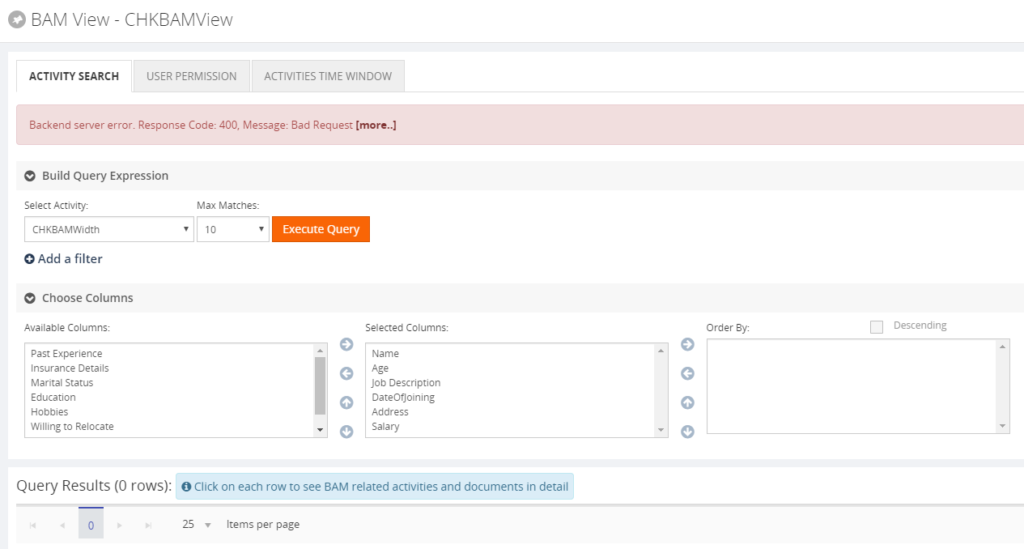
This issue happens when the end date column has NULL values and it was selected in the BAM query in BizTalk360.
Key Takeaway
We have passed this scenario to our team so that both developers and test engineers will be aware of it and they will include these scenarios in their test case checklist.
Creating team awareness
This topic is something interesting; even though it will be out of BizTalk360, it is still relevant.
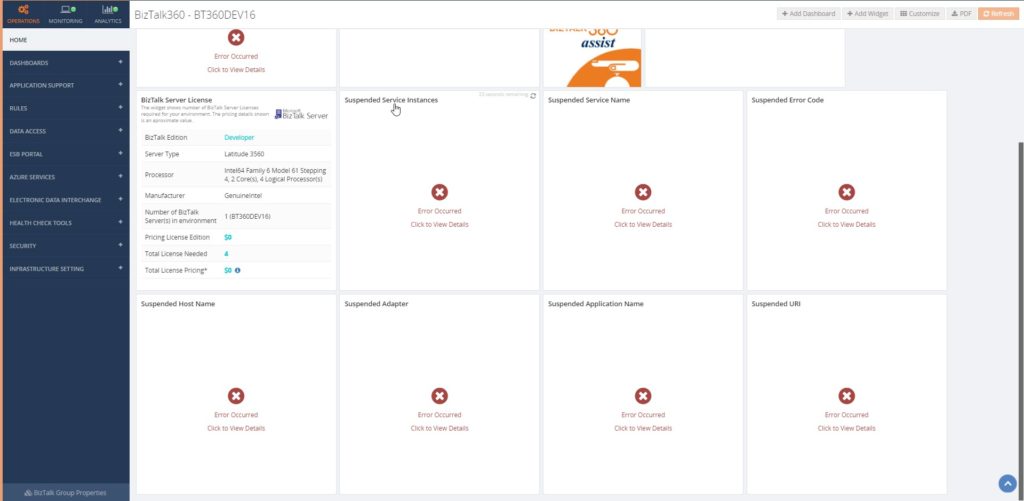
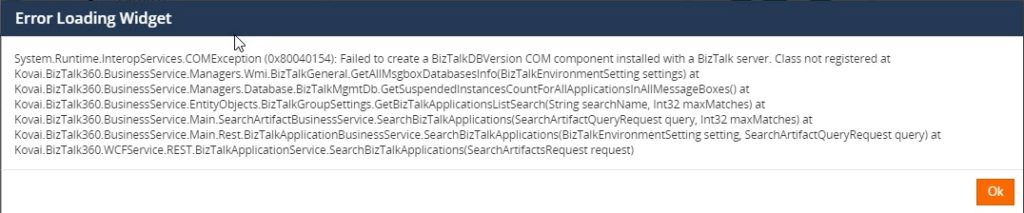
Most of our customers started to face an exception in BizTalk360, once after installing a Windows Security patch update. We found the root cause, that not only BizTalk360 shows the exception, it is because BizTalk Server facing an exception, which is reflected in BizTalk360. We recommended removing the patch update and that solved their problem. Luckily Microsoft has re-issued the updated patch for the same on July 30, 2018.
Key Takeaway
Interesting isn’t it? We have conveyed to the team, so that they will be aware of the issue. If they face the same problem with BizTalk server, they will not wait for our system engineer to repair, but they will try to fix the issue in BizTalk Server. After that, the problem will most likely be fixed in BizTalk360 as well.
Improvement tickets
At BizTalk360, we evolve the product based on feedback we get from different forums like:
- Support tickets
- Customer relationship calls
- Feedback portal
- Direct feedback
Based on the customer’s feedback, the tickets will be discussed. The feedback may concern an existing feature enhancement, a new feature or a feature document.
Key Takeaway
Based on the discussion the action will be performed. Say for example, if the feedback comes to a documentation enhancement, one of us (as we are DevOps) will be assigned to complete the necessary changes.
For an existing feature enhancement or a new feature, we will discuss with the team. Based on the team members feedback, we will add the feature in the Feedback portal and make other customers vote for it. Based on the number of votes, we will include in the product or if it is already available in the portal, we will wait for the interest of other customers. If the team agrees to accept the feature for development, one of the persons will be assigned to develop or to improve the feature.
The Brainstorming session
This is an interesting part for me. We don’t want to run the session like a normal Knowledge Transfer session with the team and we always prefer an interactive session. So once after explaining the problem faced by the customer, we will ask the team what the best solution would be and what the necessary steps are to solve the problem.
Key Takeaway
The first point is to make the team understand the problem and get their opinion. It will help us to get the solution and their point of view and may provide a better dimension of that case. We have received a better suggestion from the team, every time.
Hidden fact, it helps themselves, while developing, testing or documenting a feature. They will always be aware of how the customer is using a feature and act accordingly.
Minutes of Meeting (MOM)
Each meeting ends up with the key takeaways and MOM. This will help us to follow up and take necessary actions. During the next deliberation meeting, we start up with the past week’s MOM or with the tickets what we have discussed.
Why we started this process?
We wanted to break the dependency of individuals like Module owners and get more knowledge from our higher levels. As DevOps, we should be ready to accept any challenge while working in different roles . It’s also important to understand and be aware of the customer environment and business requirements.
I want to take this opportunity once again to thank everyone in and out of BizTalk360 for this wonderful opportunity and believing in us. We are looking forward, for much more opportunities.
Author: Sivaramakrishnan Arumugam
Sivaramakrishnan is our Support Engineer with quite a few certifications under his belt. He has been instrumental in handling the customer support area. He believes Travelling makes happy of anyone. View all posts by Sivaramakrishnan Arumugam
by Sivaramakrishnan Arumugam | Aug 23, 2018 | BizTalk Community Blogs via Syndication
I can say last month was one another interesting month for me as a Support and Test engineer, as we have received quite a few interesting tickets.
Every support ticket gives us a different experience in its own way. But, some of the support tickets seem interesting, because it helps us to explore and learn new things. One of such tickets was related to the Slack Notification Channel.
Short intro about Notification Channels
BizTalk360 is embedded with a feature called Notification Channel. Not only does BizTalk360 support internal notification like emails and SMS, along with it, we support external notifications so that customers can write their own code to send alerts to the Notification Channel they use as per their organization policy.
External Notification Channel is another customer’s feature request, which we have developed and included in our product. As it can be very helpful to Support teams, we decided to create some inbuilt Notification Channels. Further, customers can create their own Notification Channel using their own code. Kindly find the blog for Custom Notification channel.
Feedback from the customer about custom Notification Channel
We have got very positive feedback from our customers about external Notification Channels and received quite a few requests to include some of the Notification Channels as an inbuilt feature. And we did so.
Also, we haven’t kept support aside; whenever customers face challenges with Notification Channels, we helped them to solve the issue at hand to our best. One such classic case is ‘Using BizTalk360’s Notification Channel to perform some action via a PowerShell script’.
Default Notification Channels
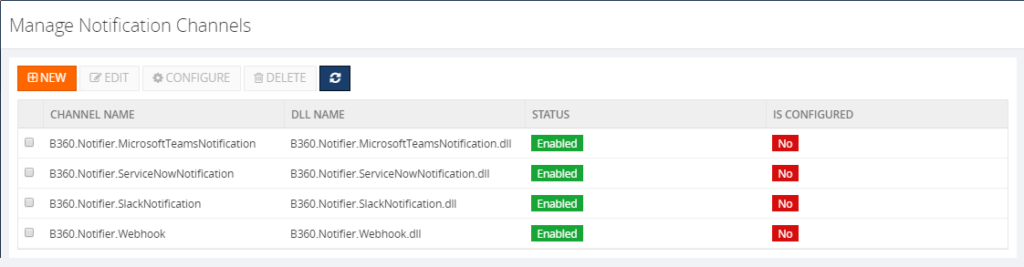
During the initial point of time, along with the version 8.0, we have provided BizTalk360 with some inbuilt Notification Channel such as:
1. Slack and
2. Webhook Notification Channel
Later as per the customer’s request, we have included two more Notification Channels and we have 4 now.
3. ServiceNow
4. Teams
Notification channel configuration in our latest version 8.8 looks like below.
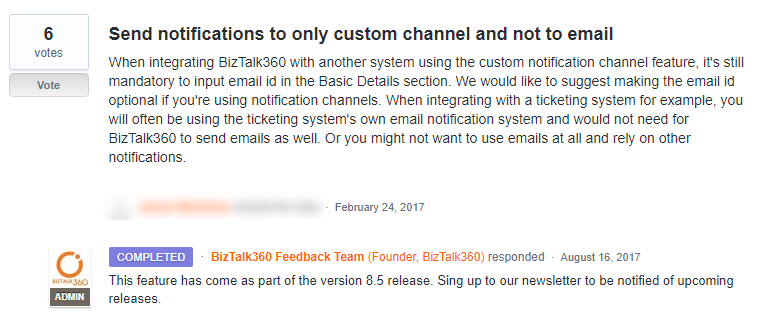
Also, we have enhanced the Notification Channel feature as per the customer’s request. Such as,

Challenge in External notification #Slack
Last month, we received a support case regarding the Slack Notification Channel, that it’s not receiving any notifications from BizTalk360 and they faced the below exception in the log file:
2018-06-08 12:01:40 ERROR – Unable to connect to the remote server
We started to approach the case with the basic troubleshooting steps such as:
• Does the user have proper credentials?
• Any ports are blocked?
• Any security tools are blocking the connection?
• The URL what they used to connect slack?
•Does the proxy is blocking the internet connectivity?
The basic troubleshooting did not help us to solve the problem. So, we went into the screen-sharing session to investigate furthermore. At that point of time, we found that admin scope is missing for the application.
To give more insight about Slack:
In Slack,
• Groups are considered as #Channels
• Applications are predefined functionality, that is considered as #Apps
• Permissions are called as #Scopes
The flow is like:
1. You must create a Channel inside Slack
2. App creation will be followed by channel
3. Add necessary permissions/scopes to the created app
4. Generate Access Key/Token for the app
5. Add app inside the channel
6. Add the Access token for the app inside BizTalk360
We asked the customer to provide the admin scope and left the call. After few days customer came back with the same problem even though they have provided admin scope.
Creation of test environment
For Testing purposes, I have created a new Slack account and Channel, tested from the scratch and we have provided the same permission as the customer had.We got the same issue as the customer encountered, though the application has the scope admin.
What our code does?
We have analyzed with the source code level to find if anything is missing at our side. But found, the code is written in a generic way to push the plaintext message to any Notification Channel. So that, it could be sent to any platform. we have found that it is not a problem with sending a notification from BizTalk360, but it could be a permission issue.
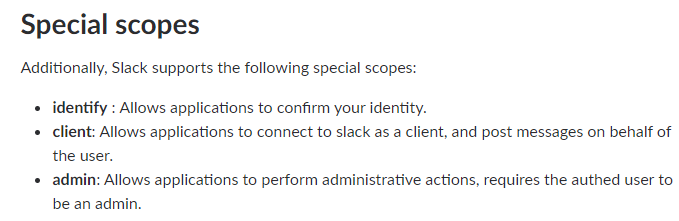
After some testing and researching, we were not able to find the minimum permission what needs to be provided for the application in order to solve the customer issue. Later, we have decided to seek help from the Slack support team for further investigation.
Working with Slack Support
Daniel from the slack support team who worked with me throughout the way. I have created the support ticket along with the sample test application which had been created for testing. The conversation started with the basic questionaries and made sure the basic configuration is configured as per the actual expectation. However, everything is correct, still, we couldn’t make the app work. The direction of an investigation gone little deep and we will look it in the coming section in detail.
Troubleshooting with the permissions
Daniel conveyed, installed app in the test workspace has a valid token. But, looking through the logs, the application has enough permission (both admin & User identity) to receive the messages. Permissions are as below,
- https://api.slack.com/scopes/admin – Got Admin scope
- https://api.slack.com/scopes/identify – And got Identify Scope
Additionally, he suggested providing
- Conversiontions:write &
- Converstions:read scopes
After following the suggestion, the app was not working. But the next suggestion made a trick.
What is the trick?!!
Later, we got a reply from Daniel “I took a closer look at your app, and it appears you haven’t added the chat: write scope. You’ll need this to make any chat:postMessage (https://api.slack.com/methods/chat.postMessage) calls with your app.”
Providing the chat: write permission to the application indeed did the trick! The application writes a message in the Slack from BizTalk360. I have updated the same to the customer and that helped them to resolve their issue.
Satisfaction does it!
This was another support case which was interesting for me as it helped me to understand the code of Notification Channel from a Developer perspective. I have explored Slack along with BizTalk360 which provided more insight from the Tester perspective. Working along with the customer and Slack Support team gave satisfaction as a Support engineer. I have received “an Awesome” review from the customer side 😊
Author: Sivaramakrishnan Arumugam
Sivaramakrishnan is our Support Engineer with quite a few certifications under his belt. He has been instrumental in handling the customer support area. He believes Travelling makes happy of anyone. View all posts by Sivaramakrishnan Arumugam
by Gautam | Aug 13, 2018 | BizTalk Community Blogs via Syndication
Do you feel difficult to keep up to date on all the frequent updates and announcements in the Microsoft Integration platform?
Integration weekly update can be your solution. It’s a weekly update on the topics related to Integration – enterprise integration, robust & scalable messaging capabilities and Citizen Integration capabilities empowered by Microsoft platform to deliver value to the business.
If you want to receive these updates weekly, then don’t forget to Subscribe!
Feedback
Hope this would be helpful. Please feel free to reach out to me with your feedback and questions.
by BizTalk Team | Aug 9, 2018 | BizTalk Community Blogs via Syndication
Microsoft customers and partners are asking what our cloud-hybrid integration roadmap is for BizTalk Server and beyond. BizTalk Server 2016 is our tenth release of a product that first shipped in December, 2000. Much has changed in the past 18 years, the rise of the Internet, the move to the cloud and the advent of Integration Platforms as a Service (iPaaS) being just a few. One thing has prevailed over these many years, existing enterprise customers running business critical workloads using BizTalk Server on-premises – and Microsoft’s continued commitment and support to these customers.
We want to confirm our commitment to BizTalk Server by providing clarity on our cloud-hybrid integration roadmap, of which BizTalk Server is a key part. Shortly after we released BizTalk Server 2016, we introduced the concept of Feature Packs – incremental product improvements and additions that facilitated a much faster ship cycle than was before possible. We believe, and have also heard from customers, that this approach is advantageous for a number of reasons: quicker time to get requested features or improvements; fewer costly upgrade cycles; continuous product investments. Yet, we understand that this model does not suit every customer, especially those that require more notice, planning and preparation for consuming both new platforms and new functionality.
Therefore, we are pleased to announce that we have begun work on BizTalk Server “vNext”, the next major release of BizTalk Server. BizTalk Server “vNext” will contain all previously released feature packs, platform support for the latest versions of Windows Server, SQL Server and Visual Studio, as well as a supported upgrade path from BizTalk Server 2013 R2 and 2016. The new release of BizTalk Server will be accompanied by a vNext of the Adapter Pack and Host Integration Server as well. We are in the early stages of planning this next release and more details will follow in due course, but we expect to make it generally available within roughly 9 months of the general availability of Windows Server 2019.
Alongside BizTalk Server, we will also continue to expand the capabilities of our iPaaS offering providing additional hosting options for Azure Integration Services, which includes Logic Apps, starting with the ability to run on-premises. We expect to deliver these capabilities during calendar year 2019.
With two offerings, BizTalk Server and Logic Apps, both capable of running on-premises and in Azure, many customers will be evaluating migration from BizTalk Server to Logic Apps. We understand this and are planning guidance on migration to assist customers’ decision-making and investments to enable this move. We know there are functional gaps between BizTalk Server and Logic Apps, and we are hard at work closing them. Our Azure Integration Services vision is to enable all customers to move to a modern, holistic and rich iPaaS platform that can meet the challenges of all their integration workloads, both today and in the future wherever they reside.
Jon Fancey, Azure Integration Services PM Lead
by Raja Sreenivasan | Aug 7, 2018 | BizTalk Community Blogs via Syndication
Recently Microsoft rolled out the July 2018 .NET Framework Security Updates. These Security Updates caused series of errors in the BizTalk Server Administration Console, SharePoint, Internet Information Server (IIS) with classic ASP and .NET applications which use impersonation.
Related to BizTalk Server, the issue is that BizTalk server relies on a COM component, that runs with restricted permissions. This COM component may fail to start after installing the July 2018 Security Updates.
For BizTalk360 to monitor the BizTalk server, it needs that the BizTalk Server Administrator components are installed in the server. But when the BizTalk360 server is also updated with the security patches, the same errors will occur while accessing the BizTalk applications and their artifacts. Many of our customers raised support tickets to BizTalk360 support channel, as they were not aware of these issues due to the windows security patch.
How the errors occur in BizTalk360 and in BizTalk Server
The com exception will occur in BizTalk360 only after the July 2018 security patch update is installed on the servers. The issue will pop up on many occasions as mentioned below.
While accessing,
- BizTalk360 application
- BizTalk Applications and their artifacts
- Hosts and Host Instances
Following screenshot refers, how the exception appears in BizTalk360.

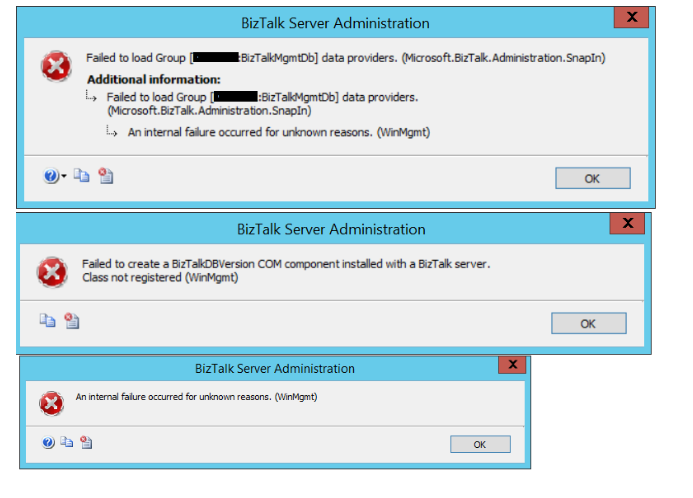
When launching BizTalk Server, a series of errors appear from Hosts and Host Instances.
Here are the errors that occurred in the BizTalk Admin console, When trying to access the host instance
Root Cause of the problem
Let ’s have a look at the root cause of these issues in detail. The Microsoft .NET Framework runtime uses the process token to determine whether the process is running within an elevated security context. These system calls can fail if the required process inspection permissions are not present. This causes an “access denied” error. However, these errors might reveal themselves with other error messages, as we have seen from the screen prints earlier in this article.
A temporary workaround is discussed in this MSDN thread. The simplest workaround is to uninstall the security patch and everything will be back to normal.
Resolution
The latest patch was re-released by Microsoft on July 30, 2018. This update helps to resolve this issue. This patch has different versions applicable to your operating system and .NET Framework installed.
- 4346877Update for Windows 10, version 1607 and Windows Server 2016: July 30, 2018
- 4346406Update for .NET Framework 4.6, 4.6.1, 4.6.2, 4.7, 4.7.1 and 4.7.2 on Windows 8.1, RT 8.1 and Server 2012 R2 (KB 4346406): July 30, 2018
- 4346405Update for .NET Framework 4.6, 4.6.1, 4.6.2, 4.7, 4.7.1 and 4.7.2 on Windows Server 2012 (KB 4346405): July 30, 2018
- 4346407Update for .NET Framework 4.6, 4.6.1, 4.6.2, 4.7, 4.7.1 and 4.7.2 on Windows 7 SP1 and Server 2008 R2 SP1 and .NET Framework 4.6 on Server 2008 SP2 (KB 4346407): July 30, 2018
- 4346408Update for .NET Framework 4.5.2 on Windows 8.1, RT 8.1 and Server 2012 R2 (KB 4346408): July 30, 2018
For detailed information about latest patch release, please click this link. Microsoft had also suggested a workaround for the issue but with the following warning message:
Warning: The workarounds may make a computer or a network more vulnerable to attack by malicious users or by malicious software such as viruses. We do not recommend these workarounds. However, we are providing this information so that you can implement the workarounds at your own discretion. Use these workarounds at your own risk.
Customer Feedback
We have received quite a few support tickets on this specific cases from our customers who have recently update the security patches. Because, the problem lies with BizTalk Server, It has affected the BizTalk360 as well while accessing the applications. We informed the customers about the reason for the error. The new patches are uninstalled, BizTalk360 and BizTalk Server will be back to normal. Here is a happy feedback from our most valued customers.

by Bill Chesnut | Jul 31, 2018 | BizTalk Community Blogs via Syndication
By Bill Chesnut
This is the first post in a multi part series on the features of Azure API Management.
When companies embark on a migration to Azure, they tend to have lots of legacy application, when they start using Azure API Management (APIM), they also want to expose some of these legacy applications, that is where the SOAP pass-through feature of APIM helps out. This feature allow you to publish these SOAP services in APIM.
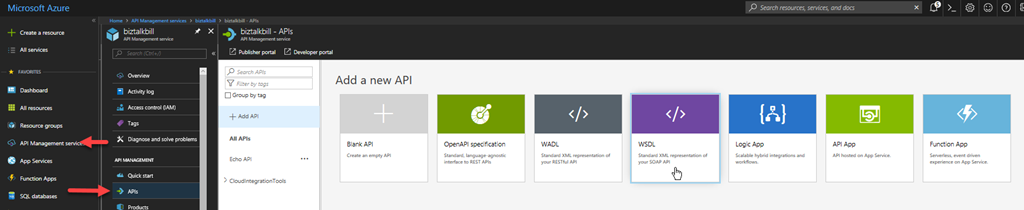
For this blog post I am going to demonstrate how you publish a BizTalk SOAP service in APIM. With APIM you can publish SOAP services by importing the WSDL (this can be either via the URL or by uploading the WSDL file), In APIM Click the “API” menu item on the left, then Click “WSDL”
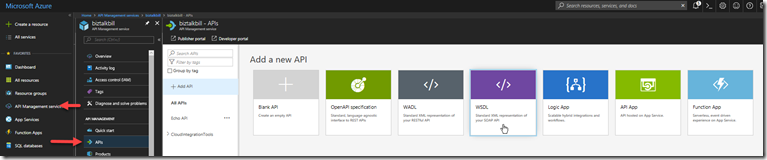
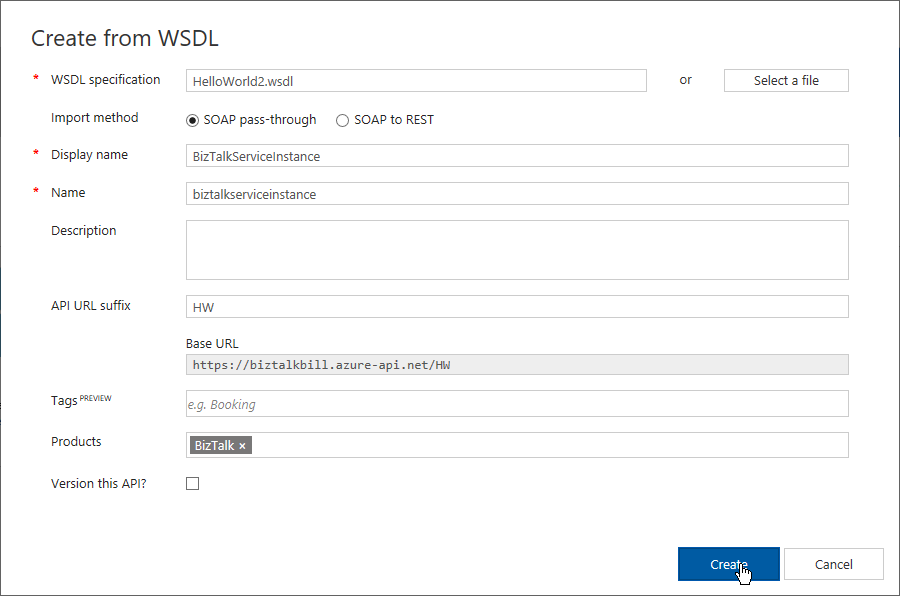
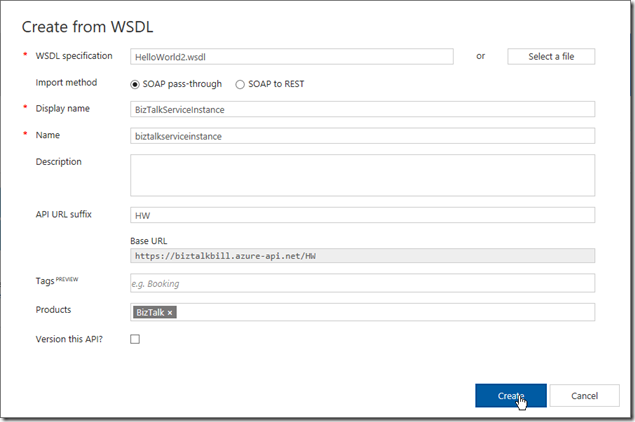
In this demonstration I am going to use an uploaded file, this is the WSDL from a BizTalk orchestration exposed as a WCF Request/Response Service, it only has a single operation ‘submit”. I am using an uploaded file because the BizTalk server is hosted in an Azure Virtual Machine and I have changed the URL to reflect the DNS name of the Virtual Machine. I could have also changed the name in APIM after the WSDL was imported. Configure as shown and click “Create”
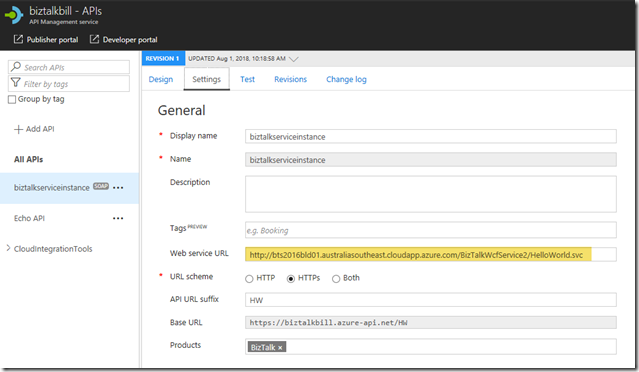
Once the WSDL import is complete, we can now see the API and it’s operations, now let click “Settings” to look at the API settings, this is where we can change the URL to the BizTalk Server hosting our SOAP Service, instead of inside the WSDL file as I have done.
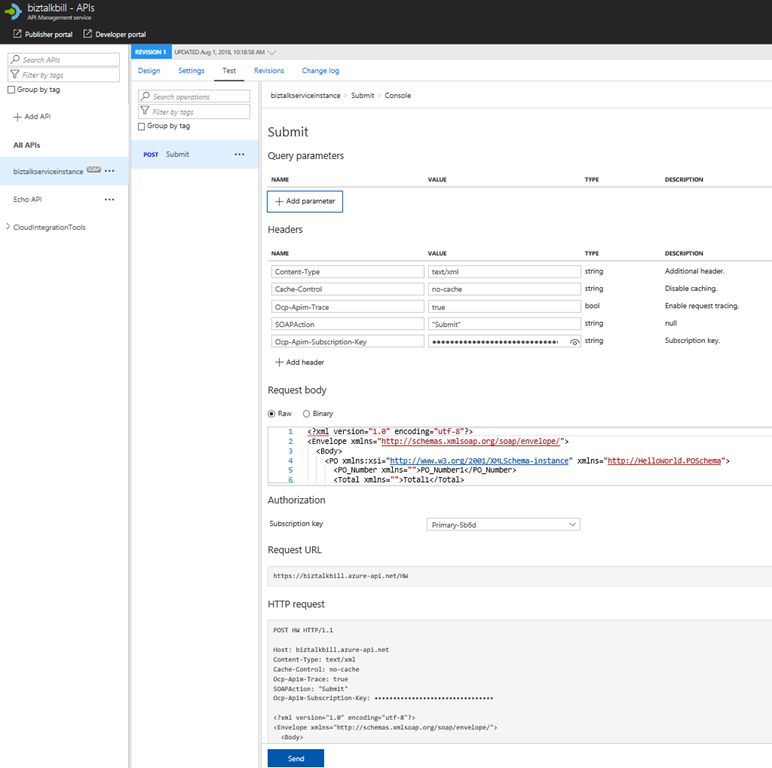
Now lets click the “Test” tab, this is where we can test our API Operation, before we release them to our consumers
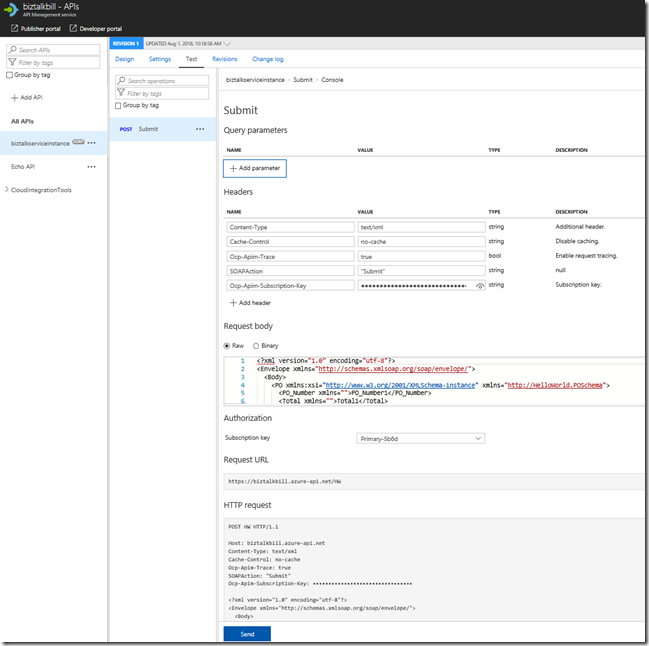
APIM Fills in all the details to test the API, notice that the payload for the API is XML, this is because we chose SOAP pass-through, SOAP services are XML based. Click “Send”
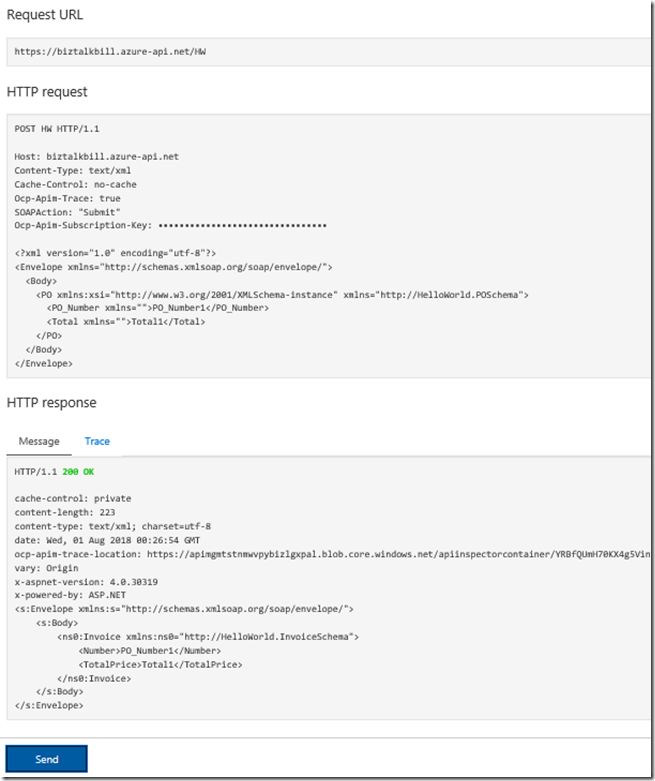
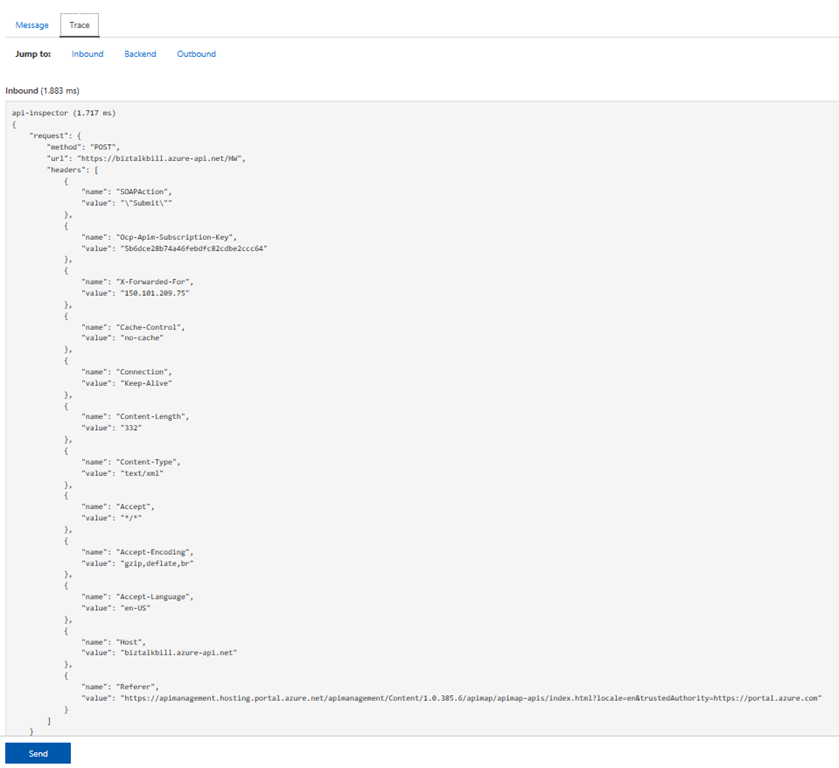
You can now see the results of our call to the BizTalk hosted SOAP Service, the results are in XML, now lets click the “Trace” tab, this will give us everything that has taken place in APIM as part of our call to the BizTalk SOAP service. Scroll down to see the full Trace.
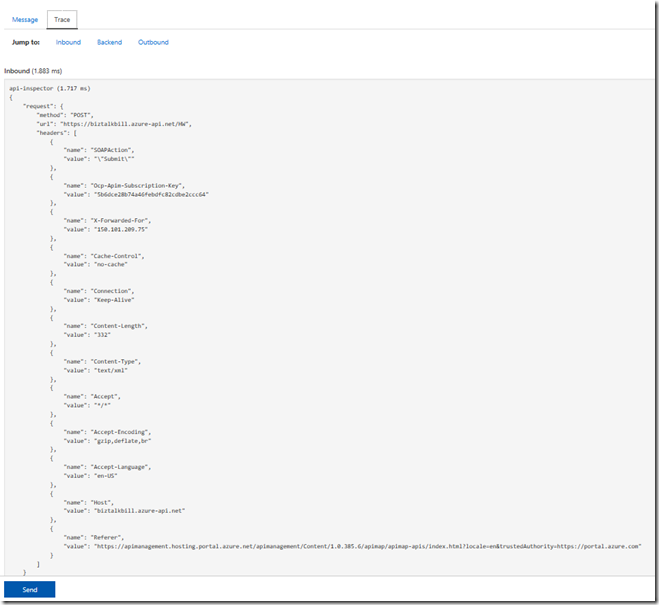
Hopefully this has given you a quick demonstration on how to expose your SOAP Services with APIM.
Cross Posted on http://www.sixpivot.com.au
by BizTalk Team | Jun 25, 2018 | BizTalk Community Blogs via Syndication
Available now is Microsoft BizTalk Server 2016 Feature Pack 3. This update to BizTalk Server 2016 contains new and improved capabilities for integrating BizTalk Server workloads with Office 365 Outlook Email, Calendar, and Contact resources.
Office 365 Adapters
Microsoft Office 365 is a cloud-based subscription service that brings together the best tools for the way people work today. By combining best-in-class apps like Excel and Outlook with powerful cloud services like OneDrive and Microsoft Teams, Office 365 lets anyone create and share anywhere on any device.
Microsoft BizTalk Server Adapters for Office 365 enable IT professionals and enterprise developers to integrate Outlook mail, contacts, and schedules with new solutions based on BizTalk Server 2016.
Office 365 Mail Adapter
Using the BizTalk Adapter for Office 365 Mail, you can read, mark as read or delete, Outlook e-mail messages through one-way BizTalk Server receive locations. Using the Office 365 Mail Adapter, you can write e-mail message, including setting message priority, through one-way static or dynamic BizTalk Server send ports.
Office 365 Calendar Adapter
Using the BizTalk Adapter for Office 365 Calendar, you can get future calendar events through one-way BizTalk Server receive locations. Using the Office 365 Calendar Adapter, you can create calendar events, including specifying required and optional attendees, through one-way static or dynamic BizTalk Server send ports.
Office 365 Contact Adapter
Using the BizTalk Adapter for Office 365 Contact, you can create contacts, by specifying all settings, through one-way static or dynamic BizTalk Server send ports.
Licensing