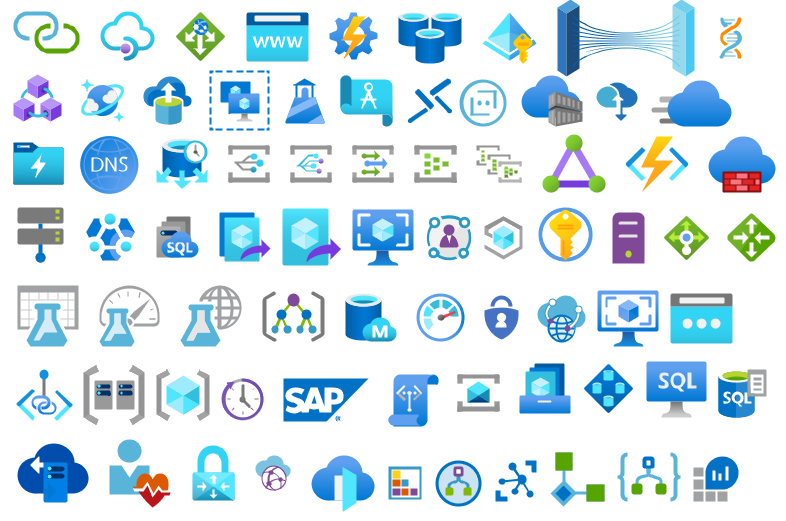
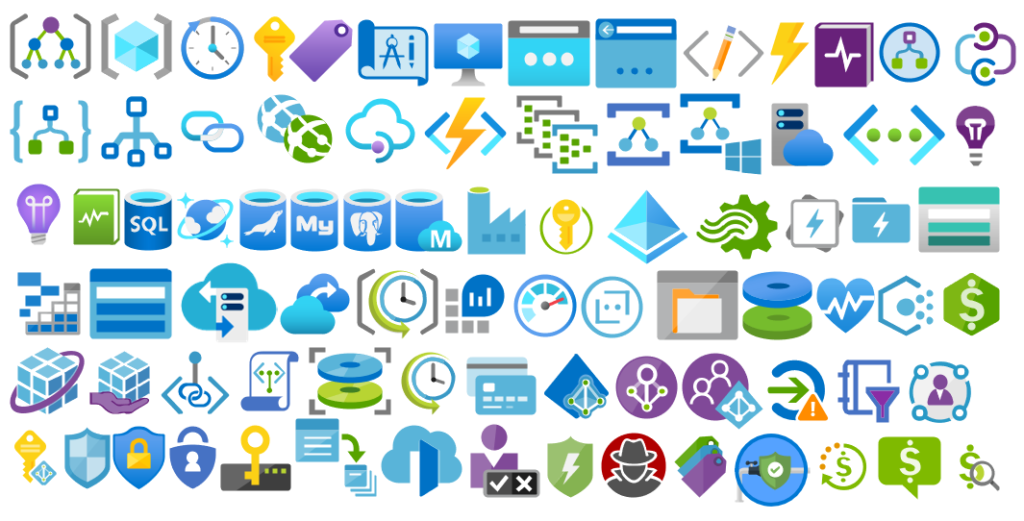
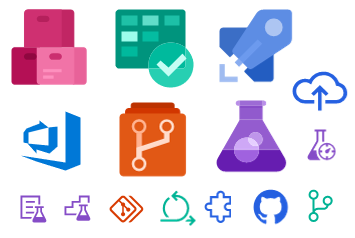
I am always paying attention to requests from members of the community, and whenever I can, I update this stencil pack with requested shapes or functionalities. And this is one of these cases, Josh asked me to add DevOps offerings stencils in special: Boards, Repos, Pipelines, Test Plans, and Artifacts.
The result was this. I hope you enjoy it.
What’s new in this version?
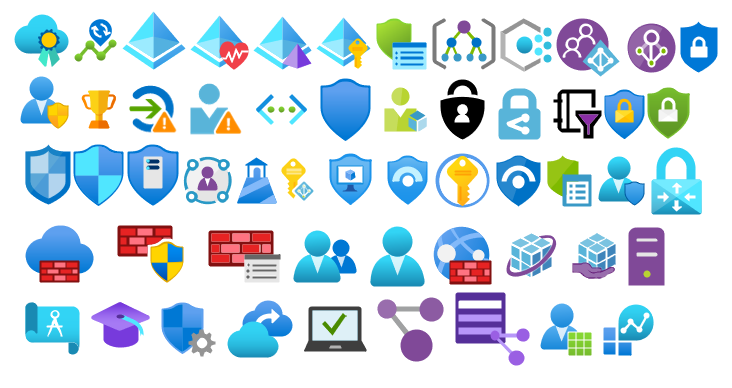
The main goal of this release was to provide the new icons present in the Azure Portal and update existing ones. In this version, the changes and additions are:
New shapes: New shapes added on MIS Developer Stencils;
SVG Files: Add new SVG files, and uniform all the filenames;
Microsoft Integration, Azure, Power Platform, Office 365 and much more Stencils Pack
Microsoft Integration, Azure, Power Platform, Office 365 and much more Stencils Pack it’s a Visio package that contains fully resizable Visio shapes (symbols/icons) that will help you to visually represent On-premise, Cloud or Hybrid Integration and Enterprise architectures scenarios (BizTalk Server, API Management, Logic Apps, Service Bus, Event Hub…), solutions diagrams and features or systems that use Microsoft Azure and related cloud and on-premises technologies in Visio 2016/2013:
BizTalk Server
Microsoft Azure
Integration
Integration Service Environments (ISE)
Logic Apps and Azure App Service in general (API Apps, Web Apps, and Mobile Apps)
Azure API Management
Messaging: Event Hubs, Event Grid, Service Bus, …
Azure IoT and Docker
AI, Machine Learning, Stream Analytics, Data Factory, Data Pipelines
SQL Server, DocumentDB, CosmosDB, MySQL, …
and so on
Microsoft Power Platform
Microsoft Flow
PowerApps
Power BI
Office365, SharePoint,…
DevOps and PowerShell
Security and Governance
And much more…
… and now non-related Microsoft technologies like:
SAP Stencils
The Microsoft Integration Stencils Pack is composed of 27 files:
Microsoft Integration Stencils
MIS Additional or Support Stencils
MIS AI and Machine Learning Stencils
MIS Apps and Systems Logo Stencils
MIS Azure Additional or Support Stencils
MIS Azure Mono Color
MIS Azure Old Versions
MIS Azure Others Stencils
MIS Azure Stencils
MIS Buildings Stencils
MIS Databases and Analytics Stencils
MIS Deprecated Stencils
MIS Developer Stencils
MIS Devices Stencils
MIS Files Stencils
MIS Generic Stencils
MIS Infrastructure Stencils
MIS Integration Fun
MIS Integration Patterns Stencils
MIS IoT Devices Stencils
MIS Office365
MIS Power BI Stencils
MIS PowerApps and Flows Stencils
MIS SAP Stencils
MIS Security and Governance
MIS Servers (HEX) Stencils
MIS Users and Roles Stencils
That you can use and resize without losing quality, in particular, the new shapes.
It was only 9 days ago that I released the latest minor version of this package, on that time the goal was to update the Security and Governance stencils to please my dear friend Nino Crudele. It was then that I notice that Microsoft did again a completely redesigned on several of the symbols and of course add new services so I decided that this was the time to not only refresh the package with the new icons but also but so extra work.
What’s new in this version?
With the growing number of stencils in this package, it was becoming hard to easily find or look for the right shape/representation. So once again based on some feedback I received from the community I decide to do so rearranging. I still have many things to do in this project in terms of organization but for now, these are the changes on this major release:
New shapes: The main additions are all the new shapes on the Azure Portal. New shapes added on:
MIS Azure Stencils: containing all the main Azure Portal Services
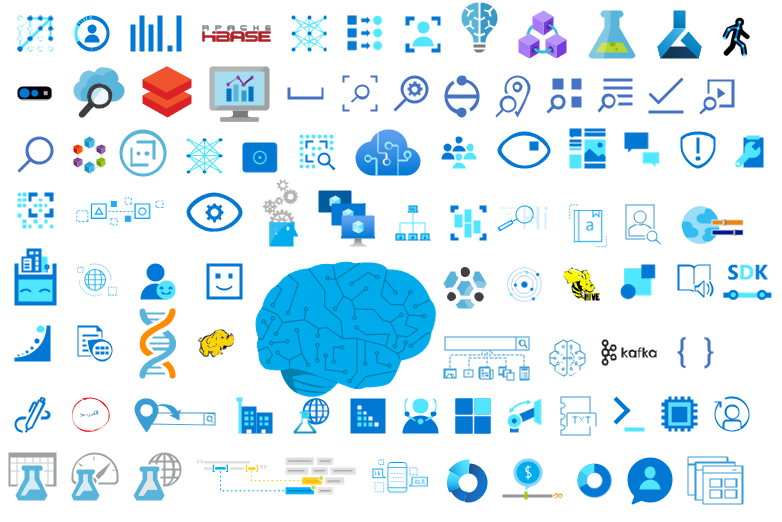
MIS AI and Machine Learning Stencils: all shapes related to AI or Machine Learning scenarios;
MIS IoT Devices Stencils: all shapes related to IoT scenarios:
Microsoft Integration Stencils;
MIS Azure Others Stencils: containing Azure Postal Services, features of the services and other interesting shapes;
MIS Azure Additional or Support Stencils: other shapes that may be interesting in supporting Azure diagrams and designs or presentations;
MIS Azure Stencils: Complete update to this category with many new shapes added and many shapes moved to MIS Azure Others Stencils file;
MIS AI and Machine Learning Stencils: Complete update to this category with many new shapes added and updating many others to there current stencils;
Add categories:
Microsoft Integration Stencils Old Version Stencils: containing all the oldest versions of stencils (obsolete, deprecated or replaced by a new shape)
Ordered by name: I recently started to sort shapes in alphabetical order. These are the categories already sorted:
MIS Azure Stencils;
MIS Azure Others Stencils;
MIS AI and Machine Learning Stencils;
Microsoft Integration Stencils Old Version Stencils;
MIS Security and Governance;
Text Annotations: This is a requested feature and I already started to work on it but it will get some time to finish it. For now, you will see text annotations on:
MIS AI and Machine Learning Stencils
SVG Files: Add new SVG files, and uniform the name of the files;
Microsoft Integration, Azure, Power Platform, Office 365 and much more Stencils Pack
Microsoft Integration, Azure, Power Platform, Office 365 and much more Stencils Pack it’s a Visio package that contains fully resizable Visio shapes (symbols/icons) that will help you to visually represent On-premise, Cloud or Hybrid Integration and Enterprise architectures scenarios (BizTalk Server, API Management, Logic Apps, Service Bus, Event Hub…), solutions diagrams and features or systems that use Microsoft Azure and related cloud and on-premises technologies in Visio 2016/2013:
BizTalk Server
Microsoft Azure
Integration
Integration Service Environments (ISE)
Logic Apps and Azure App Service in general (API Apps, Web Apps, and Mobile Apps)
Azure API Management
Messaging: Event Hubs, Event Grid, Service Bus, …
Azure IoT and Docker
AI, Machine Learning, Stream Analytics, Data Factory, Data Pipelines
SQL Server, DocumentDB, CosmosDB, MySQL, …
and so on
Microsoft Power Platform
Microsoft Flow
PowerApps
Power BI
Office365, SharePoint,…
DevOps and PowerShell
Security and Governance
And much more…
… and now non-related Microsoft technologies like:
SAP Stencils
The Microsoft Integration Stencils Pack is composed of 28 files:
Microsoft Integration Stencils
MIS Azure Stencils
MIS Additional or Support Stencils
MIS AI and Machine Learning Stencils
MIS Apps and Systems Logo Stencils
MIS Azure Additional or Support Stencils
MIS Azure Mono Color
MIS Azure Old Versions
MIS Azure Others Stencils
MIS Buildings Stencils
MIS Databases and Analytics Stencils
MIS Deprecated Stencils
MIS Developer Stencils
MIS Devices Stencils
MIS Files Stencils
MIS Generic Stencils
MIS Infrastructure Stencils
MIS Integration Fun
MIS Integration Patterns Stencils
MIS IoT Devices Stencils
MIS Office365
MIS Power BI Stencils
MIS PowerApps and Flows Stencils
MIS SAP Stencils
MIS Security and Governance
MIS Servers (HEX) Stencils
MIS Users and Roles Stencils
Microsoft Integration Stencils Old Version Stencils
That you can use and resize without losing quality, in particular, the new shapes.
In October, I did a major rearrange and release of my stencils pack mainly because Microsoft redesigned many of the icons present in the Azure Portal, but and guess what? Microsoft didn’t stop it yet. And several of the symbols that suffer a redesigned they already have a new version. So I decide that it is time for me to update my stencils once again, but instead of spending a lot of time and release everything at the same time, like I did last time, I decided this time I will do it in small waves.
What’s new in this version?
The main goal of this release was to provide the new icons present in the Azure Portal and update existing ones. In this version, the changes and additions are:
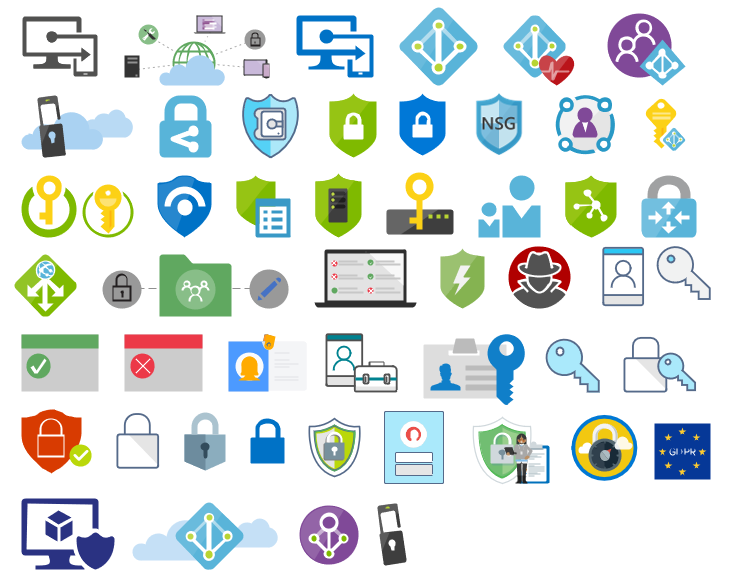
New shapes: New shapes added on MIS Security and Governance, MIS Developer Stencils and MIS IoT Devices Stencils;
MIS Security and Governance: Complete update to this category with many unique symbols added and updating many others to there current stencils;
SVG Files: Add new SVG files, and uniform all the filenames;
Special Highlights: Azure Arc and Machines – Azure Arc
Microsoft Integration, Azure, Power Platform, Office 365 and much more Stencils Pack
Microsoft Integration, Azure, Power Platform, Office 365 and much more Stencils Pack it’s a Visio package that contains fully resizable Visio shapes (symbols/icons) that will help you to visually represent On-premise, Cloud or Hybrid Integration and Enterprise architectures scenarios (BizTalk Server, API Management, Logic Apps, Service Bus, Event Hub…), solutions diagrams and features or systems that use Microsoft Azure and related cloud and on-premises technologies in Visio 2016/2013:
BizTalk Server
Microsoft Azure
Integration
Integration Service Environments (ISE)
Logic Apps and Azure App Service in general (API Apps, Web Apps, and Mobile Apps)
Azure API Management
Messaging: Event Hubs, Event Grid, Service Bus, …
Azure IoT and Docker
AI, Machine Learning, Stream Analytics, Data Factory, Data Pipelines
SQL Server, DocumentDB, CosmosDB, MySQL, …
and so on
Microsoft Power Platform
Microsoft Flow
PowerApps
Power BI
Office365, SharePoint,…
DevOps and PowerShell
Security and Governance
And much more…
… and now non-related Microsoft technologies like:
SAP Stencils
The Microsoft Integration Stencils Pack is composed of 27 files:
Microsoft Integration Stencils
MIS Additional or Support Stencils
MIS AI and Machine Learning Stencils
MIS Apps and Systems Logo Stencils
MIS Azure Additional or Support Stencils
MIS Azure Mono Color
MIS Azure Old Versions
MIS Azure Others Stencils
MIS Azure Stencils
MIS Buildings Stencils
MIS Databases and Analytics Stencils
MIS Deprecated Stencils
MIS Developer Stencils
MIS Devices Stencils
MIS Files Stencils
MIS Generic Stencils
MIS Infrastructure Stencils
MIS Integration Fun
MIS Integration Patterns Stencils
MIS IoT Devices Stencils
MIS Office365
MIS Power BI Stencils
MIS PowerApps and Flows Stencils
MIS SAP Stencils
MIS Security and Governance
MIS Servers (HEX) Stencils
MIS Users and Roles Stencils
That you can use and resize without losing quality, in particular, the new shapes.
It was only 3 days ago that I released the latest version of this package, but someone (aka Wagner Silveira) alerted me to the existence of new shiny icons in the Azure Portal… so I decided it would be a good time to launch a new major release and here it is! I hope you guys enjoy.
Microsoft Integration, Azure, Power Platform, Office 365 and much more Stencils Pack it’s a Visio package that contains fully resizable Visio shapes (symbols/icons) that will help you to visually represent On-premise, Cloud or Hybrid Integration and Enterprise architectures scenarios (BizTalk Server, API Management, Logic Apps, Service Bus, Event Hub…), solutions diagrams and features or systems that use Microsoft Azure and related cloud and on-premises technologies in Visio 2016/2013:
BizTalk Server
Microsoft Azure
Integration
Integration Service Environments (ISE)
Logic Apps and Azure App Service in general (API Apps, Web Apps, and Mobile Apps)
Azure API Management
Messaging: Event Hubs, Event Grid, Service Bus, …
Azure IoT and Docker
AI, Machine Learning, Stream Analytics, Data Factory, Data Pipelines
SQL Server, DocumentDB, CosmosDB, MySQL, …
and so on
Microsoft Power Platform
Microsoft Flow
PowerApps
Power BI
Office365, SharePoint,…
DevOps and PowerShell
Security and Governance
And much more…
… and now non-related Microsoft technologies like:
SAP Stencils
The Microsoft Integration Stencils Pack is composed of 27 files:
Microsoft Integration Stencils
MIS Additional or Support Stencils
MIS AI and Machine Learning Stencils
MIS Apps and Systems Logo Stencils
MIS Azure Additional or Support Stencils
MIS Azure Mono Color
MIS Azure Old Versions
MIS Azure Others Stencils
MIS Azure Stencils
MIS Buildings Stencils
MIS Databases and Analytics Stencils
MIS Deprecated Stencils
MIS Developer Stencils
MIS Devices Stencils
MIS Files Stencils
MIS Generic Stencils
MIS Infrastructure Stencils
MIS Integration Fun
MIS Integration Patterns Stencils
MIS IoT Devices Stencils
MIS Office365
MIS Power BI Stencils
MIS PowerApps and Flows Stencils
MIS SAP Stencils
MIS Security and Governance
MIS Servers (HEX) Stencils
MIS Users and Roles Stencils
That you can use and resize without losing quality, in particular, the new shapes.
What’s new in this version?
I still have many things to do in this project in terms of organization and cleaning some resources but I will leave that for another occasion. The main goal of this release was to provide the new icons present in Azure Portal. In this version the changes and additions are:
New shapes: I think almost all the new shapes layout present in Azure Portal are now added in this package.
New categories: MIS Azure Mono Color, MIS Azure Old Versions, MIS Azure Others, MIS Integration Fun;
Categories Renaming: MIS Databases and Analytics and MIS AI and Machine Learning
SVG Files: The SVG files, from all these new resources, are now available on GitHub
Microsoft Integration, Azure, Power Platform, Office 365 and much more Stencils Pack it’s a Visio package that contains fully resizable Visio shapes (symbols/icons) that will help you to visually represent On-premise, Cloud or Hybrid Integration and Enterprise architectures scenarios (BizTalk Server, API Management, Logic Apps, Service Bus, Event Hub…), solutions diagrams and features or systems that use Microsoft Azure and related cloud and on-premises technologies in Visio 2016/2013:
BizTalk Server
Microsoft Azure
Integration
Integration Service Environments (ISE)
Logic Apps and Azure App Service in general (API Apps, Web Apps, and Mobile Apps)
Azure API Management
Messaging: Event Hubs, Event Grid, Service Bus, …
Azure IoT and Docker
AI, Machine Learning, Stream Analytics, Data Factory, Data Pipelines
SQL Server, DocumentDB, CosmosDB, MySQL, …
and so on
Microsoft Power Platform
Microsoft Flow
PowerApps
Power BI
Office365, SharePoint,…
DevOps and PowerShell
Security and Governance
And much more…
… and now non-related Microsoft technologies like:
SAP Stencils
The Microsoft Integration Stencils Pack is composed of 23 files:
Microsoft Integration Stencils v4.0.2
MIS Additional or Support Stencils v4.0.0
MIS AI Stencils v4.0.0
MIS Apps and Systems Logo Stencils v4.0.0
MIS Azure Additional or Support Stencils v4.0.0
MIS Azure Others Stencils v4.0.0
MIS Azure Stencils v4.0.2
MIS Buildings Stencils v4.0.0
MIS Databases Stencils v4.0.0
MIS Deprecated Stencils v4.0.0
MIS Developer Stencils v4.0.0
MIS Devices Stencils v4.0.0
MIS Files Stencilsv4.0.0
MIS Generic Stencils v4.0.0
MIS Infrastructure Stencils v4.0.0
MIS Integration Patterns Stencils v4.0.0
MIS IoT Devices Stencils v4.0.0
MIS Office365 v4.1.0
MIS Power BI Stencils v4.0.0
MIS PowerApps and Flows Stencils v4.0.0
MIS SAP Stencils v4.0.0
MIS Security and Governance
MIS Servers (HEX) Stencils v4.0.0
MIS Users and Roles Stencils v4.0.0
That you can use and resize without losing quality, in particular, the new shapes.
What’s new in this version?
I’m doing some changes in the project in terms of organization and resources but instead of taking too much time doing it from top to bottom, I will be releasing small versions until the job is done. In this version the changes and additions are:
New shapes: near 50 new shapes have been added:
3 related to Microsoft Intune – a requested from a community member;
47 related to Security and Governance;
New category: I add a new file to the project called: Security and Governance with 47 shapes;
SVG Files: I’m starting to provide also the SVG files, from all these resources. At the moment these new shapes that were released in this version are now available in SVG Files on GitHub
Due to personal requests from some members of the community, I decided to release another minor version of my stencils pack that will include the following features:
New shapes: new shapes were added to existing modules like:
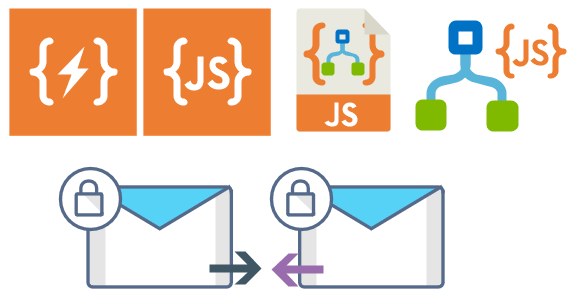
Logic App Inline Code (square – original that you can find in Logic App design)
Logic App Inline Code JS (square – original that you can find in Logic App design)
Logic App Inline Code (Custom shape version 1)
Logic App Inline Code (Custom shape version 2)
Secure Message Input
Secure Message Output
Microsoft Integration, Azure, Power Platform, Office 365 and much more Stencils Pack it’s a Visio package that contains fully resizable Visio shapes (symbols/icons) that will help you to visually represent On-premise, Cloud or Hybrid Integration and Enterprise architectures scenarios (BizTalk Server, API Management, Logic Apps, Service Bus, Event Hub…), solutions diagrams and features or systems that use Microsoft Azure and related cloud and on-premises technologies in Visio 2016/2013:
BizTalk Server
Microsoft Azure
Integration
Integration Service Environments (ISE)
Azure App Service (API Apps, Web Apps, Mobile Apps, and Logic Apps)
Event Hubs, Event Grid, Service Bus, …
API Management
IoT, and Docker
Machine Learning, Stream Analytics, Data Factory, Data Pipelines
and so on
Microsoft Power Platform
Microsoft Flow
PowerApps
Power BI
PowerShell
Infrastructure, IaaS
Office 365
And many more…
… and now non-related Microsoft technologies like:
Microsoft Integration, Azure, BAPI, Office 365 and much more Stencils Pack it’s a Visio package that contains fully resizable Visio shapes (symbols/icons) that will help you to visually represent On-premise, Cloud or Hybrid Integration and Enterprise architectures scenarios (BizTalk Server, API Management, Logic Apps, Service Bus, Event Hub…), solutions diagrams and features or systems that use Microsoft Azure and related cloud and on-premises technologies in Visio 2016/2013:
BizTalk Server
Microsoft Azure
Azure App Service (API Apps, Web Apps, Mobile Apps, and Logic Apps)
Event Hubs, Event Grid, Service Bus, …
API Management, IoT, and Docker
Machine Learning, Stream Analytics, Data Factory, Data Pipelines
and so on
Microsoft Flow
PowerApps
Power BI
PowerShell
Infrastructure, IaaS
Office 365
And many more…
… and now non-related Microsoft technologies like:
SAP Stencils
What’s new in this version?
New shapes: new shapes were added to existing modules like Generic, Azure, AI, Developer, Files or Users. But in particular a new module was born:
MIS SAP Stencils contains stencils that will represent some SAP services
Or from: Microsoft Integration and Azure Stencils Pack for Visio 2016/2013 v3.1.0 (18,6 MB) Microsoft | TechNet Gallery
Author: Sandro Pereira
Sandro Pereira lives in Portugal and works as a consultant at DevScope. In the past years, he has been working on implementing Integration scenarios both on-premises and cloud for various clients, each with different scenarios from a technical point of view, size, and criticality, using Microsoft Azure, Microsoft BizTalk Server and different technologies like AS2, EDI, RosettaNet, SAP, TIBCO etc. He is a regular blogger, international speaker, and technical reviewer of several BizTalk books all focused on Integration. He is also the author of the book “BizTalk Mapping Patterns & Best Practices”. He has been awarded MVP since 2011 for his contributions to the integration community. View all posts by Sandro Pereira
What started to be a Microsoft Integration Stencil Packs is now almost a full Microsoft stack stencil package that includes Microsoft Integration, Azure, BAPI, Office365, devices, products, competing technologies or partners and much more Stencils Pack it’s a Visio package.
This package contains fully resizable Visio shapes (symbols/icons) that will help you to visually represent On-premise, Cloud or Hybrid Integration and Enterprise architectures scenarios (BizTalk Server, API Management, Logic Apps, Service Bus, Event Hub…), solutions diagrams and features or systems that use Microsoft Azure and related cloud and on-premises technologies in Visio 2016/2013:
BizTalk Server
Microsoft Azure
Azure App Service (API Apps, Web Apps, Mobile Apps, and Logic Apps)
Event Hubs, Event Grid, Service Bus, …
API Management, IoT, and Docker
Machine Learning, Stream Analytics, Data Factory, Data Pipelines
and so on
Microsoft Flow
PowerApps
Power BI
PowerShell
Infrastructure, IaaS
Office 365
And many more
This new small update includes the new Office365 icons that were recently announced by Microsoft. It includes an additional of 19 new shapes and some reorganization.
The Microsoft Integration Stencils Pack v3.1.1 is composed of 22 files:
Or from: Microsoft Integration and Azure Stencils Pack for Visio 2016/2013 v3.1.1 (18,6 MB) Microsoft | TechNet Gallery
Author: Sandro Pereira
Sandro Pereira lives in Portugal and works as a consultant at DevScope. In the past years, he has been working on implementing Integration scenarios both on-premises and cloud for various clients, each with different scenarios from a technical point of view, size, and criticality, using Microsoft Azure, Microsoft BizTalk Server and different technologies like AS2, EDI, RosettaNet, SAP, TIBCO etc. He is a regular blogger, international speaker, and technical reviewer of several BizTalk books all focused on Integration. He is also the author of the book “BizTalk Mapping Patterns & Best Practices”. He has been awarded MVP since 2011 for his contributions to the integration community. View all posts by Sandro Pereira
Recently Microsoft announced Azure Event Grid, a highly scalable serverless event driven offering allowing us to implement publish and subscribe patterns. Event driven scenarios are becoming more common by the day, which means that we see these type of integrations increasing a lot as well. A lot of times applications will define their own message formats for their events, however, with the recent announcement of native support in Azure Event Grid for CloudEvents our lives should be made a lot easier. CloudEvents is a standard for working with events accross platforms, and gives us a specification for describing event data in a common way. This will allow any platform or application which is working with events, to implement a common format, allowing easy integration and interoperability, for example between Azure, AWS and Oracle. The specification is still under active development, and Microsoft is one of the big contributors, especially Clemens Vasters, Lead Architect on Azure Messaging Services.
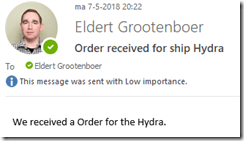
In this blog post we will be looking into Event Grid’s support for CloudEvents, and how to set this up. The specifications for the CloudEvents message format can be found on GitHub, and how this maps to Event Grid’s own schema can be found on Microsoft Docs. For this post we will use the application created in this bogpost, which will generate events when an order has been placed, as well as when a repair has been requested. These events will be handled by a Logic App, which will send out an email. In a real life scenario we could, for example, use this Logic App to create place the order at the ship’s supplier. And because we are using the CloudEvents format, the application can easily integrate with any system which supports this new specification, so they are not just bound to Azure.
Send event from custom application to Logic Apps
Currently support for Cloud Events in Event Grid is still in preview only available in a select group of regions (West Central US, Central US and North Europe), and to use it we need to enable an extension in Azure CLI by giving the following command.
az extension add --name eventgrid
Enable Event Grid extension
We can now create our Event Grid topic, where we will receive the events. Currently this is not yet supported in the portal, so we will stay in our Azure CLI, and give the following commands.
az group create -l northeurope -n cloudEventsResourceGroup
az eventgrid topic create --name cloudevents -l northeurope -g cloudEventsResourceGroup --input-schema cloudeventv01schema
The first command creates the resource group, while the second command creates the Event Grid topic. Note the input-schema switch, which allows us to set the CloudEvents format.
Create Event Grid topic
When the topic has been created, go to the Event Grid Topics blade in the portal, open the topic we just created, and grab the Topic Endpoint, we will need this later on.
Save the topic endpoint for later use
Switch to the Access keys for the topic, and grab one of the keys, we will need this later as well.
Also save on of the keys for later use
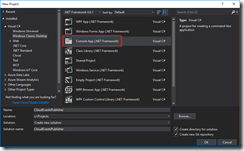
Next we will create the application which will send the events to our custom topic which we just created. For ease of this demo, this will just be a simple console application, but in a real life solution this could be any type of system. Start by creating a new solution in Visual Studio for our application.
Create console app solution
Data Classes
Add the following data classes, which describe the orders and repairs, as explained in this blog post.
/// <summary>/// Event sent for a specific ship./// </summary>publicclass ShipEvent
{/// <summary>/// Name of the ship./// </summary>publicstring Ship {get;set;}/// <summary>/// Type of event./// </summary>publicstring Type {get;set;}}
/// <summary>/// Used to place an order./// </summary>publicclass Order : ShipEvent
{/// <summary>/// Name of the product./// </summary>publicstring Product {get;set;}/// <summary>/// Number of items to be ordered./// </summary>publicint Amount {get;set;}/// <summary>/// Constructor./// </summary>public Order(){
Type ="Order";}}
/// <summary>/// Used to request a repair./// </summary>publicclass Repair : ShipEvent
{/// <summary>/// Device which needs to be repaired./// </summary>publicstring Device {get;set;}/// <summary>/// Description of the defect./// </summary>publicstring Description {get;set;}/// <summary>/// Constructor./// </summary>public Repair(){
Type ="Repair";}}
CloudEvents class
Add the CloudEvents class, which will be used to create a CloudEvents message which we will send to our Azure Event Grid. The schema for a CloudEvents message can be found here.
/// <summary>/// Representation of the CloudEvents specification, to be sent to Event Grid Topic./// </summary>class CloudEvents
{/// <summary>/// This will be used to update the Source and Data properties./// </summary>public ShipEvent UpdateProperties
{set{
Source = $"{Program.TOPIC}#{value.Ship}/{value.Type}";
Data =value;}}/// <summary>/// Gets the version number of the CloudEvents specification which has been used./// </summary>publicstring CloudEventsVersion {get;}/// <summary>/// Gets the registered event type for this event source./// </summary>publicstring EventType {get;}/// <summary>/// Gets the The version of the eventType./// </summary>publicstring EventTypeVersion {get;}/// <summary>/// Gets the event producer properties./// </summary>publicstring Source {get;set;}/// <summary>/// Gets the unique identifier for the event./// </summary>publicstring EventID {get;}/// <summary>/// Gets the time the event is generated based on the provider's UTC time./// </summary>publicstring EventTime {get;}/// <summary>/// Gets or sets the event data specific to the resource provider./// </summary>public ShipEvent Data {get;set;}/// <summary>/// Constructor./// </summary>public CloudEvents(){
CloudEventsVersion ="0.1";
EventID = Guid.NewGuid().ToString();
EventType ="shipevent";
EventTime = DateTime.UtcNow.ToString("o");}}
.Program Class
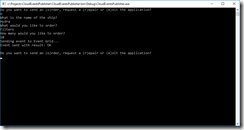
And finally we will update the Program class. Here we will get the input from the user, and create a CloudEvents message which will be sent to Event Grid. Make sure to update the topic endpoint and access key with the entries we retrieved from the portal in the previous step. Also update the topic property with your subscription id, and the resource group and topic name you used when creating the topic. One more thing to notice, is how we only send a single message, instead of a List of messages as we did in this blog post. Currently CloudEvents does not support batching of events, which is why we can only send a single event.
/// <summary>/// Send CloudEvents messages to an Event Grid Topic./// </summary>class Program
{/// <summary>/// Endpoint of the Event Grid Topic./// Update this with your own endpoint from the Azure Portal./// </summary>privateconststring TOPIC_ENDPOINT ="<your-topic-endpoint>";/// <summary>/// Key of the Event Grid Topic./// Update this with your own key from the Azure Portal./// </summary>privateconststring KEY ="<your-access-key>";/// <summary>/// Topic to which we will be publishing./// Update the subscription id, resource group and topic name here./// </summary>publicconststring TOPIC ="/subscriptions/<your-subscription-id>/resourceGroups/<your-resource-group>/providers/Microsoft.EventGrid/topics/<your-topic-name>";/// <summary>/// Main method./// </summary>publicstaticvoid Main(string[] args){// Set default valuesvar entry =string.Empty;// Loop until user exitswhile(entry !="e"&& entry !="exit"){// Get entry from user
Console.WriteLine("Do you want to send an (o)rder, request a (r)epair or (e)xit the application?");
entry = Console.ReadLine()?.ToLowerInvariant();// Get name of the ship
Console.WriteLine("What is the name of the ship?");var shipName = Console.ReadLine();
CloudEvents cloudEvents;switch(entry){case"e":case"exit":continue;case"o":case"order":// Get user input
Console.WriteLine("What would you like to order?");var product = Console.ReadLine();
Console.WriteLine("How many would you like to order?");var amount = Convert.ToInt32(Console.ReadLine());// Create order event// Event Grid expects a list of events, even when only one event is sent
cloudEvents =new CloudEvents { UpdateProperties =new Order { Ship = shipName, Product = product, Amount = amount }};break;case"r":case"repair":// Get user input
Console.WriteLine("Which device would you like to get repaired?");var device = Console.ReadLine();
Console.WriteLine("Please provide a description of the issue.");var description = Console.ReadLine();// Create repair event// Event Grid expects a list of events, even when only one event is sent
cloudEvents =new CloudEvents { UpdateProperties =new Repair { Ship = shipName, Device = device, Description = description }};break;default:
Console.Error.WriteLine("Invalid entry received.");continue;}// Send to Event Grid Topic
SendEventsToTopic(cloudEvents).Wait();}}/// <summary>/// Send events to Event Grid Topic./// </summary>privatestatic async Task SendEventsToTopic(CloudEvents cloudEvents){// Create a HTTP client which we will use to post to the Event Grid Topicvar httpClient =new HttpClient();// Add key in the request headers
httpClient.DefaultRequestHeaders.Add("aeg-sas-key", KEY);// Event grid expects event data as JSONvar json = JsonConvert.SerializeObject(cloudEvents);// Create request which will be sent to the topicvar content =new StringContent(json, Encoding.UTF8, "application/json");// Send request
Console.WriteLine("Sending event to Event Grid...");var result = await httpClient.PostAsync(TOPIC_ENDPOINT, content);// Show result
Console.WriteLine($"Event sent with result: {result.ReasonPhrase}");
Console.WriteLine();}}
The complete code for the Event Publisher application can also be found here on GitHub.
Our next step is to create the Logic App which will handle the events sent by our events publisher application.
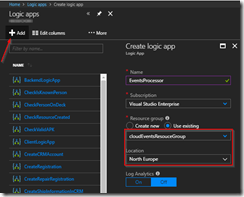
Create Logic App for processing events
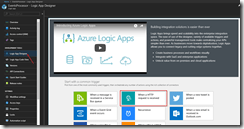
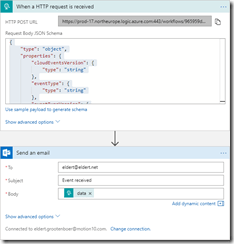
Once the Logic App has been created, open the designer and create a HTTP Request trigger template.
Use HTTP Request trigger
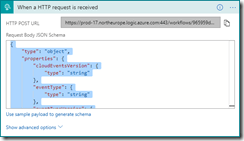
Set the Request JSON Schema to the following, which is a representation of the CloudEvents schema including the ship events.
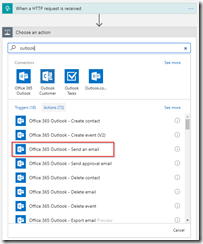
Add a step to send out an email, and authenticate using your Office365 account. If you don’t have an Office365 account you can also use one of the other connectors to send out an email.
Add the Office365 Outlook connector
Set the options for the email and save the Logic App. When you save the Logic App make sure to grab the HTTP POST URL of the HTTP Request trigger, as we will need this in the next step to set up the subscription.
Set email properties with body to the data element
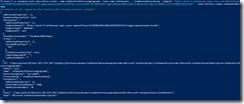
We are now going to create the Event Grid subscription, which will catch the events from our events publisher, and route them to our Logic App. We will have to do this once again from the Azure CLI, as the portal UI does not yet support the use of the CloudEvents schema. Give the following command in the Azure CLI to create the subscription which will route messages to our Logic Apps HTTP endpoint. Remember the Event Grid extension should be enabled for this.
Microsoft Integration, Azure, BAPI, Office 365 and much more Stencils Pack it’s a Visio package that contains fully resizable Visio shapes (symbols/icons) that will help you to visually represent On-premise, Cloud or Hybrid Integration and Enterprise architectures scenarios (BizTalk Server, API Management, Logic Apps, Service Bus, Event Hub…), solutions diagrams and features or systems that use Microsoft Azure and related cloud and on-premises technologies in Visio 2016/2013:
BizTalk Server
Microsoft Azure
Azure App Service (API Apps, Web Apps, Mobile Apps and Logic Apps)
Event Hubs, Event Grid, Service Bus, …
API Management, IoT, and Docker
Machine Learning, Stream Analytics, Data Factory, Data Pipelines
and so on
Microsoft Flow
PowerApps
Power BI
PowerShell
Infrastructure, IaaS
Office 365
And many more…
What’s new in this version?
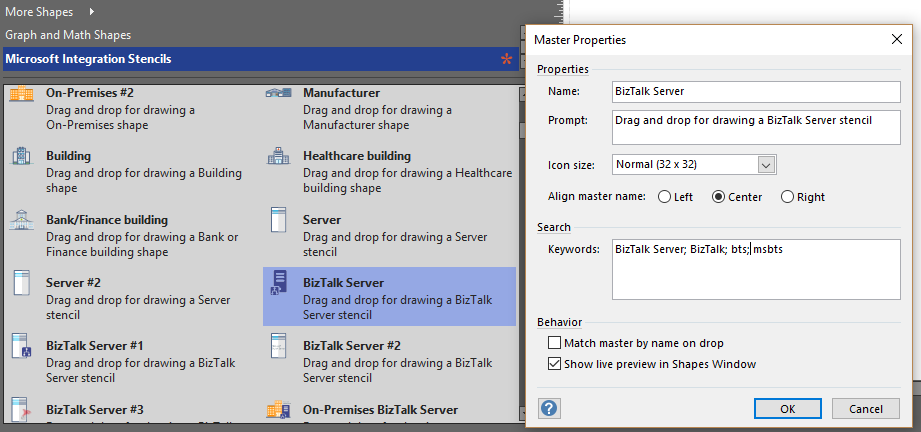
With the growing number of stencils in this package, it was becoming hard to find or look for the right shape/representation and based on some feedback I received from the community and some tips, I focused most of the work in this new version in providing search capacity to this package, but it wasn’t the only one:
Search Capabilities: Defining the correct metadata information and keywords for all the shapes for a better search functionality.
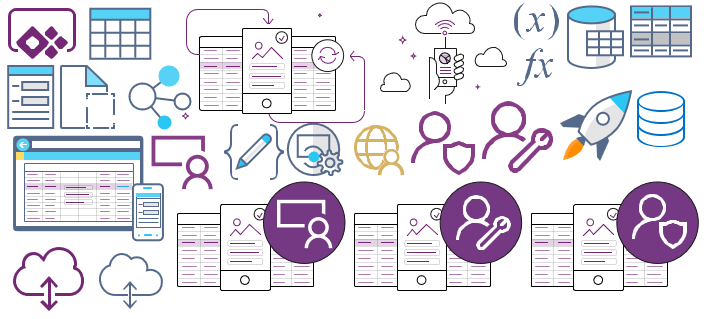
New shapes: of course, that has happened in all other versions, new shapes were added, in particular: Generic, Microsoft Flow and PowerApps shapes


 Microsoft Integration, Azure, Power Platform, Office 365 and much more Stencils Pack for Visio