Another day, another resource shared! This time regarding my session deliver on Integration User Group or also known as Integration Monday about BizTalk Server NoS add-in – BizTalk NoS Ultimate – that is a Visual Studio add-in for BizTalk developers that aims to improve the experience while developing BizTalk projects. It is an extension to Microsoft Visual Studio that will offer lots of useful functionalities, mainly for developers, by which BizTalk users can save valuable time while working on their day-to-day activities and improve productivity.
About my session
Session Name: The NOS-addin – your (free) BizTalk Dev buddy!
Session Overview: The NOS-add-in is a tool specifically developed for BizTalk developers. It contains all kind of features to make the life of a BizTalk developer easier and thereby less time-consuming.
In this session, I will show the different capabilities of this tool.
Integration User Group aims to educate, evangelize, inform the community about various integration technologies, and how developers and architects can share and learn about the evolving integration and messaging capabilities of the Microsoft platform.
I think in the past I told that do not try to configure anything in BizTalk Server if you are tired. My advice, go to sleep for one hour and come back… unless the client is eager and demands or request things to be done… then the error happens. This was one of these errors in which I usually say that the problem was between the chair and the keyboard. This week I returned to work, after my little honeymoon leave, that I spent part of it working and another part of it with my little kid a little sick (I need to compensate my wife with a proper vacation for being so understanding). So, as you can imagine I return a little tired and the first day was one of those days that I had several clients requiring my presence for several small things at the same time.
One of them was configuring correctly, according to best practices and security the IIS application pools that were being used to run Web Sites with some orchestrations exposed as Web Services that initial was running with BizTalk Server Administration account.
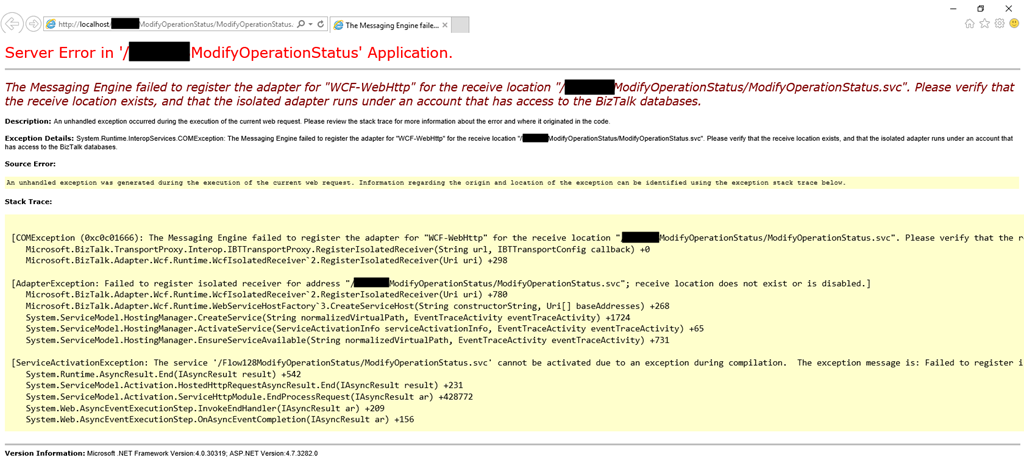
Once I finished configuring the applications pools, I started receiving the following error:
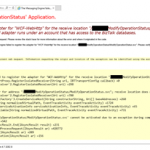
The Messaging Engine failed to register the adapter for “WCF-WebHttp” for the receive location “/ModifyOperationStatus/ModifyOperationStatus.svc”. Please verify that the receive location exists, and that the isolated adapter runs under an account that has access to the BizTalk databases~
Cause
Usually, this can happen for two reasons:
There isn’t a receive location created and enabled listening to this web service;
Or this is a permission issue! And is typically related by the fact that the account or service account specified on the application pool that the web service is running is not… a member of the BizTalk Isolated Host Users group.
In my case, and because the names of the service accounts were very identical, I improperly configured the application pool to run with the service account that was a member of the BizTalk Host Users group (btsapphostsrv) instead of the service account member of the BizTalk Isolated Host Users group (btsiapphostsrv).
Solution
To solve this issue, you first should check and double-check if the IIS Application Pool Identities are correctly configured.
If yes, guarantee that the user or service account is part of the BizTalk Isolated Host Users group. If not:
Make sure you add that user or service account into the BizTalk Isolated Host Users group.
Or change the IIS Application Pool Identity for an account that is already a member of the BizTalk Isolated Host Users Group.
And then make sure that there is a receive location configured and to listen to this web service and if it is enabled.
In my case, changing to the BizTalk Isolated Host Instance Account that is, of course, a member of BizTalk Isolated Host Users group solved my issue.
In my previous blog post, I have highlighted 5 interesting cases we received and solved in the past year. In this blog, I would like to add 5 more interesting support cases.
Let’s get into the cases.
Case 6: Data Monitor Dashboard slow to respond
In the year 2017, we have started a new initiative called ‘Customer Relationship Team. This team will get in touch with our customers regularly in the frequency of 3-4 months. The team will make sure about how the customers are using the BizTalk360 product, whether they are facing any problems, and if they have any queries.
If so, we will clarify the customer queries during the call. If can’t clarify the problem within the short time of the call, then we will create a support case for their queries and make sure we will solve the case.
In one such a call, a customer raised a concern about the Data monitoring dashboard being slow to respond and it takes more and more time.
Troubleshooting
During the investigation of the slowness, we came to know that the customer had configured 147 data monitoring alarms. Out of those, 110 data monitoring alarms were scheduled for every 15 minutes cycle, which will produce a huge result.
In more detail:
110 data monitoring results for every 15 minutes cycle.
110*4*8(business hours) = 3520 results.
110*4*24(whole day) = 10,560 results.
Loading 10k results in a single load, for sure it will take time to load all the results.
Solution
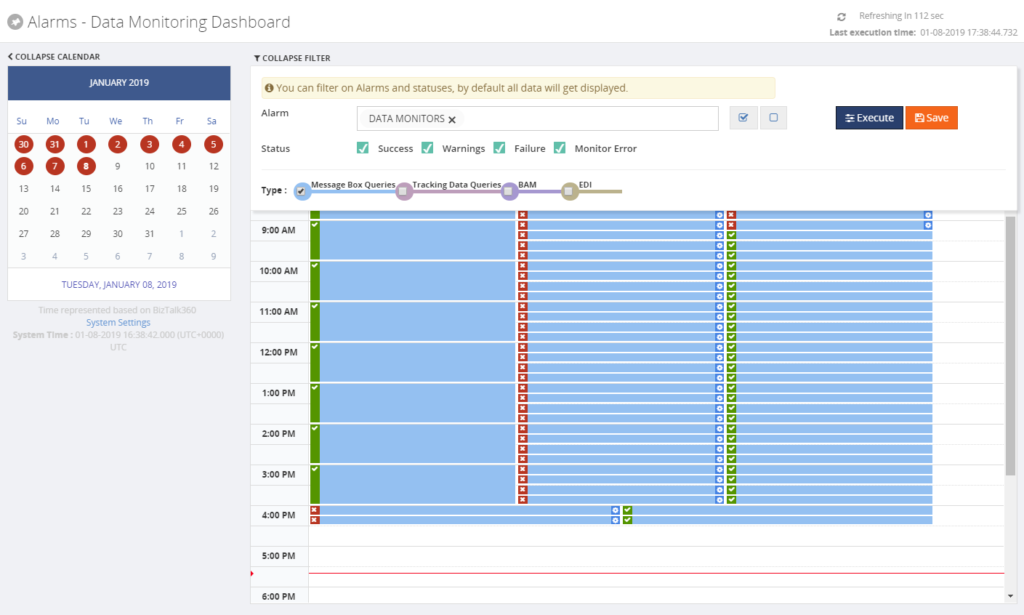
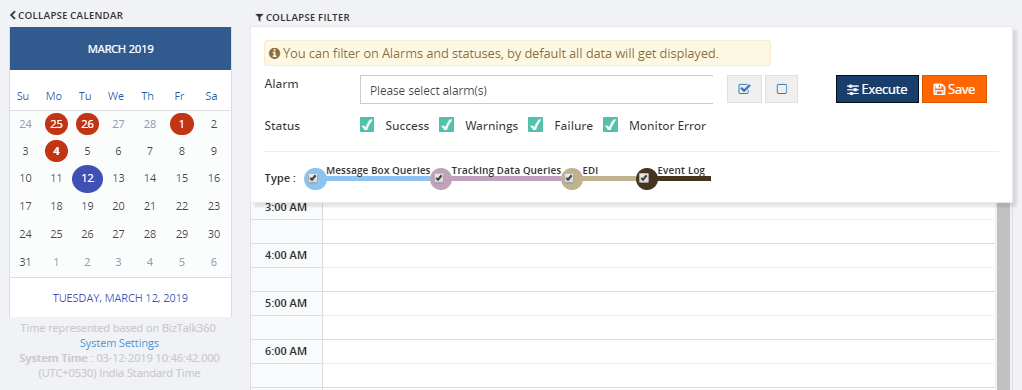
Most of the customers won’t use many schedules for data monitoring alarms. To handle such a huge load, we have improved the performance of the data monitoring dashboard, by having a filter option to select the specific alarms and corresponding status. The improved data monitoring dashboard is available from version 8.7 on.
Case 7: System resources configuration
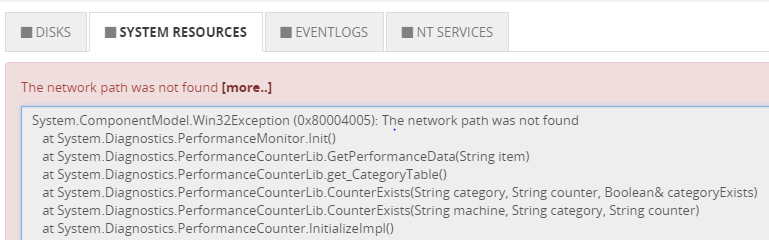
A customer faced an exception ‘the network path was not found’ while trying to enable SQL Server System resources monitoring.
Troubleshooting
We have requested the customer to check the below things:
The BizTalk360 service account is a local admin on the machine where SQL server is hosted
The Remote Registry service is started or not
Firewall ports are opened for SQL server
From BizTalk360 server, can you connect to that SQL server through SQL Management Studio
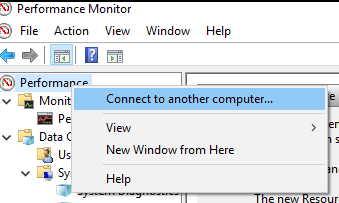
Connect to the remote computer (SQL Server configured for monitoring) from the BizTalk360 machine where the monitoring service is running
All other steps were passed, but in the Perfmon, while connecting the SQL Server on the BizTalk360 installed machine, they have faced the same exception.
Solution
To open the SQL server on another machine, port 1433 needs to be enabled. To monitor System resources of SQL machine, an additional port needs to be enabled ‘135’, which is for RPC and WMI. We have mentioned the depended ports what needs to be enabled in our existing blog.
Even after adding the port, still the problem persisted. At last, we found that the firewall rules were not activated/enabled, once after activating the rules we were able to solve the case. This is one such case in which we all missed to check the basic step that a rule should be activated because no one had access to view the rules other than the customer’s admin.
Case 8: SFTP Monitoring – PublicKeyAuthendication
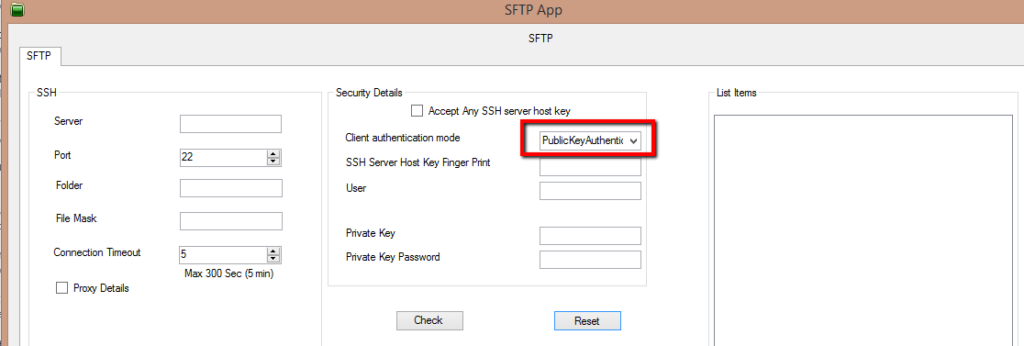
A customer was trying to configure monitoring for an SFTP location and they were facing issues. It was working fine for the customer when the authentication was used with a simple username and password. However, once they configured for PublicKeyAuthendication, they faced issues during the configuration.
Troubleshooting
We started with the basic troubleshooting steps like authentication, access permissions and we understood that it has all rights to access the FTP site. During the investigation, we found that in a folder BizTalk was picking up the inner folders as well, instead of picking the files alone.
Solution
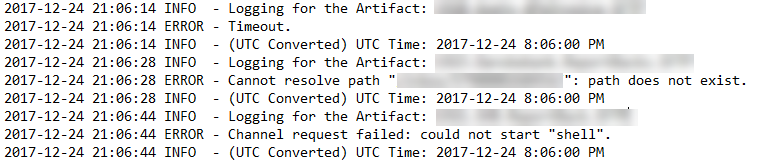
To find the exact root cause of the issue, we have developed a console application (with logs enabled) and provided it to the customer. It provided a clear picture of the problem, as mentioned earlier it has calculated the folder for PublicKeyAuthentication. Now, this has been fixed.
Case 9: Message Count mismatches
A customer faced a problem between the Receive and Send ports for the message count at Analytics Messaging Patterns.
Troubleshooting
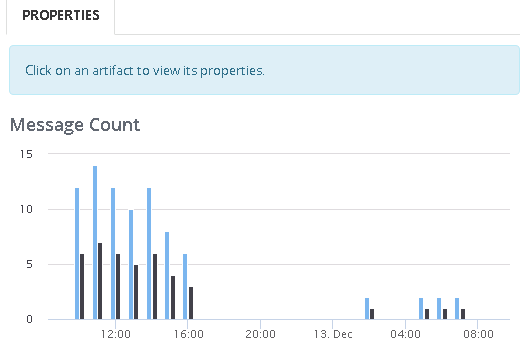
The customer had a very simple scenario (see below) where a file is picked up and placed in a different location, but the Send Port count shows the Receive Port count twice. He gets similar doubling up on Receive and Send ports for other message flows as well.
Example:
Send Port – 12 messages
Receive Port – 6 messages
During the investigation, we have found that whenever BizTalk retries to submit the suspended messages the counts get double.
Solution
As of now, we are showing the message transfer count rather than the message count. We are doing this because this will help us to determine the message performance of BizTalk Artifacts in an environment. We are going to take this as a feature enhancement in the future.
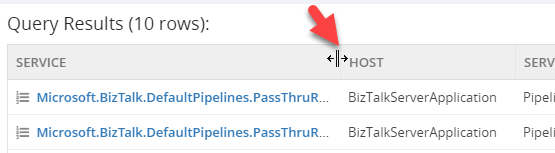
Case 10: Not possible to expand columns in query outcome
Normally you can expand the column size of the query outcome in a grid. But customers were facing a problem that they were unable to expand the columns in the MessageBox Queries grid.
Troubleshooting
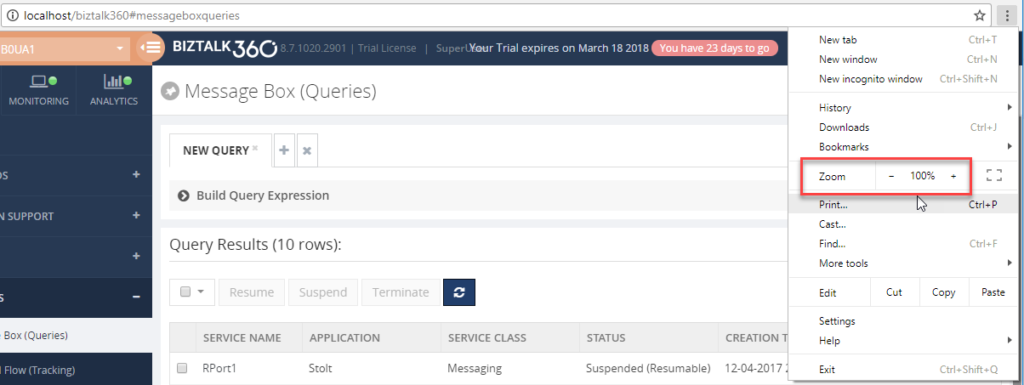
During the investigation the customers were facing this problem in Chrome, but not in Internet Explorer and Firefox. They faced the same issue while opening the browser in an incognito window as well. This is really something very strange for us, because while using the same version we were not able to reproduce the same problem.
We have investigated at the code level and everything seems fine at our end. So, we have decided to go for a meeting. During the meeting, we were able to see the problem at the customer end and we had no clue at that time, requested a few days time and closed the meeting.
We analyzed the case and it was hard to reproduce the case at our end. It is working for most of our team members and only a few are facing this issue. The team member who faced the issue and the one who’s working fine worked together, they compared each component from scratch to find what’s the difference and we found the cause.
Solution
If the Chrome page is zoomed out or zoomed in, then the column resize wasn’t working for us and this happened at the customer as well.
It seemed that this was a problem with the Kendo Grid control in the latest version this issue was introduced by Kendo. We worked along with Kendo and solved the case.
Satisfaction does it!
As a support engineer, we receive different cases on a daily basis. Every support case is unique because the problem will be faced by different customers in different environment architecture. But some of the support cases are interesting by the root cause of the problem and the way of troubleshooting the case. I’m happy that I have worked on such challenging and interesting cases.
Recently I added an article to the integration playbook which compares the different approaches used for Durability, Persistence and Retry across the various microsoft technologies such as BizTalk, Logic Apps, Event Grid, Event Hubs, Service Bus Messaging and Functions
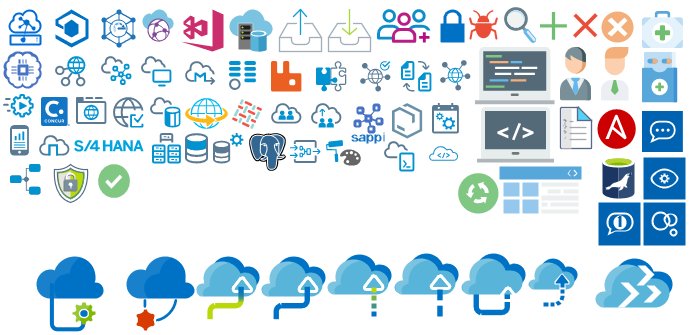
Microsoft Integration, Azure, BAPI, Office 365 and much more Stencils Pack it’s a Visio package that contains fully resizable Visio shapes (symbols/icons) that will help you to visually represent On-premise, Cloud or Hybrid Integration and Enterprise architectures scenarios (BizTalk Server, API Management, Logic Apps, Service Bus, Event Hub…), solutions diagrams and features or systems that use Microsoft Azure and related cloud and on-premises technologies in Visio 2016/2013:
BizTalk Server
Microsoft Azure
Azure App Service (API Apps, Web Apps, Mobile Apps, and Logic Apps)
Event Hubs, Event Grid, Service Bus, …
API Management, IoT, and Docker
Machine Learning, Stream Analytics, Data Factory, Data Pipelines
and so on
Microsoft Flow
PowerApps
Power BI
PowerShell
Infrastructure, IaaS
Office 365
And many more…
… and now non-related Microsoft technologies like:
SAP Stencils
What’s new in this version?
New shapes: new shapes were added to existing modules like Generic, Azure, AI, Developer, Files or Users. But in particular a new module was born:
MIS SAP Stencils contains stencils that will represent some SAP services
Or from: Microsoft Integration and Azure Stencils Pack for Visio 2016/2013 v3.1.0 (18,6 MB) Microsoft | TechNet Gallery
Author: Sandro Pereira
Sandro Pereira lives in Portugal and works as a consultant at DevScope. In the past years, he has been working on implementing Integration scenarios both on-premises and cloud for various clients, each with different scenarios from a technical point of view, size, and criticality, using Microsoft Azure, Microsoft BizTalk Server and different technologies like AS2, EDI, RosettaNet, SAP, TIBCO etc. He is a regular blogger, international speaker, and technical reviewer of several BizTalk books all focused on Integration. He is also the author of the book “BizTalk Mapping Patterns & Best Practices”. He has been awarded MVP since 2011 for his contributions to the integration community. View all posts by Sandro Pereira
Finally, I will be in Australia and New Zealand but unfortunately not in person, maybe next time, but instead remotely. Nevertheless, it will be a pleasure to present in this amazing community for the first time and it’s tomorrow already on a session about How we at DevScope are using Microsoft Integration features and related Azure technologies to improve our processes and by doing so engaging customers to also adopt some of these Microsoft Integration features.
Session Overview: In this session, I will show you real live scenarios on how we at DevScope are using Microsoft Integration features (Logic Apps, API Management, API’s) and related Azure technologies like PowerApps, Flows and Power BI to:
First, improve our internal processes like expenses reports, time reports and so on;
And, secondly, how the first step helps us out to extend our product and our business by exporting these same approaches and concepts to our clients
This will be a lightweight talk addressing some real scenarios and show them in action.
I invite you all to join us tomorrow morning or in the afternoon depending on where you are from. Grab your “seat” by registering in this session here.
Author: Sandro Pereira
Sandro Pereira lives in Portugal and works as a consultant at DevScope. In the past years, he has been working on implementing Integration scenarios both on-premises and cloud for various clients, each with different scenarios from a technical point of view, size, and criticality, using Microsoft Azure, Microsoft BizTalk Server and different technologies like AS2, EDI, RosettaNet, SAP, TIBCO etc. He is a regular blogger, international speaker, and technical reviewer of several BizTalk books all focused on Integration. He is also the author of the book “BizTalk Mapping Patterns & Best Practices”. He has been awarded MVP since 2011 for his contributions to the integration community. View all posts by Sandro Pereira
I’m glad to be back, once again, to Integration Monday Events! The first time I presented a session on this user group was almost 3 years ago on April 25, 2016, and I’m always happy to come back.
Also, I’m glad to be invited by the product owner to speak about BizTalk NoS Ultimate add-in because I feel like a godfather of this tool, some many nights I spend with Nino Crudele providing feedback and demanding new features and capabilities – from that day Nino thinks twice before I asked me for feedback or opinions about anything is developing hehe.
This will be the second time I speak about this tool on this user group. The first time it was on August 2015 in a session about “Real Case Scenarios Where BizTalk NoS Ultimate Can Improve Our Efficiency“. This time will be a different session with, in my personal opinion, full of great and good news!
Session Overview: The NOS-add-in is a tool specifically developed for BizTalk developers. It contains all kind of features to make the life of a BizTalk developer easier and thereby less time-consuming.
In this session, Sandro shows the different capabilities of the tool.
I invite you all to join us next Monday. Grab your “seat” by registering in this session here.
Author: Sandro Pereira
Sandro Pereira lives in Portugal and works as a consultant at DevScope. In the past years, he has been working on implementing Integration scenarios both on-premises and cloud for various clients, each with different scenarios from a technical point of view, size, and criticality, using Microsoft Azure, Microsoft BizTalk Server and different technologies like AS2, EDI, RosettaNet, SAP, TIBCO etc. He is a regular blogger, international speaker, and technical reviewer of several BizTalk books all focused on Integration. He is also the author of the book “BizTalk Mapping Patterns & Best Practices”. He has been awarded MVP since 2011 for his contributions to the integration community. View all posts by Sandro Pereira
What started to be a Microsoft Integration Stencil Packs is now almost a full Microsoft stack stencil package that includes Microsoft Integration, Azure, BAPI, Office365, devices, products, competing technologies or partners and much more Stencils Pack it’s a Visio package.
This package contains fully resizable Visio shapes (symbols/icons) that will help you to visually represent On-premise, Cloud or Hybrid Integration and Enterprise architectures scenarios (BizTalk Server, API Management, Logic Apps, Service Bus, Event Hub…), solutions diagrams and features or systems that use Microsoft Azure and related cloud and on-premises technologies in Visio 2016/2013:
BizTalk Server
Microsoft Azure
Azure App Service (API Apps, Web Apps, Mobile Apps, and Logic Apps)
Event Hubs, Event Grid, Service Bus, …
API Management, IoT, and Docker
Machine Learning, Stream Analytics, Data Factory, Data Pipelines
and so on
Microsoft Flow
PowerApps
Power BI
PowerShell
Infrastructure, IaaS
Office 365
And many more
This new small update includes the new Office365 icons that were recently announced by Microsoft. It includes an additional of 19 new shapes and some reorganization.
The Microsoft Integration Stencils Pack v3.1.1 is composed of 22 files:
Or from: Microsoft Integration and Azure Stencils Pack for Visio 2016/2013 v3.1.1 (18,6 MB) Microsoft | TechNet Gallery
Author: Sandro Pereira
Sandro Pereira lives in Portugal and works as a consultant at DevScope. In the past years, he has been working on implementing Integration scenarios both on-premises and cloud for various clients, each with different scenarios from a technical point of view, size, and criticality, using Microsoft Azure, Microsoft BizTalk Server and different technologies like AS2, EDI, RosettaNet, SAP, TIBCO etc. He is a regular blogger, international speaker, and technical reviewer of several BizTalk books all focused on Integration. He is also the author of the book “BizTalk Mapping Patterns & Best Practices”. He has been awarded MVP since 2011 for his contributions to the integration community. View all posts by Sandro Pereira
Last year I didn’t have the opportunity to deliver 16 sessions across the world like 2017 because I had to slow down my trips, or I didn’t participate as I would or did in the past in some communities and I don’t regret a single second. If I have to describe 2018 in a single word I have to choose: family.
I don’t have any difficulty in selecting the best moments, my baby boy born and I move my family to a bigger house because we now have 3 kids, two beautiful girls, like there mother and of course a mini-me.
So, as you may imagine, I struggle to have free time, but when you love what you do, instead of finding excuses you will always find a way to do it. So in the end, I was able to:
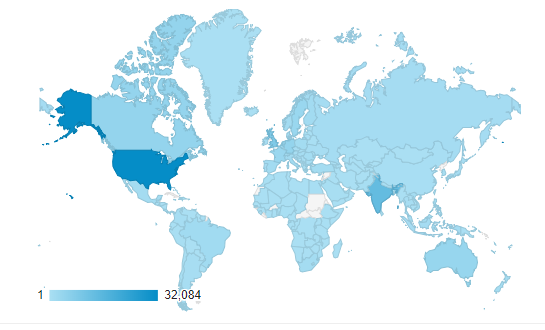
Publish 70 new posts in my blog; I wrote more blog post that in 2017, And I just now realize that! And the countries that most visited my blog still are the United States, followed by India, the United Kingdom, and Canada in a total of 194 countries
IntegrationMonday |online |The birth of a new SSO Application Configuration Tool
XXXX Porto.Data meeting, March 27 | Porto | Automatization Platform with Dynamics 365 | Dynamics365, Microsoft Flow and PowerApps
CSI about Microsoft Flow and PowerApps
Integrate 2018 | London | BizTalk Server Notes from the Road
MVPDays Microsoft Flow Conference 2018 | online | How we use Microsoft Flow and PowerApps: Real cases scenarios
And migrate all and improve, at least almost all, my community projects to GitHub:
And this is just a small set of my contributions because I still publish several small scripts and sample codes on TechNet Gallery and Code Gallery and help in other ways the community.
My favorite’s posts
The top posts that I enjoyed writing or add more fun to do it last year was:
Because of the fact normally people look at me and think that I’m a BizTalk guy but I really do more than BizTalk Server, but I only like to write about real stuff that I use daily and indeed I had a lot of fun writing these blog post and real-life cases.
And of course, to close this list:
Thanks for following me, for reading my blog and I promise that I will continue to share my knowledge during 2019.
Author: Sandro Pereira
Sandro Pereira lives in Portugal and works as a consultant at DevScope. In the past years, he has been working on implementing Integration scenarios both on-premises and cloud for various clients, each with different scenarios from a technical point of view, size, and criticality, using Microsoft Azure, Microsoft BizTalk Server and different technologies like AS2, EDI, RosettaNet, SAP, TIBCO etc. He is a regular blogger, international speaker, and technical reviewer of several BizTalk books all focused on Integration. He is also the author of the book “BizTalk Mapping Patterns & Best Practices”. He has been awarded MVP since 2011 for his contributions to the integration community. View all posts by Sandro Pereira
So, you have installed BizTalk360 and you are eager to start using it! But, BizTalk360 is such a feature-rich product, that you might find it hard to get started and implement BizTalk360 in a proper way. In this blog post, we will give you some tips and guidelines, which will be of help when you are setting up BizTalk360. You can also use the article if you have already set up some of the features in BizTalk360 and want to make sure that you did not miss anything important.
Note: BizTalk360 has a To Do list which contains a number of tasks, you could do to make full use of the product. You will find this To Do list under Settings => To Do List. See also, this article.
This blog post is separated in the following sections:
Optimizing the BizTalk360 environment
Benefit from automated monitoring
Optimizing the BizTalk360 environment
Once you have installed the product, there are a few things you must do, before you are able to use the product. Furthermore, you can also perform some tasks to optimize the environment. Let’s have a look at these tasks:
Activate the license (required)
Adding BizTalk environments to BizTalk360 (required)
Remove unused BizTalk features from the BizTalk360 UI
Create User Access Policies
Create efficient dashboards
We will have a somewhat more detailed look at these tasks.
Activate the license
After finishing the installation of BizTalk360, the installer starts the product in your default browser. Once started, BizTalk360 will ask you to provide the license. If you have purchased a license, you now can provide the details of this license. Depending if the server on which BizTalk360 has been installed has internet connectivity, the process of applying the license will be a bit different.
Adding BizTalk environments to BizTalk360
After applying the license, you will be able to access the BizTalk environment, for which you purchased the license. In case you have purchased BizTalk360 licenses for multiple BizTalk environments, there are two options on how to access these BizTalk environments from BizTalk360:
A separate installation of BizTalk360 for each BizTalk environment
Using one BizTalk360 instance for multiple BizTalk environments
It is totally up to you how you want to access your BizTalk environments from BizTalk360, although the two mentioned approaches both have their pros and cons. To sum up a few:
it is handy to have multiple BizTalk environments in the same instance of BizTalk360. But, there is the risk that you think that you are stopping artefacts in your Test environment, while you were actually doing it in the Production environment
with separate BizTalk360 instances for your BizTalk environments, it is less likely that you stop artefacts or terminate instances in the wrong environment. But, it might be hard to memorize the URL’s of the different BizTalk360 installations
If you plan to have multiple BizTalk environments in the same instance of BizTalk360, it is good to know that, to prevent confusion, you can achieve the following:
give each environment a friendly name
colour code each environment
Read this article in our Documentation portal on how to maintain environments in BizTalk360. The article mentions, amongst others, how to provide a friendly name and a colour code.
Remove unused BizTalk features from the BizTalk360 UI
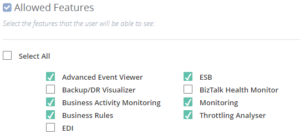
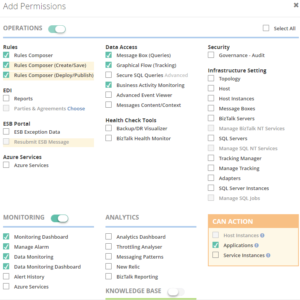
One of the primary design goals of BizTalk360 is to consolidate all the tools and portals you might need to operate your BizTalk environment. Just to mention a few of such portals, the product contains features to access BAM views, the ESB Exception Framework, the Business Rules Composer, EDI, etc. However, within your organization, you might not use all these BizTalk features. Still, they show up in the BizTalk360 user interface. Of course, you can use User Access Policies to prevent these features to show up, but then the Super User (for which no fine-grained user access policy needs to be set up) will still view these unused features. To prevent these unused features from showing up, you can simply disable them for the environment. This way, the BizTalk360 user interface is more focused on your BizTalk environment.
Check this article in our Documentation portal and under Allowed Features turn on/off the appropriate features.
Create User Access Policies
After the installation of the product, an User Access Policy has been created for the user who installed the product. However, it is likely that more people will use the product. To provide each user, which the access to BizTalk360 they need, it is best to create User Access Policies for each user. You can start with giving your fellow BizTalk administrators access to BizTalk360. But when you feel confident, you can also give people outside the BizTalk Admin team access to the product.
With the fine-grained capabilities of the User Access policies, you can, for example, can give your:
Support Engineers read-only access to BizTalk360
Business users access to portals like BAM, EDI, ESB, BRE, etc.
Access is always in a secure and audited way. In this blog post we describe how you can approach setting up access with BizTalk360.
Create efficient dashboards
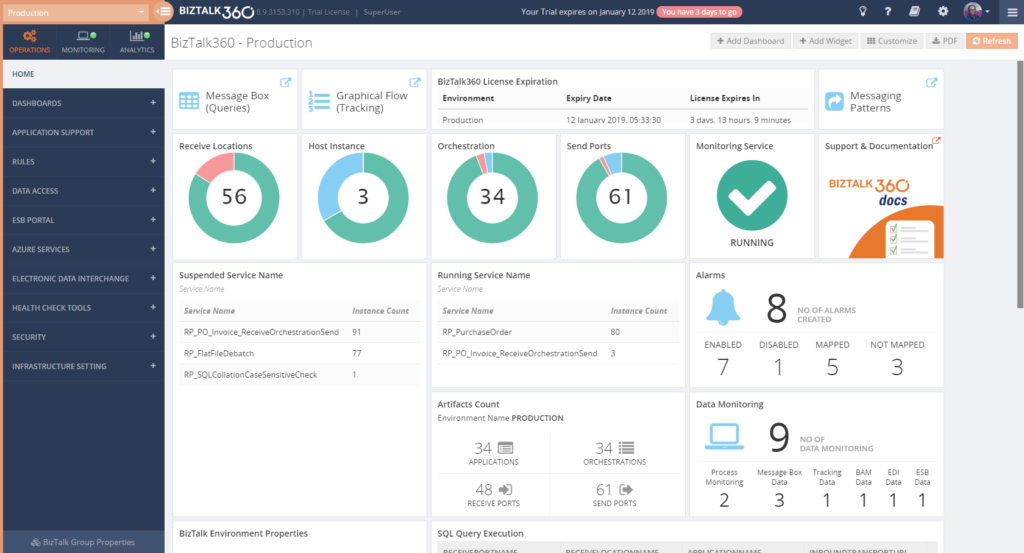
The Operations Dashboard is the entry point of BizTalk360. This Dashboard can contain a different kind of widgets of which the goal is to immediately show useful information about the well-being of your BizTalk environment. The widgets on the Operations Dashboard are fully customizable in terms of:
number of widgets
size of the widgets
location of the widgets
refresh interval of the widgets
In case the default collection of widgets does not completely fulfil your requirements, you can create Custom Widgets, enabling you for example to show the output of (BizTalk360) API calls or SQL queries.
The Documentation portal contains more information on how to set up and use the Operations Dashboards. It also contains articles about creating Custom Widgets.
Benefit from automated monitoring
The main reason you purchased BizTalk360 might very well be the monitoring capabilities of the product, so you are probably interested in setting this up as soon as possible. Setting up monitoring in BizTalk360, consists of two steps, which are:
create Alarms – to configure HOW you want to monitor
manage Mappings – to configure WHAT you want to monitor
Create Alarms to configure HOW you want to monitor
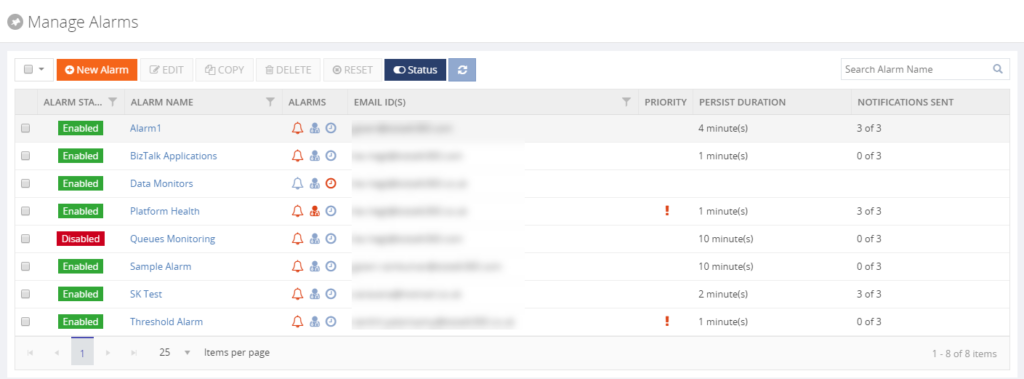
The first step is to create an alarm. With BizTalk360, alarms come in a few different flavours:
Threshold alarms – for monitoring whether artefacts are in the expected state
Health alarms – for receiving Daily check reports at configurable days/times
Data Monitoring alarms – for monitoring the processing of messages through BizTalk
Consolidated alarms – any combination of the 3 above mentioned alarm types
Besides stuff like giving an alarm a name and configuring how you want to be notified, depending on the alarm type, you can configure multiple other settings. So, again, with configuring these properties you are only configuring how you want to monitor.
Read the Understanding Alarms article in the Documentation portal for more information about the different alarm types and on how to create an alarm.
Note: you probably want to receive notifications via email. For BizTalk360, to be able to send email notifications, you need to configure an SMTP server. Read this article on how to set this up.
Manage Mappings to configure WHAT you want to monitor
After creating an alarm, you will add mappings to it, to start monitoring the required artefacts. With BizTalk360, there is a huge set of artefacts you can monitor. Think of for example (this is not the full list):
BizTalk Applications – Send Ports, Receive Locations, Orchestrations, Service instances
SQL Server Instances – SQL Server Agent Jobs, SQL Queries
HTTP Endpoints – REST, SOAP
FILE Endpoints – FILE, FTP, SFTP, FTPS
Queues – MSMQ, IBM MQ, Azure ServiceBus Queues
BizTalk Health Monitor – Critical and Non-critical Errors and Warnings
Depending on the type of the artefact, you can monitor for its state (like Stopped/Started/etc.) or Warning/Error thresholds.
Although you are completely free in how you set up monitoring, we normally recommend making a distinction between monitoring the BizTalk platform and the BizTalk applications.
Platform alarms – these contain mappings to stuff like the Host Instances, the SQL Server Agent jobs, Host Throttling, Server resources etc.
BizTalk Application alarms – these alarms contain mappings to BizTalk application artefacts (Receive/Send Ports, Orchestrations and Service Instances) and relevant endpoints (HTTP/HTTPS, FILE, FTP/SFTP/FTPS, etc.)
Note: Did you know that BizTalk360 has a feature which is called Auto-Correct? This feature enables you to automatically (try) to bring artefacts back to the expected state, after entering the wrong state. This feature, which can be a real time-saver, works for the following components:
BizTalk Applications – Receive Locations, Orchestrations and Send Ports
BizTalk Platform – Host Instances
Windows Server – Windows NT Services
SQL Server – SQL Server Jobs
Microsoft Azure – Logic Apps
Read more about this feature in the Documentation portal.
Data Monitoring
Besides artefact monitoring, BizTalk360 also allows you to monitor the processing which is taking place through BizTalk. The concept of Data Monitoring allows you to monitor activity around sources like the MessageBox, Tracking data, BAM data, EDI data, ESB data, Logic Apps and Even Log entries. Data Monitoring comes with the Data Monitoring Dashboard. This calendar-like dashboard shows the historic runs of all the configured Data Monitors. This dashboard will make it easy to address questions about whether certain processing did take place.
Without going in too much detail, with Data Monitoring you can cover scenarios like:
monitoring whether batches you expect at a particular time, really arrive in BizTalk and become processed
you may want to automatically terminate service instances, like Routing Failures, which you frequently receive
you may want to automatically resume service instances because the messages could not be transmitted due to a temporary network failure
These are only a few of the scenarios you can think of. If you want to read more about the concept of Data Monitoring, consult the Documentation portal.
Implementing BizTalk360 can be a multi-step process
You must have noticed that, once you have purchased and installed BizTalk360, there is a lot to go for. In this blog post, we only mentioned a number of features which are considered the most important to implement after installing the product. However, there are way too many features in the product to cover in a single blog post. Given the number of features in the product, it makes sense to make implementation of BizTalk360 a multi-step process. This way, your BizTalk360 implementation can grow with your requirements and the requirements of your organization.
If you need help with implementing BizTalk360 or want to receive some more tips, feel free to contact us at [email protected].
We love to hear from you and we want you to take the full benefit of your purchase!
Happy administering!
Author: Lex Hegt
Lex Hegt works in the IT sector for more than 25 years, mainly in roles as developer and administrator. He works with BizTalk since BizTalk Server 2004. Currently he is a Technical Lead at BizTalk360. View all posts by Lex Hegt
















 The Documentation portal contains more information on how to set up and use the Operations Dashboards. It also contains articles about creating Custom Widgets.