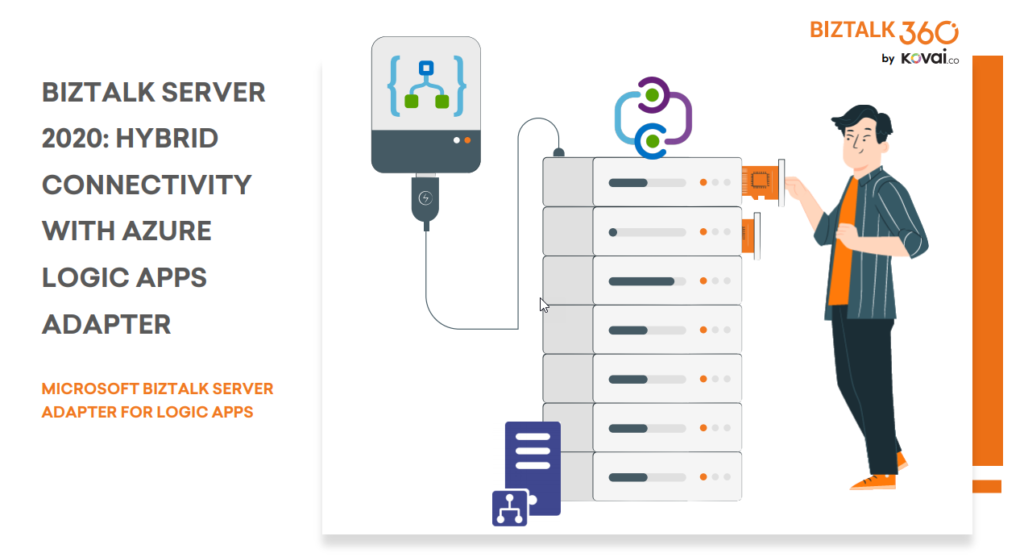
BizTalk Server 2020 is undoubtedly the best-suited integration for the On-Premises integration platform and IaaS (Infrastructure as Service). It is also integrating cloud services with a variety of built-in adapters for the cloud, such as the Azure Logic Apps.
The Azure Logic Apps adapter is used by BizTalk Server to communicate with Azure Logic Apps. This could also be possible using the HTTP adapter, but the Logic App adapter provides a better and straightforward experience.
This whitepaper will show you how BizTalk Server 2020 can interact with Logic Apps:
How BizTalk Server can send messages to Logic Apps using the Logic App adapter
How Logic Apps can send messages through BizTalk Server using the BizTalk Connector
Where I can download it
You can download the whitepaper here:
You can also find, download and enjoy several other free whitepapers of my own here:
Much has been written about the European Union’s (EU) General Data Protection Regulation (GDPR), which came into effect last May 28, 2018. the GDPR applies no matter where you are located, and with many organizations storing critical data in their database platforms, it will be incumbent upon them to ensure that the entire IT environment complies with the legislation, to avoid fines or penalties of up to €20 million or 4% of annual worldwide turnover.
Always Encrypted is a feature designed to protect sensitive data, such as credit card numbers or national identification numbers (for example, U.S. social security numbers), stored in Azure SQL Databases or on-premises SQL Server databases.
Always Encrypted allows clients to encrypt sensitive data inside client applications and never reveal the encryption keys to the Database Engine (SQL Database or SQL Server). As a result, Always Encrypted provides a separation between those who own the data (and can view it) and those who manage the data (but cannot view it). By ensuring on-premises database administrators, cloud database operators, or other high-privileged (but unauthorized) users, cannot access the encrypted data, Always Encrypted enables customers to confidently store sensitive data outside of their direct control. This allows organizations to encrypt data at rest and in use for storage in Azure, to enable delegation of on-premises database administration to third parties, or to reduce security clearance requirements for their own DBA staff.
This whitepaper will give you a detailed understanding of the following:
Creating SQL Server Database in BizTalk 2020
Creating always encrypted column in BizTalk Server
Querying and inserting data in the encrypted columns
Where I can download it
You can download the whitepaper here:
You can also find, download and enjoy several other free whitepapers of my own here:
We live in the age of fast digital transformation. Different emerging services appear extremely fast which results in a more heterogeneous IT architecture. However, when we have this heterogeneous landscape compose of different legacy and modern systems, a major problem that may arise is how can we put all of these systems to interact with each other to create the concept of a single production system.
BizTalk Server 2020 is undoubtedly the best-suited integration for the On-Premises integration platform and IaaS (Infrastructure as Service). This whitepaper is intended to show you the complete process of receiving and sending messages through the newly introduced Azure Blob Storage adapter.
This whitepaper will give you a detailed understanding of the following:
Creating Azure Blob storage
Sending messages from BizTalk Server to Blob Storage using the Blob Storage adapter
Receiving messages to BizTalk Server from Blob Storage using the Blob Storage adapter
Where I can download it
You can download the whitepaper here:
You can also find, download and enjoy several other free whitepapers of my own here:
Sometimes we want to bypass the adapters and perform the communication thru .NET code. Sometimes we want to access multiple values, or recursive values, of a message inside a helper class that supports an orchestration. Sometimes we want to perform a complex transformation or construct a message thru .NET code instead of a BizTalk Server map.
And for each of these circumstances, we can have several approaches, one that is simple, effective, and transversal to all of them is to use the XML Schema to generate a .NET class. This way, you have a quick and straightforward way to represent the messages you get from your BizTalk processes into a .NET class.
The easy way to generate classes that conform to a specific schema is to use the need to use the XML Schema Definition tool (Xsd.exe). You can do that by:
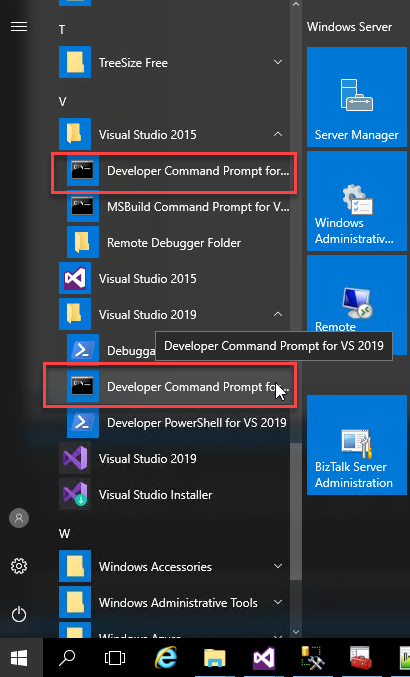
Open a Developer Command Prompt for VS <edition>
On the command prompt, navigate to the Schema folder and type
xsd /classes /language:CS Schema1.xsd
For complex schemas that import or include other schemas you need to provide all the dependencies, for example:
xsd /classes /language:CS Schema1.xsdSchema2.xsd
Now you will be able to import the C# class generated by the tool to your helper project and the rest is simple!
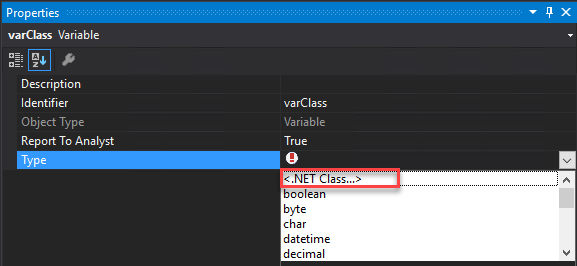
On the Orchestration you can create a variable that represents that class:
On property Type select <.NET Class…> and select the class that you created previously
From the Browse and Select .Net Type to reference, you need to select the proper assembly and the Type.
Then by using C# code inside Message Assign or Expression Shape you can serialize or deserialize XML document into C# and vice versa in a simple and straightforward way
//CONVERT MESSAGE INTO C# OBJECT
varPersonMsg = msgInput;
//CONVERT C# OBJECT INTO BIZTALK MESSAGE
msgOutput4 = varPersonMsg;
or if we have a function in a helper class like:
public static XmlDocument MapPersons(Person person)
{
...
}
we can directly pass the message to the function without the need to create a variable:
I previously wrote several posts about how you can Check/Get a list of BizTalk Server Cumulative Updates installed in your machines for previous versions of the product:
Now it is time to update this script to BizTalk Server 2020.
Checking what CU is installed is not a difficult task to do, but without a doubt, it is one of the most annoying tasks to do as an administrator because, and once again:
you can do it manually by checking “Control PanelProgramsPrograms and Features” and then view the “Installed Updates”, try to find them in the list can be sometimes very confusing because they are not organized in a category BizTalk;
Or rely on tools like BizTalk MsgBoxViewer, which sometimes are not up to date, to check and provide that information;
Probably there are other ways, nevertheless, this simple task should be simple, extremely easy and fast to do, what you really want to know is what are the BizTalk Cumulative Updates installed like:
This is the list of BizTalk Server Cumulative Updates installed in this machine: BTS2020LAB01
- Microsoft BizTalk Server 2020 Cumulative Update 1
To check if the last Cumulative is installed or not.
PowerShell script overview
So how can we easily automate tasks? and reuse them whenever necessary and at the same time saving significant time for other tasks?
Using PowerShell is a good option. Windows PowerShell is a Windows command-line shell designed especially for system administrators and can be used by BizTalk administrators to help them in automating repetitive tasks or tasks that are time-consuming to perform manually.
This is a simple script that allows you to configure the template name of the cumulative updates, that will change from version to version, and will give you the list of all BizTalk Server 2016 cumulative updates installed on your server:
Sessions, sessions, and more sessions this has been my frantic start to the year in terms of contributions to the community, four different presentations delivered in January where Logic Apps was the only common factor:
Logic Apps: Development experiences at Azure User Group Portugal with Pedro Almeida (video not yet available)
How to create robust monitor solutions with PowerShell, Azure Functions and Logic Apps at Azure Lowlands (video not yet available)
and Logic Apps: Anywhere, Everywhere at Microsoft Integrate Conference DACH
Today I’m happy to share with you the slides and the video of this last session are now available online for those who want to see them.
About the session
Session name: Logic App: Anywhere, Everywhere.
Abstract: A walk-thru session on how and where we can or should use Logic Apps and start building fantastic business processes. We will be addressing topics like: what tools should you use: Azure Portal, Visual Studio, or Visual Studio Code. What kind of solutions you can create, cloud integration, hybrid integration, or on-premises integration. Along with some best practices and what are the advantages and drawbacks of each approach.
For any reason, you could not be present at this online event, or if you want to review it again, you can now do it here:
It was a pleasure to deliver a presentation on this event, and most important, by doing that, I was able to raise and give away 1000€ to a non-profit organization.
Last January 14, I had the pleasure to be the first guest of 101 Talk Arena chat with Nino Crudele on a talk about integration without any filters, and it was amusing!
Now I’m happy to announce that the record is online and available for all of you to watch on youtube:
I’ve known Nino for many years, he is like a brother to me, and for that reason, I can’t say no to him and his crazy ideas. When he invited (challenged) me to have a 101 talk about Integration, obviously, I said yes!
It is already next Wednesday, January 14, 2021, that I will have an open conversation about Enterprise Integration and Azure:
A conversation about Enterprise Integration like BizTalk Server, Logic App, API Management, Service Bus, Azure Functions…
Is still worth using BizTalk Server?
What about the new Integration stack offered by Microsoft?
Azure RAD vs BizTalk Server, when, where, and why?
What about migration from BizTalk Server to Azure?
And other topics with Nino Crudele, and I will invite all of you to join us it is free. This is a one to one talk without filters, no marketing, nothing planned, and where people can also jump in with any question.
You can see more about the event on Nino Crudele’s website: 101 Talk Arena with Sandro Pereira – What about integration now?
I know, BAM Portal is deprecated in BizTalk Server 2020 but it is still available and until there is no better alternative – you can always use BizTalk360 – it is better than nothing.
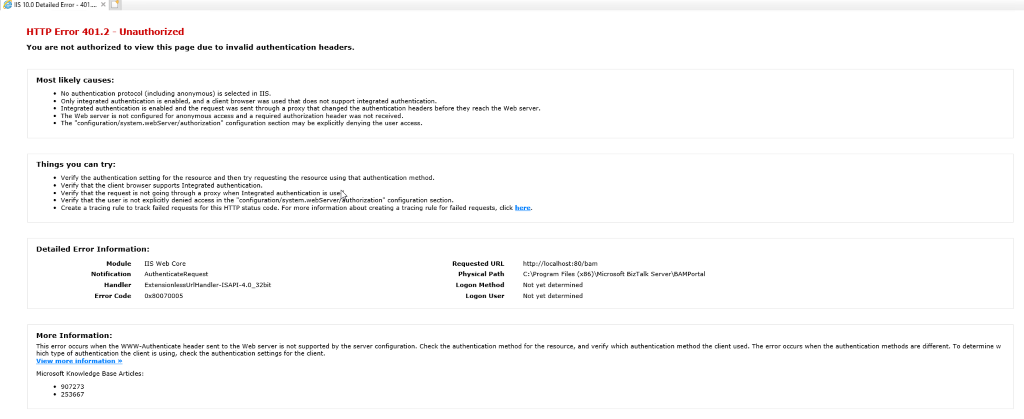
Yesterday while I was once again playing with BAM in BizTalk Server 2020 I ended up having the following error message while trying to access to BAM Portal:
HTTP Error 401.2 – Unauthorized
You are not authorized to view this page due to invalid authentication headers.
That was a bit strange since normally Everyone has access to BAM Portal, what normally can happen is that they don’t see any BAM View to explore.
Cause
For me, it was clear that this error was somehow related to the user-authentication methods/protocols installed on IIS. So I went to check the available user-authentication methods on IIS and realized that was missing the most critical method for BAM Portal to work: Windows Authentication.
BAM Portal requires Windows Authentication to work correctly.
This error is not related
Solution
This issue is very simple to fix. Windows Authentication was not available as an option, so we have to install it, and to do that you need to:
Start by running the Server Manager, if it is not already open, on the Windows Start menu, click the Server Manager option.
Under the Manage menu, select Add Roles and Features (or press Add roles and features under the Dashboard panel).
On the Before You Begin screen, click Next.
On the Installation Type screen, select Role-based or feature-based installation and click Next.
On the Server Selection screen, select the appropriate server, leave the default options, and click Next.
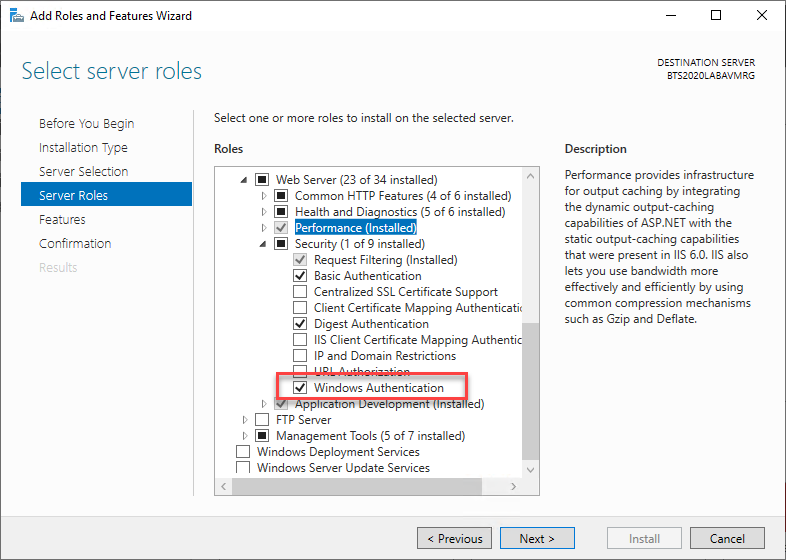
On the Server Roles screen, expand the Web Server (IIS) > Web Server > Security options.
Make sure that you select Windows Authentication option
Click Next.
On the Features screen, click Next.
On the Confirmation screen, click Install
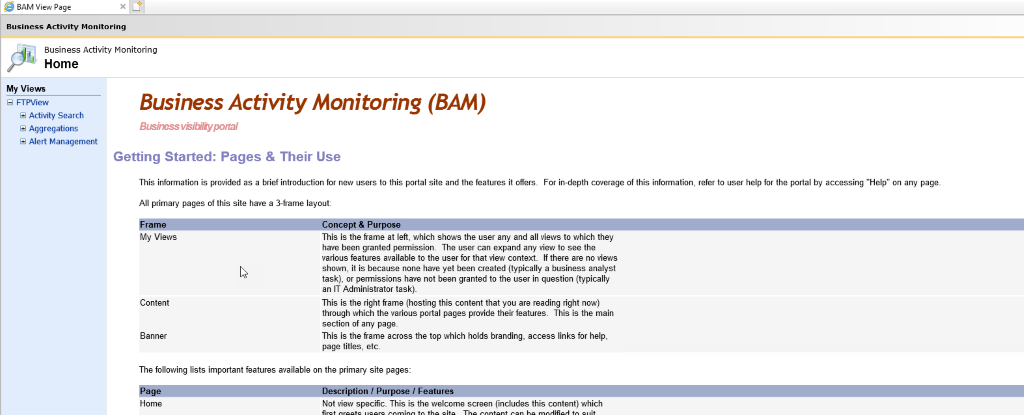
Now if you try you will be able to successfuly access to BAM Portal
Starting with BizTalk Server 2020 and newer, administrators can configure BizTalk Server to generate an audit trail for management operation on application artifacts, such as to send ports, receive ports, receive locations, orchestrations, and resources. Auditing of suspend/resume/terminate operations on service instances is also possible.
This feature may not be perfect yet, and it has space to grow in the future, but it is a good start, and I hope the BizTalk product team will improve these capabilities in the future.
How to configure the Audit Logs?
The auditing feature isn’t enabled by default. To enable auditing you need to:
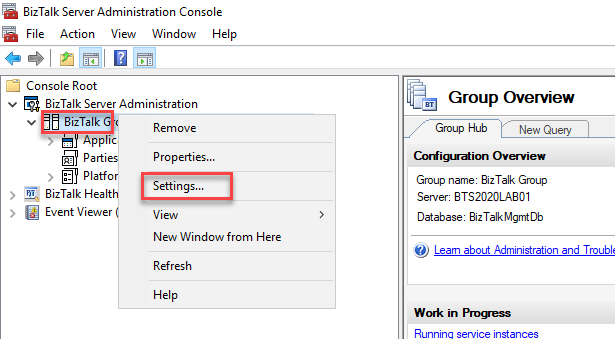
Open BizTalk Server Administration console, right-click the BizTalk Group, and select Settings
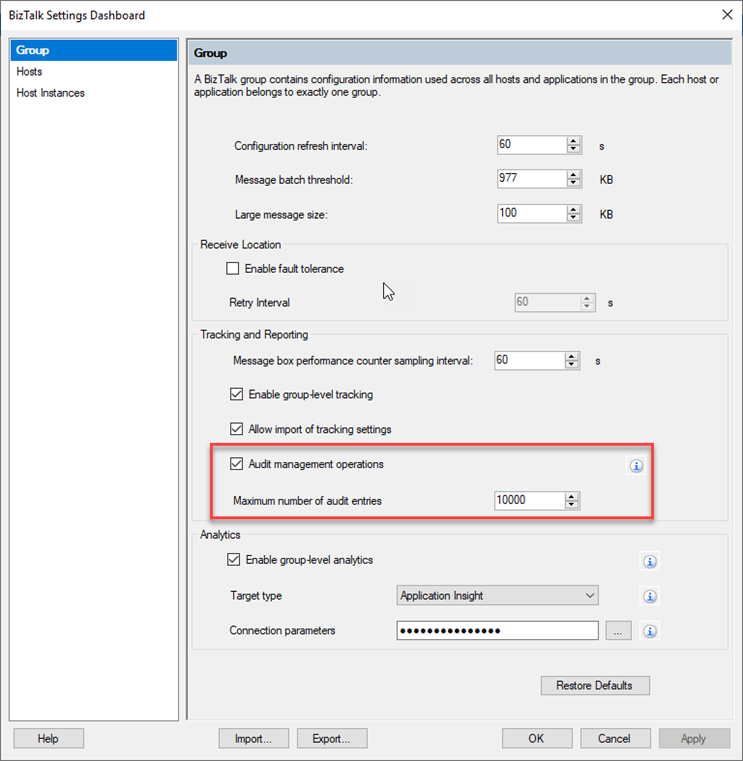
On the Group panel, under the Tracking and Reporting section:
Enable the Audit management operations option.
And set a Maximum number of audit entries property according to your needs. By default, BizTalk stores 10000 most recent entries.
Select OK to save your changes.
Now every time you make the following operations:
On Ports (Receive or Send): Create, Update and Delete
On Service Instances: Suspend, Resume and Terminate
On Application resource: Add, Update and Remove
On Bindings: Import bindings files
One or more audit entries are logged. All these correlation entries have the same BatchId. The audit log has the following information:
Property
Description
ID
Id of type Guid, unique per entry. Example: 3bf539a3-4b59-4148-b589-d22c83f32d25
BatchId
Same for all audited operations performed in a single SQL transaction. Insightful in correlating user operations with lower level details Example: a4ffa64b-8064-4e54-9d99-2e7d60797100
UserPrincipal
User who performed the operation. Example: BTS2020LAB01Administrator
Machine
Machine name from which operation was performed. Example: BTS2020LAB01
ArtifactId
Unique id of the artifact. Example: 1
ParentArtifactId
If an artifact is child of another artifact, then this field will have artifact id of the parent. Example: 1
ArtifactType
Type of artifact on which operation was performed. Example: SendPort, ReceiveLocation, etc.
ArtifactName
User configured name of the artifact. Example: BatchControlMessageRecvLoc
OperationName
Action performed on the artifact. Example: Ports: Create/Update/DeleteService Instances: Suspend/Resume/TerminateApplication resources: Add/Update/RemoveBinding file: Import
Payload
Contains information about what is changed in JSON structure. Example: { “Disabled”: 0 }
CreatedDate
Timestamp when the operation was performed Example: 2020-11-27T09:21:48.55Z
How to view the audit logs?
The easier way to access the BizTalk Server Audit logs is to access the Audit Logs REST service using your browser by using the following URL:
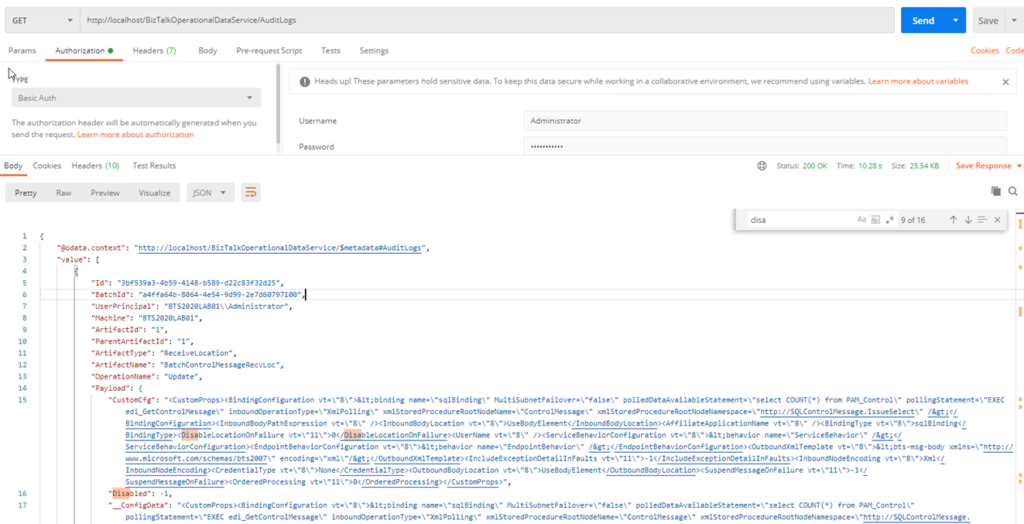
GET http://localhost/BizTalkOperationalDataService/AuditLogs
This will provide a JSON response containing all the latest logs.
For a better user experience, you could use a tool like postman to interact with this service:
You can also define a date range to retrieve the desire logs. For that you should use the following query parameters:
fromDate: beginning date, for example, 2020-12-01T01:00:00
toDate: end date, for example, 2020-12-03T01:00:00
GET request example:
GET http://localhost/BizTalkOperationalDataService/AuditLogs?fromDate=2020-12-01T01:00:00&toDate=2020-12-03T01:00:00
Supported date formats are: yyyy-MM-dd or yyyy-MM-ddThh:mm:ss.