by Sriram Hariharan | Sep 27, 2017 | BizTalk Community Blogs via Syndication
This episode of Azure Logic Apps Monthly Update comes to us directly from #MSIgnite. It is one of those episodes with a special guest and this episode featured Sarah Fender from the Azure Security Center team. The Pro Integration team are at #MSIgnite that’s happening between September 25-29, 2017 at Orlando, FL. I’ll try to give you a very crisp recap of the proceedings during the event and the important announcements from the #MSIgnite event.
Azure Security Center
Sarah started off talking about the Azure Security Center feature. Security Center provides unified security management and threat protection for Azure workloads, workloads running on-premises and on other cloud platforms. It basically assesses the security of the cloud and on-premise workloads and offers out of the box insights. In addition, Security Center offers some built in security controls such as Just in Time VM access that will help to lock down access to virtual machines, and Adaptive Access Controls that help to lock down on machines to prevent any malware execution. Security Center also monitors the hybrid cloud using advanced concepts like Machine Learning and provides rich graphical data to administrators.
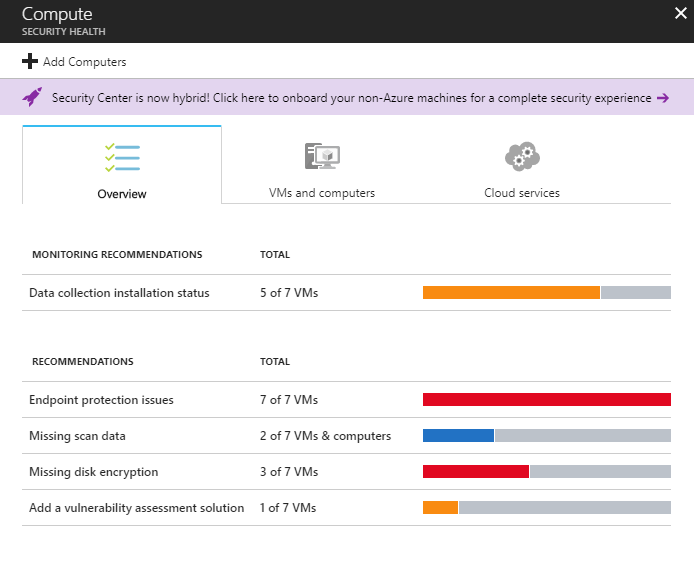
Security Center keeps a look into all the different incidents in the environment such as SQL Injection, security incidents, suspicious processes and so on and provides insights which will be very helpful for IT teams to keep a track of the issues in the environment.
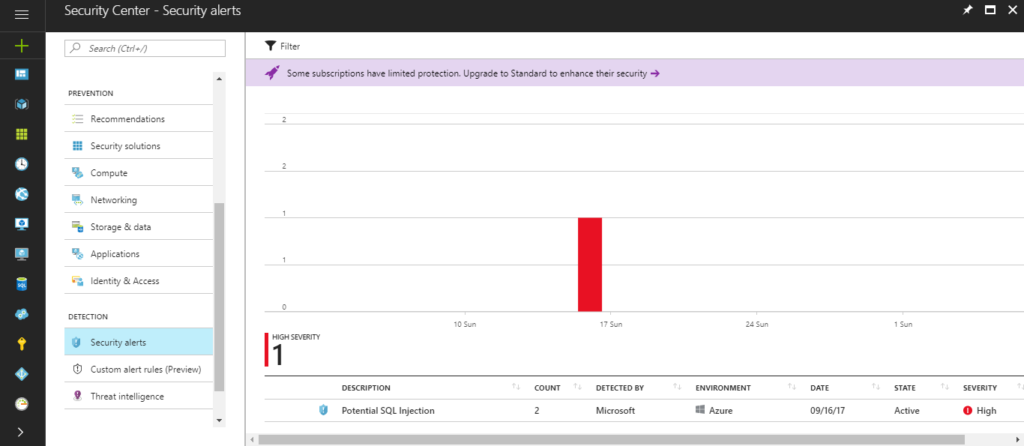
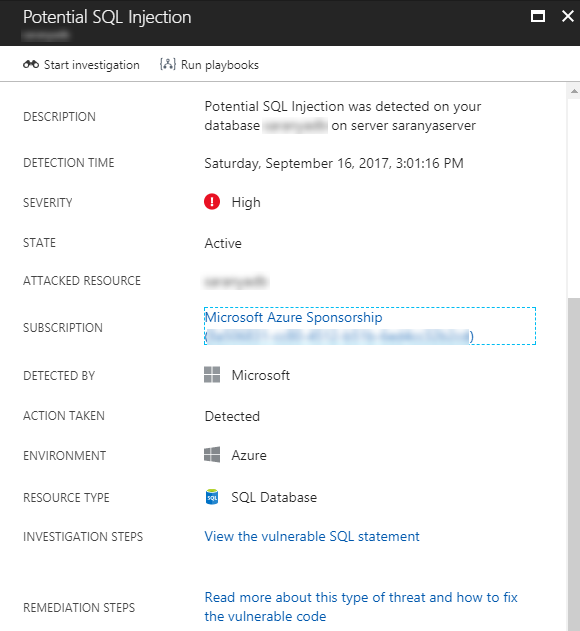
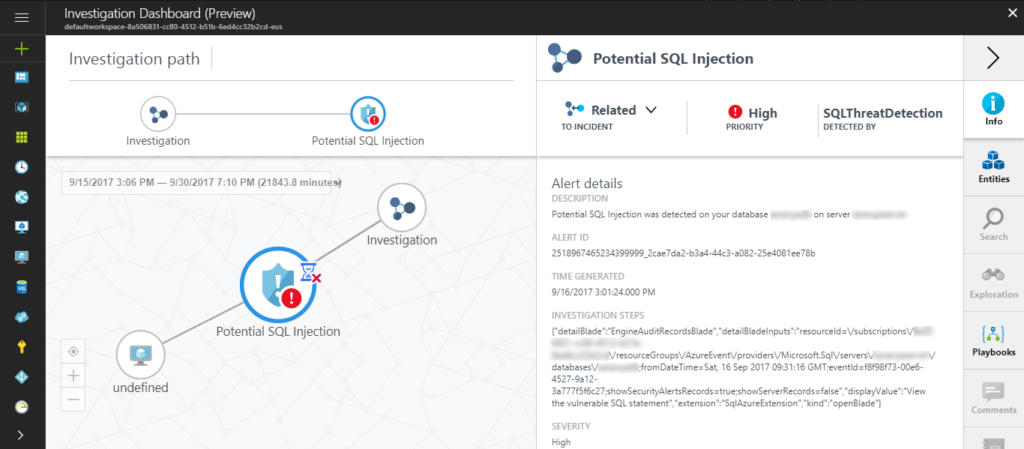
At #MSIgnite, the Azure Security Center team introduced the new experience of Investigation Dashboard. With this feature, organizations can easily respond to the incident and understand the intricate details about the security incident. The investigation path defines the attack path and the graphical view displays the detailed information such as severity of the attack, attack detected by information and so on. The investigation dashboard also lists the entities and now supports the Playbooks that are nothing but Logic Apps being triggered from Security Center when a certain alert is fired.
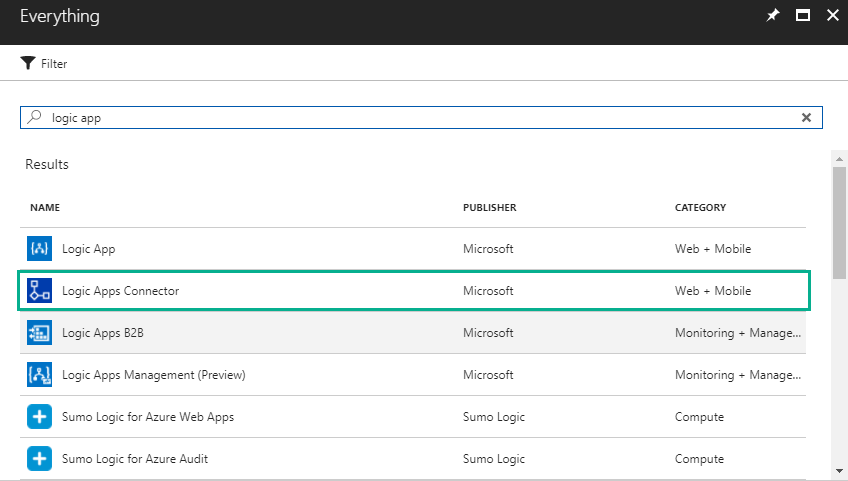
You can run a Playbook from the Security Center through the integration with Azure Logic Apps. Users can pre-define a Logic App that will actually take a corrective action when there is an attack you can allow the investigation dashboard to automatically execute that particular Logic App (through Playbook) to execute the corrective action. For e.g., when a vulnerability attack is detected with a very high severity, post a message on the slack channel for the users to get notified.
After all these updates from Sarah, it was time for the Logic Apps trio comprising of Jeff Hollan, Kevin Lam and Jon Fancey to provide the latest updates on Logic Apps. Kevin Lam started off by giving the latest updates-
What’s New in Azure Logic Apps?
- Custom Connectors – Enables the option to extend your endpoints and register them as connectors in Logic Apps.
- Large Message Support – This functionality is now available in the designer. Using this functionality, you can move large files up to 1 GB (between) for specific connectors (blob, FTP).
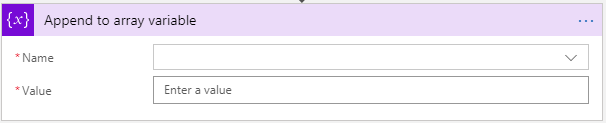
- Variables append to array – append capability to aggregate data within loops in the designer. Kevin Lam gave a pro tip here for all users –
Remember to turn on sequential for for-each to achieve this scenario.
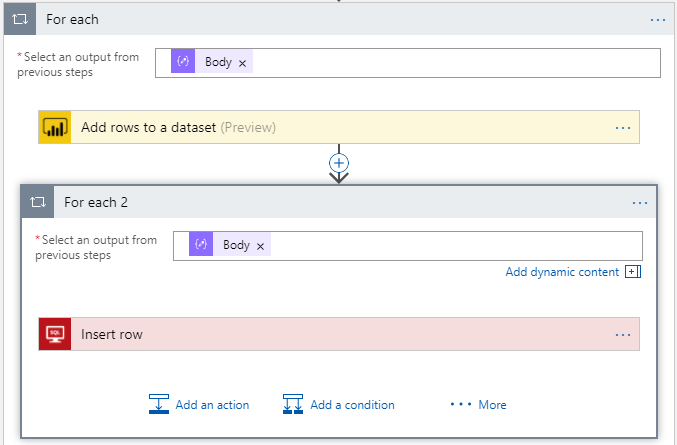
- Nested foreach and do-until – is now available in the designer.
- Enable high throughput scenarios – You can configure the number of scale units within the code view to enable the high throughput scenarios. Say, you can take one Logic App definition that runs in a scale unit and span it across 16/32/64 scale units to get increased throughput. This is called ludicrous mode (as Kevin had it on the PPT).
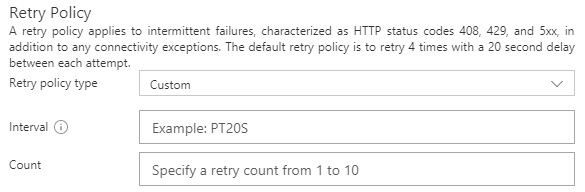
- Maximum retries count (Custom Retry Policy) has been increased from 4 to 10.
- Now you can export (Publish) Logic Apps to PowerApps and Flow
- Emit correlation tracking id from the trigger to OMS – This gives full traceability across the process that’s happening across the Logic App.
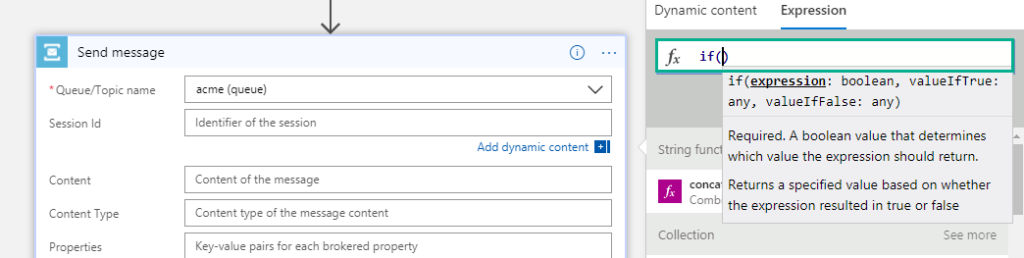
- Expression intellisense – This is now available in the designer. When you are typing an expression, you will see the same intelligent view that you see when you are typing in Visual studio.
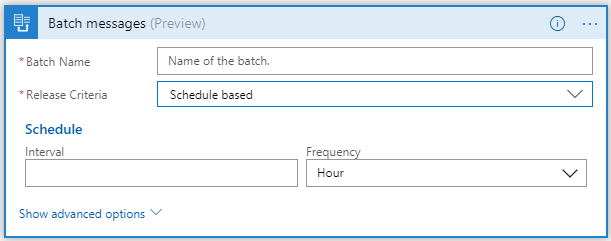
- Schedule based batching – In addition to batching based on message count, you can batch messages based on the schedule.
New Connectors
- Azure Security Center Trigger
- Log Analytics Data Collector – add information to Log Analytics from Log Analytics
- ServiceNow – create tickets, read & write into ServiceNow
- DateTime Actions
- Azure Event Grid Publish
- Adobe Sign – This was a big announcement from Microsoft at #MSIgnite – collaboration with Adobe
- O365 Groups
- Skype for Business
- LinkedIn
- Apache Impala
- FlowForma
- Bizzy
What’s in Progress?
- Concurrency Control (code-view live) – Say, your Logic App is executing in a faster way than you want it to actually work. In this case, you can make Logic Apps to slow down (restrict the number of Logic Apps running in parallel). This is possible today in the code-view where you can define say, only 10 Logic Apps can execute at a particular time in parallel. Therefore, when 10 Logic Apps are executing in parallel, the Logic Apps logic will stop polling until one of the 10 Logic Apps finish execution and then start polling for data.
- SOAP – Native SOAP support to consume cloud and on-premise SOAP services. This is one of the most requested features on UserVoice.
- Expression Tracing – You can actually get to see the intermediate values for complex expressions
- Foreach failure navigation – If there are lots of iterations in the foreach loop and few of them failed; instead of having to look for which one actually failed, you can navigate to the next failed action inside a for each loop easily to see what happened.
- Functions + Swagger – You can automatically render the Azure functions annotated with Swagger. This functionality will be going live by end of August.
- HTTP OAuth with Certificates
- Complex Conditions within the designer
- Bulk resubmit in OMS
- Batch configuration in Integration Account
- Connectors
- Workday
- Marketo
- Compute
- Containers
Watch the recording of this session here
[embedded content]
Community Events Logic Apps team are a part of
- INTEGRATE 2017 USA – October 25 – 27, 2017 at Redmond. Register for the event today. Scott Guthrie, Executive Vice President at Microsoft will be delivering the keynote speech. You can also avail Day Passes for the event (available for Wednesday and Thursday).
- ServerlessConf – 2 days of sessions on Serverless with Hackathon during October 2017
- Workday Rising – October 9 – 12 at Chicago
- CONNECT 2017 on October 9, 2017 at DeFabrique, Utrecht
Feedback
If you are working on Logic Apps and have something interesting, feel free to share them with the Azure Logic Apps team via email or you can tweet to them at @logicappsio. You can also vote for features that you feel are important and that you’d like to see in logic apps here.
The Logic Apps team are currently running a survey to know how the product/features are useful for you as a user. The team would like to understand your experiences with the product. You can take the survey here.
If you ever wanted to get in touch with the Azure Logic Apps team, here’s how you do it!
Previous Updates
In case you missed the earlier updates from the Logic Apps team, take a look at our recap blogs here –
Author: Sriram Hariharan
Sriram Hariharan is the Senior Technical and Content Writer at BizTalk360. He has over 9 years of experience working as documentation specialist for different products and domains. Writing is his passion and he believes in the following quote – “As wings are for an aircraft, a technical document is for a product — be it a product document, user guide, or release notes”. View all posts by Sriram Hariharan
by Steef-Jan Wiggers | Sep 25, 2017 | BizTalk Community Blogs via Syndication
A couple of weeks ago Azure Event Grid service became available in public preview. This service enables centralized management of events in a uniform way. Moreover, it scales with you when the number of events increases. This is made possible by the foundation the Event Grid relies on Service Fabric. Not only does it auto scale you also do not have to provision anything besides an Event Topic to support custom events (see the blog post Routing an Event with a custom Event Topic).
Event Grid is serverless, therefore you only pay for each action (Ingress events, Advanced matches, Delivery attempts, Management calls). Moreover, the price will be 30 cents per million actions in the preview and will be 60 cents once the service will be GA.
Azure Event Grid can be described as an event broker that has one of more event publishers and subscribers. Furthermore, Event publishers are currently Azure blob storage, resource groups, subscriptions, event hubs and custom events. Finally, more will be available in the coming months like IoT Hub, Service Bus, and Azure Active Directory. Subsequently, there are consumers of events (subscribers) like Azure Functions, Logic Apps, and WebHooks. And on the subscriber side too more will be available with Azure Data Factory, Service Bus and Storage Queues for instance.
To view Microsoft’s Roadmap for Event Grid please watch the Webinar of the 24th of August on YouTube.
Event Grid Preview for Azure Storage
Currently, to capture Azure Blob Storage events you will need to register your subscription through a preview program. Once you have registered your subscription, which could take a day or two, you can leverage Event Grid in Azure Blob Storage only in Central West US!

The Microsoft documentation on Event Grid has a section “Reacting to Blob storage events”, which contains a walk-through to try out the Azure Blob Storage as an event publisher.
Scenario
Having registered the subscription to the preview program, we can start exploring its capabilities. Since the landing page of Event Grid provides us some sample scenarios, let’s try out the serverless architecture sample, where one can use Event Grid to instantly trigger a Serverless function to run image analysis each time a new photo is added to a blob storage container. Hence, we will build a demo according to the diagram below that resembles that sample.
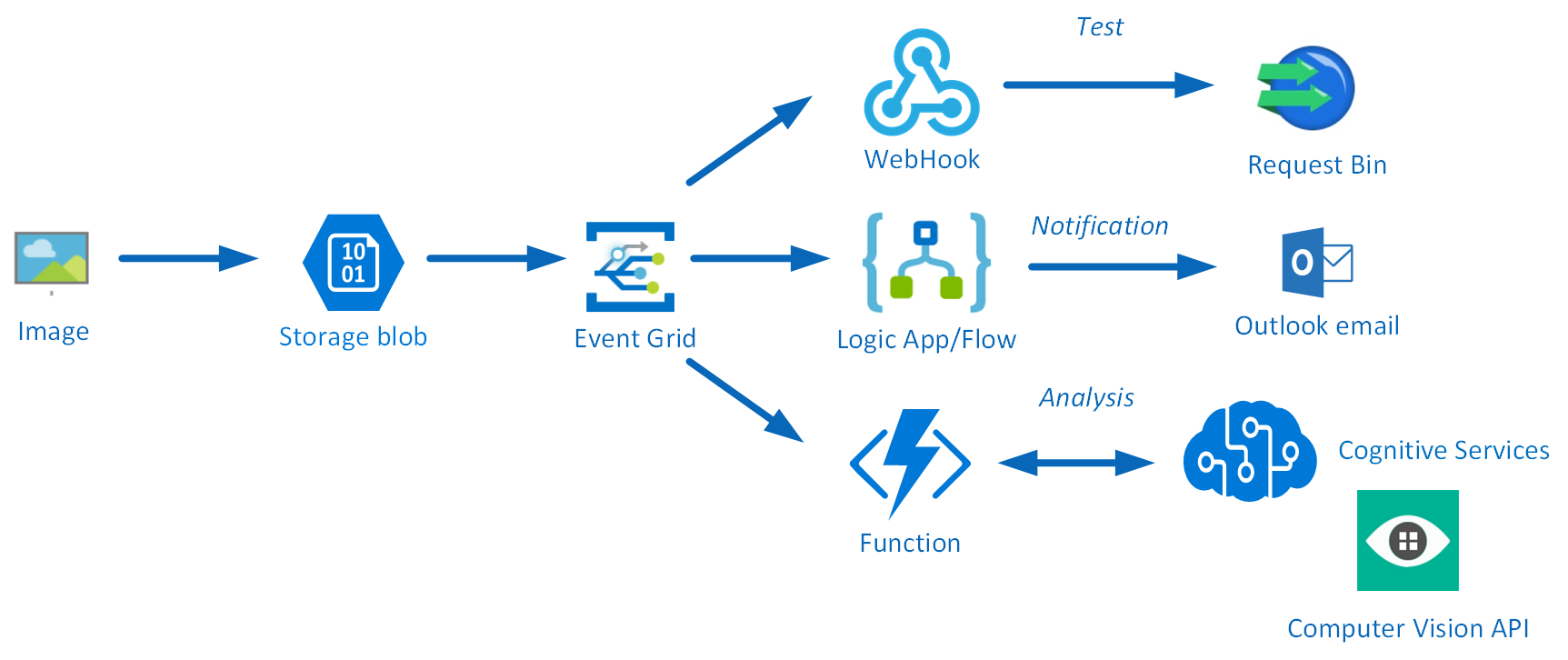
An image will be uploaded to a Storage blob container, which will be the event source (publisher). Subsequently, the Storage blob container belongs to a Storage Account containing the Event Grid capability. And finally, the Event Grid has three subscribers, a WebHook (Request Bin) to capture the output of the event, a Logic App to notify me a blob has been created and an Azure Function that will analyze the image created in the blob storage, by extracting the URL from the event message and use it to analyze the actual image.
Intelligent routing
The screenshot below depicts the subscriptions on the events on the Blob Storage account. The WebHook will subscribe to each event, while the Logic App and Azure Function are only interested in the BlobCreated event, in a particular container(prefix filter) and type (suffix filter).
Besides being centrally managed Event Grid offers intelligent routing, which is the core feature of Event Grid. You can use filters for event type, or subject pattern (pre- and suffix). Moreover, the filters are intended for the subscribers to indicate what type of event and/or subject they are interested in. When we look at our scenario the event subscription for Azure Functions is as follows.
- Event Type : Blob Created
- Prefix : /blobServices/default/containers/testcontainer/
- Suffix : .jpg
The prefix, a filter object, looks for the beginsWith in the subject field in the event. And in addition the suffix looks for the subjectEndsWith in again the subject. Consequently, in the event above, you will see that the subject has the specified Prefix and Suffix. See also Event Grid subscription schema in the documentation as it will explain the properties of the subscription schema. The subscription schema of the function is as follows:
<pre>{
"properties": {
"destination": {
"endpointType": "webhook",
"properties": {
"endpointUrl": "https://imageanalysisfunctions.azurewebsites.net/api/AnalyseImage?code=Nf301gnvyHy4J44JAKssv23578D5D492f7KbRCaAhcEKkWw/vEM/9Q=="
}
},
"filter": {
"includedEventTypes": [ "<strong>blobCreated</strong>"],
"subjectBeginsWith": "<strong>/blobServices/default/containers/testcontainer/</strong>",
"subjectEndsWith": "<strong>.jpg</strong>",
"subjectIsCaseSensitive": "true"
}
}
}</pre>
Azure Function Event Handler
The Azure Function is only interested in a Blob Created event with a particular subject and content type (image .jpg). This will be apparent once you inspect the incoming event to the function.
<pre>[{
"topic": "/subscriptions/0bf166ac-9aa8-4597-bb2a-a845afe01415/resourceGroups/rgtest/providers/Microsoft.Storage/storageAccounts/teststorage666",
"<strong>subject</strong>": "<strong>/blobServices/default/containers/testcontainer/</strong>blobs/NinoCrudele.<strong>jpg</strong>",
"<strong>eventType</strong>": "<strong>Microsoft.Storage.BlobCreated</strong>",
"eventTime": "2017-09-01T13:40:33.1306645Z",
"id": "ff28299b-001e-0045-7227-23b99106c4ae",
"data": {
"api": "PutBlob",
"clientRequestId": "206999d0-8f1b-11e7-a160-45670ee5a425",
"requestId": "ff28299b-001e-0045-7227-23b991000000",
"eTag": "0x8D4F13F04C48E95",
"contentType": "image/jpeg",
"contentLength": 32905,
"blobType": "<strong>BlockBlob</strong>",
"url": "https://teststorage666.blob.core.windows.net/testcontainer/NinoCrudele.jpg",
"sequencer": "0000000000000AB100000000000437A7",
"storageDiagnostics": {
"batchId": "f11739ce-c83d-425c-8a00-6bd76c403d03"
}
}
}]</pre>
The same intelligence applies for the Logic App that is interested in the same event. The WebHook subscribes to all the events and lacks any filters.
The scenario solution
The solution contains a storage account (blob), a registered subscription for Event Grid Azure Storage, a Request Bin (WebHook), a Logic App and a Function App containing an Azure function. The Logic App and Azure Function subscribe to the BlobCreated event with the filter settings.
The Logic App subscribes to the event once the trigger action is defined. The definition is shown in the picture below.
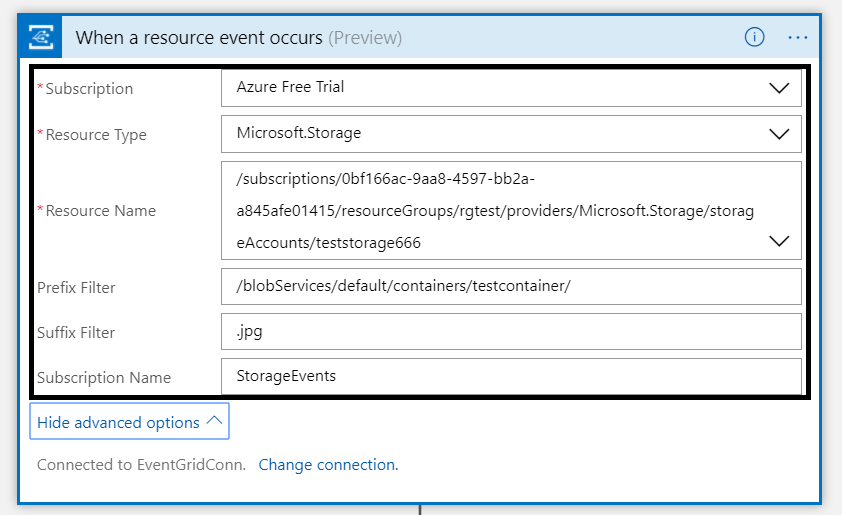
Note that the resource name has to be specified explicitly (custom value) as the resource type Microsoft.Storage has been set explicitly too. The resource types currently available are Resource Groups, Subscriptions, Event Grid Topics and Event Hub Namespaces, while Storage is still in a preview program. Therefore, registration as described earlier is required. As a result with the above configuration, the desired events can be evaluated and processed. In case of the Logic App, it is parsing the event and sending an email notification.
Image Analysis Function
The Azure Function is interested in the same event. And as soon as the event is pushed to Event Grid once a blob has been created, it will process the event. The URL in the event https://teststorage666.blob.core.windows.net/testcontainer/NinoCrudele.jpg will be used to analyse the image. The image is a picture of my good friend Nino Crudele.

This image will be streamed from the function to the Cognitive Services Computer Vision API. The result of the analysis can be seen in the monitor tab of the Azure Function.
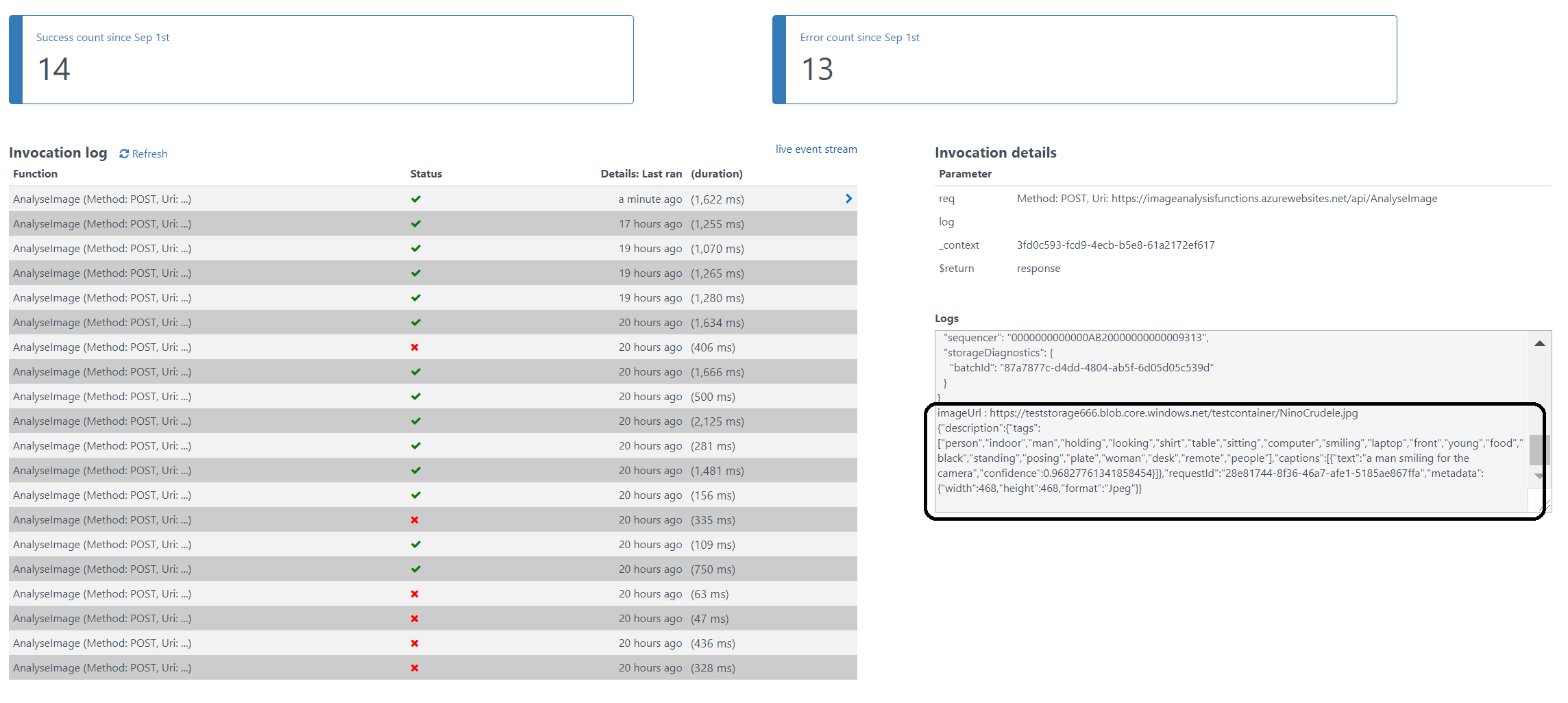
The result of the analysis with high confidence is that Nino is smiling for the camera. We, as humans, would say that this is obvious, however do take into consideration that a computer is making the analysis. Hence, the Computer Vision API is a form of Artificial Intelligence (AI).
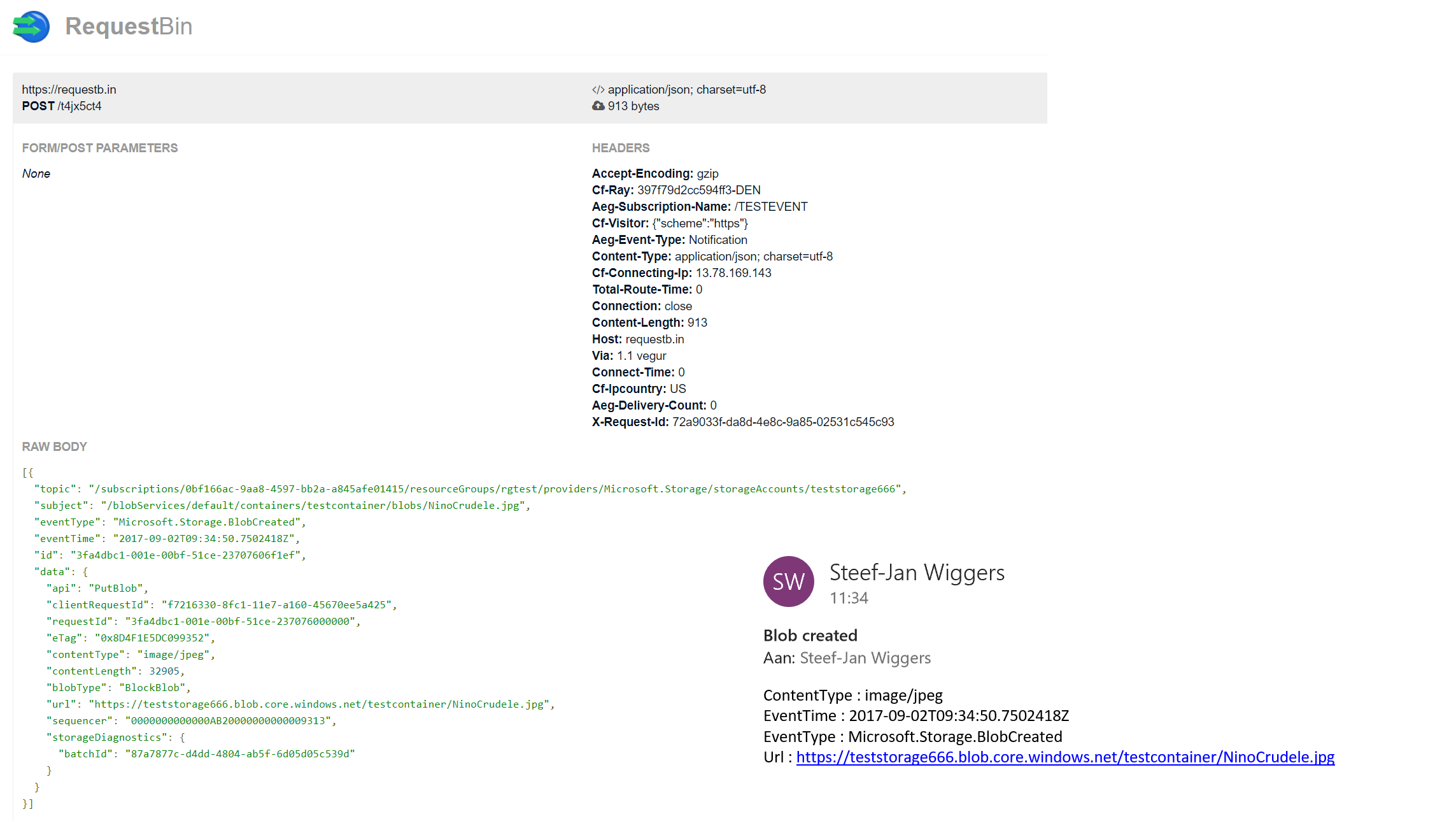
The Logic App in our scenario will parse the event and sent out an email. The Request Bin will show the raw event as is. And in case I, for instance, delete a blob, then this event will only be caught by the WebHook (Request Bin) as it is interested in any event on the Storage account.
Summary
Azure Event Grid is unique in its kind as now other Cloud vendor has this type of service that can handle events in a uniform and serverless way. Although it is still early days as this service is in preview a few weeks. However, with expansion of event publishers and subscribers, management capabilities and other features it will mature in the next couple of months.
The service is currently only available in, West Central US and West US. However, over the course of time it will become available in every region. And once it will become GA the price will increase.
Working with Storage Account as a source (publisher) of events unlocked new insights in the Event Grid mechanisms. Moreover, it shows the benefits of having one central service in Azure for events. And the pub-sub and push of events are the key differentiators towards the other two services Service Bus and Event Hubs. Therefore, no longer do you have to poll for events and/or develop a solution for it. To conclude the Service Bus Team has completed the picture for messaging and event handling.
Author: Steef-Jan Wiggers
Steef-Jan Wiggers has over 15 years’ experience as a technical lead developer, application architect and consultant, specializing in custom applications, enterprise application integration (BizTalk), Web services and Windows Azure. Steef-Jan is very active in the BizTalk community as a blogger, Wiki author/editor, forum moderator, writer and public speaker in the Netherlands and Europe. For these efforts, Microsoft has recognized him a Microsoft MVP for the past 5 years. View all posts by Steef-Jan Wiggers
by Sriram Hariharan | Aug 23, 2017 | BizTalk Community Blogs via Syndication
You can really feel how time actually flies if you have attended the Azure Logic Apps Live webcast from the Logic Apps team. It feels just like yesterday when the team came online and presented a bunch of updates for the month of July and in no matter of time, here they were today (August 22) to present the next set of updates. I’ve always been fascinated by the commitment from the Logic Apps team in rolling out new features, organizing these monthly webcasts and responding to queries on the Twitter channel. Right, now on to the Jeff Hollan and Kevin Lam show!!! (Credits to Eldert Grootenboer for terming this during the webinar!)
What’s New in Azure Logic Apps?
- Azure Event Grid – The newest and hottest kid in town; technical preview version was released by Microsoft on August 16th.
What is Azure Event Grid??
Azure Event Grid is the event-based routing as a service offering from Microsoft that aligns with their “Serverless” strategy. Azure Event Grid simplifies the Event Consumption logic by making it more of a “Push” mechanism rather than a “Pull” mechanism – meaning, you can simply listen to and react to events from different Azure services and other sources without having to constantly poll into each service and look for events. Azure Event Grid is definitely a game changing feature from Microsoft in the #Serverless space.
The best example where you can use Azure Event Grid is to automatically get notified when any user makes a slight modification to the production subscription, or when you have multiple IoT devices pumping telemetry data.
Azure Event Grid Connectors for Logic Apps
At present, there is a Azure Event Grid Connector with only one trigger – Azure Event Grid – When a resource event occurs. You can use this connector to trigger events whenever a resource event occurs.
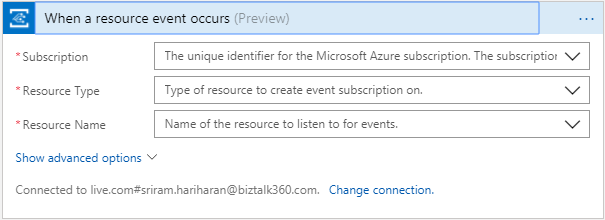
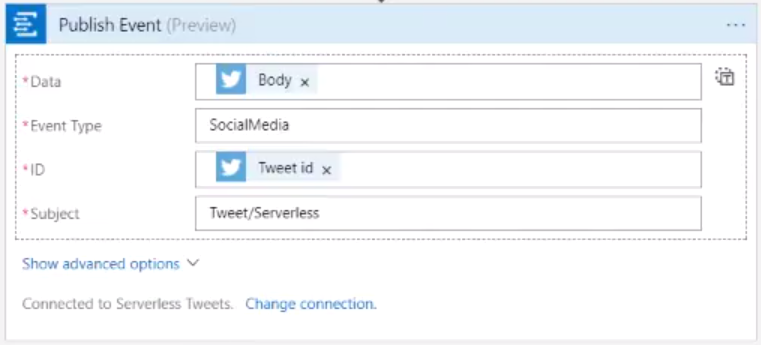
The Logic Apps team is also working on adding a new connector – Publish Event which will be rolled out shortly. Using this connector, users can publish events (e.g., all events related to Serverless) into the Event Grid.
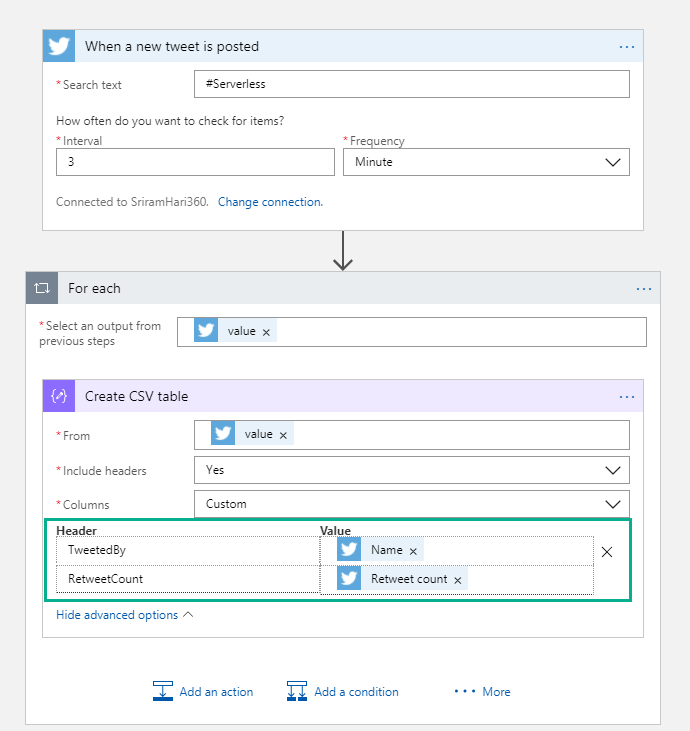
- Custom HTML and CSV headers – If you have an array of data (example, #Serverless on Twitter), you can easily convert the information into a CSV document or HTML table by using the “Create CSV Table” action. Later, you can pick up this CSV table and easily embed to an email.
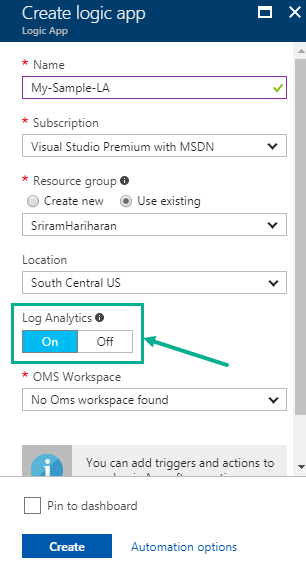
- Enable Log Analytics from Create – More easier way to enable Log Analytics by toggling the status while creating the Logic App. You no longer need to go to the Diagnostics section to enable Log Analytics. Check out this detailed blog post that shows how you can enable Log Analytics while creating the Logic App.
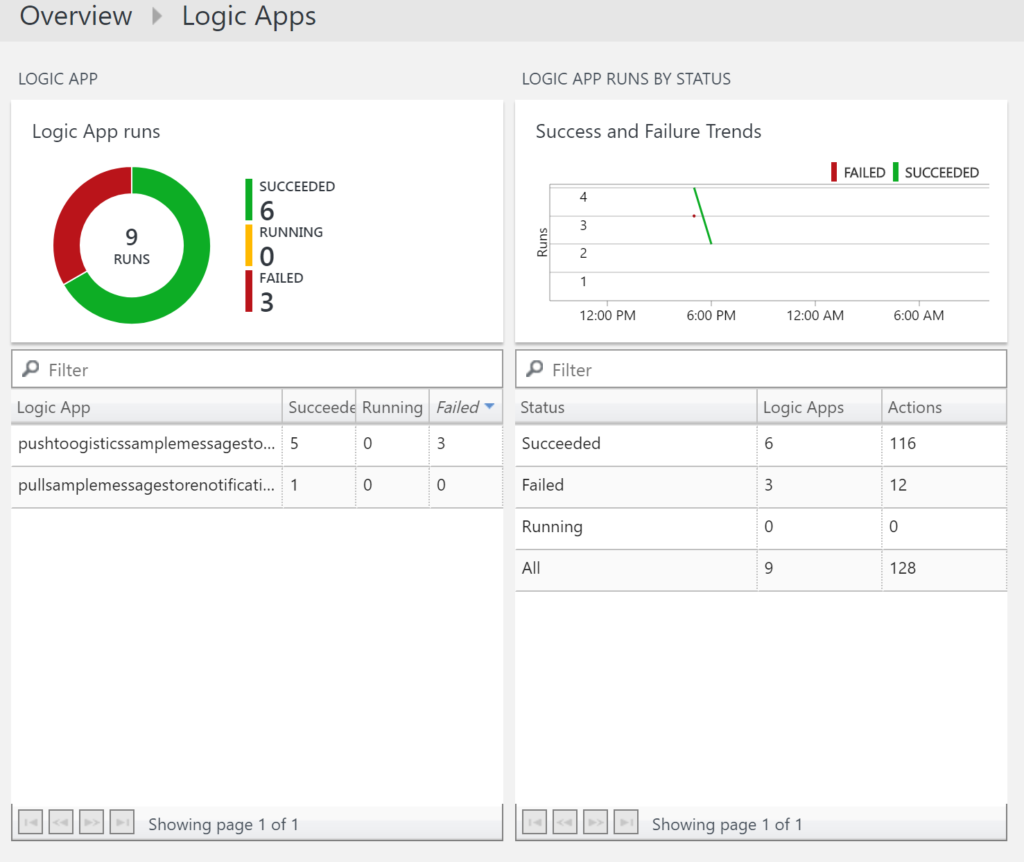
- OMS Workspace Dashboard – Create a global dashboard for all the available Logic Apps under your subscription. View the status of the Logic App, number of runs and additional details. Check out this blog post on how you can integrate Azure Logic Apps and Log Analytics.
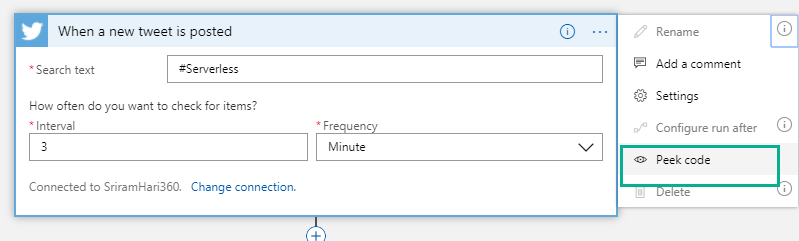
- Peek at code view – Say, you are working with Logic Apps and you add a connector. From now, you can easily switch between the code view and designer view by clicking “Peek code” from the Options drop down (….).
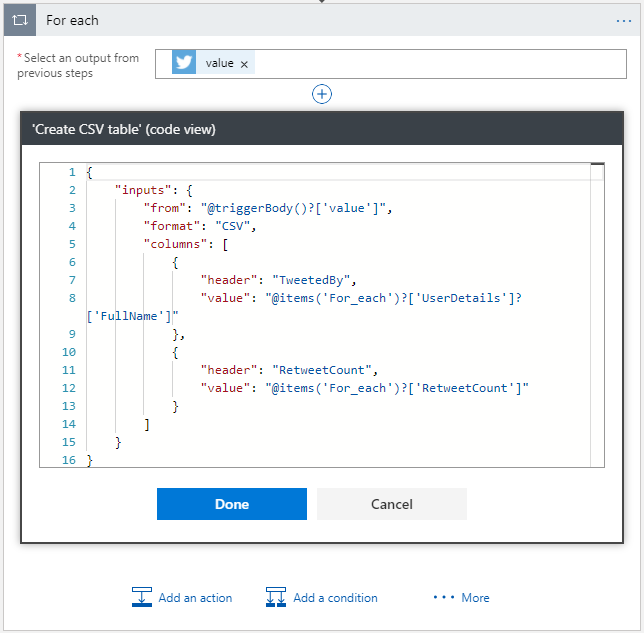
Note: At present, the Peek code is available only in Read-Only mode. If you wish you need to edit the code directly from here, you can send the Logic Apps team a feedback on Twitter or through User Voice.
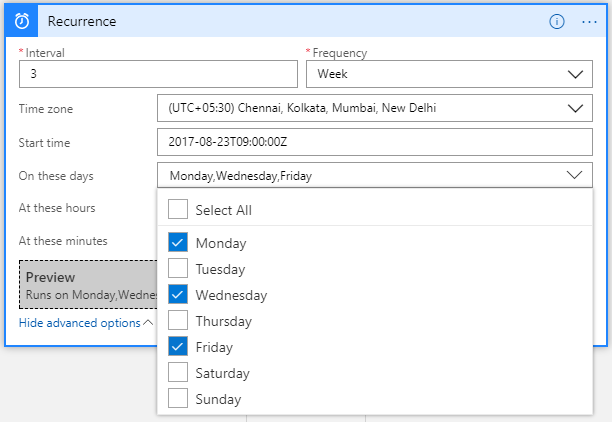
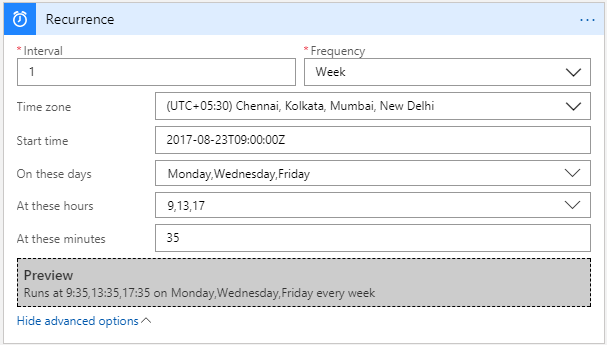
- Advanced Scheduling in the Logic Apps Designer – There are new options to schedule the Logic App execution on a Daily and Weekly basis. This was available in the code view but now you can get this experience right in the designer. Monthly update will be rolled out soon!
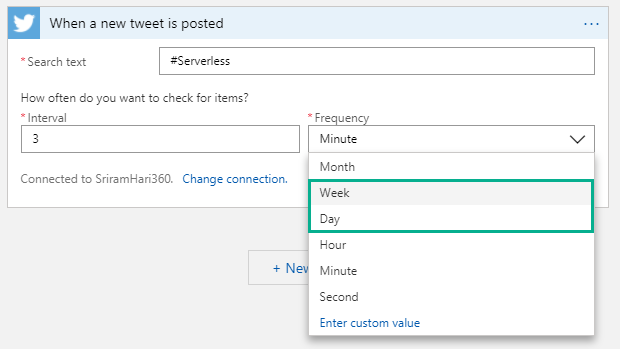
In the Schedule trigger, you will notice that when you click on Week, there are few advanced operations available for you to define when you want the trigger to execute during a week. Say, you want your trigger to execute every Monday, Wednesday, Friday at 9:35 AM, 1:35 PM; 5:35 PM. The below screenshot depicts the example. The preview section will display the actual Logic App trigger condition based on the previous selections.
New Connectors
- Azure Table Storage – This was one of the second most sought after connector from the community!
- Azure Event Grid
- Azure Log Analytics
- Azure SQL Data Warehouse
- Microsoft StaffHub
- MySQL (R/W)
- ServiceNow (East US 2 region)
- Amazon Redshift
- DocFusion 365
What’s in Progress?
As usual, another long list of features that the Logic Apps team is currently working on and should be available in the coming weeks.
- Concurrency Control (code-view live) – Say, your Logic App is executing in a faster way than you want it to actually work. In this case, you can make Logic Apps to slow down (restrict the number of Logic Apps running in parallel). This is possible today in the code-view where you can define say, only 10 Logic Apps can execute at a particular time in parallel. Therefore, when 10 Logic Apps are executing in parallel, the Logic Apps logic will stop polling until one of the 10 Logic Apps finish execution and then start polling for data.
NOTE: This works with the Polling Trigger (and not with Request Triggers such as Twitter connector etc) without SplitOn enabled.
- Custom Connectors – Get your own connector within your subscription so that your connector gets shown up on the list. This is currently in Private preview and should be available for public in the month of September.
- Large Files – Ability to move large files up to 1 GB (between) for specific connectors (blob, FTP). This is almost ready for release!
- SOAP – Native SOAP support to consume cloud and on-premise SOAP services. This is one of the most requested features on UserVoice.
- Variables (code-view live) – append capability to aggregate data within loops. The AppendToArray will be shipped soon, and AppendToString will come in the next few weeks.
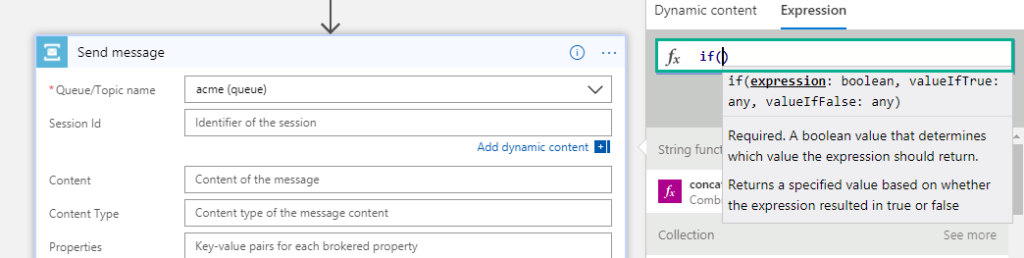
- Expression intellisense – This functionality will go live on August 25th. Say, if you are typing an expression, you will see the same intelligent view that you see when you are typing in Visual studio.
- Expression Tracing – You can actually get to see the intermediate values for complex expressions
- Foreach nesting in the designer – This capability will soon be incorporated into the designer in the coming few weeks.
- Foreach failure navigation – If there are 1000 iterations in the foreach loop and 10 of them failed; instead of having to look for which one actually failed, you can navigate to the next failed action inside a for each loop easily to see what happened.
- Functions + Swagger – You can automatically render the Azure functions annotated with Swagger. This functionality will be going live by end of August.
- Publish Logic Apps to PowerApps and Flow in a easy way
- Time based batching
- Upcoming Connectors
- Workday
- Feedly
- SQL Triggers (available in East US today but will be available across other regions in a few weeks)
Watch the recording of this session here
[embedded content]
Community Events Logic Apps team are a part of
- Integration Bootcamp on September 21-22, 2017 at Charlotte, North Carolina. This event will focus on BizTalk, Azure Logic Apps, Azure API Management and lots more.
- INTEGRATE 2017 USA – October 25 – 27, 2017 at Redmond. Register for the event today. Scott Guthrie, Executive Vice President at Microsoft will be delivering the keynote speech.
- New York Hackathon – September 5, 2017 – A first of its kind Hackathon event on September 5, 2017 at Microsoft Times Square office in Downtown, Washington. This hackathon will focus on Azure Functions, Azure Logic Apps, Azure App Services, API Management and more. If you are interested to attend this hackathon, send the Logic Apps team a Tweet (DM), email.
- Microsoft Ignite – September 25—29, 2017 at Orlando, Florida – Sessions on Logic Apps, APIs, Integration, and Serverless
Why attend INTEGRATE 2017 USA event?
Here’s a heads up as to why you have to attend INTEGRATE 2017 USA event.
Also check out this blog post that should get you convinced on why to attend INTEGRATE 2017 USA event: Read blog
Feedback
If you are working on Logic Apps and have something interesting, feel free to share them with the Azure Logic Apps team via email or you can tweet to them at @logicappsio. You can also vote for features that you feel are important and that you’d like to see in logic apps here.
The Logic Apps team are currently running a survey to know how the product/features are useful for you as a user. The team would like to understand your experiences with the product. You can take the survey here.
If you ever wanted to get in touch with the Azure Logic Apps team, here’s how you do it!

Previous Updates
In case you missed the earlier updates from the Logic Apps team, take a look at our recap blogs here –
Author: Sriram Hariharan
Sriram Hariharan is the Senior Technical and Content Writer at BizTalk360. He has over 9 years of experience working as documentation specialist for different products and domains. Writing is his passion and he believes in the following quote – “As wings are for an aircraft, a technical document is for a product — be it a product document, user guide, or release notes”. View all posts by Sriram Hariharan