by Gautam | Mar 19, 2018 | BizTalk Community Blogs via Syndication
Do you feel difficult to keep up to date on all the frequent updates and announcements in the Microsoft Integration platform?
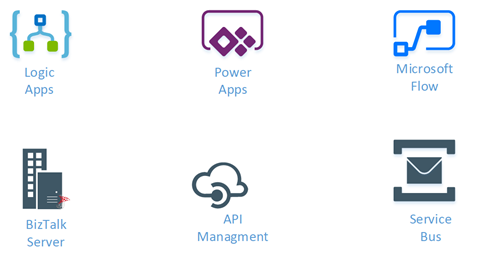
Integration weekly update can be your solution. It’s a weekly update on the topics related to Integration – enterprise integration, robust & scalable messaging capabilities and Citizen Integration capabilities empowered by Microsoft platform to deliver value to the business.
If you want to receive these updates weekly, then don’t forget to Subscribe!
Packt $10 Sale: Get your copy to start building Robust Cloud Integration solution in Azure Robust cloud Integration with Azure
New Book: Stay tuned for our next book on cloud integration with Steef-Jan Wiggers, Abhishek Kumar, & Srinivasa Mahendrakar
Feedback
Hope this would be helpful. Please feel free to reach out and let me know your feedback on this Integration weekly series.
by Gautam | Mar 11, 2018 | BizTalk Community Blogs via Syndication
Do you feel difficult to keep up to date on all the frequent updates and announcements in the Microsoft Integration platform?
Integration weekly update can be your solution. It’s a weekly update on the topics related to Integration – enterprise integration, robust & scalable messaging capabilities and Citizen Integration capabilities empowered by Microsoft platform to deliver value to the business.
If you want to receive these updates weekly, then don’t forget to Subscribe!
Feedback
Hope this would be helpful. Please feel free to reach out and let me know your feedback on this Integration weekly series.
by Gautam | Mar 4, 2018 | BizTalk Community Blogs via Syndication
Do you feel difficult to keep up to date on all the frequent updates and announcements in the Microsoft Integration platform?
Integration weekly update can be your solution. It’s a weekly update on the topics related to Integration – enterprise integration, robust & scalable messaging capabilities and Citizen Integration capabilities empowered by Microsoft platform to deliver value to the business.
If you want to receive these updates weekly, then don’t forget to Subscribe!
- Biztalk Developer Koger Technical Warren, New Jersey
- Biztalk Admin Shakti Chicago, IL, US
- Biztalk Developer InfiCare Technologies Nashville, TN, US
- Biztalk Developer _ Boston, MA Infogium Technologies, LLC Worcester, MA, US
- Biztalk Consultant NESS ENGINEERING LIMITED Georgetown, KY, US
Feedback
Hope this would be helpful. Please feel free to provide if you have any feedback on this Integration weekly series.
by Gautam | Feb 25, 2018 | BizTalk Community Blogs via Syndication
Do you feel difficult to keep up to date on all the frequent updates and announcements in the Microsoft Integration platform?
Integration weekly update can be your solution. It’s a weekly update on the topics related to Integration – enterprise integration, robust & scalable messaging capabilities and Citizen Integration capabilities empowered by Microsoft platform to deliver value to the business.
If you want to receive these updates weekly, then don’t forget to Subscribe!

Feedback
Hope this would be helpful. Please feel free to provide if you have any feedback on this Integration weekly series.

by Lex Hegt | Feb 6, 2018 | BizTalk Community Blogs via Syndication

This blog is a part of the series of blog articles we are publishing on the topic “Why we built XYZ feature in BizTalk360”. Read the main article here.
Why do we need this feature?
Traditionally, a lot of system integration happened on-premise. When integration with partners or external systems was the need of the hour, this was achieved using SOAP/REST/HTTP/FTP/SFTP etc.
With the rise and adaption of cloud technologies like Amazon AWS and Microsoft Azure, cloud solutions became more and more capable to support scenarios where on-premise systems needed to interface to the on-premise systems of your partner(s) or with SaaS solutions like Office365 and SalesForce.
Microsoft is positioning Azure Logic Apps as the integration platform in the cloud mainly for connecting SaaS based solutions like Dynamics 365, Salesforce, ServiceNow, Workday etc.
Since the introduction of the Azure Logic Apps adapter for BizTalk Server 2016 and Azure Gateway, it is possible to integrate your on-premise systems via BizTalk Server with Azure Logic Apps seamlessly. This opens up great possibilities — it opens up some 300+ SaaS connectors that are available to Azure Logic Apps that can be utilized from BizTalk Server. Also, vice versa you can make the 100’s of external SaaS systems to talk to your on-premise BizTalk Server.
So it becomes very important to have a management/monitoring platform that’s capable of supporting both on-premise BizTalk Server and Azure Logic Apps from a single place.
What are the current challenges?
Azure Logic Apps provide a great way to extend your integration scenarios and capabilities to the cloud. However, from an operational and monitoring perspective, the Azure Portal is yet another portal the BizTalk Administrators need to be aware of and fit in their daily tasks.
So, besides their on-premises oriented BizTalk Server monitoring, organizations now also need to monitor their Hybrid solutions (which involve Azure Logic Apps) as events might occur they want to know about.
Think of, for example, somebody could have disabled your Azure Logic App (that’s part of your end-to-end integration scenario), which prevents the Azure Logic Apps from being executed. Also, executions of the Azure Logic Apps might fail or run very slow, indicating that some other system might be under stress.
As it would take too much time to regularly check this kind of scenarios to take place, an administrator just wants to be informed automatically when these kind of events occur. You can use some of the monitoring features of Azure Portal, but you’ll not get the end to end visibility and it will operate on silo without giving the full context.
How BizTalk360 solves this problem?
At BizTalk360, we are closely following the trends in the integration landscape. We can clearly spot the necessity of using Azure Logic Apps in enterprise integration scenario along with BizTalk Server.
Because of this, we brought the support for Azure Logic Apps with BizTalk360. In addition to Azure Logic Apps, we also support other relevant integration technologies in Azure like Azure Service Bus, Azure API Apps and Azure Integration Account with BizTalk360.
In this article, we will just focus on how you can monitor your Azure Logic Apps from BizTalk360. Azure Logic Apps Monitoring with BizTalk360 consists of the following two parts:
- State Monitoring – Monitor whether the Logic Apps are in the expected state
- Data Monitoring – Monitor whether the executions of Logic Apps take place as expected
State Monitoring of Logic Apps
A Logic App can have the following two states:
- Enabled – an instance of the Logic App can be started by means of a trigger
- Disabled – the Logic App cannot be instantiated by means of a trigger
Azure Logic Apps monitoring with BizTalk360 consists of checking whether the state of a Logic App reflects the Expected state. In most cases, a Logic App will have to be in the Enabled state, but there might be scenarios where you want to monitor for the Logic App to be in the Disabled state, which is often referred to as Negative Monitoring. BizTalk360 allows you to monitor for both states.

Auto Correct
BizTalk360 has developed the Auto Correct feature for state-bound artifact monitoring. The feature allows you to let BizTalk360 try to bring the state bound artifact back to the expected state, once the artifact gets into the undesired state. This feature exists for the following artifact types:
- Receive Locations, Orchestrations and Send Ports
- Host Instances
- Windows NT Services
- SQL Server jobs
- Logic Apps
As you can see from the list above, Azure Logic Apps monitoring can be decorated with Auto Correct. In case the Azure Logic App can’t be get back to the expected state, BizTalk360 will try to bring it to the desired state. You can also configure a maximum number of retries in the BizTalk360 portal. This is to prevent BizTalk360 to constantly keep on trying to bring the Azure Logic App back to the expected state, in case of some problem.
Multiple Azure Subscriptions
You might have multiple Azure subscriptions which contain different Azure Logic Apps. You can register all the relevant subscription and attach them to corresponding BizTalk Server environments within BizTalk360. This provides a seamless management/monitoring experience.
Data Monitoring of Logic Apps
With Data Monitoring of Azure Logic Apps, you can monitor for example whether:
- expected number of runs are met in a certain time frame
- a number of failures occur during a certain time frame
- number of billable trigger executions in a certain time frame
The above scenarios are just an example – there are many more combinations.
Data Monitoring of Logic Apps will be discussed in more detail in another article, but here we just wanted to reveal a bit of that feature.
Conclusion
With the rise of Hybrid integration solutions, the job of BizTalk administrators has extended to the (Azure) cloud. BizTalk360 helps these administrators by providing operational and monitoring support for a number of Azure services, thereby taking away the need to constantly have to check the Azure portal to be aware of the health of these services.
In this article, we discussed the state monitoring capability of Azure Logic Apps. If you want to read more about the other Azure services BizTalk360 supports, just follow the articles in the Why did we built series.
You can read more on setting up Azure Logic Apps monitoring on our Documentation portal.
Try BizTalk360 Free for 30 days today!
Download and try BizTalk360 on your own environments free for 30 days. Installation will not take more than 5-10 minutes.

Author: Lex Hegt
Lex Hegt works in the IT sector for more than 25 years, mainly in roles as developer and administrator. He works with BizTalk since BizTalk Server 2004. Currently he is a Technical Lead at BizTalk360. View all posts by Lex Hegt
by Gautam | Jan 28, 2018 | BizTalk Community Blogs via Syndication
Do you feel difficult to keep up to date on all the frequent updates and announcements in the Microsoft Integration platform?
Integration weekly update can be your solution. It’s a weekly update on the topics related to Integration – enterprise integration, robust & scalable messaging capabilities and Citizen Integration capabilities empowered by Microsoft platform to deliver value to the business.
If you want to receive these updates weekly, then don’t forget to Subscribe!
Feedback
Hope this would be helpful. Please feel free to provide any feedback on this Integration weekly series.
by Gautam | Jan 21, 2018 | BizTalk Community Blogs via Syndication
Do you feel difficult to keep up to date on all the frequent updates and announcements in the Microsoft Integration platform?
Integration weekly update can be your solution. It’s a weekly update on the topics related to Integration – enterprise integration, robust & scalable messaging capabilities and Citizen Integration capabilities empowered by Microsoft platform to deliver value to the business.
If you want to receive these updates weekly, then don’t forget to Subscribe!
Feedback
Hope this would be helpful. Please feel free to provide any feedback on the Integration weekly series.
by Gautam | Jan 8, 2018 | BizTalk Community Blogs via Syndication
Do you feel difficult to keep up to date on all the frequent updates and announcements in the Microsoft Integration platform?
Integration weekly update can be your solution. It’s a weekly update on the topics related to Integration – enterprise integration, robust & scalable messaging capabilities and Citizen Integration capabilities empowered by Microsoft platform to deliver value to the business.
If you want to receive these updates weekly, then don’t forget to Subscribe!
Feedback
Hope this would be helpful. Please feel free to let me know your feedback on the Integration weekly series.
by Sriram Hariharan | Nov 30, 2017 | BizTalk Community Blogs via Syndication
It’s a bit longer this time! Exactly two months after the previous Azure Logic Apps Monthly Update from #MSIgnite, the Logic Apps team were back for their webcast on November 29, 2017. As always, the expectations were high to look into the updates that are coming into the Logic Apps portal. There was no Jeff Hollan in this session, so it was up to Jeff Hollan, Kevin Lam and Derek Li from the team to deliver the updates. So, buckle up! Here we take a look at the updates!!!
What’s New in Azure Logic Apps?
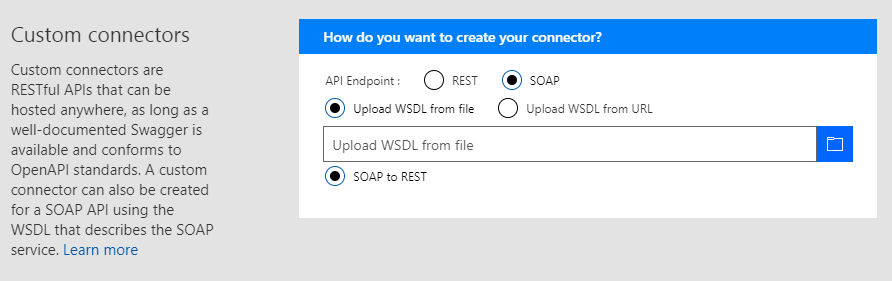
- SOAP!! Finally – The most requested and voted feature in UserVoice is now available in Azure Logic Apps. You can use the SOAP functionality over and above the already existing custom connector functionality.
- Azure Functions with Swagger – You can automatically render the Azure functions annotated with Swagger. You can have the properties exposed from your Azure Function showing up on the card to make the Azure Function look more richer with the information.
- HTTP OAuth with Certificates – OAuth2 is now supported for certificates
- Liquid Templates – This feature was released about a month ago. Liquid templates are used in Azure Logic Apps as an XSLT for JSON objects. You can create transformations on JSON objects (ex. JSON to JSON mapping and more other formats) without having to introduce a custom Azure Function. In addition, you can use Liquid templates to create a document/email template with replaceable parameters that you can use to create an output according to your requirement. Liquid templates are part of the Integration Account.
- Monitoring View – The Logic Apps team have added some cool functionalities in the monitoring view such as –
- Expression Tracing – You can actually get to see the intermediate values for complex expressions
- Decode/render XML with syntax coloring
- Do-until loop iterations
- For-each failure navigation
- Bulk resubmit in OMS
- Portal workflow settings page – New page where you can find all the workflow level settings in a single page and you make configuration changes from the single page. This avoids you to go to multiple places just to make specific configuration changes.
- New URI expressions – trim, uriHost, uriPathAndQuery, uriPort, uriScheme, uriQuery
- New Object Expressions – propertySet, property Add, propertyRemove. These expressions help you to manipulate the object throughout the life of the Logic App.
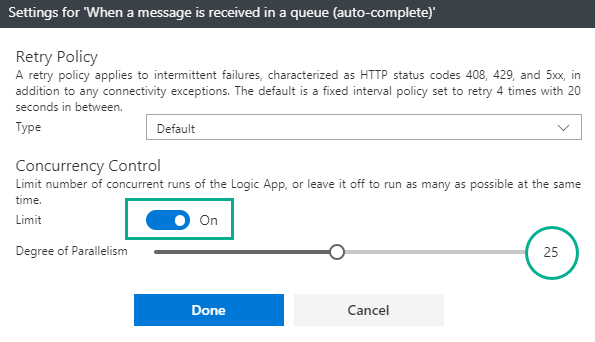
- Configurable parallelism for for-each loops and polling triggers – A toggle button to configure the degree of parallelism in a range of 1–50.
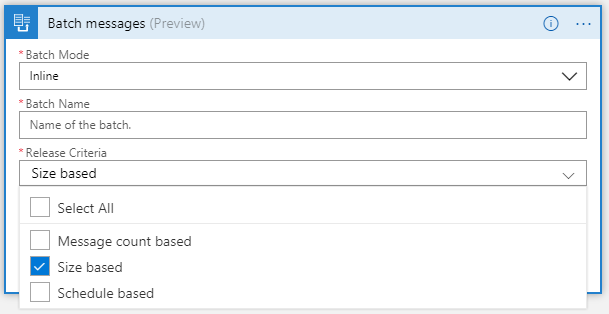
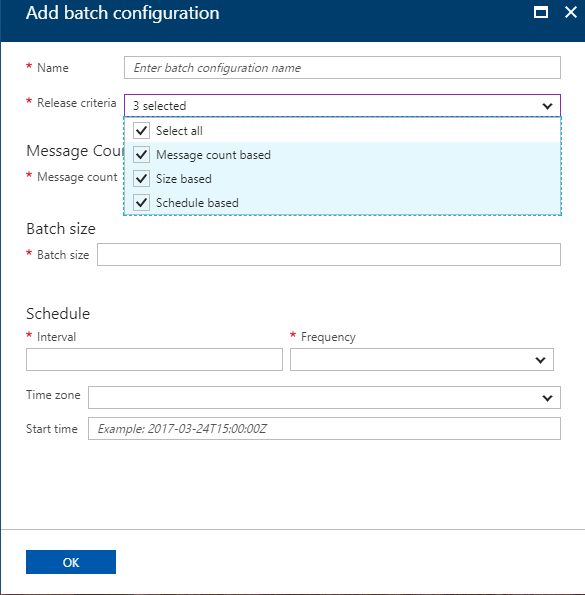
- Batching – a new trigger has been added to support the size based release. Furthermore, you can configure all the batches (size based, time based and count based) centrally in the Integration Account.
New Connectors
- Cognitive Services
- Content Moderator
- Custom Vision
- QnA Maker
- Azure Kusto
- Azure Container Instances – Manage containers right from Azure Logic Apps (create, group, manage (run workloads) and delete them)
- Microsoft Kaizala
- Marketo
- Outlook – webhook trigger
- SQL – dynamic schema for stored procedures
- Blob – create block blob
- Workday Human Capital Management (HCM)
- Pitney Bowes Data Validation
- D&B Optimizer
- Docparser
- iAuditor SafetyCulture
- Enadoc
- Derdack Signl4
- Tago
- Metatask
- Teradata – write operations
Derek Li showed a cool demo of how the configurable degree of parallelism works for for-each loops. You can watch the demo from 14:28 in the video.
[embedded content]
Logic Apps New Offerings (New Business Model)
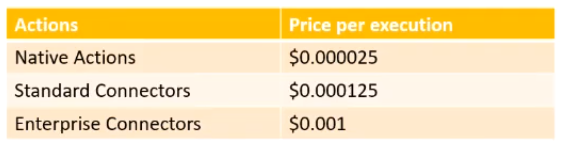
The cost of per action calls to Azure Logic Apps has been reduced and clear distinction has been made w.r.t Native calls ($800 per million actions to $25 per million actions)/Standard Connector calls ($800 per million actions to $25 per million actions)/Enterprise Connector calls.
Standard Integration Account Basic Integration Account
500 schemas & 500 maps 50 schemas & 50 maps
500 Partners 2 Partners
500 Agreements 1 Agreement
$1.35/hour $0.404/hour – 70% < standard
What’s in Progress?
- Complex Conditions within the designer – A Visual Studio Query like builder kind of experience so that they can build conditions as they want and build their applications
- Configurable lifetime – Currently the lifetime is set to 90 days. In future, this can be customized anywhere between 7 days and 365 days.
- Degrees of parallelism for split-on and request triggers
- Tracked properties in designer
- Snippets – patterns based approach (templates) to insert into a Logic App
- Updated Resource Blade
- On Premises Data Gateway
- Support for Custom Connectors (including SOAP)
- High Availability – create a gateway cluster with automatic failover capability
- Custom assemblies in Maps
- Support for XSLT 3
- New liquid actions – text/json
- Connectors
- SOAP Passthrough
- Office365 Excel
- Lithium
- Kronos
- K2
- Zoho
- Citrix ShareFile
- Netezza
- PostgreSQL
Watch the recording of the session here
[embedded content]
Community Events Logic Apps team are a part of
- Microsoft Tech Summit 2017-18 (happening Worldwide) – Logic Apps & API Management
- Gartner Application Strategies and Solutions Summit 2017 – December 4 — 6, 2017 at Las Vegas, NV
Feedback
If you are working on Logic Apps and have something interesting, feel free to share them with the Azure Logic Apps team via email or you can tweet to them at @logicappsio. You can also vote for features that you feel are important and that you’d like to see in logic apps here.
The Logic Apps team are currently running a survey to know how the product/features are useful for you as a user. The team would like to understand your experiences with the product. You can take the survey here.
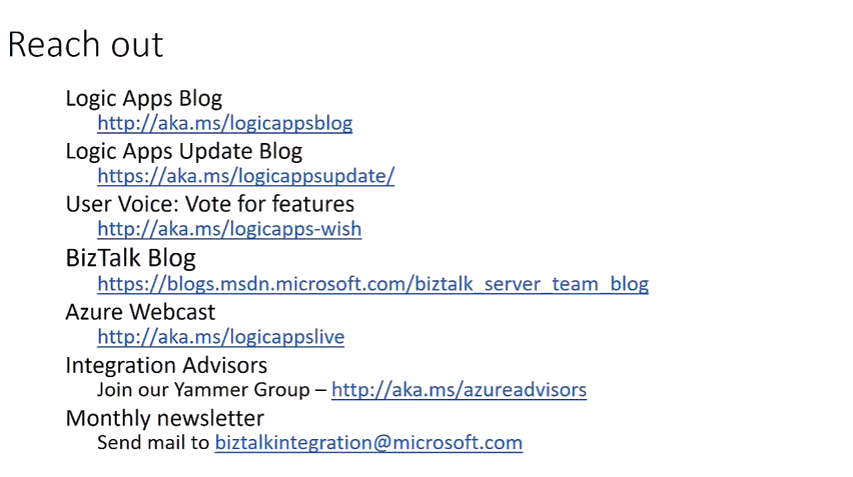
If you ever wanted to get in touch with the Azure Logic Apps team, here’s how you do it!
Previous Updates
In case you missed the earlier updates from the Logic Apps team, take a look at our recap blogs here –
Author: Sriram Hariharan
Sriram Hariharan is the Senior Technical and Content Writer at BizTalk360. He has over 9 years of experience working as documentation specialist for different products and domains. Writing is his passion and he believes in the following quote – “As wings are for an aircraft, a technical document is for a product — be it a product document, user guide, or release notes”. View all posts by Sriram Hariharan
by Gautam | Nov 19, 2017 | BizTalk Community Blogs via Syndication
Do you feel difficult to keep up to date on all the frequent updates and announcements in the Microsoft Integration platform?
Integration weekly update can be your solution. It’s a weekly update on the topics related to Integration – enterprise integration, robust & scalable messaging capabilities and Citizen Integration capabilities empowered by Microsoft platform to deliver value to the business.
If you want to receive these updates weekly, then don’t forget to Subscribe!
On-Premise Integration:
Cloud and Hybrid Integration:
Back to Cloud Services via The Azure podcast
Feedback
Hope this would be helpful. Please feel free to let me know your feedback on the Integration weekly series.



