by Gautam | Jan 13, 2019 | BizTalk Community Blogs via Syndication
Do you feel difficult to keep up to date on all the frequent updates and announcements in the Microsoft Integration platform?
Integration weekly update can be your solution. It’s a weekly update on the topics related to Integration – enterprise integration, robust & scalable messaging capabilities and Citizen Integration capabilities empowered by Microsoft platform to deliver value to the business.
If you want to receive these updates weekly, then don’t forget to Subscribe!
Feedback
Hope this would be helpful. Please feel free to reach out to me with your feedback and questions.

by Lex Hegt | Jan 8, 2019 | BizTalk Community Blogs via Syndication
So, you have installed BizTalk360 and you are eager to start using it! But, BizTalk360 is such a feature-rich product, that you might find it hard to get started and implement BizTalk360 in a proper way.
In this blog post, we will give you some tips and guidelines, which will be of help when you are setting up BizTalk360. You can also use the article if you have already set up some of the features in BizTalk360 and want to make sure that you did not miss anything important.
Note: BizTalk360 has a To Do list which contains a number of tasks, you could do to make full use of the product. You will find this To Do list under Settings => To Do List. See also, this article.
This blog post is separated in the following sections:
- Optimizing the BizTalk360 environment
- Benefit from automated monitoring
Optimizing the BizTalk360 environment
Once you have installed the product, there are a few things you must do, before you are able to use the product. Furthermore, you can also perform some tasks to optimize the environment. Let’s have a look at these tasks:
- Activate the license (required)
- Adding BizTalk environments to BizTalk360 (required)
- Remove unused BizTalk features from the BizTalk360 UI
- Create User Access Policies
- Create efficient dashboards
We will have a somewhat more detailed look at these tasks.
Activate the license
After finishing the installation of BizTalk360, the installer starts the product in your default browser. Once started, BizTalk360 will ask you to provide the license. If you have purchased a license, you now can provide the details of this license. Depending if the server on which BizTalk360 has been installed has internet connectivity, the process of applying the license will be a bit different.
Adding BizTalk environments to BizTalk360
After applying the license, you will be able to access the BizTalk environment, for which you purchased the license.
In case you have purchased BizTalk360 licenses for multiple BizTalk environments, there are two options on how to access these BizTalk environments from BizTalk360:
- A separate installation of BizTalk360 for each BizTalk environment
- Using one BizTalk360 instance for multiple BizTalk environments
It is totally up to you how you want to access your BizTalk environments from BizTalk360, although the two mentioned approaches both have their pros and cons. To sum up a few:
- it is handy to have multiple BizTalk environments in the same instance of BizTalk360. But, there is the risk that you think that you are stopping artefacts in your Test environment, while you were actually doing it in the Production environment
- with separate BizTalk360 instances for your BizTalk environments, it is less likely that you stop artefacts or terminate instances in the wrong environment. But, it might be hard to memorize the URL’s of the different BizTalk360 installations
If you plan to have multiple BizTalk environments in the same instance of BizTalk360, it is good to know that, to prevent confusion, you can achieve the following:
- give each environment a friendly name
- colour code each environment
Read this article in our Documentation portal on how to maintain environments in BizTalk360. The article mentions, amongst others, how to provide a friendly name and a colour code.
Remove unused BizTalk features from the BizTalk360 UI
One of the primary design goals of BizTalk360 is to consolidate all the tools and portals you might need to operate your BizTalk environment. Just to mention a few of such portals, the product contains features to access BAM views, the ESB Exception Framework, the Business Rules Composer, EDI, etc.
However, within your organization, you might not use all these BizTalk features. Still, they show up in the BizTalk360 user interface.
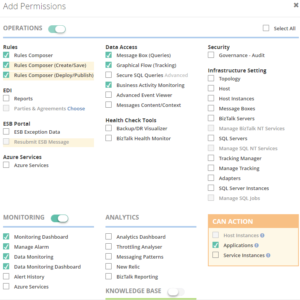
Of course, you can use User Access Policies to prevent these features to show up, but then the Super User (for which no fine-grained user access policy needs to be set up) will still view these unused features.
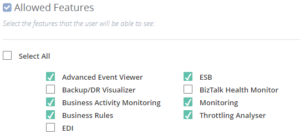
To prevent these unused features from showing up, you can simply disable them for the environment. This way, the BizTalk360 user interface is more focused on your BizTalk environment.
Check this article in our Documentation portal and under Allowed Features turn on/off the appropriate features.
Create User Access Policies
After the installation of the product, an User Access Policy has been created for the user who installed the product. However, it is likely that more people will use the product. To provide each user, which the access to BizTalk360 they need, it is best to create User Access Policies for each user.
You can start with giving your fellow BizTalk administrators access to BizTalk360. But when you feel confident, you can also give people outside the BizTalk Admin team access to the product.
With the fine-grained capabilities of the User Access policies, you can, for example, can give your:
- Support Engineers read-only access to BizTalk360
- Business users access to portals like BAM, EDI, ESB, BRE, etc.
Access is always in a secure and audited way. In this
blog post we describe how you can approach setting up access with BizTalk360.
Create efficient dashboards
The Operations Dashboard is the entry point of BizTalk360. This Dashboard can contain a different kind of widgets of which the goal is to immediately show useful information about the well-being of your BizTalk environment.
The widgets on the Operations Dashboard are fully customizable in terms of:
- number of widgets
- size of the widgets
- location of the widgets
- refresh interval of the widgets
In case the default collection of widgets does not completely fulfil your requirements, you can create Custom Widgets, enabling you for example to show the output of (BizTalk360) API calls or SQL queries.
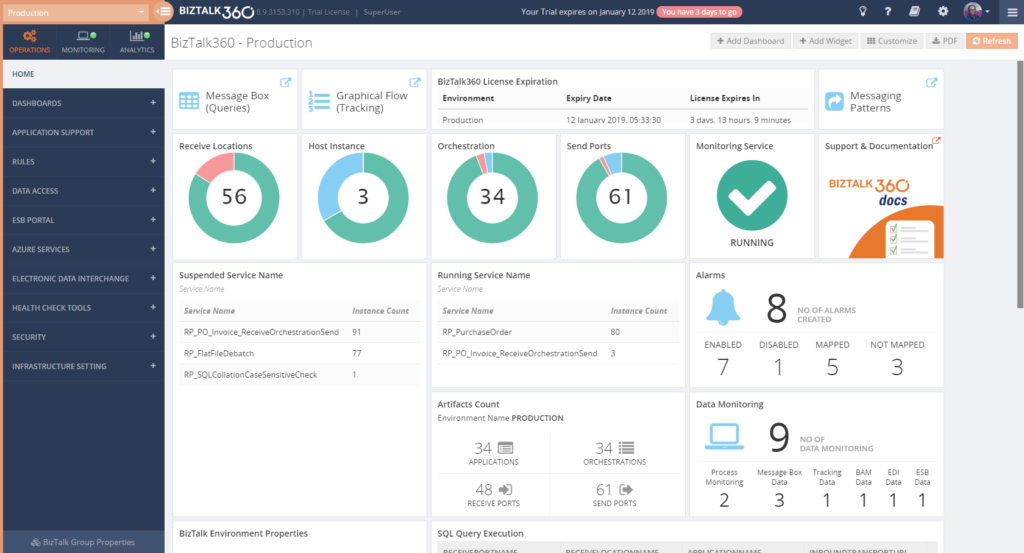
The Documentation portal contains more information on how to set up and use the Operations Dashboards. It also contains articles about creating Custom Widgets.
Benefit from automated monitoring
The main reason you purchased BizTalk360 might very well be the monitoring capabilities of the product, so you are probably interested in setting this up as soon as possible.
Setting up monitoring in BizTalk360, consists of two steps, which are:
- create Alarms – to configure HOW you want to monitor
- manage Mappings – to configure WHAT you want to monitor
Create Alarms to configure HOW you want to monitor
The first step is to create an alarm. With BizTalk360, alarms come in a few different flavours:
- Threshold alarms – for monitoring whether artefacts are in the expected state
- Health alarms – for receiving Daily check reports at configurable days/times
- Data Monitoring alarms – for monitoring the processing of messages through BizTalk
- Consolidated alarms – any combination of the 3 above mentioned alarm types
Besides stuff like giving an alarm a name and configuring how you want to be notified, depending on the alarm type, you can configure multiple other settings. So, again, with configuring these properties you are only configuring how you want to monitor.
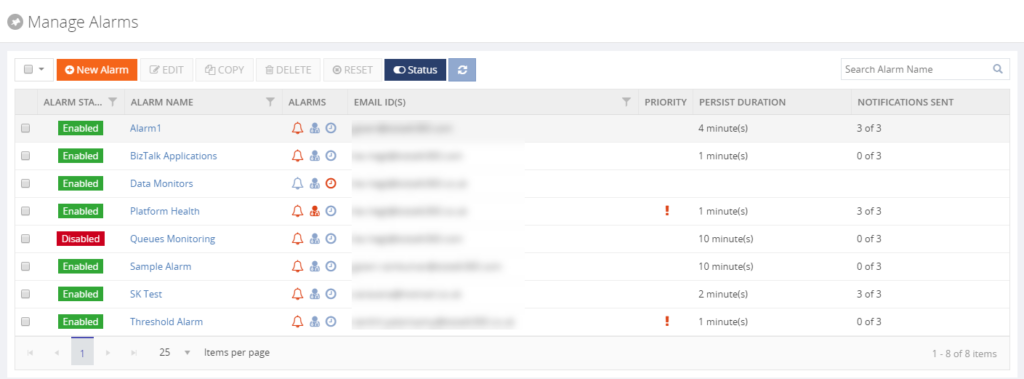
Read the Understanding Alarms article in the Documentation portal for more information about the different alarm types and on how to create an alarm.
Note: you probably want to receive notifications via email. For BizTalk360, to be able to send email notifications, you need to configure an SMTP server. Read this article on how to set this up.
Manage Mappings to configure WHAT you want to monitor
After creating an alarm, you will add mappings to it, to start monitoring the required artefacts. With BizTalk360, there is a huge set of artefacts you can monitor. Think of for example (this is not the full list):
- BizTalk Applications – Send Ports, Receive Locations, Orchestrations, Service instances
- Host instances – in/out process, clustered
- Host Instance Throttling – generic or detailed
- BizTalk Servers/SQL Servers – Disks, Event Logs, NT Services, CPU, Memory
- BizTalk Server Availability – via Ping or Telnet
- SQL Server Instances – SQL Server Agent Jobs, SQL Queries
- HTTP Endpoints – REST, SOAP
- FILE Endpoints – FILE, FTP, SFTP, FTPS
- Queues – MSMQ, IBM MQ, Azure ServiceBus Queues
- BizTalk Health Monitor – Critical and Non-critical Errors and Warnings
Depending on the type of the artefact, you can monitor for its state (like Stopped/Started/etc.) or Warning/Error thresholds.
Although you are completely free in how you set up monitoring, we normally recommend making a distinction between monitoring the BizTalk platform and the BizTalk applications.
- Platform alarms – these contain mappings to stuff like the Host Instances, the SQL Server Agent jobs, Host Throttling, Server resources etc.
- BizTalk Application alarms – these alarms contain mappings to BizTalk application artefacts (Receive/Send Ports, Orchestrations and Service Instances) and relevant endpoints (HTTP/HTTPS, FILE, FTP/SFTP/FTPS, etc.)
Note: Did you know that BizTalk360 has a feature which is called Auto-Correct? This feature enables you to automatically (try) to bring artefacts back to the expected state, after entering the wrong state. This feature, which can be a real time-saver, works for the following components:
- BizTalk Applications – Receive Locations, Orchestrations and Send Ports
- BizTalk Platform – Host Instances
- Windows Server – Windows NT Services
- SQL Server – SQL Server Jobs
- Microsoft Azure – Logic Apps
Read more about this feature in the Documentation portal.
Data Monitoring
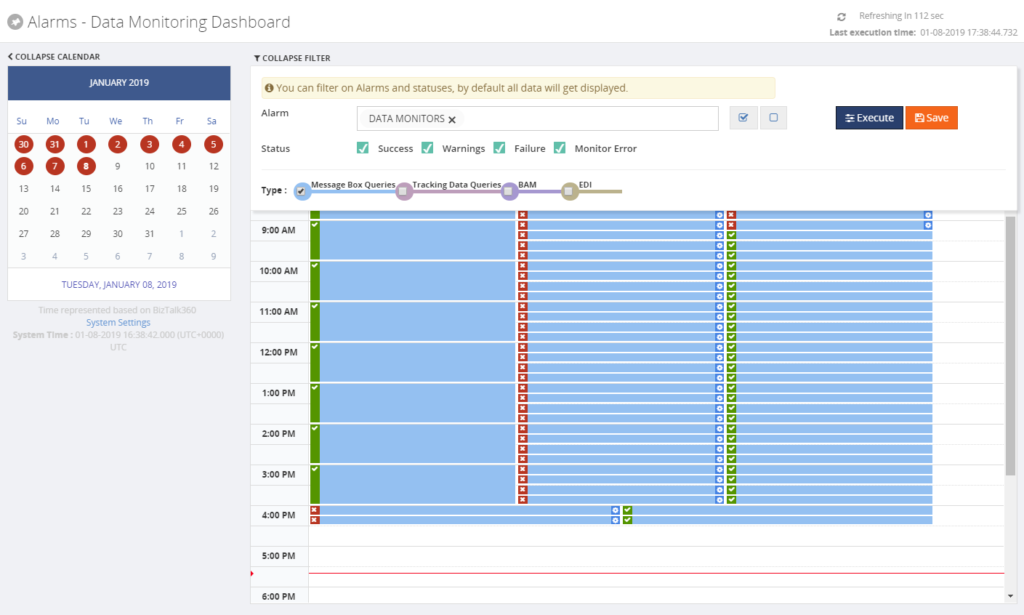
Besides artefact monitoring, BizTalk360 also allows you to monitor the processing which is taking place through BizTalk. The concept of Data Monitoring allows you to monitor activity around sources like the MessageBox, Tracking data, BAM data, EDI data, ESB data, Logic Apps and Even Log entries. Data Monitoring comes with the Data Monitoring Dashboard. This calendar-like dashboard shows the historic runs of all the configured Data Monitors. This dashboard will make it easy to address questions about whether certain processing did take place.
Without going in too much detail, with Data Monitoring you can cover scenarios like:
- monitoring whether batches you expect at a particular time, really arrive in BizTalk and become processed
- you may want to automatically terminate service instances, like Routing Failures, which you frequently receive
- you may want to automatically resume service instances because the messages could not be transmitted due to a temporary network failure
These are only a few of the scenarios you can think of. If you want to read more about the concept of Data Monitoring, consult the Documentation portal.
Implementing BizTalk360 can be a multi-step process
You must have noticed that, once you have purchased and installed BizTalk360, there is a lot to go for. In this blog post, we only mentioned a number of features which are considered the most important to implement after installing the product.
However, there are way too many features in the product to cover in a single blog post. Given the number of features in the product, it makes sense to make implementation of BizTalk360 a multi-step process. This way, your BizTalk360 implementation can grow with your requirements and the requirements of your organization.
If you need help with implementing BizTalk360 or want to receive some more tips, feel free to contact us at
[email protected].
We love to hear from you and we want you to take the full benefit of your purchase!
Happy administering!
Author: Lex Hegt
Lex Hegt works in the IT sector for more than 25 years, mainly in roles as developer and administrator. He works with BizTalk since BizTalk Server 2004. Currently he is a Technical Lead at BizTalk360. View all posts by Lex Hegt

by Gautam | Jan 6, 2019 | BizTalk Community Blogs via Syndication
Do you feel difficult to keep up to date on all the frequent updates and announcements in the Microsoft Integration platform?

Integration weekly update can be your solution. It’s a weekly update on the topics related to Integration – enterprise integration, robust & scalable messaging capabilities and Citizen Integration capabilities empowered by Microsoft platform to deliver value to the business.
If you want to receive these updates weekly, then don’t forget to Subscribe!
Feedback
Hope this would be helpful. Please feel free to reach out to me with your feedback and questions.

by Mekala Ramesh | Jan 3, 2019 | BizTalk Community Blogs via Syndication
BizTalk360 team Wishes you all a Happy and Prosperous New Year!
In 2018, we have released 3 major versions of BizTalk360 with various new capabilities, enhancements and bug fixes. In this blog post, we wanted to summarize the best 10 features released.
1. Import & Export
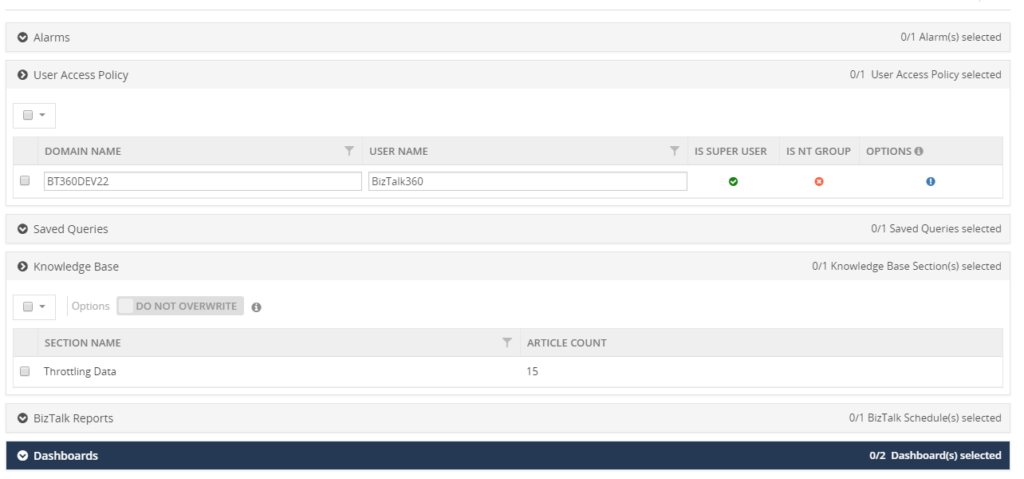
All the newly created BizTalk Server applications are being tested first in the preproduction or UAT and shadow environments to avoid business consequences. Likewise, customers would prefer to test all the functionalities of their BizTalk360 configuration in their non-production environments. Further, they populate necessary data to operate, monitor and find analytical information of their environment. Admins don’t need to recreate their BizTalk360 configuration again in their production environment as in these situations, our import and export capability plays a major role. We have enhanced the existing functionality for users to be able to export:
1. User Access Policies
2. Saved queries
3. Secure SQL queries (along with their configurations)
4. Knowledge Base articles
5. BizTalk reports
6. Dashboards and Custom Widgets (along with their configurations)
from one environment (QA/Development/UAT) and import them as is into another environment (i.e., Production). Users can also change the configurations while importing into the destination environment.
2. Advanced web endpoint monitoring
In a BizTalk environment, the health of Web Endpoints is vital to be able to process the data between multiple applications/partners. BizTalk Administrators might manually monitor the health and results of web endpoints in every execution, but this is a cumbersome process. BizTalk360 provides the capability to monitor such Web Endpoints. This monitoring capability is extended to support other different authentications.
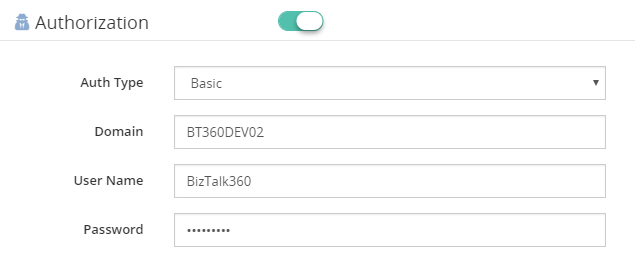
Basic
In the context of the HTTP transaction, there might be a scenario to authenticate the web endpoint using the Basic Authentication method (User Name, Password). BizTalk360 has this capability to monitor the Web endpoints using Basic Authentication.
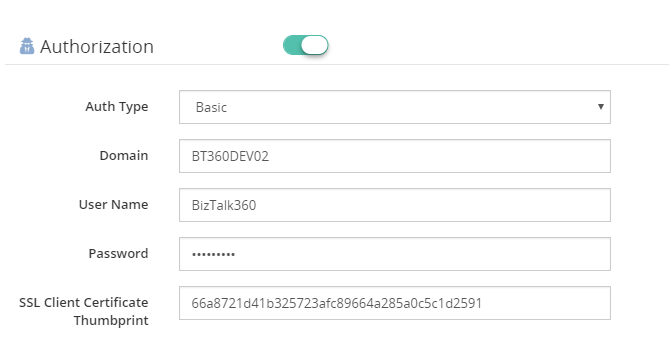
Certificate Authentication
As like basic authentication, some HTTP web endpoints require a SSL certificate for the communication. To support this kind of scenarios, we have introduced a new option to provide client certificate thumbprint in the web endpoint monitoring section.
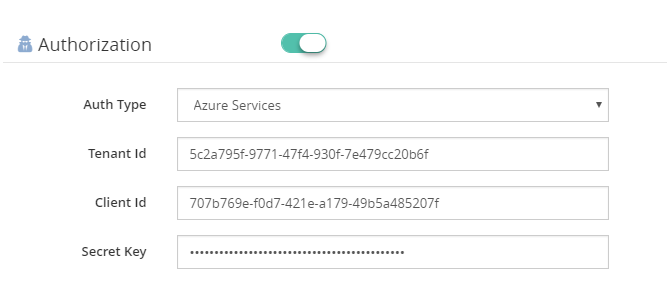
Azure Services Authentication
To provide extended support to monitor Azure services web endpoints, we have enabled the Azure services authentication mechanism in Web endpoint monitoring section. Once the Azure service principal is configured in Azure, information like Tenant Id, Client Id and Secret key need to be provided for monitoring.
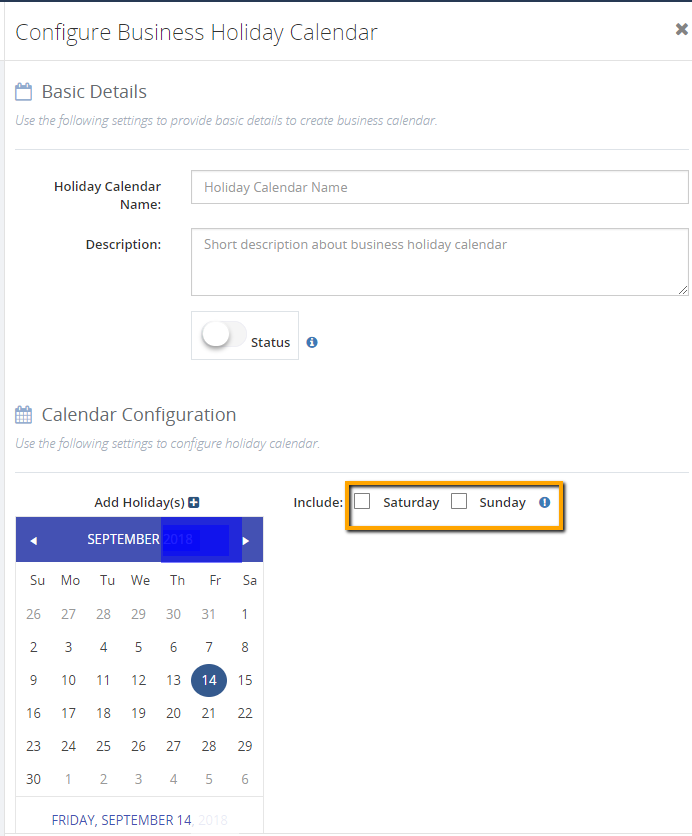
3. Business Holiday Calendar
BizTalk360 provides this new capability to configure the business holidays in a calendar. These business holiday calendars can be mapped during maintenance window setup. This new configuration section is introduced in the Monitoring Notification settings section as “Configure Business Holidays”.
Using this intuitive UI, users can configure the business holidays in a calendar and save it for further mapping during the maintenance setup process.
4. User Access Policy – Multiple options for providing access to BizTalk applications
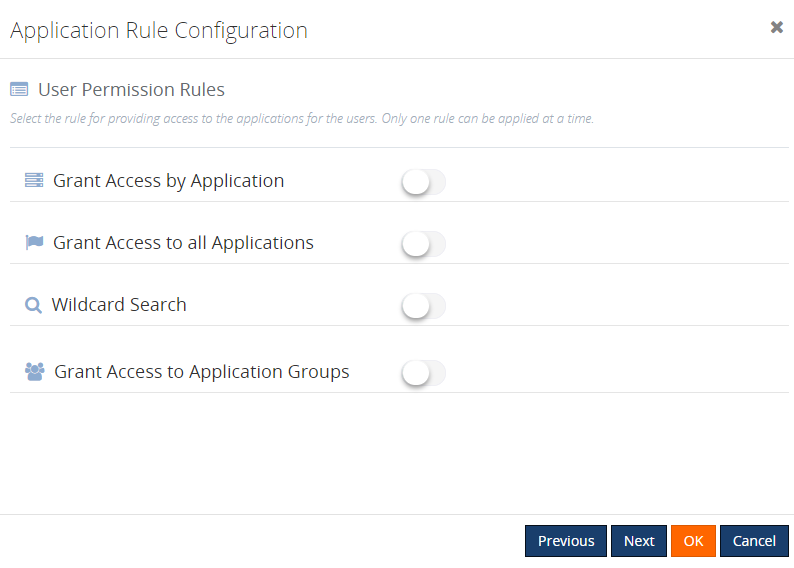
In earlier versions, it was a simple grid displaying all the available applications in a BizTalk environment, and you can select the applications to provide access to Normal Users/Groups. But now we have modified this, to provide multiple options for providing access to the applications. This would surely be more user-friendly and of course, meet the requirements. The different options include:
Grant Access by Applications
By enabling this option, the user has access to all the currently configured applications. Once this option is enabled for any profiles, that user doesn’t have access to the newly integrated applications in your BizTalk Server.
Grant Access to all Applications
As the name denotes, enabling this rule will provide access to all the available applications for the Normal Users/Groups. This will be similar to the permissions of the Super User who will have access to all currently deployed and newly added applications.
Wildcard Search
The user can select the required option and provide the search value. Once this rule has been configured, the user will have access to all the applications matching this wildcard. Also, the user will automatically be given access to the newly created applications that match the wildcard.
Grant Access to Application Groups
With this new capability, you can create Application Groups and map BizTalk applications to that group. Once the user is given access to the Application group, he/she can access all the applications mapped to that group.
5. PowerShell Notification Channel
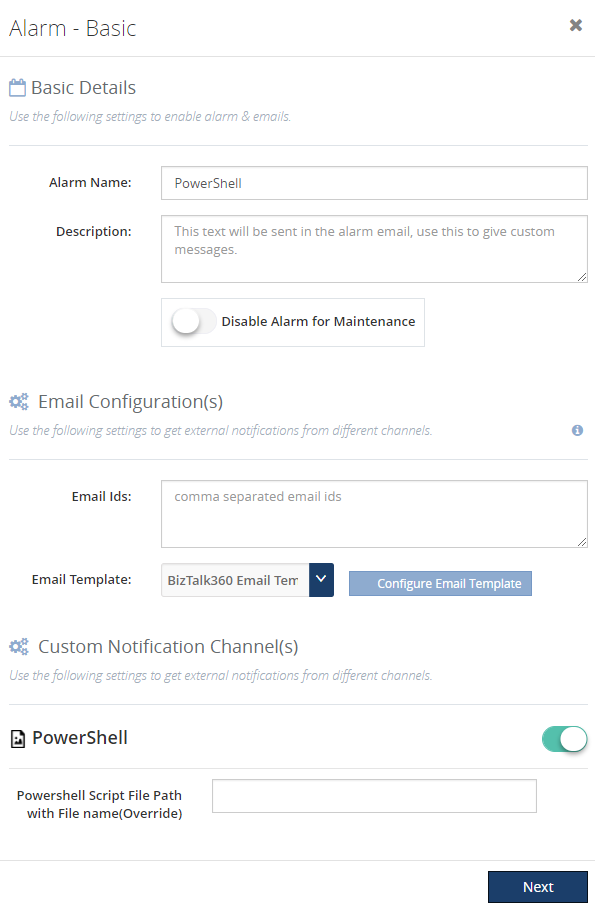
Besides the already available notification channel features, BizTalk360 supports integration with PowerShell scripts. This new capability enables the user to perform some tasks via a PowerShell script, each time the alarm was triggered.
It only takes a few steps to use the PowerShell Notification channel:
– Create the PowerShell script
– Configuring the PowerShell Notification Channel in BizTalk360
6. Grid Column customization
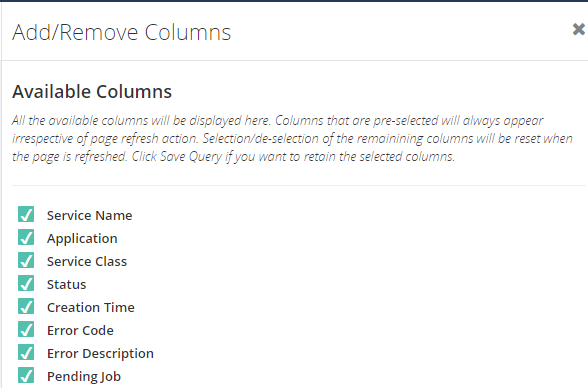
Grid columns can be dynamically removed or added based on the user preference. As per the settings in the configuration section, columns will be aligned and displayed in the grid view. These customized column settings can be saved for future reference as well. We are sure this capability will add more value when the administrator is looking for the instances/messages based on various conditions.
As an initial phase, this implementation has been done in the following areas in BizTalk360:
1. Message Box Queries
2. Graphical Flow (Tracking)
3. Electronic Data Interchange
7. Pagination for improved performance
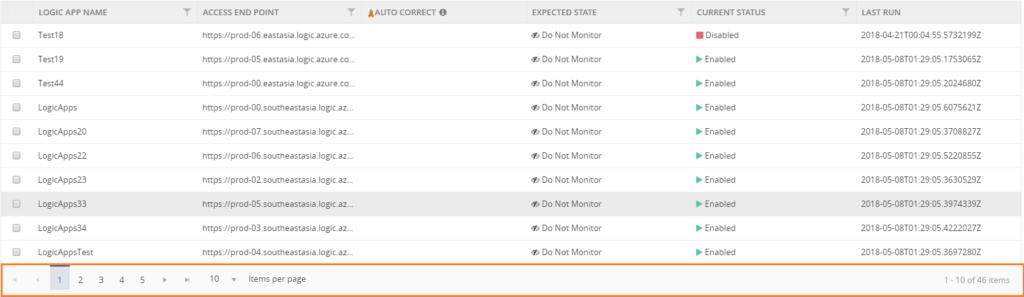
We have optimized the grids by providing you the power of pagination. We have implemented pagination for each grid available in BizTalk360. It is an easy and standard practice that prevents you from having to load the entire result set all at once. The grid supports both preloaded and dynamically loaded data. By using pagination, the rows in the grid gets dynamically separated into pages. The grid will automatically display default rows in each page. The user can increase the maximum number of result rows by selecting the Max Match size in the drop down.
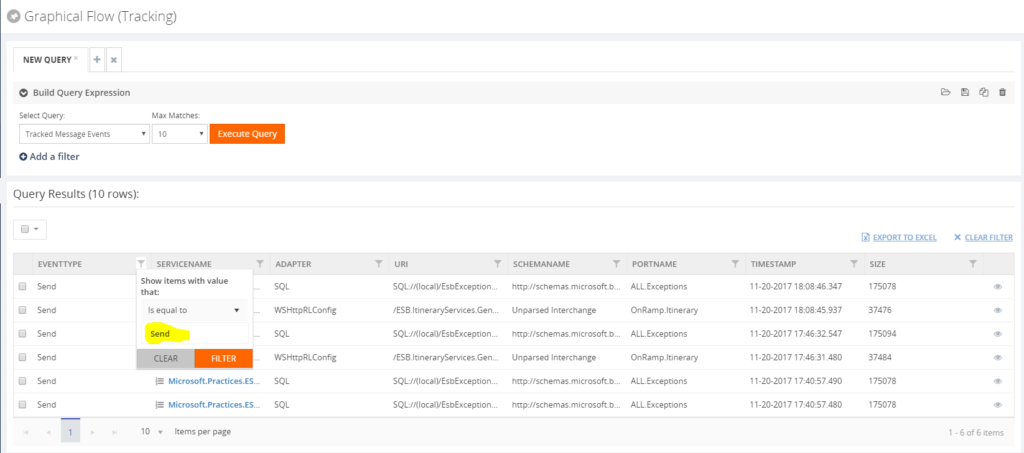
8. Grid Column Filtering
All the grid columns in BizTalk360 have got a new makeover. In a high-volume data store scenario, there will always be challenges to quickly filter and retrieve the desired data. To simplify the data retrieval process, we have implemented 4 types of filters in BizTalk360.
Text Filter
Text filter is the default filter. Using a text filter, you can filter the text input. The text filter is already implemented in BizTalk360 in various sections. The user should enter the text in the filter text box to retrieve the desired data set.
Checklist Filter
Using this filtering type, the grid shows a checkbox list with the set of predefined values. The user can select one or more of the values and apply the filtering. The types are status, Boolean & Date Time filter.
Status Filter
A Status filter allows filtering the different status in the column. For some filter conditions, some predefined values will be shown in the drop down for the data retrieval. The user can retrieve the data based on the available status. For example, a BizTalk application has different statuses, like Started, Stopped and Partially started.
Boolean Filter
This kind of filter is used to fetch the value based on true or false conditions. Say for example, in the Search Artifacts section we have a checkbox column to check for the receive port, if it’s a two-way port or not. Using the Boolean filter for this column, the user can filter for the two-way receive location.
9. Stop Alerts for maintenance Improvements
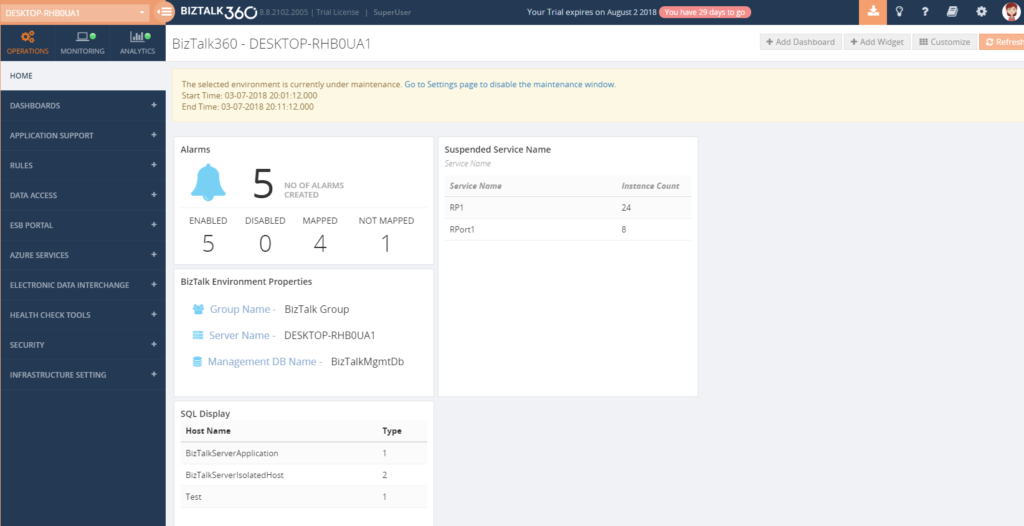
During a maintenance window, no notification was shown in the UI. This is enhanced now, and a notification will be shown in the Operations dashboard and Alert Maintenance section. We have added the capability to allow the users to set up multiple (future) maintenance windows. Additional to this, historical maintenance schedules are preserved for auditing purposes along with periodic purging capability.
10. Triggering alert emails to admin users
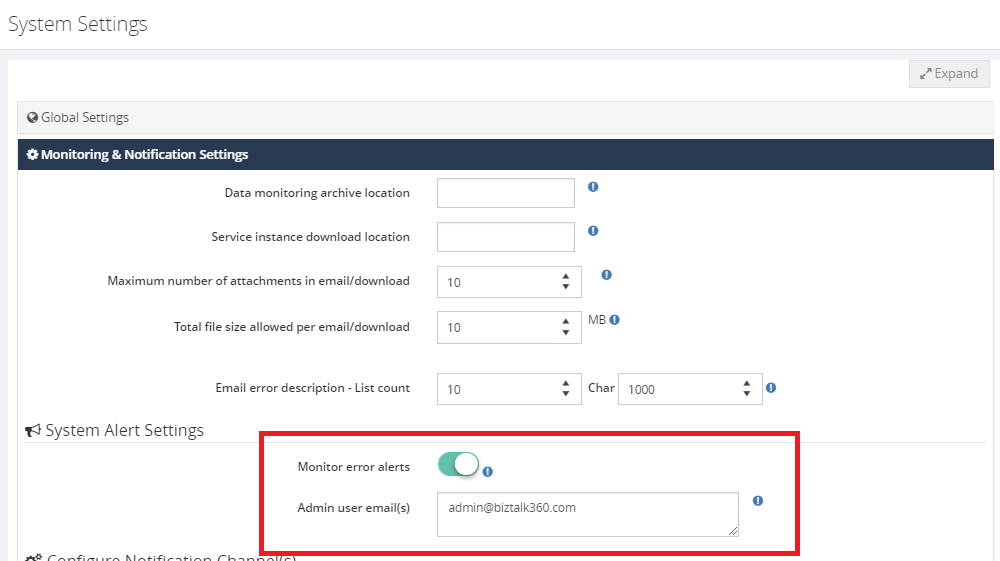
Alert Notification will be sent to the admin users in case there is some monitor error. Admin users can be configured in the system alert settings section.
Installer Improvements
Installer Logging capability
We have enabled a logging capability in the installer. This will help the users and support engineers to identify the root cause in case of any issues during the installation process.
Installer One Password Capability
We have enhanced the BizTalk360 installer, where only one set of credentials (UserName, Password) will be asked during the upgrade process, in case the same credentials have been used for all the installed components.
Installer SQL Upgrade
There was no support for the SQL authentication upgrade. We have enhanced the installer logic to support SQL Authentication upgrade.
Persist Web.config file changes during the upgrade
To access BizTalk360 via the HTTPS protocol, few configurations need to be done in the web.config file. In earlier versions, during the upgrade process, this configuration is overridden, and the user needs to do the configuration every time. This has been enhanced, and changes which are made in the config file are persisted during the upgrade process.
Conclusion
I must say 2018 was a fantastic year for us, where we focused on improving the product with exciting new features, enhancements and fixing support cases. Along with the above new capabilities, we have provided a fix for 209 support cases and enhanced 24 existing features.
We are looking forward, 2019 would be another great successful year for us with more exciting new features added to the product.
Author: Mekala Ramesh
Lead QA & Product Support at BizTalk360 – Having around 8 years of experience in software testing & customer support field with the strong knowledge in SDLC and STLC phases. Specialized in various types of testing methodologies. Passionate tester, who always want to deliver the software product with the best quality to the end customers. Possess strong knowledge, to establish the testing process from scratch. Playing a pivotal role in BizTalk360 is making me deliver the product to every customer in a delicious way. View all posts by Mekala Ramesh

by Saravana Kumar | Dec 30, 2018 | BizTalk Community Blogs via Syndication

One thing I have been doing consistently on the last day of each year since I started BizTalk360 back in 2011 is donating a small amount to GOSH as a way of saying thank you for one more successful year.
In spite of where I’m in the world, I make a note on my personal calendar to do this activity first thing on 31st December.
A definition of success is different for different people, for me, it’s pretty simple, being healthy (people around me and myself), moving forward a few steps ahead from where we have started and try and help others move forward as much as I can. As long as we are not standing still or moving backward and everyone around me is happy then it’s a successful year.
This year we contributed $10k to GOSH bringing the total contribution to approximately $47,000 in the past 7 years. Here is the summary.
About GOSH
GOSH is one of the world’s leading children’s hospitals, housing the widest range of specialists under one roof. GOSH opened its doors back in 1852 with just 10 beds, today they get around 600 new patients every day. It was the first hospital in the UK dedicated solely to the treatment of children.
GOSH was supported by some of the great individuals like Charles Dickens, Queen Victoria and Diana Princess of Wales.
We feel proud to be associated with such a great organization with such a great cause.
Author: Saravana Kumar
Saravana Kumar is the Founder and CTO of BizTalk360, an enterprise software that acts as an all-in-one solution for better administration, operation, support and monitoring of Microsoft BizTalk Server environments. View all posts by Saravana Kumar

by Rochelle Saldanha | Dec 27, 2018 | BizTalk Community Blogs via Syndication
As the year draws to a close, it’s time to gather your thoughts and think about all you’ve done, and every step – no matter how big or small, got you to where you are today.
Our parent company, Kovai Ltd., made huge strides this year and we have 4 active products in the market. We now have the complete package of tools to support hybrid integration scenarios .
A One Platform solution for your Operational, Monitoring and Analytic needs for your BizTalk environment
Empower functional support teams and Business users by providing end to end visibility into Azure integration Services with rich business context
The comprehensive way to operate, manage and monitor Azure Serverless Services related to Enterprise Integration
The Knowledge Base Software that scales with your Product
Customer Happiness Team
Managing all our customers and providing top-notch customer service is at the topmost of our priorities. Customer Service is all about serving and helping at the right time. It isn’t about selling or wanting something from your customers – But guiding and helping our customers to achieve the best from our products.
Being part of the technical support & Customer Relationship team has given us a good base to have well-meaning conversations with our customers and understand the crux of their issues and suggest suitable alternatives, workarounds or provide helpful information. Our clients really appreciate the time spent with them to help resolve their issues.
Customers don’t connect with automated bots,
Customers connect with real people.
This year the Technical support team pushed the boundaries of their skills and became part of the new DevOps teams.
DevOps is the practice of operations and development engineers participating together in the entire service lifecycle, from design through the development process to production support.
Everyone on the team provided their contribution in the form of developing a new feature, enhancing an existing feature, testing, documenting, writing blogs and so on. All the product support engineers underwent product training with the help of the respective developers who developed the product features and with the QA who tested, and they evolved from support engineers to QA cum Product Support engineer.
Document360 Team
This year is again special for us at Kovai as we started a non-integration product that is mainly aimed at customers who are struggling like us to find a dedicated self-service knowledge base platform that meet our needs.
At Kovai Limited, we needed this platform for providing customer support for our products. In fact, the whole thought process of Document360 was driven by the pain points we have seen using the Helpdesk software for documentation.
We attended multiple events around London & Dublin, spreading the word of our Knowledge Base solution – Document360

INTEGRATE 2018
Our annual event – INTEGRATE 2018 – had (420+) attendees, speakers, sponsors this year and was a grand success. The event was held at ETC. Venues in the city center of London.
We had a lot of interesting speakers from Microsoft as well from across the integration landscape all over the world. We had speakers from as close as the UK, but also as far away as New Zealand and Australia! All our sponsor booths had heavy footfall as well. It was great to meet old friends and make new friends by meeting people in the real world, who we normally only meet via email and conference calls!
Each year, we try to bring some entertainment to the event. Last year we had a magician, while a new interesting concept this year was that BizTalk360 hired Visual Scribing to come and draw a mural of all the presentations, capturing the key messages throughout the conference.
We also hired some entertainers whose skills the attendees thoroughly enjoyed. A Caricaturist who captured all the attendees true likeness and a skilled saxophone player who blew everyone’s socks off!

It was a testament to the hard work carried out by the entire team to successfully pull off an event of this scale.
We are surely going to run the INTEGRATE event in 2019 as well! In fact, there will be an event in London and one in Redmond at the Microsoft Campus.
Feel free to join us in 2019 as the registrations are already open now with Early Bird offering:

Xmas in Kovai UK
Team Kovai UK had a memorable Christmas lunch complete with Santa hats at the Rose & Crown, Orpington. As the usual tradition, we also celebrated Secret Santa in the office and had a few laughs and decorated our gorgeous Christmas Tree.
The year had indeed come to an end, and we look forward to the coming year as new challenges and opportunities come our way and with each step, we become better and build our strength and character.

So, another year has gone by, we are older and wiser and can look forward to the new year of things yet to unfold
Author: Rochelle Saldanha
Rochelle Saldanha is currently working in the Customer Support & Client Relationship Teams at BizTalk360. She loves travelling and watching movies. View all posts by Rochelle Saldanha

by Gautam | Dec 24, 2018 | BizTalk Community Blogs via Syndication
Do you feel difficult to keep up to date on all the frequent updates and announcements in the Microsoft Integration platform?
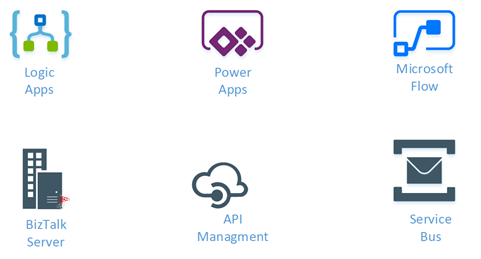
Integration weekly update can be your solution. It’s a weekly update on the topics related to Integration – enterprise integration, robust & scalable messaging capabilities and Citizen Integration capabilities empowered by Microsoft platform to deliver value to the business.
If you want to receive these updates weekly, then don’t forget to Subscribe!
Feedback
Hope this would be helpful. Please feel free to reach out to me with your feedback and questions.
by Sivaramakrishnan Arumugam | Dec 20, 2018 | BizTalk Community Blogs via Syndication
A few days back we have received a question from one of our customer on the possibility to install BizTalk360 on Windows Azure Virtual machine. We have replied with suggestions, and he was impressed by the option what we have provided to install BizTalk360.
That’s the moment of inspiration for this blog. Here, we are going to look at the types of installers available and different ways to install BizTalk360.
I would recommend you to have a look at the prerequisites that should be met to install and work with BizTalk360.
Installing BizTalk360 – What are the options
One of the common questions that customers raise to us. There are various deployment choices available for BizTalk360.
This is one of the common questions we have observed recently on our customer engagements.
The deployments are purely based on the organization needs and based upon the BizTalk environment architecture. Here are the options BizTalk360 provides:
- Installing BizTalk360 On a BizTalk Server
- Installing BizTalk360 On a Stand-Alone (non-BizTalk) Server
- Installing Just the BizTalk360 Monitoring Service
- Installing Just the BizTalk360 Analytics Service
- Installing BizTalk360 on High Availability BizTalk Servers
How can you achieve the various deployment options?
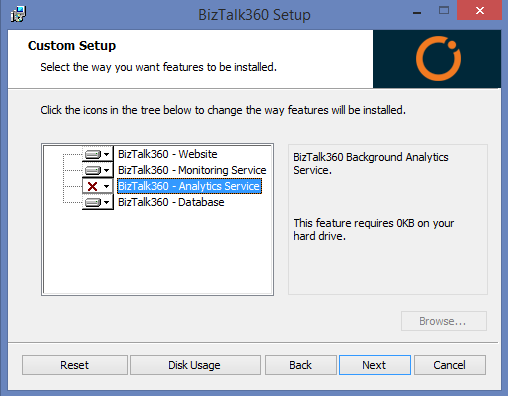
If you are installing BizTalk360 for the first time, you can select the components that you wish to install on the server.
Option 1 – Installation on the BizTalk Server environment
You can install BizTalk360 in one of BizTalk Servers of the BizTalk Server environments (production, non-production etc.) and configure all the environments in one BizTalk360 interface.
Option 2 – Installation on a stand-alone server
This is another common scenario where customers don’t want to install BizTalk360 directly on their production environment.
BizTalk360 supports this scenario by allowing customers to install on a standalone server and access various environments. In this case, customers need to install BizTalk administration components (only) in the standalone server. Also, any third-party adapters must be installed on this server.
It is one of our recommendations to install BizTalk360 on a separate box for the customers who don’t want to install in their BizTalk Environment. The benefit is that once your BizTalk server goes down, your BizTalk360 server won’t go down along with it and be able to send notifications about your BizTalk server not being available.
Option 3 – Install Just the BizTalk360 Monitoring Service
The Monitoring Service plays a key role as it is responsible for fetching the status of artifacts from the BizTalk server to monitor them. Using this option, you can install the BizTalk360 Monitoring Service on a separate box and BizTalk360 database on a separate box.
This setup will be helpful in a scenario where the customer wants to have the BizTalk360 web services, user interface (IIS), BizTalk360 Monitoring service and the BizTalk360 Database all in separate boxes.
This setup can also be done when you want the BizTalk360 monitoring service to be in the high availability state. When monitoring service is installed in two servers in the high availability mode, when one service goes down, the other service will be up, where the monitoring of your BizTalk environment by BizTalk360 will be continued without any interruption.
Option 4 – Install Just the BizTalk360 Analytics Service
As like installing BizTalk360 monitoring service on a separate box you can install the BizTalk360 Analytics Service on a separate box as well.
Option 5 – Installing BizTalk360 on High Availability BizTalk Servers
You can install BizTalk360 on BizTalk high availability servers. At the same time, you can make BizTalk360 as a highly available setup.
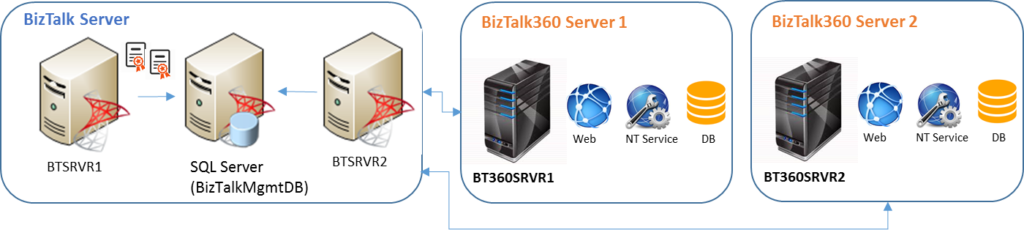
Installing BizTalk360 on the single server environment is a straightforward task when the BizTalk server and database are existing in the same machine. You can simply run the BizTalk360 MSI from the Administrator Command prompt.
But in most of the cases, we have seen our customers use BizTalk360 in a High Availability mode to make it available all the time.
Different ways to install BizTalk360
To fulfil all the customer needs, there is a number of ways to install BizTalk360 and we provide different types of installer options:
- Default installation
- Silent Installation
- Azure Marketplace installer
- Azure easy installer
Default installation
The Default installation is the regular way of installing BizTalk360.
Once you have created and configured a machine with all the prerequisites met, download the latest version of BizTalk360 (.msi) and install it on the machine.
In which case will this be helpful?
When you have a physical/virtual server within an organization which may have or have not internet connectivity.
You can achieve all the various deployment choices,
- Installing BizTalk360 on a BizTalk Server
- Installing BizTalk360 on a Stand-Alone (non-BizTalk) Server
- Just the BizTalk360 Monitoring Service
- Just the BizTalk360 Analytics Service
- BizTalk360 on High Availability BizTalk Servers
You can download the latest version installer of BizTalk360 from http://www.biztalk360.com/free-trial/ . You must enter the registration information in the form before downloading the BizTalk360 MSI.
Silent Installation
This is one of the interesting cases which came to us. One of our customers was trying to install BizTalk360. Although he was from Admin team, he was not a member of the BizTalk groups.
He proposed a request that is there any option to install BizTalk360 without the installer user interface or screen. We do have Silent installation support.
So, we assisted the customer with the command which they need to run the installer without the installer GUI. But with the silent installation, you can’t achieve all the various deployment choices as seen with the regular installation (Refer the section “Default Installation -> In which case it will be helpful”).
Azure easy installer
The move to the cloud eventually means that customers using BizTalk360 for managing and monitoring their BizTalk server environments will need their BizTalk360 setup to run on their Azure setup. Without BizTalk360 on their Azure setup, the only way for customers to manage their BizTalk environment (running on Azure) is by physically logging into the server through RDP connection.
Also, there is a challenge with the number of RDP connections (no. of users) who can access the server at a time. Therefore, the presence of BizTalk360 becomes an important factor – be it in an on-premise setup or on a remote server (Azure).
In which case will this be helpful?
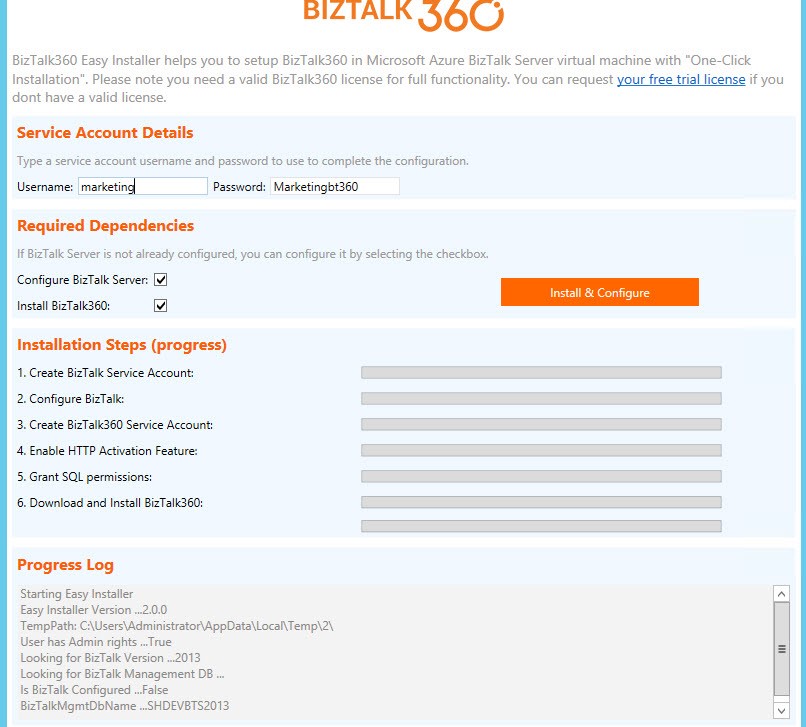
Any server which has BizTalk Server installed, with the help of BizTalk360 Azure Easy Installer, you can easily install BizTalk360 by executing a single PowerShell command on your BizTalk Server Machine.
Why did we introduce this?
As the technology and usability evolve, we would like to encourage customers who are already using BizTalk server in Azure, to move their BizTalk360 environment to the cloud as well.
The customers using BizTalk360 for managing and monitoring their BizTalk server environments in Azure will need their BizTalk360 setup to run on their Azure setup as well.
How easy to use is it?
With the BizTalk360 Azure Easy Installer, you can easily install BizTalk360 by executing a single PowerShell command on your BizTalk Machine. The installer will take care right from the scratch of creating a service account for BizTalk360, configuring the BizTalk server (optional), enabling HTTP feature, granting SQL permissions and IIS.
Azure Marketplace installer
This is helpful for customers having a Microsoft Azure account and provisioned BizTalk server machines in the cloud with a more complex setup such as a domain, Active Directory, and one or more BizTalk environments in the network.
With BizTalk360 in Azure, you get a complete deployment that can target your BizTalk environment running on-premise via VPN or ExpressRoute or on Azure IaaS Platform.
In which case it will be helpful?
With the help of BizTalk360’s Azure Marketplace installer, you can simply spin up and add a new BizTalk360 machine into your existing BizTalk environment. We support BizTalk Server 2013R2 and 2016.
Why did we introduce this?
To ease the installation process, where the customer has the BizTalk server setup in domain Azure architecture, this tool will be very helpful. In any architecture, to add a new application software will be a difficult job because so many changes need to be done right from the providing permission to other prerequisites.
Likewise, to install BizTalk360, set of prerequisites must be performed before installing. To make this job easier for the users, our Azure marketplace installer comes into the picture.
How easy to use is it?
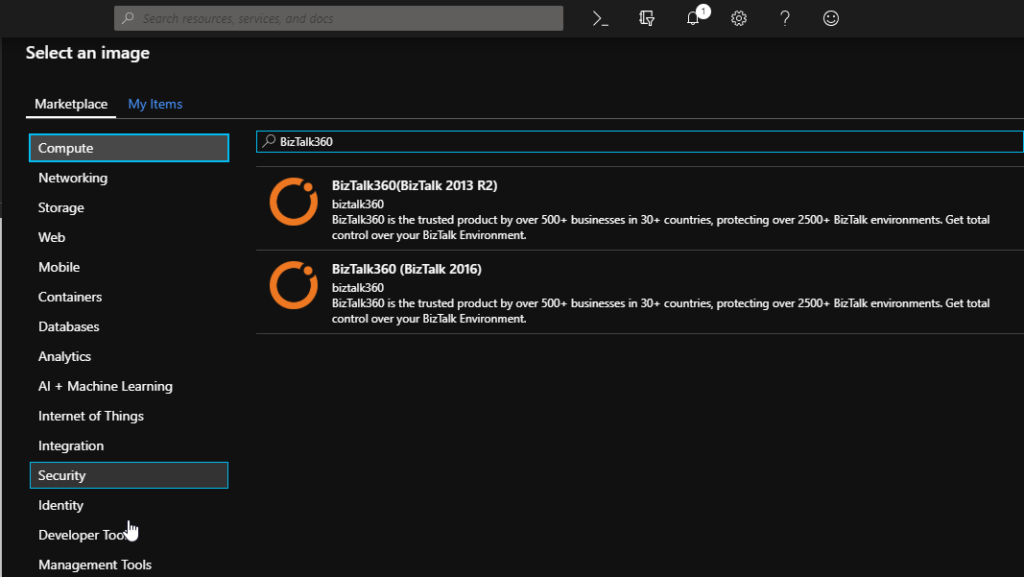
While adding a new machine for BizTalk360, select new Virtual machine in the Marketplace and select the image according to your existing environment. As of now, we are providing support for BizTalk server 2013 R2 and BizTalk 2016.
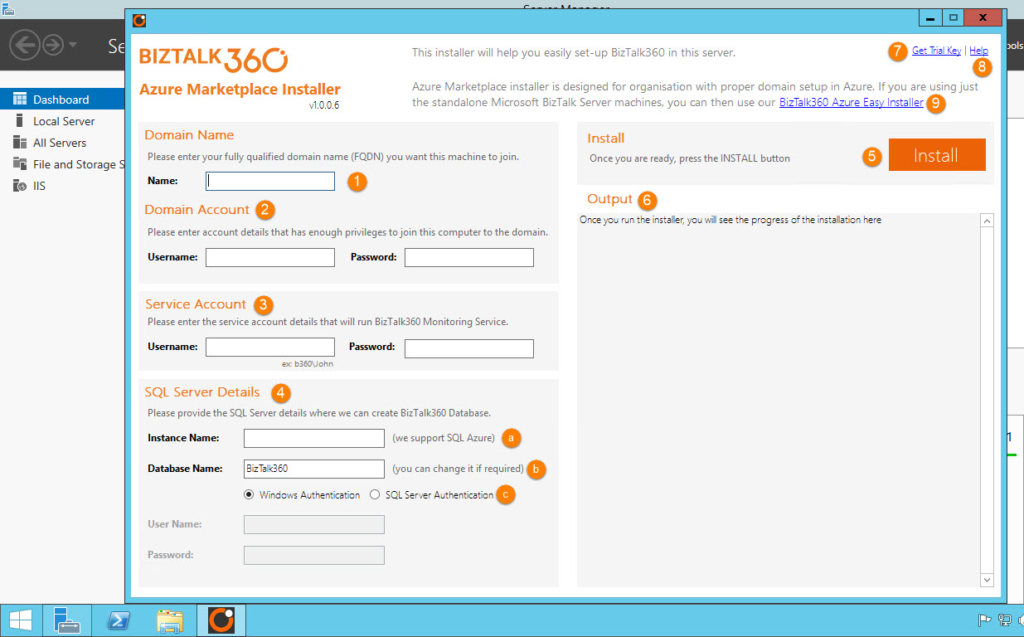
It is just a simple process; once after the creation of the new BizTalk360 Virtual machine, the Azure Marketplace installer will be opened. Just providing the credentials, it will be added to the domain (the machine will be automatically restarted as a part of this process), and BizTalk360 installation will continue.
Upon successful completion, BizTalk360 will be installed and you will notice a browser window firing open with the BizTalk360 screen. We want to convey that using the BizTalk360’s Azure Marketplace installer, and the Azure easy installer is free of costs.
Conclusion
Keeping the user perspective in mind, we have built various deployment choices for BizTalk360 customers which would ease the installation and provide a user-friendly experience.
Author: Sivaramakrishnan Arumugam
Sivaramakrishnan is our Support Engineer with quite a few certifications under his belt. He has been instrumental in handling the customer support area. He believes Travelling makes happy of anyone. View all posts by Sivaramakrishnan Arumugam

by Gautam | Dec 16, 2018 | BizTalk Community Blogs via Syndication
Do you feel difficult to keep up to date on all the frequent updates and announcements in the Microsoft Integration platform?
Integration weekly update can be your solution. It’s a weekly update on the topics related to Integration – enterprise integration, robust & scalable messaging capabilities and Citizen Integration capabilities empowered by Microsoft platform to deliver value to the business.
If you want to receive these updates weekly, then don’t forget to Subscribe!
Feedback
Hope this would be helpful. Please feel free to reach out to me with your feedback and questions.

by Jeroen | Dec 16, 2018 | BizTalk Community Blogs via Syndication
TL;DR – There is no decent .NET support for PCF in the IBM client, but we can use IKVM.NET to convert JARs to DLLs so we can still use .NET instead of JAVA to use PCF.
Intro
Programmable Command Formats (PCFs) define command and reply messages that can be used to create objects (Queues, Topics, Channels, Subscriptions,…) on IBM Websphere MQ. For my current project we wanted to build a custom REST API to automate object creation based on our custom needs. The IBM MQ REST API was not a possible alternative at that moment in time.
The problem
The .NET PCF namespaces are not supported/documented by IBM and do not provide the possibility to inquired the existing subscriptions on a queue manager. All other tasks we wanted to automate are possible in .NET. Using JAVA seemed to be the only alternative if we wanted to build this custom REST API with all features.
| Action |
PCF Command |
Result |
Info |
| Create Local/Alias Queue |
MQCMD_CREATE_Q |
OK |
|
| Delete Queue |
MQCMD_DELETE_Q |
OK |
|
| List Queues |
MQCMD_INQUIRE_Q |
OK |
|
| Purge Queue |
MQCMD_CLEAR_Q |
OK |
|
| Create Subscription |
MQCMD_CREATE_SUBSCRIPTION |
OK |
|
| List Subscriptions |
MQCMD_INQUIRE_SUBSCRIPTION |
NOK |
Link1 |
| |
|
|
Link2 |
| Delete Subscription |
MQCMD_DELETE_SUBSCRIPTION |
OK |
|
Being able to use the .NET platform was a requirement at that time, because the whole build and deployment pipeline was focused on .NET.
IKVM.NET
After some searching I stumbled upon IKVM.NET:
“IKVM.NET is a JVM for the Microsoft .NET Framework and Mono. It can both dynamically run Java classes and can be used to convert Java jars into .NET assemblies. It also includes a port of the OpenJDK class libraries to .NET.“
Based on this description it sounded like it could offer a possible solution!

Using IKVM.NET we should be able to convert the IBM JARs to .NET assemblies and use the supported and documented IBM Java Packages from a .NET application.
From JAR to DLL
Now I will shortly explain how we were able to put it all together. Using IKVM.NET is not that easy when you use it for the first time. The whole process consists basically out of 3 steps:
- Download (and Install) the IBM MQ redistributable client (in order to extract the JAR files)
- Convert JARs to DLLs with IKVM.NET
- Copy DLLs and Reference in .NET project
- The IBM Converted JARs and the IKVM.NET Runtime dlls
Convert JAR to DLL
Download IKVM: https://sourceforge.net/projects/ikvm/
Extract the IKVM files (c:toolsIKVM)
I have the IBM client installed, so the JAR files will be on there default installation (C:Program FilesIBMMQjavalib)
Open up a Command Prompt:
1
2
3
4
5
|
set path=%path%;c:toolsIKVMbin

cd C:Program FilesIBMMQjavalib

ikvmc -target:library -sharedclassloader { com.ibm.mq.jar } { com.ibm.mq.jmqi.jar } { com.ibm.mq.headers.jar } { com.ibm.mq.pcf.jar }
|
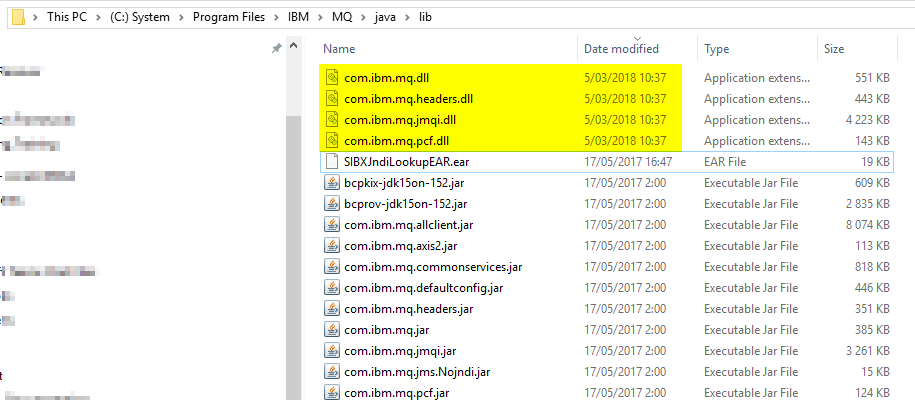
You will find the output in the source directory of the JAR files:
Add References…
Now that we have our DLLs, we can add them to our .NET project. This seemed less easy then I thought, I spend a lot of time figuring out what dependencies I needed. In the end, this was my result:
1 = The IBM JARs converted to DLLs
2 = The IKVM.NET runtime DLLs

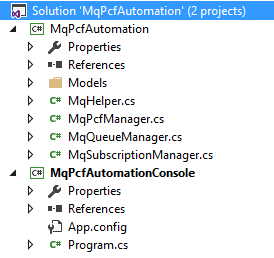
MqPcfAutomation Sample
To help you get started, I added my sample proof of concept solution to GitHub in the MqPcfAutomation repository.
In the sample a showcase the functionality described in the table at the beginning of this post.
Conclustion
In the end I am happy that I was able to build a solution for the problem. The question is if this approach is advised…
I don’t think IBM approves this approach, but it works for what we need it. We are using this solution now for more then 6 months without any issues. In the future we might be able to move to the IBM MQ REST API as more features will be added.