by community-syndication | Jun 4, 2009 | BizTalk Community Blogs via Syndication
While the idea of Microsoft giving a keynote address at JavaOne – the Java community’s biggest conference of the year – has probably raised a few eyebrows, it really shouldn’t come as that big of a surprise at this point. Not only have we been involved in JavaOne for the past few years, you’ve also heard me talk many, many times about the importance of interoperability: most recently in the context of cloud computing and often as it relates to Web services. The latter has been a heavy focus for my team – and Microsoft in general – for a number of years. In fact, sometimes folks are caught off guard at just how active Microsoft has been in driving better interoperability via Web services and through our work with W3C, WS-I, WS-*, OASIS (e.g., the recent announcement regarding WS-RX, WS-TX and WS-SX), DMTF and more.
As we look at our latest research numbers, we see that 73% of professional developers rely on .NET or a combination of .NET and Java. In that sense, both Java and .NET have won in the enterprise and it is incumbent on both Microsoft and Sun to ensure that interoperability for the platforms is real, available and as easy to implement as possible. It’s a responsibility that we both share and customers tell us loud and clear that they expect innovation to accompany interoperability. I’m proud to say that this is something we take seriously and are executing against.
Along these lines, some of you may recall that last November we announced our participation – and the contribution of our StockTrader 2.0 code – to the Apache “Stonehenge” project. Stonehenge was formed to deliver a set of sample applications that demonstrate interoperability across multiple underlying platform technologies by using currently defined W3C and OASIS standard protocols. This is helpful for a number of reasons. While industry efforts like WS-* define approaches to enable interoperability, products may still need to be configured by customers before the benefits of interoperability can be realized. In fact, we’ve had a number of customers tell us they need better examples and more guidance on how to realize the built-in interoperability of applications across multiple vendor platforms. Stonehenge addresses this by providing customers with best practice guidelines and actual code that illustrates precisely how to achieve this in real world scenarios. To put it a little more poetically, Stonehenge will help us complete the “last mile” of interoperability between today’s standards-based infrastructure and tomorrow’s service-based applications.
So what exactly does this have to do with Microsoft – and specifically me and Dan’l Lewin – keynoting at JavaOne? A great deal actually, since during our keynote, Sun Vice President Aisling MacRunnels, Dan’l and I will announce that Sun has also now agreed to participate in the Stonehenge project and will be contributing the Metro-based StockTrader application code. This is important for two reasons. First, it means that Stonehenge will deliver even more value by providing best practice guidelines and reference implementations across an even broader range of scenarios and platforms, including Java, .NET, PHP, etc. The more samples and real world guidance we can give the community the better since it gives customers the ability to choose the best ones for their specific business requirements. It also makes it easier to pinpoint potential interoperability problems.
In addition, it represents another step forward in our ongoing work with Sun. As we all know, today’s IT environments are heterogeneous; whether it’s a single organization that runs both.NET and Java apps or multiple organizations that seek to collaborate with each other. To that end, we’ve been working closely with Sun on a number of interoperability initiatives over the past five years to help customers leverage their existing investments in Sun and Microsoft technologies. Some of the best examples include our work on Web Single Sign On, the Interop Vendor Alliance, our collaboration on virtualization and, of course, our recent agreement to use the SAML federation standard in both the Sun OpenSSO Enterprise federation solution and the forthcoming Microsoft “Geneva” Server federation solution.
Looking ahead, our work with Sun (or perhaps I should say Oracle?) becomes even more important in the context of cloud computing. Success in the cloud for most enterprises will hinge on the ability to utilize a broad and diverse set of computational resources, some of which may be implemented very differently from others. Interoperability protocols are the key to this. Thus, it’s important for us to continue to work together to ensure platform interoperability through these protocols, especially as it relates to Web service interoperability standards. The work that we are announcing today with Sun around Stonehenge is a great step in the right direction since it helps demonstrate seamless interoperability across application platforms – whether those applications are implemented on premises and in the cloud – and whether those applications are implemented on J2, on .NET or on something else.
With that in mind, I’d encourage everyone to take a look at the Stonehenge project and download the StockTrader sample app on one of the many supported platforms such as .NET, Java, PHP, WSAS, Sun Metro, etc. If you are interested, you can also read more about what Microsoft is doing around interoperability in general or watch Dan’l’s and my full JavaOne keynote. The keynote focuses specifically on the work we are doing with Sun to deliver interoperable application platforms that span on-premises and cloud computing, and help our customers leverage their Java and .NET investments.
by community-syndication | Jun 3, 2009 | BizTalk Community Blogs via Syndication
Well folks – that pain point SPAM, it’s normally pills, sniffers, adding inches, removing
inches
Lately I’ve been getting”Just confirming for the online event X that is happening
in 2 days <blurb> Click Here”
This latest one I had to share with you
Essentially the SPAMMERs formula is <Send Email><Add Words to Make User
Click><Provide Dodgey Links that will track you for life><End Email>
Sent from a gmail acct (that makes it real 🙂
———————–
Princeton Global Networks
<http://rm.resultsmail.com/customers/BGInc/img/new%20logo.jpg>
Dear Mick Badran,
It is my pleasure to inform you that you are being considered for inclusion into the
2009/2010 Princeton Global Networks “Honors Edition” of the Registry.
The 2009/2010 edition of the Registry will include biographies of the world’s most
accomplished individuals. Recognition of this kind is an honor shared by thousands
of executive and professional men & women throughout America and the World each
year. Inclusion is considered by many as a very high mark of achievement.
Upon final confirmation, you will be listed among a select few of accomplished individuals
in the Princeton Global Network Registry. There is NO cost to be included in the Registry
as a basic listing.
For accuracy and publication deadlines, please complete your application by using
the link provided below and submit your information to us at the earliest opportunity.
http://www.formdesk.com/pgn/New (Link
has been modified as it contained GUIDs that I reckon verify my addr)
On behalf of the Managing Director, we wish you continued success.
Sincerely,
<Bugs Bunny>
Editor in Chief
by community-syndication | Jun 3, 2009 | BizTalk Community Blogs via Syndication
Sometimes, the Oracle EBS adapter throws this error while invoking artifacts like Concurrent Programs, Interface Tables, Interface Views and a few PL-SQL APIs.
The message in the event viewer looks like the following (snipped some portions to improve readability):
Event Type: Warning
Event Source: BizTalk Server 2009
…
Description:
The adapter failed to transmit message going to send port “<your_send_port_name>” with URL “oracleebs://<YourURI>”. It will be retransmitted after the retry interval specified for this Send Port.
Details:”Microsoft.ServiceModel.Channels.Common.ConnectionException: Could not retrieve User ID, Responsibility ID, and Application ID. These values are required to set the application context. Make sure that you have specified correct values in the binding properties or the message context properties for setting the application context.
—> Microsoft.ServiceModel.Channels.Common.MetadataException:
—> Oracle.DataAccess.Client.OracleException ORA-01403:
….
at Microsoft.Adapters.OracleEBS.OracleEBSConnection.InitializeApps(…)
at Microsoft.Adapters.OracleEBS.OracleEBSConnection.OpenConnection(…)
The Oracle adapter throws this error when it is not able to set app context using the Responsibility-Name (or responsibility-key), application-short-name and apps-user provided by the user. You can read up on app-context in earlier blogs posts (http://blogs.msdn.com/adapters/archive/2008/10/14/oracle-ebs-adapter-application-context.aspx and http://blogs.msdn.com/adapters/archive/2008/10/17/precedence-while-setting-application-context-in-oracle-ebs-adapter.aspx).
One of the commonly asked questions is “How do I determine the correct responsibility name to be used?“.
Here is a tool that you can use to determine the responsibility that you need to set app context. The tool will prompt will prompt you for relevant details like credentials, application short name etc.
Usage: CheckAppContext [/Responsibility:<Responsibility>]
– If the responsibility name is not provided, the tool lists the valid responsibilities that could be used for the apps user <AppsUserName> in the application <AppsShortName>.
– If the responsibility name is provided, the tool checks whether the provided combination of <AppsShortName> and <Responsibilty> can be used to set app context for the Apps User <AppsUserName>.
NOTE: The responsibility should be enclosed in quotes if it has spaces else quotes are not required .

by community-syndication | Jun 3, 2009 | BizTalk Community Blogs via Syndication
I had a great time speaking last week at DevDays 2009 in Den Haag (The Hague), along with Fritz, Keith, and Matt. It was my first time in The Netherlands and I absolutely loved it there. The first thing I noticed when leaving the train station was the massive number of bicycles. There are actually more bicycles in The Netherlands than people. Most folks own at least 2-3 and they use them.


In fact, check out this shot I took at the Amsterdam central train station (yes, those are all bikes on the multi-layer platform):

We spent most of the week in The Hague by the sea, but got to spend Friday evening and all day Saturday sight-seeing in Amsterdam.


Then one of our old Dutch friends, Henk de Koning, picked us up for a drive and he took us to a neat little fishing town called Volendam where we had an excellent seafood dinner right by the water.


Now I actually understand the difference between The Netherlands, Holland, and why they call themselves Dutch. ;-) The conference organizers were fantastic and the attendees were very engaging, bright, and interesting to talk toalways makes for a fun week.
For those who attended the conference, here are the demos from my various presentations last week:
- A Day of the Azure Services Platform
- What’s New in WCF/WF 4.0
- Introducing .NET Services
- Introducing the WCF REST Starter Kit

by community-syndication | Jun 3, 2009 | BizTalk Community Blogs via Syndication
SEO (search engine optimization) is one of the important considerations that any Internet web-site needs to design with in mind. A non-trivial percentage of Internet traffic to sites is driven by search engines, and good SEO techniques can help increase site traffic even further.
Likewise, small mistakes can significantly impact the search relevance of your site’s content and cause you to miss out on the traffic that you should be receiving. Some of these mistakes include: multiple URLs on a site leading to the same content, broken links from a page, poorly chosen titles, descriptions, and keywords, large amounts of viewstate, invalid markup, etc. These mistakes are often easy to fix – the challenge is how to discover and pinpoint them within a site.
Introducing the IIS Search Engine Optimization Toolkit
Today we are shipping the first beta of a new free tool – the IIS Search Engine Optimization Toolkit – that makes it easy to perform SEO analysis on your site and identify and fix issues within it.
You can install the IIS Search Engine Optimization Toolkit using the Microsoft Web Platform Installer I blogged about earlier this week. You can install it through WebPI using the “install now” link on the IIS SEO Toolkit home.
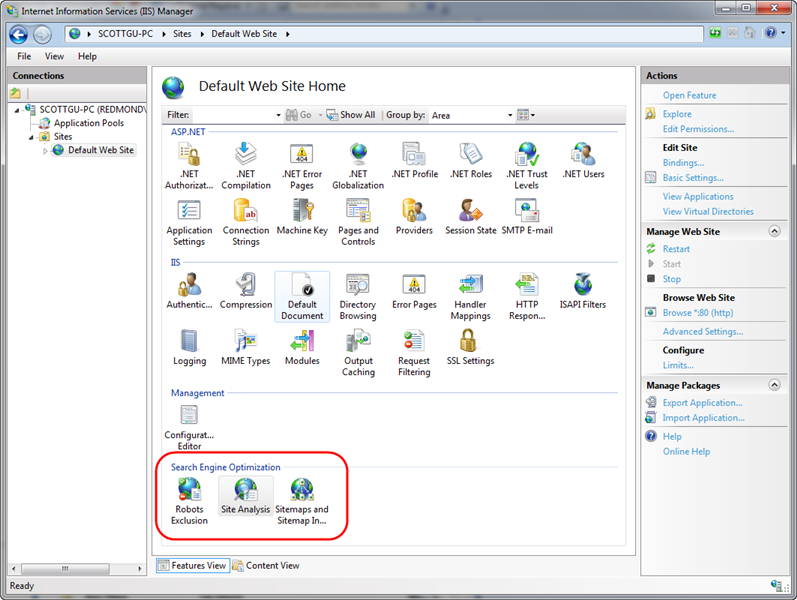
Once installed, you’ll find a new “Search Engine Optimization” section within the IIS 7 admin tool, and several SEO tools available within it:
The Robots and SiteMap tools enable you to easily create and manage robots.txt and sitemap.xml files for your site that help guide search engines on what URLs they should and shouldn’t crawl and follow.
The Site Analysis tool enables you to crawl a site like a search engine would, and then analyze the content using a variety of rules that help identify SEO, Accessibility, and Performance problems within it.
Using the IIS SEO Toolkit’s Site Analysis Tool
Let’s take a look at how we can use the Site Analysis tool to quickly review SEO issues with a site. To avoid embarrassing anyone else by turning the tool loose on their site, I’ve decided to instead use the analysis tool on one of my own sites: www.scottgu.com. This is a site I wrote many years ago (last update in 2005 I think). If you install the IIS SEO Toolkit you can point it at my site and duplicate the steps below to drill into the SEO analysis of it.
Open the Site Analysis Tool
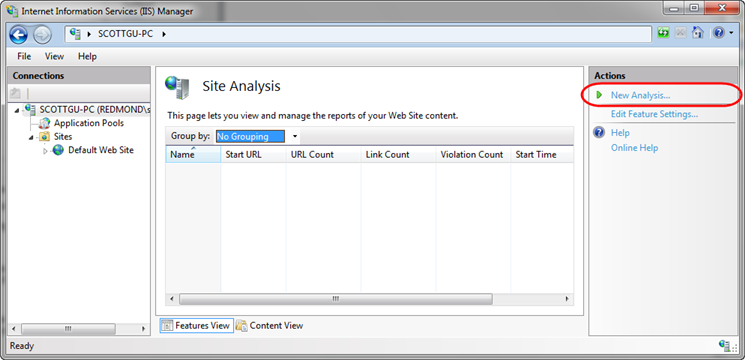
We’ll begin by launching the IIS Admin Tool (inetmgr) and clicking on the root node in the left-pane tree-view of the IIS7 admin tool (the machine name – in this case “Scottgu-PC”). We’ll then select the “Site Analysis” icon within the Search Engine Optimization section on the right. Opening the Site Analysis tool at the machine level like this will allow us to run the analysis tool against any remote server (if we had instead opened it with a site selected then we would only be able to run analysis against local sites on the box).
Opening the Site Analysis tool causes the below screen to display – it lists any previously saved site analysis reports that we have created in the past. Since this is the first time we’ve opened the tool, it is an empty list. We’ll click the “New Analysis” action link on the right-hand side of the admin tool to create a new analysis report:
Clicking the “New Analysis” link brings up a dialog like below, which allows us to name the report as well as configure what site we want to crawl and how deep we want to examine it.
We’ll name our new report “scottgu.com” and configure it to start with the http://www.scottgu.com URL and then crawl up to 10,000 pages within the site (note: if you don’t see a “Start URL” textbox in the dialog it is because you didn’t select the root machine node in the left-hand pane of the admin tool and instead opened it at the site level – cancel out, select the root machine node, and then click the Site Analysis link).
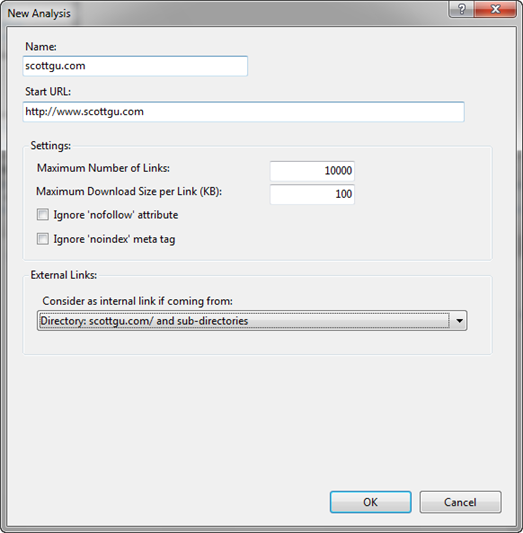
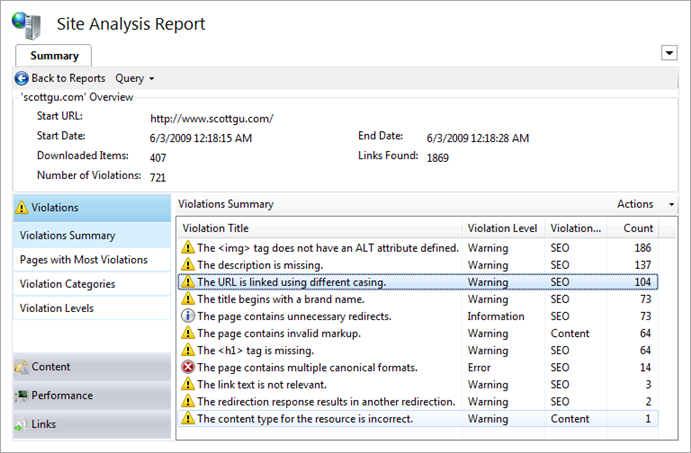
When we click the “Ok” button in the dialog above the Site Analysis tool will request the http://www.scottgu.com URL, examine the returned HTML content, and then crawl the site just like a search engine would. My site has 407 different URLs on it, and it only took 13 seconds for the IIS SEO Toolkit to crawl all of them and perform analysis on the content that was downloaded.
Once it is done it will open a report summary view detailing what it found. Below you can see that it found 721 violations of various kinds within my site (ouch):
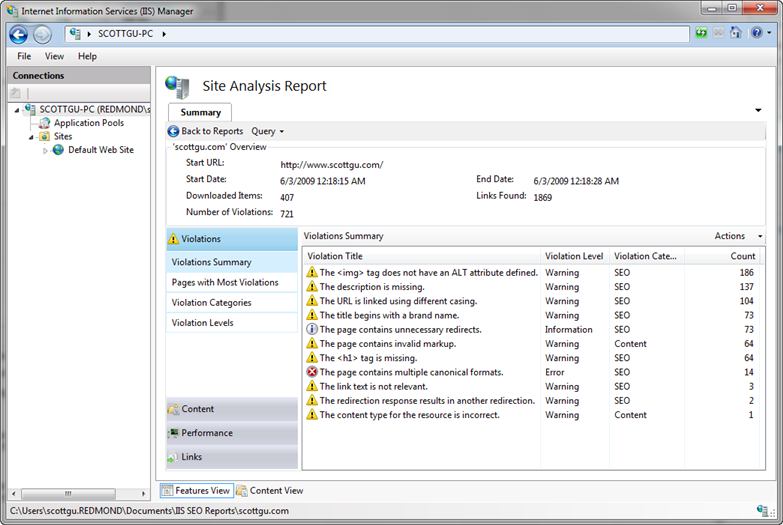
We can click on any of the items within the violations summary view to drill into details about them. We’ll look into a few of them below.
Looking at the “description is missing” violations
You’ll notice above that I have 137 “The description is missing” violations. Let’s double click on the rule to learn more about it and see details about the individual violations. Double clicking the description rule above will open up a new query tab that automatically provides a filtered view of just the description violations (note: you can customize the query if you want – and optionally export it into Excel if you want to do even richer data analysis):
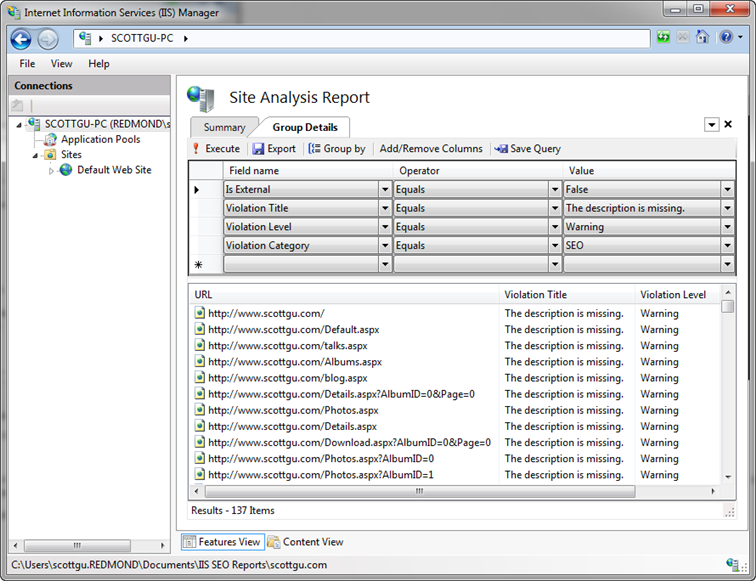
Double clicking any of the violations in the list above will open up details about it. Each violation has details about what exactly the problem is, and recommended action on how to fix it:
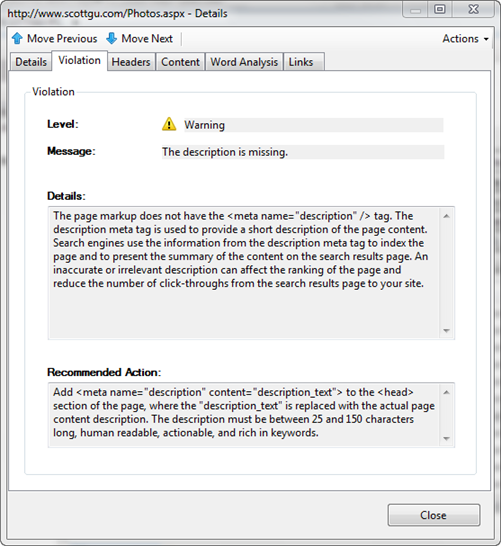
Notice above that I forgot to add a <meta> description element to my photos page (along with all the other pages too). Because my photos page just displays images right now, a search engine has no way of knowing what content is on it. A 25 to 150 character long description would be able to explain that this URL is my photo album of pictures and provide much more context.
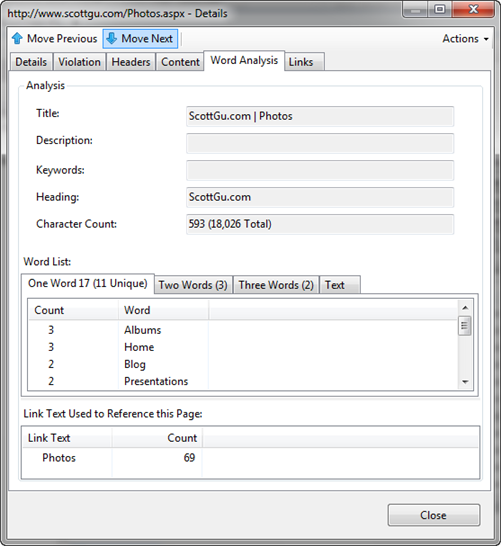
The “Word Analysis” tab is often useful when coming up with description text. This tab shows details about the page (its title, keywords, etc) and displays a list of all words used in the HTML within it – as well as how many times they are duplicated. It also allows you to see all two-word and three-word phrases that are repeated on the page. It also lists the <a> text used on other page to link to this page – all of which is useful to come up with a description:
Looking at the URL is linked using different casing violations
Let’s now at the “URL is linked using different casing” violations. We can do this by going back to our summary report page and by then clicking on this specific rule violation:
Search engines count the number of pages on the Internet that link to a URL, and use that number as part of the weighting algorithm they use to determine the relevancy of the content the URL exposes. What this means is that if 1000 pages link to a URL that talks about a topic, search engines will assume the content on that URL has much higher relevance than a URL with the same topic content that only has 10 people linking to it.
A lot of people don’t realize that search engines are case sensitive, though, and treat differently cased URLs as different actual URLs. That means that a link to /Photos.aspx and /photos.aspx will often be treated not as one URL by a search engine – but instead as two different URLs. That means that if half of the incoming links go to /Photos.aspx and the other half go to /photos.aspx, then search engines will not credit the photos page as being as relevant as it actually is (instead it will be half as relevant – since its links are split up amongst the two). Finding and fixing any place where we use differently cased URLs within our site is therefore really important.
If we click on the “URL is linked using different casing” violation above we’ll get a listing of all 104 URLs that are being used on the site with multiple capitalization casings:
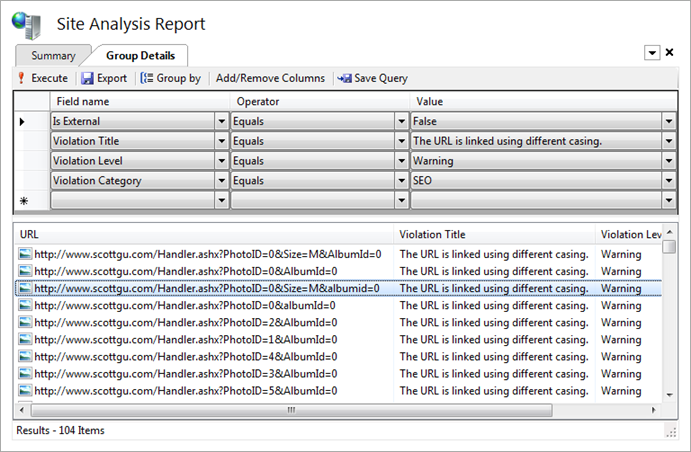
Clicking on any of the URLs will pull up details about that specific violation and the multiple ways it is being cased on the site. Notice below how it details both of the URLs it found on the site that differ simply by capitalization casing. In this case I am linking to this URL using a querystring parameter named "AlbumId". Elsewhere on the site I am also linking to the URL using a querystring parameter named "albumid" (lower-case “a” and “i”). Search engines will as a result treat these URLs as different, and so I won’t maximize the page ranking for the content:
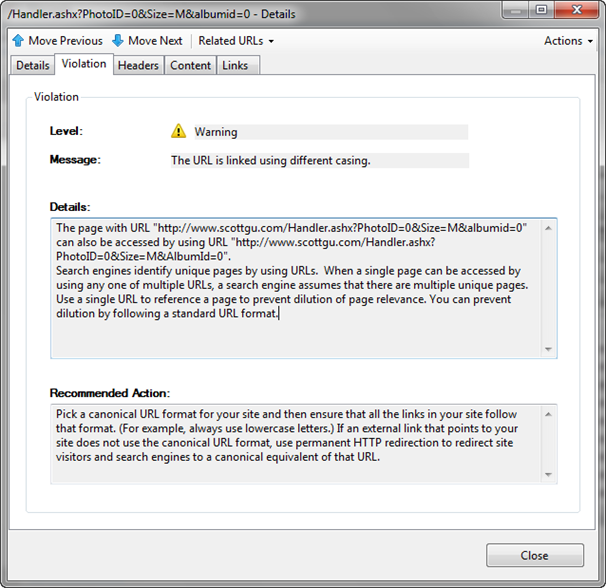
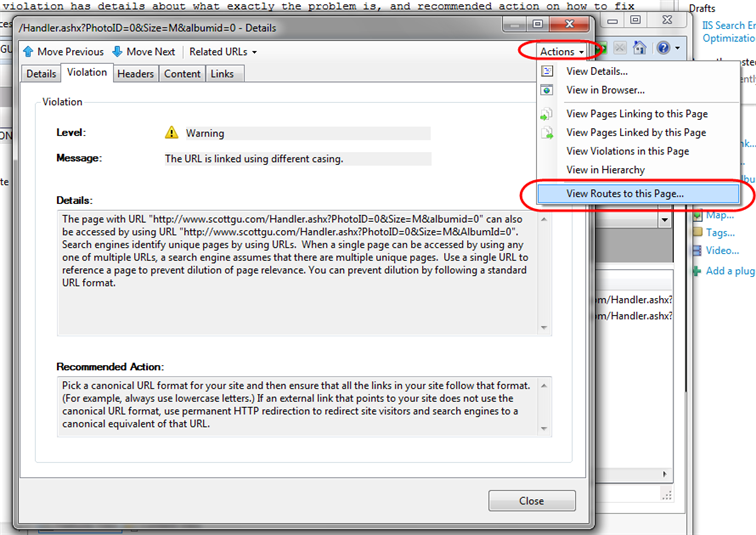
Knowing there is a problem like this in a site is the first step. The second step is typically harder: trying to figure out all the different paths that have to be taken in order for this URL to be used like this. Often you’ll make a fix and assume that fixes everything – only to discover there was another path through the site that you weren’t aware of that also causes the casing problem. To help with scenarios like this, you can click the "Actions" dropdown in the top-right of the violations dialog and select the "View Routes to this Page" link within it.
This will pull up a dialog that displays all of the steps the crawler took that led to the particular URL in question being executed. Below it is showing that it found two ways to reach this particular URL:
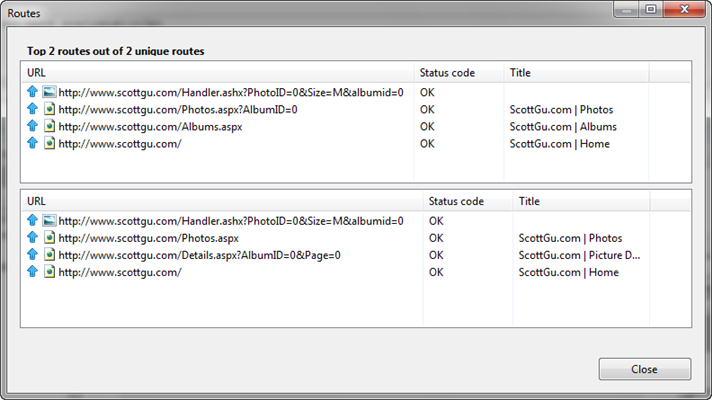
Being able to get details about the exact casing problems, as well as analyze the exact steps followed to reach a particular URL casing, makes it dramatically easier to fix these types of issues.
Looking at the page contains multiple canonical format violations
Fixing the casing issues like we did above is a good first step to improving page counts. We also want to fix scenarios where the same content can be retrieved using URLs that differ by more than casing. To do this we’ll return to our summary page and pull up the “page contains multiple canonical format violations” report:
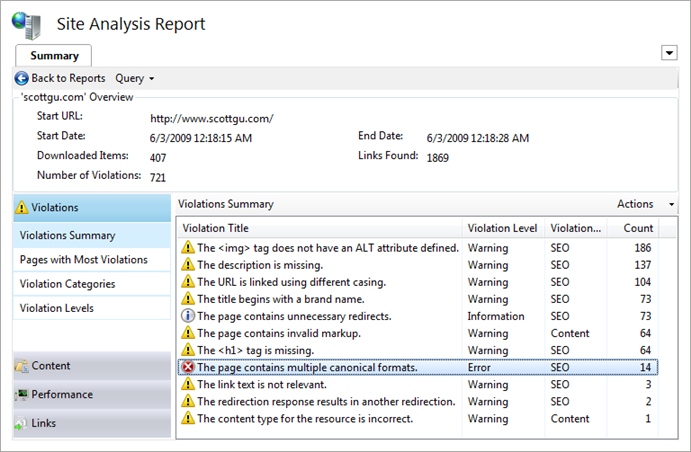
Drilling into this report lists all of the URLs on our site that can be accessed in multiple “canonical” ways:
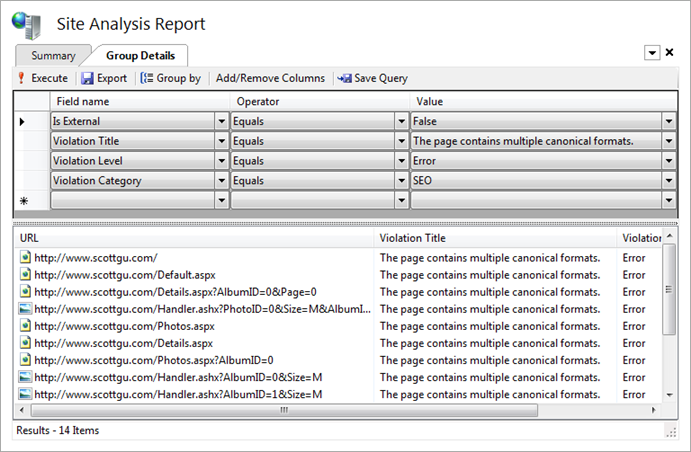
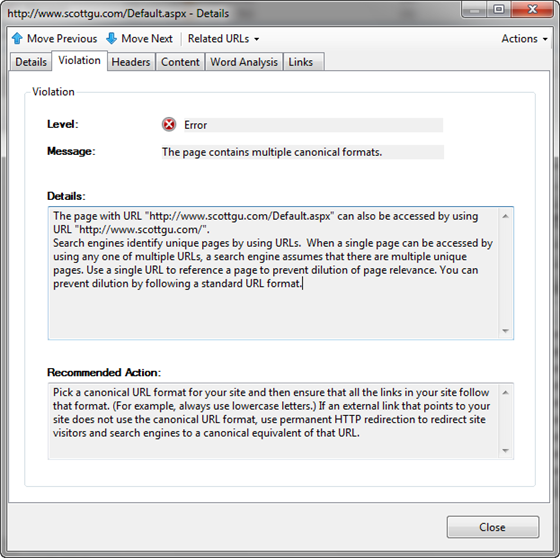
Clicking on any of them will pull up details about the issue. Notice below how the analysis tool has detected that sometimes we refer to the home page of the site as "/" and sometimes as "/Default.aspx". While our web-server will interpret both as executing the same page, search engines will treat them as two separate URLs – which means the search relevancy is not as high as it should be (since the weighting gets split up across two URLs instead of being combined as one).
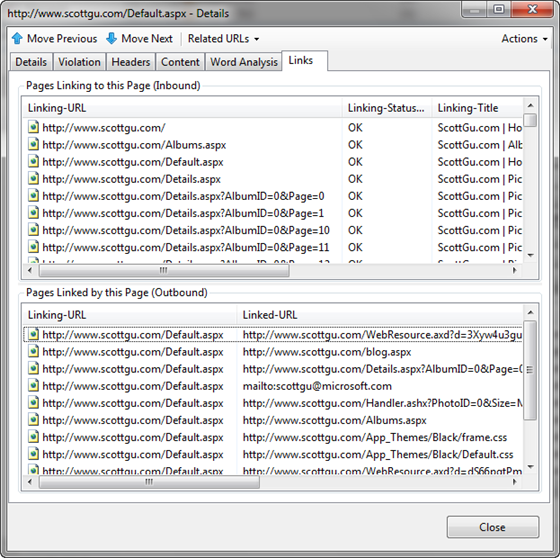
We can see all of the cases where the /Default.aspx URL is being used by clicking on the “Links” tab above. This shows all of the pages that link to the /Default.aspx URL, as well as all URLs that it in turn links to:
We can switch to see details about where and how the related “/” URL is being used by clicking the “Related URLs” drop-down above – this will show all other URLs that resolve to the same content, and allow us to quickly pull their details up as well:
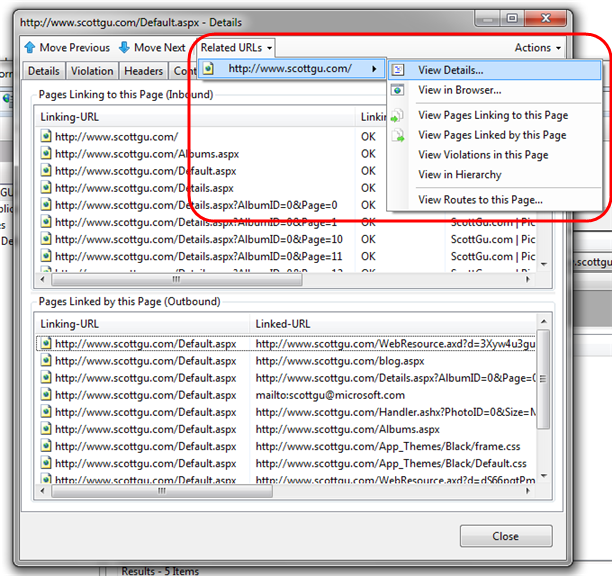
Like we did with the casing violations, we can use the “View Routes to this Page” option to figure out of all the paths within the site that lead to these different URLs and use this to help us hunt down and change them so that we always use a common consistent URL to link to these pages.
Note: Fixing the casing and canonicalization issues for all internal links within our site is a good first step. External sites might also be linking to our URLs, though, and those will be harder to all get updated. One way to fix our search ranking without requiring the externals to update their links is to download and install the IIS URL Rewrite module on our web server (it is available as a free download using the Microsoft Web Platform Installer). We can then configure a URL Rewrite rule that automatically does a permanent redirect to the correct canonical URL – which will cause search engines to treat them as the same (read Carlos’ IIS7 and URL Rewrite: Make your Site SEO blog post to learn how to do this).
Looking up redirect violations
As a last step let’s look at some redirect violations on the site:
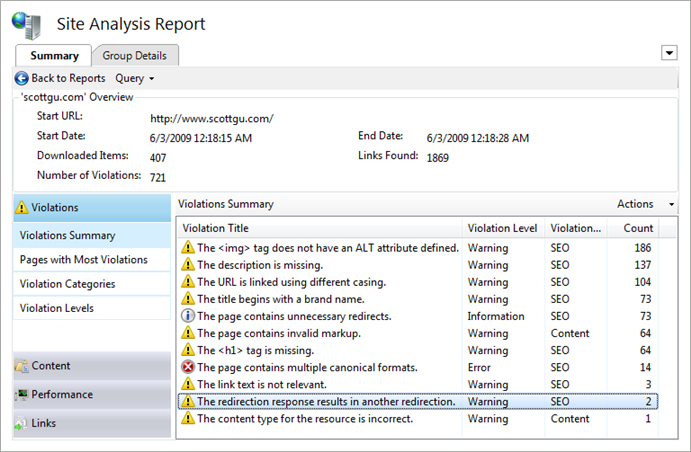
Drilling into this rule category reminded me of something I did a few years ago (when i transferred my blog to a different site) – that I just discovered was apparently pretty dumb.
When I first setup the site I had originally had a simple blog page at: www.scottgu.com/blog.aspx After a few weeks, I decided to move my blog to weblogs.asp.net/scottgu. Rather than go through all my pages and change the link to the new address, I thought I’d be clever and just update the blog.aspx page to do a server-side redirect to the new weblogs.asp.net/scottgu URL.
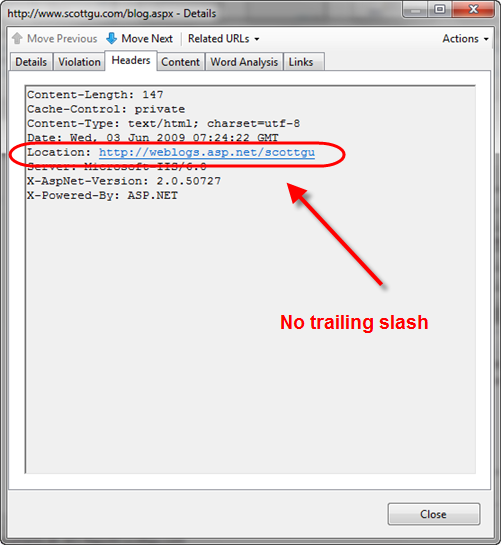
This works from an end-user perspective, but what I didn’t realize until I ran the analysis tool today was that search engines are not able to follow the link. The reason is because my blog.aspx page is doing a server-side redirect to the weblogs.asp.net/scottgu URL. But for SEO reasons of its own, the blog software (Community Server) on weblogs.asp.net is in turn doing a second redirect to fix the incoming weblogs.asp.net/scottgu URL to instead be http://weblogs.asp.net/scottgu/ (note the trailing slash is being added).
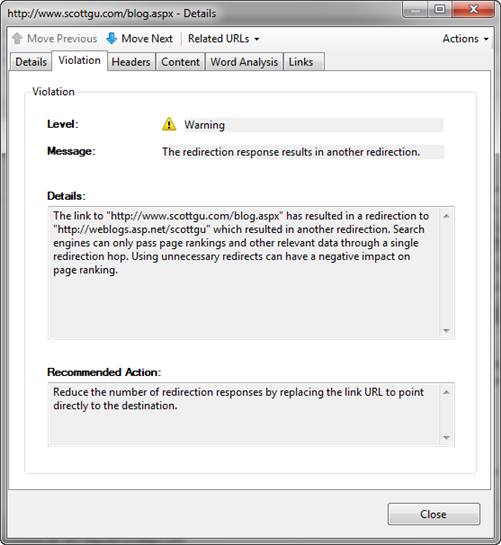
According to the rule violation in the Site Analysis tool, search engines will give up when you perform two server redirects in a row. It detected that my blog.aspx redirect links to an external link that in turn does another redirect – at which point the search engine crawlers give up:
I was able to confirm this was the problem without having to open up the server code of the blog.aspx page. All I needed to-do was click the "Headers" tab within the violation dialog and see the redirect HTTP response that the blog.aspx page sent back. Notice it doesn’t have a trailing slash (and so causes Community Server to do another redirect when it receives it):
Fixing this issue is easy. I never would have realized I actually had an issue, though, without the Site Analysis tool pointing me to it.
Future Automatic Correction Support
There are a bunch of additional violations and content issues that the Site Analysis tool identified when doing its crawl of my web-site. Identifying and fixing them is straight-forward and very similar to the above steps. Each issue I fix makes my site cleaner, easier to crawl, and helps it have even higher search relevancy. This in turn will generate an increase of traffic coming to my site from search engines – which is a very cost effective return on investment. Once a report is generated and saved, it will show up in the list of previous reports within the IIS admin tool. You can at any point right-click it and tell the IIS SEO Toolkit to re-run it – allowing you to periodically validate that no regressions have been introduced.
The preview build of the Site Analysis tool today verifies about 50 rules when it crawls a site. Over time we’ll add more rules that check for additional issues and scenarios. In future preview releases you’ll also start to see even more intelligence built-into the SEO Analysis tool that will allow it to also verify on the server-side that you have the URL Rewrite module installed with a good set of SEO-friendly rules configured. The Site Analysis tool will also allow you to fix certain violations automatically by suggesting rewrite rules that you can add to your site from directly within the site analysis report tool (for example: to fix issues like the “/” and “/Default.aspx” canonicalization issue we looked at before). This will make it even easier to help enforce good SEO on the site. Until then, I’d recommend reading these links to learn more about manually configuring URL Rewrite for SEO:
Summary
The IIS Search Engine Optimization Toolkit makes it easy to analyze and assess how search engine friendly your web-site is. It pinpoints SEO violations, and provides instructions on how to fix them. You can learn more about the toolkit and how to best take advantage of it from these links:
The IIS Search Engine Optimization Toolkit is free, takes less than a minute to install, and can be run against any existing web-server or web-site. There is no need to install anything on a remote server to use it – just type in the URL of the site and you’ll get a report back a site analysis report with actionable items that that you can use immediately to improve it.
Today’s release is a beta release, so please use the IIS Search Engine Optimization Toolkit Forum to let us know if you run into any issues or have feature suggestions.
Hope this helps,
Scott



