by community-syndication | Apr 12, 2010 | BizTalk Community Blogs via Syndication
Earlier in March, we informed you about the upcoming commercial availability of Windows Azure platform AppFabric. Today, we are absolutely thrilled to let you know that AppFabric has now become a fully SLA-supported paid service. Customers using AppFabric will see billing information in their accounts, as usage charges have begun accruing as of 11:00 PM (UTC) on April 12, 2010.
Windows Azure platform AppFabric includes Service Bus and Access Control services. AppFabric Service Bus connects services and applications across network boundaries to help developers build distributed applications. AppFabric Access Control provides federated, claims-based access control for REST web services.
You can find pricing for AppFabric here. You can also go to the pricing section of our FAQs for additional information as well as our AppFabric pricing blog post. If you do not wish to be charged for AppFabric, please discontinue use of these services.
Also, we are happy to let you know that the Microsoft Windows Azure Platform, including Windows Azure, SQL Azure, and Windows Azure platform AppFabric has expanded general availability to an additional 20 countries, making our flexible cloud services platform available to a global customer base and partner ecosystem across 41 countries. Details about this announcement are available here.
Thank you for your business and your continued interest in AppFabric.
The Windows Azure platform AppFabric Team
by community-syndication | Apr 12, 2010 | BizTalk Community Blogs via Syndication
Note: This blog post is written using Silverlight 4.0 RC 1
One of the cool new features in Silverlight 4 is the ability to data bind to indexed properties. This means that even if you don’t know at design time what properties you data object has you can still data bind to them.
The syntax is very similar to a normal data binding, only in this case you need to use the [key] syntax instead. For example in example below the FirstName is a regular property while the LastName below is an indexed property.
<StackPanel Name="LayoutRoot">
<StackPanel Orientation="Horizontal" Margin="1">
<TextBlock Text="FirstName" Width="150"></TextBlock>
<TextBox Text="{Binding FirstName, Mode=TwoWay}" Width="500"></TextBox>
</StackPanel>
<StackPanel Orientation="Horizontal" Margin="1">
<TextBlock Text="LastName" Width="150"></TextBlock>
<TextBox Text="{Binding [LastName], Mode=TwoWay}" Width="500"></TextBox>
</StackPanel>
</StackPanel>
Creating the class to data bind to is simple. All you need to do is add a property with the following syntax:
public object this[string key]
{ get; set; }
In this example I am using a Peron class with a regular FirstName property and all others are dong using indexed properties. The complete class, including INotifyPropertyChanged looks like this:
public class Person : INotifyPropertyChanged
{
public Person()
{
PropertyChanged = (s, e) => { };
FirstName = "Maurice";
this["LastName"] = "de Beijer";
this["BabyName"] = "Kai";
}
private Dictionary<string, object> _data = new Dictionary<string, object>();
public object this[string key]
{
get
{
if (!_data.ContainsKey(key))
_data[key] = null;
return _data[key];
}
set
{
_data[key] = value;
PropertyChanged(this, new PropertyChangedEventArgs(""));
}
}
public IEnumerable<string> Keys
{
get
{
return _data.Keys;
}
}
private string _firstName;
public string FirstName
{
get
{
return _firstName;
}
set
{
_firstName = value;
PropertyChanged(this, new PropertyChangedEventArgs("FirstName"));
}
}
public event PropertyChangedEventHandler PropertyChanged;
}
While not having to know the objects structure at design time is nice but in the XAML above I still hard coded the data bindings so that doesn’t buy us much yet. So fully utilize this we need to dynamically generate the UI as well. Fortunately that is quite easy to do with the following code:
void MainPage_Loaded(object sender, RoutedEventArgs e)
{
var person = new Person();
DataContext = person;
foreach (var item in person.Keys)
{
var lbl = new TextBlock();
lbl.Text = item;
lbl.Width = 150;
var txt = new TextBox();
var binding = new Binding("[" + item + "]");
binding.Mode = BindingMode.TwoWay;
txt.SetBinding(TextBox.TextProperty, binding);
txt.Width = 500;
var line = new StackPanel();
line.Orientation = Orientation.Horizontal;
line.Children.Add(lbl);
line.Children.Add(txt);
line.Margin = new Thickness(1);
LayoutRoot.Children.Add(line);
}
}
And the result looks like this. The LastName is printed twice because it is both hard coded into the XAML and added dynamically.
A few gotchas I ran into.
While doing this I experimented with using a Dictionary<string, object> as the DataContext itself. That worked file except for the part that this doesn’t implement INotifyPropertyChanged. So i tried to create a Peron class deriving from Dictionary<string, object> and adding a indexer to that but this doesn’t work, data binding completely fails to load the data. The same was try for my own implementation of IDictionary<string, object>.
Another thing was the property name that is used with the INotifyPropertyChanged.PropertyChanged event. It seems using an empty string as the property name is the only thing that works to get other controls to update their binding. Not a big issue but I caught me at first.
Enjoy!
www.TheProblemSolver.nl
Wiki.WindowsWorkflowFoundation.eu
by Richard | Apr 12, 2010 | BizTalk Community Blogs via Syndication
Update 2010-04-13: Grant Samuels commented and made me aware of the fact that inline scripts might in some cases cause memory leaks. He has some further information here and you’ll find a kb-article here.
I’ve posted a few times before on how powerful I think it is in complex mapping to be able to replace the BizTalk Mapper with a custom XSLT script (here’s how to.aspx)). The BizTalk Mapper is nice and productive in simpler scenarios but in my experience it break down in more complex ones and maintaining a good overview is hard. I’m however looking forward to the new version of the tool in BizTalk 2010 – but until then I’m using custom XSLT when things gets complicated.
Custom XSLT however lacks a few things once has gotten used to have – such as scripting blocks, clever functoids etc. In some previously post (here and here) I’ve talked about using EXSLT as a way to extend the capabilities of custom XSLT when used in BizTalk.
Bye, bye external libraries – heeeello inline scripts 😉
Another way to achieve much of the same functionality even easier is to use embedded scripting that’s supported by the XslTransform class. Using a script block in XSLT is easy and is also the way the BizTalk Mapper makes it possible to include C# snippets right into your maps.
Have a look at the following XSLT sample:
<?xml version="1.0" encoding="utf-8"?>
<xsl:stylesheet
    version="1.0"
    xmlns:xsl="http://www.w3.org/1999/XSL/Transform"
    xmlns:msxsl="urn:schemas-microsoft-com:xslt"
    xmlns:code="http://richardhallgren.com/Sample/XsltCode"
    exclude-result-prefixes="msxsl code"
    >
    <xsl:output method="xml" indent="yes"/>

    <xsl:template match="@* | node()">
        <Test>
            <UniqueNumber>
                <xsl:value-of select="code:GetUniqueId()" />
            </UniqueNumber>
            <SpecialDateFormat>
                <xsl:value-of select="code:GetInternationalDateFormat('11/16/2003')" />
            </SpecialDateFormat>
            <IncludesBizTalk>
                <xsl:value-of select="code:IncludesSpecialWord('This is a text with BizTalk in it', 'BizTalk')" />
            </IncludesBizTalk>
        </Test>
    </xsl:template>

    <msxsl:script language="CSharp" implements-prefix="code">
        //Gets a unique id based on a guid
        public string GetUniqueId()
        {
            return Guid.NewGuid().ToString();
        }

        //Formats US based dates to standard international
        public string GetInternationalDateFormat(String date)
        {
            return DateTime.Parse(date, new System.Globalization.CultureInfo("en-US")).ToString("yyyy-MM-dd");
        }

        //Use regular expression to look for a pattern in a string
        public bool IncludesSpecialWord(String s, String pattern)
        {
            Regex rx = new Regex(pattern);
            return rx.Match(s).Success;
        }
    </msxsl:script>
</xsl:stylesheet>
All one has to do is to define a code block, reference the xml-namespace used and start coding! Say goodbye to all those external library dlls!
It’s possible to use a few core namespaces without the full .NET namespace path but all namespaces are available as long as they are fully qualified. MSDN has a great page with all the details here.aspx).

by community-syndication | Apr 12, 2010 | BizTalk Community Blogs via Syndication
The next ACUSG meeting is confirmed for Thursday the 6th of May at 5:30pm (presentation starts at 6:00pm). Don’t forget to register if you are attending. Free drinks and pizza as always!
BizTalk Roadmap
Location: Datacom Systems Limited, 210 Federal Street, Auckland CBD, Auckland, 1141. Parking on the street around Datacom. There is […]

by community-syndication | Apr 11, 2010 | BizTalk Community Blogs via Syndication
We are very excited to announce our latest Pluralsight On-Demand! feature for customers located within India – regional pricing and delivery! Ultimately, this means India-based developers will benefit from a more cost-effective pricing option to access Pluralsight On-Demand! training from within the India region. We are launching the beta program for this regional model during TechEd India 2010, the Visual Studio 2010 Global Launch event held in Bangalore, India this week.
As part of that beta program, all TechEd India 2010 attendees are eligible to receive a free 1-month subscription to Pluralsight On-Demand, no strings attached. Look for the Pluralsight activation code within your attendee materials and activate by April 18, 2010. If you activate after April 18th, the code will give you a free 1-week subscription.
In addition to regional pricing, Pluralsight On-Demand! also now takes advantage of a worldwide content distribution network for regional delivery of our training videos. This new feature will ultimately help our customers all over the world receive the best possible performance including those customers located in the India region (more details here)
I am personally onsite in Bangalore this week for this exciting announcement. I’m looking forward to engaging with our India customers during the event and hope to learn more about their needs this market. If you’re attending TechEd India 2010 this week, come visit me at the Pluralsight/Infragistics booth and say hello. I will be there throughout the show. I’d love the opportunity to talk to you about what you look for in training, and what we can do to make the Pluralsight experience better for you in India. You can follow me on Twitter throughout the week on @skonnard.
Also, if you’re a Microsoft MVP, RD, or local User Group leader in India, be sure to come by the booth and introduce yourself to me. I have something special to give you for helping improve the Microsoft developer community!
You can read the full Pluralsight press release here.
Happy learning.


by community-syndication | Apr 11, 2010 | BizTalk Community Blogs via Syndication
We’re excited to announce that Pluralsight On-Demand! now takes advantage of a worldwide content distribution network to deliver our training videos to customers all over the world. This ultimately helps our customers receive the best possible user experience when accessing our training library from locations far from our central servers.
When accessing a video through the Pluralsight On-Demand! website, the request is now routed to the nearest edge-caching server. If that cache location doesn't yet have a copy of that particular video, it requests it from the central servers and immediately begins streaming it to you, caching the video as it goes. If your local cache location already has the video, you'll get it served from the cache location immediately, which is typically much closer than our central servers, depending on where you are located. Hence, as Pluralsight On-Demand! usage grows, subscribers will continue to see the best possible performance when accessing the videos from our library.
Our 14 edge caching servers are located all around the world in the following major cities; Ashburn, VA, Dallas/Fort Worth, TX, Los Angeles, CA, Miami, FL, Newark, NJ, Palo Alto, CA, Seattle, WA, St. Louis, MO, Amsterdam, Dublin, Frankfurt, London, Singapore, Hong Kong and Tokyo. And there will be more coming in the future.

by community-syndication | Apr 11, 2010 | BizTalk Community Blogs via Syndication
In Part 2 of this series we discussed how you can receive IDocs from SAP in flat file format in order to avoid tight coupling with the version of SAP you are running as discussed in Post 1.
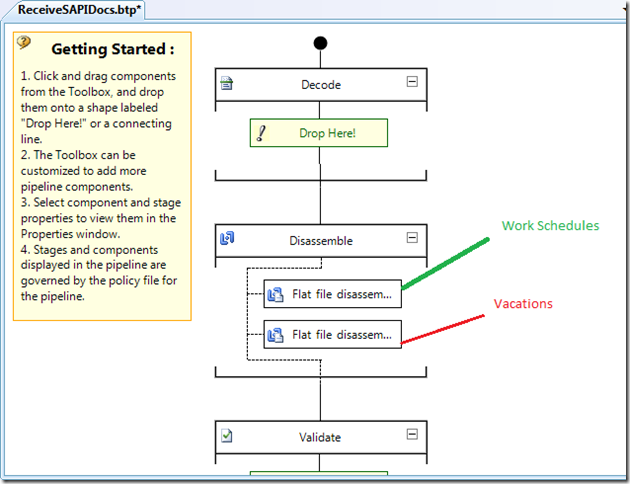
As I alluded to in the end of the Part 2 post, there is an issue when you include more than 1 IDoc schema in a Receive Pipeline that will be use the same Program ID and Receive location.
The behavior that I experienced when working through this scenario is the first message in my pipeline would be processed successfully but the second type(Vacations) would not.
When I tried to process my 2nd type of IDoc (Employee Vacations) I would get the following error:
Event Type: Error
Event Source: BizTalk Server 2009
Event Category: (1)
Event ID: 5719
Date: 4/11/2010
Time: 10:10:49 AM
User: N/A
Computer: *BizTalk Server*
Description:
There was a failure executing the receive pipeline: "SAPVersions.ReceiveSAPIDocs, SAPVersions, Version=1.0.0.0, Culture=neutral, PublicKeyToken=147585b889447deb" Source: "Flat file disassembler" Receive Port: "ReceiveIDocsFromSAP" URI: "sap://CLIENT=XX;LANG=EN;@a/SAPSERVER/XX?ListenerGwServ=sapgwXX&ListenerGwHost=SAPSERVERci&ListenerProgramId=*ProgramID*&RfcSdkTrace=False&AbapDebug=False" Reason: Unexpected data found while looking for:
‘Z2HR_WS_SEG000’
The current definition being parsed is idocData. The stream offset where the error occured is 520. The line number where the error occurred is 2. The column where the error occured is 0.
For more information, see Help and Support Center at http://go.microsoft.com/fwlink/events.asp.
In the rest of the post I will discuss how you can fix this problem manually and then discuss the Hot Fix from Microsoft that addresses this situation. I recommend proceeding with the Hot Fix route as it is a more sustainable solution. The manual steps include modifying a schema that was generated by the Consume Adapter Service Wizard. The risk is you can manually modify one of these schemas only to have a colleague regenerate the schema and overwrite your manual change. If you do proceed with the Hot Fix route you will want to ensure any other developers that will be generating IDoc schemas are also using this Hot Fix. I also want to highlight that this Hot Fix should be applied to developer’s workstations as this fix addresses a design time issue.
Fixing issue manually
- Open up your schema that contains the “meat” of your IDoc information in an XML Editor view. Whenever you generate SAP IDoc schemas you are bound to have multiple XSD schemas created. You can expect 1 IDoc that includes the various complex types, another that acts as the “Request” container IDoc, a Response xsd and the “meat” xsd which will include most of the “core” details of the schema.
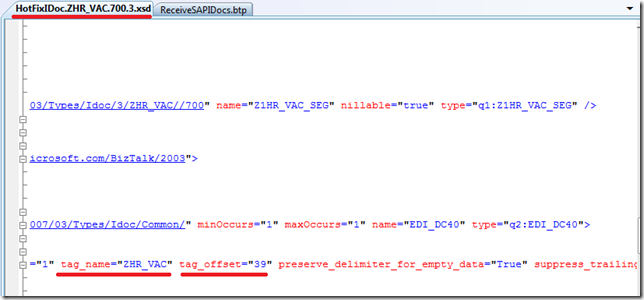
- Scroll down until you find a section that includes tag_name=”EDI_DC40” tag_offset="0" and replace it with tag_name="ZHR_VAC" tag_offset="39" where “ZHR_WS” is the name of your IDoc type.


- What you will find as you open your schemas is that all of them will have this tag_name="EDI_DC40" tag_offset="0" string included in the IDoc which prevents BizTalk from distinguishing one IDoc from another.
- Once you have modified all IDocs in this fashion, redeploy and you should find that both(in my case) IDocs were processed successfully.

Fixing issue with HotFix
- In KB977528 Microsoft describes the issue as “This problem occurs because the first Flat file disassembler pipeline component in the custom pipeline tries to disassemble all the IDOCs that are received. However, the IDOCs should be processed by different Flat file disassembler components that have different schemas”.
- When using the HotFix, you download schemas the same way as you previously did
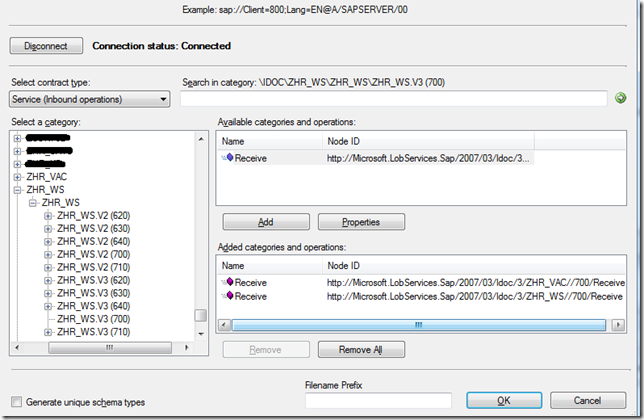
- Note when you open up the schema, you will now notice that the same change that we applied manually has now been incorporated into the schema definition automatically.
- If you have changed the name of you XSD files, make sure you update your receive pipeline, deploy and restart your host instance(s). You should now be able to receive both types of flat file IDocs without issue

Note:
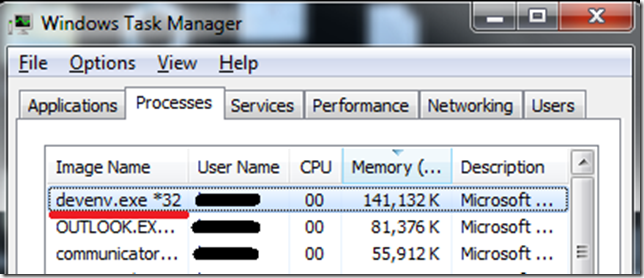
My developer workstation is a 64 bit machine so when I navigated to the Hot Fix Web site it detected that my system was a 64 bit system and provided me with a 64 bit patch. The problem is that Visual Studio runs in 32 bit mode and since this fix is a design time issue my issue was not resolved until I downloaded the 32 bit version of this KB. I logged onto a 32 bit machine and navigate to the same site in order to get the 32 bit fix.
Thus far we have been focusing on receiving IDocs. A reader has asked if I can demonstrate how to sent a flat file schema to SAP using the BizTalk Adapter Pack so that will be the next post in this series.
by community-syndication | Apr 11, 2010 | BizTalk Community Blogs via Syndication
Mike Stephenson has recorded a couple of webcasts focusing on build and test in BizTalk Server 2009. These are part of the “BizTalk Light & Easy” series of webcasts created by some of the BizTalk Server MVPs.
Testing BizTalk Applications
Implementing an Automated Build Process with BizTalk Server 2009

by community-syndication | Apr 10, 2010 | BizTalk Community Blogs via Syndication
My title was suspended this week and now its activated again. I was missing my MVP tag from forums and I am happy to see it back again. I thankMicrosoft again for resolving my NDA issue. I would like to thankmy nominator, fellowMVPs, my MVP leads and the Program manager for Global MVP program as […]

by community-syndication | Apr 10, 2010 | BizTalk Community Blogs via Syndication
Below you’ll find the demo code for all of my presentations at the Dutch DevDays 2010 event last week. It was a great event, thanks to Arie Leeuwesteijn and the rest of his team. Thanks again for having me!
You can also find many of the DevDays 2010 session recordings on Channel9.
One of my favorite memories from the show was when my laptop decided to apply a Windows Update and reboot right in the middle of one of my presentations – I’m oblivious to it but the smiles gave it away: 😉

This event had over 2000+ paid attendees this year, which is nearly the size of a large TechEd event, but it’s organized locally by Microsoft DE (Arie and his team). It keeps growing every year and has become one of the most successful regional events I’ve seen. Everything is top notch. The speaker line-up this was nothing short of amazing.
Also, every DevDays attendee received a free 1-week pass to Pluralsight On-Demand! (look for the plastic card in your attendee bag). Don’t forget to activate the card before it expires.
To get a full taste of the event, check out our DevDays 2010 Facebook photo album on the Pluralsight Training page.
Enjoy!




