by community-syndication | Sep 16, 2010 | BizTalk Community Blogs via Syndication
This is probably not my most ’appealing’ post but I thought I mention it anyway. I recently discovered the ’Hide property schemas’ feature in the BizTalk Administration Console. You can right click in the schema view and select ’Hide property schemas’. It is obvious that after enabling it, the deployed property schemas are hidden from […]
by community-syndication | Sep 16, 2010 | BizTalk Community Blogs via Syndication
The next major release of BizTalk Server is just around the corner. Microsoft has had some of the new features brewing since before BizTalk Server 2009. Others have been long sought after functionality that have yielded many third party components to fill the gap. In an industry where change is always on the horizon the one thing that remains constant is the question of readiness. Are you prepared for the launch of BizTalk Server 2010?
Let’s drill into some of the new features to find out what it can provide your organization.
Enhanced BizTalk Mapper
One of the features, that will stand out the most as you open up Visual Studio 2010 to create your first new BizTalk Server 2010 project, is the new and improved BizTalk Mapper. New features include:
- Ability to search a map for a given schema node, or functoid
- Ability to cut, copy, and paste functoids and links between maps and pages
- Cleaner display of map links based on how related they are to schema nodes within the view
- Automatic highlighting of links and functoids related to the active selection
- Automatic scrolling into view of links and functoids related to the active selection
- Simplified configuration UI for functoids (e.g., the scripting functoid has a single tabbed window with which you can fully configure the connections and the script)
- Indicative match functionality that suggests nodes to link
These features and others make dealing with large maps, re-using existing maps, and creating new maps a much more pain free experience. Many of the features the new BizTalk Mapper offers derive from a version of the BizTalk Mapper demoed at PDC in years past – they have more than delivered on what was already demonstrated.
Updated Trading Partner Management (TPM) Capabilities
Another fairly major change within BizTalk Server 2010 is the way in which Parties are configured. Previously, if you had a party with whom you interacted with in multiple ways, there was not a clear way to configure and logically categorize those interactions within the Admin console. BizTalk Server 2010 solves this problem by bringing in the concepts of Business Profiles, and Trading Partner Agreements.
A Business Profile is a singular role that a trading partner could play, or a singular instance of that partner. For example you could have a trading partner that at sometimes will be a vendor, and at other times will be purchasing from your business. Those two roles would become two separate Business Profiles attached to the same party. You could also have a trading partner that has both a US and European division, those could also become separate profiles. Each profile also has related identity and protocol settings that can be configured.
A Trading Partner Agreement is a definition of how two profiles interact, including the selected protocol settings for each side of the communication.
Managing parties in this way still enables rapid change, but also allows for logical organization and consistency for those partners who interact in multiple ways with your enterprise.
Adapter & Integration Changes
Since BizTalk Server 2009, and even somewhat earlier, we have seen BizTalk adapters in a slow but steady migration over to WCF counterparts. BizTalk Server 2010 continues in this path as the SQL adapter finally rests in peace. The WCF-SQL adapter serves as its replacement (alternatively WCF-Custom using the sqlBinding binding).
In a similar turn of events, the SOAP adapter has also been deprecated in this release, and with it the BizTalk Web Services Publishing Wizard.
This slow migration to WCF-based adapters has not stopped the product team from making key updates to existing adapters however. The FTP adapter has been updated to support both FTPS (not yet SFTP), and read-only FTP locations. This functionality has been long sought after, and a few third party components had been filling this gap. That will no longer be necessary.
BizTalk Server Settings Dashboard
This new feature is not quite as glamorous as some of the others, but is still a huge improvement. The BizTalk Server Settings Dashboard is a new UI for configuring the key performance, throttling, and tracking settings of your entire BizTalk group while offering fine grained control all the way down to the Host Instance level. It combines settings that had previously been strewn about in the Admin Console, the registry, the BizTalk configuration file, and the configuration database, into a single logically organized UI.
Further, it allows you to import/export these settings for transfer between environments (even when the naming of the hosts and host instances does not match the original environment. This is going to be a boon for controlled performance testing, and something to keep in your back pocket.
Updated Platform Support
This release of BizTalk Server will no longer be supported on Windows Server 2003. Instead the minimum requirement will be raised to Windows Server 2008 with SP2, and it will also support running on Windows Server 2008 R2. If you’re running it for development purposes, it will also support both Windows Vista with SP2 and Windows 7 on the desktop OS side of things.
For development you will now be using Visual Studio 2010 when dealing with BizTalk Server. Visual Studio is, by far, Microsoft’s best IDE to date. I was personally hesitant at first given its whimsical color scheme, however shallow that may be, but the productivity gains ultimately sold me – that, and the fact that it even runs perfectly happily on my netbook.
If you’re not running SQL Server 2008 yet in your environment, you will be. BizTalk Server 2010 supports both SQL Server 2008 SP1, and SQL Server 2008 R2.
How to Obtain BizTalk Server 2010
If you want to start diving into BizTalk Server 2010 now, you can find the link to download the Beta at Microsoft’s BizTalk Landing Page.
QuickLearn also offers a class on BizTalk Server 2010 aimed at developers who would like to update their skills to Microsoft’s latest offering. A preview of that class, and our new self-paced learning environment, can be accessed through the link on the QuickLearn Online Anytime page.
by community-syndication | Sep 16, 2010 | BizTalk Community Blogs via Syndication
Hello readers, It’s time to announce our monthly SO-Aware webinar . This time we are going to focus on BizTalk Server governance using SO-Aware !!!!!!! As many of you know that topic is very close to my heart 🙂 I got to admit that this wasn’t our original…(read more)

by community-syndication | Sep 16, 2010 | BizTalk Community Blogs via Syndication
This post is for everyone reading my blog but not Yossi’s blog, Richard’s blog, Dan’s blog, or Steef-Jan’s blog. (I know, very small chance ). The AppFabric Customer Advisory Team (CAT) (formerly known as BizTalk Rangers) opened a new blog. Their focus is not just on BizTalk Server but now also on Windows Server AppFabric, […]
by community-syndication | Sep 16, 2010 | BizTalk Community Blogs via Syndication
Today we deployed an incremental update to the Access Control Service in the Labs environment. It’s available here: http://portal.appfabriclabs.com. Keep in mind that there is no SLA around this release, but accounts and usage of the service are free while it is in the labs environment.
This release builds on the prior August release of the Access Control Service, and adds the following features:
· Support for OAuth 2.0 Web Server and assertion profiles (http://tools.ietf.org/html/draft-ietf-oauth-v2-10)
· Additional support for X.509 certificate authentication via WS-Trust and Service Identities
· The ability to map Identity Providers to Relying Parties
· Several updates to the Management Web Portal:
o Upload a WS-Fed Metadata file through the portal
o Additional fields uploading encrypting and decrypting certificates
o Expanded support for machine keys (password, symmetric key, and X.509) and creation of valid usage dates
We’ve also added some more documentation and updated samples on our CodePlex project: http://acs.codeplex.com.
For more information about the Access Control Service, see the Channel 9 video at http://channel9.msdn.com/shows/Identity/Introducing-the-new-features-of-the-August-Labs-release-of-the-Access-Control-Service.
Like always, I encourage you to check it out and let the team know what you think.
The Windows Azure AppFabric Team

by community-syndication | Sep 16, 2010 | BizTalk Community Blogs via Syndication
I’m pleased to announce that today we shipped the final release of the Windows Phone 7 Developer Tools. You can download them here.
What is Included?
The Windows Phone 7 Developer Tools package includes everything you need to write awesome applications and games for Windows Phone 7. All of the tools included in it are absolutely free.
The following is installed with the download:
- Visual Studio 2010 Express for Windows Phone – Free edition of VS 2010 for Phone development.
- Express Blend 4 for Windows Phone – Free version of Blend for Windows Phone 7 Development.
- Silverlight for Windows Phone 7 – Rich framework for building great applications for Windows Phone 7.
- XNA Game Studio for Windows Phone 7 – Rich framework that enables you to build great 2D and 3D games for Windows Phone 7.
- Windows Phone Emulator – A hardware accelerated emulator that allows you to run and debug your applications and games without requiring a phone.
- Phone Registration Tool – When you get a device, this allows you to “unlock” the device so you can run/debug your application on it, using your Marketplace account.
All of the above tools and frameworks are packaged into one setup, and everything is free. If you already have Visual Studio 2010, the setup will also add support for Windows Phone 7 development and projects to your full Visual Studio 2010.
Applications and games you build with the tools released today can be uploaded to the Windows Phone Marketplace – which enables any phone consumer to easily download and purchase them directly from their phone. This provides a great way to distribute applications/games that you either get paid for or distribute for free.
Using the Windows Phone 7 Tools
VS 2010 Express for Windows Phone provides a rich development environment for building great phone applications.
Using File->New Project, you can choose from several Silverlight for Windows Phone starter templates when creating new projects. Today’s release adds support for new Panormana and Pivot controls and associated project templates that you can use to create applications that take advantage of these new Windows Phone 7 metaphors:
Selecting the “Panorama Application” template above will cause VS to create a fully working Silverlight for Windows Phone application that uses the Panorama UI metaphor (and the new Silverlight Panorama control):
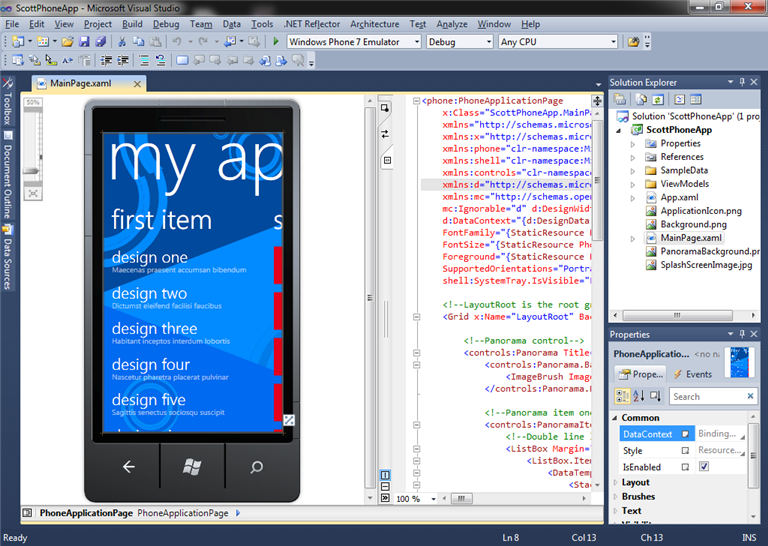
Visual Studio provides a WYSIWYG design-surface (with split-view support for XAML source) for building phone applications using Silverlight. It also provides full code intellisense, debugger and developer tool support.
You can choose to deploy and debug an application on a physical phone device – or alternatively within a built-in phone emulator. Below is a screen-shot of the above application running inside the built-in emulator and being debugged by Visual Studio:

The phone emulator is hardware accelerated, and optionally supports multi-touch monitors (enabling you to easily simulate finger gestures).
Expression Blend for Phone
You can edit projects using both Visual Studio 2010 Express for Phone as well as with Expression Blend for Phone (which is also included for free in the download package). The project file format is the same for both tools – enabling you to create an application in one of the tools and then open it up and edit it in another.
Expression Blend for Phone provides a really powerful environment for creating interactive experiences:

It includes full designer support – including support for animations, storyboards, custom paths, and many other features. It also uses the same phone emulator as VS – enabling you to build and run applications without needing a physical device.
Great Applications Already Happening
We have had hundreds of thousands of downloads of the development tool previews – and are already seeing some awesome applications being built for the Windows Phone 7 launch.
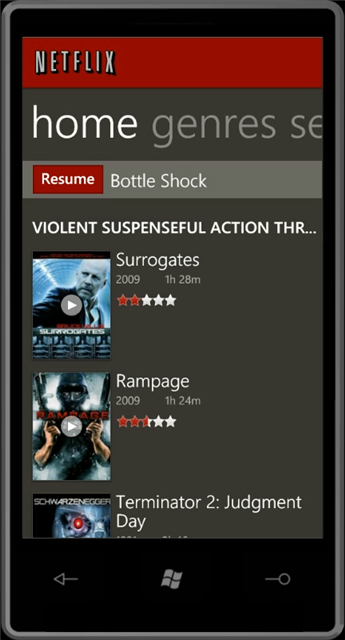
Below are some videos taken of a few applications running on actual Windows Phone 7 hardware devices connected to the web over 3G:
On YouTube, you can search the tag wp7dev to find other demos that have been posted by developers who have been using the previous previews – the demos posted include games, utility applications, data snacking applications, and more.
How to Start Building Windows Phone 7 Apps Now
If you’re a developer who has experience with .NET, Silverlight or XNA, you already have the core skills necessary to start writing a Windows Phone 7 application or game.
We’ve been working hard to get resources and information out to developers so they can be successful writing applications from day one. Since the Windows Phone 7 application platform is Silverlight-based, most articles or information about writing a great Silverlight application is also relevant to the phone. The same is true for XNA articles and information for building games.
Below are some Windows Phone 7 specific links to help get you started:
You can learn more about today’s release from the Windows Phone 7 Blog as well as from this Channel9 video that includes an interview from me.
Silverlight for Windows Phone 7 Toolkit
I’m also pleased to announce that we’re extending the popular Silverlight Toolkit concept to include Windows Phone 7 components as well, with a dedicated release that will be available to download here.
The Windows Phone 7 Toolkit includes the following additional Silverlight controls and components that are customized for the Windows Phone 7 experience:
- ContextMenu
- DatePicker
- TimePicker
- WrapPanel
- ToggleSwitch
- GestureService – adds events for Tap, DoubleTap, Hold, Drag (DragStarted, DragDelta, DragCompleted), Flick and Pinch
This library is delivered both as a binary, as well as with fully buildable and modifiable code licensed under the MS-PL license, and you are free to modify and/or include it in your applications.
You can learn more about using some of the cool controls in the Toolkit from:
Installation Notes
If you have installed previous preview releases of the tools, you will need to completely uninstall those before installing today’s final release. This is also true for the Zune Client if you’ve installed that as well (which is used to sync applications with real devices).
The download of the final Windows Phone 7 Developer Tools release is here.
Summary
We are really excited about the Windows Phone 7 release, and what it means for both consumers and developers.
Today’s tools release provides everything you need to get started building great Windows Phone 7 applications. We are looking forward to seeing what you create!
Hope this helps,
Scott
P.S. In addition to blogging, I am also now using Twitter for quick updates and to share links. Follow me at: twitter.com/scottgu
by community-syndication | Sep 16, 2010 | BizTalk Community Blogs via Syndication
This webcast is based on a real world scenario using Windows Azure Storage Blobs and Queues to transfer 15 GB of files between two laptops located behind firewalls.
The use of Queues and Blobs resulted in a simple but very effective solution that supported load balancing on the download clients and automatic recovery from file transfer errors.
The two client applications took about 30 minutes to develop, the transfer took a total of three hours, and the total cost for bandwidth was under $4.00.
The webcast is here.
by community-syndication | Sep 15, 2010 | BizTalk Community Blogs via Syndication
I’ve been invited to speak tonight at the Spokane .NET Users Group and I’ll be talking about Heresy with MongoDB.
In the back of most developers minds, lingering in their subconscious and waiting to pounce when they least expect it is the nagging concept that not every system in the world is an ideal fit for the structured life of a relational database. Join Microsoft MVP, Tim Rayburn as he reviews MongoDB, a document database, its concepts, ideas and the drivers available to the .NET developer for using this project. Come learn how you may never again have to separate OrderLines from Orders just to make a database happy – and similar approaches used by the likes of Amazon and Google (just to name a few).
by community-syndication | Sep 15, 2010 | BizTalk Community Blogs via Syndication
The IE9 beta was released today, and I’m really excited. Sure, it supports HTML5 and modern web standards, leverages hardware acceleration to make it faster than any other browser on the world, and more. But that’s not what really gets me excited about it. DoKashiteru / CC BY 2.5 For those of you unable to […]
by community-syndication | Sep 15, 2010 | BizTalk Community Blogs via Syndication
IE9 Beta 1 arrived today, and it looks great. The browser wars are back on and getting heated. The IE guys have been getting very bullish about performance on their blog site. See their post from a few days ago at http://blogs.msdn.com/b/ie/archive/2010/09/10/the-architecture-of-full-hardware-acceleration-of-all-web-page-content.aspx. Mozilla got beta 5 of Firefox 4 out of the door a couple of days ago and have hit back hard with various counterclaims see http://www.theregister.co.uk/2010/09/13/mozilla_v_windows_on_hardware_acceleration/. Who is right? Well, as I see it, we have an unwinnable playground spat about who was ‘first’ in GPU acceleration and the undignified sight of both sides claiming to have the fastest browser.
It’s easy to investigate the performance side of things, at least in a casual way. One place to start is the IE9 test site at http://ie.microsoft.com/testdrive/Performance/01FlyingImages/Default.html. Now, of course, this is a Microsoft site and is likely to favour their browser. However, this site has been a work in progress for a long time now, and cannot, as a simple matter of chronology, have been explicitly doctored to show Firefox 4 beta 5 in a bad light. Whatever the truth about why things are as they are, it is clearly the case that Firefox 4 can sometimes rival IE9 performance when running the GPU-orientated demonstration pages on that site. Take ‘Flying Images’ for example. It’s fine if you view ‘My Browser’ or ‘All Browsers’. However, try ‘Fix Photo’ or ‘Large IE Logo’ and see the difference. IE9 is much faster. Try playing Browser Hunt on both browsers (hey, it’s Pac-Man). IE9 wins hands-down.
OK, so these test could be biased. Where else can we turn. Ahha. There is a single test page that Mozilla has been using to demonstrate the wonders of GPU acceleration in Firefox. You will find it at http://demos.hacks.mozilla.org/openweb/HWACCEL/. Let’s do a comparison. Oh my! Firefox 4 is the clear winner. It reports performance 50% faster than IE9. Turns out, though, that this page is no good for comparing hardware acceleration performance between different browsers (Mozilla, of course, never claimed it was). The culprit is the line ‘if (!stop) setTimeout(draw, TO)’ where TO, which is initially 30, tends to a value of 0. As the test speeds up, you just end up measuring the browser-specific resolution of the timer set by the zero-interval call to setTimeout(), rather than the speed of rendering. Differences in rendering are so small that they are hidden by timer resolution characteristics. At least we can say that when using setTimeout() in this way, FF4 is faster than IE9. Maybe MS should change the timer resolution in IE9? Just an idea.
OK. So we can see, as so often with micro benchmarks, that you can pick the test of your choice to ‘prove’ whatever you wish.
Let’s try the SunSpider test.
IE9 Beta 1:383.6 ms
Firefox 4 Beta 5:504.2 ms
Today, IE9 has a faster JavaScript implementation than Firefox 4. That surely is beyond contention. But wait a moment. The Mozilla crew are working an on a new JavaScript engine which they claim will propel them into poll position at some point in the future. Watch this space!
One thing that surprised me going through the Microsoft tests is the number of technologies that the Firefox beta does not seem to support. I ran into issues with SVG, MP3, etc. I was also surprised that, going through Microsoft’s tests, I couldn’t immediately locate any obvious improvement in FF4 over FF3.6 in terms of standards compliance. That surely can’t be right. I haven’t the time to investigate this further, but it was a weird experience to see IE9 happily doing a whole bunch of things Firefox 4 can’t, and doing them in a more standards-compliant fashion. I’m sure, though, that someone could come up with stuff that Firefox handles and which IE9 does not.
I’m going to largely steer clear of commenting further on standards compliance for the simple reason that this is such a fraught area, it needs proper independent assessment. I will say this, though. IE8 made significant improvements, but still fell short in several areas. IE9 is clearly in a different league to previous versions. I’m sure we will see a huge effort to try to trash what Microsoft has achieved and the advent of new web sites dedicated to trying to convince you that IE9 is a failure. However, I expect that IE9 will do rather well when tested independently using official compliance test suites for various specifications, and may even emerge as best-of-breed in a number of areas.
Microsoft has been playing catch-up with the other browser suppliers for a very long time. There are many people in the web development community for whom the notion that IE is a perpetual poor relation to other browsers forms a core part of their belief system. The trouble is that, as often tends to happen over time, the laggards catch up. They may even become the leaders. Some people find this unnerving. Expect an avalanche of claims and counter-claims in the days to come, and lots of red-hot anger and bile. WebGL support seems to be one area of contention currently, so why not use that to have a go at MS, if you are so inclined.
We are seeing the dawn of the end of an era. Of course, older versions of IE (especially IE6) are still widely used and will haunt Microsoft for years to come. The IE6 phenomenon is due to the fact that many corporates have far slower cycles than Microsoft when it comes to technology refresh and remain locked down on this dinosaur of a browser. Anyway, the point is this. IE has now climbed its way fully out of the hole it was in and is back in contention, at least on the Windows platform (multi-platform support is one thing that IE certainly can’t touch). This is a good thing. It results in greater competition and better browsers. IE9 would not exist if it were not for Firefox, Chrome and Safari. Firefox, Chrome and Safari will end up as better, faster, more standards-compliant browsers because of the new ‘threat’ from IE9. We all win. Thanks, Microsoft, and thanks Mozilla, Google and Apple.