
by community-syndication | Oct 5, 2010 | BizTalk Community Blogs via Syndication
Introduction Today I kicked off the install of BizTalk 2010 RTM. On Friday of last week the BizTalk 2010 downloads were made available to MSDN customers and over the weekend the ESB Toolkit 2.1 RTM downloads also became available (http://www.microsoft.com/downloads/en/details.aspx?FamilyID=8b24d2a7-f079-4123-8428-7699e732a736). For some reason the Standard and Enterprise edition downloads are now almost twice the size […]
by community-syndication | Oct 5, 2010 | BizTalk Community Blogs via Syndication
Before I uninstall BizTalk Server 2010 Standard Edition and go back to Developer I thought I’d run one additional test that points to a limit with Standard and a peculiarity “discovered” earlier this year that I can’t take any credit for noticing. It’s blogged about here – In essence: BizTalk Server 2009 Standard supports 6 “custom” BizTalk applications, not just the five that the license mentions. Or rather – It supports 5 additional applications on top of the ones created by install/configure by default (for those of you that do not understand what the term application means at this point, and how it affects us, can read this link). So the question then is – Does this hold true for the 2010 Standard RTM as well?
Sure enough, as you would expect, I am stopped from creating more than 5 additional applications by the following dialog.
I can however rename BizTalk Application 1 and use that for whatever purposes.
I can also just delete the BizTalk Application 1 and create a new application named whatver-I-want.
So. The answer to the question I asked above is – Yes it holds true. BizTalk Server 2010 Standard allows 6 applications on top of the BizTalk.System application, which is read-only. Nothing has changed from 2009 on this account.
by community-syndication | Oct 5, 2010 | BizTalk Community Blogs via Syndication
One of the common tasks in StreamInsight is to use a reference stream to integrate metadata or reference data from a relatively static source (such as a SQL Server table – a walkthrough of this technique will be described in an upcoming blog post). One of the challenges in integrating the reference stream has to do with liveliness; that is to say:
In this diagram we see two streams (data and reference) joined together to create a joined stream, with a LINQ syntax such as:
CepStream<SensorReading> dataStream = ...;
CepStream<SensorMetadata> metadataStream = ...;

var joinedQuery = from e1 in dataStream
                    join e2 in metadataStream
                    on e1.SensorId equals e2.SensorId
                    select e1;
From the diagram above, we see that we’ll only get two output events for (1) and (2). This is as a result of how the StreamInsight engine produces output – based on the application time (which is updated by the CTIs – current time indicators, or how the StreamInsight engine knows it has all of the data required to calculate results). In this case the engine sees:
- I have a time of T5 on the data stream
- I have a time of T0 (ish) on the reference stream
- Since I have joined these two streams together I can only produce output when I have received all of the events for a given time period. Since the reference stream lags behind the data stream, I can only output events at the speed of the reference stream.
In general, this is absolutely the correct behavior. However, we know something about the reference stream that the StreamInsight engine does not – that the reference stream is slowly changing, and we don’t want to wait for it to catch up. That is to say, we want to produce output at the pace of the data stream. How do we do this?
By importing the CTIs from the data stream into the reference stream:
This operation is performed by one of the overloads on the CepStream<>.Create() method, as per the syntax below (reading from this csv file as the sample data source, and this csv file as the sample reference source). The entire project can be downloaded from here (look in the SimpleJoin.cs class).
////////////////////////////////////////////////////////////////////
// Create a time import settings definition that states that a stream
// will import its CTI settings from dataStream
var timeImportSettings = new AdvanceTimeSettings(null,
    new AdvanceTimeImportSettings("dataStream"),
    AdvanceTimePolicy.Adjust);

////////////////////////////////////////////////////////////////////
// Create a reference data stream from the refStream.csv file; use
// the CTIs from the dataStream as defined by the timeImportSettings
// object
CepStream<SensorMetadata> metadataStream = CepStream<SensorMetadata>
    .Create("refStream", typeof(TextFileReaderFactory),
        new TextFileReaderConfig()
        {
                CtiFrequency = 1,
                CultureName = CultureInfo.CurrentCulture.Name,
                Delimiter = ',',
                InputFileName = "refStream.csv"
        }, EventShape.Point, timeImportSettings);
Note that this syntax assumes the presence of a “dataStream” stream. At this point, we should be able to join the two streams and see a steady flow of output. However, if we simply want to look at the raw output of metadata stream as per:
var rawData = metadataStream.ToQuery(cepApp, "MetadataStream", "",
    typeof(TracerFactory), traceConfig, EventShape.Interval,
    StreamEventOrder.FullyOrdered);
Here is the error that is returned:
Error in query: Microsoft.ComplexEventProcessing.ManagementException:
Advance time import stream 'dataStream' does not exist. --->

        Microsoft.ComplexEventProcessing.Compiler.CompilerException:
Advance time import stream 'dataStream' does not exist.
|
Huh? What do you mean the time import stream does not exist? I already defined it! What’s actually happening here is that the import stream has not yet been physically joined with the stream. In order to resolve this issue, you need to join the two streams before binding an output adapter (i.e. creating a query).
////////////////////////////////////////////////////////////////////
// Create a join of the two streams, and bind the output to the
// console
var joinedQuery = from e1 in dataStream
                    join e2 in metadataStream
                    on e1.SensorId equals e2.SensorId
                    select e1;

var query = joinedQuery.ToQuery(cepApp, "JoinedOutput", "",
    typeof(TracerFactory), traceConfig, EventShape.Interval,
    StreamEventOrder.FullyOrdered);
Ok, now let’s look at the output:
REF,Interval from 06/25/2009 00:00:00 +00:00 to 06/25/2009 00:00:00 +00:00:,MySensor_1001,1001,14
REF: CTI at 06/25/2009 00:00:00 +00:00
REF: CTI at 06/25/2009 00:00:09 +00:00
REF: CTI at 12/31/9999 23:59:59 +00:00
|
Huh? Where’s all of my output? Look at the data sources in question – the reference data is a sequence of point events. If we want to truly use it as a reference stream, we need to convert the series of point events into edge events (i.e. this value is good until replaced by a new value). In order to do this, we need to apply an AlterEventDuration and a Clip operator:
// Convert the point events from the reference stream into edge events
var edgeEvents = from e in metadataStream
                        .AlterEventDuration(e => TimeSpan.MaxValue)
                        .ClipEventDuration(metadataStream, (e1, e2) => (e1.SensorId == e2.SensorId))
                    select e;
What this bit of code does is:
- Stretch the point events out to infinity (i.e. these reference values are good “forever”)
- Clip each point event by any arriving event with the same sensor ID. For example, given a value of (1001, SensorId_1001), if another event later arrives with the values (1001, MySensor), the initial event will be clipped off and the new value will be MySensor
Then, putting the whole thing together:
// Convert the point events from the reference stream into edge events
var edgeEvents = from e in metadataStream
                        .AlterEventDuration(e => TimeSpan.MaxValue)
                        .ClipEventDuration(metadataStream, (e1, e2) => (e1.SensorId == e2.SensorId))
                    select e;

    ////////////////////////////////////////////////////////////////////
    // Create a join of the two streams, and bind the output to the
    // console
var joinedQuery = from e1 in dataStream
                    join e2 in edgeEvents
                    on e1.SensorId equals e2.SensorId
                    select new
                    {
                        SensorId = e1.SensorId,
                        Name = e2.Name,
                        Value = e1.Value
                    };
Results in:
REF,Interval,12:00:00.000,12:00:00.000,,MySensor_1001,1001,14
REF: CTI at 06/25/2009 00:00:00 +00:00
REF,Interval,12:00:01.000,12:00:01.000,,MySensor_1001,1001,4
REF,Interval,12:00:02.000,12:00:02.000,,MySensor_1001,1001,77
REF,Interval,12:00:03.000,12:00:03.000,,MySensor_1001,1001,44
REF,Interval,12:00:04.000,12:00:04.000,,MySensor_1001,1001,22
REF,Interval,12:00:05.000,12:00:05.000,,MySensor_1001,1001,51
REF,Interval,12:00:06.000,12:00:06.000,,MySensor_1001,1001,46
REF,Interval,12:00:07.000,12:00:07.000,,MySensor_1001,1001,71
REF,Interval,12:00:08.000,12:00:08.000,,MySensor_1001,1001,37
REF,Interval,12:00:09.000,12:00:09.000,,MySensor_1001,1001,45
REF: CTI at 12/31/9999 23:59:59 +00:00
|

by community-syndication | Oct 5, 2010 | BizTalk Community Blogs via Syndication
The BizTalk version number table has been updated with the latest BizTalk release. Thanks to Imre Zolnai for triggering me to update it. Tagged: BizTalk, BizTalk 2010
by community-syndication | Oct 4, 2010 | BizTalk Community Blogs via Syndication
A while back I blogged about a service that would go fetch Natural Gas Prices, the price of Oil and Stock Quotes from Yahoo. The information that is returned from BizTalk is surfaced in an Xcelsius dashboard along with a lot of other business critical data from SAP. Our executive team accesses this information from a web part in SharePoint site. As people launch their browsers, they see the Stock Quotes and other commodity prices get updated. Since this is a dashboard, people will view the data for a few minutes and then close their browser. This type of user behavior never uncovered a flaw in the application. It is not like someone sat on the dashboard all day long waiting for the stock price to change.
A request came in to turn this Dashboard into a Windows 7 widget. Once this widget was in place, we uncovered that the stock quotes were not being updated. The Widget simply acts as a container for the dashboard. So we dug out Fiddler and could determine that the BizTalk service was not being called on a regular interval. The reason? Caching. There was no cache command or expiration date sent on the HTTP header going back to the dashboard so it would not be called on a regular basis. Since this Widget does not get restarted like a Web Browser does, the stock quotes would remain static for the duration of a user’s desktop session.
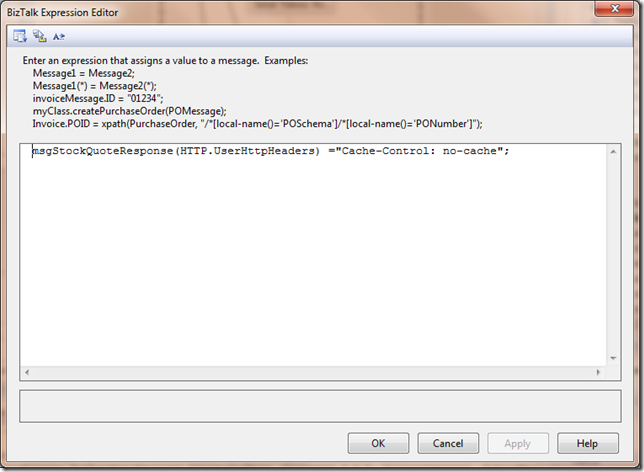
To avoid this situation, I needed to provide an explicit command in a Message Assignment Shape to prevent my responses from being cached:
msgStockQuoteResponse(HTTP.UserHttpHeaders) ="Cache-Control: no-cache";
Since the client was instructed not to cache the response, it would now go ahead and call the service when it goes to refresh the rest of its data.
There are many options that you can set within the HTTP Header. For example, if you wanted to expire content every 2 minutes, you could set your header to Cache-Control: max-age=120. If you are interested in what other features can be set in an HTTP Header, I recommend checking out this site.
by community-syndication | Oct 4, 2010 | BizTalk Community Blogs via Syndication
The jQuery library has a passionate community of developers, and it is now the most widely used JavaScript library on the web today.
Two years ago I announced that Microsoft would begin offering product support for jQuery, and that we’d be including it in new versions of Visual Studio going forward. By default, when you create new ASP.NET Web Forms and ASP.NET MVC projects with VS 2010, the core jQuery library is now automatically added to your project.
Earlier this year at the MIX 2010 conference I announced that Microsoft would also begin contributing code to the jQuery project. During one of my keynotes, John Resig — the creator of the jQuery library – joined me on stage and talked a little about our participation and discussed an early prototype of a new client templating API for jQuery.
I later blogged more details about the jQuery Templates plugin, jQuery Data Link plugin, and jQuery Globalization plugin that the ASP.NET team has been working on in conjunction with the jQuery team and jQuery community. We’ve had a lot of requests from ASP.NET customers looking to enable this type of functionality. We followed the standard jQuery open source model and posted prototypes of the plugins to Github.com, participated in the jQuery forums, and incorporated design feedback from the community.
Official jQuery Plugins
Today, I am happy to make a joint announcement with the jQuery team that the jQuery project has accepted these three plugins (jQuery Templates, jQuery Data Link, and jQuery Globalization) as official jQuery plugins.
As official jQuery plugins, the plugins will be maintained as part of the jQuery project. Starting today, you can download these plugins by visiting the jQuery website. The documentation for these plugins is also now integrated within the official jQuery documentation site.
Furthermore, in the next major release of jQuery (jQuery 1.5), the jQuery Templates plugin will be included as a standard part of the core jQuery library. This means that the “jQuery Templates” functionality will be included in the jQuery.js file. And it means that developers will be able to take advantage of a standard templating library and syntax when working with jQuery.
Learning More
You can learn more about the plugins by watching the following Web Camps TV episode hosted by James Senior with Stephen Walther:
Web Camps TV #5 – Microsoft Commits Code to jQuery!
Below is additional information (and links to the official documentation on jQuery.com) for the three plugins:
jQuery Templates
The jQuery Templates plugin enables you to create client templates. For example, you can use the jQuery Templates plugin to format a set of database records that you have retrieved from the server through an Ajax request.
You can learn more about jQuery templates by reading my earlier blog entry on jQuery Templates and Data-Linking or by reading the documentation about it on the official jQuery website. In addition, Rey Bango, Boris Moore and James Senior have written some good blog posts on the jQuery Templates plugin:
When the next major version of jQuery is released — jQuery 1.5 — jQuery Templates will be included as a standard part of the jQuery library.
jQuery Data Link
The jQuery Data Link plugin enables you to easily keep your user interface and data synchronized. For example, you can use the Data Link plugin to automatically synchronize the input fields of an HTML product form with the properties of a JavaScript product object.
You can learn more about the Data Link plugin by reading my previous blog entry on jQuery Templates and Data-Linking. The documentation for the Data Link plugin is also now live at the official jQuery website.
jQuery Globalization
The jQuery Globalization plugin enables you to use different cultural conventions when formatting or parsing numbers, dates and times, calendars, and currencies. The Globalization plugin has information on over 350 cultures. You can use this plugin with the core jQuery library or plugins built on top of the jQuery library.
You can learn more about the jQuery Globalization plugin by reading my previous blog entry on the jQuery Globalization plugin.
Summary
My team is excited to participate and contribute to the jQuery project. We hope these three plugins make it easier for all web developers to build great sites and applications. We’ve made good progress the last few months, and are looking forward to making new announcements concerning jQuery in the future.
You can learn even more about today’s announcement from the jQuery team’s blog post about it.
Hope this helps,
Scott
P.S. In addition to blogging, I am also now using Twitter for quick updates and to share links. Follow me at: twitter.com/scottgu

by community-syndication | Oct 3, 2010 | BizTalk Community Blogs via Syndication
Hi there and welcome to the 24th interview with someone who doesn’t have the good sense to ignore my email. This month we are chatting with Johan Hedberg who is an architect, Microsoft MVP, blogger, and passable ship captain. Let’s jump in. Q: In the near future you are switching companies and tasked with building […]

by community-syndication | Oct 3, 2010 | BizTalk Community Blogs via Syndication
In my last post, I took an initial look at the Amazon Web Services (AWS) SimpleDB product and compared it to the Microsoft Windows Azure Table storage. I showed that both solutions are relatively similar in that they embrace a loosely typed, flexible storage strategy and both provide a bit of developer tooling. In that […]
by community-syndication | Oct 3, 2010 | BizTalk Community Blogs via Syndication
What would a free edition of BizTalk do for the platform?
by community-syndication | Oct 2, 2010 | BizTalk Community Blogs via Syndication
- Khan Academy
The Khan Academy is a not-for-profit 501(c)(3) with the mission of providing a world-class education to anyone, anywhere.

